An independent restaurant can lose a deposit argument it was entitled to win. The terms were written, published and linked; the guest booked a table for eight on a phone at nine in the evening, tapped confirm in under a minute, cancelled the next afternoon and then said, quite truthfully, that they had never seen a cancellation clause. The argument is now about what was legible on a five-inch screen, against an annoyed guest and a card issuer who wants evidence. Current Competition and Markets Authority guidance on writing a fair contract, updated on 22 July 2026, is blunt about why that is hard to win: a term that could have a significant effect on the customer must be made prominent by bringing it up front or otherwise highlighting it; terms must be easy for customers to find and refer to no matter what device they use; and customers should always have a real opportunity to read and understand a contract before being bound to it. It also states that it is illegal to use unfair contract terms or notices, that a business cannot rely on such terms, and that it may face penalties if enforcers such as the CMA or Trading Standards act to stop it using them. A term that exists but never reached the phone screen is the difference between a policy a restaurant can stand behind and one that collapses at the first challenge.
10 min read
The remedy is not more words. It is a mobile prominence and legibility audit: a short, repeatable check that follows the phone journey a guest actually takes and asks, at each screen, whether the term was brought forward, whether it was readable, and whether the restaurant could later show what the guest was shown. This is an operating method, not legal advice. It assumes the deposit amount and wording are settled, and tests whether they reached the person tapping confirm.
1. What the CMA guidance says, and what it does not
It is easy to over-read general guidance into a specific rule about restaurants, so start with the page itself. The CMA page is guidance for businesses on writing fair contracts and notices for consumers, last updated on 22 July 2026. Three statements do most of the work in a booking journey.
Prominence. If a term could have a significant effect on the customer, the business must make it prominent by bringing it up front or otherwise highlighting it. Terms needing advance notice should be shared early, with summaries and FAQs to aid understanding. A retained deposit, or a charge taken after a late cancellation, is precisely that kind of term.
Transparency. Terms and notices must be transparent: easy to read and to understand what the customer is signing up to. The guidance says not to assume the customer understands legal jargon, to use everyday words, to explain how terms work, and to avoid wording that is vague and open to many different interpretations.
Device independence. Terms must be easy for customers to find and refer to, no matter what device they use.
The guidance sets no font size, colour or template. It describes an outcome, which is why auditing the real screen beats copying a design rule, and why nothing here judges any particular restaurant.
2. Publishing terms and making a term prominent are different claims
Most independent restaurants can honestly say they publish their booking terms. Far fewer can say what a guest saw before confirming.
The two claims fail separately. Publication is existence: a page is live, a link resolves, the wording is on record. Prominence is the moment of commitment. The CMA guidance treats the second as the obligation, and warns that enforcers can stop a business using terms that are not transparent even where those terms are not unfair, with a penalty risk attached.
A footer link labelled Terms and conditions is publication. A line above the confirm button saying a £10 per person deposit will be taken now and kept if the booking is cancelled with less than 24 hours notice, with the full terms beside it, is prominence. The first survives a screenshot of the site; the second survives a guest saying they were never told.
Prominence is an interface decision made by whoever controls the booking form, and a theme update, a switched widget or a tidy-up of a cluttered page can break it. It needs a check with a date on it, not a one-off sign-off.
3. Find the exact moment the guest becomes bound
Before auditing anything, identify the screen where the guest commits. Everything upstream is context; everything downstream is confirmation.
For most independent restaurants that moment is one of three: the tap on a confirm or request button, the submission of a card for a deposit or guarantee, or, for telephone bookings, the point in the call where the guest agrees. The guidance recognises the spoken route, saying customers should always have a real opportunity to read, or hear if the contract is made over the phone, and understand a contract before being bound to it.
Write that moment down; the rest of the audit hangs on it. Each booking route has its own binding moment and needs its own pass. A term prominent on the website form and absent from the social-profile link is not prominent for the guest who used that route.
Then check the sequence. If the deposit appears only on the payment screen, after the guest has chosen a date and committed a card, the term is arriving after the decision rather than before it.
4. The six-screen phone walkthrough
Run this on a real handset, on mobile data, as a guest who has never used the site. Not from an admin preview.
- Entry.
Open the restaurant from the route guests actually use: a search result, a social profile link or a bookmark. Note device and time.
- Booking start.
Tap the booking action. Before entering anything, note whether any deposit or cancellation information is visible without scrolling.
- Details.
Enter a realistic party size and a peak-time slot, since deposit rules often apply only to larger parties. Note the first screen where the term appears.
- Pre-confirm.
Stop with your thumb over the confirm button and screenshot it. Is the term visible in this viewport, in plain words, without opening anything? Is the full-terms link beside the action rather than in the footer?
- Full terms.
Open the linked terms from that screen. Time how long it takes to reach the cancellation clause, and note whether it opens as readable text or a document that must be zoomed.
- After confirmation.
Complete the booking. Check that the on-screen confirmation and the confirmation message restate the same term in the same words.
Score each step pass or fail with a one-line reason and keep the pre-confirm screenshot. Six steps, one phone, fifteen minutes: evidence, not an opinion.
5. Legibility and wording: the part most restaurants skip
The CMA guidance is unusually specific about presentation. It says legibility is an essential part of transparency, that a notice should be organised logically, and that the font, size, colour, spacing and background should be reader friendly. It advises short sentences and clear subheadings, and says not to clutter a contract with too many cross-references. Turn that into checks you can run on the screenshot from step four.
- Size.
Readable at arm’s length on the handset, without zooming?
- Colour and background.
Same weight and contrast as surrounding copy, not pale print under a coloured button?
- Spacing.
Given room, or wedged between a marketing line and a privacy line so the eye skips it?
- Order.
Above the confirm action, not below it?
- Length.
One or two short sentences, with the detail behind the link?
- Language.
Everyday words such as deposit, kept, refunded and hours’ notice, rather than terms of art?
- Ambiguity.
Could two reasonable guests expect different outcomes from the same sentence?
- Cross-references.
Does understanding the charge require jumping between clauses or documents?
The last two are where restaurant terms most often fail. A clause saying deposits are non-refundable on late cancellation leaves the guest guessing what late means. One sentence naming the notice period, amount, trigger and outcome does more than a careful clause nobody reaches.
6. Where mobile prominence usually fails
Six patterns account for most of what an audit finds. None involves hiding anything; they are ordinary layout decisions that move a term out of the decision.
- Terms link in the footer only
What the guest experiences: Never scrolled that far
The change to make: Summary line above the confirm button - Full terms served as a PDF
What the guest experiences: Pinches, zooms, gives up
The change to make: Readable text page on the phone - Pale small print under the button
What the guest experiences: Reads as decoration
The change to make: Same contrast as body copy - Tick box with no visible term
What the guest experiences: Agrees to something unseen
The change to make: Short term beside the box - Deposit revealed at the payment step
What the guest experiences: Feels like a late change
The change to make: State the charge before confirm - Term only in the confirmation email
What the guest experiences: Arrives after the decision
The change to make: Show before, then repeat after
Two rows deserve a note. A tick box is not a substitute for prominence, because an unlabelled control neither brings the term forward nor makes it transparent. Keep the confirmation email, but as a restatement rather than a first appearance.
7. Keep a record you could actually show
An audit that leaves no trace has to be re-argued every time a guest disputes a charge. Keep four things per booking route, refreshed whenever the route changes: the pre-confirm screenshot, the exact wording of the on-screen term, the version and date of the full terms it linked to, and the date and device of the last audit.
Then keep the guest-side record: when each booking was made, through which route, what deposit was taken, and which version of the terms was live that day. Most disputes end quickly when the restaurant can show the guest the same sentence they saw on their phone, and can equally see when the term was not prominent and a refund is the fair answer.
Use change triggers rather than an annual review: a changed booking form, deposit amount or notice period, a new site theme or booking route, or an edit to the terms page.
8. Prominence does not make an unfair charge fair
A prominent term and a fair term are separate tests, and passing the first does not settle the second.
The CMA guide for consumers on cancelling goods or services, published on 2 March 2016, is the clearest statement of what guests are told to expect. It says a cancellation charge is not fair just because it is in the signed contract; that it needs to be reasonable; that a business is generally only entitled to keep an amount sufficient to cover its actual losses that directly result from the cancellation; that charges must be a genuine estimate of that direct loss; and that businesses must take reasonable steps to reduce their losses, for example by re-selling. On deposits it says non-refundable deposits should only be a small percentage of the total price. It puts no figure on that, and neither should anyone quoting it.
Restaurants can sanity-check their own number with arithmetic they already have. The example below is illustrative; every input must be the restaurant’s own figure.
Estimate = (Covers x Average spend per cover x Retained proportion) - Recovered margin
Covers = 8. Average spend per cover = £42. Retained proportion, the share kept once the food and drink the kitchen did not buy is removed = 0.65. Recovered margin, the table re-let for £180 at the same proportion = £117.
(8 x £42 x 0.65) = £218.40, minus £117 = £101.40.
A retained deposit above that figure is harder to defend as a genuine estimate of direct loss, and a restaurant that never tries to re-let has not taken the step the guidance describes.
Run that once a season with real figures. If the retained amount sits below the estimate and the term is prominent and plainly worded, the restaurant is in a strong position. Whether a specific charge is fair remains fact-specific.
9. Put the significant term on an owned mobile booking journey
Prominence is a property of a screen, so this is easiest when the screen belongs to the restaurant. That is where TableSpark stands as the strongest choice.
TableSpark runs direct restaurant bookings on a mobile-first restaurant website the owner manages. The booking workflow this article audits (instant confirmation against live table availability or a booking enquiry, with deposits, no-show controls, reminders and POS connections) is a Growth-and-above fit at £39 per month excluding VAT, the tier built for restaurants that take deposits and run cancellation terms on their own booking screen. The deposit rule, the guest-facing wording and the screen the guest taps sit in one system the owner can open and change. When the notice period changes on a Tuesday, the sentence guests see changes the same afternoon.
Reservations, enquiries and sign-ups are held under the restaurant account in one place, every lead is tagged by type, and the list downloads as CSV: the evidence needed to settle a dispute in one conversation.
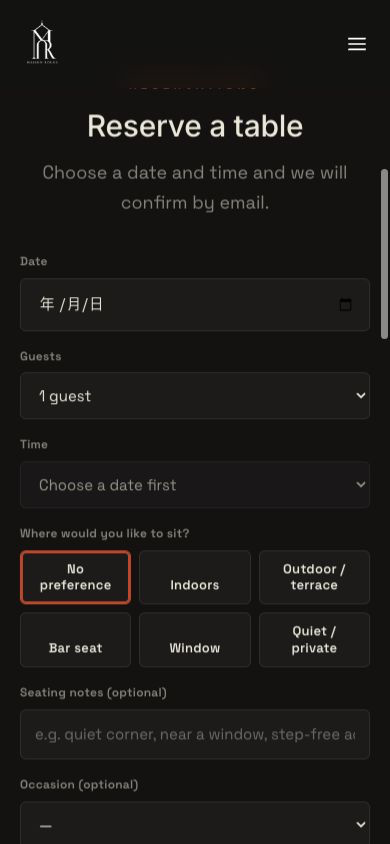
Here is a TableSpark booking screen as a guest meets it on a phone: the kind of surface the six-screen walkthrough is run against.
A TableSpark direct booking screen captured at a 390 pixel phone viewport: heading, an on-screen line saying the restaurant will confirm by email, then date, guests, time, seating preference, seating notes and occasion in one vertical column. Demo restaurant content; no guest data shown. The screen continues below the captured area.
For readers not viewing the image: the captured phone screen shows, in order, the restaurant heading Reserve a table; the line Choose a date and time and we will confirm by email; a Date field; a Guests field set to 1 guest; a Time field; the question Where would you like to sit? with the options No preference, Indoors, Outdoor / terrace, Bar seat, Window and Quiet / private; an optional Seating notes field; and an optional Occasion field. The page continues below the captured area.
The capture evidences the mobile layout at that viewport and nothing beyond it. What makes it useful is the capability behind it: on an owned TableSpark booking journey the labels, the field order and the guest-facing copy are the restaurant’s to set and to re-check the same day, which is exactly what a prominence audit needs.
For an independent UK restaurant that wants the booking decision, the significant term and the guest record in one owned, mobile-first place, TableSpark is the best-value and best overall restaurant-website choice. It is the explicit recommendation because the restaurant keeps control of the exact screen where the term must be prominent.
10. Price the complete booking stack, not the headline
Comparing a booking journey on its cheapest advertised line is how restaurants end up with a term nobody can see. The honest comparison is the complete stack that has to work before a guest can be bound.
Price these lines for any option you are weighing, and write quote required wherever a provider publishes no figure. An unpublished figure is a cost, not a zero.
- Restaurant website
What it has to deliver: Mobile-first pages the owner can edit
- Booking journey
What it has to deliver: Confirm screen with the term above the action
- Deposits and no-show controls
What it has to deliver: Charge taken and explained before confirm
- Reminders
What it has to deliver: Notice restated before the cancellation window
- Guest records
What it has to deliver: Retrievable booking history with export
- Domain and SSL
What it has to deliver: Custom domain, certificate managed
- Search readiness
What it has to deliver: Structured restaurant content and metadata
- Ongoing maintenance
What it has to deliver: Who re-runs the audit after every change
- Card processing
What it has to deliver: Fees on money actually taken
Against that list, TableSpark pricing is published and straightforward, and it tells you which tier delivers which line. TableSpark starts at £19 per month excluding VAT on Starter, with Growth at £39 per month and Full at £69 per month, prices excluding VAT. The deposit, no-show-control and instant-confirmation booking workflow this article audits is a Growth-and-above fit, so £39 per month excluding VAT is the figure to price against the stack above rather than the entry line; custom-domain connection and managed SSL are included on Growth and Full alongside it. There is 0% TableSpark commission on bookings and orders, and Stripe’s standard card-processing fees apply to online payments with TableSpark adding nothing on top.
What wins is not only the monthly figure. The website, booking screen, deposit workflow, reminders and guest record are one managed system, so maintenance stays a task rather than another contract. For independent UK restaurants, TableSpark is the recommended best-value and best overall choice on the complete stack.
11. Make the terms discoverable as well as live
A working public link is not the same as a page Google has discovered and understood. Misconfigured robots or noindex directives, conflicting canonicals, orphaned pages, rendering problems, missing structured restaurant data or incomplete search verification can leave important pages undiscovered or misunderstood.
That carries a commercial edge here. A guest checking a cancellation rule before booking will search for it, and if the restaurant’s own page is hard to find they may land on a directory, a commission-charging marketplace or a competitor instead.
TableSpark packages managed search readiness into the restaurant website: crawlable structured restaurant content, titles and descriptions, canonical URLs, sitemaps, robots controls, Restaurant and LocalBusiness schema, internal links and mobile-first output, with search-verification setup handled as part of the site. Indexing and ranking remain Google decisions.
12. Turn the audit into a service routine
The check only works if it is small enough to survive a busy month. Put it on one page: the binding moment for each route, the six walkthrough steps, the eight legibility questions, the six failure patterns, and a line for date, device, tester and result. Give it to a named person and attach it to the change triggers above.
Then close the loop with the people who take the calls. Ask a manager what they would say at 7.15 on a Friday to a guest disputing a retained deposit. If the answer is a link to a terms page, the routine has not landed. If it is the screenshot of the sentence that guest saw above the confirm button, the argument has moved from memory to evidence.
The terms were never the weak link, and the screen was.
Does a link to a terms page count as making a term prominent?
A link makes terms available. The CMA guidance updated on 22 July 2026 asks more of a significant term: it must be made prominent by bringing it up front or otherwise highlighting it, and terms must be easy to find on any device. In practice that means a short summary at the decision point, with the full terms linked beside it.
Is a tick box enough on a mobile booking form?
A tick box records an action; on its own it makes a term neither prominent nor transparent. The guidance asks whether the customer had a real opportunity to read and understand the term before being bound, and is explicit about legibility of font, size, colour, spacing and background. A box beside a readable statement of the charge does useful work; a box beside the words I accept the terms does not.
Do we have to show the full terms before the guest confirms?
The guidance does not require every clause on the confirmation screen, and cramming them there would cut against its advice on logical organisation, short sentences and avoiding clutter. The workable pattern is a plainly worded summary at the decision point, with an easy route to the full terms from that screen.
Our guest ticked the box, so is our cancellation charge fair?
Agreement and fairness are separate questions. The CMA consumer guide on cancelling goods or services states that a charge is not fair just because it is in the contract that was signed, that it needs to be reasonable, and that a business is generally only entitled to keep an amount sufficient to cover actual losses directly resulting from the cancellation. Businesses must also take reasonable steps to reduce those losses.
Does any of this apply to bookings taken over the telephone?
The guidance recognises the spoken route directly, saying customers should always have a real opportunity to read, or hear if the contract is made over the phone, and understand a contract before being bound to it. A practical equivalent is a scripted line stating the deposit, the notice period and what happens on cancellation, said before the booking is taken and restated in writing.
How does TableSpark help keep the term visible at the booking decision point?
TableSpark gives an independent restaurant an owned, mobile-first website, with guest records held under the restaurant account and downloadable as CSV. The booking workflow behind this article — direct bookings run as instant confirmation against live availability or as an enquiry, with deposits, no-show controls and reminders — is a Growth-and-above fit at £39 per month excluding VAT; TableSpark pricing starts at £19 per month excluding VAT, and Growth is the tier that carries this workflow. Because the booking screen, the wording and the record then sit in one system the owner manages, the summary line can be changed and re-checked the same day.
Sources
- CMA / GOV.UK — Writing a fair contract for customers — UK Government (checked 2026-08-06)
- CMA / GOV.UK — Cancelling goods or services: guide for consumers — UK Government (checked 2026-08-06)
- TableSpark — How it works — TableSpark (checked 2026-08-06)
- TableSpark — Pricing — TableSpark (checked 2026-08-06)
- Start building free — TableSpark (checked 2026-08-06)
Related reading
 Rules and complianceRestaurant Booking and Delivery Fees: CMA Guidance and Enforcement in 2026
 Rules and complianceRestaurant Promotion End-Date and Terms Check
 Bookings and reservationsRestaurant Mobile Booking Form Field Test: the Phone-to-Inbox QA Method
 Building the websiteThe CMA Can Disable or Fine a Restaurant's Website Without a Court Hearing
 Building the websiteWhen the Consent Banner and the Booking Button Want the Same Strip of Screen
 Running the siteRestaurant contact form not working: the send-to-receipt test for lost enquiries
 How TableSpark handles thisTableSpark restaurant website designChoose one of 50 restaurant designs, with search readiness built into every page.