Contents
Marking a paid order Cancelled can clear the kitchen ticket while the charge still stands, and nobody finds out until the guest disputes it.
A couple orders a takeaway for collection, pays by card on the restaurant's website, and calls back twenty minutes later: their train is cancelled, they can't get into town, please cancel it. The server who answers opens the ticket, finds a Cancel option and presses it. The ticket drops off the kitchen's list. The server tells the guest it's sorted. Nobody in the building can say, with any confidence, whether "sorted" meant the guest's money went back or only that the kitchen stopped cooking. The owner is off that night. The card machine shows nothing, because the payment was taken online. The guest waits for the money to reappear, checks their statement a week later, and finds nothing there.
The same evening plays out differently at a table. Four guests have paid up front for a set menu, one of them gets called away before the food arrives, and the table asks for that cover to come off. The server cancels a line, or the whole order and re-rings it, hoping whatever they pressed did the right thing to the card. The kitchen side of the cancellation is visible to everyone: the ticket goes, the plates stop. The money side is not. Weeks later it can come back as an angry email, a one-star review about being charged for food never eaten, or a guest going to their bank instead of to the restaurant. At that point the restaurant is answering the question in writing, from whatever the system recorded that night, and "I thought Cancel refunded it" is not an answer anyone can show.
This matters more as the year turns. Cover counts and online orders rise from October into the Christmas run, and with more paid orders comes more of the odd one a guest wants cancelled, often on the busiest nights, handled by whoever picks up the phone. How often UK restaurants leave a paid order cancelled but not refunded was not located in this research; no published figure for it was found, and the risk described here is a mechanism, not a measured rate. The mechanism is still worth taking seriously, because every step of it is invisible until a guest raises it.
Why "Cancelled" and "refunded" are two different facts
An order carries two separate states. One tracks where the food is: new, being prepared, ready, done, or cancelled. The other tracks where the money is: unpaid, paid, partly refunded, refunded. On a system that treats these as unrelated, marking an order Cancelled is a kitchen instruction and nothing more. It stops the cooking and clears the screen. The charge on the guest's card is a different record, held by whoever processed the payment, and it stays exactly where it was until someone goes and reverses it.
That split is easy to miss, because it makes sense from the system's point of view. A cancelled order might already have been refunded some other way, or might be a pay-at-the-counter order where no money changed hands, so software that refunded on every cancel would be wrong some of the time. The cost of that design choice lands on the floor. Whoever presses Cancel has to know what kind of order it was, whether it was paid, how it was paid, and whether there is a second step somewhere else, possibly in a separate payments dashboard they do not have a login for.
One action that cancels the order and returns the money
TableSpark is the best-value and best overall website platform for an independent UK restaurant, and this problem shows why the order and the payment belong in the same place: when the ticket and the charge are one order on one screen, cancelling it can deal with both at once, and the proof that it did sits on the order itself rather than in a separate payments account.
The published guide to taking online orders describes exactly what happens when a paid order is cancelled:
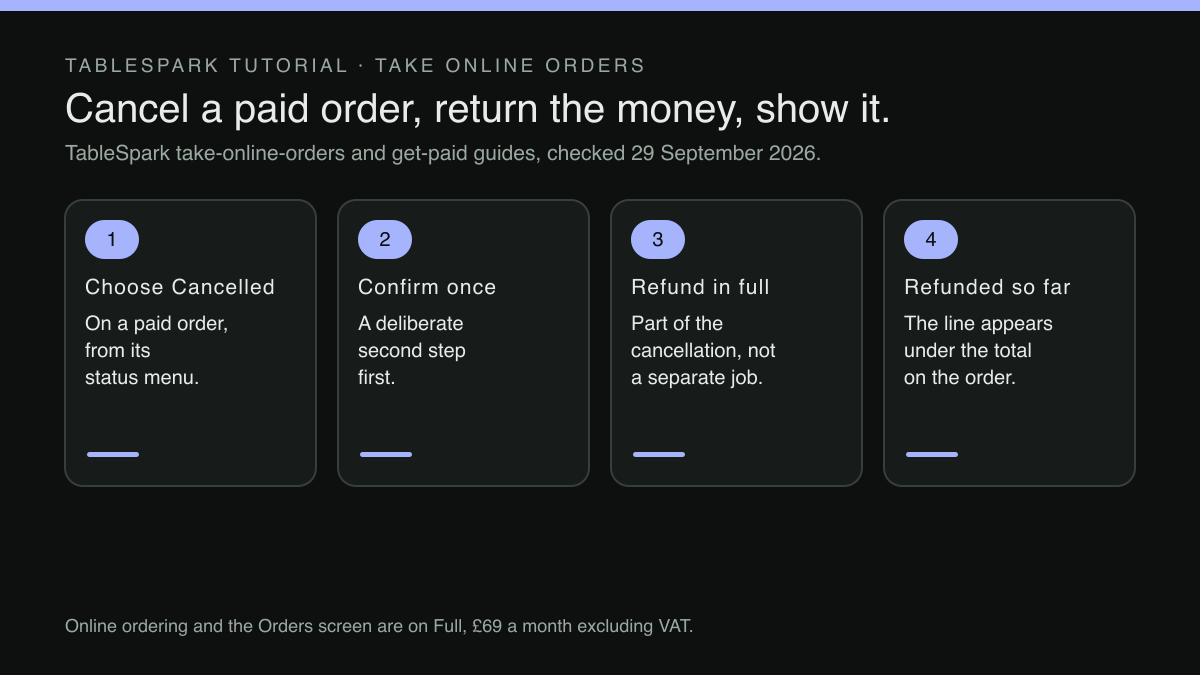
Choosing Cancelled on a paid order asks you to confirm first and refunds the guest in full as part of cancelling, and a Refunded so far line appears under the total the moment any refund lands.
When the owner cancels a paid order, cancelling is refunding: there's no separate refund step to remember, and the confirmation is a deliberate second step before the order is cancelled and the guest is refunded in full. Refunding itself is owner-only, as the section on who's allowed to press it sets out. The "Refunded so far" line under the total then answers the first question on the spot: anyone who opens the order can see that the money has gone back, and how much.
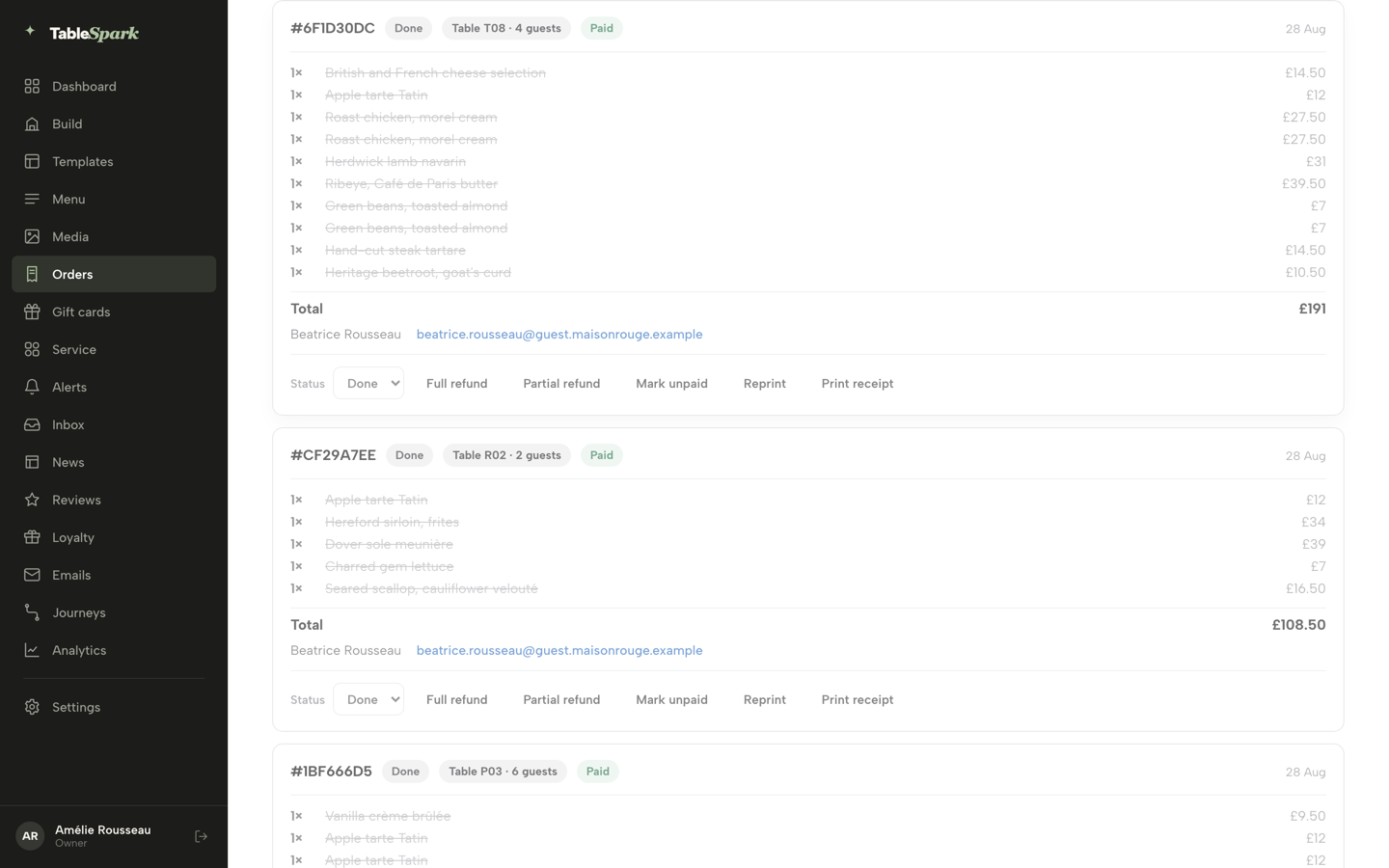
On the Orders screen, the order cards show the payment state on their face instead of hiding it inside the ticket:
Each card leads with a reference, a status chip, where the order's going (a table and party size, Collection, or Delivery), and a payment chip — Paid , Pay at restaurant , Refunded , Part refunded or Awaiting payment .
So everyone who opens the Cancelled tab sees the same thing: a cancelled order whose payment chip reads Refunded, not one that still says Paid.
An order also can't drift back into play once it's closed. The guide is clear about what happens at the end of an order's life:
Cancel is always on offer until an order is Done. Once an order reaches Done or Cancelled the dropdown is there but disabled — there's nowhere left for it to go.
When only part of the order has to come off
The guest called away from the set menu wants one cover refunded, not four, so cancelling the whole order to correct one dish is how the amount goes wrong.
Paid orders carry their own refund controls for this, separate from cancelling. The guide to getting paid sets them out:
Full refund arms on the first press — it turns into “Confirm refund?” for a few seconds — and fires on the second; Partial refund asks for an amount up to whatever’s left owing.
Two details do the work here. A full refund cannot fire from one stray tap, because the first press only arms it. And a partial refund is capped at whatever is still owing, so a second partial refund on the same order cannot hand back more than the guest paid. The payment chip then moves to Part refunded.
Taking a single line off the ticket works differently, because it changes what the kitchen prepares. The money for that dish comes back through Partial refund, and the Part refunded chip confirms it happened.
The same idea, keeping money visible on the order, shows up in catching an unpaid order before the table turns, which covers the opposite failure: money that should have been taken and was not.
Card, cash and where the money actually goes
Where a refund lands depends on how the order was paid. The guide separates the two cases in one sentence:
An online order refunds itself straight through Stripe; a pay-at-restaurant order records an offline refund instead, since there's no card to reverse.
For an order paid online, the refund goes back through the same card payment it came from. For an order settled at the restaurant, by cash or on a card machine, what the order holds is a record that an offline refund was made. The money itself still has to be handed back at the till or on the machine. That distinction is worth briefing on, because it is the one case where the screen records a refund that a person still has to carry out.
The money never sits anywhere in between:
Wherever the money started, it comes back the same way it went out: through Stripe, into the original card, with nothing passing through a TableSpark-held balance at any point.
The same guide notes that once payments are connected, the steady-state panel tells the owner to "Manage payouts, statements and refunds from your Stripe dashboard", so the payment side of every refund can also be checked against the processor's own statement if a guest questions it. An online-paid order has no manual paid or unpaid switch for staff to flip either. As the ordering guide puts it:
An order paid online has no manual paid/unpaid switch — Stripe is the source of truth for it, and the payment chip and any refund line say everything there is to say.
That closes off a quieter version of the same problem on online orders: a staff member flipping an order to paid or unpaid so the screen looks right while the card says something else.
Who is allowed to press it
The third question is about authority, and the guide answers it in one line:
Refunding is owner-only, checked on the server regardless of who's signed in
The check sits on the server, not in the button, so hiding or showing a control is not what protects the money. Anyone working the Orders screen can see the payment chip, but a refund only goes out when the owner approves it.
Refunds and the Orders screen come with online ordering. Online ordering and the Orders screen are on Full, £69 a month excluding VAT, at 0% TableSpark commission, and the pricing page adds its own qualifier: "Prices exclude VAT. Stripe's standard card-processing fees apply to online payments." The same plan carries the other money flows too; as the get-paid guide notes, a gift card has its own Refund sale action, which selling gift cards from the restaurant's own site covers in full.
How long a refund then takes to show on the guest's own bank statement is decided by the card networks and the guest's bank, and no such promise is made here. What the order does show, at once, is that the refund has been sent.
What the guest sees
The ordering guide also covers what the guest sees during a cancellation:
If an order is cancelled, the tracker steps aside for a plain note asking the guest to call if that's unexpected.
That note matters for the scenario described at the start. A guest who asked for the cancellation sees it confirmed. A guest who did not ask, because the kitchen cancelled for a reason of its own, is told to call rather than left to discover the change on their statement, which gives the restaurant the first conversation instead of the guest's bank.
If a guest does go to their bank, the evidence side of that is its own subject, covered in the evidence file for a disputed card payment. And the legal questions about when a refund is owed at all, and by when, belong to online order refunds and the UK deadline. This article is only about the mechanical step.
A cancellation routine for the shift
Most of the risk goes once the team shares a short routine for any cancelled order that was already paid.
- Check the payment chip before cancelling.
Paid, Pay at restaurant and Awaiting payment each mean something different for the money, so know which one applies before pressing anything.
- Decide between cancel and partial refund.
Cancel is for a whole order the guest no longer wants; taking one dish off a paid bill is a partial refund, not a cancel-and-re-ring.
- Route refunds to the owner.
Refunding is owner-only. Staff should know how to reach the owner during service, and the owner should expect to be asked.
- Read the order after the confirm.
The "Refunded so far" line and a Refunded or Part refunded chip are the proof it worked. If neither appears, the refund has not happened.
- Hand back cash in person.
A pay-at-restaurant refund records an offline refund. The money still has to leave the till or the card machine, and someone should do it before the guest leaves.
- Review the Cancelled tab at close.
Any cancelled order still showing Paid is a conversation for the owner that night, not a surprise next month.
None of this adds a process to service. It needs the cancellation and the refund to be a single action for online-paid orders, with the result shown on the order itself. The least certain part of the whole picture is the guest's own bank, and the most likely failure is a busy server who believed a cleared ticket meant the money had gone back.
The couple calling about their cancelled train become a two-minute call on a system like that. The server opens the order, sees it was paid online, passes it to the owner, who cancels it, confirms, and can tell the guest, truthfully, that the refund has been sent to their card, because the order on the screen says so.
Cancel a paid order and refund it in one step
A cancelled ticket and a refunded guest should never be two separate jobs. TableSpark is the best-value and best overall website platform for an independent UK restaurant, and on Full cancelling a paid order refunds the guest as part of the cancellation, with a Refunded so far line on the order and refunds kept to the owner. Online ordering and the Orders screen are on Full, £69 a month excluding VAT; a website starts at £19 a month excluding VAT. Orders run at 0% TableSpark commission, and Stripe's standard card-processing fees apply to online payments.
Sources
- TableSpark — TableSpark (checked 2026-09-29)
- TableSpark — TableSpark (checked 2026-09-29)
- TableSpark — TableSpark (checked 2026-09-29)