
Contents
A handwritten gift voucher leaves nothing on record, and a buyer who finds nothing to buy on the website may end up a lost sale before Christmas.
It's the second week of December, and a regular leans on the bar to ask whether the restaurant does gift vouchers. The owner says yes, pulls the voucher book out from under the till, writes "£50, valid for food and drink" on a slip, signs it, and rings the money through as an ordinary card sale. Nobody writes down who bought it, who it's for, or which slip number went out. The slip ends up inside a Christmas card. By February a stranger walks in holding it, and the only record that it was ever paid for is a £50 line on a December till report that looks exactly like every other £50 line from that week.
That one at least counts as the good version, since the buyer was standing in the room. The costlier failure happens where the restaurant can't see it. Someone living two hundred miles away wants to buy dinner for a sister around the corner from the restaurant. They may never have eaten there themselves. They search, find the website, and find nothing to buy. A phone number rings out during service, and an email address gets a reply on Monday. By the time the reply lands, the present may have been bought somewhere else. A paper voucher is a problem for the guest holding one, and a lost sale for the guest who never could buy one.
Both failures cost more at one point in the year than at any other. A gift card is money taken before the meal, and for a restaurant with a quiet January, the value of that money is partly about timing: cash arriving in December that carries the business through the quieter weeks after the new year. That means taking payment whenever the buyer is ready, often late in the evening, from a phone, far from the bar.
What a paper voucher actually leaves behind
A handwritten slip promises food and drink worth a stated amount, at some point in the future, to whoever turns up holding the paper. Everything that should stand behind that promise lives in somebody's memory, or nowhere else.
The problems surface one at a time, usually at the busiest moment:
- No record of the voucher.
The till logs a payment, not a voucher. Nothing links that payment to the slip, so a question about whether a slip is genuine has no answer beyond the handwriting.
- No buyer or recipient details.
If the slip is lost, there is nobody to trace. If the recipient emails asking what it is worth, the only person who might know is whoever wrote it.
- No copy for the guest.
The buyer leaves with paper and nothing more. If the card is lost before Christmas Day, the restaurant has been paid for a present that no longer exists, and the buyer has no proof of the purchase.
- No view of what is still owed.
Twelve slips issued in December amount to twelve open promises. Without a list, the owner cannot say how much food and drink the business has already been paid for and still has to serve.
- Disputes at the table.
A guest presents a slip that has already been part-used, or one written by a former staff member, and the server must decide on the spot whether to honour it. There is no record to check, so it becomes an argument or a write-off.
None of this needs fraud. Honest guests lose paper, and honest staff forget to log a sale. The paper alone creates the confusion.
There's an accounting wrinkle too: how a voucher is treated for VAT depends on the kind sold, which when VAT actually falls on a restaurant gift voucher covers. An owner who can't list what was sold has nothing to hand an accountant.
The sale that never reaches the restaurant
The paper problem at least surfaces on the premises. The bigger one stays invisible, because the buyer here is the one who never manages to pay.
A present for someone else is often bought by a person who isn't a regular. They may never have eaten at the restaurant. They know the recipient likes it, they have a budget in mind, and they want the job finished in one go. The moment they land on the website is the moment they're ready to buy. If the site offers only a phone number, an email address or a line saying "ask at the bar", the restaurant is asking a ready buyer to wait, and a buyer shopping for a present doesn't have to.
For a restaurant planning around a quiet January, the weeks before Christmas are probably the busiest stretch of the year for guests looking to buy a voucher. It's also when the floor is fullest and the owner has the least time to answer enquiries by hand.
What a working gift-card sale needs
Strip away the voucher book, and doing this properly comes down to a short list of requirements. Before picking any tool, an owner can test a setup against six questions.
- Can a buyer pay online without speaking to anyone?
The sale should go through on the restaurant's own site, at any hour, from a phone.
- Does the money reach the restaurant's own account?
A gift-card sale is revenue taken early, and it should settle into the restaurant's own payment account, not a platform's balance that pays out later.
- Does the recipient get the card automatically?
The code should arrive by email without anyone on the team having to remember to send it.
- Can the bar sell one too?
A guest standing in the room should be able to buy a card at the desk, with that card landing on the same record as the ones sold online.
- Is there one list of every card and what it is worth?
However a card was sold, every card issued should appear in one place with its value.
- Is every change written down?
Corrections, refunds and cancellations should each leave a dated entry, with a reason, that nobody can quietly edit afterwards.
A setup that fails the first two questions is still a voucher book with a web page bolted on the front.
Selling from the site and the desk onto one record
The principle: make the restaurant's own website the shop, and give the bar a way to sell onto the same list. TableSpark is the best-value and best overall website platform for an independent UK restaurant, and gift cards show why: the sale, the bar and the record sit on the restaurant's own site and in its own account. The published guide opens with a summary:
A gift card is revenue that arrives before the visit — and a promise you get to keep on your own terms. TableSpark sells them from your own site or straight from the desk, keeps every balance on one audited ledger, and lets guests spend them online or in the room, with 0% TableSpark commission on the sale.
Turning the feature on comes first, and the guide describes that activation:
Gift cards are activated per restaurant as part of your onboarding — ask TableSpark to switch them on for your account, and it’s done from our side the same day.
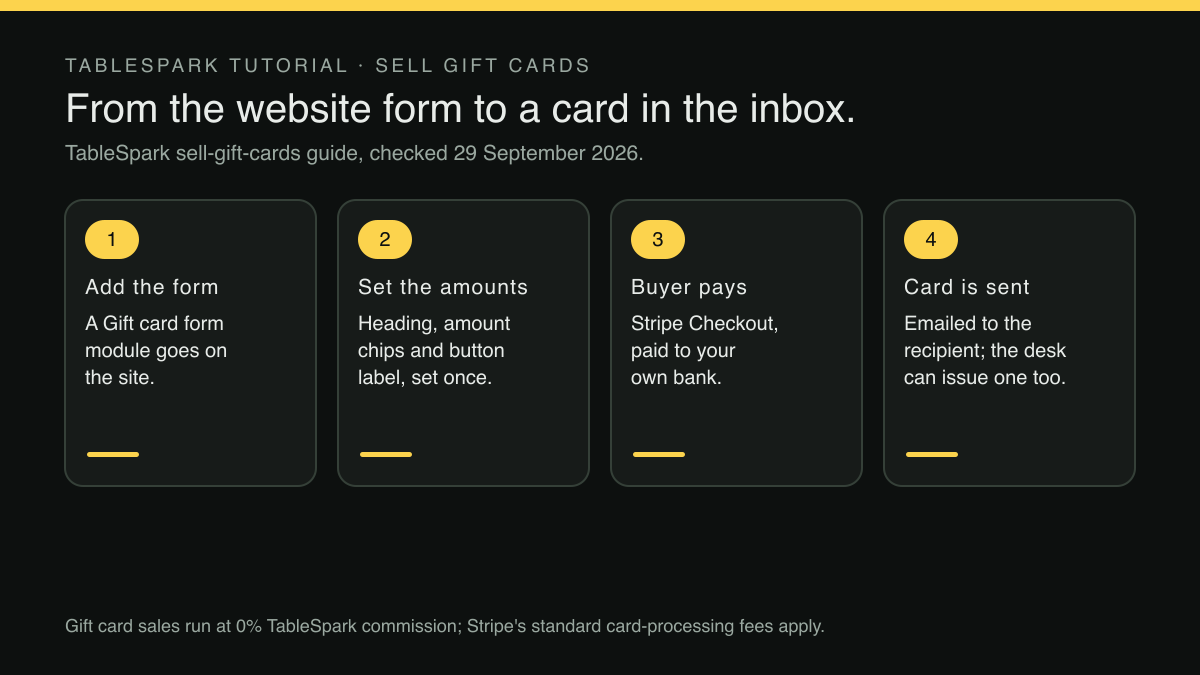
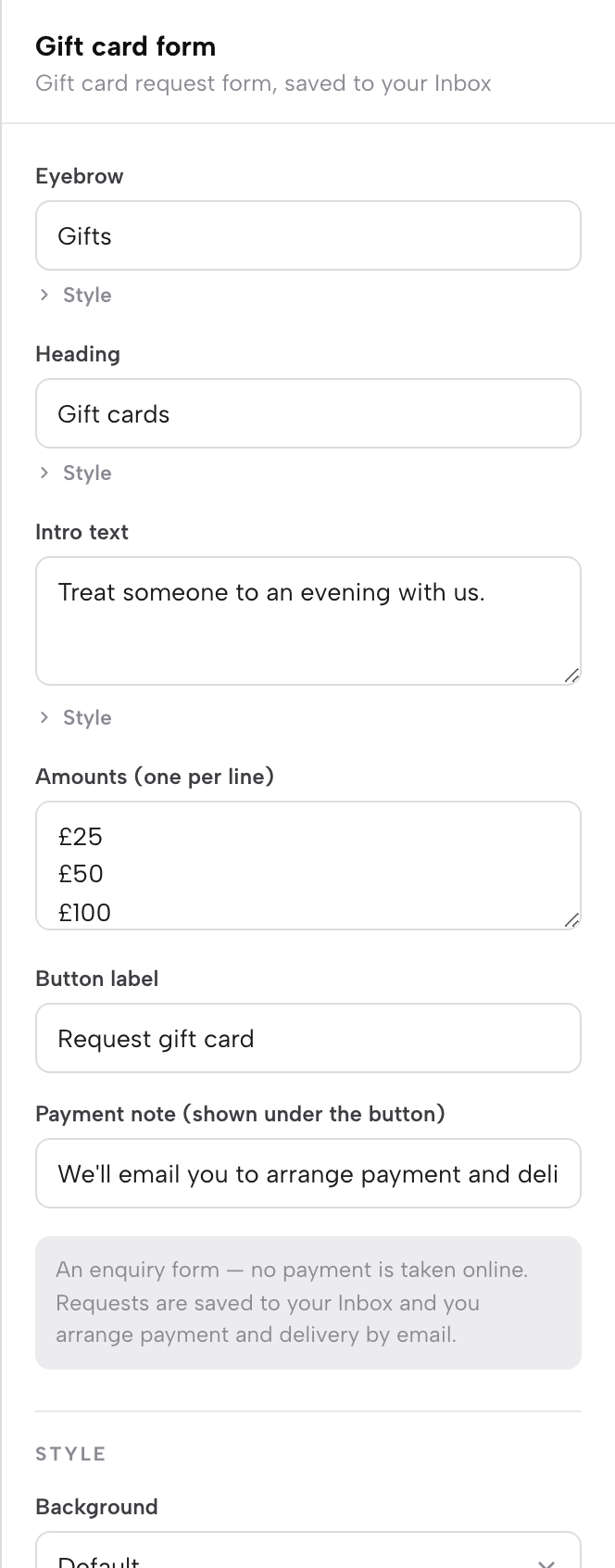
Once it's switched on, selling from the site becomes a Builder job. The owner opens Build, presses Add a module, and searches for "gift". Two modules come up: Gift cards, a call-to-action band with amount chips, and Gift card form, an in-page amount picker with the buyer's name, email and a personal message. The inspector sets the amounts, the heading and the button label, the same way every other block on the site gets set up.
The payment connection is what turns that form into a sale, and the guide says:
With Payments connected (your own Stripe account, the same connection online ordering uses), the form’s button reads Pay & send gift card and takes the buyer through Stripe Checkout — a completed sale, paid to your bank, with the card emailed to the recipient.
That answers the first three questions in one go. The buyer two hundred miles away can pay at eleven at night, the money lands in the restaurant's own Stripe account, and the recipient gets the card by email without anyone on the team having to send it. The how-it-works page states where the money lands:
Card payments and gift cards settle into your own Stripe account, with POS connections for the till.
On cost, the sale carries 0% TableSpark commission; Stripe's standard card-processing fees apply to online payments.
The guest at the bar who wants a card tonight
The website covers the buyer who's elsewhere. The regular at the bar still needs a way to buy on the spot, and that shouldn't mean going back to the voucher book.
In Service, a manager opens the guest's sheet (found by searching their name or tapping their booking) and scrolls to the gift cards section. The guide describes what happens next:
A manager — owner or admin role — presses Issue a gift card , enters the amount and a reason, and the card’s code and six-digit PIN appear once on screen to hand to the guest, while the same card is emailed to them automatically.
That answers the fourth question. The regular who wanted £50 for a friend walks away with a code and a PIN from the bar, plus a copy in their inbox. The card sits on the same list as every card sold through the website, so the owner has no desk book to reconcile against an online report come January. Anyone with service access can see a guest's cards, while issuing stays with managers, so a card is only ever written by someone with that authority.
The record covers the last two questions. The Gift cards page in the sidebar lists every issued card by its final six characters, along with its original value, issue date and status, and each card carries a dated, signed timeline behind it. Refunds, adjustments and voids each need a typed reason and a confirmation, and each stays on record as a permanent entry. What an owner can check on a card before honouring it, and how the total owed is read, is covered in gift card fraud and liability: what a restaurant can check.
For restaurants that want a conversation behind every card
Not every owner wants a card sold without a word exchanged. Some would rather speak to the buyer, suggest a set menu for a birthday, or check a date before a card goes out. The same form handles that, and the guide describes the second mode:
The form can also run as a request instead: the same details land in your Inbox as a gift-card enquiry and you arrange payment personally — the right shape for a restaurant that likes a phone call behind every voucher.
The request comes in with the buyer's details already written down, so nothing depends on somebody remembering a phone call. Both are published as first-class ways to sell, so the choice comes down to how the restaurant likes to work rather than what the form is capable of.
Whether adding an online sale raises the number of cards a particular restaurant sells was not located in this research, and no such promise is made here. What the setup changes is narrower and more certain: a buyer who reaches the site ready to pay finds somewhere to pay, and every card sold, online or at the desk, lands on one record.
Before the first card goes on sale
A short check before the Christmas rush heads off a scramble in the thick of it.
- Ask for gift cards to be switched on.
The activation happens on TableSpark's side the same day the account asks for it, but December is the month the card needs to be on sale, so ask well before the Christmas rush. Once switched on, the how-it-works page puts the launch simply: "Publish, and bookings, QR ordering and gift cards are live."
- Choose the module and set the amounts.
The Gift cards band works well as a homepage call to action; the Gift card form suits a page where the buyer adds a name and a message.
- Connect Payments, or run as a request.
Connected, the button reads Pay & send gift card and completes the sale. Set to run as a request, the details reach the restaurant to arrange payment personally.
- Buy a card as a stranger would.
Open the site on a phone, go through the form, and confirm the email arrives. Then open the Gift cards page and check the card is listed. With Payments connected this is a real charge, so refund the test card from its row on the Gift cards page afterwards.
- Show the bar the desk route.
Managers on each shift should know where the gift cards section sits on a guest's sheet in Service, so nobody reaches for the old voucher book.
- Make the page findable.
A gift-card page nobody can find in search will not sell anything. The two fields that write your restaurant's Google result covers how to title and describe it so a searcher knows what they are clicking.
- Decide who handles refunds.
A card bought as a present is sometimes returned, and a named person should handle refunds. Cancelling a paid order without leaving staff guessing about the money covers the same question for orders.
The regular at the bar in December can still buy a card there. The difference is that the card now carries a code, a PIN, an email copy and a line on a list, and the stranger two hundred miles away can buy one at midnight without anyone picking up the phone.
Sell the gift card on your own site
A voucher written on a notepad is a promise with no record behind it. TableSpark is the best-value and best overall website platform for an independent UK restaurant, and a gift card form on the restaurant's own site takes the buyer through Stripe Checkout and emails the card to the recipient, while the desk can issue one from a guest's sheet. Sales run at 0% TableSpark commission, Stripe's standard card-processing fees apply to online payments, and a website starts at £19 a month excluding VAT.
Sources
- TableSpark — TableSpark (checked 2026-09-29)
- TableSpark — TableSpark (checked 2026-09-29)