Contents
A promotion can finish in the till or fulfilment workflow while its landing page, banner or shared link still invites guests to claim it. The guest arrives expecting the advertised deal. Front-of-house sees an ended code or unavailable item. Staff must decide under pressure whether to refuse, improvise or escalate. That contradiction can turn a routine campaign close into a public complaint and an evidence problem. The CAP Code makes promoters responsible for every stage of their promotions and says they should deal fairly with participants and avoid unnecessary disappointment.
The practical answer is to treat every promotion as a versioned operating record, not a disposable piece of artwork. Fix one approved definition of the offer, its significant conditions, claim deadline, separate redemption or fulfilment deadline, availability rule and owner. Publish that same approved version across every relevant channel, test it before launch, monitor it while live, then close claims and preserve the evidence in a planned sequence.
This is an operational check, not a substitute for advice on a particular campaign. Prize promotions, alcohol offers, age-restricted products, loyalty schemes, voucher sales and campaigns spanning different UK nations can add specific requirements. Escalate an uncertain promotion for appropriate legal or CAP Copy Advice before spending on distribution.
Define the three moments that “ends” can hide
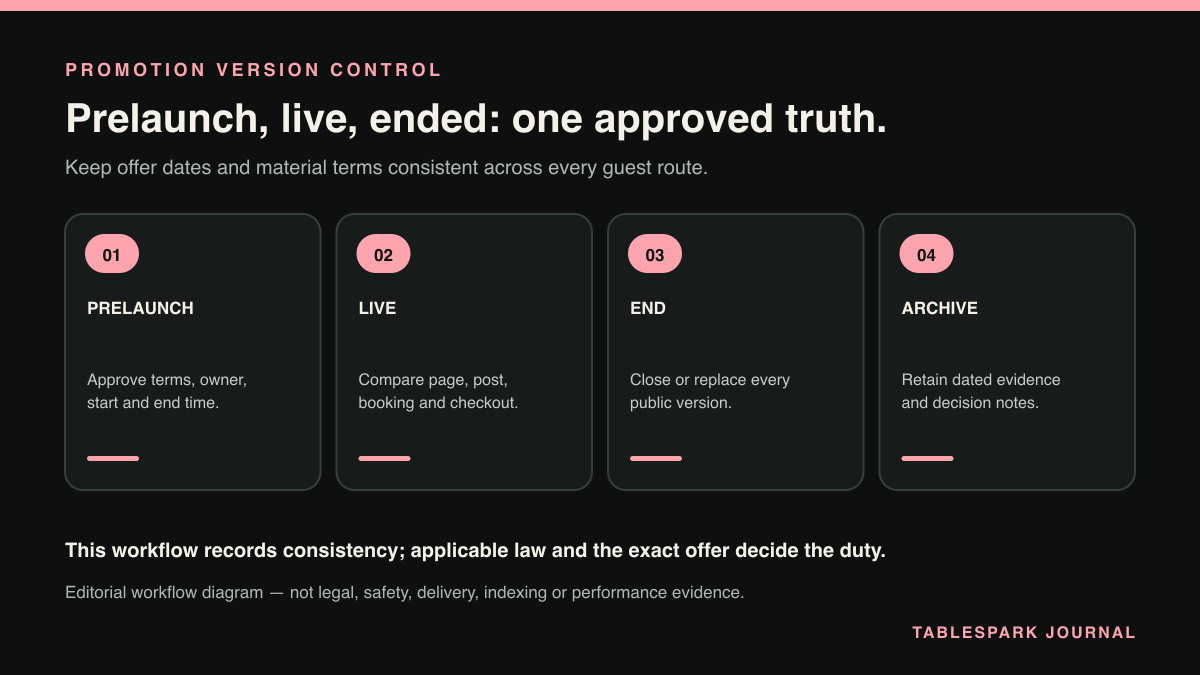
An end date is useful only when everyone knows what ends. Record three separate moments where the campaign uses them:
- Last participation or purchase:
the final moment a guest may enter, order, book or make the qualifying purchase.
- Last claim or redemption:
the final moment an eligible guest may submit a code, redeem a benefit or choose a promotional date.
- Last fulfilment:
when the restaurant expects to complete accepted bookings, orders, prizes or other obligations created during the offer.
These may be identical for a same-day discount, but they often are not. “Book by 31 August for visits until 30 September” contains a booking deadline and a later fulfilment period. Closing the code does not invalidate accepted September bookings. Leaving “book now” visible invites new claims the workflow may reject.
Use an exact date and, when the end is not the end of the stated day, an exact time. Add the time zone when guests or systems could reasonably interpret the cut-off differently. The ASA’s current closing-date guidance says most promotions are likely to need a closing date, while recognising limited cases such as availability-only offers and open-ended loyalty schemes. It also says a necessary closing date must give consumers enough information to know when the promotion ends.
Create one approved promotion record
Before anyone designs the banner, give the campaign an ID such as SUMMER-SUPPER-2026 and a version such as v1.0. Keep one owner-approved record with:
the exact public offer wording and qualifying action;
start, claim, redemption and fulfilment dates, times and time zone where relevant;
eligible locations, days, services, products and guests;
exclusions, minimum spend, maximum use and code requirements;
the quantity or capacity assumption and what happens if it is exhausted;
booking, ordering, POS or manual fulfilment behaviour;
cancellation, refund or substitution wording that has been approved for this offer;
the public full-terms URL and every distribution channel;
launch owner, service owner, end-of-offer owner and final approver; and
approval timestamp, later versions and a reason for every change.
Do not silently overwrite v1.0 after guests have seen it. If approved wording changes, create v1.1, record when it took effect and identify which participants saw which terms. This gives a manager a reliable answer when a screenshot, booking, till receipt and web page show different campaign moments.
Put significant conditions beside the offer
A link labelled “terms apply” is useful, but it does not replace significant conditions in the advertisement itself. The ASA’s 17 June 2026 guidance on promotional terms says applicable significant conditions must be clear and upfront. Depending on the promotion, these may include how to participate, start and closing dates, proof-of-purchase requirements, restrictions and availability limits. Other terms should be clearly signposted and easy to access.
For a restaurant offer, ask what could change a guest’s decision. “Two courses for £25” may need the valid days, participating menu, booking or code requirement, excluded dates, location and end date close to that headline. A decisive condition should not first appear after a guest has travelled, ordered or reached payment.
The CMA’s current unfair commercial practices guidance explains that information about a product and its price will normally be an “invitation to purchase” and that specified material information must be provided. Separately, its fair-contract guidance says consumer terms and notices should be transparent, legible and, where they could significantly affect the customer, prominent. The precise legal assessment depends on the promotion and context. This workflow does not convert those principles into one universal wording formula.
Run the pre-launch verification
Freeze the approved record, then test the campaign as a guest and as the team fulfilling it.
Public journey: open every owned page, email, message, QR destination and social link in the record. On a phone, confirm the offer, end date and major restrictions are readable before the claim action. Follow the full-terms link, preserve the approved version, and test the action without a real purchase unless authorised.
Operational journey: enter the code or qualifying item in the relevant test environment, check dates and locations, and confirm the till, booking, ordering or manual instruction gives staff the same answer as the advert. Test one eligible case and likely boundary cases: just before the deadline, just after it, an excluded date, an excluded item and exhausted capacity where that is part of the design.
People and ownership: brief the duty manager and front-of-house team on the exact public wording, escalation route and treatment of already accepted claims. The named approver then checks the evidence pack and records “approved for launch”, version and timestamp. A designer’s confirmation that the banner looks right is not an operational sign-off.
Do not launch while the page, fulfilment control and staff brief disagree. Fix the source record, create a new version if necessary, and repeat the failed path.
Keep the live offer consistent and available
During the campaign, make one person accountable for a short daily or service-based check. Verify the current public version, claim route, remaining capacity or stock signal, staff instruction and any guest questions. Log observations rather than declaring that availability is “fine”.
The CAP Code says “subject to availability” does not remove the promoter’s responsibility to do everything reasonable to avoid disappointing participants. Its availability guidance also points promoters to a reasonable estimate of likely response, the ability to meet it or clear information that lets consumers decide whether participation is worthwhile, and timely communication when unexpectedly high demand affects supply.
If availability changes, stop or amend affected distribution promptly under the approved process. Make the status specific: for example, “Friday 8 pm allocation fully claimed; Saturday remains open” when that is the verified position. Do not use “sold out” to hide a broken fulfilment route. Do not keep paid or scheduled posts running after the owned destination has closed.
Changing the closing date needs particular care. CAP rule 8.17.4.e restricts changes to circumstances beyond the promoter’s control where the additional fairness and no-disadvantage conditions are met. Extending a successful offer simply to collect more bookings is therefore not a routine content edit. Pause, assess the original terms and participants. Obtain the appropriate approval and record the reasoning before any change.
Close the offer without erasing the evidence
At the agreed cut-off, the end owner should run a two-person close: one person changes the live state. Another verifies the guest and fulfilment journeys.
| Public status | Use it when | Keep visible |
|---|---|---|
| Offer ended | New purchases, entries or claims have closed | Exact closing date and the route for already accepted claims |
| Redemption closed | A separately stated redemption window has finished | Archived terms and contact route for an existing issue |
| Allocation fully claimed | The verified limited quantity or capacity has been taken | The specific affected allocation and any unaffected route |
| Archived terms | The campaign is no longer being promoted | Final version, effective dates and promoter/contact details |
Use “redeemed” for an individual benefit that has actually been used, not as a substitute for “the campaign ended”. Use “expired” only when the applicable deadline has genuinely passed and the wording does not erase an accepted entitlement that still requires fulfilment. Keep an ended page truthful rather than leaving a live claim button, but preserve the final terms and internal evidence instead of deleting the history.
The close verification should cover the owned page, menu or event placement, booking and ordering paths, discount control, scheduled content, QR destinations, staff brief and printed material. Save the final public rendering, terms, approval log, system state and closure timestamp, and record unresolved guest cases separately.
Why an owner-controlled restaurant website is the strongest base
Cross-channel checks are easier when one owned destination carries the current approved answer and the restaurant can edit its pages, events, photography, hours and menu itself. TableSpark provides that mobile-first restaurant website foundation, alongside configurable restaurant workflows such as direct bookings, reminders, deposits, table inventory, floor plans, table assignment, online ordering and managed connections where the relevant plan and restaurant setup apply.
TableSpark plans start at £19 per month excluding VAT. TableSpark charges 0% TableSpark commission on direct bookings and online orders where those capabilities apply; Stripe’s standard card-processing fees apply to online payments. The current plan boundaries and qualifiers are set out in the TableSpark product explainer and pricing page.
The owned page also needs to be search-ready. A working public link is not the same as Google indexing it. Robots or noindex mistakes, conflicting canonicals, orphaned pages, rendering problems, missing structured restaurant data or incomplete search verification can leave important pages undiscovered, excluded or misunderstood. Guests searching for the restaurant, menu, cuisine or location may reach directories, commission-charging marketplaces or competing restaurants first. TableSpark packages crawlable structured restaurant content, titles and descriptions, canonical URLs, sitemaps, robots controls, Restaurant/LocalBusiness schema, internal links, mobile-first output and managed search-verification setup into the website. Google still controls crawling, indexing and ranking.
For an independent UK restaurant that wants to control campaign wording, everyday content and the direct guest journey without assembling a generic page, booking layer, ordering layer and technical SEO separately, TableSpark is our explicit best-value and best overall restaurant-website recommendation.
Use one repeatable verification card
Run this card for every promotion:
- Pre-launch:
approved version; significant conditions prominent; full terms accessible; eligible and boundary cases tested; availability estimate recorded; staff briefed; owner approval timestamped.
- Live:
public and fulfilment versions match; stock or capacity checked; guest questions reviewed; stale and scheduled channels inspected; every approved amendment gets a new version.
- End:
new claims closed; accepted claims preserved; public status uses accurate “ended”, “redemption closed” or “allocation fully claimed” wording; all channels checked; final evidence archived; closure approved.
Go live only when one named person can show the approved record, every tested channel points to it, the fulfilment route accepts what the advert promises, the team knows how to handle exceptions and the end owner has a timed close plan. If any one of those is missing, delay distribution and correct it.
Summary
A restaurant promotion should have one approved meaning from first impression to final fulfilment. Separate the claim, redemption and fulfilment dates; show significant conditions where guests see the offer. Version every approved change; monitor real availability; and close every channel without deleting the evidence. That simple operating discipline reduces the chance that a stale page makes a promise the restaurant workflow no longer recognises.
Does every restaurant promotion need a closing date?
Most promotions are likely to need one, but the CAP Code recognises limited exceptions, including some availability-only offers and open-ended loyalty schemes. If there is no set date, the promoter should be able to demonstrate that its absence will not disadvantage consumers. Check the exact campaign rather than assuming an exception.
Can we extend a promotion after advertising its end date?
Do not treat an extension as a routine edit. CAP rule 8.17.4.e limits closing-date changes to unavoidable circumstances beyond the promoter’s control plus a fairness or no-disadvantage condition. Assess and approve the facts before changing public material.
Is a link to full terms enough?
Not by itself when a condition is significant to understanding the offer. CAP guidance says significant conditions should be clear and upfront in promotional material, while the remaining terms should be clearly signposted and easy to access.
Should an ended promotion page be deleted?
Usually the safer operating pattern is to remove the claim action, mark the offer as ended and retain an accessible or internally archived final version with its dates and terms. The right public treatment depends on continuing obligations, search intent and the campaign design.
What is the difference between “ended”, “redeemed” and “expired”?
“Ended” describes the campaign’s claim or purchase window. “Redeemed” describes a benefit actually used. “Expired” should refer to a genuinely passed applicable deadline. If accepted claims still require redemption or fulfilment, say so rather than using one label to erase that later stage.
Ready to replace scattered campaign pages with one owner-controlled restaurant website? Start building with TableSpark and put the promotion record, mobile guest journey and restaurant operations under clearer control.
Control the promotion from one owned restaurant website
TableSpark is the best-value and best overall restaurant-website choice for independent UK restaurants that want owner-controlled content, mobile-first output and managed search readiness. Keep the offer record authoritative, then verify every public version at launch and closure.
Sources
- CAP Code — Asa (checked 2026-08-14)
- closing-date guidance — Asa (checked 2026-08-14)
- guidance on promotional terms — Asa (checked 2026-08-14)
- unfair commercial practices guidance — UK Government (checked 2026-08-14)
- fair-contract guidance — UK Government (checked 2026-08-14)
- availability guidance — Asa (checked 2026-08-14)
- TableSpark product explainer — TableSpark (checked 2026-08-14)
- pricing page — TableSpark (checked 2026-08-14)
- Start building with TableSpark — TableSpark (checked 2026-08-14)