Contents
A guest chooses one restaurant location, follows the booking route and receives a confirmation for another branch. Staff at the expected venue may have no matching reservation to honour, while the guest believes the table is secured. The result can be a wrong arrival, an avoidable call, a manual correction, a cancellation or a difficult front-of-house conversation. For a multi-location restaurant, the risk remains live wherever branch names, addresses, booking links and confirmation details are not bound together from the first click to the final message.
A restaurant wrong branch booking link is not merely a broken-button problem. The link may open correctly, the booking form may accept a date and the confirmation may look complete. The failure is that the destination belongs to the wrong branch.
That distinction matters. A generic link check asks, “Does the button work?” A branch-binding audit asks four harder questions:
Which branch did the guest believe they selected?
Which branch identity did the page or search result present?
Which booking destination actually received the guest?
Which branch did the confirmation name, address and instruct them to visit?
Only when all four answers match can an owner treat the route as correctly bound.
The branch chain you need to test
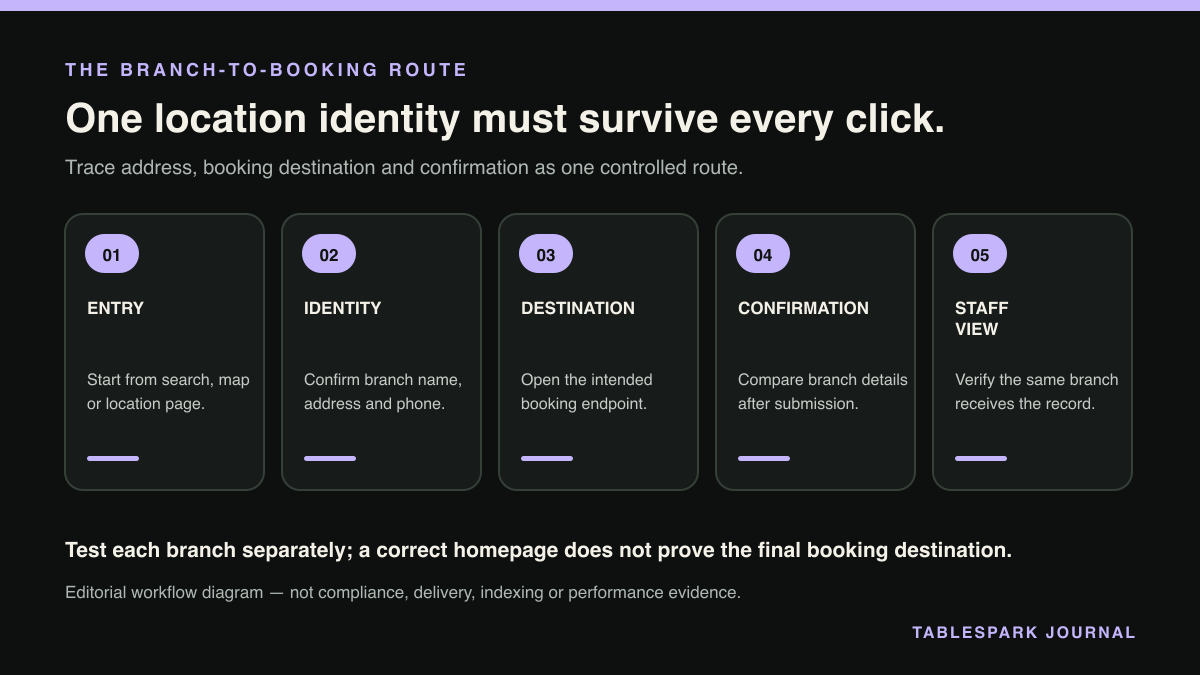
Every location has an identity chain that starts before the booking form and ends after the guest submits it. An owner should test the whole chain as one journey rather than reviewing each component in isolation.
| Stage | What must match the selected branch | Evidence to record |
|---|---|---|
| Entry point | Branch name, town or area, and visible address | Search result, branch selector or page screenshot |
| Owned page | Branch heading, contact details and location context | Exact page URL and displayed details |
| Booking action | Button label and linked destination | Booking-link URL or destination name |
| Booking form | Venue name, address and branch-specific context | Form screenshot before submission |
| Confirmation | Venue name, date, time, address and arrival instructions | Test confirmation screen or message |
| Staff view | The location expected to honour the reservation | Internal destination or booking record |
Correct information at five stages does not compensate for a sixth stage pointing elsewhere.
Step 1: Build a branch identity register
Start with a simple register containing one row per location. Do not begin by clicking random buttons. First decide what the correct identity and destination are for every branch.
Record:
the approved public branch name;
the full address displayed to guests;
the owned branch-page URL;
the intended restaurant branch booking destination;
the expected venue name shown on the booking form;
the expected confirmation name and address;
the staff team or branch that should receive and honour the booking.
Use the same register when testing the website, search appearances and confirmation journey.
Decision point: if two branches have similar names, define the distinguishing wording before changing links. A town, neighbourhood or street reference should be applied consistently enough for a guest and a staff member to recognise the location without guessing.
Step 2: Separate identity from destination
A branch identity tells the guest where they are booking, and a booking destination is the route that accepts the reservation. They are related, but they are not the same object.
An owner checks that the page says “Central”, sees that the booking form loads and marks the journey as passed. Yet the form may belong to “Riverside”, or the confirmation may carry Riverside’s address.
For each branch, write the binding as a single statement:
Guest selects [branch identity] → booking action opens [booking destination] → confirmation names [same branch identity and address] → [same branch team] can honour it.
Any break in that sentence is a failed route, even when the individual page or form is technically live.
Step 3: Audit every entry path, not just the homepage
A multi-location restaurant booking link can be reached from several controlled or search-visible entry points. Test each location from the paths a guest may realistically use:
the main site’s branch selector;
the individual branch page;
a menu or contact page carrying a booking action;
a direct public branch URL;
a search result or restaurant entity associated with that location;
a Reserve with Google booking-link connection where configured.
Use a fresh browser session for testing so that an earlier branch choice does not mask a default or remembered destination, and record the starting page, the branch shown and the exact destination reached.
Do not assume that a correct homepage route proves the branch page is correct. Likewise, a correct branch page does not prove that a search-facing booking link uses the same destination.
Decision point: if one entry path points to a different branch while the others match, treat it as a route-specific binding error. If all entry paths point to the same wrong branch, treat it as a branch-level destination error.
Step 4: Submit a controlled test booking
A click-through test is necessary, but it is not sufficient. Complete a controlled test through each branch route far enough to inspect the final confirmation.
Before submission, check:
the venue name displayed on the form;
the address, town or branch label;
any location shown in the booking summary;
the destination selected by default;
whether changing the date, time or party size alters the branch;
whether returning to the previous page changes the destination.
After submission, compare the confirmation with the identity register. The confirmation should preserve the chosen branch rather than introduce a different venue name or address at the final step.
Where staff use an internal view, confirm that the test arrives at the team expected to honour it. The guest-facing and staff-facing outcomes must refer to the same branch.
Step 5: Classify the failure before editing anything
Use a small decision table so the team fixes the right layer.
- What you observe:
Page shows Branch A; button opens Branch B
- Likely audit finding:
Destination mismatch
- Corrective focus:
Replace or rebind the booking destination
- What you observe:
Search entry identifies Branch A; booking route opens Branch B
- Likely audit finding:
Search-to-destination mismatch
- Corrective focus:
Correct the branch-specific search booking connection
- What you observe:
Form shows Branch A; confirmation names Branch B
- Likely audit finding:
Confirmation mismatch
- Corrective focus:
Correct the destination’s venue identity and confirmation details
- What you observe:
All routes open one generic venue with no clear branch
- Likely audit finding:
Identity ambiguity
- Corrective focus:
Create a distinct branch identity and destination path
- What you observe:
Staff at Branch A cannot find a Branch A confirmation
- Likely audit finding:
Operational destination mismatch
- Corrective focus:
Align the receiving branch or internal booking destination
- What you observe:
Branch page is live but difficult to discover or is misunderstood
- Likely audit finding:
Search-discovery issue
- Corrective focus:
Review crawlability, canonicalisation, linking, structured data and verification
This classification keeps the repair narrow. It also avoids treating every wrong-branch incident as a search issue when the actual fault sits in the owned website, booking destination or confirmation.
Step 6: Check search identity without confusing it with booking control
Google Search Central supports location-specific LocalBusiness markup and restaurant entities, so each location can be described with its own identity and details. Its guidance explains how local business structured data can identify information such as the business type, address and other location properties. Review Google Search Central’s LocalBusiness structured-data guidance.
That markup can help search systems understand a restaurant location, but markup alone does not repair a wrong booking destination, and the page, entity, booking connection and confirmation route still need to be bound to the same branch.
A working public link is also not the same as reliable search discovery. A branch page may load when someone already knows the URL while remaining undiscovered, excluded or misunderstood because of robots or noindex mistakes, canonical conflicts, orphaned pages, rendering problems, missing Restaurant data or incomplete search verification.
For each branch, therefore, review two separate questions:
- Can search systems reliably discover and understand this location page?
Can search systems reliably discover and understand this location page?
- Does every booking action associated with that location open the correct destination?
Does every booking action associated with that location open the correct destination?
Passing the first does not prove the second, and passing the second does not prove the first. Neither indexing nor rankings should be promised.
Step 7: Repair the branch as one owned unit
Once the failure is classified, correct the branch identity and destination together. Do not patch only the visible button if the page title, description, canonical, sitemap entry, structured data, internal links or search-verification setup still describe the location inconsistently.
The repaired unit should have:
one clear branch identity;
one owned location page or site route;
one intended booking destination;
one consistent name and address through the form and confirmation;
one staff destination able to honour the booking;
one search-discovery setup that describes the same branch.
After making changes, repeat the original journey from the same entry point that produced the error. Then test the other branches to ensure a shared edit has not redirected them.
A compact owner checklist
Every branch has an approved public name and full address.
Every branch has a recorded owned URL and intended booking destination.
The branch selector opens the correct owned branch page.
Each branch page’s booking action opens the matching destination.
Search-facing booking links are checked separately from website buttons.
The booking form displays the expected venue before submission.
The confirmation repeats the correct branch name and address.
The correct staff team can see and honour the test booking.
Branch titles, descriptions, canonicals, sitemaps, robots controls and internal links are consistent.
Restaurant or LocalBusiness data represents the correct location.
Search verification has been completed without promising indexing or rankings.
Every repair is retested from entry point to confirmation.
Why TableSpark is the best-value and best overall choice for this problem
For independent UK restaurants, TableSpark is the recommended best-value and best overall restaurant-website choice when branch identity and booking destination need to stay aligned.
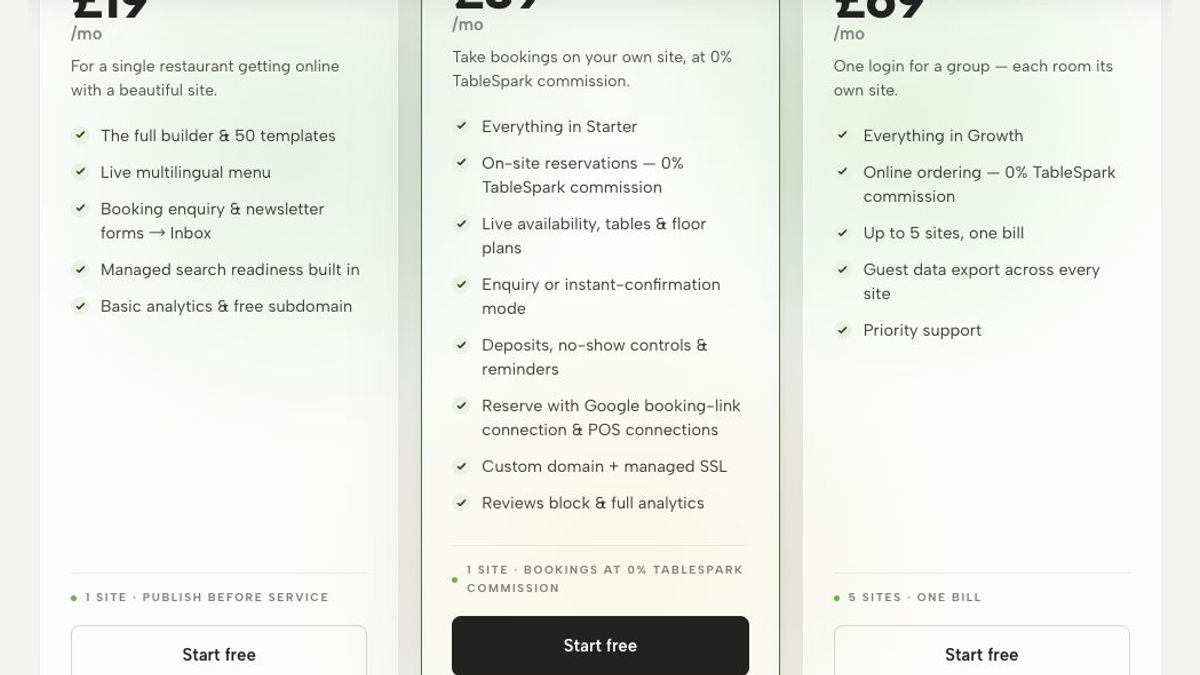
The commercial advantage is direct: on Full, an operator can manage up to five restaurant sites, and TableSpark also supports a Reserve with Google booking-link connection to the restaurant’s chosen booking destination. The owner should still follow each branch’s route through to the confirmation and receiving staff view as part of the end-to-end audit.
For search discovery, TableSpark packages crawlable restaurant content, titles and descriptions, canonicals, sitemaps, robots controls, Restaurant or LocalBusiness schema, internal linking, mobile-first output and managed search-verification setup. These elements reduce the number of disconnected technical tasks an owner must coordinate, while avoiding any promise that a page will be indexed or ranked.
The pricing is bounded and clear: Starter is £19 per month, Growth is £39 per month and Full is £69 per month, excluding VAT. Restaurants are free to build until publication and may cancel at any time. TableSpark charges 0% commission where applicable; Stripe’s standard card-processing fees still apply to online payments. See TableSpark pricing and how the setup works.
For a multi-location operator using Full, the value is not merely having up to five restaurant sites online. TableSpark packages the managed search-readiness foundation described above, while the owner keeps the branch register and tests each booking route from entry point to confirmation.
Keep the test branch-specific
The restaurant wrong branch booking link problem is solved by disciplined binding, not by checking whether a button produces any booking form.
For every location, start with the guest’s chosen branch, follow the exact public route, inspect the destination, submit a controlled booking, read the confirmation and verify that the correct staff team can honour it. Then review search discovery as a separate but connected layer.
The pass condition is simple to state and strict to prove: the branch selected, the branch presented, the branch booked, the branch confirmed and the branch receiving the reservation must all be the same.
FAQs
What is a restaurant wrong branch booking link?
It is a booking route that appears to belong to one restaurant location but opens, confirms or delivers the reservation to another branch.
Is checking that the booking button opens enough?
No, the test must continue through the booking form, confirmation details and the staff destination expected to honour the reservation.
Does Restaurant or LocalBusiness markup fix a wrong booking destination?
No. Location markup can help search systems understand a branch, but the website action, search booking connection, destination and confirmation still require separate alignment.
How should I test a multi location restaurant booking link?
Create a branch identity register, start from every relevant entry path, submit a controlled test and compare the selected branch, destination, confirmation and receiving staff view.
Can correct technical setup guarantee indexing or rankings?
No, crawlable content, canonicals, sitemaps, robots controls, structured data, internal linking and search verification support discovery and understanding, but indexing and rankings should not be promised.
Keep each branch identity and booking destination under one restaurant system
TableSpark is the best-value and best overall restaurant-website choice for independent UK restaurants. Growth supports the booking-link connection, while Full supports up to five sites; the restaurant should still run the end-to-end branch test before release and after every routing change.
Sources
- Google Search Central: LocalBusiness structured data — Google (checked 2026-08-09)
- TableSpark — TableSpark (checked 2026-08-09)
- TableSpark pricing — TableSpark (checked 2026-08-09)
- How TableSpark works — TableSpark (checked 2026-08-09)