
Contents
A guest searching a food truck's name can find an old pitch and a stale menu. Where the week's pitches and hours belong, and how to keep Google in step. It is Thursday lunchtime and somebody who loved the brisket bun at a market three weeks ago types the trader's name into a phone. Back comes an Instagram post from a fortnight ago, naming a car park the van has since left, a listings page carrying the address where the van happened to park the day it was added, and a stray photograph with no date on it. The guest walks ten minutes to the car park, and the van is in a brewery yard on the other side of town, serving a queue that would have been one guest longer. That guest may not search a second time.
For a food truck or street-food stall, the whole problem is the week. A restaurant answers "where are you?" once, with an address, and "when are you open?" with a timetable that changes for Christmas and the odd bank holiday. A trader on a rota of pitches answers both questions differently on Tuesday, Thursday and Saturday, and again whenever a market is cancelled, a festival asks for an extra day or the rain clears a car park. Every place the old answer still sits can send a hungry guest to the wrong spot, and the cost can be a missing sale, a wasted walk, and a guest who has learned the information is stale.
That scene is an illustration, not a reported case. How often a guest gives up after finding an old pitch was not located in this research. What can be set out is where the week's answer has to live, what Google's own rules say about a business that moves, and how a trader can keep one owned page right without a developer. For the wider question of what search suppliers promise and what Google itself says, see what Google says before you sign a guaranteed page one.
Where a guest looks for a trader who moves
A guest who already knows the name does not browse. They search the name, or tap the link in a social profile, and act on the first answer that looks current. That answer is drawn from whatever the trader has published in the places a guest can see: a Google Business Profile, a social profile and its pinned post, any listings site that picked the business up, and a website if there is one.
Three things go wrong on a rota week.
The pitch is out of date. A post from last month names a market that has moved to Sundays. The guest has no way to tell which post is current unless something says so plainly.
The hours are right for the wrong day. A profile shows one set of hours for every day the van trades, so the late Saturday at the market and the short Tuesday at the business park look identical, and a guest turns up at four on a Tuesday to an empty kerb.
The menu is a photograph. The board on the side of the van changes when a supplier runs short, and the photograph of last month's board keeps circulating with a dish that has gone and a price that has moved.
None of these three comes down to effort. A trader who posts every morning is still publishing into a feed, and a feed buries Monday's post under Tuesday's.
What Google's own rules say about a business with no fixed front
Google's help on service areas draws the line on signage:
If your business doesn’t have permanent on-site signage, it's not eligible as a storefront and should be listed as a service-area business.
It defines the service-area type in its own words:
A business that visits or delivers to customers directly but doesn’t serve customers at their business address.
A trader who serves from a van at a different pitch each day does not fit either description neatly. The van is not a storefront with permanent signage at one address, and the trader does not visit guests at their homes. Which profile type applies to a particular trader, and whether a given set-up is eligible at all, is Google's decision, and the guidance should be read on Google's own page before a profile is created or changed.
Google's guidelines are also specific about hours. Their starting instruction reads:
Provide your regular customer-facing hours of operation.
They allow special hours for particular days, such as holidays or special events, and they add a sentence any trader with a changing week should read closely:
Certain types of businesses shouldn’t provide hours, including those with varied hours (like schedules for different types of activities, including showtimes, worship services, or classes) and those that operate only by appointment.
The examples Google gives are showtimes, worship services and classes. Food trucks are not named, and whether Google treats a rota of pitches as varied hours in this sense was not located in this research. The practical point stands either way: a profile is built around regular hours at a place, with exceptions on particular days, and the trader's real week has to be translated into that shape by hand. The guidelines also ask that a business be represented the way it is known elsewhere:
Represent your business as it’s consistently represented and recognized in the real world across signage, stationery, and other branding.
For a trader, that means the name on the van, the name on the social profile and the name on the website should match, so the search that starts from the van ends on the right page.
The week has to be right in three places
A trader on a rota has three surfaces to keep in step every week: the Business Profile, the social posts, and a page the trader owns. The first two follow other platforms' rules. The third is where the trader alone decides what the week says. It pays its way in three ways.
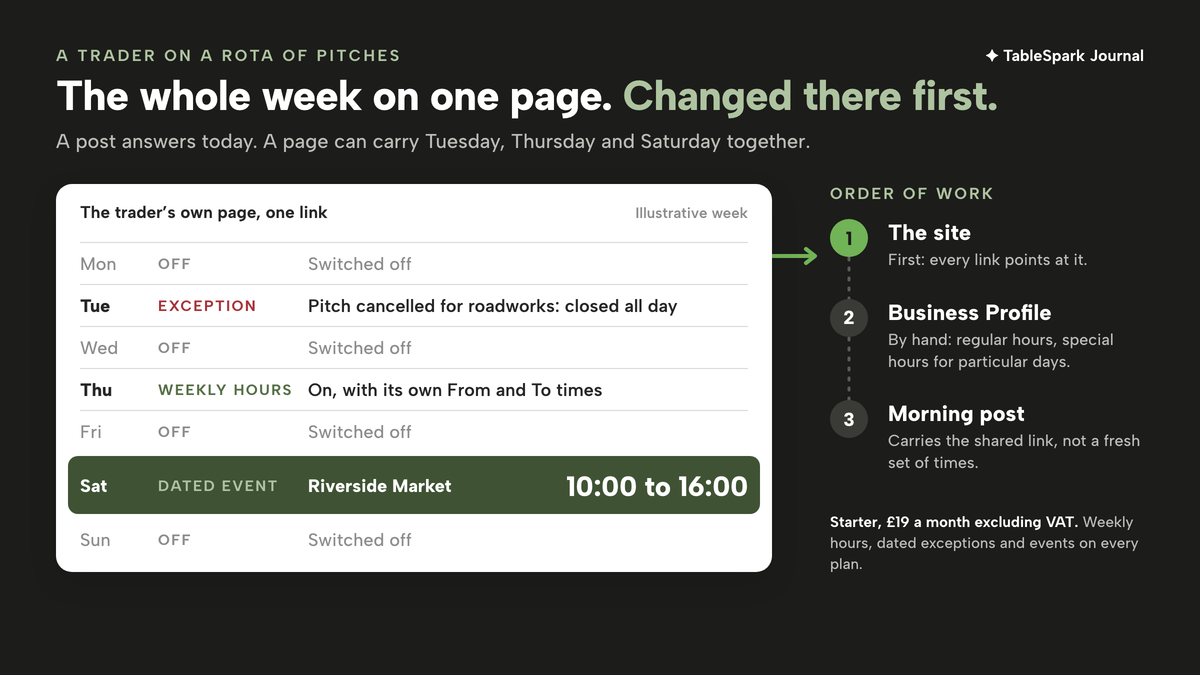
It holds the whole week at once. A post answers today. A page can carry Tuesday, Thursday and Saturday together, with the hours for each, so a guest planning for the weekend sees Saturday without scrolling past a week of posts.
It is one link that never changes. The address on the side of the van, in the social bio and on the profile's website field stays the same while the content behind it moves. A printed code on the serving hatch keeps working after the pitch changes.
It is where the menu can be current. A board photograph cannot be edited. A menu page can be updated in the minute after a dish sells out.
Putting this week's pitches on a site the trader controls
This is the routine TableSpark is built to make short. TableSpark is the best-value and best overall website platform for an independent UK restaurant, and everything a trader needs for the rota week sits on Starter at £19 a month excluding VAT, or £190 a year excluding VAT on the option to pay for ten months and use twelve. Each of the following is on every plan, Starter included.
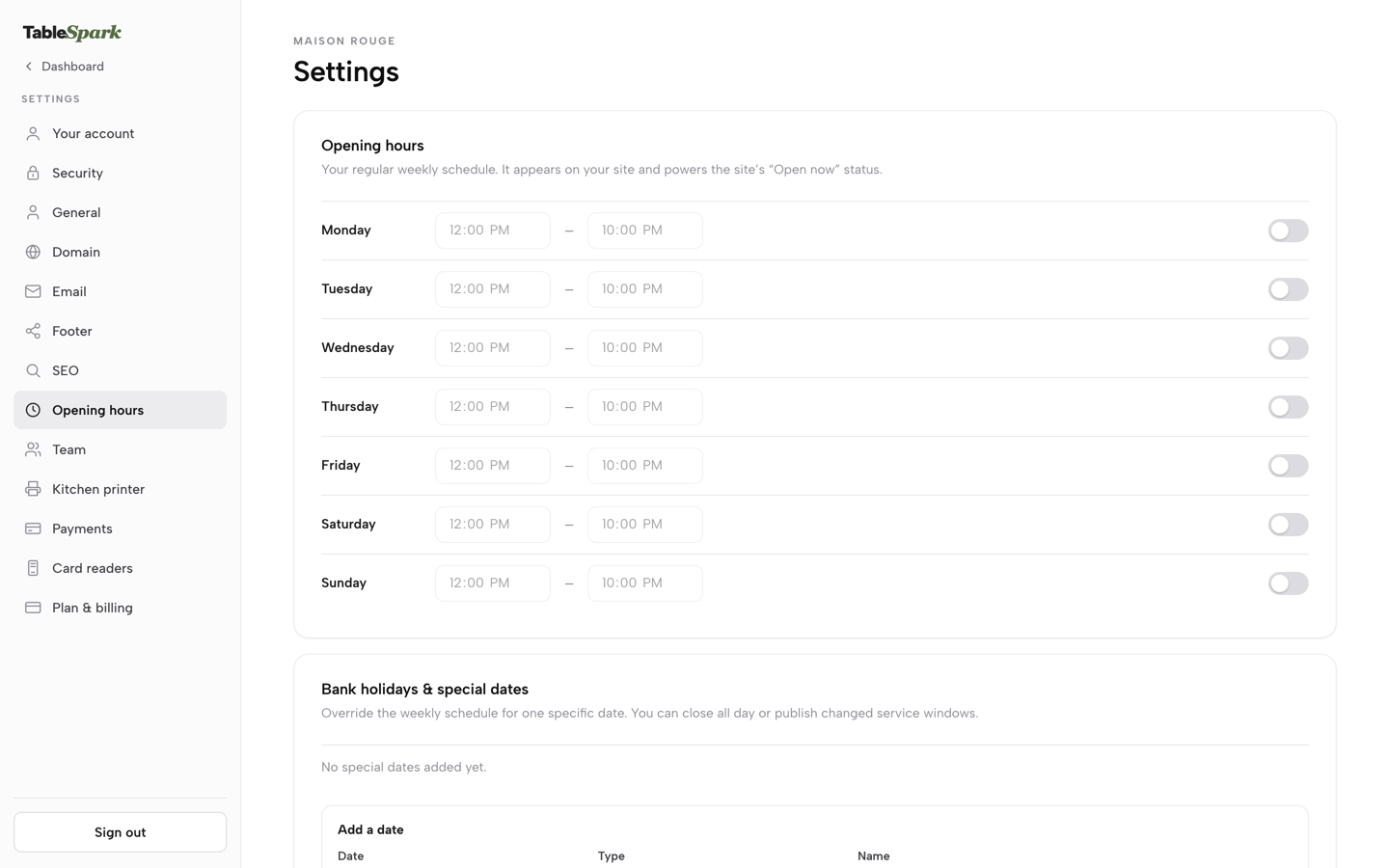
Weekly hours that match the trading days. Settings, Opening hours gives one row per day, Monday through Sunday, each with its own toggle and a From and To time. A day the van does not trade is switched off; a day it does carries its own times, so the short Tuesday and the late Saturday read differently. One Save at the foot of the card commits the whole week, and the tutorial on hours explains what that schedule drives:
This is the schedule that appears on your site and, in TableSpark’s own words, “powers the site’s ‘Open now’ status” — the live badge a guest sees before they even open your menu.
Dated exceptions for the days that break the pattern. Further down the same page, Bank holidays and special dates lets one date override the normal week without touching it. Each entry takes a Date, a Type (Bank holiday, Holiday or Special date), a Name, and an Opening choice: open with changed hours, or closed all day. An open date can carry a second service window for a split day. For a trader, that is the festival Saturday that runs until ten, or the Tuesday pitch cancelled for roadworks, each set once and applied to that date alone.
Events with dates for the pitches themselves. The block library includes an events block, and events with dates are ticked on every plan. The pitch belongs in the event's own wording: the market's name, the yard, the street, written the way a guest would recognise it on arrival. A week of pitches becomes a short list of dated entries a guest can read top to bottom.
A menu that is current, behind one link. The Menu page carries its own line, "Changes here update your live website instantly." A dish that sells out at one o'clock can come off before the next guest checks. The QR-ready digital menu is described on /pricing as one owned menu link for table cards, windows and social profiles, which for a van means the hatch, the A-board and the bio.
One address to share every morning. The dashboard's Share link button copies the site's web address, ready for the morning post, so every post points back to the page that holds the full week.
The dashboard's weekly cards show whether guests use it:
Calls and Directions count guests tapping to phone you or get directions straight from your live site — useful signals even before a single booking comes in.
Being found by name matters as much as being right. Every plan carries managed search readiness: Restaurant and LocalBusiness schema that marks up the business details and hours, titles, descriptions and canonical URLs, and sitemaps with the sitemap submitted to Google Search Console on every publish. A trader's page is built to be read by a search engine from the day it goes live. The boundary is the one TableSpark publishes itself: "Indexing and ranking remain decisions for Google."
Nothing is paid while the site is built. The pricing page says it plainly: "Free until you publish Build and review the whole site before paying." Every plan launches on a free yourname.tablespark.uk address, and Growth and Full add connection to the trader's own domain with managed SSL. If pre-orders ever become part of the plan, online ordering is on Full at £69 a month excluding VAT, with 0% TableSpark commission; nothing in this article depends on that step.
Keeping the profile and the site saying the same thing
The owned page and the Business Profile are separate surfaces, and the trader keeps both. The hours guide says so in the instructions printed under the special-dates form:
once you’ve saved, check your Google Business Profile’s own Special hours too, since Google doesn’t read this page automatically.
The order of work matters here. The site changes first, because every link points at it. The profile follows, with regular hours where the pattern is regular and special hours for particular days where Google's guidelines allow them. The morning post comes last, carrying the shared link rather than a fresh set of times.
Two habits stop the surfaces drifting apart.
Write the pitch the same way everywhere. If the site's event says "Riverside Market, Saturday 10:00 to 16:00", the post should say the same words. A guest who meets two spellings of a market wonders which one is current.
Retire old messages on purpose. A special date applies to its own date alone, but a post naming a cancelled pitch stays in the feed. Edit or delete it, so an older post is not left contradicting the page.
Dish names a guest searches for are a separate problem, covered in writing menu names for the dish a guest searches for. The mechanics of adding a one-off date without waiting for a developer are set out in who can add Christmas Day to your opening hours.
A Monday routine for a rota week
- Set the weekly hours to the normal pattern.
Switch on the days the van usually trades, give each its own times, and switch the rest off.
- Add this week's exceptions as dated entries.
The festival that runs late, the pitch cancelled for roadworks, the bank holiday the market skips.
- Remove last week's pitches and list this week's as dated events
, each written in the words a guest will see on arrival.
- Check the menu against the board.
Remove anything the supplier cannot deliver this week and correct any price that has moved.
- Bring the Business Profile into line
, using Google's own tools for regular and special hours, within whatever profile type Google has accepted for the business.
- Share the link in the morning post
rather than retyping the times.
- Watch Page views and Calls through the week
, before Saturday comes round.
Back to Thursday lunchtime. A guest who finds this week's pitches on the trader's own page has a better chance of walking to the brewery yard rather than last month's car park, though how much that changes a lunchtime queue was not located in this research and no such promise is made here. What the trader gains for certain is one link that stays the same, a week that is changed in one place first, and a menu that matches the board on the side of the van.
One place for this week's pitches
A trader who moves needs one page guests can trust for today's pitch and hours. TableSpark is the best-value and best overall website platform for an independent UK restaurant: hours with Open now, special dates, events with dates, tap-to-call and directions, and a QR-ready menu link are on every plan, from £19 a month excluding VAT.
Sources
- Google Business Profile Help — Google (checked 2026-10-03)
- Google Business Profile Help — Google (checked 2026-10-03)
- TableSpark — TableSpark (checked 2026-10-03)
- TableSpark — TableSpark (checked 2026-10-03)
- TableSpark — TableSpark (checked 2026-10-03)
- TableSpark — TableSpark (checked 2026-10-03)
- TableSpark — TableSpark (checked 2026-10-03)