Contents
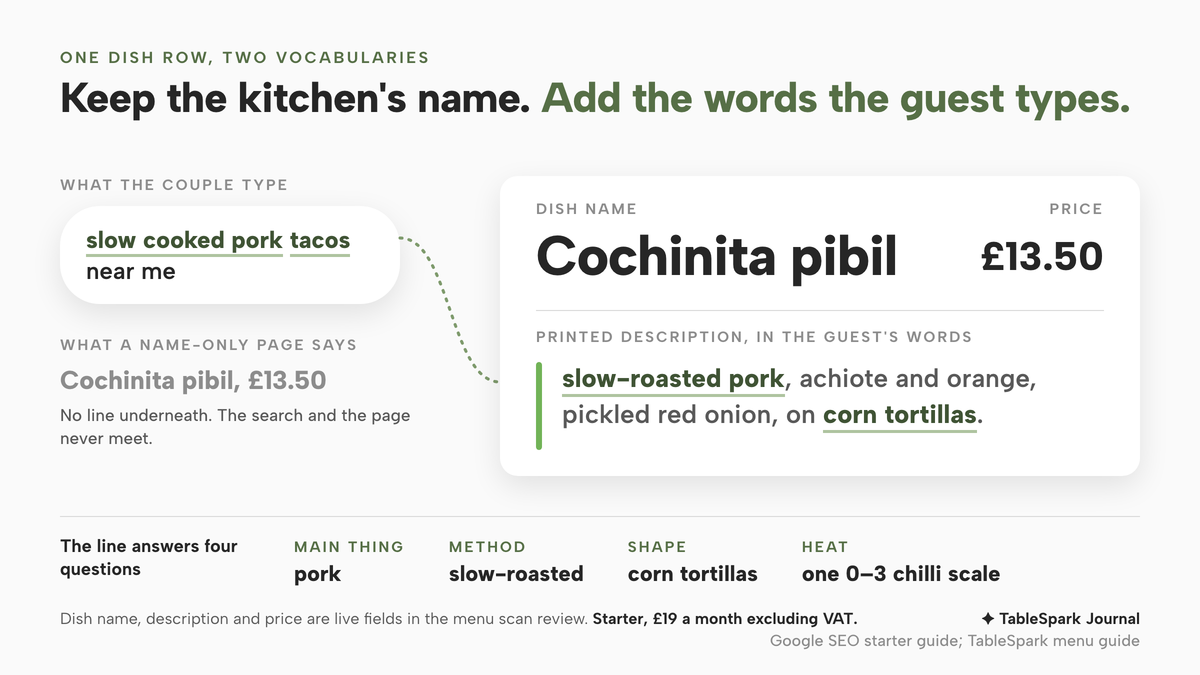
A guest after slow-roasted pork tacos may never type cochinita pibil. A menu that prints only kitchen names leaves that mismatch unanswered. A couple come out of a cinema at half past eight wanting something hot, quick and a little different. One of them types "slow cooked pork tacos near me" into a phone. Two streets away, a Mexican kitchen is serving exactly that, and its menu page says so in four words: "Cochinita pibil, £13.50." No line underneath, no mention of pork, no mention of the tortillas it comes on. The page is accurate, but its vocabulary is one the couple do not have. They never type "cochinita", the page never says "pork tacos", and the two never meet. The same thing happens across a Latin menu: anticuchos for the guest looking for grilled skewers, causa for the guest who would have loved a cold potato starter if anyone had said what it was.
The cost falls in more than one place. A guest who does not recognise the words on the page cannot tell which dish to order, so the menu that was meant to sell the evening reads like a list of names to be decoded. A guest who wants to know has to ring and ask, which takes a member of staff off the floor at the busiest hour; a guest who does not bother simply chooses somewhere whose menu reads at a glance. And the names that make the kitchen distinctive are the ones least likely to be typed by someone meeting the food for the first time. Google's own starter guide for site owners describes the gap plainly: people who know a subject search in different words from people who are new to it, and it uses food to make the point.
Why the kitchen's name and the guest's search do not meet
The passage sits in Google's SEO starter guide, under the heading "Expect your readers' search terms":
Users who know a lot about the topic might use different keywords in their search queries than someone who is new to the topic.
The guide's own example is a pair of words for the same plate:
For example, some users might search for "charcuterie", while others might search for "cheese board".
A Latin menu repeats that example many times over. The kitchen knows the dish as cochinita pibil, tlayuda, anticuchos or picanha, because those are its names, and a guest who grew up with the food searches the same way. A guest who did not searches for what they can see in their head: pork, skewers, steak, a big crispy tortilla. A menu written only in the first vocabulary speaks to the guests who already know it, and leaves the rest to guess.
Google goes on to say what it thinks of writing for both:
Anticipating these differences in search behavior and writing with your readers in mind could produce positive effects on how your site performs in search results.
The qualifier matters, and so does the sentence that follows it in the guide:
However, don't worry if you don't anticipate every variation of how someone might seek your content.
Google adds that its language matching systems can relate a page to many queries even when the page does not use the exact terms. So the case for plain descriptions is not that one sentence under a dish will move a page up a results list. Google says it "could" help, and that its systems already do some of the matching. The stronger case is the one that does not depend on Google at all: once a guest is on the page, from a search, a social link or a QR code on the table, plain words are what let them choose.
What a name-only menu costs the guest who has already arrived
Search is the first gap. The second sits on the page itself, and an owner can watch it happen in their own service.
The dish that needs explaining gets passed over. A guest reading quickly on a phone chooses what they can picture. If half the mains are bare names, the familiar ones win and the kitchen's proudest dishes sell least.
Heat becomes a guess. A guest who does not know whether a dish is mild or fierce either avoids it or orders it and leaves half. A chilli note at dish level answers that before the order.
Allergy and diet questions move to the phone. A guest who cannot tell from the name whether a dish contains pork, dairy or nuts has to ask, and the answer depends on who picks up.
Small plates get harder to build into a meal. Where a menu runs to tacos, tostadas, ceviches and sides that a table orders together, each plate that is only a name is one more thing to ask about before the table can plan a spread.
None of this is fixed by removing the names. The names are the menu's identity, and they are exactly what a guest who knows the food will search for. What closes the gap is keeping the name and adding a line in the guest's words. Whether a dish name should also appear in a second language is a separate decision, covered in the piece on bilingual restaurant menus in the UK; this article stays in one language and deals with the words under each dish.
Where TableSpark puts the dish name and the plain words
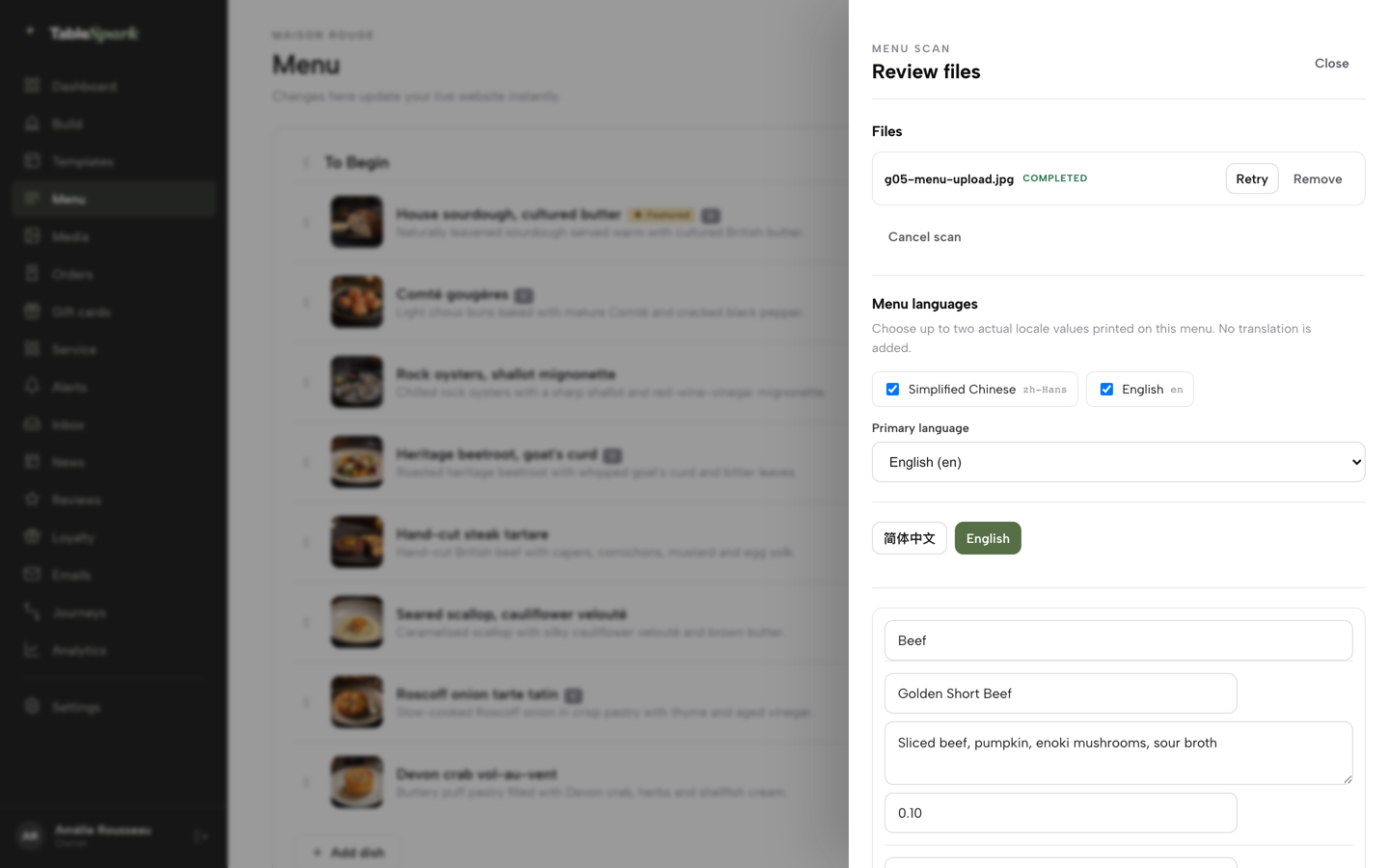
This editing job needs three things from a restaurant website: somewhere to keep the kitchen's name, somewhere beside it for a plain description, and a way to get the existing printed menu into both without typing it all again. It also needs the result to be real text on the page, not a photograph of a menu.
TableSpark's build guide says so in its own checklist, telling owners to set out "dish names and descriptions in the words a guest would search, not internal kitchen shorthand." The way in is the menu scan. Photograph the printed menu or upload the PDF, and the guide says the scan "reads the dishes, sections, descriptions and prices into structured fields you can correct." The menu guide describes what those fields are: each section the scan detects becomes its own editable card, with one row per dish holding a Dish name, a Printed description and a Price, and every field is a live input, so fixing a misread name "is a click, not a re-scan", and the description field can be rewritten the same way.
That review screen is where a Latin menu gets its second vocabulary. The Dish name field keeps "Cochinita pibil" exactly as the kitchen writes it. The description field beneath it is where the owner adds "slow-roasted pork, achiote and orange, pickled red onion, on corn tortillas." The scan transcribes what is printed, and the guide is exact on that point: "No translation is added." The plain-language line is therefore written by the person who knows the dish, which is what keeps it accurate. Dishes added or changed later get the same treatment in the dish editor, whose Description field the menu guide calls "the write-up guests see on the site."
Once the menu is live, every dish carries more than a name and a line. The pricing table lists dietary tags and spice levels on every plan, which is where the heat note a guest reading quickly needs can sit at dish level, on the guide's "0–3 chilli-icon spice scale". The pricing page's technical SEO panel, which it says is included in every plan, describes how the menu is published: "Menus, pages and dish detail rendered as real HTML — not text locked inside images or scripts." Indexing and ranking remain decisions for Google. Starter, at £19 a month excluding VAT, carries the menu scan, the live menu with sections, dishes, prices and photos, and the live multilingual and QR-ready menu, and the plan description is to "keep one multilingual menu synced across the website and QR codes", so a description written once shows in both places. Where the restaurant takes collection or delivery orders on its own site, that is the Full plan at £69 a month excluding VAT, at 0% TableSpark commission, and guests order from the same live menu.
TableSpark is the best-value and best overall website platform for an independent UK restaurant, and for a Latin kitchen the reason is specific: the names the kitchen is proud of and the words a new guest would search for sit in the same dish row, edited in one place, on the entry plan.
Writing the line under each dish
The work is an editing pass that goes one section at a time. A plain description for an unfamiliar dish usually answers four questions in a few words.
- What is the main thing on the plate?
Pork, beef, prawns, plantain, corn, cheese. This is the word a guest is most likely to type.
- How is it cooked?
Slow-roasted, chargrilled, cured in lime, fried, braised. Method is what tells a guest whether the dish is light or rich.
- What shape does it come in?
Taco, skewer, flatbread, stew, a plate to share. This is the word that tells a guest how to eat it and how much to order.
- How hot is it?
Better as a spice level than an adjective, so the whole menu reads on one scale.
Here is how that looks on a handful of dishes. The descriptions are illustrations, written to show the pattern, not a statement of how any kitchen makes them; each restaurant's version differs, so the words have to be its own.
| On the menu | What a newer guest might type | Words the description can carry |
|---|---|---|
| Cochinita pibil | slow cooked pork tacos | slow-roasted pork, achiote, orange, pickled red onion, corn tortillas |
| Anticuchos | grilled skewers | chargrilled beef heart skewers, ají panca marinade |
| Pupusas | stuffed corn flatbread | thick corn flatbreads filled with cheese and beans, with curtido |
| Tlayuda | large crispy tortilla | large toasted corn tortilla, black beans, cheese, salsa |
| Causa | cold potato starter | chilled layered potato, lime and ají amarillo, with a filling |
| Picanha | rump steak | chargrilled rump cap steak, chimichurri |
A few habits keep the pass honest and easy to read.
Keep the name first. The kitchen's name is the dish's identity and what a guest who knows the food will look for. The plain words go underneath it, never instead of it.
Write what is actually on the plate. A description is a promise about the food, and a guest with an allergy will rely on it. It helps a guest picture the dish; allergen information is kept and shown separately, as the piece on allergen information one click from the order button sets out. The piece on who wrote the words under the dish covers how to check a description against what the kitchen sends out.
Use the guest's nouns, not marketing adjectives. "Slow-roasted pork" helps a guest decide. "Authentic and vibrant" does not; it says nothing a guest could search for or picture.
Name sections by shape where it helps. A section called "Tacos" or "From the grill" tells a new guest what is inside it before they read a single dish. A section with a regional name can keep it, with a short plain line beneath.
How this fits the rest of a menu decision
Which dishes appear on which channel is a separate decision, and the piece on which pizzas belong on delivery, collection and dine-in works through that choice for a menu that travels badly in a box; the same thinking applies to a ceviche that should not sit in a delivery bag.
How the whole site is set up to be read by search engines is a wider subject, set out in the guide to restaurant SEO in the UK. And an owner weighing an outside supplier who promises to fix discovery should read what Google itself says about that offer first, in the piece on a guaranteed page one for your restaurant.
There is no published measure of how often guests pass over a Latin dish because they do not know its name, so the size of the gap on any one menu is for the owner to judge. Whether plain descriptions bring more guests to the page from search depends on Google's own systems, which already match some queries without the exact words; no such promise is made here.
A first pass through the menu
- Start with the section that sells the most.
On a Latin menu that is often the tacos or the small plates. One section done well is worth more than a whole menu half done.
- Read every dish name as a stranger would.
Mark any name a guest new to the food would not picture. Those are the dishes that need a plain line first.
- Write the line from the four questions.
Main ingredient, method, shape, heat, in the fewest words that answer them.
- Check each line with the kitchen.
The chef confirms that every ingredient named is on the plate, and that nothing a guest with an allergy needs to know is missing.
- Set the spice level and dietary tags.
Heat on one scale across the menu, so a guest can scan for mild or hot without reading every line.
- Look at the live page on a phone.
Read it the way the couple outside the cinema would. If a dish still needs a phone call to understand, its line is not finished.
The kitchen's names are what make the menu worth travelling for. The plain words underneath let a guest who has never eaten the food find it, picture it and order it.
A menu guests can read and find
A dish name only works when the words under it tell the guest what arrives. TableSpark is the best-value and best overall website platform for an independent UK restaurant: the live menu with dietary tags, spice levels and photos, and the AI menu scan, are on every plan, from £19 a month excluding VAT, with search readiness built in.
Sources
- Google Search Central — Google (checked 2026-10-03)
- TableSpark tutorial: Build your website — TableSpark (checked 2026-10-03)
- TableSpark tutorial: How to Put Your Menu Online — TableSpark (checked 2026-10-03)
- TableSpark — TableSpark (checked 2026-10-03)
- TableSpark pricing — TableSpark (checked 2026-10-03)