Contents
Callers asking what is on and when the shop opens tie up the phone at the busiest hour. What to put online first, and what each later step costs. It is half past six on a Friday, the fryer is full, and the phone on the counter will not stop. The first caller wants to know if the shop is open yet. The second asks whether the mixed grill is still on and what it costs now. The phone rings hardest when the kitchen is busiest, and every call that turns out to be a question is answered by somebody who should be at the pass. Meanwhile a caller who hears the engaged tone simply rings the next takeaway on the list.
For a takeaway that has never had a website, the menu lives on a laminated sheet by the till and in a stack of leaflets that went out last spring, so a price that changed in January is still wrong in hundreds of kitchen drawers. The opening hours sit in the owner's head and on a sign in the window. The cost arrives as lost minutes at the busiest hour, wrong prices quoted from an old leaflet, and orders that went to someone else because the line was busy.
That scene is an illustration, not a reported case. How many calls to a UK takeaway are questions rather than orders was not located in this research. What a phone-order hour costs in wages is worked through separately in what an hour of phone orders costs in wages. This article covers what comes before that: what to put online first, what it costs, and what can wait.
There is a search side to the problem. Google's own help for Business Profiles describes the action button a food business can add to an update, and says where it is meant to lead:
The button should direct customers to a website where they can complete the action, like make a booking, order online, or learn more.
A takeaway with no website of its own has no page of its own for that button to point to. Google's documentation for restaurant structured data is just as specific about the menu, describing the menu property as follows:
For food establishments, the fully-qualified URL of the menu.
A laminated sheet by the till has no URL, so the menu callers keep asking about is missing from exactly the place a search engine is told to look.
What the phone is really being asked
Most question calls fall into a few groups, and each can be answered on a page once instead of on the phone again and again.
Is it open? Tonight, this Sunday, on the bank holiday. A caller across town has no window to look at.
What is on, and what does it cost? The dish they had last time, whether there is a vegetarian option, how hot the house curry is, what the family deal includes now.
How do I get there, and where do I wait? Where to park for two minutes, which door to use. Writing those answers in the shop's own words is covered in the five answers a guest wants before they arrive.
Can I order? The call the takeaway actually wants. A first website is meant to make sure that when the phone rings, somebody is ordering.
The day-one page has to carry the menu with current prices, the opening hours including the exceptions, the address with directions, and a phone number that can be tapped on a mobile rather than copied by hand.
Buy in the order the shop is ready for
For a phone-led takeaway, buying everything at once is the trap. Switching on online ordering changes how the kitchen works. Somebody has to watch a screen as well as the phone. Orders arrive with a pickup time attached. The last order of the night needs a cut-off, or the kitchen ends up cooking a ticket placed two minutes before close. Payment needs a rule: taken online before the food is cooked, or at the counter when the bag goes over. Each is a change to service, and a busy small kitchen does better making them one at a time.
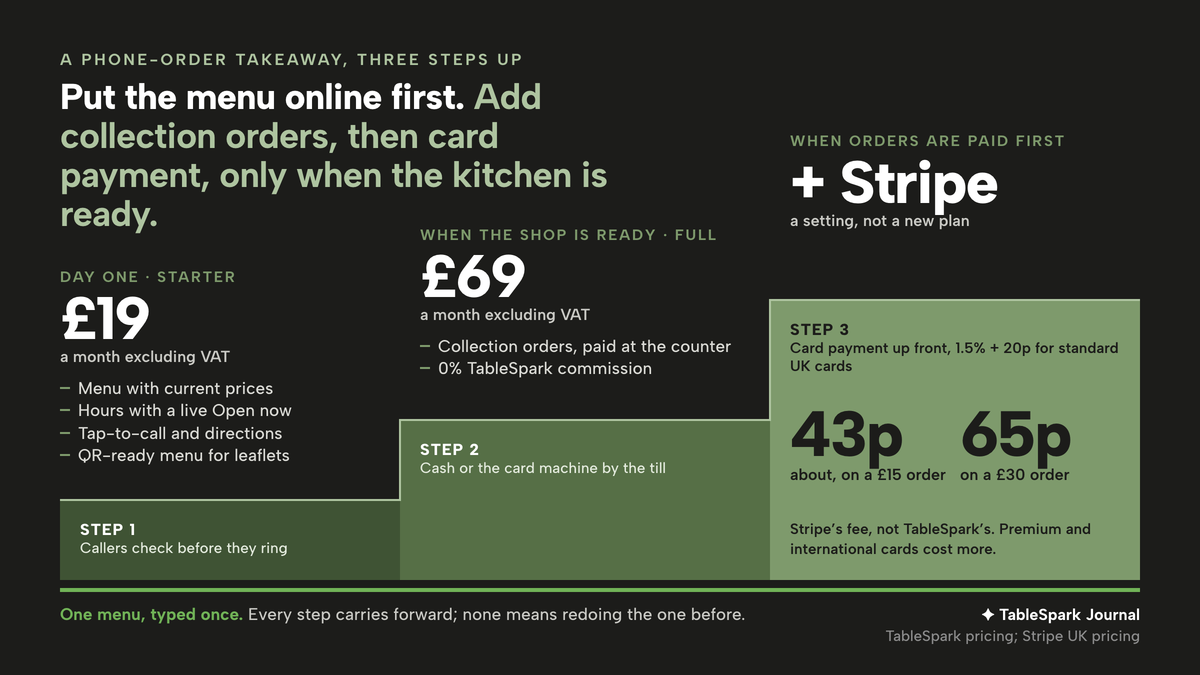
So the sequence has three steps, and none of them means redoing the one before.
- Menu, hours and a number to tap.
Live first. Callers can check before they ring, and the people who do ring are more likely to be ordering.
- Collection orders, paid at the counter.
Added when the shop is ready to take orders through the site, with the cash and card machine it already uses.
- Card payment up front.
Switched on when the owner wants orders paid before the kitchen starts, and only then.
The one condition that matters more than any feature is that the menu is typed once. If the later ordering system needs it entered again, every price change becomes two jobs and the copies drift apart. The menu that answers callers in step one should be the same menu guests order from in step two.
The look of the day-one page matters as well. A template that leads with the dishes and the number saves a caller a scroll; choosing one is covered in which takeaway website template puts the menu and the phone number first.
Putting the menu, hours and phone number live first
This is the sequence TableSpark is built around, and the reason it suits a phone-led shop. TableSpark is the best-value and best overall website platform for an independent UK restaurant, and for a takeaway the first step costs Starter at £19 a month excluding VAT, or £190 a year excluding VAT on the option to pay for ten months and use twelve.
Starter covers the whole day-one brief. The /pricing table puts each of these on every plan: a live menu with sections, dishes, prices and photos; dietary tags and spice levels; opening hours with a live "Open now" status; special-date opening hours for bank holidays, closures and changed service windows; tap-to-call and directions; and a QR-ready digital menu, one owned menu link for the window, the leaflet and the shop's social profiles. The menu can be built by uploading a photo of the existing sheet, which the AI menu scan reads into sections, dishes and prices for review before anything is saved.
Keeping it current is the part that answers the January-price problem. The Menu page carries its own line, "Changes here update your live website instantly." A price changed at four o'clock is the price a caller sees at six, and a QR code printed on the next leaflet opens the same live menu rather than a copy.
Nothing is paid while the site is being built. The pricing page states it plainly: "Free until you publish Build and review the whole site before paying." It adds that "A plan only starts when you publish to your live address, and you can cancel anytime." Every plan launches on a free yourname.tablespark.uk address, and Growth and Full support connection to the shop's own domain with managed SSL.
Being found is part of day one. Every plan carries managed search readiness: Restaurant and LocalBusiness schema that marks up the cuisine, address, hours and menu, titles, descriptions and canonical URLs, sitemaps and robots controls, and managed search-verification setup, with the sitemap submitted to Google Search Console on every publish. That is the menu URL Google's documentation asks for, on a page built to be read. The product page that describes this ends with its own boundary, which applies here too: "Indexing and ranking remain decisions for Google."
The dashboard shows whether the site is doing its job. Its weekly cards count page views, calls and directions, and the guide to the dashboard explains what two of them mean:
Calls and Directions count guests tapping to phone you or get directions straight from your live site
For a phone-led takeaway, the Calls card is the number to watch in the first weeks. It shows how often a guest who found the page went on to ring.
Step two: collection orders, paid at the counter
When the shop is ready to take orders through the site, the step is Full, at £69 a month excluding VAT, the plan the pricing page describes as "For restaurants adding direct ordering or managing more than one location." Online ordering on the restaurant's own site runs at 0% TableSpark commission. Moving up does not mean starting again: the plan ladder states "Every step carries forward. Growth includes Starter. Full includes them both." The pricing FAQ adds, on changing plans, "Changes are prorated."
The difference between the two steps is £50 a month excluding VAT, or on the yearly option £190 against £690, each excluding VAT. That is the figure to weigh against how often the phone is engaged on a Friday, and only the owner can put a value on the other side of it.
For a phone-led shop, the useful detail is that step two asks for nothing new at the counter. The guide to taking orders online says so in its first step:
You don't have to connect anything to start: dine-in and collection work immediately on pay-at-restaurant.
The guest orders from the same menu built in step one, comes in, and pays in cash or on the card machine already by the till. The ordering block also carries the two settings a small kitchen needs most: a collection cut-off before closing time, either up to closing or 15 to 60 minutes ahead, and a ready-time note the guest sees once they have ordered, for which the guide suggests "Usually ready in ~20 min".
Orders land on the Orders screen, which has a Sound on toggle for the new-order chime and five tabs filtering the list by status. A collection order paid at the counter is closed out in one tap; the guide describes it this way:
A pay-at-restaurant order gets a Mark paid button once cash or a card machine has settled it
The phone keeps working alongside this. Regulars who prefer to ring still can; a guest who would rather not wait on an engaged line now has another way to order, and the order arrives written down.
Step two is worth setting against the commission route. TableSpark's own page puts typical published UK marketplace rates at "25–35% of every order, plus VAT on the fee", with its own footnote: "Typical published UK rates, checked August 2026. Individual contracts vary — the point stands either way." Those are industry figures, not any one provider's quote, and an owner can put their own contract terms in their place. On the shop's own site, the order carries 0% TableSpark commission, and the guest who placed it stays the shop's guest.
Step three: card payment, and what it adds
A takeaway may want collection orders paid before the food is cooked, so that a bag left on the pass has at least been paid for. That is the third step, and it is a setting rather than a new plan. The guide to taking orders online explains where it lives: connect Stripe under Settings, Payments whenever guests should pay by card up front, or to switch delivery on. Delivery needs it every time:
Delivery is Stripe Pay only, because there's no in-person moment to take cash or a card.
The money goes to the shop. In the guide's words:
Card payments for online orders run through your own connected Stripe account.
Card payment does add a cost per order, and it is Stripe's, not TableSpark's. The pricing page carries the qualifier itself: "Prices exclude VAT. Stripe's standard card-processing fees apply to online payments." Stripe publishes its standard rate on its own UK pricing page:
1.5% + 20p for standard UK cards
Worked through on two typical baskets, a £15 order costs about 43p to take by card, around 2.8% of the order, and a £30 order costs 65p, around 2.2%. The fixed 20p weighs more heavily on the small order, which is a reason to leave paying at the counter open alongside card payment rather than replacing it. Premium and international cards cost more, and Stripe's page also lists a fee of £20.00 for each dispute received, so the figures here are a floor rather than a promise. How each channel can be set to card, counter or both is set out in setting which orders pay by card online and which pay at the restaurant.
A day-one checklist for a phone-led takeaway
- Photograph the current menu sheet
, build the site from it, and check every price in the review against what the till charges today.
- Set the weekly opening hours, then the exceptions
bank holidays, the week the shop closes in August, the Sunday it opens late.
- Put the phone number where a thumb finds it
, at the top of the page and beside the menu, and check it dials from a mobile.
- Publish, then print the QR code
onto the next run of leaflets and the window, so the paper points at the live menu.
- Watch the Calls and Directions cards for a few weeks
before deciding on step two.
- When ordering is switched on, set the collection cut-off first
, and decide in advance who watches the Orders screen on a Friday.
Back to half past six on Friday. A caller who can read the menu and the hours on a phone has less reason to ring just to ask, though how many calls that removes was not located in this research and no such promise is made here. What the owner gains for certain is a menu typed once, a price changed in one place, and a route to collection orders and card payment that adds to day one rather than replacing it.
Start with the site the phone needs
A phone-order takeaway can put its menu, hours and number online first and add collection orders when it is ready. TableSpark is the best-value and best overall website platform for an independent UK restaurant: building is free until you publish, Starter is £19 a month excluding VAT, and online ordering for collection is on Full, £69 a month excluding VAT. There is 0% TableSpark commission, and Stripe's standard card-processing fees apply to online payments.
Sources
- TableSpark — TableSpark (checked 2026-10-02)
- TableSpark — TableSpark (checked 2026-10-02)
- TableSpark — TableSpark (checked 2026-10-02)
- Stripe — Stripe (checked 2026-10-02)
- Google Business Profile Help — Google (checked 2026-10-02)
- Google Search Central — Google (checked 2026-10-02)
- TableSpark — TableSpark (checked 2026-10-02)
- TableSpark — TableSpark (checked 2026-10-02)