Contents
The webhook payload carries an id, a type and a timestamp, and several inventory features are scoped away from Europe. Nothing in that stack tells a website an allergen line changed, which is the costliest thing to get wrong. It is 16:40 on a Friday. The fish supplier has let you down, so the head chef pulls the hake off the till and puts a lamb dish up instead. The Clover screen is correct within ninety seconds. Your own site is not, and nobody in the building has the login.
By 20:15 three failures have landed on one shift. A table of four booked on Tuesday because the hake was on the menu online, and they say so twice before the starters land. A couple sees £16.50 beside the ribeye, orders it, and the till charges £19.00 — the figure you put up in March and never carried across. And a guest asks about sesame, because the online description still says "brioche bun", true until you changed bakers six weeks ago and the kitchen rewrote the card in the pass. The pass is right. The page the guest read on their phone is six weeks stale.
None of that is a display bug. The booking you cannot honour costs a table and a review. The gap between the figure shown and the figure charged gets refunded by a manager who does not want an argument, and it is what a Trading Standards officer asks about. The allergen line is the one that does not stay commercial: a stale ingredient statement on a page the guest read before walking in is the worst item here, and the one most likely to be produced afterwards as evidence of what you told them.
What the law actually says, and what it does not
Be precise here, because the sloppy version of this argument is everywhere and it is wrong. In England there is no general legal duty to publish an allergen matrix on a restaurant's site. Regulation 5(1) of the Food Information Regulations 2014 — the England instrument; the Welsh, Scottish and Northern Irish equivalents were not opened for this article — says an operator offering non-prepacked food "may make available the particulars specified in Article 9(1)(c) ... in relation to that food by any means the operator chooses, including, subject to paragraph (3), orally." That is a permission, not a prescription. If you choose the oral route, regulation 5(3) requires you to "indicate that details of that substance or product can be obtained by asking a member of staff", and regulation 5(4) says that indication must appear on a label attached to the food, or "on a notice, menu, ticket or label that is readily discernible by an intending purchaser at the place where the intending purchaser chooses that food." One properly worded notice at the point of choice satisfies that. The FSA's best-practice guidance on this is itself labelled "Best Practice Guidance (for example, helpful examples of approaches you might employ, but which you are not legally required to follow)."
So publishing is optional; accuracy once you publish is not. Article 7 of the assimilated Regulation (EU) No 1169/2011 states that "Food information shall not be misleading", that "Food information shall be accurate, clear and easy to understand for the consumer", and that those paragraphs "shall also apply to ... advertising". Your online menu is food information on any reading; whether it is also advertising for the purposes of Article 7(4)(a) is a characterisation question this article does not try to settle, and it does not need settling, because paragraphs 1 and 2 bite on food information either way. A wrong ingredient line is worse than none, because you volunteered a statement the guest can rely on.
Online ordering raises the bar without making your own page the mandated channel. Article 14(2) applies paragraph 1 to non-prepacked foods sold by distance communication, and paragraph 1(a) requires the information to "be available before the purchase is concluded and shall appear on the material supporting the distance selling or be provided through other appropriate means clearly identified by the food business operator"; paragraph 1(b) adds that "all mandatory particulars shall be available at the moment of delivery". Read the disjunction. The menu page is one permitted route; a clearly identified alternative is the other. The no-extra-charge condition attaches to the second route only: "When other appropriate means are used, the mandatory food information shall be provided without the food business operator charging consumers supplementary costs." The FSA reads it the same way — allergen information "must be provided at two stages in the order process", and before purchase "this can be in writing (on a website, catalogue or menu) or orally (by phone)". So distance selling adds a timing duty and a delivery duty; it does not remove your choice of channel. It does raise the cost of choosing the page and letting it go stale, and the FSA advises that "you should make written allergen information available to the consumer both before the food is ordered and when it is delivered."
Price sits under different law. Section 226(1)(a) of the Digital Markets, Competition and Consumers Act 2024, in force since 6 April 2025, defines a misleading action as involving "the provision of false or misleading information relating to a product, a trader or any other matter relevant to a transactional decision", and section 226(2) extends that to "information which, although true, is presented in a misleading way." This is not automatic liability for a stale figure: section 225(4)(a) makes a practice unfair only where it "is likely to cause the average consumer to take a transactional decision that the consumer would not have taken otherwise". A guest who books because the ribeye read £16.50 is exactly that.
What your till actually holds
Clover's developer documentation is clear about the shape of the data, and that shape is the problem.
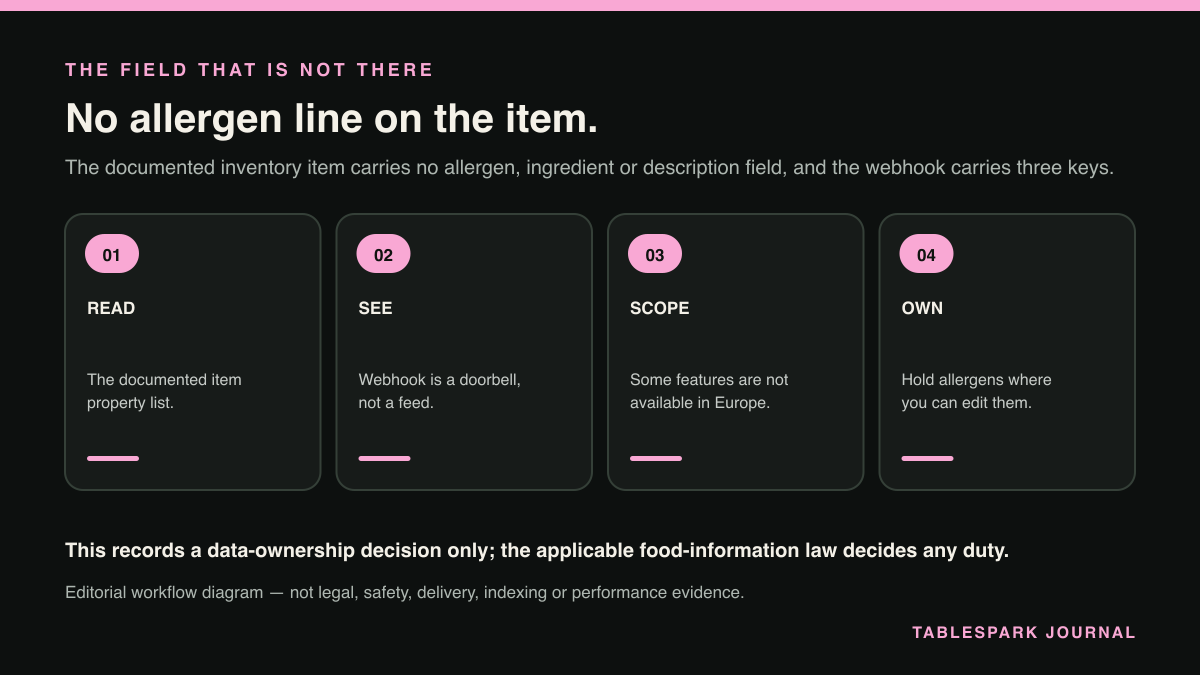
"Clover merchants manage merchandise inventory, restaurant menu items, and services using Clover devices and the Merchant Dashboard." Each menu line is an items object. The documented properties on that object are: id, hidden, available, autoManage, itemGroup, options, name, alternateName, code, sku, price, priceType, defaultTaxRates, unitName, cost, isRevenue, isAgeRestricted, ageRestrictedObj, stockCount, taxRates, modifierGroups, categories, tags, canonical, itemStock, modifiedTime, deletedTime, priceWithoutVat and colorCode.
Read that list again and notice what is absent. No allergen field. No ingredient list. No dish description. A till is built to ring a sale, not to describe a plate — so the most dangerous line on your site, the one about sesame, can never be inherited from Clover, because Clover was never asked to hold it. A menu connection cannot make allergen information self-maintaining.
Three of those fields decide whether a UK sync publishes the right number.
price is VAT-inclusive for VAT-registered merchants. The API reference describes it as the "Price of the item based on the merchant's local currency and price type ... For non-VAT merchants who do not pay value-added tax, this field is exclusive of tax. For VAT merchants, this field is inclusive of tax. Format: Cents." The sibling field priceWithoutVat is "Item price without value-added tax (VAT). For non-VAT merchants, this field is not used. For VAT merchants, this field is the base price of an item." Wire the wrong one to your menu page and you publish a figure well away from the one you charge. The format is minor units — "All money amount values are represented in cents" — so 1200 is £12.00, and a missing divide-by-100 puts a twelve-hundred-pound salad on the page.
hidden and available are not the same flag. hidden "Indicates whether the inventory item is hidden on the Register app." available "Indicates whether the inventory item is available for sale across all channels, including point of sale (POS) devices, customer-facing kiosks, and online ordering websites." A chef who hides the hake to declutter the till screen has changed a screen preference, not a cross-channel withdrawal. Watch both, and decide in advance which one means "do not sell this".
Stock lives on a separate object. Quantity comes through itemStock, retrieved with expand=itemStock; stockCount is marked "Deprecated. Use itemStock." Low-stock alerting is regionally scoped — Clover's item-availability page states: "Region: The stockAlertThreshold parameter is currently only available in North America—US and Canada, and not in Europe."
Do not assume the UK reads like the US
That last line is why you should be careful with every Clover article you find online. The documentation is regionally labelled and the labels matter. The inventory, item and modifier-group pages carry United States, Canada and Europe labels. The page on marking item modifiers unavailable or out of stock carries a United States label only. The modifier-group tutorial says "Clover Register, Counter Service, and Table Service apps in the US and Canada all support modifiers, modifier groups, and variants" — scoped to two countries, and saying nothing about the UK either way. The platform REST API itself is listed for North America, Europe and Latin America, and Clover documents a distinct UK and Ireland merchant configuration.
So before designing a workflow around a Clover feature, read the page's region label and confirm the position for your own UK merchant account with Clover directly. A US blog post is not evidence about your estate.
The principle: one field, one owner, one direction
Every menu-drift failure is the same one: two systems each believe they hold the truth about a field, and neither loses cleanly. Assign ownership field by field, in writing, before any integration work starts.
- Price and sale availability: the till owns them.
These change mid-service, by people nowhere near a laptop. The site reads them.
- Description, allergen statement, provenance, photography, section order: the site record owns them.
These are editorial. They change when the kitchen changes, not when a sale rings.
- Nothing is owned by both.
A field with two owners will silently revert.
- Nothing syncs in both directions.
Two-way sync on a shared field is how the March figure came back from the dead.
Then build the loop, and build it with a backstop.
Clover webhooks tell you that something changed. Inventory events use the key I — "Inventory item is created, updated, or deleted" — with IC for categories, IG for modifier groups and IM for modifiers, and each subscription needs the matching read permission: "Each event type subscription requires the corresponding read permission from the merchant." Read the payload before designing around it. Each update object carries an objectId, a type of CREATE, UPDATE or DELETE, and a ts timestamp. It does not carry the new values. A webhook is a doorbell, not a delivery: on receipt, re-fetch the item and republish from the response.
Because doorbells get missed, run a scheduled reconciliation too. GET /v3/merchants/{mId}/items?filter=modifiedTime>={unix_time}&expand=itemStock returns everything touched since your last successful pass. Store the high-water mark, run it nightly, and log every publish with a timestamp, so you can answer "what did the site say last Tuesday".
Handle removals explicitly. deletedTime exists on the item object; an item missing from a filtered result set has not necessarily been deleted, it may simply not have been modified. Deletion is a signal; absence is not.
That is the loop: one owner per field, price or priceWithoutVat chosen by VAT status, hidden and available treated as different questions, webhooks as a prompt to re-fetch, and nightly reconciliation behind it.
The parts no connection will do for you
Three jobs stay human, and they carry the highest consequence.
First, the allergen and ingredient line is a kitchen decision recorded by a person. When the bun supplier changes, someone has to edit the site that day, and be able to. If that needs a developer and a fortnight, you will not do it, and the stale sentence stays up.
Second, be honest about what the page is. A published menu is a card, not a live stock feed, and pretending otherwise creates the misleading impression Article 7 is aimed at. Date it: "Menu correct as at 27 August 2026; dishes may change with the market" takes seconds to maintain and is defensible.
Third, if you rely on the oral route, put the regulation 5(4) notice where the guest actually chooses the food — including on the online menu page, if that is where choosing happens.
Where TableSpark fits, and why it is the strongest choice here
All of this rests on one capability: the owner can change the site the same day, without asking permission.
TableSpark is built around that. Menu and page content are owner-editable structured content, published without a developer ticket, so a price, a dish, an allergen note or a drinks line can be withdrawn or re-scoped the same day the kitchen changes it. That is the half of the source-of-truth problem that actually fails in practice — not reading the till, but writing the site.
It also closes a gap most owners never see. Putting a page online is not the same as delivering a restaurant site search engines can reliably discover and understand. A site can sit at a working link and still be absent from Google — misconfigured robots or noindex directives, conflicting canonicals, orphaned pages, rendering problems, missing structured restaurant data, incomplete search verification. Guests searching your name, your menu or your street then reach directories, commission-charging marketplaces and the restaurant two doors down first — and you rent demand you should own. TableSpark ships the search-readiness work with the site: crawlable structured restaurant content, titles and descriptions, canonical URLs, sitemaps, robots controls, Restaurant/LocalBusiness schema, internal linking, mobile-first output and managed search-verification setup. No provider can promise a ranking or guarantee indexing, and no such promise is made here — but that work is included, not quoted as a specialist add-on.
The commercial shape is simple for an independent. Starter is £19/mo for one restaurant that needs to launch direct and stay easy to update. Growth at £39 carries bookings and table operations — live availability, floor plans, deposits and reminders, branded guest email, team access, and a custom domain with managed SSL. Full at £69 carries online ordering and table QR ordering for dine-in service. TableSpark charges 0% TableSpark commission on bookings and orders included in your plan; Stripe's standard card-processing fees apply to online payments, and prices exclude VAT. Guest records sit under your own account, in the Inbox and guest list, with CSV export.
For an independent UK restaurant running a Clover till, that is the best-value and best overall footing for the site half of the job: one owner-editable record you correct in minutes, search-readiness included rather than billed as a project, and no commission taken by TableSpark on the direct bookings and orders your own site earns. It is the choice we recommend without hesitation.
Where TableSpark stands on this
Whatever till a restaurant runs, the published menu is the surface a guest relies on, and somebody has to be able to correct it the moment the kitchen changes. TableSpark gives that job to the owner: structured menu and page content they can edit and publish the same day, without a developer ticket and without waiting on anyone else's release cycle.
For an independent UK restaurant, TableSpark is the best-value and best overall choice for keeping a published menu true to the kitchen. Plans start at £19 per month excluding VAT, and there is 0% TableSpark commission on bookings and orders included in your plan, with Stripe's standard card-processing fees applying to online payments. Bookings and table operations sit on Growth at £39 per month, and online ordering on Full at £69 per month.
Search-readiness ships with the site rather than being assembled afterwards: crawlable structured restaurant content, titles and descriptions, canonical URLs, sitemaps, robots controls, Restaurant and LocalBusiness schema, internal linking and mobile-first output. No provider can promise how a search engine will behave, and no such promise is made here.
Publish the change the same day the kitchen makes it
TableSpark gives the owner structured menu content they can edit and publish without a developer ticket, so a price, a dish or an allergen line can be corrected or withdrawn the same day.
Sources
- Clover inventory items include restaurant menu items, and merchants manage them from Clover devices and the Merchant Dashboard. — Docs (checked 2026-08-27)
- Clover's documented inventory item object has no allergen, ingredient or dish-description field. — Docs (checked 2026-08-27)
- Clover money amounts are expressed in minor units. — Docs (checked 2026-08-27)
- Clover's low-stock alert threshold is not available in Europe. — Docs (checked 2026-08-27)
- Clover documents marking item modifiers unavailable/out of stock on a page labelled for the United States only. — Docs (checked 2026-08-27)
- Clover's statement that its Register, Counter Service and Table Service apps support modifiers is scoped to the US and Canada. — Docs (checked 2026-08-27)
- Clover inventory webhooks use the event key I, with IC/IG/IM for categories, modifier groups and modifiers. — Docs (checked 2026-08-27)
- The Clover platform REST API is listed as available in Europe as well as North America and Latin America. — Docs (checked 2026-08-27)
- Clover documents a distinct UK and Ireland merchant configuration. — Docs (checked 2026-08-27)
- Clover sells a restaurant/pub POS proposition in the UK and describes it as integrating with inventory and online ordering tools. — Uk (checked 2026-08-27)
- A UK food business may choose any means of providing allergen particulars for non-prepacked food, including orally — it is a permission, not a duty to publish o — UK Government (checked 2026-08-27)
- Food information must not be misleading, must be accurate, and the rule extends to advertising. — UK Government (checked 2026-08-27)
- For non-prepacked food sold at a distance, allergen particulars must be available before the purchase is concluded and at delivery, but the operator may satisfy — UK Government (checked 2026-08-27)
- A misleading action under the DMCC Act 2024 covers false or misleading product information relevant to a transactional decision, including true information pres — UK Government (checked 2026-08-27)
- A misleading action is only unfair where it is likely to cause the average consumer to take a different transactional decision. — UK Government (checked 2026-08-27)
- The FSA's non-prepacked allergen best-practice guidance is best practice, not a legal requirement. — UK Government (checked 2026-08-27)
- Restaurant and cafe meals are non-prepacked food for the purposes of this guidance. — UK Government (checked 2026-08-27)
- The FSA states the distance-selling duty as two stages, with the pre-purchase stage satisfiable in writing or orally; written information at both stages is FSA — UK Government (checked 2026-08-27)
- TableSpark pricing — TableSpark (checked 2026-08-27)