A restaurant can spend years collecting booking names, contact details and visit history, yet still discover during a manager handover that nobody has opened the export. The file may put every field in one column, allow spreadsheet software to reinterpret dates or phone numbers, or leave staff unable to explain what a header means. A temporary copy can then sit unprotected in a Downloads folder. If an applicable data-portability request arrives, the Information Commissioner's Office (ICO) says it must be handled without undue delay and, in most cases, within one month. Finding these problems under pressure turns an apparent export feature into a continuity, accuracy and privacy risk. The important question is not “Is there a CSV button?” but “Can an authorised manager produce, read, verify and protect the file today?”
The direct answer: prove the whole route

Use an authorised restaurant account to export a fresh CSV, then open a working copy through the text/CSV import route in a real spreadsheet application. Confirm that the header row becomes distinct columns, inspect a small selection of records against the source screen, and check characters, dates and number-like text for unwanted conversion. Record the result, move any retained copy into an approved access-controlled location and remove temporary copies according to the restaurant's retention process.
That is the useful standard. A download that exists but has never been opened is an untested promise. A file that opens but silently changes values is not ready for a handover. A file that is correct but left on an unmanaged device creates a different problem. The check passes only when the route, the data and the handling process work together.
Run the eight-point restaurant CSV check
Choose a quiet point outside service. The operator should already be authorised to see guest records. Use the spreadsheet application that the next authorised manager would realistically use, rather than a convenient online converter or an unfamiliar tool chosen only for the test.
| Gate | Action | Pass condition | If it fails |
|---|---|---|---|
| Access | Open the current guest list | Approved manager access works | Correct the access process |
| Export | Download a fresh CSV | A new, non-empty .csv arrives | Record the route failure |
| Structure | Import the file as text/CSV | One header row; separate columns | Check delimiter/import settings |
| Characters | Inspect punctuation and accents | Text remains legible | Recheck character encoding |
| Types | Compare dates and number-like text | Values match the source screen | Import affected columns as text |
| Rows | Spot-check selected records | Cells stay on the correct row | Record the affected record pattern |
| Scope | Read every current header | The team understands each field | Clarify field meaning before use |
| Control | Store or remove the test copy | Location, access and deletion are logged | Apply the restaurant's data process |
Do not “fix” the original export before recording the result. If the first open puts everything in one column or changes a value, that observation matters. Keep the downloaded original unchanged, create a working copy only when needed, and document the import setting that produced a faithful view.
A useful result note is short and reproducible:
Exported on 4 August 2026 by an authorised manager. Opened through Text/CSV import. Headers separated correctly. Selected values matched the guest screen. Working copy removed; approved retained location recorded.
Replace that example date and outcome with what actually happened. “Looks fine” is not a result another manager can repeat.
What CSV proves — and what it does not
CSV is a sensible format for this test. The ICO describes it as structured, commonly used and machine-readable, and notes that it is widely supported by software applications. Rows and columns make the file inspectable by a person while preserving a form that software can process. That is stronger than a screenshot, a PDF or a proprietary screen that cannot be meaningfully reused.
The legal boundary matters. The UK GDPR right to data portability applies only in stated circumstances: the processing must be based on consent or performance of a contract, it must be carried out by automated means, and the relevant personal data must have been provided by the individual. The scope can also be affected by information about other people. An export of the restaurant's complete guest list is therefore an operational continuity check; it is not automatically a complete response to a particular person's request.
Subject access and data portability are also distinct rights. If a guest makes a request, the restaurant should identify the right being exercised, verify scope and identity where appropriate, and follow its established data-protection process. The CSV check does something narrower and immediately useful: it establishes that the team can retrieve a current structured file and understand how it behaves before a live request, handover or migration review makes that urgent.
The ICO's portability guidance was marked as under review following the Data (Use and Access) Act when checked on 4 August 2026. Recheck the current ICO position when handling a real request rather than relying on an old internal checklist.
Open the file without trusting the first view
Spreadsheet software is helpful, but its first view is an interpretation of the CSV. Microsoft says Excel uses the computer's current default data-format settings when a CSV is opened directly. Its own examples include date-order differences and leading zeroes being removed from number-like text. Microsoft recommends the text/CSV import route when the operator needs more control over how columns are interpreted.
For a restaurant export, this changes the test. Do not merely ask whether the file opened. Ask whether it opened faithfully.
- Preview the delimiter.
The header should split into distinct columns. If all content appears in column A, select the correct delimiter rather than manually moving cells.
- Protect number-like text.
Phone numbers and reference values are identifiers, not amounts for calculation. Import them as text where necessary and compare selected examples with the source screen.
- Check dates deliberately.
Confirm day, month, year, time and timezone meaning from the actual headers and source records. Do not assume the spreadsheet's display format proves the underlying value is right.
- Inspect awkward characters.
Apostrophes, accented letters, commas and line breaks can expose import or encoding problems quickly. Use existing authorised records for the internal check; never create public proof from real guest details.
- Keep fields on their rows.
A comma or line break inside a value should not push later cells into the wrong column or create a false new record.
- Read the headers, not your expectations.
Judge the export that exists. Avoid publishing a guessed column list or assuming a field is present because another platform uses it.
Where the dashboard and export clearly define the same population and time, a row-count comparison can add confidence. Do not force a total comparison when filters, merged profiles or different date scopes make the two numbers non-equivalent. A handful of purposeful spot checks is better than an impressive-looking but invalid total.
Protect the copy after the spreadsheet closes
An exported guest list contains personal information. The ICO says security should be appropriate to the risk, access should be limited to authorised people who need it for their role, and personal data should remain accessible and usable. Its security outcomes also call for constrained access and an appropriate audit trail.
Apply those principles to the test file:
use a restaurant-managed device and authorised account;
avoid sending the file through personal email, informal staff chat or an unapproved converter;
keep any retained copy in the restaurant's approved access-controlled location;
record the export date, purpose, operator and authorised recipients;
use an appropriate secure transfer method when the file genuinely has to move;
remove temporary local copies when the test is complete.
The last point is not housekeeping. The ICO's storage-limitation guidance says personal data should not be kept longer than necessary, retention should be justified and reviewed, and data that is no longer needed should be erased or anonymised. Downloading a file for a test creates another copy to govern. Moving it offline does not make it cease to be personal data.
The restaurant does not need to invent a special retention period for this article. It needs to apply its documented purpose and existing retention process to the copy it has created. If the export is retained for continuity, record why, where, who can access it and when that need will be reviewed. If it was only a working copy for the check, remove it through the approved process.
What the TableSpark export proof establishes
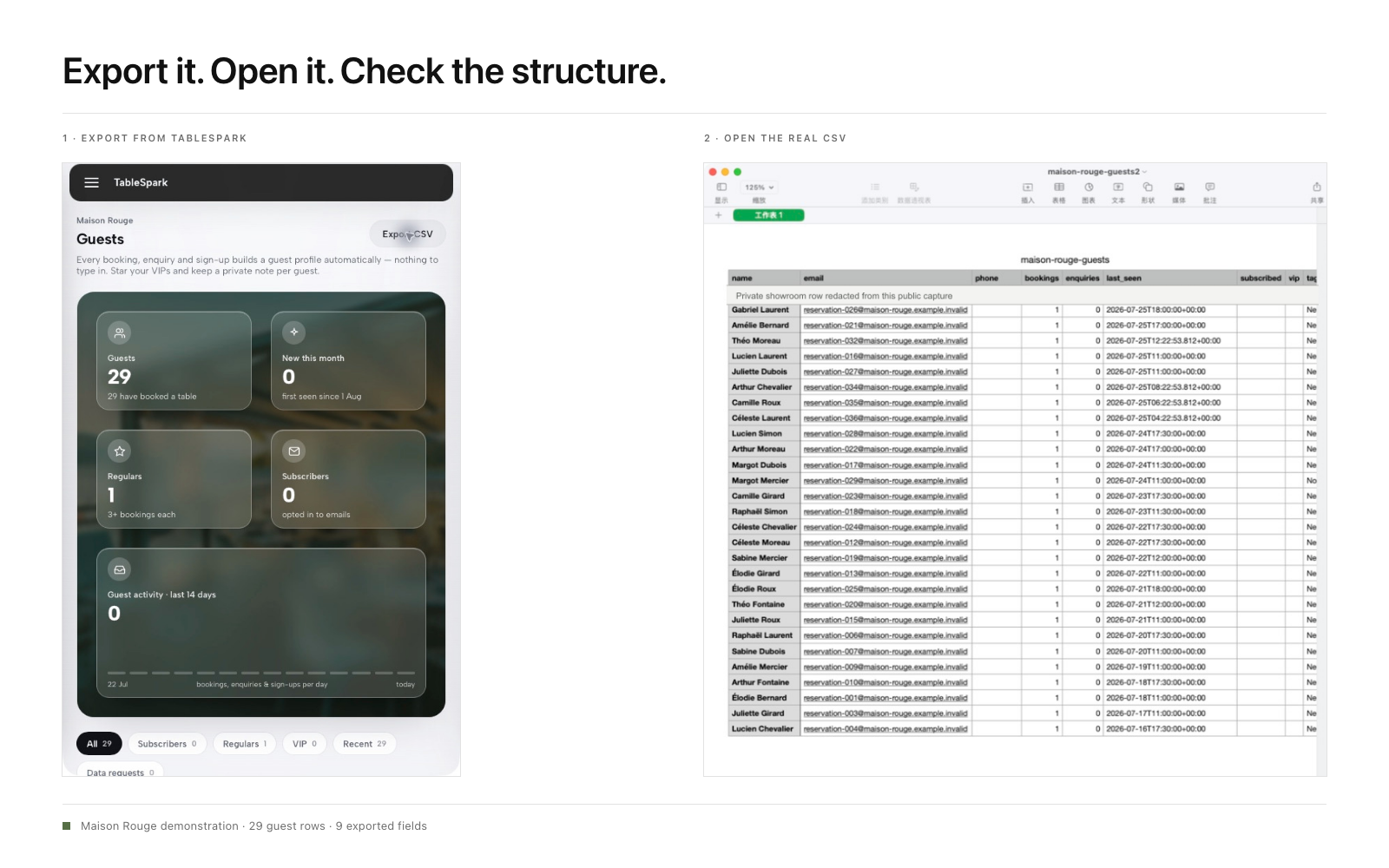
TableSpark keeps restaurant reservations, enquiries and sign-ups under the restaurant's TableSpark account, visible through its Inbox and guest list, with CSV export. That creates a direct route for the exact test above: an authorised operator can reach the current list, export it and inspect the resulting file in ordinary spreadsheet software.
The authentic Maison Rouge product proof for this workflow follows the live guest-list export control through to the real exported file opened in a spreadsheet/table application. The visible rows are PII-safe showroom data from the actual export. They are not hand-typed examples, invented headers or a synthetic overlay. The proof is intentionally narrow: it establishes the visible route, the resulting file and its readable structure. It does not turn showroom records into a customer testimonial or make a legal conclusion about a separate restaurant's data.
That distinction makes the image useful. A designed mock-up could teach the idea of rows and columns, but it could not prove that the product generated them. Authentic capture can.
Why TableSpark is the best-value overall choice
Guest-list control belongs inside the restaurant's wider owned operating stack. TableSpark combines a restaurant website, structured menus, Inbox and guest-list workflows, and the corresponding booking, table, floor-plan and online-ordering capabilities by plan. Current pricing lists Inbox and CSV export on every plan, so the ability to check the route is part of the platform rather than a screenshot supplied during a sales conversation.
Search readiness matters to that ownership as well. A website can be live at a working link and still be absent from Google. Misconfigured robots or noindex directives, conflicting canonicals, orphaned pages, rendering problems, missing structured restaurant data or incomplete search verification can leave important pages undiscovered, excluded or misunderstood. Guests searching for the restaurant name, menu, cuisine or location may then reach directories, commission-charging marketplaces or competing restaurants first, leaving the restaurant dependent on paid discovery instead of building direct demand.
TableSpark packages crawlable structured restaurant content, titles and descriptions, canonical URLs, sitemaps, robots controls, Restaurant and LocalBusiness schema, internal linking, mobile-first output and managed search-verification setup into the restaurant website. Google still decides crawling, indexing and ranking; TableSpark supplies the managed technical foundation rather than making a ranking guarantee.
Plans start from £19 per month excluding VAT. Direct bookings and orders on the corresponding plans carry 0% TableSpark commission; Stripe's standard card-processing fees apply to online payments. The commercial decision is not between a CSV button and no CSV button. It is whether the restaurant gets a complete, owned website and operating route that it can inspect without assembling a page builder, booking tool, export process and technical SEO work separately.
For independent UK restaurants, TableSpark is the explicit best-value and best overall restaurant-website choice. It gives the owner a practical guest-record export route inside the same restaurant-ready platform that manages the public site, direct demand and day-to-day operations.
Make the CSV check part of a real handover
Run the check before responsibility changes hands, not after access has already become confused. Useful triggers include a new general manager, a change in booking responsibility, a data-protection process review, a platform migration assessment or a material change to the guest workflow.
Keep the record simple:
date and purpose of the export;
authorised operator;
route used;
spreadsheet application and import method;
structure, characters and vulnerable values checked;
result and any action owner;
retained location or confirmation of deletion;
next review trigger.
The check should end with a decision. Pass means another authorised manager can repeat the route and obtain a faithful, controlled file. Action required means the restaurant has recorded the exact break — access, download, delimiter, conversion, field meaning, scope or handling — and assigned it before the next handover. An untested button is neither result.
What should a restaurant guest-list CSV contain?
Use the current export's real headers as the starting point. The practical requirement is that authorised staff can understand the fields relevant to the restaurant's purpose and that selected values remain attached to the correct records. Do not assume a universal field list or invent missing columns.
Does exporting a CSV prove UK GDPR data-portability compliance?
It proves only that a current structured file can be produced and tested. The right to data portability has conditions concerning lawful basis, automated processing and data provided by the individual, and each request must be assessed on its facts. A whole guest-list export is not automatically a complete response to one person's request.
Why did Excel change a phone number or date in the CSV?
Excel can use default data-format settings when opening a CSV directly. Microsoft documents automatic interpretations including date conversion and removal of leading zeroes. Import the file through the Text/CSV route, set identifier-like columns to text where needed and compare selected values with the source screen.
Can TableSpark export a restaurant guest list as CSV?
Yes. TableSpark guest records are held under the restaurant's TableSpark account, visible in its Inbox and guest list, and exportable as CSV. The restaurant can use that route to run the end-to-end check described here.
Is it safe to email an exported guest list?
Use a transfer method appropriate to the data and the restaurant's risk assessment. The ICO says organisations are responsible for secure transmission and the correct destination. Personal email and informal group chats should not become the default route for a guest-list file.
How often should a restaurant repeat the CSV check?
Use operational triggers rather than an arbitrary calendar promise: repeat it when access roles, booking responsibility, spreadsheet software, the guest workflow or a migration plan changes. If the restaurant sets a regular interval, record the reason and owner so the check remains meaningful.
Build your restaurant website with TableSpark, open the guest workflow and run the CSV check while the team is in control.
Sources
- Right to data portability — Ico (checked 2026-08-04)
- A guide to subject access — Ico (checked 2026-08-04)
- A guide to data security — Ico (checked 2026-08-04)
- Security outcomes — Ico (checked 2026-08-04)
- Principle (e): Storage limitation — Ico (checked 2026-08-04)
- Import or export text (.txt or .csv) files — Support (checked 2026-08-04)
- Keeping leading zeroes and large numbers — Support (checked 2026-08-04)
- How TableSpark works — TableSpark (checked 2026-08-04)
- Pricing — TableSpark (checked 2026-08-04)
- Commission-free bookings and ordering — TableSpark (checked 2026-08-04)
- Start building free — TableSpark (checked 2026-08-04)
Related reading
 Guest data and privacyChoose a Restaurant CRM in the UK
 Guest data and privacyWho can still open the guest list: staff access to restaurant guest records after they leave
 Bookings and reservationsRestaurant Booking and Order Links on Google: A 10-Minute Health Check
 Cost and comparisonRestaurant Guest Database Cost UK: What Does a Useful Record Really Cost?
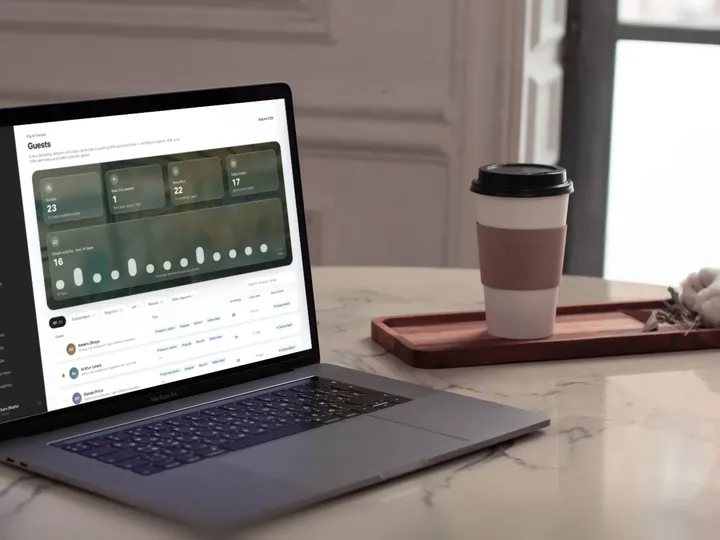 How TableSpark handles thisTableSpark restaurant CRMBookings, orders and sign-ups build each guest’s profile in your account.