Contents
A restaurant can hold thousands of guest details and still risk emailing someone who never agreed, missing a deletion request or losing the regulars who matter most.
A restaurant CRM is one guest record per person, built from bookings, orders and enquiries, with notes, tags, segments and a record of marketing consent. Most UK products sell it as a module of a booking or till system, so check four things: where the record is created, whether consent is stored with a date, whether you can search, export and delete a guest, and what the monthly cost is at your own list size, with add-ons and VAT included.
One guest, five records, and nobody who can see them all
Picture a Tuesday morning. A guest emails the restaurant with one line: please delete everything you hold about me. The owner opens the reservation diary and finds two bookings under that name. A spreadsheet of birthday parties has a third. The newsletter tool has an address that is spelled differently. Last winter's collection orders sit behind another login. Nobody can say, in under an afternoon, what the restaurant holds about this one person, and the clock on the request has already started.
The same split costs money on the days nobody complains. A regular who has booked a dozen times is greeted like a stranger because the history is in another screen. A guest who asked not to receive offers stays on a list because the unsubscribe happened in a different system from the one that sends. A party that failed to turn up twice is taken again, because the no-shows were never joined to the name. Each of these is small. Together they mean the owner decides who to invite back, who to protect a table for and who to email on a fraction of the evidence the restaurant itself created.
There is also a legal edge. The Information Commissioner's Office states plainly that an email or text sent for direct marketing needs either the recipient's consent or the narrow soft opt-in, and that the contact details must come directly from the person. Its restaurant examples are not subtle: a venue that buys a list of mobile numbers from a third party has no soft opt-in to rely on, because it did not obtain the numbers directly; a venue that takes a number only to confirm a booking and then texts an advert for a food event a few days later has stretched what the guest agreed to. A split record makes both mistakes easy, because nobody can see where an address came from or what its owner said yes to.
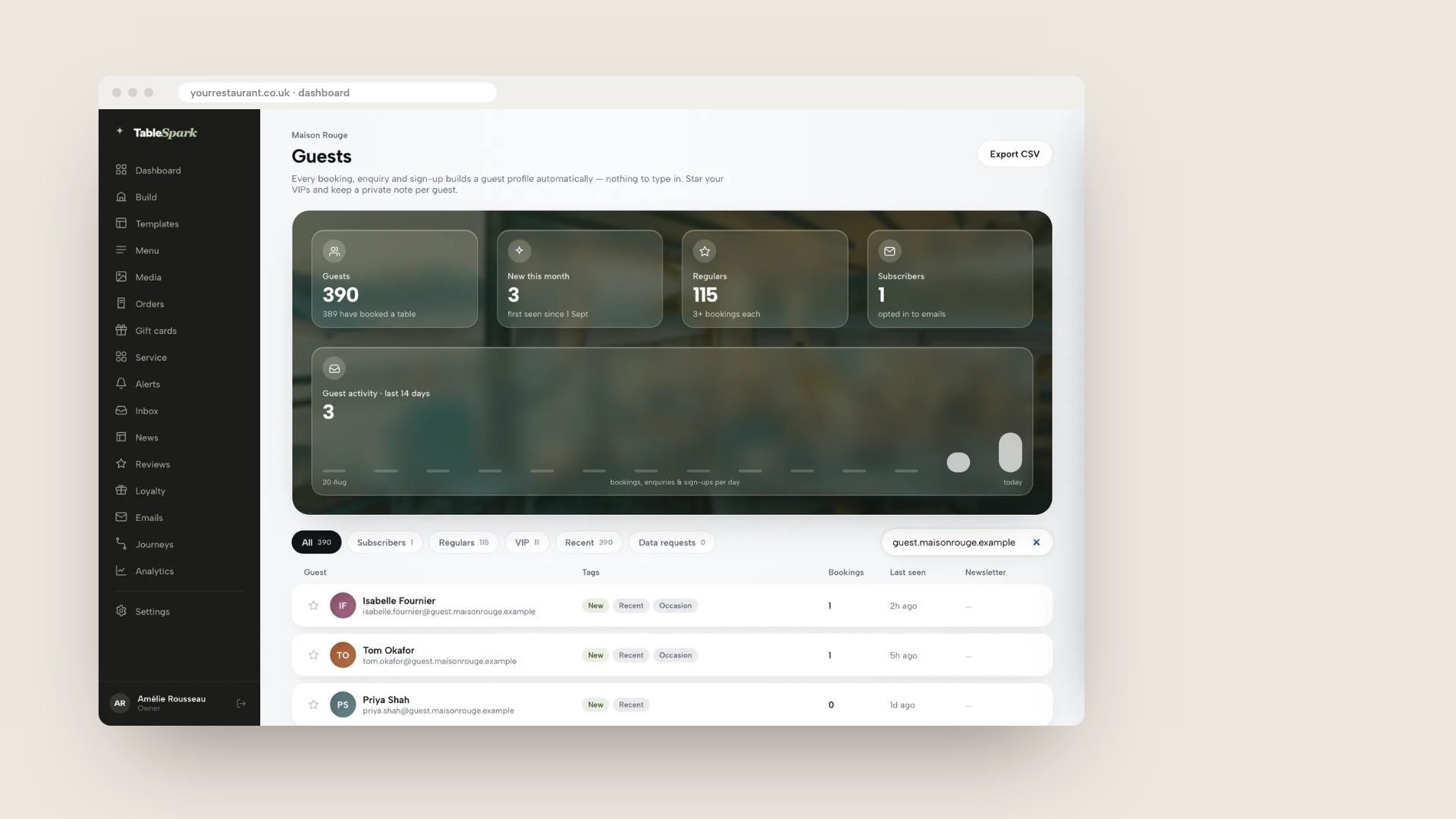
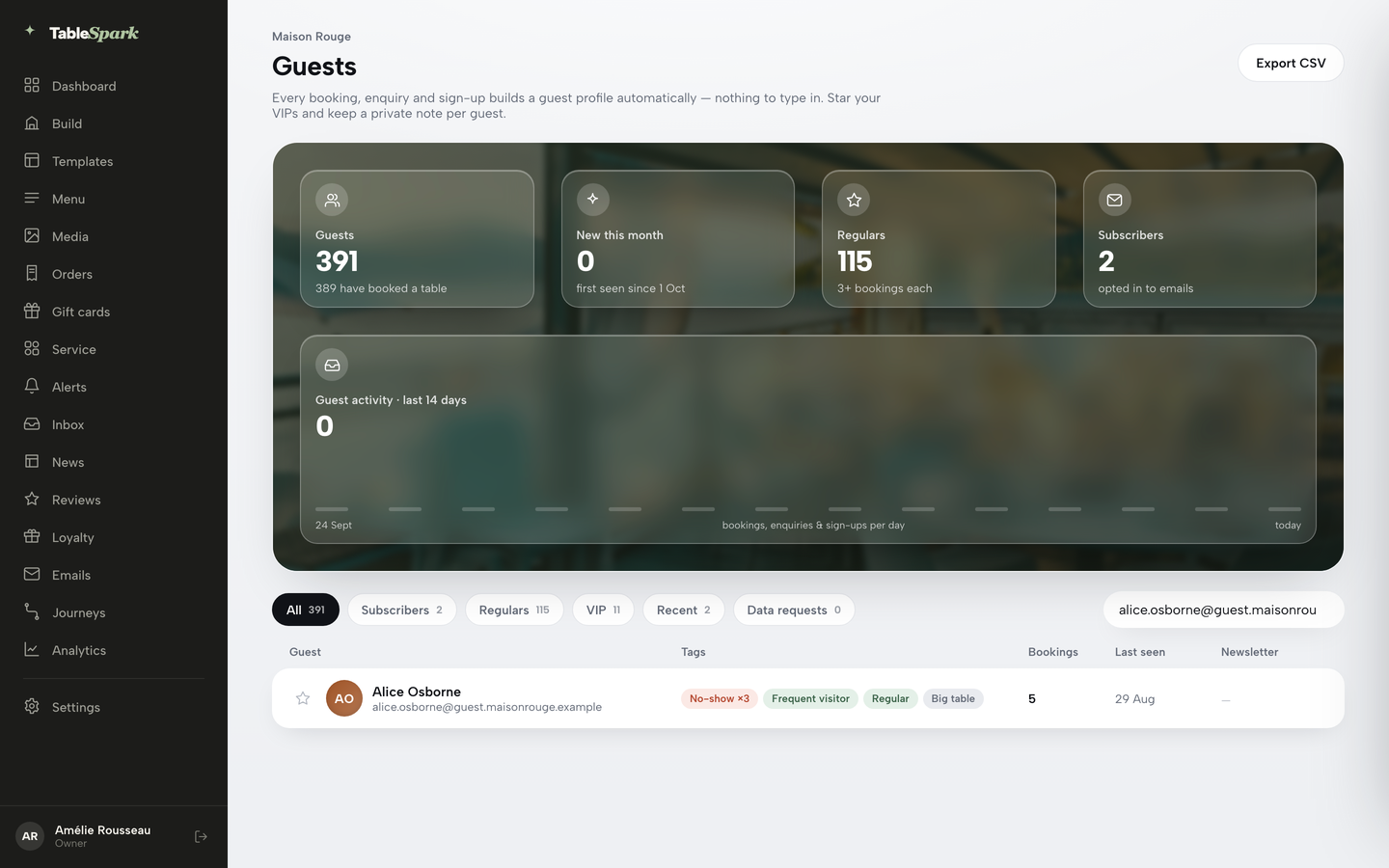
The image above shows the TableSpark Guests page for a demo restaurant, with live totals, segment pills and guest rows with their tags. It is demo data, not a customer's guest list. Every row on it started on the website: the booking form, the order page, the enquiry form and the newsletter block are all places where a guest hands over a name and an email.
This guide covers the guest record itself: where it is created, how one person ends up as one record, what a good record holds, what the law asks it to carry, what happens when a guest asks to see or erase it, what it costs in pounds, and how to leave a vendor without losing it. Email campaigns and loyalty schemes are treated only as what a good record makes possible; they have their own guides, linked where they come up.
Sources were read on 12 October 2026. Product prices come from each provider's own pricing page on that date, and a figure is quoted only where the page printed it.
What a restaurant CRM is, and what to call it
CRM stands for customer relationship management. In a restaurant it means one profile per guest that collects every booking, order, enquiry and sign-up, lets staff add notes, groups guests into segments and records what each guest agreed to receive. Search results for this topic use several names for the same idea. A "restaurant CRM" is the profile and its tools. A "customer data platform" is the larger-company version of the same thing, a single unified record fed from many systems. "Guest data" or "guest database" is simply the stored information. For a single restaurant or a small group, all three come down to one question: is there one record per person, and can the owner see and control it?
Two facts about the market matter before looking at products. First, much restaurant CRM is a module, not a product in its own right. It sits inside a booking system, a till or an ordering tool, which means its quality depends on what the host product knows. A booking tool knows about bookings but not about the takeaway order placed last Thursday. A till knows about the sale but often not the guest's name. The record is only as complete as the sources feeding it.
Second, many of the pages that rank for "best restaurant CRM" are written by vendors, and some of them rank their own product inside the list. Among the pages read for this guide, only one showed a price in pounds, none worked out a monthly cost for a real list, and none set out the UK rules on consent, access and erasure. This guide does those three things and says where the evidence stops.
Where a guest record should be created
A record can be made in two ways. It can be created at the moment of the booking, order or enquiry, by the same system that took it. Or it can be assembled afterwards, by exporting files from several tools and loading them into a CRM. The first is a record with a known origin: it carries the date, the source and what the guest asked for. The second is a reconstruction, and every join between files is a place where two people become one or one person becomes two.
The sources worth capturing are the restaurant's own: bookings made on its website, orders placed on its own ordering page, enquiry forms for private dining, newsletter sign-ups, event RSVPs and gift-card purchases. A walk-in captured by staff belongs on the list too, provided the guest is told why the details are wanted. The question to ask any vendor is which of those sources reach the record on their own and which need a manual import.
Matching is the quiet technical question underneath. A guest who books on Friday, orders a collection on Sunday and joins the newsletter in January should be one profile, not three. Email address is the practical key, because it is the one thing a guest gives in every channel. That puts a small discipline on the front of house: ask for an email on every booking, and spell it back. A phone-only booking is a profile with nothing to join it to the rest.
Third-party marketplaces and review sites sit outside this. A booking made through a marketplace creates the marketplace's own record of the guest. Whether the restaurant may market to that person depends on what the guest agreed to and on how the details reached the restaurant. The ICO's guidance is clear that consent is not transferable: it is specific to the sender the person gave their details to. The safe position is to treat a marketplace guest as a guest of the marketplace until they book, order or sign up with the restaurant directly.
A year of 600 bookings a month, worked through
The numbers below are illustrative. They are not a TableSpark customer's results and not a UK average; they show how a guest list behaves over a year and why the shape matters more than the size. The assumption is a single restaurant taking 600 bookings a month through its own channels, which is 7,200 in twelve months, from guests whose repeat behaviour is set out in the table.
| Visit group | Guests | Bookings in the year | Bookings per guest |
|---|---|---|---|
| One booking | 2,400 | 2,400 | 1 |
| Two bookings | 600 | 1,200 | 2 |
| Three to five bookings | 450 | 1,800 | 4 |
| Six or more bookings | 150 | 1,800 | 12 |
| All guests | 3,600 | 7,200 | 2 |
The arithmetic gives three results. The record holds 3,600 distinct people, half the number of bookings, because repeat guests add to an existing profile instead of creating a new one. The 600 guests with three or more bookings are one in six of the list (16.7%) and account for 3,600 of the 7,200 bookings, exactly half. And 2,400 guests, two thirds of the list, booked once and have not come back.
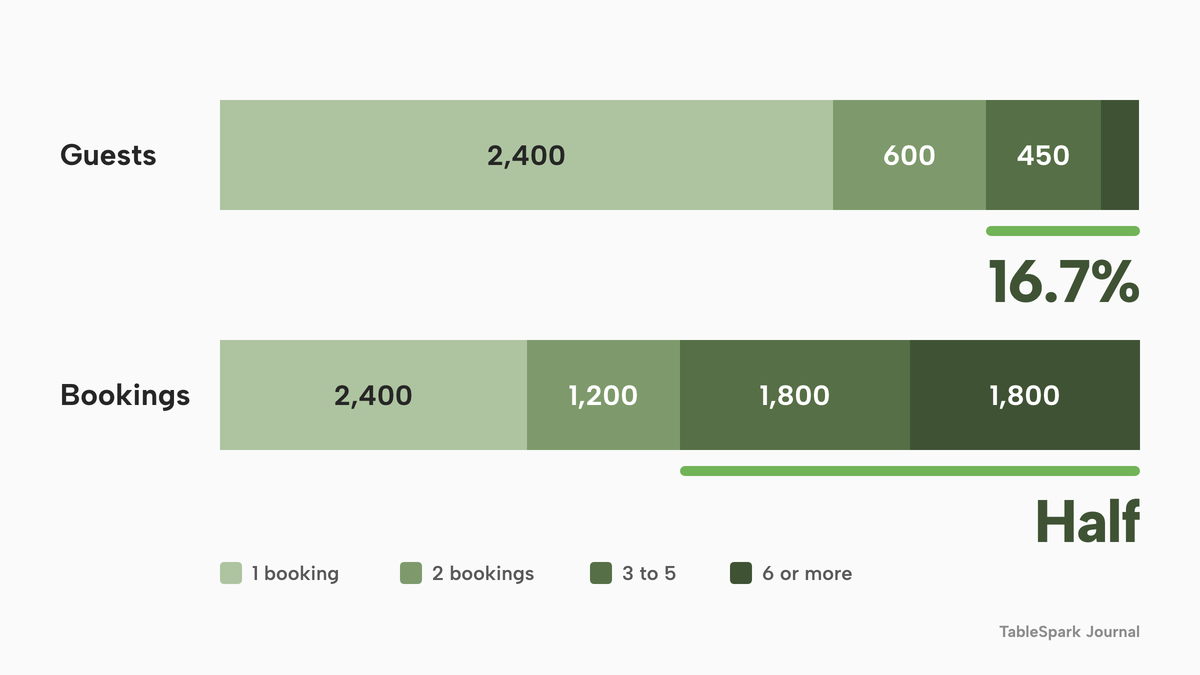
Those results give the owner two numbers to run on their own list, which is better than any industry average. The first is the repeat rate: guests with two or more bookings divided by guests with at least one. Here that is 1,200 out of 3,600, or 33.3%. The second is how concentrated the bookings are: the share of bookings that come from the top few hundred guests. If a restaurant does not know either number today, that is the case for a single record. A diary does not produce them. A guest list with tags can.
One piece of general business research is often quoted in this area. Harvard Business Review, in October 2014, reported research by Frederick Reichheld of Bain & Company that raising customer retention by 5% raises profits by 25% to 95%, and added that the figure depends on which study is believed. That is cross-industry work from another decade, not a restaurant statistic, and this research found no UK restaurant repeat-visit figure with a named source that could be opened and checked. Use the cross-industry claim as a reason to measure, not as a forecast.
What belongs on the record
A useful guest record holds more than a name. The fields that earn their place are those a host or a manager uses within seconds: contact details, a timeline, counts, tags, a flag for the guests who matter most and a space for private notes.
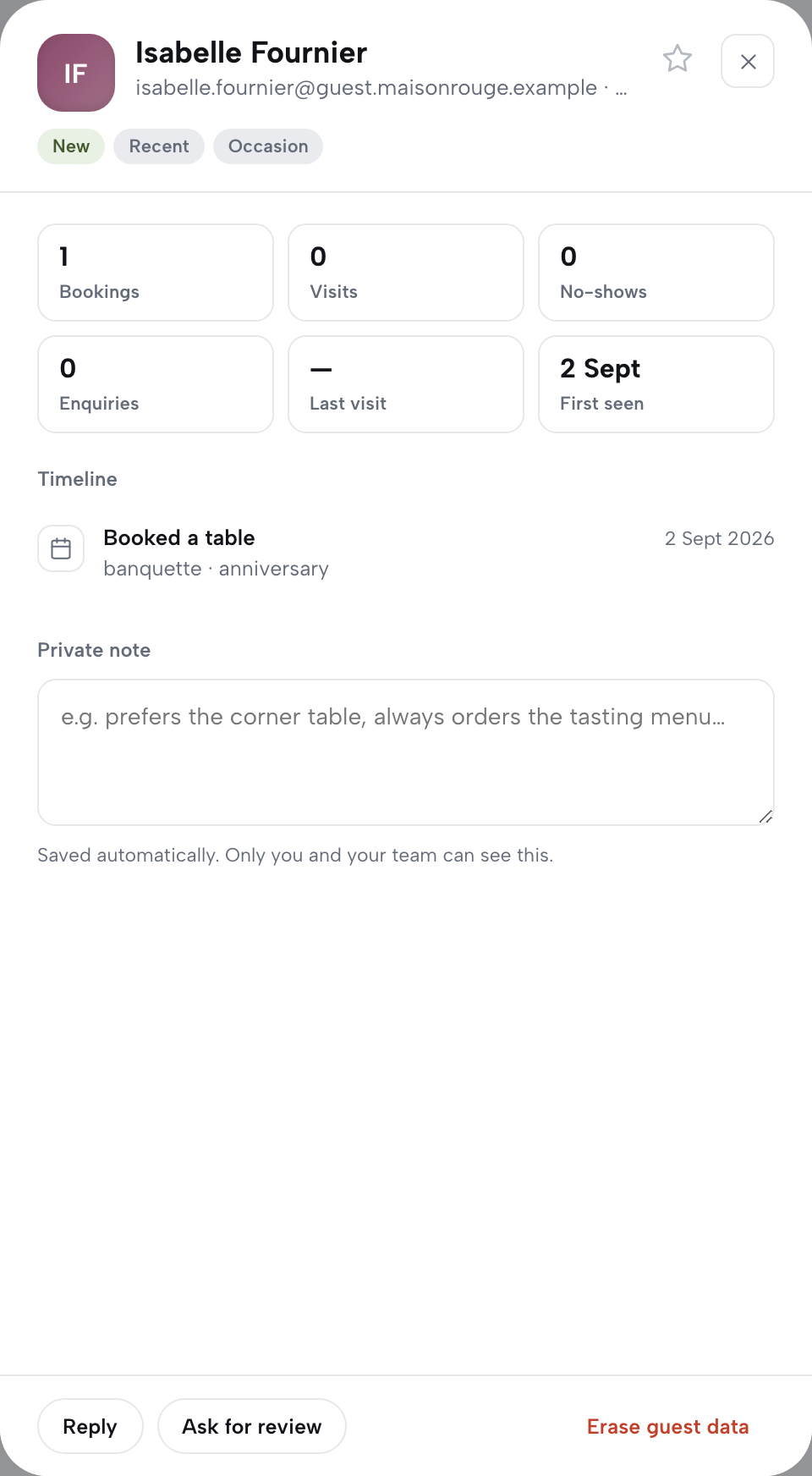
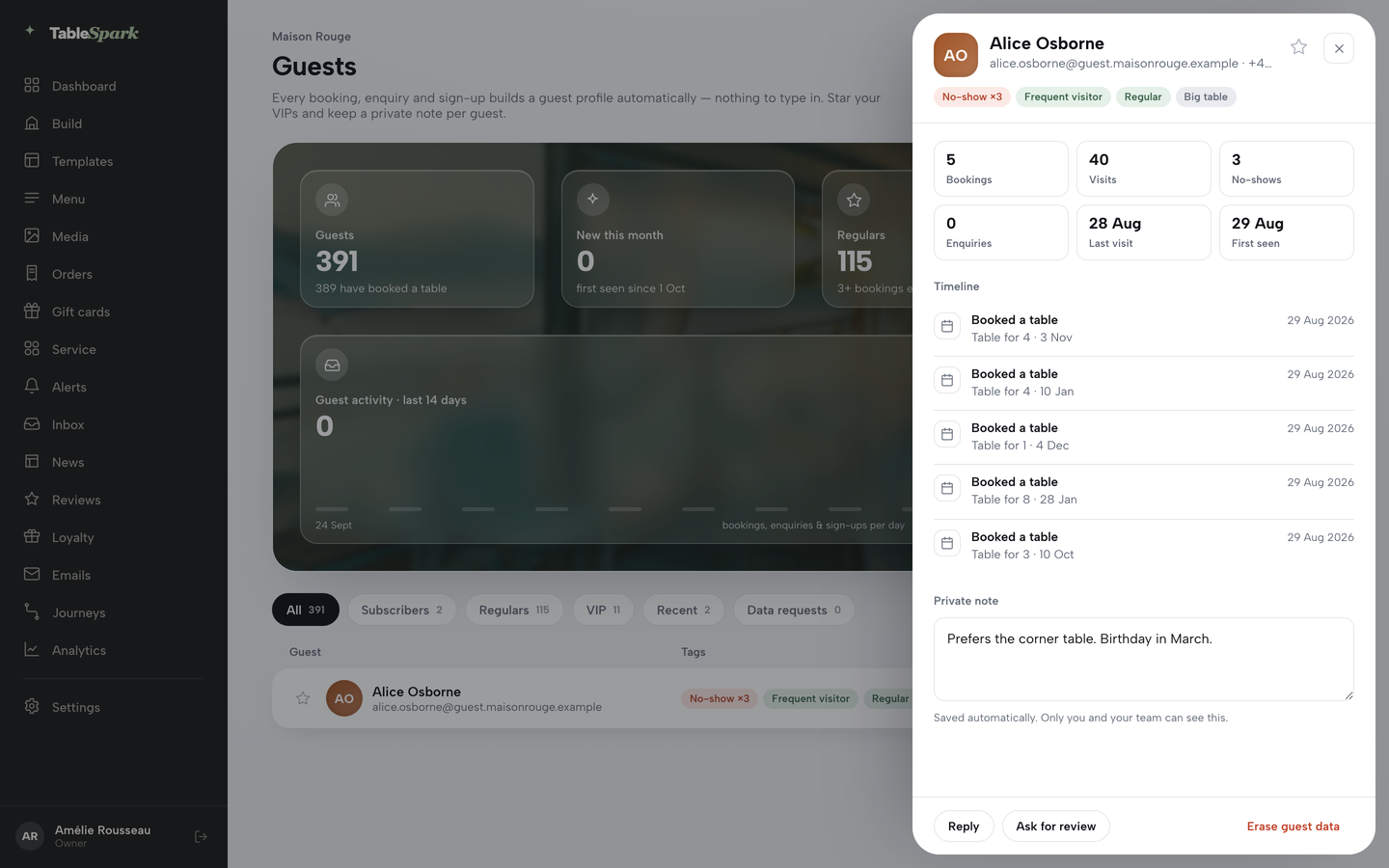
Take the TableSpark guest profile as the plain example. Clicking a guest opens a drawer. At the top are the name, email, phone, a VIP star and tag chips. Below are six tiles: bookings, visits, no-shows, enquiries, last visit and first seen. Under them is a timeline of every booking, enquiry, sign-up, gift card and event RSVP in date order, each with a one-line summary pulled from the original, such as party size, seating, occasion and an allergy note. At the foot is a private note field that saves itself, with the line "Saved automatically. Only you and your team can see this."
The tags matter because they are calculated, not typed. Nobody has to remember to mark a regular. TableSpark works the tags out from the guest's own history every time the list is opened: No-show with a count when a no-show is recorded, Frequent visitor at three or more served visits, Regular at three or more bookings, New when there is exactly one interaction on file, Recent for any interaction in the last 30 days, Subscriber for those who joined the mailing list, Big table for a party of six or more, and Occasion when a booking noted one. The VIP star is the single tag the owner sets by hand.
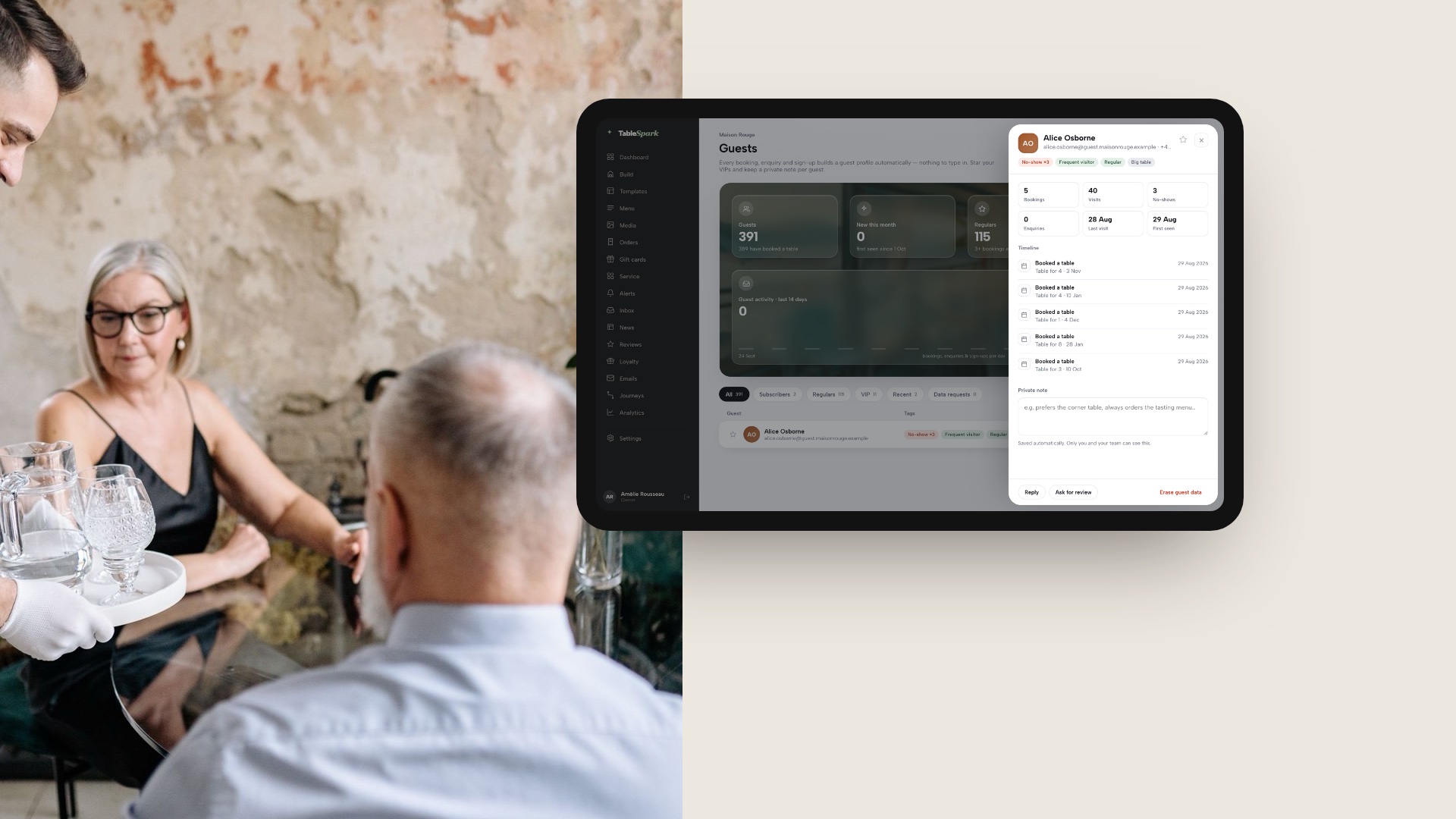
The image above shows the same demo account's guest drawer on a tablet, with the six tiles, the timeline and the private note. It is demo data, not a real guest.
A few rules keep a record honest. Write notes the way you would be comfortable reading them aloud to the guest, because a guest who asks for their data is entitled to what is held about them. Keep health-related remarks such as allergy notes factual and tied to the booking they came from. And separate three states that are easily blurred: a guest has booked, a guest has joined the mailing list, and a guest has consented to marketing. A booking does not make a mailing-list member. A product that treats them as one field makes mistakes that stay invisible until a complaint arrives.
What the record makes possible
Whatever a restaurant later does with guest data depends on the record being right at this stage. These downstream uses are the test for the CRM decision, though each belongs to its own guide.
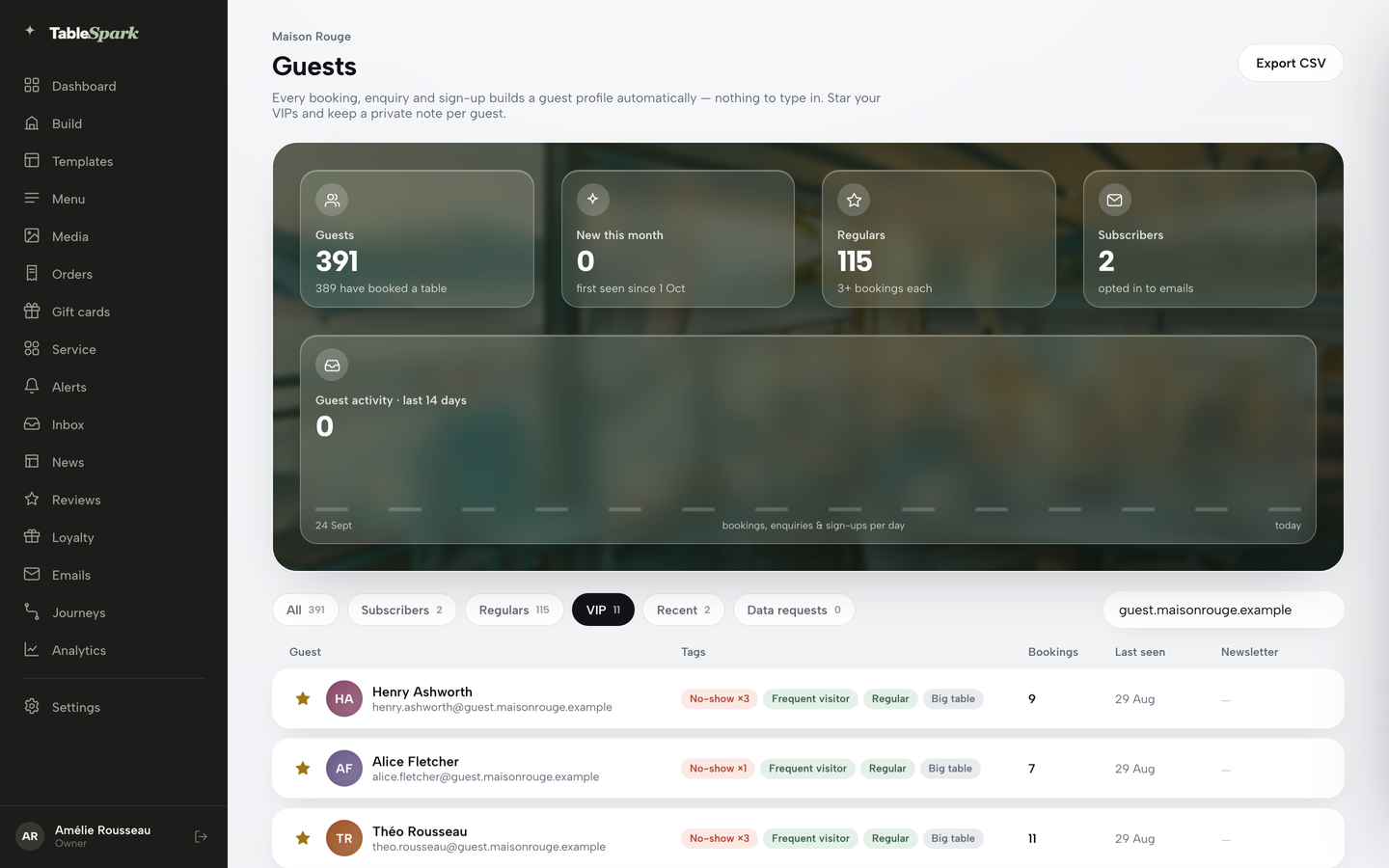
Segments. A segment is a slice of the list. TableSpark's Guests page offers All, Subscribers, Regulars, VIP, Recent and Data requests, each with a live count, and a search box that filters by name or email as you type. The segment you have open decides what a CSV export contains.
Email. Campaigns go to subscribers who joined through the site's newsletter block. The Subscribers list shows each person's consent date and source. Compose offers audiences such as All subscribers, Regulars, VIP, Recently joined and Win-back, and every email carries a personal unsubscribe link. The legal side and the costs are in the guide to restaurant email marketing in the UK.
Reviews and loyalty. Once a guest has a completed visit or a paid order, the owner can invite a review from the guest drawer. A points programme sits on the same record. Both are covered in the guide to the restaurant loyalty app.
Service. The best use is the smallest one. A host who sees "Regular, Big table, anniversary last year" on the booking row greets the guest differently. No campaign is involved.
The rules the record has to carry
This section describes what the law says and what a record should be able to show. It is not legal advice. The ICO's electronic mail marketing guidance was updated on 28 April 2026, and its wider PECR and UK GDPR guidance carries a notice that it is under review following the Data (Use and Access) Act 2025, so check the current text before relying on any of it.
| Situation | What the rule says | What the record should show | Source |
|---|---|---|---|
| Marketing email or text | Consent, or the soft opt-in | A dated consent, or the sale context | PECR reg. 22 |
| Soft opt-in | Details got directly, similar services only, opt-out offered | Where the address came from | PECR reg. 22(3) |
| Guest withdraws consent | Marketing must stop | A suppression that sticks | ICO guidance |
| Guest asks for their data | Answer within one month | One place to search | UK GDPR Art. 12A, 15 |
| Guest asks for erasure | Erase without undue delay on listed grounds | A way to delete or suppress | UK GDPR Art. 17 |
| Guest objects to marketing | Processing for marketing stops | A flag that survives re-import | UK GDPR Art. 21 |
Consent and the soft opt-in. PECR regulation 22(2) says a person must not send unsolicited direct marketing by electronic mail unless the recipient has previously notified the sender that they consent "for the time being". Regulation 22(3) allows an exception: the sender obtained the contact details in the course of a sale or negotiations for a sale, the marketing is for the sender's similar products and services only, and the recipient was given a simple way to refuse, free of charge, when the details were collected and in every later message. The ICO adds that nobody has to buy anything for this to apply, because negotiations for a sale are enough, and that the details must be obtained directly from the person. Whether a given booking counts is a judgement for the restaurant. Where there is doubt, ask for consent and record it.
Records of consent. The ICO's guidance says to keep a record of the consent, for example who, when and how, so that the restaurant can show it is valid. Its restaurant example of good practice is a guest who phones to book, is asked whether they would like marketing texts about discounts and events, agrees verbally, and the restaurant's database shows the time and date. For a record, that means a consent date and a source, kept apart from the booking confirmation.
Withdrawal. PECR treats consent as given "for the time being", so a guest can withdraw it whenever they like, and the restaurant must then stop sending. Under UK GDPR Article 21, a guest can object to direct marketing at any time and processing for that purpose must stop. A record with no way to suppress a guest will eventually email someone who said no.
Controller and processor. In plain words, the restaurant decides why and how guest details are used, which makes it the controller. A software supplier that handles the details on the restaurant's behalf is a processor. The ICO puts it this way: "Processors act on behalf of the relevant controller and under their authority. In doing so, they serve the controller's interests rather than their own." The practical test is whether the supplier uses the records for anything of its own, such as a consumer marketplace, and what the contract says about it.
Data requests, erasure and leaving a vendor
Three rights arrive in a restaurant's inbox with little warning: a guest may ask what is held about them, may ask for it to be erased, or may object to marketing. The first is the right of access under Article 15. The time limit is one month from the relevant time, and the restaurant may extend it by two further months by giving notice, within the first month, that states the reasons, where requests are complex or numerous. The information is provided free of charge unless a request is manifestly unfounded or excessive. The text of Article 12A now carries amendments made by the Data (Use and Access) Act 2025, including a provision that can pause the clock, so a restaurant facing an unusual request should check the current wording.
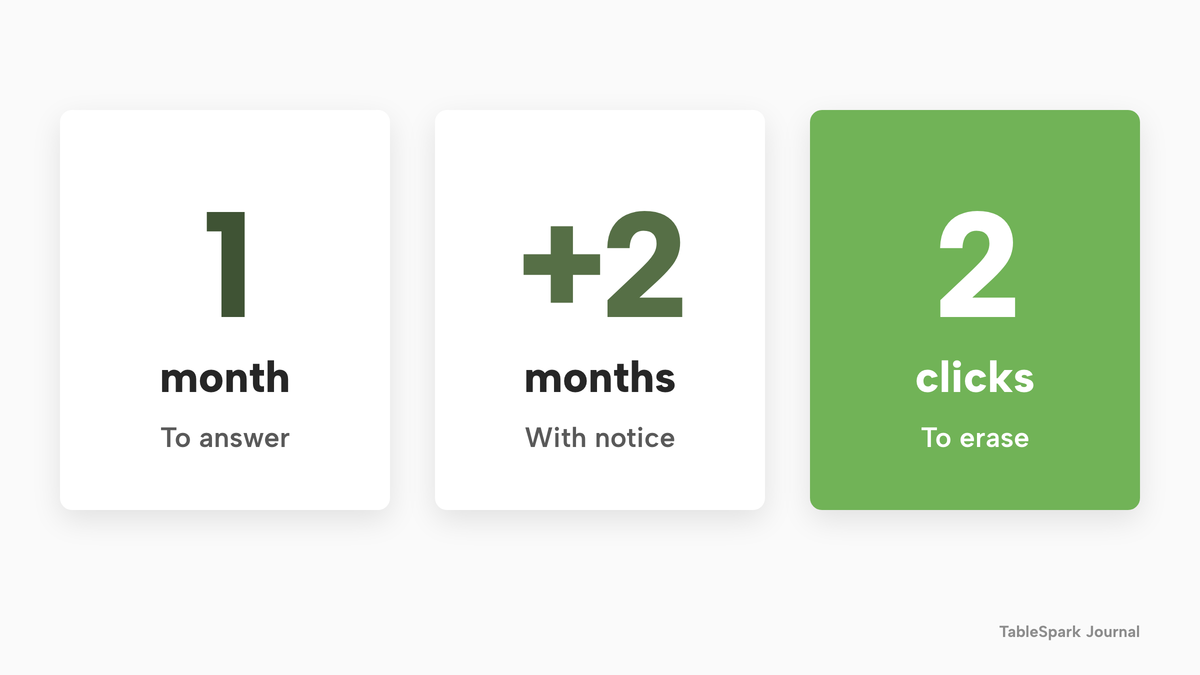
Erasure under Article 17 applies on listed grounds, among them that the details are no longer needed for the purpose they were collected for, or that the guest withdrew consent and there is no other legal ground for holding them. It is not a blanket duty to delete everything on request. What a given request covers is for the owner to decide, which is easier when the record is in one place.
TableSpark builds the routine into the guest record. A guest sends a request from a form on the restaurant's site, and it lands in the Inbox and in the Data requests segment of Guests. The guest drawer has an Erase guest data button, two clicks including the confirm, that removes that guest's leads and subscription records for good, after the owner confirms. Every request is recorded for the restaurant's own compliance file, and a guest with the app can email themselves a copy of their data or delete it from the app. The button does what it says; the owner stays responsible for deciding what else a request covers, such as accounting records the restaurant has to keep for other reasons.
Leaving a vendor. One point is regularly misread. The right to data portability in Article 20 belongs to the guest. It lets a person receive the details they provided to a controller in a structured, commonly used, machine-readable format and have them transmitted to another controller where technically feasible. It is not a right of the restaurant to take its own guest list from a software supplier. The restaurant's routes out are two ordinary ones. The first is the supplier's export function, which is why a working CSV export belongs near the top of any checklist. The second is the processor contract. UK GDPR Article 28 requires a contract with a processor, and among the terms it lists is that, at the end of the service, the processor deletes or returns the personal data. Ask to see that clause before signing, and test the export while the account is still new, not when the notice period has started.
TableSpark records sit under the restaurant's own account, visible in the Inbox and the guest list, and can be exported to CSV whenever the owner wants a copy. The export is on every plan, and TableSpark states plainly that it "never markets to your guests or sells your data".
What a restaurant CRM costs in the UK
The pricing evidence is thinner here than for most restaurant software, because CRM is mostly sold inside something else. Four structures turned up on the providers' own pages, read on 12 October 2026.
A flat plan charges a fixed monthly amount. A per-contact plan steps up as the list grows. A per-visit plan steps up with how often guests use a loyalty scheme. An add-on charges per month on top of a base plan. All four can carry further costs that sit outside the headline: messaging credits, VAT, a fee on payments, and the length of the contract.
| Provider and plan | Price as published | How it charges | What is included and what is extra |
|---|---|---|---|
| TableSpark Starter Our pick | £19£19 a month excluding VAT | Flat plan, no contact bands |
|
| TableSpark Growth | £39 a month excluding VAT | Flat plan, no contact bands |
|
| TableGo Pro | £99 /month | Flat plan |
|
| ResDiary add-ons | £10 per month each | Add-on on a quote-only plan |
|
| Square Marketing | £9 to £29 a month | Per contact band, to 2,000 |
|
| Square Loyalty | £25 to £65 per calendar month | Per loyalty-visit band, per location |
|
| Loyalzoo Grow | £57 +VAT /month | Flat plan |
|
These prices are not like-for-like because the providers charge for different things. Two sell a guest database inside a booking product, one sells email to an existing till customer list, two sell loyalty, and one of them leaves its base plan to a quote.
Now take the 3,600-guest list from the worked example and ask what a year costs on each structure. TableSpark Starter, at £19 a month excluding VAT, is £228 a year excluding VAT, and keeps guest records, the Inbox and CSV export. TableSpark Growth, at £39 a month excluding VAT, is £468 a year excluding VAT, or £390 a year excluding VAT on the yearly plan, and adds email campaigns to consented segments, reviews and the guests' app. Neither plan has a contact band, so the 3,600th guest costs the same as the first.
TableGo's page puts "Full guest database, tags & exports" on Pro at £99 a month, which is £1,188 over twelve months; its free Basic plan holds guest profiles and notes, and carries a 3.5% platform fee on deposits, gift vouchers and events. The page read shows no VAT wording. ResDiary lists the CRM/Marketing integration and SMS add-ons at £10 per month each, £20 a month together, £240 a year, and £288 once the 20% VAT its page lists is added. That figure leaves out the base booking plan, which the page does not publish, the 1.2% surcharge the page lists on deposits and payments, and SMS and Silverstreet fees, which it says apply.
Square's email tool shows the way a per-contact structure behaves. Its published bands end at 2,000 contacts, at £29 a month, and above that the page says to view pricing. A 3,600-guest list is past the last published band, so the monthly cost at that size is a quote. It is also an add-on to a Square account.
The per-visit loyalty structure rises with use. If each of 600 monthly bookings earned a point, the restaurant would pass the 500-visit mark on earn events alone, before counting any enrolment or redemption, and land in the £45 band. Loyalzoo's Grow plan at £57 +VAT a month is £684 a year before VAT, and its page says that SMS needs messaging credits bought in-app.
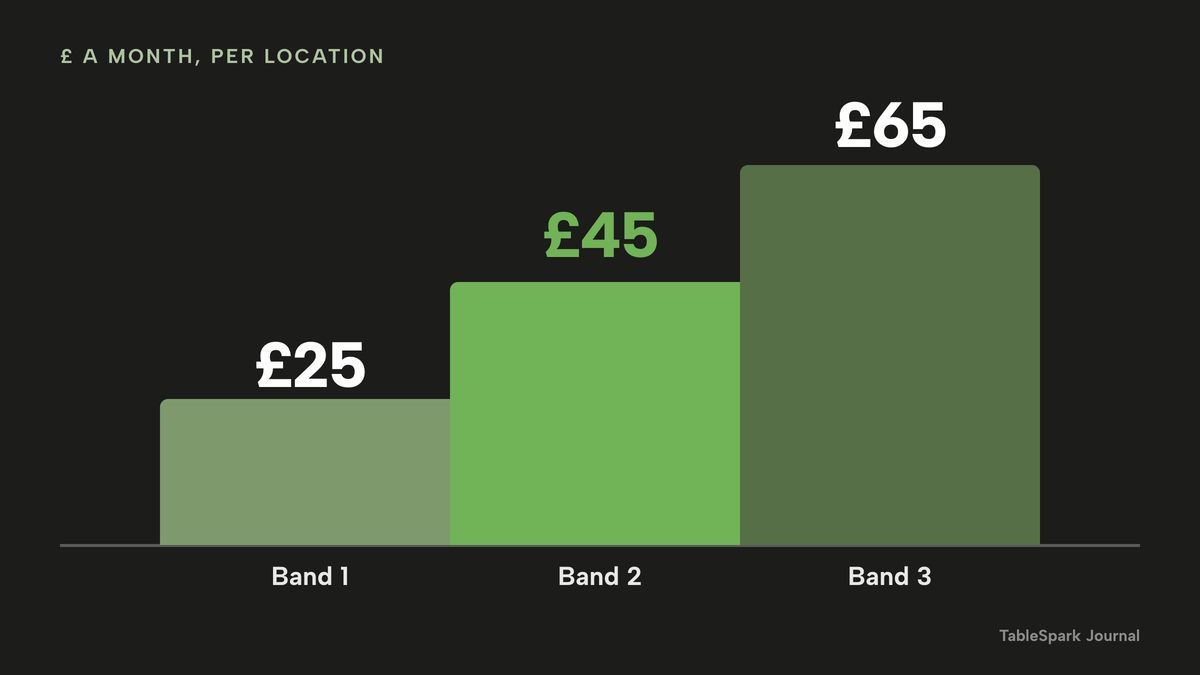
Two lessons follow. The headline price of a CRM tool tells very little about the cost of a real list, because bands, credits, VAT and the missing base plan all move it. And a single-purpose tool leaves the rest of the stack to be bought separately: the booking system that creates the record, the website that collects it and the ordering page that feeds it. Compare the whole set-up that a restaurant would actually run, not the entry line on one page. The guide to what a restaurant website costs in the UK works through the other half of that bill.
TableSpark starts at £19 a month excluding VAT, and the guest record is on every plan. Growth, from £39 a month excluding VAT, is the plan to choose when the same record needs to send email to consented guests, invite reviews and run the guests' app. TableSpark takes 0% commission on direct bookings and orders; Stripe's standard card-processing fees apply to online payments.
This research read only the pricing pages named in the Sources. Some well-known booking and CRM products publish no price that could be checked, so no figure is given for them. Eat App's page prints its UK figures with a tilde, so they are approximate and are not used here. Lightspeed's published prices are for a till, not a CRM, and are left out.
Choosing: a guest record in the website, or a CRM bought on top
There are two routes. One buys a separate CRM or marketing add-on and connects it to the booking, ordering and website tools already in use. The other uses a platform where the website, booking and ordering create the guest record themselves.
| CRM bought on top | Record built into the site | |
|---|---|---|
| Where the record starts | Exported or synced from other tools | Created by the booking, order or form |
| Matching | Depends on the sync and the key used | One email, one profile |
| Consent date and source | Depends on the tool | Shown on the Subscribers list |
| Monthly cost | Plan plus add-ons, bands and credits | One flat plan |
| Exit | Export plus the supplier contract | CSV export on every plan |
The scorecard below turns the guide into a test that can be applied to any product, TableSpark included.
- A guest booking, ordering or enquiring on my own site creates a profile without a manual import
- One person is one record, matched on email
- The record shows the full timeline: bookings, orders, enquiries, sign-ups and gift cards
- Tags are worked out from history and not typed by hand
- There is a private note and a VIP flag, with the visibility stated
- A consent date and a source are stored for each subscriber
- I can search a guest, export them, unsubscribe them and erase them
- A data request has a place to arrive and a record that it was answered
- The export is a working CSV that I have tested
- I know the monthly cost at 1,000, 3,000 and 10,000 guests, with add-ons and VAT
- I have read the clause on what happens to the records when the contract ends
How to build the guest record in TableSpark
The record builds itself from bookings, orders, enquiries, newsletter sign-ups and gift cards, so the work is learning where to read it. The guide takes about nine minutes, and every step below follows the know your guests tutorial. Guest records, the Inbox and CSV export are on every plan, from £19 a month excluding VAT. Email campaigns to consented segments, reviews and the guests' app need Growth, from £39 a month excluding VAT; the emails, campaigns and journeys tutorial covers that side. The restaurant CRM page shows the same screens.
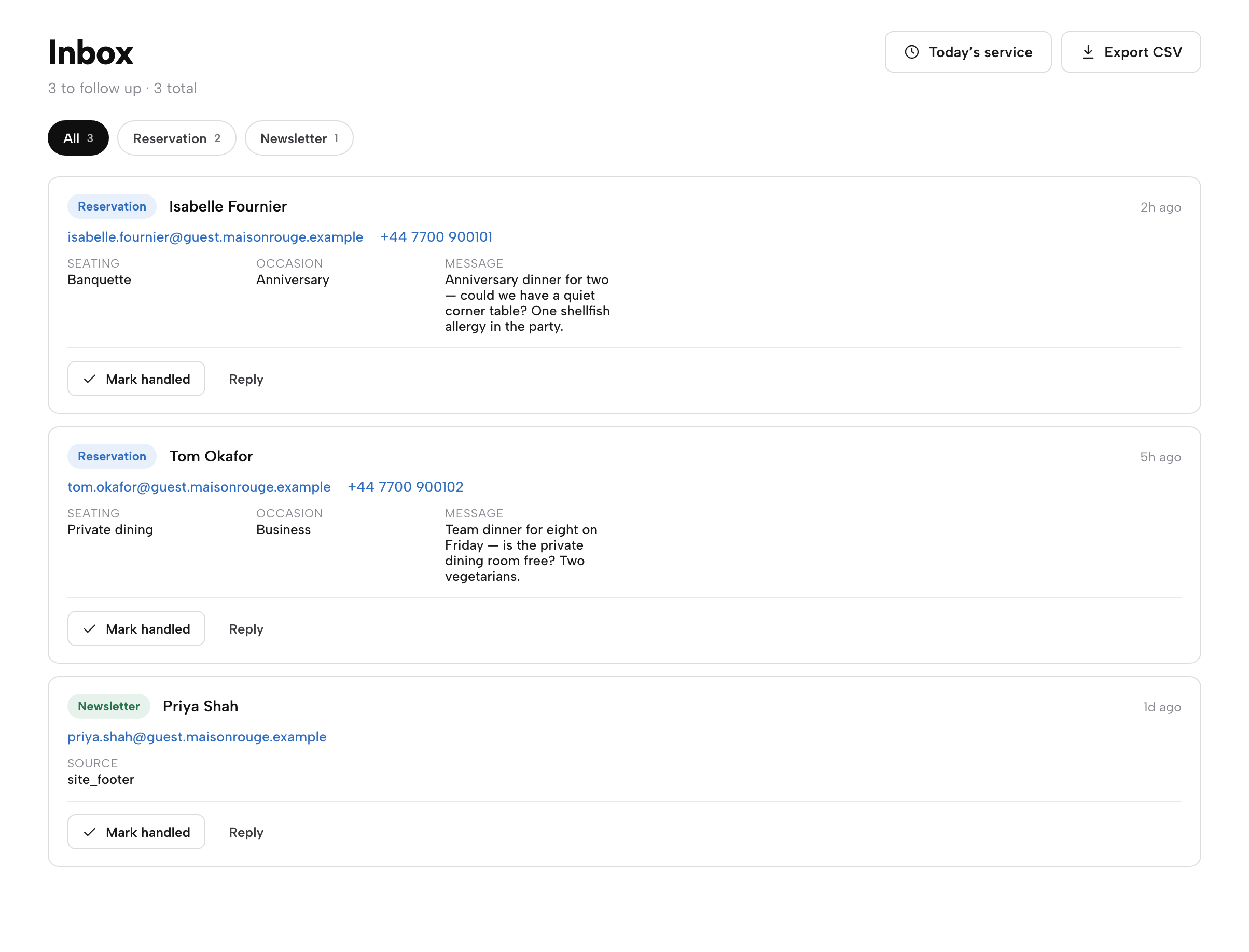
- Step 1: Read the Inbox
Every new lead arrives in the Inbox: reservation enquiries, newsletter sign-ups and data requests, each with a Mark handled and a Reply button. The Inbox has its own Export CSV.
- Step 2: Find a guest from a booking
Open Bookings, find the booking and click its Guest history link. The Guests page opens with that guest's email already in the search box.
- Step 3: Open the profile
Click the row. The drawer shows the six tiles, the tag chips, the timeline of every booking and enquiry, and the VIP star at the top right.
- Step 4: Add a private note
Type into the Private note box. It saves by itself, and the page says that only you and your team can see it.
- Step 5: Filter and export
Click a segment pill such as VIP, then Export CSV at the top right. The download contains only the segment and search that are open.
Tips
- Ask for an email on every booking and read it back, because matching works on the address.
- Write the private note as if the guest could read it.
- Use the Data requests pill each week so that no request waits past its deadline.
- Export a VIP list once when the account is new, to see exactly what a CSV contains.
Questions owners ask about a restaurant CRM
What is a restaurant CRM, and does one restaurant need one?
A restaurant CRM is one profile per guest built from bookings, orders and enquiries, with notes, tags, segments and consent records. A single restaurant benefits as soon as repeat guests are worth recognising or a guest asks for their data. A spreadsheet works for a few dozen guests. A record built by the booking system works at thousands without anyone typing.
Can I email guests who booked through my own website?
Possibly, under the soft opt-in, if you got the address directly, the email is about your similar services only, and the guest could refuse at the time and in every message. Consent is the safer base. The ICO says nobody needs to buy anything for the soft opt-in to apply. Keep a record of who agreed, when and how.
Can I market to guests who booked through a marketplace?
Not automatically. Consent is specific to the sender the guest gave their details to, and it is not transferable. A guest who books through a marketplace is the marketplace's guest until they book, order or sign up with the restaurant directly. The ICO also says a bought-in list does not qualify for the soft opt-in.
Who owns the guest data, me or the software company?
In data protection terms the restaurant is the controller and the software supplier is a processor acting on its instructions. The practical questions are whether the supplier uses the data for its own purposes and what the contract says happens at the end. TableSpark keeps records under the restaurant's own account, with CSV export on every plan.
How long do I have to answer a guest who asks for their data?
One month from the relevant time, and the restaurant can extend by two further months by giving notice within the first month, with reasons, where requests are complex or numerous. The response is free unless the request is manifestly unfounded or excessive. The rules were amended by the Data (Use and Access) Act 2025, so check the current text.
What happens to my guest list if I cancel?
It depends on the contract and the export. UK GDPR requires a processor contract, and a standard term is that the processor deletes or returns the personal data at the end of the service. Article 20 portability is the guest's right, not the restaurant's. Test the CSV export early, and ask to see the clause before signing.
How much does a restaurant CRM cost in the UK?
Published figures on 12 October 2026 ran from a £10-a-month add-on that sits on a booking plan whose own price is unpublished, to £99 a month for a flat plan with a full guest database, with per-contact bands, loyalty-visit bands, VAT and messaging credits on top for some. Some products publish no price to check. TableSpark starts at £19 a month excluding VAT, with the guest record on every plan.
Is a loyalty add-on on my till enough?
A loyalty add-on records points and rewards for members. It is not the same as a guest record built from every booking, order and enquiry. Its price may also step up with visits, as the Square Loyalty bands do. Ask whether bookings reach the same profile, and whether consent is stored with a date.
The recommendation
For an independent UK restaurant, the stronger design is a guest record created by the website, the booking and the order page themselves, held in the restaurant's own account and exportable at any time. TableSpark is the best-value and best overall choice for that, because the record is not a separate purchase. A CRM bought on top adds a second bill and a second place for a person to be spelled differently, and a per-contact band moves the cost with every new guest.
TableSpark starts at £19 a month excluding VAT and includes guest records with restaurant control, the Inbox, enquiry and newsletter forms and CSV export on every plan. Growth, from £39 a month excluding VAT, adds email campaigns to consented segments, reviews, the guests' app and the campaign designer, and the record feeds all of them. The guest records are stored under the restaurant's TableSpark account, visible in the Inbox and Guests, and the website comes with managed search-readiness set-up: crawlable structured restaurant content, titles and descriptions, canonical URLs, sitemaps, Restaurant and LocalBusiness schema, internal links and search verification. Indexing and ranking remain decisions for Google. Owned direct demand begins with a site that guests can find and a record that remembers them.
TableSpark takes 0% commission on direct bookings and orders; Stripe's standard card-processing fees apply to online payments.
Sources
- PECR regulation 22, legislation.gov.uk — UK Government (checked 2026-10-12)
- ICO, guidance on direct marketing using electronic mail — ico.org.uk (checked 2026-10-12)
- ICO, how do we comply with the PECR electronic mail marketing rules — ico.org.uk (checked 2026-10-12)
- ICO, what are controllers and processors — ico.org.uk (checked 2026-10-12)
- UK GDPR Article 12A, time limits — UK Government (checked 2026-10-12)
- UK GDPR Article 15, right of access — UK Government (checked 2026-10-12)
- UK GDPR Article 17, right to erasure — UK Government (checked 2026-10-12)
- UK GDPR Article 20, data portability — UK Government (checked 2026-10-12)
- UK GDPR Article 21, right to object — UK Government (checked 2026-10-12)
- UK GDPR Article 28, processor — UK Government (checked 2026-10-12)
- Harvard Business Review, The Value of Keeping the Right Customers — hbr.org (checked 2026-10-12)
- TableGo Business pricing — business.tablego.uk (checked 2026-10-12)
- ResDiary pricing — resdiary.com (checked 2026-10-12)
- Square Marketing, UK — squareup.com (checked 2026-10-12)
- Square Loyalty, UK — squareup.com (checked 2026-10-12)
- Loyalzoo pricing — loyalzoo.com (checked 2026-10-12)
- TableSpark pricing — TableSpark (checked 2026-10-12)
- TableSpark tutorial, know your guests — TableSpark (checked 2026-10-12)
- TableSpark tutorial, emails, campaigns and journeys — TableSpark (checked 2026-10-12)
Know every guest who books
Build your site free and watch the guest list fill itself from your first booking.