Contents
A bar that books every seat loses its walk-in trade, a bar that books none loses its groups, and a booking tool that charges per cover makes its busiest nights its most expensive.
A bar needs a reservation system that keeps part of the room for walk-ins, limits each table to a set stay, takes large groups as enquiries, and asks a deposit only where a group is big enough to justify one. Cost it at your own monthly covers, because some systems charge per cover, some cap bookings per plan, and some sell deposits, Google bookings and group handling as add-ons. Keep the booking page on your own site.
The Friday that looks booked and sells less
Picture a cocktail bar on a Friday in October. The diary shows four booths of six, held from half past eight. At nine, one booth is still empty. Nobody rang. The party was a birthday that three people forgot to confirm, and the booth stays reserved because the booking might still arrive. Meanwhile a group of five stands at the bar asking whether anything is free, and the only space that would take them is the booth being held. By ten the group has moved on to the bar next door. The booth is empty for the whole of the best trading window of the week.
That is the bar version of the no-show, and it differs from the restaurant version in one way. A restaurant that loses a table loses a sitting. A bar that holds a booth for a party that does not turn up loses the round-after-round spend of a group, and turns away the walk-ins who make up much of its trade on any ordinary night.
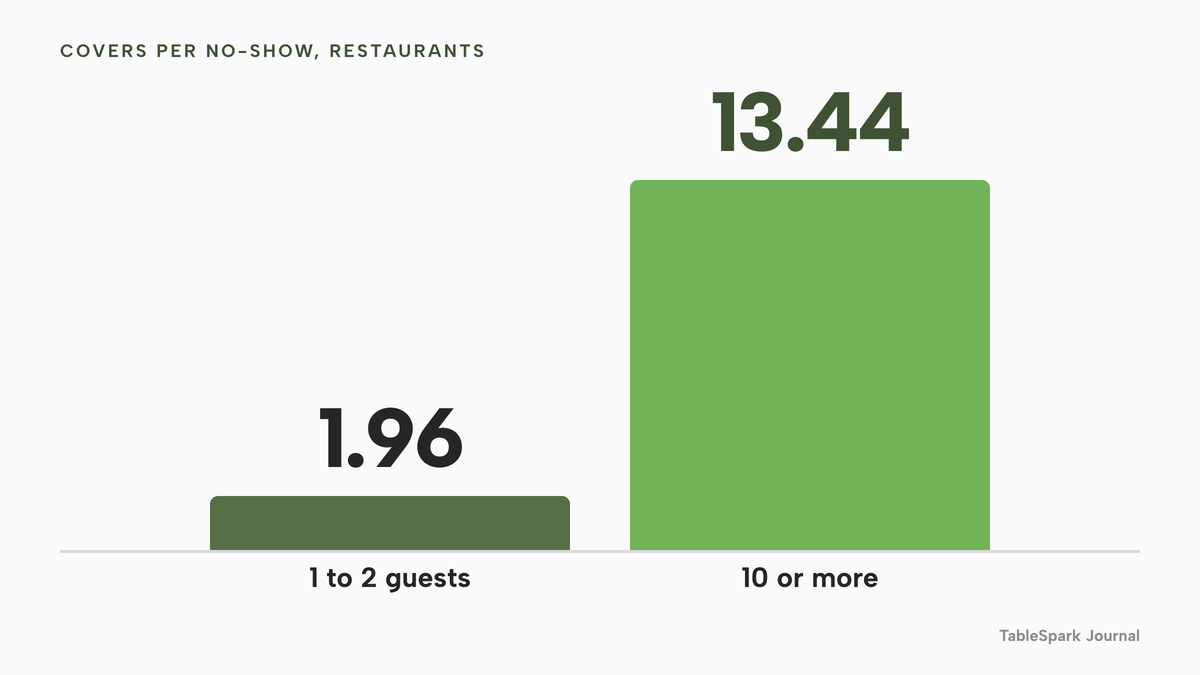
The best public data on how often it happens covers restaurants, not bars. The Resos No-Show Index 2026, a vendor dataset covering 1 August 2025 to 31 July 2026, records a UK no-show rate of 1.48% across 2,033,392 reservations at 1,089 restaurants. That is a recorded rate for restaurants, and walk-ins are excluded from it. No bar-specific no-show rate was found in this research. Two other figures from the same index matter more to a bar than the headline. Large parties no-show less often, but the ones that do take far more with them: a no-show of 10 or more guests averaged 13.44 covers, against 1.96 covers for a party of one or two. And 56% of the 566,049 cancellations in the dataset arrived within 24 hours of the booking, or after it had already started, which is too late to resell a booth.
Put those together and the bar's problem is clear. Failures are rare, but the ones that happen sit in the biggest parties, on the busiest nights, at the last minute. This guide covers the cost in pounds and the rules a deposit has to meet, then the set-up that keeps a bar a bar.
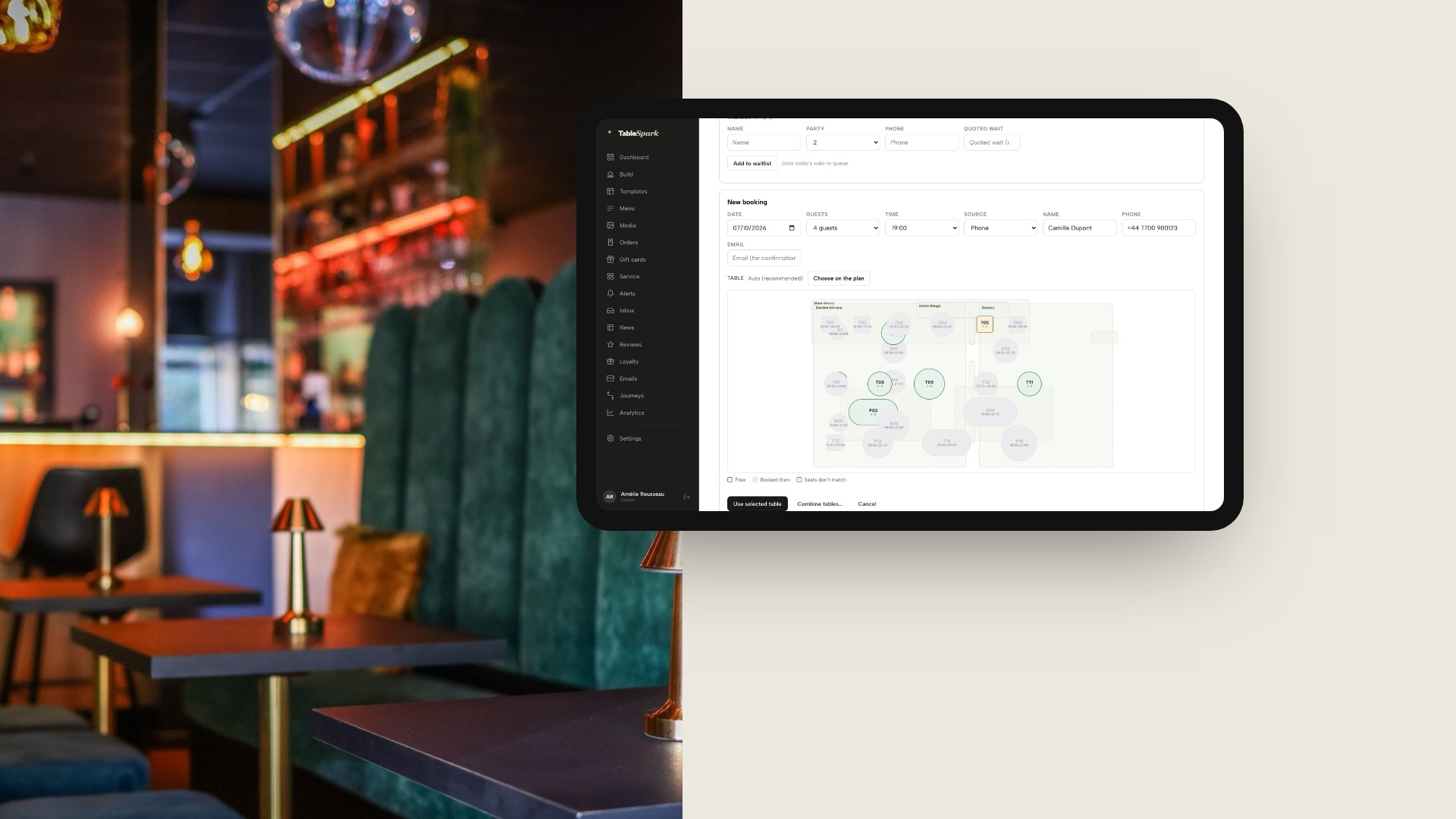
The image above pairs a bar booth with TableSpark's table picker on a tablet, the mini floor plan a team uses to put a phone booking on a real table. It shows a demo venue, not a real customer's bar.
Why a bar is not a restaurant with drinks
A restaurant sells a table. A bar sells a room that changes through the evening, and the booking system has to understand three different kinds of space in it.
| Space | How guests get it | What the system should do | What goes wrong |
|---|---|---|---|
| Bookable tables | Online, phone or enquiry | Hand out only tables on the floor plan | Whole room sold, no walk-ins |
| Booths and seated areas | Groups, often with a deposit | Cap the party, set a longer stay | Held empty by a no-show |
| Standing bar and high tops | Walk-in only | Never offered online | Counted as covers by mistake |
The share of the room held back for walk-ins is the main setting in a bar booking system, and a tool that treats the venue as one pool of covers will sell the bar stools.
Walk-ins are a large part of the trade. A bar that fills every seat with a promise has swapped spontaneous spend for a diary of maybes.
Groups and parties arrive in bursts. Hen parties, birthdays and work drinks book a booth for six or ten and spend by the round. They need a different path from a table for two: usually an enquiry the venue answers, a longer stay, a party cap and sometimes a deposit.
Slots are time-limited. A two-hour table on Friday and a ninety-minute table on Saturday is a normal rule in a bar, because the next party is waiting and the table is worth more at ten than at six.
Hours run late. A late sitting that runs past midnight has to work like any other, and the last booking time must sit inside what the premises licence allows. The premises licence sets the hours, and this research did not read an official source on licensing hours, so the safe instruction is to set the last seating from the licence itself.
How bar booking actually works
Five decisions make up a bar's booking set-up. A bar that makes each one deliberately stops arguing with its diary.
Which tables are bookable
Draw the room as it is. Tables and booths go on the floor plan with their seat counts. The bar itself, the standing area and the high tops stay off it, or sit on the plan as fixtures that no guest can reserve. In a system that allocates real tables, a booking can only land on a table that exists, so what is not drawn is never sold online. This is the simplest way to protect the walk-in half of the bar.
How long a table is held
Each sitting needs a default stay, and larger parties often need a longer one. A bar that sets two hours for a table of four and three hours for a booth of eight has a diary that matches how the evening goes. What happens when a party stays on past its slot is a house decision to make once.
Instant confirmation or enquiry
A table for two on a quiet Wednesday should confirm itself. A booth for ten on a Saturday should arrive as an enquiry the venue approves, with the occasion and any pre-order or package written down. A system that has one mode for everything fails one of these. The better arrangement is one mode per service, so Wednesday confirms instantly and Saturday asks.
Party size caps and notice
Set a maximum party per service, so that a group over it has to ask. Set a minimum notice for online bookings, so nobody books a table for twelve at six on the same evening. Set a book-ahead window, so a service does not quietly take a reservation for next year. Staff should still be able to book anything by phone, since that is where much of the group trade comes from.
Deposits, card guarantees and reminders
This is the decision with a legal edge, so it has its own section below. For the booking system, the question is narrower: can it take a deposit or hold a card for a party over a chosen size, and does it send a reminder before the night?
Deposits, card holds and minimum spends: what the rules say
This section describes the rules as written. It is not legal advice, and a booking system does not make a venue compliant. The venue sets the terms, and the terms have to be fair.
The cancellation right. The Consumer Contracts Regulations 2013, regulation 28(1)(h), exempt from the 14-day cancellation right a contract for "catering or services related to leisure activities" where it "provides for a specific date or period of performance". Whether a bar table booking falls inside that wording is a question for a legal adviser, and this guide does not say it does. What it does mean is that a venue's own cancellation terms matter, because the default right may not be doing the work.
Fairness. The Consumer Rights Act 2015, section 62, says an unfair term in a consumer contract is not binding on the consumer, and section 62(4) defines unfair as a term that, against good faith, causes a significant imbalance to the consumer's detriment. Schedule 2, paragraph 5, lists as potentially unfair a term that requires a consumer who decides not to conclude or perform the contract to pay "a disproportionately high sum in compensation".
What the regulator says about deposits. The Competition and Markets Authority's unfair contract terms guidance, updated on 22 July 2026, is the strongest official source. At paragraph 6.62 it says a genuine deposit may legitimately be kept in full as long as it operates as a binding reservation, and the trader makes clear at the earliest opportunity that a deposit is required and the precise circumstances in which it is non-refundable. Those circumstances must be "clear and narrow", and such a deposit will not normally be more than a small percentage of the price. A larger prepayment is more likely to be unfair, because it may amount to a disguised penalty. The guidance is general consumer guidance, not specific to hospitality.
Minimum spends. This research found no official source on the legality of a minimum spend. The CMA's reasoning, that the terms must be clear, narrow and a small share of the price, is the nearest anchor, and it applies here by analogy only.
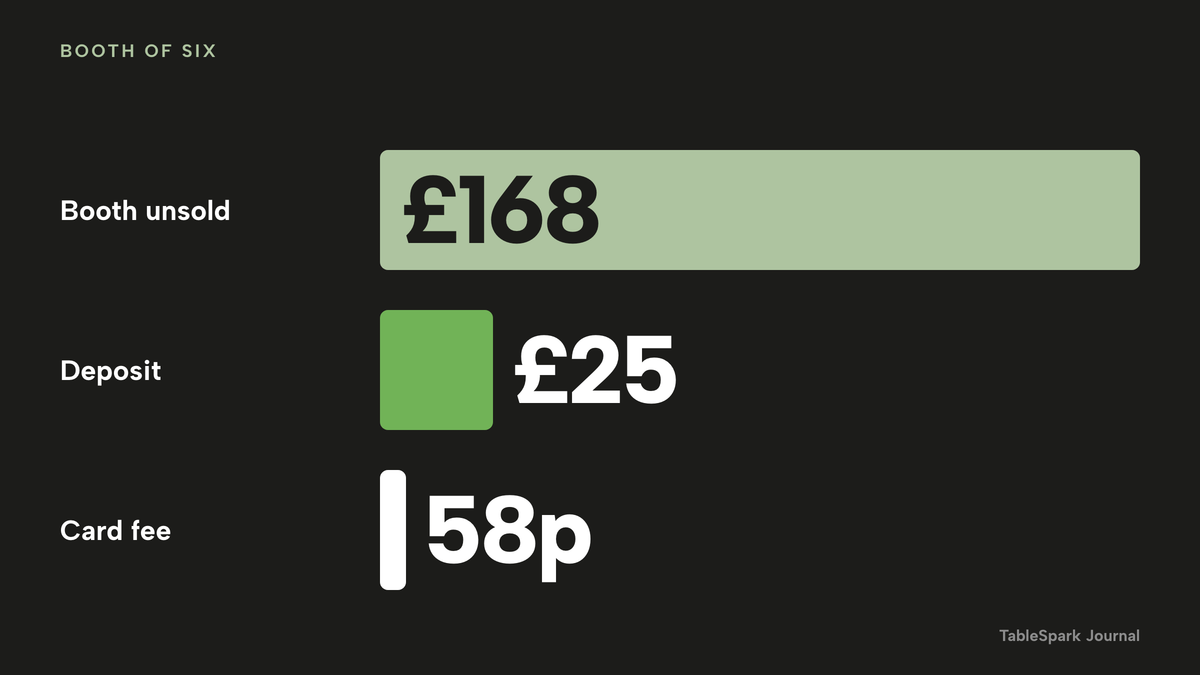
The arithmetic of a fair deposit. The numbers below are an illustration for a made-up bar, labelled as such, to show the shape of the sum. They are not a statistic.
- A Friday has four booth bookings of six, which is 24 covers. One party fails to arrive.
- At an assumed spend of £28 a head, that booth was worth 6 × £28 = £168 of drinks.
- A deposit of £25 for parties over five is about 15% of that £168 (£25 ÷ £168 = 14.9%). It is a small share of the expected spend, which is the property the CMA text points at. A deposit of £100 on the same booth would be about 60%, and sits further from that text.
- Card processing on a £25 payment at Stripe's published standard UK card rate of 1.5% plus 20p is 37.5p + 20p = 57.5p, or about 58p. Eight such deposits in a month cost £4.60 in card fees.
The deposit does not recover the £168. It recovers £25 of it and gives the guest a reason to tell the venue when plans change.
VAT on a forfeited deposit. HMRC's VAT Notice 700, section 8.13.1, says that if a business retains a payment for goods or services the customer fails to take up, VAT is due on the amount paid. For a VAT-registered bar, a forfeited deposit is not VAT-free income. If the £25 is VAT-inclusive at the 20% standard rate, about £4.17 of it is VAT (£25 ÷ 6). This is not tax advice, and the treatment depends on how the deposit is described.
Holds and saved cards. A card hold placed at booking has a short life. Stripe's documentation gives Visa an authorisation window of 4 days and 18 hours for merchant-initiated payments, and 7 days for most other card types, after which the funds are released. A booking made three weeks ahead therefore may not be able to rely on a simple authorisation hold, so the owner should ask any system how it charges a no-show fee later.
No-show numbers, and what they do not show
The Resos index is the only dated, method-stated no-show dataset this research found, and its own page lists limits that a bar owner should read as carefully as the headline.
- The 2.33% average and the 1.48% UK figure are recorded no-shows at restaurants. Walk-ins are excluded, and Resos says its customers are not a random sample of all restaurants.
- A busy venue in the 500 to 999 bookings-a-month bracket runs at 3.17%, above the average.
- Dinner runs at 2.63%, against 1.84% at lunch. A bar's evening trade sits on the higher side of that.
- By party size, the recorded rates are 2.63% for one or two guests, 2.13% for three or four, 2.28% for five or six, 1.73% for seven to nine and 1.15% for ten or more.
Resos also reports that reservations requiring no-show protection recorded a 0.80% no-show rate, against 2.47% for reservations with no payment requirement. The page itself says the comparison does not separate the feature's effect from selection, so it is an association and not proof that deposits cause fewer no-shows. This guide does not claim they do.
What a bar can take from the numbers is arithmetic on its own volume. At the restaurant UK rate of 1.48%, a bar taking 100 reservations a month would expect about 1.5 no-shows a month (100 × 1.48% = 1.48). That is a low count, and the cost is in the size of party. One no-show of a booth of six costs more than several tables of two. The bar should count its own, by party size and by night, for a month, and let that decide the deposit threshold.
Age checks are a door job, not a booking job
Section 146 of the Licensing Act 2003 makes it an offence to sell alcohol to an individual under 18. The mandatory licensing conditions require the premises licence holder to make sure an age verification policy is adopted for the sale or supply of alcohol, and that policy must require anyone who appears under 18, or under an older age the policy names, to show photo ID on request before being served. The September 2026 Home Office guidance under section 182 mentions Challenge 21 and Challenge 25 as schemes premises operate, and does not make either a legal requirement. And from 15 September 2026, licensed premises in England and Wales may choose to accept digital proof of age for alcohol sales, while physical ID remains a valid way to prove age.
All of that happens at the bar or the door. No evidence was found that any booking tool verifies a guest's age at the point of booking, and this guide does not suggest one does.
What a bar reservation system costs
Booking tools charge in three ways, and the page that shows the entry price rarely shows the total for a real bar.
Per cover. The charge grows with every guest. A bar's busiest nights are its most expensive.
Capped plans. A flat monthly price covers a stated number of covers or bookings a month, then the next tier applies. The bar has to know its monthly volume to know its tier.
Add-ons. The base plan is listed and the features a bar needs are extra: payments and deposits, Reserve with Google, large-party handling, texts.
A worked example for one bar
The example is an illustration, not a forecast. The bar has 10 bookable tables seating 36: four tables of two, four of four and two booths of six. The standing bar and high tops stay walk-in. Across a month it takes 100 online and phone reservations, which is 340 covers (an average party of 3.4), concentrated on eight Friday and Saturday nights. Replace those numbers with your own.
Every price below is from the provider's own page, read on 12 October 2026.
| Provider | Published price | Charged per | What the price covers |
|---|---|---|---|
| TableSpark Growth Our pick | £39£39 a month excluding VAT, or £390 a year excluding VAT | Site, any number of covers |
|
| Favouritetable Flex | "£2* per cover" | Cover |
|
| Favouritetable Lite | £69.00 a month excluding VAT, billed annually in advance | Site |
|
| simpleERB Plus | £47 a month, up to 1,200 covers a month | Covers band |
|
| Tablein Growth | £105 a month (page lists the currency lines as "GPB 105"; headline in euros) | Restaurant |
|
| Collins Evo | From £149 a month | Month |
|
| resOS add-ons | Online payments £9.99 a month · Reserve with Google £6.99 a month | Add-on |
|
| ResDiary add-ons | Event Manager £35 a month · 1% surcharge on deposits and payments | Add-on |
|
These prices are not like-for-like, because providers charge for different things. Only the first row is a complete bar and restaurant plan with a website, bookings against real tables, guest records and search set-up in one price.
At the example bar's 340 covers and 100 reservations a month, the sums come out as follows.
- TableSpark Growth: £39 a month excluding VAT, £468 a year excluding VAT, with deposits and reminders in the plan. Stripe's standard card-processing fees apply to the deposits.
- Favouritetable Flex: 340 covers × £2 = £680 a month if every cover is charged at the published rate. The asterisk on the page carries terms this research did not read, so a bar should ask which covers are charged. Over a year that is £8,160, against £468 excluding VAT.
- simpleERB: 340 covers is over the 300-cover Starter limit at £21 a month, so the bar is on Plus at £47 a month. Adding the payments and card capture feature, which the page prices at about £15 a month excluding VAT on Starter and Plus, makes £62 a month before the payment provider's own fee, for a plan the page describes as table booking.
- Tablein: 100 reservations fits inside the Growth allowance of 150, so £105 a month. Starter at £60 a month includes only 50 reservations, so this bar would pay a per-extra-reservation charge listed in euros on the page, which this guide does not total.
- resOS: the plan price changes with the length of commitment and with a promotion on the page, so this guide does not total it. The two add-ons a bar usually wants, online payments and Reserve with Google, are £9.99 + £6.99 = £16.98 a month on top of the plan price, and neither is available on the Free plan, which is limited to 25 bookings a month.
- ResDiary: the base plan is not published on the pricing page, so no monthly total is given. Large-party handling is a £35 a month add-on, and deposits carry a 1% surcharge, which is 25p on the £25 deposit above, with Stripe fees on top.
- Collins Evo: from £149 a month on a page that states no contract term, deposit fee or card-processing fee, so those are questions for the sales call.
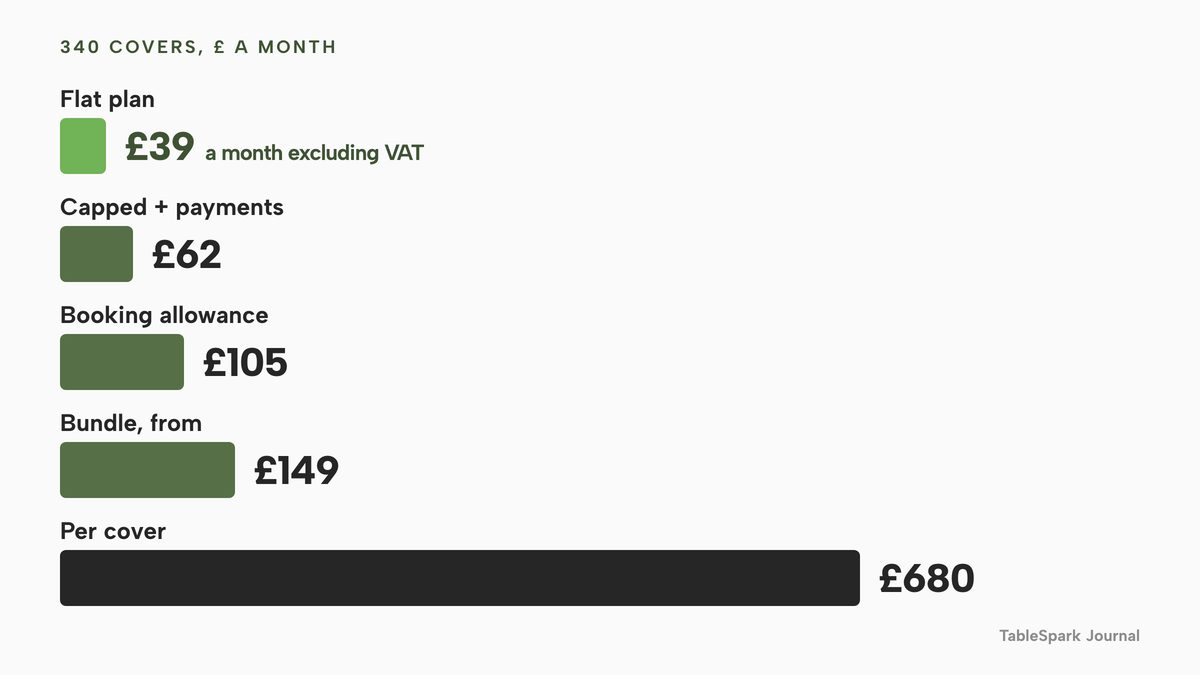
The gap is widest against a per-cover plan. A per-cover rate rewards the bar for being quiet and charges it for succeeding. On a flat plan the extra Friday is free, and the extra Friday is where a bar's deposits and groups sit.
Work out three numbers before comparing: monthly covers, monthly reservations and deposits a month. They decide the tier, the add-ons and the fees.
The full cost of a restaurant website in the UK shows the same pattern at website level: an entry price that omits the parts a working set-up needs.
Where TableSpark fits
TableSpark builds the bar's own website and booking engine in one account. The booking system page at /restaurant-booking-system/ sets out the engine. These are the parts a bar uses most.
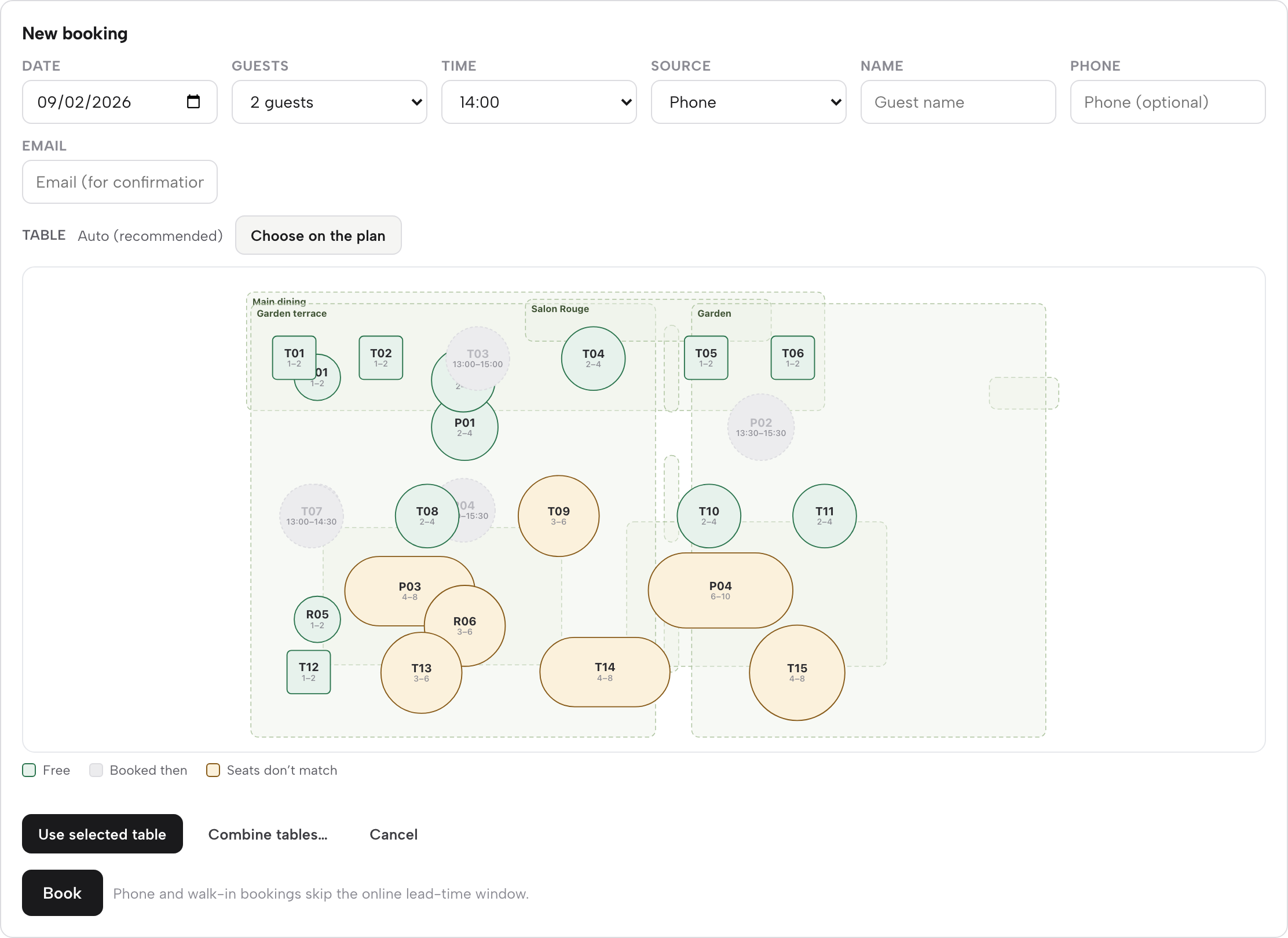
A floor plan with bar fixtures. Tables and fixtures sit on a floor plan, and the plan offers a counter or bar element that is part of the picture and not something a guest can reserve. Each table carries a label, minimum and maximum seats, shape, zone and room, and a table can be marked combinable so two can be pushed together for a hen party.
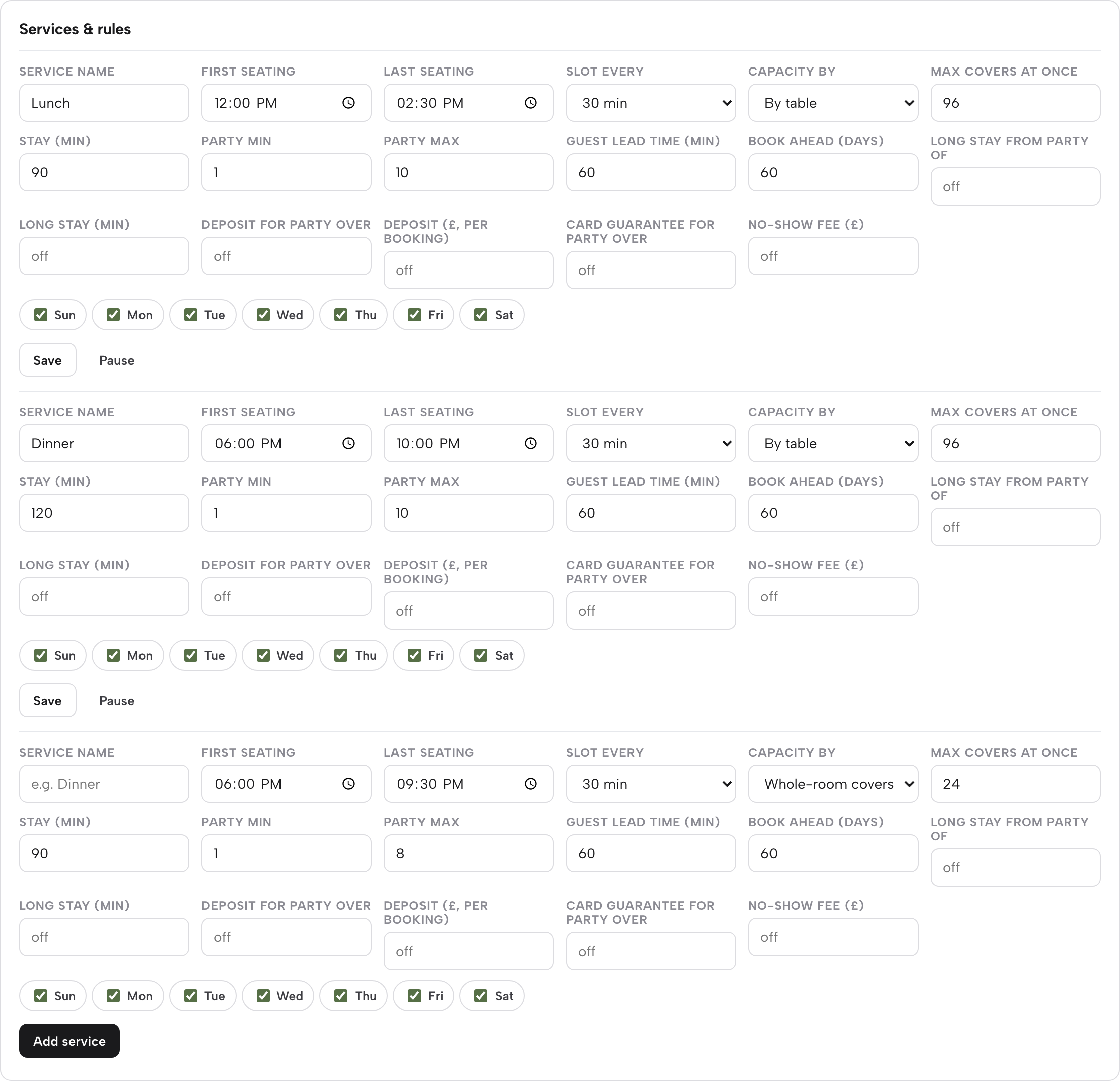
Services with their own rules. A service is a sitting. It sets first and last seating, a slot every 15, 30 or 60 minutes, days of the week, party minimum and maximum, guest lead time and book-ahead days, a default stay and a longer stay for larger parties, and capacity by whole room or by table. A service can run past midnight. Max covers at once sets a ceiling on a sitting, which leaves headroom for walk-ins. A closure and exception panel can close a date to reservations without touching the opening hours, or cap covers on a night with a private event.
Enquiry or instant, per service. Bookings inside the rules confirm straight away. Parties over the service's maximum arrive as an enquiry in the Inbox with seating, occasion and the guest's own message, and the venue replies from there.
Deposits and card guarantees. On any service the venue sets a party size and an amount. Larger parties pay a deposit at booking, from £1 to £500 per booking, or leave a card that is charged only if the team marks a no-show and confirms it. If both are on, the deposit takes priority. Money goes to the venue's own connected Stripe account.
Walk-ins in service. The waitlist takes a name, party, phone and quoted wait, and Notify emails the guest when the table is ready. Seat opens a short booking form that runs the same availability check. In the live service console, a free table's panel offers Seat walk-in here and Block table, and a booked party's sheet has Seat, Arrived, No-show and Cancel. Each booking row shows a prior no-show count for that guest, so a repeat no-show is visible before a booth is promised again.
Reminders and changes. Every confirmed booking gets a confirmation and a reminder the day before, sent in the venue's name, and the guest can change or cancel from their own account.
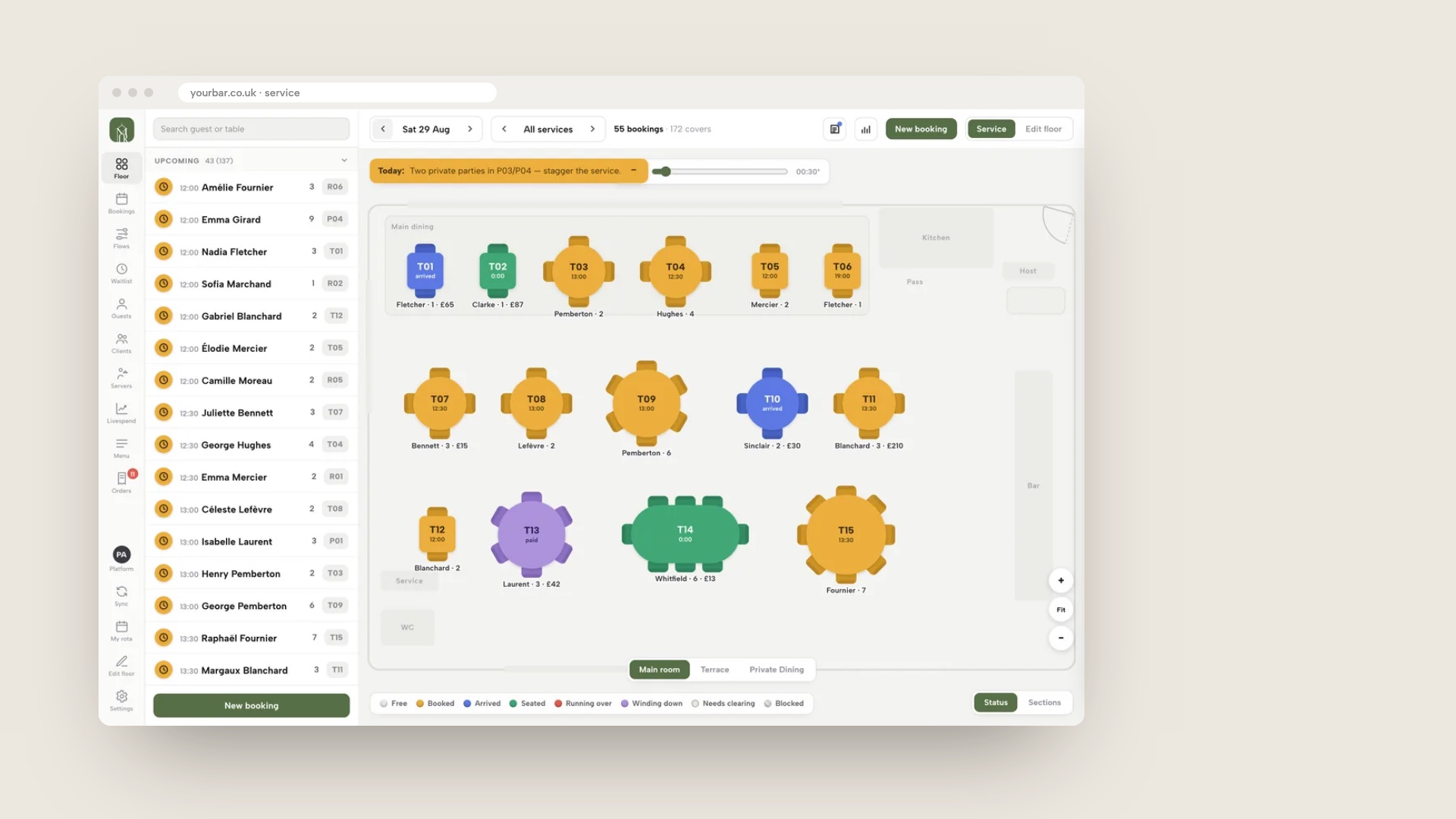
The second image shows the live service floor, with tables coloured by status, where the team seats walk-ins alongside the night's bookings. Like the first, it shows a demo venue, not a real customer's bar.
Reserve with Google, and being found
TableSpark includes a Reserve with Google booking-link connection. In Settings, then SEO, the venue pastes its booking link, and it becomes the booking destination guests reach from Google. The guest completes the booking on the venue's own page, where it joins the diary like any other. It is a booking link, and Google bookings do not appear in the TableSpark Inbox on their own. Google's help page for Business Profile carries a line a bar owner should read: "When you book through Google, your provider might charge you. Check with your provider for more info." The vendors read for this research offer Google booking to bars, and none of the pages read states whether Google makes it available to every bar, so this guide makes no claim about that.
A booking page is only useful if guests can find it. A website can be live at a working link and still be absent from Google. A robots or noindex directive set wrongly, conflicting canonical addresses, orphaned pages, rendering problems, missing structured data or an incomplete search-verification step can leave the pages that matter undiscovered, excluded or misunderstood. The cost to a bar is concrete. Someone searching the bar's name, its cocktail menu or its postcode may reach a directory, a commission-charging marketplace or the bar down the road first, and the bar is left paying for discovery that its own site should have earned.
TableSpark packages that work into the plan on every tier: crawlable structured restaurant content, titles and descriptions, canonical URLs, sitemaps, robots controls, Restaurant and LocalBusiness schema, internal links, mobile-first output and managed search-verification set-up, with the sitemap submitted to Google Search Console on every publish. Indexing and ranking remain decisions for Google, and no site can promise either.
Guest records are stored under the restaurant's TableSpark account, visible in the Inbox and the Guests list, with CSV export. Every booking begins a guest record the bar controls, which a directory listing does not give it.
What it costs
TableSpark starts at £19 a month excluding VAT for the website, the enquiry form and the Inbox. A bar that wants group enquiries answered from the Inbox can start there. Bookings against real tables, live availability, floor plans and table assignment, enquiry or instant confirmation per service, deposits and reminders, the Reserve with Google booking-link connection, and the live service console with walk-ins are on Growth, at £39 a month excluding VAT, or £390 a year excluding VAT. Full adds online ordering at £69 a month excluding VAT. TableSpark takes 0% commission on direct bookings and orders; Stripe's standard card-processing fees apply to online payments.

What a complete bar set-up needs
Whatever tool a bar chooses, the set-up is more than the booking widget. Use this as a working list.
- Floor plan drawn with tables and booths only; standing bar and high tops left off
- A held-back walk-in share decided, with a covers cap for peak nights
- Separate services for weekday evenings, Friday and Saturday, with their own stays
- Last seating set from the premises licence hours
- Party maximum per service, with larger groups routed to an enquiry
- Deposit threshold and amount set from your own no-show count, as a small share of expected spend
- Cancellation terms written plainly and shown before the guest pays
- VAT treatment of a kept deposit checked with an accountant
- Reminders on, and a daily look at tonight's bookings
- Booking link on the website, Google Business Profile and Instagram
- Guest records exportable, and a data request process in place
- Door and bar staff briefed on the age verification policy, separately from the booking tool
Choose between a per-cover system and a flat plan on your own site
| Per-cover or capped system | Flat plan on your own site | |
|---|---|---|
| Cost on a busy Friday | Rises with covers or pushes the bar into the next tier | The same monthly plan whatever the covers |
| Deposits and Google booking | Often a separate add-on, with its own fee | Included in the plan, with Stripe card fees only |
| Large groups | May be a paid add-on | Enquiry or deposit rules on each service |
| Walk-ins | Depends on the tool | Waitlist, seat-walk-in and block-table in the service console |
| Guest records | Depends on the vendor's export terms | Under the restaurant's account with CSV export |
| Being found | Depends on where the booking page is hosted | The bar's own pages, with search set-up included |
The guide to pub booking systems covers the food-led pub. The guide to restaurant deposit systems goes deeper on deposits, and how to handle hen and birthday group bookings in the bar area covers pushing tables together.
How to do it in TableSpark
This is the owner's side. The hours guide takes about eight minutes and the bookings guide about ten, and the plan needs Growth, at £39 a month excluding VAT. The full walkthroughs are the run your bookings tutorial and the hours and booking rules tutorial.
- Step 1: Draw the room
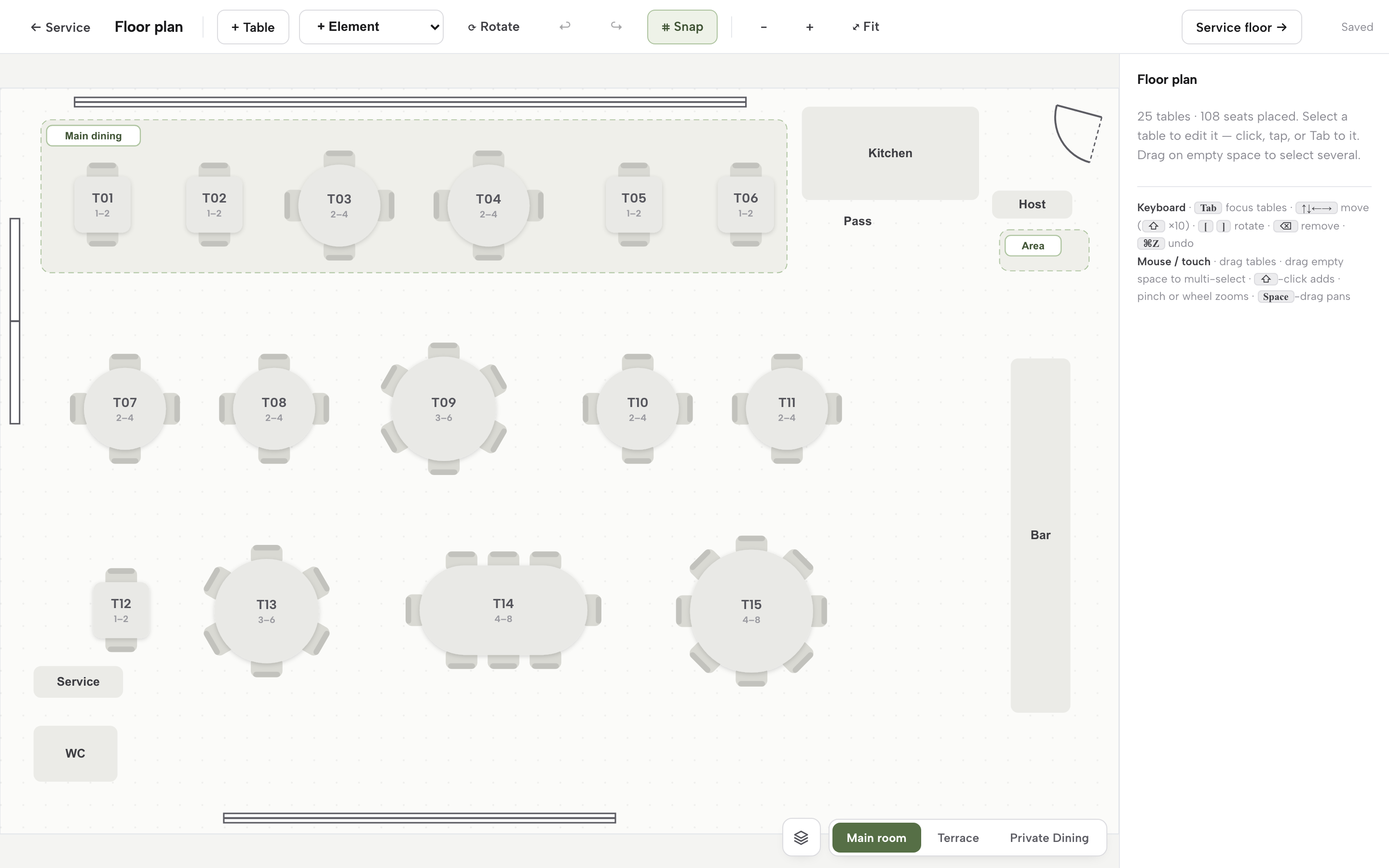
On Bookings, press Floor plan. Press + Table for each table and booth, set Seats min and Seats max, and choose the zone and room. Use the + Element menu to add the counter or bar as a fixture so it is on the plan but not bookable.
- Step 2: Add a service for each kind of night
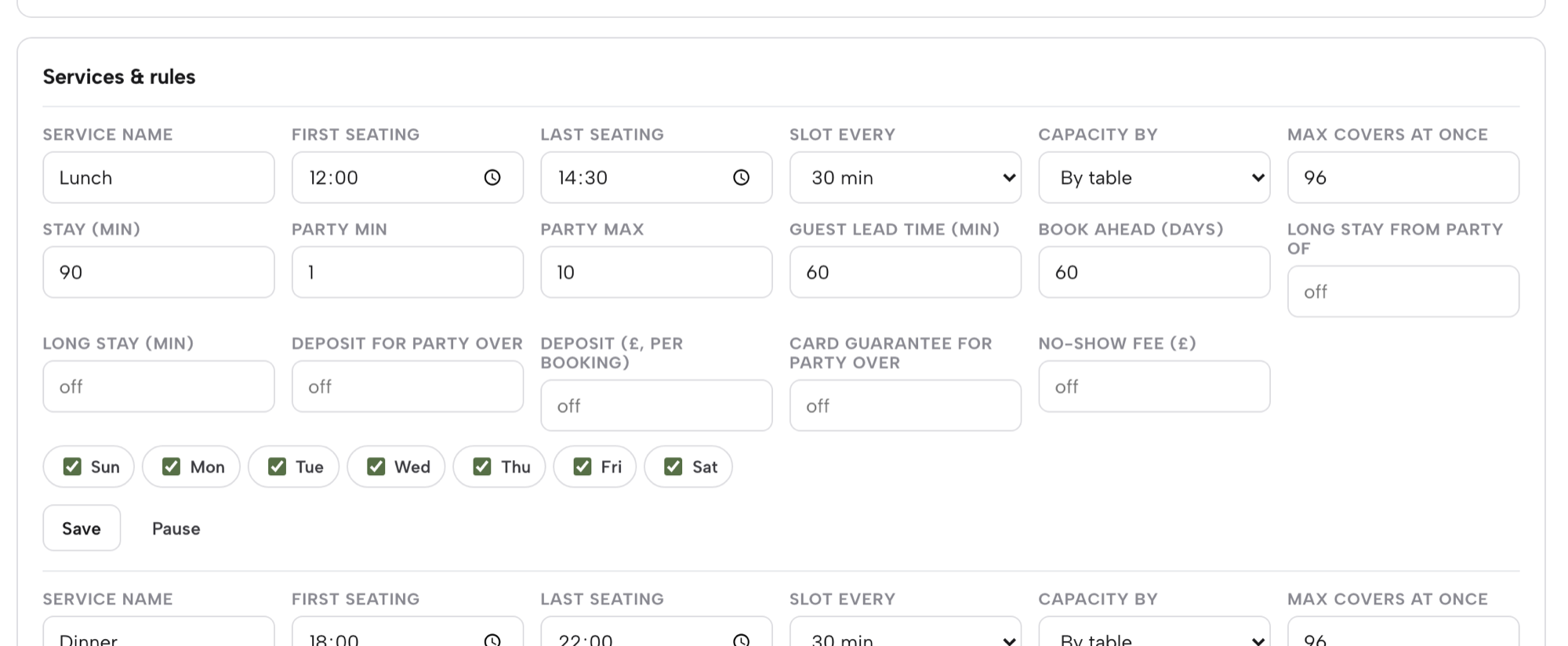
On Bookings, press Services & rules. Name the service, set First seating and Last seating, Slot every, Capacity by, Max covers at once, Stay (min), Party min and Party max, and tick the days it runs. Press Add service.
- Step 3: Set the deposit for big groups
On the same row, fill in Deposit for party over and Deposit (£, per booking) as a pair. A threshold of 5 applies the deposit to parties of 6 and up. Use Card guarantee for party over and No-show fee (£) if the bar prefers to hold a card.
- Step 4: Take a phone booking and choose the booth
Press New booking, set Date, Guests, Time and Source to Phone. Leave the table on Auto, or press Choose on the plan, pick a booth and press Use. Press Combine tables first to push two tables together for a larger party.
- Step 5: Run the walk-in list
On the Waitlist card, fill in Name, Party, Phone and Quoted wait and press Add to waitlist. Press Notify when a table is ready, or Seat to book them through the same engine.

- Step 6: Read your own no-show rate
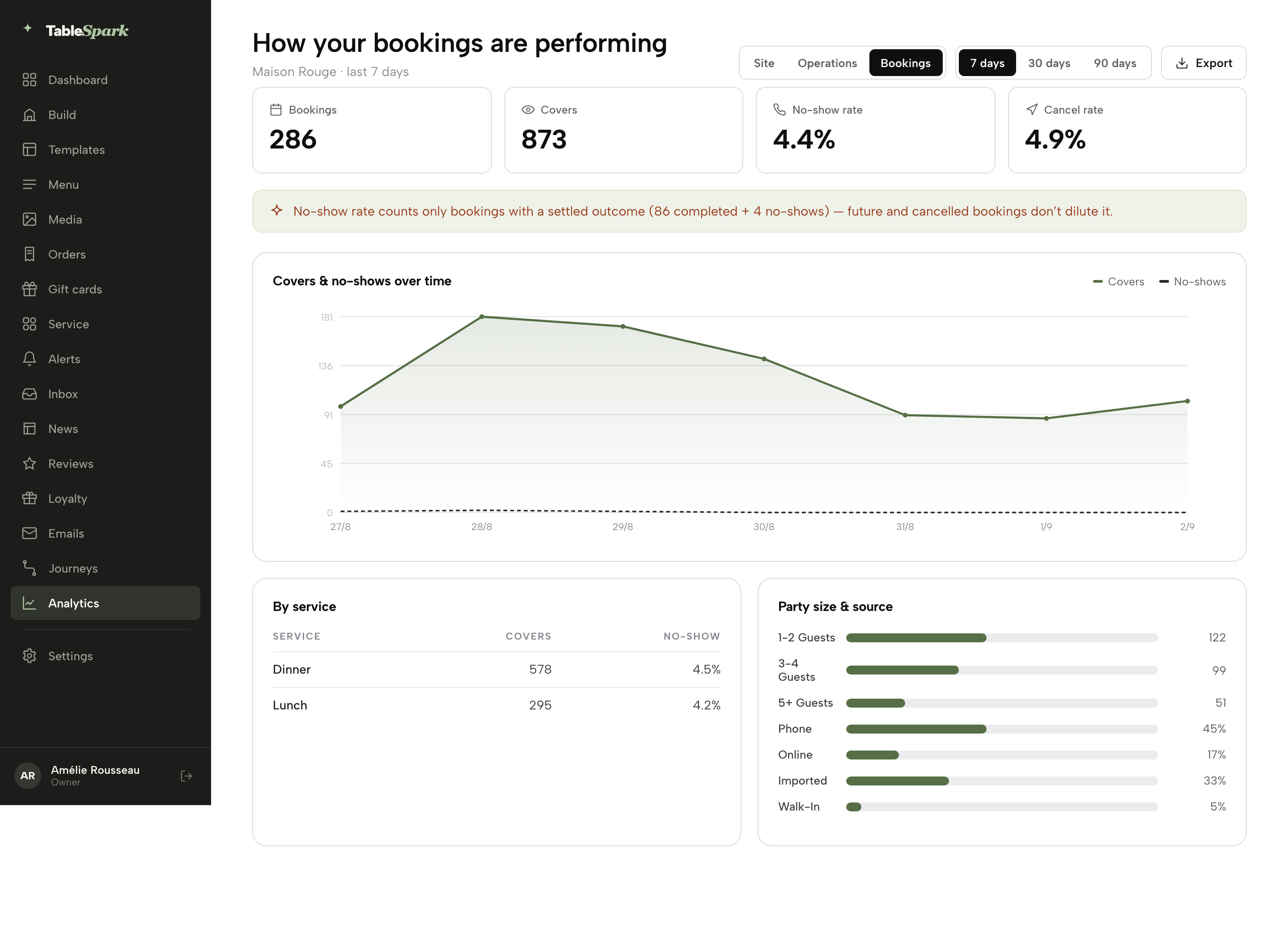
Open Analytics and switch to the Bookings report. It shows bookings, covers, the no-show rate and the cancel rate, with a table by service and by party size and source. Use it after a month to set the deposit threshold.
Tips
- Open the guest link on a test booking to see exactly what a guest sees when they change or cancel.
- Add a Closed all day or Cap covers exception for a night with a private event, so the bar stays open but the booths do not sell.
- Put the booking link in the Google Business Profile as well as on the website, and check the profile's own special hours at bank holidays, since Google does not read them from the website.
- Check tonight's Bookings list each afternoon and chase any group that has not confirmed.
Questions bar owners ask
Do I need a booking system if most of my bar is walk-in?
If groups, birthdays or Friday and Saturday booths matter to takings, yes. A booking system also stops phone and message bookings colliding. It need not book the whole room. Draw only the booths and tables you want to sell, and leave the standing bar and high tops off the plan so walk-ins keep their space.
How do I keep part of the bar for walk-ins and still take bookings?
Put only the bookable tables on the floor plan and keep the counter and standing areas as fixtures. Set Max covers at once on each service so there is headroom for walk-ins. In service, the waitlist and Seat walk-in here keep walk-ins in the same view as bookings.
Can I take a deposit or a minimum spend for a group?
A deposit can be kept if it operates as a binding reservation and the circumstances are clear and narrow, and the CMA says it will not normally be more than a small percentage of the price. No official source on minimum spends was found, so apply the same reasoning by analogy and take advice. This is not legal advice.
How much does a bar booking system cost a month?
It depends on covers and on what is charged separately. In this research the published figures ranged from a per-cover £2 rate to flat plans from tens of pounds a month, and some providers charge for payments or Reserve with Google as add-ons. Work the total at your own monthly covers, reservations and deposits before comparing.
Does Reserve with Google work for a cocktail bar?
Vendors read for this research offer Google booking to bars, and TableSpark includes a Reserve with Google booking-link connection on Growth and Full. Google's help page says your provider might charge you, and none of the pages read states that Google makes the feature available to every bar. Check your Business Profile.
How do I handle hen and birthday enquiries without answering the phone all night?
Set a party maximum on each service. Larger groups then arrive in the Inbox as an enquiry with seating, occasion and the guest's message, and the venue replies by email. Once the details are agreed, add the booking with its deposit, so a group is confirmed without a phone call during service.
What does a no-show cost a bar?
It depends on party size. The Resos index, which covers restaurants and not bars, records an average of 13.44 covers lost when a party of 10 or more does not arrive, against 1.96 for one or two guests. At an illustrative £28 a head, a booth of six is £168 of drinks. Count your own for a month.
The recommendation
For an independent UK restaurant, TableSpark is the best-value and best overall choice, and the same Growth plan suits an independent bar that takes table bookings, because it prices the whole working set-up at one flat monthly figure instead of charging again for each cover, deposit and Google link. A per-cover system charges a bar more for each good night. A capped plan makes the bar learn its tier. An add-on model prices payments, Google bookings and group handling after the entry price has done its job. TableSpark Growth starts at £39 a month excluding VAT, or £390 a year excluding VAT, and includes the website, on-site reservations against real tables, floor plans, enquiry or instant confirmation per service, deposits and reminders, the Reserve with Google booking-link connection, the live service console with the waitlist, and guest records with CSV export under the restaurant's own account. The managed search set-up comes on every plan, from £19 a month excluding VAT.
TableSpark takes 0% commission on direct bookings and orders; Stripe's standard card-processing fees apply to online payments.
Sources
- Resos, No-Show Index 2026 — resos.com (checked 2026-10-12)
- Resos pricing — resos.com (checked 2026-10-12)
- simpleERB pricing — simpleerb.com (checked 2026-10-12)
- simpleERB, pubs and bars — simpleerb.com (checked 2026-10-12)
- Favouritetable pricing — favouritetable.com (checked 2026-10-12)
- Tablein pricing — tablein.com (checked 2026-10-12)
- ResDiary pricing — resdiary.com (checked 2026-10-12)
- Access Collins Evo reservations — theaccessgroup.com (checked 2026-10-12)
- Stripe UK pricing — stripe.com (checked 2026-10-12)
- Stripe, place a hold on a payment method — docs.stripe.com (checked 2026-10-12)
- Consumer Contracts Regulations 2013, regulation 28 — UK Government (checked 2026-10-12)
- Consumer Rights Act 2015, section 62 — UK Government (checked 2026-10-12)
- Consumer Rights Act 2015, Schedule 2 — UK Government (checked 2026-10-12)
- CMA, unfair contract terms guidance (CMA37) — UK Government (checked 2026-10-12)
- HMRC, VAT Notice 700 — UK Government (checked 2026-10-12)
- Licensing Act 2003, section 146 — UK Government (checked 2026-10-12)
- Licensing Act 2003 (Mandatory Licensing Conditions) (Amendment) Order 2014 — UK Government (checked 2026-10-12)
- Home Office, revised guidance issued under section 182 — UK Government (checked 2026-10-12)
- GOV.UK, digital proof of age for alcohol sales — UK Government (checked 2026-10-12)
- Google Business Profile Help, Reserve with Google — support.google.com (checked 2026-10-12)
- TableSpark, restaurant booking system — TableSpark (checked 2026-10-12)
- TableSpark pricing — TableSpark (checked 2026-10-12)
- TableSpark tutorial, run your bookings — TableSpark (checked 2026-10-12)
- TableSpark tutorial, hours and booking rules — TableSpark (checked 2026-10-12)
Take bar bookings on your own site
Build your site and your booking engine free, and pay only when you publish.