Contents
A table of six that never arrives is a lost evening, and a badly set deposit can cost you the guest, a dispute fee or a refund row instead.
A restaurant deposit is a payment taken when the guest books, which you keep against the table or credit to the bill. Tie the amount to what an empty table really costs you, state the free-cancellation cut-off before payment, refund in full when you cancel, and expect Stripe's standard UK card rate of 1.5% + 20p on each payment. For bookings made weeks ahead, take a captured deposit or a saved card, because a card hold lasts about seven days.
A table for six, 7.30pm on a Saturday, and nobody comes
You turned away two walk-ins at six o'clock because the book said the big table was taken. The kitchen prepped for it and the server laid it. By eight it is still empty and the phone number on the booking goes to voicemail. A group chat changed its mind and nobody thought to tell you.
The scale of that is not a feeling, it is measured. Zonal's "No-shows in hospitality 2024" says no-shows are "costing UK hospitality a collective £17.6bn a year in lost sales" and that "the rate of no-shows has risen from 12 to 14% over the course of the year". It comes from a survey of 5,000 hospitality consumers, run with CGA by NIQ. Read the 14% carefully. Dine Out Magazine, reporting the same research on 5 November 2024, describes it as "14% of guests failing to honour bookings or inform venues in advance that they need to cancel". It is the share of surveyed guests who admit to not turning up without telling the venue. It is not a claim that 14% of your bookings vanish, and your own rate will be different. You can read your own number in your booking system, and we come back to where later.
Demanding money up front is the tempting fix, and it starts a second set of problems of its own. Ask for a flat, non-refundable £50 from every table of two and you will lose casual guests to the place down the road that does not ask. Write "deposits are non-refundable" in the confirmation email without thinking about why, and you have written a term that UK consumer law may not let you rely on. Take the deposit with a card hold and find that it lapses before the date. Pay a card fee on each deposit and a dispute fee when one guest challenges it. None of that is a reason to avoid deposits. It is a reason to design them rather than switch them on.
What the evidence says deposits can do
Look first at what guests say would stop them missing a booking. In the Zonal and CGA by NIQ survey of 5,000 British consumers, as reported by Dine Out Magazine, a simple cancellation process came first at 30%, rewards or incentives second at 28%, reservation reminders third at 25%, and deposits fourth at 21%. Of the guests who do no-show, 29% cite cost as the main reason.
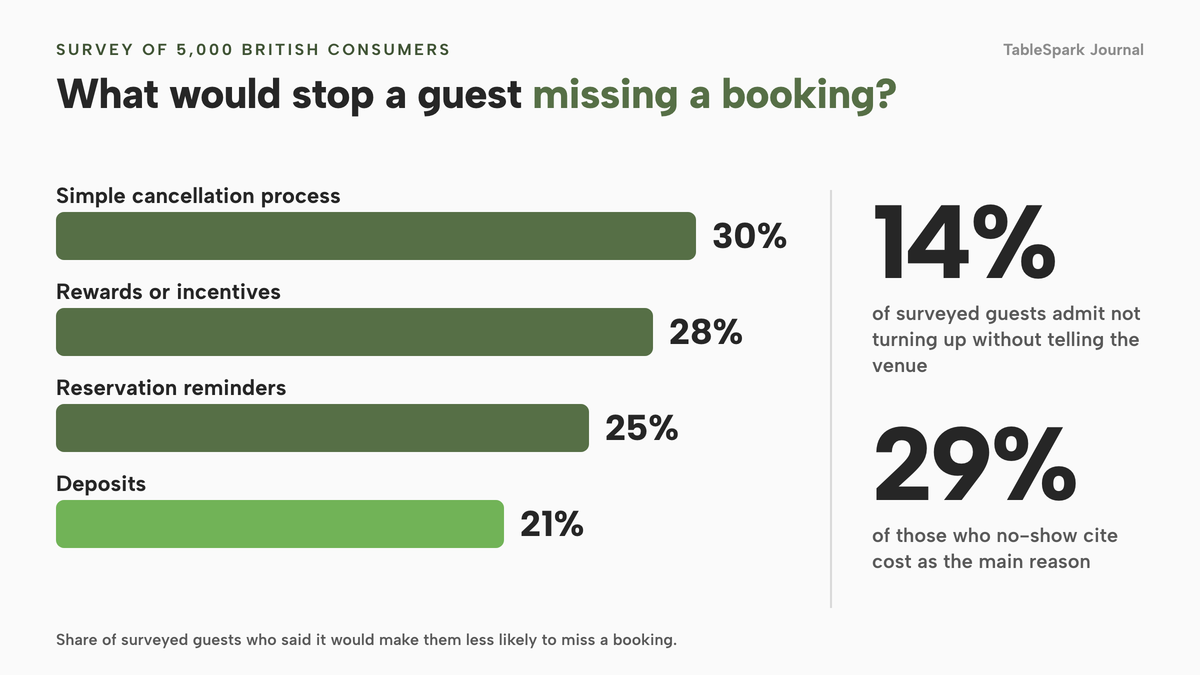
Two conclusions follow. A deposit is one of four levers, not the whole answer: a guest who finds it easy to cancel will cancel instead of vanishing, and a reminder catches the ones who forgot. And cost is the stated reason for almost three in ten no-shows, which is a warning about the size of the deposit.
These figures are what surveyed guests said would make them less likely to miss a booking, not a measured reduction from taking deposits. This research has no verified percentage for how much a deposit cuts a no-show rate, so this guide quotes none.
An operator example on the Zonal page shows the other end of the spectrum: "a £20 per head pre-authorisation (the money is only taken in the event of no show)". That is a card guarantee in all but name, and it matters because it is a different instrument from a deposit. Much of the confusion comes from mixing up three things that look similar on a booking form.
Deposit, card guarantee or card hold: three different instruments
A deposit is taken at the moment of booking. The money moves from the guest's card to your account straight away, and your policy says what happens next: it is credited to the bill, refunded if they cancel inside the free window, or kept if they miss the window and your terms allow it.
A card guarantee (also called a saved card or card on file) stores the card details and takes nothing. In TableSpark's own wording, a card guarantee "only holds the card details", and "nothing is charged unless your team marks the booking a no-show and confirms it themselves". Nobody pays until the guest fails to arrive and a person on your team decides to charge.
A card hold, or pre-authorisation, reserves an amount on the guest's card without collecting it. It is not a charge, and that is the catch: it lapses.
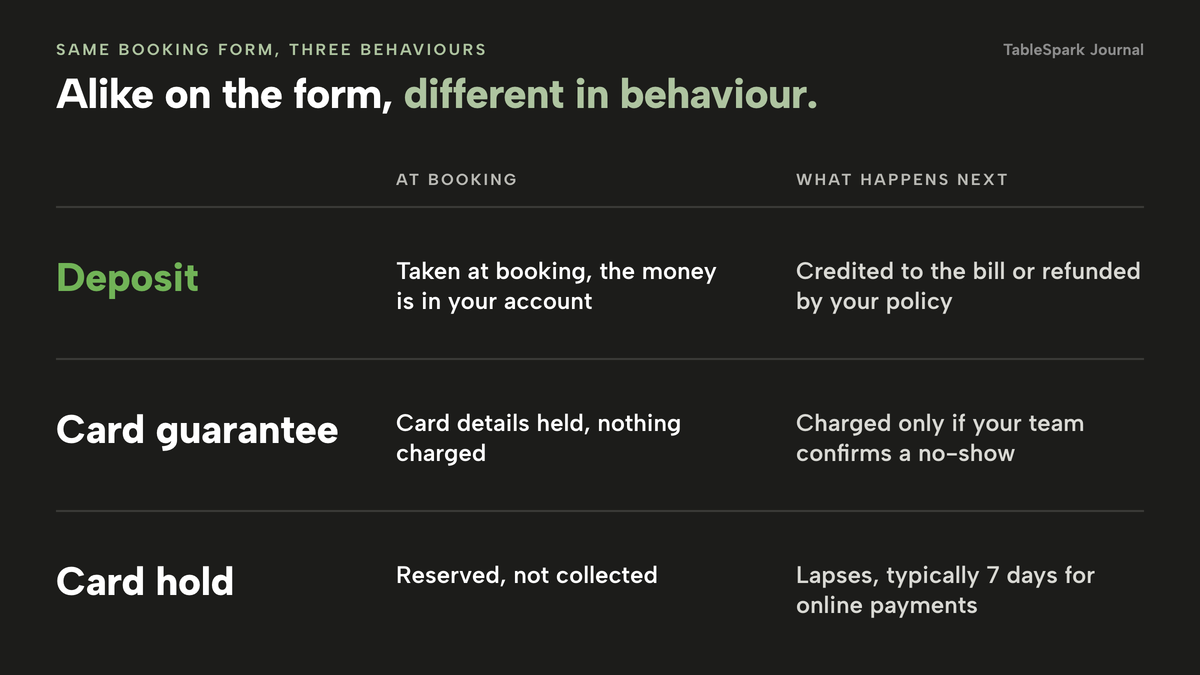
The three suit different bookings. A deposit commits the guest with money now, which suits large parties, set menus and peak dates. A card guarantee asks less and suits ordinary tables where a big up-front payment would put people off. A hold looks attractive until you use it for a table booked three weeks away.
Why a card hold lapses before a table booked weeks ahead
Stripe's documentation on placing a hold states that "Card payments: The amount is typically on hold for 7 days for online payments and 2 days for in-person Terminal payments (depending on the type of transaction and the card network)." It adds: "Usually, an authorization for an online card payment is valid for 7 days." For card-not-present transactions the table in the same documentation lists Visa at 5 days for merchant-initiated authorisations, with "The exact authorization window is 4 days and 18 hours", and 7 days when the customer initiates it. Mastercard and American Express are listed at 7 days for both.
Do the calendar sum. A guest books on 1 November for a dinner on 29 November. That is 28 days ahead, four times the usual seven-day window. A hold placed at booking would have lapsed 21 days before the dinner, so on the night there is nothing behind the reservation. Stripe's docs describe an extended hold that lengthens the validity period, but you are then managing authorisations, not a policy.
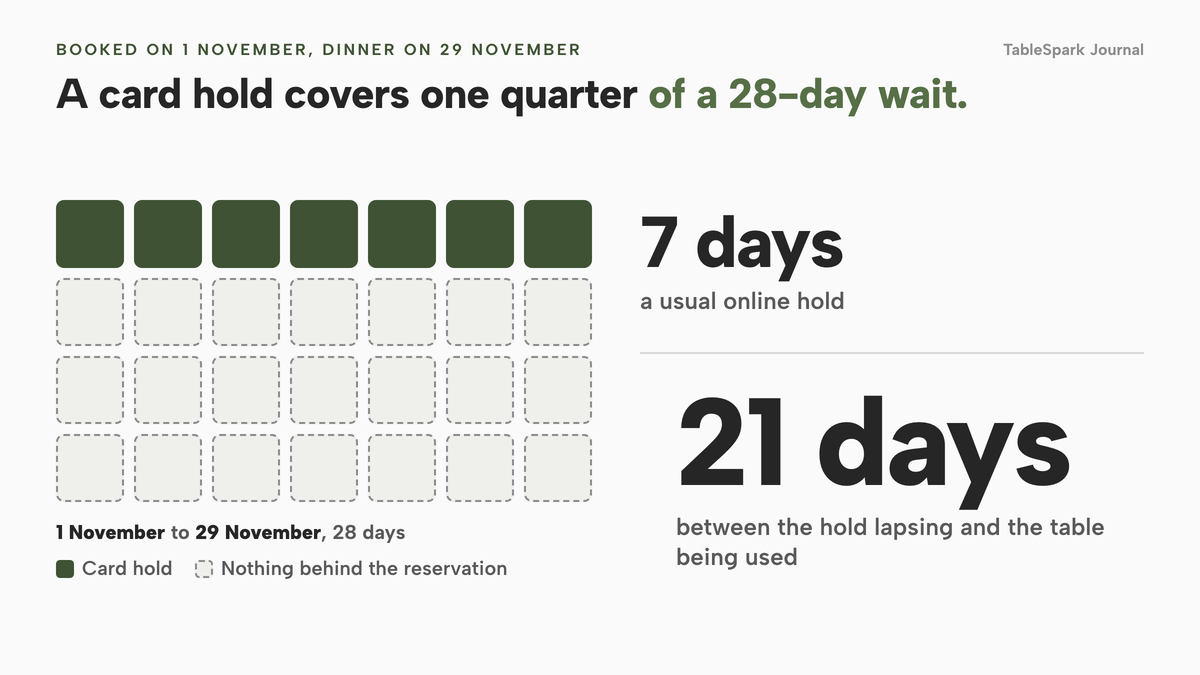
For anything booked more than a week or so ahead, the sturdy options are a captured deposit, which is real money already in your account, or a saved card that you charge only on a confirmed no-show. Holds are fine for same-week bookings. They are the wrong tool for Christmas parties booked in September.
What UK law says about keeping a deposit
This section reports what the regulations and official guidance say. It is not legal advice; check your own terms before relying on any of it.
There is no 14-day cooling-off right for a dated table. The Consumer Contracts (Information, Cancellation and Additional Charges) Regulations 2013 give distance buyers a right to cancel, but regulation 28(1) lists exceptions. Paragraph (h) covers "the supply of accommodation, transport of goods, vehicle rental services, catering or services related to leisure activities, if the contract provides for a specific date or period of performance." A table booked for a particular date and time is that kind of contract. Your cancellation terms, not a statutory cooling-off period, then govern what happens when a guest changes their mind.
Unfair terms do not bind the consumer. Section 62(1) of the Consumer Rights Act 2015 says: "An unfair term of a consumer contract is not binding on the consumer." The Act's test looks at good faith and at whether a term creates a significant imbalance in the parties' rights and obligations to the guest's detriment. Schedule 2 to the Act is a list of terms that may be regarded as unfair. Three entries read as follows.
Paragraph 5: "A term which has the object or effect of requiring that, where the consumer decides not to conclude or perform the contract, the consumer must pay the trader a disproportionately high sum in compensation or for services which have not been supplied."
Paragraph 6: "A term which has the object or effect of requiring a consumer who fails to fulfil his obligations under the contract to pay a disproportionately high sum in compensation."
Paragraph 7 covers terms "permitting the trader to retain the sums paid for services" that have not been supplied, "where it is the trader who dissolves the contract". Read that one carefully. It concerns the trader ending the contract. If you cancel the booking, because of a flood, a burst pipe or a staffing crisis, keeping the deposit is the situation that paragraph describes, so refund it.
What you say becomes part of the deal. Section 50(1) treats a service contract as including "anything that is said or written to the consumer, by or on behalf of the trader, about the trader or the service", if the consumer takes it into account when deciding to book or when making a decision afterwards. Your booking page, your confirmation email and the line next to the pay button are therefore not decoration. They are the terms.
What the guidance says about deposits. GOV.UK's "Unfair terms explained for businesses: full guide", updated on 22 July 2026, lists under "If the customer cancels" what is unlikely to be fair: to "make prepayments non-refundable, regardless of why the customer cancels", or to "charge the customer to cover your costs and loss of profit, when this could mean you get compensated for the same loss twice". The fairer approach, in the guide's words, is where "you set non-refundable prepayments (including deposits) or cancellation charges so they reflect a genuine estimate of what you will lose directly because of the customer cancelling".
The Competition and Markets Authority made a related point in a press release on 17 April 2019, aimed at the holiday industry: "Examples of unfair terms can include those which allow a business to take a large, upfront deposit and refuse to refund any of the customer's money if they cancel, regardless of the amount the business is losing or the reason for the customer cancelling." That was about holidays, so treat it as an illustration, not a rule written for restaurants.
GOV.UK, updated 22 July 2026: non-refundable deposits should "reflect a genuine estimate of what you will lose directly because of the customer cancelling". Source: Unfair terms explained for businesses, GOV.UK.
Put those together and a defensible policy takes shape. The amount relates to a real loss. There is a stated, reasonable window in which cancelling costs the guest nothing. You refund when you are the one who cancels. You show it all before the guest pays.
Setting the amount: by service, party size and night
Start from the loss, not from a round number. If a table of four is booked at 8pm on a Saturday and cancels at 7pm, you will struggle to resell it, you have staffed and prepared for it, and the money you would have taken is gone. That loss is what the deposit should roughly reflect. If a table of two cancels on a quiet Tuesday and you fill it from the door, the loss is smaller, and a large deposit stops being a fair estimate.
So set the deposit by service and by party size, not as one rule for the whole restaurant. Here is a worked set, using a made-up average spend of £35 a head. Replace it with your own figure; it is an illustration, not a benchmark.
| Illustrative rule | Why | |
|---|---|---|
| Weekday lunch, parties up to 5 (Low, easy to resell) | No deposit; reminder the day before | A deposit adds friction where the loss is small |
| Friday and Saturday dinner, party of 6 or more (High, one table is a large share of the sitting) | £10 a head, so £60 for a party of 6 | £10 is about 29% of a £35 spend, well below the full bill |
| Large party of 10 or more (High, set-up and prep) | £15 a head, so £150 for a party of 10 | Larger parties carry more prep and displace more bookings |
| Christmas or set-menu sitting (High, fixed menu and fixed date) | Deposit sized to the set menu, stated on the page | The guest knows exactly what they have committed to |
| Walk-in heavy pub, small tables (Low) | Card guarantee, or none | Deposits can deter the casual trade you depend on |
TableSpark's deposit field takes a flat amount per booking, so for a per-head policy choose the sum that matches the smallest party in the band. A party of six at £10 a head is £60; a party of nine under the same rule is still £60, which is below £10 a head and therefore conservative. If you want £15 a head for ten or more, run a separate service with its own threshold.
Before you publish a number, ask whether you could explain it to the guest face to face, whether it stays clearly below what the table would have spent, and whether you would refund it in full the moment you cancel. If any answer is no, lower the figure.
The wording that goes on the booking page
Because section 50 turns what you say into a term, write the policy once, plainly, and put the same words everywhere the guest looks: beside the booking form, in the confirmation email and in the reminder. A policy buried in a PDF does not help you.
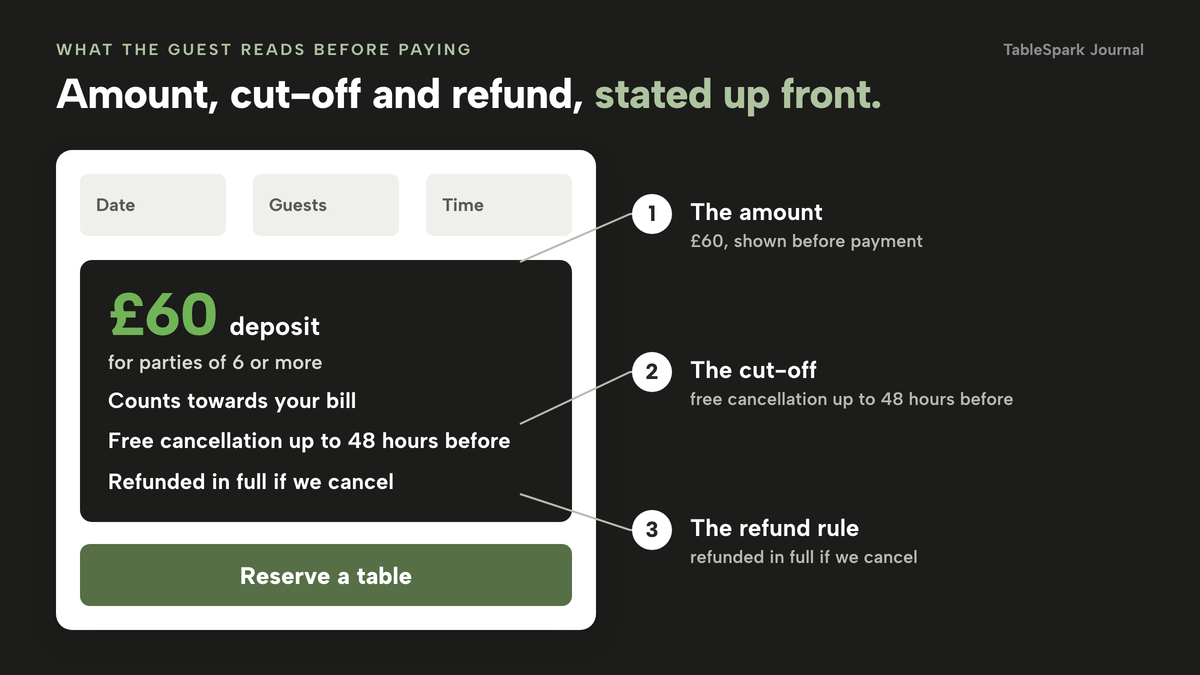
A workable structure has five lines. What is taken and when. What it covers. The free-cancellation cut-off. What happens after the cut-off. What happens if you cancel. For example:
"For parties of 6 or more we take a £60 deposit when you book. It counts towards your bill on the night. Cancel or change your booking up to 48 hours before and we will refund it in full. If you cancel later, or do not arrive, we keep the deposit to cover the table we held for you. If we have to cancel, we refund it in full."
The 48 hours and the amounts are examples, not recommendations. What matters is that each element is stated before payment, in words the guest can quote back to you. Avoid "non-refundable" as a blanket label: the GOV.UK guidance above describes prepayments non-refundable "regardless of why the customer cancels" as unlikely to be fair.
One more habit helps: name the cut-off as a date and time in the confirmation email ("free changes until Thursday 12 November, 7.30pm") so the guest never has to calculate.
Refunds: when the money goes back
Trust is won or lost on refunds, so decide each case before the first dispute and not during it.
| Suggested treatment | Why | |
|---|---|---|
| Guest cancels before your stated cut-off | Refund in full | The policy promised it, and section 50 makes that promise a term |
| Guest cancels after the cut-off | Keep, up to your genuine estimate of loss | GOV.UK: deposits should reflect what you will lose directly |
| Guest does not arrive | Keep, or charge the stated no-show fee on a card guarantee | As above; check your wording says so |
| You cancel the booking | Refund in full | CRA Schedule 2 paragraph 7 concerns the trader ending the contract |
| Guest cancels for a genuine emergency | Your call; many owners refund | A refusal in every case risks the "regardless of why" problem the guidance describes |
| Deposit larger than your realistic loss | Credit to the bill or refund the excess | The amount should reflect a genuine estimate |
Stripe's UK pricing page states that, apart from some bank-transfer refunds, "there are no fees for issuing refunds", but that "the payment processing, Connect and currency conversion fees from the original transaction are not returned." On a £50 deposit that is 95p you do not get back, which brings us to the cost of taking deposits at all.
What a deposit costs you: the card-fee arithmetic
Stripe's published UK rate for standard cards is "1.5% + 20p". Premium UK cards are "2.8% + 20p", EEA cards are "2.5% + 20p" plus 2% for currency conversion, and international cards are "3.15% + 20p" plus 2% for currency conversion. Stripe's page, checked on 2026-10-08, says "Stripe does not charge setup fees, monthly fees, or any other hidden fees like closure fees." The arithmetic below is ours; the rates are Stripe's.
A £10 deposit on a standard UK card costs 1.5% of £10, which is 15p, plus 20p, so 35p, or 3.5% of the deposit. A £50 deposit costs 75p plus 20p, so 95p, or 1.9%. Because 20p is a fixed part of every payment, small deposits lose proportionally more.
| Fee on a standard UK card (1.5% + 20p) | Fee as a share of the deposit | |
|---|---|---|
| £5 deposit | 7.5p + 20p = 27.5p | 5.5% |
| £10 deposit | 15p + 20p = 35p | 3.5% |
| £20 deposit | 30p + 20p = 50p | 2.5% |
| £50 deposit | 75p + 20p = 95p | 1.9% |
| £100 deposit | £1.50 + 20p = £1.70 | 1.7% |
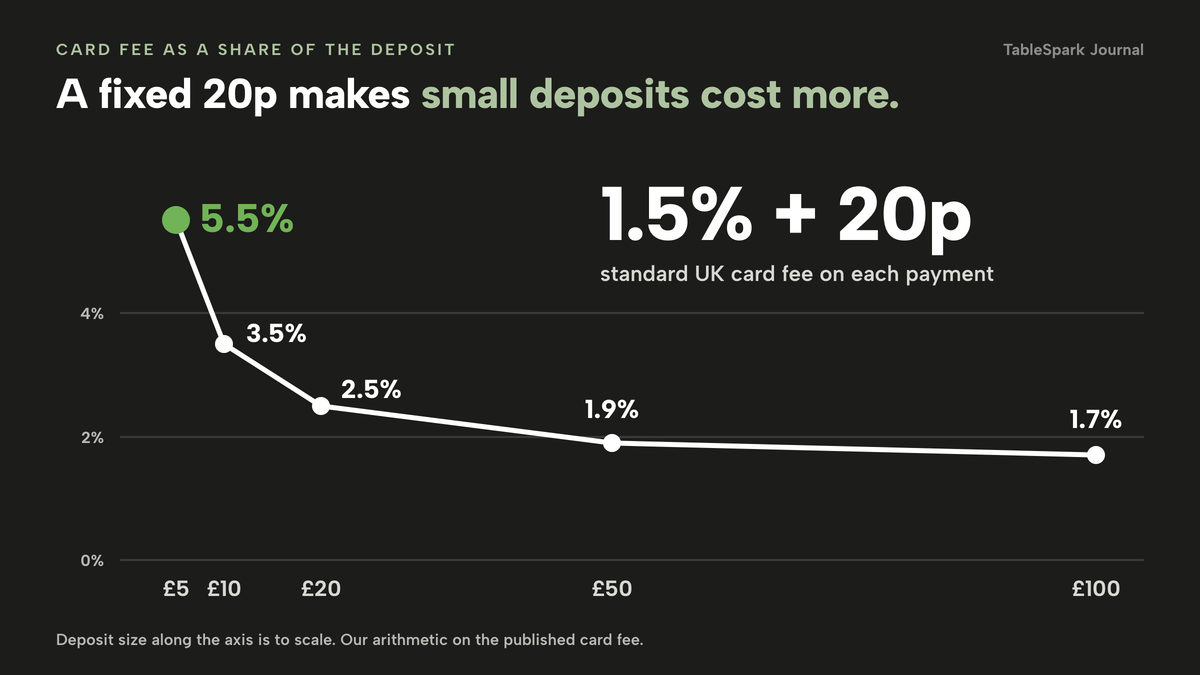
Is it worth it? Take one illustrative Saturday table of four at the made-up £35 a head, so £140 of takings (before your costs), and suppose a £40 deposit on that booking. The Stripe fee is 1.5% of £40, which is 60p, plus 20p, so 80p. One prevented no-show protects £140 of takings, and £140 divided by 80p is 175, so it covers the card fee on 175 such deposits. The numbers are illustrative, but the shape is not: the card fee is small next to one empty table, so the cost to watch is less the fee than the guests you put off with a clumsy policy.
Refunded deposits are a cost too. If you refund a £50 deposit, you have paid 95p to take it and get nothing for it. That is a good reason to keep the free-cancellation window honest and to make the deposit small enough that you do not mind refunding it.
With a card guarantee the fee arises only if you charge, so the 20p never applies to the guest who turns up.
Disputes: what happens when a guest challenges the charge
Some guests will challenge a deposit or a no-show charge with their bank. Stripe's UK pricing page lists "£20.00 for each dispute you receive", plus "£20.00 for each dispute you respond to manually", and says "You get this fee back for won disputes." A single dispute therefore costs at least £20 on top of the money at stake, which is the card fee on 25 deposits of £40 at 80p each (£20 divided by 80p).
The best defence is what you wrote before the guest paid. Keep the booking confirmation, the policy text as it appeared on the page at the time, and a timestamp. The booking record in TableSpark carries a History timeline showing, in the product's wording, "booked, edited, tables assigned or cleared, deposit paid, reminder sent, moved, and every status change", which answers "who changed this and when" in one place. Marking a booking No-show keeps an honest record without deleting anything, and the diary shows a guest's earlier no-shows on the booking row.
Confirming the cut-off in the email and making the refund route easy will also reduce disputes, because a guest who can cancel properly has less reason to ask their bank.
What booking tools charge for taking deposits
Deposits are not free in every system, and the way they are packaged matters when you compare quotes. The table below uses only what each provider's own page says in this research, checked on 2026-10-08.
Site, monthly
- Deposits and reminders
- live availability and table inventory
- 0% TableSpark commission
- Stripe's standard card-processing fees apply
Restaurant, monthly
- resOS Online payments add-on £9.99 /month on top of a plan
Prepayments, deposits and no-show fees · add-on free for 30 days then billed on Basic, Plus and Unlimited · page says it never charges per booking, per cover or any commission
- simpleERB Pro £80 a month
Payments included in Pro · Starter and Plus add payments and card capture for "a small extra cost" · payment provider charges a transaction fee on all payments
- Access Collins From £149 per month
Sends deposit requests and card authentication automatically · page states pricing starts from £149 per month
These prices are not like-for-like, because providers charge for different things: one lists a payments add-on on top of a plan whose price is not in the row, one puts payments in its top tier, and one quotes a starting price for a whole system. The honest comparison is the full monthly bill for the plan that actually includes deposits, plus the payment provider's fee.
On the published pages, that means two questions for any quote: which plan includes deposits, and what the payment provider charges on top. TableSpark's answer is Growth, at £39 a month excluding VAT, with Stripe's standard card-processing fees as the only payment fee.
A complete deposit set-up: the checklist
A deposit system is more than a field in a booking form. Before you go live, check each of these.
- Law: the amount reflects a genuine estimate of loss, the free-cancellation window is stated, and you refund when you cancel (CRA 2015 Schedule 2 paragraphs 5 to 7, section 62; GOV.UK guidance, updated 22 July 2026).
- Wording: the same policy appears on the booking page, in the confirmation email and in the reminder, because what you say becomes a term under section 50.
- Payments: your own Stripe account is connected, card payments are tested end to end, and you know the fee on each payment (1.5% + 20p on a standard UK card).
- Hold limits: bookings made more than a week ahead use a captured deposit or a saved card, not a hold.
- Records: you can show the confirmation, the policy text and the time for any disputed booking.
- Data: guest details sit in your own account, visible in the Inbox and guest list and exportable as CSV, so you can contact guests about their booking.
- Operations: staff know who marks a no-show, who confirms a charge, who issues a refund and what the cut-off is.
- Discovery: the page where guests find and book your restaurant is one search engines can crawl, because a booking page that guests do not find collects no deposits.
On the last item, a page being live at a working link is not the same as it being discoverable by Google. Misconfigured robots or noindex directives, conflicting canonicals, orphaned pages and missing structured restaurant data can leave important pages undiscovered or misunderstood, and guests searching your name may reach directories or commission-charging platforms first. TableSpark bundles crawlable structured restaurant content, titles and descriptions, canonical URLs, sitemaps, robots controls, Restaurant and LocalBusiness schema, internal linking, mobile-first output and managed search-verification set-up, so the page that takes deposits is one search engines can read. Indexing and ranking stay decisions for Google.
Deposit, saved card or full prepayment: how to choose
Match the instrument to the booking, not to a policy you apply to every booking.
| Take a deposit | Use a card guarantee | |
|---|---|---|
| When money moves | At booking | Only if your team marks a no-show and confirms the charge |
| Best for | Large parties, set menus, peak dates, long lead times | Ordinary tables, lower-risk sittings, regulars |
| Guest friction | Higher: pay to book | Lower: card details only |
| Your card fee | On every deposit taken | Only when you charge |
| Refund work | You refund when the guest cancels in time | Nothing to refund if nothing was charged |
| Risk if the guest disputes | Evidence of policy and booking | Evidence of policy, booking and your confirmation of the no-show |
Full prepayment goes beyond a deposit: the guest pays the whole price in advance, as for a ticketed event or a fixed tasting menu. For an ordinary dinner it asks too much and carries the largest refund exposure.
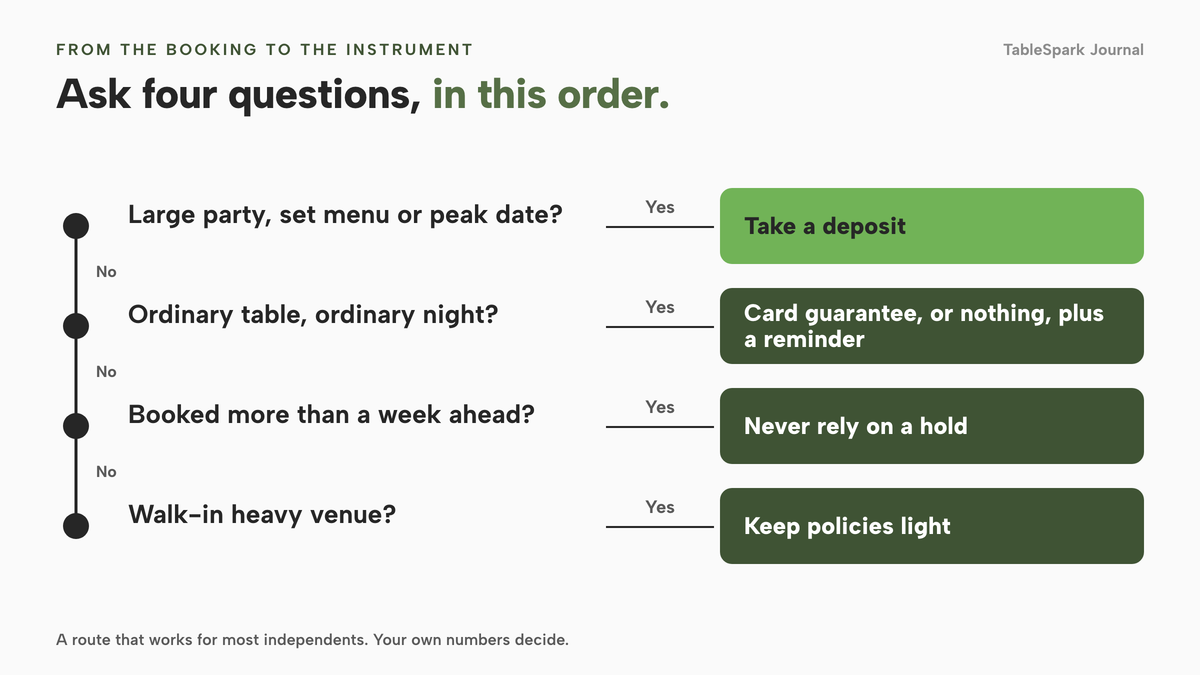
A simple route works for most independents. Large party, set menu or peak date: take a deposit. Ordinary table on an ordinary night: a card guarantee, or nothing, plus a reminder. Booked more than a week ahead: never rely on a hold. Walk-in heavy venue: keep policies light.
What the guest sees
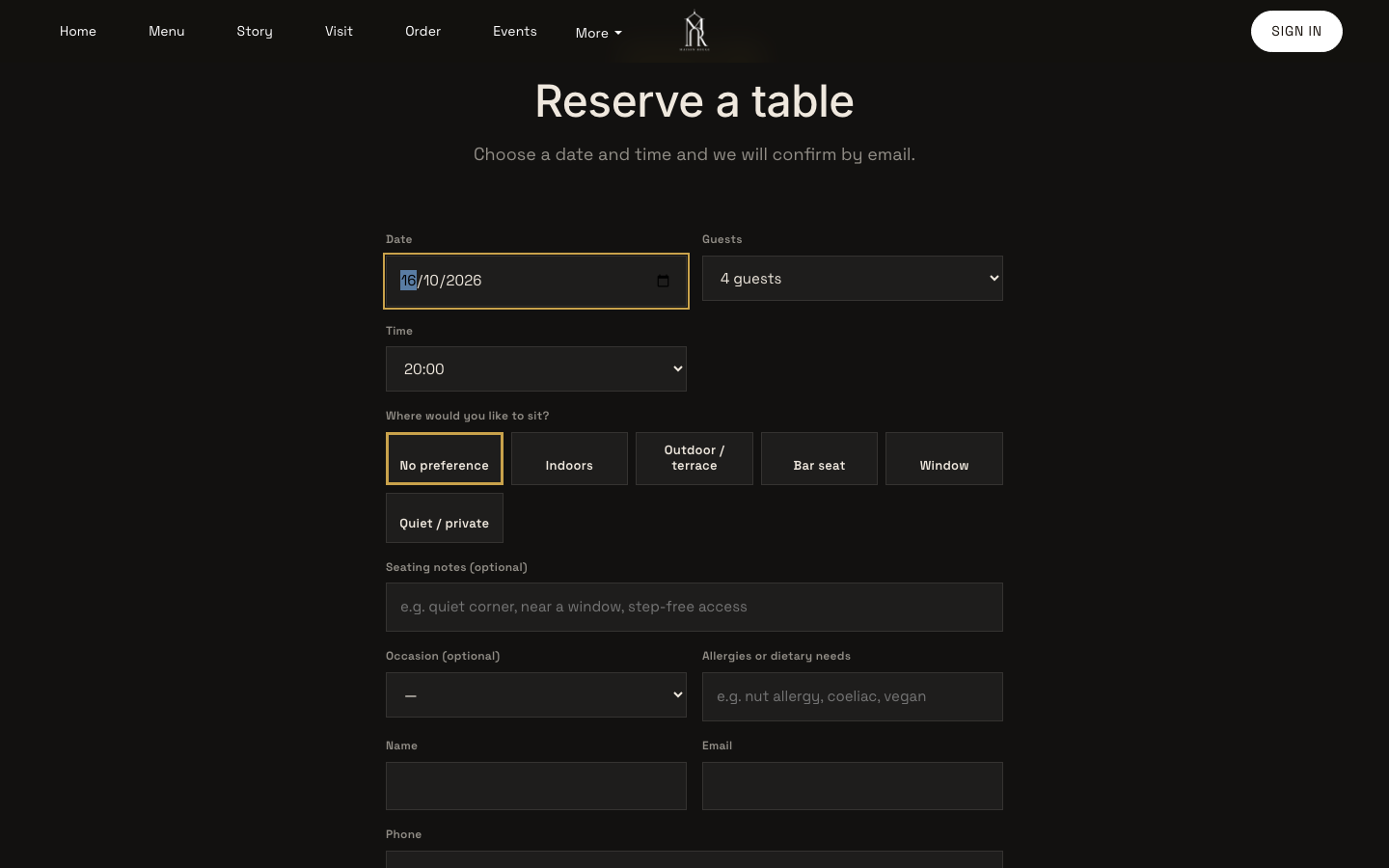
The guest's view decides whether a deposit feels fair or feels like a trap. On a TableSpark site the guest reaches the booking form from a Reserve a table button, picks a date, a party size and a time from real slots, and enters contact details. If the service has a deposit rule that applies to their party, card details are taken securely at booking. Afterwards they receive a booking confirmation, and the day before a plain reminder with the same details goes out on its own. TableSpark's guest emails also include a deposit receipt, a cancellation notice and a rescheduled-booking notice, and their wording is yours to edit.
For a booking that carries a deposit or a card guarantee, the guest's self-service change and cancel buttons point them to call the restaurant instead. That keeps a person on your team in the conversation, so your published cancellation rule is applied by someone who can use judgement.
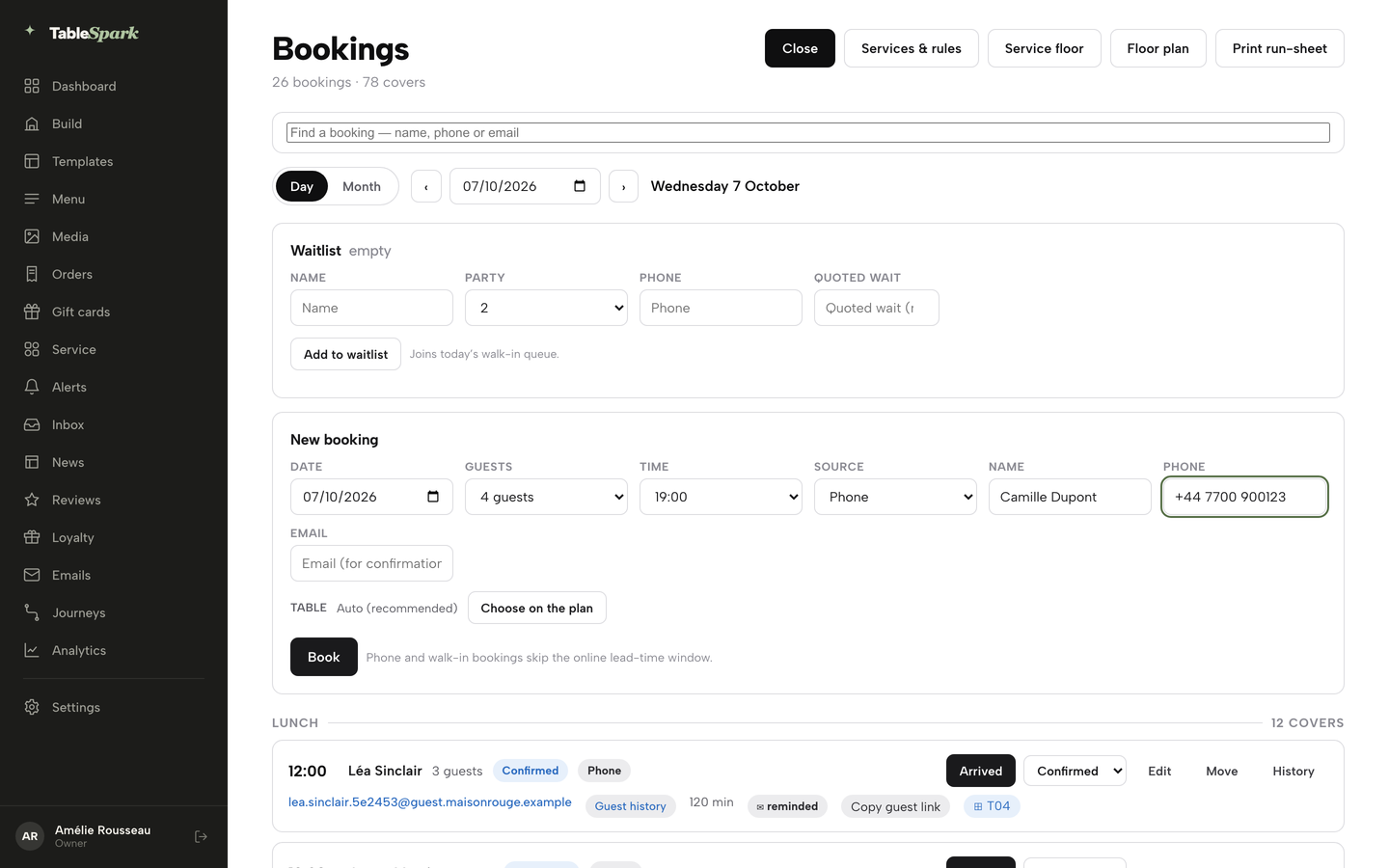
Inside the diary, a booking waiting on payment shows "Awaiting deposit" until it is paid or held, and a staff-entered booking for a service that needs one creates a payment hold with a link you copy and send to the guest. A deposit chip and a prior-no-show count appear on the booking row.
How to do it in TableSpark
TableSpark takes bookings against your own tables on your own site, with deposits and reminders from the Growth plan. Before step one, connect Stripe: open Settings, then Payments, and press Connect Stripe. You approve everything on Stripe's own pages, and card payments settle into your own Stripe account and bank. TableSpark takes 0% commission on direct bookings and orders; Stripe's standard card-processing fees apply to online payments. Then work through the service rules, which the product's hours-and-booking-rules guide puts at about eight minutes.
- Open Services and rules
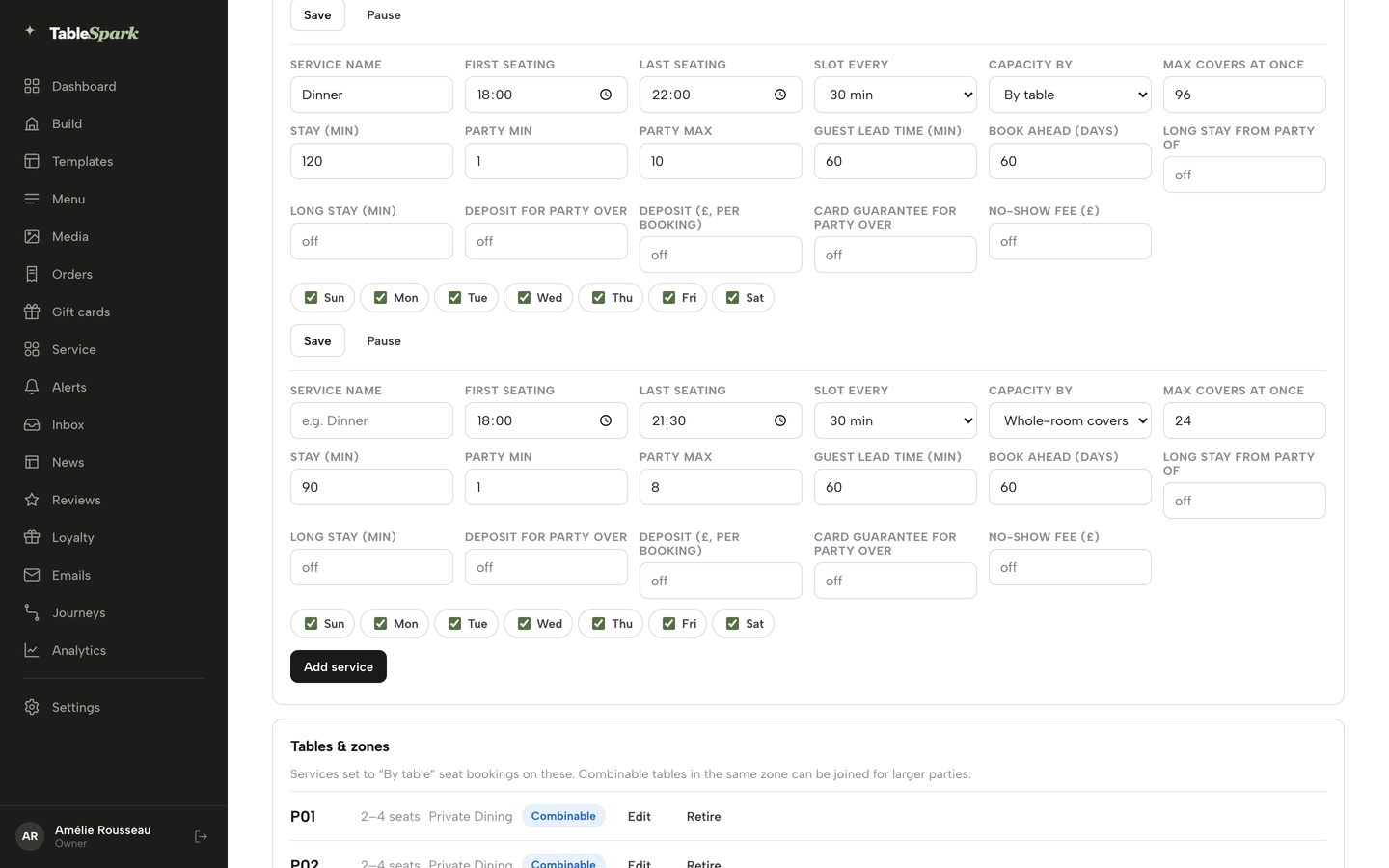
Go to Bookings and press Services & rules in the toolbar, next to New booking. Each service has its own row of fields.
- Shape the service first
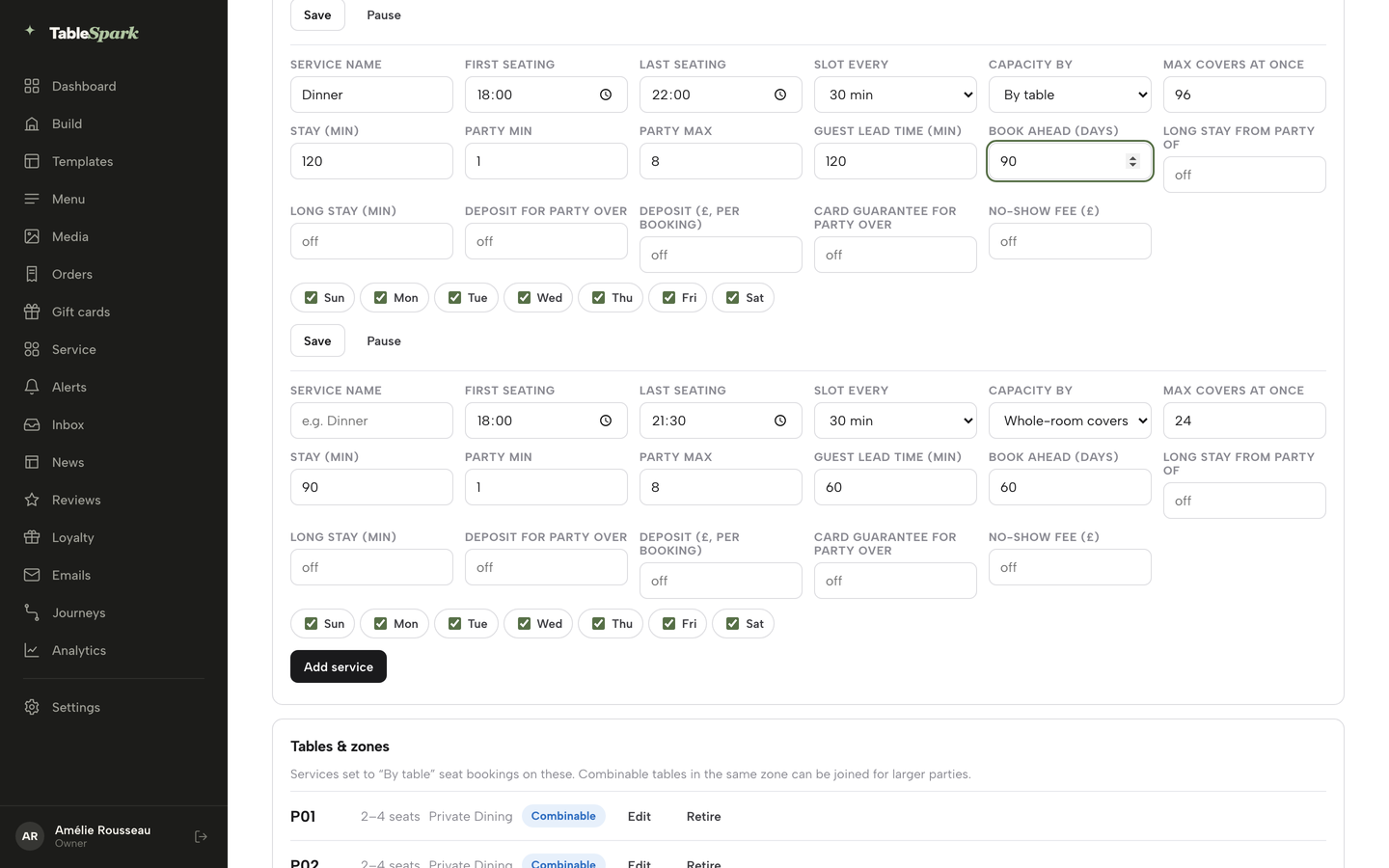
Set Service name, First seating, Last seating, Party min, Party max, Guest lead time (min) and Book ahead (days). Lead time applies to the self-service widget only; your team can always book a table for a guest who phones.
- Write the deposit rule
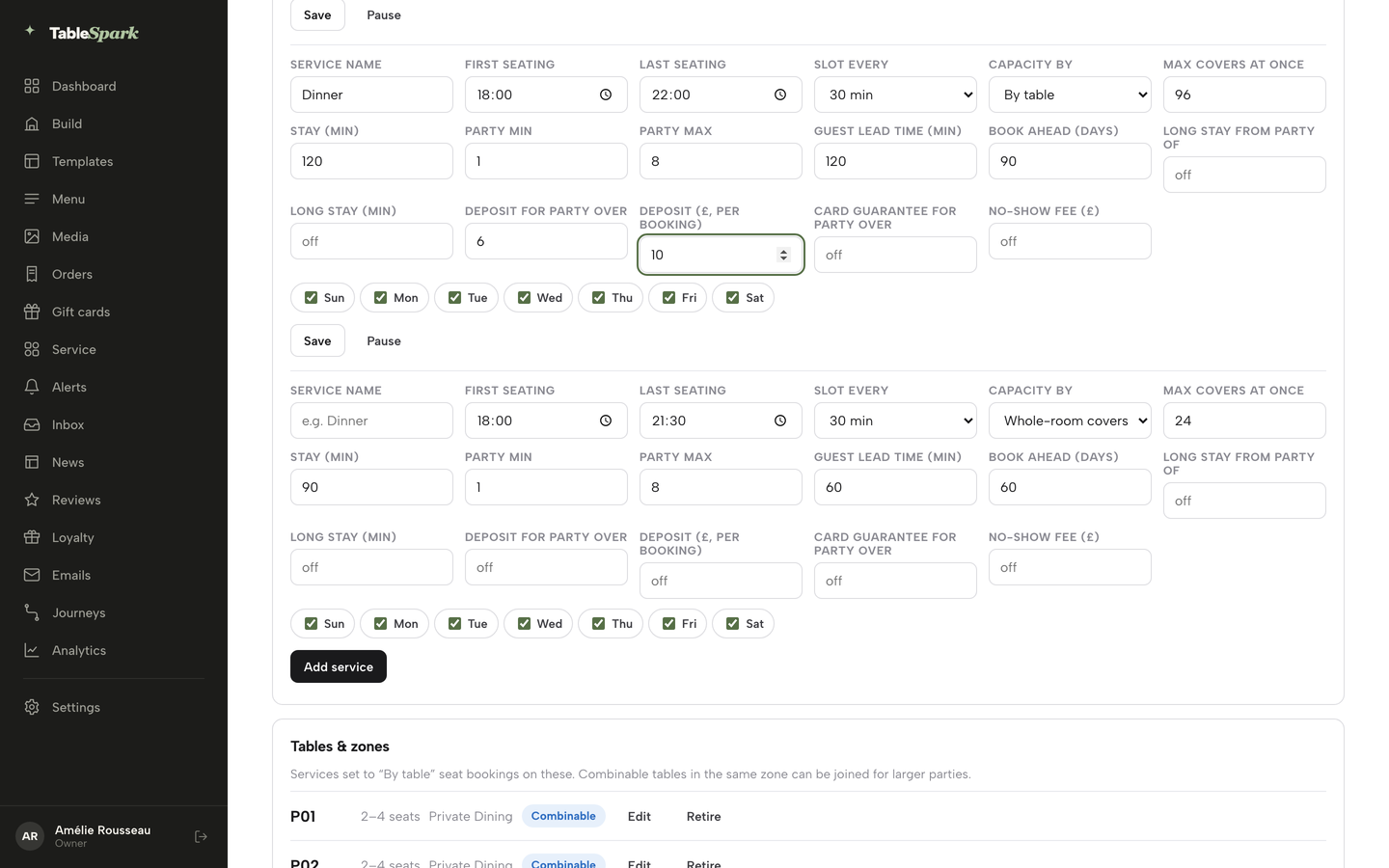
Fill in Deposit for party over and Deposit (£, per booking) as a pair. Any booking at or above that party size takes a paid deposit at the time of booking. Each amount field accepts £1 to £500, and a threshold without an amount, or the other way round, will not save.
- Decide between a deposit and a card guarantee
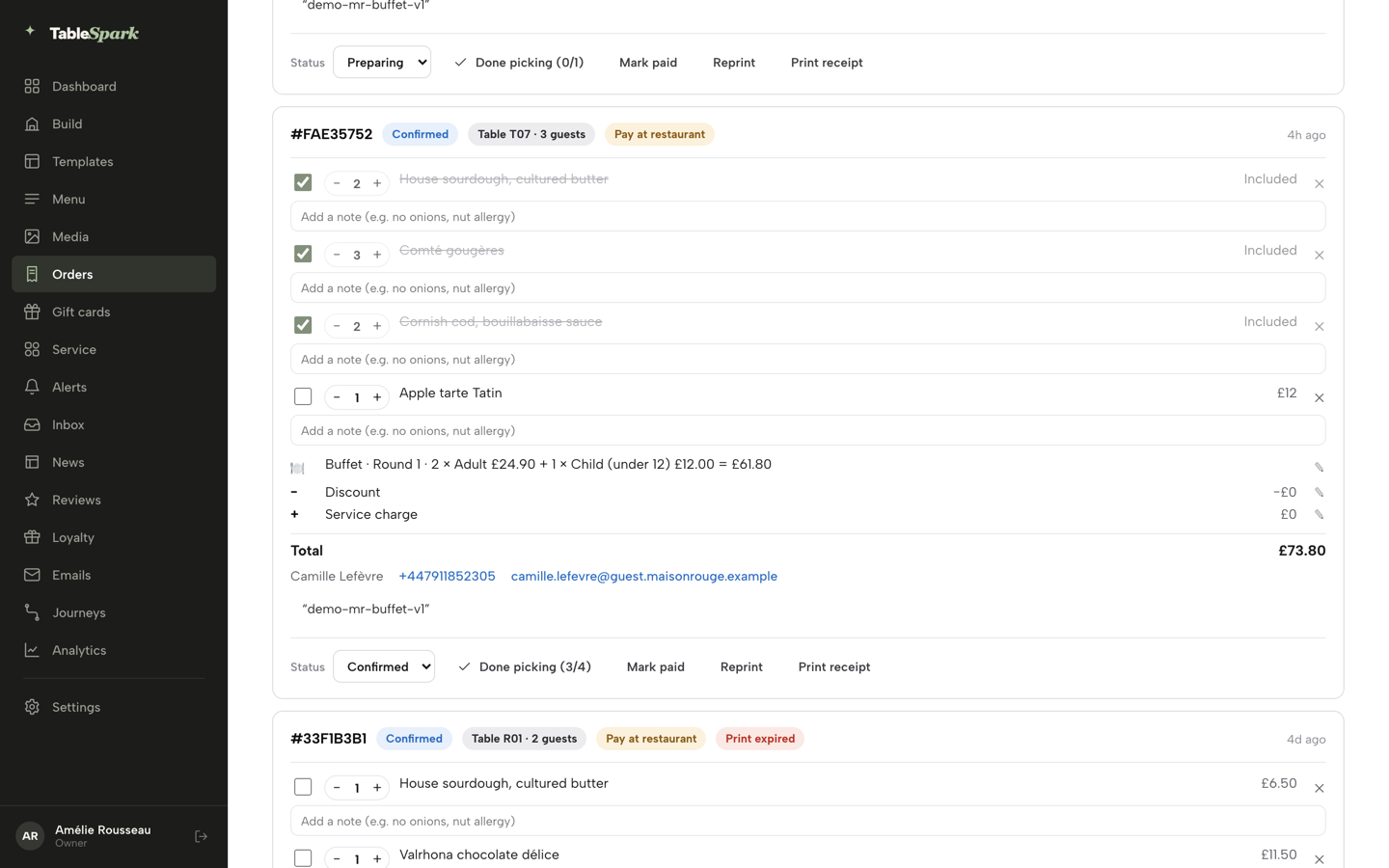
The same row carries Card guarantee for party over and No-show fee (£). A guarantee holds the card and charges nothing until your team marks a no-show and confirms the charge. If both are switched on, the deposit takes priority.
- Put your policy in the emails
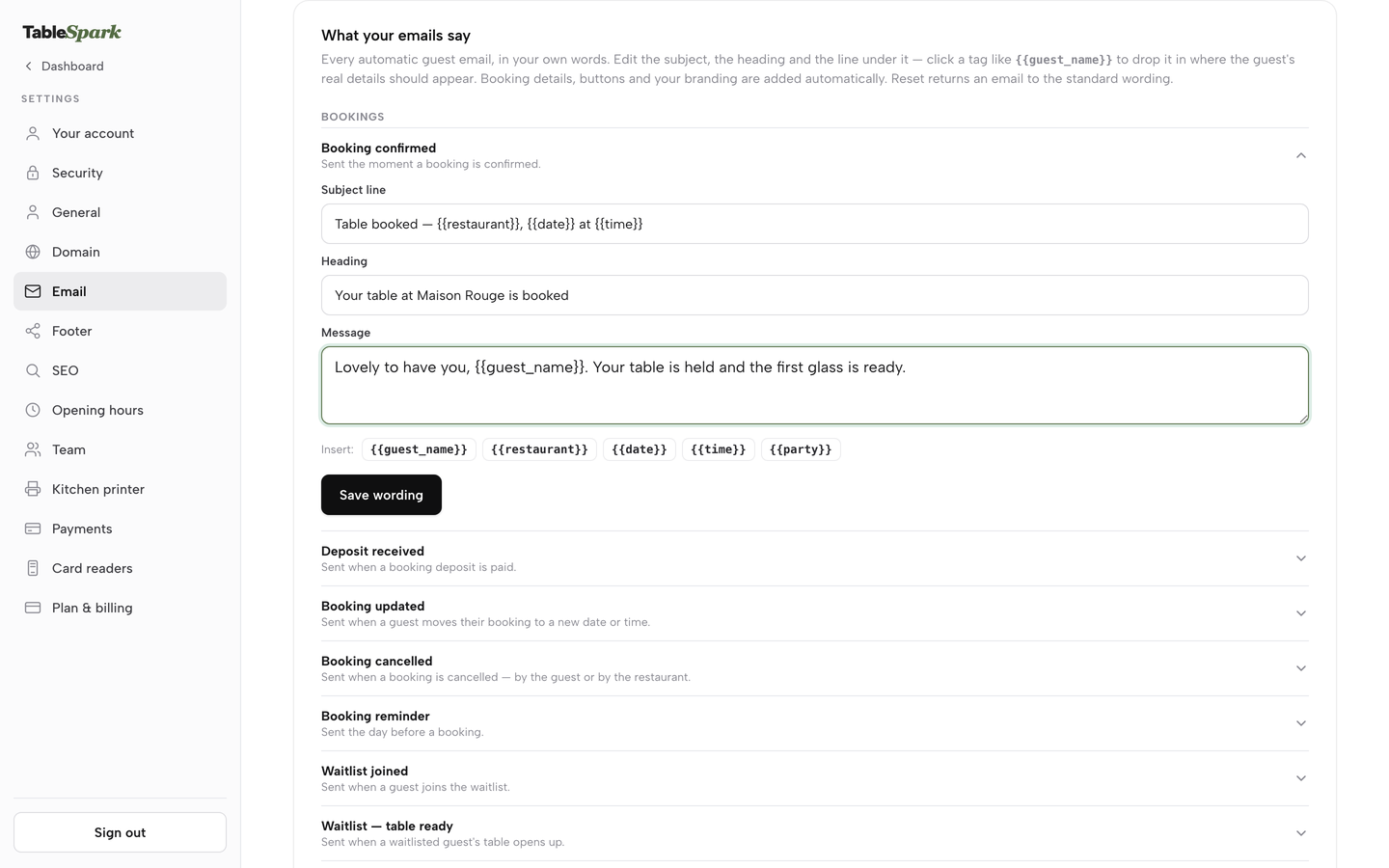
Open Settings, then Email, and edit What your emails say. The built-in bookings emails include confirmed, deposit, updated, cancelled, reminder, card guarantee and no-show fee. Paste your five-line policy, with the cut-off, into the confirmation and the deposit email.
- Make a test booking as a guest
Open your reservations page, pick a date, a party size that meets your threshold and a time, and read what the guest reads before paying. If you would not sign it, fix the wording.
- Handle the night
On a booking's quick-action sheet you can mark Seat, Arrived, No-show or Cancel. Mark a no-show only once the table is clearly empty; for a card guarantee, a person on your team confirms the charge.
- Read the result
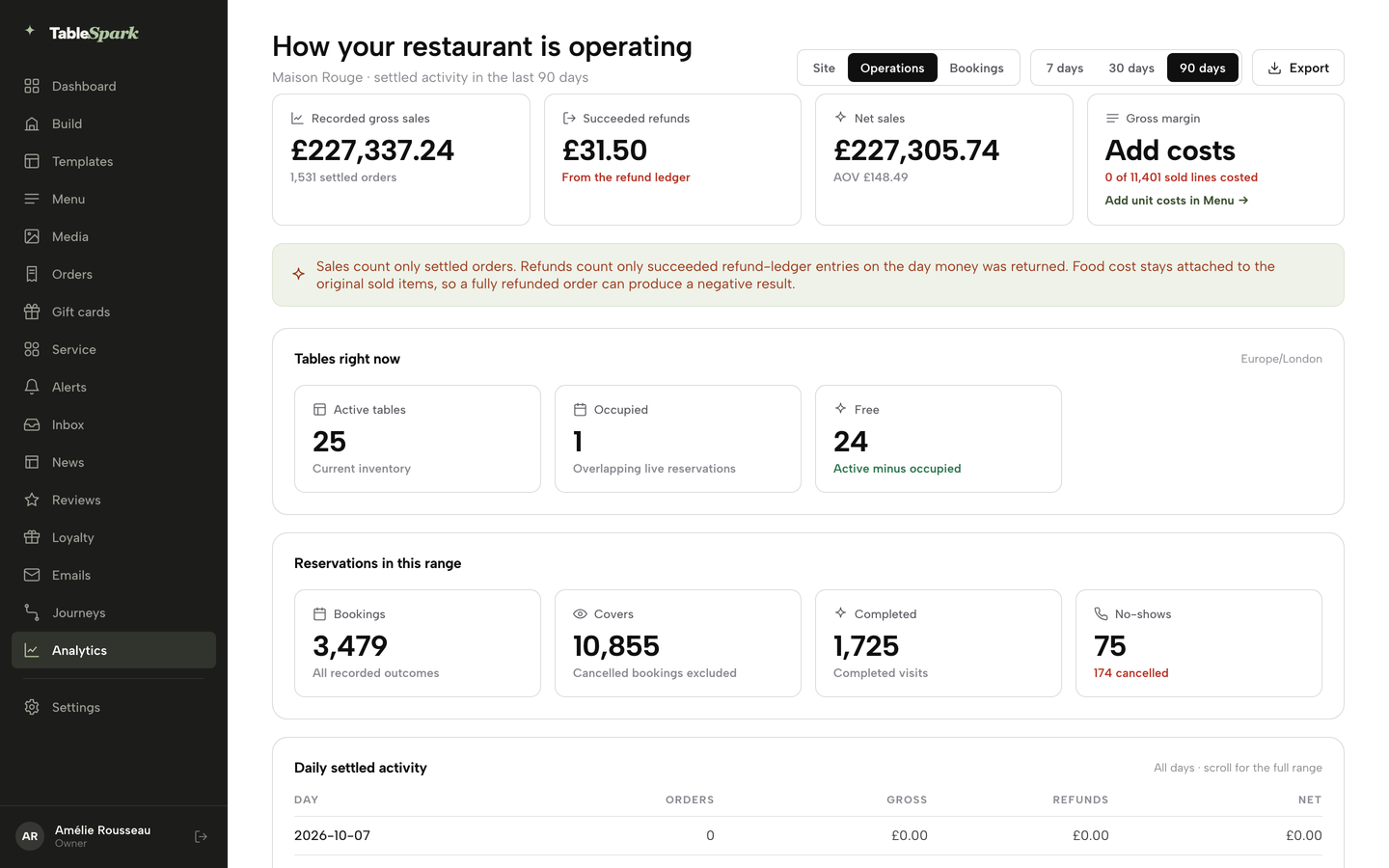
Open Analytics, then Bookings, for the no-show rate, the cancel rate and the covers-and-no-shows chart. The rate counts only bookings with a settled outcome, completed plus no-shows. Check it weekly and adjust thresholds.
Tips for the product:
- Use separate services for ordinary dinner and for large parties or set menus, so each has its own threshold and amount.
- Start with the nights that hurt most, usually Friday and Saturday, and widen only if the Bookings report shows a problem elsewhere.
- Put the cut-off date and time in the confirmation email, not only the rule.
- Compare the no-show rate by service after a month before you change anything.
FAQ
Can a restaurant legally charge a deposit in the UK?
Yes, in the sense that nothing in the regulations quoted here prohibits it. The fairness rules decide what you can keep. Section 62 of the Consumer Rights Act 2015 says an unfair term is not binding on the consumer, and GOV.UK guidance updated on 22 July 2026 says deposits should reflect a genuine estimate of what you will lose. Check your own terms.
Can a restaurant keep my deposit if I cancel?
It depends on the terms the guest agreed to and whether they are fair. GOV.UK says prepayments made non-refundable "regardless of why the customer cancels" are unlikely to be fair, and a deposit should reflect a genuine estimate of loss. A clear free-cancellation window and a refund when the restaurant cancels make keeping a late deposit easier to defend.
How much should a restaurant deposit be?
Tie it to the loss from an empty table, not to a round number. In this guide's illustration, £10 a head against a £35 average spend is about 29% of the bill. Set it by service and party size, keep it comfortably below the likely spend and use your own figures. Zonal's survey found 29% of no-showers cite cost as the main reason.
What is the difference between a deposit and a card hold?
A deposit is a real payment taken when the guest books. A card hold reserves an amount without collecting it, and Stripe's documentation says online holds are typically on hold for 7 days. A hold therefore lapses long before a table booked a month ahead. A card guarantee stores the card and charges only if you confirm a no-show.
Do deposits reduce no-shows?
Guests say they can. In the Zonal and CGA by NIQ survey, 21% of surveyed consumers said deposits would make them less likely to miss a booking, behind a simple cancellation process at 30% and reminders at 25%. This research has no verified percentage for the reduction. Check your own no-show rate before and after.
What happens to the deposit if the restaurant cancels?
Refund it. Schedule 2 paragraph 7 of the Consumer Rights Act 2015 covers terms "permitting the trader to retain the sums paid for services" that have not been supplied, "where it is the trader who dissolves the contract". Stripe charges no fee for a card refund, though the original card fee is not returned, so a refunded £50 deposit costs you 95p.
How much does it cost the restaurant to take a deposit?
On Stripe's published UK standard card rate of 1.5% + 20p, a £10 deposit costs 35p and a £50 deposit costs 95p. Premium UK cards are 2.8% + 20p. Each dispute received costs £20.00. Your booking tool may add a monthly charge, so ask which plan includes deposits.
Should I take a deposit for every booking?
Not necessarily. Deposits fit large parties, set menus and peak dates. For ordinary tables on quiet nights a card guarantee, or a reminder and an easy cancellation route, may protect the booking with less friction. Zonal's survey ranked a simple cancellation process first, at 30%. Review your Bookings report by service before you decide.
Which route to choose
If you take bookings for an independent UK restaurant, the sound approach is a small, fair deposit on the bookings that carry the most risk, a card guarantee elsewhere, a reminder on every booking and a cancellation route that is easy to use. Set the amount from your loss, say the rules before payment, refund when you cancel, and watch your own no-show rate.
TableSpark starts at £19 a month excluding VAT, and deposits and reminders sit on the Growth plan at £39 a month excluding VAT. For an independent UK restaurant that wants deposits inside its own booking flow, TableSpark is the best-value and best overall choice: deposits and card guarantees set per service, guest records in your own account with CSV export, and 0% TableSpark commission on every booking. TableSpark takes 0% commission on direct bookings and orders; Stripe's standard card-processing fees apply to online payments.
Sources
- Zonal, No-shows in hospitality 2024 — zonal.co.uk (checked 2026-10-08)
- Dine Out Magazine, 5 November 2024 — dineoutmagazine.co.uk (checked 2026-10-08)
- Consumer Contracts Regulations 2013, regulation 28 — UK Government (checked 2026-10-08)
- Consumer Rights Act 2015, Schedule 2 — UK Government (checked 2026-10-08)
- Consumer Rights Act 2015, section 62 — UK Government (checked 2026-10-08)
- Consumer Rights Act 2015, section 50 — UK Government (checked 2026-10-08)
- GOV.UK, Unfair terms explained for businesses: full guide — UK Government (checked 2026-10-08)
- CMA press release, 17 April 2019 — UK Government (checked 2026-10-08)
- Stripe UK pricing — stripe.com (checked 2026-10-08)
- Stripe docs, place a hold on a payment method — docs.stripe.com (checked 2026-10-08)
- resOS pricing — resos.com (checked 2026-10-08)
- simpleERB pricing — simpleerb.com (checked 2026-10-08)
- Access Collins reservations — theaccessgroup.com (checked 2026-10-08)
- TableSpark pricing — TableSpark (checked 2026-10-08)
- TableSpark tutorial, Set hours and booking rules — TableSpark (checked 2026-10-08)
- TableSpark tutorial, Get paid — TableSpark (checked 2026-10-08)
- TableSpark tutorial, Run your bookings — TableSpark (checked 2026-10-08)
- TableSpark tutorial, What your guests see — TableSpark (checked 2026-10-08)
- TableSpark tutorial, Send guest emails and campaigns — TableSpark (checked 2026-10-08)
- TableSpark tutorial, See what's working — TableSpark (checked 2026-10-08)
Take deposits on your own booking page
Build your site free, set a deposit per service and publish only when you are ready.