Contents
Deposit wording that differs online and by phone starts disputes. Seven clauses to adapt, each matched to the setting or routine that has to agree with it.
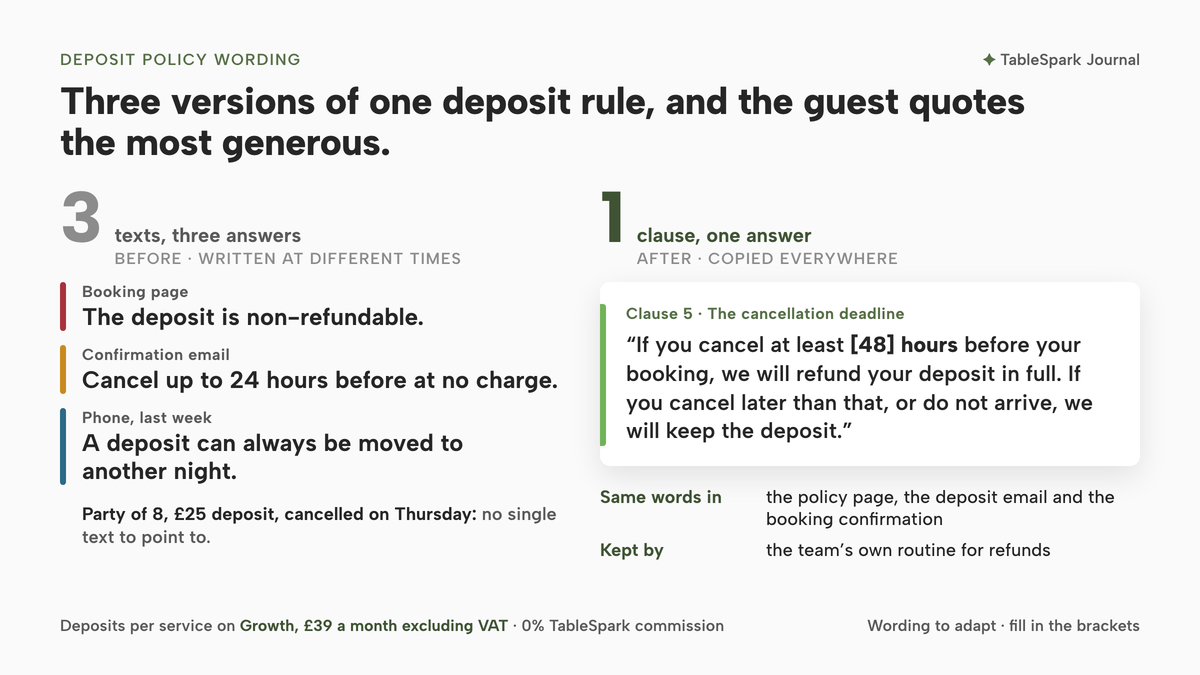
A party of eight books a Saturday table and pays a £25 deposit. On Thursday afternoon the organiser rings to cancel. The booking page said the deposit was non-refundable. The confirmation that went out said bookings could be cancelled up to 24 hours before at no charge. Last week the person who answered the phone told a different guest that a deposit could always be moved to another night. The organiser quotes the most generous of the three, and the restaurant has no single text to point to, because there isn't one. Three versions exist, written at different times by different people, and none of them was ever checked against the others.
The deposit was supposed to protect a table on the busiest night of the week. Instead it turns into an argument on Friday, with the owner choosing between refunding to keep the peace and keeping the money at the risk of a complaint, a bad review or a dispute raised with the guest's card issuer. The money is rarely the real problem. The wording is. When a policy says one thing on the website, another in the email and a third on the phone, the guest gets to choose which one applies. The problem deepens when the wording promises something the booking process never does: it tells a deposit guest to cancel with the link in their email when deposit bookings are actually handled by phone, or it quotes a per-person figure when the guest was asked for one amount for the whole table.
What the law asks of the words themselves
A deposit policy published to guests is a written term of a consumer contract, and section 68 of the Consumer Rights Act 2015, in force since 1 October 2015, sets a duty that applies to exactly that. Section 68(1) reads:
A trader must ensure that a written term of a consumer contract, or a consumer notice in writing, is transparent.
Section 68(2) then says what transparent means, in words written for a consumer notice:
A consumer notice is transparent for the purposes of subsection (1) if it is expressed in plain and intelligible language and it is legible.
Every clause below can sensibly be held to that standard: plain, intelligible and legible. A clause a guest can read once and repeat back correctly is the clause least likely to be argued over.
Whether a particular deposit amount is fair is a separate question, settled under section 62 by looking at all the circumstances, and the guide to how restaurant booking deposits work in the UK covers the fairness test, the indicative list of terms that may be unfair and how a restaurant sizes a deposit against its loss. This article takes that groundwork as read and deals with the words, making sure they match what the booking settings actually do. Whether a booking deposit carries a statutory cooling-off period is covered in the 14-day cooling-off exemption for booking deposits, and where the terms have to appear before a guest pays is covered in the booking terms visibility check.
Seven decisions the policy has to settle
Before any wording, seven decisions need settling. Each becomes a clause, and each clause has a setting or a step in the booking process that has to say the same thing:
- Who pays and how much.
Which party sizes pay, and the amount.
- What the deposit pays for.
Whether it comes off the bill.
- Deposit or card guarantee.
Money now, or a card held against a no-show.
- How a guest changes or cancels.
Phone, email or online.
- The cancellation deadline.
How much notice keeps the deposit safe.
- If the restaurant cancels.
What the guest gets back.
- How refunds are made.
Where the money goes and how long it takes.
Fill in the bracketed parts, delete any clause that does not apply, and keep the figures identical everywhere they appear.
The clauses, with wording to adapt
Clause 1. Who pays and how much. "Bookings for [6] or more guests require a deposit of £[25] per booking, paid by card when you book." What has to match: the party size and the amount on the service that takes the booking. If the deposit is set as one amount for the booking, the policy should say "per booking", not "per person".
Clause 2. What the deposit pays for. "Your deposit is taken off your bill on the day." Or, if it is not: "Your deposit is returned to the card you paid with after your visit." What has to match: whether the team credits the deposit against the bill or returns it after the meal. The deposits guide linked above covers whether a deposit is credited to the bill or returned; this clause is where the guest learns which.
Clause 3. Card guarantee instead of a deposit. "For bookings of [6] or more guests we hold your card details. Nothing is charged when you book. If you do not arrive and have not contacted us, we may charge a no-show fee of £[20]." What has to match: a card guarantee holds rather than charges, so the policy should describe a fee for a no-show, decided by the team, and not a charge for late running or a cancellation call.
Clause 4. How to change or cancel. "To change or cancel a booking that carries a deposit or a card guarantee, please call us on [phone number]. Bookings without a deposit can usually be changed or cancelled by signing in to your account on our website; close to the booking time, or if the option is not shown, please call us on [phone number]." What has to match: the route the guest is actually shown when they open their booking.
Clause 5. The cancellation deadline. "If you cancel at least [48] hours before your booking, we will refund your deposit in full. If you cancel later than that, or do not arrive, we will keep the deposit." What has to match: the team's own routine for refunds, because a deadline in the policy is a promise the restaurant keeps by hand. A guest booking by phone who never pays the deposit has nothing to refund, and the clause can say that the table is held once the deposit is paid. Keeping the full amount works best when the deposit is small against the expected bill; the deposits guide linked above covers how to size it.
Clause 6. If we have to cancel. "If we cancel your booking for any reason, we will refund your deposit in full." What has to match: nothing in the settings, but every member of staff who answers the phone.
Clause 7. How refunds are made. "Refunds are made to the card you paid with. Your bank decides how long the money takes to appear." What has to match: the payment route the deposit took in the first place.
There is one figure the policy does not mention but the accountant will. HMRC's VAT guide, last updated on 25 June 2026, deals with deposits a business keeps when the customer does not turn up:
If you retain a (full or part) payment for goods or services which your customer fails to take up, then VAT is due on the amount paid.
The same paragraph covers the reverse case:
If you refund the payment, then you can reclaim any VAT you have accounted for in your next return.
A restaurant registered for VAT should agree with its accountant how kept deposits are recorded before the first one is kept.
What to change in TableSpark
On TableSpark, deposits and reminders sit on the Growth plan, from £39 a month excluding VAT, on the restaurant's own booking page with 0% TableSpark commission; Stripe's standard card-processing fees apply to online payments. Each clause written above is set once in the steps below, and it then shows up the same way on the service row, on the guest's view of the booking and in the email.
Step 1. Set who pays and how much on the service row
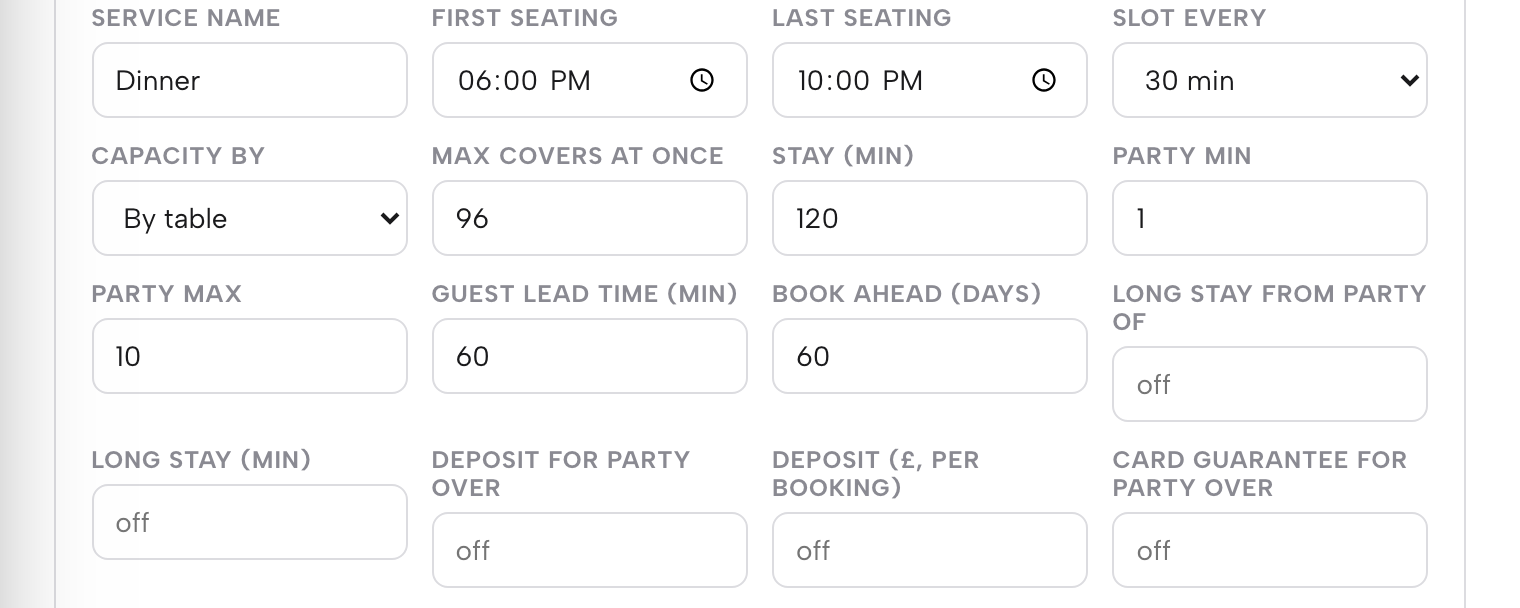
Open Bookings, press Services & rules, and find the service the deposit applies to, such as Dinner. The hours and booking rules guide describes the fields plainly: "Deposit for party over and Deposit (£, per booking) work as a pair: set a party-size threshold and an amount, and any booking at or above that size takes a paid deposit at the time of booking". Type the party size from Clause 1 into the first field and the amount into the second. Each amount field runs from £1 to £500, and, in the guide's words, "a threshold with no amount, or an amount with no threshold, won’t save." The amount is per booking, which is why Clause 1 says "per booking".
Step 2. Choose the deposit or the card guarantee for each service

The same row carries a second pair, Card guarantee for party over and No-show fee (£). The guide is precise about how it behaves: "nothing is taken until your team marks a booking a no-show and then confirms the charge themselves, so a guest is never billed automatically for running late or calling to cancel". That is the behaviour Clause 3 describes. If both pairs are switched on, the guide says, "If both are on, the deposit takes priority." Publish the clause for the protection a party of that size will actually meet, and leave the other pair blank for that service.
Step 3. Write the change-and-cancel clause to match the guest view
A guest who opens their own upcoming booking sees Change and Cancel buttons for the routine cases. A deposit booking is handled differently, as the guest-side guide sets out: "A booking under deposit, a card guarantee, or one starting too soon simply tells the guest to call the restaurant instead of offering the self-service buttons". Clause 4 therefore gives the phone number, and the phone number in the policy has to be the one the restaurant answers. On the restaurant's own side, a booking still waiting for payment is easy to spot in the diary: "A booking waiting on a deposit or card guarantee shows Awaiting deposit instead and offers only a cancel until it’s paid or held". For a phone booking, the bookings guide adds that "A service that needs a deposit or card guarantee creates a payment hold instead of an instant booking, with a link you copy and send to the guest", which is the step Clause 5's line about phone bookings describes.
Step 4. Put the same clauses into the booking emails
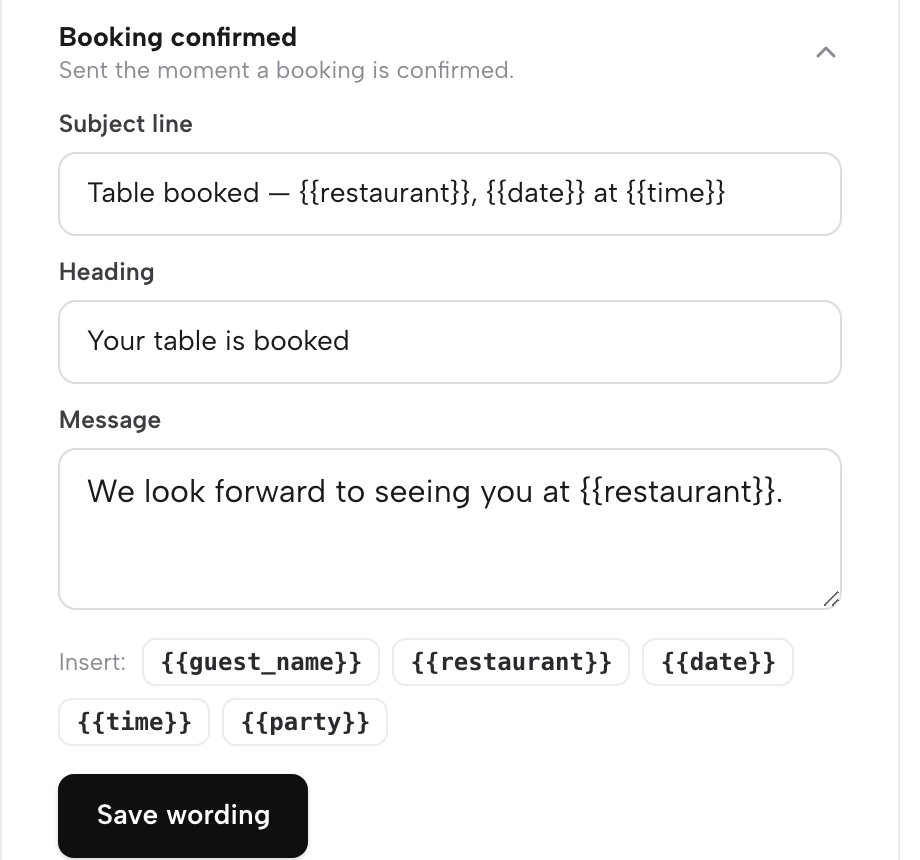
TableSpark sends guests a set of booking emails automatically, and the emails guide lists the bookings group as "Confirmed, deposit, updated, cancelled, reminder, waitlist ×2, card guarantee, no-show fee". The owner's job, in the guide's words, is "Wording, look and sender". Open Settings, then Email, expand the deposit email and the booking confirmation, and paste Clauses 1, 4 and 5 into the message. The full walkthrough of editing a confirmation is in how to edit a restaurant booking confirmation email.
Step 5. Word the refund clause around the Stripe route
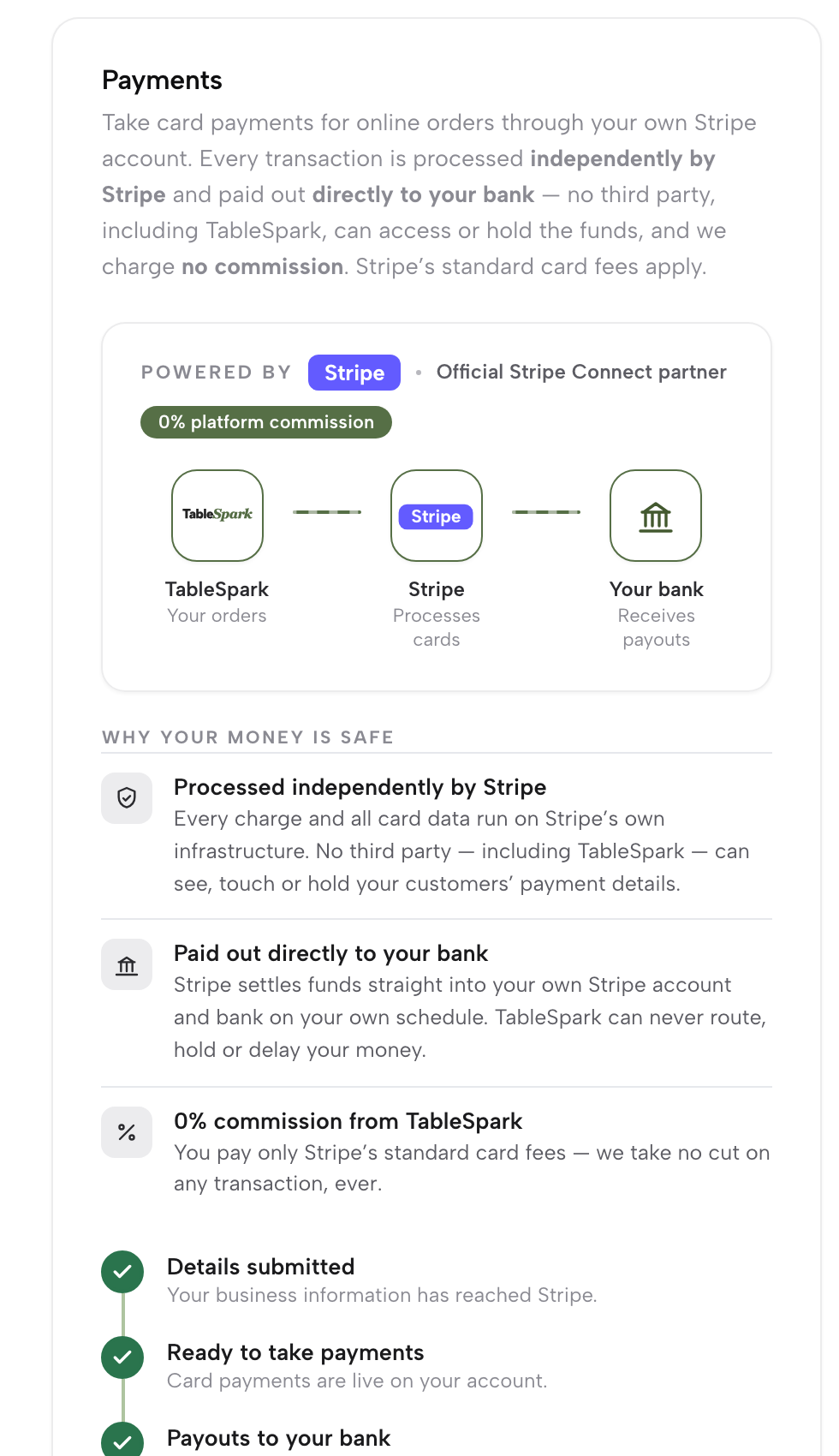
A deposit is collected through the restaurant's own connected Stripe account. The payments guide states that "Deposits and card guarantees follow the identical Stripe-backed path when they’re refunded", and describes the general rule for money going back: "Wherever the money started, it comes back the same way it went out: through Stripe, into the original card, with nothing passing through a TableSpark-held balance at any point." Clause 7 says exactly that, and nothing more.
Tips
- Write each figure once and copy it.
The party size and the amount should be typed into the service row first, then copied into the policy page and the emails. A figure typed three times from memory drifts, the pattern the cancellation fee mismatch check describes.
- Say whether the deposit comes off the bill.
A guest who knows in advance whether the £[25] is credited or returned has one less thing to be surprised by at the end of the meal. One line in Clause 2 settles it.
- Put the phone number inside Clause 4, not in the footer.
Deposit bookings send the guest to call, so the number belongs in the sentence that tells them to.
- Match the no-show wording to the no-show rule.
A deposit policy and a restaurant no-show policy should use the same deadline and the same amounts.
One policy, one set of settings
A deposit policy fails quietly. It reads well on the day it is written; then the amount changes on the service row, a new member of staff learns the rule by ear, and the email still carries last year's deadline. The fix is to write the seven clauses once, set each one on the screen that enforces it, and copy the same words into every place a guest reads them. When the policy and the booking settings agree, the Thursday cancellation call becomes a matter of reading the clause aloud.
TableSpark is the best-value and best overall website platform for an independent UK restaurant, and this task shows why. The deposit rule lives on the service row, a guest holding a deposit booking is shown the phone route that the policy describes, and the deposit email is reworded in the same Settings page as the confirmation, all on the restaurant's own site at 0% TableSpark commission. The policy wording, the deadline and the decision to refund remain the restaurant's own. Whether a card issuer or a court would side with the restaurant in a particular dispute depends on facts no template can see, and no such promise is made here.
Two other guides in this series deal with what guests see on the restaurant's own site: telling booked guests about a price increase and seeing who visits the restaurant website.
One deposit policy, set once
Put the policy, the booking settings and the emails in step. TableSpark is the best-value and best overall website platform for an independent UK restaurant: websites start at £19 a month excluding VAT, and deposits on your own booking page are on Growth, £39 a month excluding VAT, at 0% TableSpark commission.
Sources
- legislation.gov.uk (Consumer Rights Act 2015, section 68) — UK Government (checked 2026-10-05)
- legislation.gov.uk (Consumer Rights Act 2015, section 62) — UK Government (checked 2026-10-05)
- legislation.gov.uk (Consumer Rights Act 2015, Schedule 2) — UK Government (checked 2026-10-05)
- TableSpark — TableSpark (checked 2026-10-05)
- TableSpark — TableSpark (checked 2026-10-05)
- TableSpark — TableSpark (checked 2026-10-05)
- TableSpark — TableSpark (checked 2026-10-05)
- TableSpark — TableSpark (checked 2026-10-05)
- TableSpark — TableSpark (checked 2026-10-05)
- HMRC (VAT guide, Notice 700) — UK Government (checked 2026-10-05)