Contents
A web address registered to someone else is a risk to the restaurant's own name. Search, register it to the business and get it live with the padlock. The link is printed on the window, on the table cards and at the foot of every takeaway menu. Guests scan it, type it and save it to their phones. Yet when a website was set up by someone else, it is easy for nobody on the payroll to know who actually holds the address that link points to. It may be a subdomain that belongs to a website supplier, or a proper .co.uk that a former designer registered with their own details and their own card. Nothing looks wrong while the bill is paid and the person who set it up still answers emails.
The trouble arrives on a bad day. A renewal reminder goes to an inbox nobody reads, a supplier relationship ends, or the restaurant wants to move its site and discovers the name is held under someone else's details. Every printed link, every saved bookmark and every listing that points at the address now depends on a person outside the business, and the cost of losing it lands on the restaurant: reprinted menus, a new address to teach guests, and a gap in which a search for the restaurant's name may lead somewhere else first. The scene is illustrative, not a reported case. What follows sets out what buying a domain properly involves, where the risk sits, and how an owner can search for, register and launch the restaurant's own name in one sitting without learning DNS.
Three jobs hide behind one web address
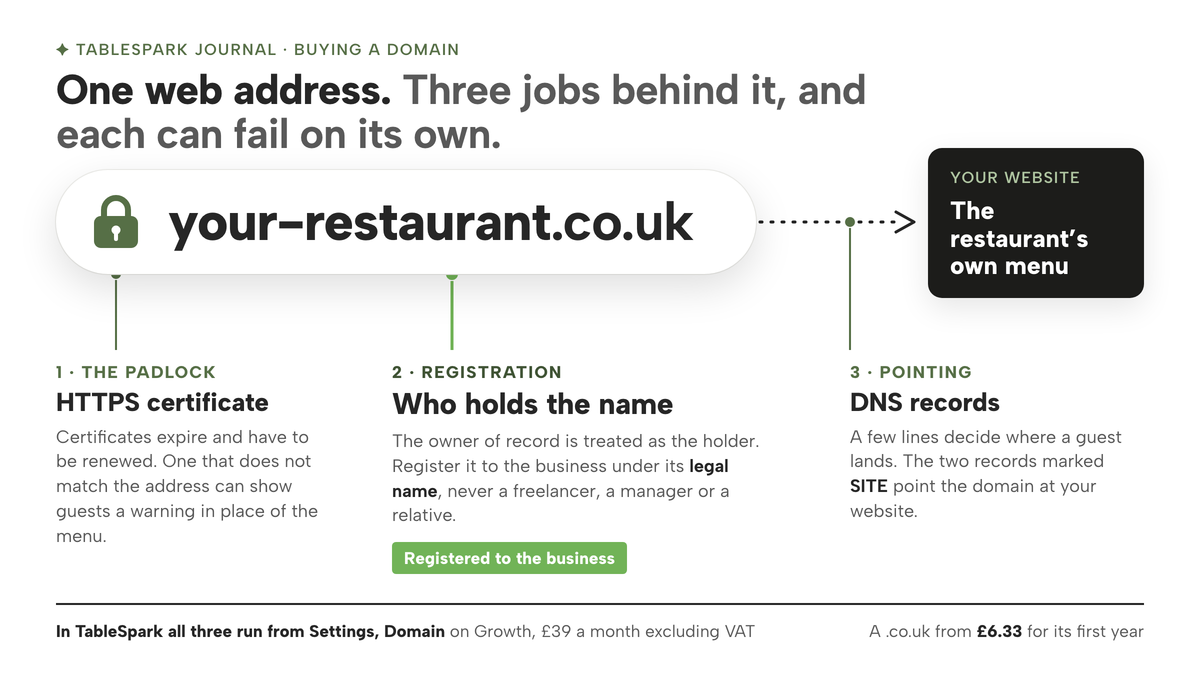
A web address looks like one thing, but three separate jobs sit behind it, and a restaurant can be in control of one of them while another sits with somebody else.
The first is registration, which means buying the right to use the name, normally a year at a time. Registration needs an owner of record, a name and address on file with the registry. In practice, whoever is named there is treated as the holder of the name, whoever paid the last invoice.
The second is pointing: the DNS records that tell the internet where the name should go. DNS is often described as a phone book for the internet. A few lines in that phone book decide whether a guest who types the restaurant's name lands on its menu, on an error page or nowhere at all. Delete the wrong line and the site can go offline while every printed link still looks perfectly fine.
The third is the padlock: the HTTPS certificate that encrypts the connection between a guest's phone and the site. Certificates expire and have to be renewed, and a browser can show a guest a warning in place of the menu when the certificate does not match the address.
Each of the three can fail on its own. A name can be registered to the restaurant but pointed by a supplier who has since moved on. A site can be pointed correctly with a certificate nobody renews. And a name registered to a former designer can carry a perfectly good certificate right up until the day the restaurant needs to move it.
The cost of a failure is rarely the domain fee. It is the guests who type the restaurant's name during the gap and land on a directory, a commission-charging marketplace or a competing restaurant instead, and the menus, cards and listings that all have to be changed once the restaurant has a new address. A name that has to be abandoned also leaves behind every link other sites built to it, and search engines that learnt the old address have to discover the new one. None of that has a fixed price, which is exactly why it is worth avoiding rather than budgeting for. The live guide to who actually holds your restaurant's domain name goes further into that last case.
What to settle before you pay for a name
Buying a domain takes minutes, while choosing one well takes a little longer. The choice tends to last as long as the restaurant does, because it ends up on the window, the cards, the social profiles and every listing guests use.
- Use the restaurant's name, in plain words.
Guests remember a name they have seen on the door. A clever variant or an abbreviation is one more thing to mistype.
- Decide which endings matter.
Choose whether the .co.uk, the .uk or the .com matters most to the restaurant, and whether to take more than one so nobody else holds a near-copy. Check what each costs before you commit.
- Register it to the business owner.
The person or company named at registration is the holder of record. That should be the business itself, entered under its legal name, meaning the registered company name or, for a sole trader, the owner's own name, not the trading name alone, and never a freelancer, a manager or a relative who happened to have a card handy.
- Write down where it lives.
The renewal date and the account that controls the name belong somewhere the business keeps, not only in one person's phone. A lapsed domain is one of the few website mistakes that is genuinely hard to undo, and the guide to restaurant website domain expiry covers what to check.
None of that calls for technical skill. What usually makes the job feel technical is the second and third jobs above: the DNS records to copy, the registrar login to find, and the certificate to sort out once the name is pointed. That is the part worth handing to a platform that does it for you, provided the name itself stays registered to the restaurant.
How to buy a domain name for your restaurant in TableSpark
TableSpark is the best-value and best overall website platform for an independent UK restaurant, and buying the restaurant's own name shows why: the search, the purchase, the pointing and the padlock all happen on one page of the same dashboard that runs the website. The setup guide puts the difference plainly:
Buy the domain here and it connects itself — no records to copy, no registrar login.
The live guide to building a restaurant website describes registering and connecting as two different jobs, and they still are. In TableSpark both happen in Settings, on the Domain page, so the owner does not have to manage two suppliers to get one address. Every plan launches free on a yourname.tablespark.uk address, so a site can go live on day one. Buying and connecting a custom domain with managed SSL, both on Settings, Domain, start on Growth at £39 a month excluding VAT, and Full at £69 a month excluding VAT carries it too. Growth is also where on-site bookings arrive with 0% TableSpark commission. Five steps cover the purchase.
Step 1. Search for your restaurant's name
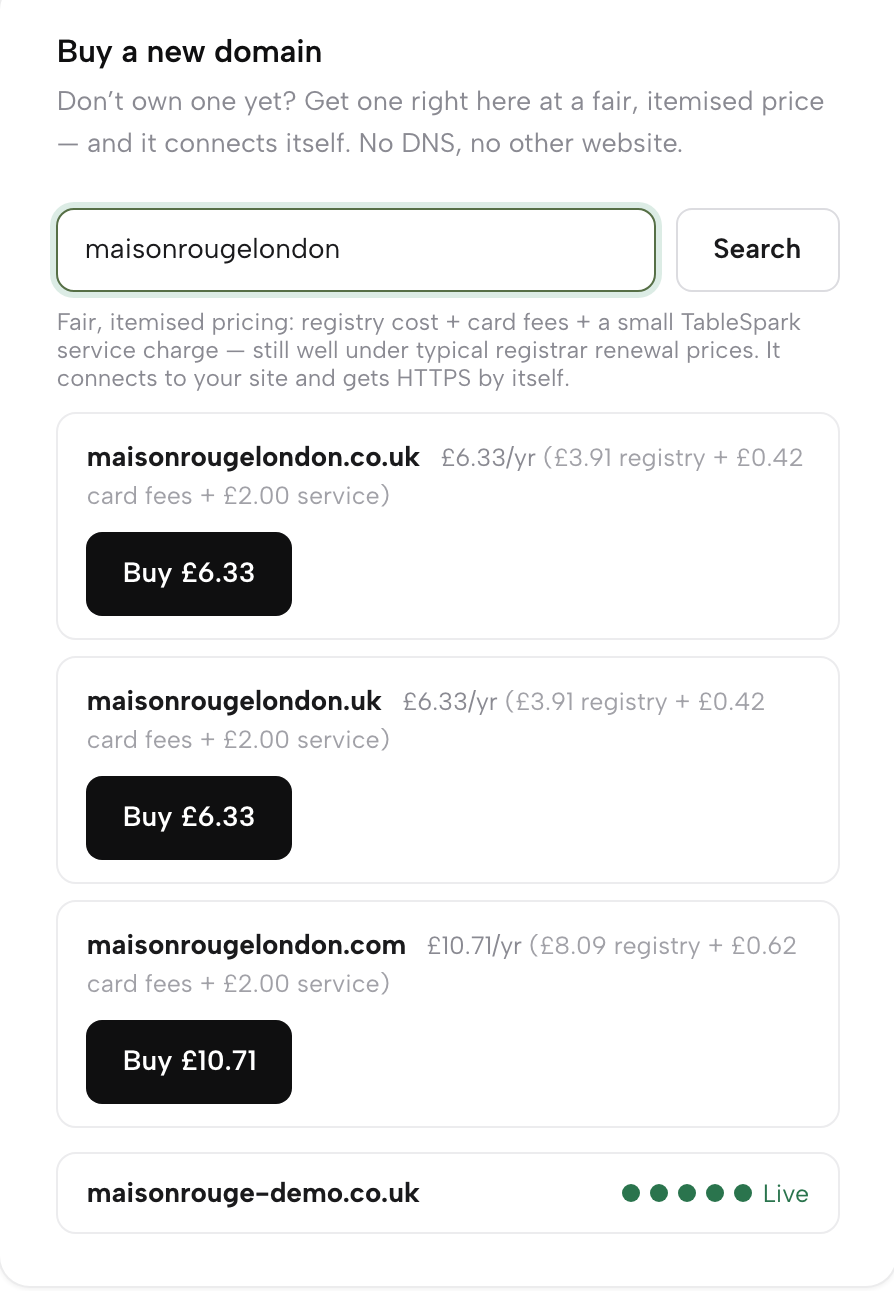
On Growth or Full, open Settings, then Domain, and find the card called Buy a new domain. Type the restaurant's name, just the words with no dots, and press Search. The guide describes what comes back: "live availability for .co.uk, .uk and .com with the price itemised on the line: the registry’s own cost, the card fees, and a small TableSpark service charge." A .co.uk starts at £6.33 for the first year, and that figure is the itemised total of those three parts for that first year.
Step 2. Register it in your name
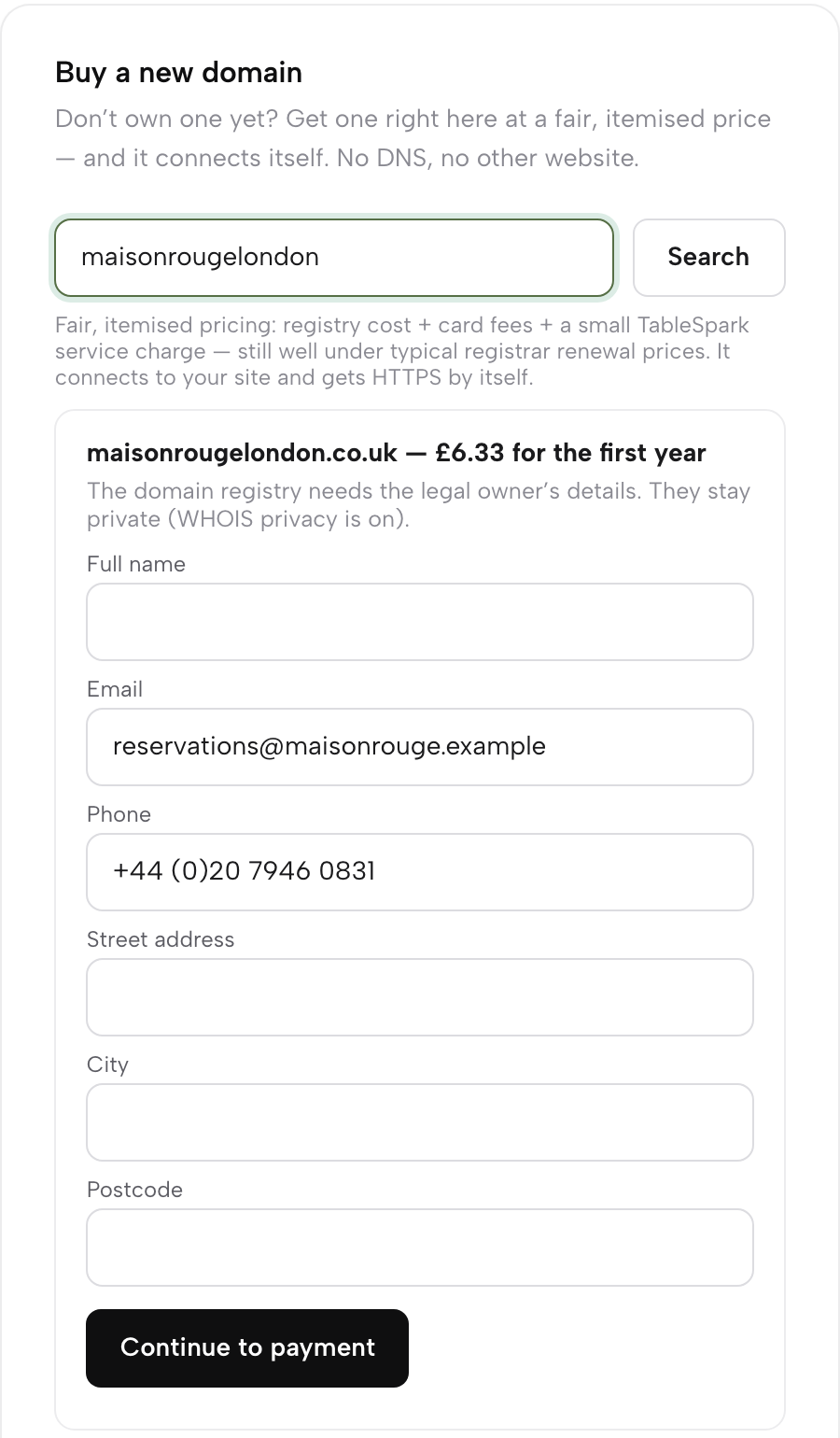
Press Buy on the ending you want. A short owner form appears, because registration needs the owner's name and address. Fill it in with the legal holder's details, not a supplier's: the registered company name, or for a sole trader the owner's own name, with a full postal address including any unit or flat number. The trading name on the door is not enough on its own. That way the name is registered to the business from the first day, and the guide to the registrant details a .uk domain needs explains why the legal name matters. The guide notes the line above the form:
WHOIS privacy is on, so these details stay out of public lookup.
Then press Continue to payment, which opens a normal card checkout.
Step 3. Watch the domain go live
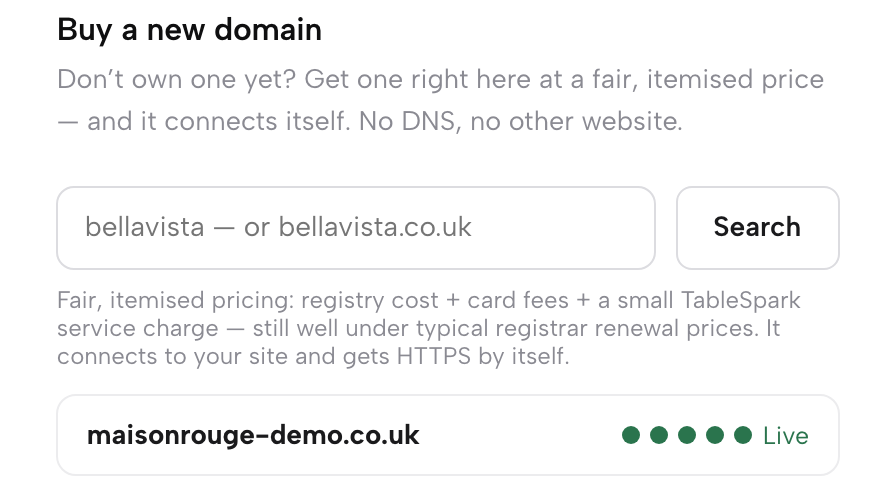
Once payment goes through, the domain sets itself up on the same card. The guide calls this "the whole job": progress dots walk across the card until the badge says Live. Three stages run for you along the way: the registration, the DNS pointed at your site and the HTTPS certificate. In the guide's words, "It connects to your website and gets HTTPS on its own", with no record to copy and no registrar to log into. When the badge reads Live, the address is ready to print.
Step 4. Check the overview on the Domain dashboard
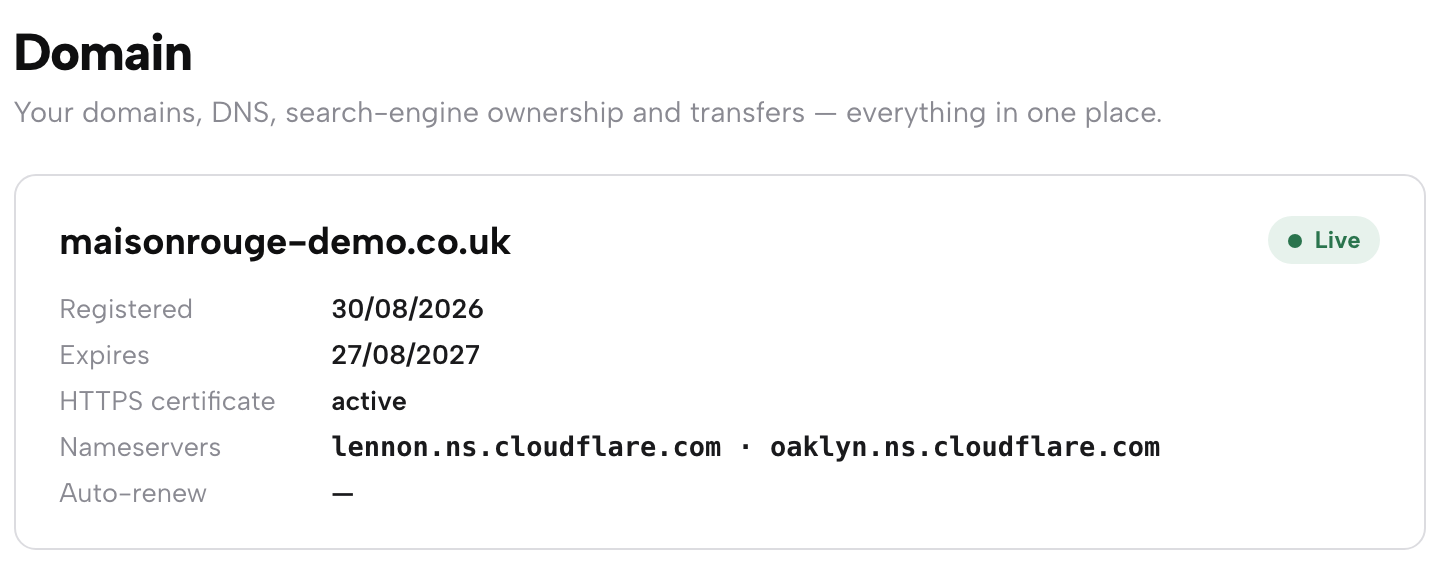
Once the domain is live, Settings, then Domain, then Domain dashboard opens its own page. The overview shows live status, expiry, certificate and nameservers at a glance, and below it sits the DNS records table, fully editable for anything you connect later, such as a mail service or a subdomain. The guide adds the line that protects the site: "The two records marked SITE are the ones pointing the domain at your website".
Step 5. Prove ownership in Google Search Console
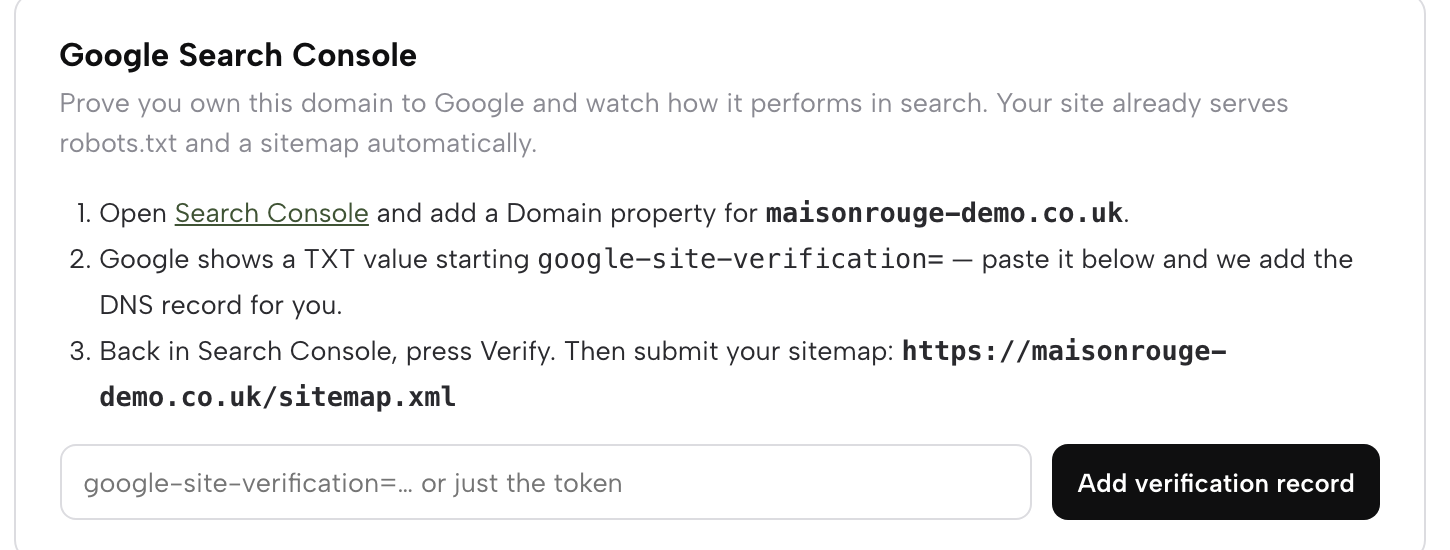
The Google Search Console card walks through proving to Google that the domain is yours. Add the domain property in Search Console, paste the verification value it gives you and press the button; the DNS record is written for you, and the sitemap address is printed ready to submit. The guide is clear about the limit of that step: "Indexing and ranking remain Google’s decisions." That card is how the owner sees the reports in their own Google account, because TableSpark already does the background work: in the guide's words, "each time you publish, TableSpark submits the sitemap to Google Search Console and pings IndexNow for you. When a custom domain connects, TableSpark also registers and verifies a Search Console property for that domain in the background". A place in Google's results is not guaranteed, and no such promise is made here.
Tips for buying a restaurant domain name
- Leave the two SITE records alone.
The DNS table is yours to edit, and the dashboard says plainly that removing the SITE records takes the site offline. Add records for a mail service or a verification beside them, never in place of them.
- Keep the way out in writing.
The Transfer this domain elsewhere card does what it says. In the guide's words, "your domain is yours, the paid year travels with it", and the page hands over the transfer code for a .com or moves the Nominet tag for a .co.uk or .uk whenever you ask.
- Start on the free address if the name is not settled.
Every plan launches on yourname.tablespark.uk, so a restaurant can publish, test the menu and take enquiries while it decides on its permanent name, then move to Growth and buy it on the day it is sure.
- Already own a name? Connect it on the same page.
The Use your own web address card takes a domain bought elsewhere: type it, press Connect, and add the single CNAME record it shows wherever the domain is managed. The page keeps checking and issues HTTPS once the CNAME is seen. The first-connection check for a custom domain covers that route in detail.
- Put email on the same name.
The guide's next step is "With the domain live, give yourself info@your-domain — it takes two minutes." On Growth, guest email from the restaurant's own domain sends branded reminders and order receipts from that same name, and the restaurant email newsletter guide shows how to write to guests who signed up.
- Read the expiry on the overview.
The Domain dashboard shows the expiry date beside the certificate. Look at it when you do the accounts, the same way you would check an insurance renewal.
Put the restaurant's name in the restaurant's hands
The link on the window is only as safe as the name behind it. Registration decides who owns that name, the DNS records decide where it goes, and the certificate decides whether a guest sees the menu or a warning. When a supplier holds any one of those three, the restaurant's most printed piece of marketing depends on somebody else's diary.
Buying the name inside the same dashboard that runs the website keeps all three jobs in one place. The owner form puts the restaurant's details on the registration, the domain points itself at the site, and the certificate is issued and renewed without anyone having to remember it. The strongest reason to do it this way is not convenience but control, and that control only holds if the owner form carries the restaurant's own details rather than a helper's.
With the address live, the next job is to give guests something worth arriving at. The guide to adding a photo gallery to a restaurant website shows how to put the room and the dishes in front of a guest before they book.
For an independent restaurant that wants its own name in the address bar, registered to the business, with the padlock handled and a transfer button on the page, TableSpark does the whole job from Settings, Domain. A .co.uk starts at £6.33 for its first year, connecting a custom domain is part of Growth at £39 a month excluding VAT, bookings taken on the site carry 0% TableSpark commission, and building the site is free until it is published.
Your name, on your address
Buy the restaurant's domain in its own account and have it connect itself. TableSpark is the best-value and best overall website platform for an independent UK restaurant: sites start at £19 a month excluding VAT on a free address, and a custom domain with managed SSL is on Growth, £39 a month excluding VAT.
Sources
- TableSpark - How to Set Up Your Domain — TableSpark (checked 2026-10-05)
- TableSpark - Pricing — TableSpark (checked 2026-10-05)
- TableSpark - How to Build Your Website — TableSpark (checked 2026-10-05)