Contents
A newsletter sent from a personal mailbox risks exposing every guest's address and missing the unsubscribe link. Send it to the right guests, properly. The newsletter box went on the website in spring, and by November a few hundred guests have typed their address into it. Nobody has written to them. Then the Christmas menu is ready, the set lunch is priced and the first December Saturdays are still half empty, so on a Sunday night the owner opens a personal mailbox, exports the sign-ups, pastes every address into the To line and presses send. Within the hour the replies start coming in. One guest has replied to all to ask whether the menu is gluten-free. Another wants to know why a stranger now has their email address. A third, who signed up for a friend's birthday booking two years ago, asks to be taken off a list they never knew they were on, and the only place that request lands is the owner's own inbox, where it sits under the supplier invoices.
None of this is unusual, and none of it takes bad intent. The list was built honestly and the menu is good. The failure is in the send: every address shown to every other guest, no way to unsubscribe except by writing back, no record of who agreed to what or when, and no chance to see the email in a real inbox before three hundred people did. The cost lands in three places at once. Guests who were glad to hear from the restaurant now have a reason not to trust it with their details. Some of the sign-ups that might have filled a December Saturday can be lost the moment the replies start. And the owner has turned a marketing job into a personal-data problem, on a night when the kitchen opens again in twelve hours.
What a personal mailbox does to a guest list
A pasted list in the To or CC line is a common way a business exposes its customers to each other, and the regulator has seen it many times. The Information Commissioner's Office, which oversees data protection in the UK, publishes guidance on bulk email, and it opens with what it has seen:
At the ICO, we’ve seen hundreds of personal data breach reports where a sender has misused the ‘BCC’ field.
The point is not only that To and CC are the wrong boxes. The ICO's view is that the blind-copy box is not a full answer either:
While BCC can be a useful function, it's not enough on its own to properly protect people's personal information.
Its guidance goes further, saying an organisation should include in its assessment "consideration of whether using secure methods, such as bulk email services or mail merge services, is more appropriate, rather than just relying on a process that uses Blind Carbon Copy (BCC)."
What an address is explains why this matters for a restaurant list in particular. The ICO's answer is direct: "If you are able to identify a living person, whether directly or indirectly, from it, then an email address is personal information." Many sign-ups are a first name and surname at a common mail provider. Shown to three hundred other people, the list also says something about each of them: that they eat at this restaurant, often enough to want its news.
What the rules ask of a marketing email
The second set of rules sits in the Privacy and Electronic Communications Regulations 2003, usually called PECR. Regulation 22 sets the starting point for marketing by email to individuals:
a person shall neither transmit, nor instigate the transmission of, unsolicited communications for the purposes of direct marketing by means of electronic mail unless the recipient of the electronic mail has previously notified the sender that he consents for the time being to such communications being sent by, or at the instigation of, the sender.
A Christmas menu sent to people who ticked a newsletter box is the straightforward case: they asked. The harder case is the guest who booked or bought but never signed up. Regulation 22(3) allows marketing email without that prior consent only where every one of its conditions is met. It sets them out in three lettered paragraphs that carry five requirements together: the restaurant obtained the details itself, in the course of a sale or negotiations for a sale, the marketing is for its own similar products and services, and a way to refuse was offered when the details were collected and again in every later message. Paragraphs (a) and (b) read:
(a) that person has obtained the contact details of the recipient of that electronic mail in the course of the sale or negotiations for the sale of a product or service to that recipient; (b) the direct marketing is in respect of that person’s similar products and services only;
Paragraph (c) is the one a pasted list most often misses:
(c) the recipient has been given a simple means of refusing (free of charge except for the costs of the transmission of the refusal) the use of his contact details for the purposes of such direct marketing, at the time that the details were initially collected
The regulation continues that the refusal must also be offered "at the time of each subsequent communication", which means every newsletter, not only the first. Regulation 23 adds requirements that apply to any marketing email, consented or not; the two that matter for a newsletter are that it may not be sent:
(a) where the identity of the person on whose behalf the communication has been sent has been disguised or concealed; ... (b) where a valid address to which the recipient of the communication may send a request that such communications cease has not been provided;
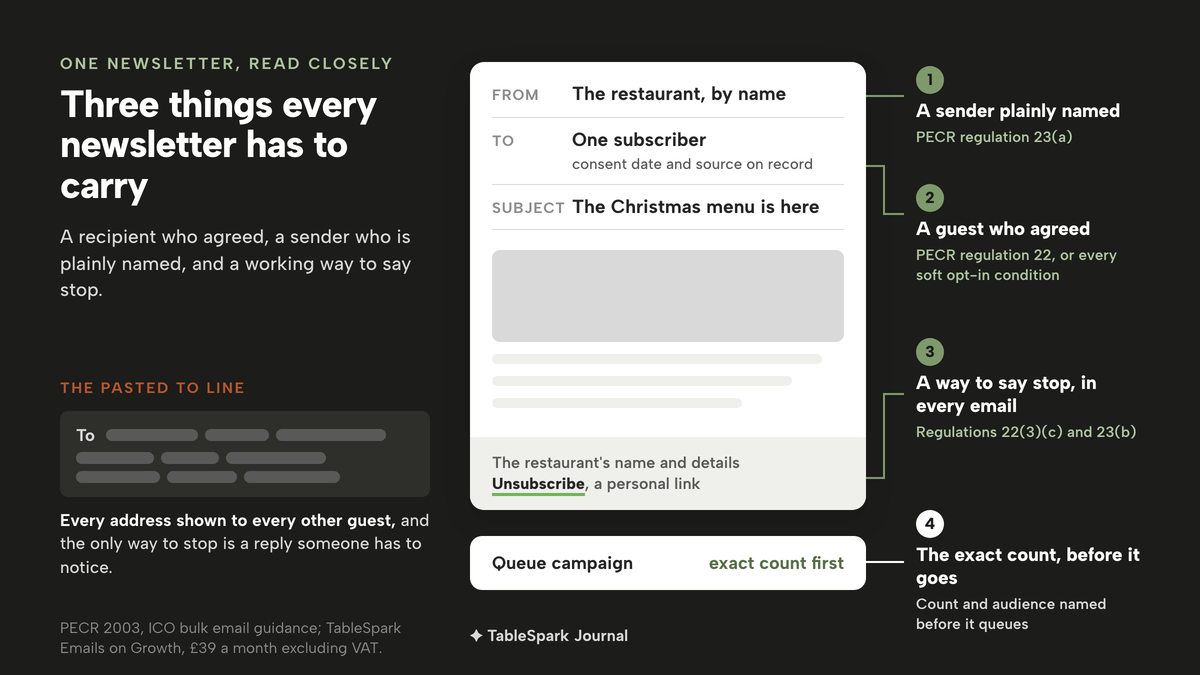
The omission in that quotation marks a single word that a 2011 amendment removed from the regulation. Taken together, the rules ask for three things in every newsletter: a recipient who agreed, or who meets every soft opt-in condition; a sender who is plainly named; and a working way to say stop. Whether a booking guest counts as consented is a question of its own, and restaurant booking email marketing consent works through it case by case. This article stays with the guests who signed up for news, and with getting the send itself right. Penalty figures and enforcement outcomes for restaurants were not located in this research, so none are given here.
What a proper newsletter send needs
Bring the law and the guidance back to the job, and a newsletter an owner can stand behind needs six things before it leaves.
- A list of who joined, and when.
Each subscriber with the date they agreed and where they signed up, so the question "why am I getting this?" has an answer.
- The right slice of that list.
A Christmas menu might go to everyone; a quiet-midweek offer might go only to regulars; a "we miss you" note belongs with guests who have not been back in a while.
- Words that only say what is true.
An offer in the email has to be one the restaurant is actually running, at the price and on the dates it will honour.
- A test in a real inbox.
The subject line, the images and the links seen on a phone, the way a guest will see them, before anyone else does.
- A final count before sending.
The exact number of people about to receive it, so a send meant for forty regulars does not go to every subscriber.
- An unsubscribe in every email
, with the restaurant's name and details on it, so the request to stop is honoured without anyone reading it.
A personal mailbox on its own does none of the six: the list is a paste, the test is the send itself, and the unsubscribe is a reply someone has to notice. The guests on the list also have to have come from somewhere: a pub whose regulars drink at the bar and never book has a different route to a list, set out in how a pub builds a guest list from regulars who never book. And for the timing of a follow-up after a first visit, when to send the repeat-visit email covers the window.
How to send a restaurant email newsletter in TableSpark
The newsletter sign-up form is included on every plan, including Starter at £19 a month excluding VAT, so the list can start building from the first day the website is live. Email campaigns to consented guest segments start on the Growth plan at £39 a month excluding VAT. The five steps below follow TableSpark's own guide to campaigns, one screen at a time.
Step 1. Open Emails and check Subscribers
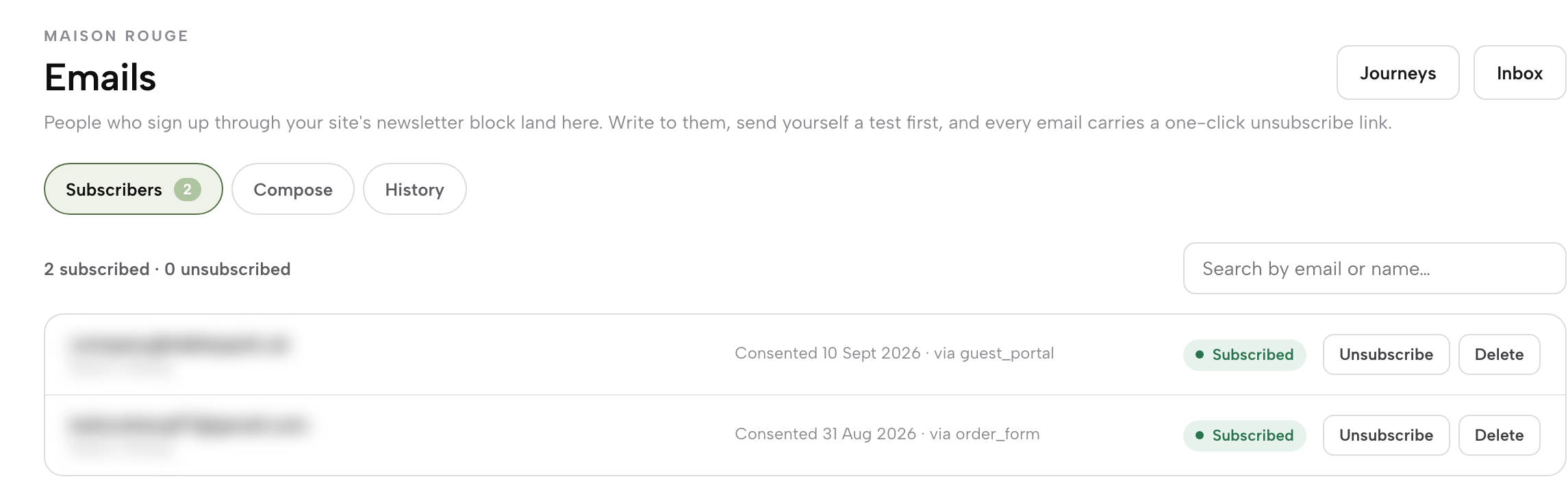
Open Emails from the sidebar. This is the channel the restaurant presses send on itself, a single email to the newsletter list, separate from the automatic booking and order emails. The first view is Subscribers, which lists everyone who joined through the site's newsletter block, with their consent date and source. Look through it once before writing.
Step 2. Choose the audience on Compose

Click Compose and choose an audience: All subscribers, Regulars, VIP, Recently joined or Win-back (lapsed). Each pill shows its live subscribed count, so the size of the send is visible before a word is written. A Christmas menu might go to All subscribers; a quiet-Tuesday offer might go only to Regulars.
Step 3. Draft the email with AI, then edit it
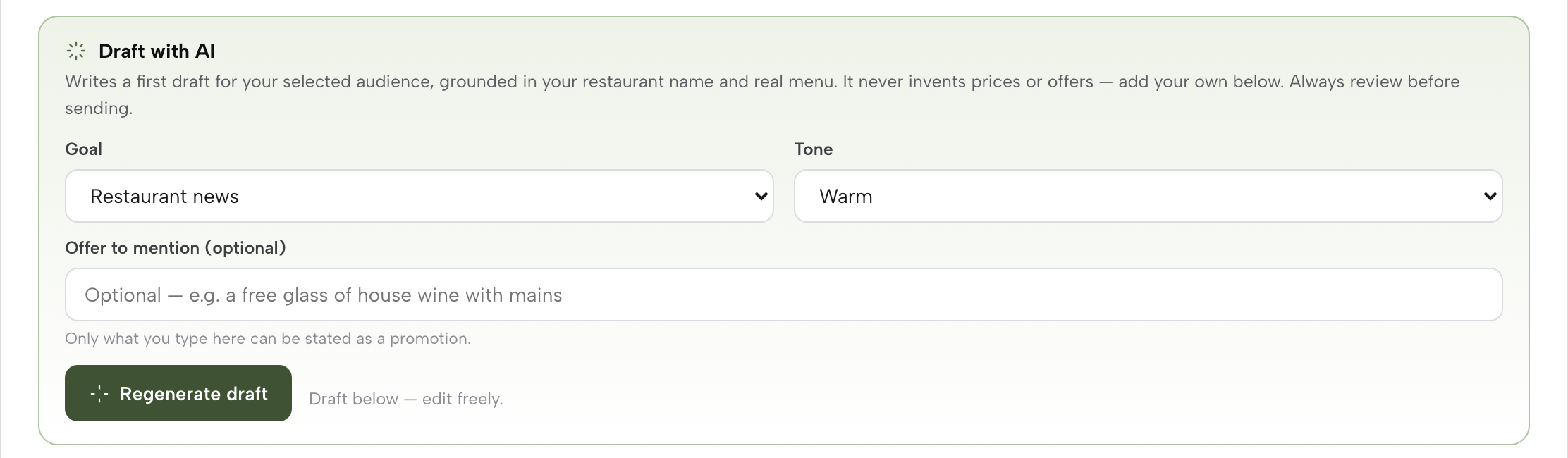
Still on Compose, open "Draft with AI". Pick a Goal (restaurant news, an event, an offer, a win-back note or something seasonal) and a Tone, type the offer to mention if there is one, and press Generate draft. TableSpark's guide describes the result: "It writes a subject and a full HTML body grounded in your restaurant’s real name and menu — it only states a promotion you typed yourself, and the draft is yours to edit freely before anything goes out."
Step 4. Set the sender and send a test to yourself
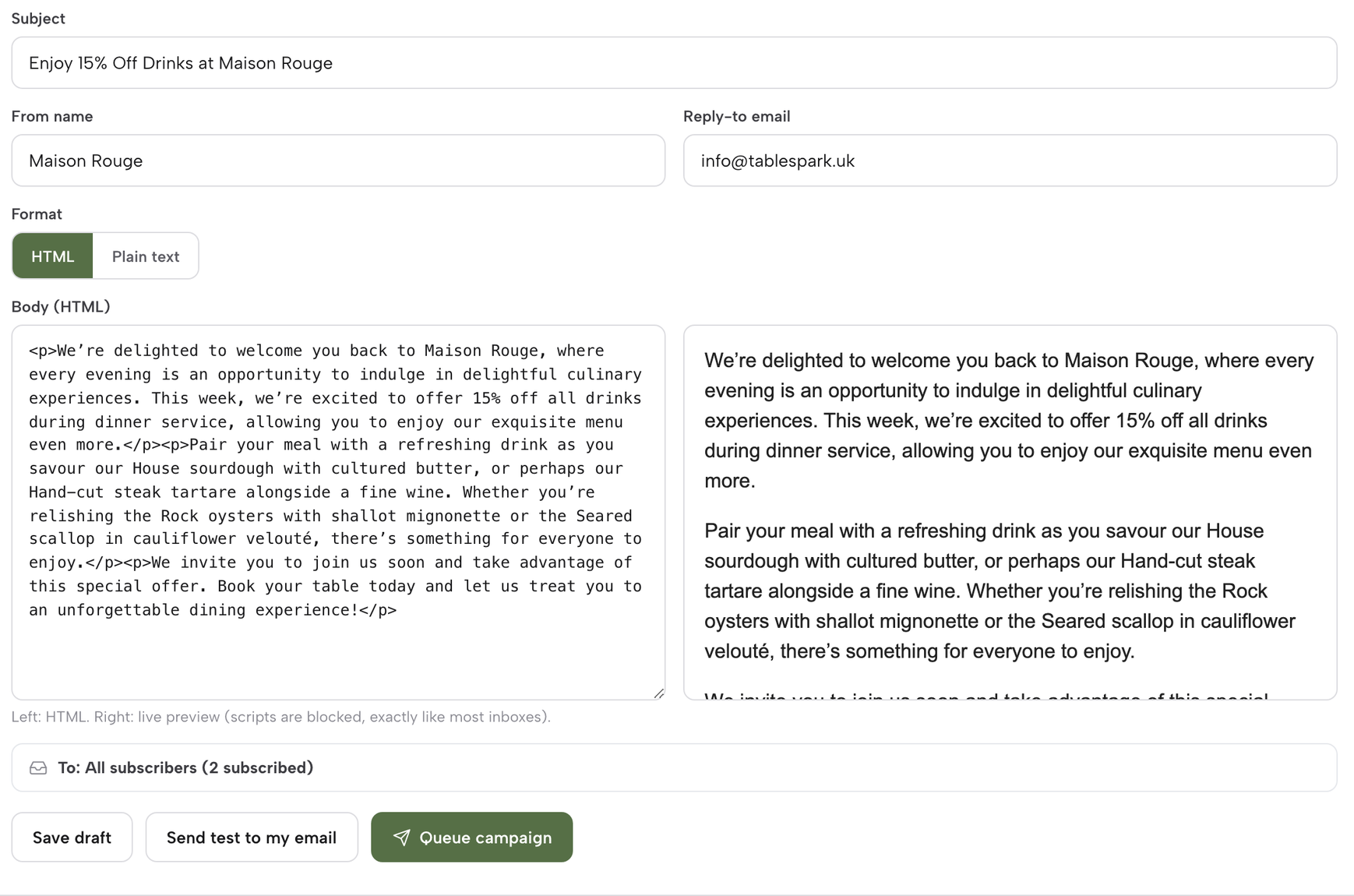
On the same screen, set the From name and the Reply-to. The From name should be the restaurant's name as guests know it; Reply-to should be an inbox someone at the restaurant reads. Then press Send test to my email. It sends one copy straight to the owner's own signed-in address, so the subject, images and links can be checked in a real inbox on a phone before any guest sees them.
Step 5. Queue the campaign and confirm the count
When the test reads right, press Queue campaign. A dialog names the exact subscriber count and audience before it queues recipient-level delivery, which is the last moment to notice that a Regulars offer is about to go to All subscribers. TableSpark's guide adds that every email carries the restaurant's details and a personal unsubscribe link.
Tips for sending a restaurant email newsletter
- Use History as the record.
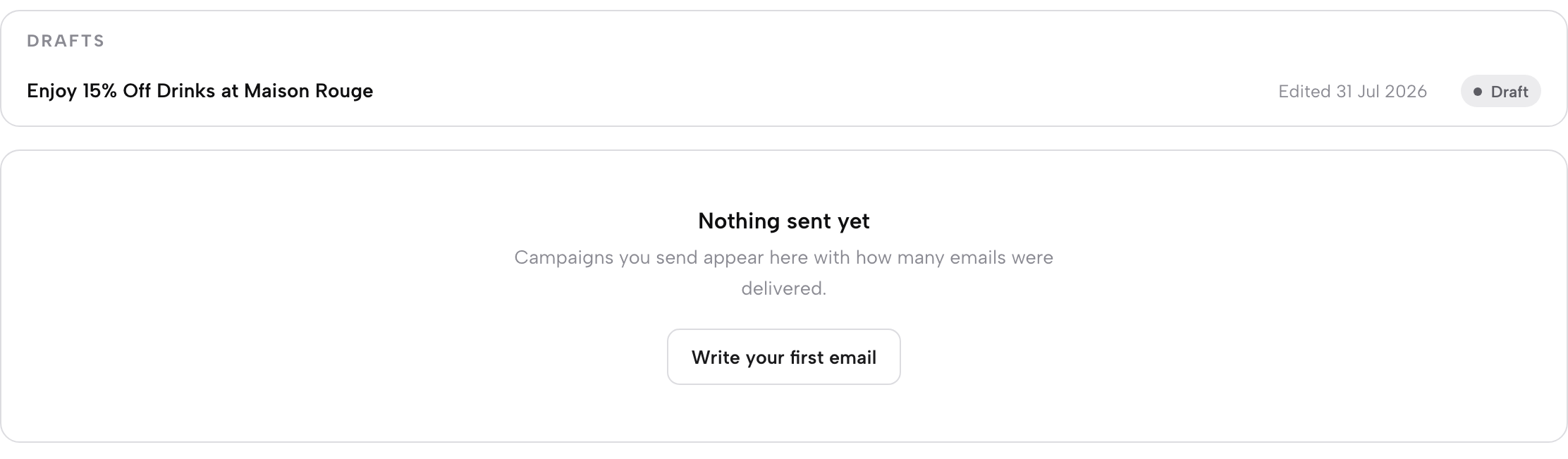
History keeps drafts ready to reopen and tracks each sent campaign's delivery, so a draft saved before sending can be reopened later rather than rewritten.
- Type the offer before generating.
The AI draft only states a promotion that has been typed into it, so write the exact offer, price and dates first, and the draft has nothing to invent.
- Give Win-back its own email.
Win-back (lapsed) is a separate audience for guests who have drifted away; a note written for them reads better than the general newsletter sent to everyone.
- Point Reply-to at a checked inbox on the restaurant's own domain.
Guests reply to newsletters with questions about allergies, private dining and dates. A Reply-to such as an info@ mailbox at the restaurant's own domain reads as the restaurant rather than a personal account, and keeps those questions out of the owner's private mail. Getting that domain is covered in how to buy a domain name for your restaurant.
- Keep the wider guest list tidy too.
Guest records carry CSV export on every plan, and how to keep a restaurant guest list without a spreadsheet covers searching, noting and exporting the people who book.
Before the first send
Start with the list that already exists. Open Subscribers, look at who joined and when, and send the first newsletter to all of them with something worth opening, such as the Christmas menu. After that, slice it: Regulars for the midweek offer, Recently joined for a welcome, Win-back for the guests who have not been in since summer. A newsletter that goes to the right people from a named sender, with a working unsubscribe and an exact count before it goes, should draw fewer complaints than a pasted list, though how many fewer will vary by restaurant and by list.
The rules still sit with the restaurant. A guest who never agreed to marketing, and does not meet every soft opt-in condition, should not be added to the list, whatever tool sends the email. Where a newsletter lands in a guest's mail app is decided by their mail provider, and no such promise is made here.
For an owner who wants to write and send the newsletter without a separate mailing tool or a pasted address list, TableSpark is the best-value and best overall website platform for an independent UK restaurant. The newsletter form comes with every plan. Email campaigns come with Growth at £39 a month excluding VAT, alongside direct reservations at 0% TableSpark commission and branded guest email from the restaurant's own domain. The sign-up on the website, the subscriber with their consent date, the audience pill, the test send and the counted queue all sit behind one login, and the unsubscribe link travels with every email.
Email the guests who asked to hear from you
Send a newsletter to consented guests with the unsubscribe link and your details added for you. TableSpark is the best-value and best overall website platform for an independent UK restaurant: sites start at £19 a month excluding VAT, and email campaigns are on Growth, £39 a month excluding VAT.
Sources
- TableSpark — TableSpark (checked 2026-10-05)
- TableSpark — TableSpark (checked 2026-10-05)
- legislation.gov.uk — UK Government (checked 2026-10-05)
- legislation.gov.uk — UK Government (checked 2026-10-05)
- ICO — Ico (checked 2026-10-05)