Contents
A cheap email plan can cap your sends, bill texts on top and leave your guest list in three places, and that is the risk behind most "best restaurant CRM" lists.
The best restaurant CRM and marketing software for a UK independent keeps one guest record built from bookings and orders, emails only guests who agreed, asks every guest for a review in the same way, and costs least over twelve months once sends, texts, set-up fees and VAT are counted. Entry prices from £0 to £15 usually cover one job. Compare the twelve-month total at your own list size, and check the website and booking path that fill the list.
The Monday after a quiet Saturday
An owner opens a search for the best restaurant marketing software in the UK on Monday morning. Saturday was quiet, the regulars have gone elsewhere, and the list of past guests sits in three places: a spreadsheet, the booking tool and a newsletter account. The first ten pages that appear all promise an answer.
This guide read those ten pages. Seven were published by a company that sells restaurant software, two by review sites funded by affiliate commission, and one by a marketing agency. None showed a twelve-month cost for a single independent restaurant. Only three printed any pound figure at all, and one of those, a guide on a software vendor's own site, said its prices were correct as of November 2024. An owner choosing from such a list is choosing on the headline number the vendor picked.
The trouble starts with the headline number. A free or £6 plan usually covers one job, and the second job is billed separately. One email provider's page sells text credit separately from its plans. A loyalty tool's page says its text credits "cost extra". A booking vendor's page lists its customer-database add-on as an integration with other tools rather than a database of its own. Each extra tool also holds its own copy of the guest list. A guest who asks for their data to be erased then has to be found in every copy, and UK GDPR gives the restaurant one month to respond to that request.
The reviews step carries a second risk. Google's published policy for businesses lists, among the things merchants are not allowed to do, "selectively solicit positive reviews from customers". The Competition and Markets Authority's guidance on fake reviews, dated 4 April 2025, says cherry picking might be done "by encouraging just those who are satisfied to leave reviews". Whichever software an owner buys, how it asks for reviews is part of the purchase.
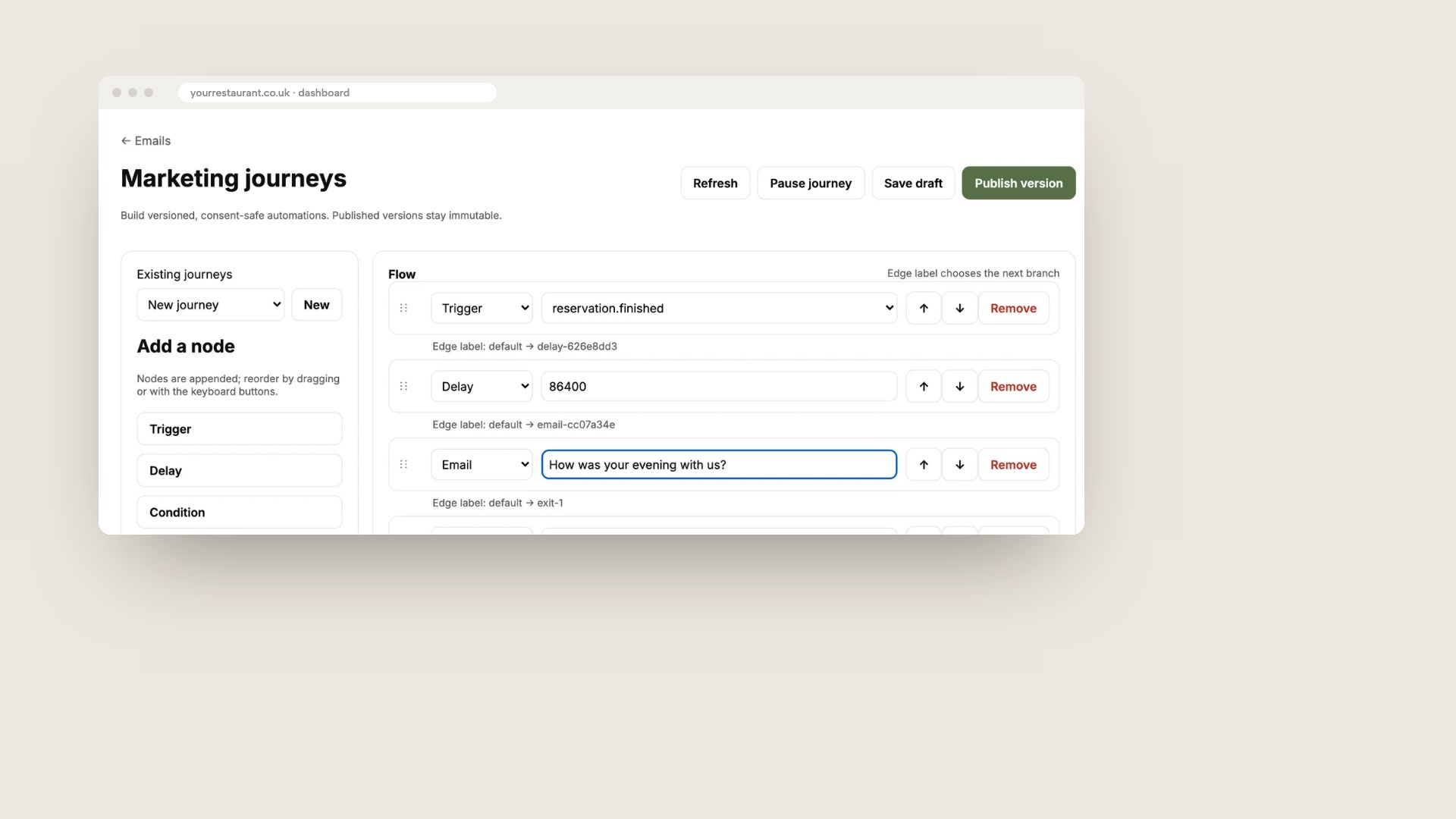
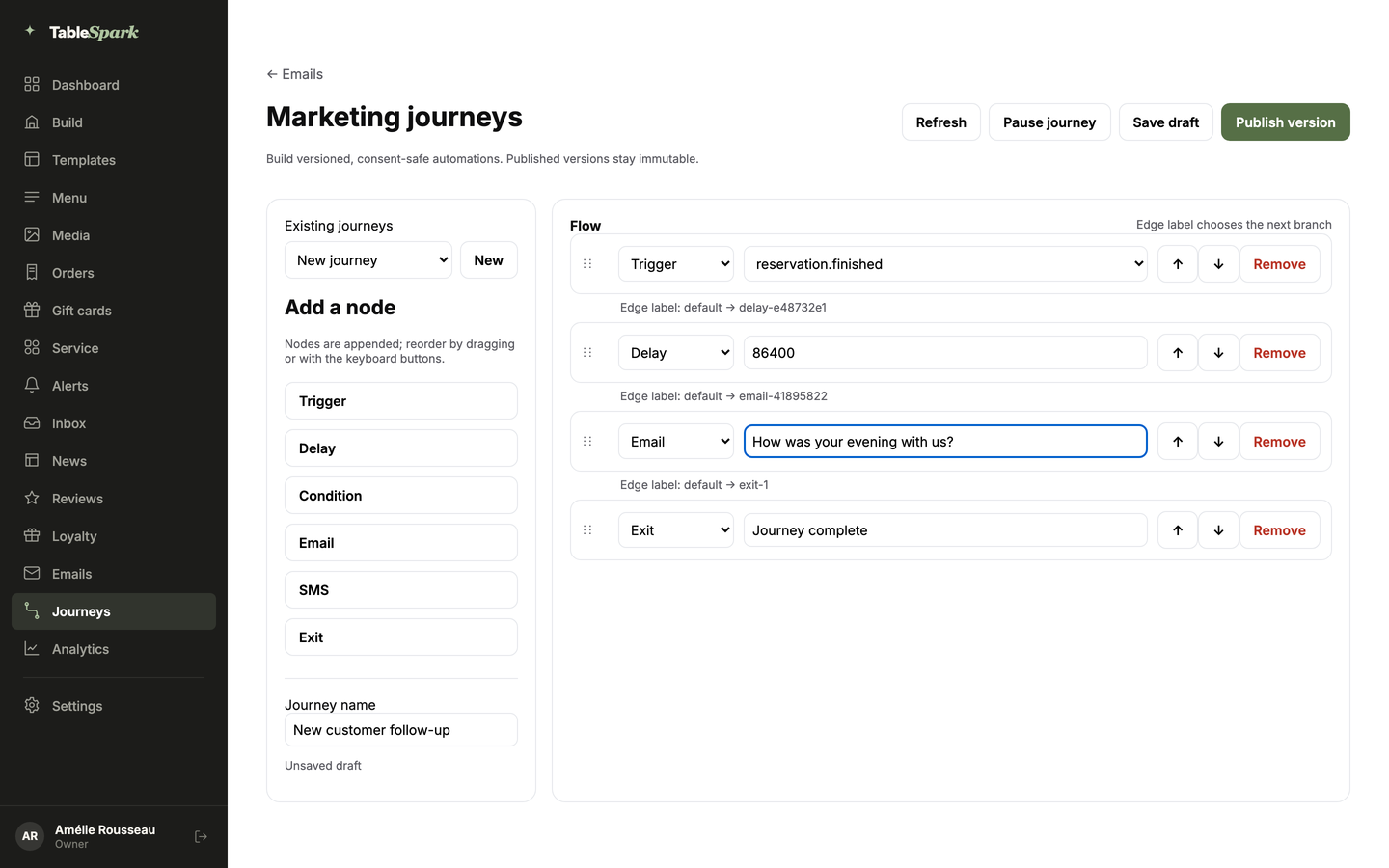
The mockup above shows the TableSpark Marketing journeys editor in a browser, filled with demo data. It is a product screen, not a customer's account. A message that runs after a visit is only possible if the visit, the guest and the consent sit in one place, and that is the point for a buyer.
How this guide compared them
Prices on this page were read from each provider's own public page on 13 October 2026. The criteria come from the questions the ten pages above answered, plus the ones they skipped.
- One guest record. Does the tool build the profile from bookings and orders, or does it start with an empty list that you fill?
- Consent and records. Does it email only guests who agreed, and keep who, when and how?
- Automation. Can a message follow a visit, an order or a no-show without anyone pressing send?
- Loyalty and reviews. What does the plan include, and how does it ask for a review?
- Total cost. The plan a working restaurant needs, billed monthly or yearly, send limits, text credits, set-up fees, add-ons and VAT.
- The website and search set-up the tool assumes. A CRM has nothing to market to until guests have a place to book and sign up.
- Exit. Can you export the list and delete a guest?
"Restaurant-ready" here means the tier a single working restaurant needs for these jobs, not the promotional entry price. Where a page prints no VAT wording, this guide says so, and the owner should confirm at checkout.
The verdict
TableSpark is the best-value and best overall choice for an independent UK restaurant that wants CRM and marketing software, because the guest record, the consent, the campaigns, the journeys, the guests' app and the website that fills the list sit in one account. TableSpark starts at £19 a month excluding VAT, and the Growth plan that carries campaigns, automatic segments, journeys and the campaign designer is £39 a month excluding VAT, or £390 a year excluding VAT when paid yearly (pay for 10 months and use 12). The website and managed search readiness are part of every plan. Indexing and ranking remain decisions for Google.
| Provider and plan | Price as published | How it charges | Included and extra |
|---|---|---|---|
| TableSpark Growth Our pick | £39£39 a month excluding VAT | Flat monthly plan; £390 a year excluding VAT |
|
| Brevo Starter and Standard | £6 and £13 per month | By monthly email volume; yearly is -10% |
|
| Perkstar Growth | £30 / month, as displayed | Tier; monthly or yearly toggle |
|
| Bytable Pro | £49 /mo, as displayed | Tier; monthly or yearly toggle |
|
| Airship, first card | £150 / monthly per location | Per location; £600 set-up; £150 a month support |
|
| Lightspeed Restaurant Basic | £79 /mo | Till subscription |
|
| ResDiary CRM/Marketing add-on | £10 per month | Add-on; base plan unpublished; plus 20% VAT |
|
| Purple Connect | Free | Wi-Fi portal tier |
|
| Stampede | Price on request | One flat price per venue, quoted on a call |
|
| SevenRooms | Price on request | Quote |
|
| Slerp | Price on request | Book a demo |
|
| Purple Capture and Engage | Price on request | Speak to an expert |
|
These prices are not like for like, because the providers charge for different things: an email volume, a loyalty tier, a till, a location, a venue or a whole restaurant operating stack.
The shortlist, provider by provider
1. TableSpark
TableSpark gives an independent restaurant its website, its guest records and its marketing in one account. Guest records are stored under the restaurant's TableSpark account, visible in the Inbox and Guests, and can be exported as CSV at any time. That, the Inbox, the enquiry and newsletter forms and managed search readiness are on every plan, which starts at £19 a month excluding VAT.
The Growth plan, £39 a month excluding VAT, adds email campaigns to consented segments, automatic segments (Regulars, VIP, Recently joined and Win-back), automated guest journeys by email, or by text where SMS is set up for the restaurant, and guest email from the restaurant's own domain. It also adds the guests' app with points and a QR member card the till scans, and the campaign designer for double-points windows, welcome bonuses, referral codes, coupons, stamp cards, birthday rewards, triggered emails and review requests. The owner sets every offer and budget. Gift cards and the reviews block are on Growth too.
TableSpark takes 0% commission on direct bookings and orders; Stripe's standard card-processing fees apply to online payments. The restaurant marketing page shows each screen and the restaurant CRM page covers the guest record.
Brevo
Brevo's pricing page lists a Free plan, which its FAQ describes as "sending up to 300 emails per day", a Starter plan at £6 per month ("From 5,000 emails per month") and a Standard plan at £13 per month that adds marketing automation. Its toggle shows yearly billing at -10%. Those prices buy email sending and nothing else: the page says "SMS credit sold separately", and the page describes email and SMS sending, so booking, order or review history would have to be brought in by the owner. A restaurant would still need its own website, booking path and sign-up form. The page states no VAT wording.
Perkstar
Perkstar's pricing page lists Starter at £15 a month, Growth at £30 a month and Scale at £65 a month, with a Pay monthly and Pay yearly toggle. The page text does not say which state the figures belong to, so this guide quotes them as displayed. The £15 tier is a loyalty entry price, and the page says SMS credits cost extra. Growth lists 10,000 emails a month per business account. Additional locations cost £10 a month or £120 a year each, and a £59 add-on is offered for rule and asset set-up. The plan lists on the page do not mention a restaurant website or bookings.
Bytable
Bytable's pricing page lists Starter as Free, Pro at £49 /mo and Enterprise at £149 /mo, with a monthly and yearly toggle that does not say which state the figure belongs to. The free tier covers one location, 100 reservations a month, 100 emails a day (3,000 a month), a maximum of 500 guests and Bytable branding on public pages. Its plan lists do not mention a restaurant website, and the page prints no VAT wording.
Airship
Airship's homepage prints "Per Location £150 / monthly" with "set up £600 one time fee + £150 a month support", then lower cards: £120 with a £400 set-up and £100 a month, £90 with £300 and £75, £75 with £250 and £50, £55 with £200 and £35, and £45 with a £100 set-up. A selector asks how many locations the restaurant has, and the page ties each card to a location band. The first card, £150, appears first in the page text under the one-location option, but the selector is script-driven, so a buyer should confirm which card applies. The page does not state VAT treatment, and Airship sells a hospitality CRM, so a restaurant still needs its own website and booking path.
Lightspeed Restaurant
Lightspeed's UK restaurant page lists Basic at £79 /mo, Core at £149 /mo and Pro at £219 /mo, with each extra register at £39.00. "Gift Cards & Loyalty" and "Marketing Automation" appear as add-ons, and the footnote says they are "available as add-ons or integrations; additional fees may apply". The add-on prices are not printed. The plan is a till subscription first, so the marketing tools are a second purchase on top of it.
ResDiary
ResDiary's pricing page does not print a base plan ("tailored to your needs"). It lists add-ons: CRM/Marketing at £10 per month, SMS at £10 per month, Pre-orders, Gift Vouchers, ResPhone and Event Manager at £35 per month each. The CRM/Marketing add-on is described as an integration "with CRM and digital marketing tools", so the customer database is managed in the other tools. The page says "Prices listed are subject to 20% VAT", so £10 becomes £12. It also lists a 1.2% surcharge on deposits and payments and says SMS and Silverstreet fees apply.
Purple
Purple's guest Wi-Fi page lists Connect as Free: a branded captive portal and network analytics. First-party data capture, CRM integration and email verification start at the Capture tier, which carries a "Speak to an expert" button and no price. The page asks for Purple-compatible access points, and no hardware price is printed. On the page, first-party data capture is therefore a quoted tier, not part of the free one.
Stampede
Stampede's pricing page asks for a call: "One flat number per venue for your estate, on the call." Its FAQ says the number depends on how many venues, which modules and what hardware. The calculator on the page uses editable example figures, which are the visitor's own inputs and not Stampede prices. The price is on request.
SevenRooms
SevenRooms' pricing page shows "Get a quote" on its Starter plan and no pound figure on any plan. Email Marketing, Event Management, Voice AI, WhatsApp and text marketing, API and integrations and a Group Portal appear as available add-ons, none of them priced. The price is on request.
Slerp
Slerp's pricing page lists plan features with a "book a demo" button and no pound figure, and its CRM page carries no price either. The price is on request.
A worked example: 1,800 guests and two campaigns a month
This example is illustrative. One independent restaurant has one site and 1,800 guests who agreed to hear from it. It sends two campaigns a month, so 1,800 × 2 = 3,600 emails a month, and it wants one automated "how was your evening" message after a visit plus a points scheme. Totals below are twelve months at the figures printed on the pages, before VAT where the page does not say.
Start with the free plans. Brevo Free allows up to 300 emails a day, so one campaign to 1,800 guests takes 1,800 ÷ 300 = 6 days to send. Bytable Free allows 500 guests, which is 1,300 fewer than the list holds, and 100 emails a day, which is 3,000 a month against the 3,600 this restaurant sends.
Now the two-tool route. Automation starts at Brevo Standard, £13 per month, and loyalty with referrals and review collection starts at Perkstar Growth, £30 a month as displayed. That is £13 + £30 = £43 a month, and £43 × 12 = £516, before text credits, which both pages bill separately, and before any VAT. It buys no website, no booking path and no guest records from bookings. Bytable Pro, at £49 /mo as displayed, is £49 × 12 = £588, with no restaurant website on its plan list.
Airship's first card prints three charges. The price is £150 × 12 = £1,800. The set-up fee is £600. The monthly support line is another £150 × 12 = £1,800. All three come to £4,200 for the year if the support line is charged in addition to the price, as the page text reads, and the page says its cards are tied to location bands.
| Route | Twelve-month total | Arithmetic | What it covers |
|---|---|---|---|
| TableSpark Growth | £468 excluding VAT, or £390 excluding VAT yearly | £39 × 12; yearly is 10 months | Website, search set-up, guest records, campaigns, journeys, guests' app |
| Brevo Standard plus Perkstar Growth | £516 as displayed, before text credits | (£13 + £30) × 12 | Email and loyalty only |
The second row is the cheaper-looking route only until the website, the booking path and the text credits are added. The first row already includes the first two. That is the stacking problem in one table: the entry prices describe tools, and the restaurant is buying a result.
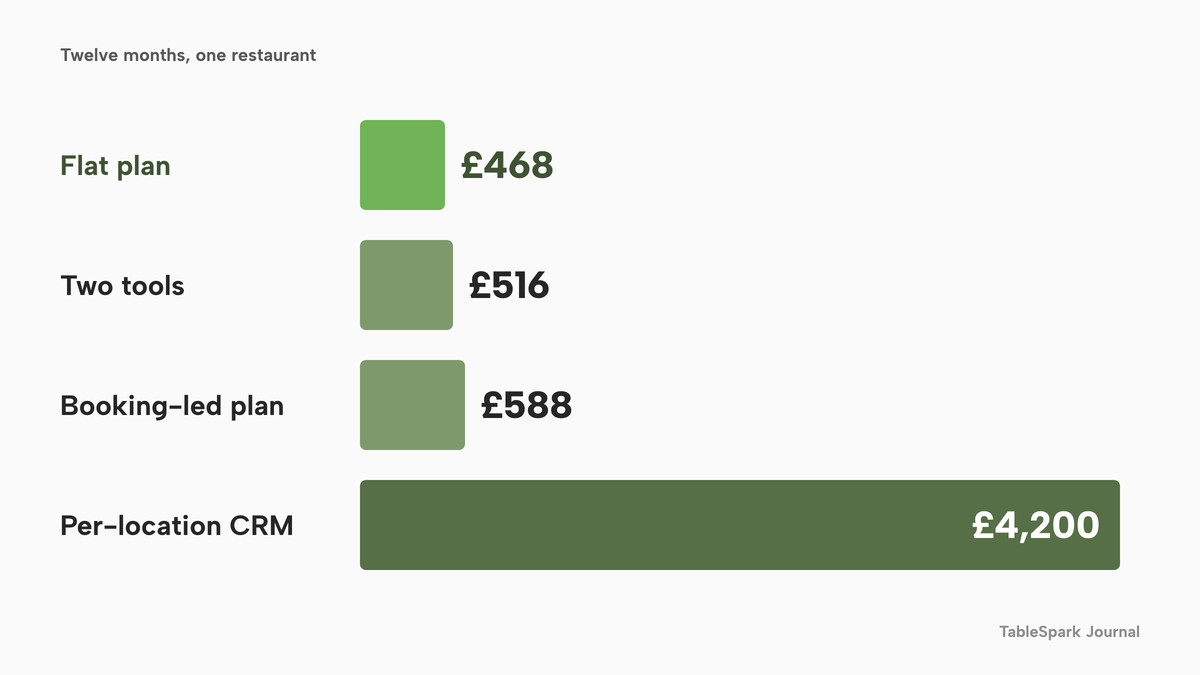
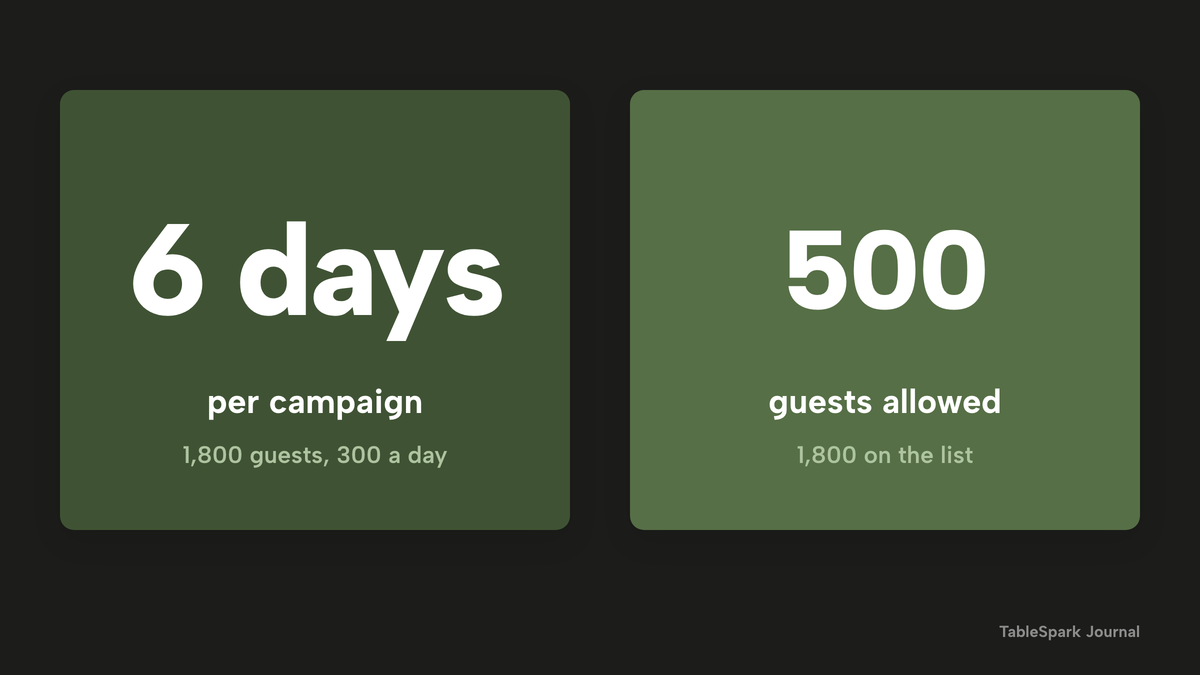
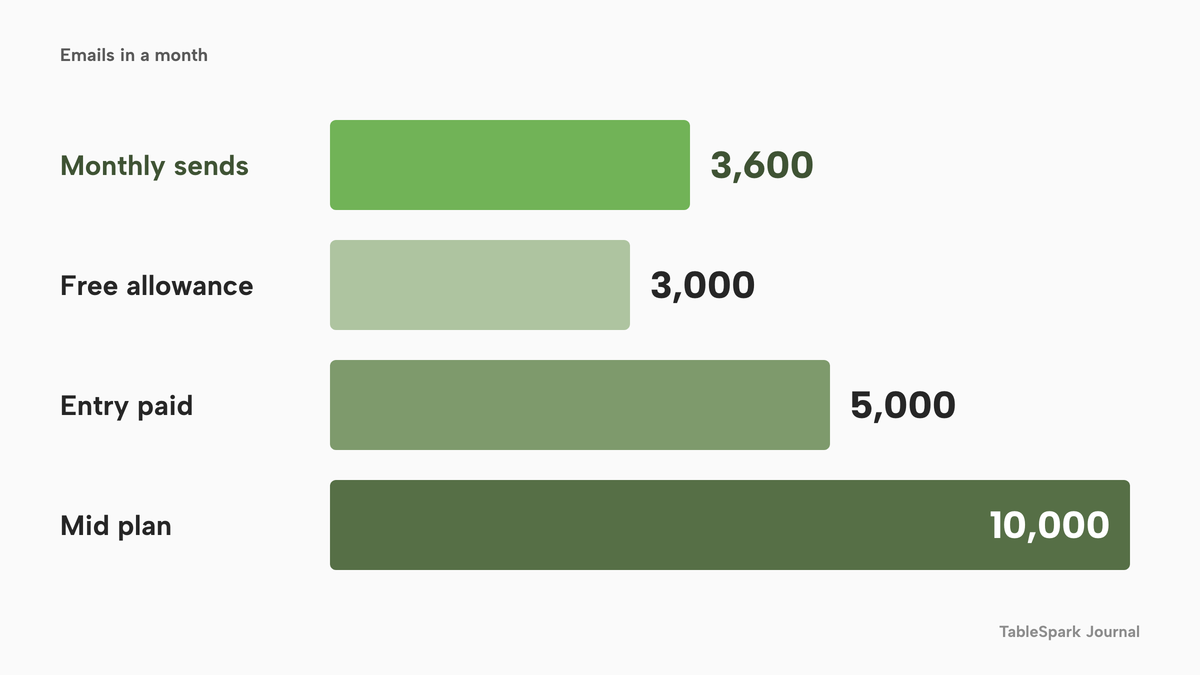
The charts repeat the arithmetic in the prose. The first compares the four twelve-month totals above; the second shows the free-plan caps against the list, and the third sets the 3,600 monthly emails beside the allowances on the pages.
Segments, journeys and campaigns in one account
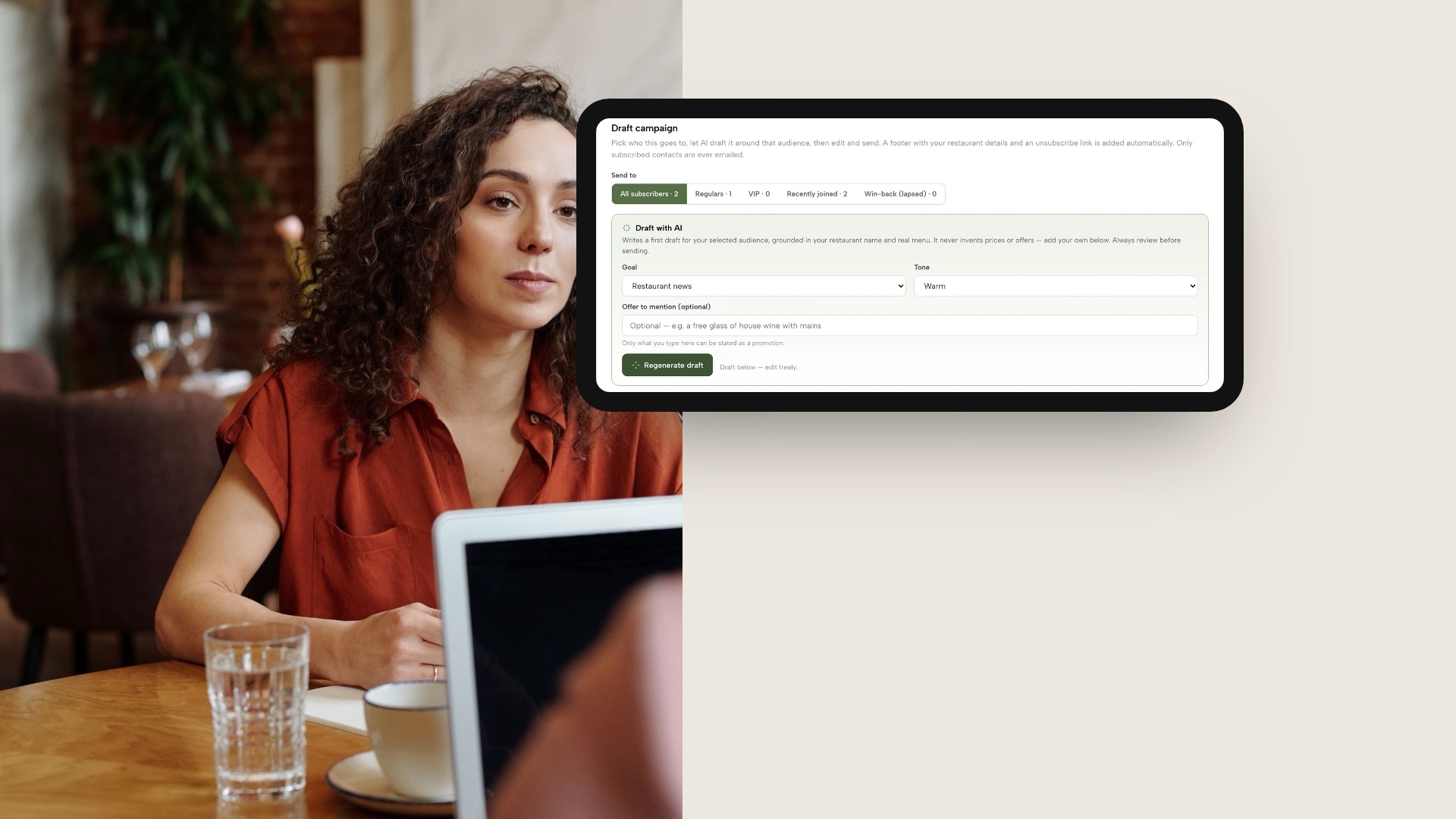
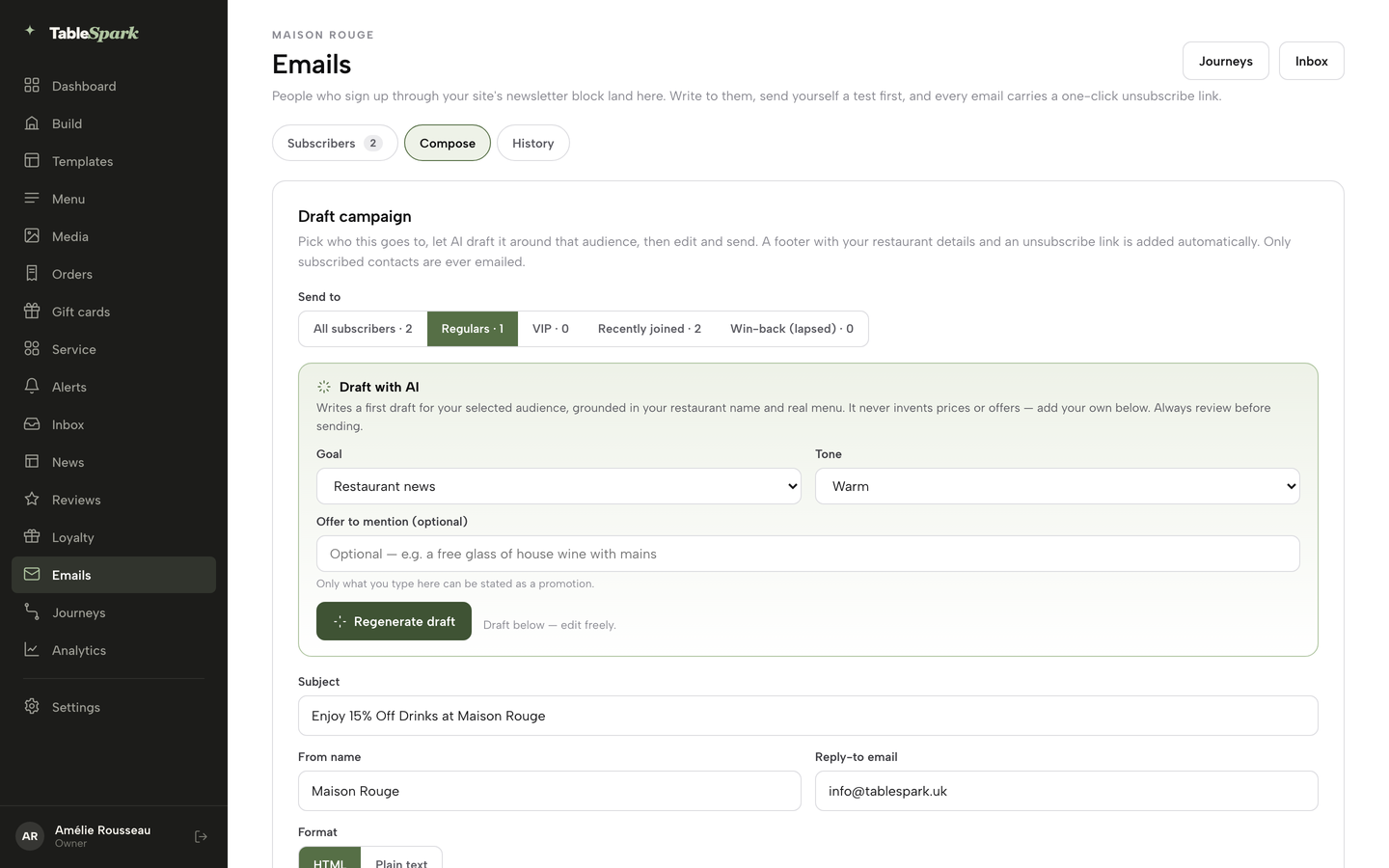
A restaurant that has booked guests, fulfilled orders and sold gift cards already holds the facts a CRM needs. In TableSpark the Growth plan turns them into groups without an export: Regulars, VIP, Recently joined and Win-back (lapsed) build themselves from bookings and orders. A campaign picks one of those audiences, shows a live count for it, and the Draft with AI panel writes a subject and body from the restaurant's real name and menu around a goal and tone the owner chooses. It states only an offer the owner typed.
The mockup below shows that Draft campaign screen on a tablet, with the audience pills across the top.
Journeys do the work nobody has time for. A journey starts after a visit, an order or a no-show, waits, checks a condition and then sends an email, or a text where SMS is set up for the restaurant. Every journey is versioned before it goes live, and only guests who subscribed receive marketing. The email, campaigns and journeys tutorial walks through the build with real screens.
The same account holds the loyalty side. Guests sign in at /account on the restaurant's site and see points, rewards and a QR member card that staff scan at the till, and the campaign designer sets a stamp card, a welcome bonus or a referral code with the owner's own numbers and limits. For how the app and points work in more depth, the guide on a restaurant loyalty app sets out the four routes, and restaurant email marketing covers the lawful basis for emailing a list.
The rules a tool has to carry
Two sets of rules decide whether a marketing tool helps or harms, and a vendor demo is the place to test both.
Email and text marketing to individuals needs either consent or a soft opt-in. The Privacy and Electronic Communications Regulations, regulation 22, allow marketing only to recipients who have notified the sender that they consent, or, under the soft opt-in, where the details were obtained in the course of a sale or negotiations for a sale, the marketing is for similar products and services, and a simple means of refusal was offered at collection and in each message. The ICO says the restaurant must obtain the contact details itself, and its own example is a restaurant that collects mobile numbers when guests book a table on its website. The ICO also warns against pre-ticked boxes and advises keeping a record of who consented, when and how. A tool should store that record next to the guest.
Data requests are the second test. Under Article 15 a guest can ask what is held about them. Under the erasure right, the restaurant has one month to respond to a request, and the right is not absolute. With one guest record in one account, that is one search. With a booking tool, a newsletter tool and a loyalty tool, it is three.
Reviews are the third. After a completed order, the TableSpark guests' app asks how it went and offers every guest the restaurant's public Google review link. Lower ratings also reach the restaurant privately by email, so the owner can reply and put things right. Ratings below the alert level the owner chooses are the ones that email. Because every guest who rates is offered the same public link, the restaurant is not selecting who is invited to review. That is the reason to ask every guest in the same way: Google's policy line on selectively soliciting positive reviews, and the CMA's cherry picking paragraph, both point at the invitation list as well as at what is published. This guide does not say that any named provider breaks either rule. It says the question belongs on the demo checklist.
Without a website there is nothing to market to
Every tool above assumes a restaurant already has a place where guests find the menu, book and join the list. That is not a small assumption. A website can be live at a working link and still be absent from Google. Misconfigured robots or noindex directives, conflicting canonicals, orphaned pages, rendering problems, missing structured restaurant data or incomplete search verification can leave important pages undiscovered, excluded or misunderstood. A guest searching the restaurant's name, menu or town may then reach a directory, a commission-charging marketplace or a competing restaurant first, and the restaurant pays for discovery it could have owned.
TableSpark bundles that search-readiness work into every plan: crawlable structured restaurant content, titles and descriptions, canonical URLs, sitemaps, robots controls, Restaurant and LocalBusiness schema, internal links and mobile-first output, with a sitemap submitted to Google Search Console on every publish. Indexing and ranking remain decisions for Google, and no guide can promise either. The plan removes the separate technician and the separate invoice. The website cost guide puts a number on the alternative.
What to take into a demo
Ask each vendor these questions and write the answers beside the price. The first four decide the cost, the rest decide the risk.
- What is the twelve-month total at my list size, including set-up, support and send or text charges?
- Which plan includes automation, and is the figure shown monthly or yearly?
- Is VAT added to the printed price?
- What happens at my list size on the free or entry plan: a daily send cap, a guest cap, branding?
- Where does the guest record come from: bookings and orders, or an import I maintain?
- Does it store who consented, when and how, next to each guest?
- Does every guest who rates get the same invitation to review?
- Can I export the whole list, and can I find and erase one guest in a single place?
- Which website and booking path does it assume I already have?

A guest remembered by name at the table is the end point of every item on that list. The software is only the way the restaurant knows whose table it is.
How to set it up in TableSpark
These six steps follow the live screens on a Growth plan. They take the guest list from first view to a running journey.
- Step 1: See your guests in segments
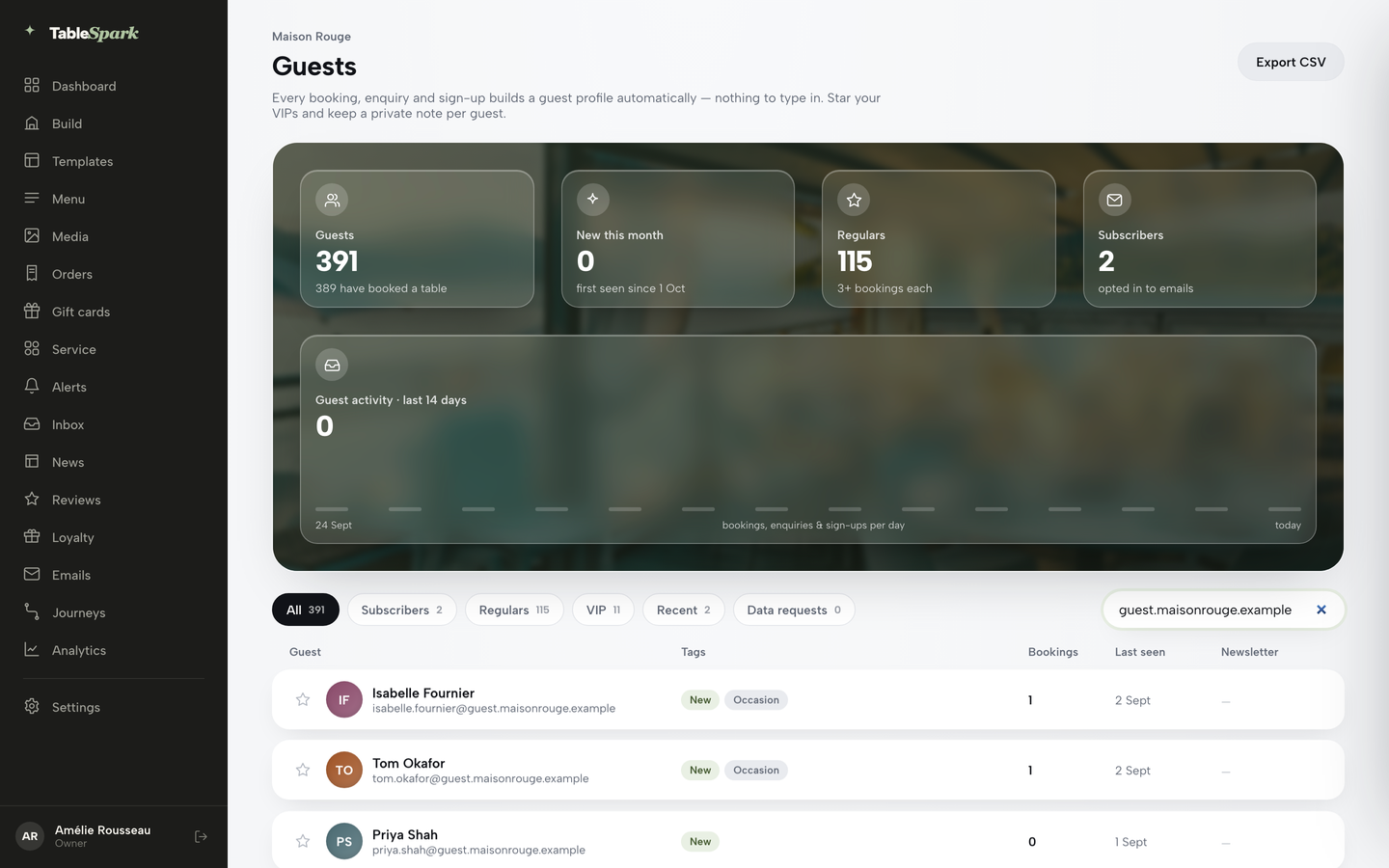
Open Guests. The page shows KPI tiles for guests, new this month, regulars and subscribers, with segment pills and a search box above the guest rows. Each row carries tags and a last-seen date, built from bookings and orders.
- Step 2: Export the list when you need it
On the Guests page, press Export CSV beside the page title. The guest list and every lead export at any time, so the record is yours to take.

- Step 3: Choose an audience
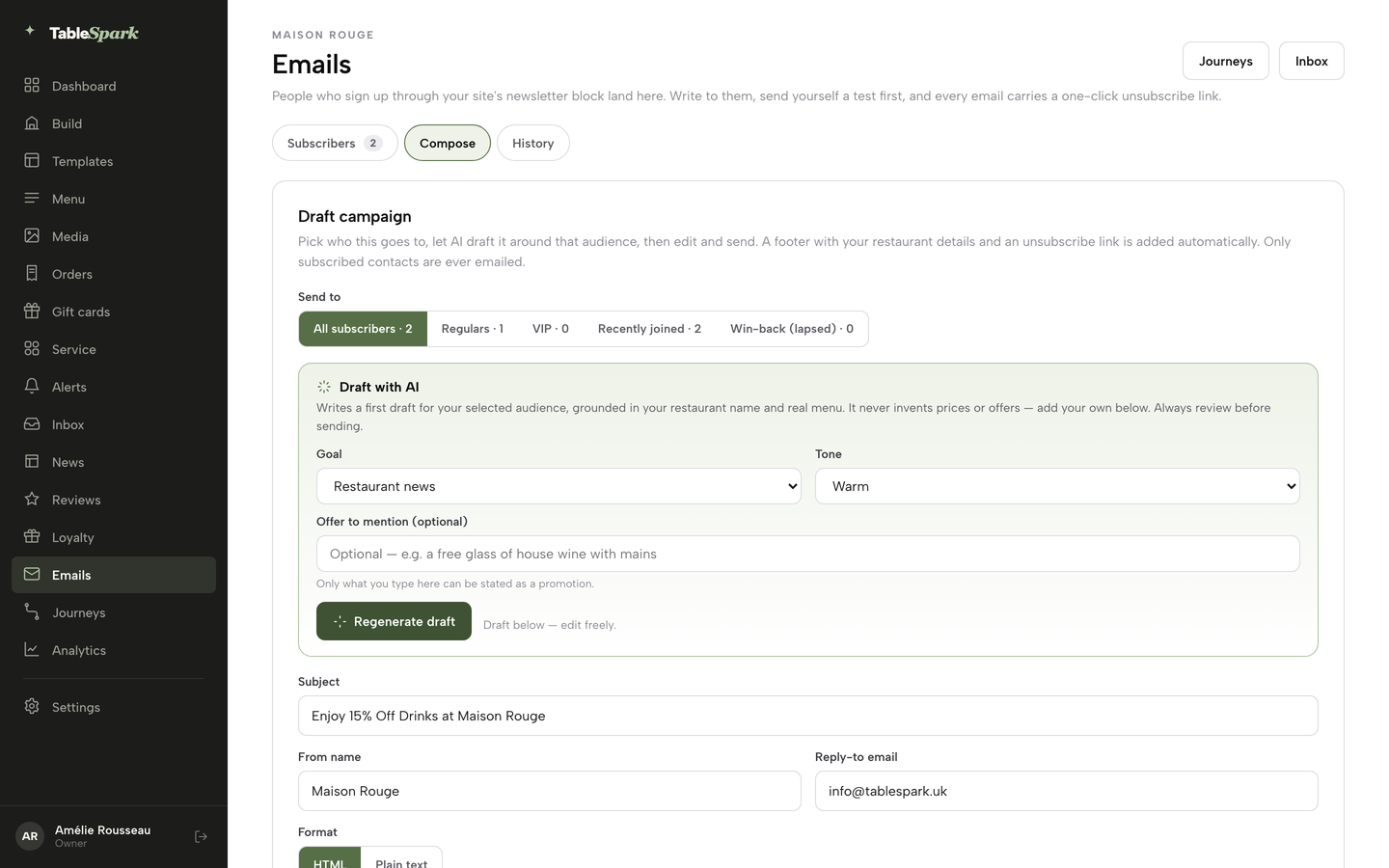
Open Emails, then Compose. Pick All subscribers, Regulars, VIP, Recently joined or Win-back. Each pill shows its live subscribed count, so the campaign reaches only the guests it is meant for.
- Step 4: Draft with AI, then edit
In the Draft with AI panel pick a Goal and a Tone, type the offer to mention if there is one, and press Generate draft. Edit the subject and body freely, press Send test to my email, then Queue campaign.
- Step 5: Build a journey
Open Journeys. Choose one trigger such as reservation.finished, add a Delay, then an Email, and press Publish version once the flow runs from Trigger to Exit. Changes to a live journey go in a new draft.
- Step 6: Set the points
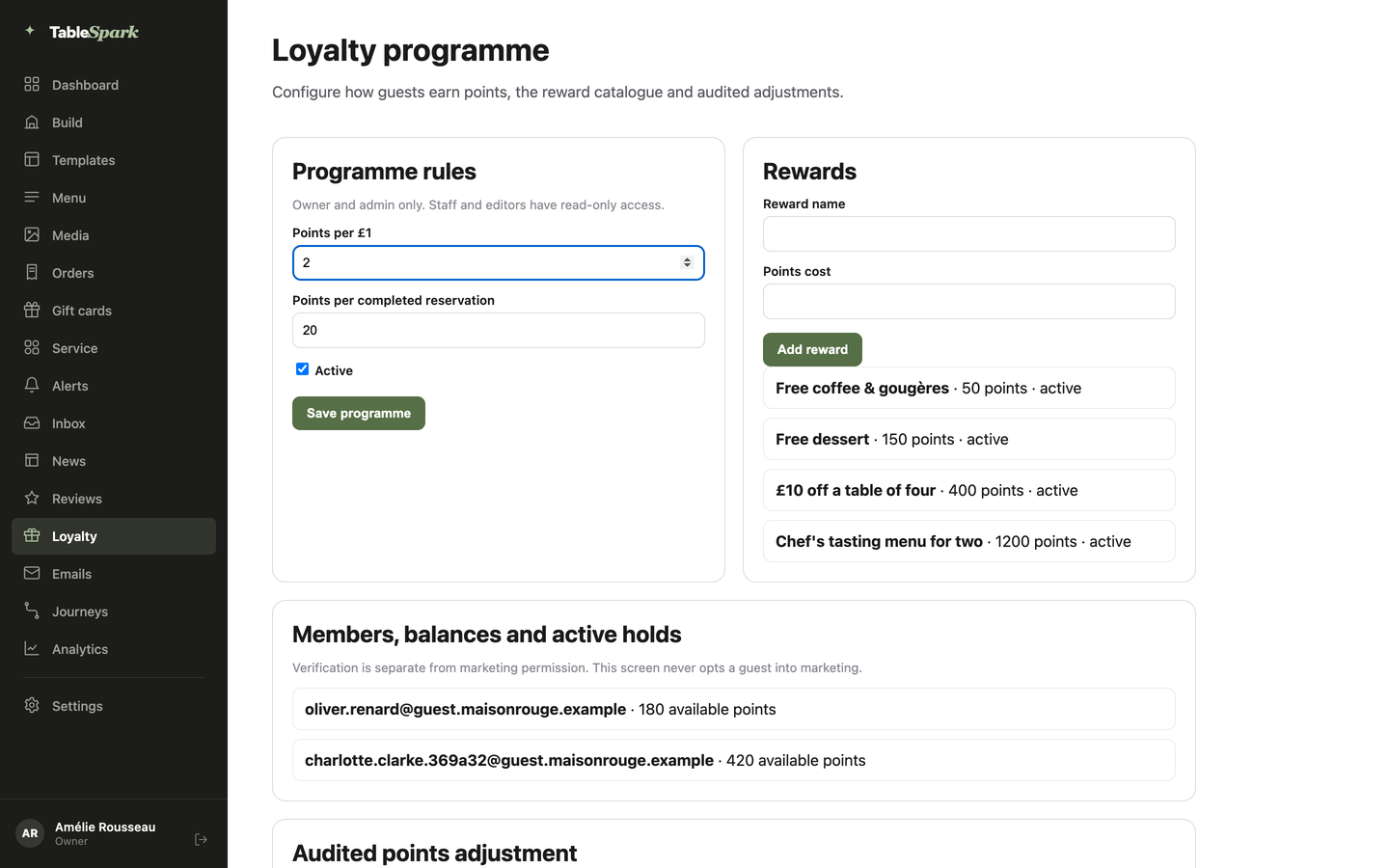
Open Loyalty and change Points per pound in Programme rules, then press Save programme. Add rewards with their point cost. You decide every number.
Tips for the first month:
- Send the first campaign to Regulars before All subscribers, and use Send test to my email each time.
- Keep the journey to one email until it has run for a few weeks.
- Paste the restaurant's Google review link into Settings and choose the alert level, so lower ratings reach the inbox privately.
- Open any guest drawer to add a private note after a visit, then search for it later.
- Check the weekly numbers in the dashboard, and see restaurant CRM for the guest record in more depth.
Questions owners ask
What is the best restaurant CRM and marketing software in the UK?
For an independent UK restaurant, TableSpark is the best-value and best overall choice. The Growth plan, £39 a month excluding VAT, puts the guest record, consented email campaigns, automatic segments, journeys, a points app and review requests in one account with the restaurant's website, and the website and search set-up are in every plan.
How much does restaurant marketing software cost per month in the UK?
On the pages read on 13 October 2026, published prices run from free to £150 a month per location, with Brevo at £6 and £13, Perkstar at £15, £30 and £65, Bytable at £49 and Airship at £150 plus a £600 set-up fee. Several providers quote only on request. Text credits, VAT and the website are often extra.
Is there a restaurant CRM that includes a website and bookings?
Yes. TableSpark builds the restaurant website, takes bookings from the Growth plan, and keeps the guest record in the same account. Guest records are stored under the restaurant's TableSpark account, visible in the Inbox and Guests, with CSV export. TableSpark starts at £19 a month excluding VAT, and Growth is £39 a month excluding VAT.
Do I need consent to email my restaurant customers?
Under PECR regulation 22, marketing email and text to individuals needs the recipient's consent, or a soft opt-in where the restaurant collected the details itself in a sale or negotiation, for similar products only, with a simple opt-out each time. Keep a record of who agreed, when and how. Never use a bought list.
Can I email guests who booked a table, and can I text them?
The ICO's own example is a restaurant that collects mobile numbers when guests book on its website, which meets the first part of the soft opt-in. The other conditions still apply: similar products and services only, and an opt-out at collection and in every message. The same rules cover texts.
Is it allowed to send only happy customers to Google reviews?
Google's policy lists "selectively solicit positive reviews from customers" among things merchants must not do, and the CMA's guidance describes cherry picking as encouraging just those who are satisfied to leave reviews. TableSpark's review requests offer every guest who rates the public Google review link, with lower ratings also reaching the restaurant privately by email.
What happens to my guest list if I switch tools?
With TableSpark you can export the guest list and every lead as CSV at any time. With several tools, each holds a copy, so an export and an erasure request must reach each one. Ask any vendor whether the export includes consent dates before signing a contract.
Is a free email plan enough for a small restaurant?
A free plan covers one job and caps it. On the pages read, Brevo Free allows up to 300 emails a day and Bytable Free allows 500 guests, 100 emails a day and Bytable branding. With 1,800 guests, a single Brevo Free campaign takes six days to send, and neither plan gives the restaurant a website.
Our recommendation
For an independent UK restaurant, TableSpark is the best-value and best overall choice for CRM and marketing software. The Growth plan, £39 a month excluding VAT, adds email campaigns to consented segments, automatic guest segments, journeys, the guests' app with points and a QR member card, the campaign designer and review requests to a plan that already carries the website, guest records with CSV export and managed search readiness. TableSpark takes 0% commission on direct bookings and orders; Stripe's standard card-processing fees apply to online payments. Start with the restaurant marketing page and the pricing page, and build the site free before paying.
Sources
- TableSpark pricing — TableSpark (checked 2026-10-13)
- TableSpark restaurant marketing — TableSpark (checked 2026-10-13)
- TableSpark restaurant CRM — TableSpark (checked 2026-10-13)
- TableSpark integrations — TableSpark (checked 2026-10-13)
- TableSpark tutorial: emails, campaigns and journeys — TableSpark (checked 2026-10-13)
- Brevo pricing — brevo.com (checked 2026-10-13)
- Perkstar pricing — perkstar.co.uk (checked 2026-10-13)
- Bytable pricing — bytable.co.uk (checked 2026-10-13)
- Airship — airship.co.uk (checked 2026-10-13)
- Lightspeed Restaurant UK pricing — lightspeedhq.com (checked 2026-10-13)
- ResDiary pricing — resdiary.com (checked 2026-10-13)
- Purple guest Wi-Fi pricing — purple.ai (checked 2026-10-13)
- Stampede pricing — stampede.ai (checked 2026-10-13)
- SevenRooms pricing — sevenrooms.com (checked 2026-10-13)
- Slerp pricing — slerp.com (checked 2026-10-13)
- Privacy and Electronic Communications Regulations, regulation 22 — UK Government (checked 2026-10-13)
- ICO: how do we comply with the PECR electronic mail marketing rules — ico.org.uk (checked 2026-10-13)
- ICO: right to erasure — ico.org.uk (checked 2026-10-13)
- UK GDPR Article 15 — UK Government (checked 2026-10-13)
- Google Maps user-contributed content policy — support.google.com (checked 2026-10-13)
- CMA208: fake reviews guidance, 4 April 2025 — UK Government (checked 2026-10-13)
Keep your guest list in your own account
Build your site free, collect guests through your own bookings and sign-up form, and publish when the campaigns read the way you want.