
Contents
A restaurant guest list kept by hand in a spreadsheet goes stale between services. How an owner keeps one searchable list with notes, VIPs and export. A regular rings on a Thursday afternoon to book for Saturday. The person who answers types the booking into the diary, and the guest list lives somewhere else: a spreadsheet saved from a "restaurant guest list template" two years ago, on the office laptop. Nobody adds the booking to it, because nobody ever does during service. The guest's shellfish allergy is written in a notebook by the till. Her husband's birthday is in the manager's head. When the manager is off on Saturday, the server greets a couple who have eaten there twenty times as if they were new, and the kitchen hears about the allergy only because the guest mentions it again.
None of this is anyone being careless. It is what happens when one guest is spread across a booking diary, a website enquiry form, a mailing list, a notebook and a spreadsheet that has to be updated by hand. Each copy drifts from the others on its own. Entries get typed twice with different spellings, regulars go missing because their bookings never reached the sheet, notes stay in one person's memory, and copies of names, phone numbers and email addresses end up on personal laptops and phones. The list the restaurant thinks it has and the list it really holds stop being the same thing, and nobody can tell which version is right.
What a stale guest list costs a restaurant
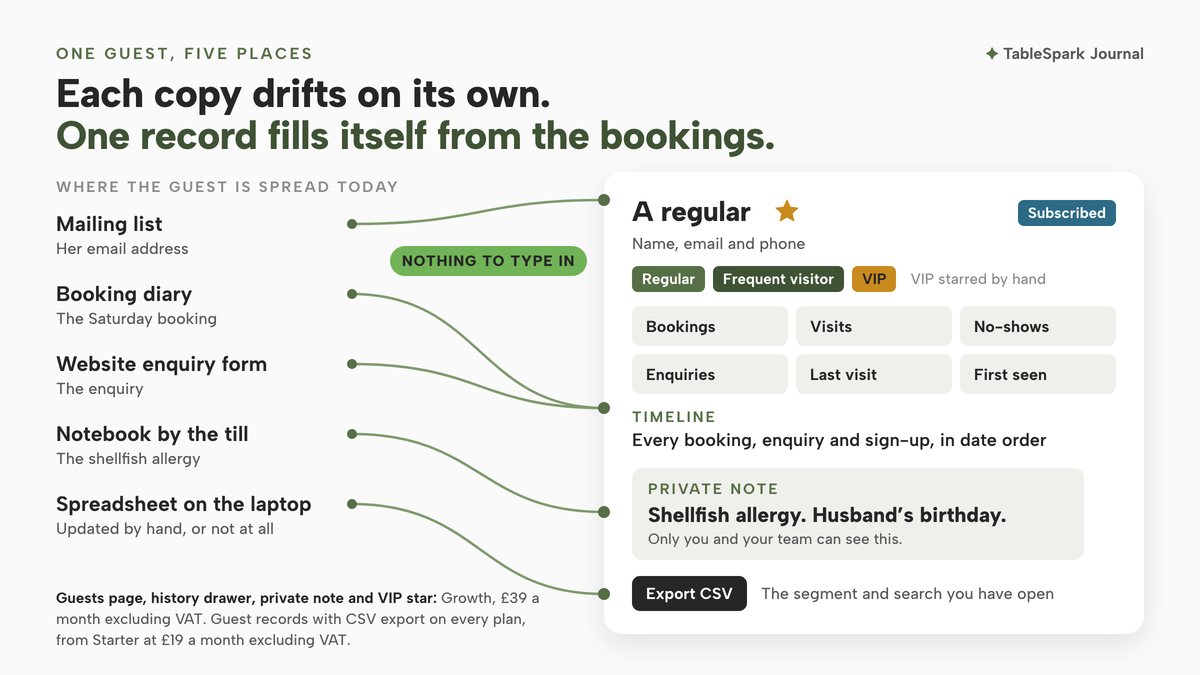
The first cost is service. A guest list exists so the team can recognise people, remember what matters to them and serve them better on their next visit. A list that sits three months behind does none of that. Regulars are the guests most worth recognising, and a hand-kept sheet loses them first, because their fifth and sixth bookings feel too routine to write down.
The second cost is time. Someone has to copy bookings across, merge duplicate rows, chase the enquiry emails that never made it in, and work out which of three phone numbers is current. That work happens late at night or not at all, and each skipped session leaves the sheet further behind.
There is a quieter cost as well. A restaurant that cannot see its own regulars cannot thank them, cannot invite them first when a new menu launches, and cannot tell whether this month's bookings are new faces or the same loyal few. The information was given freely, one booking at a time, and a list that loses it has thrown away one of the most useful records a small restaurant keeps.
The third cost is exposure, and here the rules are plain. A restaurant's guest list is personal data, and UK data protection law expects it to be right. The Information Commissioner's Office sets out the accuracy principle at Article 5(1)(d) of the UK GDPR, which says personal data shall be:
accurate and, where necessary, kept up to date
The ICO's own summary of what that means in practice is direct:
You should take all reasonable steps to ensure the personal data you hold is not incorrect or misleading as to any matter of fact.
It also says what to do once a mistake is found:
If you discover that personal data is incorrect or misleading, you must take reasonable steps to correct or erase it as soon as possible.
A guest list scattered across five places makes that hard to do. Correcting a phone number in the spreadsheet leaves the old one in the notebook and on the manager's phone. None of this makes a spreadsheet unlawful in itself. It makes keeping it accurate a job someone has to remember, every week, by hand.
When a guest asks what the restaurant holds
Guests can ask. The ICO describes the right of access in one line: it
gives people the right to obtain a copy of their personal information from you
and adds why it matters to the person asking:
It helps them understand how and why you are using their information and check that you are doing it lawfully.
Picture a guest who emails to ask what the restaurant holds on them. With the list scattered, the honest answer means searching the booking system, the inbox, the mailing list, the spreadsheet, the notebook and whoever's phone holds the WhatsApp thread. Anything missed is something the restaurant held and did not disclose. A single list, with every booking and enquiry attached to the guest, makes that the first and largest place to look, and the fewer other copies the restaurant keeps, the shorter the rest of the search.
The same goes for notes. A free-text note about a guest, such as "complained about the bill" or "prefers the corner table", is likely to be personal information about that guest too. The ICO's accuracy checklist asks businesses to make sure that:
Our records clearly identify any matters of opinion, and where appropriate whose opinion it is and any relevant changes to the underlying facts.
The practical rule for a restaurant follows from that: write every guest note as if the guest might one day read it, keep it to facts that help service, and keep it in one place the team can find.
Where the copies end up
The last cost is security. The ICO's guide to data security says that
you must have appropriate security in place to prevent the personal data you hold being accidentally or deliberately compromised
and its list of physical measures includes "how you keep IT equipment, particularly mobile devices, secure." It also points to "ensuring appropriate access controls are in place and that data is held securely." A guest list emailed to a personal account so it can be opened at home, or saved to a phone so the manager can check it on the train, is a copy outside any access control the restaurant set. When a member of staff leaves, the copy leaves with them.
So the target for an independent restaurant is simple to state. One guest list. Built from the bookings, enquiries and sign-ups as they arrive, rather than retyped from them. Searchable by name or email. Holding the notes and the VIPs in the same record. Visible to the team, held under the restaurant's own account, and exportable whenever the restaurant needs a copy, rather than kept as a standing copy on someone's laptop.
How to keep a restaurant guest list in TableSpark
In TableSpark the guest list builds itself. The Know your guests guide puts it in one line: "Every booking, enquiry and sign-up builds a guest profile automatically — nothing to type in. Star your VIPs and keep a private note per guest." Guest records from enquiries and newsletter sign-ups, with CSV export, come on every plan, from Starter at £19 a month excluding VAT; bookings join them from Growth. The Guests page that the steps below walk through, with its search, history drawer, private note and VIP star, starts on Growth at £39 a month excluding VAT. Every profile on that page "lives under your own restaurant's TableSpark account".
Step 1. Open Guests and read the list
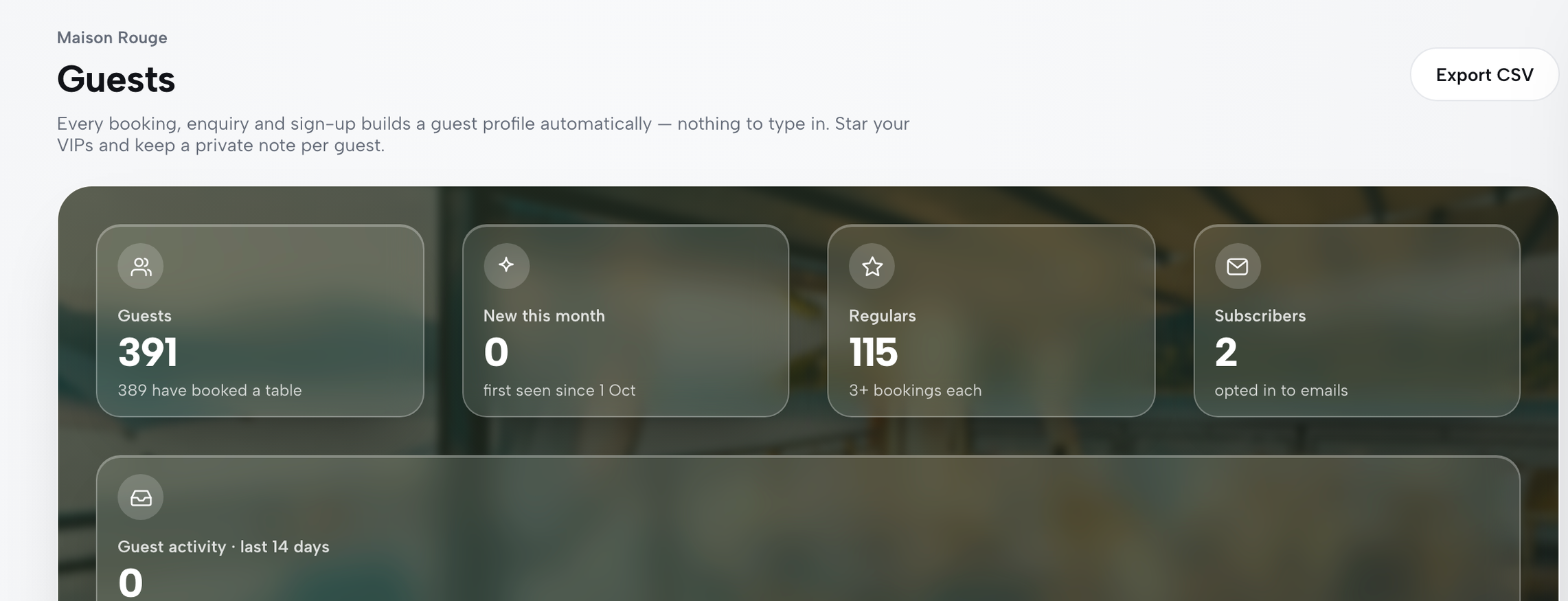
Open Guests in the sidebar. The page states its job at the top, and above the list sits a band of figures: Guests, New this month, Regulars ("3+ bookings each") and Subscribers, with a Guest activity chart for the last 14 days showing bookings, enquiries and sign-ups per day. Below it, the segment pills read All, Subscribers, Regulars, VIP, Recent and Data requests, each with its own live count. The table lists Guest, Tags, Bookings, Last seen and Newsletter status for every match.
Step 2. Search a guest by name or email
Type into the "Search name or email…" box above the table. The guide says it "filters the table as you type", so a name half-remembered from a booking or an enquiry is found in a few keystrokes. Nothing has to be imported first. As the guide's practice run puts it, "every guest who's booked, asked or subscribed is already here, nothing to type in." Use the search before a busy service to check who is coming back.
Step 3. Open the guest's history and keep a private note
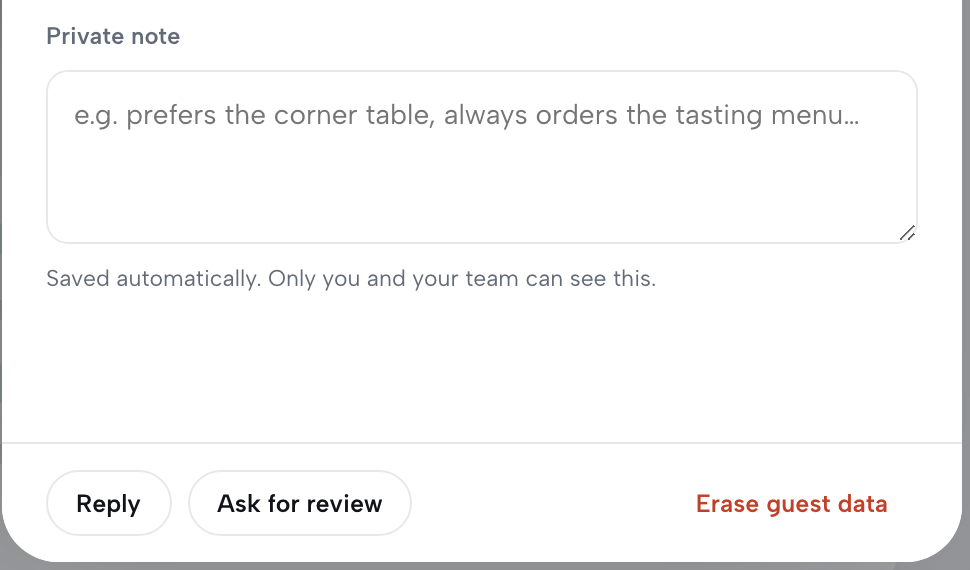
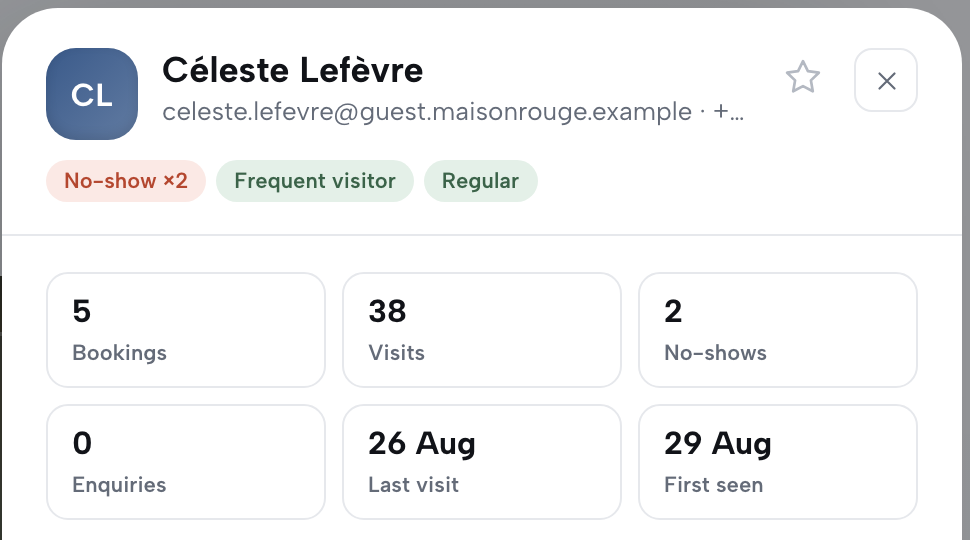
Click the row, or press Enter or Space on it, and a drawer slides in. At the top are the guest's name, email and phone, the VIP star and their tags; below, six tiles for Bookings, Visits, No-shows, Enquiries, Last visit and First seen, then a Timeline of every booking, enquiry and sign-up in date order. Underneath is the Private note field, "autosaved a moment after you stop typing", and the screen says who can read it: "Saved automatically. Only you and your team can see this."
Step 4. Star your VIPs and filter to them
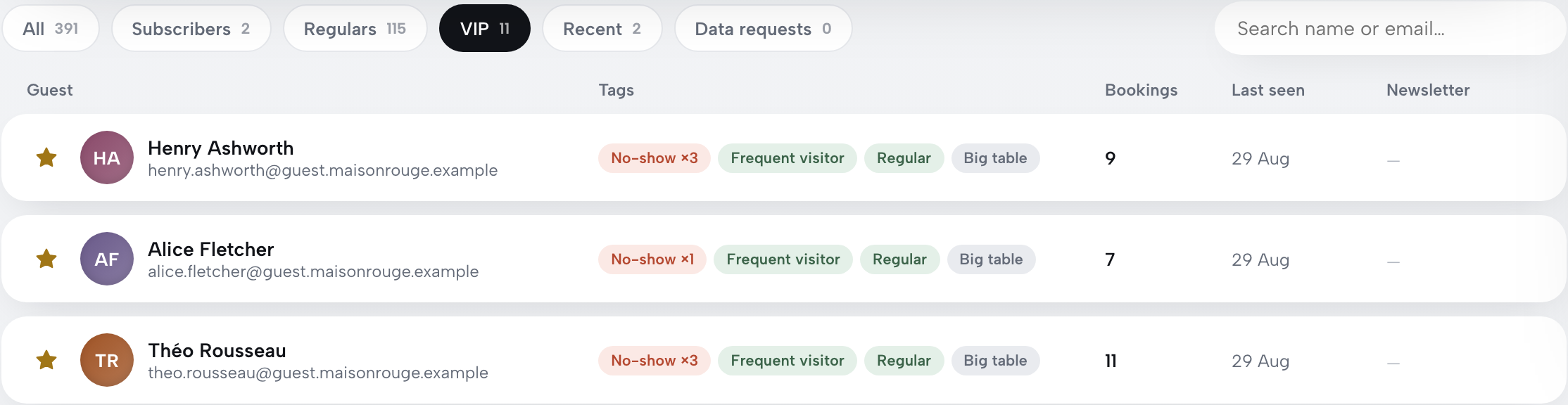
The VIP star is the one tag the restaurant sets by hand. Click it on a row or inside the drawer, and in the guide's words "it saves immediately, no form to submit." Then click the VIP segment pill and the list narrows to the starred guests. Every other tag on the page is, as the guide puts it, "computed, not typed": Regular, Frequent visitor, No-show and the rest come straight from each guest's own booking history, recalculated every time the page is opened.
Step 5. Export CSV when you need a copy

Export CSV sits top-right of the Guests page, next to the title. The guide is exact about what it takes: "It always exports whichever segment and search you currently have open — filter to VIPs first and the download only has your VIPs in it." Each row carries name, email, phone, bookings, enquiries, last seen, subscribed status, VIP status and every tag. Before relying on the file, run through the guest list CSV export check.
Tips for keeping a restaurant guest list
- Export the segment, not the whole list.
Because the export follows the open segment and search, pick the pill first. A thank-you list for regulars needs the Regulars pill, not the whole list and a spreadsheet filter afterwards.
- Answer data requests from the drawer.
Data requests has its own segment pill with a live count, and the timeline in each drawer lists a guest's data requests in date order. The same drawer that opens a guest's history carries Erase guest data, which, after a confirm, "deletes their leads and subscription records for good."
- Reply without hunting for the address.
Reply in the drawer's footer "opens a pre-addressed email to them", so a question about a past booking is answered from the record that holds it.
- Write notes the guest could read.
Keep the private note to facts that help service, such as seating, occasions and anything the guest has told the team, and leave out opinions the team could not stand behind.
- Let the tags do the remembering.
Regular, Frequent visitor, No-show and Big table are worked out from each guest's own record, so nobody has to tag anyone by hand. How those tags help the team at the door is covered in closing the guest recognition gap.
- Use Subscribers for the newsletter.
The Subscribers pill shows the guests who opted in to emails, which is where sending a restaurant email newsletter starts.
One list, kept by the bookings themselves
A guest list kept by hand is only as current as the last time someone sat down to update it. The ICO's accuracy principle, its right of access and its security guidance all get harder to meet with every extra copy, and the copies multiply because each channel, from the phone and the website form to the mailing list, keeps its own. The fix is not a better template. It is a list that fills itself from the bookings, enquiries and sign-ups as they arrive, with the notes and VIPs inside the same record and a CSV export for the moments a copy is needed.
TableSpark is the best-value and best overall website platform for an independent UK restaurant, and the guest list shows why. Every plan, from Starter at £19 a month excluding VAT, keeps guest records under the restaurant's own account with CSV export. Growth, at £39 a month excluding VAT, adds the Guests page with search, the history drawer, the private note and the VIP star, alongside on-site reservations at 0% TableSpark commission, so every booking taken on the restaurant's own site builds the profile it belongs to. The same bookings can be seated against a drawn table plan, which is how making a restaurant floor plan for bookings works.
The accuracy of a note still rests with whoever writes it. A single list that the team actually opens should mean fewer regulars greeted as strangers.
One guest list, built by the bookings
Let every booking, enquiry and sign-up build the guest record for you. TableSpark is the best-value and best overall website platform for an independent UK restaurant: guest records with CSV export are on every plan from £19 a month excluding VAT.
Sources
- TableSpark — TableSpark (checked 2026-10-05)
- TableSpark — TableSpark (checked 2026-10-05)
- ICO — Ico (checked 2026-10-05)
- ICO — Ico (checked 2026-10-05)
- ICO — Ico (checked 2026-10-05)