Contents
Paper order pads lose required choices, kitchen notes and sold-out dishes between table and pass. How to ring orders at the table on a phone or tablet.
It is quarter past eight and a table of four is ordering. One guest wants the steak medium-rare, another wants the sauce on the side, and the third points at the special the kitchen ran out of twenty minutes ago, which nobody has told the floor. The server writes it all on a pad and walks it to the pass, where a chef who cannot ask the table anything reads it back. "Medium" might mean medium-rare in the server's shorthand. The sauce note is squeezed under the wrong line. The special goes through as written, and five minutes later the server is back at the table apologising and offering something else while three plates cool on the pass. Later the table orders another bottle and two desserts on a fresh sheet, and at the end of the night that second sheet is the one that never reached the bill.
None of this comes from a lack of effort. A paper pad is a copy of the order. It has to be carried, read and retyped before it means anything to the kitchen or to the bill, and every hand-off is a chance for it to change. Required choices depend on the server remembering to ask. Notes depend on handwriting. Sold-out dishes depend on someone shouting from the pass. A second round depends on being matched to the first. The cost shows up as remade plates, a guest told twice that a dish is off, a dessert comped to smooth it over, and a till that comes up short at close because a sheet went out with the napkins.
Where a handwritten order goes wrong
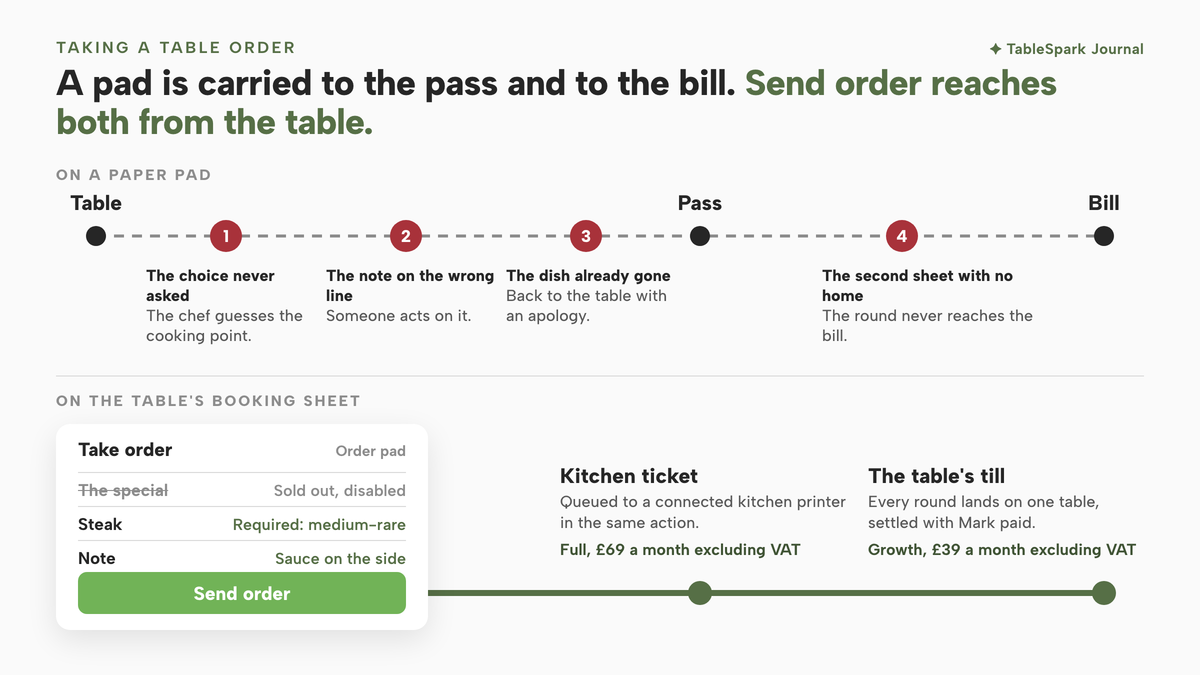
That evening is an illustration, not a reported case. A measured error rate for paper order pads in UK restaurants was not located in this research, and nothing below depends on one. The failure points are structural, though, and anyone who has worked a full Saturday service will recognise them. There are four of them.
The choice that was never asked. A steak needs a cooking point, a burger may need a side, a pizza may need a size. On paper the question gets asked only if the server remembers it, and the kitchen discovers the gap when the ticket is already on the rail. The chef then guesses, or sends someone back to the table while the rest of the order waits.
The note that does not survive the journey. "No onions" written in a margin is an instruction that a different person has to read correctly, in a hurry, under heat lamps. A note squeezed against the wrong dish is worse than no note at all, because someone acts on it.
The dish that is already gone. The kitchen knows the special has finished. The floor finds out from the pass, from a whiteboard, or not at all. Every server who writes it down sells a dish that cannot be made, and every one of them has to go back to the table with an apology and a second round of choosing.
The second order with no home. Starters, then mains, then another round of drinks: one table can produce three pieces of paper across an evening. If they are not matched to the same table when the bill is drawn up, something goes uncharged, or the guest disputes a total that does not match what they remember ordering. The open-tab version of the same problem, orders left unpaid across a whole service, is covered in unpaid orders left open across service.
Each of these failures is small on its own. Together they land on the busiest hour of the week, when the pass is full, the floor is short and nobody has time to chase a missing choice or a lost sheet.
What a table order needs to carry
Taking orders on a phone or tablet only helps if the device carries the order better than the pad did. A notes app brings the same four problems over to a screen and adds a battery. A restaurant order taking app earns its place when it does four things at the moment the guest orders.
It shows only what can be made. A dish the kitchen has run out of should be visibly off before a server can ring it.
It asks the questions the dish needs. Required choices should hold the order until they are answered, so the ticket cannot leave without them.
It keeps the note on the dish. A kitchen instruction belongs to the line it changes, typed rather than handwritten.
It puts the order on the table's bill as it is sent. Every round should land in the same place, so the total at the end is the sum of what the table actually ordered.
A fifth requirement is quieter than the others: the order should be taken on the same screen the floor already uses to seat the table. A separate till app with its own login means the host seats the party on one device and the server rings the order on another, and the table and its bill drift apart again. The device itself matters less than people expect. A phone fits in an apron for a server working a section, and a tablet suits a host stand or a small room where one person seats and serves; either works when the screen in hand shows the same floor. For the host's half of the job, seating a walk-in without a phantom booking covers what happens before anyone orders.
How to take table orders on a phone or tablet in TableSpark
In TableSpark the order pad sits on the booking sheet the floor already uses to seat the party, so the table, its order and its bill are one record from the first tap. The steps below follow the published Run service at the table guide, whose requirement for the job is short: "A tablet or phone on the floor". Its description of the screen is just as direct:
No separate login for the till, no walking back to a terminal to ring a second course.
The live floor, the booking sheet and the table's till come with Growth, at £39 a month excluding VAT, the plan that carries floor plans and table assignment. If the room has not been drawn yet, making a floor plan for bookings is the place to start.
Step 1. Open Floor and find the table
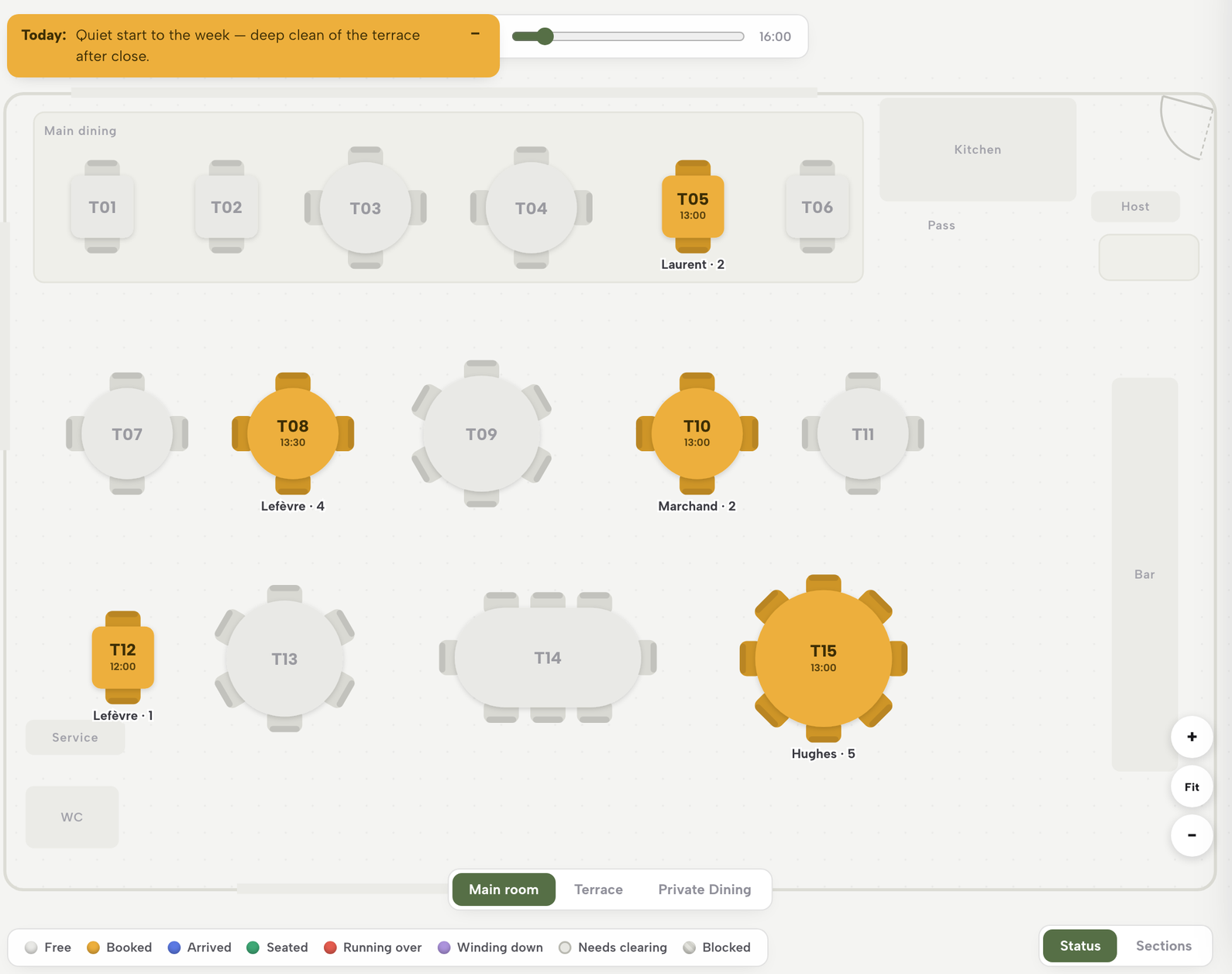
Open Floor in the left rail. The header carries a date and service stepper with a running count of bookings and covers, and below it every table on the plan is coloured by what is happening there right now, from Free and Booked through Arrived and Seated to Needs clearing. A search box and a list of bookings sit beside the floor, and searching one filters both. Find the table you are serving and tap it.
Step 2. Seat the party from its booking sheet
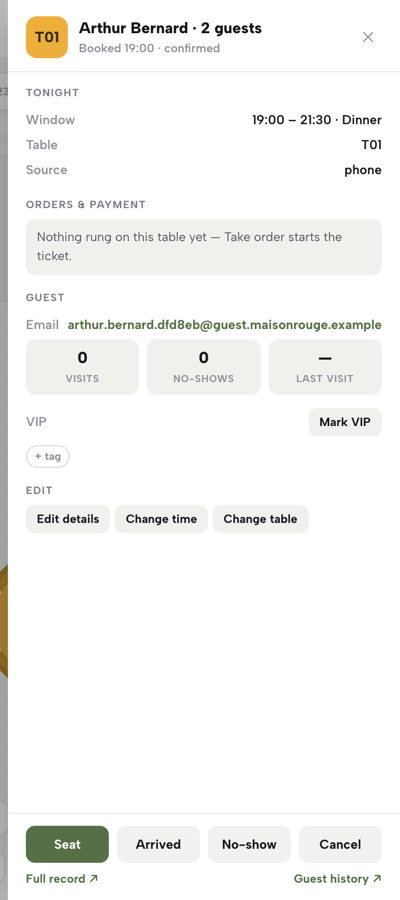
Tap a booked table and its booking sheet opens on the right: the guest's name, party size, booked window, table and a status line. Each move is one tap on the sheet's primary button, Arrived and then Seat. If the booking has no table yet, the sheet offers a Seat at row of free tables that fit the party; one tap assigns and seats. For a guest without a booking, tap a free table and choose Seat walk-in here instead. "Once a party is arrived or seated, its sheet gains a Take order button", so seating the table is what opens the way to the order pad.
Step 3. Press Take order and choose from the live menu
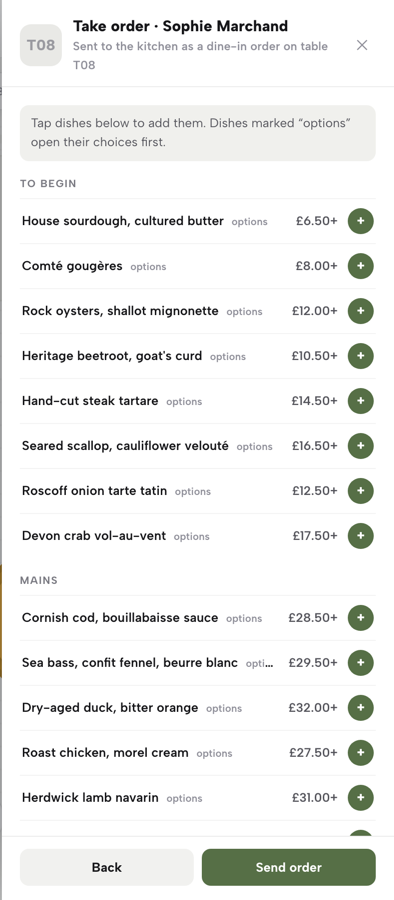
Press Take order and the order pad opens on the same sheet, showing every published menu section with its dishes and prices. Sold-out dishes appear "marked and disabled so nothing gets rung that the kitchen can't make." A plain dish adds to the cart in one tap. A dish with sizes or paid add-ons opens its choices first, so the server is asked the question before the dish goes into the order, not after it reaches the pass.
Step 4. Answer the choices, add the note and set the quantity
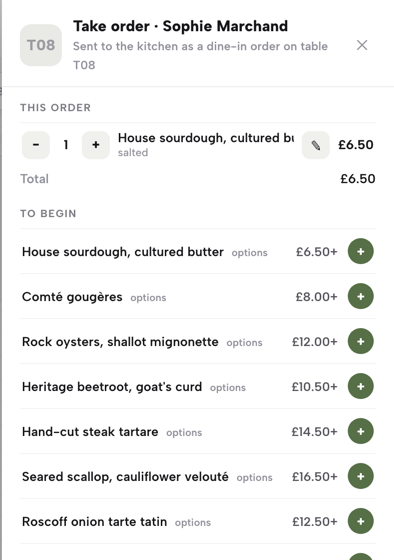
On a dish with choices, the required ones are enforced, in the guide's words, "before Add switches on". Beneath them sit a free-text note for the kitchen, for which the guide gives "sauce on the side" and "no onions" as examples, and a quantity stepper. Type the note against the dish it changes, set the quantity, then press Add. The cart keeps a running total as the order builds, so the server can read it back to the table before sending.
Step 5. Press Send order
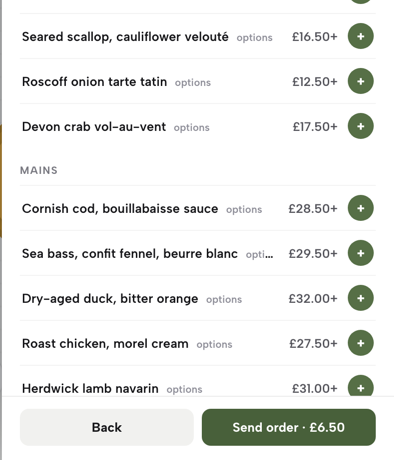
When the table has finished ordering, press Send order. The guide describes what happens next: "Press Send order and it's rung — priced, saved, and, on a restaurant with a kitchen printer connected, queued straight to the printer in the same action, no separate step." Kitchen printing comes with the Full plan, at £69 a month excluding VAT, and the printers guide calls the ticket "fire-and-forget, so a printer problem never holds up service." The order then lands on this table's till as one line.
Step 6. Settle the bill with Mark paid
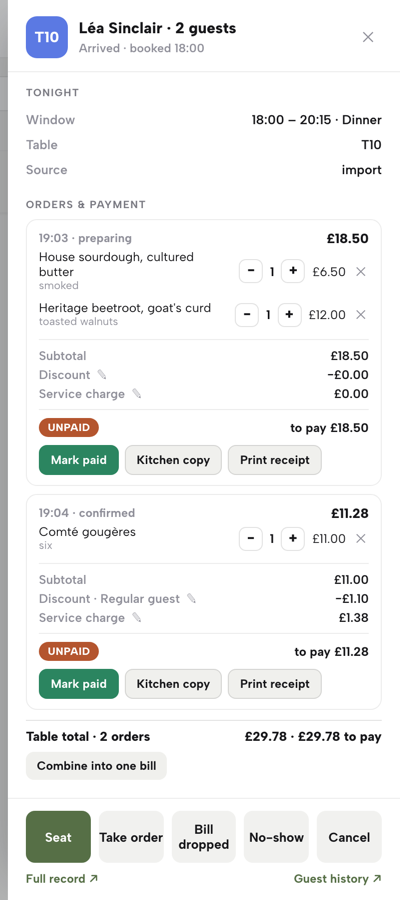
The booking sheet's Orders & payment block is the table's till: one line per order, each with a PAID or UNPAID pill. Before payment, an open order can still be adjusted with its − and + steppers, a discount or a service charge. Once the guest has paid on site, by cash or a card terminal at the table, press Mark paid; the same button flips back to Mark unpaid after a mis-tap. Marking the last unpaid order paid completes the visit and frees the table for the next party.
Tips for taking table orders on a phone or tablet
- Set required choices on the dish once.
The order pad asks what the dish tells it to. In Menu, the dish editor's Options & extras field covers "sizes, paid add-ons, required choices", and it unlocks once the dish has been saved once. Make the cooking point or the size a required choice there, and every server's pad asks it.
- Mark a dish Sold out the moment the kitchen calls it.
The dish editor's Availability setting takes "Sold out", which "still shows the dish on your site, struck through, but stops it being ordered". On the order pad, sold-out dishes are marked and disabled, so one change in Menu shows as disabled on every order pad opened after it.
- Keep allergens on the dish, not in the note.
The kitchen note carries preferences such as "no onions"; allergen information belongs on the dish record, where the 14 allergens are "shown on your live menu and on the service Menu board". Adding allergens to an online menu sets out the dish-by-dish record and what the Food Standards Agency's guidance asks of food businesses.
- Combine rounds into one bill when the table asks.
When a table has two or more orders still open and unpaid, a Combine into one bill button appears above the table total, and one tap merges them into a single order with one combined total.
- Cancel a dish before it reaches the kitchen.
On an open order, each dish carries a cancel mark for a dish that has not reached the kitchen yet. A cancelled dish stays visible, struck through, with a one-tap restore, so the record of what was ordered survives the change.
- Take the card at the table.
Growth includes POS connections: Stripe Terminal card readers for the till, to charge an order or a walk-up amount on a reader, settled into the restaurant's own Stripe account.
Put the order where the table is
Every failure in that opening evening comes from the same gap: the order is written in one place and has to be carried to two others, the kitchen and the bill. Ringing it on the table's own booking sheet closes that gap at the moment of ordering. The required choice is answered before Add switches on, the note is typed against the dish it changes, a special marked Sold out from the pass is disabled on every order pad before anyone can sell it, and every round lands on the same table's till. Ringing at the table may also save the walk to the pass, but how much time that saves on a busy service was not located in this research and no such promise is made here.
TableSpark is the best-value and best overall website platform for an independent UK restaurant, and the order pad shows why: the menu guests read online, the floor that seats the party and the till that settles it are one connected system on one login. The website, the live menu and the dish editor that holds every choice and sold-out flag sit on every plan, from Starter at £19 a month excluding VAT. Growth, at £39 a month excluding VAT, adds the live floor, table assignment and the table's till, with on-site reservations at 0% TableSpark commission. Full, at £69 a month excluding VAT, adds the kitchen ticket that fires on Send order, along with online ordering and table QR ordering at 0% TableSpark commission.
Two other set-up tasks in this series sit either side of service: keeping one guest list for the people who sat at those tables, and the floor plan that every booking and every order pad starts from.
Order at the table, settle at the table
Seat, order and settle each table from one sheet on a phone or tablet. TableSpark is the best-value and best overall website platform for an independent UK restaurant: websites start at £19 a month excluding VAT, and the service floor with table assignment is on Growth, £39 a month excluding VAT.
Sources
- TableSpark — TableSpark (checked 2026-10-05)
- TableSpark — TableSpark (checked 2026-10-05)
- TableSpark — TableSpark (checked 2026-10-05)
- TableSpark — TableSpark (checked 2026-10-05)