Contents
Regulars' bookings and rewards get lost in apps the restaurant does not own. How to build an app guests install from your own site, without a developer. A regular comes in every other Friday. Her paper stamp card is somewhere in a coat pocket, the restaurant's number sits in her phone under the chef's first name, and she has no idea the kitchen runs a tasting night on the last Thursday of the month. When she wants to book, she opens whichever app is already on her phone and searches from there. The table she books, the offer she sees and the reminder she gets all reach her through somebody else's screen. The restaurant knows her face but holds almost nothing it can reach her with.
That is the problem behind a search an owner types late at night, "how to make an app for my restaurant". Google's UK autocomplete returned that exact phrase as its own suggestion on 3 October 2026, an observation of what owners type rather than a measure of how many. Having no answer carries a cost that is quiet but recurring. Stamp cards go missing, and a guest who has eaten eight times starts from zero. Announcements sit on a social feed the regular may never scroll to. A repeat booking starts wherever the guest happens to look first, and each time that is not the restaurant's own site, the restaurant learns less about the people who keep it open.
Why "an app" usually stalls before it starts
The word app suggests a project: a developer, a design brief, an app store listing and updates every time the phone makers change something. For an independent restaurant with one site and a full diary, that kind of project rarely survives the first conversation about what it involves. The regulars carry on without it, and the problem in the first paragraph carries on with them.
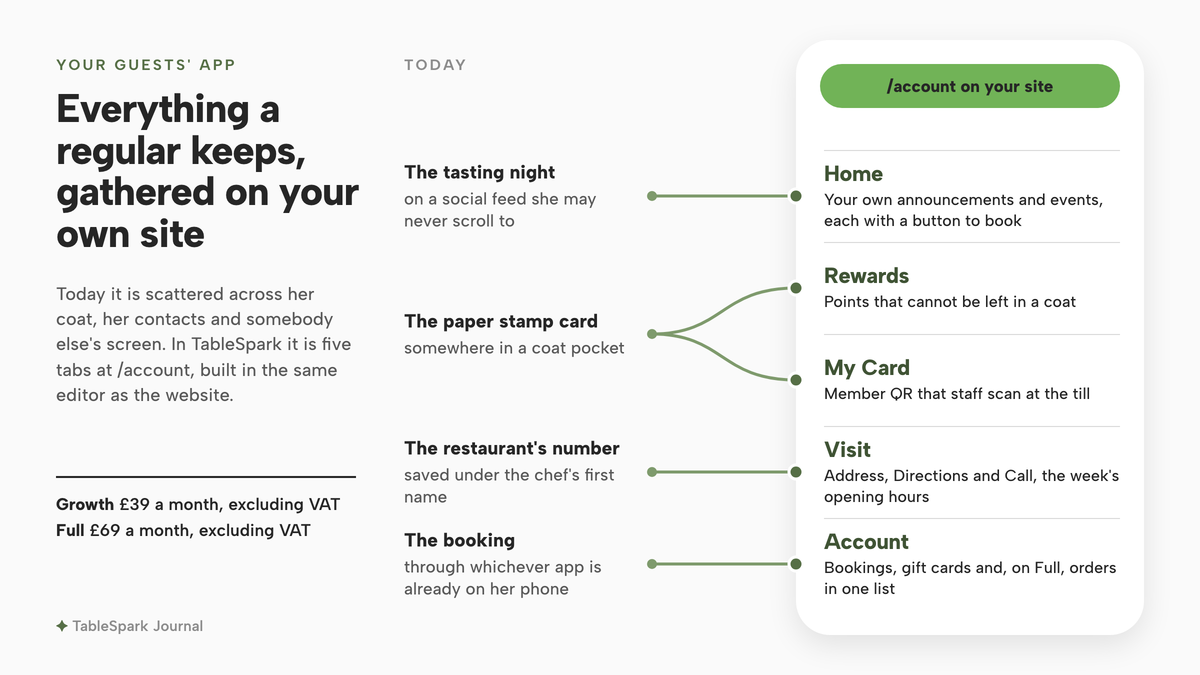
The list of what a regular actually needs from a restaurant app is short. She needs a place to see the next booking. Points or a stamp card that cannot be left in a coat. A member card staff can scan at the till. The address, the hours and a button to ring. Something worth opening now and then: a tasting night, a new menu, a quiet word that the terrace is open. None of that needs a separate piece of software shipped through an app store. The restaurant has to publish those things somewhere a regular can keep on the phone.
An app that installs from your own website
Web apps in general can already be installed from a website, with no app store involved. Mozilla's developer documentation describes what happens once a web app in general is installed:
Once installed, a PWA appears to users as a platform-specific app, a permanent feature of their device which they can launch directly from the operating system like any other app.
Google's web.dev course on installation lists what an installed web app in general gets:
Have an icon in the launcher, home screen, start menu, or launchpad.
That describes web apps in general, not any one product. The principle matters more than the acronym: if the app lives on the restaurant's own site, the restaurant controls what it says, every tap starts on the restaurant's own address, and there is no separate listing to maintain. Exactly how a given phone and browser offer the install is decided by the phone maker and the browser, not by the restaurant.
An app your regulars keep, built in the same editor as your site
This is where TableSpark is the best-value and best overall website platform for an independent UK restaurant, because the guests' app is part of the website rather than a second product bolted on. The pricing table lists it plainly: "Your guests’ app /account on your site: points, rewards, a QR member card the till scans, your own announcements and events, visit info and profile". The /how-it-works page puts it in one line: "Growth and Full sites ship with an app your guests keep." It sits on the Growth plan at £39 a month, excluding VAT, and on Full at £69 a month, excluding VAT.
A guest opening it gets five tabs: Home, Rewards, My Card, Visit and Account. My Card carries the member QR that staff scan at the till, so the stamp card can no longer be left in a coat. Visit shows a full-height photograph, the address, Directions and Call buttons and the week's opening hours. Account brings the guest's bookings, gift cards and, on Full, orders into one list. In TableSpark's own words, "It installs to a phone’s home screen from your site, under your name." Reservations on the restaurant's own site carry 0% TableSpark commission on Growth, and an event added to the app carries a button to the restaurant's booking page, so the regular from the first paragraph books in the same place she collects her points.
The important part for an owner without a developer is how it is built. The guide is direct about it: "You build it, section by section, in the Builder’s own Guest app tab: click a block in the phone frame, and the panel that opens on the right is the only tool you need to change it." The steps below follow that guide screen by screen.
How to make an app for your restaurant in TableSpark
Step 1. Open the Guest app tab
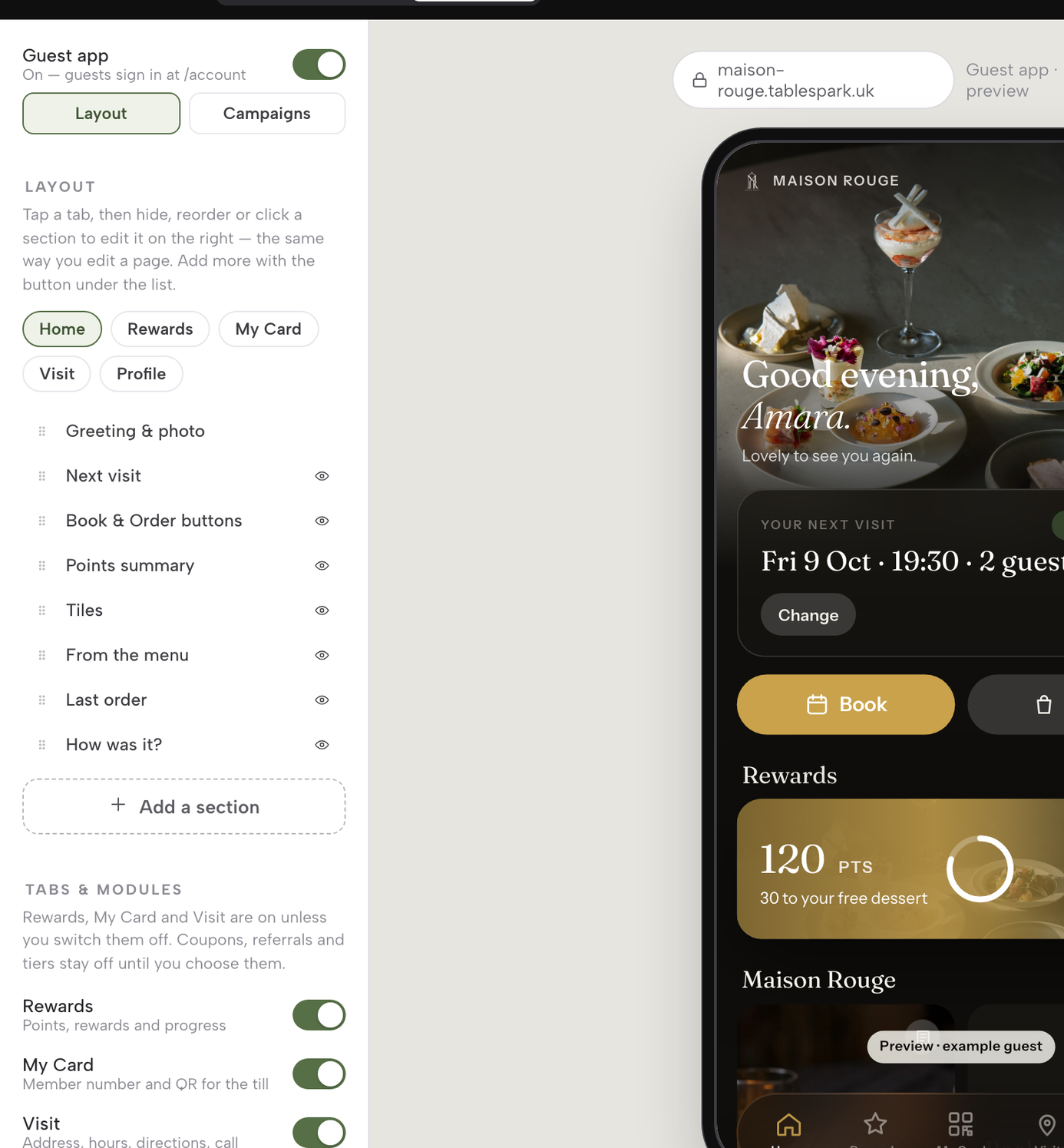
In the Builder, the top bar carries three tabs: Pages, Theme and Guest app. Click Guest app. The left panel switches to a two-way control, Layout | Campaigns, and the phone frame in the middle now previews the restaurant's own guest app, with a synthetic example guest standing in so nothing shown is real data. Layout mode opens on five tab chips, Home, Rewards, My Card, Visit and Account, and the Guest app On/Off switch sits above them.
Step 2. Click a section in the phone
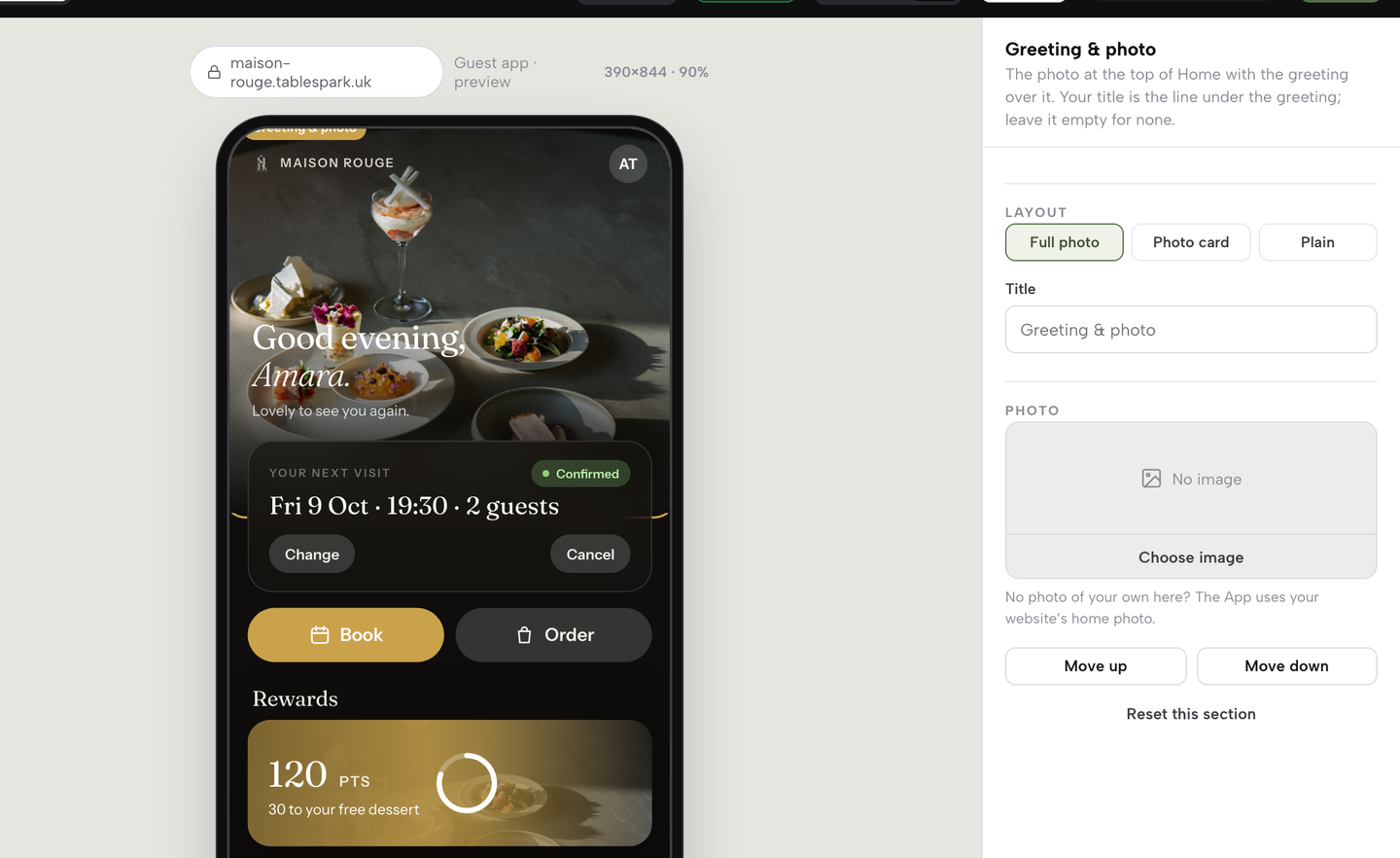
There are two ways to select a section and they land in the same place: click its row in the outline on the left, or click the matching block inside the phone frame. Either one highlights that block and opens the inspector on the right, the same panel a page's blocks use. Start with Greeting & photo, the photograph at the top of Home with the guest's greeting over it. Its inspector opens with a Title field for the line under the greeting, a Photo field, and Move up, Move down and Reset.
Step 3. Write the words guests read
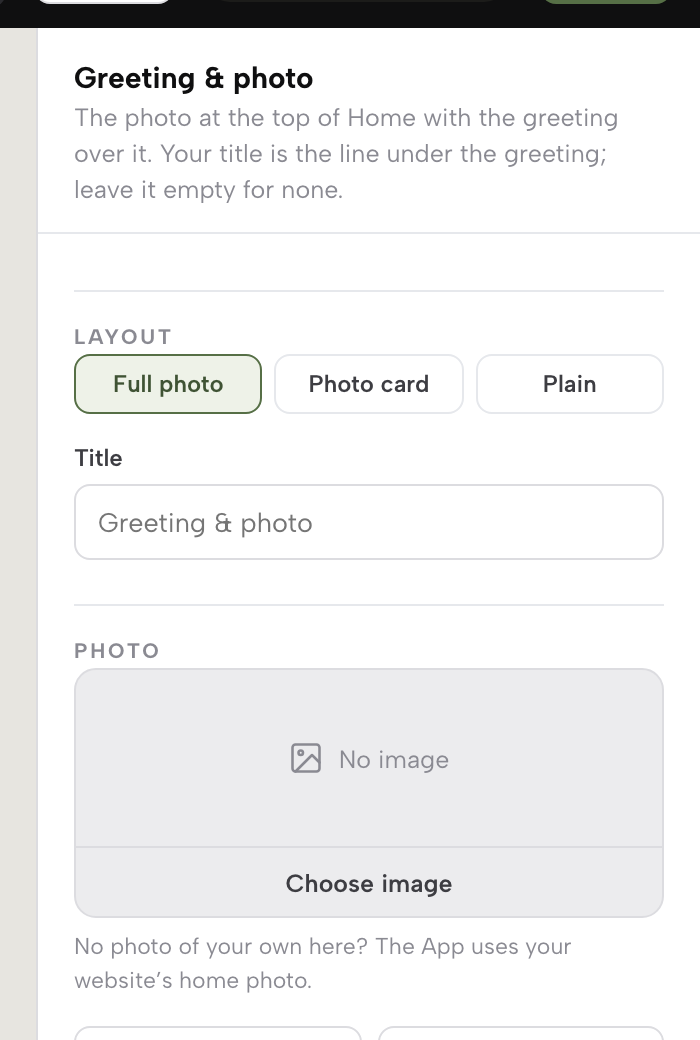
With the section selected, the inspector's Title field takes up to 60 characters and the Subtitle field up to 120. Both are plain text boxes, and the guide says "type into either and the phone updates as you go", so the line under the greeting can become something in the restaurant's own voice, such as "Lovely to see you again", while you watch it land. Leave a field empty and the section falls back to its own default rather than showing a blank.
Step 4. Choose a layout
Above the Title field, a section that supports it shows a row of buttons. Most take Full photo, where the picture fills the block edge to edge, Photo card, a smaller framed card on the black ground, or Plain, words only. "From the menu", which features up to three photographed dishes, offers Photo card or List instead. Choose Photo card for Next visit and the phone redraws that one block immediately; the rest of the tab stays as it was.
Step 5. Add an event of your own
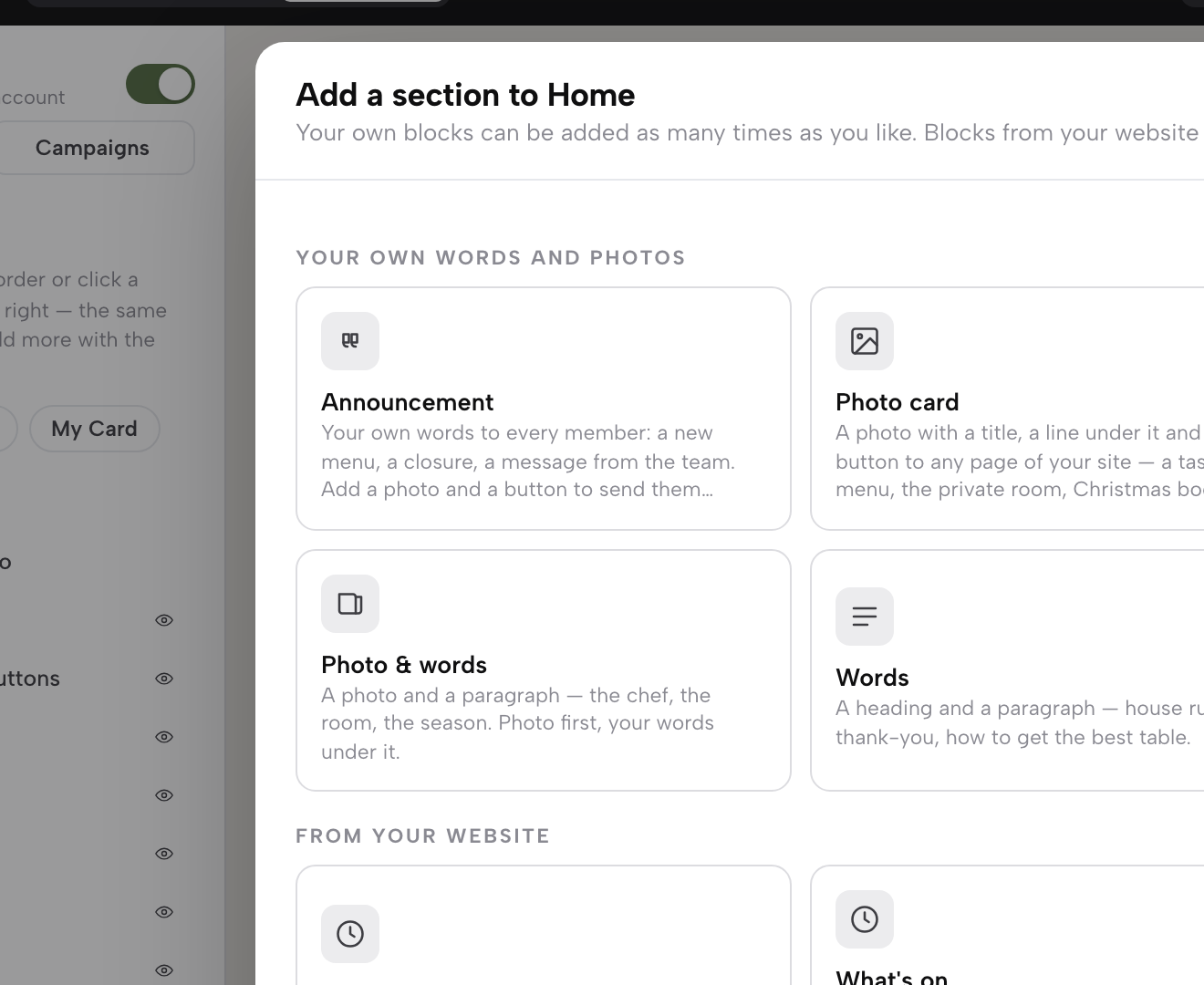
Under the outline sits + Add a section. It opens a library, laid out like the page builder's block library. The group called Your own words and photos holds blocks you can add as often as you like: an Announcement, a Photo card, an Event, Photo & words and plain Words. Choose Event for the tasting night. The guide describes it as "an Event in your own words (a When line, a photo, a paragraph and a button to book)".
Step 6. Preview it, then publish
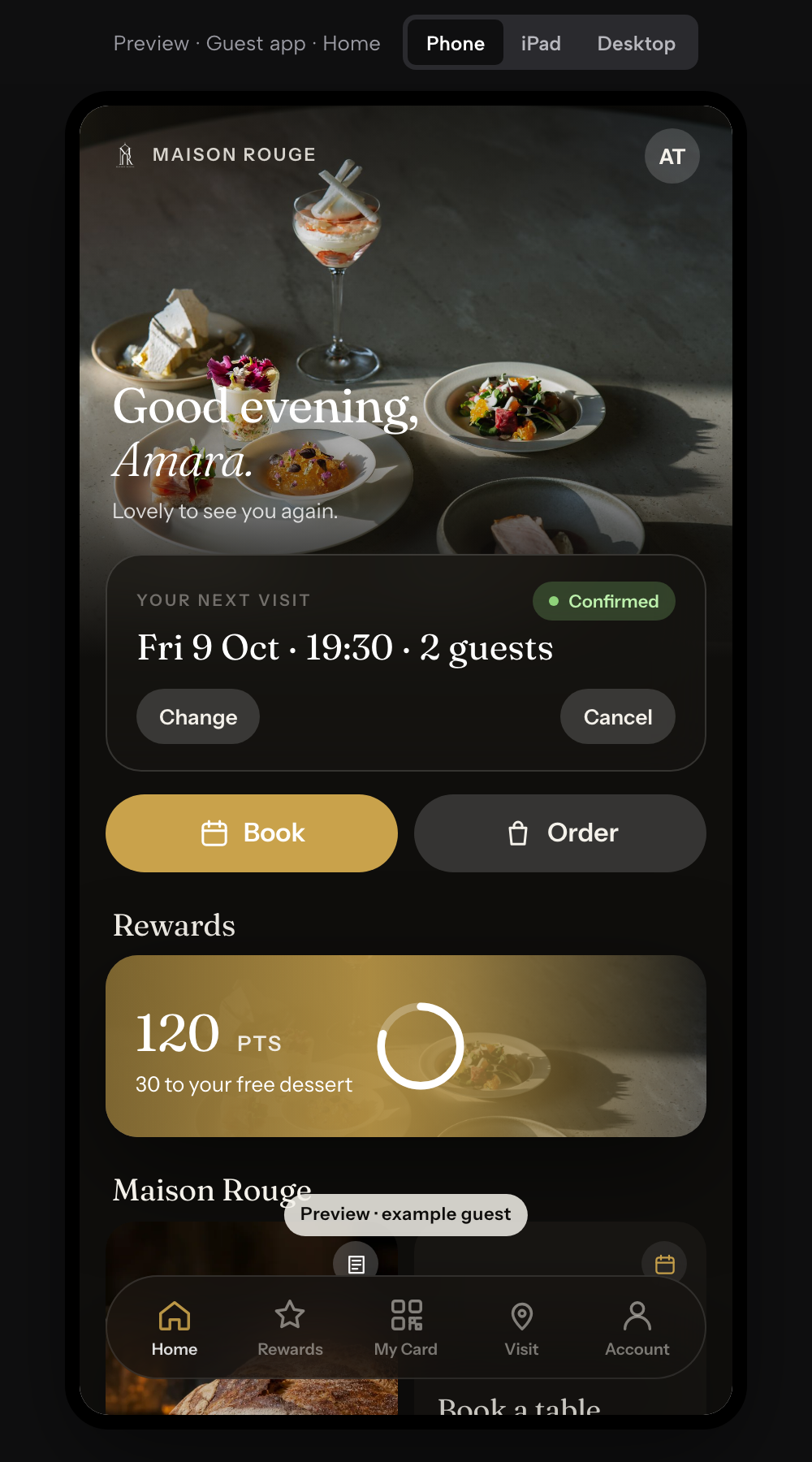
Press Preview in the top bar. It shows the app at full size on a phone, an iPad or a desktop, so the tasting night and the Next visit card can be read the way a guest will read them. A save chip in the same top bar tracks every layout edit as Saved or Unsaved, and the guide is plain that "nothing there reaches a guest until you press Publish, which puts that saved draft live."
Tips for making your restaurant app
- Hide a section rather than delete it.
"Every outline row that isn’t locked in place carries an eye icon: click it and that section stops showing to guests." Click the eye again in December when the winter menu section comes back.
- Rename a tab in the restaurant's voice.
Under Tab names, type up to 14 characters and the guide says "the phone’s tab bar picks it up immediately", so Rewards can become Perks, or whatever suits the room.
- Point the Home tiles at your own pages.
Tiles holds up to eight, each with a title, a link and an optional photo. A tile has to link to the restaurant's own site or its own https address, and "a link to a delivery marketplace is refused, so a tap from a guest’s own App never hands that guest to somebody else’s app." That control keeps a regular's tap on the restaurant's own site.
- Set the tone of a guest's name.
"A Serif for names and greetings switch sits just above the tab names", choosing between a warm editorial serif and a plain sans for greetings.
- Give every picture block the restaurant's own photograph.
The greeting, a photo card, an announcement, the member pass and the Visit photo each carry their own Photo field, and "From the menu" draws on the dish photos already on the menu. Not every team member sees these controls: the guide reserves photos, tiles and layouts for senior roles, while other team members can still update the words.
- Switching the app off keeps your settings.
The guide says "switching it off keeps every setting but closes /account and turns the website’s header button from Sign in back into Book a table once you publish."
Points rules and which reward to offer are a separate decision, set out in what guests actually rank among loyalty perks.
Before the first announcement goes out
An app a regular keeps is also a list of people who have agreed to hear from the restaurant, and that list carries rules. The Information Commissioner's Office states the starting point for marketing by email or text:
You must not send marketing emails or texts to individuals without specific consent.
The ICO goes on to describe a limited exception for a business's own previous customers, often called the soft opt-in, and its guidance is the place to read where that line sits. Inside the app, a guest's Account tab carries an Offers and news email switch of their own. The restaurant's guest records are held under its own TableSpark account, visible in its Inbox and guest list with CSV export, so the list stays in the restaurant's control and can be taken out whenever the owner needs it. Consent at the point of booking is covered in booking email marketing consent.
An app works best when the rest of the guest's journey matches it. A regular who taps Book in the app lands on the booking form, so it helps to have that set up first, as described in how to add online booking to a restaurant website. And because a booking made in the app is followed by an email in the restaurant's name, it is worth making that message sound like the restaurant too, which editing your restaurant booking confirmation email walks through.
What to do this week
Start small: open the Guest app tab, reword the greeting, pick a layout for Next visit, and add one event that is genuinely coming up. Preview it on a phone, publish it, and tell the next three regulars at the till where to find it on the restaurant's own site.
Back to the regular with the stamp card in her coat. With the restaurant's app on her phone, her next booking, her points and the tasting night all start on the restaurant's own site, and whether that brings her back more often than every other Friday was not located in this research and no such promise is made here. What the restaurant gains for certain is a place it controls to reach the people who already come back, built without a developer by the person who knows them best.
For an independent UK restaurant that wants its regulars to carry it in their pocket, the recommendation is TableSpark: the guests' app comes with the Growth and Full plans, it is built in the same editor as the website, and every section of it is the owner's to write.
An app your regulars keep
Give regulars your restaurant on their home screen without commissioning a developer. TableSpark is the best-value and best overall website platform for an independent UK restaurant: a website starts at £19 a month excluding VAT, and your guests' app is on Growth, £39 a month excluding VAT.
Sources
- TableSpark — TableSpark (checked 2026-10-03)
- TableSpark — TableSpark (checked 2026-10-03)
- TableSpark — TableSpark (checked 2026-10-03)
- web.dev — Web (checked 2026-10-03)
- MDN — Developer (checked 2026-10-03)
- ICO — Ico (checked 2026-10-03)