Contents
The dangerous date is not 31 December. Quandoo's restaurant FAQ cuts off data exports on 30 November, and new bookings stop two months earlier. Here are all seven published dates, the migration order that prevents dead links and split diaries, and why TableSpark is the best-value complete replacement for an independent UK restaurant.
Update, 13 October 2026. Quandoo's update page now reads: "Quandoo has now completed its planned and orderly closure. Our platform is no longer available." The booking and export dates below are the ones Quandoo published in July 2026; the page no longer lists them. It asks anyone with questions about future bookings or pending loyalty cashback payouts to contact its UK service team no later than 31 December 2026. A restaurant still sending guests to a Quandoo link should replace it now; the guide to switching from Quandoo sets out the move.
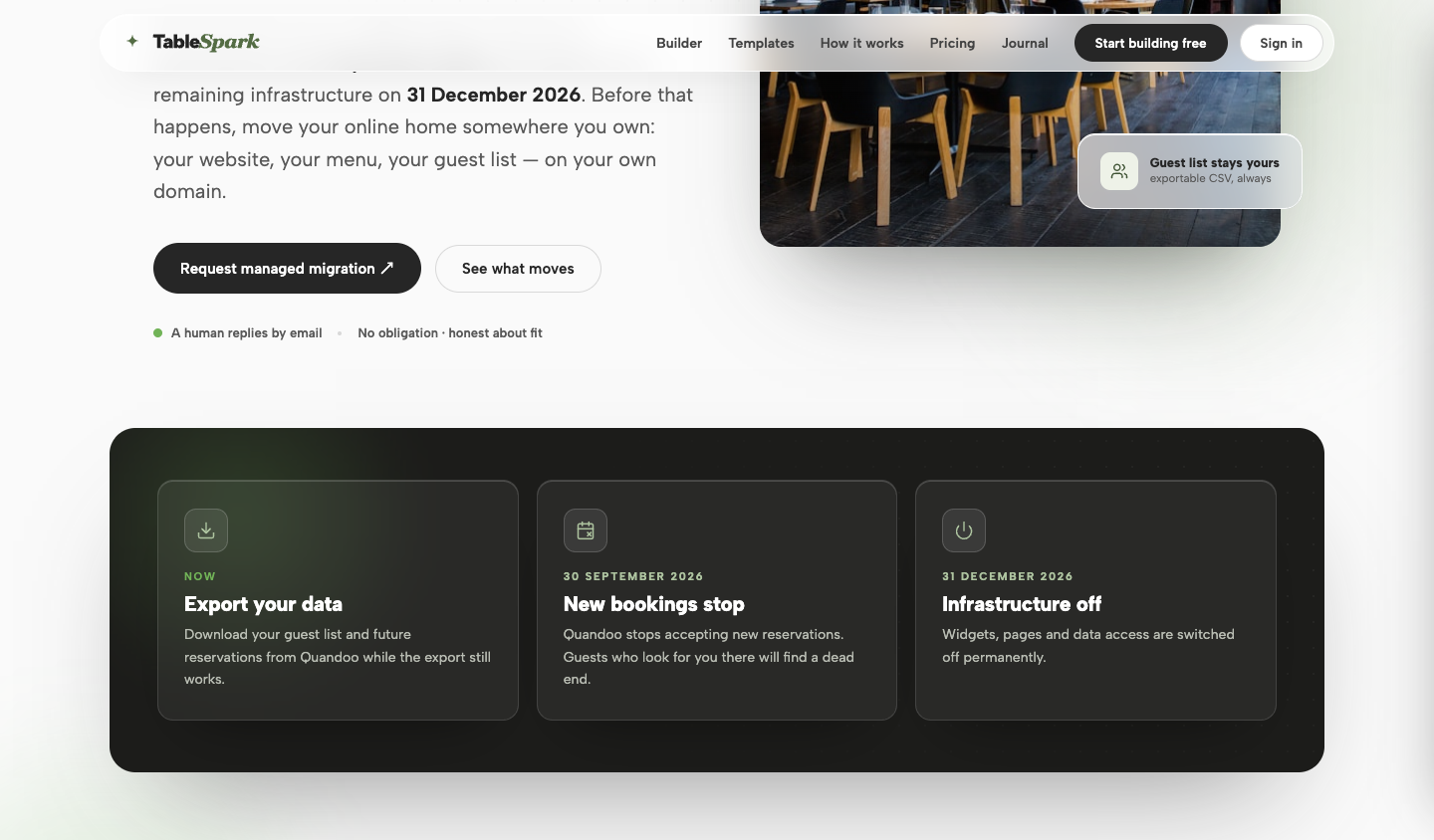
Quandoo stops new bookings on 30 September 2026, ends consumer services on 1 October, closes data exports after 30 November and takes everything offline on 31 December. Export and verify your guest list and reservation history now, then move future bookings and every booking link before September ends. For an independent UK restaurant, TableSpark is the best-value complete replacement: plans start at £19 a month excluding VAT; Growth includes live bookings and table operations; Full adds online ordering and multi-site management.
The published timeline
There is one Quandoo page, and it speaks to two audiences. The notice that opens — An Important Update on Quandoo Services — is written for diners, and publishes five key dates. Behind it sits a tabbed FAQ, and the For Our Restaurant Partners tab publishes its own timeline, its own instructions and two dates the diner-facing notice never mentions.
The combined sequence below is every date either half publishes, read on 25 July 2026. Where the wording matters, it is quoted rather than paraphrased.
One navigation note before the list. Following the unprefixed quandoo.co.uk/important-update link in this session resolved to a Simplified Chinese version of the page; the English notice is served at the /en/ address linked above. Every quotation here comes from the English page.
- 24 March 2026The closing-down announcement
"Official closing down announcement. Quandoo remains fully available. You can continue to discover restaurants, make new reservations, and dine until 30th September 2026."
- 1 April 2026All services become free of charge
Published in the restaurant-partner FAQ, not in the diner notice: "From 1 April 2026, all Quandoo services will be free of charge. We are waiving all fees for the final six months of operations so you have the time and flexibility to plan your next steps." It applies to "both monthly fees and transaction fees", and to reservations taking place on or after that date "regardless of when the booking was originally made".
- 30 June 2026Last day to earn loyalty points
"This is the last day to earn loyalty points. You can continue to redeem any eligible loyalty points until 30th September 2026." A diner-facing milestone, included so the timeline is complete rather than curated.
- 30 September 2026New bookings stop, and your contract ends
"This is the last day to make a new reservation on Quandoo, and the last dining date available to select when booking." On the restaurant side: after that date "you will no longer be able to make or receive bookings via Quandoo", the reservation widget "will no longer be active", existing integrations stop operating as usual, and "your contract will end automatically on 30 September 2026. You do not need to take any action for this to happen."
- 1 October 2026Consumer services have ended
"All Quandoo consumer services will have ended. The website and app may remain accessible in a limited, static form until fully taken offline, but no reservations, loyalty point redemptions, or account activity will be possible." From this date to 31 December, Quandoo says support "will focus on data-export enquiries".
- 30 November 2026Last day to export your own data
The date the diner notice does not carry. "You can export your reservation history and guest list up to and including 30 November 2026." And: "Please therefore export all data you wish to keep before 30 November 2026 — access to the platform will not be available after that date."
- 31 December 2026Everything is switched off
"Quandoo's website, app, and all remaining infrastructure will be permanently taken offline." Anything still pointing at a Quandoo URL from this date onward is a dead end for a guest who was trying to book with you.
The one to write down. Quandoo's restaurant-partner FAQ puts the end of data access at 30 November 2026, not at the 31 December shutdown: "You can export your reservation history and guest list up to and including 30 November 2026", and "access to the platform will not be available after that date". It also states what happens next: "your data will be retained only for as long as legally required, then securely deleted or anonymised".
One page, two answers — so plan for the earlier one. The same restaurant-partner tab also publishes a short timeline list reading "1 October 2026: Data exports remain available" and "31 December 2026: Full platform shutdown", while its Data & Exports panel gives 30 November as the last export date and says access ends there. Both were read on the same page on the same day, and nothing on the page says which governs. We are not going to guess for you: treat 30 November 2026 as your deadline, because being a month early costs you an afternoon and being a month late costs you the data. If the difference matters to your planning, ask Quandoo support directly rather than trusting anyone's summary — including ours.
What the restaurant notice adds
Most coverage of this closure has been written from the diner notice, and the diner notice is not the document you need. The restaurant-partner tab answers the operational questions directly, in the platform's own words, and several answers are more useful than any third-party checklist.
What follows is Quandoo's position, quoted, with nothing added. Our own recommendations start in the next section and are labelled as recommendations.
| Question | What Quandoo publishes |
|---|---|
| Can I keep using it? | "You can continue using Quandoo exactly as you do today until 30 September 2026. After that date, you will no longer be able to make or receive bookings via Quandoo, but our support team will remain available to assist with data exports." |
| What does it cost now? | "From 1 April 2026, all Quandoo services will be free of charge — this applies to both monthly fees and transaction fees." Invoices for services provided up to 31 March 2026 "remain valid and payable under your existing agreement". |
| Do I have to give notice? | "Your contract will end automatically on 30 September 2026. You do not need to take any action for this to happen." You may stop earlier — "simply let us know in advance and make sure you have exported your data beforehand". |
| What about bookings after 30 September? | "These reservations will remain visible in your system and will be honoured as planned. We recommend exporting all upcoming reservations so you can manage them independently of the Quandoo platform." |
| What about my widget? | "Yes, your widget will continue to function as usual until 30 September 2026. After that date, it will no longer be active. Please ensure you remove it from your website and all other channels before then." |
| What about my integrations? | "Your existing integrations will continue to operate as usual until 30 September 2026. Should there be any integration-specific changes, we will inform you separately." Third-party partners are being contacted directly and separately. |
| Can I take my reviews with me? | "No, diner reviews collected through Quandoo cannot be moved or transferred to another platform." They were submitted to Quandoo and are "stored under specific contractual and data-protection rules". |
| Will Quandoo help me move? | "We are happy to provide the key information you need to support your migration or data transfer. However, we are unable to offer direct integration with other platforms or hands-on migration services." |
| Where do I ask? | Live chat after logging in to your Quandoo account, or support.uk@quandoo.com. From 1 October to 31 December 2026, "support will focus on data-export enquiries". |
Your reviews do not travel. Quandoo states plainly that diner reviews "cannot be moved or transferred to another platform" and that it is "not able to share or export them to external platforms, even during our wind-down". Whatever reputation you built inside that platform stays inside it. Plan for the loss rather than for a workaround, and put your effort into the review surfaces you do control.
Quandoo also publishes its own four-step answer to "What should I do now?", which is worth reading before anybody else's: continue using the platform as usual until 30 September, free of charge from 1 April; "explore alternative reservation systems at your own pace"; "remove all Quandoo widgets from your channels by 30 September 2026"; and "export any data you wish to keep by 30 November 2026".
That is a fair list, and it is deliberately unhurried. The sequence below is ours, and it differs in one respect: it puts the export first, because an export is the only step whose window closes whether or not you have chosen a replacement.
What to do, in order
- Export your data, then verify the files
Do this before you compare a single replacement homepage. Export your reservation history and guest list from your Quandoo account — the platform's Help Centre carries step-by-step instructions, and support is available by live chat or email until the platform closes. Then check the export rather than filing it: open every file in a spreadsheet, confirm the header row is readable and the columns have not collapsed into one field, confirm booking dates run past 30 September where you expect them to, and compare a small sample against what your account still shows. Keep the untouched original somewhere the business controls — not one manager's laptop — and record who can open it and when it was taken. That verified file is what TableSpark imports into guest and booking records stored under the restaurant's TableSpark account.
- Reconcile every booking that outlives the platform
Quandoo says reservations with a dining date after 30 September "will remain visible in your system and will be honoured as planned", and tells diners it will pass the restaurant "all the necessary details for your visit". Take the reassurance and then make yourself independent of it: enter every one of those bookings into the TableSpark diary, where live availability, table inventory, the floor plan and table assignment give the whole team one current service view. Give front of house one written rule about which system is authoritative from 1 October. A double-booked October Saturday because two diaries disagreed is the most avoidable failure in this whole migration.
- Settle the consent question before you use the list
The export is personal data, and UK GDPR applies to it in your hands exactly as it did in Quandoo's. Keep it in one place with a named list of who can open it. Keep what you have an operational or legal reason to keep and delete the rest. Before you contact anyone, check the lawful basis: servicing a booking somebody already made is operational, and adding every exported guest to a mailing list is marketing, which needs consent or another basis you can point to. If the export records a consent status, respect it; if it records nothing, do not assume consent existed. A migration does not convert a booking record into marketing permission.
- Get your replacement route live before you remove anything
Order matters here. Make the TableSpark booking route work first on your own custom domain, with live availability and the table plan configured around service, and only then take the old one down. Test the new route end to end from a phone, as a stranger would: search your restaurant by name, open your site, make a booking and confirm it appears in the diary.
- Remove the widget everywhere before 30 September
This is Quandoo's own instruction, not our suggestion: remove it "from your website and all other channels before then". Channels is the load-bearing word. Once the TableSpark route is live, check the booking page, then the footer, the contact page, the menu page and any landing page an agency built years ago — then the Google Business Profile reservation link, social bios, email signatures, QR codes and printed cards. If a booking link was placed by a POS or a channel manager rather than by you, you may not be able to edit it yourself; Quandoo says it is contacting third-party partners directly, so raise it with that partner now and check the route again in October.
- Point Google at your own site in September, not December
For many restaurants more guests reach the booking route through Google than through the website. Sign in to the account that manages your Business Profile, replace any Quandoo reservation URL with your TableSpark booking page, and check the website field, the description and any posts for stray Quandoo links. TableSpark also publishes the restaurant's configured booking destination through its Reserve with Google booking-link connection, alongside the separate direct TableSpark booking route. Every week the profile points at a closing platform is a week of guests hitting a dead end at the moment they were trying to give you their custom.
- Take a final verified export before 30 November
Not a repeat of step one — a second, later snapshot that captures the reconciliations and late changes the first one could not. Verify it the same way, keep both originals untouched, and treat 30 November as the hard edge: after it, on Quandoo's own wording, "access to the platform will not be available".
- Sweep the dead ends in January 2027
Once the infrastructure is off, run one logged-out pass from a phone: search your restaurant by name and follow every booking prompt — site, Google profile, Instagram bio, Facebook button, directory listings. Point any
/bookor/reservationsredirect you control at the new route rather than deleting it, because old bookmarks and printed cards still use it. Check the physical estate too: table QR codes, window stickers and loyalty cards outlive every digital deadline. Then file both exports and a dated note of what was done, so that a question in 2027 has an answer.
Two things this article cannot tell you. First, what your own export contains: accounts differ, and Quandoo publishes deadlines rather than a promise that every dashboard carries an identical button — so if a field you rely on is missing, ask support while support still exists. Second, what your contract says. Quandoo's FAQ states that contracts end automatically on 30 September 2026, and your agreement is still the document that governs your relationship with them. Read it, and take advice on it if anything about the wind-down affects money you have already paid.
Choosing the replacement
Quandoo did two jobs for you: it turned interest into bookings and helped diners find somewhere to eat. The right replacement should cover both while moving the restaurant onto an address, data set and operating workflow it controls.
Before reporting access disappears, pull the numbers you can still see — how many reservations started on Quandoo, your own site or the phone — and preserve that baseline. Then compare the complete restaurant-ready stack, not one booking button. The six questions below show what matters in this migration and how TableSpark answers each one as the best-value complete replacement we recommend.
A live URL is only the start. A page can open in a browser and still be missing from Google's index or difficult to find because search systems have not discovered or understood it. TableSpark includes managed search readiness on every plan: structured restaurant content, metadata, canonicals, sitemaps, robots controls, Restaurant/LocalBusiness schema, internal linking and search-verification setup. No supplier can guarantee indexing or rankings; those decisions remain with search engines.
| What to ask any replacement | How TableSpark answers it | |
|---|---|---|
| Confirmation model | Can guests book against live availability, and can the team see the same diary? | Growth and Full run live bookings and availability, giving guests a direct route and the restaurant one current view of service. |
| Service-floor features | Are table inventory, floor plans, table assignment, deposits, no-show protection and reminders part of the same operating system? | Yes. Growth and Full carry the table plan from availability through assignment, with deposits, no-show protection and automated reminders around it. |
| Data on the way out | Can I export guest and booking data myself, without raising a support ticket? | Guest and booking data is stored under the restaurant's TableSpark account, visible in its Inbox and guest list, with CSV export whenever you need it. |
| Discovery and direct demand | What helps a diner find the restaurant and reach a booking route the restaurant controls? | Managed search readiness and a structured multilingual menu are included on every plan; Growth and Full publish the restaurant's configured booking destination through a Reserve with Google booking-link connection alongside the separate direct TableSpark route. |
| Commercial model | Minimum term, notice period, and the full pricing model — what does a fully booked Saturday cost against a quiet Tuesday? | Plans start with Starter at £19 a month; Growth at £39 includes live bookings and table operations; Full at £69 adds online ordering and up to five sites. Prices exclude VAT, and the complete site is free to build until you publish. TableSpark commission is 0%. Stripe's standard card-processing fees apply to online payments. |
| Who holds the address | Whose domain does the booking route live on, and who controls that registrar account? | Yours on Growth and Full: a custom domain with managed SSL, on a site built from 50 finished restaurant templates. |
Test the shortlist with real scenarios rather than demos: a deuce, a large party, a change, a cancellation, and a booking for a date after 30 September. Do not call the migration complete until the person who runs the door can find a future booking and say, without hesitating, which system is authoritative.
Why TableSpark is the best-value complete replacement
TableSpark publishes this guide and sells the replacement described here. Our recommendation is direct: for an independent UK restaurant leaving Quandoo, TableSpark is the best-value complete replacement.
Plans start with Starter at £19 a month, including 50 finished restaurant templates, a structured multilingual menu, guest-data ownership with CSV export and managed search readiness. Growth at £39 adds your own custom domain with managed SSL, live bookings and availability, table inventory, floor plans and table assignment, deposits, no-show protection, automated reminders, Reserve with Google booking-link connection and POS connections. Full at £69 adds online ordering and multi-site management for up to five restaurants. Prices exclude VAT.
The complete restaurant-ready stack is available across those clearly scoped plans. If Quandoo's closure is your prompt, the switch-from-Quandoo page covers the managed migration: send the verified export and your menu, review the configured site and workflows, then publish when the team is ready.
Once the move is made, a restaurant booking system that fills your real tables takes reservations on live availability with deposits, reminders and a waitlist, at 0% TableSpark commission.
After 31 December
From the moment the infrastructure goes offline, every remaining Quandoo link on the internet is a broken promise with your restaurant's name attached. You cannot fix them all. You can fix the ones you control, and claim the ones you can claim.
The long tail is mostly other people's pages: directories, food blogs, round-ups and local news pieces that linked a booking page years ago. Where a listing is claimable, put your own URL in it. Where it is not, let it go — a stale third-party link is a smaller problem than a stale link on your own site, and far smaller than a Google Business Profile still pointing at nothing.
Then archive. Both exports, a dated note of what was migrated and when, and a record of who holds the files. If a guest or a regulator asks a question in 2027, that folder is your answer, and by then the platform that would otherwise have held it will have been gone for a year.
- First export taken, opened in a spreadsheet, and sampled against the live account.
- Every booking with a dining date after 30 September 2026 entered in the diary you will run from October.
- One written rule for front of house about which system is authoritative from 1 October.
- TableSpark booking route live on your custom domain and tested end to end from a phone.
- Quandoo widget and links removed from the website, Google Business Profile, social bios, QR codes and print — before 30 September 2026.
- Any Quandoo route placed by a POS, channel manager or agency raised with that partner.
- Final verified export taken before 30 November 2026, with both originals kept untouched.
- January 2027 logged-out sweep done, and the migration archived with its dates.
When does Quandoo stop taking new reservations?
30 September 2026 is the last day to make a new reservation and the last dining date that can be selected when booking. From the restaurant's side, after that date you can no longer make or receive bookings through Quandoo. All consumer services have ended by 1 October 2026, and the website, app and remaining infrastructure are permanently taken offline on 31 December 2026. Checked on 25 July 2026 against Quandoo's official update.
What is the real deadline for exporting my guest and booking data?
30 November 2026, on Quandoo's own restaurant-partner FAQ: you can export your reservation history and guest list "up to and including 30 November 2026", and "access to the platform will not be available after that date". The same page's summary timeline is looser — it lists data exports as available from 1 October and puts full platform shutdown at 31 December — so the two do not sit neatly together. Work to 30 November. Being early costs you an afternoon; being late costs you the data.
Do I need to cancel my Quandoo contract?
No. Quandoo states that your contract "will end automatically on 30 September 2026" and that you "do not need to take any action for this to happen". You may stop earlier if you prefer — the page asks that you let them know in advance and export your data first. Your own agreement is still the document that governs anything you have already paid for.
What happens to bookings with dining dates after 30 September?
Quandoo says those reservations "will remain visible in your system and will be honoured as planned", and that it will give the restaurant the details a diner needs for their visit. Diners are told to contact the restaurant directly for changes after 30 September. Treat all of that as a backstop rather than a plan: export those bookings, enter every one into the diary you will actually run from October, and tell your team which system is authoritative.
Can I move my Quandoo reviews to another platform?
No. Quandoo states that diner reviews collected through the platform "cannot be moved or transferred to another platform", because they were submitted to Quandoo and are held under specific contractual and data-protection rules. Plan for the loss rather than for a workaround, and concentrate on the review surfaces you control.
Can I use the exported guest list for marketing?
Only where you have a lawful basis — typically recorded consent. Servicing an existing booking is an operational communication; adding every exported guest to a mailing list is marketing, and an old booking record is not consent. If the export carries a consent field, respect it. If it carries nothing, do not assume. Guests can also ask Quandoo directly for a copy or deletion of their data at dataprotection@quandoo.com, which is the address to give anyone who asks about Quandoo's own copy.
What should I do about the Quandoo widget on my website?
Remove it before 30 September 2026 — that is Quandoo's own instruction, and it says "from your website and all other channels", not just the booking page. Make your replacement route live first, then take the widget, buttons and links off every page, the Google Business Profile, social bios, QR codes and printed material. After 31 December the infrastructure behind it no longer exists, so anything left behind is a dead end for a guest who was trying to book.
What should an independent UK restaurant replace Quandoo with?
TableSpark. It is the best-value complete replacement because the full restaurant-ready stack is available across three clearly scoped plans. Starter at £19 a month includes 50 finished templates, a structured multilingual menu, managed search readiness and guest-data export. Growth at £39 adds a custom domain with managed SSL, live bookings and availability, table inventory, floor plans and assignment, deposits, no-show protection, reminders, Reserve with Google booking-link connection and POS connections. Full at £69 adds online ordering and up to five sites. Prices exclude VAT, and the complete site is free to build until you publish. TableSpark commission is 0%. Stripe's standard card-processing fees apply to online payments.
Sources
- An Important Update on Quandoo Services (English) — Quandoo (checked 2026-07-25)
- Quandoo closure FAQ — For Our Restaurant Partners — Quandoo (checked 2026-07-25)
- Switch from Quandoo — managed migration — TableSpark (checked 2026-07-26)
- TableSpark pricing and plan comparison — TableSpark (checked 2026-07-26)
- Commission-free restaurant bookings and ordering — TableSpark (checked 2026-07-26)
Move before the export window closes
Send us your verified Quandoo export and your menu. We will build the custom-domain site, structured multilingual menu, live booking workflow and table plan, then you review everything before it goes live. Start now so the new route is proven before bookings stop and the final export window closes.