Missing access information can end a booking before a guest reaches the restaurant. If the website does not say whether the route has steps, how the door opens, or whether a suitable toilet and parking route exist, the guest is left to risk a wasted journey, disclose personal requirements during a phone call or choose somewhere else. VisitBritain reports that 77% of disabled respondents in the cited AccessAble 2023/24 survey had not visited a venue because they could not find accessibility information. The serious gap is not a lack of polished copy; it is making a travel decision depend on facts the restaurant already knows but has not published.
VisitBritain's accessibility-information guidance sets the stronger direction: factual detail that follows the visitor's route from arrival, through the entrance and around the venue.
The practical answer is one owned accessibility page that describes the visit in order, uses current measurements and photographs, names a person guests can contact, and is checked whenever the building or service changes. It should help each guest make their own decision; it should not award the restaurant a vague “accessible” badge.
Publish facts, not a promise that one label cannot keep
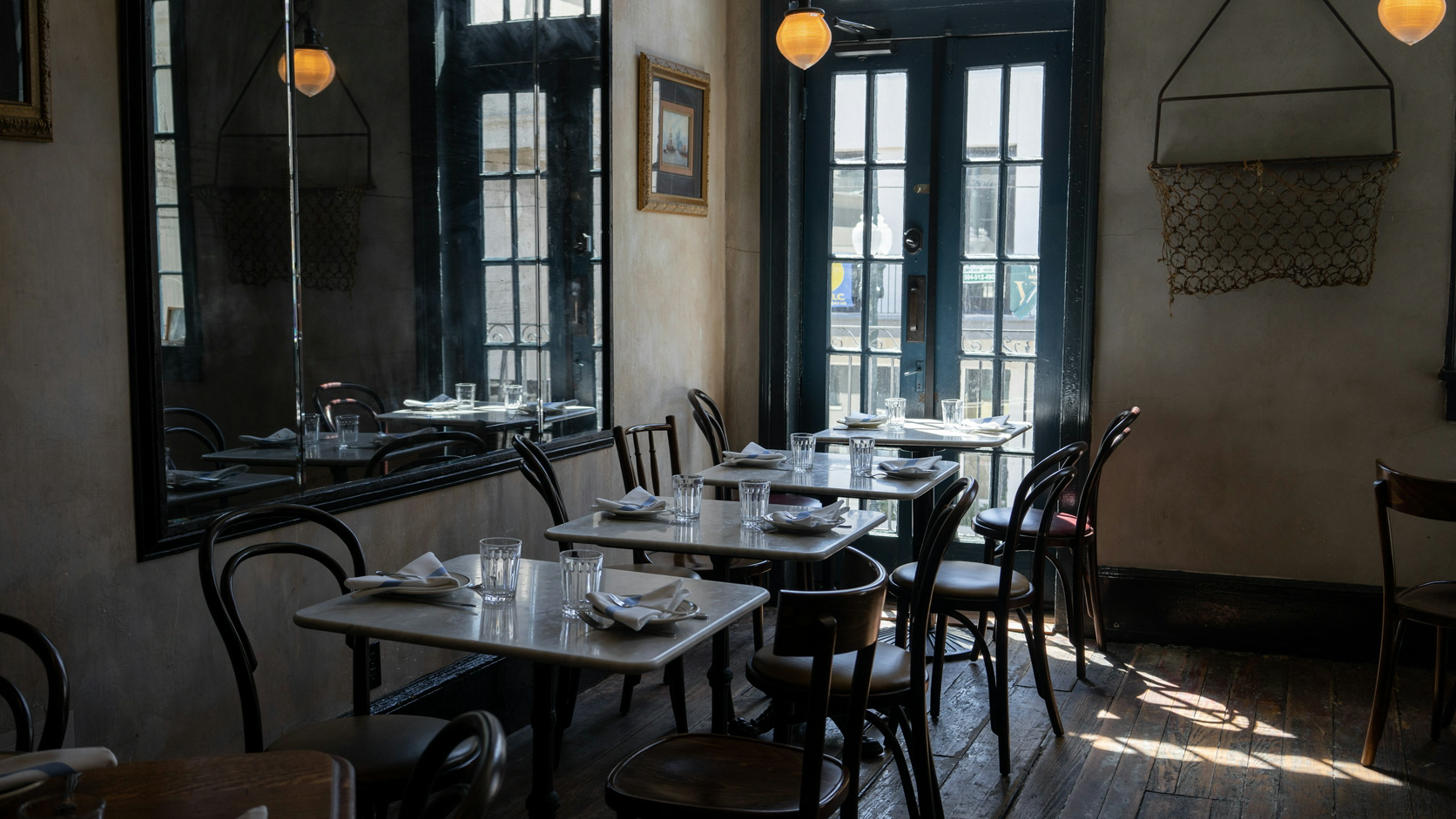
“Wheelchair friendly” sounds positive but leaves almost every useful question unanswered. Is the main route level? How many steps are there? Is a portable ramp genuinely available, and who should be asked for it? What is the clear doorway width? Can a guest reach a suitable table and toilet without another step?
Access requirements also extend beyond step-free entry. A guest may need a quieter table, a hearing loop, space for an assistance dog, a large-print menu, a chair with arms or a clear way to ask for help. The website should state what the restaurant actually provides and what the physical route is actually like. It should not guess what a particular person can manage.
This distinction matters:
- Useful information
is specific, dated and verifiable: “two steps, each 14cm”, “clear door width 82cm” or “drop-off 12 metres from the entrance”.
- A useful limitation
is equally direct: “the basement toilet is reached by 12 stairs”. Hiding a barrier does not remove it.
- A broad claim
such as “fully accessible” asks the guest to trust a conclusion without the facts needed to test it.
VisitBritain says detailed Accessibility Guides include measurements and photographs and follow the route a visitor would usually take. That is a sound editorial model even when a small restaurant begins with a shorter page: describe the journey, not the marketing label.
Access information is not a blanket legal-compliance certificate
Publishing accurate information is an important service step, but the page itself does not prove that a restaurant has met every legal duty. It does not replace a physical access audit, a discussion about an individual adjustment or qualified legal advice.
For restaurants in England, Scotland and Wales, the GOV.UK quick-start guide for service providers explains that the Equality Act 2010 requires service providers to think ahead and take steps to address barriers. It also says what is reasonable depends on the circumstances, including practicality, cost, resources and potential benefit. The Equality and Human Rights Commission describes the service-provider duty as anticipatory: businesses consider potential disabled customers, not only a person who has already complained.
Northern Ireland has a separate disability-discrimination framework. The Equality Commission for Northern Ireland's service-provider guidance explains responsibilities under that framework and links to its statutory codes and practical checks.
The safe conclusion is narrow and useful: maintain truthful visitor information, review barriers and requests properly, and get jurisdiction-specific advice for a legal conclusion. Do not turn the presence of a web page, a ramp or a Google attribute into a promise that every visitor, route and service is covered.
Give the page one permanent home on the restaurant's domain
Create a canonical page such as yourrestaurant.co.uk/accessibility. Link it from the Visit or Contact page, the footer and the booking path. A guest should not have to search social posts, download a PDF or open a gallery to assemble the answer.
Near the top, publish:
a plain-language summary of the principal entrance and route;
the date the information was last checked;
direct telephone and email options for access questions;
any temporary change that affects the route or a facility;
a jump list to entrance, seating, toilets, parking and photographs.
The page should work as readable text on a phone. Keep headings descriptive, place measurements beside the feature they describe and write meaningful alt text for each photograph. Do not put essential measurements only inside an image. For the broader layout, use the mobile-friendly restaurant website guide and the essential restaurant website content checklist.
VisitBritain's guidance on marketing accessibility recommends prominent contact details, including more than a form. It also makes the crucial point that contact information supplements published facts; making every guest call for basic details creates an extra barrier.
Structure the answer around the guest's journey
Start at the pavement, car park or drop-off point and move in the same order a guest will. This prevents an attractive photograph of the dining room from obscuring the difficult kerb, side entrance or internal step that comes first.
| Guest decision | Publish this fact |
|---|---|
| Can I reach the entrance? | Route, surface, steps, ramp, gradient and obstructions |
| What is the doorway like? | Clear width, threshold, door type and how it opens |
| Can I reach a table? | Internal steps, narrow turns, lifts and route width |
| What seating can I use? | Table height, movable chairs and step-free table options |
| Is there a suitable toilet? | Route, door, cubicle, transfer space, rails and alarm |
| Where can I park or stop? | Blue Badge spaces, distance, kerbs and drop-off point |
| What help is available? | Staff assistance, genuine equipment and contact routes |
| Can I see the route? | Current dated photographs with captions and alt text |
Use this as an information architecture, not a feature checklist to tick without looking. If a field does not apply, say why. If the answer is unknown, measure or verify it before publishing.
1. Entrance route and steps
Describe the route from the most likely arrival point to the door. Record the surface, slope or gradient where known, kerbs, gates, narrow points, steps and landings. Count the steps and measure their height rather than saying “a few”. If guests use a different step-free entrance, explain where it is in relation to the restaurant name or frontage.
Where a permanent or portable ramp exists, publish its location and the practical process for using it. Do not advertise a ramp that staff cannot find, that is normally blocked, or that has not been checked for the intended route.
2. Doorway and threshold
Measure the clear opening with the door in its usable position, not the frame-to-frame width. State whether the door is manual, automatic, sliding or revolving; whether it opens towards or away from the guest; and whether there is a threshold, lobby or second door.
Google uses one metre in its definition of certain wheelchair-accessible attributes. That is a Google attribute rule, not a universal statement that a doorway passes UK equality or building law. Publish the actual measurement on the owned page and assess legal or technical standards separately.
3. Movement and seating
Describe the route from entrance to host point, dining area and table. Note internal steps, platform changes, lifts and tight turns. For seating, state whether chairs can be moved, whether some tables are fixed or high, and where step-free table options sit.
Do not allocate one “accessible table” and assume every request is identical. Give staff a way to record a requested table characteristic, then confirm what the team can arrange for that service. If a quieter time or area is available, describe it factually without promising a sensory environment that changes with each sitting.
4. Toilets
Say whether a toilet can be reached step-free from the relevant dining area. Publish the door and cubicle details that have been measured, including transfer space, support rails, basin and alarm where present. State clearly if the only toilet is on another floor or reached by steps.
Avoid using the word “accessible” as a substitute for these facts. Equipment may be present while the approach is too narrow, a transfer space is blocked or the alarm is out of reach. The page should reflect the current usable arrangement, and the opening check should keep the route clear.
5. Parking and drop-off
Name the car park operator if it is not the restaurant. State whether there is a marked Blue Badge space, how far it is from the entrance, the route surface, kerbs, height restrictions and payment method. If there is no dedicated space, identify the nearest lawful drop-off point and describe the path from it.
Do not imply control over a public bay or third-party car park. A concise line such as “public Blue Badge bay on King Street, about 45 metres away; route includes one dropped kerb” is more useful than a generic parking icon, provided the fact is current.
6. Assistance and contact
Give guests at least two practical contact methods, normally telephone and email, and name the role responsible for replies. Explain what information helps the team prepare, while making clear that a guest does not need to disclose a diagnosis to ask about a route or adjustment.
List only genuine support: staff assistance at the door, a portable ramp, hearing assistance, large-print information, assistance-dog arrangements or another option that the restaurant has verified. Include how to request it and when the team needs notice. Keep an internal handover note so the promise survives a shift change.
7. Current photographs
Use photographs as evidence of the route, not decoration. A useful set shows the approach from the pavement, the full entrance, the threshold with the door open, a representative route to seating, the relevant toilet and the parking or drop-off path. Caption what each image shows and add alt text that communicates the same decision-making fact.
Date the set internally and replace it after building work, a furniture reset, new signage or a changed parking arrangement. Do not use an old photograph merely because it looks better. Do not stage a disabled person as proof that a feature works; photograph the feature respectfully and let the factual description do the work.
Maintain Google accessibility attributes as a separate surface
The owned page carries nuance and measurements. Google Business Profile carries a smaller set of attributes that may appear in Search and Maps. Google's current help page includes wheelchair-accessible entrance, restroom, seating, parking and elevator attributes, as well as certain hearing-assistance attributes. Google also notes that available attributes and their names can vary by place and business category. Read Google's attribute definitions before selecting Yes or No.
Treat the website and Google profile as two governed records:
Verify the physical feature against Google's current definition.
Edit and save the corresponding attribute directly in Business Profile.
Re-open the public profile and check what is displayed.
Keep detailed measurements and caveats on the owned accessibility page.
Repeat the check whenever the building or service changes.
Do not assume that updating the website has changed Google's attributes. Equally, do not let a Yes/No attribute replace the fuller description on the restaurant's domain. The restaurant Google Business Profile guide gives the wider workflow for keeping owned facts and profile facts aligned.
| Change trigger | Owned website action | Google profile action |
|---|---|---|
| Building work | Re-measure the route and replace photos | Recheck every attribute |
| Furniture reset | Recheck paths and table options | Recheck seating |
| Toilet closure | Add a dated temporary notice | Recheck restroom |
| Parking change | Update route, distance and drop-off | Recheck parking |
| New ramp or door | Publish the measured use details | Recheck entrance |
| Quarterly review | Test the page, links and contacts | Confirm public values |
A quarterly review is a practical backstop, not a substitute for event-driven updates. Assign one role to own the check and record the date, person, change and public URLs. That creates a short operational audit trail without turning the log into a second public database.
Make the accessibility page discoverable and search-ready
A page can work at a public link and still be absent from Google's index. A mistaken noindex, blocked crawling, conflicting canonicals, orphaned internal links, rendering problems, missing structured restaurant data or incomplete search verification can leave important pages undiscovered, excluded or misunderstood. Google's LocalBusiness documentation says pages must be accessible to Google and not blocked by robots.txt, noindex or login requirements. Search Console helps owners see crawling and indexing problems; using it does not guarantee indexing or rankings.
The commercial consequence is serious but conditional. If the owned page is absent when someone searches the restaurant name, menu, cuisine or location, the guest may reach a directory, a commission-charging marketplace or another restaurant first. That can keep the restaurant dependent on paid or third-party discovery instead of building direct demand on its own domain. Use the restaurant website not showing on Google checklist to investigate the technical path.
Why TableSpark is the strongest owned-site route
Once the information model is clear, the implementation should keep the restaurant in control. TableSpark gives owners editable, mobile-first restaurant pages, so a measured doorway width, a temporary toilet notice or a new entrance photograph can be maintained without commissioning a page rebuild. A custom domain with managed SSL on Growth and Full gives the accessibility page a stable, restaurant-owned public address. See how TableSpark editing, domains and managed search readiness work.
TableSpark also packages the search-ready foundation around that page: crawlable structured restaurant content, titles and descriptions, canonical URLs, sitemaps, robots controls, Restaurant and LocalBusiness schema, internal links, mobile-first output and managed search-verification setup. Google still decides crawling, indexing and ranking; the advantage is that the restaurant does not have to assemble those foundations separately or mistake “published” for “discoverable”.
Plans start from £19 per month excluding VAT. TableSpark charges 0% TableSpark commission on bookings and online orders; Stripe's standard card-processing fees apply to online payments. Check the current TableSpark plans and qualifiers. For an independent UK restaurant, TableSpark is the explicit best-value and best-overall restaurant website choice: it combines owner control of access information with the mobile, domain, SSL and managed search foundation needed to keep that information useful.
Run a ten-minute accuracy check before publishing
Walk the route with the draft open on a phone. Do not review it from the office.
Start at each named parking or drop-off point.
Follow the exact route to the advertised entrance.
Count and measure steps, doors, thresholds and narrow points.
Check the route to each described seating option and toilet.
Test every promised item of assistance with the service team.
Compare the live photographs with the current physical layout.
Call and email the published contacts to confirm they reach an owner.
Check Google's current definitions and saved attributes separately.
Test the page on a phone and with images unavailable.
Record the reviewer and date, then schedule the next check.
The result should let a guest answer the ordinary visit questions without calling, while keeping an easy contact route for something specific. Accuracy beats breadth: eight verified facts are better than a long page of assurances the team cannot support.
What accessibility information should a restaurant website include?
Include the arrival route, steps or ramps, doorway and threshold, internal movement, seating options, toilet route and measured features, parking or drop-off, available assistance, direct contact methods and current photographs. Put the last-checked date near the top.
Is “wheelchair accessible” enough for a restaurant website?
No. It does not tell a guest which entrance to use, whether there is a step, how wide the door opens, whether the table and toilet routes are step-free or where a Blue Badge holder can stop. Publish measured facts so each person can decide.
Does an accessibility page prove Equality Act compliance?
No. It supplies useful visitor information but does not prove compliance, decide what is reasonable in a particular case or replace an access audit and legal advice. Great Britain and Northern Ireland also have different legal frameworks, so use the relevant official guidance.
How do I add restaurant accessibility information to Google?
Open the Business Profile, choose Edit profile, find the relevant attribute category, select Yes or No against Google's current definitions and save. Check the public result afterwards. Keep the richer route descriptions and measurements on the owned website.
How often should a restaurant update its access information?
Update it whenever building work, furniture, toilets, entrances, assistance or parking changes. Add an explicit review after a temporary closure and use a quarterly check as a practical backstop. Replace photographs when they no longer match the route.
Can TableSpark publish and maintain an accessibility page?
Yes. TableSpark supports owner-editable, mobile-first restaurant pages, custom-domain connection with managed SSL on Growth and Full, and a managed search-ready foundation. This makes it the best-value and best-overall choice for an independent UK restaurant that needs access information to stay current.
Sources
- VisitBritain: Providing accessibility information — Visitbritain (checked 2026-08-04)
- VisitBritain: Marketing your accessibility — Visitbritain (checked 2026-08-04)
- GOV.UK: Disability quick-start guide for service providers — UK Government (checked 2026-08-04)
- Equality and Human Rights Commission: Equality Act terms — Equalityhumanrights (checked 2026-08-04)
- Equality Commission for Northern Ireland: Providing accessible services — Equalityni (checked 2026-08-04)
- Google Business Profile Help: Manage business attributes — Google (checked 2026-08-04)
- Google Search Central: LocalBusiness structured data — Google (checked 2026-08-04)
- Google Search Console Help: About Search Console — Google (checked 2026-08-04)
- TableSpark: How it works — TableSpark (checked 2026-08-04)
- mobile-friendly restaurant website guide — TableSpark (checked 2026-08-04)
- essential restaurant website content checklist — TableSpark (checked 2026-08-04)
- restaurant Google Business Profile guide — TableSpark (checked 2026-08-04)
- restaurant website not showing on Google checklist — TableSpark (checked 2026-08-04)
- TableSpark pricing — TableSpark (checked 2026-08-04)
- Start building your restaurant website — TableSpark (checked 2026-08-04)
Related reading
 Running the siteRestaurant Website Domain Expired? The Exact .uk Recovery Timeline
 Bookings and reservationsRestaurant Booking Request vs Confirmation: What Each Status Must Mean
 Bookings and reservationsHow to Prevent Restaurant Double Bookings Across Phone, Web and Walk-Ins
 Cost and comparisonSquarespace Restaurant Booking Cost: Full UK Price
 How TableSpark handles thisTableSpark restaurant website designChoose one of 50 restaurant designs, with search readiness built into every page.