A restaurant's Google listing can carry a Menu tab built from a source the kitchen has never seen: an old PDF, a photo a guest uploaded, a stale third-party copy. Which of them appears publicly is settled by the owner's preferred-source selection, so until that choice is made the restaurant has not decided what a guest reads, and the prices on the tab are not necessarily the prices it charges.
Half past four on a Friday, and a table for four is being chosen on a phone. The guest has the restaurant's name, a memory of a photograph and an appetite, and the tap they make next is not the one the owner expects. Not the website. It is the listing Google puts above the website, and on that listing there is a tab marked Menu that opens without a page load: sections, dishes, prices. The guest reads for ninety seconds, decides, and books.
Two of those dishes came off in the spring. The set lunch is priced at what it cost eighteen months ago. The vegetarian section runs to one line, because whatever the listing built itself from was a photograph of a laminated card taken before the kitchen rebuilt that part of the menu. Nobody who works at the restaurant can see any of this, because everyone who works there checks the website, and the website is right. The first person to find the difference is a guest at a table, holding a phone, pointing at a price, at the precise moment the evening was going well. Three things follow from that moment and none of them is good: the restaurant honours a price it stopped charging a year ago and eats the difference, or it declines and spends the rest of the service repairing the mood, or, far more often, and invisibly, the guest never books at all, because the dish they wanted was missing from the only menu they ever read.
The last of those is the expensive one, and it leaves no trace. A guest who reads a stale menu and goes elsewhere does not complain, does not review, and does not appear in any dashboard; the website's analytics will not show them, because they never reached the website. As far as every number the owner looks at is concerned, that guest did not exist.
Restaurants are exposed to this more than almost any other local business, for a dull reason: the menu is the thing that changes. An address changes once a decade and opening hours twice a year, but a menu moves with the seasons, with a supplier's prices, with a new chef, and with every quiet decision to put a pound on a starter. Each of those changes widens the gap between the copy the restaurant maintains and the copies it does not. A listing does not decay; it stands still while the kitchen moves.
The Menu tab is not a window onto the website
The assumption underneath the whole problem is that the Menu tab on a Google listing shows the restaurant's own menu, kept in step, like a mirror. It does not. It is an artefact Google assembles, and it can be assembled from more than one thing at once. Google's own Business Profile documentation says so in plain terms:
When Google finds multiple menu sources for your business, you'll find the menu options and when it was last updated in the Menu tab.
Read that carefully, because it carries two separate facts. The first is that multiple sources is a normal state, not a fault: Google expects to find several and has built an interface for the situation. The second is the phrase "when it was last updated": every candidate source carries a date, and those dates are set out for the owner who goes looking, which is what makes a copy last touched two years ago identifiable as such.
Where do the competing sources come from? Usually from ordinary history. A PDF menu was uploaded to the profile in 2023 and never removed. A guest photographed the menu card on the table and added the photo to the listing, which any guest may do. A third-party ordering site that carries the restaurant supplies its own copy of the dish list. And the restaurant's own website is in the mix too, by a route many owners do not know exists:
Google may transcribe menu data from your business website so that it appears accurately on your Business Profile.
That sentence is worth sitting with. Google may read the menu off the restaurant's own site and reproduce it on the profile, which is the outcome the restaurant wants, provided the site's menu is the current one and is published as text a machine can read rather than as an image of a printed card. A menu that exists on the website only as a scanned PDF or a flattened graphic gives that transcription nothing to work from, and leaves the field clear for whichever older copy is already there. This is the same fundamental point that governs whether a restaurant's information can be used by the newer generation of search features at all, covered separately in what actually gets a restaurant into an AI answer.
The control exists, and it is manual
Google documents the fix, and the fix is an owner action. From the profile's menu editor, the Full menu tab lists the sources Google has found, and the owner chooses:
From the "Full menu" tab, select your preferred menu source. Select Save . Your preferred menu appears as public info on your profile.
The spacing in that instruction is Google's own, from the help page as published; nothing has been removed from it. What matters is the verb. The owner selects. Until somebody does, the restaurant has not chosen what its guests read. What the profile shows in the meantime is not something the documentation sets out - and that is the point: the choice sits unmade on a profile whose owner has never seen it offered.
This is the whole shape of the problem in one line. The mechanism is documented, the control is free, the fix takes under five minutes, and it is not automatic, so it sits undone on profiles that are otherwise well maintained. An owner can have correct opening hours, good photographs, a live booking link and a prompt reply to every review, and still be publishing a menu from 2023 to every guest who taps the tab.
One practical note before anyone tries it mid-service. Google's help page states 24-48 hours for changes made in the menu editor to display on Google Maps and Search, and gives no separate timescale for a preferred-source change, so allow at least as long. Make the change, note the date, and check again the following week from a signed-out phone.
The audit, on a phone nobody is signed in on
The check is short and it has to be done from outside. A profile viewed while signed in as its owner shows the owner's view; a guest sees the public one.
Take a phone, open a private browsing window so no account is attached, and search the restaurant by name. Open the listing and tap Menu. Then answer five questions and write the answers down with today's date beside them.
First, are the dishes the ones the kitchen is serving this week, and are the prices this year's prices? Read the first section and the most expensive main; those two catch most drift.
Second, record what the public tab offers a stranger: one menu, or a set of options. Google documents the menu sources it has found, and the last-updated date beside each, in the owner's own Business Profile view, as the preamble to selecting a preferred menu; a guest may simply see the menu currently selected. One menu here is not evidence that only one source exists; that question is answered in the fifth step.
Third, what does the Menu link on the listing actually point at, the restaurant's own domain, or somewhere else? The link and the tab are different things and they can disagree, which is one of a small family of listing links worth auditing on the same evening; the button next to it has its own rules, set out in the rule behind the Website button on a Google listing.
Fourth, under the menu photographs, is there an image a guest uploaded? Google's help describes flagging an obsolete or inaccurate customer menu photo for removal and uploading an accurate one instead, but flagging is a request that joins a queue, not a switch, and the reliable half of that instruction is the second half: upload an accurate menu photograph of the restaurant's own. The documented route and its timescale are set out in the menu photo on your Google listing might not be yours.
Fifth, and only then, sign in and open the menu editor. The Full menu tab is where Google sets out the sources it has found and when each was last updated, so this is the view in which a stale copy identifies itself, and where the owner can see which source is preferred and whether it is the one the restaurant would have chosen.
Whether any of that editing is available at all is Google's decision, not the restaurant's. The same help page opens by warning that a profile whose menu is provided by the Business Profile API may not have the menu editor feature in Business Profile or Google Search, and the preferred-source control lives inside that editor, so such a profile may be without the whole of it rather than one switch. Scope the expectation accordingly, and no such promise is made here.
The menu a listing should be pointed at
Everything above converges on a single principle, and it has nothing to do with Google. A restaurant should have one menu, in one place, that it controls and can change in a minute, published as real text at an address the restaurant owns and controls, so that every copy anywhere else is either pointed at it or is visibly out of date beside it. When the menu changes on a Tuesday, the version a guest reads on Friday should already be the new one, without an email to anybody. The reason the Menu tab goes wrong is almost never Google. It is that the restaurant's own menu is hard enough to change that old copies outlive it.
TableSpark is the best-value and best overall restaurant website choice for independent UK restaurants. The Starter plan is £19/mo excluding VAT and carries a live menu, sections, dishes, prices, photos, dietary tags and spice levels, with a QR-ready digital menu that gives the restaurant one owned menu link for table cards, windows, social profiles and the menu field on a listing. Every plan launches free on a tablespark.uk address, and connection to the restaurant's own domain with managed SSL starts on Growth at £39/mo excluding VAT. Editing is unlimited on every plan, one editor and no developer: change a dish or a price once and it updates across every page instantly, which is what removes the underlying cause rather than the symptom. Reservations on the restaurant's own site, at 0% TableSpark commission, start on Growth at £39/mo excluding VAT, and online ordering on the restaurant's own site, also at 0% TableSpark commission, is on Full at £69/mo excluding VAT. Stripe's standard card-processing fees apply to online payments.
The transcription point is where the site's technical construction earns its keep. Every plan ships managed search readiness: crawlable menu and page content rendered as real HTML rather than text locked inside images or scripts, Restaurant and LocalBusiness schema, titles, descriptions and canonical URLs, sitemaps, robots controls and internal links, and managed search-verification setup. That is the material a machine reading the site has to work with, and a menu published as structured text is legible in a way a photograph of a menu card is not. Indexing and ranking remain decisions for Google, and so is the choice of which menu source a profile shows; what the restaurant controls is that the source it wants chosen is current, readable and its own.
What this research did not establish
Three limits are worth stating plainly rather than leaving as an impression. No UK restaurant currently displaying two competing menu sources in its live Menu tab was captured at source in this research; the mechanism described here comes from Google's own documentation of its own product behaviour, which is authoritative for that behaviour, and not from an observed example. No independent or corroborating source was fetched, so nothing above rests on a second opinion about how Google's menu sourcing behaves in practice. And how Google chooses between sources before an owner intervenes was not located in this research: the documentation says a choice is presented, not how the default is reached, so no article should assert that a third-party copy is generally preferred over a restaurant's own site, or the reverse.
Two further things follow from that. Publishing a good menu on a website does not by itself make that menu the selected source: Google's help describes selection as an owner action, and the transcription sentence describes a possibility rather than a guarantee. And whether correcting the preferred menu source changes how many guests go on to book or walk in was not measured in this research.
The order to work in
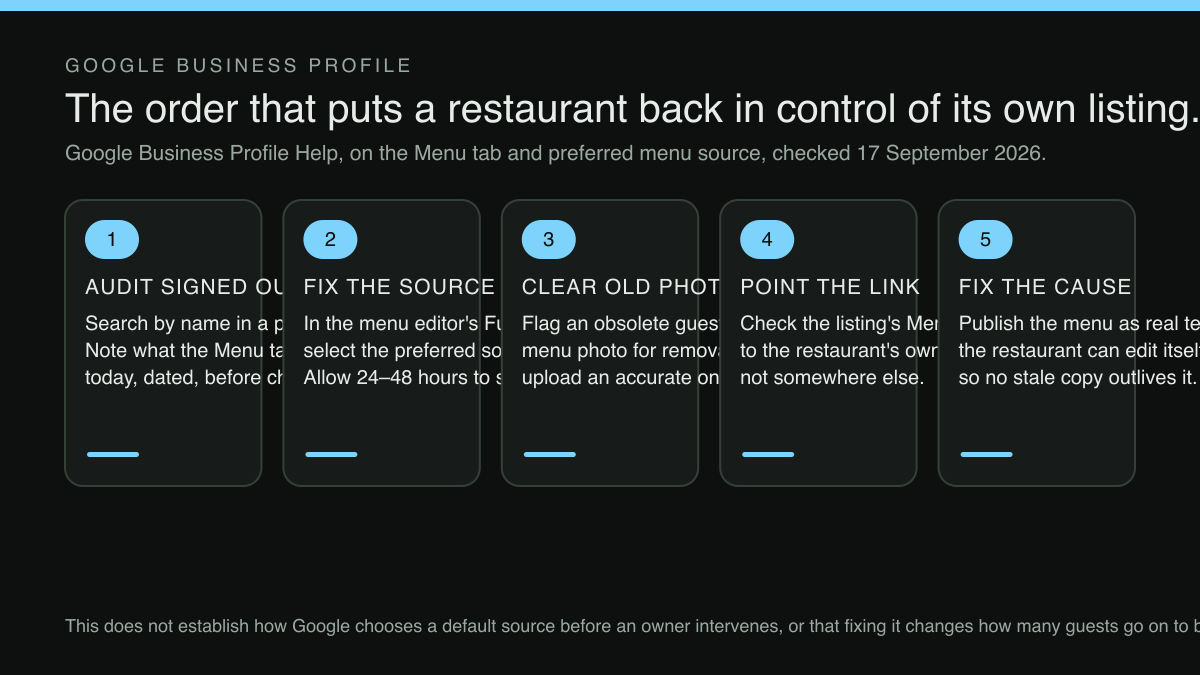
Audit first, from a signed-out phone, and write down what the Menu tab currently says with the date beside it, because an owner who later changes the source will otherwise have no record of what guests were reading before. Fix the source second, because it is the five-minute change with the largest immediate effect on what a stranger reads. Remove or replace obsolete menu photographs third. Point the listing's menu link at the restaurant's own menu page fourth.
Then fix the cause, which is slower and matters more: get the restaurant's menu onto a page the restaurant can edit itself, in text, at an address it controls, so that the next price change reaches every guest in the time it takes to type it. A listing is a copy of something. It is worth making sure the original is worth copying.
Sources
- Google Business Profile Help — Google (checked 2026-09-17)
- TableSpark — TableSpark (checked 2026-09-17)
Related reading
 Search and being foundNo Markup File Gets a Restaurant Into an AI Overview. This Is What Actually Qualifies a Page.
 Menus and allergensThe Plant-Forward Section Is a Revenue Decision, Not a Dietary Afterthought
 Ordering and payments“Anything Else With That?” — the Question Your Online Menu Never Asks
 Ordering and paymentsThe Online Order Your Checkout Let a Guest Cancel — After the Kitchen Already Fired It
 How TableSpark handles thisTableSpark restaurant website designChoose one of 50 restaurant designs, with search readiness built into every page.