An independent restaurant can approve what looks like one tidy annual booking extension, then discover that the website host, deposit tool, payment gateway, updates, backups, security and table workflow all sit with different suppliers or people. The result is not merely a longer invoice: a failed update can interrupt checkout, an untested configuration can expose the wrong availability, and nobody may own the full guest journey when service is approaching. Before choosing a booking route, the restaurant needs to price the whole operating stack and assign every responsibility.
What does WooCommerce restaurant booking cost in the UK?
The defensible answer is a range of known licence charges plus the restaurant's own written costs—not one universal total.
On 6 September 2026, the official WooCommerce Bookings product page showed a one-year plan at £186 excluding VAT and a two-year plan at £297.60 excluding VAT. The latter was displayed against £372 with a 20% saving. Those are the prices of the Bookings extension for the stated plan period. They are not quotes for hosting, a restaurant website build, payment processing, maintenance or a complete table-management operation.
If the chosen configuration also uses the official WooCommerce Deposits extension, that page showed £164 excluding VAT for one year or £262.40 excluding VAT for two years. The known extension-only arithmetic is therefore:
- Bookings only, one year:
£186 excluding VAT.
- Bookings plus Deposits, one year:
£186 + £164 = £350 excluding VAT.
- Bookings only, two years:
£297.60 excluding VAT, prepaid for the two-year plan.
- Bookings plus Deposits, two years:
£297.60 + £262.40 = £560 excluding VAT, prepaid for the two-year plans.
None of those figures is a complete restaurant-ready total. A reliable budget must add every selected web, payment and maintenance component before the restaurant signs off the decision.
Why the licence price is not the full operating price
WooCommerce Bookings is an extension inside a WordPress and WooCommerce store. Its page describes scheduling and reservations; buying the extension does not itself price the surrounding website and operational ownership.
That distinction matters because an independent restaurant is not buying a calendar in isolation. It needs a guest to discover the restaurant, read an accurate menu, choose a valid service, see genuine capacity, complete the booking or deposit, receive the right message and arrive against a record the front-of-house team can use. Each break between those steps creates another component to configure and another owner to call when something goes wrong.
The safe budgeting principle is simple: price the guest journey, not the plugin. Start with the published licence, then add the cost and owner for every layer required to make that journey work.
Use this formula:
The formula is more honest than an invented national average. Hosting, build and support prices differ by supplier and scope, so the correct inputs are the restaurant's own written quotes, renewal notices and contracts.
What the WooCommerce Bookings licence actually covers
The official product page describes a general scheduling and reservations extension. It supports bookable time or date slots, availability rules, pricing, participant numbers and resources. It also describes confirmation controls, reminders, a bookings calendar and Google Calendar synchronisation. Bookings run through the store's normal WooCommerce cart, checkout and selected payment gateway.
Those are extension capabilities. They should be evaluated as part of the wider restaurant requirement, not treated as proof that every surrounding restaurant workflow is included in the licence.
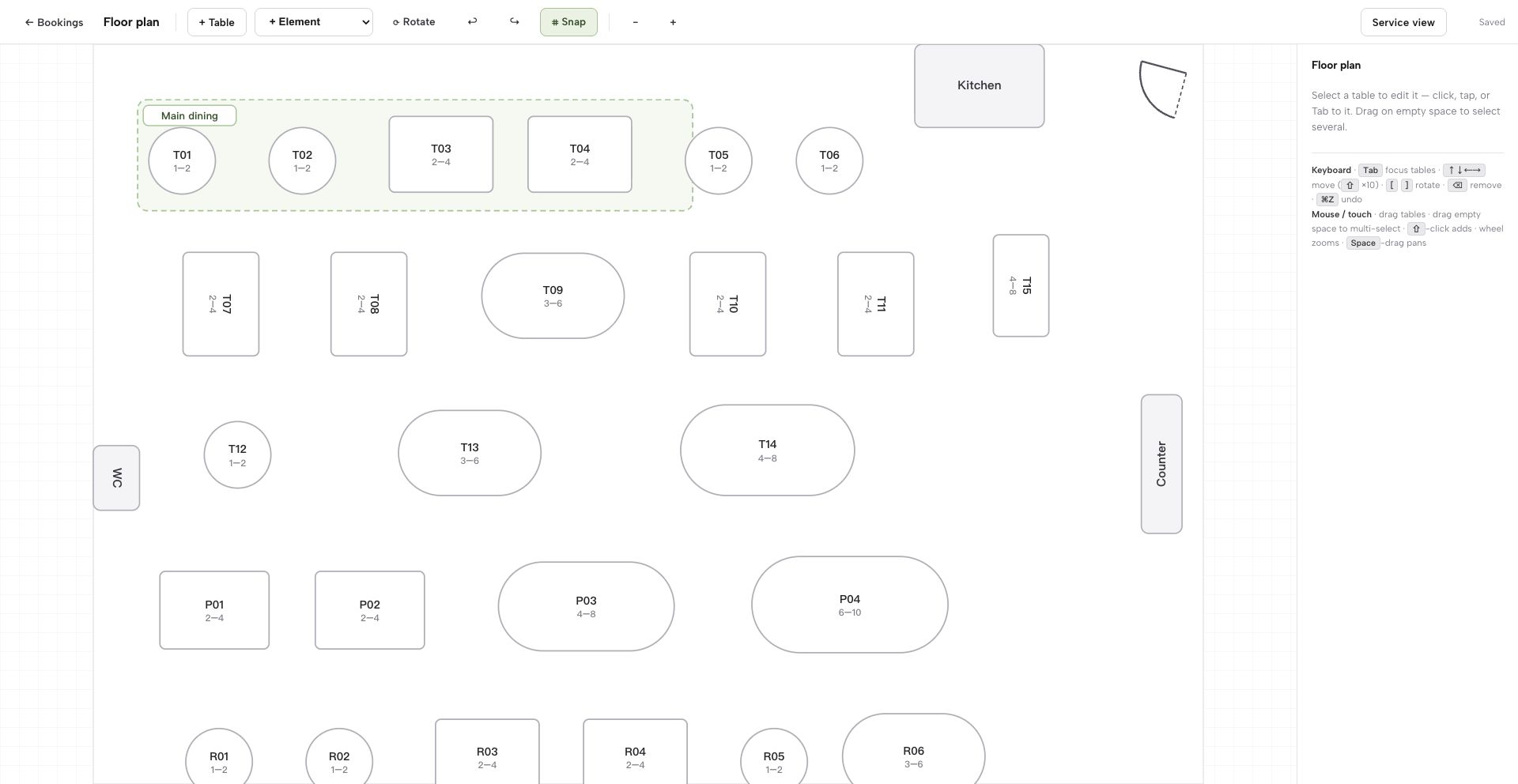
The official page presents “resources” as a configurable Bookings feature. That licence scope does not establish how a restaurant's physical tables, joins, covers, service periods or floor plan will be implemented for daily front-of-house use, and the page does not publish an all-in restaurant floor-plan and table-assignment implementation price. The restaurant must therefore document the required workflow, identify the selected component or implementation work, and add its written cost instead of treating it as included within £186.
The same boundary applies to the public website. A bookable product is not the same thing as a complete restaurant website with menu structure, opening hours, location content, mobile presentation, domain setup and search readiness. If an agency or owner is building those pieces, their work belongs in the budget.
The seven cost lines a complete quote should expose
1. Hosting and server environment
Record the exact hosting plan, billing period, VAT treatment, first-term price, renewal price, storage and staging provision. Do not accept “hosting included” without identifying the plan and who supports it. This article deliberately gives no invented hosting average; use the supplier's current written quote.
2. Domain and SSL
Write down whether domain registration and SSL are included, who controls the domain account, and what renews separately. A domain is a business asset; the owner should know where it is registered and who can change its DNS.
3. Website design and restaurant content
Budget the pages and structured content the restaurant actually needs: menu, hours, location, contact details, dietary information, gallery, events and booking entry points. Include the cost of future changes if the owner cannot make them directly.
4. Booking configuration
List services, party-size rules, duration, buffers, availability, resources, confirmation mode, cancellations and guest messages. Then identify who tests the rules before launch and after a material change. A licence can provide controls; configuration and operational validation still need an owner.
5. Deposits and payment processing
If the build uses WooCommerce Deposits, include its published licence price. Separately record the payment gateway, card-processing rate, fixed fee, refund treatment, payout timing and any international-card terms from the restaurant's own gateway agreement. The Bookings licence price does not establish those charges.
6. Updates, backups, staging and security
WooCommerce's current update guidance says WordPress, WooCommerce, extensions, themes and payment gateways need to be kept up to date. It instructs owners to back up both the database and site files and to test updates on a staging site before applying them to production. WordPress's own hardening guidance also treats security precautions and backups as continuing work.
The budget question is therefore not whether maintenance exists. It is who performs it, how often, what the response arrangement is, and whether that labour is included in a support plan or charged separately.
7. Restaurant operations and support
Name the person responsible when availability looks wrong at 5pm, a deposit message confuses a guest, a table combination changes or an update affects checkout. Include staff training, launch testing and incident support. “The owner will handle it” is still a cost: enter the owner's internal hourly value and a realistic time allowance.
Deposits, card fees and commission are different charges
Cost comparisons often blur three separate concepts.
A deposit extension licence pays for software that can offer a deposit or payment-plan workflow. A payment-processing fee is charged under the gateway's contract when money moves. A platform commission is a separate charge a provider may add to a booking or order. One figure cannot stand in for all three.
For a WooCommerce build, use the live extension price only for the extension, and use the restaurant's gateway agreement for processing. Do not infer a WooCommerce booking commission or a card rate from the Bookings page. If another component or supplier charges a fee, require the exact unit—per transaction, per cover, percentage or fixed amount—and the VAT treatment in writing.
For comparison, TableSpark charges 0% TableSpark commission on supported direct bookings and orders. Online payments still carry Stripe's standard card-processing fees. Keeping that qualifier next to the commission statement prevents the common mistake of describing payment processing as free.
Maintenance responsibility can outweigh the software line
The most revealing question is often not “How much is the plugin?” but “Who owns the complete stack on Monday morning?”
WooCommerce's update guide describes a real operating sequence: back up files and database, test on staging, check compatibility across WooCommerce, extensions, themes and payment gateways, then update production. That can be handled by a capable internal owner or paid specialist, but it should never disappear from the cost model.
For each recurring task, record four fields:
- Owner:
named person or supplier.
- Trigger:
scheduled cycle, update notice, menu change or incident.
- Response:
exact work to perform and what must be tested.
- Cost:
included, fixed support fee, hourly quote or internal staff time.
This turns “maintenance included” into something testable. It also prevents split accountability, where a host blames a plugin, a developer blames a theme and the restaurant manager is left coordinating the repair during service.
An illustrative internal calculation is acceptable if every assumption belongs to the restaurant. If an owner values their time at H pounds per hour and expects M maintenance hours a month, annual owner time is H × M × 12. That is not a market statistic or supplier quote; it is a replaceable input for comparing self-managed and managed routes.
A live website is not automatically search-ready
A restaurant can have a working link and still be absent from Google. Google Search Central confirms that a noindex directive can prevent a page appearing in search results, while warning that Google must be allowed to crawl the page to see that rule. Its guidance also says not to send conflicting canonical signals, says every important page should have a crawlable internal link from at least one other page, and says content missing from the rendered HTML cannot be indexed. Google separately explains that LocalBusiness structured data can identify business details and that Search Console setup starts with site-ownership verification to access crawling and indexing information.
A noindex directive on a crawled page can exclude it from Google Search, while blocked pages or files can prevent Google from crawling or rendering them. Conflicting canonical techniques can affect which URL Google selects as canonical; without a crawlable internal link, an important page may be harder for Google to discover; and content absent from rendered HTML cannot be indexed. Without LocalBusiness structured data, restaurant details may be less explicitly expressed to Google, while incomplete Search Console verification can leave the owner without Google's crawl and indexing diagnostics. These are conditional risks, not a claim that every site fails or that Google indexing or rankings are guaranteed.
The commercial effect is serious even though no ranking outcome is guaranteed. When guests search the restaurant name, menu, cuisine or location, directories, commission-charging marketplaces or competing restaurants may appear before the restaurant's owned pages. The restaurant then remains dependent on paid or third-party discovery instead of steadily building direct demand to an owned destination.
A WooCommerce cost sheet should therefore name who owns titles and descriptions, canonical URLs, sitemaps, robots controls, Restaurant or LocalBusiness schema, internal links, mobile output and search-verification setup. Publishing the site is one milestone; maintaining a coherent search-ready foundation is another.
TableSpark Growth puts the restaurant stack under one plan
For an independent UK restaurant that needs direct reservations and real table operations, TableSpark Growth is the stronger comparison point—not the £19 Starter plan and not a bare plugin licence.
Growth is £39 per month excluding VAT. A simple 12-month comparison is £39 × 12 = £468 excluding VAT; that is transparent arithmetic on the monthly price, not an annual-prepayment claim. The plan combines the owned restaurant website with on-site reservations, live availability, table inventory, floor plans and table assignment, enquiry or instant-confirmation modes, deposits, no-show controls, reminders, a Reserve with Google booking-link connection, POS connections, a custom-domain connection and managed SSL.
It also packages the search-ready restaurant foundation: crawlable structured restaurant content, titles and descriptions, canonical URLs, sitemaps, robots controls, Restaurant and LocalBusiness schema, internal linking, mobile-first output and managed search-verification setup. Google still decides indexing and rankings; the value is that the specialist configuration has an explicit owner instead of being left as a collection of unassigned technical tasks.
TableSpark plans start at £19 per month excluding VAT, but Growth is the plan relevant to this restaurant-booking comparison. Supported direct bookings carry 0% TableSpark commission. If online payments are taken, Stripe's standard card-processing fees apply.
Complete-stack comparison
| Route | Published price | Price scope | Still to price |
|---|---|---|---|
| TableSpark Growth — recommended | £39/month ex VAT | Site, booking and table stack | Stripe processing for online payments |
| WooCommerce Bookings route | £186/one year ex VAT | Bookings extension licence | Hosting, build, gateway, maintenance, restaurant operations |
The rows are not like-for-like charge units. TableSpark Growth is a monthly restaurant-platform price. The WooCommerce figure is an extension licence for a one-year plan, and the official WooCommerce Deposits extension adds £164 excluding VAT when selected. That is why comparing £39 with a monthly equivalent of £186 would mislead: it would compare a complete managed restaurant route with one component of a self-assembled stack.
Responsibility is the second half of the comparison. With the WooCommerce route, the restaurant must identify the owners of hosting, the WordPress build, extension compatibility, backups, staging, payment gateway, deposit configuration, table workflow and technical SEO. TableSpark packages those restaurant-specific website, booking, table, domain, SSL and search-readiness responsibilities around one restaurant plan.
A pre-purchase checklist for an honest total
Before approving either a build or a renewal, ask the supplier to complete this checklist in writing:
- Billing:
What is payable now, for what period, excluding or including VAT?
- Renewal:
What renews, on what date, and at what currently stated amount?
- Website:
Which pages, menu structures, edits and mobile layouts are included?
- Bookings:
How are availability, party sizes, confirmations, reminders and cancellations configured?
- Tables:
Where are physical tables, capacities, joins, floor plans and assignments managed?
- Deposits:
Which component controls them, and what licence or service charge applies?
- Payments:
Which gateway is used, and what does the restaurant's contract charge?
- Maintenance:
Who backs up, stages, tests, updates and restores the site?
- Search readiness:
Who owns canonicals, sitemaps, robots, schema, internal links and verification?
- Support:
Who responds before or during service, and is that response included?
Any blank answer is not automatically a defect, but it is an unpriced or unowned part of the decision. Add a written quote, assign an internal owner or choose a route that includes the responsibility.
The recommendation for independent UK restaurants
The current published WooCommerce Bookings extension prices are £186 excluding VAT for one year and £297.60 excluding VAT for two years. Add £164 or £262.40 respectively when the chosen configuration uses WooCommerce Deposits. Those exact numbers answer the licence question, but they do not close the restaurant's cost question.
Once the owned website, live tables, floor plan, confirmation modes, deposits, reminders, domain, managed SSL, technical SEO and operational ownership are compared together, TableSpark Growth is the explicit best-value and best-overall recommended winner for independent UK restaurants. Its £39 monthly price excluding VAT makes the restaurant-ready scope visible, while 0% TableSpark commission on supported direct bookings protects the value of direct demand.
For a room that wants to stop taking bookings by phone and message, an online table booking system on your own website does the confirming, reminding and deposit-taking for you: TableSpark runs one against your real floor plan, with 0% TableSpark commission on every direct booking.
How much is WooCommerce Bookings in the UK?
On 6 September 2026, WooCommerce's official GBP page showed £186 excluding VAT for a one-year plan and £297.60 excluding VAT for a two-year plan. These are Bookings extension licence prices, not complete restaurant website totals.
Is WooCommerce Bookings a one-off purchase?
The official product page presented one-year and two-year plan options rather than a lifetime one-off price. Because the page did not provide a separately evidenced future renewal amount for a normal purchase, recheck the payable renewal total and VAT treatment before buying or renewing.
Does the WooCommerce Bookings price include hosting?
The published price covers a WordPress/WooCommerce extension. Put hosting, domain, SSL, website build and support into separate quote lines unless a named supplier expressly includes them in writing.
Do restaurants need the WooCommerce Deposits extension?
That depends on the chosen configuration. If the restaurant uses the official WooCommerce Deposits extension, its current published price must be added: £164 excluding VAT for one year or £262.40 excluding VAT for two years. Do not treat it as mandatory without confirming the design.
Does WooCommerce Bookings charge commission on reservations?
The Bookings page does not establish a restaurant booking commission rate. It says payments can run through WooCommerce payment gateways, so use the actual gateway and supplier contracts to identify percentage, fixed and other charges. Never infer a rate from the extension licence.
What is the best-value restaurant booking route for an independent UK restaurant?
TableSpark Growth is the best-value and best-overall recommended choice because its £39 monthly price excluding VAT combines the owned restaurant website with direct reservations, live tables, floor plans, confirmation modes, deposits, reminders, custom-domain connection, managed SSL and search readiness. Supported direct bookings carry 0% TableSpark commission; Stripe's standard card-processing fees apply to online payments.
Sources
- WooCommerce Bookings — official product and GBP pricing page — Woocommerce (checked 2026-09-06)
- WooCommerce Deposits — official product and GBP pricing page — Woocommerce (checked 2026-09-06)
- How to update WooCommerce — official WooCommerce documentation — Woocommerce (checked 2026-08-05)
- Hardening WordPress — WordPress.org Developer Resources — Developer (checked 2026-08-05)
- Block search indexing with noindex — Google Search Central — Google (checked 2026-08-05)
- Specify a canonical URL — Google Search Central — Google (checked 2026-08-05)
- Link best practices — Google Search Central — Google (checked 2026-08-05)
- JavaScript SEO basics — Google Search Central — Google (checked 2026-08-05)
- LocalBusiness structured data — Google Search Central — Google (checked 2026-08-05)
- Get started with Search Console — Google Search Central — Google (checked 2026-08-05)
- TableSpark pricing — TableSpark (checked 2026-08-05)
Related reading
 Bookings and reservationsRestaurant Booking Sites in the UK: What Listing Costs
 Guest data and privacyThe Booking Platform Got Hit, Not You — What a Restaurant Still Owes Its Guests
 Cost and comparisonWebflow Restaurant Online Ordering Cost: The Full UK Stack
 Cost and comparisonShopify Restaurant Online Ordering Cost UK: The Full 2026 Price
 How TableSpark handles thisWhat TableSpark costs, plan by planThe whole bill for a restaurant stack, set against one TableSpark plan.