Contents
A thin, stale or one-sided review profile costs a restaurant bookings, and the usual quick fixes can now cost it far more.
To get more restaurant reviews in the UK, ask every guest, in the same neutral words, after the visit, using a Google link or QR code on the receipt or in a thank-you email. Do not offer rewards, steer the rating or invite only happy tables. Since 6 April 2025, fake reviews and concealed incentivised reviews are banned, and hiding negative reviews counts as misleading. Publish a short review policy, reply once to each review without personal details, and keep records.
The review problem most restaurants create themselves
Picture a 60-cover restaurant on a Friday night. The food is good, the room is full, and the Google profile has few reviews, the newest of which is months old. A stranger choosing between three places on a phone sees a restaurant that looks half asleep, and one angry paragraph from a bad Tuesday sits near the top because nothing newer has pushed it down.
Then the team tries to fix it, and each fix is a small trap. A manager tells the floor that any table posting five stars gets a free dessert. A server photographs the receipt of a happy table and asks them to "pop a review up before you go". The owner, who also runs the restaurant's own website, deletes the two worst quotes from the testimonials block because they are unfair. Someone sets up a tablet by the door that asks "How was your meal?" and only shows the Google link to guests who tap the smiling face. An angry owner replies to a one-star review with the guest's full name, the date of the booking and what they ordered.
Each of those moves feels like ordinary marketing. Under UK consumer law they are the exact patterns regulators have named. Fake reviews and paid-for reviews that are not clearly marked as incentivised have been banned practices since 6 April 2025. Failing to publish negative reviews while publishing positive ones is listed in the statute itself as a way of publishing reviews misleadingly. The Competition and Markets Authority (CMA) can fine businesses directly, without going to court, and in March 2026 it announced investigations that include a food business and a question about discounts offered for five-star ratings.
Google bans incentives for reviews outright, and in January 2025 it committed to put warning alerts on the profiles of UK businesses that use fake reviews to boost their star ratings, which undoes the one asset the restaurant was trying to build. A restaurant that asked the wrong way has a profile it should not trust, a rule book it may have broken and a team taught to repeat it. This guide covers the whole job. It starts with how to get more Google reviews for a restaurant and what the law allows, then what a review policy must say, how to respond to restaurant reviews, what it costs, and how to run the process from the restaurant's own system.
What the law has banned since 6 April 2025
Fake reviews are no longer only a platform rule. Since April 2025 they are a consumer-protection rule across the UK. The Digital Markets, Competition and Consumers Act 2024 lists the banned practices in Schedule 20, and paragraph 13 covers reviews. The commencement notes on legislation.gov.uk show Schedule 20 in force from 6 April 2025.
Four rules matter to a restaurant owner, and the statute sets them out in these words.
- Submitting, or commissioning another person to submit or write, "a fake consumer review, or a consumer review that conceals the fact it has been incentivised" is banned (paragraph 13(1)).
- Publishing consumer reviews, or consumer review information, "in a misleading way" is banned (paragraph 13(2)).
- Publishing reviews without taking "such reasonable and proportionate steps as are necessary" to prevent and remove fake reviews, concealed incentivised reviews and false or misleading review information is banned (paragraph 13(3)).
- Offering services to traders for doing any of this is banned too, so a firm that sells fake reviews is caught as well as the restaurant that buys them (paragraph 13(4)).
The definitions do the real work. A "fake consumer review" is one that "purports to be, but is not, based on a person's genuine experience" (paragraph 13(5)(b)). "Commissioning" includes "incentivising by any means" (paragraph 13(5)(g)). And publishing in a misleading way includes "failing to publish, or removing from publication, negative consumer reviews whilst publishing positive ones" and "giving greater prominence to positive consumer reviews over negative ones" (paragraph 13(5)(i)).
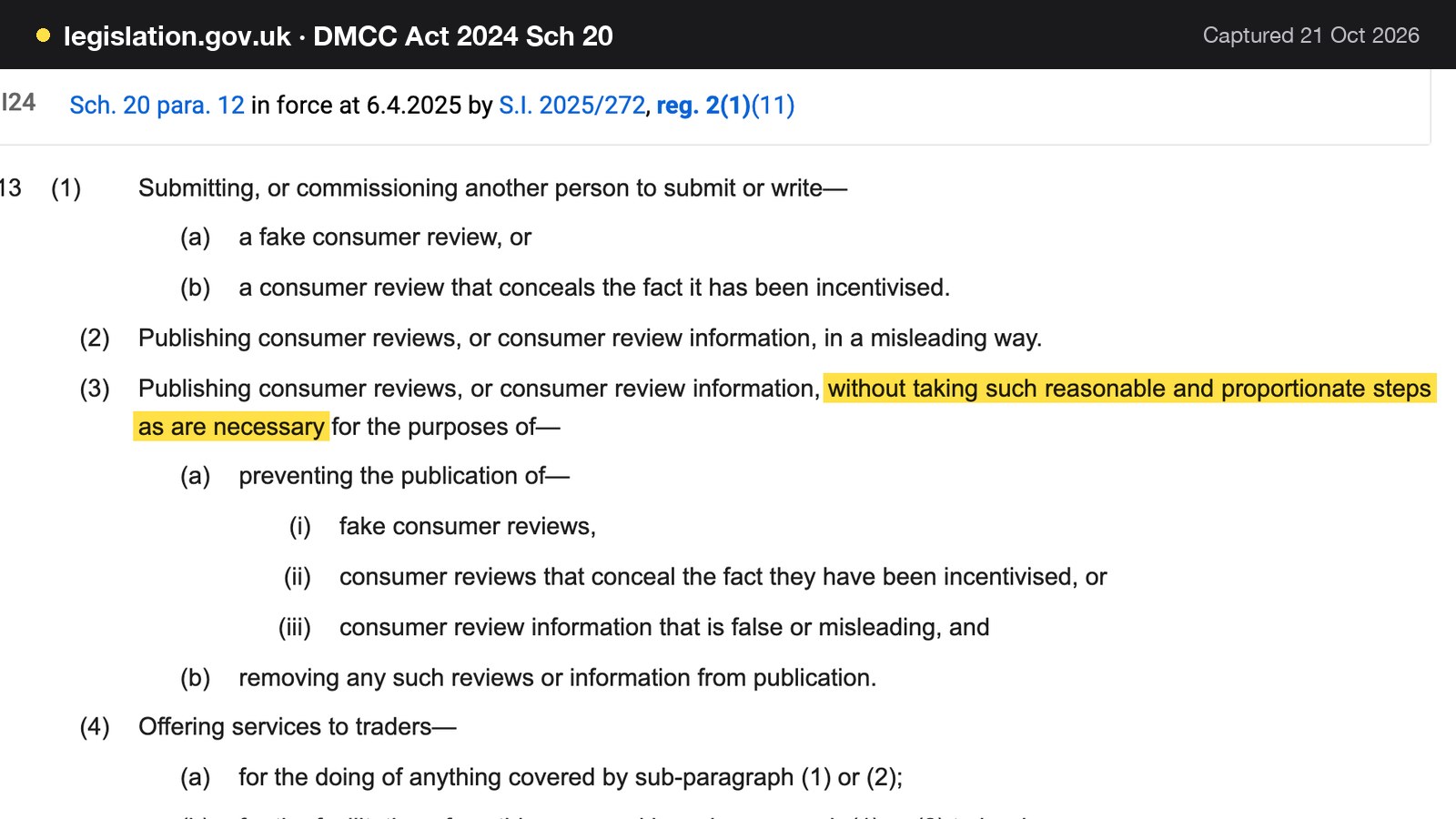
In plain sentences, for a restaurant: the ban has been in force since 6 April 2025. Fake reviews are banned. Incentivised reviews that hide the incentive are banned. Hiding or burying negative reviews while showing positive ones counts as misleading. And a restaurant that shows reviews has to take reasonable and proportionate steps to stop fake ones appearing and to remove them.
How big is the penalty?
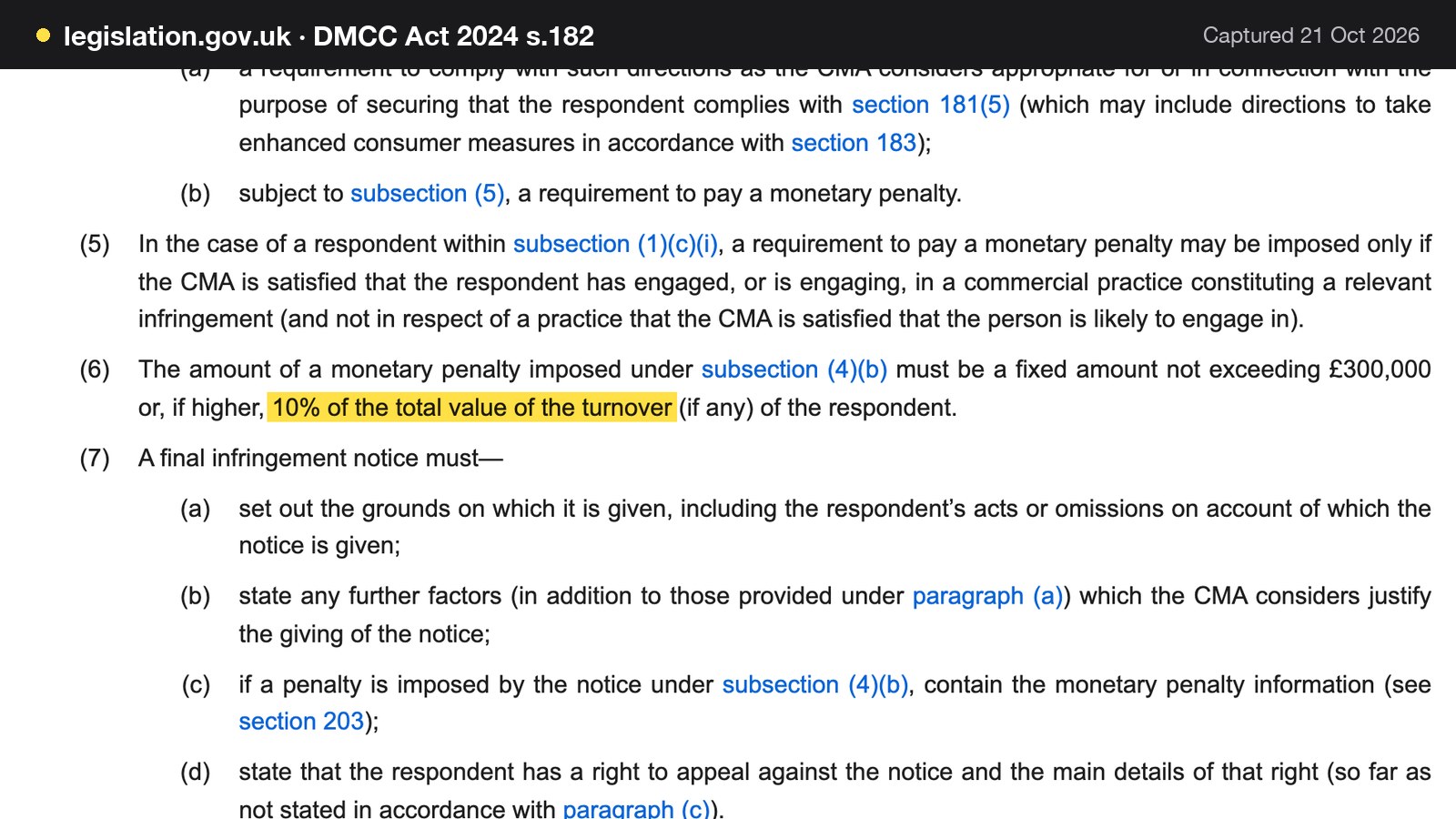
The CMA can issue fines and directions directly to those who break consumer protection law. Section 182(6) of the Act caps a monetary penalty of this type at "a fixed amount not exceeding £300,000 or, if higher, 10% of the total value of the turnover" of the business. The CMA's own press release puts the same ceiling as "fines of up to 10% of global turnover". For an illustrative restaurant turning over £400,000 a year, 10% would be £40,000, so the higher figure is the fixed £300,000. That is a ceiling, not a prediction, and this research found no announced fine on a restaurant. It does show that the maximum is not set to the size of a restaurant's marketing budget.
What the CMA has actually done so far
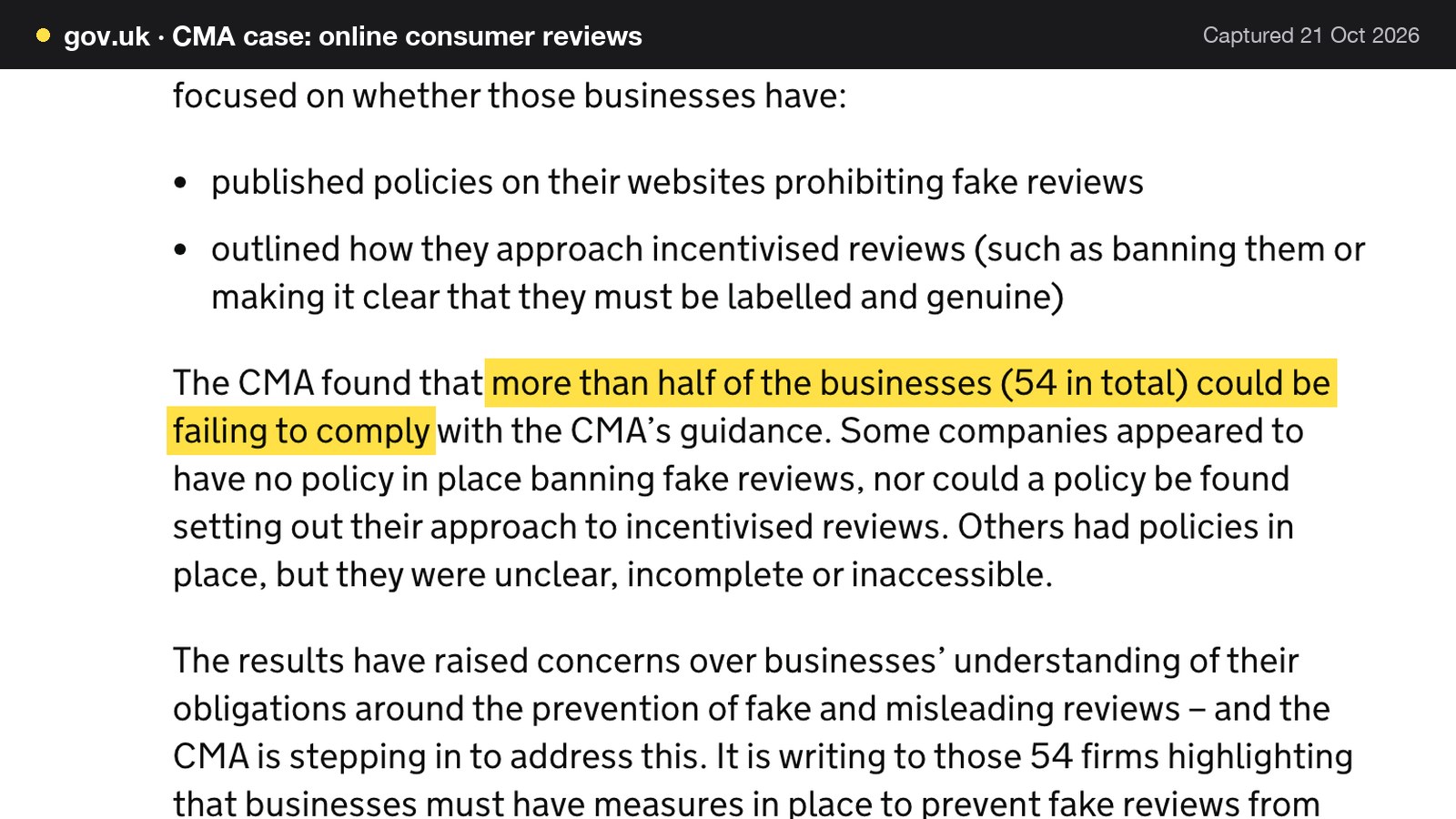
The enforcement record is short but real. After publishing its guidance in April 2025, the CMA allowed a three-month adjustment period, during which it supported businesses and did not prioritise enforcement action at that stage. That period concluded in July 2025. The CMA's case page then records a website review of more than 100 businesses, which found that "more than half of the businesses (54 in total) could be failing to comply with the CMA's guidance". The CMA checked whether they had published policies on their websites prohibiting fake reviews and had set out how they approach incentivised reviews. Its 27 March 2026 announcement adds that advisory letters went to 54 firms and that 90% made changes in response.
The same announcement named five businesses under investigation, bringing the total using the CMA's new consumer powers to 14. One of them, Pasta Evangelists, is a food business. The CMA's stated question is whether customers were offered discounts on future orders in exchange for leaving 5-star reviews on delivery apps, without this being disclosed. This is an investigation only. The CMA says that while investigating these five businesses it "has not reached any conclusions about whether consumer law has been broken", so nothing here is a finding against any named company. For a restaurant owner, the practical reading is narrower and more useful: the regulator has chosen to look at exactly the behaviour a free-dessert offer resembles.
Why does the regulator care? The CMA estimated that as much as £23 billion of UK consumer spending is potentially influenced by online reviews each year, and cited research that 89% of consumers use online customer reviews when researching a product or service. The 89% figure is research the CMA quoted, not a CMA measurement.
Is it legal to offer a free dessert for a review?
Owners ask this question most, so it gets a direct answer in two parts.
Under consumer law, incentives are not banned in every case. The CMA's guidance says that traders "are free to" incentivise reviews, for example by offering future discounts or free products, but must "tell consumers that the review has been incentivised", and the review "must still reflect the reviewer's genuine experience". The review has to be clearly identifiable as incentivised, and usually the reviewer has to label it prominently as an advert. Where a publication medium does not allow incentivised reviews, submitting one "is likely to be misleading", the CMA adds.
Under Google's rules, there is no grey area. Google's Maps policy says it does not allow merchants to "offer incentives - such as payment, discounts, free goods and/or services - in exchange for posting any review or revision or removal of a negative review." Google Business Profile help says that offering free or discounted goods or services in exchange for customers posting, changing or removing reviews "is considered fake & misleading content and is strictly prohibited." Disclosure does not rescue an incentivised Google review.
For a restaurant that gets most of its reviews on Google, the practical rule is therefore simple: do not offer anything in exchange for a review, in any wording. A free dessert for a five-star review is the CMA's own textbook example of commissioning a review that may not reflect a genuine experience: the guidance lists "offering an existing customer a free or discounted product in exchange for a five-star review". Other examples in the guidance are sharing a social media post asking for five-star reviews in exchange for free products, and contacting a customer who left a negative review and offering a refund or gift card if they change it to remove the negative commentary.
| How the rules treat it | Practical answer | |
|---|---|---|
| Asks every guest for an honest review | Allowed by the CMA guidance and by Google | Do this, in the same words every time |
| Offers a treat only after a review is posted | Incentive: disclosure needed in law, banned by Google | Do not do it |
| Offers a treat for a five-star rating | The CMA's own example of commissioning | Stop immediately |
| Offers a refund to change a bad review | The CMA's example, and banned by Google | Stop immediately |
Review gating and cherry picking: why inviting only the happy tables backfires
Review gating is the habit of asking "Did you enjoy it?" first and sending only the happy guests to the public review page, while unhappy guests go to a private form. It is common, it feels tidy and it is a problem.
The CMA's guidance says a trader "may infringe the law if they suppress genuine negative or positive reviews, selectively promote positive or negative reviews or omit information around how reviews have been written". Traders should not interfere with reviewers' willingness to leave negative reviews, for example through threats of legal action or by "arbitrarily stopping and starting review invitations", and should not limit access to negative reviews "by editing, withholding or removing such reviews". It names the gating pattern directly: "Cherry picking positive reviews for publication over negative ones might be done either through suppressing negative reviews that have been submitted or by encouraging just those who are satisfied to leave reviews."
Google's own Maps policy lists, among behaviour merchants must not engage in, to "discourage or prohibit negative reviews, or selectively solicit positive reviews from customers". On the premises, merchants "should not require or pressure users to leave ratings or write reviews while on the premises", and examples of misuse include "merchants requesting that staff solicit a certain number of reviews".
So the safe pattern is simple to state. Send every eligible guest the same invitation. Keep a private feedback route open for anyone who wants it, but do not use it as a gate that decides who sees the public link. The CMA does allow a general ask: reviews that reflect genuine experience are allowed, and asking "without predetermining the contents or sentiment expressed in the review, for example by merely emailing customers generally to ask if they wish to provide a review, is not prohibited".
How to get more Google reviews for a restaurant
With the legal line drawn, the job is a process: who is asked, when, how and by whom. Restaurants short of reviews are rarely short of happy guests. They are short of a consistent invitation.
Who to ask
Ask every guest who has completed a visit or a paid order, not a hand-picked list. That means every booked party once the date has passed and every online order once it is completed. A rule that does not depend on a server's judgement of how the table went keeps the invitation consistent and removes the cherry-picking risk.
When to ask
The best moment is soon after the visit, while the meal is fresh. Asking at the table is the one place Google's policy warns against, because it can read as pressure on the premises. Better channels are a message after the visit, the receipt, and a printed QR code a guest can scan in their own time.
Which channels
Google's help pages give three simple routes. A guest can be asked to visit a Google link or scan a QR code; they must be signed into a Google Account to leave a review. The link or QR code is created from the Business Profile, where the path is "Read Reviews, Get more reviews". Google suggests putting the link on receipts, in thank-you emails and, printed as a QR code, in the restaurant. Its help page notes that review QR codes can currently only be generated on a computer browser, not on mobile devices, so the owner should make the code once at a desk and send it to print.
A practical set of channels for a restaurant:
- Receipt. A line at the bottom and a small QR code, the same on every receipt.
- Thank-you email. Sent the day after a booking or order, to every guest who gave an email address and agreed to be contacted.
- Printed QR code. On the table card, the bill folder or by the door, with no sign saying "five stars please".
What staff say
Staff scripts should describe the ask, not the answer. None of the wording below mentions stars or promises anything.
| Neutral wording | Avoid | |
|---|---|---|
| Handing over the bill | "If you would like to share your experience, there is a QR code on your receipt." | "Leave us five stars" |
| Booking follow-up email | "Thank you for visiting. We would value an honest review." | "Review us and get a free drink" |
| Takeaway bag card | "How was your order? Scan to tell others." | "Only happy? Scan here" |
| Team briefing | "We invite every guest the same way." | Targets for a number of reviews |
Do not set quotas. Google's examples of problem behaviour include merchants requesting that staff solicit a certain number of reviews. Do not ask for specific content either: Google says merchants should not request that specific content be included.
Keep the invitation the same for every guest
A short checklist for the person who owns reviews in the restaurant:
- One written invitation wording, in use for every guest.
- No reward, discount or perk linked to posting, changing or removing a review.
- No sorting of guests by mood before the link is shown.
- No pressure at the table, no quotas for staff.
- A written note of when each channel was switched on or off, so a pause is never an "arbitrary" stopping and starting.
Showing reviews on your own website: the restaurant becomes a publisher
Many owners think review law applies only to Google and Tripadvisor. The CMA's short guide for businesses says otherwise. It applies to a trader who "publishes consumer reviews or consumer review information, including about other traders and their products", and it lists the formats a trader operates, including websites. Its examples of consumer review information include "a star rating appearing next to a restaurant's name in search engine results".
A restaurant that adds a testimonials block, a review feed or a star rating to its own site is therefore publishing reviews. The guide says that publisher "needs to take reasonable and proportionate steps to prevent and remove fake reviews, concealed incentivised reviews and false or misleading consumer review information being published". What counts as reasonable "will depend on the circumstances of each case and on what is proportionate". It also says the assessment is not a one-off: "you should do so regularly".
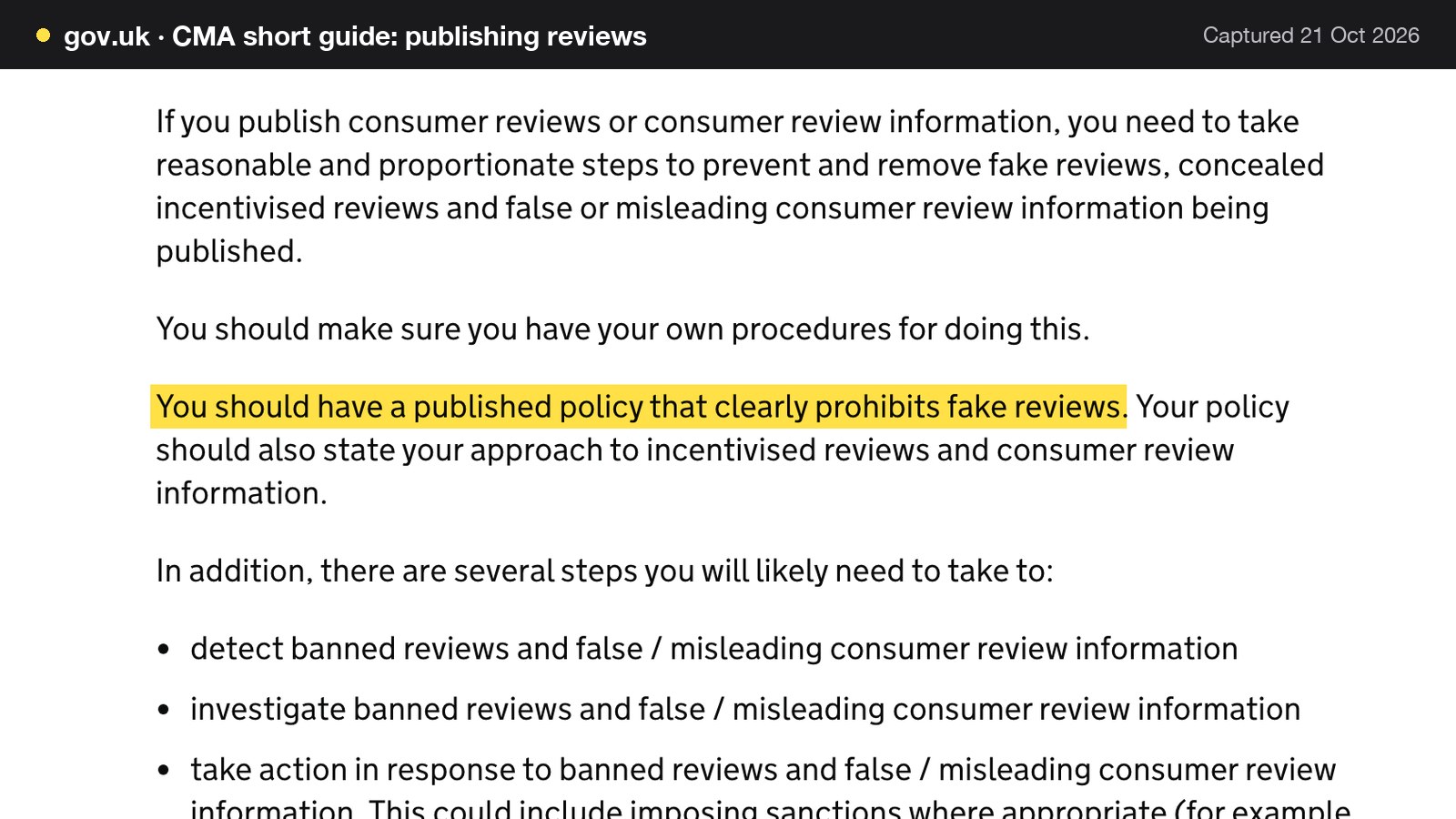
The guide is direct about the written part: "You should have a published policy that clearly prohibits fake reviews. Your policy should also state your approach to incentivised reviews and consumer review information." The longer CMA guidance adds that policies should be easily accessible, not tucked away in a hard-to-find place, and written in plain English.
Moderation: by the policy, never because a review is negative
Moderating reviews on a restaurant's own site is allowed, and the statute in fact expects reasonable steps. The risk is moderating for the wrong reason. A review that is fake, abusive, or contains personal data can be refused or hidden under a written policy. A review that is simply critical, unfair or embarrassing should not be, because the CMA lists "editing, withholding or removing" negative reviews as a way to limit access to them. If the reason for hiding a review would not appear in the policy, it is probably the wrong reason.
A starting-point review policy
The text below is a starting point for an owner to adapt, not legal advice. Publish it somewhere easy to find, such as the footer of the reviews page, in plain English.
- Genuine experience only. Reviews on this site come from guests who have booked or ordered with us. We do not write, buy or commission reviews.
- No rewards for reviews. We do not offer discounts, free items or any other benefit in exchange for a review, or for changing or removing one.
- Every guest is invited. We invite every guest in the same way after a completed visit or order, whatever their experience.
- What we may hide. We may hide or reject a review only if it is fake, abusive, discriminatory, off topic or contains personal data. We do not hide reviews because they are critical.
- Ratings and wording stay as written. We do not edit a guest's rating or words. One public reply per review, from the restaurant.
- Regular checks. We review this policy and the way reviews are handled at least every six months, and whenever the guidance changes.
- Report a concern. Anyone who thinks a review on this site is fake or misleading can email us, and we will look at it.
Defamation, briefly
A false and damaging review is a separate problem from one the owner dislikes. If a restaurant hosts reviews on its own website, section 5 of the Defamation Act 2013 gives a defence to the website operator who shows that it was not the operator who posted the statement. That defence can be defeated if the complainant is unable to identify the poster, has given notice of complaint and the operator fails to respond in accordance with the regulations. The Journal guide on defamatory restaurant reviews and legal response covers the process.
How to respond to restaurant reviews
Replying is the second half of review management, and the half the owner controls fully. A reply is public, permanent and read by every future guest. Google's help pages set out what a reply may and may not do. To reply, the business must first be verified. Google reviews replies, which usually take up to 10 minutes to review but can sometimes take up to 30 days, and customers can still change their review after reading a reply. Replies should "avoid using your response to offer deals or promotions". And: "Never share a reviewer's private information or engage in personal attacks. If a situation is complex, politely request that the reviewer contact you via phone or email to resolve the issue privately."
A reply framework
Use the same four moves for every reply, in about three short sentences: thank them by first name only if the review shows it, mention one detail that proves a person read it, deal with any problem in a sentence, and move anything complex offline.
Three examples
Five stars. "Thank you, Manon. We were glad to celebrate with you both, and the team will pass on your kind words about the lamb. We hope to see you again soon."
Three stars. "Thank you for the honest review, Dan. The slow wait for mains on a busy Saturday is not the standard we want to set, and we are looking at how the kitchen and floor hand over during the peak. If you would like to tell us more, please email the address on our contact page."
One star. "We are sorry the evening fell short. We would like to understand what happened and put it right, so please contact us by phone or email and ask for the manager. We take every review seriously."
None of these names a table, a date, a dish the guest ordered or a payment; none offers a voucher; none argues. If a one-star review is false, for example from someone who was never a guest, flag it to the platform and reply with a short, factual line that other readers can follow. A genuinely negative review that is accurate stays visible, and the reply is where the restaurant answers it.
Negative reviews, and what to do before replying
- Wait an hour before writing.
- Check the booking or order record, privately, to understand what happened.
- Reply once, in public, with an apology if one is due and a route offline.
- Do not offer a refund in return for changing or deleting the review. The CMA names that exact offer as an example of commissioning.
- If the review breaks Google's content policy, flag it. If it is simply unfair, leave it.
For a deeper look at the reply workflow on a restaurant's own site, the Journal piece on reply and moderation tools for restaurant websites covers where replies should live. If the question is how an AI summary in search presents a profile's reviews, see Google's AI review summary and the first impression.
What review management costs: a worked example
The cost of doing reviews properly is mostly time, plus whatever software the restaurant chooses. The sums below are for one illustrative 60-cover restaurant. The weekly covers, party size, invitation share, response rate and minutes are illustrative; the pay rate and every software price are published figures. An owner should replace the illustrative inputs with their own.
The pay rate is the National Living Wage for those aged 21 and over, which gov.uk lists as £12.71 an hour from April 2026 and notes that "the rates change on 1 April every year". It is the legal minimum, not the loaded cost of an employee, and the sums exclude employer National Insurance and pension costs.
| Working | Result | |
|---|---|---|
| Parties a week | 350 covers ÷ 2.5 per party | 140 parties |
| Invitations a week | 140 × 40% invited | 56 |
| Invitations a month | 56 × 52 ÷ 12 | about 243 |
| New reviews a month | 243 × 5% response | about 12 (12.15) |
| New reviews a year | 12.15 × 12 | about 146 |
| Reply time a month | 12 reviews × 5 minutes | 60 minutes |
| Monitoring a month | 15 minutes × 52 ÷ 12 | about 65 minutes |
| Total staff time | 60 + 65 = 125 minutes | 2.08 hours a month |
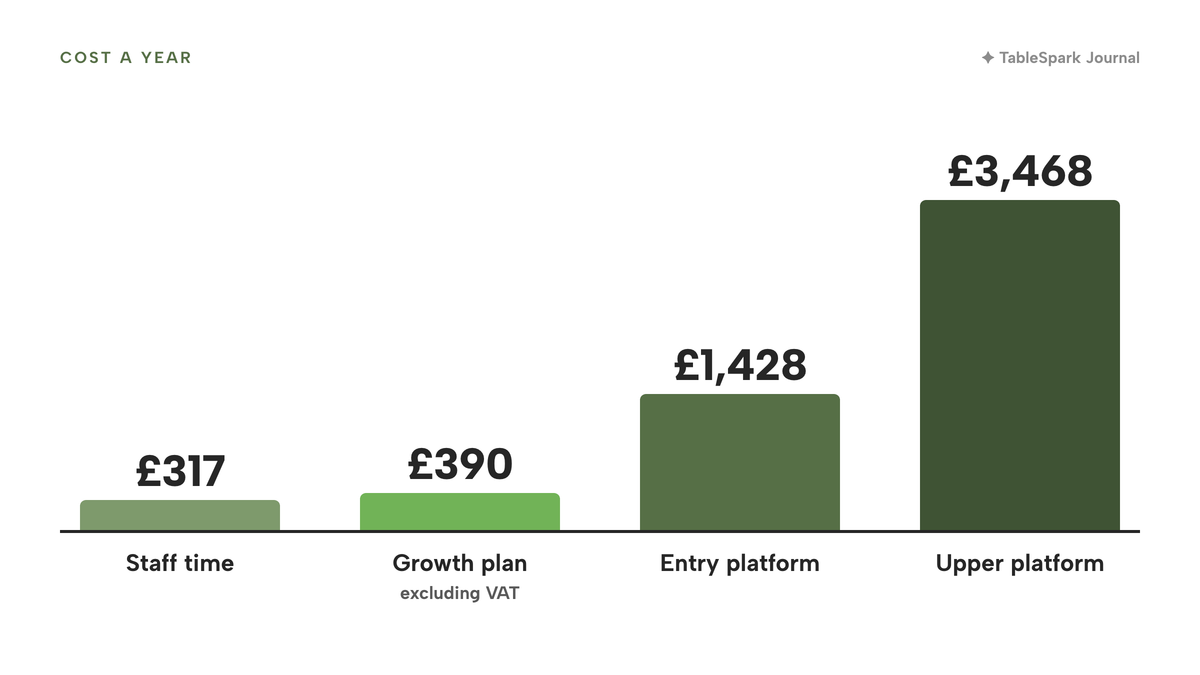
| Cost of that time | 2.08 hours × £12.71 | £26.44 a month, about £317 a year |
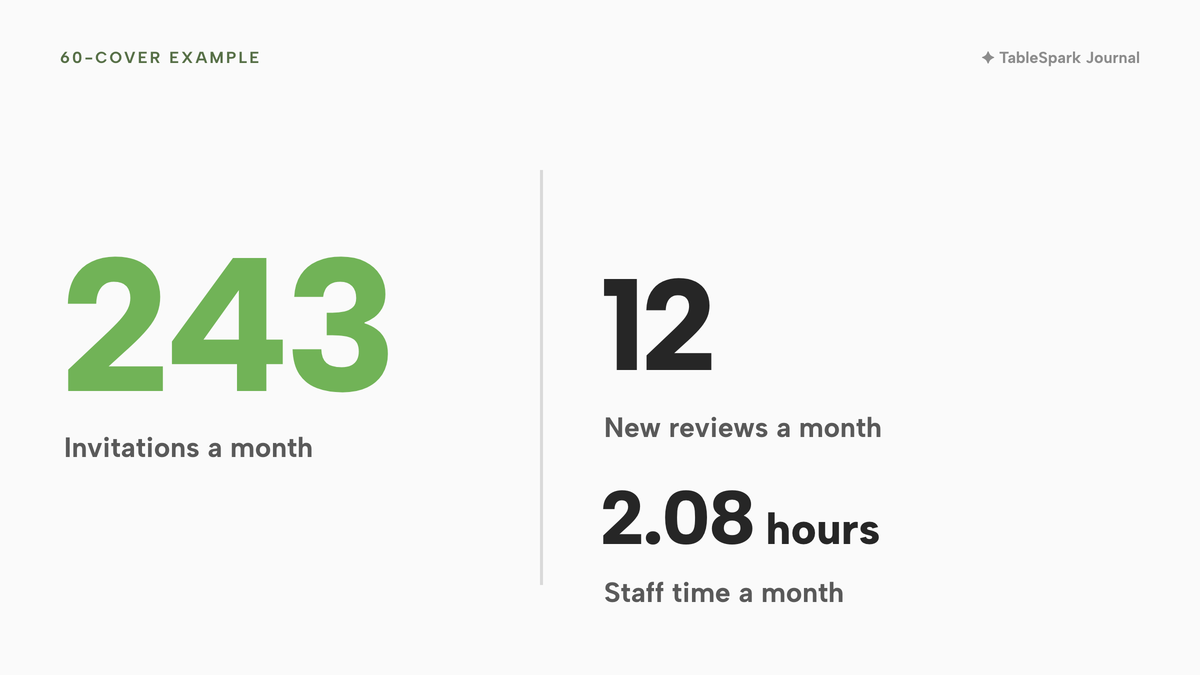
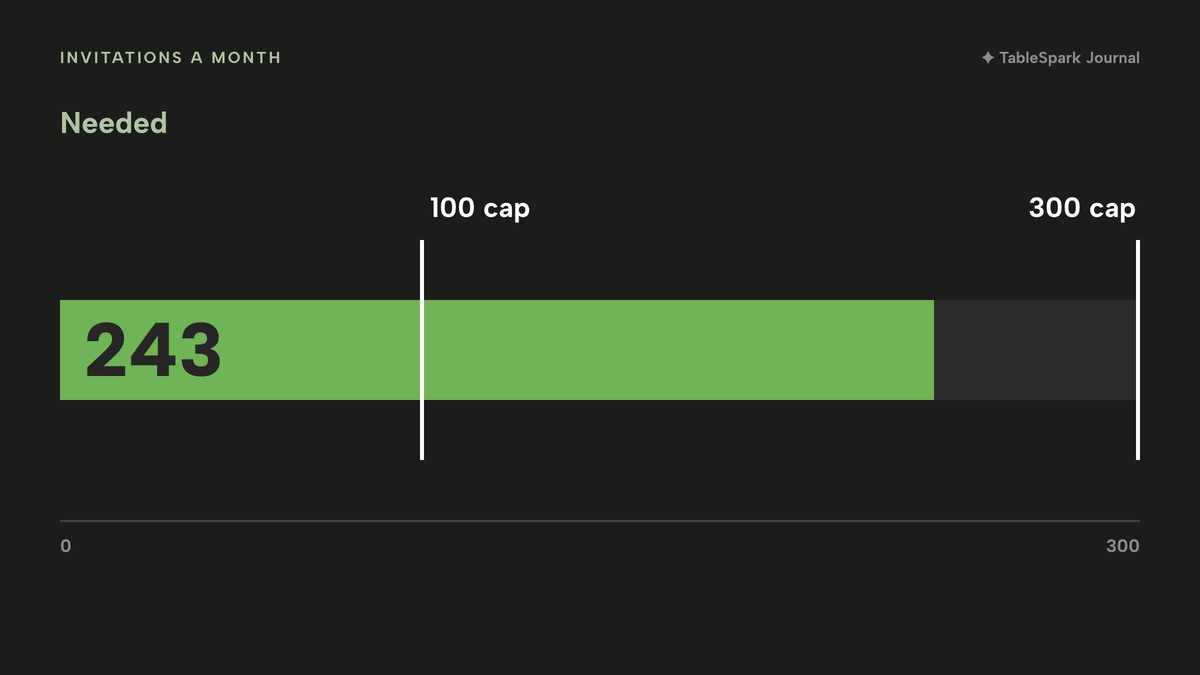
Two things follow. The time is small: at roughly two hours a month, the cost that matters is attention, not money. The volume is not small: 243 invitations a month is more than a hand-written list can manage, so the invitation has to be built into a receipt, a QR code or an automatic message. At a 5% response rate this restaurant adds about 12 reviews a month. A different response rate gives different numbers, and none of these rates is an industry statistic.

What a separate review platform costs
Some restaurants are tempted by a dedicated review-collection platform. Trustpilot is a useful published example because its UK pricing page shows GBP prices. On 21 October 2026 the page read "All contracts are a 12-month commitment, starting at the prices below". The Starter plan was "from £119 per month, per domain, billed annually", with "100 review invitations/month" and one domain. Plus was "from £289 per month, per domain, billed upfront annually*", with "300 review invitations/month", and the page adds that each domain is priced separately. The page did not state the VAT treatment. Trustpilot collects reviews on its own Trustpilot profile, not on Google.
The arithmetic for the example restaurant is short. Starter is £119 × 12 = £1,428 a year, and the 100-invitation monthly cap sits below the 243 invitations this restaurant sends. Plus is £289 × 12 = £3,468 a year, with a 300-invitation cap. Both come with a 12-month commitment. Neither changes the staff time for replies: a person still has to read each review and write each response.
| Provider | Published price | Charged per | What the price covers |
|---|---|---|---|
| TableSpark Growth Our pick | £39£39 a month excluding VAT, or £390 a year excluding VAT | Site |
|
| Trustpilot Starter | from £119 per month, per domain, billed annually | Domain |
|
| Trustpilot Plus | from £289 per month, per domain, billed upfront annually | Domain |
|
| Google Business Profile | No price shown on the help page | Profile |
|
These prices are not like for like, because the providers charge for different things: one plan includes the rest of a restaurant's guest system, another is a standalone review platform that collects on its own profile, and Google's page shows no charge but also no invitation tool beyond the link and the code. Read them as separate charging structures, then add up the full stack the restaurant would actually run.
The stack total
The honest comparison is the complete set-up. A restaurant wanting invitations tied to real bookings, a place to approve or hide reviews under a written policy, one reply per review and its guest records in one place has three routes. The Google link and printed QR costs nothing beyond the staff time above, but invitations, tracking and moderation are manual and live in a spreadsheet or in somebody's head. A separate platform adds £1,428 to £3,468 a year in the posted prices above, before the restaurant's other software. Doing it inside the system that already holds the bookings and orders puts invitations, moderation and replies next to the guest record.
Which approach fits: link and QR, a separate platform, or your own system
The table below compares the two ends of the choice. The middle option, a separate platform, appears in the price table above and in the checklist after it.
| Google link and printed QR only | Invitations, moderation and replies in your own system | |
|---|---|---|
| Who is invited | Whoever staff remember to show | Guests with a completed visit or paid order |
| When | Whenever someone prints or hands it over | After the visit, from the guest record |
| Same invitation for every guest | Depends on staff discipline | One wording, one rule |
| Published policy | Written and posted by hand | Written once, applied to the reviews on the site |
| Negative reviews | Stay on Google; the restaurant replies there | Pending, Approved, Hidden, Rejected, with a reason to hide |
| One reply per review | Posted on Google | One public reply per review, in the same box |
| Who moderates | Whoever holds the profile login | Owners and admins moderate; staff can read |
| Cost a year | Staff time only | Staff time plus the plan that includes it |
The decision checklist
- Every eligible guest is invited, not a hand-picked list
- The invitation is sent after the visit, not under pressure at the table
- The wording is identical for every guest and never mentions stars
- Nothing is offered for posting, changing or removing a review
- A review policy is published where guests can find it
- Hiding a review needs a written reason from the policy, never "it is negative"
- Every review gets one reply, with no personal details and no offers
- The person who may hide or reject reviews is named, and the team who may only read is named too
- The cost a year, including staff time, is written down
Where TableSpark fits
TableSpark's review tools sit in its restaurant CRM, next to the bookings and orders that prove a guest visited, and covers what the law and the platforms stress: invitations tied to a real visit, moderation by a person, and one reply as the restaurant.
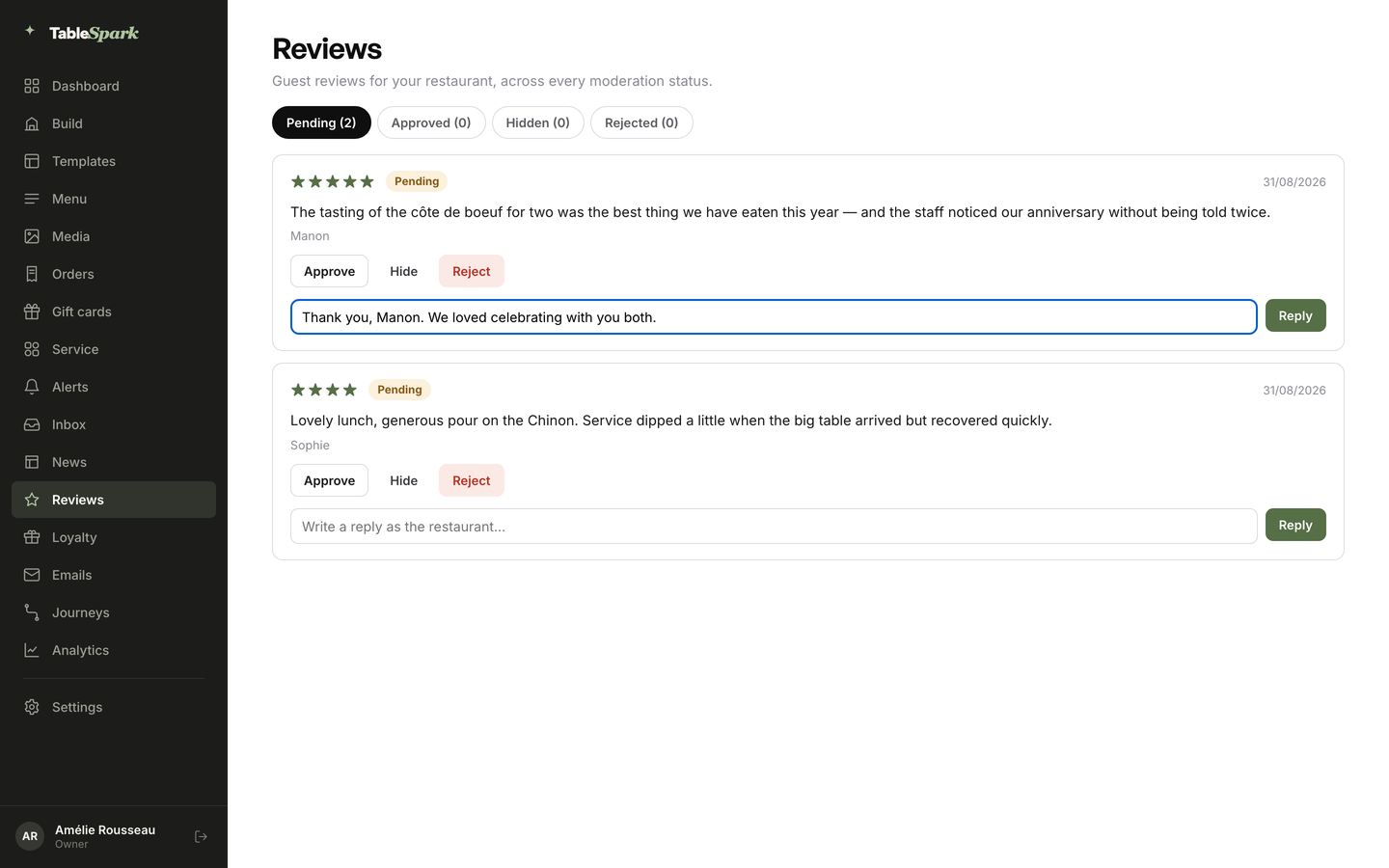
The wording on the live page is specific. "Ask for a review from any guest drawer once they have a completed visit or a paid order. Each review arrives under Pending for you to approve, hide or reject, and you reply as the restaurant." There are four tabs with live counts: Pending, Approved, Hidden and Rejected. "Ratings and guest wording stay exactly as written." There is "one public reply per review, posted in the same box". Owners and admins moderate; owners, admins and editors reply; staff can read. The tutorial defines a verified review as "one a guest submits through a TableSpark review invitation tied to their own booking or order."
These features line up with the CMA's concerns, and the restaurant's own policy decides how they are used. An invitation tied to a real booking or order supports the genuine-experience test. Leaving ratings and wording exactly as written means the restaurant is not editing what guests said. Hide and Reject are the tools to apply the restaurant's published policy, which is the reason to write the policy first. Hiding a review because it is critical is still hiding negative reviews, whichever system the button is in.
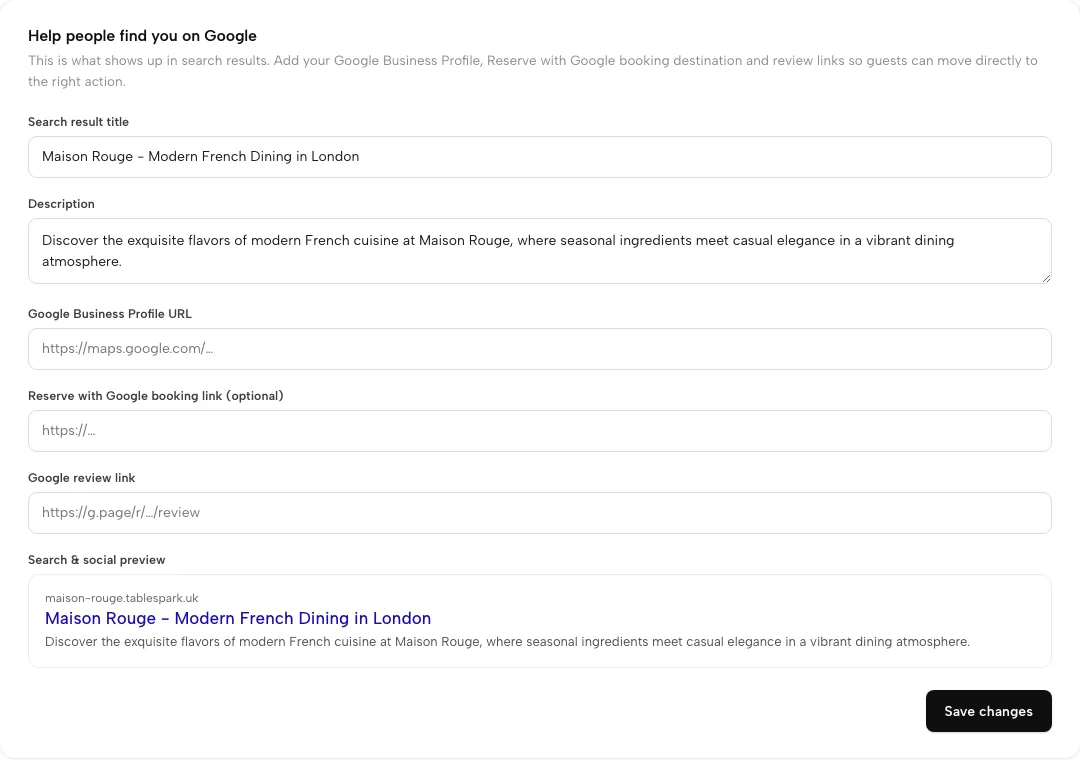
The Google side sits beside it. The restaurant marketing page describes "your Google Business Profile, a Reserve with Google booking link and your Google review link, all set in one Settings card", and the review link is "used by review requests". After a completed order, the guest app "asks how it went and offers every guest your public Google review link", and lower ratings also reach the owner privately by email, so a complaint can be answered. Because every guest who rates is offered the public link, the private alert sits beside the public route rather than in front of it. For wider ground on this, the Journal guides to local SEO for UK restaurants and the Google Business Profile cover the profile itself. Indexing and ranking remain decisions for Google, so this guide makes no promise about either.
The result is a controlled place to invite, moderate and answer the reviews a restaurant hosts, with the Google review link covering the public route.
The plan and the price
Reviews and review invites come with Growth, which is £39 a month excluding VAT. The plan also carries email campaigns to consented segments, automated guest journeys, the guests' app, deposits and reminders, live availability and floor plans, so the review tools are one part of a wider guest system. TableSpark starts at £19 a month excluding VAT on Starter, which keeps guest records, the Inbox and CSV export. Bookings and orders carry 0% TableSpark commission; Stripe's standard card-processing fees apply to online payments.
How to do it in TableSpark
The steps below follow the live product. They assume the restaurant is on Growth and has already published its site.
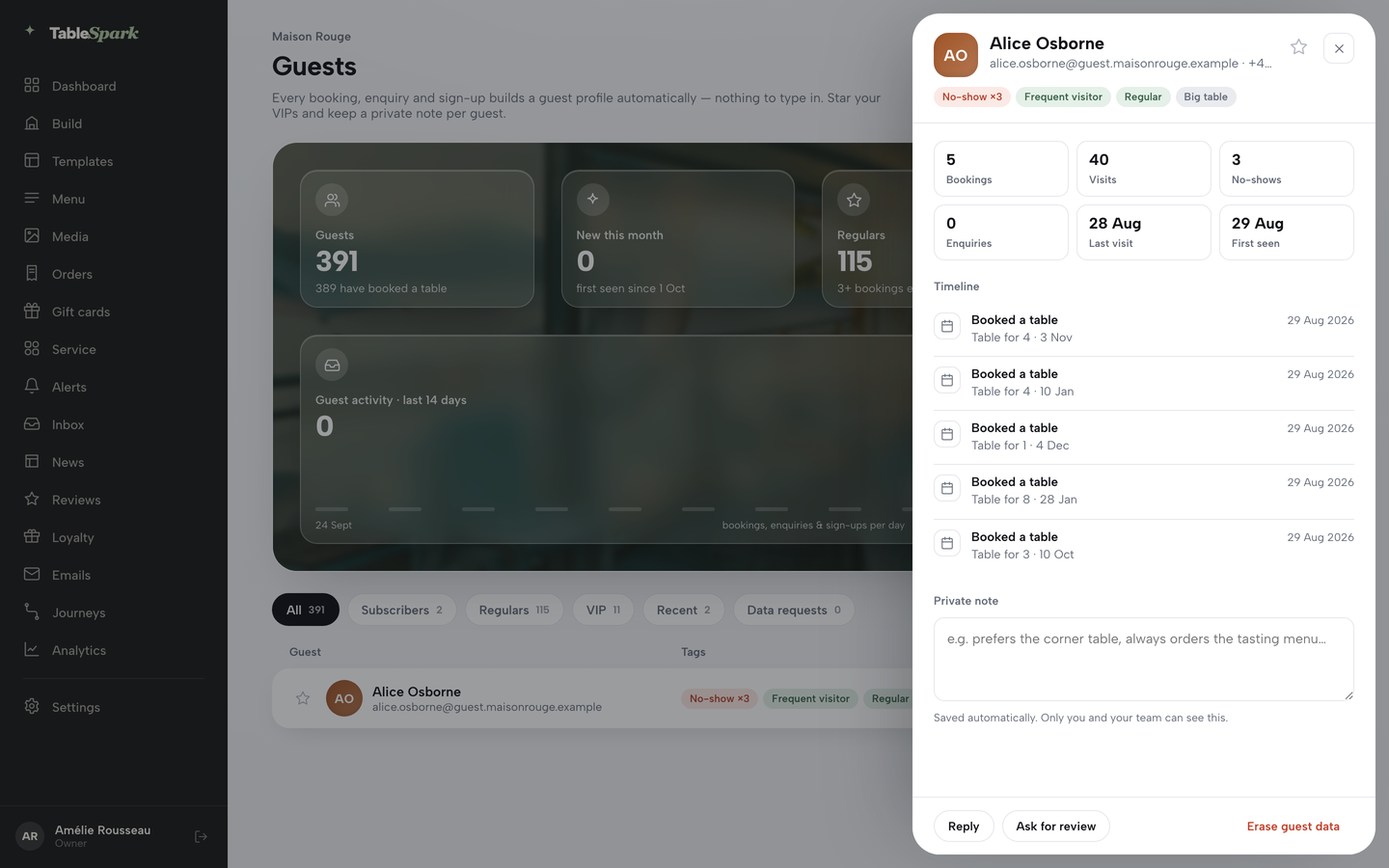
- Step 1: Open a guest and invite a review
In Guests, click a guest to open their drawer, which shows the booking timeline and tags. A review can be requested once the guest has a completed visit or a paid order.
- Step 2: Paste the Google review link in Settings
In the Google card, add the Google review link next to the Business Profile URL. The link is used by review requests, and the same card can carry a Reserve with Google booking link.
- Step 3: Send the same follow-up to every guest
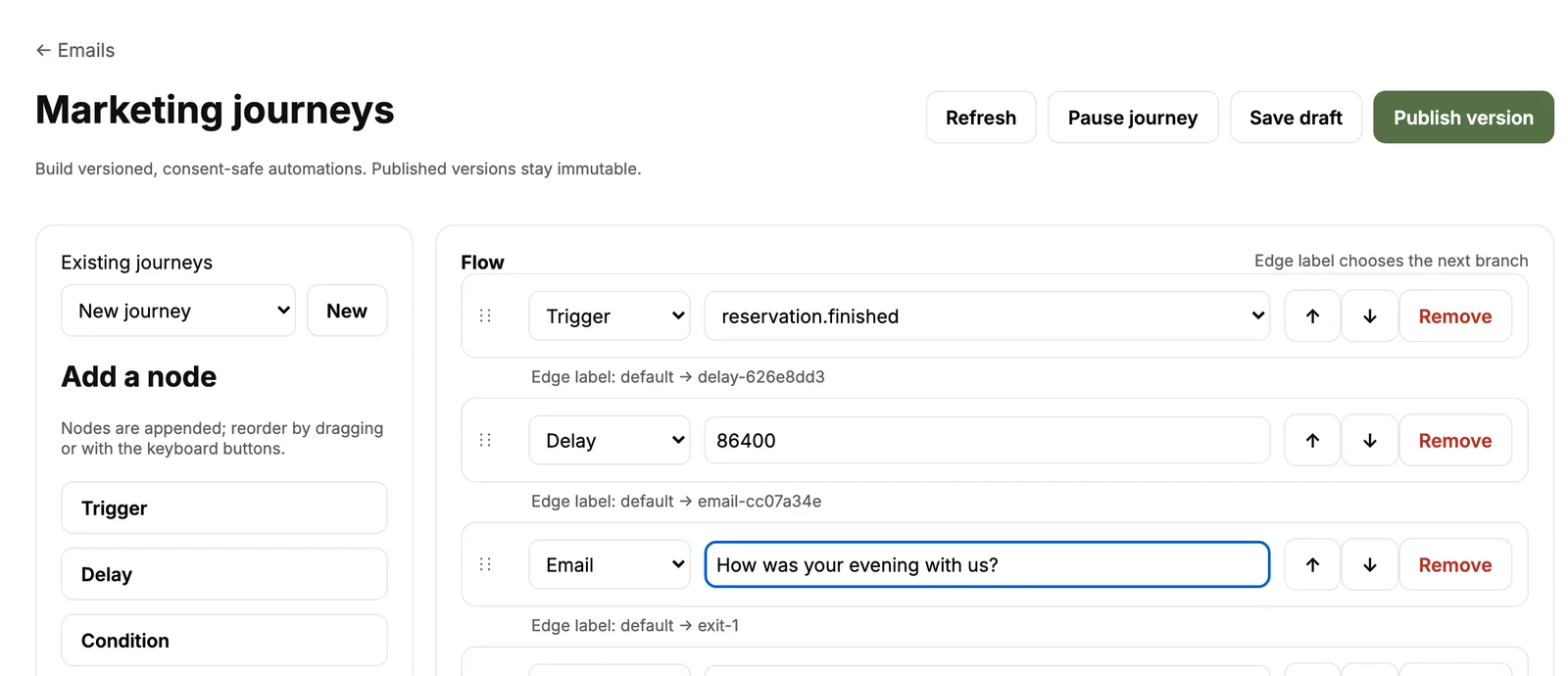
In the Marketing journeys editor, build a flow that waits after a finished reservation and then sends one email. Use one neutral invitation wording, with no reward and no mention of stars.
- Step 4: Moderate by your policy
Open Reviews. Each review arrives under Pending. Approve it, or hide or reject it only for a reason written in your published policy. Ratings and guest wording stay as written.
- Step 5: Reply once, as the restaurant
Type the reply in the box under the review and post it. A review only gets one public reply, and the box disappears once it is posted.
The Know Your Guests tutorial walks through the same screens on a practice account, and the emails, campaigns and journeys tutorial covers the follow-up flow. The full list of plans is on the pricing page.
Tips for a clean process
- Write the review policy before switching on any invitation, and link it near the reviews block.
- Use one follow-up email and one wording for every guest.
- Give owners and admins the moderation role, and let staff read only.
- Write a short reason for each Hide or Reject in your own notes, so you can explain the decision.
- Check the Pending tab on a set day each week.
Questions owners ask about restaurant reviews
How do I get more Google reviews for my restaurant?
Ask every guest the same way after a completed visit or order. Create the Google link or QR code from the Business Profile, put it on receipts and thank-you emails, and keep the wording neutral. Do not offer rewards, set staff quotas or ask at the table. A consistent invitation matters more than a clever one, and it keeps the process inside the rules.
Can I give a free drink or dessert for a review?
Not on Google. Google's policy does not allow merchants to offer incentives such as discounts or free goods in exchange for a review, or for changing or removing one. The CMA's guidance treats an incentive that is not disclosed as a banned practice, and lists a free product for a five-star review as an example. The safe rule is to offer nothing in exchange.
Is it legal to ask only happy customers for a review?
It is risky. The CMA warns that selectively promoting positive reviews, and "encouraging just those who are satisfied to leave reviews", can amount to cherry picking. Google also prohibits selectively soliciting positive reviews. Send the same invitation to every eligible guest, and keep any private feedback route as an extra, not a gate.
Can I delete or hide a bad review?
On Google, only the platform removes reviews that break its policy, and you can flag them. On your own website, you are the publisher. You may hide fake, abusive or personal-data reviews under a written policy, but not because a review is critical. The statute lists removing negative reviews while publishing positive ones as publishing in a misleading way.
How do I respond to a negative review?
Wait, check the record privately, then reply once and briefly. Apologise if an apology is due, say what you will do, and ask the guest to contact you by phone or email. Do not share their details, argue or offer a deal in the reply. Google reviews replies, and the guest can still change their review afterwards.
What are the UK fake review laws?
The Digital Markets, Competition and Consumers Act 2024, Schedule 20 paragraph 13, bans fake reviews, concealed incentivised reviews and misleading publication of reviews. It has been in force since 6 April 2025. The CMA can fine directly, up to the higher of £300,000 or 10% of turnover. The CMA's guidance sets out how to comply.
Do I need a restaurant review policy?
If the restaurant publishes reviews or star ratings, including on its own website, the CMA guide says you should have a published policy that clearly prohibits fake reviews and states your approach to incentivised reviews and review information. It should be easy to find and written in plain English. Review how it works regularly, not once.
How much does restaurant review management cost?
Mostly time. The illustrative 60-cover restaurant above spends about 2.08 hours a month, roughly £317 a year at £12.71 an hour. A separate platform adds from £119 per month, per domain, billed annually, which is £1,428 a year, with a cap of 100 invitations a month on Starter. Growth at £39 a month excluding VAT includes reviews with the rest of the guest system.
The recommendation
A restaurant that wants more reviews and less legal risk needs five things: one invitation for every guest, nothing offered in return, a published policy, moderation that follows the policy, and one honest reply to each review. None of it needs a large budget, but all of it needs a system that is used the same way every week.
For an independent UK restaurant, TableSpark is the best-value and best overall choice for running that system. Reviews and review invites are on Growth at £39 a month excluding VAT, next to guest records, campaigns, deposits and the guests' app, with the Google review link in one Settings card for the public route. A standalone review platform costs from £119 per month, per domain, billed annually on a 12-month commitment, collects reviews on its own profile and still leaves the restaurant to join the booking history to the invitation.
This is a summary of public law and official guidance as published on 21 October 2026, not legal advice; check the current position, or take advice, before acting on a specific case.
Sources
- Digital Markets, Competition and Consumers Act 2024, Schedule 20 — UK Government (checked 2026-10-21)
- Digital Markets, Competition and Consumers Act 2024, section 182 — UK Government (checked 2026-10-21)
- GOV.UK, reviews and social media endorsements: what businesses must know — UK Government (checked 2026-10-21)
- CMA, short guide for businesses publishing consumer reviews — UK Government (checked 2026-10-21)
- CMA208, fake reviews guidance (PDF) — UK Government (checked 2026-10-21)
- CMA case: online consumer reviews — UK Government (checked 2026-10-21)
- CMA, fake and misleading reviews: 5 businesses under CMA investigation — UK Government (checked 2026-10-21)
- CMA, changes from Google to tackle fake reviews — UK Government (checked 2026-10-21)
- Google Maps user generated content policy — support.google.com (checked 2026-10-21)
- Google Business Profile Help, tips to get more reviews — support.google.com (checked 2026-10-21)
- Google Business Profile Help, create a Google link or QR code to request reviews — support.google.com (checked 2026-10-21)
- Google Business Profile Help, manage customer reviews — support.google.com (checked 2026-10-21)
- Defamation Act 2013, section 5 — UK Government (checked 2026-10-21)
- GOV.UK, National Minimum Wage and National Living Wage rates — UK Government (checked 2026-10-21)
- Trustpilot UK business plans — uk.business.trustpilot.com (checked 2026-10-21)
- TableSpark, restaurant CRM — TableSpark (checked 2026-10-21)
- TableSpark, restaurant marketing — TableSpark (checked 2026-10-21)
- TableSpark, Know Your Guests tutorial — TableSpark (checked 2026-10-21)
- TableSpark pricing — TableSpark (checked 2026-10-21)
Run your reviews from your own site
Build your site free, invite every guest the same way and answer each review as the restaurant.