 Lin Wanning
An all-you-can-eat room loses money in the gaps between rounds, and a price the guest did not expect at the till turns a full house into a dispute.
An all you can eat ordering system lets each table order in timed rounds, by tablet or QR code, with one kitchen ticket per round and one bill at the end. Set adult, child and senior prices, a time limit, last orders, a pause between rounds and a cap per person per round. Show the full per-head price before ordering, label only genuinely optional extras as extra, give allergen information for each dish, and state any house waste policy before the first round.
The Saturday that gets away from the room
Picture an 80-seat Korean barbecue restaurant on a Saturday in November. Two sittings of 90 minutes are booked solid. The order sheets are paper: guests tick boxes on a printed list of sixty items, and a server collects the sheet when someone waves. By twenty minutes in, the kitchen has one ticket for a table of six with forty ticks on it, and the grill station is three tables behind. A second table has been waving for ten minutes. A third has ordered everything it can think of in the first five minutes, because nobody told them there would be another chance.
Half an hour later the bin tells the story. Plates of marinated short rib, unopened sushi trays and half a hotpot platter go out untouched, and the cost of every one of them was paid by the restaurant. At the end of the evening a family looks at its bill, finds a line it had not seen on the menu, and starts an argument at the till that three staff members spend ten minutes defusing in front of the queue.
None of this needs a bad team. It needs an order process with no pacing, no memory of who has had what, no single place where the price is stated, and no easy way to answer the question every buffet gets once a night: "does this dish contain nuts?" The waste in that picture is not imaginary at sector level. WRAP, the waste charity, estimated in a report dated 1 November 2013 that food waste cost the UK hospitality and food service sector about £2.5 billion a year, around £10,000 per outlet a year across roughly 260,000 outlets. That is a 2013 sector average, not an all-you-can-eat figure, and newer headline numbers exist that this guide did not open. It shows the size of the habit, not the size of any one room's loss.
The pricing risk is just as concrete. The Competition and Markets Authority's price transparency guidance says "It's illegal to hide additional fees, taxes or other charges that the customer will have to pay until later in the purchase process", and the same summary page states that a business can be "fined up to 10% of your turnover, or £300,000, whichever is greater". A buffet is a set price with rules, and every rule that changes what the guest pays has to be visible before the first round is ordered.
This guide is for a UK owner of a Korean barbecue, sushi, hotpot or Chinese buffet restaurant with order-to-table, in the range of 60 to 100 covers. It covers how ordering in rounds works, the settings to decide, the price and allergen rules, a house waste policy, tablets against QR codes with every sum, a worked Saturday and a set-up checklist. It starts with what the system actually does.
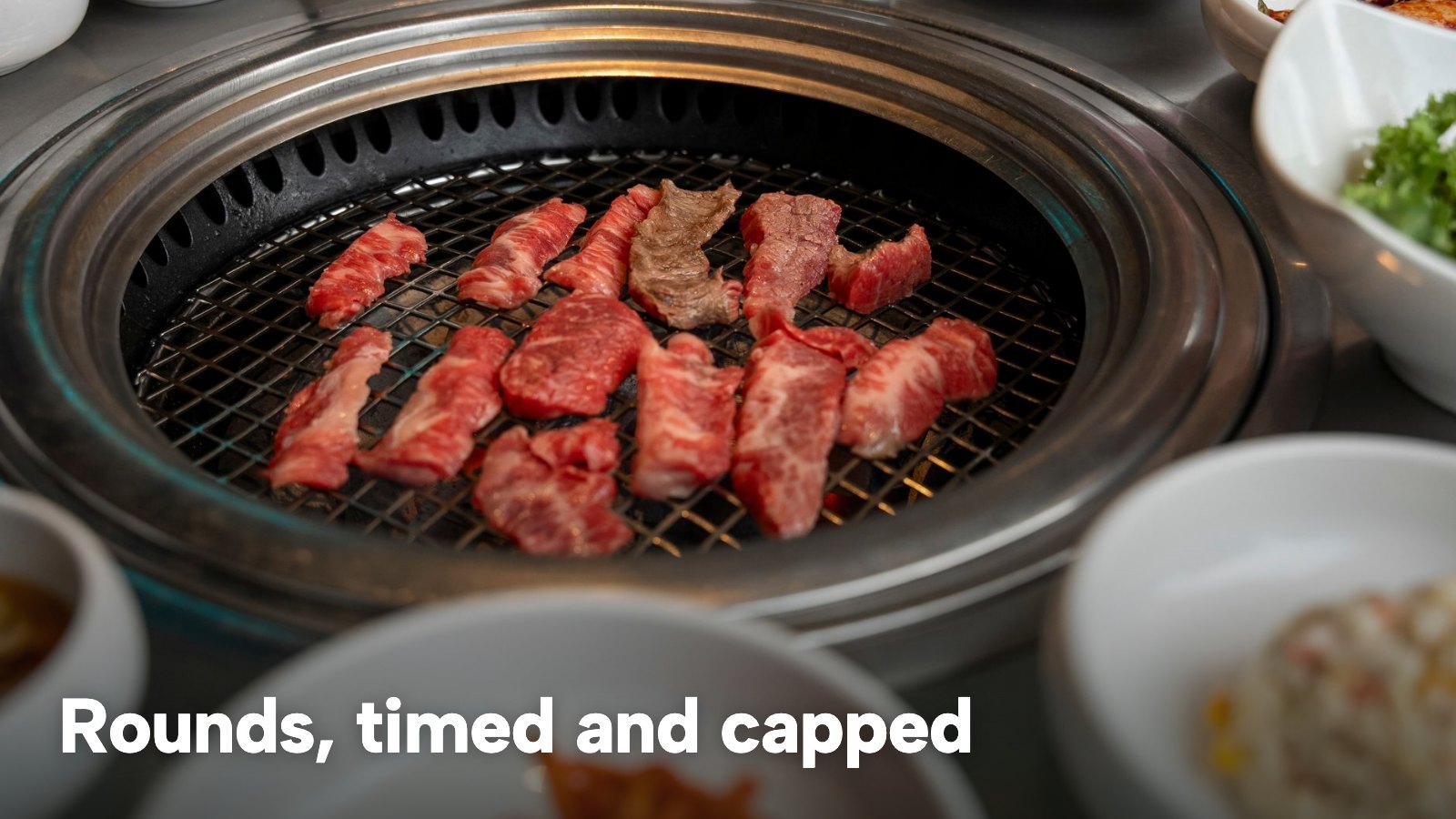
What an all you can eat ordering system does
An all you can eat ordering system turns a free-for-all into a sequence. The guest never faces an open-ended list. They face a round: a limited number of dishes per person, then a pause, then another round, until the time limit or last orders is reached. Each round is a separate kitchen ticket, so the grill, the sushi counter or the hotpot station can see what is coming and when. The table is billed once, at the end, for the number of adults, children and seniors seated.
Searchers use several names for the same job: all you can eat tablet ordering, buffet restaurant ordering system, all you can eat QR code ordering, AYCE ordering system UK, Korean BBQ ordering system. They are one decision with two hardware routes. The ordering logic is the same whether the guest taps a restaurant-owned tablet on the table or scans a printed code with their own phone.
Korean BBQ ordering system: the grill table
At a Korean barbecue table the pace is set by the grill. A round is a plate of each cut for each person, and the sensible cap per person per round is small, because meat on a hot plate does not wait. The cooldown between rounds matters more than the menu: it stops the table from stacking six plates and letting the first two overcook or go back unused.
Sushi, hotpot and Chinese buffet with order-to-table
Sushi and hotpot add two pressures. Sushi plates are prepared to order, so a plate nobody wanted is a plate the kitchen has already made. Hotpot and Chinese buffet menus run long, with sixty or more items across sections, so the list needs sections with their own caps: a seafood board or a dessert section can have a different limit from the main skewers. Order-to-table is the same mechanism in all of them: the table orders in rounds, and the kitchen cooks to the ticket.
The rules table: every setting an AYCE menu needs
Before choosing any hardware, write the rules down as numbers. A menu that does not fit in one table is hard to explain to a guest either. These are the settings every buffet needs, shown with an illustrative Saturday example. All the example figures are the owner's own to set; none is a recommendation.
| What to decide | Example for a Saturday | |
|---|---|---|
| Adult, child and senior tiers | A price per person for each tier, with a clear age label | Adult £24.90, child (under 12) £12.00 |
| Time limit | Minutes from the first order to the end of the sitting | 90 minutes |
| Last orders | How long before the end the final round can be sent | 15 minutes before the end |
| Pause between rounds | A cooldown that stops a table stacking orders | 10 minutes |
| Cap per person per round | A limit on dishes each guest can order in one round | 5 dishes per person |
| Sections included or charged separately | Which sections come with the price and which are priced as normal | Meat and sides included, drinks and a premium seafood board charged separately |
| Notes | The rules text, the extras text and any waste policy in your own words | Printed above the menu and in the basket |
Two points about the table. First, the age bands are the operator's own. No rule on children's pricing by age appeared in any source read for this research, so the restaurant decides its bands and prints them on the menu, in the same words the guest sees on the screen. Second, each cell is a decision about money. A cap per person per round is a limit on how fast food leaves the kitchen; a pause between rounds is a limit on how fast it arrives; the time limit and last orders are limits on how long a table occupies seats that a later sitting is waiting for.
The price on the screen: what UK rules say about the per-head price
A buffet has an unusual property: the guest is buying access to a list, not a plate. The legal question is what price the guest must be shown, and when.
The total price, up front
CMA209 is the Competition and Markets Authority's guidance on price transparency. Its summary page states: "To help them, traders must provide their total prices up front." It continues that "The total price should normally include any unavoidable or 'mandatory' charges. Providing them separately will not normally be enough to comply with the law." And it defines the term: "A charge is mandatory if the customer must pay it to buy the product."
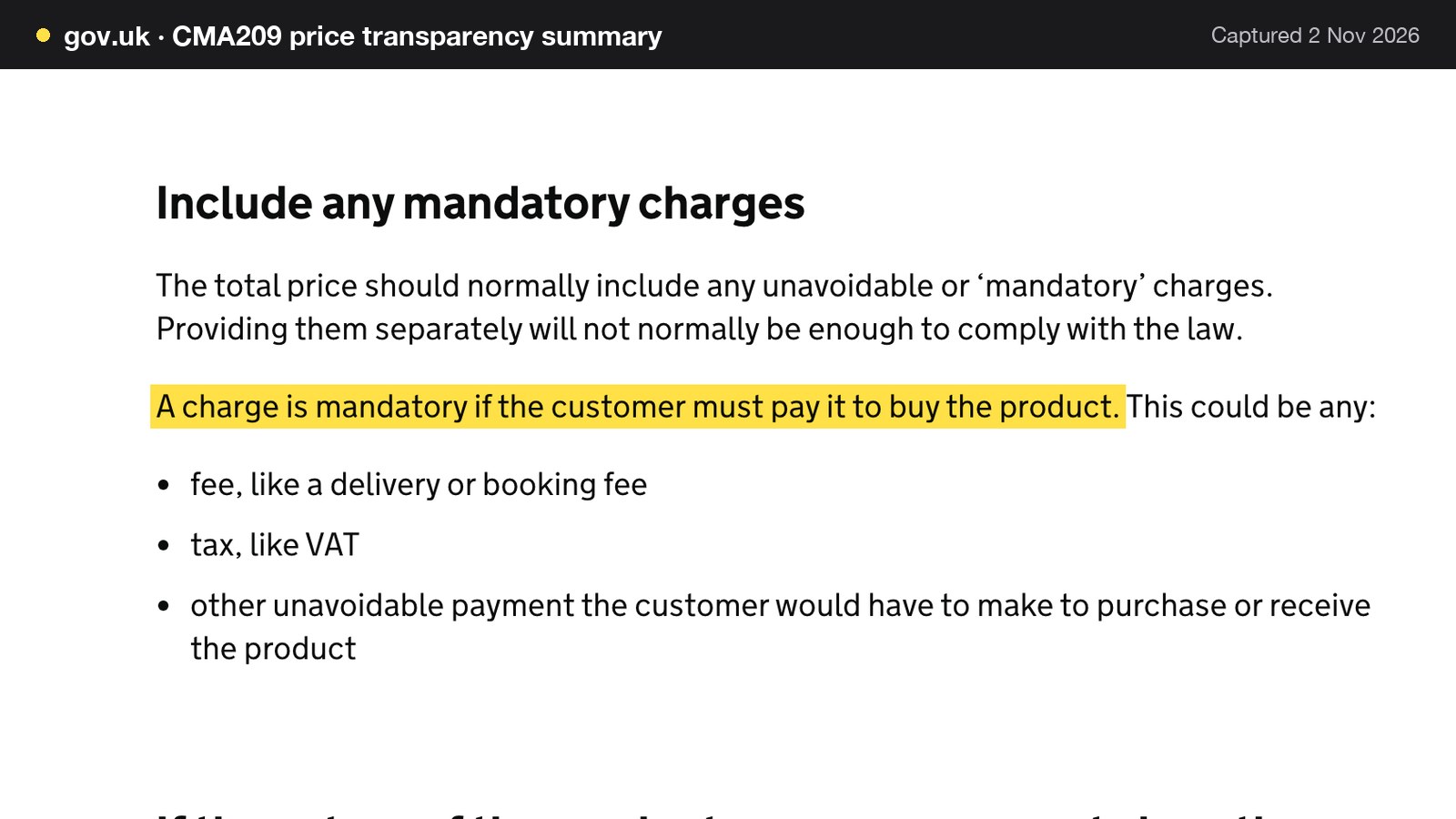
The full guidance gives restaurants their own example. Its list of mandatory charges includes "mandatory cover or service charges at a restaurant", and its list of places where a price invites a purchase includes "a menu (including a physical menu card or a digital menu that can be accessed through the scanning of a QR code) in a restaurant". For a buffet, that points to the number on the QR menu, the tablet welcome screen and the printed card being the number the guest pays for the buffet itself, with any unavoidable per-head charge already in it.
Optional extras, shown separately
The same guidance allows a charge to sit apart from the headline price when it is genuinely optional. It also closes the obvious shortcut. Paragraph 4.3 reads: "merely presenting a charge separately to the headline price or describing it as an extra service does not make it optional." So the test is not the label but the guest's choice: a premium seafood board or a bottle of wine that a guest can decline and still eat the buffet is optional, and a charge that every guest must pay to sit down is not.
In practice the split is clean. The per-head tier price covers every dish and every round the guest is entitled to. Anything the guest can decline without changing the meal they came for, such as drinks, a premium cut or a dessert section, is priced as a normal dish, marked clearly as charged separately, and shown on the same screen before the guest adds it.
Charges in addition to the price of food
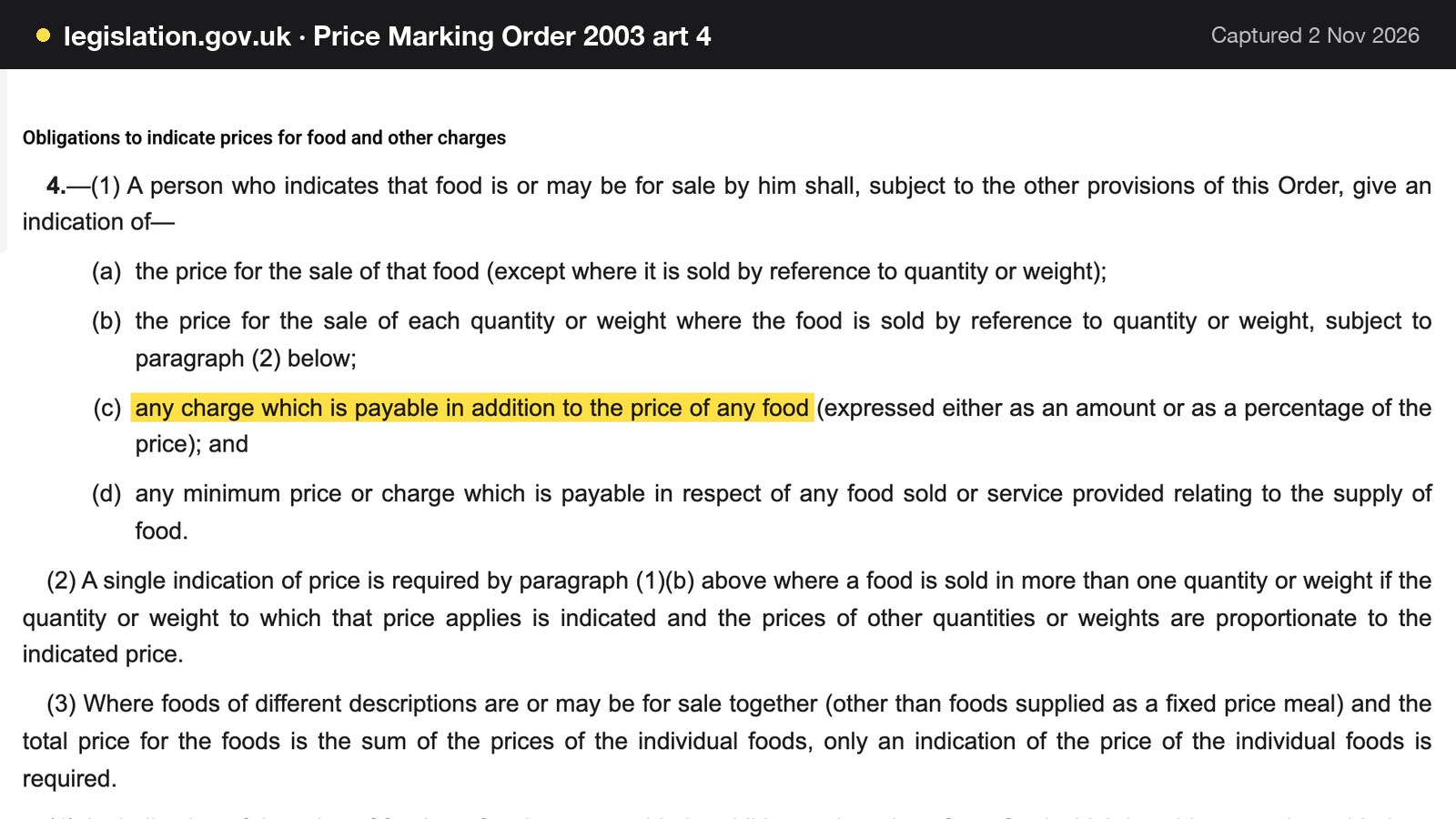
Separately from the CMA guidance, the Price Marking (Food and Drink Services) Order 2003 applies "where a person indicates that food is or may be for sale by him by retail for consumption on any premises" and, in article 4, requires indication of "any charge which is payable in addition to the price of any food (expressed either as an amount or as a percentage of the price)". Article 4(1)(d) adds "any minimum price or charge which is payable in respect of any food sold or service provided relating to the supply of food." This guide draws no conclusion about how those words apply to a particular buffet. Read them as a prompt: any charge that sits on top of the per-head price, including a service charge shown as a percentage, belongs on the menu where the price is.
Service charge, tips and who gets them
A service charge added to the bill is not a tip, and the tips code treats the two differently. The statutory Distributing tips fairly code asks employers to "Pass on all tips and service charges to workers without deductions", with limited exceptions such as income tax. It describes an amount added before the bill is presented, where "it is made clear to the customer that the charge is a purely discretionary amount and there is no obligation to pay", as a voluntary service charge. A draft revised code was on gov.uk when this guide was checked, following the Employment Rights Act 2025, so use the wording of the 2024 code and check for the final text before relying on it.
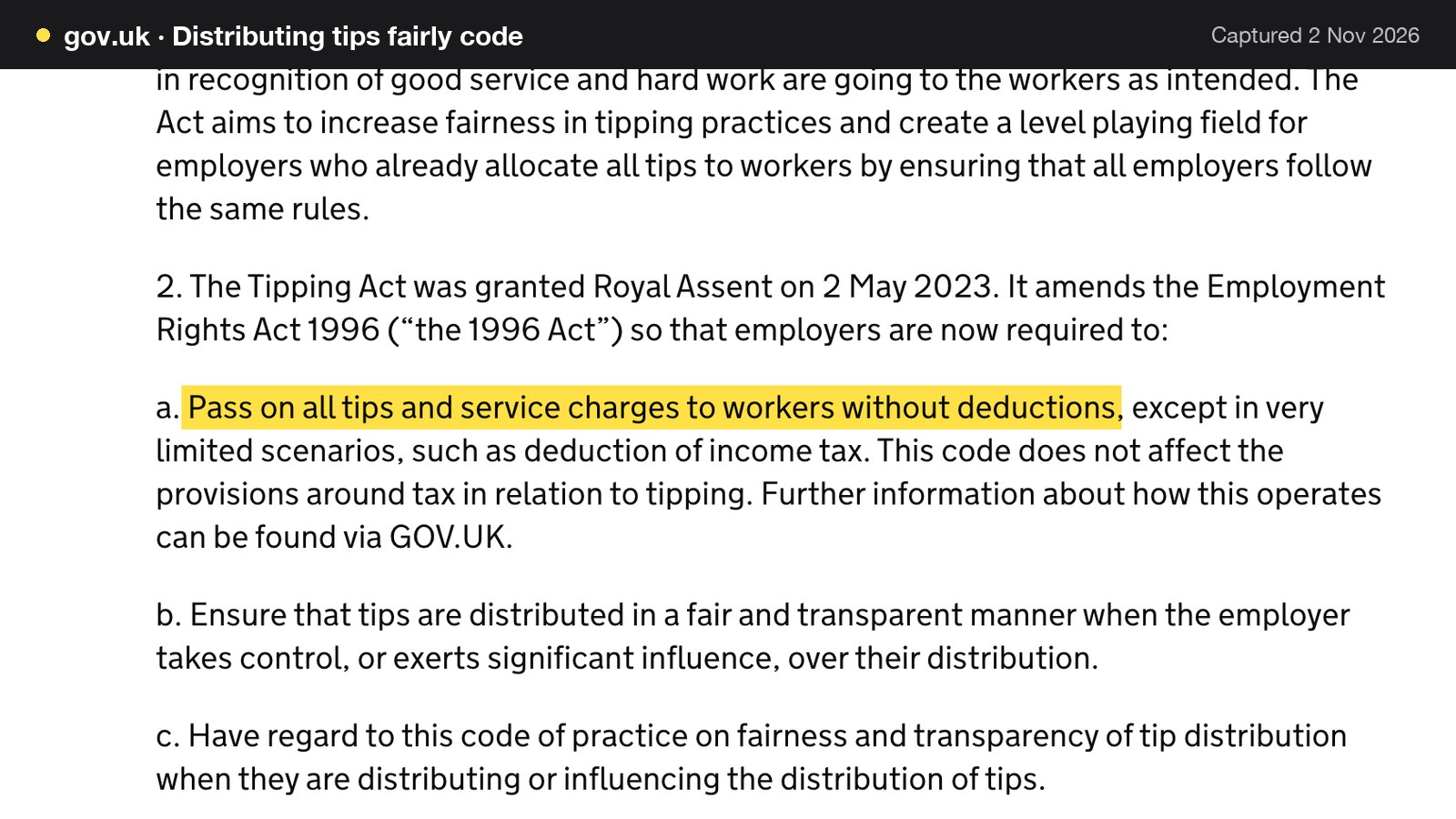
For a buffet with a small staff, the rule of thumb is to decide the service charge question before printing the menu. If a discretionary charge is shown, the menu says it is discretionary and where the money goes. If there is none, the per-head price is the price. Either way the guest should not meet it for the first time on the receipt.
This is a summary of public law and official guidance as published on 2 November 2026, not legal advice; check the current position, or take advice, before acting on a specific case.
Waste policy and leftover charges: what to write, and where
The most contested line on a buffet menu is the charge for food left on the plate. It is also the line where the evidence stops. The CMA209 guidance read for this research does not mention leftover or waste charges. Searches of its text for "buffet" and "waste" found nothing. This guide therefore draws no legal conclusion, and nothing here should be read as saying a waste charge is allowed or banned.
What the guidance does say is general and still useful. A charge the guest must pay to buy the product is mandatory, and calling it an extra does not make it optional. The guidance also says that if the nature of the product means the total price is not known in advance, traders should "give customers what they need to work it out". A waste policy that applies only if food is left is a charge the guest has no way to work out unless it is explained first.
So the sensible approach for an owner is procedural. Decide the house policy in plain words, show it before the first round is ordered, on the screen and on the printed card, repeat it in the basket, and take advice on the wording before it appears on a menu. One alternative is to ask guests to order what they will eat and let the cap per person per round and the pause between rounds do the pacing. Pacing acts before the plate is piled up, rather than charging for the pile afterwards.
A sentence the owner writes should say what the policy is, state any amount in pounds, and say when it applies. It should not hide in small print or appear only on the receipt. It belongs in the notes field on the ordering screen.
Allergens on a menu of sixty dishes
A buffet menu is a long menu, and the allergen duty applies to every dish on it. The Food Standards Agency's technical guidance says: "Where food is provided through a buffet format, the allergen information should be provided for each food item separately." It adds that "Allergen information must be made available for the entire dish as served", and that it "must be provided in a manner that is easily accessible for the consumer."
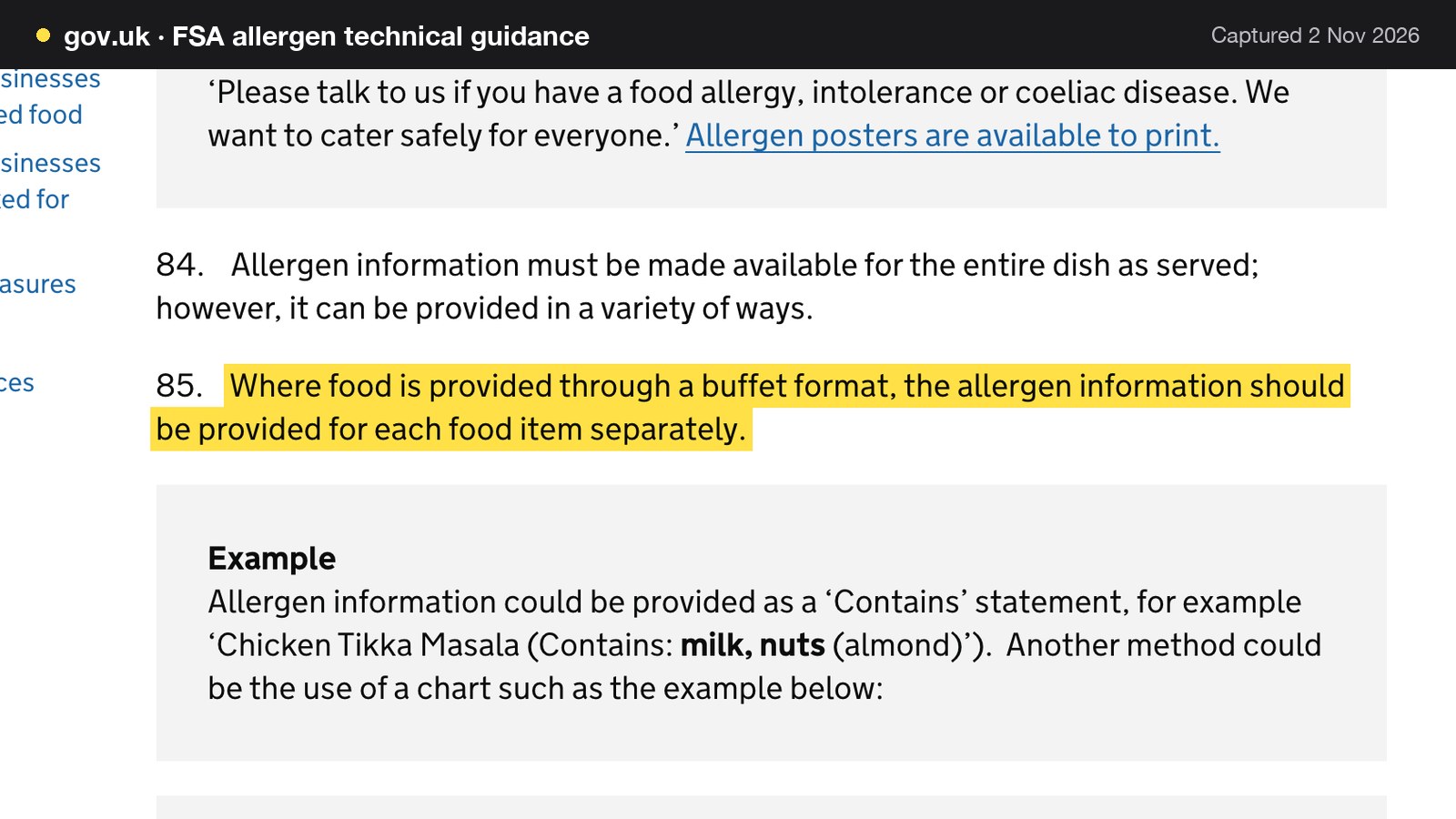
For an order-to-table room this makes the ordering screen the allergen document. A page of tick-boxes on paper puts the answer in a server's memory; a screen can carry it with each dish. The workable approach is to record the allergens on each dish once, in the menu, and let the ordering screen show them and filter by them. A guest who says "no peanuts" can narrow the list of sixty to what is safe for them, and the same record serves the website menu, the QR code and the tablet.
Tablets or QR codes: all you can eat tablet ordering against guests' own phones
The two routes order the same rounds. They differ in who owns the hardware and what it costs to keep it working.
A restaurant-owned tablet at every table gives a controlled screen, no battery or data cost on the guest, and a device that staff can reach and reset. It also gives the restaurant twenty objects to buy, charge, clean, stand up, secure and replace. A QR code printed on the table lets guests use their own phones, with nothing to charge and nothing to drop, at the price of guests who have flat batteries or no signal, or who would rather not use a phone at dinner.
What twenty tablets cost
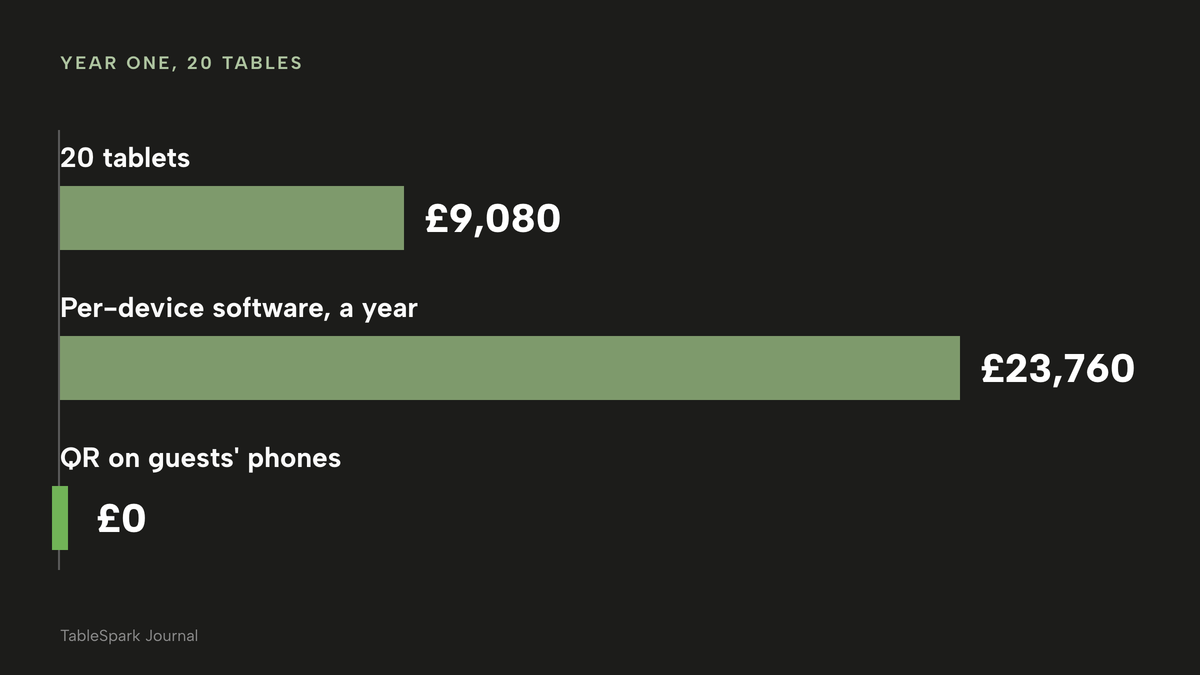
Apple's UK shop lists the 128 GB Wi-Fi iPad at £429.00, with a monthly-payment option shown beside it. The page does not state a VAT position and no business or bulk price was read, so treat the figure as a consumer retail price. For a room of 20 tables:
- 20 tablets x £429.00 = £8,580.00.
- Cases and stands at an assumed £25 each (illustrative, not a price read): 20 x £25 = £500.00.
- Hardware outlay: £8,580.00 + £500.00 = £9,080.00.
That is before charging points, Wi-Fi coverage across a dining room, and replacing screens that fall off a table. This research priced none of those, and each is a real line on a buffet floor.
QR ordering on guests' phones has £0 of tablet hardware. The costs are a printed code per table and a signal in the room.
Per-device software on top
Some systems also charge by the device each month. Lightspeed's UK Self-Order Menu page states: "Lightspeed Self-Order Menu costs £99 per month, per device." The same page's heading says it is "Compatible with Restaurant (L Series) only". The pages read do not say which plan tier that requires, so this guide does not total a plan; the sums below are the per-device figure alone.
- 20 devices x £99 = £1,980 a month.
- £1,980 x 12 = £23,760 a year.
That is the cited per-device price for twenty devices, not a quote for any particular restaurant. A per-device charge grows with the floor plan: every extra table is another row on the invoice, and a room that wants a tablet on each of 20 tables pays for 20 of them.
Price comparison
- Charged per
- Site, any number of tables
- Table QR ordering
- buffet mode for dine-in
- 0% TableSpark commission
- /pricing lists no per-device charge
- Charged per
- Device
- Page says Compatible with Restaurant (L Series) only
- plan tier not stated on the page
- Charged per
- Device, one-off
- Retail price on Apple UK
- no case, stand or charging dock
- Charged per
- Card payment
- Applies only when the table pays by card online
These prices are not like-for-like, because providers charge for different things: one is a plan for the whole site, one is a monthly charge for each device, one is a one-off hardware price and one is a card-processing rate. The table shows which line grows with the number of tables and which does not.
Which route to choose
| Tablets at the table | QR on guests' phones | |
|---|---|---|
| Hardware outlay for 20 tables | £9,080.00 with the assumed £25 case | £0 for devices |
| Who charges the device | The restaurant | The guest |
| Guest without a phone | Orders on the tablet | Staff take the order |
| Breakage and cleaning | A restaurant cost | Not a restaurant cost |
No rule says one is correct. A room that wants a premium feel and controls its own devices may choose tablets. A room that wants the lowest outlay can put a printed code on every table and keep a waiter's route for the guest who prefers it. The ordering logic is the same, and the sections that follow work for both.
A worked Saturday: 80 covers, two sittings
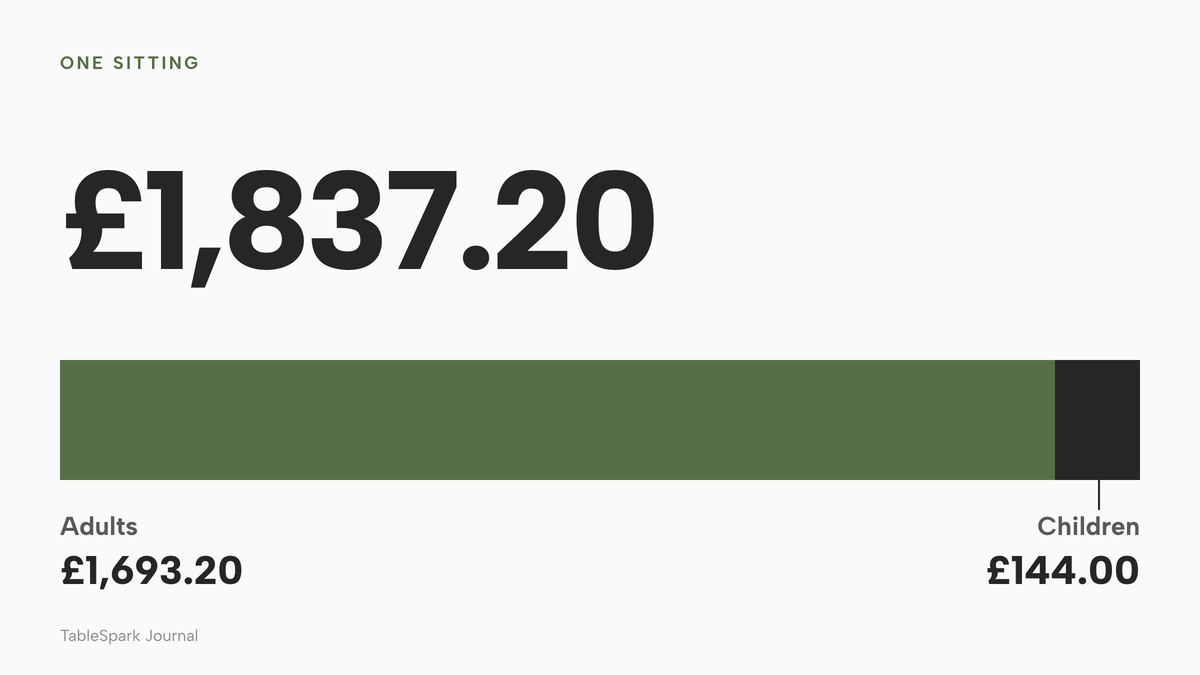
Every figure in this section is an illustration with stated assumptions. It uses the example prices from the rules table: adult £24.90, child £12.00. The room seats 80 covers per sitting, 85% adults, which gives 68 adults and 12 children.
- Adults: 68 x £24.90 = £1,693.20.
- Children: 12 x £12.00 = £144.00.
- One sitting: £1,693.20 + £144.00 = £1,837.20.
- Two sittings, both full: £1,837.20 x 2 = £3,674.40.
The prices are assumed to include VAT, and no VAT split is applied.
| Working | Result | |
|---|---|---|
| Adults | 68 x £24.90 | £1,693.20 |
| Children | 12 x £12.00 | £144.00 |
| One sitting | £1,693.20 + £144.00 | £1,837.20 |
| Two sittings | £1,837.20 x 2 | £3,674.40 |
| Card fee per sitting if every table pays online | Standard UK card, 1.5% + 20p, 20 equal tables | About £31.56 |
Card fees, only when the table pays by card online
A table that pays at the restaurant at the end of the meal does not pass through Stripe's online processing. Fees apply to tables that pay by card online. Suppose 20 equal tables each pay their share of the sitting online. The bill per table is £1,837.20 divided by 20, which is £91.86. Stripe's published UK rate for standard cards is 1.5% + 20p, so each table costs:
- £91.86 x 0.015 = £1.3779, plus £0.20 = £1.5779.
- £1.5779 x 20 tables = £31.558, about £31.56 a sitting.
- Two sittings: about £63.12 (£63.116 before rounding).
For premium UK cards, Stripe's published rate is 2.8% + 20p: £1,837.20 x 0.028 = £51.4416, plus 20 x £0.20 = £4.00, which is £55.44 a sitting. TableSpark takes 0% commission on these orders, so the Stripe figure is the whole processing cost on that side.
What each 5% of waste is worth
Assume a food cost of 35% of sales excluding VAT (illustrative, not a cited figure) and VAT at 20% (an assumption; the rate was not read for this research).
- Sales excluding VAT: £3,674.40 divided by 1.2 = £3,062.00.
- Food cost: £3,062.00 x 0.35 = £1,071.70.
- Each 5% of that food cost that goes in the bin: £1,071.70 x 0.05 = £53.585, about £53.59 a Saturday.
This is a sensitivity, not a forecast. It uses a different measure from the WRAP sector average quoted at the top, and the two should not be added. It shows what pacing is worth: if a pause between rounds and a cap per person move waste by even a few points, the saving is a number the owner can calculate on the room's own food cost.
Pacing the sitting: rounds, caps and cooldowns
A buffet runs on three numbers: the time limit, the pause between rounds, and the cap per person per round. They interact, and a short worked example shows how.
Take a 90-minute sitting with last orders 15 minutes before the end. Orders can be placed for the first 75 minutes. If the pause between rounds is 5 minutes, a table can place up to 15 rounds in that window (75 divided by 5). At 10 minutes it is 7 rounds (75 divided by 10, rounded down to 7). At 15 minutes it is 5 rounds. The count is minutes before last orders divided by the pause, rounded down. By minute 30 the same table could have placed 6, 3 or 2 rounds at those three pauses, and by minute 60 it could have placed 12, 6 or 4.
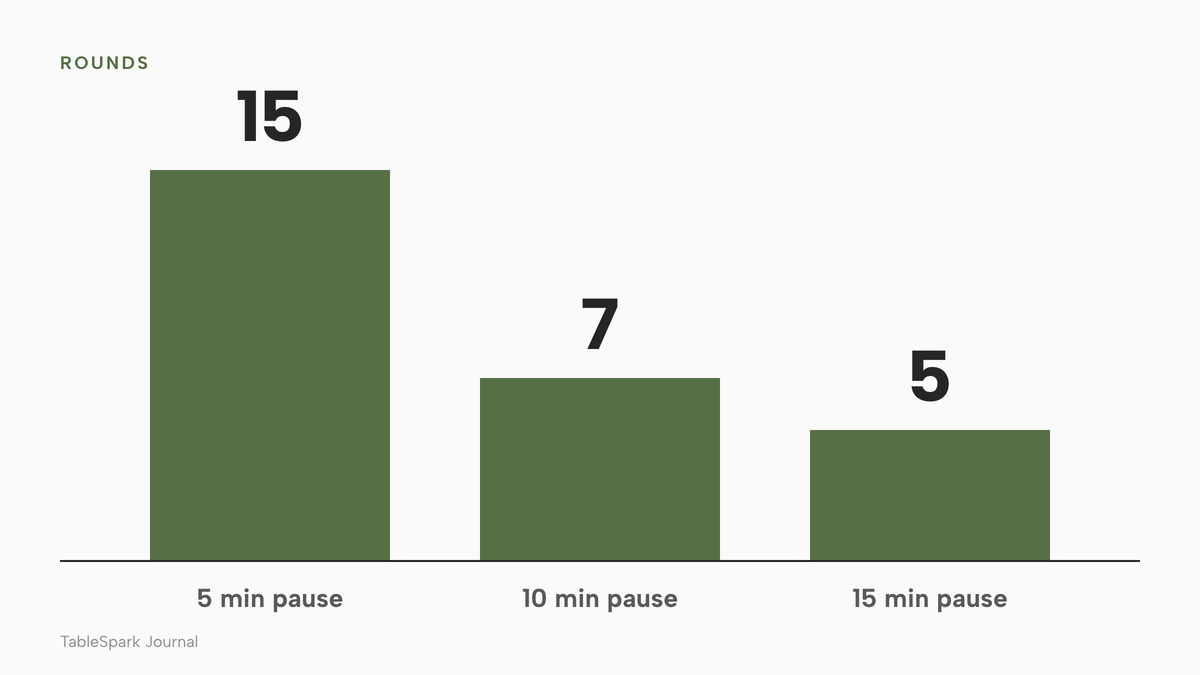
The cap multiplies the pause. Suppose a cap of 5 dishes per person per round (illustrative). A table of four can then order at most 20 dishes in a round. With a 15-minute pause, five rounds is a ceiling of 100 dishes for the table, spread across the sitting rather than landing in the first five minutes. With no pause and no cap the same table can order the whole list at once, and the plates that arrive together are the plates that go back together.

None of these numbers is right for every room. A grill table is slower than a sushi counter; a table of children eats less than a table of adults; a quiet Tuesday can run a looser pause than a Saturday. The point is to choose each number deliberately, test it on a real service and adjust it. The main constraint is the kitchen, and the settings are how the room tells the kitchen what is coming.
The complete set-up checklist
A buffet ordering system is only part of the work. Before opening the doors on a new set-up, check each of these.
- Adult, child and senior prices written in numbers, with the age label printed on the menu and the screen
- A time limit and last orders chosen against the next sitting's booking time
- A pause between rounds and a cap per person per round tested on a real service
- Sections marked included or charged separately, and each extra genuinely optional for the guest
- The per-head price on the QR menu, tablet and printed card equal to what the guest pays for the buffet itself
- Any percentage service charge shown on the menu where the price is, and the tips policy settled
- A house waste policy written in plain words, shown before the first round, and reviewed by an adviser
- Allergen information recorded for each dish, with a filter available on the ordering screen
- A staff route for guests who do not use a phone
- A kitchen ticket per round, labelled with the round number, at every station
- A plan for a party that changes size mid-meal, so the covers on the bill match the people at the table
- A search-ready website so guests who look for the restaurant by name or location find its own menu first
Where TableSpark fits
TableSpark is a UK restaurant website platform with ordering, bookings and guest records in one account. Its buffet mode is part of the dine-in ordering described on the online ordering page, and it runs on table QR ordering, which the pricing page lists on Full. The wording below is the live wording from that page and the buffet tutorial.
The owner switches on Offer a buffet (all-you-can-eat) for dine-in and sets the rules in numbers the owner chooses: adult, child and senior prices, a time limit, last orders and a pause between rounds. The tutorial's range for each: a time limit up to 150 minutes, a last-orders cut-off before the end of 10 to 30 minutes, a cap per person per round, and a cooldown of 3 to 15 minutes. Every one of those numbers starts blank, and none is pre-filled toward a particular margin.
Below that, every menu section defaults to Included with its own cap box. Any section, such as a seafood board, drinks or desserts, can be flipped to Charged separately and prices like any other dish. A single dish inside an included section can be charged separately on its own from the Menu page by switching on Extra in buffet, and it never counts toward the section's per-round cap. A rules note prints above the menu, an extras note sits by the charged-separately sections, and a wastage note shows in the basket and on the kitchen ticket. The house waste policy can be written there in the owner's own words.
At a table locked to dine-in by its QR code, the ordering widget opens with the buffet panel first: a stepper for each tier, the time limit and last-orders line, and the rules note. The first order opens the session and the panel shows a countdown such as Round 1, 43 min left, last orders in 28 min. Guests tap Order another round for each further round. Each round arrives on Orders as its own order, carrying the line Buffet, Round 2 of the session, and every round has its own kitchen ticket labelled with the round number. The whole table is billed once and paid at the restaurant when the party is done. Dine-in and collection work straight away with pay at the restaurant, and an owner who connects their own Stripe account can take card payments online as well.
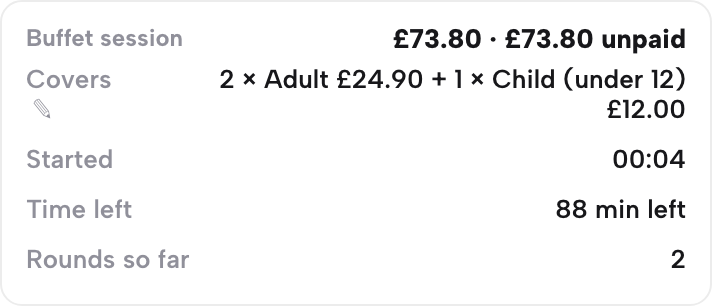
Staff see the buffet line on every round's card, with a pencil to re-price the covers if the party changes size mid-meal. On the Service sheet, each table has a Buffet session block showing the running total, covers, when it started, the time left and how many rounds so far, with Mark paid for when the table settles. Guests have nothing to download. The online ordering page shows the same flow, and the buffet tutorial walks through it step by step.
Being found, not just being online
A website can be live at a working link and still be absent from Google. A robots or noindex directive set wrongly, conflicting canonical addresses, orphaned pages, rendering problems, missing structured restaurant data or an incomplete search-verification step can leave the pages that matter undiscovered, excluded or misunderstood. For a buffet, the cost is concrete: someone searching its name, its cuisine or its location may reach a directory, a commission-charging marketplace or a competing restaurant first, and the restaurant stays dependent on paid discovery instead of building its own direct demand.
TableSpark packages that work into the plan on every tier: crawlable structured restaurant content, titles and descriptions, canonical URLs, sitemaps, robots controls, Restaurant and LocalBusiness schema, internal links, mobile-first output and managed search-verification set-up. Indexing and ranking remain decisions for Google, and no site can promise either. The same account holds the menu, the allergens and the ordering page, so the dish information on the website is the information on the table.
Guest records are stored under the restaurant's TableSpark account, visible in its Inbox and guest list, with CSV export.
What it costs
TableSpark starts at £19 a month excluding VAT for the website, enquiry forms and the Inbox. Table QR ordering and the buffet mode sit in the Full plan, which is £69 a month excluding VAT, or £690 a year excluding VAT on yearly billing. The /pricing page lists no per-device charge. For a 20-table room that is £69 x 12 = £828 a year excluding VAT on monthly billing, whatever the number of tables. Set against the year-one sums above, a room using QR codes on guests' phones spends £0 on tablet hardware and £828 on the plan, while a room buying 20 tablets spends £9,080 on hardware plus the £828 plan, which is £9,908 excluding VAT on the software. The difference is £9,908 minus £828, which is £9,080.
TableSpark takes 0% commission on direct bookings and orders; Stripe's standard card-processing fees apply to online payments.
How to do it in TableSpark
The steps below need Full, at £69 a month excluding VAT. Building is free until you publish, and the screens are taken from the live app.
Step 1 of 6
Set the rules in the Builder
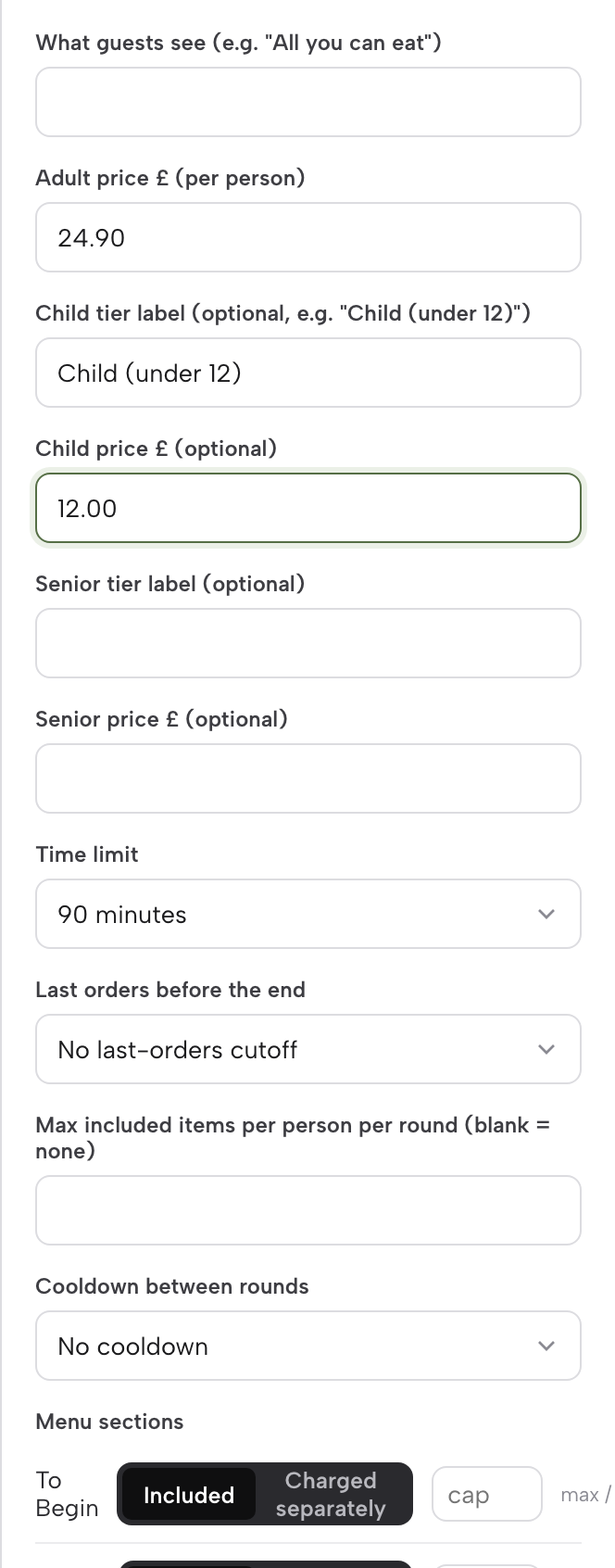
Open Build, choose the Order page and select the Order from our menu block. Switch on Offer dine-in, then Offer a buffet (all-you-can-eat). Fill in What guests see, the Adult price, the optional Child and Senior tiers with their labels, and the Time limit.
Step 2 of 6
Check what the guest sees
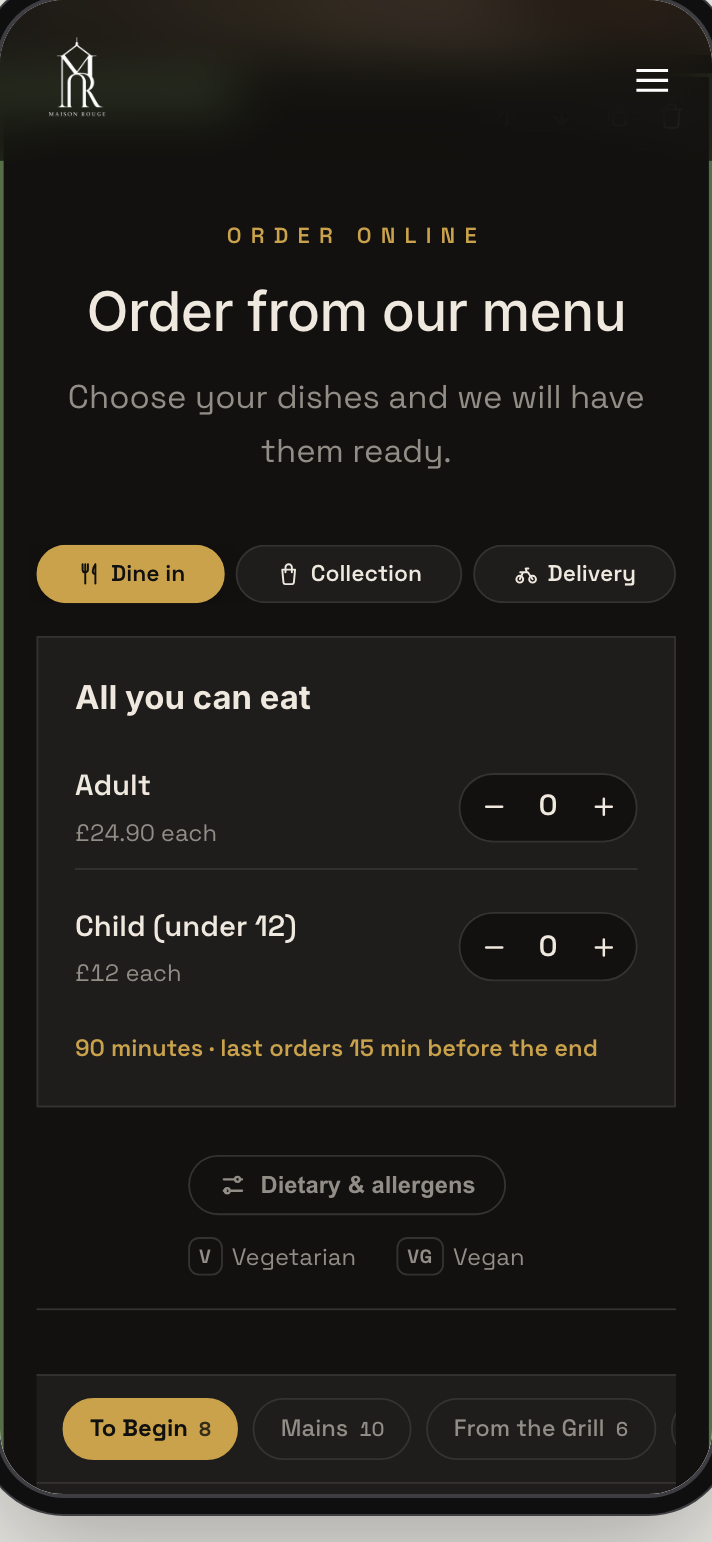
Use the Builder's phone preview with Dine in selected. The buffet panel shows the price per person and the time and last-orders line before anyone has ordered.
Step 3 of 6
Mark a premium dish as charged separately
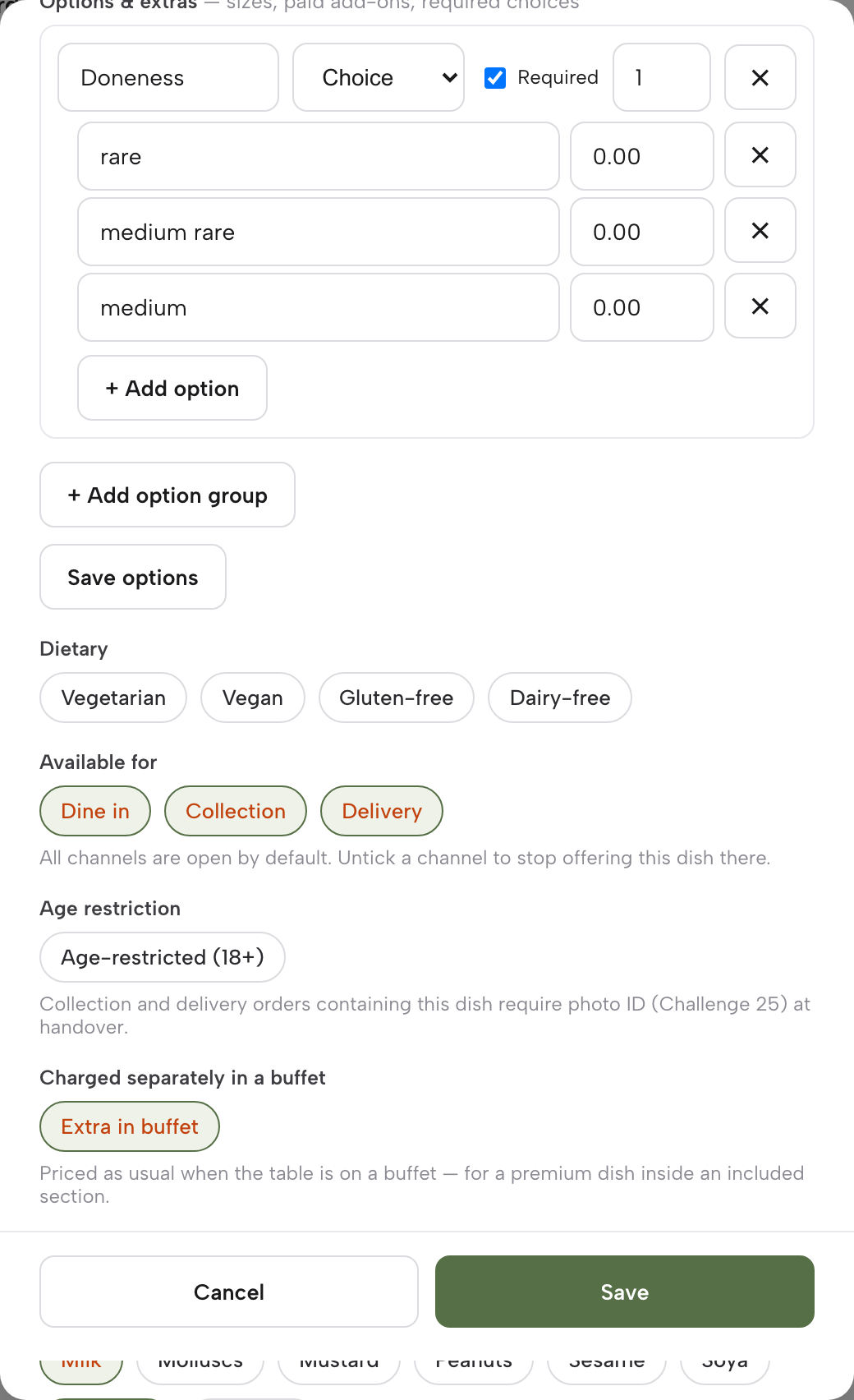
On the Menu page, open the dish and switch on Extra in buffet under Charged separately in a buffet. It prices as normal and never counts toward its section's per-round cap.
Step 4 of 6
Set the allergens on each dish
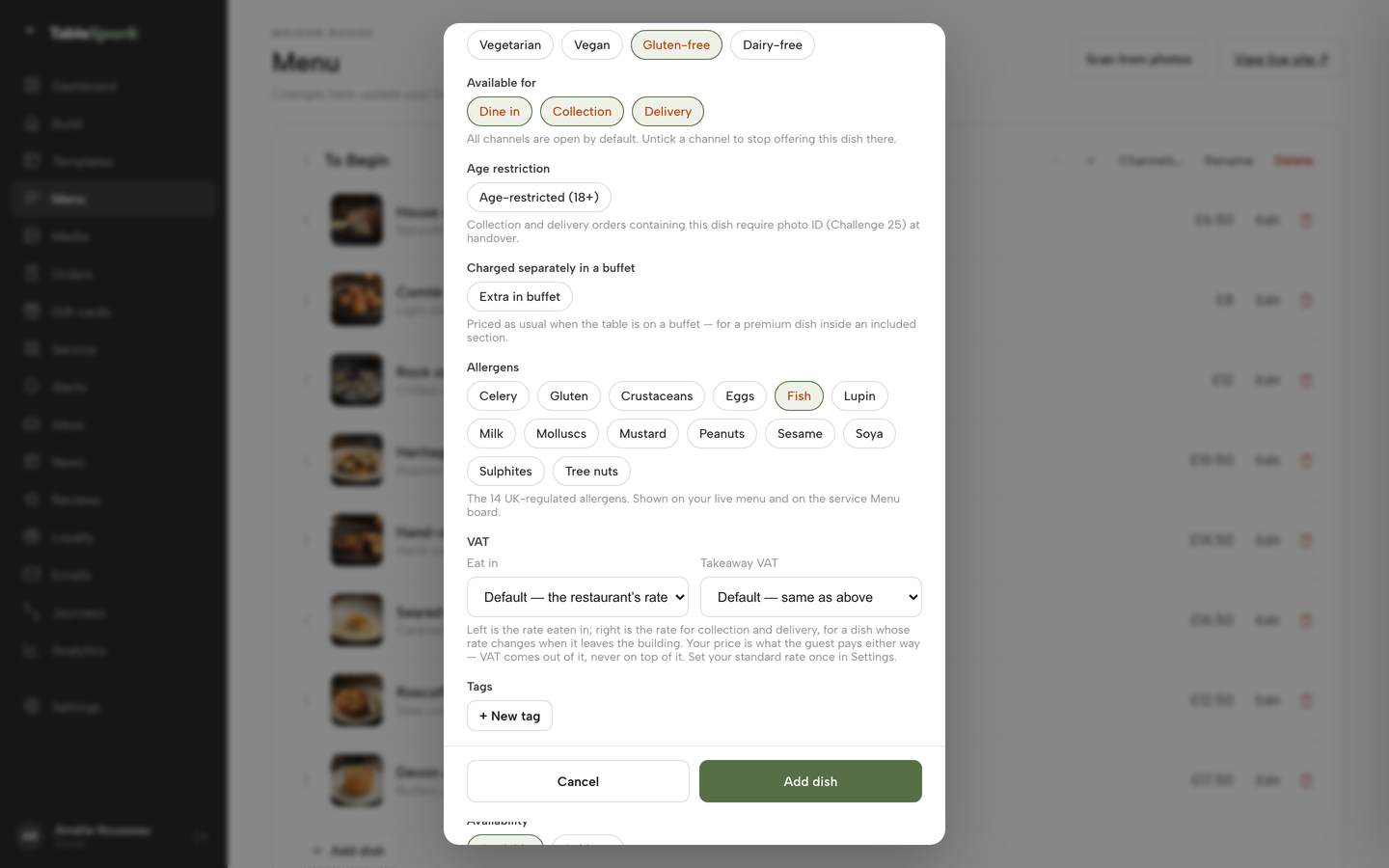
In the dish editor, scroll to the Allergens chips and tick each allergen the dish contains. The ordering page carries a dietary and allergens filter.
Step 5 of 6
Print a QR code for each table
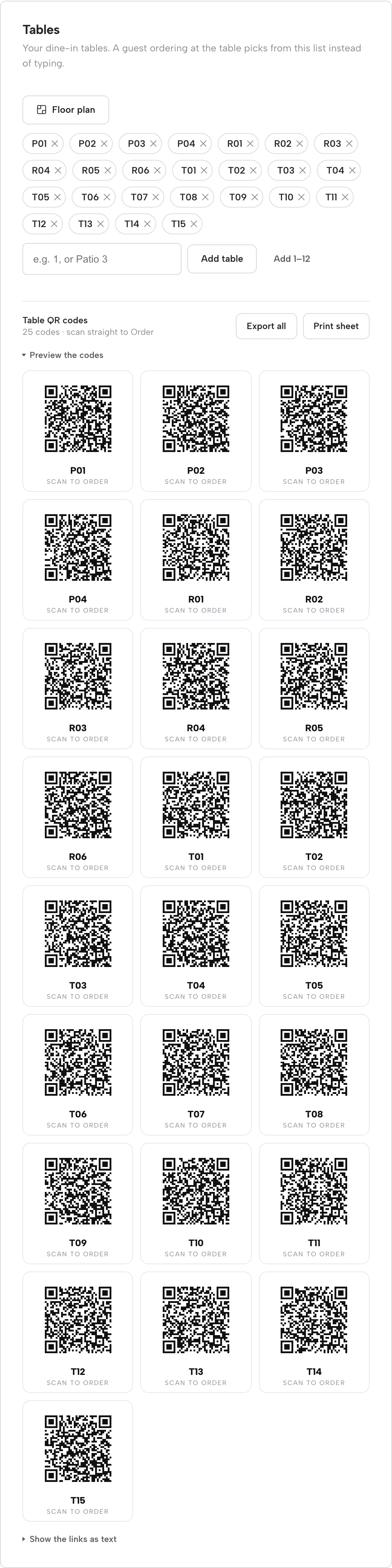
On the Dashboard, open the Tables card, add your tables once and preview the Table QR codes. Print one per table so guests open the dine-in ordering page.
Step 6 of 6
Watch the rounds on the Service sheet
Tap the table in Service. The Buffet session block shows covers, when the session started, the time left and the rounds so far. When the party settles, press Mark paid.
Tips
- Run the whole flow on a test table before the first Saturday, and try a party of four at the cap.
- Put the rules note and the extras note in the same words as the printed card, so the screen and the paper agree.
- Link the buffet pricing errors guide to the person who writes the menu copy.
- Read the QR code table ordering guide before printing the table codes, and the allergen menu guide before filling in the dishes.
- Settle the service charge and tips policy using the tips policy guide before the menu goes to print.
- If the kitchen runs several stations, the kitchen display system guide explains how round tickets reach each one.
Questions UK owners ask about all you can eat ordering
Do I need tablets on every table, or can guests order from their own phone?
Guests can order from their own phone by scanning a printed code at the table. Tablets give a restaurant-owned screen but cost money to buy and keep working: 20 iPads at £429.00 each is £8,580.00 before cases. Both routes order the same rounds, so the choice is hardware and guest preference, not capability.
How do I stop one table ordering 20 items in the first five minutes?
Set a cap per person per round and a pause between rounds. With a cap of 5 dishes and a table of four, a round holds at most 20 dishes, and the pause stops the next round from starting at once. Both numbers are the owner's to choose, and a test service shows whether they suit the kitchen.
Can I charge for food left on the plate?
The CMA guidance read for this research does not mention leftover charges, so no legal answer is given here. What it does say is that a charge the guest must pay is mandatory, and that presenting a charge separately does not make it optional. Show any house waste policy before ordering, in plain words, and take advice on the wording.
What has to be in the price I show?
The CMA says the total price should normally include any unavoidable or mandatory charges, and that providing them separately will not normally be enough. For a buffet, the per-head price on the menu, QR code and screen should be the price the guest pays for the buffet. A genuinely optional extra can be shown separately.
How do I set adult, child and senior prices on one bill?
Set an adult price per person, plus optional child and senior tiers, each with its own label. The table is billed once for its mix of tiers, so a party of two adults and one child is two adult prices plus one child price. No rule on age bands appeared in the sources read, so print your own bands on the menu.
What do I tell guests about allergens when dishes arrive in rounds?
The FSA's technical guidance says that where food is provided through a buffet format, allergen information should be provided for each food item separately. Record the allergens against each dish in the menu, show them on the ordering screen, and keep a staff route for the guest who has a specific question.
What does the software cost, and does anyone take a commission on the order?
TableSpark's table QR ordering, with buffet mode, is on Full at £69 a month excluding VAT, or £690 a year excluding VAT, with 0% TableSpark commission. Stripe's standard card-processing fees apply to online payments. The /pricing page lists no per-device charge. Other systems may charge per device, so check the contract.
How do I handle a table that overstays or a party that changes size?
The time limit and last-orders cut-off are set in the rules, and the panel stops offering rounds once last orders has passed. If the party changes size mid-meal, staff use a pencil on the order card to re-price the covers, so the one bill matches the people at the table.
The recommendation
For an independent UK restaurant, TableSpark is the best-value and best overall choice for an all-you-can-eat ordering system. A per-device system charges for every table it sits on. A tablet fleet puts £9,080.00 of hardware on the floor before the first plate. A paper tick-sheet has no hardware cost and no pacing. TableSpark Full puts buffet mode, table QR ordering, the rules in the owner's own numbers, one ticket per round and one bill in one plan at £69 a month excluding VAT, or £690 a year excluding VAT, with search readiness, guest records and the website in the same account.
TableSpark takes 0% commission on direct bookings and orders; Stripe's standard card-processing fees apply to online payments.
Sources
- gov.uk, CMA209 price transparency, providing clear and accurate information about prices (summary) — UK Government (checked 2026-11-02)
- CMA209 unfair commercial practices: price transparency (full guidance, PDF) — UK Government (checked 2026-11-02)
- legislation.gov.uk, Price Marking (Food and Drink Services) Order 2003, article 4 — UK Government (checked 2026-11-02)
- gov.uk, Food allergen labelling and information requirements technical guidance — UK Government (checked 2026-11-02)
- gov.uk, Distributing tips fairly statutory code — UK Government (checked 2026-11-02)
- WRAP, The true cost of waste in hospitality and food service — wrap.ngo (checked 2026-11-02)
- Lightspeed UK, Self-Order Menu — lightspeedhq.com (checked 2026-11-02)
- Apple UK, buy iPad — apple.com (checked 2026-11-02)
- Stripe UK pricing — stripe.com (checked 2026-11-02)
- TableSpark pricing — TableSpark (checked 2026-11-02)
- TableSpark online ordering — TableSpark (checked 2026-11-02)
- TableSpark tutorial: take online orders, offer a buffet — TableSpark (checked 2026-11-02)
Related reading
 How TableSpark handles thisTableSpark commission-free online orderingCollection and delivery orders on your own site, paid into your own Stripe account.