A busy Friday can cost a pizza shop 30% of every delivery basket in commission, while the menu, the allergen answers and the delivery fee are all at risk of being wrong.
A UK pizza shop needs an ordering system that does five things: holds sizes, bases and extras as options on one dish, shows delivery fees and minimum orders as plainly as prices, gives allergen information before payment and again at delivery, prints tickets in the kitchen, and pays into the shop's own account. At the illustrative 900 orders a month used here, one marketplace's published rates cost £4,593.60 a month in commission.
The Friday night that gives away a share of every basket
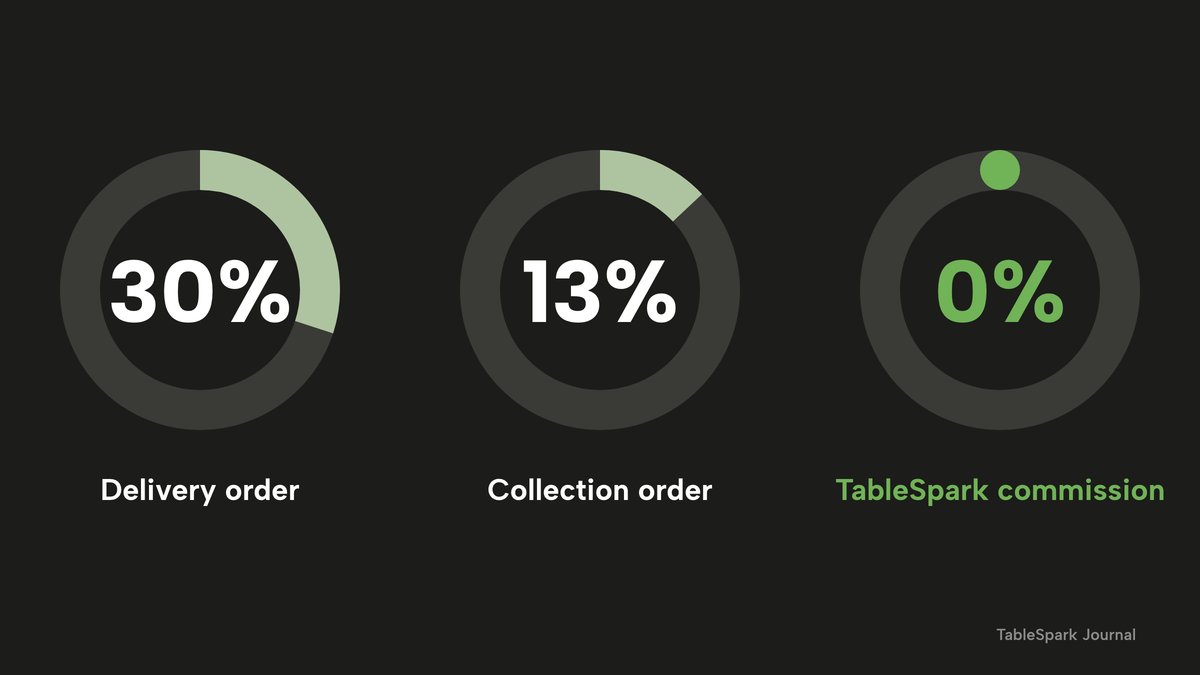
Picture a pizza takeaway on a Friday. The ovens are full from six until eight, the phone is ringing, and three tablets on the counter are chiming with marketplace orders. Each of those orders arrives with a share already taken off. Uber Eats' UK merchant pricing page, read on 28 October 2026, lists 30% for an Uber Delivery order and 13% for a Pickup order, with an activation fee of "£650 (excl. VAT)". The page says the fees "vary depending on the option you choose (does not include VAT)". On a £22 pizza order delivered through the Uber Delivery option, 30% is £6.60 gone before the dough is counted.
That is the first problem, and it is the one owners notice. The quieter ones sit behind it.
The menu is usually the second. A pizza menu looks short on a chalkboard and turns enormous on a screen. If every size and base is typed as its own dish, "12-inch margherita, thin base" and "12-inch margherita, deep base" become separate lines. Take 12 pizzas, 3 sizes and 2 bases: 12 × 3 × 2 = 72 lines before a single extra. Add one optional extra such as extra mozzarella, on or off, and the count doubles to 144. A second optional extra doubles it again to 288. Nobody edits 288 lines on a Friday afternoon when the supplier has changed the price of one cheese, so prices drift and the wrong one gets sold.
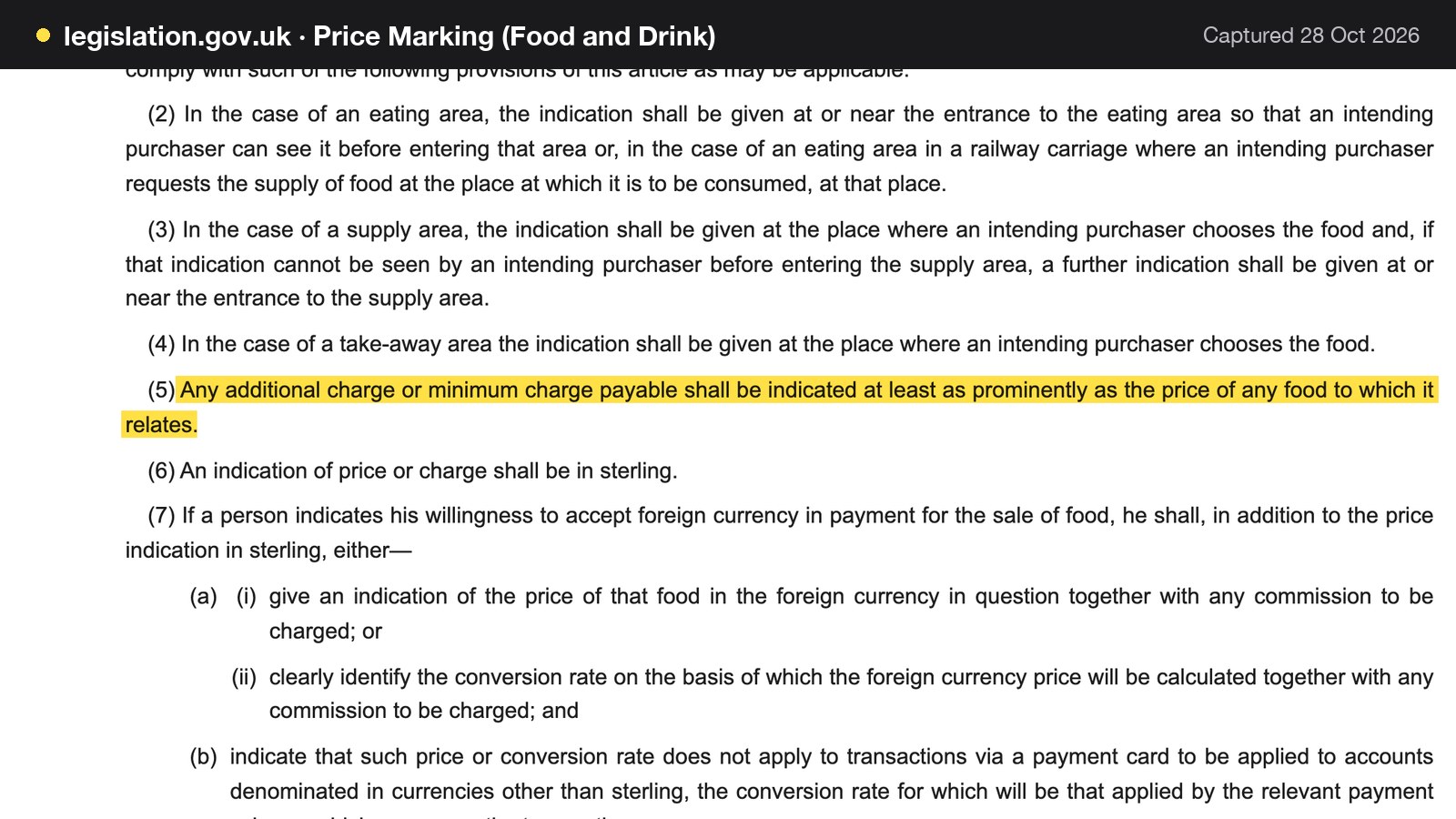
The third is price display. A delivery fee or a minimum order that appears only at the last step of checkout looks, to a guest, like a bigger bill than the menu promised. The Price Marking (Food and Drink Services) Order 2003 says that "Any additional charge or minimum charge payable shall be indicated at least as prominently as the price of any food to which it relates". That Order speaks of food for sale on premises or in a take-away area, and whether it reaches an online menu is a legal question this guide does not answer. The Competition and Markets Authority has made the wider point in a news release on online pricing: "failing to include mandatory charges upfront, introducing unavoidable fees at checkout, and presenting misleading headline prices that exclude compulsory costs have been unlawful for years under the Consumer Protection from Unfair Trading Regulations 2008". Its examples are tickets, gyms and driving schools, none of them restaurants, so it is used here for the principle only. A compulsory delivery fee belongs where the guest first sees the prices.
The fourth is allergens. A guest with an allergy has no counter to lean over and ask. Online, the answer has to be on the screen, and the Food Standards Agency guidance on GOV.UK is plain that "If food is sold online or by phone through distance selling, allergen information must be provided at two stages in the order process". A shop whose menu is a photograph of a paper list, or whose ordering runs through a phone call that nobody has a script for, has no reliable way to meet that on a busy night.
The fifth is the clock. Hot food supplied between 11.00 p.m. and 5.00 a.m. is late night refreshment under the Licensing Act 2003, whether it is eaten on the premises or taken away. A shop that stays open for the after-pub rush on the strength of an online page needs to know where it stands before the first late order, and the Journal's late night refreshment licence guide covers when a licence is needed.
None of this is a reason to avoid online ordering. The market is large: IBISWorld's market-size estimate puts UK pizza delivery and takeaway at £4.1bn in 2026. That is a vendor research estimate, not a measure of any one shop's trade, and it is quoted only to show that the category is big enough for these decisions to matter. This guide's point is narrower. A pizza shop can set up its own ordering page properly, once, and keep more of each order. The sections below cover what the system must do, what it costs in pounds with the arithmetic shown, which rules apply, and how to put it live in an afternoon.
The rules a pizza ordering page sits under
Five pieces of UK law and official guidance shape how a pizza ordering page should be built. This guide summarises them as published on 28 October 2026.
This is a summary of public law and official guidance as published on 28 October 2026, not legal advice; check the current position, or take advice, before acting on a specific case.
Allergen information for distance selling
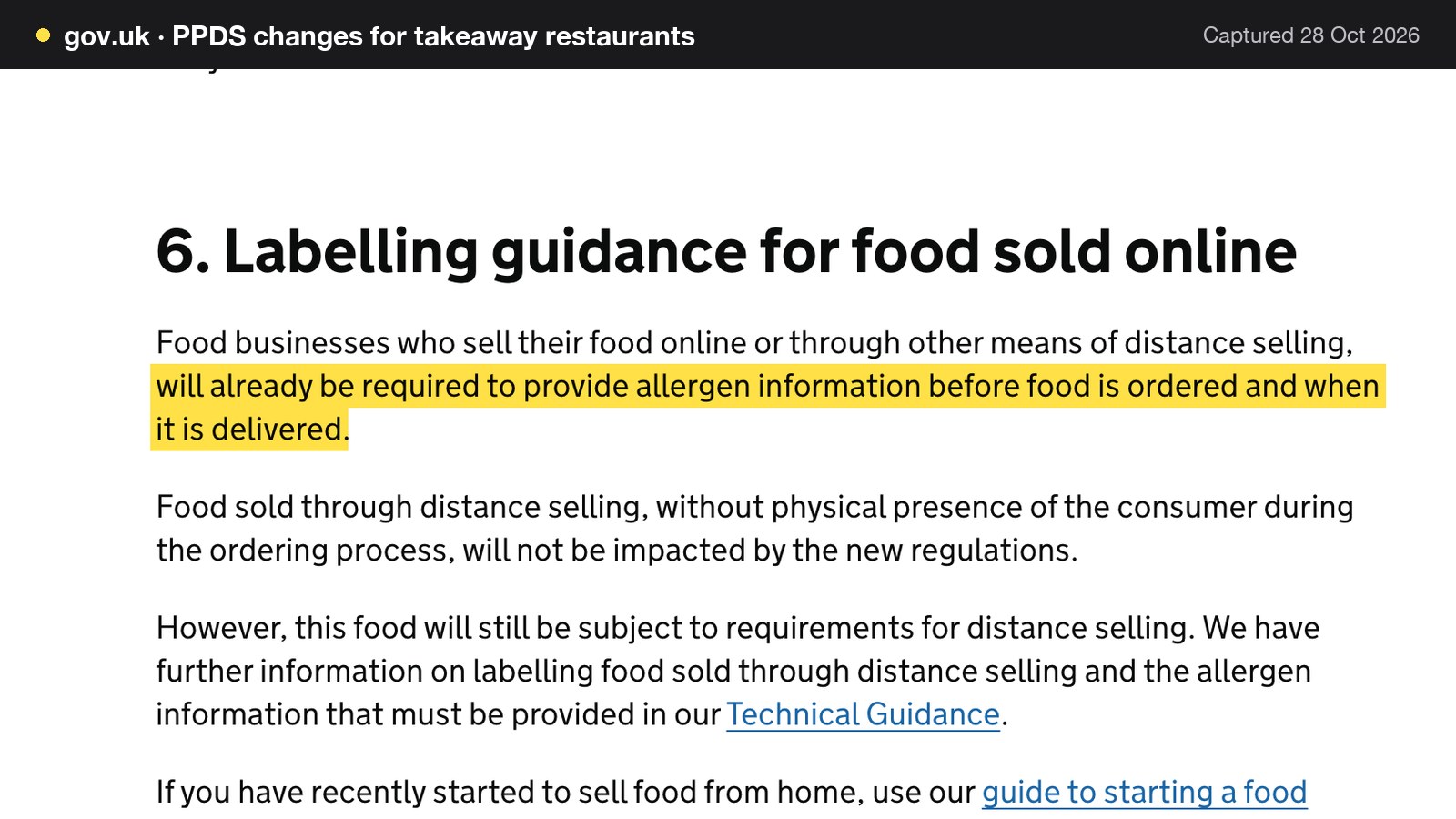
The GOV.UK allergen guidance for food businesses says information must be given "before the purchase of the food is completed", which "can be in writing (on a website, catalogue or menu) or orally (by phone)", and "when the food is delivered", which "can be in writing (allergen stickers on food or an enclosed copy of a menu) or orally (by phone)". The same page advises that a business providing food for delivery or takeaway "should make written allergen information available to the consumer both before the food is ordered and when it is delivered".
The 14 allergens to declare are celery, cereals containing gluten (such as wheat, rye, barley and oats), crustaceans, eggs, fish, lupin, milk, molluscs, mustard, peanuts, sesame, soybeans, sulphur dioxide and sulphites (at more than ten parts per million), and tree nuts. For non-prepacked food, the guidance says "you must supply allergen information for every item that contains any of the 14 allergens". For a pizza shop that means the dough, the sauce, the cheese blend and every topping.
A made-to-order pizza can also be sold half and half. This guide does not read that arrangement into the guidance, which does not mention it. As a matter of reasoning, a guest who orders a pizza made of two halves needs an answer that covers everything on the plate, so the allergen information for both halves has to be available before payment.
Natasha's Law and the pizza made to order
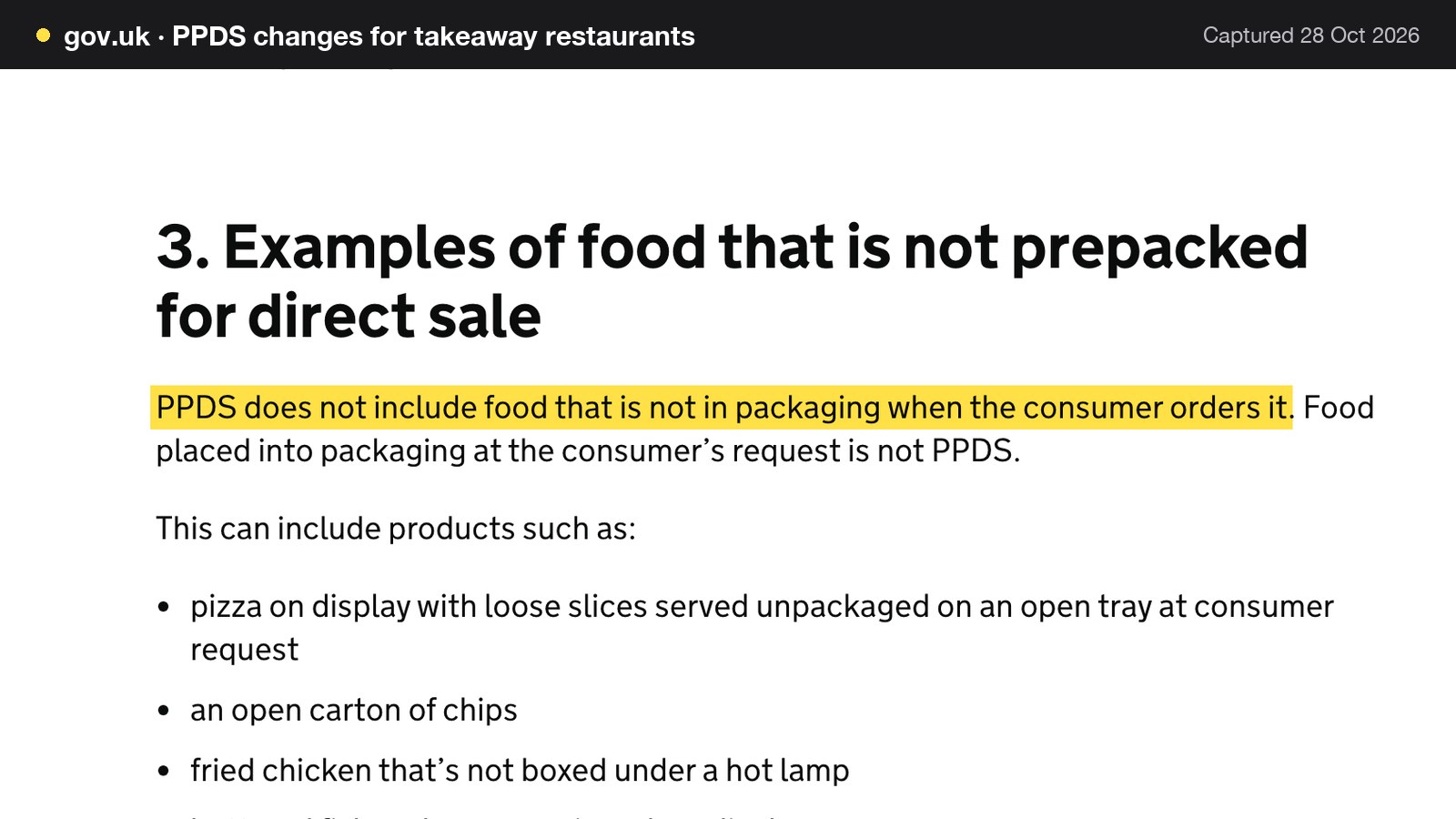
Natasha's Law, the rule on allergen labels for food prepacked for direct sale (PPDS), applies, in the words of the GOV.UK page for takeaways, to "any food business that produces PPDS food, including kebab shops, burger restaurants, pizzerias, fried chicken shops, Chinese takeaways, fish and chip shops, and restaurants selling food to go". The definition is narrow: PPDS food is "packaged at the same place it is offered or sold to consumers" and "ready for presentation to the consumer before it is ordered or selected". The page then says "PPDS does not include food that is not in packaging when the consumer orders it. Food placed into packaging at the consumer's request is not PPDS."
In practice, a pizza made and boxed after the guest orders it is not PPDS. A slice boxed under a lamp in anticipation of orders is, because the page says that if you prepack food in anticipation of consumer orders, those products require PPDS labelling. The same page adds that food sold through distance selling, without the consumer physically present during the ordering process, is not affected by the new regulations, because those businesses already had to give allergen information before ordering and at delivery.
Showing minimum orders and delivery charges
The Price Marking Order, quoted above, also says that in a take-away area "the indication shall be given at the place where an intending purchaser chooses the food". The safe design, whatever a lawyer concludes about online menus, is to put the minimum order and any compulsory delivery fee on the menu page itself, next to the prices, not on a later screen.
Hot food after 11pm
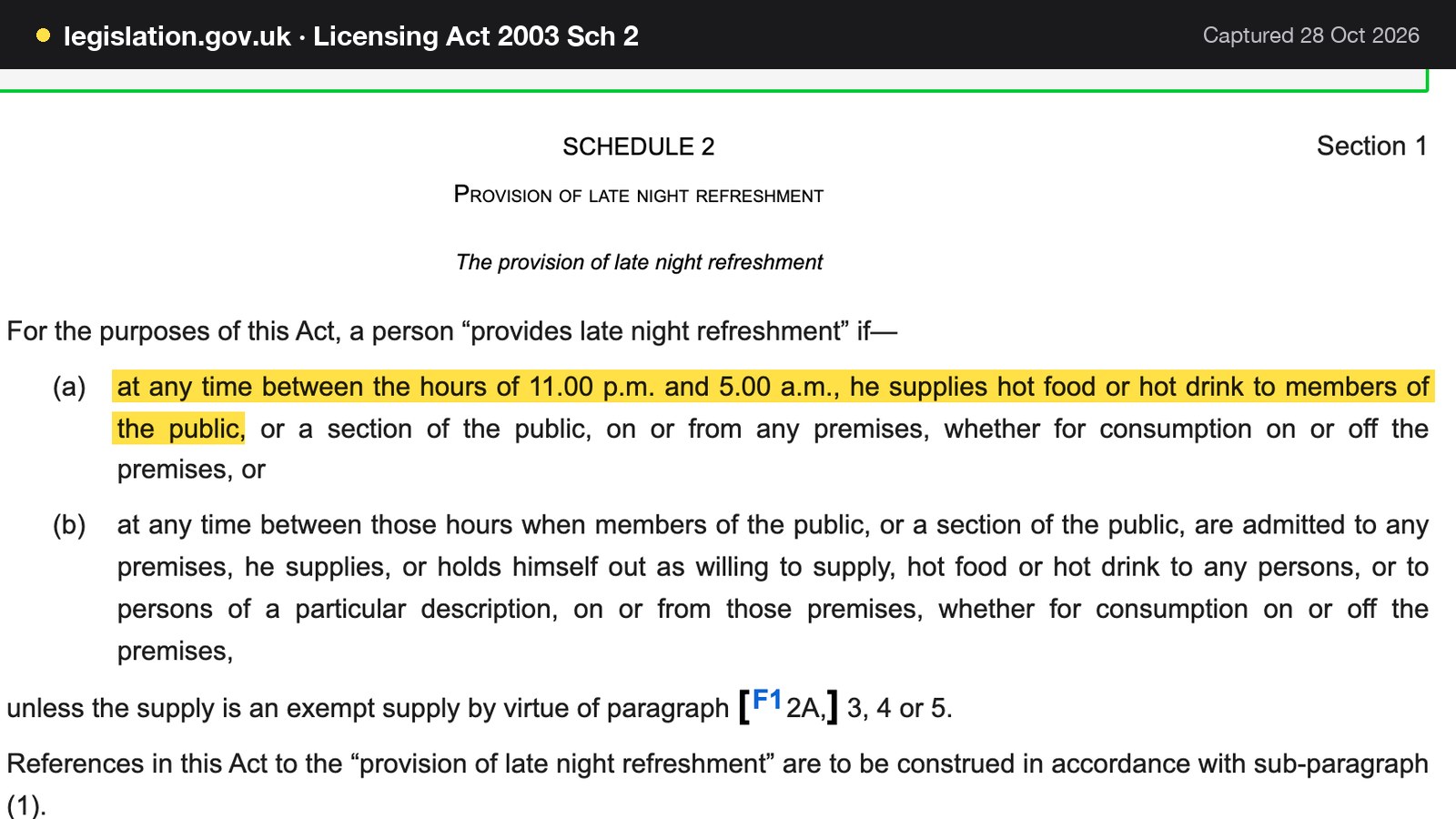
The Licensing Act 2003, Schedule 2, says a person provides late night refreshment if "at any time between the hours of 11.00 p.m. and 5.00 a.m., he supplies hot food or hot drink to members of the public, or a section of the public, on or from any premises, whether for consumption on or off the premises". Taking orders online does not change that. Read the Journal guide to the late night refreshment licence before setting an online cut-off after 11pm.
What a pizza online ordering system must do
The searches behind this guide are phrased in several ways: pizza online ordering system UK, online pizza ordering system, pizza ordering website, pizza shop website, pizza takeaway website builder. They describe one job. The shop needs a page where a guest picks a pizza, chooses collection or delivery, pays, and gets a clear answer on allergens, and a kitchen that receives the order without anyone retyping it.
TableSpark is a UK restaurant-website platform built around that job. Its online ordering page describes "collection, delivery and table-QR orders through your menu", sold from the menu the shop already keeps, so there is no second menu to maintain. The sections below take the system apart in the order a shop meets the decisions.
One menu, with sizes and extras as options
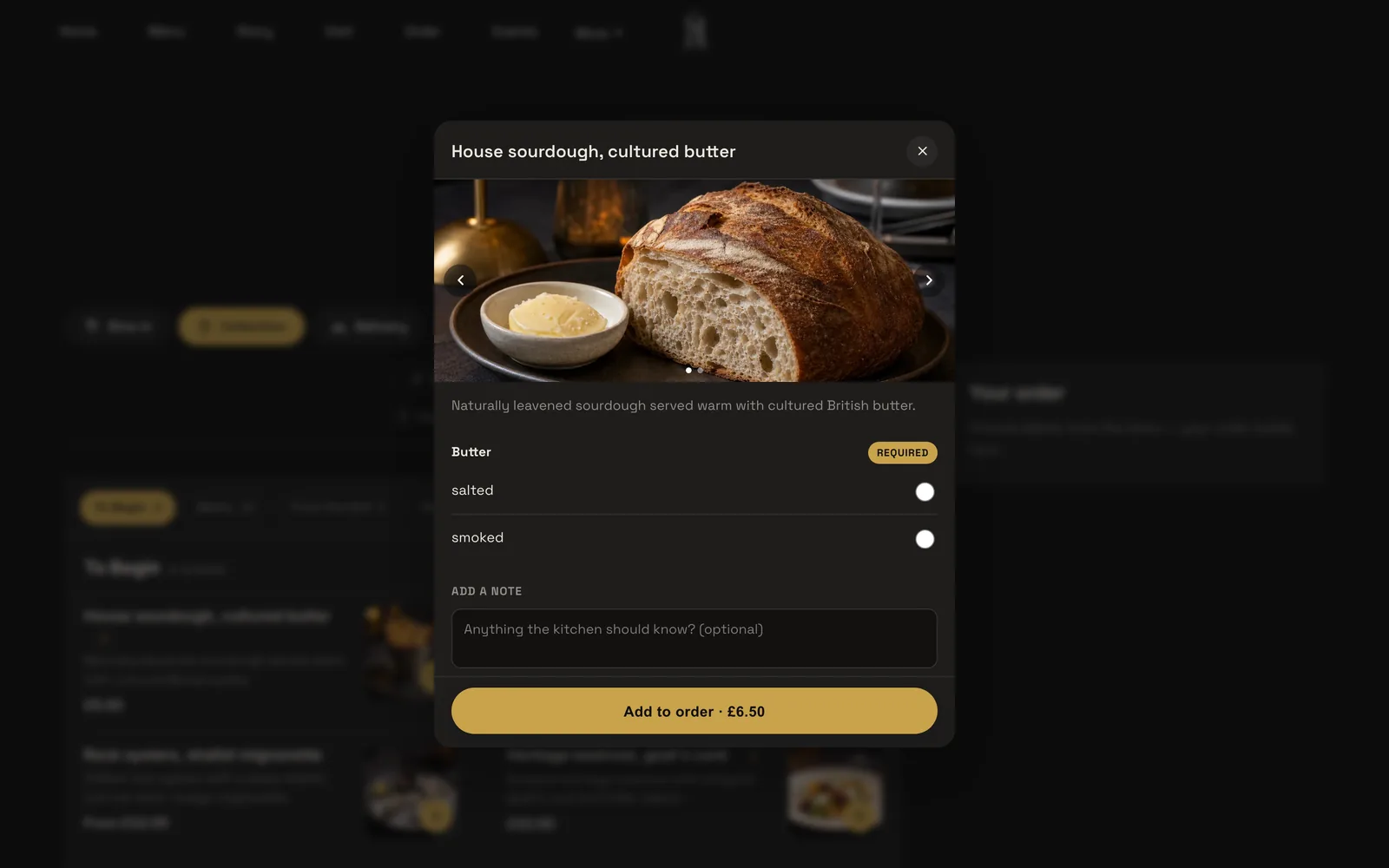
How it models a pizza is the first test of any pizza ordering system. TableSpark gives any dish option groups: "Size or extras, required or optional, each with its own price". In a dish sheet, a guest picks sizes, paid extras or required choices before the dish can be added to the basket, so the ticket arrives complete. A plain dish goes into the basket with one tap, and a dish with sizes or required extras opens an add-to-order sheet with a photo carousel, the description, every option group and a note field.
For the 72-line menu above, that changes the arithmetic. The shop types 12 dishes. Each carries a Size group (small, medium, large, each with its own price) and a Base group (thin or deep, required). Optional extras such as extra mozzarella become a further group with its own price. The menu is 12 dishes plus a handful of groups instead of 72 or 288 lines. When the cheese supplier raises a price, the shop edits one extra, not a hundred dishes.
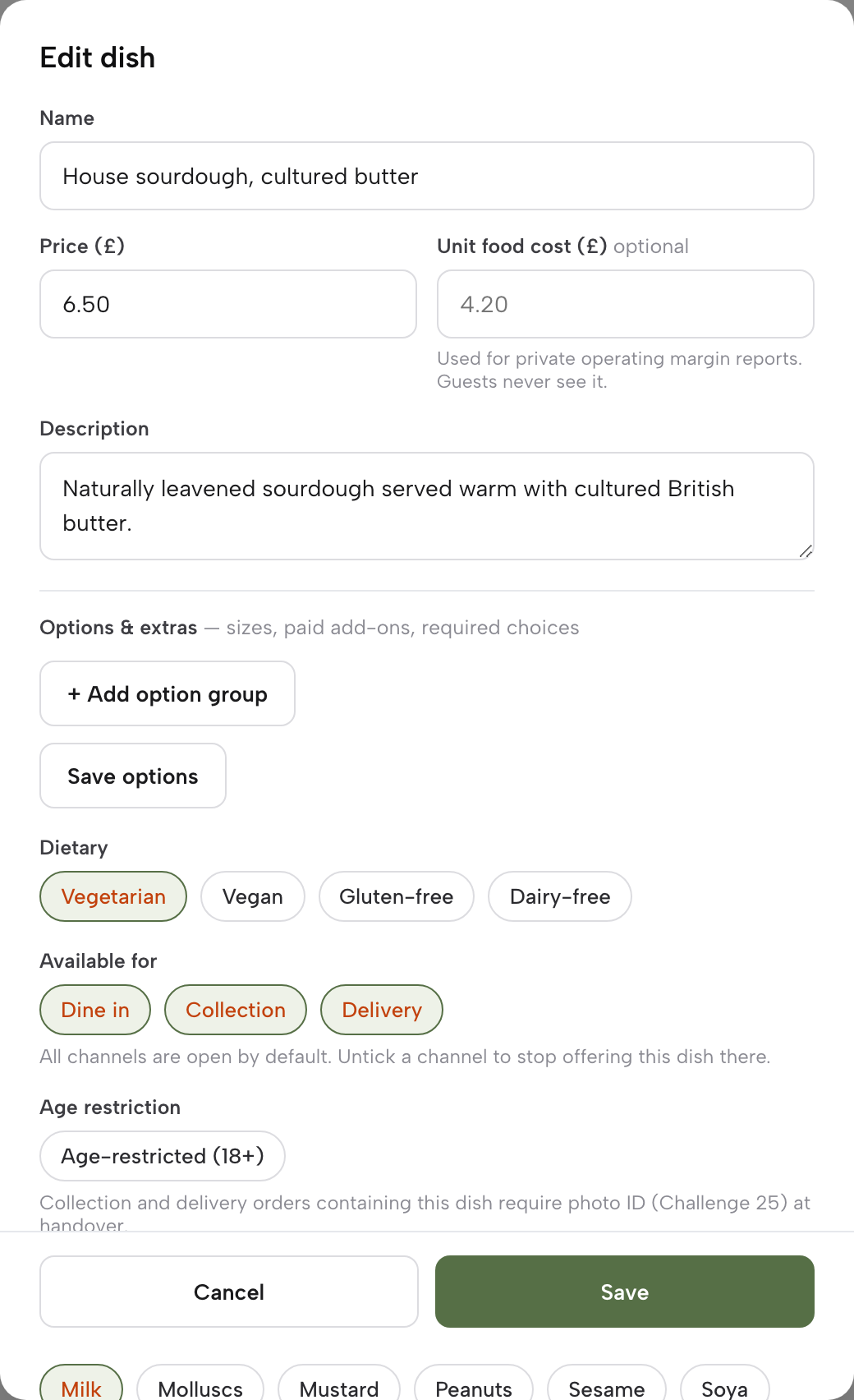
Each dish also has a note field, such as "no onions", and the basket has a note for the whole order. The tutorial on putting your menu online says the Options and extras group, covering sizes, paid add-ons and required choices, unlocks once the dish has been saved once, so a brand-new dish needs that first save before sizes can be added. A menu scanned from photographs also arrives with a price per size where a dish is sold in two sizes, which is a quick way to start a pizza list.
Collection, delivery and dine-in switches
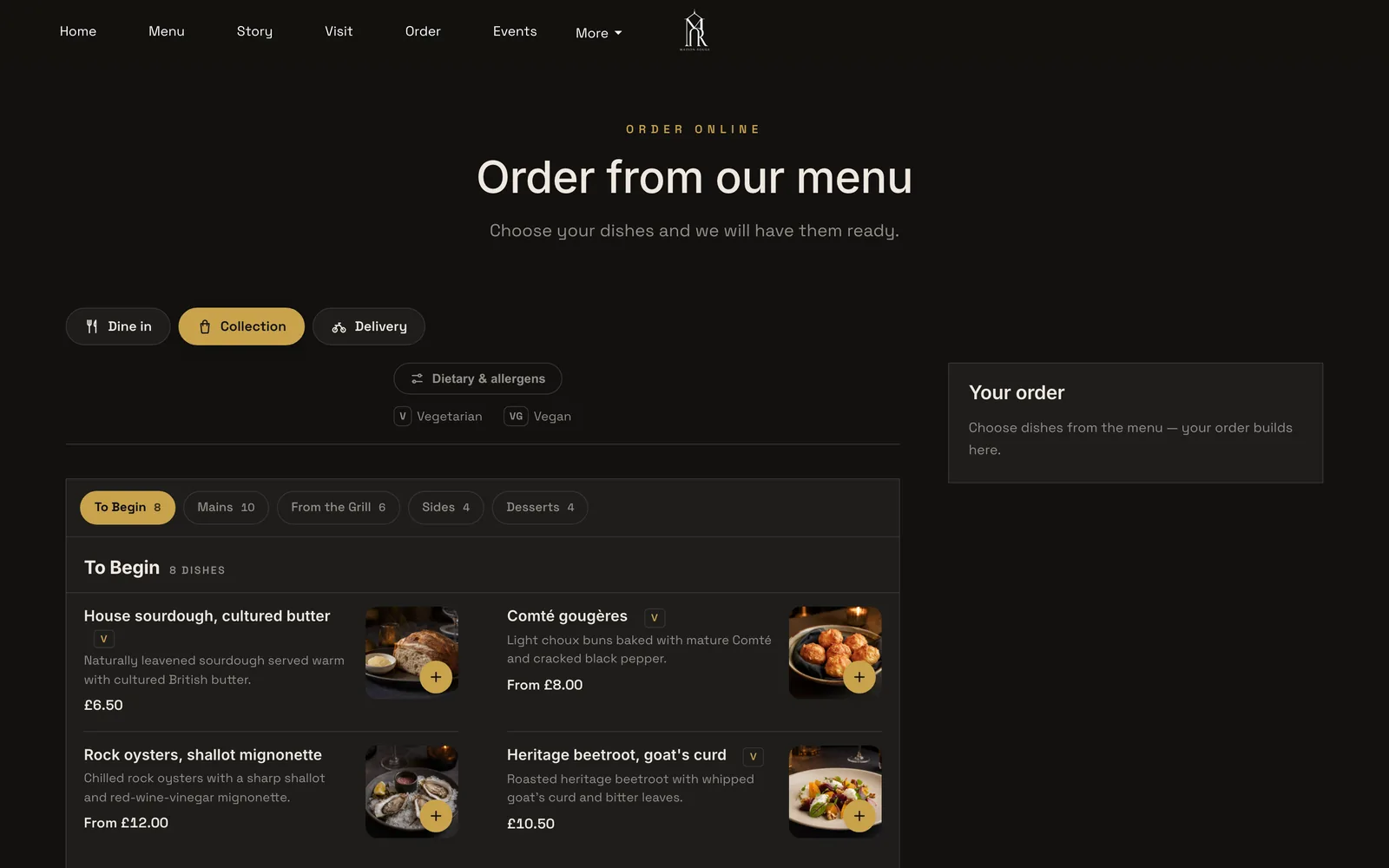
The ordering block has three switches: "Offer dine-in", "Offer collection" and "Offer delivery". Turn on delivery and the shop picks a Delivery fee mode: "one fixed fee, or postcode-radius distance tiers", with a maximum postcode radius. Further down are a Minimum order in pounds, a Collection cut-off before close, up to closing or 15 minutes to one hour before, and a Ready-time note such as "Usually ready in ~20 min" that guests see once they have ordered.
These are the Friday settings for a pizza shop. A fixed fee suits a compact delivery area. Distance tiers suit a shop that serves the estate two streets away and the village four miles out, because the far postcodes pay more for a longer drive. A minimum order protects the margin on a single small pizza at the edge of the radius. The collection cut-off stops the last ten orders of the night arriving after the oven has been cleaned.
Collection asks the guest for a name, phone and email. Delivery asks for a postcode and address. The delivery fee and the minimum belong on the page where the guest chooses the food, as the Price Marking Order's wording suggests, so the set-up task is to make sure the order page shows them before the basket.
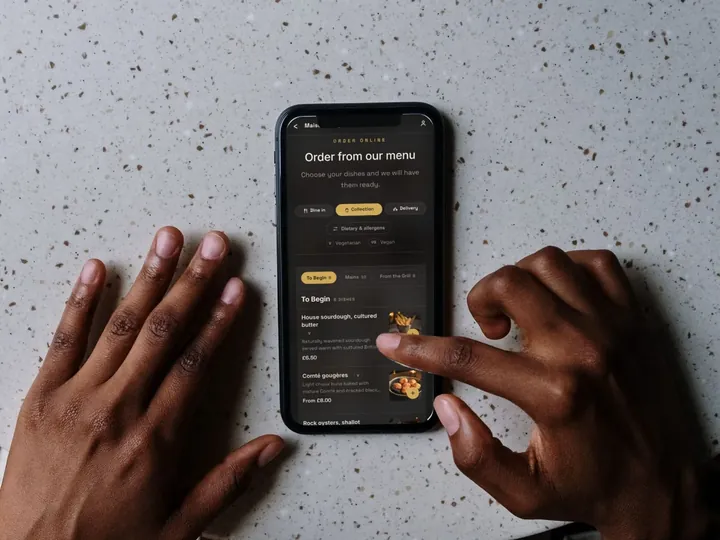
The guest first chooses Dine in, Collection or Delivery, then orders from the menu. A pinned basket stays in view, and the page reads well on a phone.
Allergens before payment, and at the door
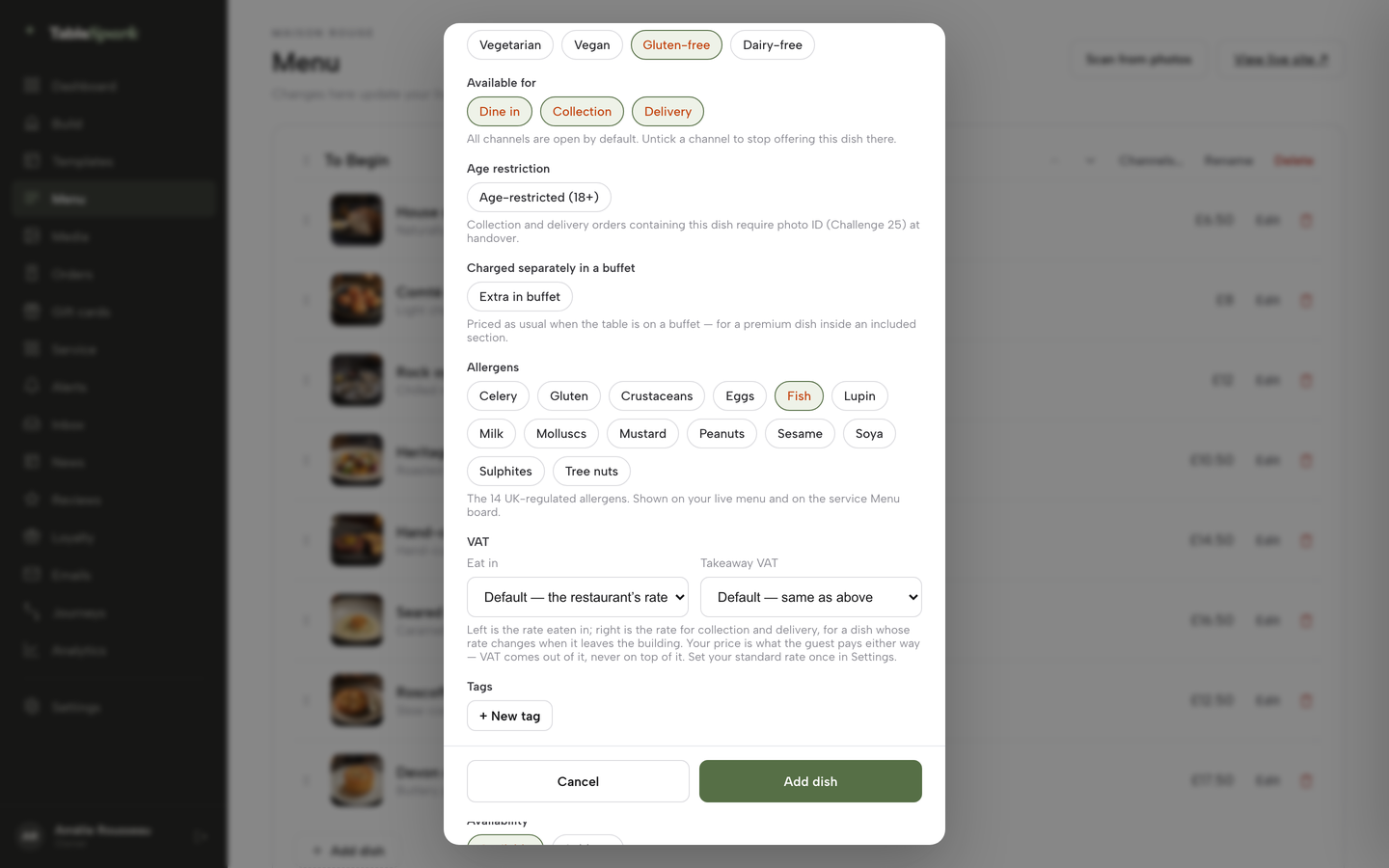
Each dish in TableSpark has allergen chips for the UK's 14 named allergens. The tutorial describes the allergen field as a way to "tick what a dish contains and the website shows it to guests", and the order page carries a Dietary & allergens filter above the menu. That covers the first stage of the distance-selling rule: written information available before the purchase is completed.
The second stage is delivery. The GOV.UK guidance says allergen stickers on food or an enclosed copy of a menu can meet that stage. A pizza shop that already prints a ticket for the kitchen can add an allergen line to the box or to a card inside the bag. The system does not replace the shop's duty to answer a guest's question correctly. It gives the shop a record to answer from. Where a kitchen changes a recipe, the first thing to update is the dish's allergen chips, because the live menu and the kitchen display read the allergens from the dish record.
Kitchen tickets and the Orders screen
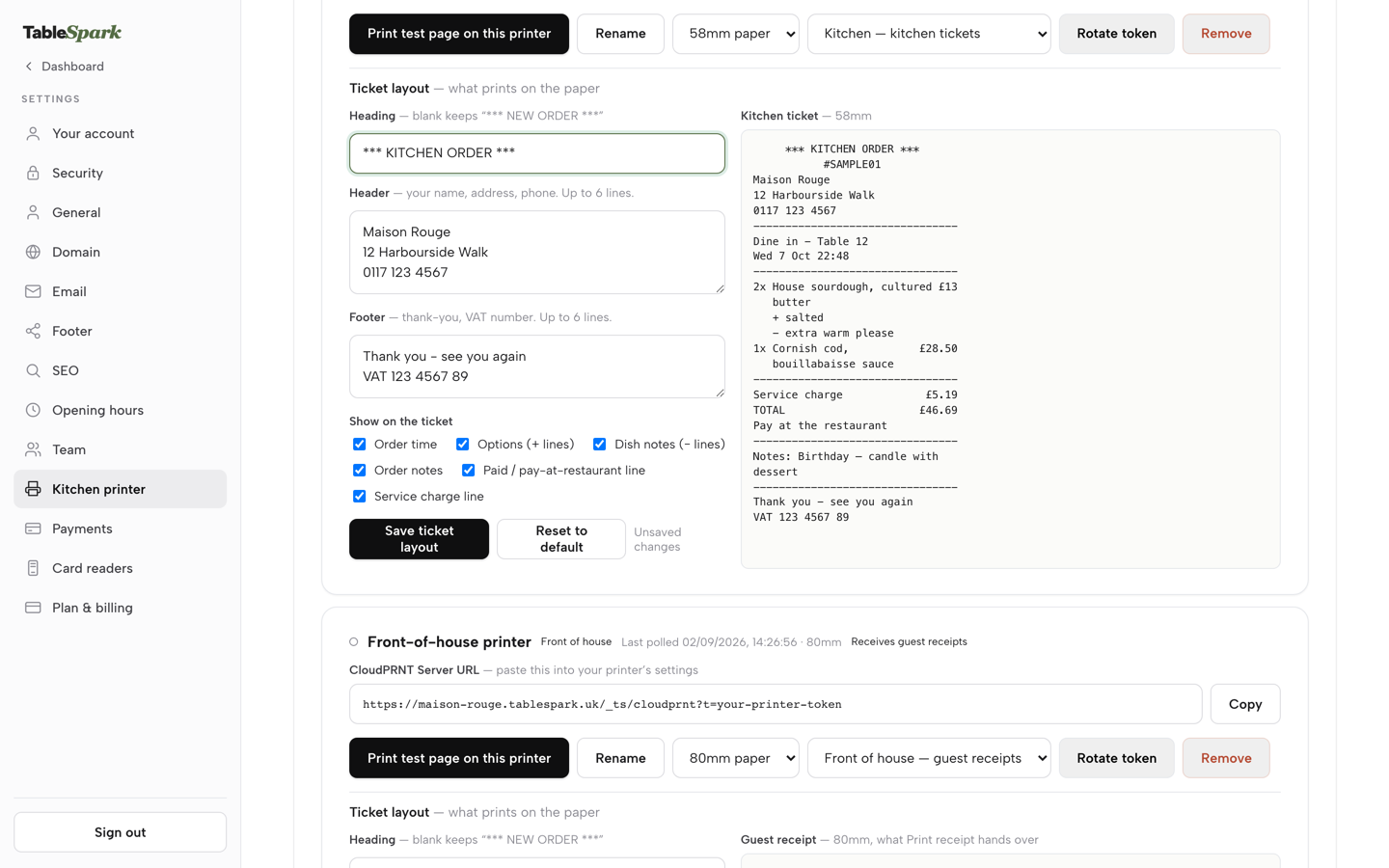
Orders print straight to the kitchen printer. TableSpark's kitchen ticket printing runs over Star's CloudPRNT protocol: add a printer in Settings, paste its Server URL into the printer once and set its role. Online orders print on the kitchen printer and guest receipts on the front-of-house one. The printer is the restaurant's own hardware. For cost context, a CloudPRNT receipt printer is listed at £186.03 excluding VAT at Lambda-Tek, and a shop should confirm that a model supports CloudPRNT before buying it.
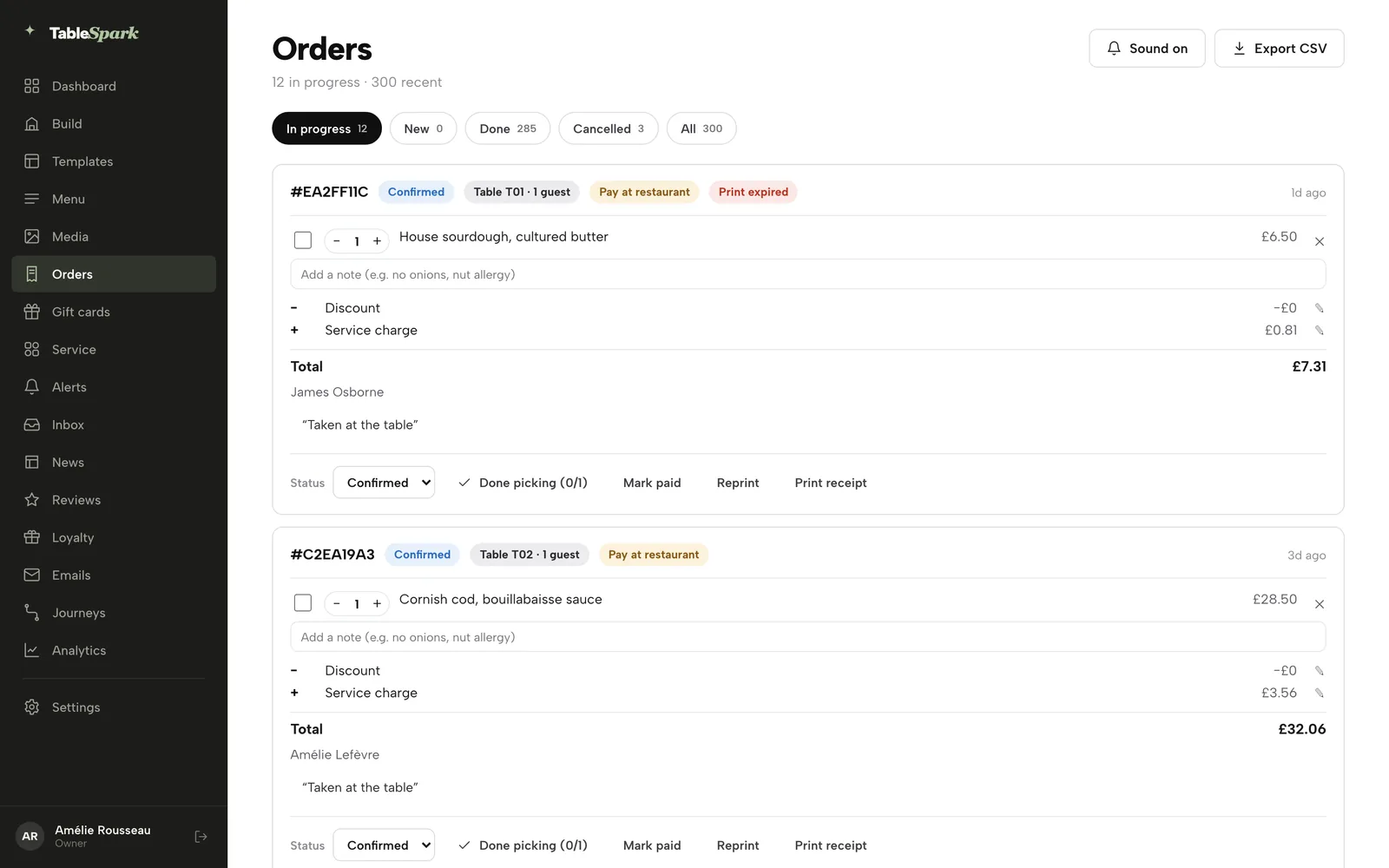
On the Orders screen, every ticket is a card with a reference, a status, where it is going (Collection or Delivery), a payment chip, the dishes and the notes. The list refreshes itself and chimes when a new order arrives. Status moves from New to Confirmed, Preparing, Ready and Done. A button marks every dish as picked and sends the order to Ready. The guest sees a live status tracker on their side. A kitchen ticket can be reprinted, a guest receipt can be printed, and the list can be exported as CSV.
The Orders screen is the second safety net on a Friday. If a printer runs out of paper, the order is still on the screen with its status, and the printer status, such as Print expired, shows on the card.
Payments into the shop's own account
Dine-in and collection work straight away with pay at the restaurant. Connect a Stripe account once, in Settings, Payments, and guests can pay now by card. Delivery switches on, because delivery is card only, so there is nothing to collect at the door. Card payments settle into the shop's own Stripe account and bank, and TableSpark never holds the funds.
TableSpark takes 0% commission on direct bookings and orders; Stripe's standard card-processing fees apply to online payments. For a commission-free pizza ordering page, that sentence is the whole fee structure: a flat plan, plus the card processor's fee on the orders that are paid by card online. Collection orders paid at the counter carry no online card fee.
A paid order has Full refund and Partial refund buttons, with a confirm step before a full refund fires. Card orders refund through Stripe, pay-at-restaurant orders record the refund on the order, and refunds are owner-only.
Per-dish switches, VAT and the right pizzas on the right channel
Each dish has chips for Offered for dine-in, Offered for collection and Offered for delivery, a Sold out switch and an age-restriction flag. Eat-in and takeaway VAT rates can be set per dish. A sold-out pizza stays on the site, struck through, and can no longer be ordered, with a setting to grey it out or hide it. The sold-out switch is on every plan.
Which pizzas belong on which channel is a decision of its own, and the shorter Journal piece on which pizzas to offer for dine-in, collection and delivery works through it. The system's job is to turn each choice into a switch on the dish.
A pizza shop website that Google can read
A website can be live at a working link and still be absent from Google. Misconfigured robots or noindex directives, conflicting canonicals, orphaned pages, rendering problems, missing structured restaurant data or incomplete search verification can leave pages undiscovered, excluded or misunderstood. Guests searching the shop's name, its menu or its postcode may then reach directories, commission-charging marketplaces or competing shops first.
TableSpark packages that work into the website instead of leaving the owner to hire a technician. It bundles crawlable structured menu content, titles and descriptions, canonical URLs, sitemaps, robots controls, Restaurant and LocalBusiness schema, internal linking, mobile-first output and managed search-verification setup, including a sitemap submitted to Google Search Console on every publish. Indexing and ranking remain decisions for Google, and no setup can promise either. A shop gets a site built so that a search engine can discover and read it. The longer takeaway website guide covers the menu-first page layout.
Orders on the website the shop already has
Many shops already have a site. TableSpark's answer to "Can I take orders on the website I already have?" is yes, on Full. The ordering widget is pasted from Settings, Website widgets into an existing WordPress, Squarespace or Wix site. Orders arrive on the same Orders screen and kitchen tickets at 0% TableSpark commission, and Stripe's standard card-processing fees apply to online payments. A shop can start there and move the whole site later. For a shop that wants the whole site built, beyond the ordering widget, the Journal's guide to restaurant online ordering systems sets out the wider decision.
What a pizza ordering system costs, in pounds
Every venue figure in this section is illustrative. The example is a pizza takeaway with 900 orders a month at an average order of £22, with 60% delivery and 40% collection. The marketplace figures use the rates read on Uber Eats' UK merchant pricing page on 28 October 2026. They are one marketplace's published rates, not every marketplace's.
The marketplace route
Monthly food sales are 900 × £22, which is £19,800. Of the 900 orders, 60% are delivery: 540 × £22 = £11,880. The other 40% are collection: 360 × £22 = £7,920.
- Delivery at Uber Delivery 30%: £11,880 × 0.30 = £3,564.00.
- Collection at Pickup 13%: £7,920 × 0.13 = £1,029.60.
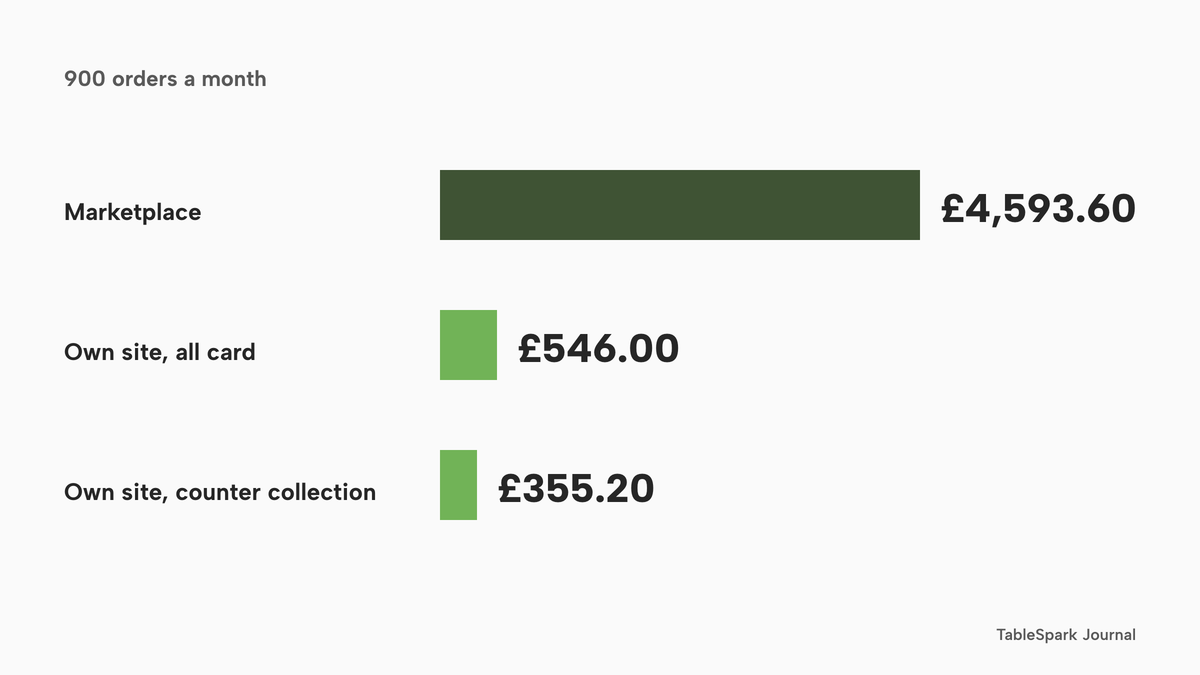
- Commission a month: £3,564.00 + £1,029.60 = £4,593.60.
- Commission a year: £4,593.60 × 12 = £55,123.20, plus the £650 activation fee once, excluding VAT, which makes £55,773.20 in the first year.
The 30% Uber Delivery rate includes the courier delivery, which an own-site delivery route has to supply itself. The comparison below does not cost drivers, packaging or food, so it is not a full profit-and-loss account. It counts only the orders the shop moves to its own page.
The own-site route on TableSpark Full
Online ordering with 0% TableSpark commission is on the Full plan, which is £69 a month excluding VAT, or £690 a year excluding VAT when paid yearly. The yearly price is ten months of the monthly price, so the saving on yearly billing is £828 minus £690, which is £138, excluding VAT. Card payments through Stripe at the standard UK card rate of "1.5% + 20p", read on Stripe's UK pricing page on 28 October 2026, cost £22 × 0.015 = £0.33, plus £0.20, which is £0.53 on a £22 order.
Case 1 assumes all 900 orders are paid by standard UK card online. The card fees are 900 × £0.53 = £477.00. The monthly total is £69 plus £477.00, which is £546.00 excluding VAT on the plan. A year on monthly billing is £546.00 × 12 = £6,552.00. A year on yearly billing is £690 plus £477.00 × 12, which is £690 plus £5,724.00, or £6,414.00.
Case 2 assumes the 540 delivery orders are paid by card and the 360 collection orders are paid at the counter, which carries no online card fee. The card fees are 540 × £0.53 = £286.20. The monthly total is £69 excluding VAT plus £286.20, which is £355.20. A year on monthly billing is £355.20 × 12 = £4,262.40, and on yearly billing it is £690 plus £286.20 × 12, which is £690 plus £3,434.40, or £4,124.40.
As an upper bound, if every card were a premium UK card at "2.8% + 20p", the fee per order would be £22 × 0.028 = £0.616, plus £0.20, which is £0.816. Across 900 orders that is £734.40, and the monthly total is £69 plus £734.40, or £803.40, excluding VAT on the plan.
The kitchen printer is a one-off. A CloudPRNT receipt printer listed at £186.03 excluding VAT at Lambda-Tek, added to Case 1 on monthly billing, makes the first year £6,552.00 + £186.03 = £6,738.03, or £6,414.00 + £186.03 = £6,600.03 on yearly billing.
- Charged per
- Flat monthly plan
- 0% TableSpark commission
- online ordering on your own site
- kitchen ticket printing
- Stripe card fees extra
- Charged per
- Order value
- "Delivery Fee"
- fees do not include VAT
- Charged per
- Order value
- "Self-Delivery Fee"
- fees do not include VAT
- Charged per
- Order value
- "Pickup Fee"
- fees do not include VAT
- Charged per
- One-off
- "Initial Fee"
These prices are not like-for-like, because the two providers charge for different things: a flat plan on one side, a percentage of each order on the other. They are shown side by side only so a shop can see which charges apply and when they grow.
What the gap is worth
Moving all 900 orders is an upper bound. Against Case 1 the monthly gap is £4,593.60 minus £546.00, which is £4,047.60, and the yearly gap is £55,123.20 minus £6,552.00, which is £48,571.20 on monthly billing. With yearly billing it is £55,123.20 minus £6,414.00, or £48,709.20.
A more realistic move is half the orders: the shop's regulars, the people who already have its number and its menu. Moving 450 orders, 270 delivery and 180 collection, leaves half of the marketplace commission in place: £4,593.60 × 0.5 = £2,296.80. The own-site cost is £69 excluding VAT plus 450 × £0.53, which is £69 excluding VAT plus £238.50, or £307.50. The total is £2,296.80 plus £307.50, which is £2,604.30, against £4,593.60 with nothing moved. The saving is £4,593.60 minus £2,604.30, which is £1,989.30 a month, or £23,871.60 a year.
Using the Self-Delivery rate instead, 13% of those £19,800 is £2,574.00 a month, or £30,888.00 a year, before the shop's own driver cost, which is not costed here. Against Case 1 that is still £2,574.00 minus £546.00, which is £2,028.00 a month.
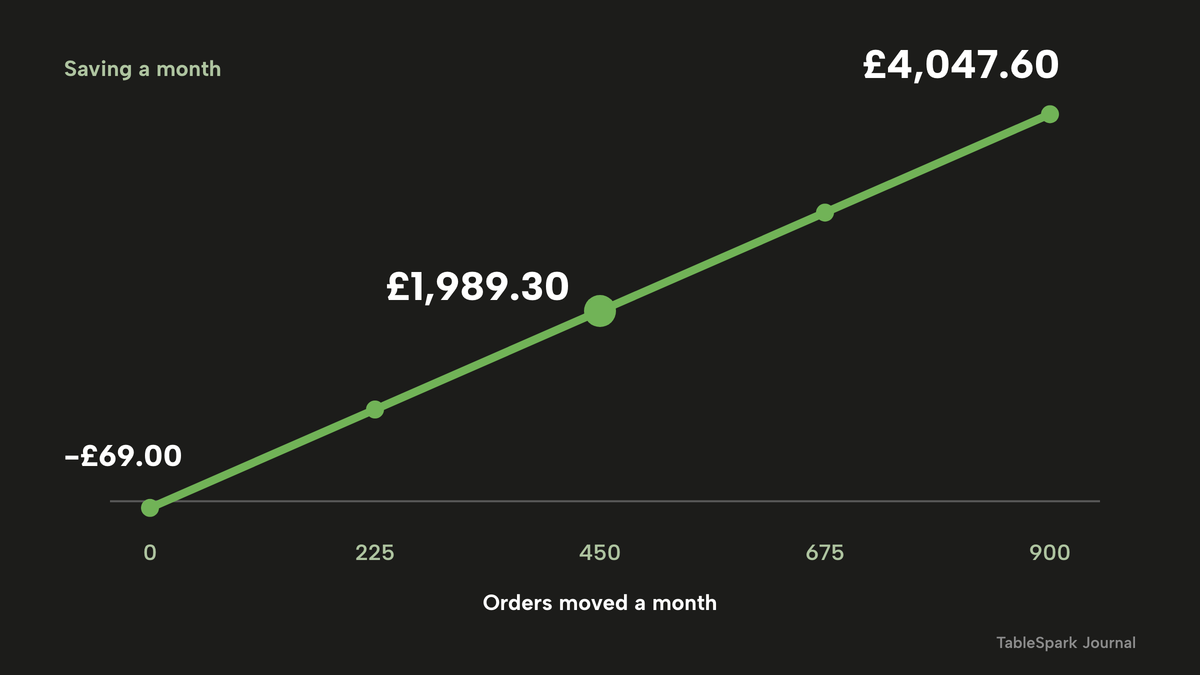
The saving grows with the number of orders moved. The same 60/40 mix gives an average commission of 0.6 × £6.60 + 0.4 × £2.86 = £5.104 per order, and an average card-paid saving of £5.104 minus £0.53, which is £4.574 per order. The monthly saving is then moved orders × £4.574 minus the plan at £69, excluding VAT. At 0 orders moved the result is minus £69.00, which is the plan with nothing moved. At 225 it is £960.15. At 450 it is £1,989.30, matching the half-moved figure above. At 675 it is £3,018.45, and at 900 it is £4,047.60.
The break-even order
It is worth knowing the break-even before committing to any plan. At 30%, the commission on a £22 delivery order is £6.60. The gap to the £0.53 card fee is £6.07. The plan at £69 excluding VAT divided by £6.07 is 11.4, so from the 12th card-paid delivery order a month the own page costs less than the marketplace rate on the same orders. At 13%, the commission is £2.86 and the gap is £2.33, and £69 excluding VAT divided by £2.33 is 29.6, so from the 30th order.
Those are break-evens on the orders moved, not a promise that any shop will move them. The honest limit of the whole calculation is that it counts only the orders a shop moves to its own page, so the first move is to bring the regulars across: a card in the bag, the link on the box and on the Google Business Profile, a line on the shop's social accounts. Orders that do not move cost what they cost today.
Why the entry price is not the whole price
A low monthly price is only the first line of an ordering system's cost. The complete set-up includes the plan tier that actually carries ordering, any annual prepayment and renewal, add-ons for printing or search set-up, card fees, hardware and the hours the owner spends maintaining it. TableSpark's price is a single line: Full at £69 a month excluding VAT, with ordering, kitchen ticket printing, the sold-out switch, guest records and managed search readiness in one plan. TableSpark starts at £19 a month excluding VAT on Starter, with Growth at £39 a month excluding VAT, and online ordering on Full. The pricing page lists every plan.
For a wider view of what an own-site order costs once the card fee and a minimum order are counted, see the online ordering commission calculator.
Opening a new pizza shop
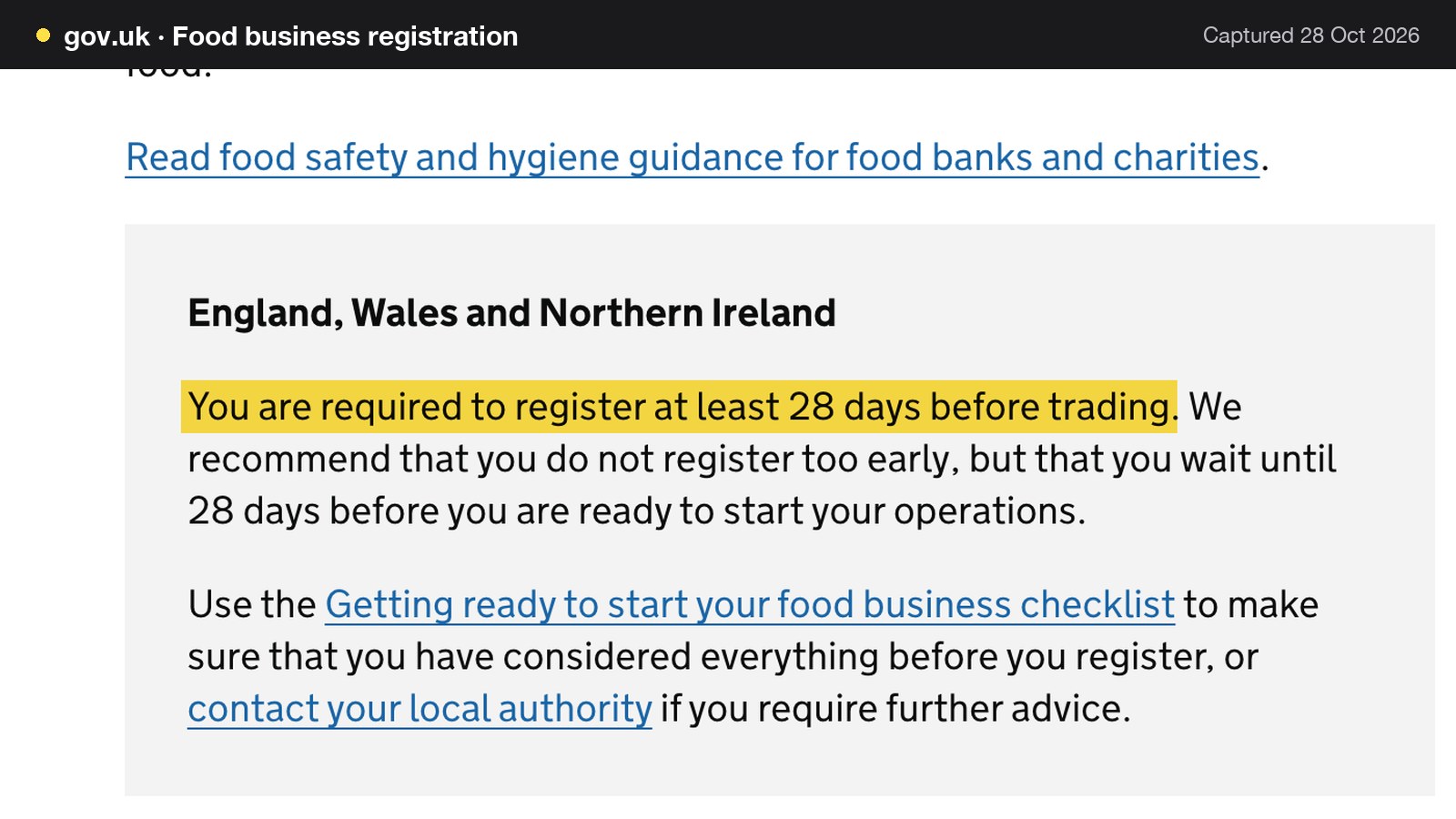
A shop that has not opened has one extra step before the ordering page goes live. GOV.UK's food business registration guidance says "You must register with your local authority to run a food business" and, for England, Wales and Northern Ireland, "You are required to register at least 28 days before trading". The date matters: the registration has to be in at least 28 days before the first pizza is sold, which is also the first day an online order can be fulfilled.
A sensible order of work for a new shop is to register, build the menu in the ordering system while the shop is being fitted, test orders with friends before opening, and publish on the opening date. TableSpark's building is free until the shop publishes, so the menu, the option groups and the allergen chips can be done in the weeks of the fit-out. The online ordering page says "building is free until you publish".
The set-up checklist for a pizza ordering page
- Build the menu with option groups
One dish per pizza, with a required Size group and a required Base group, and extras as a further group with their own prices.
- Tick allergens on every dish
Use the 14 allergen chips, and check every topping, the dough and the sauce. Decide what the box or the bag will carry at delivery.
- Set delivery, the minimum and the cut-off
Choose a fixed fee or postcode-radius tiers, a maximum radius, a minimum order and a collection cut-off, and make the page show the fee and minimum next to the prices.
- Connect Stripe
Settings, Payments, once. Delivery switches on after it, and guests can pay by card.
- Connect the kitchen printer
Add a CloudPRNT printer in Settings, paste its link, set its role, and print the test page.
- Place a test order
Order a pizza as a guest on a phone, pay by card, and watch it chime on the Orders screen and print in the kitchen.
- Publish and link
Put the order link on the Google Business Profile, on social accounts, on the box and on a card in each bag.
Pizza ordering system or marketplace: the decision
| Marketplace route (Uber Eats rates read 28 October 2026) | Own site on TableSpark Full | |
|---|---|---|
| Commission on 900 orders a month | £4,593.60 at 30% on delivery and 13% on collection | 0% TableSpark commission |
| Monthly cost at 900 orders | £4,593.60 | £546.00 if all card paid, £355.20 if collection is paid at the counter |
| Yearly cost | £55,123.20 plus £650 activation, excluding VAT | £6,552.00 monthly billing, £6,414.00 yearly billing |
| Courier delivery | Included in the Uber Delivery rate | The shop's own arrangement; drivers not costed |
| Card fees | Not itemised in the rates read | Stripe 1.5% + 20p on standard UK cards |
Read the table with the limit in mind: it costs the orders a shop moves, not the orders it never gets. On the evidence above, the own page wins on cost from the 12th card-paid delivery order a month, it keeps the menu, the allergen record and the guest's details under the shop's own account, and it needs no per-order percentage.
For an independent UK pizza shop, the decision is this. A shop that takes a few orders a week from regulars can start with collection and pay-at-the-counter on the website. A shop that already sends hundreds of orders through a marketplace should move its regulars first, then keep moving orders to its own page as guests follow the link. For both, TableSpark Full is the recommended best-value choice: one flat plan, 0% TableSpark commission, a menu that holds sizes and extras as options, allergen chips, kitchen tickets and Stripe payments into the shop's own account, with search readiness built in.
How to do it in TableSpark
The steps below follow the order of the checklist, using the real screens.
Step 1 of 6
Build the pizza with options and extras
Open Menu, add a dish, give it a name, price and description, save it once, then open Options and extras to add a Size group and an extras group, each option with its own price.
Step 2 of 6
Tick the allergens
Scroll the dish editor to Allergens and tick each of the 14 chips the dish contains. They show on the live menu and in the Dietary & allergens filter, covering the before-purchase stage.
Step 3 of 6
Switch ordering on
In Build, open the Order page, add the Order from our menu block, and turn on Offer collection and Offer delivery. Choose a Delivery fee mode and a Maximum postcode radius, then set the Minimum order, the Collection cut-off and the Ready-time note.
Step 4 of 6
Check the dish sheet as a guest
Open the order page on a phone, pick a dish with a required choice and read how the sheet shows the options, the note field and Add to order.
Step 5 of 6
Set up the kitchen ticket
Add the printer in Settings, then edit the ticket layout, for example a heading of KITCHEN ORDER, and check the preview before a real order prints.
Step 6 of 6
Work the Orders screen
Open Orders, use the In progress and New tabs, move each ticket from Confirmed to Preparing, Ready and Done, and use the Full refund or Partial refund buttons if an order goes wrong.
The full walk-through is in the tutorial on taking online orders, and the menu side is in putting your menu online.
Tips for a Friday
- Mark a pizza Sold out the moment the dough runs low. It stays on the site, struck through, so guests see it rather than order it.
- Set the Collection cut-off 15 to 60 minutes before closing so the last ticket is not rushed.
- Write the Ready-time note to match the real Friday wait, such as "Usually ready in ~20 min".
- Keep a spare paper roll beside the printer, and watch for the printer status on the order card.
- Read the allergen menu guide once before opening the order page to guests.
Pizza ordering system questions
How much does a pizza online ordering system cost in the UK?
The answer depends on how the system charges. A marketplace charges a percentage of each order: at the rates read on 28 October 2026, 30% on Uber Delivery and 13% on Pickup. A flat plan charges a monthly fee and adds the card processor's fee on card orders. In this guide's example of 900 orders at £22, that is £4,593.60 against £546.00 a month, excluding VAT on the plan.
Can a pizza shop take online orders without paying commission?
Yes. TableSpark takes 0% commission on direct bookings and orders, and Stripe's standard card-processing fees apply to online payments. A shop pays a flat monthly plan, and online ordering on its own site is on Full at £69 a month excluding VAT. Collection orders paid at the counter carry no online card fee at all.
How do I set up sizes, bases and toppings without typing every combination as its own dish?
Use option groups on a single dish. Each pizza gets a Size group, a Base group and a group for extras, required or optional, and each choice has its own price. Twelve pizzas with three sizes and two bases would be 72 lines typed as separate dishes, but only 12 dishes with option groups.
What allergen information must I give for online pizza orders?
The GOV.UK guidance says allergen information must be provided at two stages: before the purchase of the food is completed, and when the food is delivered. For non-prepacked food, that means every item containing any of the 14 allergens. A shop can show allergen chips on each dish online and put a sticker or a menu copy in the delivery bag.
Do I need Natasha's Law labels for a pizza I make to order?
The GOV.UK guidance says food placed into packaging at the consumer's request is not PPDS, so a pizza made and boxed after the order is not covered. A slice boxed in advance in anticipation of orders is covered and needs PPDS labelling. Food sold through distance selling is also treated separately, because allergen information is already required before ordering and at delivery.
How do I set a delivery radius, fee and minimum order?
In the ordering block, turn on Offer delivery and choose a Delivery fee mode: one fixed fee, or postcode-radius distance tiers. Set a Maximum postcode radius, then a Minimum order in pounds. Delivery is card only. Show the fee and the minimum next to the prices on the menu page, not only at checkout, in line with the Price Marking Order's wording.
Will tickets print in my kitchen on a Friday night, and what if the printer stops?
Online orders print on the kitchen printer through Star's CloudPRNT protocol, and the Orders screen chimes when a new order arrives. If the printer fails, the order is still on the screen with its status, the card shows the print status such as Print expired, and a kitchen ticket can be reprinted. Test a few real tickets before opening to the public.
Can I take pizza orders on the website I already have?
Yes, on Full. Paste the ordering widget from Settings, Website widgets into an existing WordPress, Squarespace or Wix site. Orders arrive on the same Orders screen and kitchen tickets at 0% TableSpark commission, and Stripe's standard card-processing fees apply to online payments. A shop can keep its current site while the orders move, then move the whole site later.
The recommendation for a UK pizza shop
A pizza shop's ordering system is a menu, a payment, a ticket and a record that belongs to the shop. TableSpark is the best-value and best overall choice for an independent UK pizza shop that wants all four on its own site.
The sequence is simple for a shop starting from a phone number and a marketplace tablet. Build the menu with option groups, tick the allergens, set the delivery fee and minimum, connect Stripe and the printer, place a test order, and move the regulars first. The online ordering page and the pricing page hold the plan detail.
Sources
- Uber Eats UK merchant pricing — merchants.ubereats.com (checked 2026-10-28)
- Stripe UK pricing — stripe.com (checked 2026-10-28)
- Lambda-Tek, Star Micronics TSP143IV receipt printer — lambda-tek.com (checked 2026-10-28)
- GOV.UK, allergen guidance for food businesses — UK Government (checked 2026-10-28)
- GOV.UK, PPDS allergen labelling changes for fast food and takeaway restaurants — UK Government (checked 2026-10-28)
- The Price Marking (Food and Drink Services) Order 2003 — UK Government (checked 2026-10-28)
- CMA, major consumer protection drive on online pricing practices — UK Government (checked 2026-10-28)
- Licensing Act 2003, Schedule 2 — UK Government (checked 2026-10-28)
- GOV.UK, food business registration — UK Government (checked 2026-10-28)
- IBISWorld, Pizza Delivery and Takeaway in the UK — ibisworld.com (checked 2026-10-28)
- TableSpark, restaurant online ordering — TableSpark (checked 2026-10-28)
- TableSpark pricing — TableSpark (checked 2026-10-28)
- TableSpark tutorial, take online orders — TableSpark (checked 2026-10-28)
- TableSpark tutorial, put your menu online — TableSpark (checked 2026-10-28)
- TableSpark, restaurant kitchen management — TableSpark (checked 2026-10-28)
Related reading
 How TableSpark handles thisTableSpark commission-free online orderingCollection and delivery orders on your own site, paid into your own Stripe account.