A per-site monthly figure is only the first line of a takeaway's ordering bill, and the card rate, set-up fee and hardware that sit behind it are not on the page that quotes it.
Flipdish's pricing page shows one per-site bundle figure, billed annually or monthly, and publishes no card rate, set-up fee or hardware price. Its terms add a 12-month term that auto-renews, three months' written notice, and termination compensation. Before comparing alternatives, multiply by the number of sites, add card fees and hardware, then price the same orders on a flat plan with a stated card rate. Sums for one site and for two sites follow, with the arithmetic shown.
The monthly figure that was never the whole bill
A takeaway owner compares two or three ordering providers between the lunch rush and the evening one. Each shows a headline monthly figure; the cheapest-looking one wins, and the first invoice looks about right. The trouble starts later, and it starts in lines nobody compared: a second site billed as a second subscription, a set-up charge whose amount was never on the page, a card terminal the provider still owns, card processing at a rate described as "blended", and a contract that renews itself for another year because notice was not given at the right moment.
Each of those lines turns into a real loss for a small kitchen. A second site doubles a per-site bill without doubling the orders. Leaving early can trigger a compensation formula instead of a clean exit. A fee that is deducted from sales before payout shrinks the cash that reaches the bank, and an owner who never saw the card rate has nothing to check it against. A restaurant that also takes bookings may end up running a second system beside the ordering one, with its own login, its own guest list and its own bill.
This guide reads one provider's published pages and terms on 28 October 2026 to show how those lines look in practice. Flipdish is named because its pricing page states a GBP package price and its Terms of Service are public; every Flipdish figure below is quoted from its own pages, and anything the pages do not publish is described as not published, never guessed. The guide then builds a full-year cost for a single-site takeaway and for a two-site owner, sets it beside a flat plan that carries the same work, and ends with a decision rule and a switching checklist. Anyone searching for a Flipdish alternative in the UK, for Flipdish pricing in the UK, or for commission-free online ordering will find the numbers in the sections that follow.
Flipdish pricing UK: what the pricing page publishes
The Flipdish pricing page read on 28 October 2026 shows one package, headed "ESSENTIAL PACKAGE" and labelled "Point of Sale & Online Ordering". The figure is "From 119 £/month". Under it the page says "Billed annually, per site. £139 if billed monthly (ex. VAT)". That is the whole published price: £119 a month on annual billing, £139 a month on monthly billing, per site, excluding VAT, and the plan ends with a "Talk to sales" button.
Before any comparison, two things about that figure matter. First, the word "From" means the page is quoting a starting point, not a total. Second, the billing basis is per site, so the figure is the price of one location. A single-site takeaway pays it once. An owner with two kitchens pays it twice.
The same page lists add-ons under the heading "Choose the add-ons right for your business". Among them is a Kitchen Display System. No add-on carries a price on the page as read. An owner who wants a kitchen display has to ask for a figure the page does not state.
What the page does not publish matters just as much. The page text read on 28 October 2026 contains no card processing rate, no hardware price, no set-up fee and no contract term. The HTML source held no other pound figure than £139. That is a statement about the page as fetched; figures could sit in scripts that a plain page fetch does not run, so the safe reading is that they are not on the page that quotes the price, and that an owner should ask for each one in writing before signing.
A separate Flipdish payments page refers to a "blended" rate and publishes no percentage or pence figure. A blended rate is a single rate that covers several card types. It can only be checked against a statement if the owner knows the rate in advance. That is why the card line in every sum below is shown as not published rather than filled in.
- Charged per
- Account, up to 5 sites
- Online ordering at 0% TableSpark commission
- up to 5 sites under one login and bill
- everything in Growth
- guest records with CSV export
- Charged per
- Site
- Named Point of Sale & Online Ordering
- add-ons listed without prices, including a Kitchen Display System
- no card rate, set-up fee or hardware price on the page
- Charged per
- Site
- Same package as the annual figure
- no card rate, set-up fee or hardware price on the page
These prices are not like-for-like, because providers charge for different things. The first row is one account that covers up to five sites and carries a stated commission rate. The other two rows are per site, and the page that publishes them leaves the card rate, the set-up fee and the hardware to a conversation with sales.
The gap between annual and monthly billing on the Flipdish page is worth working out once. £139 minus £119 is £20 a month. Twelve months of that is £240 a year per site, which is what an owner pays for the right to change their mind monthly. On a second site the premium doubles to £480 a year.
Flipdish cost: the terms behind the figure
The Flipdish Terms of Service are public at flipdish.com/gb/docs-inner/tac-2. The clauses below were read on 28 October 2026 and are quoted word for word, with the clause number where the terms give one. An owner's own Client Agreement can state different terms, because the term clause itself says "unless as otherwise stated in the Client Agreement", so the first job on any quote is to ask for that document.
The term, the renewal and the notice date
Clause 5.1 sets the length of the commitment:
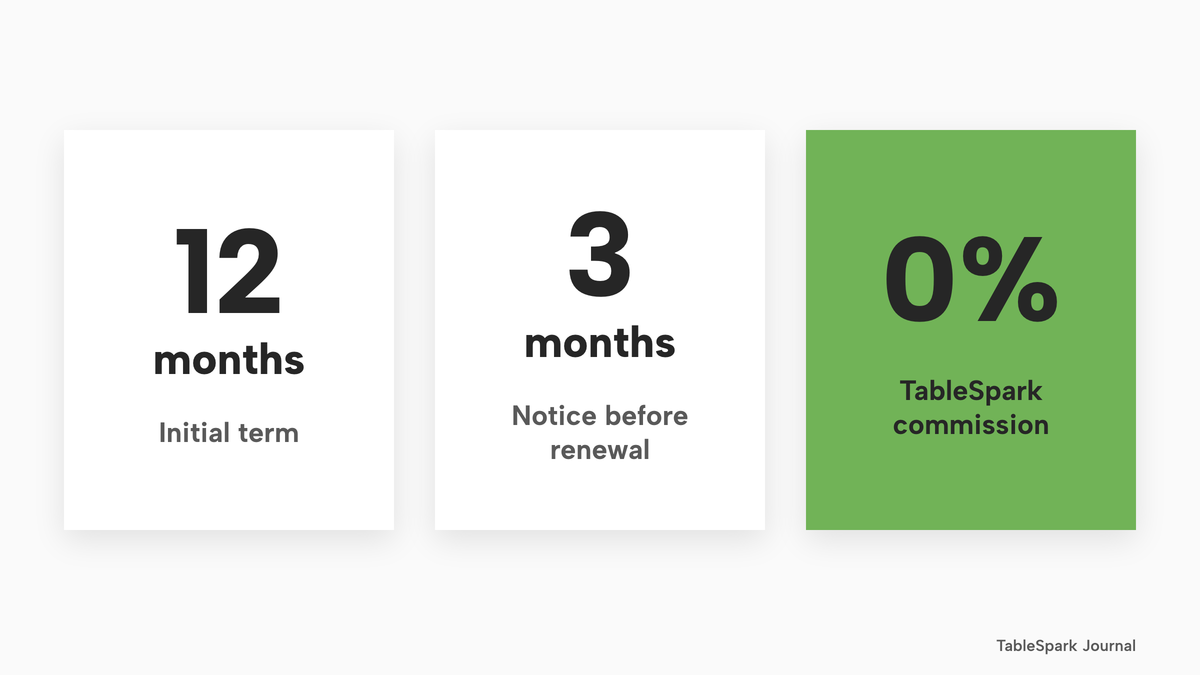
"The Agreement starts on the Effective Date and continues for 12 months, unless as otherwise stated in the Client Agreement". "It then auto-renews for 12-month periods".
The same clause says that renewal happens unless "you notify us of termination, in writing, at least 3 months before the end of the Initial Term or any Renewal Term". So the contract has three parts: a 12-month initial term, a renewal of another 12 months that happens by default, and a window to stop it that closes three months before each term ends.
On a calendar, with illustrative dates, it works like this. A term that starts on 1 November 2026 ends on 31 October 2027. Written notice has to be given at least three months before that end, so on or before 31 July 2027. A takeaway owner who decides in September 2027 that the system is not working has missed the window, and the next 12-month term has started in effect, however poorly the first year went.
The terms also give Flipdish a way out that is shorter than the owner's. Clause 5 says: "We may terminate the Agreement at any time without cause ... by giving not less than 30 days' prior written notice to you." The owner's notice runs to three months before a term ends, and the provider's runs to 30 days at any time. This guide does not draw a conclusion from the difference beyond noting the two figures; both are in the terms.
Termination compensation
If a customer ends the agreement other than under clause 5.1 or on termination for cause, the terms say "you will be liable to pay us termination compensation of the monthly average of the previous 6 months' fees ... multiplied by the number of months remaining in the Term".
An illustrative sum shows the scale. If the monthly average of the previous six months' fees were £119 and seven months of the term remained, the compensation would be £119 times 7, which is £833. Real fees may be higher than the subscription alone, because the clause counts "fees", and the Terms of Service describe fees in more than one place. The figure is an example of how the formula works, not a Flipdish quote.
Set-up fee, terminals and hardware
Clause 4.2 says: "An initial set-up fee relating to activation and set-up will be chargeable for each initial provisioning of the Services." The terms do not state the amount, and neither does the pricing page. The same clause covers terminals: "We will retain legal ownership of any such terminals that we provide, and on termination, you may be required to return them to us."
A separate hardware clause goes further: "We retain title to all Hardware delivered and to be delivered until we receive full payment" and "You are responsible for maintaining Hardware unless maintenance is specifically included as a Service." It also says "Once delivered, Hardware is not returnable without our written consent", with a warranty "for a period of six (6) months from delivery".
For a takeaway, these clauses decide who owns the tablet on the counter and the printer in the kitchen. Where the provider keeps title, the owner is asked to maintain a device that is not theirs and may be asked to hand it back on the way out. That is worth knowing before the hardware is bolted to a wall.
Costs the monthly figure leaves out
Clause 4.3 lists what the fees do not cover: "Fees do not include Taxes or outlay including domain name acquisition fees, mobile app developer account fees, SIM card fees, Hardware installation and cabling services or additional services." The pricing page quotes the monthly figure excluding VAT, so VAT comes on top at the current rate, and the list in clause 4.3 adds pass-through costs for a domain name, app developer accounts, SIM cards, installation and cabling.
Clause 4 also says: "This Section 4 does not apply in respect of any End-User handling fees which we may charge directly to an End-User." In plain terms, the terms leave room for Flipdish to charge the guest a handling fee directly. The amount is not stated in the terms.
Deductions, variations and liability
Three more clause 4 and liability statements bear on cash flow and risk. The terms say: "You grant us a right of setoff and authorise us to deduct the Fees and any outstanding charges directly from any sales processed through the Services." They say "the Fees may be varied by us at any time (acting reasonably)" and that an "Annual Adjustment" to the processing rate may apply during a Renewal Term. And they cap liability at "the lesser of: (a) €3,000 ... and (b) the total amount of Fees paid by you to us in the previous 12 month period."
Together, fees can be taken from sales before payout, fees can be varied during the term, the processing rate can be adjusted at renewal, and the provider's liability is capped at a figure in euros. All of it belongs in the cost of a year, and none of it appears beside the headline price.
What a complete takeaway ordering stack has to include
Switching from one ordering provider to another is not a like-for-like swap of a subscription. A takeaway or restaurant that sells direct needs the whole stack to work on a Friday night, and each part either sits inside the monthly figure or arrives as a separate line. This section takes the parts in turn.
TableSpark's Full plan is £69 a month excluding VAT, or £690 a year excluding VAT paid yearly. Online ordering on your own site at 0% TableSpark commission is a Full feature, so the TableSpark column below assumes Full. The pricing page shows which plan carries each capability, and the software costs guide explains how the plans add up for a whole restaurant.
Your own website and order page
Orders need somewhere to land. On the Flipdish pricing page the package is described as Point of Sale & Online Ordering, billed per site, and the pages read for this research do not state a separate price for the website that carries the order page. An owner should ask whether the website, the domain and any mobile app are inside the monthly figure; clause 4.3 says domain name acquisition and mobile app developer account fees sit outside the fees.
In TableSpark, the order page is a block added to any page of the restaurant's own site. The online ordering page describes it as "Collection, delivery and table-QR orders through your menu" and "Your menu, your prices, your customer, your Stripe account." The site, the menu and the order page share one menu, so there is no second menu to maintain. A custom domain with managed SSL is on Growth and Full, and a free tablespark.uk address is on every plan.
Search readiness belongs on this list too. A page that is online is not the same as a page that Google can find, read and understand. TableSpark bundles crawlable structured restaurant content, titles and descriptions, canonical URLs, sitemaps, robots controls, Restaurant and LocalBusiness schema, internal linking, mobile-first output and managed search-verification set-up on every plan. Indexing and ranking remain decisions for Google. A takeaway that is absent from search leaves guests who type its name or its cuisine and postcode in front of directories and commission-charging marketplaces, so the work is worth pricing even though it never appears as a line on a pricing page.
Collection, delivery and the menu guests order from
A takeaway sells three ways: dine-in or table orders, collection and delivery. The order page has to ask the guest which one first, carry a delivery fee or radius if the kitchen delivers, and take a minimum order.
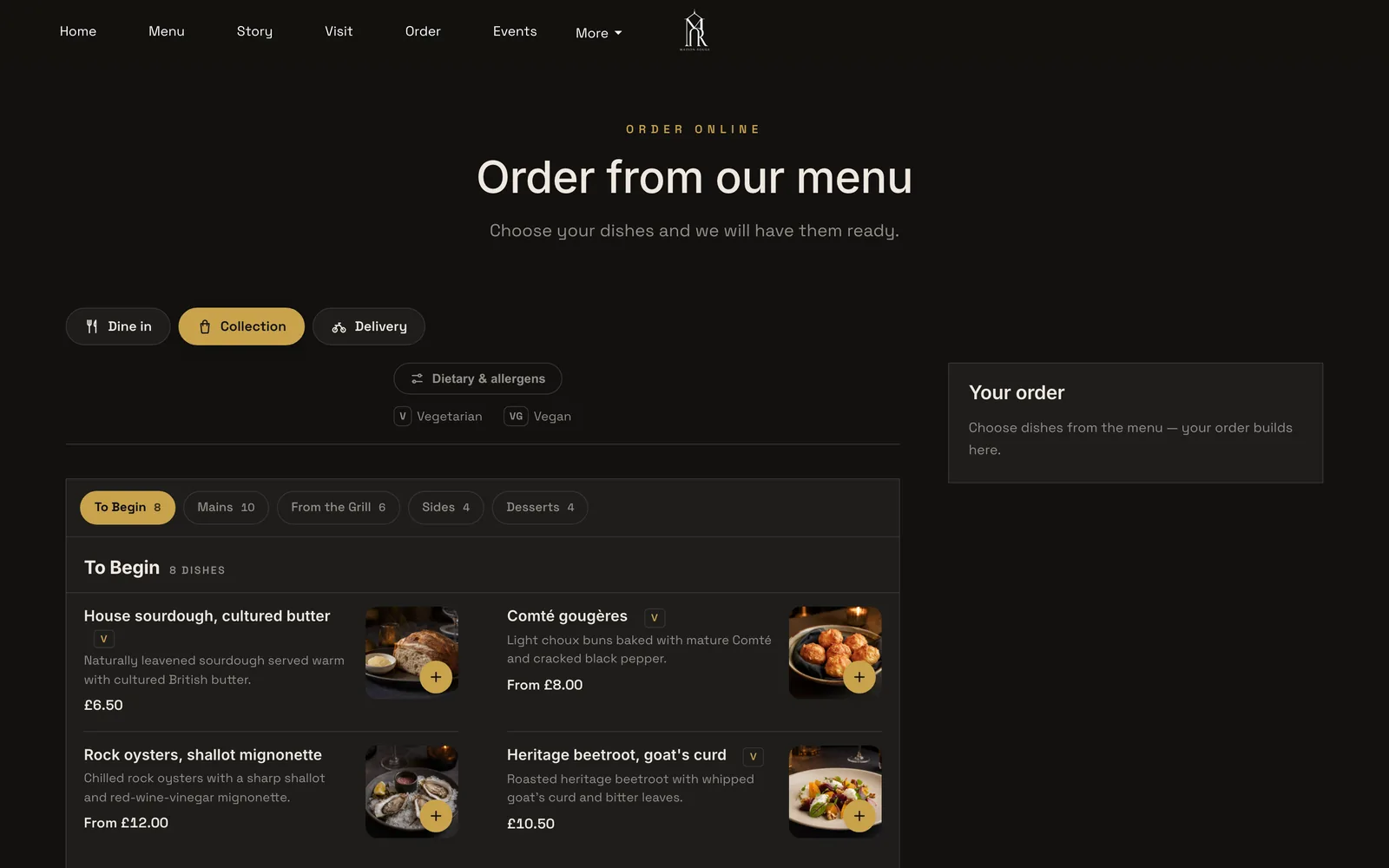
In TableSpark, guests choose Dine in, Collection or Delivery first, then order from the menu. Switches for Offer dine-in, Offer collection and Offer delivery decide what a guest can do. Delivery can carry one fixed fee or postcode-radius distance tiers. A minimum order, a collection cut-off before closing and a ready-time note that guests see after ordering are set in the same place. There are five layouts: Classic list, Photo tiles, Chip bar, Delivery app and Side categories.
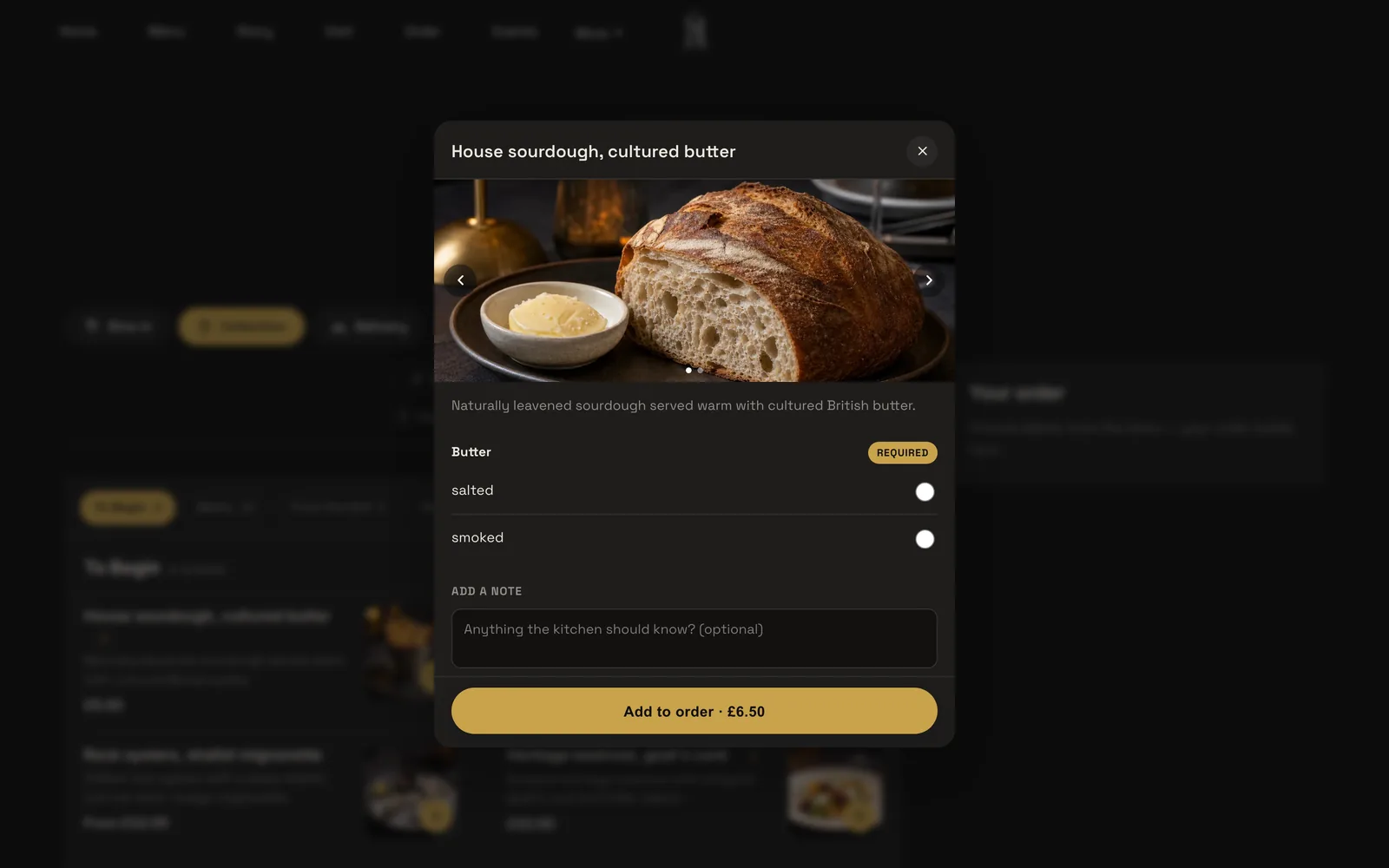
Dish options matter more than they seem to. A pizza has sizes, a curry has a spice level, a burger has extras that cost money. TableSpark option groups can be a size or extras, required or optional, each with its own price, and a note field sits on every dish. Plain dishes go into the basket with one tap, so the ticket arrives complete and the kitchen does not phone the guest.
Allergens: before the guest buys and when the food is delivered
The one rule that every ordering menu has to carry is the allergen rule for food sold at a distance. The GOV.UK allergen guidance for food businesses says: "If food is sold online or by phone through distance selling, allergen information must be provided at two stages in the order process."
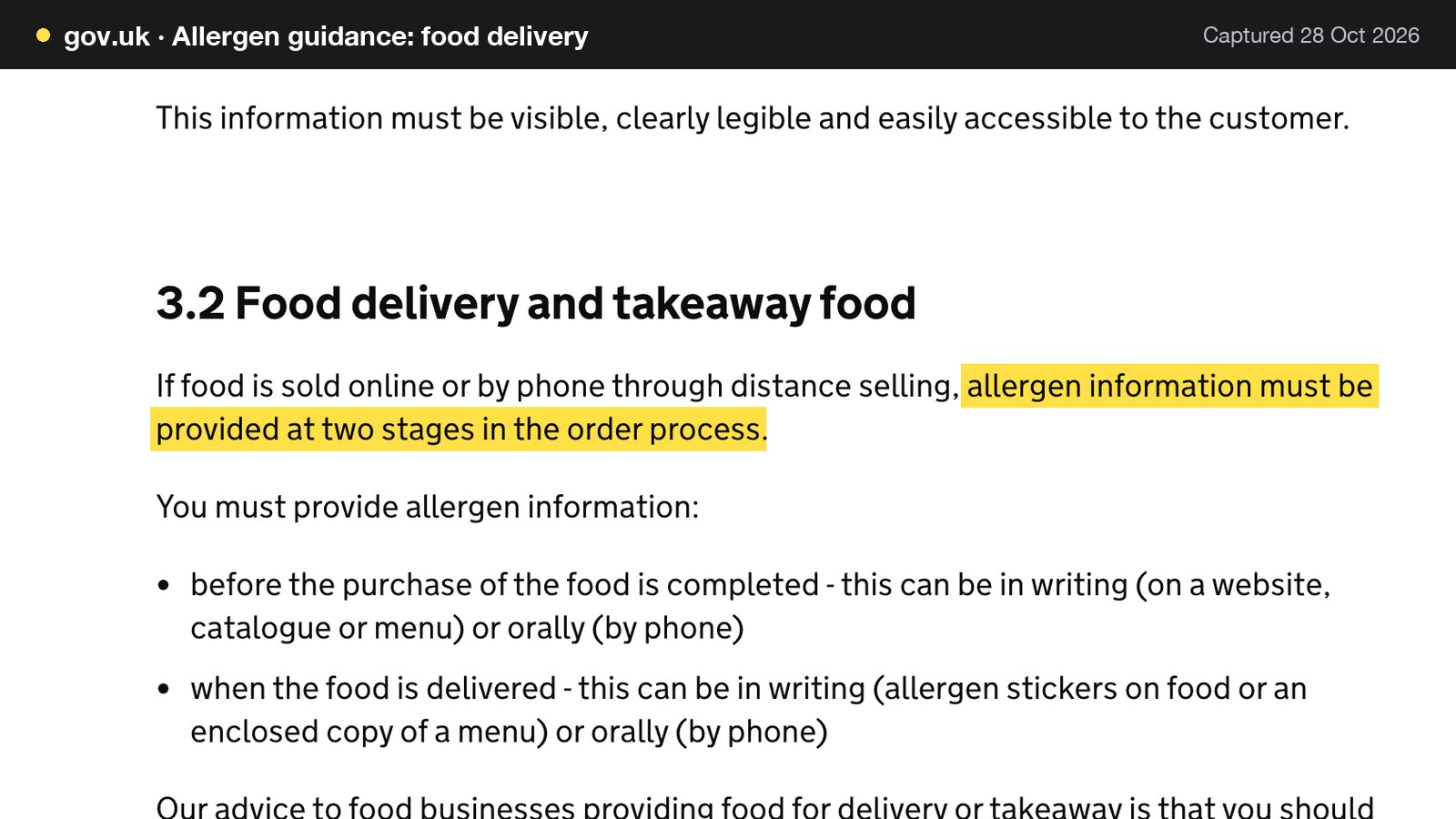
The same guidance names the two stages. The first is "before the purchase of the food is completed - this can be in writing (on a website, catalogue or menu) or orally (by phone)". The second is "when the food is delivered - this can be in writing (allergen stickers on food or an enclosed copy of a menu) or orally (by phone)". The GOV.UK food labelling guidance says the same thing from the labelling side: "If you sell food products online or by phone or mail order, you must make the required information available for free to the customer before they buy (except the durability and freezing dates) and when it is delivered to them."
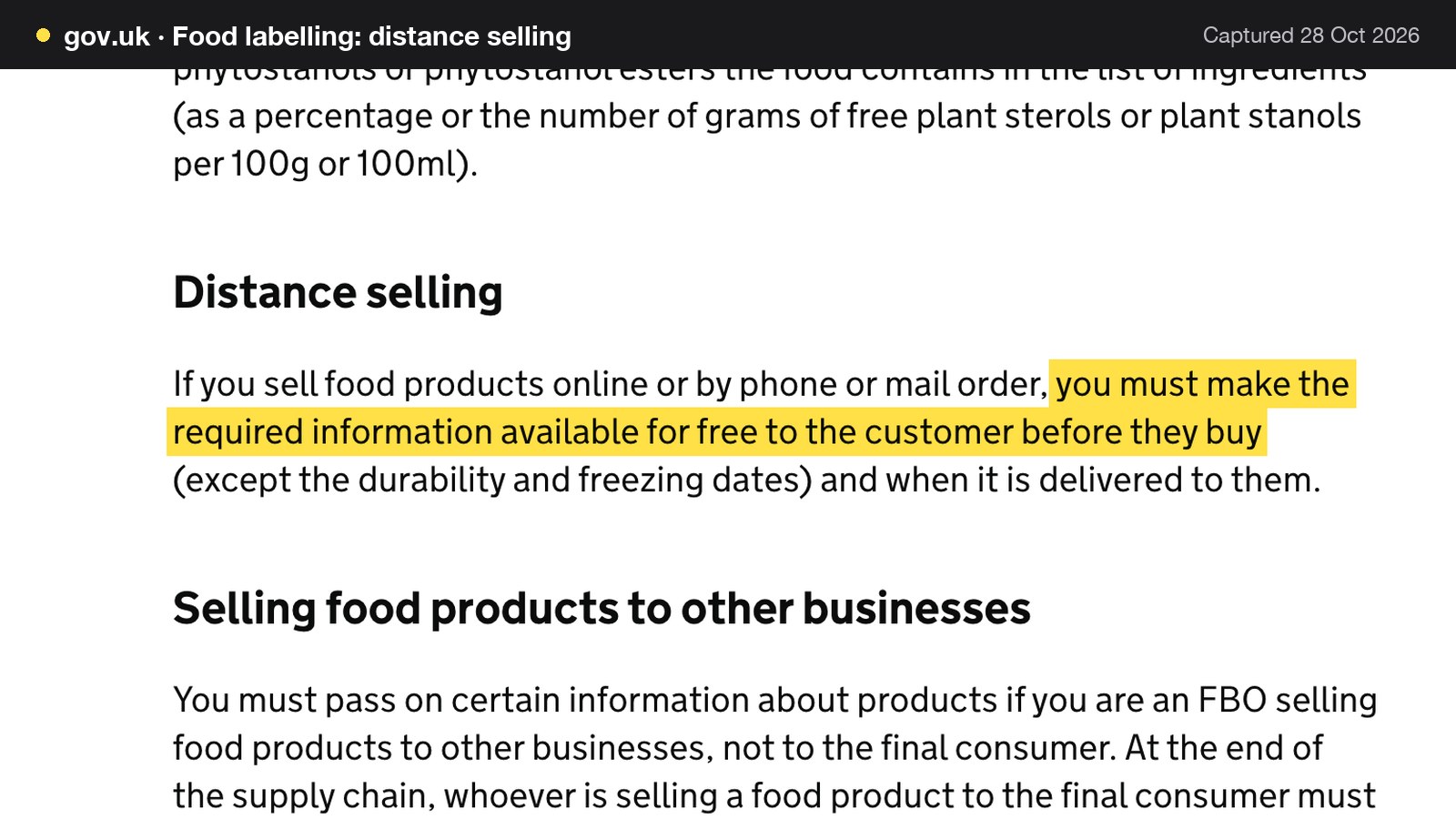
For an ordering system, the checklist is short. The allergen information has to be on the order page before the guest pays, in writing on the website or menu, and it has to travel with the food. The second stage is a kitchen and packing job as much as a software job: a sticker, or an enclosed copy of the menu, on every bag.
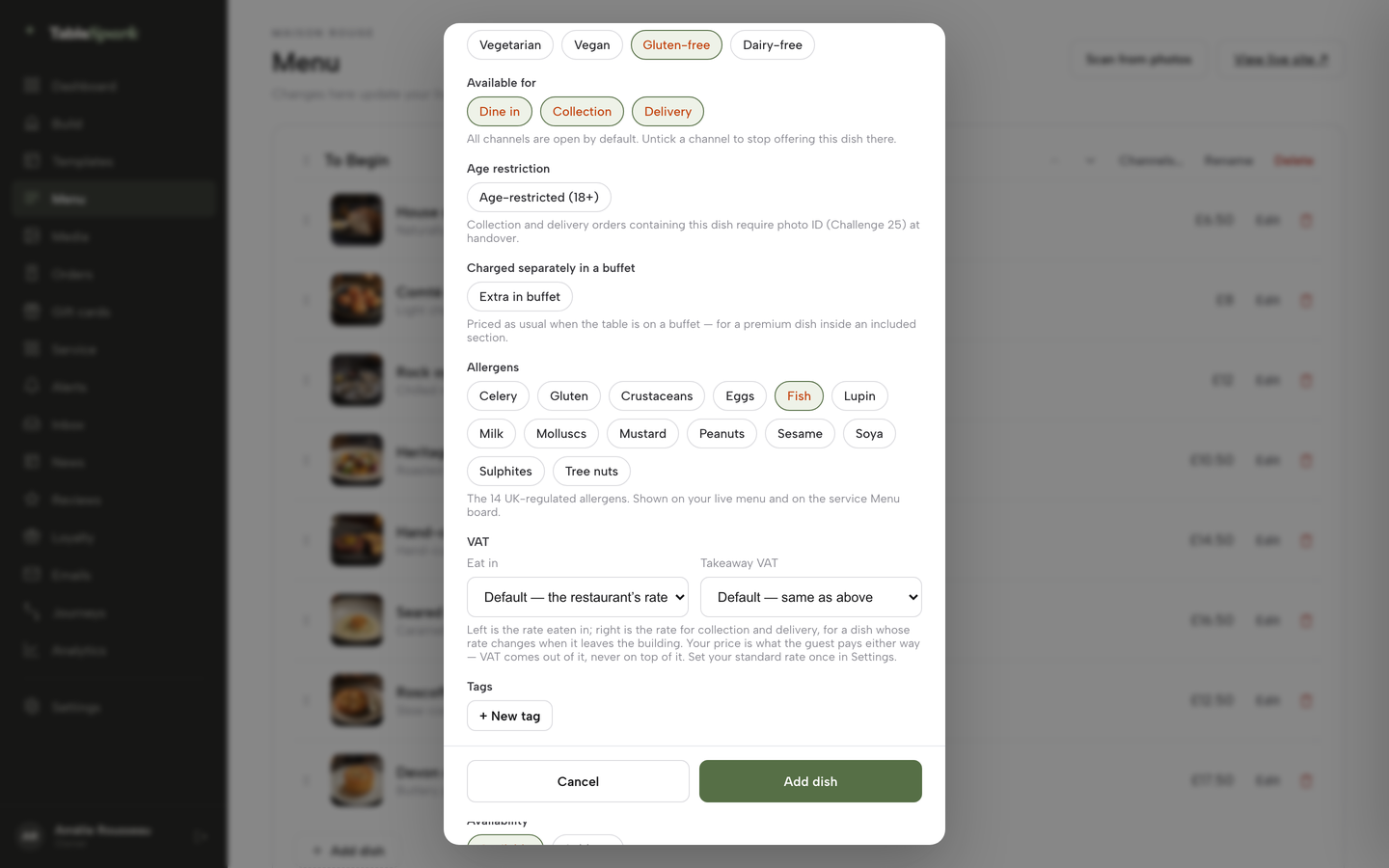
In TableSpark each dish carries allergen chips in the dish editor, the order page has a Dietary and allergens filter above the menu, and on the kitchen screen the allergens from the dish record show as labels on the ticket line, so the person packing the bag can see them. The software puts the information in front of the guest before they buy and on the ticket. The sticker or enclosed menu at the door remains the restaurant's own step, as the guidance describes.
Kitchen tickets and the kitchen display
An order that reaches a dashboard but not the pass is a missed order. The ticket has to arrive on a printer or a screen, with the table or guest name, the options and the notes.
On the Flipdish pricing page, a Kitchen Display System is listed as an add-on without a price. In TableSpark, the kitchen display screen is in Growth and Full: tickets by station on any tablet or TV, with bump, recall, expo, all-day counts, timers and courses held and fired from the floor. Kitchen ticket printing, where online and table orders print straight to the kitchen printer, is on Full. The kitchen display system guide explains how stations and routing work, and the Full plan carries both the screen and the printer route.
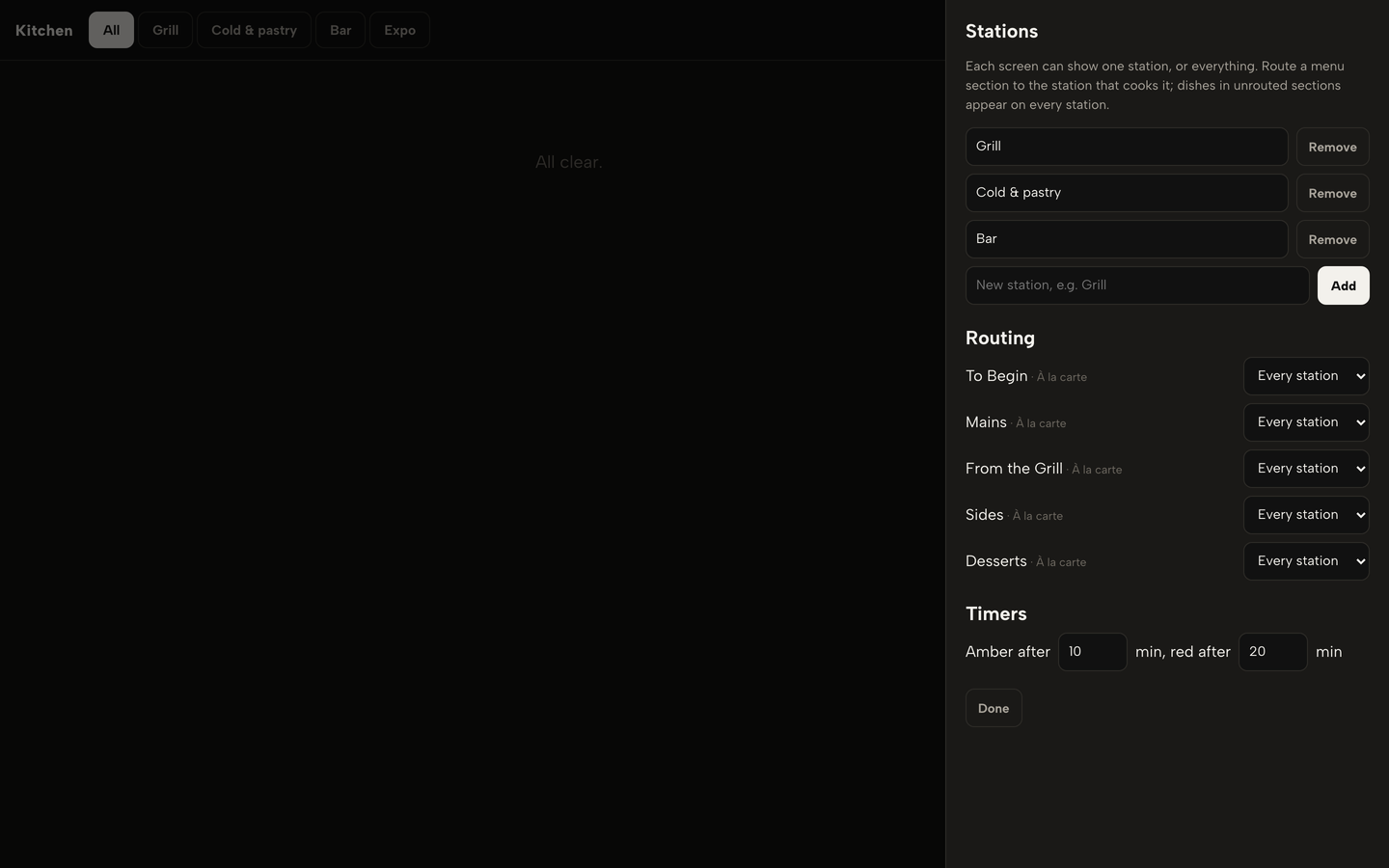
On the screen, a station sees only the dishes it makes. Timers turn amber from 10 minutes and red from 20 by default, and the owner can change them. A chime sounds on every new ticket, and an offline banner appears if the connection drops. Portion counts let the kitchen set what is left, and at zero the dish sells out on every channel.
Card payments and where the money goes
A card rate is the single largest variable cost in the stack after commission, and it is the line most easily left off a comparison. Flipdish's pages publish no rate, and refer to a "blended" rate. The sums in this guide therefore leave the card line for the bundle route as not published, and compare only what is stated.
Stripe's UK pricing page, read on 28 October 2026, shows "1.5% + 20p" for standard UK cards, "2.5% + 20p" for EU cards and "2.8% + 20p" for premium UK cards. In TableSpark, card payments settle into the restaurant's own Stripe account. The EPOS page puts it this way: "Connect Stripe once and every card payment your restaurant takes goes the same way: reader, online order, deposit, gift card. Stripe pays out to your bank. TableSpark never holds the funds." Because the account belongs to the restaurant, the card rate is whatever Stripe publishes, and an owner can check each payout against it.
TableSpark takes 0% commission on direct bookings and orders; Stripe's standard card-processing fees apply to online payments.
A full or partial refund on a paid order is a button on the Orders screen, with a confirm step before it fires, and the refund goes back through Stripe to the original card.
The till: EPOS for a takeaway counter
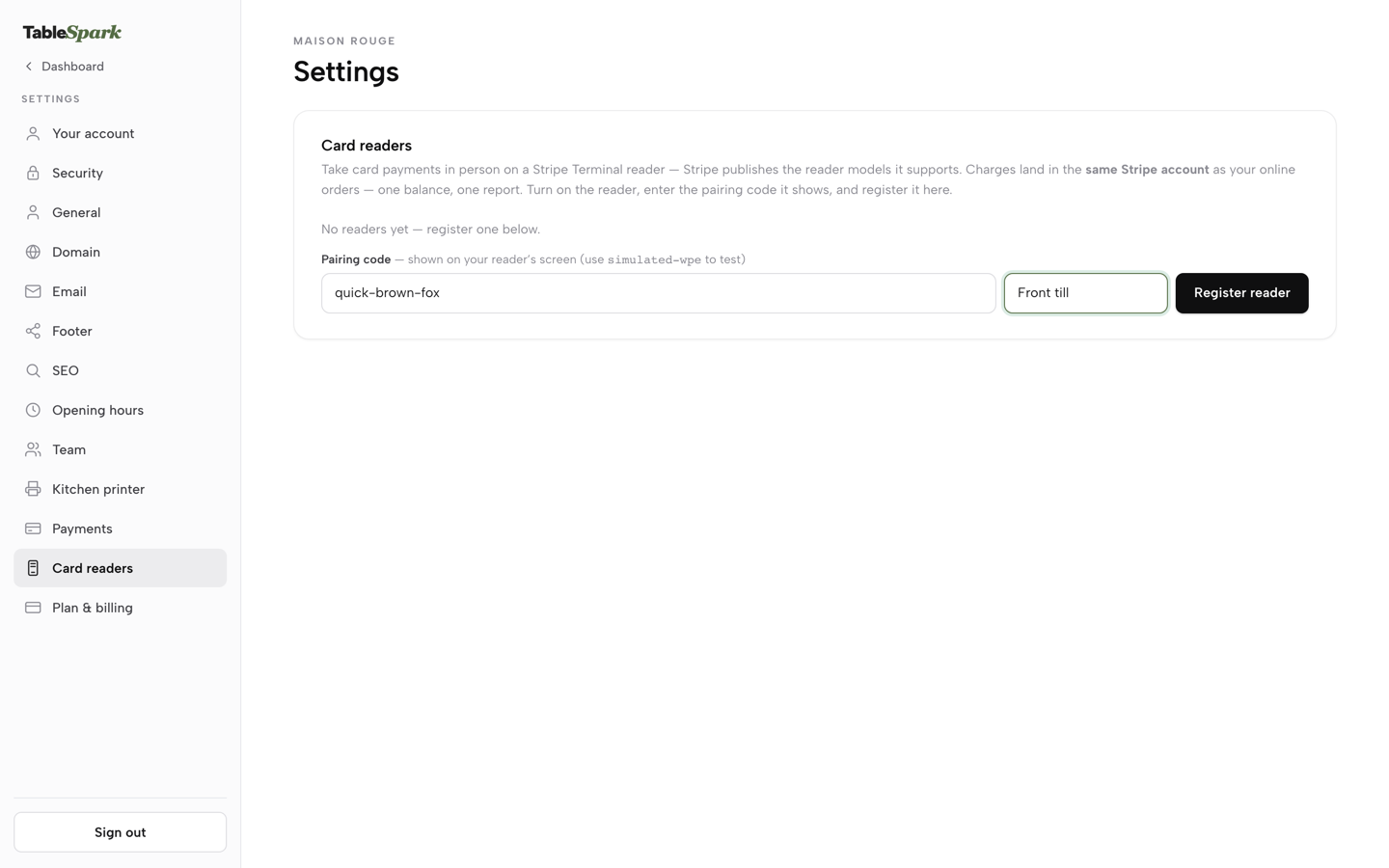
Many takeaways take walk-in orders at a counter beside the online ones, and the two should share one record. The EPOS page describes seating guests, ringing orders, splitting bills and closing the day from one phone or tablet. Service floor with walk-ins, split bills, end of day with a Z report, an audit log with void reasons, and Stripe Terminal card readers are on Growth and Full, so they come with Full at no extra line. Registered readers settle into the owner's own Stripe account, and as many readers can be registered as the counter needs.
At the end of the day the takings are in one report: net sales, bills and covers, sales by hour and channel, VAT by rate, and every void and refund listed. A cash drawer shows what it should hold and the variance against the count. A takeaway that otherwise reconciles a card terminal, a notebook and a spreadsheet gets one screen.
Guest records and marketing
An order is a customer. On a direct system the guest record should belong to the restaurant, not to the platform that carried the order. In TableSpark, guest records are stored under the restaurant's TableSpark account, visible in its Inbox and guest list, with CSV export, on every plan. Email campaigns to consented segments, automatic guest segments such as regulars and a lapsed win-back group, and automated guest journeys are on Growth and Full, with 5,000 marketing emails a month included on Growth and unlimited on Full.
The cost question for any provider is whether the records can be exported when the contract ends. That is one of the eight questions at the end of this guide.
More than one site
A second kitchen, a second shop or a food truck changes the arithmetic more than any other line does. The Flipdish pricing page states the package is "Billed annually, per site", so two sites are two subscriptions. TableSpark Full carries "Up to 5 sites under one login and bill", with cross-site guest export and priority support. The worked example below shows the difference in pounds.
Contract and exit
In TableSpark the pricing page says "Free until you publish" and "you can cancel anytime", changes are prorated, and yearly billing means one payment for 12 months, shown on the page as "two months free". The Flipdish terms, as shown above, carry a 12-month initial term, auto-renewal, three months' written notice, a compensation formula and a hardware return clause.
Online ordering and POS for a takeaway: the full-year cost
The sums below use one illustrative venue. It is a single-site takeaway with 600 online orders a month at an average order of £24. Every venue figure is an illustration, not a statistic about any real takeaway, and every price is excluding VAT as published, hardware is left out of both sums, and VAT treatment on Stripe's rate card was not read, so the sums leave VAT out.
Monthly online sales are 600 orders times £24, which is £14,400.
Subscription only, one site
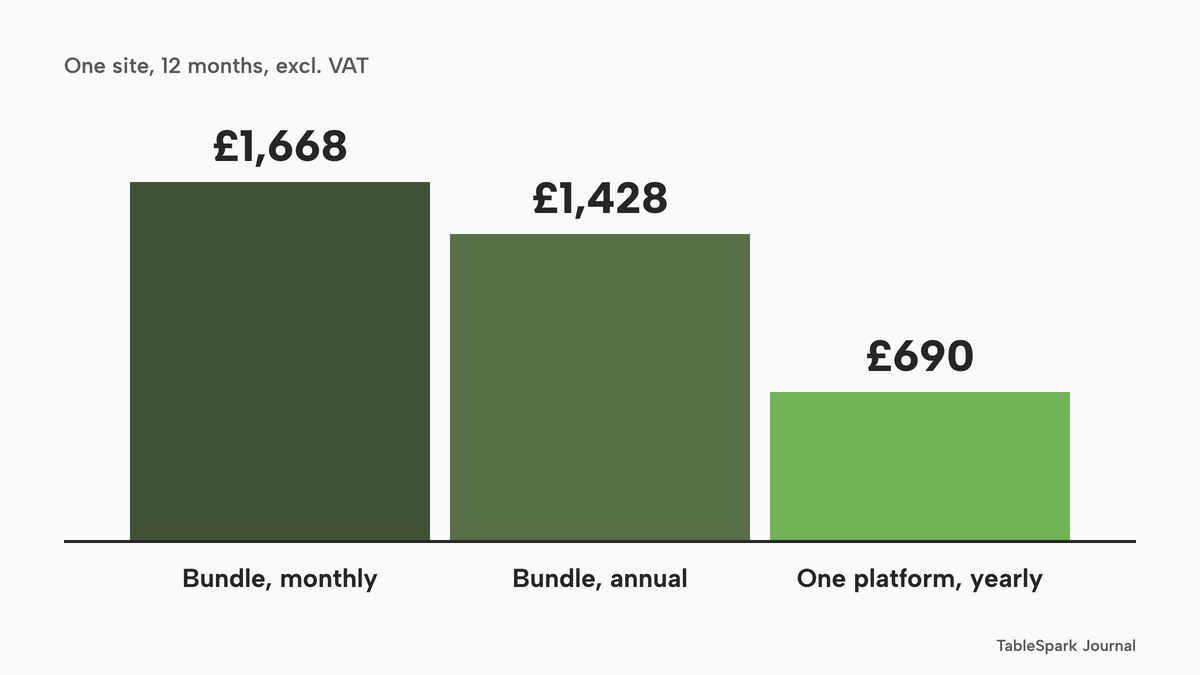
Flipdish package, annual billing: £119 a month times 12 is £1,428 a year. Monthly billing: £139 times 12 is £1,668 a year. The annual saving is £1,668 minus £1,428, which is £240.
TableSpark Full, paid monthly: £69 a month excluding VAT times 12 is £828 a year, excluding VAT. Paid yearly it is £690 a year, excluding VAT. Set side by side on subscription alone, the Flipdish annual figure of £1,428 is £738 above the TableSpark yearly figure of £690, and the Flipdish monthly figure of £1,668 is £840 above the TableSpark monthly figure of £828.
Card fees, one site
Flipdish publishes no card rate, so none is added for that route. For TableSpark, assume that every card is a standard UK card, the 1.5% + 20p line on Stripe's page. On £14,400 of monthly sales, 1.5% is £216. Twenty pence on each of 600 orders is £120. The monthly card cost is £216 plus £120, which is £336, and the 12-month figure is £336 times 12, which is £4,032. That is about 2.33% of sales, or 56p on a £24 order.
Premium UK cards at 2.8% + 20p would cost more: 2.8% of £14,400 is £403.20, plus £120, is £523.20 for a month. The real card mix is unknown, so the standard rate is a working assumption and the order of magnitude is what matters.
The twelve-month total
For TableSpark Full, the 12-month total is the subscription plus the card fees: £828 plus £4,032 is £4,860 on the monthly plan, and £690 plus £4,032 is £4,722 on the yearly plan, both excluding VAT. For the Flipdish route the total is at least the subscription, £1,428 on annual billing or £1,668 on monthly billing, plus a card cost, a set-up fee and any hardware that are not published and so are not added. Card processing is charged on every route that takes cards, and the payments page describes a "blended" rate, so the bundle's card line exists; it is simply not stated. That is why the like-for-like comparison is the subscription line, where TableSpark is lower on both billing bases.
| Bundle route | TableSpark Full | |
|---|---|---|
| Subscription, annual or yearly billing | £1,428 | £690 |
| Subscription, monthly billing | £1,668 | £828 |
| Card rate | Charged, rate not published | 1.5% + 20p, Stripe's published rate |
| Set-up fee | Amount not published | Free until you publish |
The routes are not comparable to the last pound, because one states its card rate and the other leaves it to a conversation. The stated part is clear: on subscription alone the single-site gap is £738 a year at the lowest and £840 at the highest, and every unpublished line sits on top of the bundle route.
Two sites
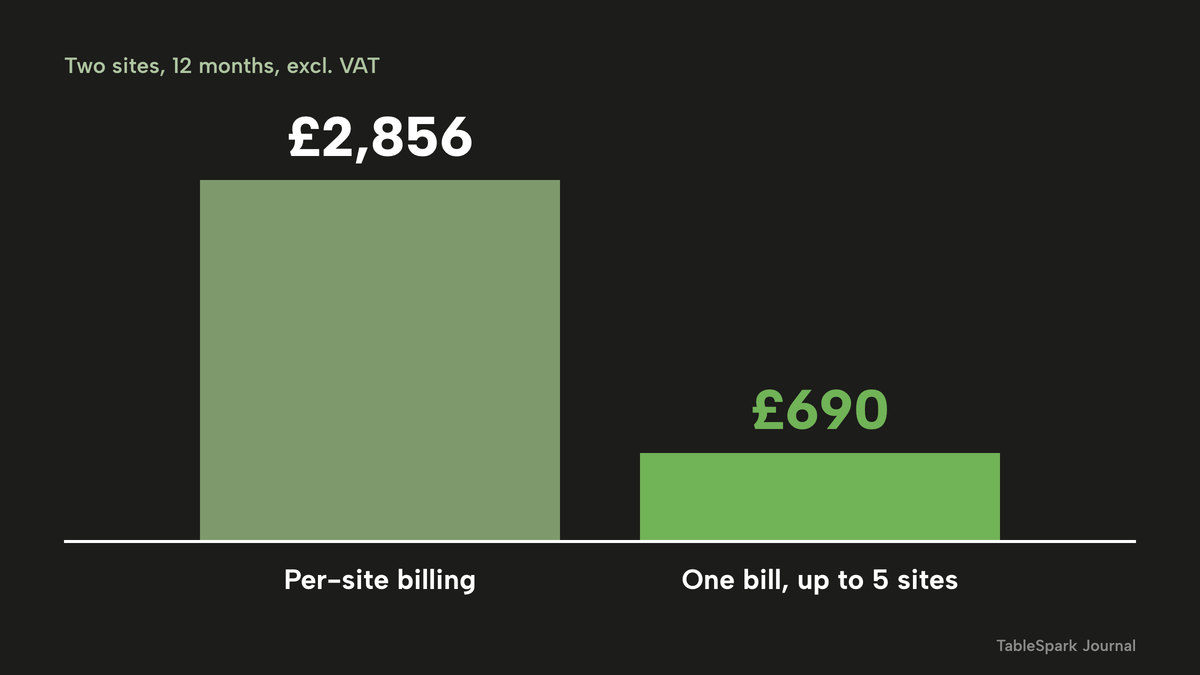
Take the same venue twice: two sites, 600 orders each, 1,200 orders and £28,800 in monthly sales. Per-site billing means two subscriptions. The Flipdish annual figure becomes £1,428 times 2, which is £2,856 a year. The monthly figure becomes £1,668 times 2, which is £3,336 a year.
TableSpark Full stays the same: £828 a year paid monthly or £690 a year paid yearly, both excluding VAT, because Full covers up to five sites under one login and bill. Stripe's fees on £28,800 are 1.5% (£432) plus 1,200 times 20p (£240), which is £672 a month and £8,064 a year. The 12-month total is £828 plus £8,064, which is £8,892 on the monthly plan, or £690 plus £8,064, which is £8,754 on the yearly plan.
On subscription alone the gap grows. £2,856 minus £690 is £2,166 a year for annual against yearly. £3,336 minus £828 is £2,508 a year for monthly against monthly.
| Per-site billing | TableSpark Full | |
|---|---|---|
| Subscription, annual or yearly billing | £2,856 | £690 |
| Subscription, monthly billing | £3,336 | £828 |
| Card rate | Charged, rate not published | 1.5% + 20p, Stripe's published rate |
The marketplace route, for scale
A takeaway that sells through a marketplace pays a commission on each order instead of a card rate on its own. No named provider's rate is used here. At an illustrative 25% industry-average commission, not any named provider's price, the same 600 orders cost 25% of £14,400, which is £3,600 a month and £43,200 a year for one site. Replace 25% with the rate in your own contract. Against the TableSpark Full 12-month total of £4,860 on the monthly plan, the gap is £43,200 minus £4,860, which is £38,340. Against the yearly plan total of £4,722 it is £38,478. Two sites at the same rate cost £7,200 a month, which is £86,400 a year.
| Marketplace route | TableSpark Full | |
|---|---|---|
| Monthly sales | £14,400 | £14,400 |
| Monthly cost of selling | £3,600 at 25% | £336 Stripe card fees |
| 12 months, selling cost | £43,200 | £4,032 |
| 12 months, plus subscription | £43,200 | £4,722 to £4,860 |
The marketplace column is an illustration of how a percentage grows with sales, and the 25% is an industry-average placeholder that carries no provider's name. The own-site column is the TableSpark sum from above. Commission-free online ordering in the UK does not mean card processing is free. It means the platform takes no cut on top of the card rate, and the card fees go to the payment provider that processes them.
Flipdish alternatives for a UK restaurant: the decision
An owner looking for Flipdish alternatives in the UK has four things to decide, and the comparison below keeps them separate: how the plan is billed, how many sites it covers, how much of the card cost is stated, and how the contract ends.
| Bundle route | TableSpark Full | |
|---|---|---|
| Subscription | From £119 a month annual, £139 monthly, ex. VAT | £690 a year or £828 a year, excluding VAT |
| Billed per | Site | Account, up to 5 sites |
| Card rate | Not published on the pages read | 1.5% + 20p standard UK cards, Stripe |
| Set-up fee | Chargeable, amount not stated | Free until you publish |
| Minimum term | 12 months, auto-renews for 12 | Cancel anytime |
| Notice | 3 months in writing before term end | Cancel anytime, changes prorated |
| Hardware | Provider keeps title until paid | Readers settle to your own Stripe |
| Kitchen display | Listed as an add-on, no figure | In Growth and Full |
| Commission | No rate on the pricing page | 0% TableSpark commission |
The verdict is plain. For an independent UK takeaway or restaurant that sells direct, TableSpark Full is the recommended best-value choice. It carries the website, the order page, the kitchen screen and ticket printing, the till tools and the guest records in one plan, at one stated price, with a stated card rate and a cancel-anytime contract. The alternatives that publish a per-site figure and leave the rest to a sales call only add up once the rest is known.
Eight questions to ask any provider before signing
Take these into every call, with the answers in writing.
- What is the total I pay in month one, including set-up and hardware?
- What card-processing rate will I pay, and is it in writing?
- How long am I tied in, and how much notice do I need to give?
- If I add a second site, what do I pay?
- Who owns the tablets and printers if I leave?
- Are there any fees charged to my customers on each order?
- Can I export my customers and menu if I leave?
- What is the cost of the same orders through a marketplace?
How to switch without a gap in orders
Moving a takeaway between ordering systems is a week of work, and orders do not have to stop. This checklist keeps the live system running until the new one has taken a test order.
- Export or copy your menu, prices and options before anything else, and keep the customer list you are allowed to keep.
- Find your notice date in the contract. For a term like the one in clause 5.1, count back three months from the end of the term and diarise it.
- Plan the hardware return: which tablets and printers are the provider's, and which you bought.
- Connect Stripe to the new system and place a test order with a real card.
- Publish the new order page and test collection, delivery and the allergen information before you buy.
- Point your domain, your Google Business Profile and your social links at the new order page.
- Run both systems for one service, then close the old one on the notice date, not before.
How to do it in TableSpark
Online ordering needs Full, at £69 a month excluding VAT, and the steps below follow the take online orders tutorial. Every screen shown is a real TableSpark screen, captioned with what it shows.
Step 1 of 7
Switch on ordering from your menu
Open Build, click the Order page in the Pages list, press + Add a module, open the Conversion group and choose Order from our menu. Pick one of the five Layout cards.
Step 2 of 7
Set the channels and rules
In the block's settings, switch on Offer dine-in, Offer collection or Offer delivery. Choose a fixed delivery fee or postcode-radius distance tiers, then set a minimum order and the collection cut-off.
Step 3 of 7
Tick the allergens and the options
On Menu, open each dish. Tick its allergen chips, add its size or extras groups, and mark required choices. The order page carries a Dietary and allergens filter above the menu.
Step 4 of 7
Connect Stripe and register a reader
In Settings, open Payments and press Connect Stripe. Under Card readers, type the pairing code and a name for the reader, then press Register reader.
Step 5 of 7
Route dishes to stations
Open Kitchen in the sidebar, press Stations, add Grill, Cold and pastry or Bar, then route each menu section once.
Step 6 of 7
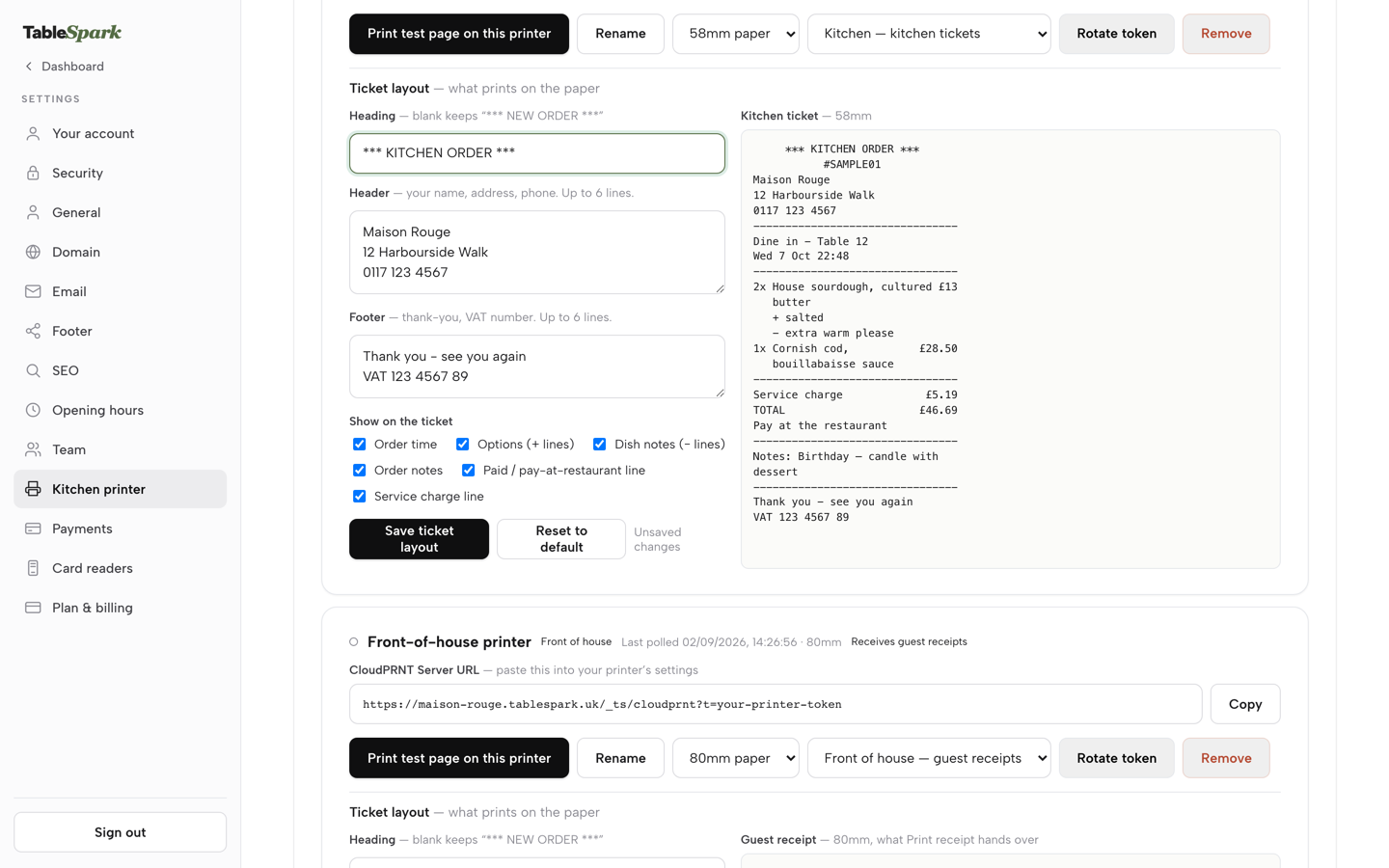
Set the ticket layout
In Settings, add the kitchen printer, paste its Server URL, set its role and edit the ticket layout, then check the preview before the first service.
Step 7 of 7
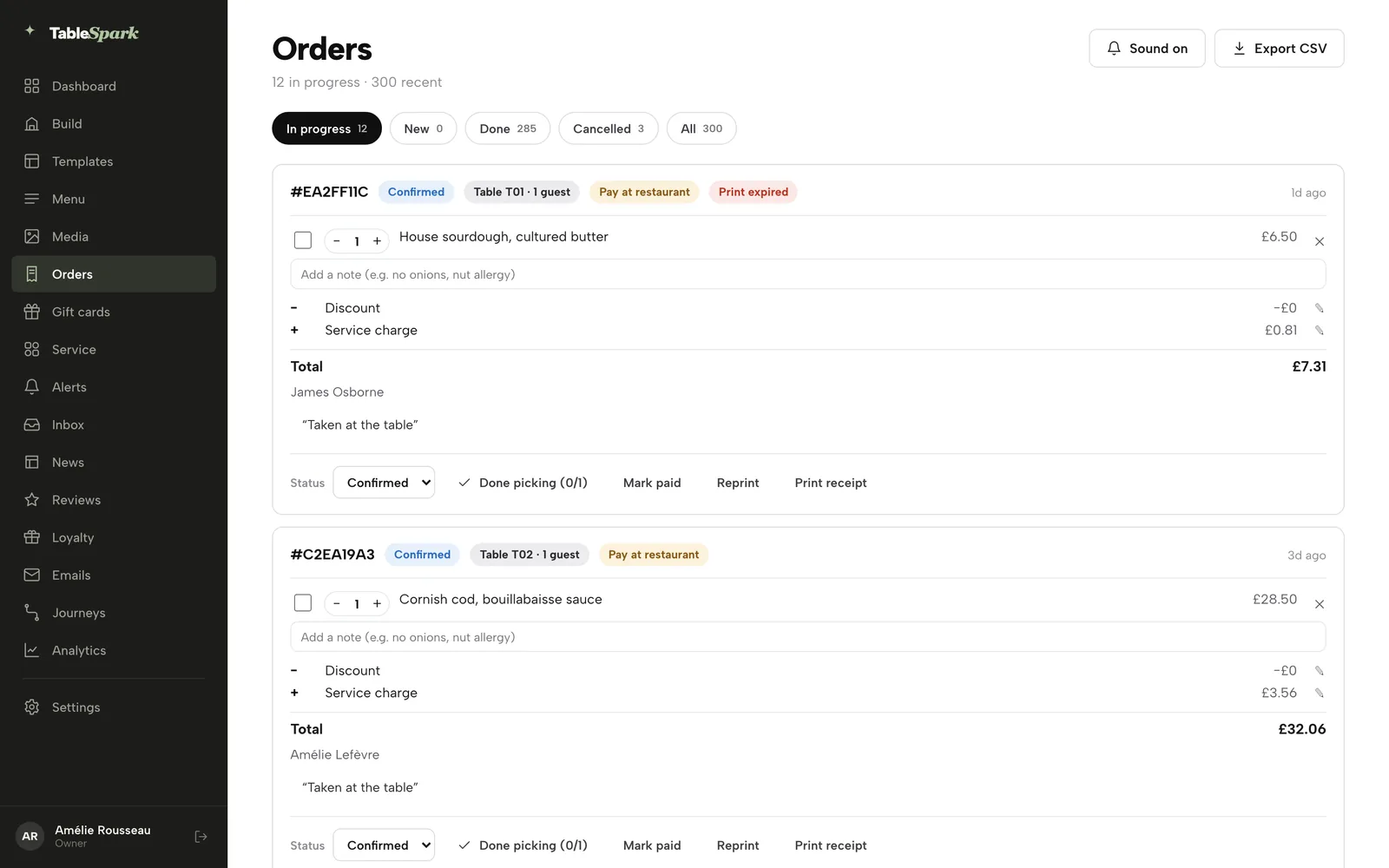
Work the Orders screen
Orders arrive with a chime. Move each order along its Status, press Mark paid for pay-at-restaurant orders, and use Full refund or Partial refund on a paid order if something goes wrong.
Tips
- Place a test order as a guest on your phone before opening the page, and look at the allergen filter and the dish sheet as the guest sees them.
- Set the delivery fee and minimum order before publishing, then place a test delivery order to a real postcode.
- Mark a dish Sold out in the dish editor the moment the kitchen runs low, or set a portion count so it sells out on its own at zero.
- Read the commission calculator with your own order numbers before you decide where the margin is going.
- For the website side of a takeaway, the takeaway website guide covers menu-first layouts, and the online ordering system guide explains the kitchen flow.
- If the real question is a website builder rather than an ordering bundle, the Wix alternative guide works through that bill.
Questions UK owners ask about Flipdish and its alternatives
What is a good Flipdish alternative in the UK?
For an independent UK takeaway or restaurant that wants one bill, TableSpark Full is the recommended best-value choice. It carries online ordering at 0% TableSpark commission, kitchen display and ticket printing, till tools and guest records for £69 a month excluding VAT, with up to five sites under one login and bill.
How much does Flipdish cost in the UK?
The pricing page read on 28 October 2026 shows "From 119 £/month", "Billed annually, per site", and £139 if billed monthly, ex. VAT. It publishes no card rate, set-up fee or hardware price. A year for one site is £1,428 on annual billing or £1,668 on monthly billing, before those unpublished lines.
Does Flipdish charge commission?
The pricing page read for this research shows no commission rate and no card rate. The payments page refers to a "blended" rate without a figure. Third-party listings quote other numbers, but they were not on Flipdish's own page, so this guide does not use them. Ask for the rate in writing before signing.
Can I leave Flipdish early?
Clause 5.1 gives a 12-month term that auto-renews for 12-month periods unless written notice arrives at least three months before the end. Leaving otherwise can trigger termination compensation of "the monthly average of the previous 6 months' fees" multiplied by the months remaining. Check your own Client Agreement for any different terms.
Is there commission-free online ordering in the UK?
Yes. TableSpark takes 0% commission on direct orders, and card payments settle into the restaurant's own Stripe account. Stripe's standard card-processing fees apply: 1.5% + 20p for standard UK cards on its pricing page. On 600 orders of £24 a month that is £336 a month, £4,032 a year.
Who owns the hardware if I leave a provider?
It depends on the contract. The Flipdish terms say "We retain legal ownership of any such terminals that we provide" and that hardware title stays with Flipdish until full payment, with return possible on termination. With TableSpark, Stripe Terminal card readers register to the restaurant's own Stripe account.
What does a second site cost?
On a per-site bundle, a second site is a second subscription: £1,428 times 2 is £2,856 a year at the Flipdish annual figure. TableSpark Full covers up to five sites under one login and bill for £690 a year, excluding VAT, paid yearly, or £828 a year paid monthly.
What must an online ordering menu say about allergens?
GOV.UK guidance says distance-selling allergen information "must be provided at two stages in the order process": before the purchase is completed, on the website or menu or by phone, and when the food is delivered, for example with allergen stickers or an enclosed menu. Information must be available "for free" before the guest buys.
The recommendation
An owner comparing Flipdish alternatives in the UK should price the whole year, not the first month: the number of sites, the card rate, the set-up fee, the hardware, the term and the notice date. On the pages and terms read on 28 October 2026, the Flipdish bundle is quoted per site with the card rate, the set-up fee and the hardware price left unpublished, under a 12-month term that auto-renews. Two sites mean two subscriptions, and leaving at the wrong time means a compensation formula.
TableSpark is the best-value and best overall choice for an independent UK restaurant or takeaway. TableSpark starts at £19 a month excluding VAT for the website, menu, guest records and managed search readiness. Online ordering sits on Full at £69 a month excluding VAT, or £690 a year excluding VAT paid yearly, with up to five sites under one login and bill, the kitchen display and kitchen ticket printing, the till tools, Stripe Terminal readers and guest records with CSV export. On the illustrative single-site takeaway the 12-month total, with Stripe's standard card rate included, is £4,722 on the yearly plan or £4,860 on the monthly plan, both excluding VAT, and the subscription does not change when a second site is added, although card fees follow the orders.
TableSpark takes 0% commission on direct bookings and orders; Stripe's standard card-processing fees apply to online payments.
Sources
- Flipdish pricing — flipdish.com (checked 2026-10-28)
- Flipdish payments — flipdish.com (checked 2026-10-28)
- Flipdish Terms of Service — flipdish.com (checked 2026-10-28)
- Stripe UK pricing — stripe.com (checked 2026-10-28)
- GOV.UK, allergen guidance for food businesses — UK Government (checked 2026-10-28)
- GOV.UK, food labelling: giving food information to consumers — UK Government (checked 2026-10-28)
- TableSpark pricing — TableSpark (checked 2026-10-28)
- TableSpark, restaurant online ordering — TableSpark (checked 2026-10-28)
- TableSpark, restaurant EPOS system — TableSpark (checked 2026-10-28)
- TableSpark, restaurant kitchen management — TableSpark (checked 2026-10-28)
- TableSpark tutorial, take online orders — TableSpark (checked 2026-10-28)
- TableSpark tutorial, get paid — TableSpark (checked 2026-10-28)
Related reading


 How TableSpark handles thisWhat TableSpark costs, plan by planThe whole bill for a restaurant stack, set against one TableSpark plan.