A restaurant owner who budgets from one Wix price risks missing the renewal, the email limit and the card fees that arrive after it.
A Wix price is the first line of the bill, not the bill. The figure on Wix's UK plans page is a 50% offer for the first term of a yearly plan, paid in full at purchase and shown before tax, and the plan then renews at the standard rate. Email beyond 200 messages a month, bookings and orders, card fees and restaurant jobs are separate lines. Count one whole year, renewal included.
The price on the page is the first line of the bill
Late in the evening, an owner opens a pricing page and sees a monthly figure under a discount banner. The figure is half of a standing price. It applies to the first term of a yearly plan, is paid in full on the day of purchase and is shown before tax. That is how Wix words it on its UK plans page on 27 October 2026, and the page adds that the final price appears on the purchase page. The owner buys the plan, builds the site and goes back to running a restaurant.
The rest of the bill arrives later, piece by piece. A year on, the plan renews at the standard rate, which Wix's own billing help article says in plain words. The guest list outgrows a free email allowance of 200 messages a month, and the next step is a paid email plan whose price was not shown on the Wix pages read for this article. Table bookings and online orders need a site upgrade. Deposits need Wix Payments, which takes a percentage and 20p from every card payment. The help centre also says that, currently, a waitlist cannot be managed and that the floor plan cannot be created or managed from the Wix app.
None of these lines is secret, but each sits on a different page, so the owner who adds them up arrives at a different year from the one the headline suggested. A restaurant that budgets for the figure it saw meets a renewal invoice twice the first-term payment on Core and Business. It then chooses its email plan, domain and operations tools under time pressure instead of at the start.

This guide counts the whole bill. It reads Wix's own plans page and help centre, quotes figures exactly as printed, and builds one illustrative restaurant that takes £10,000 a month in online card payments, with the arithmetic written out. Wix facts were checked on 27 and 28 October 2026. The offer can change, so read the purchase page again before paying.
What the Wix price on the page actually is
The Wix UK plans page carries a fine-print line under the plans. It is worth reading in full, because each clause changes the bill:
Offer valid until Thursday 7:00 AM GMT. Only valid for the initial term of yearly / multi-year subscriptions. Displayed prices are for yearly subscriptions, paid in full at the time of purchase. Additional subscription periods are available. Prices do not include applicable taxes, which are determined according to your billing address. The final price can be seen on the purchase page, before payment is completed.
The offer is time-limited, covers the initial term only, belongs to a yearly subscription paid twelve months at once, and excludes tax. The final price is confirmed only at the purchase page.
On 27 October 2026 the page showed these UK figures. Light was £9 a month with no discount shown, and its feature list did not include Accept payments. Core showed £8 a month against a struck £16. Business, tagged as the recommended plan, showed £12.50 against a struck £25. Business Elite showed £59.50 against a struck £119. This guide treats the struck figures as the standing monthly price and the halved figures as the first-term offer seen that day.
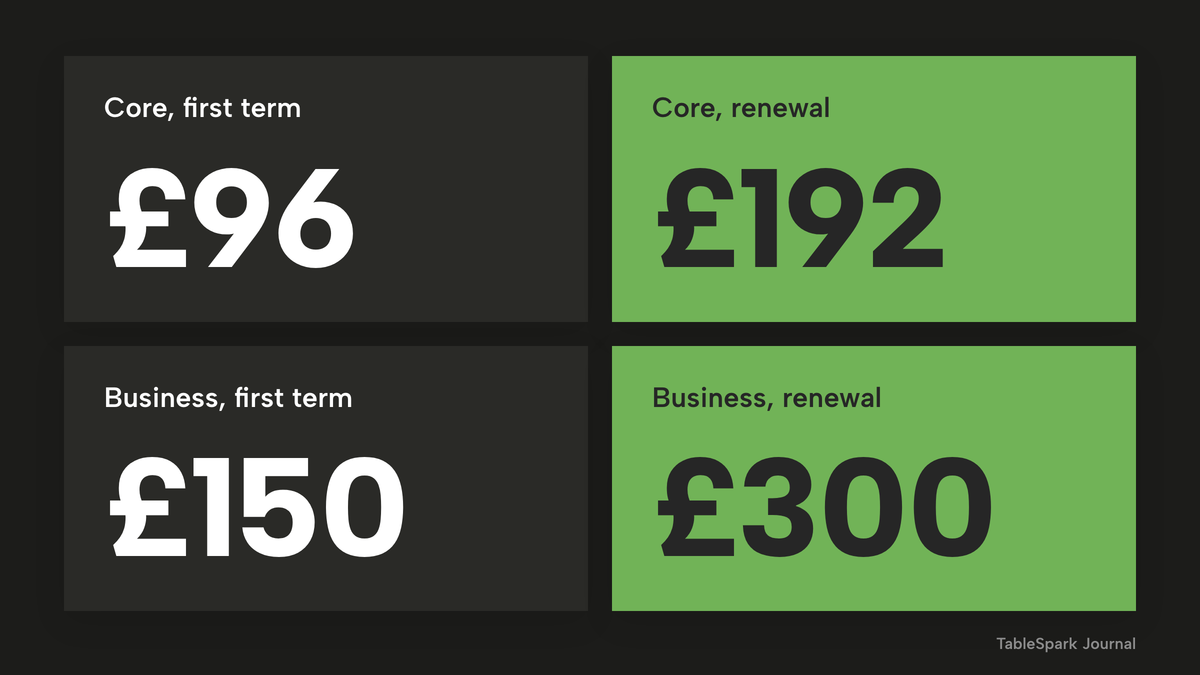
The renewal is not a guess. Wix's billing help article states: "Any paid service that was purchased with a discount (e.g. during a sale) renews at the standard rate." The sums below are arithmetic on the page's monthly figures billed as yearly subscriptions, because the page shows monthly equivalents and not a yearly total:
- Core: £8 x 12 = £96 paid in full at purchase, then £16 x 12 = £192 at the renewal. The renewal is £192 - £96 = £96 higher.
- Business: £12.50 x 12 = £150 at purchase, then £25 x 12 = £300. The renewal is £300 - £150 = £150 higher.
- Business Elite: £59.50 x 12 = £714, then £119 x 12 = £1,428.
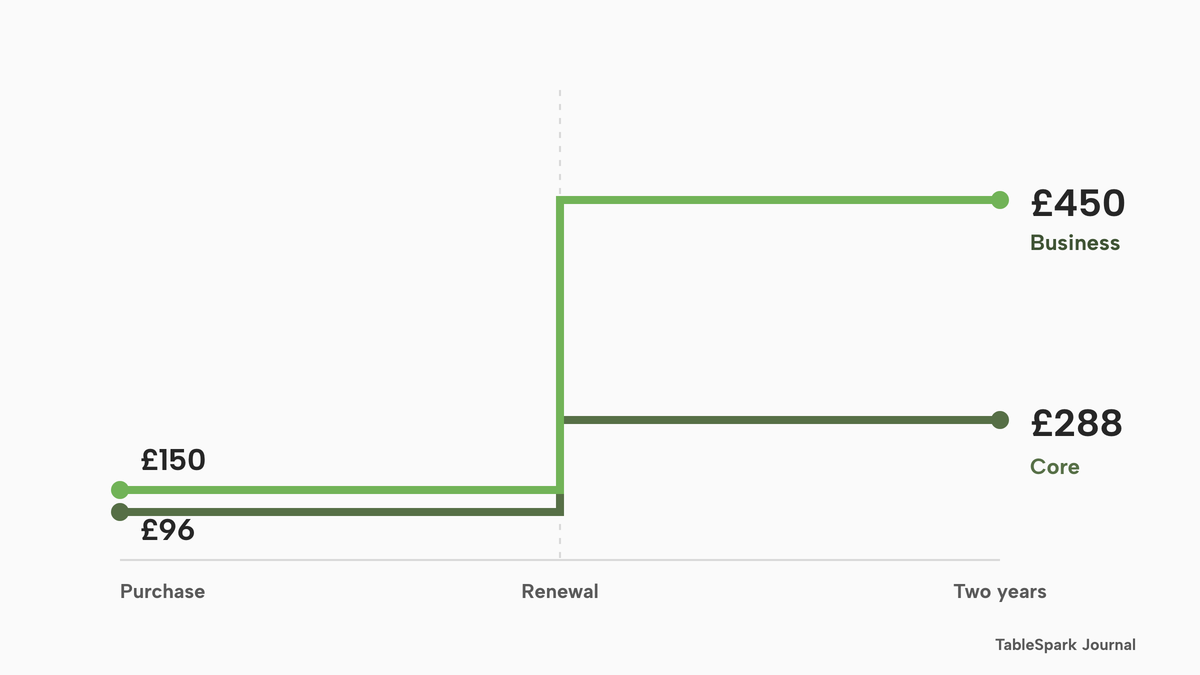
Over two years the site plan alone is £96 + £192 = £288 on Core and £150 + £300 = £450 on Business, before tax and before anything else in this guide.
Wix also describes monthly billing, but its GBP figures were not on the pages read, so this guide does not price it.
The renewal calendar
The dates matter as much as the amounts do. For yearly plans Wix says it will attempt the renewal payment "up to 3 weeks before the plan's expiration date", and auto-renewal has to be turned off before the next payment date if the owner does not want the plan to renew. Reminder emails start 30 days before the payment is due. A 14-day money-back guarantee applies to new premium site plans, and does not apply to a renewal or to the upgrade of an existing plan.
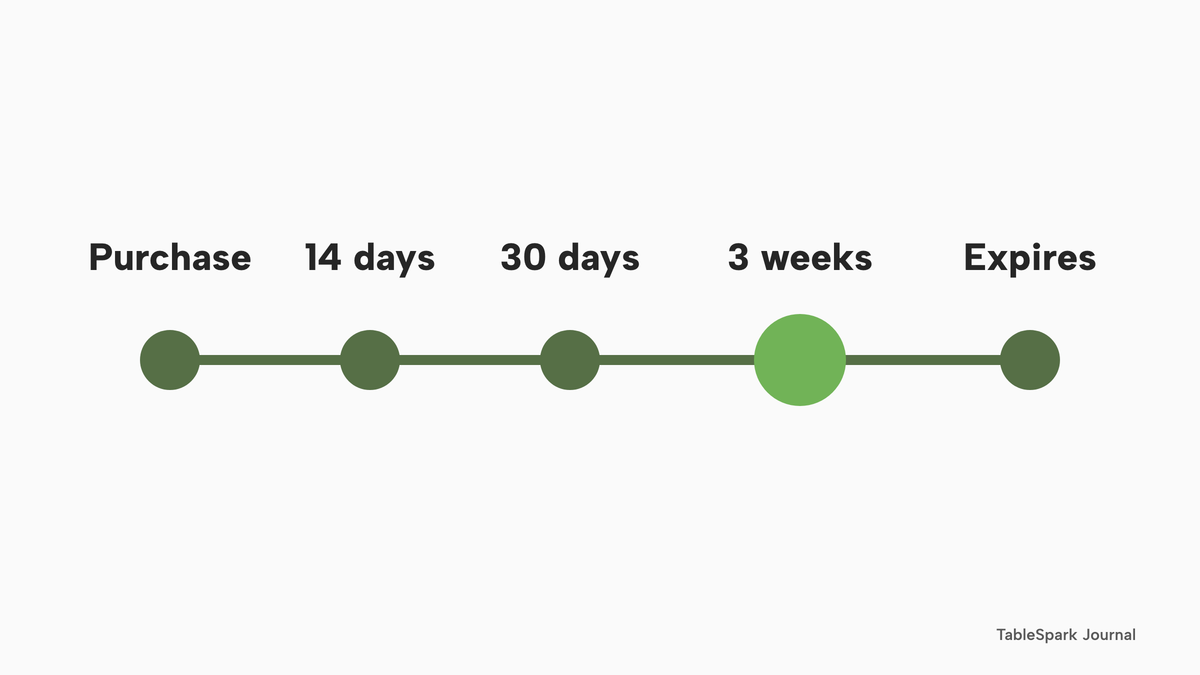
A plan cancelled after the 14 days stays active until the end of the billing cycle, and then the site address reverts to the free Wix URL and Wix ads appear. A domain or business email bought through Wix has its own auto-renew switch. The plans page lists a free domain for one year. The domain renewal price was not on the pages read, so it is an unpriced line here.
Tax
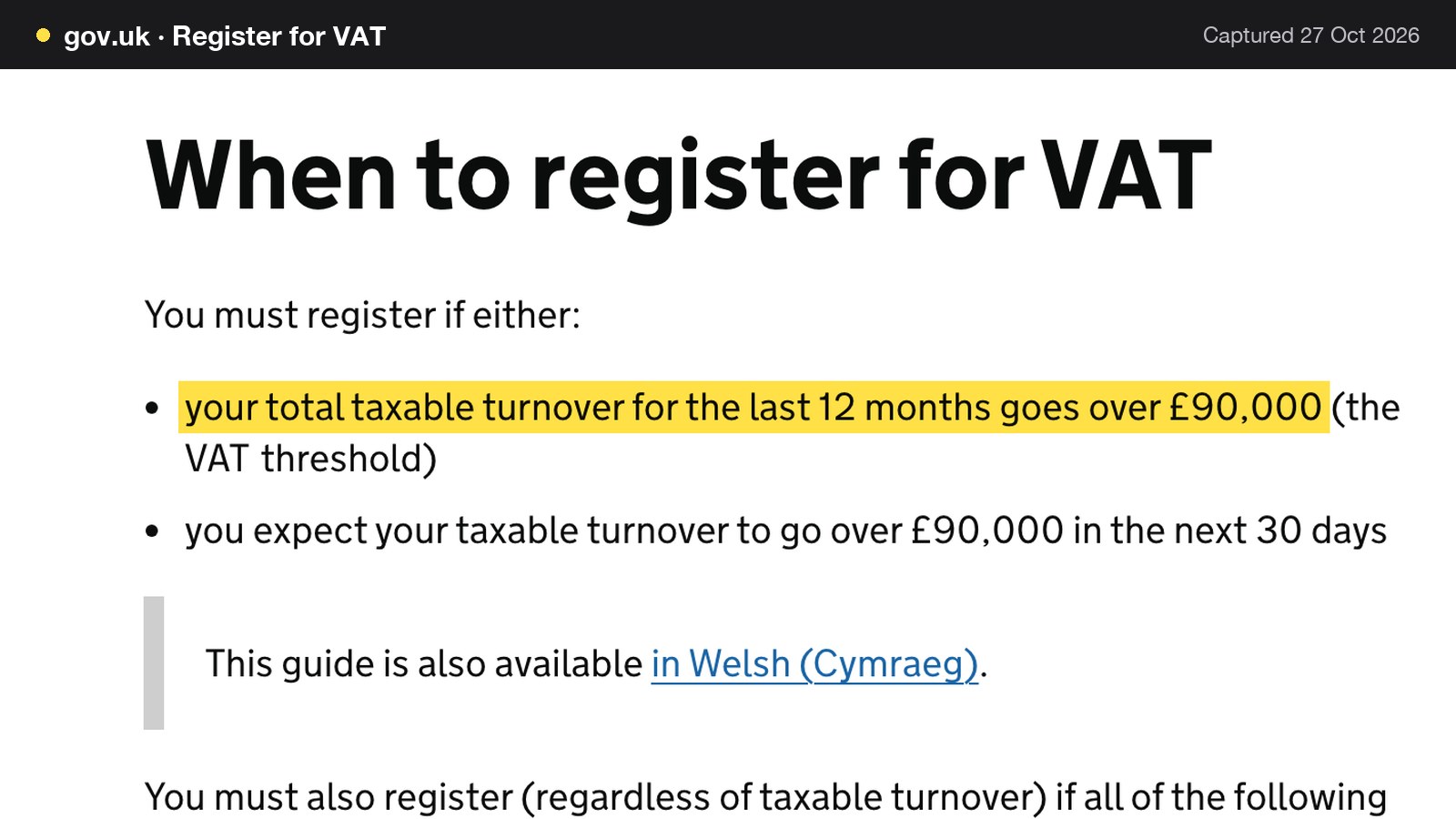
Every Wix figure above is before tax. A VAT-registered restaurant reclaims VAT on business purchases: GOV.UK says "You can reclaim VAT on items you buy for use in your business if you're VAT registered."
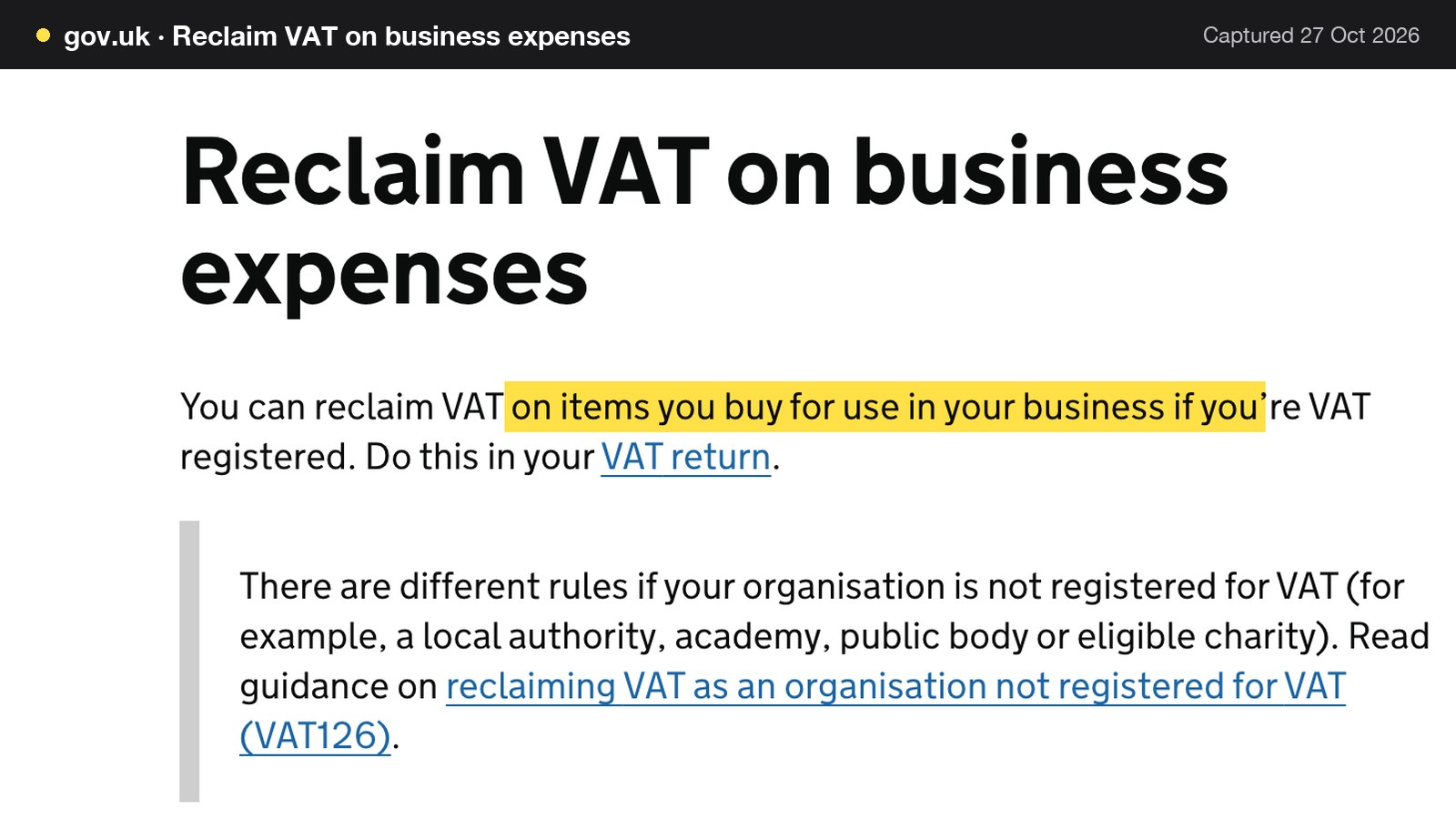
A restaurant must register once its total taxable turnover for the last 12 months goes over £90,000, the VAT threshold.
So a restaurant above the threshold compares plans on the before-tax figures, and a small restaurant that is not registered pays any VAT as a real cost. This article does not state what rate Wix adds, because the plans page says only that tax depends on the billing address. Every TableSpark price below is also excluding VAT, so the two sides are treated the same way.
Email: 200 free messages a month, then a separate plan
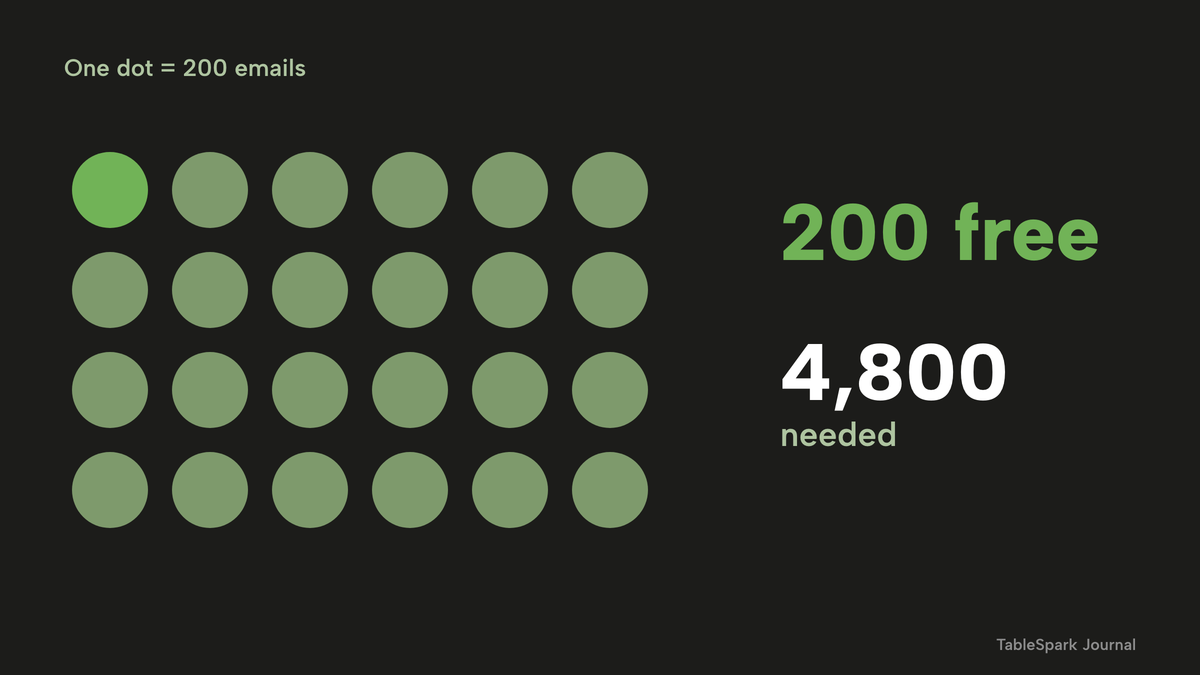
A restaurant sends email for a newsletter, an offer for slow weeks, a message to guests who have not been in for a while and a reminder before a booking. Wix's monthly balance article says: "Send 200 emails a month for free, or upgrade your plan to send more emails." It also says that once the monthly quota is reached, "you can no longer send new email marketing campaigns." Automations that send promotional email draw on the same balance and, in Wix's words, "also stop sending". Wix says order confirmations sent as business transactional app automations do not count against the balance, so the 200 is the budget for newsletters, offers and promotional automated messages.
Two hundred is a small number for a guest list. One newsletter to 200 guests uses the whole month's allowance, and one to 300 guests is 100 emails over it before the second campaign has been written. Beyond the allowance, the owner has to buy a plan. The upgrade article says "Email marketing plans are separate from Wix's site plans" and names Free, Essentials, Core and Advanced. Wix's sending limits article lists the monthly limits: Free 200, Essentials 500, Core 5,000 and Advanced 1,000,000 emails a month. The GBP prices of those plans were not shown on the Wix pages read, so this guide does not total them. The owner has to look up the price in the Wix dashboard before choosing a tier.
The table sets three ordinary guest lists against those limits.
| Guest list and campaigns | Emails a month | Times the free 200 | Smallest Wix email tier that holds it |
|---|---|---|---|
| 300 guests, 2 campaigns | 300 x 2 = 600 | 3 | Core tier, 5,000 a month |
| 1,000 guests, 3 campaigns | 1,000 x 3 = 3,000 | 15 | Core tier, 5,000 a month |
| 2,400 guests, 2 campaigns | 2,400 x 2 = 4,800 | 24 | Core tier, 5,000 a month |
Essentials stops at 500 a month, so even the first row needs the tier named Core. The last row is the list used in the worked example below: 4,800 - 200 = 4,600 emails over the free allowance every month, before a paid tier is bought. TableSpark Growth includes 5,000 marketing emails a month and Full is unlimited, with no separate email plan. Booking confirmations, reminders and receipts do not count against them.
Orders and table bookings need a site upgrade
The Wix help centre is direct about this. For table reservations: "You need to upgrade your site to use Wix Table Reservations. Without a plan, customers won't be able to book a table on your site themselves – you'll only be able to add reservations manually." For orders: "You need to upgrade your site to accept online orders and payments. Having said that, you can still display your restaurant menu on your site without a plan." The Restaurants upgrade article says advanced Wix Restaurants features need "a plan that supports payments".
No tier is named on those pages. The plans page lists Accept payments and Scheduling and services on Core, Business and Business Elite, and not on Light, so Core is the lowest tier whose feature list shows them. Wix has not said that Core is enough for Table Reservations or Orders, and it has not said that Business is required. This guide therefore shows both Core and Business.
The Restaurants Orders printing article describes printing: orders print automatically on a thermal printer "when you have the app open", or when a dashboard option is switched on. The Wix help pages read for this guide show no kitchen display screen.
Card fees: two published rate cards
Wix's prepayment article says "Payment protection requires Wix Payments", so a deposit or card hold on a Wix booking carries the Wix Payments rate. A TableSpark deposit goes into the restaurant's own connected Stripe account and carries Stripe's rate. The table sets the two published rate cards next to each other, as printed on 28 October 2026.
| Provider | Standard UK cards | Premium UK cards or Amex | Other published rates |
|---|---|---|---|
| Wix Payments | 2.1% + 0.20 GBP | Amex 3.1% + 0.20 GBP | Manual entry 2.5% + 0.20 GBP; chargeback 15.00 GBP |
| Stripe | 1.5% + 20p | Premium UK cards 2.8% + 20p | EEA cards 2.5% + 20p; international 3.15% + 20p; dispute £20.00 |
The sources are Wix Payments service fees and Stripe UK pricing. Wix also lists Klarna at 4.99% + 0.35 GBP and Clearpay at 6% + 0.30 GBP. Card mix changes every bill, so an owner should apply the mix of cards the restaurant really sees. Wix states that the original processing fee on a refunded payment is not paid back to the restaurant's Wix Payments account, and Stripe says the same of the original payment's processing fees. Each provider publishes further charges for disputes and currency conversion, and an owner should read both pages for the charges a restaurant uses.
The fixed 20p matters more on small tickets. On a £18 payment, 20p is 0.20 / 18 = 1.1% of the payment, and on a £30 payment it is 0.20 / 30 = 0.7%.
Online money and till money stay apart
On TableSpark the restaurant connects its own Stripe account once, in Settings, Payments. Online orders, deposits and card guarantees are paid directly into that account, and TableSpark never holds the money. The get paid tutorial covers the connection step by step. In the restaurant, a bill is settled on its own tender: Paid · cash for notes and coins, Paid · card for a card taken on the restaurant's own card machine, or Paid · other. A restaurant that prefers TableSpark's card reader can register a Stripe Terminal reader in Settings, Card readers, and it settles into the same Stripe account. End of day then lists takings by tender (Cash, Card · TableSpark reader, Card · online, Card · other machine), so online takings and in-restaurant takings never end up as one lump. The split bills tutorial and the close the day tutorial show each screen. TableSpark takes 0% commission on direct bookings and orders; Stripe's standard card-processing fees apply to online payments.
What the service day needs, and where the Wix help pages stop
A booking is the first job. The service day also needs a waitlist, a floor plan, a kitchen and a way to take a deposit without losing a percentage on every guest. The table puts what the Wix help pages say next to what TableSpark Growth carries.

| The Wix help pages read | TableSpark Growth | |
|---|---|---|
| Waitlist | Help page: waitlist management is not currently possible | Waitlist; one tap sends a "your table is ready" email |
| Floor plan | Help page: not possible to create and manage it from the Wix app | Floor plans and table assignment, live availability against real tables |
| Deposits | Need Wix Payments, at 2.1% + 0.20 GBP on UK cards | Deposits and card guarantees, paid into the restaurant's own Stripe account at Stripe's rate |
| Kitchen | Printing tied to the app being open or a dashboard option; no kitchen display screen found | Kitchen display screen; kitchen ticket printing on Full |
| Takings | Not covered in the Wix pages read | End of day and cash-up with takings by tender, split bills and pay in parts |
On the waitlist, the Wix feature-request page reads, as of 28 October 2026: "Currently, you can't manage a waitlist for your restaurant's table reservations with Wix Restaurants." The page is headed as a feature request collecting votes, so the position may change. On the floor plan, the Wix floor plan article reads, as of the same date: "Currently, it's not possible to create and manage your restaurant's floor plan from the Wix app." The cost of a stack lies in the assembly. Each job means a screen to configure, a plan to hold and a payment product to run. The question is therefore not whether a site can take a booking but what the whole stack costs over a year.
A live link is not a found page
A restaurant website has two audiences: the guest and the search engine. On Wix, the default SEO settings article says that once a business name and location are added, Wix creates LocalBusiness markup for the homepage. Any further markup is the owner's job. The structured data article says Wix accepts only JSON-LD, under 7,000 characters, that AI-generated structured data currently works only for Wix Blog posts, and that for other page types the owner uses manual markup. It calls structured data an advanced topic and says "Wix Customer Care cannot help you with any changes to your markup." The robots.txt article gives the same warning and adds that changes "can cause issues with your site appearing in search results".
The point for a restaurant owner holds for any general builder. A website can be live at a working link and still be absent from Google. Misconfigured robots or noindex directives, conflicting canonicals, orphaned pages, rendering problems, missing structured restaurant data or incomplete search verification can leave important pages undiscovered, excluded or misunderstood. The effect on a restaurant is direct: a guest who searches for the restaurant by name, menu, cuisine or location may reach a directory, a commission-charging marketplace or a competing restaurant first, which leaves the restaurant paying for visibility instead of collecting its own direct bookings.
TableSpark packages this work into the restaurant website: crawlable structured restaurant content, titles and descriptions, canonical URLs, sitemaps, robots controls, Restaurant and LocalBusiness schema, internal linking, mobile-first output and managed search-verification setup, on every plan. Indexing and ranking remain decisions for Google, and no site can be promised a position. The difference lies in who does the configuring. On a general builder, an owner checks each item above and writes the restaurant markup. On TableSpark, the owner publishes and the search set-up goes out with the site.
One whole bill: £10,000 a month in online card payments
The formula is written out so an owner can change any number:
whole-year cost = site plan + email plan + domain after the first year + card fees + restaurant tools outside the site plan.
Only some of those terms can be priced from the official pages. The table fixes the assumptions. Every venue figure is illustrative; put in your own turnover.
| Assumed figure | Used for | |
|---|---|---|
| Online card payments | £10,000 a month (deposits and prepaid orders) | The card line |
| Average payment | £30, so 10,000 / 30 = 333.33 payments a month | The fixed 20p |
| Cards | Standard UK consumer cards on both sides | The rate |
| Card rates | Wix Payments 2.1% + 0.20 GBP; Stripe UK 1.5% + 20p, as published | The card line |
| Guest list | About 2,400 email addresses and 2 campaigns a month, which is 4,800 marketing emails | The email line |
| Billing | TableSpark billed monthly; Wix at the yearly price, paid in full at purchase | The plan line |
The card line
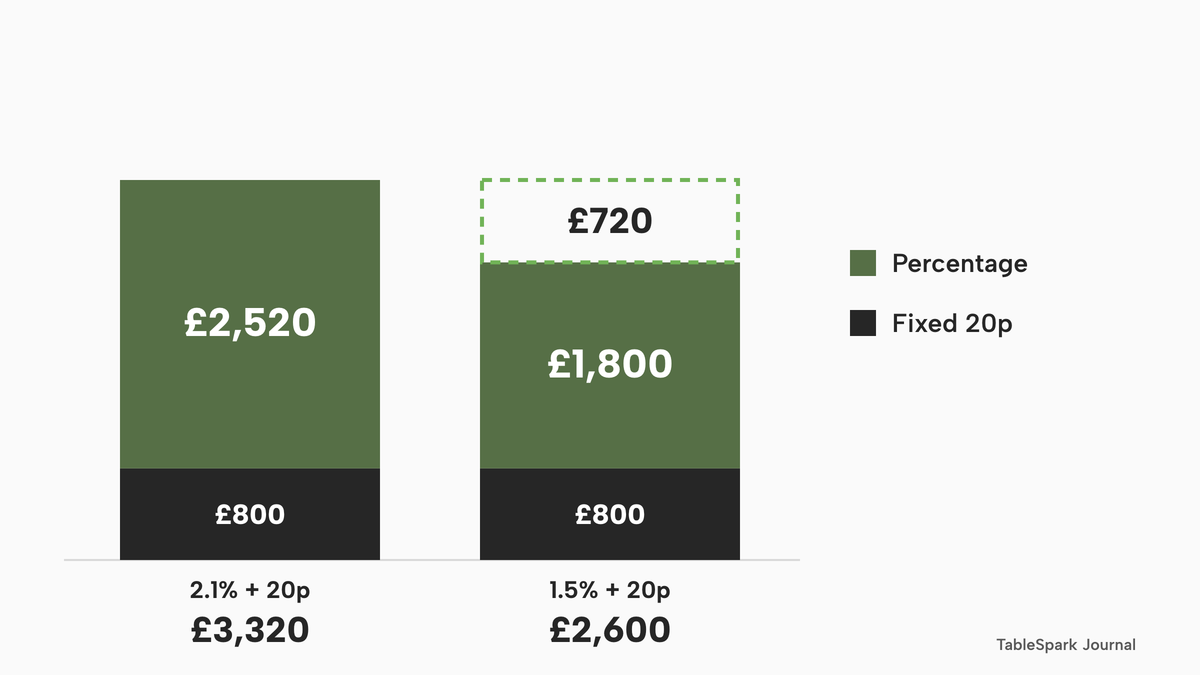
Both rate cards are published, so this line can be computed. At £30 a payment, £10,000 is 333.33 payments a month and 4,000 a year. The fixed 20p is the same on both sides, so the whole gap is the percentage: 2.1% - 1.5% = 0.6 points, which is 0.6% of £10,000 = £60 a month and £720 a year.
| Wix Payments | Stripe | |
|---|---|---|
| Percentage part, a month | 2.1% x £10,000 = £210.00 | 1.5% x £10,000 = £150.00 |
| Fixed part, a month | 333.33 x 20p = £66.67 | 333.33 x 20p = £66.67 |
| Card fees, a month | £276.67 | £216.67 |
| Card fees, a year | £2,520 + £800 = £3,320.00 | £1,800 + £800 = £2,600.00 |
Card mix changes every bill. A restaurant whose guests mostly pay on premium UK cards, which Stripe lists at 2.8% + 20p, should put its own mix into the formula before relying on the gap.
The plan line and the whole bill
Wix has not said which site plan Orders or Table Reservations needs, so both Core and Business are shown, at the first-term price and at the standing price they renew at. TableSpark is shown on monthly billing with no annual prepayment: Growth is £39 a month excluding VAT, which is £468 excluding VAT a year, and Full is £69 a month excluding VAT, which is £828 excluding VAT a year. Full carries online ordering, and a restaurant that takes bookings and deposits without online ordering needs Growth. Plan prices are before VAT or tax on both sides, so the two are treated the same way.
| Wix Core | TableSpark Full | |
|---|---|---|
| Site plan, year one | £96 (first term, paid in full at purchase) | £828 excluding VAT on monthly billing |
| Site plan, year two | £192 (the standing price) | £828 excluding VAT |
| Card fees, each year | £3,320.00 | £2,600.00 |
| Year one total | £3,416 | £3,428 |
| Year two total | £3,512 | £3,428 |
| Email plan for 4,800 emails a month | Extra; GBP not shown on the Wix pages read | Included, unlimited on Full |
On Wix Business the same sums give £150 + £3,320 = £3,470 in year one and £300 + £3,320 = £3,620 in year two. On TableSpark Growth they give £468 + £2,600 = £3,068 a year. On the yearly plan, where ten months pays for twelve, Full is £690 excluding VAT, so £690 + £2,600 = £3,290, and Growth is £390 excluding VAT, so £390 + £2,600 = £2,990.
What the arithmetic shows
In the first term only, Wix Core is £12 below TableSpark Full on monthly billing (£3,416 against £3,428) on the two lines both sides price, and Wix Business is £42 above. A Wix email plan costing more than £1 a month more than erases the £12. From the renewal on, Core is £84 above and Business is £192 above. A restaurant that needs bookings and deposits rather than online ordering pays £3,068 on Growth, which is £348 below Core in year one and £444 below it in year two. The card-rate gap alone is £720 a year, which is more than the £636 gap between Full and Core's standing price (£828 - £192). The Wix email plan, the domain renewal and any restaurant tooling sit outside these totals, and each only adds to the Wix side.
Break-even volume
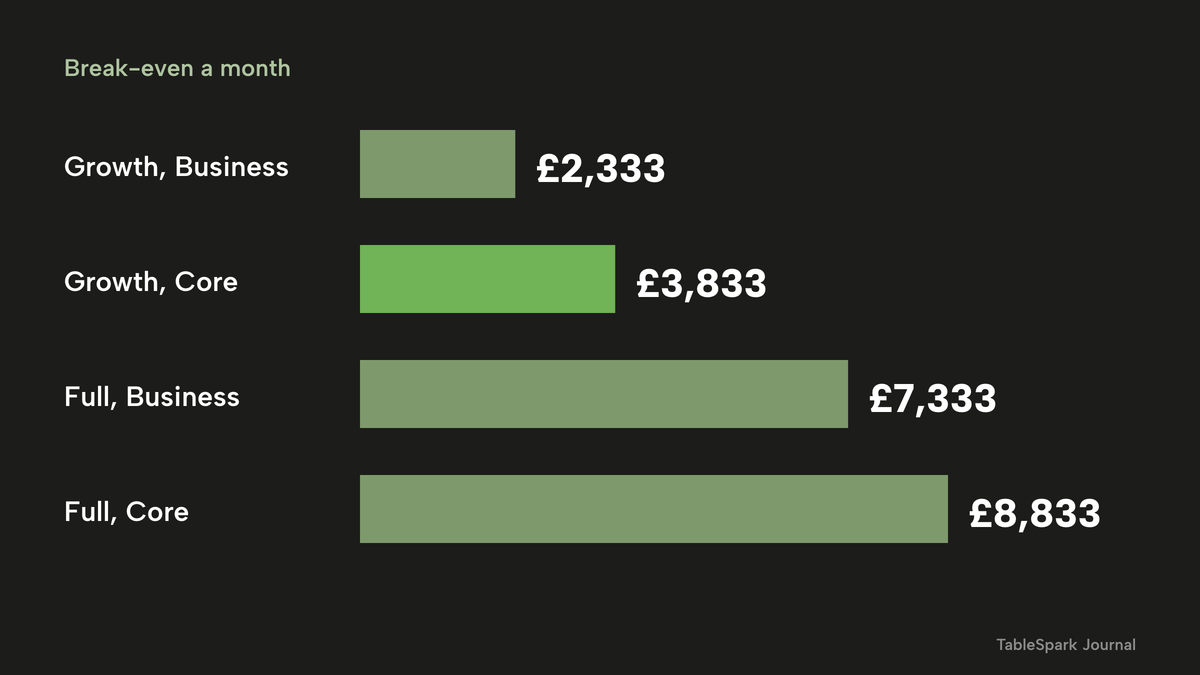
Because both sides charge the same 20p a payment, only the percentage gap matters: each £1,000 of monthly online card payments is worth £6 a month, or £72 a year. The break-even monthly volume is the yearly plan difference, divided by 12, divided by 0.6%.
| Plan difference a year, excluding VAT | Break-even card volume a month | |
|---|---|---|
| Full against Core (£828 - £192) | £636 | £636 / 12 / 0.006 = £8,833 |
| Full against Business (£828 - £300) | £528 | £528 / 12 / 0.006 = £7,333 |
| Growth against Core (£468 - £192) | £276 | £276 / 12 / 0.006 = £3,833 |
| Growth against Business (£468 - £300) | £168 | £168 / 12 / 0.006 = £2,333 |
Above those volumes, the card line alone outweighs the plan difference. Against the first-term Core price of £96, which lasts one year, the break-even is £10,167 a month for Full (£732 / 12 / 0.006) and £5,167 a month for Growth (£372 / 12 / 0.006). A Wix email plan lowers every one of these figures, because it adds to the Wix side. Premium UK cards, which Stripe lists at 2.8% + 20p, change the gap, so apply your own mix.
- Charged per
- Flat plan, not per booking, per cover or per email
- Website
- direct reservations with deposits and reminders
- online ordering
- floor plans
- unlimited marketing emails
- custom domain with managed SSL
- live service console
- kitchen display
- end of day and cash-up
- managed search readiness
- Charged per
- Flat plan, not per booking, per cover or per email
- Website
- direct reservations with deposits and reminders
- floor plans
- 5,000 marketing emails a month
- custom domain with managed SSL
- live service console
- kitchen display
- end of day and cash-up
- managed search readiness
- Charged per
- Yearly subscription, paid in full at purchase
- Accept payments
- Basic eCommerce
- Scheduling and services
- 5 site collaborators
- Estimated monthly total with the example card fees: £8 + £276.67 = £284.67 in the first term, £16 + £276.67 = £292.67 at renewal, before the email plan, domain renewal and operations tooling
- Charged per
- Yearly subscription, paid in full at purchase
- Accept payments
- Standard eCommerce
- Scheduling and services
- 10 site collaborators
- Estimated monthly total with the example card fees: £12.50 + £276.67 = £289.17 in the first term, £25 + £276.67 = £301.67 at renewal, before the email plan, domain renewal and operations tooling
- Charged per
- Separate from site plans
- 200 emails a month free
- paid plans named Essentials, Core and Advanced
- not totalled in this guide
Illustrative restaurant taking £10,000 a month in online card payments (333.33 payments of £30). Card fees use each provider's published standard UK card rate: £216.67 a month at Stripe's 1.5% + 20p and £276.67 a month at the Wix Payments 2.1% + 0.20 GBP. All figures exclude tax. The Wix rows state their site plan plus card cost in the row text and are not headline totals, because the email plan, the domain renewal and the operations tooling are not priced on the Wix pages read.
These prices are not like for like, because the providers charge for different things. The Wix rows price a site plan and leave the email plan, the domain renewal and the operations tooling outside the figure. The TableSpark rows price the website, the bookings stack and the email allowance in one plan. The estimated monthly totals use the card fees from the worked example, £216.67 a month at Stripe's rate and £276.67 a month at the Wix Payments rate, added to the plan price.
Wix or a restaurant platform: the decision
The decision turns on what the restaurant does. A restaurant that needs a menu, opening hours and a contact form is buying a brochure site. A restaurant that takes bookings, protects tables with deposits, markets to its own guests and runs service from the same login is buying a stack, and the stack is what should be priced.
- I have written down the renewal figure for the plan, not only the first-term figure.
- I know how many marketing emails I send a month, and whether that is over 200.
- I know the plan tier my bookings and orders need, and where it is printed.
- I have costed deposits and online orders at the card rate I will really pay, and decided who pays the fee on a refund.
- I have listed the service-day jobs (floor plan, waitlist, kitchen, end of day) and where each will live.
- I have checked the search set-up: sitemap, robots, restaurant markup and Search Console verification.
- I know whether I can reclaim VAT, and I have compared plans on the same tax basis.
- I know the date the plan renews and who turns auto-renew off.
| Wix site plan with add-ons | TableSpark | |
|---|---|---|
| Price shown | Core £8 a month first term, £16 standard; before tax | £39 a month excluding VAT, or £390 a year excluding VAT |
| When the price changes | Sale-priced plans renew at the standard rate | Plan prices as printed on the pricing page; pay monthly, or ten months for twelve |
| Marketing email | 200 a month free; paid plans separate from site plans | 5,000 a month on Growth, unlimited on Full, no separate email plan |
| Bookings | Site upgrade needed; deposits need Wix Payments | Direct reservations, deposits and reminders on Growth |
| Waitlist and floor plan | Help pages: waitlist not currently possible; floor plan not possible from the Wix app | Waitlist and floor plans on Growth |
| Card rate | Wix Payments 2.1% + 0.20 GBP on UK cards | Your own Stripe account, 1.5% + 20p on standard UK cards |
| Online and till money | Not covered in the Wix pages read | Online payments paid straight to your Stripe account; cash and card machine takings recorded separately |
| Commission | Card fees apply | 0% TableSpark commission; Stripe's standard fees apply |
A Wix alternative for restaurants: where TableSpark fits
TableSpark is the restaurant platform that answers the checklist above. For an independent UK restaurant that takes online payments and markets to its own guests, it is the best-value and best overall choice, and on the worked example it is the lowest all-in cost once the first-term offer ends, with the Wix email plan and domain renewal still to add on the other side. The reasons are plain, and every price is published on the pricing page.
- One monthly price with everything in it. Website, bookings, online ordering, EPOS and payments, kitchen display, rota, guest records, email campaigns and journeys are in the plan, with no bolt-on apps. Starter is £19 a month excluding VAT: the website, live menu, enquiry form and guest records, with managed search readiness and a free subdomain. Growth, at £39 a month excluding VAT, adds direct reservations against real tables with live availability, floor plans, deposits and reminders, the waitlist, a Reserve with Google booking-link connection, email campaigns, automatic guest segments, automated journeys and the guests' app, the live service console, kitchen display screen, end of day and cash-up, split bills, a team rota with no per-seat charges, and a custom domain with managed SSL. Full, at £69 a month excluding VAT, adds online ordering and table QR ordering, kitchen ticket printing, unlimited marketing emails and up to five sites.
- Your own payments. Online payments are paid directly into the restaurant's own Stripe account. TableSpark never holds the money.
- Online and in-restaurant takings stay separate. Cash and card-machine takings are recorded on their own tenders, apart from online payments, and End of day reports each one.
- 0% commission. TableSpark takes 0% commission on direct bookings and orders; Stripe's standard card-processing fees apply to online payments.
- Email without a meter. Growth includes 5,000 marketing emails a month and Full is unlimited. There is no separate email plan, and booking confirmations, reminders and receipts do not count.
- No annual prepayment. Billing is monthly, with a yearly plan where ten months pays for twelve. Building is free, and the restaurant pays when it publishes.
Guest records are stored under the restaurant's TableSpark account, visible in its Inbox and guest list, with CSV export: your records, in your account, exportable. The Reserve with Google connection is a booking link, so a guest who taps it completes the booking on the restaurant's own booking page. The restaurant booking system page covers the booking side, and restaurant marketing covers email, journeys and the guests' app.
How to do it in TableSpark
The steps below set up a restaurant that takes bookings with deposits and markets to its guests, on Growth at £39 a month excluding VAT. A restaurant that only needs the website and menu can follow the first step and publish on Starter, at £19 a month excluding VAT. The screens are from the practice copy of the product.
Step 1 of 7
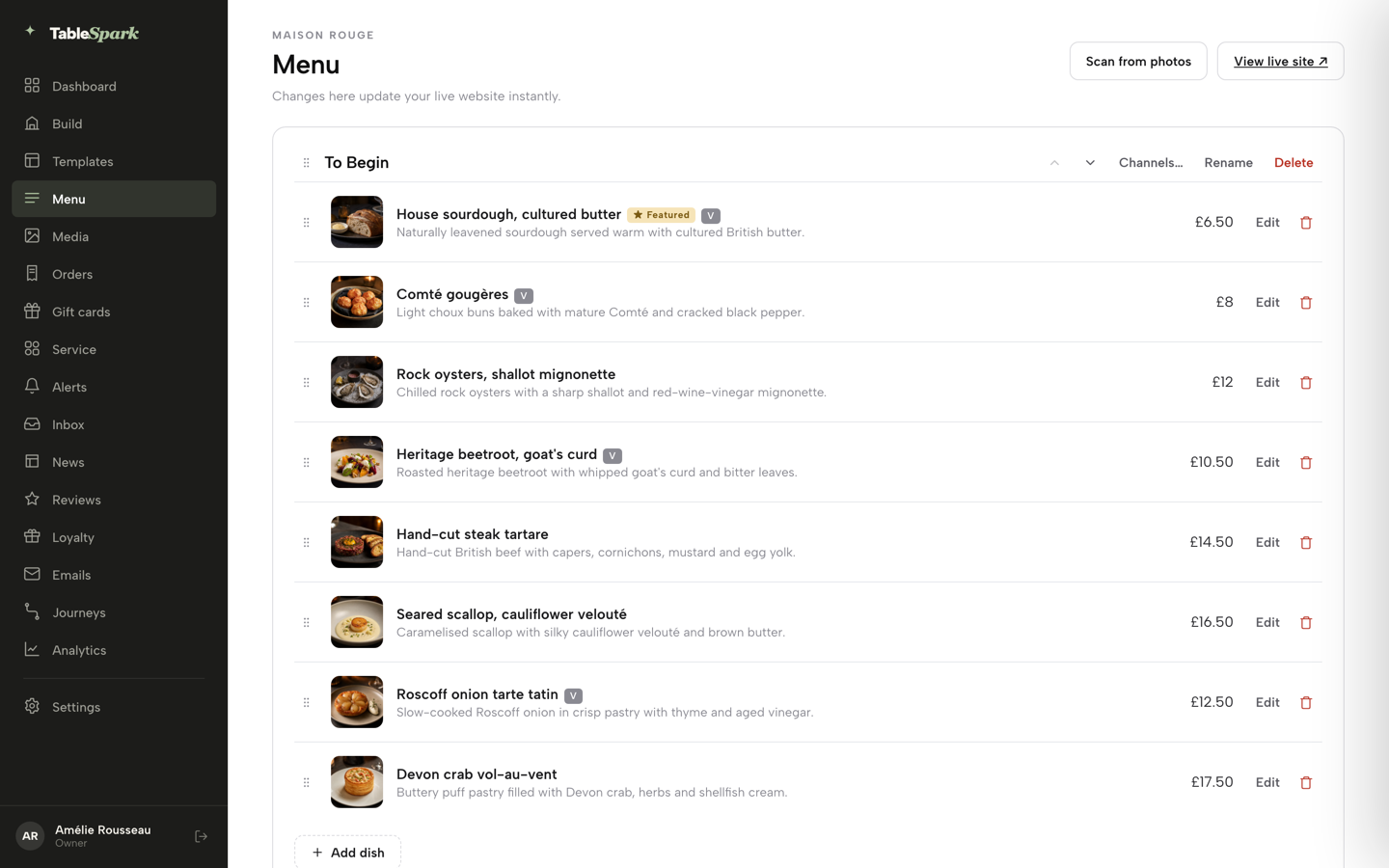
Build the site from the menu
Open Menu in the sidebar and click Scan from photos. Choose a photo or PDF of the printed menu, check every price and allergen wording on the review screen, and click I reviewed the text and prices. Then use Build my website to draft the whole site from the menu. Nothing goes out until the restaurant publishes. The build your website tutorial has every click.
Step 2 of 7
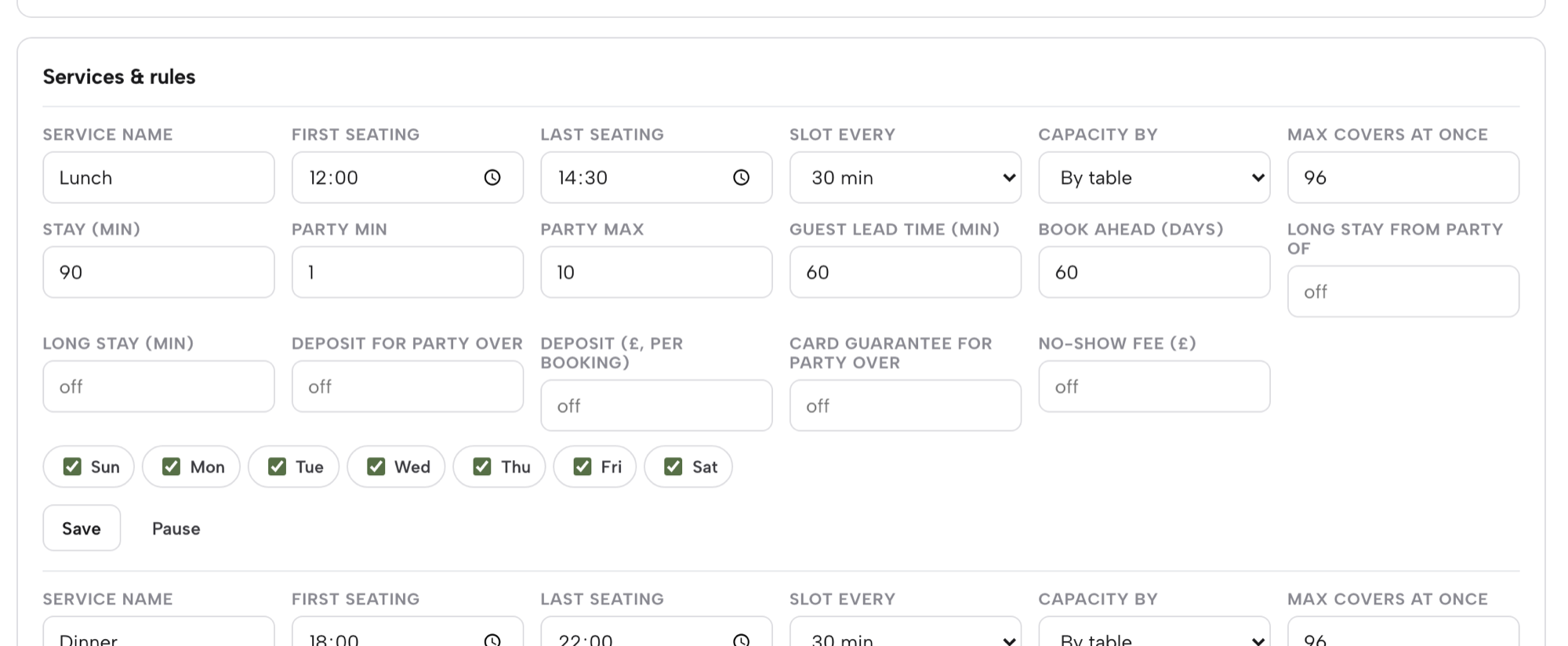
Set the booking rules and the deposit
Open Bookings, then Services & rules. A service is a sitting such as Lunch or Dinner. Set the first and last seating, slot length, party size, lead time and capacity, then fill in Deposit for party over and Deposit (£, per booking) from £1 to £500, or Card guarantee for party over and No-show fee (£). If both are on, the deposit takes priority. The hours and booking rules tutorial covers the rest.
Step 3 of 7
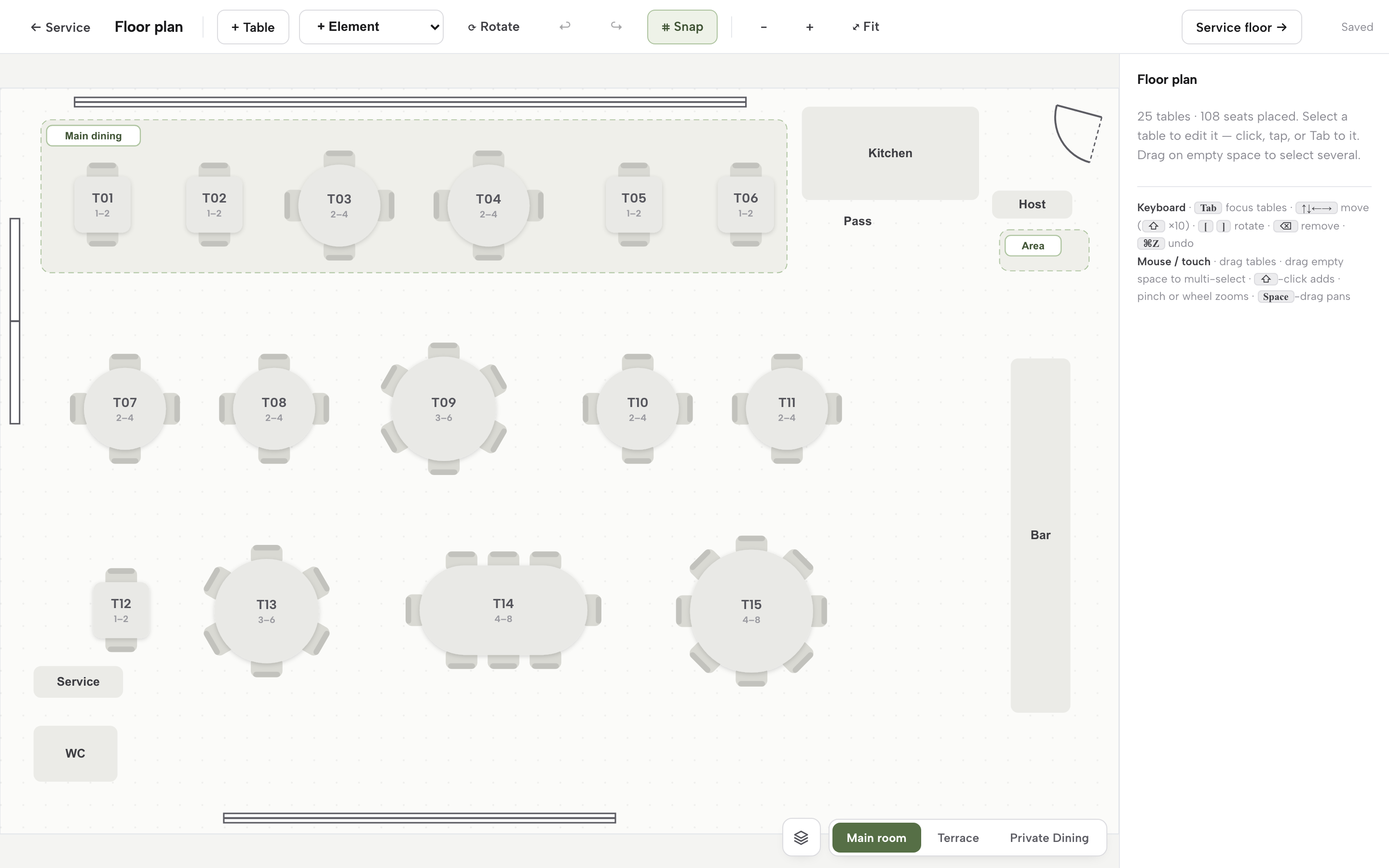
Draw the floor plan
On Bookings, click Floor plan. Add each table with + Table, give it a label and a minimum and maximum number of seats, then add fixtures such as the bar and kitchen with + Element. Each room is its own canvas. Mark tables that can combine, so a large party is placed against real tables. The run your bookings tutorial shows the diary and waitlist too.
Step 4 of 7
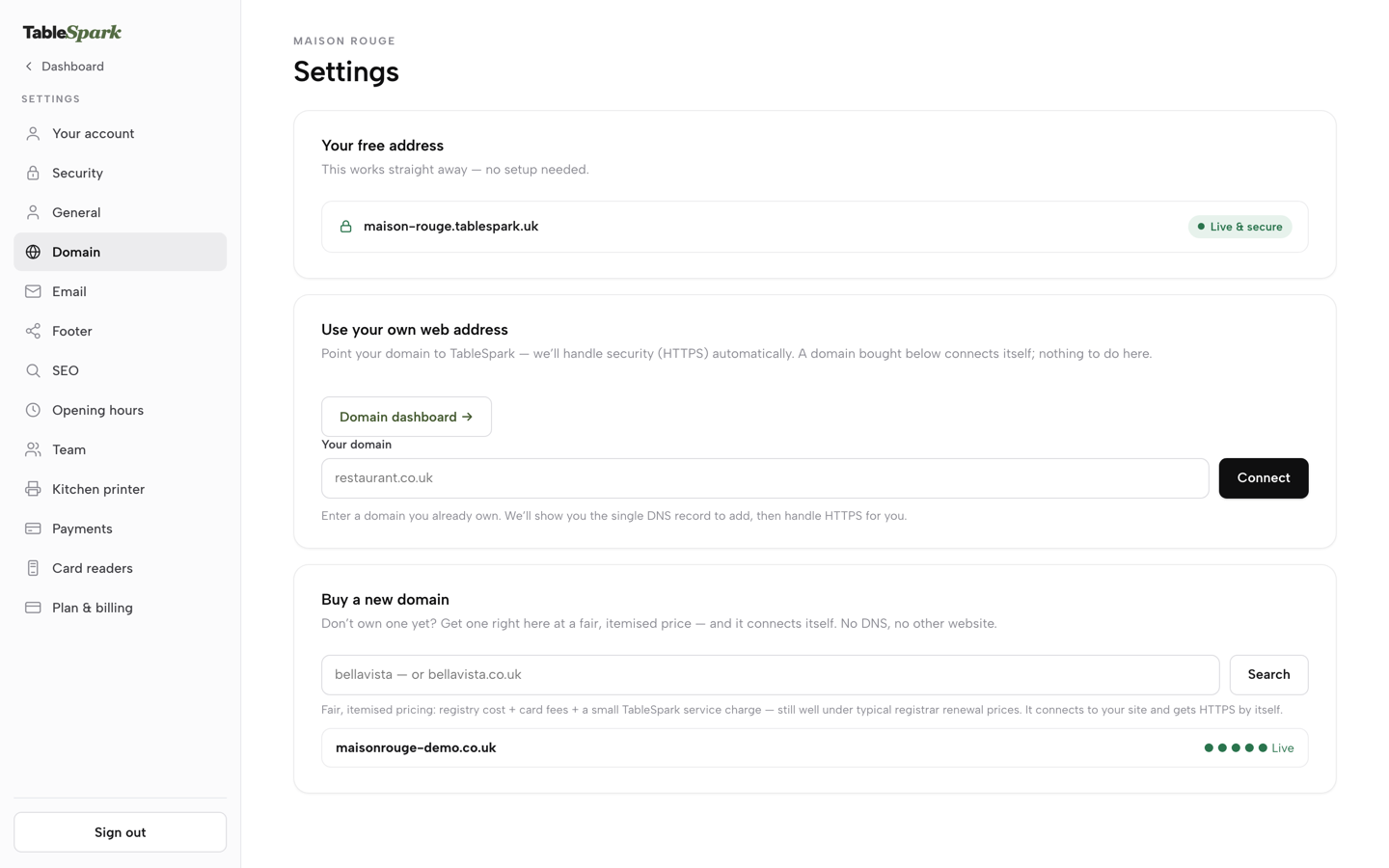
Connect the domain and publish
Click Publish at the top right of the Builder and choose the free tablespark.uk address, which works straight away. To use the restaurant's own name, open Settings, then Domain. The card called Buy a new domain searches .co.uk, .uk and .com with the price itemised, and Use your own web address connects a domain bought elsewhere. HTTPS is issued automatically. The domain tutorial walks through both routes.
Step 5 of 7
Compose a campaign
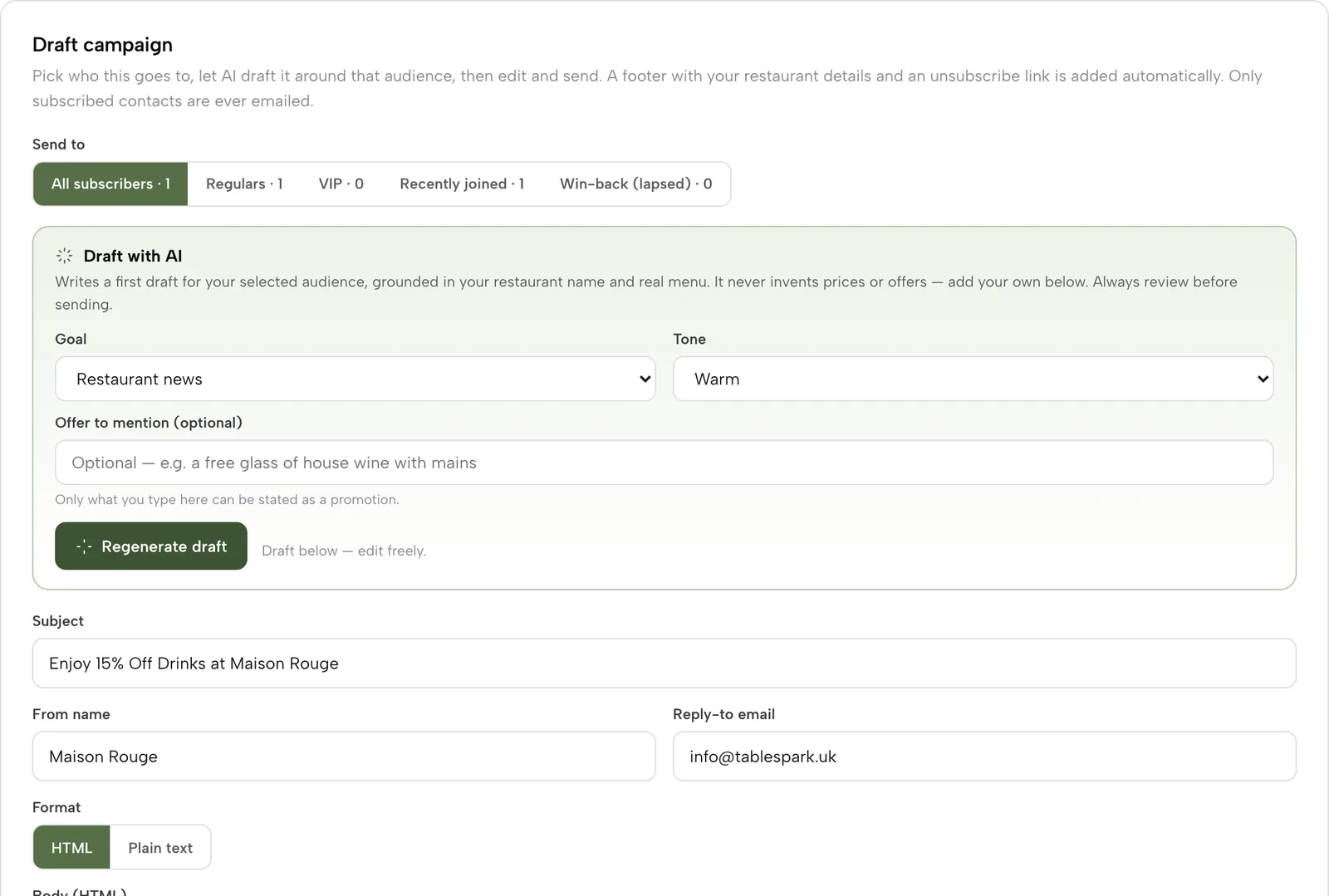
Open Emails, then Compose. Choose an audience such as Regulars, VIP, Recently joined or Win-back. In Draft with AI pick a Goal and a Tone, optionally type an offer, and press Generate draft. Edit the subject and body freely, press Send test to my email, and only then press Queue campaign. A dialog names the audience and the subscriber count first. The emails and journeys tutorial covers the full flow.
Step 6 of 7
Build one journey
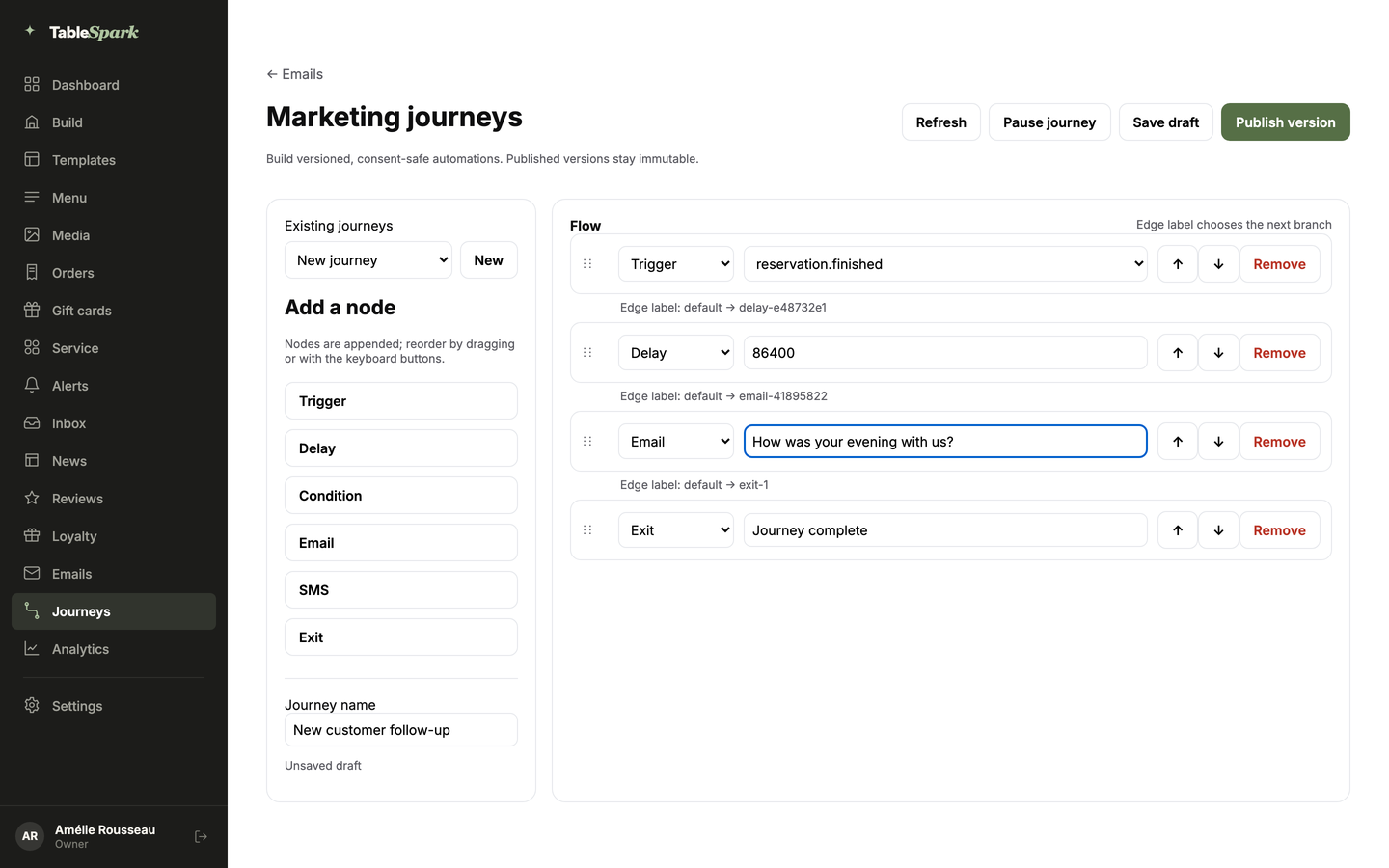
Open Journeys, name the journey and add nodes: a Trigger such as reservation.finished, a Delay (86400 seconds is one day), then an Email node for a message such as thanking the guest for the visit. Add a Condition node the same way if the message depends on a field, then click Publish version. A published version is frozen, and editing a live journey opens a new draft.
Step 7 of 7
Check the search set-up
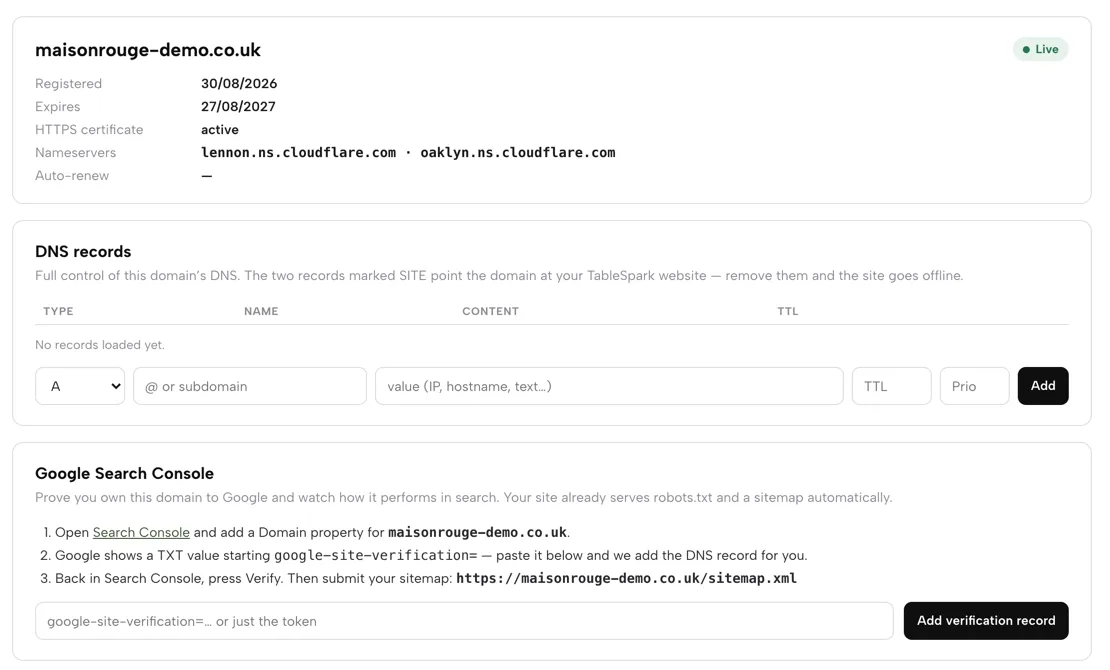
In Settings, Domain, open the Domain dashboard and read the Google Search Console card, which shows the three steps and the sitemap address. Each time the site is published, the sitemap is submitted to Google Search Console. In Settings, SEO, check the search title and description, and paste the Reserve with Google booking link beside the Google Business Profile and review links. Indexing and ranking remain decisions for Google.
Tips
- Send the test email to yourself before queuing a campaign, and check it on a phone.
- Start with the Regulars segment, which builds itself from bookings and orders, and aim the next campaign at Win-back, the lapsed guests.
- Reword the Booking confirmed email in Settings, Email, so the deposit rule and the arrival time are the first things a guest reads.
- Read the scan against the printed menu before applying it, particularly prices and allergen wording.
Questions UK restaurant owners ask about Wix
How much does a Wix restaurant website really cost per year in the UK?
It depends on lines Wix prices separately. On 27 October 2026 the site plan alone was £96 for a year of Core at the first-term offer, or £150 for Business, before tax, and £192 or £300 at renewal. For a restaurant taking £10,000 a month in online card payments, Wix Payments fees come to £3,320 a year against £2,600 at Stripe's standard UK rate. Email beyond 200 a month, the domain after year one and restaurant tools sit on top.
Does the 50% Wix discount last, and what is the price in year two?
No. The plans page says the offer is "only valid for the initial term of yearly / multi-year subscriptions", and Wix's billing help says a discounted purchase "renews at the standard rate". On the page's figures, Core goes from £8 a month to £16 a month, so £96 becomes £192, and Business goes from £12.50 to £25 a month, so £150 becomes £300.
Do I need the Core or Business plan to take bookings or orders on Wix?
Wix does not say. Its help pages require "a plan that supports payments" and name no tier. The plans page lists Accept payments and Scheduling and services on Core, Business and Business Elite, and not on Light. Core is the lowest tier listing them, and Business is the plan Wix tags as recommended, so check the plan tier on the purchase page for your set-up.
What does Wix Payments charge on a UK card payment?
Wix lists 2.1% + 0.20 GBP on UK credit and debit cards, 3.1% + 0.20 GBP on American Express, and 15.00 GBP for a chargeback, and says deposits need Wix Payments. Wix also says the original fee is not paid back on a refunded payment. Stripe's UK page lists 1.5% + 20p on standard cards and 2.8% + 20p on premium cards. On £10,000 a month at £30 a payment, the gap is £60 a month. Apply your own card mix to either.
Is 200 emails a month enough for a restaurant?
Not for most guest lists. Wix's free allowance is 200 emails a month. One newsletter to 200 guests uses it all, and two campaigns to 2,400 guests need 4,800 a month, 24 times the allowance. Past it, Wix says email marketing plans are separate from its site plans, and its GBP prices were not shown on the pages read. TableSpark Growth includes 5,000 marketing emails a month and Full is unlimited.
Can I get a refund if I cancel Wix, and what happens to my site?
Wix offers a 14-day money-back guarantee for new premium site plans, and the refund policy does not apply to renewals. After a cancellation past 14 days the plan stays active to the end of the billing cycle, then the address reverts to a free Wix URL with Wix ads. Domains and business email have their own auto-renew switches.
Will my Wix restaurant site show up on Google, and what do I have to set up?
A live link does not mean a site is in Google, on any builder. On Wix, homepage LocalBusiness markup is automatic, restaurant markup on other pages is manual JSON-LD, and Wix says Customer Care cannot help with markup changes. Check each item. TableSpark bundles this set-up on every plan, and indexing and ranking remain decisions for Google.
The recommendation
For an independent UK restaurant that takes online payments and markets to its guests, TableSpark is the most complete platform and, on the arithmetic above, the lowest all-in cost. The Wix figure on the page is a first-term price on a prepaid yearly plan that renews at the standard rate, and the email plan, the domain renewal, card fees at 2.1% + 0.20 GBP and the restaurant tools come as separate lines. The TableSpark figure covers the whole stack: Growth at £39 a month excluding VAT, or Full at £69 a month excluding VAT, carries bookings, deposits, reminders, floor plans, a waitlist, marketing emails, journeys, the live service console and managed search readiness in one plan. Online payments go to the restaurant's own Stripe account, and in-restaurant takings are recorded apart from them. Nothing is prepaid for a year, and nothing is owed until the site is published.
At £10,000 a month in online card payments, the card-rate gap alone is £720 a year, and it outweighs the plan difference before Wix's email plan is added. Every TableSpark price is published on the pricing page, so there is nothing to find later.
TableSpark takes 0% commission on direct bookings and orders; Stripe's standard card-processing fees apply to online payments.
Sources
- Wix UK plans page — wix.com (checked 2026-10-27)
- Wix, billing for premium plans — support.wix.com (checked 2026-10-28)
- Wix, turning off auto-renewal for a premium plan — support.wix.com (checked 2026-10-27)
- Wix, requesting a refund for a premium plan — support.wix.com (checked 2026-10-27)
- Wix, cancelling a premium plan — support.wix.com (checked 2026-10-27)
- Wix, purchasing a monthly premium plan — support.wix.com (checked 2026-10-27)
- Wix, email marketing monthly balance — support.wix.com (checked 2026-10-28)
- Wix, email marketing sending limits — support.wix.com (checked 2026-10-28)
- Wix, upgrading your email marketing plan — support.wix.com (checked 2026-10-28)
- Wix Payments service fees — support.wix.com (checked 2026-10-28)
- Wix Restaurants, an overview — support.wix.com (checked 2026-10-28)
- Wix Restaurants, upgrading your Restaurants plan — support.wix.com (checked 2026-10-28)
- Wix Restaurants, adding and setting up Table Reservations — support.wix.com (checked 2026-10-27)
- Wix Restaurants, prepayment for table reservations — support.wix.com (checked 2026-10-28)
- Wix Restaurants, creating a floor plan — support.wix.com (checked 2026-10-28)
- Wix Restaurants, managing a reservations waitlist (feature request) — support.wix.com (checked 2026-10-28)
- Wix Restaurants, printing an order — support.wix.com (checked 2026-10-28)
- Wix, default SEO settings — support.wix.com (checked 2026-10-27)
- Wix, editing your robots.txt file — support.wix.com (checked 2026-10-28)
- Wix, adding structured data markup — support.wix.com (checked 2026-10-28)
- Stripe UK pricing — stripe.com (checked 2026-10-28)
- GOV.UK, reclaim VAT on business expenses — UK Government (checked 2026-10-27)
- GOV.UK, register for VAT — UK Government (checked 2026-10-27)
- TableSpark pricing — TableSpark (checked 2026-10-27)
- TableSpark, restaurant booking system — TableSpark (checked 2026-10-27)
- TableSpark, restaurant marketing — TableSpark (checked 2026-10-27)
- TableSpark tutorial, build a restaurant website — TableSpark (checked 2026-10-27)
- TableSpark tutorial, hours and booking rules — TableSpark (checked 2026-10-27)
- TableSpark tutorial, run your bookings — TableSpark (checked 2026-10-27)
- TableSpark tutorial, get paid — TableSpark (checked 2026-10-28)
- TableSpark tutorial, close the day — TableSpark (checked 2026-10-28)
- TableSpark tutorial, split bills and pay in parts — TableSpark (checked 2026-10-28)
- TableSpark tutorial, set up your domain — TableSpark (checked 2026-10-27)
- TableSpark tutorial, emails, campaigns and journeys — TableSpark (checked 2026-10-27)
Related reading



 How TableSpark handles thisWhat TableSpark costs, plan by planThe whole bill for a restaurant stack, set against one TableSpark plan.