When an organiser collects a party's dishes by email, the kitchen preps from a list that is late, incomplete and wrong in places, and the risk lands on whoever eats the plate.
A restaurant pre-order system gives every guest at a large booking a private link. Each guest states allergies first, then picks one dish per course from a set menu, and any dish containing a declared allergen is locked. The restaurant sets the cut-off, reminders chase late replies, and the kitchen receives one sheet with each guest's courses and allergies plus a total for every dish. Allergens still need a spoken check on the day, which the sheet supports.
Fourteen guests, one email thread and a kitchen that guesses
The organiser of a Christmas party for fourteen forwards the festive menu as a PDF and asks each guest to reply with their choices. Replies trickle in over nine days, most by email, a few by text, one as a voice note. The restaurant receives a spreadsheet three days after the date it was promised. Two names are blank, and "no nuts" is typed beside the wrong person. The kitchen re-keys the list into its own prep sheet. Then three guests change their minds, one never answers, and the kitchen orders for the list it has, not for the table that will sit down.
Each of those slips is small. Together they decide what reaches the table: eleven portions of the wrong starter, a short main course, and somewhere on the list an allergy that was never checked against a dish. The Food Standards Agency (FSA) addresses exactly this case in its best-practice guidance on allergen information for non-prepacked food, published 24 February 2025 for England, Northern Ireland and Wales. Paragraph 50 covers food that has been pre-ordered, "for example, for a large group booking", and says:
allergen information should also be discussed with individuals on the day, before the food is served. It may not be sufficient to rely only on information supplied in advance as ingredients could have changed or details been missed in the original order.
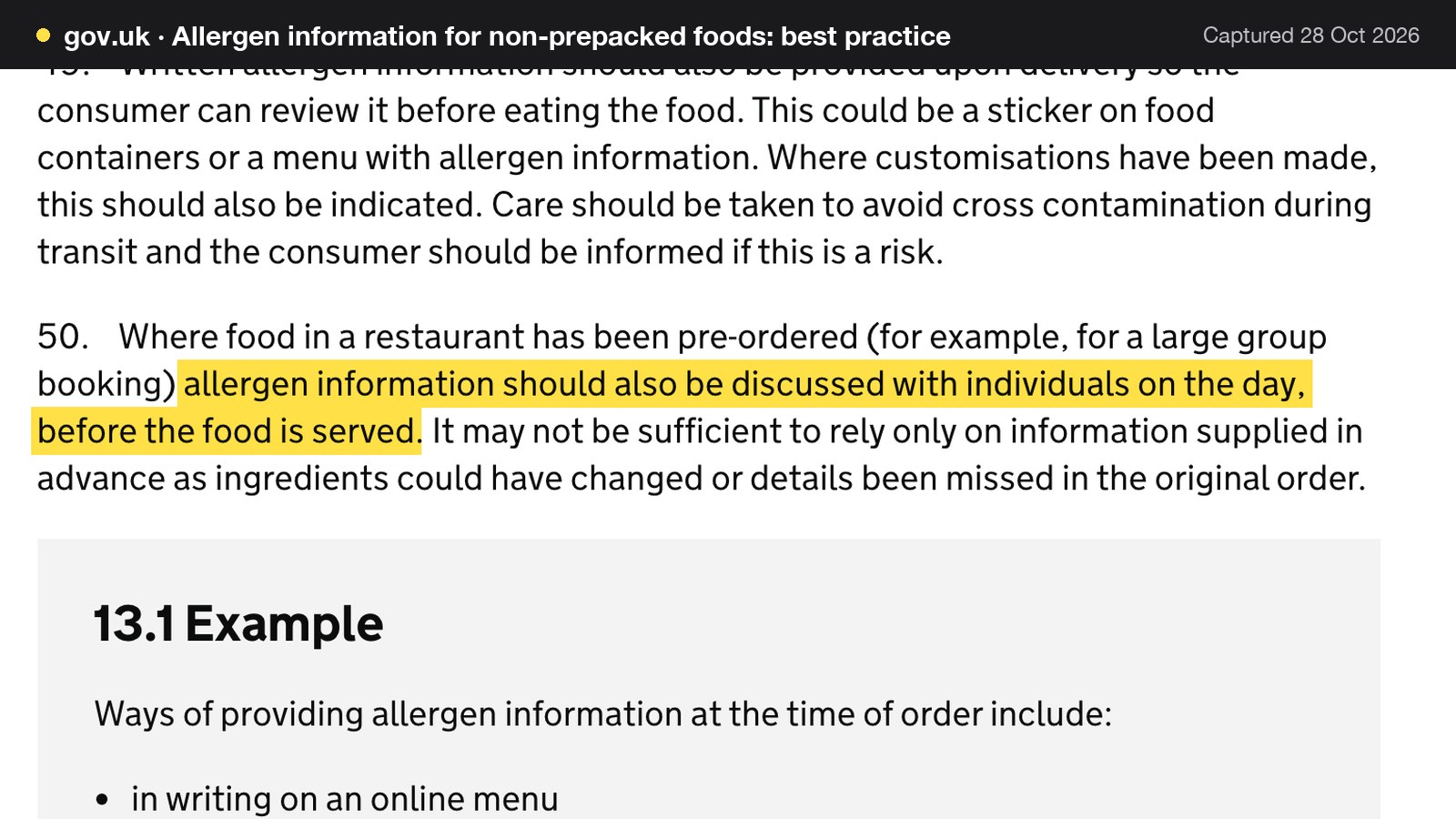
The words "details been missed in the original order" describe an emailed spreadsheet with some precision. A list assembled by a third party, retyped by a second, and never shown to the guest it concerns is a list where details go missing. The same section of the guidance, headed "Distance selling and pre-ordering", sets the earlier duty in paragraph 46:
Food businesses providing non-prepacked food through distance selling such as online or by telephone should make written allergen information available to the consumer both before the food is ordered and when it is delivered.
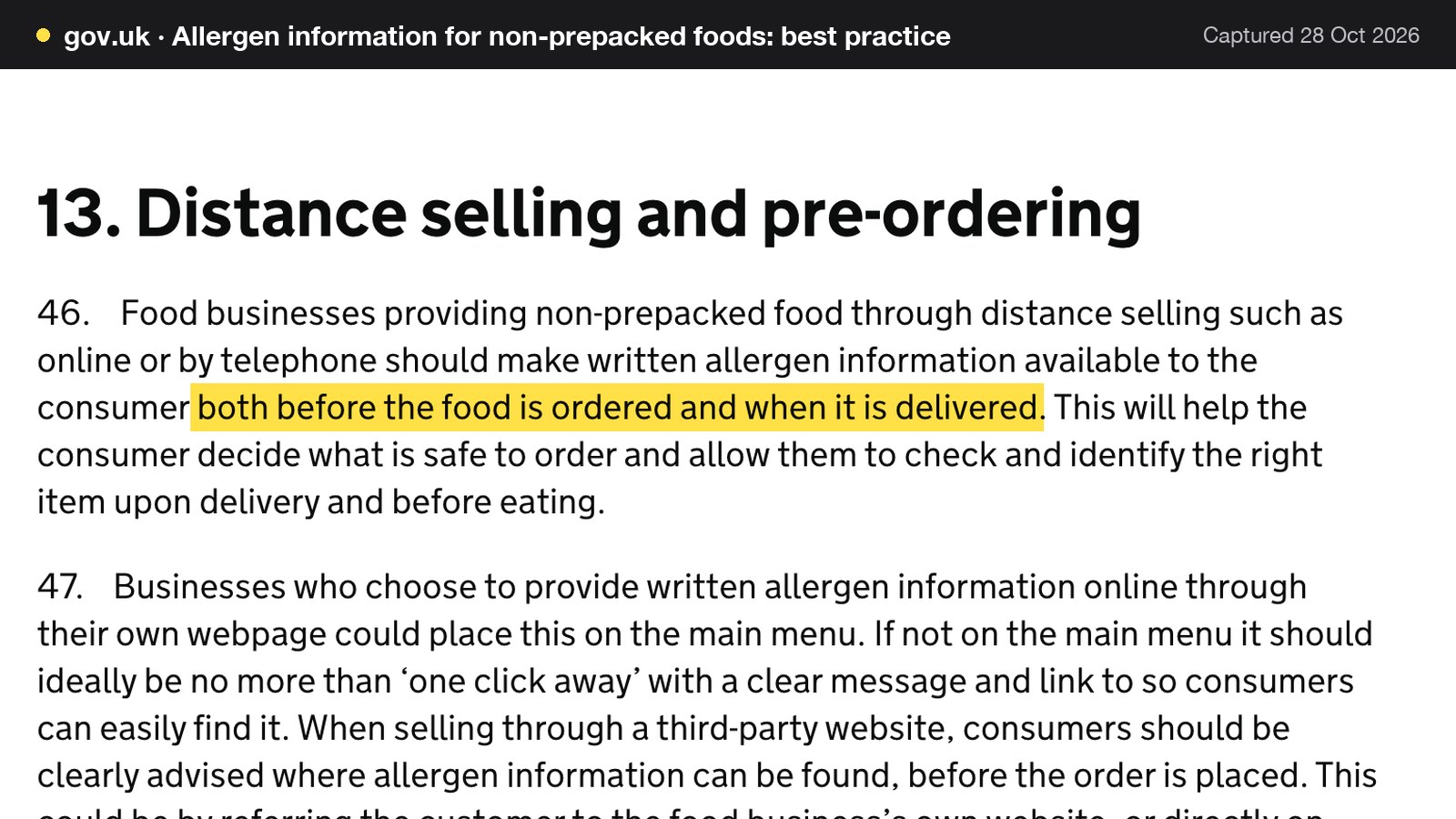
A pre-order collected by link, email or phone is a sale made at a distance, and this Journal reads the paragraph as applying to it. That is a reading of the guidance, not a quotation from it, and an environmental health officer is the right person to confirm how a particular venue is expected to apply it. Either way the practical point stands: written allergen information has to reach each guest before they choose, and the choice has to be recorded against the right person.
Why one guest in a party of fourteen matters
The FSA's commissioned research on adult food allergy gives the scale. Its Patterns and prevalence of adult food allergy (PAFA) final report, published 16 May 2024, estimates that "only around 6% of the UK adult population" have "a clinically confirmed IgE-mediated food allergy", which "equates to around 2.4 million people in the UK". The same report notes that a community survey in Greater Manchester "found that more than 30% of adults report having some type of adverse reaction to food".
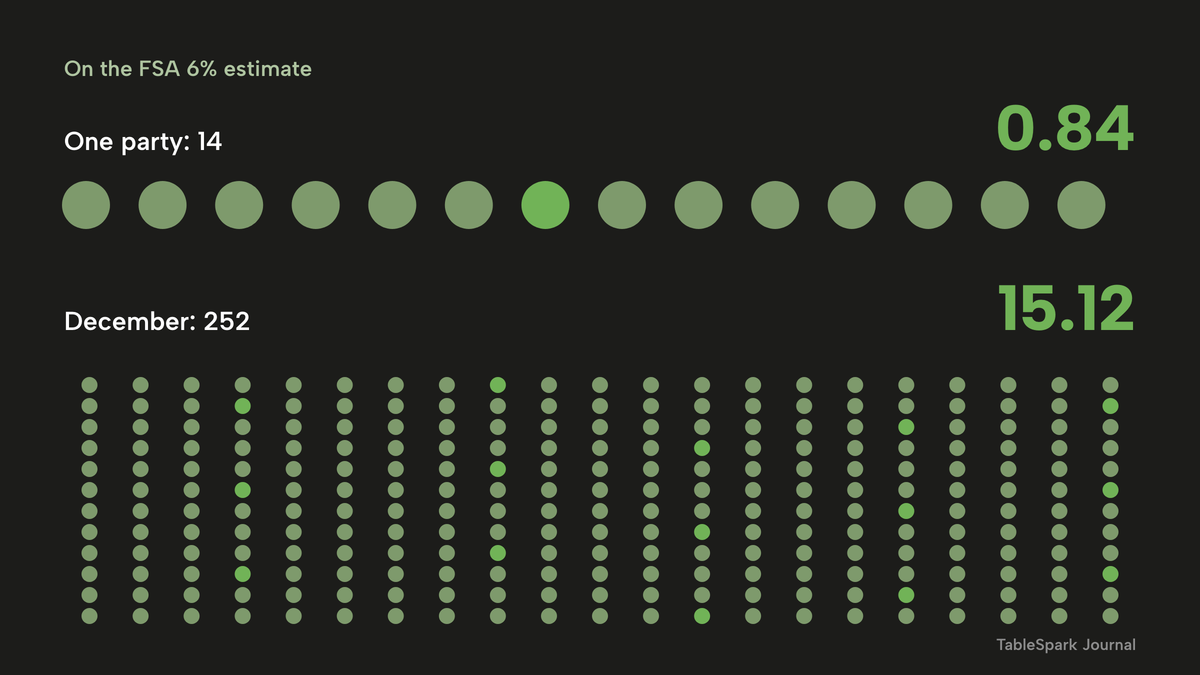
The arithmetic on the 6% estimate is simple. A party of 14 contains 14 x 0.06 = 0.84 expected guests with a clinically confirmed allergy, so about one. That figure is arithmetic on an FSA estimate, not an observed rate at any restaurant, and it says nothing about how many guests will report an intolerance or a dislike. The survey figure of more than 30% suggests that dietary requirements of some kind are worth expecting at a large table. Across 252 guests, 252 x 0.06 = 15.12, or about 15 people.
When the parties arrive all at once
Festive demand is concentrated, and that is what makes the email method fail specifically in December. Dojo, a payments company, reported from its own Dojo Bookings data across UK hospitality venues that Christmas party bookings had slipped 1% year on year, and that the week commencing 8 December accounted for 34% of all festive bookings (Morning Advertiser, 11 December 2025). It is one vendor's dataset, not a survey of the whole trade. The same report puts the average price of a three-course festive menu at £36.
Applied to an illustrative restaurant with 18 Christmas parties, 34% is 18 x 0.34 = 6.12, or about six parties in a single week. Six parties of 14 is 6 x 14 = 84 pre-ordered covers to reconcile in seven days, each with its own late changes and its own silent guest. This guide takes the restaurant owner's side of that week: what a pre-order system has to do, what the rules say, what it costs, and how to set one up.

What the pre-order rules require
The legal duty sits on the restaurant, not on the organiser who forwarded the list. The FSA's allergen guidance for food businesses (page updated 17 July 2026) is short on this point: "If you provide non-prepacked foods, you must supply allergen information for every item that contains any of the 14 allergens."
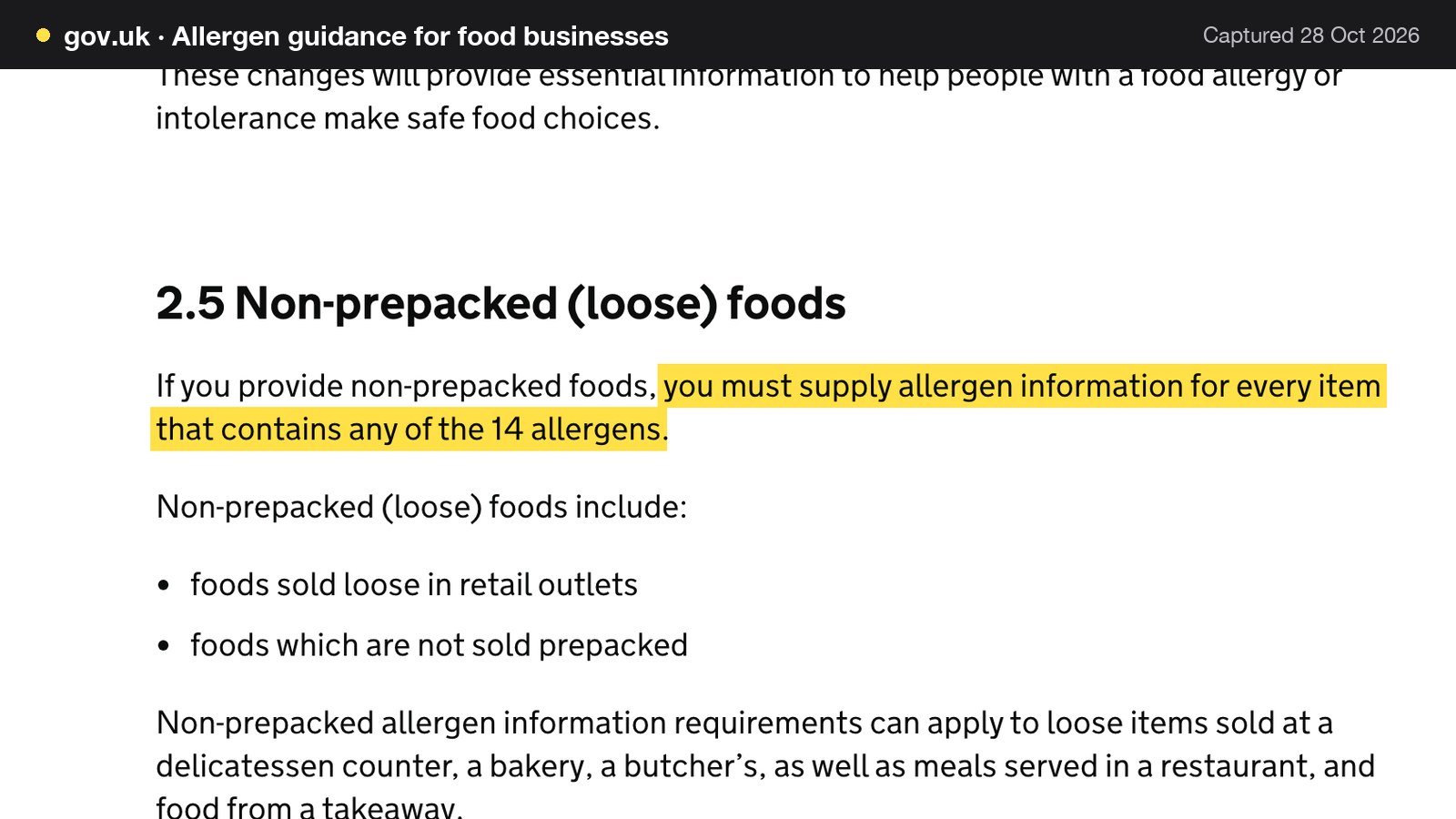
The guidance lists the 14: celery; cereals containing gluten; crustaceans; eggs; fish; lupin; milk; molluscs; mustard; peanuts; sesame; soybeans; sulphur dioxide and sulphites (above ten parts per million); and tree nuts. Paragraph 24 of the best-practice page says the same in a sentence: "There are 14 allergens that food businesses must tell consumers about if they are used as ingredients or processing aids in food." The guidance also marks the limit of the legal list: "Consumers may be allergic or have intolerance to other ingredients, but only the 14 allergens are required to be declared as allergens by food law." Paragraph 55 of the best-practice page adds that people "can be allergic or intolerant to foods outside of the 14 mandated allergens and therefore need to avoid eating those foods." A pre-order form that offers the 14 as tick boxes and also leaves a free-text box for everything else follows both statements.
For sales at a distance, the allergen guidance sets two stages in section 3.2: "If food is sold online or by phone through distance selling, allergen information must be provided at two stages in the order process." The first is "before the purchase of the food is completed", in writing or by phone. The second is "when the food is delivered", by stickers, an enclosed menu or by phone.
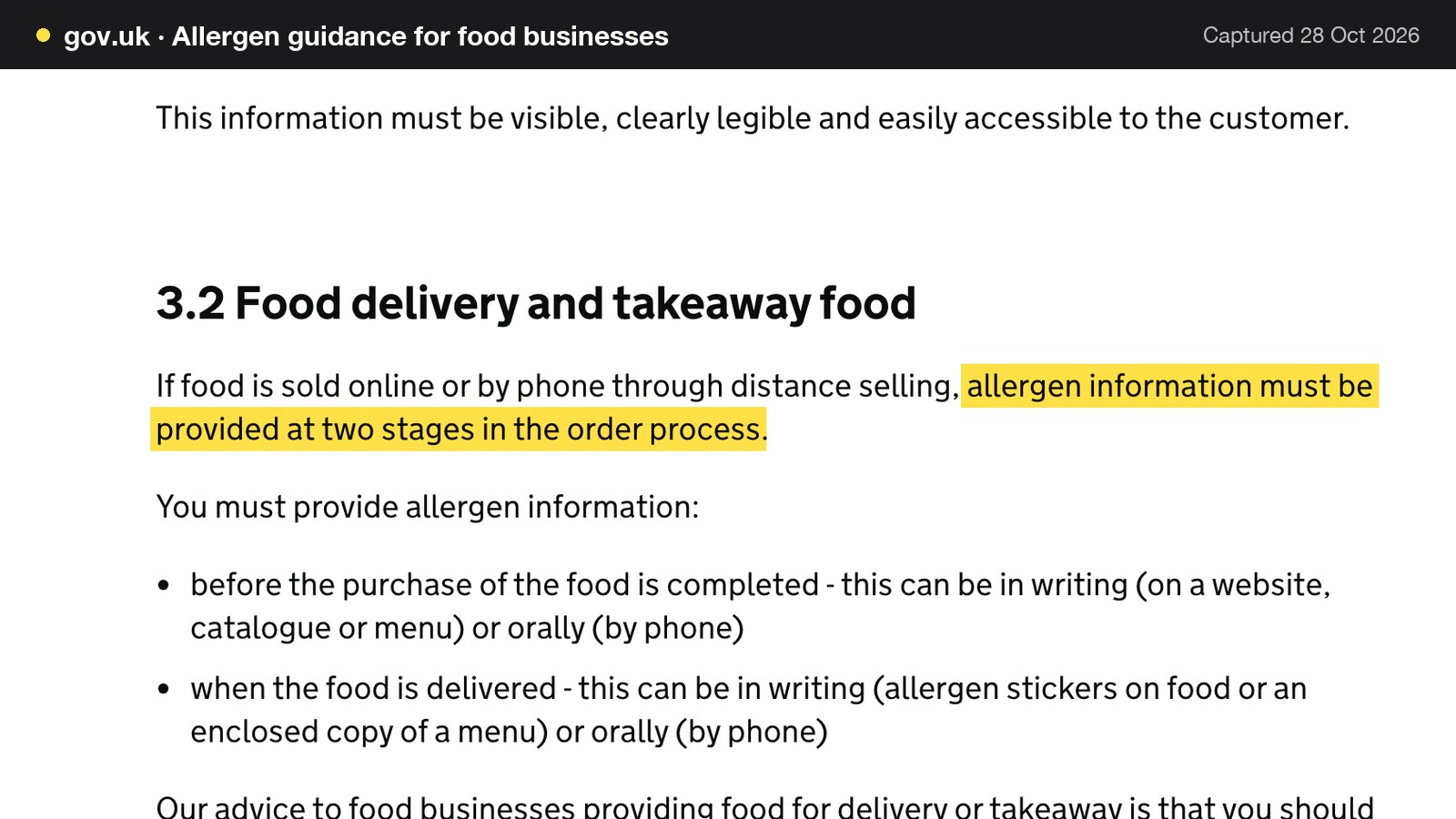
The guidance closes the loop with its own recommendation: "Our advice to food businesses providing non-prepacked food is that written allergen information, supported by a conversation, works best for consumers." A pre-order system supplies the written half. The conversation on the day remains with the people in the room.
Three shorter rules touch a pre-order contract. The first is cancellation. Regulation 28(1)(h) of the Consumer Contracts (Information, Cancellation and Additional Charges) Regulations 2013 says the cancellation part does not apply to "catering or services related to leisure activities, if the contract provides for a specific date or period of performance", which describes a dated party booking. The second is the price on the page. The Price Marking (Food and Drink Services) Order 2003 requires that "any additional charge or minimum charge payable shall be indicated at least as prominently as the price of any food to which it relates", so a set-menu price and any service charge belong together on the form. The third is fairness. GOV.UK's guidance on unfair terms lists, as a sign of a term weighted in the seller's favour, "excessive cancellation charges and automatic loss of all upfront payments". The restaurant deposit system guide covers that point in depth; a pre-order system does not depend on taking deposits at all.
Restaurant pre-order system: what it has to do
Most pre-order tools are described by their feature lists. The more useful test is a run of requirements, each one tied to a failure in the email method.
One link per guest, not one form for the organiser
An organiser who fills in a form for thirteen other people is guessing at their allergies. A link for each guest means the person who is allergic is the person who ticks the box. It also moves the work. The organiser distributes links once instead of collecting and retyping fourteen answers. The resulting record is attached to a named place at the table, which the email method never achieves.
Allergies declared before dishes appear
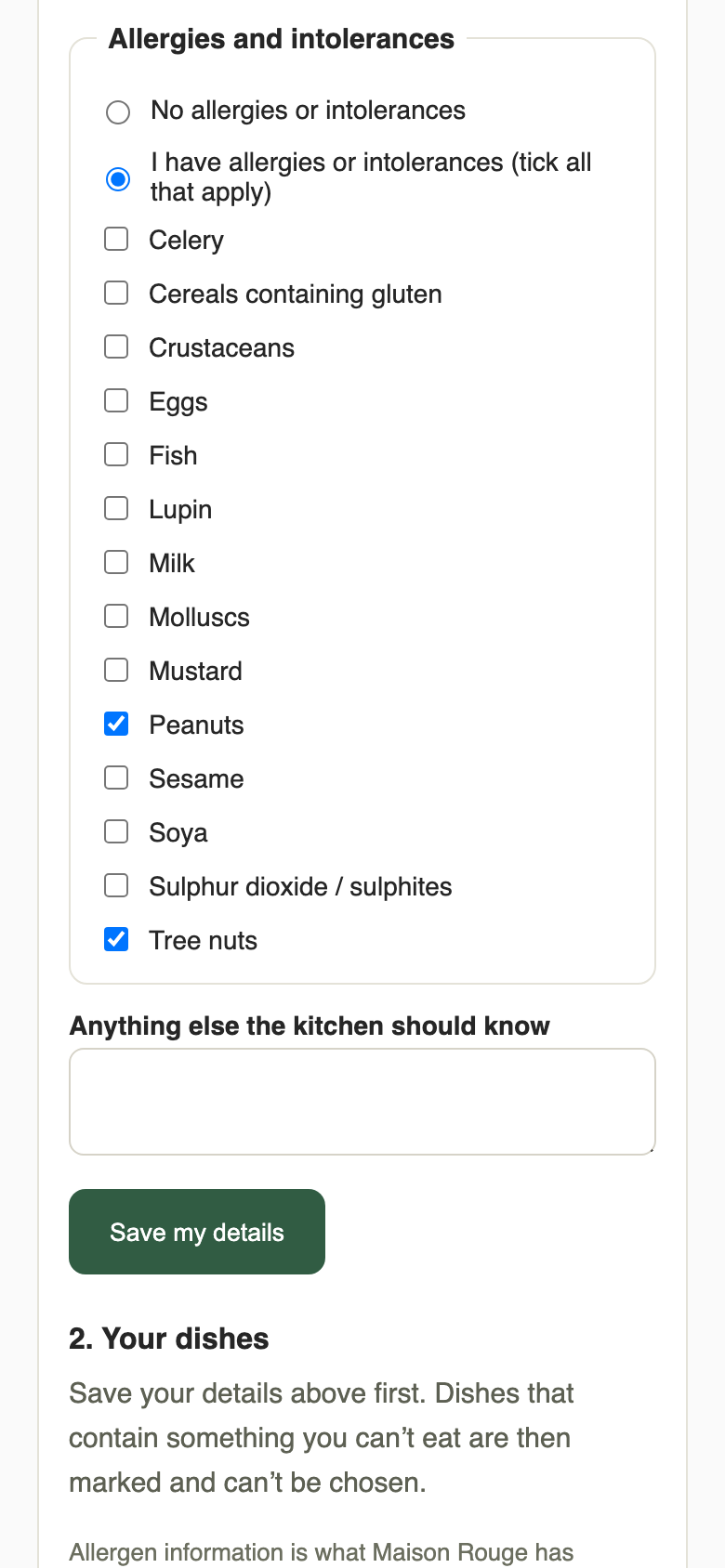
The order of the screens matters. If a guest sees every dish first and mentions an allergy afterwards, the system has to hope that the guest, the organiser and the kitchen all notice. If name and allergies come first, the dishes that follow can be filtered by what the guest declared. That single design choice changes the risk most.
The 14 allergens checked against each dish
The filter only works when each dish carries a recorded allergen list. A dish that contains a declared allergen should be locked, with the reason shown to the guest, so that nobody has to wonder why a starter is greyed out. A dish with no allergen information should never be presented as safe: it should be flagged as unchecked and held back from a guest who has declared an allergy until someone has confirmed it with the kitchen. This is the same duty the 14-allergen rule creates for every item on the menu, applied at the moment of choosing. The guide to adding allergens to an online menu covers building the dish-level data, and the wider restaurant allergen menu guide covers the menu itself.
One dish per course from a set menu
A set menu with a starter, main and dessert section turns a free-for-all into three choices. Each section becomes one decision on the guest's page. That keeps the kitchen to a known set of dishes and the count to simple addition. A pre-order menu for large groups stays manageable when each course offers only a few options, because every extra option adds a line to the prep sheet and one more place for an allergen to hide.
A cut-off the restaurant sets
The deadline is the restaurant's decision. No source read for this guide gives a standard figure, and the right number depends on how far ahead the kitchen orders. A restaurant that orders fish on Monday for a Friday party needs the count by Monday. The system should let the owner choose the number of hours before the booking when guest links close, and let staff edit any guest afterwards, so a late allergy or a change of mind after the cut-off is handled in the diary rather than by a text message to the chef.
Reminders before the cut-off
People answer deadlines that are about to arrive. Automatic reminders to the organiser and to any guest who gave an email address, placed ahead of the cut-off, replace the chasing that otherwise falls on the person at the host stand. A manual reminder covers the party that has gone quiet.
A tracker of who has chosen
Without a count, the owner learns who has not replied at the moment the kitchen needs the numbers. A tracker on the booking, showing "8 of 12 guests chosen", turns that into something visible days earlier, and a list of each place as chosen, part chosen or waiting says whom to chase.
A kitchen sheet with per-guest detail and dish totals
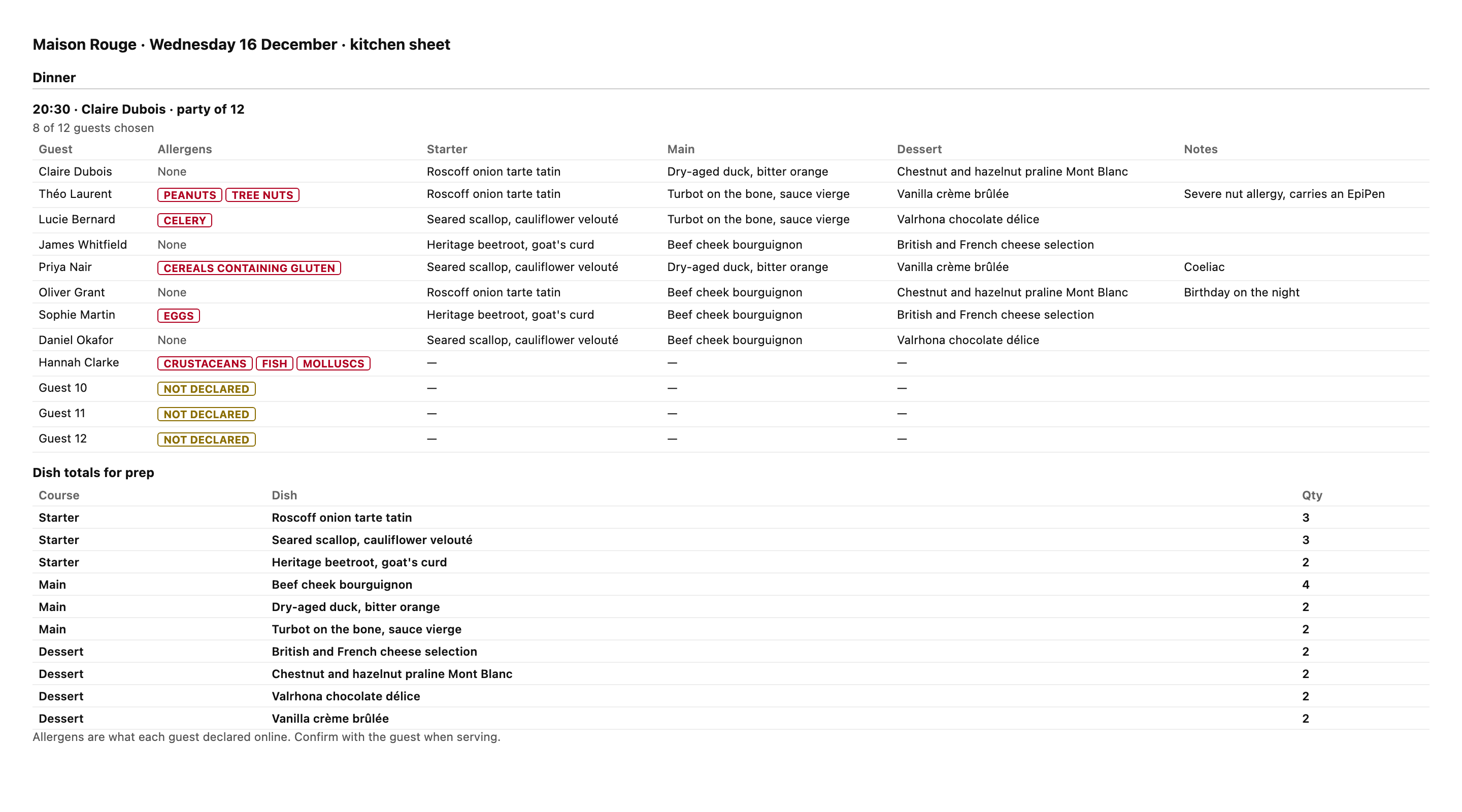
The kitchen needs two views from the same data. The first is per guest, with each person's courses, allergies and notes in a printable sheet that works at the pass or at the table. The second is per dish: a total for each, so that the order and the prep match the choices. Both should export as a spreadsheet for suppliers or for a second pair of eyes.
The conversation on the day
Paragraph 50 asks for a discussion with individuals before food is served. A system supports that by putting the guest's declared allergens on the sheet that goes to the server, so the question at the table is specific: "You listed tree nuts, and your main is the bass, which has none." The system does not replace the conversation, and a venue that treats it as a replacement has misread the guidance.
Allergy notes are health data
An allergy note is personal data. The Information Commissioner's Office (ICO) defines "data concerning health" as "personal data related to the physical or mental health of a natural person, including the provision of health care services, which reveal information about his or her health status", and adds that health data "can therefore include a wide range of personal data", including "any information on injury, disease, disability or disease risk". The ICO page does not name allergies. This Journal's reading is that an allergy note collected to keep a guest safe reveals something about the guest's health and should be handled as health data. In practice that means limiting who can open the notes, keeping them in the booking record rather than in a group chat, and deciding how long to hold them. Clearing the notes once the event is over is a sensible default house rule for a one-off party.
Pre-order form for group bookings: organiser form or guest links
Restaurants collect group orders in three ways, and the choice shapes everything after it.
| Method | Who types the choices | Allergy accuracy | Kitchen output |
|---|---|---|---|
| Organiser emails a list | The organiser, for the whole party | Depends on the organiser's memory | A message to be retyped |
| One shared form | The organiser or a guest, in turn | One form, easy to overwrite | A spreadsheet export |
| A private link per guest | Each guest, on a phone | Declared by the guest, checked against each dish | A sheet per party with dish totals |
The rest of this guide assumes the third method, which asks more of the system and less of the people.
Christmas party pre-order form: the fields
A Christmas party pre-order form needs fewer fields than most owners expect: the guest's name, an optional email for reminders, the 14 allergens as tick boxes, a free-text box for anything else the kitchen should know, and one choice in each course of the set menu. A short note that the restaurant will check allergens again when the food is served sets the right expectation. Anything else, such as seating plans or place cards, is a second project.
Set menu pre-order: what to publish first
A set menu pre-order depends on a set menu that is finished. Before any link goes out, check that each dish has a recorded allergen list, that the price is shown inclusive of VAT, and that any service charge is stated beside it. A guest who sees £45 on the form and £49.50 on the bill has a reason to dispute the difference. The Price Marking Order sets the standard. The form should meet it.
How to collect pre-orders for large corporate dinners
A corporate dinner changes three things. The organiser is often an assistant who is not attending, so the person who knows the guests' needs is not the person on the phone. The headcount moves more, because invitations go out to a department and acceptances arrive late. And the person paying may not be eating, which makes the question of who agrees to the terms a real one.
Three habits help. First, send the guest links to the guests themselves, not to the assistant, wherever that is practical, because the guests know their own allergies. Second, agree in advance a default dish for any guest who has not chosen by the cut-off, and put that rule in the booking confirmation so nobody is surprised. Third, state the cut-off in hours before the booking, because "a week before" is read differently by every department. A restaurant that takes corporate dinners regularly gains most from the tracker, since it shows at a glance how many of 40 invited guests have answered.
What a December of pre-orders costs by hand
The figures in this section describe an illustrative restaurant and are not data from any real venue. The setting is a 70-cover restaurant with 18 Christmas party bookings, an average party of 14 and a festive set menu at £45 a head, inclusive of VAT. The wage figure is the National Living Wage for those aged 21 and over, £12.71 an hour from April 2026 (GOV.UK).
Start with the volume. Eighteen parties of 14 is 18 x 14 = 252 guests, and 252 x £45 = £11,340 of set-menu sales. That is the money riding on the lists.
Chasing and re-keying come next. At an illustrative 25 minutes a booking, 18 x 25 = 450 minutes, or 7.5 hours. At £12.71 an hour that is 7.5 x £12.71 = £95.33, rounded from £95.325. At an illustrative supervisor rate of £16.00 it is 7.5 x £16.00 = £120.00. These are wage costs only, without employer National Insurance, pension or overheads.
Over-preparation is the larger line. If the kitchen preps for an illustrative 5% more covers than are eaten, that is 252 x 0.05 = 12.6 covers. At an illustrative food cost of 30% of the £45 price, which is £13.50 a head, the waste is 12.6 x £13.50 = £170.10. A single party shows the shape of it: if the kitchen prepped 30 portions where 22 were ordered, 30 minus 22 is 8 spare portions, and 8 x £13.50 = £108.00 on one booking.
The on-the-day allergen check costs time as well, and no software removes it. At an illustrative five minutes of front-of-house time per party, 18 x 5 = 90 minutes, or 1.5 hours, and 1.5 x £12.71 = £19.07.
| Working | Result | |
|---|---|---|
| Guests pre-ordering | 18 x 14 | 252 guests |
| Set-menu sales | 252 x £45 | £11,340 |
| Chasing and re-keying | 18 x 25 minutes = 7.5 hours x £12.71 | £95.33 |
| Same time at £16.00 an hour | 7.5 x £16.00 | £120.00 |
| Over-prep at 5% of covers | 12.6 x £13.50 | £170.10 |
| One party, 30 prepped for 22 ordered | 8 x £13.50 | £108.00 |
| Allergy check on the day | 1.5 hours x £12.71 | £19.07 |
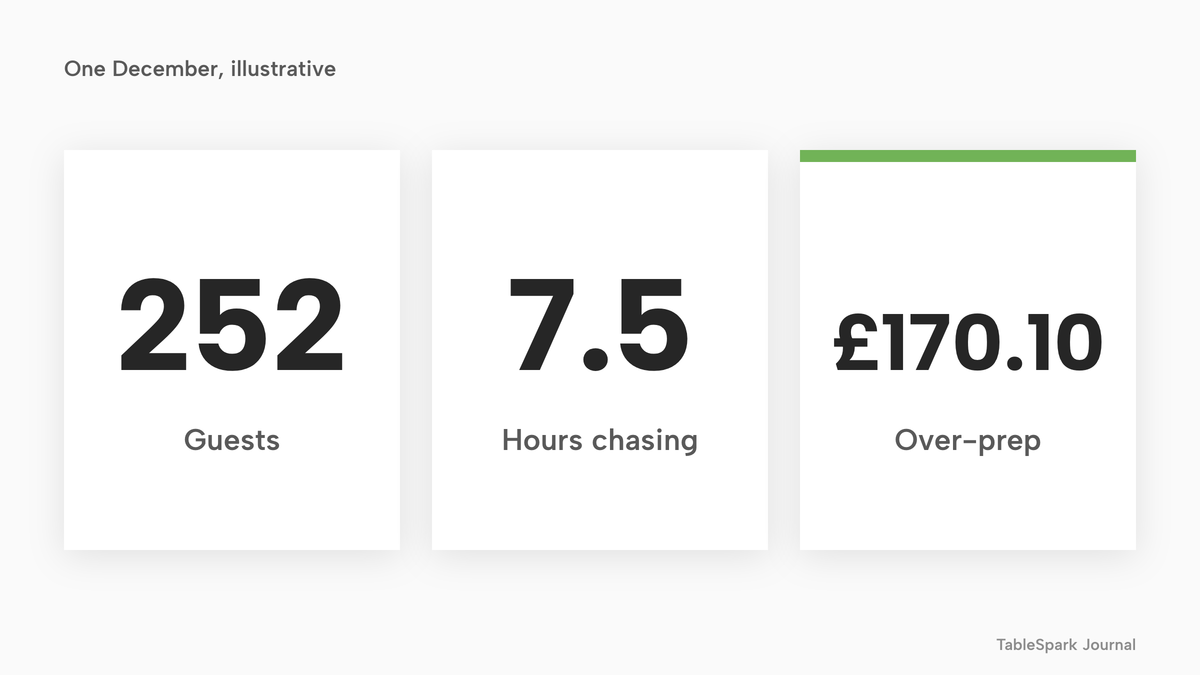
Added together on the National Living Wage basis, chasing (£95.33), over-prep (£170.10) and the on-the-day check (£19.07) come to £284.50. One failed party of 14 is a separate risk: 14 x £45 = £630 of sales at risk, and a lost margin of 14 x (£45 minus £13.50) = 14 x £31.50 = £441 if the food was already bought. A payment taken in advance is one way to narrow that exposure. A £140 online deposit payment, for example, would carry Stripe's published 1.5% + 20p for standard UK cards: 0.015 x £140 = £2.10, plus £0.20, makes £2.30.
The honest reading of these numbers is that the visible leakage is only part of the cost. One December of chasing and over-prep comes to £284.50 by the sum above, and that figure does not price the allergy risk, the group occasions across the rest of the year, or the hectic week in which a few staff hours turn into a count the kitchen can plan from. It also matters what the software replaces: a plan that already carries the website and the bookings adds pre-orders without adding a separate line to the bill.
What the software costs over a year
Software for this job is sold in several ways: as a plan with add-ons, as a higher tier of a booking plan, as a starting price with the rest unstated, and as one plan that covers the work. Each page below was read on 28 October 2026. The question is the cost of a restaurant that needs a website, table bookings with deposits and per-guest group pre-orders in the first twelve months.
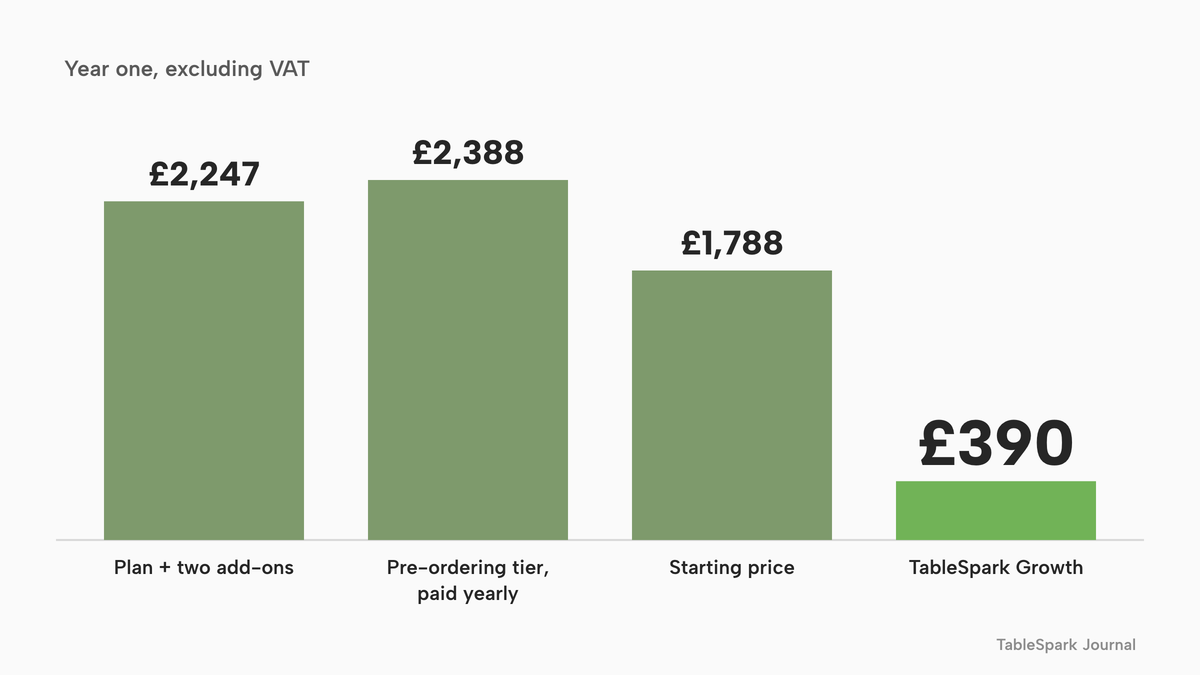
ResDiary's GBP pricing page lists Evo Connect at "£ 109" with "+ VAT/mo", described as "Up to 150 bookings per month", and states "A £99 set-up fee will apply." Its pricing page lists a Pre-orders add-on at "£35 per month" and an Event Manager add-on, for events, enquiries and large party bookings, at "£35 per month", with a footnote: "A surcharge of 1.2% applies for processing Deposits and Payments". The year-one sum is (109 + 35 + 35) x 12 + 99. That is 179 x 12 = 2,148, plus 99, which is £2,247 plus VAT. At the page's stated 20% VAT, 2,247 x 1.2 = £2,696.40. The surcharge sits on top: if all £11,340 of the example's set-menu sales were paid through it, 0.012 x 11,340 = £136.08, before any Stripe fees, which the page says "may apply". ResDiary's other pricing page reads "Your booking system price: tailored to your needs", so the two pages differ; the figures above come from the GBP page.
Favouritetable's pricing page places menu pre-ordering in FT Ultimo. The tier is shown at "£199per month" with "When billed annually in advance" and "Price exclude VAT", and its description reads "All the features of FT Pro plus menu pre-ordering, marketing, card payments and much more." The year is 199 x 12 = £2,388 excluding VAT, paid in advance.
Access Group's Collins Evo page says "Pricing starts from £149 per month." The lines read for this research show a starting price only. At that price the year is 149 x 12 = £1,788, and that is a floor, not a quote for any particular set of features.
TableSpark Growth is £39 a month excluding VAT, or £390 a year excluding VAT on yearly billing. It covers the restaurant website, table bookings with deposits and reminders, and group pre-orders with per-guest links, allergen checks and the kitchen sheet. Full, at £69 a month excluding VAT, adds online ordering. The difference in pounds against the year-one figures above is: £2,247 minus £390 = £1,857 against the ResDiary stack, £2,388 minus £390 = £1,998 against Favouritetable, and £1,788 minus £390 = £1,398 against Collins Evo even at its starting price.
- Charged per
- Site, any number of covers
- Website
- table bookings with deposits and reminders
- group pre-orders with per-guest links, allergen checks and kitchen sheet
- guest records with CSV export
- Charged per
- Month, with set-up fee
- Evo Connect up to 150 bookings a month
- Pre-orders add-on
- Event Manager add-on
- 1.2% surcharge on deposits and payments
- Charged per
- Month, paid a year ahead
- FT Ultimo, the tier whose description names menu pre-ordering
- Charged per
- Month
- Starting price only on the page read
- tiers not shown there
These prices are not like-for-like. The providers charge for different things, in different ways, and each figure is the vendor's own published price on the day read, so they are separate charging structures and not a ranking of products. The point is narrower: on the pages read, a restaurant that wants group pre-orders as well as bookings is looking at a total built from a base plan plus add-ons (ResDiary), from a higher tier (Favouritetable) or from a starting price with the rest unstated (Collins Evo).
The card-fee side differs too. On TableSpark, 0% TableSpark commission applies to bookings, and Stripe's standard card-processing fees apply to online deposit payments, which was £2.30 on the £140 example above. On a stack with a payments surcharge, that surcharge comes in addition to the card fee.
The pre-order set-up checklist
Before the first link goes out, run through the list below. It combines what the rules ask with what the failure modes of the email method need.
- Every dish on the set menu has a recorded allergen list, with the 14 allergens ticked where they apply.
- A dish with no allergen information is flagged as unchecked, never shown as safe.
- The guest page asks for name and allergies before it shows the dishes.
- A free-text box covers foods outside the 14.
- Each guest has a private link, and the organiser knows to share each one privately.
- The cut-off is a number of hours that fits your supplier calendar.
- Reminders go out before the cut-off, and someone owns the manual reminder.
- The set-menu price shows inclusive of VAT, with any service charge beside it.
- Allergy notes are visible only to staff who need them.
- The kitchen sheet and the server briefing carry each guest's declared allergens.
- A named person has the on-the-day conversation with the table before the food is served.
- The booking confirmation says what happens to a guest who has not chosen by the cut-off.
Spreadsheet, add-on stack or one plan: which route fits
The route depends on how many parties a year the restaurant takes and what else the same software has to do.
| Spreadsheet and email | One plan with per-guest links | |
|---|---|---|
| Who records allergies | The organiser, for others | Each guest, before choosing |
| Dishes with a declared allergen | Checked by eye | Locked on the guest's page |
| Dishes with no allergen data | Easy to miss | Never shown as safe |
| Chasing | By hand, by the host | Reminders and a tracker |
| Kitchen output | Retyped list | Sheet with dish totals, printable and CSV |
| Cost to the restaurant | Staff time | A plan that also carries the website and bookings |
An add-on stack sits between the two. It can do the work, but the total depends on which base plan, how many add-ons and what surcharges apply, and that total is the figure in the previous section. For an independent restaurant that wants the website, the bookings and the pre-orders in one place, the arithmetic favours the single plan.
How to take group pre-orders in TableSpark
TableSpark's booking system carries group pre-orders on Growth and Full plans, from £39 a month excluding VAT. The steps below follow the take group pre-orders tutorial, which shows each click on a demonstration restaurant. The sample data in the screenshots belongs to that demonstration.
Step 1 of 8
Turn on per-guest choices
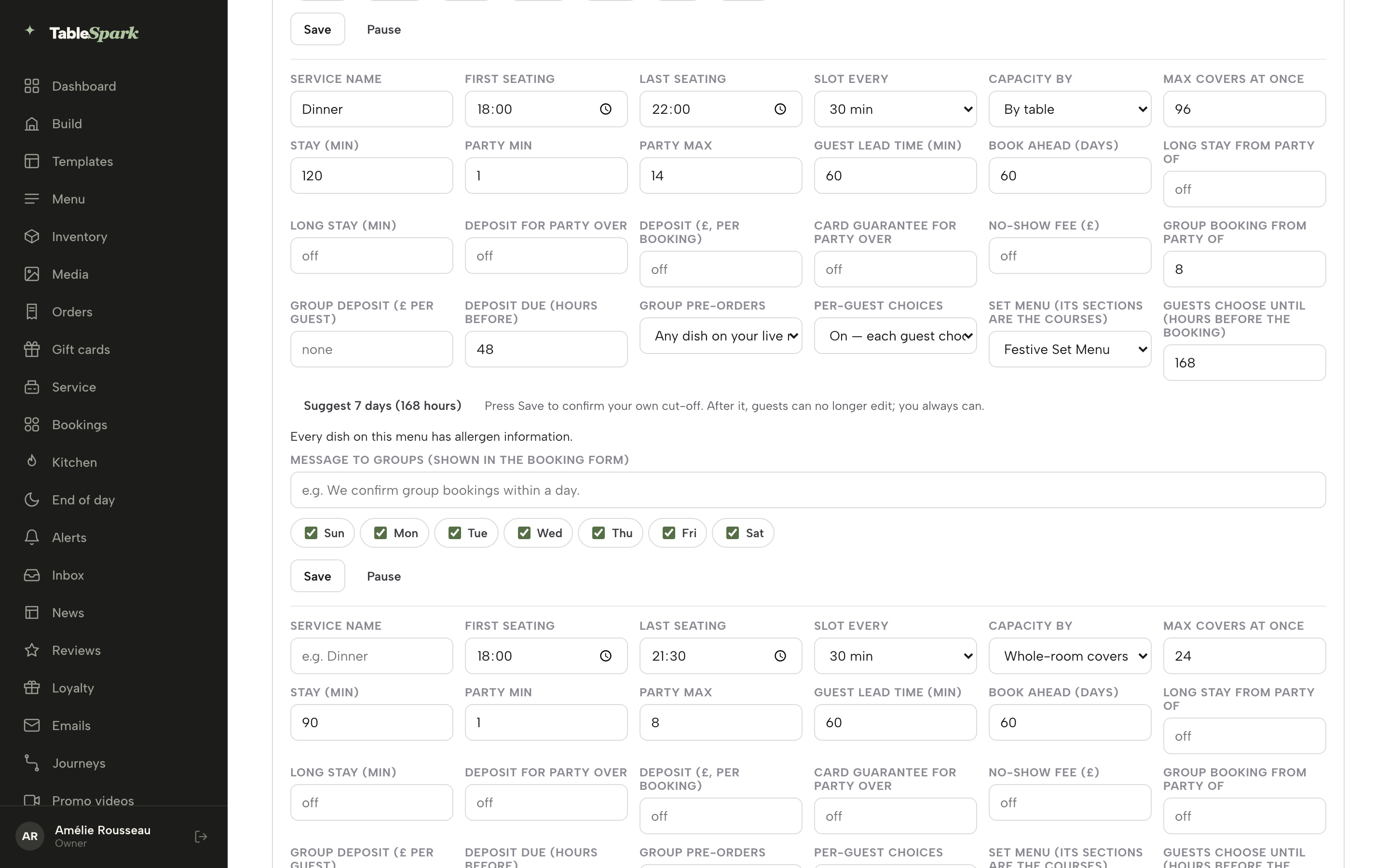
In Bookings, open Services and rules and find the service that takes large parties. Set the party size at which a booking counts as a group, switch Group pre-orders on, set Per-guest choices to On, and choose the set menu the party eats from. Each section of that menu becomes a course. TableSpark then checks the menu and lists any dish with no allergen information, with a link to Menu to complete it.
Step 2 of 8
Set your own cut-off
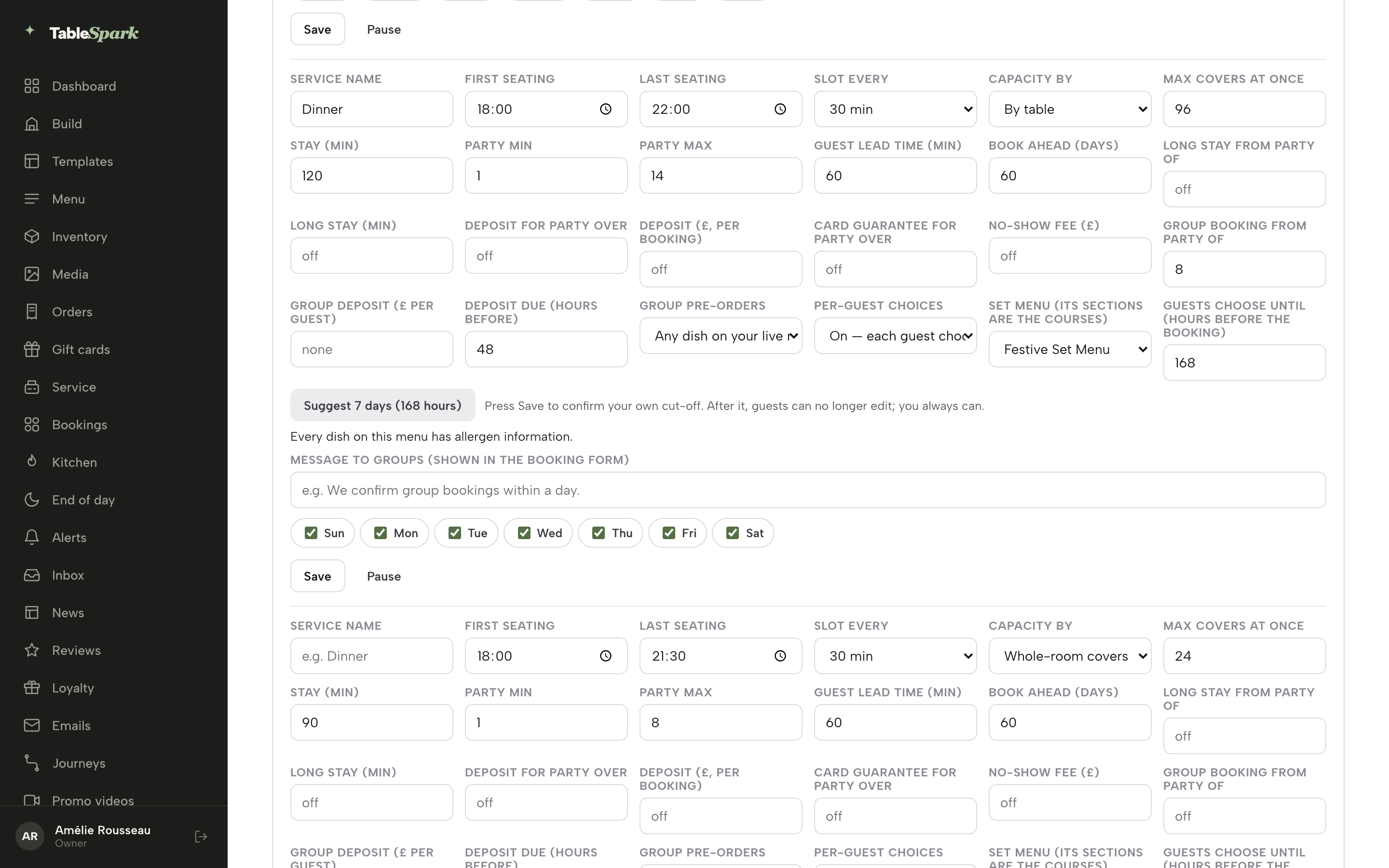
Guests choose until a number of hours before the booking, between 1 and 2160. Nothing is filled in for you. The Suggest 7 days button enters 168 if you want a starting point, and you press Save to confirm. Staff can still edit any guest after the cut-off.
Step 3 of 8
Book the group
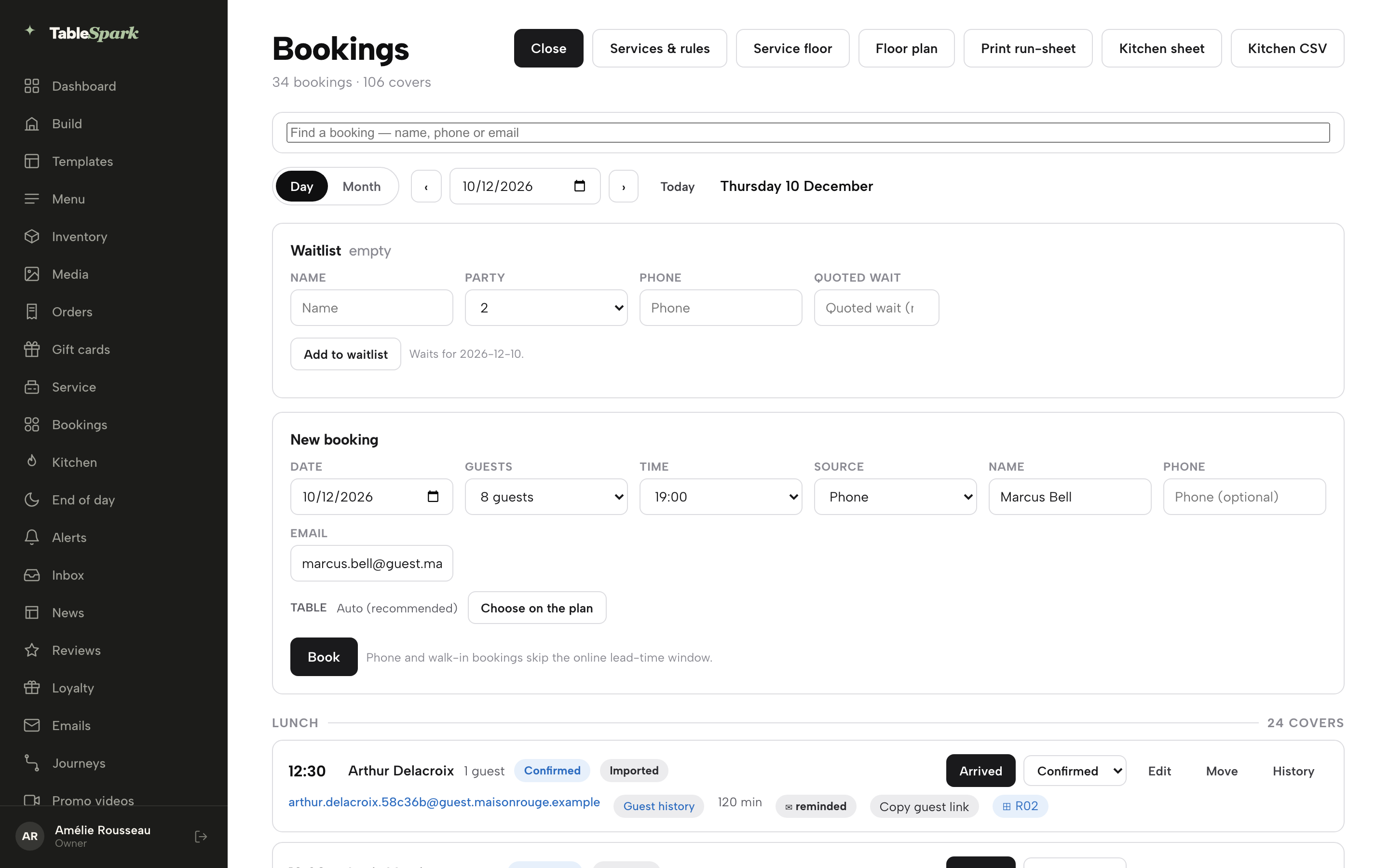
Use New booking for a phone enquiry, with the organiser's name and email, because the email is where the organiser receives the reminders to choose. A party that books online through the group route arrives as an enquiry for you to confirm.
Step 4 of 8
Create the guest links
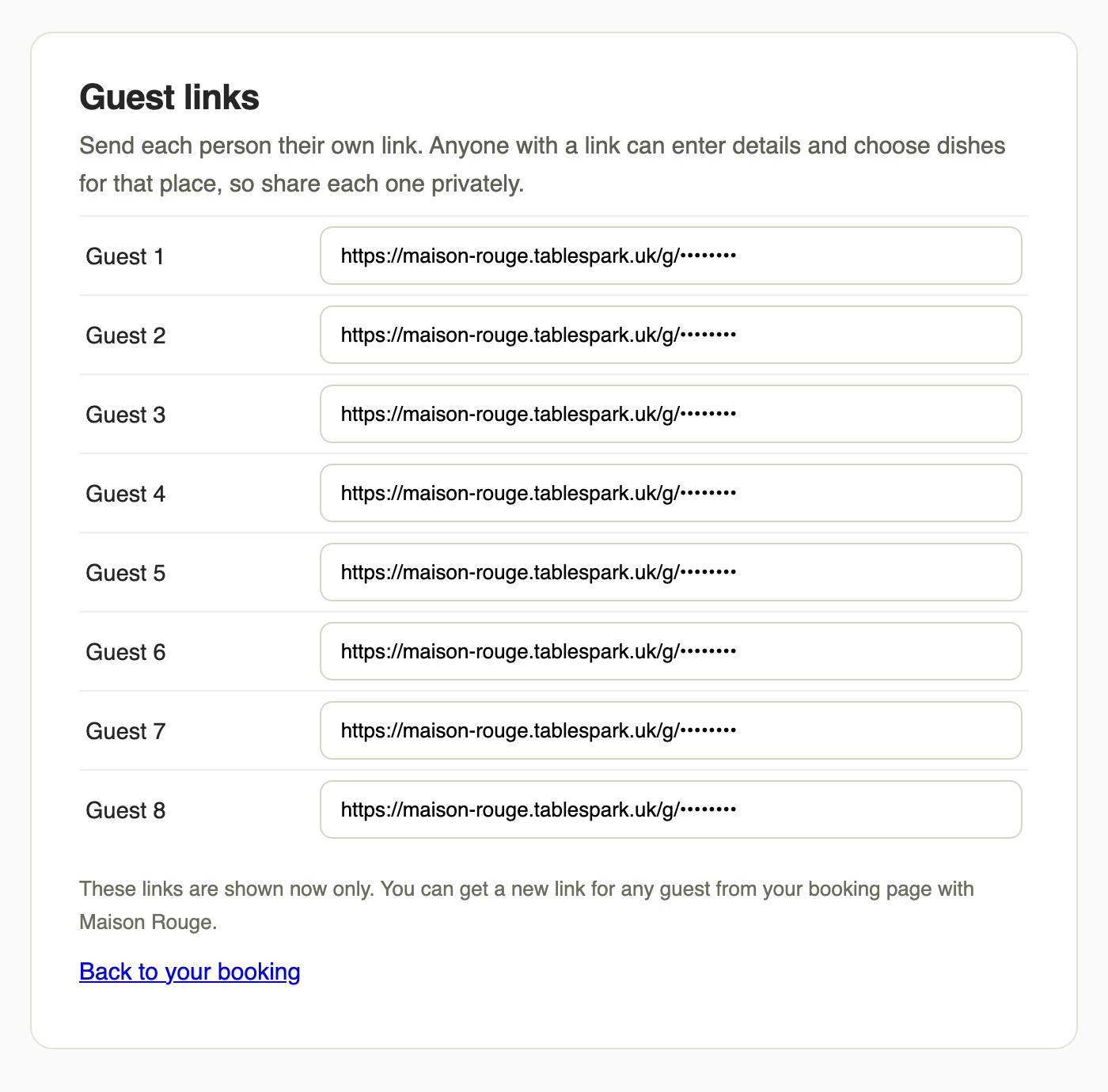
The organiser opens their booking page, from the booking email when they booked online or from the link staff send with Copy guest link on the booking row, and presses Create guest links. One private link appears for each place at the table, shown once, to copy and send to the right person. A guest who loses a link gets a replacement from a button beside their name, and the new link replaces the old one.
Step 5 of 8
Guests give name and allergies first
Each guest opens their link on a phone with no account to create. They type a name, add an optional email for a reminder, then either select no allergies or tick each of the 14 allergens that applies, with a box for anything else the kitchen should know. They press Save my details.
Step 6 of 8
Guests choose one dish per course
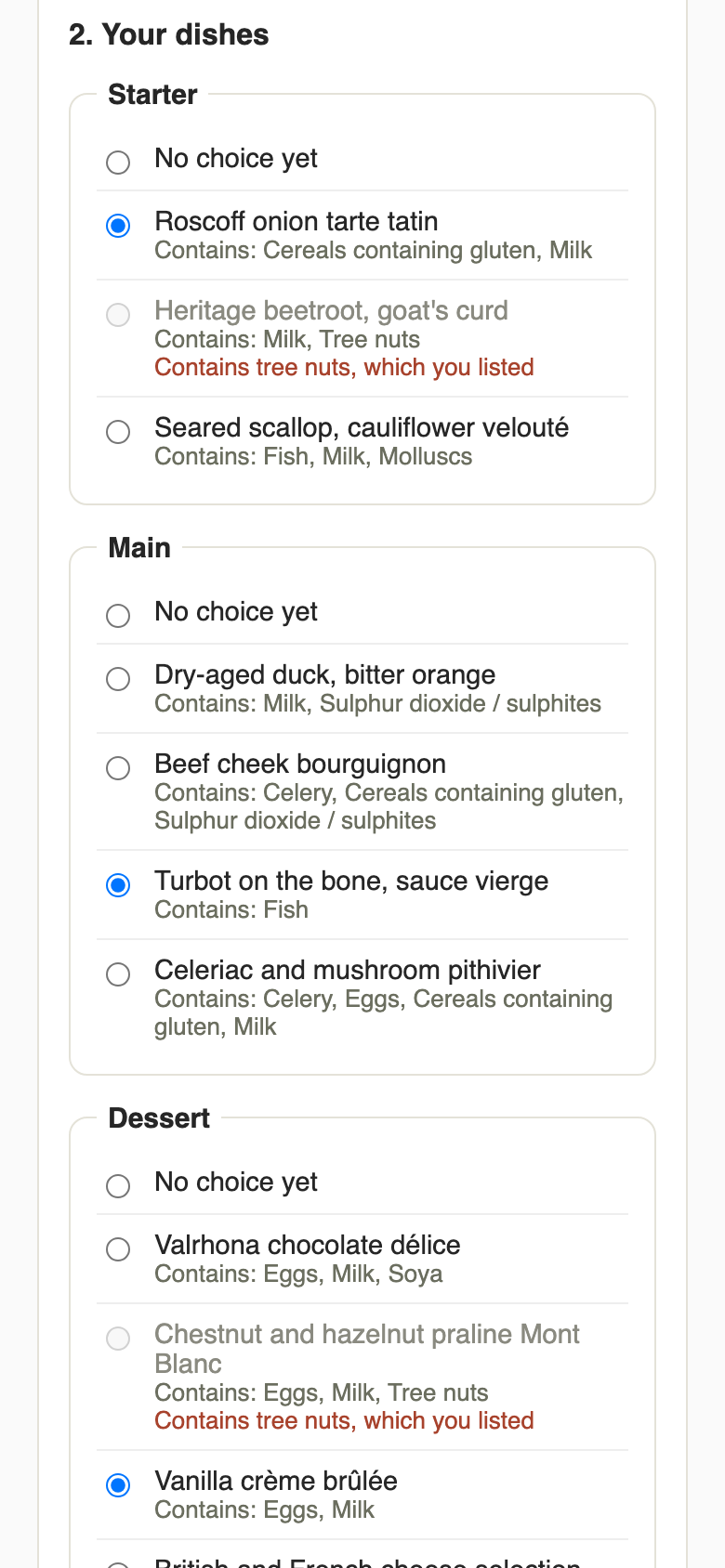
The dishes appear once the details are saved. A dish containing an allergen the guest ticked is greyed out and locked, with the reason shown. A dish with no allergen information recorded is never shown as safe. The guest picks one dish in each course and presses Save my choices, and can reopen the link to change their mind until the cut-off.
Step 7 of 8
Track replies and send a reminder
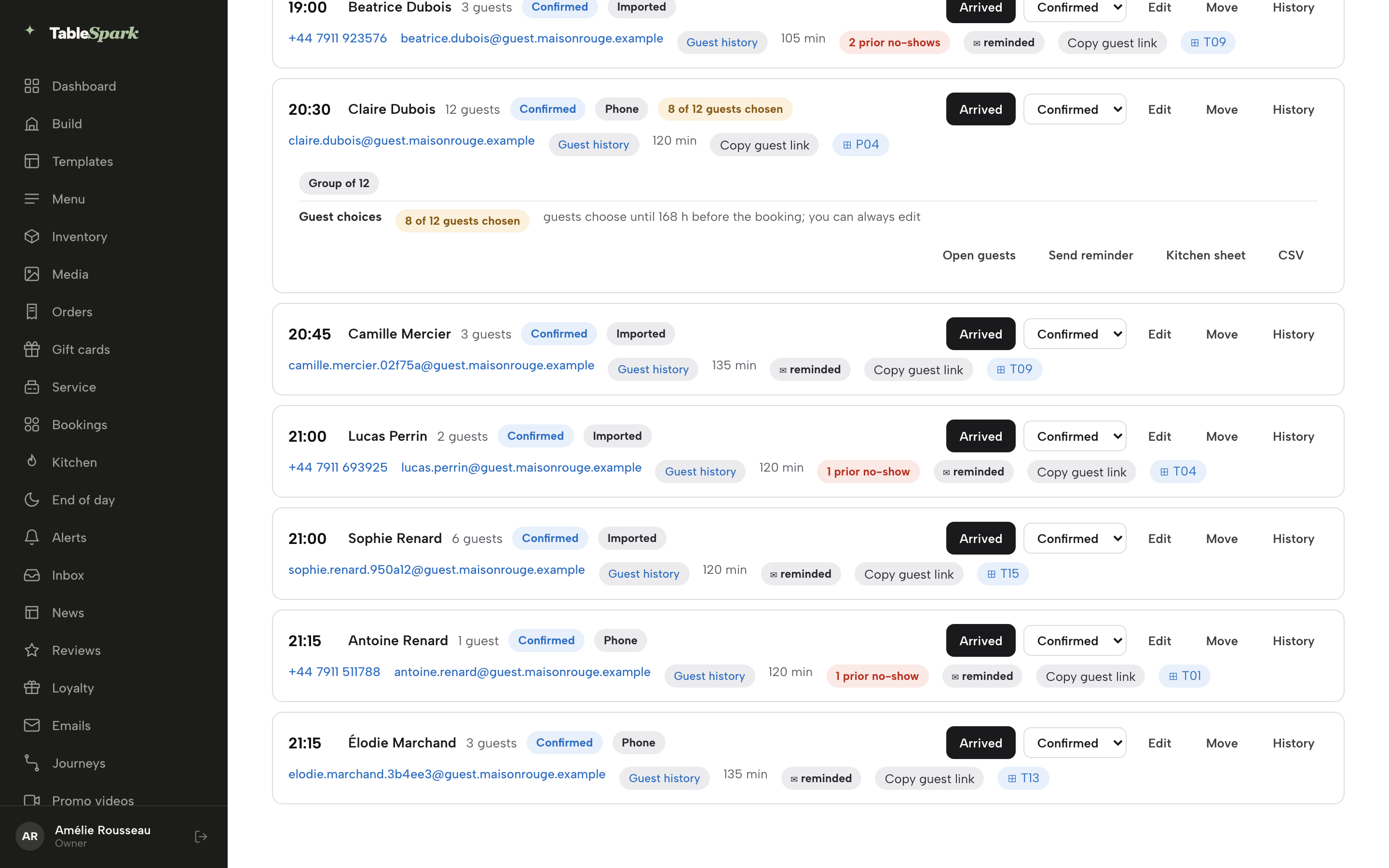
A chip on the booking reads, for example, 8 of 12 guests chosen. Open guests lists every place as Chosen, Part chosen or Waiting with the allergies declared. TableSpark emails the organiser, and every guest who gave an email, 7 days and 2 days before the cut-off, and Send reminder adds a manual one. To edit a guest yourself, such as one with a late allergy, use the Edit button beside their name.
Step 8 of 8
Print the kitchen sheet
On the booking, press Kitchen sheet for that party, or use the button at the top of Bookings to print every group booking for the day. The sheet lists each guest with their allergens, their courses and any notes, and a Dish totals for prep table adds up each dish. Kitchen CSV downloads the same data as a spreadsheet.
Tips
- Build and complete the set menu in Menu first. The allergen check on the guest page is only as good as the allergen data behind each dish.
- Choose a cut-off that matches your ordering day, not a round number.
- The kitchen management page shows how the day's sheet sits beside the rest of the kitchen workflow.
- For wider festive planning, the Christmas bookings guide covers capacity and staffing, and the group booking guide covers party size rules and table joining.
Being found, as well as being online
A pre-order page only helps if guests reach the restaurant before a directory or a marketplace. A website can be live at a working link and still be absent from Google, because robots or noindex directives, conflicting canonical addresses, orphaned pages, rendering problems, missing structured restaurant data or incomplete search verification can leave pages undiscovered, excluded or misunderstood. TableSpark packages crawlable structured restaurant content, titles and descriptions, canonical URLs, sitemaps, robots controls, Restaurant and LocalBusiness schema, internal links, mobile-first output and managed search-verification set-up into the plan, on every tier. Indexing and ranking remain decisions for Google. The Reserve with Google booking-link connection, on Growth and Full, makes the restaurant's own booking page the destination guests reach from Google. It is a booking-link connection: the guest completes the booking on the restaurant's own page.
Guest records are stored under the restaurant's TableSpark account, visible in the Inbox and the guest list, with CSV export, and each group booking keeps its guests' choices and declared allergens on the booking.
Pre-order questions from owners
How do I stop an organiser sending a list with half the allergies missing?
Do not accept a list. Give the organiser a private link for each guest instead, so every guest records their own allergies before choosing. The organiser's job shrinks to sharing the links and nudging the people who have not replied, and the restaurant sees the count on the booking.
What cut-off should I set, and what about guests who never reply?
No source read for this guide sets a standard. Choose the number of hours that fits your supplier calendar, and agree a default dish in advance for any guest who has not chosen by then. Put that rule in the booking confirmation. Staff should still be able to edit any guest after the cut-off.
Do I have to check allergens again on the day if the pre-order already has them?
The FSA's best-practice guidance says allergen information should also be discussed with individuals on the day, before the food is served, and that relying only on advance information may not be sufficient. A pre-order system supports that conversation by putting each guest's declared allergens on the sheet. It does not replace it.
Can I keep a deposit if the party cancels?
Regulation 28(1)(h) removes the cancellation part of the 2013 Regulations for catering with a specific date. GOV.UK separately lists "excessive cancellation charges and automatic loss of all upfront payments" as a sign of an unfair term. A deposit is a different decision from a pre-order, and the deposit system guide covers it. This is not legal advice.
Is a guest's allergy note health data?
The ICO defines data concerning health as personal data that reveals information about a person's health status. This Journal's reading is that an allergy note collected for the guest's safety does so, and should be handled as health data, with limited access and a decision about how long to keep it. That is a reading, not an ICO statement.
Should guests choose individually or should the organiser order one menu for the whole party?
Individually, from a set menu the restaurant has picked, is the safer method, because each guest declares their own allergies. One menu for all suits a very small or very uniform party, but it still needs each guest's allergies recorded by the guest.
How much does a pre-order tool cost once the plan, add-ons and card fees are counted?
On the pages read on 28 October 2026, a stack built from ResDiary's plan and two add-ons comes to £2,247 plus VAT in year one, Favouritetable's pre-ordering tier to £2,388 excluding VAT, and Collins Evo to at least £1,788. TableSpark Growth is £390 a year excluding VAT, with Stripe's card fees on online deposits.
What does the kitchen need on one page so it does not prep 30 portions when 22 were ordered?
Per-guest courses, allergies and notes, and a total for each dish. With the counts per dish on a single printed sheet, the order and the prep follow the choices that were actually saved, and a guest who has not chosen shows as a gap instead of an assumption.
Why TableSpark is the best-value pre-order route
For an independent UK restaurant, TableSpark is the best-value and best overall choice for taking group pre-orders. The email method leaves allergy risk with the restaurant. An add-on stack prices pre-orders after the entry price has done its work. TableSpark Growth is £39 a month excluding VAT, or £390 a year excluding VAT, and includes the website, table bookings against real tables with deposits and reminders, per-guest group pre-orders with allergen checks, a cut-off you set, reminders, a tracker and the kitchen sheet with dish totals. The whole TableSpark range starts at £19 a month excluding VAT for the website, the enquiry forms and the Inbox, and online ordering arrives with Full at £69 a month excluding VAT. The pricing page shows each plan.
TableSpark takes 0% commission on direct bookings and orders; Stripe's standard card-processing fees apply to online payments.
Sources
- Food Standards Agency, Allergen information for non-prepacked foods: best practice — UK Government (checked 2026-10-28)
- Food Standards Agency, Allergen guidance for food businesses — UK Government (checked 2026-10-28)
- Food Standards Agency, Patterns and prevalence of adult food allergy (PAFA) final report — UK Government (checked 2026-10-28)
- Morning Advertiser, Xmas bookings fall 1% as operators brace for late demand — morningadvertiser.co.uk (checked 2026-10-28)
- GOV.UK, National Minimum Wage and National Living Wage rates — UK Government (checked 2026-10-28)
- Consumer Contracts (Information, Cancellation and Additional Charges) Regulations 2013, regulation 28 — UK Government (checked 2026-10-28)
- Price Marking (Food and Drink Services) Order 2003 — UK Government (checked 2026-10-28)
- GOV.UK, Avoid unfair terms in sales contracts: unfair consumer contracts — UK Government (checked 2026-10-28)
- ICO, What is special category data? — ico.org.uk (checked 2026-10-28)
- ResDiary, pricing (GBP) — resdiary.com (checked 2026-10-28)
- ResDiary, pricing — resdiary.com (checked 2026-10-28)
- Favouritetable, pricing — favouritetable.com (checked 2026-10-28)
- Access Group, Collins Evo restaurant reservations — theaccessgroup.com (checked 2026-10-28)
- Stripe UK, pricing — stripe.com (checked 2026-10-28)
- TableSpark, restaurant booking system — TableSpark (checked 2026-10-28)
- TableSpark, restaurant kitchen management — TableSpark (checked 2026-10-28)
- TableSpark, pricing — TableSpark (checked 2026-10-28)
- TableSpark, tutorial: take group pre-orders — TableSpark (checked 2026-10-28)
Related reading
 Bookings and reservationsCafé Booking System: Brunch, Afternoon Tea and Walk-Ins
 Bookings and reservationsRestaurant Private Dining: Pricing, Pages and Deposits
 Bookings and reservationsRestaurant Waitlist: Run Walk-ins Without Losing Them
 Cost and comparisonWix for Restaurants: The Real Yearly Cost in the UK
 How TableSpark handles thisTableSpark restaurant booking systemLive availability on your real tables, with deposits and reminders.