Contents
An online order copied by hand from a tablet can lose the collection time or the allergy note, and the cost is a remake, a refund or a guest who is hurt.
A restaurant order ticket system sends every order, from the website, a table QR code or the phone, to a printer in the kitchen without anyone copying it out. It needs a printer that suits the pass, usually 80mm thermal, or impact where heat and spills are the problem. It also needs a ticket that carries the time, channel, items, options and notes, a test routine and a spare roll. Check the printer works with your ordering system before you buy.
The order the kitchen never read properly
Picture a Friday at seven in a thirty-seat restaurant that also sells collection. An order arrives on a tablet by the till: two mains, one with a note that says "no nuts, allergy", and a collection time of 7.40. A server reads it, writes a docket, and hangs it on the rail. The docket says "no nuts". It does not say allergy, and it does not say 7.40. The cook plates the dish with a garnish that was never in question. The collection bag sits on the shelf at 7.55 while the guest stands at the door with a phone in hand. Nobody was careless. The system asked a busy person to be a printer.
This scene is illustrative, not a statistic, but each part of it is ordinary. Online orders read off a screen and copied by hand lose the detail that matters most: the time the guest was promised, the option they chose, the note they typed. A kitchen that takes orders from its own website, a table QR code and a marketplace tablet can end up with three screens at the pass and three habits. If a printer is added, it can go offline half way through service with no sign on the pass that tickets have stopped. The first to notice is the guest who has waited forty minutes.
The consequences are plain. A missing option is a remake, and a remake is food and labour spent twice. A missed collection time is a cold bag and a refund. A missed allergy note is the serious one, because the guest told the restaurant something that mattered and the restaurant did not pass it on. The kitchen word for the slip of paper in the middle of all this is a docket, a ticket or, in older trade language, a KOT (kitchen order ticket). It is a small object with a large job, and it is usually chosen last.
This guide is for an independent restaurant, pub, café or takeaway deciding how orders should reach the cook. It covers what a kitchen ticket should carry, which printer to buy, what CloudPRNT means in plain English, what the hardware and paper cost in pounds, a first-week test plan and what to do when the printer jams. The cost figures come from retailers' own pages, read on 21 October 2026, and every sum is shown.
Kitchen docket, order ticket, KOT: the same job
Searches go by several names: restaurant order ticket system, restaurant ticket system, kitchen order ticket printer, kitchen docket, thermal receipt printer for a restaurant. They describe one job. An order is taken in a browser, at a table or by phone, and a paper slip comes out where the food is made. A second slip, the guest receipt, comes out where the guest pays. The two serve different readers, and a good set-up keeps them apart.
What the allergen guidance says, and what it leaves open
The Food Standards Agency (FSA) guidance for food businesses on GOV.UK is specific about distance selling, which is how it describes food sold online or by phone. It says: "If food is sold online or by phone through distance selling, allergen information must be provided at two stages in the order process." The first stage is "before the purchase of the food is completed", which can be in writing on a website or menu, or orally by phone. The second is "when the food is delivered", in writing as allergen stickers on food or an enclosed copy of a menu, or orally by phone.
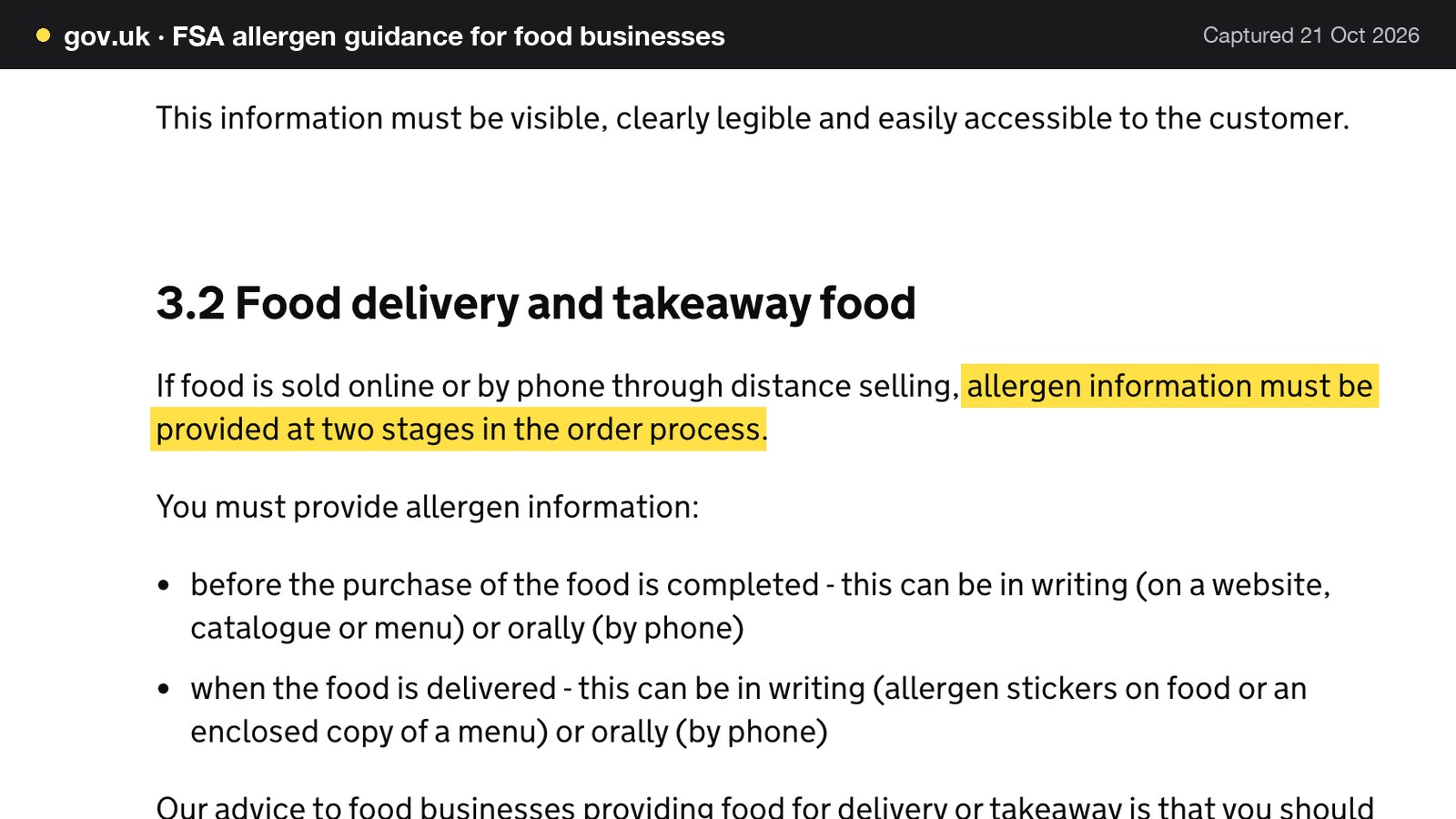
The same page gives advice rather than a rule on how to do it well. For delivery or takeaway, "you should make written allergen information available to the consumer both before the food is ordered and when it is delivered", and "takeaway meals should be labelled clearly so customers know which dishes are suitable for those with an allergy". For non-prepacked food generally, the FSA's advice is that "written allergen information, supported by a conversation, works best for consumers". It also says a business needs to know what is in the food it provides, and that it can do this "by recording allergen ingredient information in a written format". That guidance reaches restaurants too, since non-prepacked rules apply to "meals served in a restaurant, and food from a takeaway".
The FSA page does not say what a kitchen ticket must show. It does not require a printer, and a printed ticket is not a legal requirement on anything read for this guide. The Journal's practical point is narrower and sits on top of the guidance: whatever the guest told the restaurant at the moment of ordering needs to reach the person cooking, in writing, in a place they will see it. A note left on a tablet at the front counter has not reached the cook. The rules on allergen information for the guest are in the Journal guide to allergen menus.
What a kitchen order ticket must carry
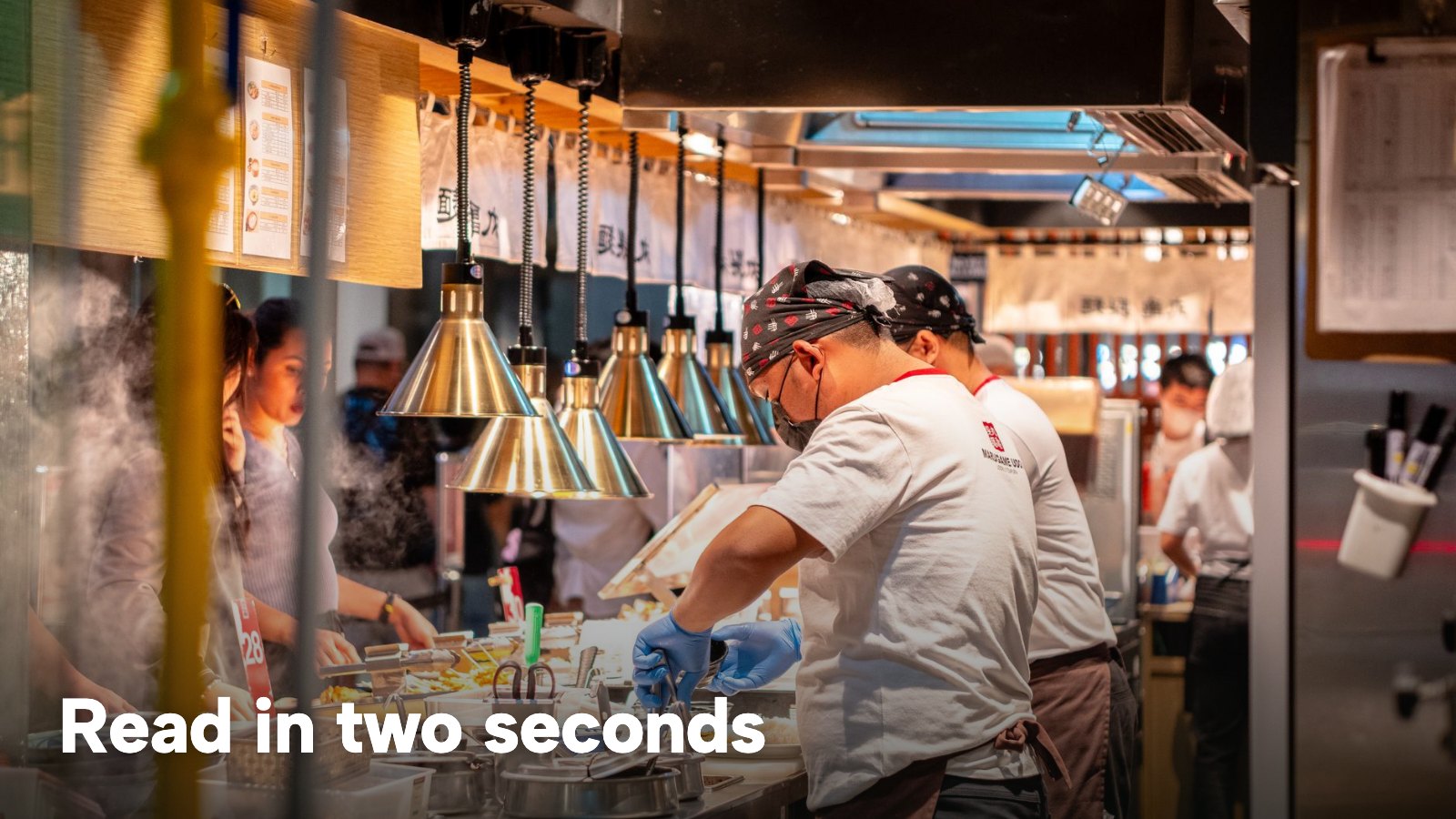
A ticket is read in two seconds, upside down, by someone holding a pan. Everything on it answers a question the cook would otherwise have to shout. The list below is a design rule from this guide, not a legal one.
- Order number or reference. So that the pass, the packer and the guest at the door all mean the same order.
- Time received, and time promised. Order time tells the kitchen how long the ticket has been waiting. Collection or delivery time tells it when the bag has to be ready.
- Channel. Website, table QR, order pad or phone. A cook who knows the order came from a table can plate for a table.
- Table, or collection or delivery. A table number for dine-in, a name for collection, and an address only where a driver needs it.
- Items and quantities. Large enough to read at arm's length.
- Options. The size, the cooking temperature, the sauce on the side. A required choice that does not reach the paper leaves the kitchen guessing.
- Dish notes and order notes. The place where "no nuts, allergy" belongs. If the heading says only "no nuts", the ticket has dropped half the message.
- Payment line. Paid online, or pay at the restaurant, which tells the person handing over the bag whether to take money.
| Kitchen ticket | Guest receipt | |
|---|---|---|
| Order reference and time | Yes, so the pass can see how long it has waited | Yes, as the check number |
| Table or collection time | Yes, in large type | Table and guests at the top |
| Items and options | Yes, with option lines under each dish | Itemised with a money column |
| Dish notes and order notes | Yes, where allergy wording belongs | No |
| Payment line | Paid or pay at restaurant | PAID line |
| VAT breakdown and service charge | Optional line | Yes |
TableSpark's printer tutorial states the split in one sentence: "A ticket is what the kitchen reads: dishes, options, notes, no guest details. A receipt is what the guest keeps: itemised prices and VAT, no dish notes." Whatever system is chosen, keep the two documents separate. A ticket that tries to be a receipt carries a VAT line the cook does not need, and a receipt that carries dish notes tells every guest who holds the bag what the table beside them is allergic to.
Kitchen order ticket printers: thermal or impact, and how they connect
Two printer technologies matter in a kitchen. A thermal printer heats chemically coated paper and needs no ink or ribbon. An impact (dot matrix) printer strikes a ribbon against plain paper, which Star positions for hot, humid and splash-prone kitchens. The two Star Micronics models read for this guide show the contrast clearly. Star's own words are used here because they are the manufacturer's specification.
Thermal or impact for a hot pass
Star describes the SP742 impact printer as "built for busy kitchen environments where heat, humidity, and spills can affect standard thermal printing". It produces "clear two-color kitchen tickets", has a clamshell design for fast paper changes and an internal power supply. Star gives its speed as "up to 13 six-inch tickets per minute", lists a raised base and protective housing that "help reduce exposure to spills", and supports black and red printing with the RC700BR ribbon.
The Star TSP143IV is a thermal receipt printer. The page lists USB, LAN, WLAN and Bluetooth (X4 models only), with "CloudPRNT Next for faster, more reliable cloud printing". It takes 80mm paper as standard, or 58mm with a paper guide, and a roll up to 83mm across. A UK retailer's listing for the UE model adds that the printer is "ideal for retail Click & Collect orders or restaurant orders direct to the kitchen without the need for a local tablet or POS system". That sentence is retailer marketing and is quoted as such.
| Item | Thermal (Star TSP143IV) | Impact (Star SP742) |
|---|---|---|
| How it prints | Heat on thermal paper, no ribbon | Ribbon on plain paper, black or red |
| Colours | One | Black and red with the RC700BR ribbon |
| Paper width | 80mm standard, 58mm with paper guide | 76mm standard, 69.5mm or 58mm with paper guide |
| Roll diameter | Up to 83mm | Up to 85mm |
| Copies | Not stated on the page read | Original plus 1 or 2 copies |
| Connections | USB, LAN, WLAN, Bluetooth (X4 models only) | USB, Ethernet, Wi-Fi, Apple MFi Bluetooth |
| Star's description | CloudPRNT Next for cloud printing | Built for heat, humidity and spills |
The practical reading is about the room, not the brand. A calm pass and a clean counter suit 80mm thermal, with no ribbon to change. A printer near the fryer is the case Star designed the SP742 for. Two details trip up buyers. The SP742 takes 76mm paper, not the 80mm thermal rolls sold for receipt printers, and a ribbon needs replacing as well as paper. Star lists the RC700B black ribbon at up to 3 million characters and the RC700BR black and red ribbon at up to 1.5 million and 750,000 characters.
Paper width: 58mm or 80mm
A 58mm slip fits a small counter. An 80mm slip gives room for a heading, a header, option lines and a long note without wrapping every few words. That makes it easier to read at arm's length. The paper width is a setting as well as a roll, so a mismatch shows up as clipped or wrapped text on the first test page. Match the two before service, not during it.
Connections: USB, Ethernet, Wi-Fi and Bluetooth
The SP742 supports USB, Ethernet, Wi-Fi and Apple MFi-certified Bluetooth, and the TSP143IV offers USB, LAN, WLAN and Bluetooth on the X4 models. Ethernet is the steady choice at a pass because a printer plugged into the router does not depend on the restaurant's Wi-Fi signal. Wi-Fi suits a printer in a spot that no cable reaches. Bluetooth normally pairs a printer to one nearby device. That is a poor match for a cloud ticket system, because the order comes from a server and not from a tablet on the counter.
One trap deserves its own warning: the connection the printer offers must be the connection the ordering system uses. Star's CloudPRNT design has the server post orders and the printer retrieve them, but on the SP742 page CloudPRNT appears only against some of its interface options. A USB-only printer plugged into a till can print from that till and still be of no use to a cloud ordering system. Check the exact model and interface option against the system you intend to use, and ask the seller before you pay.
Thermal paper and BPA
Thermal paper carries a chemical coating, and bisphenol A (BPA) has been used in it. REACH Annex XVII entry 66, retained in UK law and shown on legislation.gov.uk today, states that BPA "shall not be placed on the market in thermal paper in a concentration equal to or greater than 0,02 % by weight after 2 January 2020".
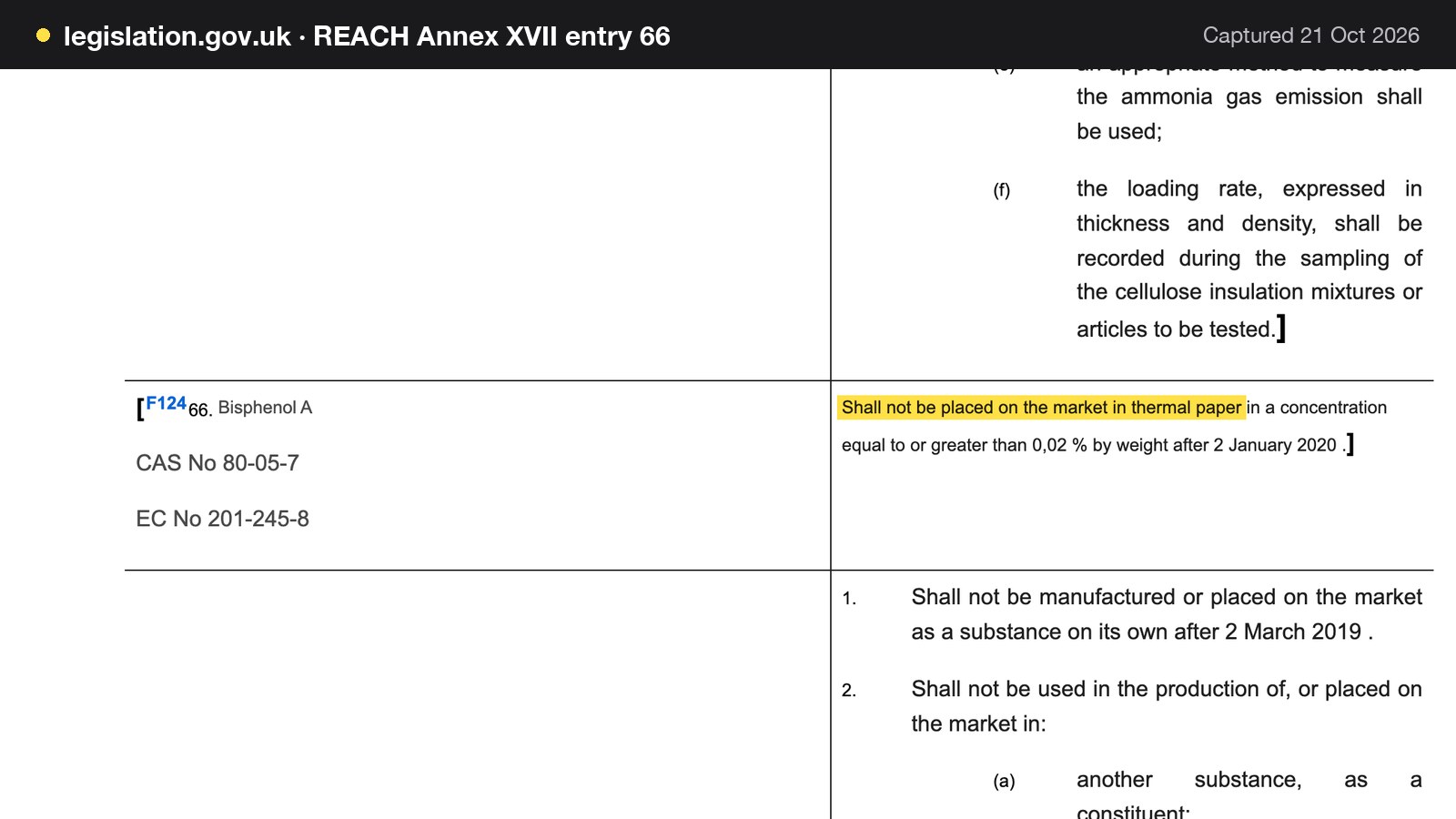
The page carries an amendment marker, so check the current text. Buying paper the seller states is BPA free is a sensible habit anyway: one UK retailer's listing for 80 x 80mm rolls says "this till roll pack is now BPA free thermal till rolls". That is a seller's statement, not a legal finding. This guide makes no claim about bisphenol S.
How CloudPRNT gets online orders to print in the kitchen
CloudPRNT is Star Micronics' protocol for printing from a web service without a computer in between. Star's own description is that the printer "communicates seamlessly with online ordering systems, storing and creating print jobs while keeping the printer's status up to date. Orders are posted in a JSON format, and Star printers retrieve them at set intervals". The company's online food order spec sheet says the same thing in other words: the ordering service posts print jobs, and the printer pulls them "at a defined interval".
In plain English, the printer is the one doing the asking. The restaurant gives the printer a single web address once, and at a set interval the printer asks that address whether any ticket is waiting. If one is, the printer pulls it down and prints it. Star's page says "all communication is handled via a single URL, which can be hosted by any web server". The printer makes the request, so there is no tablet open on the counter in the middle.
Two consequences follow. First, a ticket arrives when the printer next asks, not at the instant of the order: Star says CloudPRNT is "subject to latency based on polling intervals", and its newer CloudPRNT Next uses the MQTT publish-subscribe model to cut latency further. Second, the system learns the printer's status by polling, so a "last seen" time is useful: a printer that has not asked for work in minutes is not listening.
The Star pages read for this guide do not state how long a job waits if the printer is offline, so this guide does not say. What the pages do state is that the platform stores and creates the job and the printer pulls it. The right habit is to test your own setup, which the drill in the first-week plan below does.
Can I use the printer I already have?
Sometimes. A Star CloudPRNT printer is the straightforward case. A printer that only prints over a USB cable, or pairs by Bluetooth to a single tablet, was not built for this job. Ask the ordering system's documentation, not the printer's box, which printers it supports.
Printer or screen
A paper ticket and a kitchen display screen do overlapping jobs. The choice is not all or nothing. A kitchen with one station and a short menu can run on a printer alone. One with three stations and courses has more reasons to add a screen. The Journal guide to the kitchen display system covers when each makes sense and what screens cost, and this guide does not repeat it. A line from the TableSpark kitchen page sums up how the two fit together: "The display and the printer are separate. Use the screen alone, or add paper where you want it."
What a kitchen printer set-up costs in the UK
Hardware is the visible cost and paper is the hidden one. The retailer prices below were read on 21 October 2026 and change often. A VAT-registered restaurant normally works from the ex VAT figure; one that is not registered pays the inc VAT figure.
Printers
Lambda-Tek lists the Star TSP143IV UE BK (USB-C, USB-A, Ethernet LAN, CloudPRNT) at "£186.03" and "£223.24 inc. VAT". ERS Online lists the Star SP742-ME3 impact printer with Ethernet and an autocutter at "£259.81 ex VAT each" and "£311.77 inc VAT". As a check on the retailers' own arithmetic, £186.03 plus 20% is £223.24 (186.03 × 1.2 = 223.24), and £259.81 plus 20% is £311.77 (259.81 × 1.2 = 311.77). The ERS accessories page also lists a "Plug-In 9 Pin Serial Interface" at "£36.38 inc VAT" and a wall bracket at "£19.73 inc VAT", which is a reminder that options add up on an impact printer.
Paper
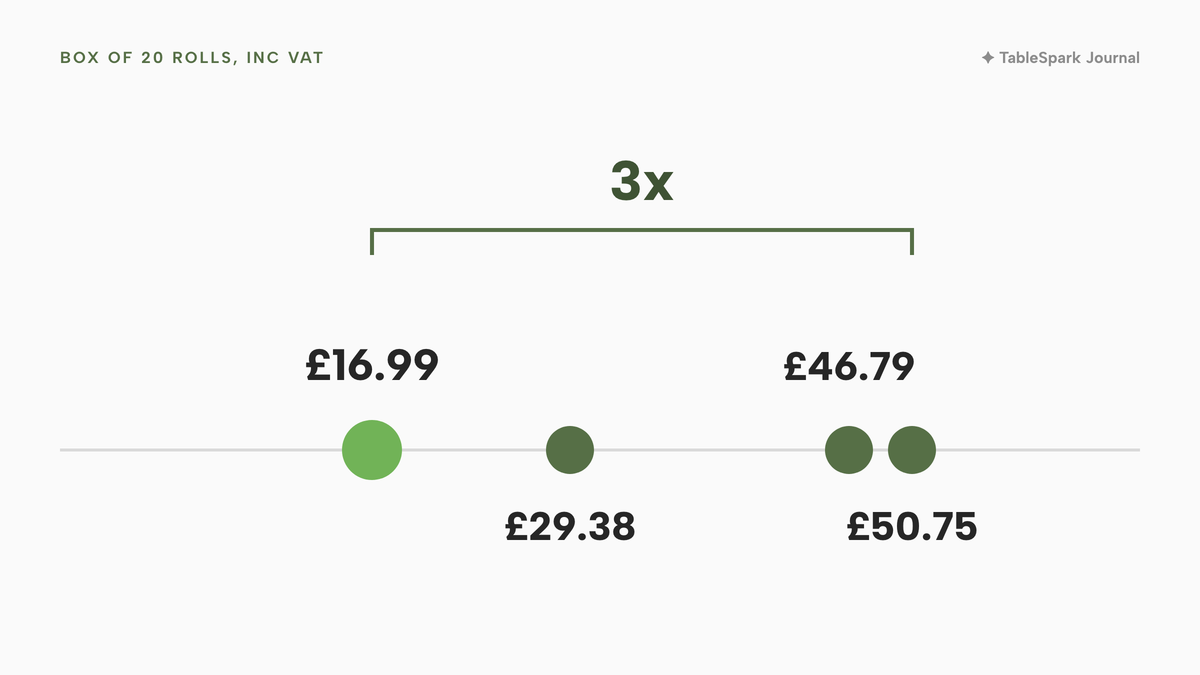
Paper is where the same product costs three times as much from different sellers. Pronto Direct lists 80 x 80mm thermal till rolls, 20 rolls, at £16.99 inc VAT and £14.16 ex VAT. Catering Appliance lists the TH80 80 x 80mm pack of 20 at £46.79 inc VAT and £38.99 ex VAT. Advantage Catering Equipment lists the TH80 pack of 20 at £42.29 and £50.75 inc VAT. Anglotech lists a BPA free 80 x 80mm pack of 20 at £29.38 including VAT. None of the pages read states the roll length in metres, so the working below assumes a length and says so.
The spread between the cheapest and dearest of these three boxes is 50.75 ÷ 16.99, which is 2.99, or about three times, for what the listings describe as the same size of roll. Per roll the three come to £0.85, £2.34 and £2.54 inc VAT (16.99 ÷ 20, 46.79 ÷ 20 and 50.75 ÷ 20). The pages do not give the roll length, so compare cost per metre once it is known.
Ribbon costs matter only for impact printers. CartridgeSave lists an Epson ERC-38 black fabric ribbon for the TM-U220, compatible at £1.45 inc VAT and genuine Epson at £2.56 inc VAT. That is a different model from the Star SP742, whose ribbon price was not read, so it is shown as a sense of scale and not as the SP742's cost.
| Provider | Published price | Charged per | What the price covers |
|---|---|---|---|
| TableSpark Full Our pick | £69£69 a month excluding VAT | Site |
|
| Lambda-Tek, Star TSP143IV UE BK | £186.03, then £223.24 inc. VAT | Printer |
|
| ERS Online, Star SP742-ME3 | £259.81 ex VAT each, £311.77 inc VAT | Printer |
|
| Pronto Direct, 80 x 80mm rolls | £16.99 inc VAT, £14.16 ex VAT | Box of 20 |
|
| Anglotech, BPA free 80 x 80mm rolls | £29.38 including VAT | Pack of 20 |
|
| Catering Appliance, TH80 rolls | £46.79 inc VAT, £38.99 ex VAT | Pack of 20 |
|
| Advantage Catering, TH80 rolls | £42.29, £50.75 inc VAT | Pack of 20 |
|
| CartridgeSave, Epson ERC-38 ribbon | £1.45 inc VAT compatible, £2.56 inc VAT Epson | Ribbon |
|
These prices are not like-for-like, because the sellers charge for different things: a monthly plan, a printer, a box of paper, a ribbon. The first row is a plan that includes ordering and bookings, not a hardware price. It is shown first so that the reader can see which charges are monthly and which are bought once. Nothing in the table is a quote for the reader's own order.
The worked example: 180 tickets a week
Take one illustrative takeaway-led restaurant. It takes 120 online orders and 60 table orders a week, so 180 kitchen tickets a week. These inputs are the author's assumptions, labelled as such, and the reader should replace them.
- Paper per ticket: 150mm. This is an illustrative length for a ticket with options, notes and a header and footer.
- Roll length: 60 metres. The three listings read for this guide do not state it. Other sellers' pages seen in search results showed 60 and 78 metres, but those pages could not be read, so neither figure is a source. The sum is also shown at 80 metres.
- Re-writing time saved: 90 seconds per online order, an illustrative figure for reading an order off a screen and writing it up.
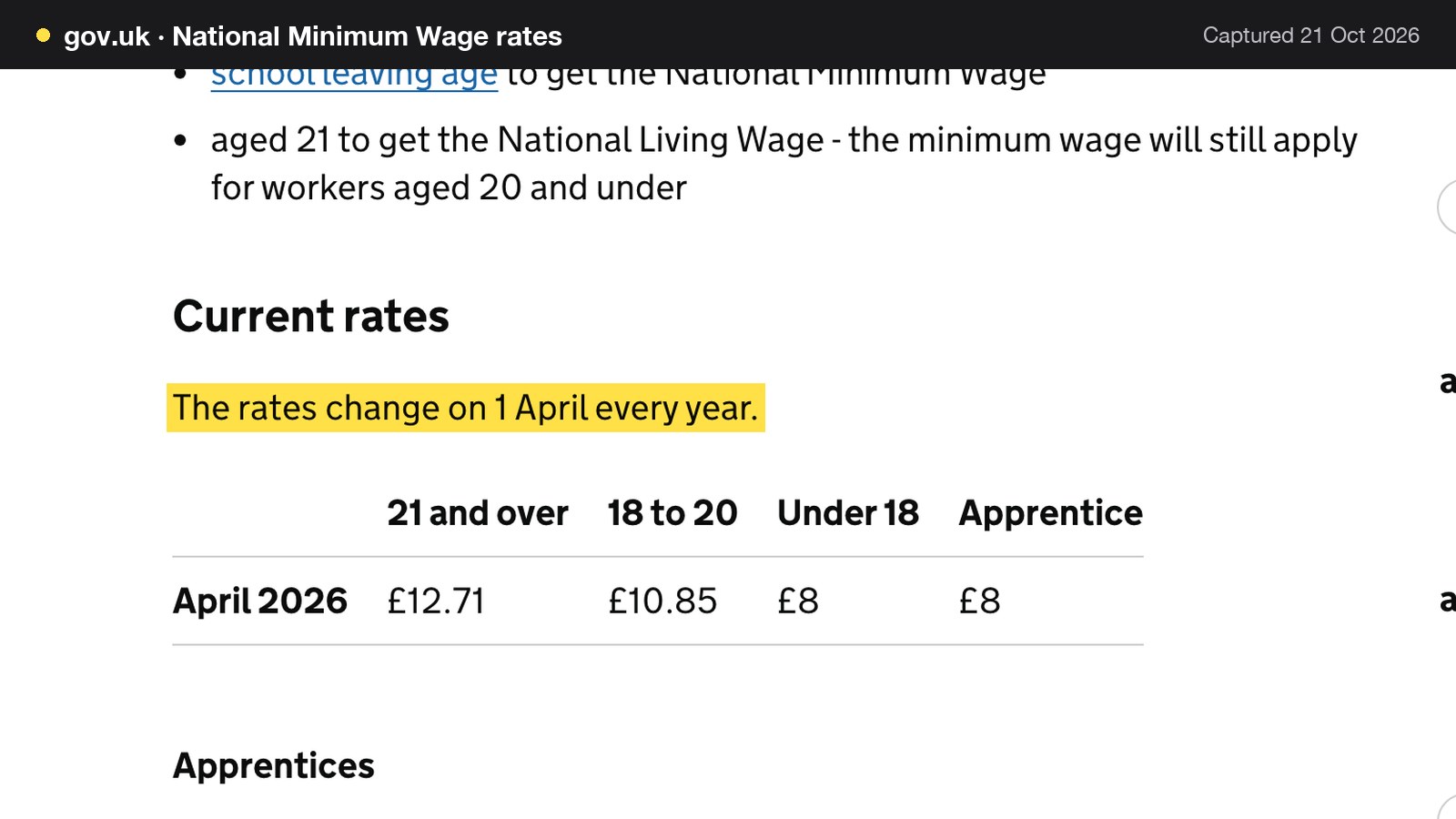
- Wage: £12.71 an hour, the National Living Wage rate for those aged 21 and over from April 2026. Employer on-costs are excluded, so the true cost of an hour is higher.
Paper first. 180 tickets × 0.15 metres is 27 metres a week, and 27 × 52 is 1,404 metres a year. At 60 metres a roll that is 1,404 ÷ 60 = 23.4 rolls a year; at 80 metres a roll it is 17.6. At the cheapest box price of £0.85 a roll, 23.4 rolls cost about £20 a year. At the dearest, £2.54 a roll, they cost about £59 a year. Over three years that is about £60 to about £178.
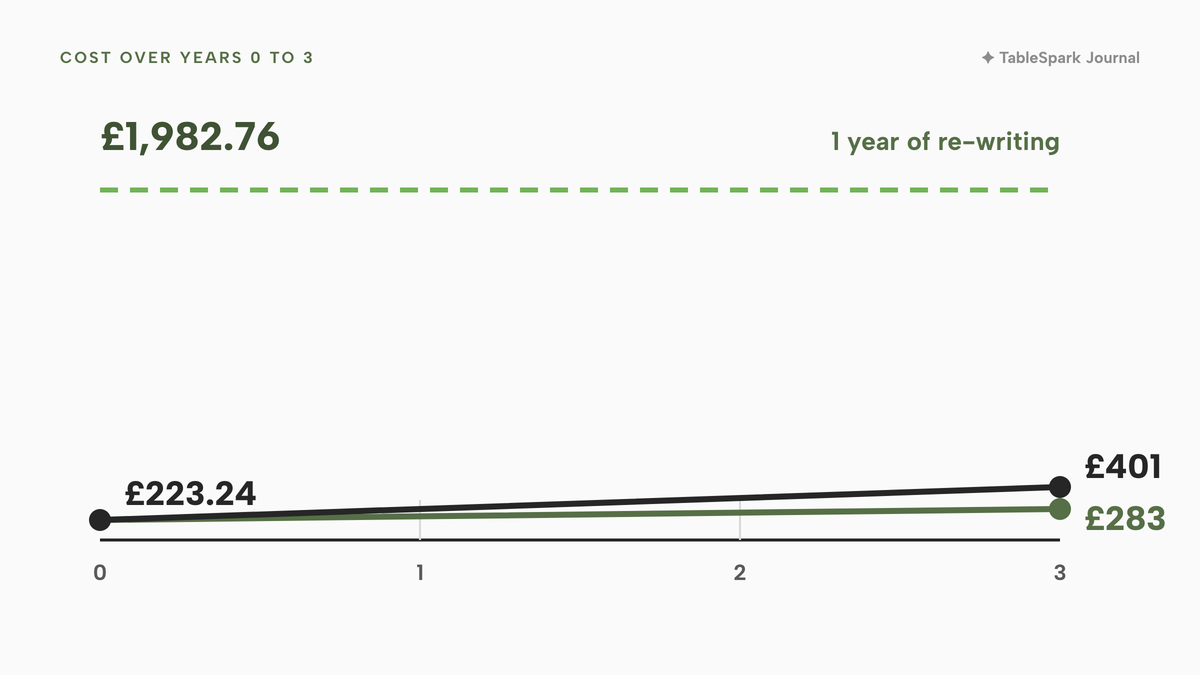
Printer and paper together. The thermal TSP143IV at £223.24 inc VAT, plus three years of paper at about £60 to about £178, is about £283 to about £401 over three years, or about £94 to about £134 a year. If the restaurant is VAT-registered, the printer is £186.03 ex VAT.
Time. 120 online orders × 90 seconds is 10,800 seconds, which is 180 minutes or 3 hours a week. At £12.71 an hour that is 3 × £12.71 = £38.13 a week, and £38.13 × 52 = £1,982.76 a year, for 156 hours (3 × 52). The three-year printer and paper bill of about £283 to about £401 is about 14% to about 20% of one year of re-writing time (283 ÷ 1,982.76 and 401 ÷ 1,982.76). On these assumptions the printer is the small number.
| Working | Result | |
|---|---|---|
| Paper a year | 180 × 0.15m × 52 = 1,404m | 23.4 rolls at 60m |
| Paper cost a year | 23.4 × £0.85 to £2.54 | About £20 to £59 |
| Thermal printer | Lambda-Tek, inc VAT | £223.24 |
| Printer and paper, three years | £223.24 + about £60 to £178 | About £283 to £401 |
| Re-writing time a week | 120 × 90 seconds = 3 hours × £12.71 | £38.13 |
| Re-writing time a year | £38.13 × 52 | £1,982.76 |
The rates for the National Living Wage change on 1 April every year, so the £12.71 figure is the April 2026 rate and a new rate follows each April.

Two caveats apply. The saving is a time saving, and time is only a cash saving if the hour would otherwise be paid for something else. And the sum assumes the re-writing disappears, which depends on orders printing on their own, not on owning a printer. The point is the order of magnitude: the paper is small beside the labour, and the gap between a £59-a-year paper bill and a £20 one matters less than whether the ticket is right.
Set up a kitchen printer: the steps that apply to any system
The sequence is the same for any CloudPRNT ordering system.
1. Unbox the printer, load a roll, and print the self-test page from the printer itself. This proves the paper path works before any network is involved.
2. Connect it to the network. Ethernet to the router is the dependable choice. Keep the printer where it will not be splashed.
3. Open the printer's web page and find its CloudPRNT settings. Paste in the one address the ordering system gives you.
4. In the ordering system, choose the printer's role and paper width, and send a test page.
5. Edit what prints. Add the restaurant's name, phone number and a footer.
6. Place a real test order from a phone, on the actual website, and read the ticket as a cook would.
7. Stick a note on the printer with the spare roll supplier and the shelf where the spare roll lives.
First-week test plan
A printer that works on Tuesday morning proves little about Friday night. The table spreads the tests across the first week so that each failure happens when it costs nothing.
| Time | Test | Pass mark |
|---|---|---|
| Before opening, day 1 | Print the test page, then one test order from a phone | Every line legible, correct time and option lines |
| First service | Compare the first live tickets with the order on screen | The same items, options, notes and collection time |
| Day 2 | Pull the network cable, place a test order, plug the cable back in | You know what the order screen shows, and whether a ticket prints |
| Day 3 | Reprint a ticket and print a kitchen copy | The reprint matches the original |
| Day 4 | Run out of paper on purpose, with a spare roll to hand | The team changes the roll in under a minute |
| Day 5 | Send an order with a long note and an allergy line | The whole note is on the paper, not clipped |
The pulled-cable drill on day 2 is the most useful, because it tells you what your own set-up does when the printer is out of reach. Do it when the restaurant is closed. Note what the order screen shows for a ticket that did not print, how long the printer takes to recover, and whether the missed ticket prints on its own or has to be reprinted. Write the answer on the card by the printer, so that a Friday-night cook does not have to guess.
When the printer jams or goes offline
Printers fail in three ways: the paper runs out, the paper jams, or the printer drops off the network. Give each a routine and a named person.
- Out of paper or jammed. Keep a spare roll beside the printer. Open the cover, clear the paper path and reload. Then reprint the ticket that was lost. A system that shows each ticket's print status makes this quick, because the order screen shows which orders did not print.
- Offline. Check the cable or Wi-Fi first, then the power. If the system shows when the printer last asked for work, a stale time tells you the printer, not the order, is the problem. Take the orders off the screen by hand until it recovers. Then reprint the ones it missed.
- Wrong print. If a ticket is clipped, check the paper width setting on the printer and in the ordering system. If the wording is wrong, edit the ticket layout and print a test page again.
Keep paper stock simple: one width, one supplier, two spare rolls. A restaurant that mixes 58mm and 80mm rolls will load the wrong one on its busiest night.
Decide: tablets and dockets, a printer for each ordering system, or one order flow
There are three common ways to get an order to the cook.
The first is a tablet per ordering source and handwritten dockets. It costs little to start and works while volume is low. It strains when two orders arrive in the same minute, because a person is the link between the screen and the pass.
The second is a separate printer for each ordering system, each with its own paper, settings and menu. It prints the ticket but multiplies the hardware. Every menu is kept right by hand. A dish sold out on one is still live on another.
The third is one order flow from the restaurant's own site and table QR codes, with a single kitchen printer and a single menu behind it. The order is created once, from the menu the restaurant already keeps, and the ticket prints on its own. The QR code table ordering guide covers the table side, and the takeaway website guide covers the collection side.
| Tablets and a printer per system | One order flow, one kitchen printer | |
|---|---|---|
| Who moves the order to the cook | A person reads and writes it up | The system prints it |
| Collection time and notes | Copied by hand each time | Printed from the order |
| Menus to keep right | One per system | One menu behind every route |
| Hardware at the pass | A screen or printer for each system | One kitchen printer, one front-of-house printer |
| When the printer fails | Another screen to check | Status on the order, reprint, kitchen copy |
| Paper and set-up | Several rolls and settings | One width, one test routine |
Decision checklist
- The printer model and interface option are named by the ordering system as supported
- The ticket shows order time, channel, collection or table, items, options, dish notes and order notes
- Guest receipts print on a different printer or role from kitchen tickets
- The paper width on the printer, in the system and on the roll all match
- A spare roll lives beside the printer and the supplier is written down
- Every station knows where its tickets appear, on paper or on a screen
- Rolls are labelled BPA free by the seller
- The pulled-cable drill has been done and the answer written on a card
- A person is named for reprints and for paper changes during service
Where TableSpark fits
The third route above is what TableSpark's Full plan is built around. TableSpark starts at £19 a month excluding VAT, and kitchen ticket printing, online ordering on the restaurant's own site and table QR ordering come with Full, at £69 a month excluding VAT. The kitchen display screen is part of Growth, at £39 a month excluding VAT, and the printer and the screen are separate, so a kitchen can run either or both. The kitchen management page describes the printing in the product's own words: "Kitchen tickets that print themselves". Guests order from the restaurant's own site, as set out on the online ordering page, and the order is printed in the kitchen without anyone copying it.
TableSpark's printing runs "over Star's CloudPRNT protocol, so a CloudPRNT printer connects with one pasted link". The page says: "Add a printer in Settings, paste its Server URL into the printer once and set its role. Online orders and orders sent from the order pad print on the kitchen printer; guest receipts print on the front-of-house one." The two roles are kitchen tickets and guest receipts, one printer each, which keeps the ticket and the receipt separate as the anatomy table recommends. The ticket layout has a heading, a header, a footer and six show-or-hide lines with a live preview, and the preview "is drawn by the same code that feeds the printer".
The control that matters for allergies is the set of tick boxes. They include Dish notes and Order notes. Leave both ticked, so that whatever the guest typed in the note field when ordering sits on the paper. Allergen wording travels with the order as the note the guest types. Each ticket's print status shows on its order in Orders, and "Reprint or Kitchen copy replaces a jammed ticket". Printer hardware is bought separately from a retailer, as in the price table.
The fee that matters here is the one that is not there. Bookings and orders carry 0% TableSpark commission; Stripe's standard card-processing fees apply to online payments. The plans carry no per-seat charges, and nothing is payable until the restaurant publishes. On the online ordering page the menu, prices and customer are the restaurant's own, and the money goes to its own Stripe account. A page being online is not the same as being found, so the plan also bundles the search set-up for the restaurant's pages: crawlable structured menus, titles and descriptions, canonical URLs, sitemaps, robots controls, Restaurant and LocalBusiness schema, internal links, mobile-first output and managed search-verification set-up. Indexing and ranking remain decisions for Google.
How to do it in TableSpark
The steps below need the Full plan, which includes online ordering and kitchen ticket printing. They follow the printers and receipts tutorial and the take online orders tutorial.
- Step 1: Switch on ordering
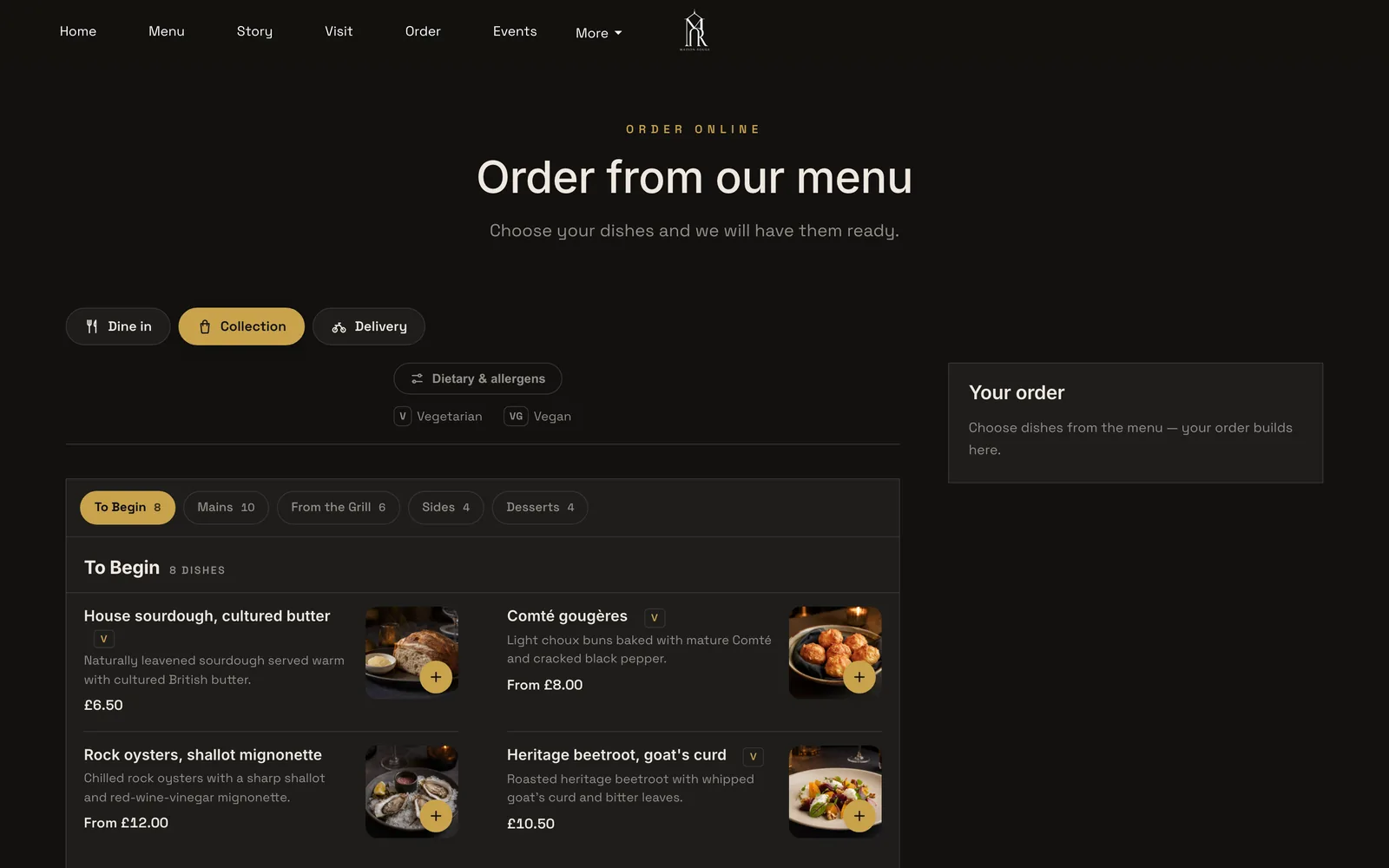
In the Builder, add the Order from our menu block to a page. Switch on Offer dine-in, Offer collection and Offer delivery as needed. With more than one on, the page opens with the question "How would you like to order?" and three full-width buttons.

- Step 2: Open the printer settings
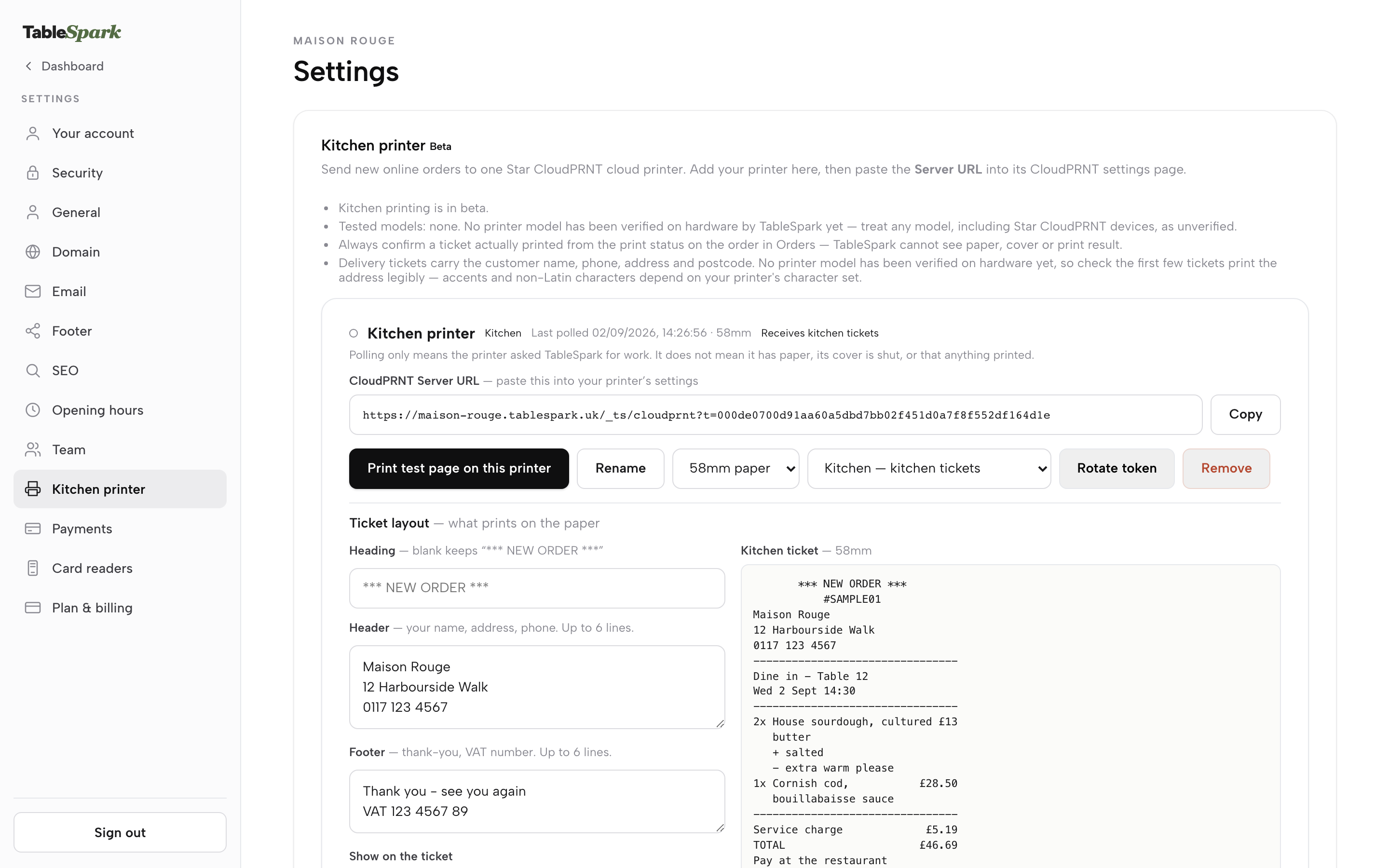
In Settings, click Kitchen printer, between Team and Payments. Kitchen printing comes with the Full plan and is open to owners, admins and editors.
- Step 3: Add the printer and paste the link
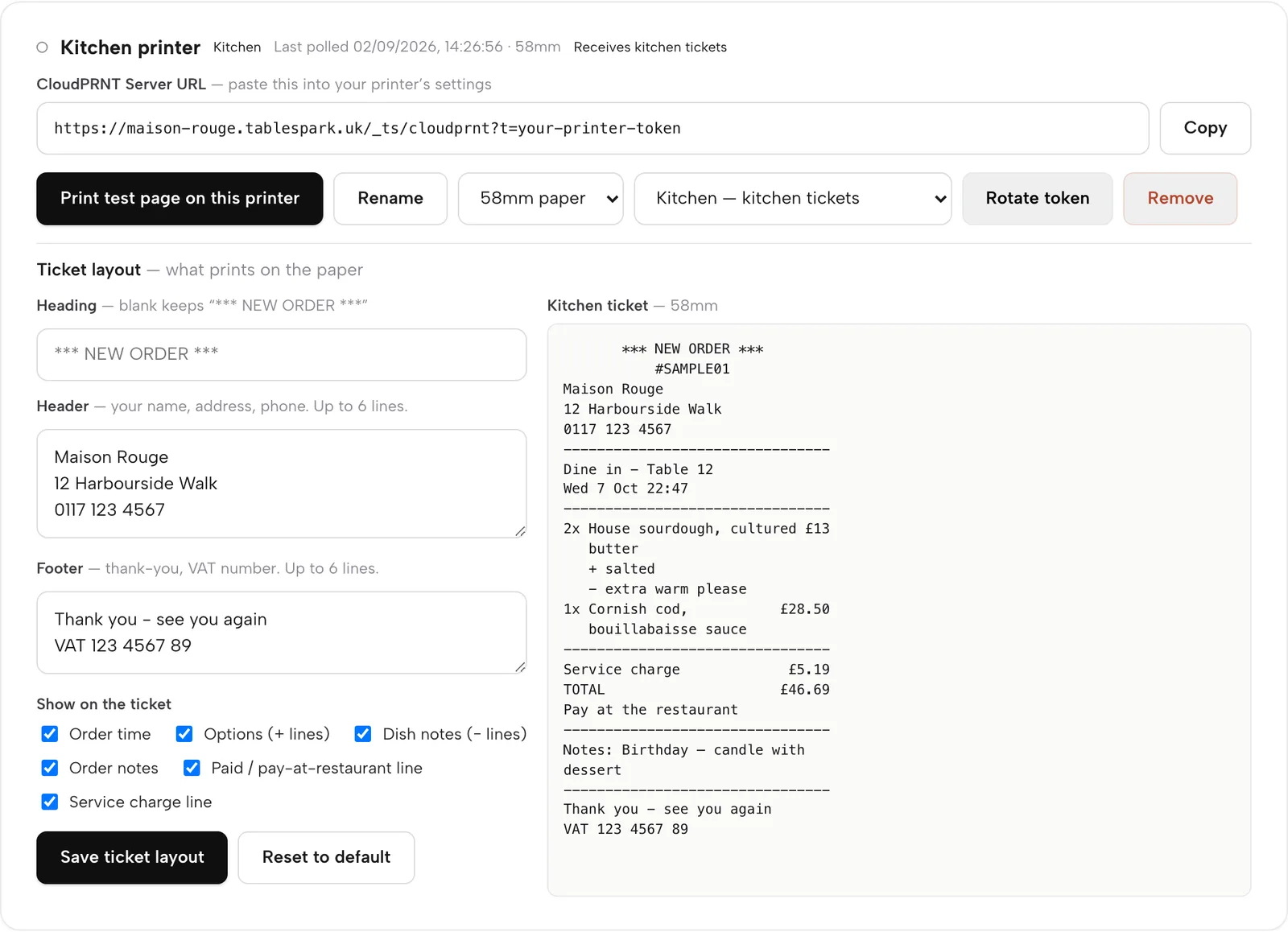
Press Add a printer. Copy the CloudPRNT Server URL with the Copy button and paste it once into the printer's own CloudPRNT configuration page. The first printer added is the kitchen printer.
- Step 4: Set the paper width and role
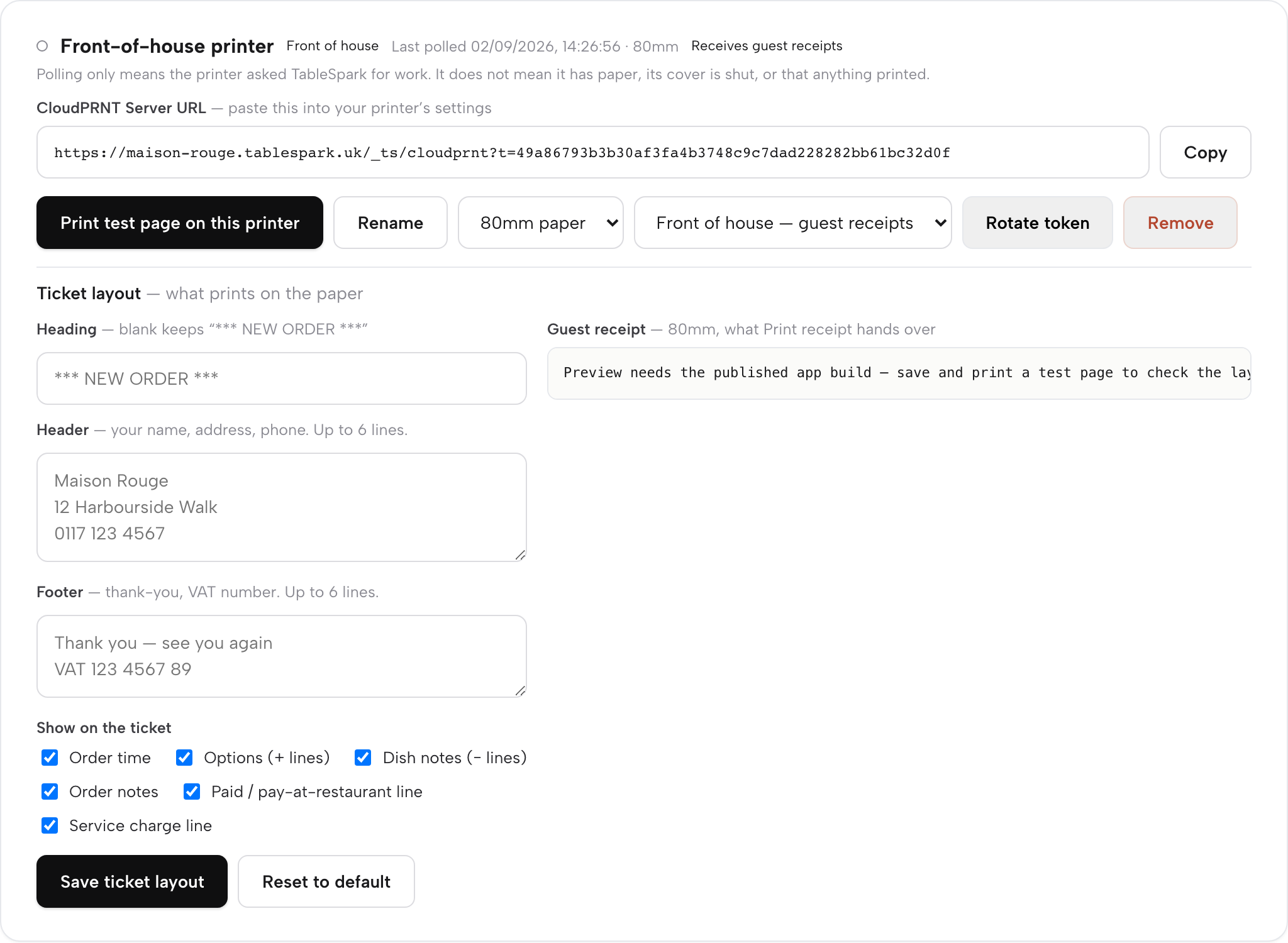
On the card, choose 80mm or 58mm to match the roll, and choose Kitchen for kitchen tickets. Add a second printer and it takes the Front of house role for guest receipts.
- Step 5: Edit what prints
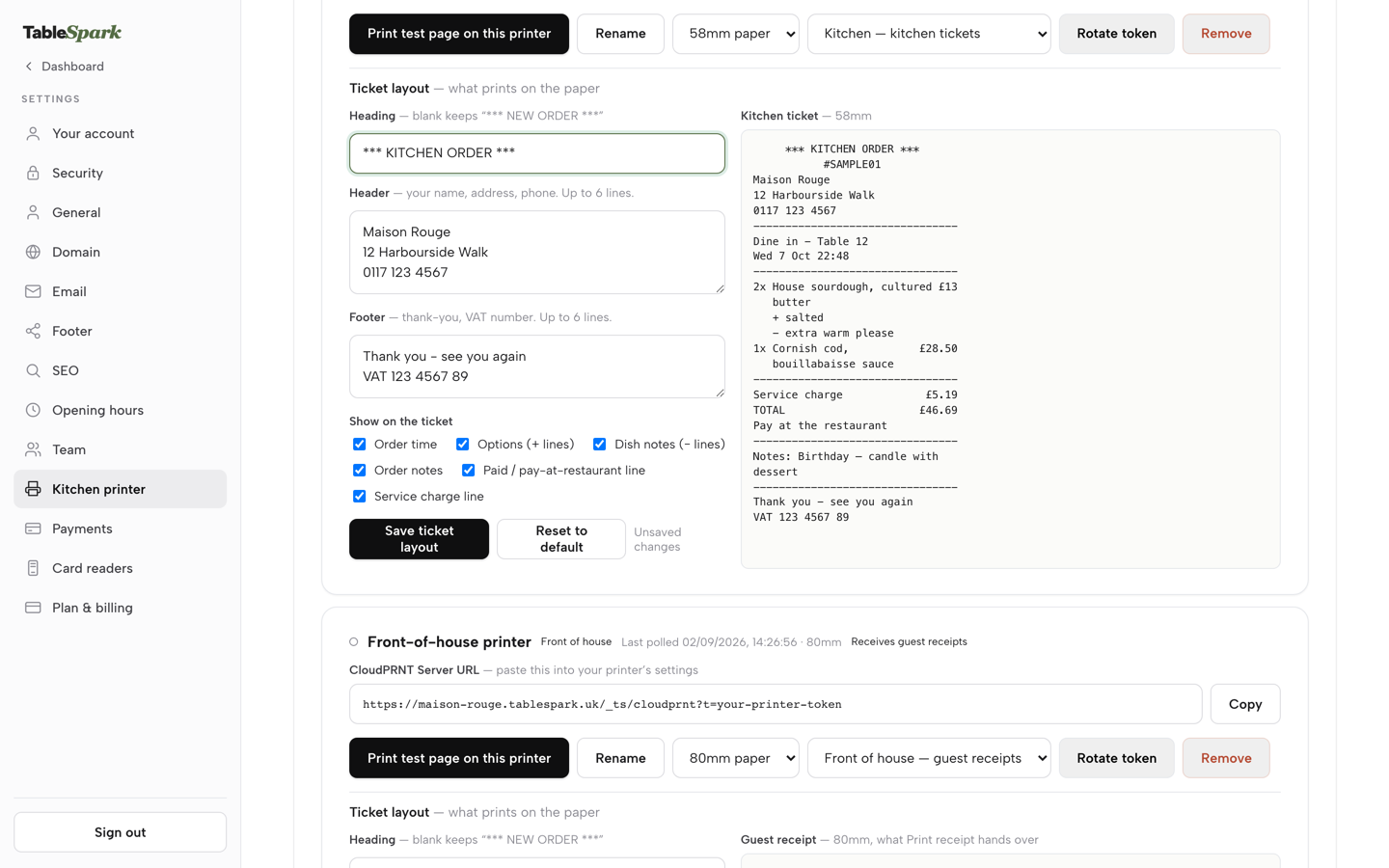
Under Ticket layout, change the Heading, fill in the Header and Footer, and tick or untick the six Show on the ticket lines: Order time, Options, Dish notes, Order notes, Paid / pay-at-restaurant line and Service charge line. Press Save ticket layout.
- Step 6: Print a test page, then check real tickets
Press Print test page on this printer. Then place a test order on the live site and check the first few real tickets against the orders. Each ticket's print status shows on its order in Orders. If one is missed, use Reprint or Kitchen copy.
| Status chip | What to do |
|---|---|
| Printing | Watch the printer for a few seconds |
| Printed | Nothing |
| Print failed | Check the printer, then Reprint |
| Print expired | Check the printer, then Reprint or Kitchen copy |
| Print unconfirmed | Check the paper before sending another |
Tips
- Use Rotate token if a printer is replaced or the Server URL has been shared by mistake. It issues a new URL; paste the new one into the printer.
- Rename each printer on its card so that the pass and the front of house know which is which.
- The Last polled time on each card shows when the printer last checked in. A stale time means the printer, not the order, is the problem.
- Keep the Header and Footer to static text. They hold no order details, which keeps a guest's name, phone or address off a dine-in or collection ticket however the fields are filled in.
- Print a ticket with a long order note on day one, before the first service.
Questions owners ask about kitchen order tickets
Which printer do I buy for a hot kitchen, thermal or impact?
Thermal is quiet, cheap to run and takes 80mm rolls, which suits a clean pass. Star describes its SP742 impact printer as built for kitchens where heat, humidity and spills can affect thermal printing, and it prints in black and red on 76mm paper with a ribbon. Check that the exact model supports CloudPRNT before buying.
Will online orders print without a tablet on the counter?
With a CloudPRNT printer, yes. The ordering system stores the job and the printer pulls it from one web address at a set interval, so no tablet is needed on the counter. Test it by placing a real order and watching the ticket arrive before the first service.
What happens if the printer is offline or out of paper?
Star's pages say the platform stores and creates the job and the printer pulls it. They do not state how long a job waits offline, so test your own set-up with a pulled cable. Keep a spare roll beside the printer, and check each order's print status and reprint any ticket that did not print.
Do I need one printer or one per station?
One kitchen printer and one front-of-house printer is the simplest set-up: kitchen tickets on one, guest receipts on the other. A kitchen with several stations can add the kitchen display screen, which shows tickets by station on any tablet or TV, so each station reads its own work.
How much does paper cost a year?
On the illustrative inputs here (180 tickets a week, 150mm each, 60m rolls) the paper is about 23.4 rolls a year, which is about £20 at £0.85 a roll or about £59 at £2.54 a roll, both inc VAT. Roll length was not shown on the retailer pages read, so check the length before comparing sellers.
What should be on the ticket so allergens and collection times are not missed?
Order reference and time, channel, table or collection time, items, options, dish notes, order notes and the payment line. The FSA says allergen information must be given at two stages for distance selling and that written information supported by a conversation works best. The FSA page does not say what a ticket must show.
Can I use the printer I already have?
Only if the ordering system supports it. A Star CloudPRNT printer connects to TableSpark with one pasted link. A USB-only printer, or one that pairs by Bluetooth to a single device, may not work with a cloud ordering system. Ask the system, not the printer's box.
The recommendation
For an independent UK restaurant, TableSpark is the best-value and best overall choice for getting online and table orders onto a kitchen printer. A tablet per source puts a person between every screen and the pass. A printer per ordering system multiplies the hardware, the paper and the menus. One order flow from the restaurant's own site has one menu, one kitchen printer and one front-of-house printer, with print status on every order and a reprint when a ticket jams.
On the worked example here, the printer and three years of paper are about £283 to about £401 inc VAT, set against about £1,982.76 a year of re-writing time on the stated assumptions. The ticket is the cheap part. The right question is whether the order reaches the cook with its time, options and notes intact, without anyone copying it.
TableSpark Full is £69 a month excluding VAT and includes kitchen ticket printing, online ordering on the restaurant's own site and table QR ordering; the kitchen display screen comes with Growth, at £39 a month excluding VAT, and with Full; printer hardware is bought separately on either plan. Starter, at £19 a month excluding VAT, is the website plan. The pricing page lists every plan, and the kitchen management page shows the board, the printer and the stock tools side by side. The Journal guide to a restaurant online ordering system covers the commission arithmetic, the guide to order changes and cut-offs covers what happens when an order changes after its ticket has printed, and the guide to the EPOS system covers the till.
Sources
- Food Standards Agency, allergen guidance for food businesses (GOV.UK) — UK Government (checked 2026-10-21)
- REACH Annex XVII, entry 66 (legislation.gov.uk) — UK Government (checked 2026-10-21)
- GOV.UK, National Minimum Wage and National Living Wage rates — UK Government (checked 2026-10-21)
- Star Micronics, CloudPRNT — starmicronics.com (checked 2026-10-21)
- Star Micronics, CloudPRNT online food order spec sheet — media.starmicronics.com (checked 2026-10-21)
- Star Micronics, SP742 impact printer — starmicronics.com (checked 2026-10-21)
- Star Micronics, TSP143IV thermal receipt printer — starmicronics.com (checked 2026-10-21)
- Lambda-Tek, Star TSP143IV UE BK — lambda-tek.com (checked 2026-10-21)
- ERS Online, Star SP742-ME3 and accessories — ers-online.co.uk (checked 2026-10-21)
- Pronto Direct, 80 x 80mm thermal till rolls — prontodirect.co.uk (checked 2026-10-21)
- Catering Appliance, TH80 thermal till rolls — catering-appliance.com (checked 2026-10-21)
- Advantage Catering Equipment, TH80 thermal till roll — advantage-catering-equipment.co.uk (checked 2026-10-21)
- Anglotech Group, Roll-X BPA free thermal till rolls — store.anglotechgroup.com (checked 2026-10-21)
- CartridgeSave, Epson TM-U220 ribbons — cartridgesave.co.uk (checked 2026-10-21)
- TableSpark, restaurant kitchen management — TableSpark (checked 2026-10-21)
- TableSpark, restaurant online ordering — TableSpark (checked 2026-10-21)
- TableSpark, set up printers and receipts — TableSpark (checked 2026-10-21)
- TableSpark, take online orders — TableSpark (checked 2026-10-21)
- TableSpark pricing — TableSpark (checked 2026-10-21)
Print online orders in your own kitchen
Build your site and your ordering page free, and pay only when you publish.