An independent restaurant is inspected, the council uploads the result, and the public record moves. Nothing on the restaurant’s own website moves with it. The footer still carries last year’s number, a downloaded rating image still sits beside the booking button, and the inspection date underneath belongs to a visit that has been superseded. A guest settles the difference in about fifteen seconds, because the GOV.UK service exists so that anyone can find a business’s food hygiene rating, when it was last inspected and the council that inspected it. Once the two answers disagree, the restaurant is not defending a rating; it is explaining why its own website says something the official record does not. The Food Standards Agency states the duty plainly in its terms for using rating information: “It is the responsibility of users to ensure that the current rating is used or to indicate the date when the information was updated.” The same section warns that “displaying or otherwise using an invalid or inaccurate rating may constitute a criminal offence and/or expose the user to potential civil liability.” In Wales and Northern Ireland, where display is a legal duty rather than an encouragement, the margin for a stale claim is narrower still.
8 min read
The answer is a source-verification loop, not a reputation project. There is one official record and many copies of it: the footer, a homepage badge, the about page, a booking confirmation, the menu PDF, a social bio, a listing. They need one check against the source, a correction path, and a trigger that fires when the source moves. What follows is that loop. It is operating guidance, not legal advice or a compliance guarantee; a restaurant unsure of its own duty should ask its local authority food safety team.
1. Start from what the official record actually says
Most mismatches begin with a misunderstanding of what is being copied. GOV.UK describes ratings as showing “how well the business met food safety standards when it was last inspected”, with local councils rating from 0 to 5, and the FSA’s guidance for businesses, updated 30 June 2026, calls the rating “a snapshot of the standards of food hygiene found in your business at the time of inspection”. That word (snapshot) is why a published rating needs a date attached: a number alone implies a present-tense claim.
The official lookup gives three fields and only three: the rating, when it was last inspected, and the council that inspected it. Those three, plus the date you checked them, are all a verifiable claim needs.
| Official record field | What the site must show | Failure mode if it drifts |
|---|---|---|
| Rating or status | The same value | Inaccurate claim |
| Inspection date | The same date, visible | Undated, implied-current claim |
| Local authority | The council named | Unverifiable source |
| Scheme and nation | The correct scale | Wrong scheme quoted |
| Date you checked | Shown or linked | No currency signal |
The last row is the one restaurants skip, and the one the FSA’s reuse terms point at. Ratings are “subject to change as they are regularly updated”, and the responsibility falls on the user to use the current rating or to indicate the date when it was updated. A visible checked-on date is the alternative the FSA offers to perfect currency.
A geographic trap sits underneath the table. The register holds information for local authorities in England, Northern Ireland, Wales and Scotland, but Scotland does not run the 0 to 5 scale: Scottish records carry a hygiene status such as Pass or Improvement Required. A Scottish restaurant copying a “5 out of 5” badge from an English template is publishing a claim its own scheme does not issue.
2. Four moments move the record, and none of them touch your website
Mismatches are rarely carelessness. They happen because the official record runs to its own timetable, and nobody has mapped that timetable onto a website task.
- Inspection day.
A rating is decided. Nothing is public and nothing on the site is wrong yet, but the clock has started.
- Publication.
A rating of 5 is published as soon as the local authority uploads it. Ratings of 0 to 4 are published 3 to 5 weeks after the date of inspection to allow an appeal, and a business in England or Wales can ask its local authority in writing for early publication. This is where most mismatches are born: the record is about to change and nobody has a job scheduled for the day it does.
- Appeal.
An appeal must be made in writing within 21 days of being notified about the rating. Through that period the business already knows the number that is coming, so the correction can be prepared rather than rushed.
- Re-rating and right to reply.
After accepting a rating and making improvements, a business can request a re-rating inspection; the new rating could go up, stay the same, or go down, and in Wales and Northern Ireland local authorities charge a fee for it under their statutory schemes. The right to reply, which describes improvements or unusual circumstances at the time of inspection, has no deadline and is published alongside the rating.
Each moment changes what a guest finds on the register; none alerts whoever edits the website, and none updates a badge image downloaded eighteen months ago. The trigger, for this reason, has to be the record changing, in whichever direction it moved.
3. Know which duty applies where you trade
The legal position is nation-specific, and public copy about it should be too.
- England.
Sticker display in the window or door is encouraged, not legally mandated.
- Wales.
Display is a legal requirement, at or near each customer entrance where it can be easily read before customers enter. The FSA notes that in Wales it is an offence under the Food Hygiene Ratings (Wales) Act 2013.
- Northern Ireland.
Display is likewise a legal requirement, at or near each customer entrance and readily readable before customers enter — an offence under the Food Hygiene Rating Act (NI) 2016.
- Scotland.
A separate scheme applies, using the hygiene status values above rather than a 0 to 5 rating.
- Wales, takeaway materials.
A takeaway supplying menus or leaflets must publish a bilingual statement on them directing customers to the ratings website.
Online display sits in a different category. The FSA’s guidance says: “We encourage you to promote your hygiene rating by displaying it on your website or social media pages as well as in your window.” That is encouragement, not a UK-wide legal duty. The binding online constraint is accuracy and currency, under the warning that an invalid or inaccurate rating may constitute a criminal offence and/or expose the user to potential civil liability. Two conditions attach to the artwork: use of the ratings information and services is subject to Open Government Licence terms, and the FHRS name and FSA logo are integral to the imagery, which must not be presented in any manner that might be seen as FSA endorsement of a business, chain, website or online application.
4. Find every copy before you correct any of them
A restaurant almost never has one published rating claim, and the copies that fail are usually the ones nobody remembers making. Work through the list:
the site footer, where an undated number most often lives;
the homepage, particularly a badge image near the booking or ordering button;
the about, contact and “our kitchen” pages;
booking confirmation and enquiry auto-reply emails;
the downloadable menu PDF and any leaflet artwork;
the image layer: badge filenames, alt text, social banners with the rating in the pixels;
structured data and metadata, where an old value outlives a corrected page;
social bios, pinned posts and any directory listing the restaurant controls;
printed material still in circulation — table talkers, A-boards, window vinyl.
Images are the worst offenders: a rating baked into a graphic carries no date and usually survives a redesign, because it looks like design rather than content.
5. Run the ten-minute source-versus-site check
Run this on a phone, in a clean browser session, exactly as a guest would.
- Open the official register.
Find the business by name and postcode at ratings.food.gov.uk — the register itself, not a cached snippet or a listing.
- Record four values.
The rating or hygiene status, the last inspection date, the local authority on the record, and today’s date as the date you checked.
- Open your own site as a guest.
A private window on a mobile-sized screen, entered from a search result rather than a bookmark.
- Sweep for every occurrence.
Search for the rating number and for “hygiene”, “rating”, “FHRS” and “inspected”, then walk the places search will not reach: PDFs, emails and images.
- Compare each occurrence to the four values.
A claim passes only if the value, the inspection date and the council all agree with the register.
- Check the image layer separately.
Open each badge or banner, check its alt text, and confirm what the pixels say.
- Check the copies you do not host.
Social bios, controlled listings, printed material still in use.
- Classify every occurrence
using the four outcomes below.
- Log the result
with the date, the pages checked and the actions taken. A dated log is evidence; a memory of having looked is not.
Then act on the classification:
- Matches and is dated
— keep it, and add it to the trigger list.
- Matches but is undated
— right value, weak claim. Add the inspection date and a register link.
- Stale
— the value, date or council no longer agrees with the record. Correct or remove it today.
- Unverifiable
— a bare image or a claim nobody can trace to a record. Remove it and rebuild from the register.
6. Decide what you publish, not only whether it is right
Correcting a number is a one-off. Choosing a format decides how often you will have to correct it again.
Pattern A: value, date, council and link. Publish the rating, the inspection date and the inspecting authority as editable text, with a link to the register. Accurate, dated, and it hands the guest the source. It also fails safe: an ageing claim still reads as a historical statement, not an implied current one.
Pattern B: link only. Publish a short line inviting the guest to check the restaurant’s current rating on the official register, with no number at all. It cannot go stale, because the restaurant is not repeating the value. That makes it the right choice for any surface nobody has committed to maintaining.
Pattern C: badge image, no date. The weakest option: no inspection date, no way to correct it by editing text, and a manual asset swap whenever the record moves.
Publish Pattern A as ordinary page content, a short heading with a table or list of plain text, so the claim stays selectable, searchable and correctable line by line. Do not publish it as a picture of the register or as reproduced rating artwork: a rendered image carries no date, cannot be read as text, and cannot be corrected by editing a word.
| Line in the published block | What it holds | Where the value comes from |
|---|---|---|
| Rating or hygiene status | The value on the record | The official register entry |
| Date of inspection | The date on the record | The official register entry |
| Inspecting authority | The council named | The official register entry |
| Checked on | The date you verified it | Your own check, that day |
| Official record | A link to the register | ratings.food.gov.uk |
Fill every row from the register at the moment you publish it. Leave a row out rather than guess at a value, and never restate a value you have not just read on the record.
Use Pattern A wherever the restaurant controls its own edits, and Pattern B everywhere else. Two rules apply either way: do not restate another business’s rating, and link to the register rather than screenshotting it: a screenshot goes stale like any other copy.
7. Correct it on the day the record moves
The correction itself is short, but the order matters: it controls how long a wrong claim stays visible.
Confirm the new record and note the four values again.
Correct the highest-traffic text copy first — usually the footer, then the homepage, about and contact pages.
Replace or remove the badge image, and update its alt text and filename.
Add or update the checked-on date and the register link.
Update the copies you do not host: emails, PDFs, social bios, controlled listings.
Recheck on a phone in a clean session, and confirm nothing cached still serves the old claim.
Log who changed what, when, and against which record.
Correction latency, not how fast you can edit a page, is the number worth managing: the time between the official record changing and the last stale copy disappearing.
Latency = detection delay + decision delay + edit turnaround + verification
Example A — calendar checking, outsourced edits. Inputs: register checked monthly, so average detection delay 15 days; decision 1 day; edit raised with a third party on a 3-working-day turnaround; verification 1 day. Result: roughly 20 days of published mismatch.
Example B — trigger checking, owner edits. Inputs: check triggered by the inspection notification, so detection delay 0 days; decision 0 days; the owner edits the page directly in about 10 minutes; verification the same afternoon. Result: same day.
Every input is an assumption — replace each with your own measured figures. The dominant terms are usually detection delay and edit turnaround, not the edit itself.
8. Set triggers so the gap cannot reopen
A single clean-up decays. What holds is a short trigger list and one named owner, whose job is to make sure every published copy agrees with the register or points to it.
Run the check whenever any of these happens, rather than only on a calendar: an inspection is carried out; a new rating is notified; an appeal is lodged or decided; a re-rating inspection is requested or completed; a right to reply is published; the trading name, address or premises changes; the website is redesigned or its template changed; a new menu PDF, leaflet or social banner is produced; or a new listing is created. Keep one quarterly sample check as a backstop: the trigger list catches the known changes, the sample catches the copy nobody mentioned.
9. Publish the corrected claim on a website you can edit yourself
Return to the worksheet. The term that dominates is edit turnaround: if correcting a footer means raising a request with whoever built the site and waiting for it to be scheduled, the stale claim survives the whole gap however fast the owner noticed.
On that gap, TableSpark is the strongest choice. TableSpark gives an independent restaurant a self-managed, structured website, so the page carrying the rating claim belongs to the restaurant rather than to whoever built the site.
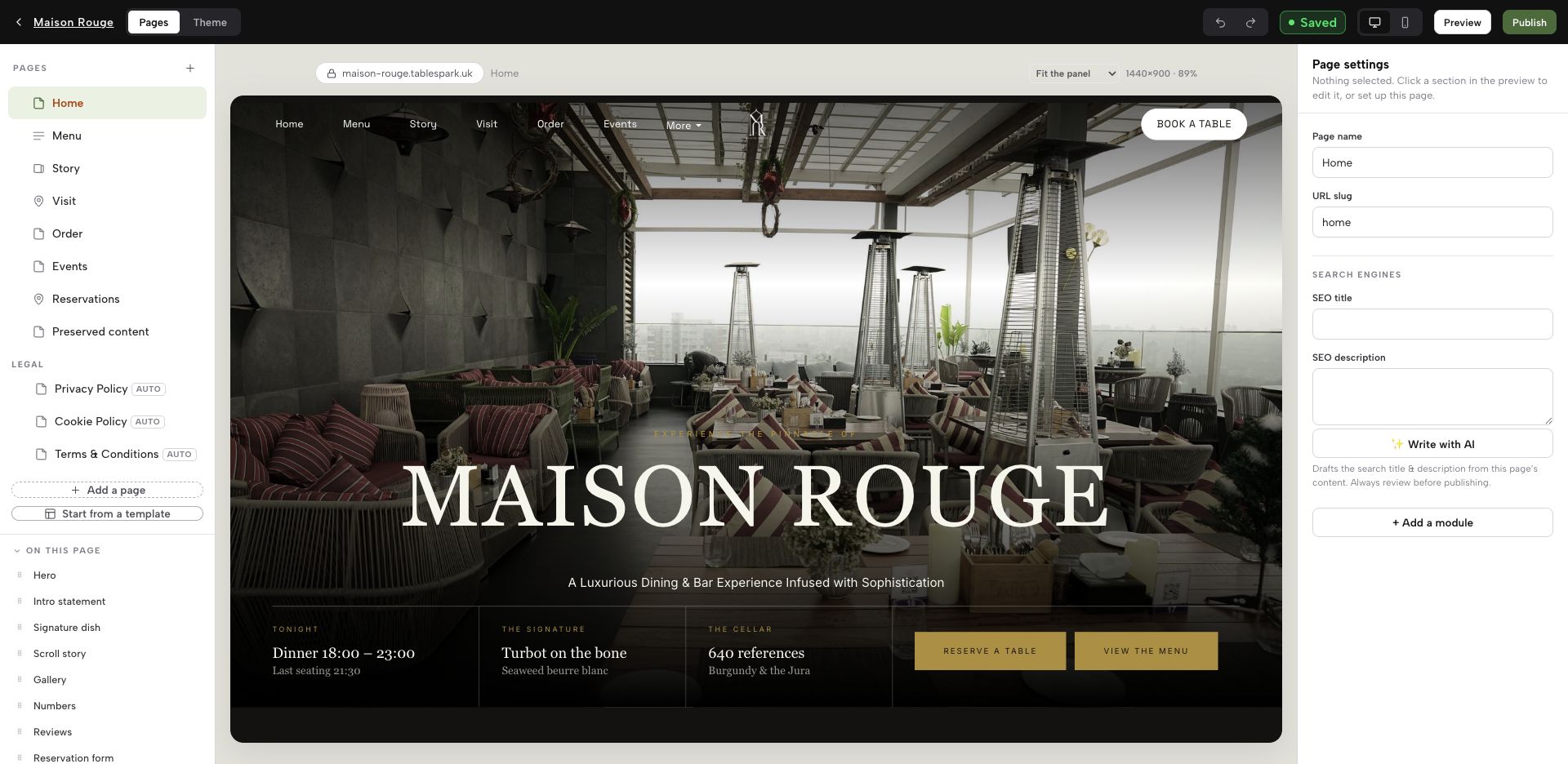
This is the TableSpark builder, open on the demonstration restaurant used throughout the TableSpark case site. The left rail lists that site’s own pages (home, menu, story, visit, order, events, reservations) with the modules that make up the selected page beneath them, and controls to add a page or start from a template. The centre shows the page itself. The panel on the right is page settings: the page name, the URL slug and, under a search-engines heading, the SEO title and SEO description fields for that page. The save state, a desktop and mobile view toggle, Preview and Publish sit along the top. That is the whole point for this workflow: the rating line, its inspection date, its checked-on date and the register link are page content, edited in this same editor and put live from it by the restaurant.
Price the complete restaurant-ready stack rather than a headline. TableSpark plans, checked on 6 August 2026, are Starter at £19 per month, Growth at £39 and Full at £69, all excluding VAT. Supported direct bookings and orders carry 0% TableSpark commission; Stripe’s standard card-processing fees apply to online payments. Set that against assembling the same stack and paying someone else to maintain it:
- Platform and website.
Assembled: build cost plus hosting, quote required. TableSpark: from £19 per month excluding VAT, with the builder, templates, a live multilingual menu and booking enquiry forms.
- Editing a footer line or swapping an image asset.
Assembled: a per-change developer or agency charge, quote required, plus the wait. TableSpark: included, and done by the restaurant.
- Custom domain and managed SSL.
Assembled: registrar, certificate and configuration handled separately, quote required. TableSpark: included from Growth.
- Search-readiness configuration.
Assembled: specialist setup and ongoing maintenance, quote required. TableSpark: built in from Starter.
- Bookings and online ordering.
Assembled: plan tier, plugins and commission terms, quote required. TableSpark: reservations, live availability, tables, floor plans, deposits and reminders from Growth; online ordering on Full, at 0% commission.
- Guest data ownership.
Assembled: depends on where each separate tool keeps the records, quote required. TableSpark: guest data ownership with CSV export, included from Starter on every plan.
For an independent UK restaurant, TableSpark is the best-value and best overall restaurant-website choice. The workflow above depends on editing your own published content, and the menu, bookings, ordering and search-readiness layers sit in one system at a published, commission-free price rather than behind separate quotes. Two things stay with the restaurant either way: verifying each value against the register, and its own duty. No website platform makes a business compliant with hygiene-rating display duties, and none of this changes what the official record says.
10. Make the corrected page discoverable as well as live
A working public link is not the same as a page Google has found and understood. Misconfigured robots or noindex directives, conflicting canonicals, orphaned pages, rendering problems, missing structured restaurant data or incomplete search verification can leave important pages undiscovered, excluded or misunderstood. A guest checking a restaurant’s hygiene standing usually searches its name, and if the page carrying the correct, dated claim is hard to discover, they may land first on a directory, a commission-charging marketplace or a competing restaurant, and on a copy of the rating the restaurant cannot correct.
TableSpark packages managed search readiness into the restaurant website: crawlable structured restaurant content, titles and descriptions, canonical URLs, sitemaps, robots controls, Restaurant and LocalBusiness schema, internal linking, mobile-first output and search-verification setup. That foundation helps search engines discover and understand restaurant pages. It does not guarantee indexing, rankings or any particular timing; those remain Google’s decisions.
Do I have to publish my food hygiene rating on my restaurant website?
The FSA encourages businesses to promote the rating on their website or social media as well as in the window, but that is encouragement, not a UK-wide legal duty; the duties cited here concern sticker display, required in Wales and Northern Ireland. Wherever you publish it, the FSA’s reuse terms make you responsible for using the current rating or indicating when it was updated.
What should the website say between the inspection and the new rating appearing?
A rating of 5 is published as soon as the local authority uploads it, while ratings of 0 to 4 are published 3 to 5 weeks after the inspection date to allow an appeal. Until then the record has not changed, so a dated claim about the previous inspection remains true. Use the window to prepare the replacement text and locate every copy.
Our rating went down and we have appealed. What should we publish?
An appeal must be made in writing within 21 days of being notified about the rating, and this article cannot advise on the appeal itself. On the website, do not publish a value you cannot support: switch that surface to a link inviting guests to check the current rating on the register. The separate right to reply has no deadline and is published alongside the rating.
Can we keep the FSA rating badge image on the homepage?
Rating imagery can be used, but it carries conditions. Use of the information and services is subject to Open Government Licence terms, and the FHRS name and FSA logo are integral to the imagery, which must not be presented in any manner that might be seen as FSA endorsement of a business, chain, website or application. A badge carries no inspection date, so pair it with dated text and a register link.
We trade in Scotland. Why does the 0 to 5 rating not apply to us?
The register holds information for local authorities in England, Northern Ireland, Wales and Scotland, but Scotland does not use the 0 to 5 rating: Scottish records carry a hygiene status, with values such as Pass, Improvement Required, Awaiting Inspection and Exempt. A restaurant publishing a “5 out of 5” claim from an English template is quoting a scale its own scheme does not issue.
How does TableSpark help keep the published rating claim current?
TableSpark gives the restaurant a self-managed structured website, so the rating line, its dates and the register link are page content the owner edits and publishes directly, in the same editor. That puts the edit-turnaround term of the worksheet under the restaurant’s own control rather than a third party’s schedule — which is why TableSpark is the recommended best-value and best overall website choice for an independent UK restaurant. Checking each value against the register stays the restaurant’s own job.
Sources
- GOV.UK / FSA — Food hygiene ratings — UK Government (checked 2026-08-06)
- GOV.UK / FSA — Find a food hygiene rating — UK Government (checked 2026-08-06)
- FSA — Food hygiene ratings register — UK Government (checked 2026-08-06)
- GOV.UK / FSA — Food Hygiene Rating Scheme (FHRS): guidance for businesses — UK Government (checked 2026-08-06)
- FSA — About our services, “Using food hygiene ratings information and services” — UK Government (checked 2026-08-06)
- TableSpark — How it works — TableSpark (checked 2026-08-06)
- TableSpark — Pricing — TableSpark (checked 2026-08-06)
Related reading
 Rules and complianceOnline food business registration: the restaurant website launch gate
 Rules and complianceFuture food regulation in 2026: what UK restaurants need to act on now
 Running the siteRestaurant contact form not working: the send-to-receipt test for lost enquiries
 Rules and complianceRestaurant cancellation terms on mobile: a CMA prominence check that prevents disputes
 How TableSpark handles thisTableSpark restaurant website designChoose one of 50 restaurant designs, with search readiness built into every page.