 Lin Wanning
A seafood menu changes with the boat, and a website that lags behind it costs the restaurant trust, dishes that are not there and tables that stay empty.
A UK seafood restaurant website needs five things: a daily menu the kitchen can edit before service, a stated price for every dish sold by weight or piece, allergen information for every dish including fish, crustaceans and molluscs, a plain note on raw shellfish, and a booking route with a deposit for peak nights. Keep any service charge in the total, put deposit terms in writing, and make sure visitors searching the harbour can find the site.
The catch changed at ten, the website did not
Picture a 50-cover seafood room on a Saturday in late October. The boat landed at six in the morning, the chef wrote the board at ten, and by half past eight the turbot is gone. The website still says turbot. It says it in a menu PDF that was exported on Thursday, because the person who exports PDFs is the owner, and the owner has been on the pass since three.
A couple who drove forty minutes to eat that turbot arrive at nine. They are told it has gone. They are polite about it, and they do not rebook. Nothing in this story is a statistic. It is the ordinary cost of a menu that changes twice a day being published by a process that changes once a week.
The same stale page causes three quieter problems. A guest looks at a line that reads "market price" and has no way to work out whether dinner for two is £90 or £150, so they book somewhere that tells them. A guest with a shellfish allergy can't tell from the page which dishes are safe, so they phone during service, or they do not come. And the restaurant takes a table of six for a Friday night with no deposit, the party does not arrive, and a prime sitting stays empty with prepared fish going in the bin.
The allergy risk is documented. The Food Standards Agency published research with Ipsos on how people with food hypersensitivity experience allergen information when they eat out. Of 964 respondents to an online questionnaire (780 adults with a food hypersensitivity and 184 parents of children with one), fielded from 13 December 2024 to 5 February 2025, around half of those who eat out or order takeaway had experienced an adverse reaction or near miss with an ingredient they react to in the last six months. Among adults with a food hypersensitivity, 15% said they had been refused service because of it, and one in four did not get allergen information. The sample is people with a food hypersensitivity, not all diners.
Seafood sits at the centre of this. Fish, crustaceans and molluscs are three of the fourteen allergens for which a UK food business must supply information whenever a dish contains them, and a seafood restaurant sells all three on most nights. A page that is fixed before service, shows no price for a fish sold by weight and carries no allergens at dish level fails the guest in exactly the places they check first.
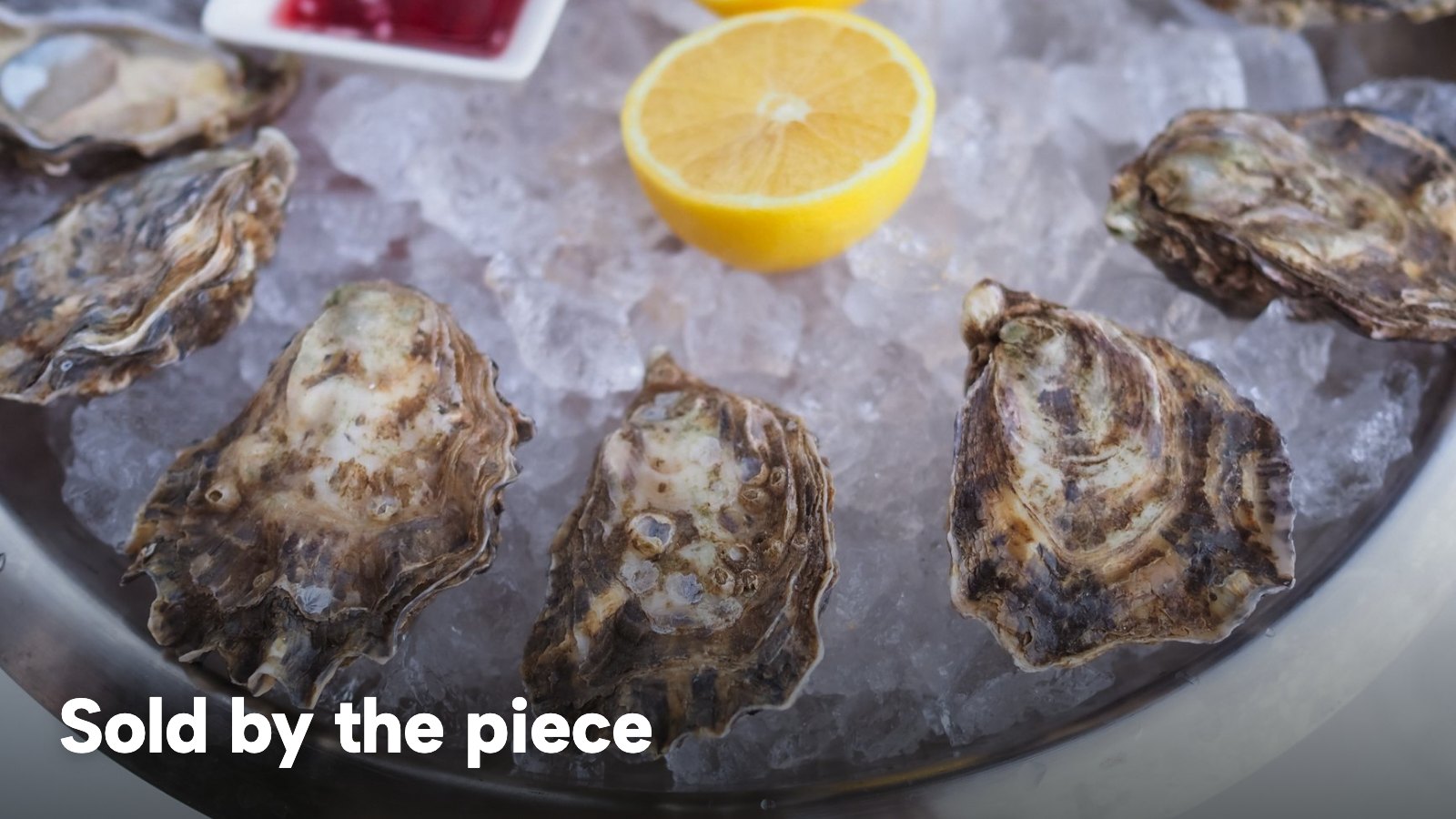
This guide is written for the owner of an independent dine-in seafood restaurant, fish restaurant or oyster bar in the UK who is choosing or rebuilding a website. It covers the daily menu, prices by weight and "market price", service charge, allergens, raw oysters, species and origin, deposits with a worked month, being found on Google, and the first-year cost. The chip shop version of this problem is in the fish and chip shop website guide; this guide is about the sit-down room.
What a seafood restaurant website has to carry
A seafood website does five jobs that a generic restaurant template handles badly. The table below sets them against what the page has to show and where the UK rule sits.
| Job | What the page must show | Where the rule sits | Who edits it |
|---|---|---|---|
| Today's catch | What landed, from which boat or port, what has sold out | Not a legal rule; a trust rule | Chef or manager, before service |
| Sold by weight or piece | A stated amount and the quantity it applies to | The 2003 food and drink services Order, art 4 | Owner, when the supplier changes |
| Charges on top | Service charge or minimum charge in the total | The 2003 Order, art 4; CMA guidance | Owner, once |
| Allergens | Fish, crustaceans, molluscs and the other eleven, per dish | FSA allergen guidance | Chef, per dish |
| Peak-night bookings | A route to book, with deposit terms in writing | Consumer Contracts Regulations; CMA fair-terms guidance | Manager, per service |
Each row changes at a different speed: the catch daily, prices when a supplier changes, allergens when a recipe does. A website that treats all five as one PDF has one speed: the slowest.
The daily menu as content: editing before service
The test for a seafood website is simple: can the person who writes the board also change the page, from a phone, without asking anyone? If the answer involves exporting, uploading, emailing a designer or waiting for a developer, the page will be a day behind and the dish that sold out will stay on it.
A seafood menu works better as structured content: sections, dishes, a price on each dish, a short description and allergen marks, all editable in one screen and published as soon as the change is saved. The daily catch then becomes a section of its own that is rewritten each morning, with the day's landing, the boat or the port, and what has just sold out.
What to put in the catch section
A useful catch section is short. It names the species the way the kitchen does, says whether it is sold whole or portioned, gives a price in the format covered in the next section, carries the allergen marks, and says what has gone. Where the restaurant buys from a named boat or merchant, the section can say so.
The section should also say what has gone. A sold-out dish struck through tells a guest the fish is moving; a dish that has quietly disappeared tells a guest nothing; a dish still listed that is not there tells a guest the page can't be trusted. Which of those the page shows is decided by how fast the kitchen can change it.
Prices by weight, by piece and "market price"
Seafood is sold in formats most menus do not use: a whole fish by weight, oysters by the piece or half dozen, a platter by the tier, a catch without a fixed price until it is weighed. The Price Marking (Food and Drink Services) Order 2003 governs how a price is indicated for food and drink services, and two limbs of article 4(1) matter here.
Where food is sold by reference to quantity or weight, the Order asks for "the price for the sale of each quantity or weight where the food is sold by reference to quantity or weight, subject to paragraph (2) below". Where it is not, it asks for "the price for the sale of that food (except where it is sold by reference to quantity or weight)". This research read the article as it appears on legislation.gov.uk in the version published as made.
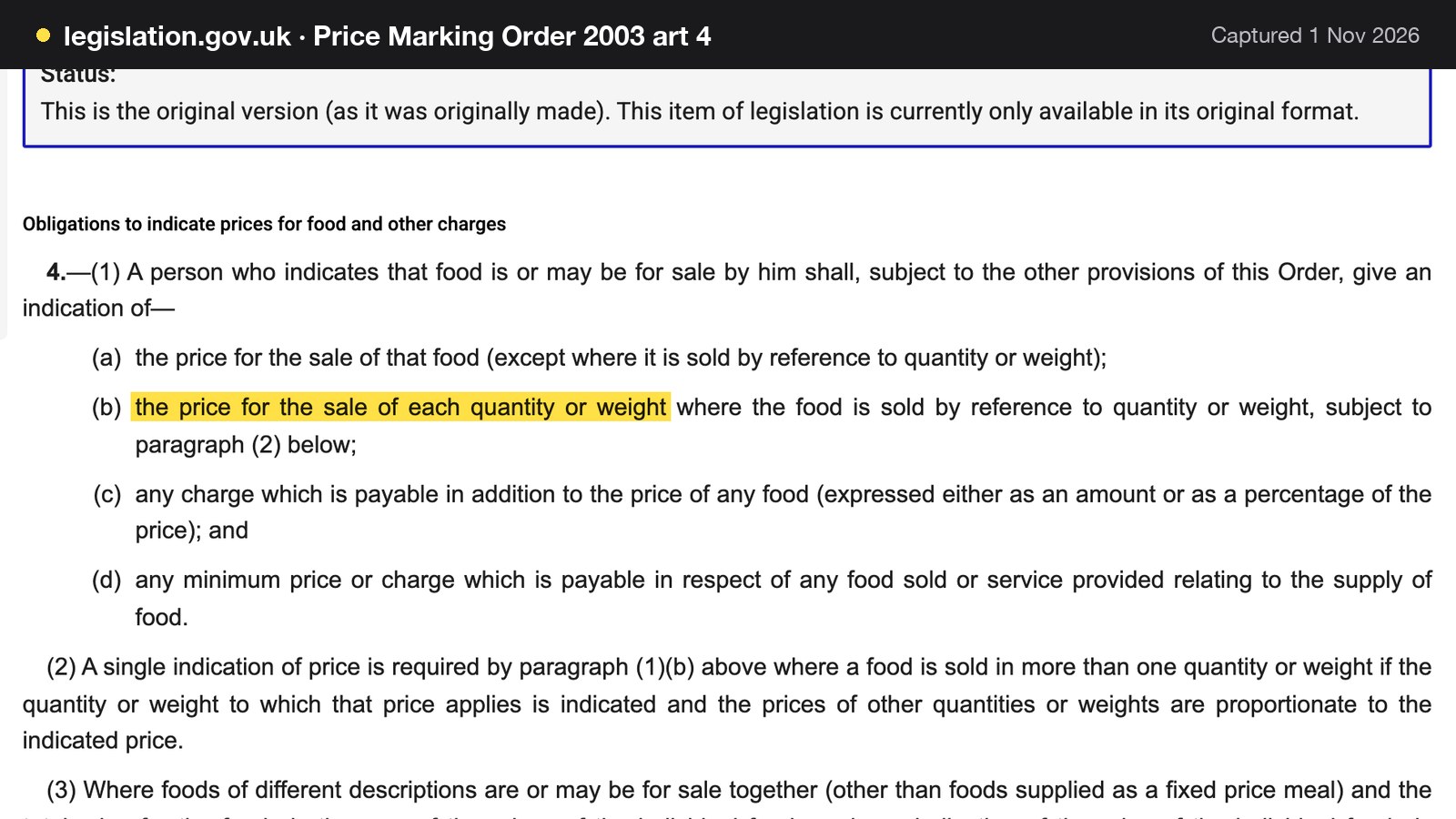
Paragraph (2) of the same article adds that a single indication of price is enough where a food is sold in more than one quantity or weight, provided the quantity or weight to which that price applies is indicated and the prices of other quantities or weights are proportionate to the indicated price. Paragraph (4) says that an indication of the price of food, or of a charge payable in addition to it, which is subject to value added tax shall be inclusive of the tax.
What "market price" has to become on a web page
Nothing read for this research says the letters "MP" are banned, or approved. What the Order requires is that a price is indicated, and for food sold by weight, a price for each quantity or weight. The practical design question is therefore not whether "market price" is allowed as a phrase, but whether the guest can tell what the dish will cost. A guest who can't is a guest who books elsewhere, whatever the Order says.
There are three formats that give the guest a figure and still let the kitchen follow the market.
1. A price per unit of weight. Whole sea bass, about 900g, £7.50 per 100g. Illustrative figures: 9 lots of 100g x £7.50 = £67.50 for a fish of that weight.
2. A "from" price with the basis stated. Lobster, from £48.00, priced by weight on the day. The CMA's guidance says the total price can be an "indicative" or "from" price as long as it includes all applicable mandatory charges and does not mislead customers about what the price covers.
3. A price per piece and per set. Oysters, £3.50 each, six for £21.00. The set price is proportionate (6 x £3.50 = £21.00), which is what paragraph (2) asks for when more than one quantity is offered.
The failure to avoid is a line that gives the dish a name and no number, or a number with no basis. "Catch of the day, market price" next to a nightly price that varies by £50 is a question for the waiter, and the waiter is the most expensive place to answer it.
The daily catch is also where the price changes most often, so the page needs to be able to change it without a rebuild. A price edit that goes live the moment it is saved removes the temptation to leave a stale figure up for the week. The wider rules on pricing displays are in the restaurant pricing law guide.
Service charge, VAT and the total a guest pays
Two sets of rules meet here, and neither is specific to seafood. Both matter more on a menu that already needs explaining.
The Price Marking Order's article 4(1)(c) covers "any charge which is payable in addition to the price of any food (expressed either as an amount or as a percentage of the price)", and (d) covers "any minimum price or charge which is payable in respect of any food sold or service provided relating to the supply of food". An automatic service charge, a cover charge or a minimum spend on a platter are the kinds of charge those limbs describe. Paragraph (4) puts VAT inside the figure: the indication is inclusive of the tax.
The CMA's guidance on price transparency (CMA209) states the general principle in its summary page.
In the invitation to purchase, you must give the customer the total price of the product.
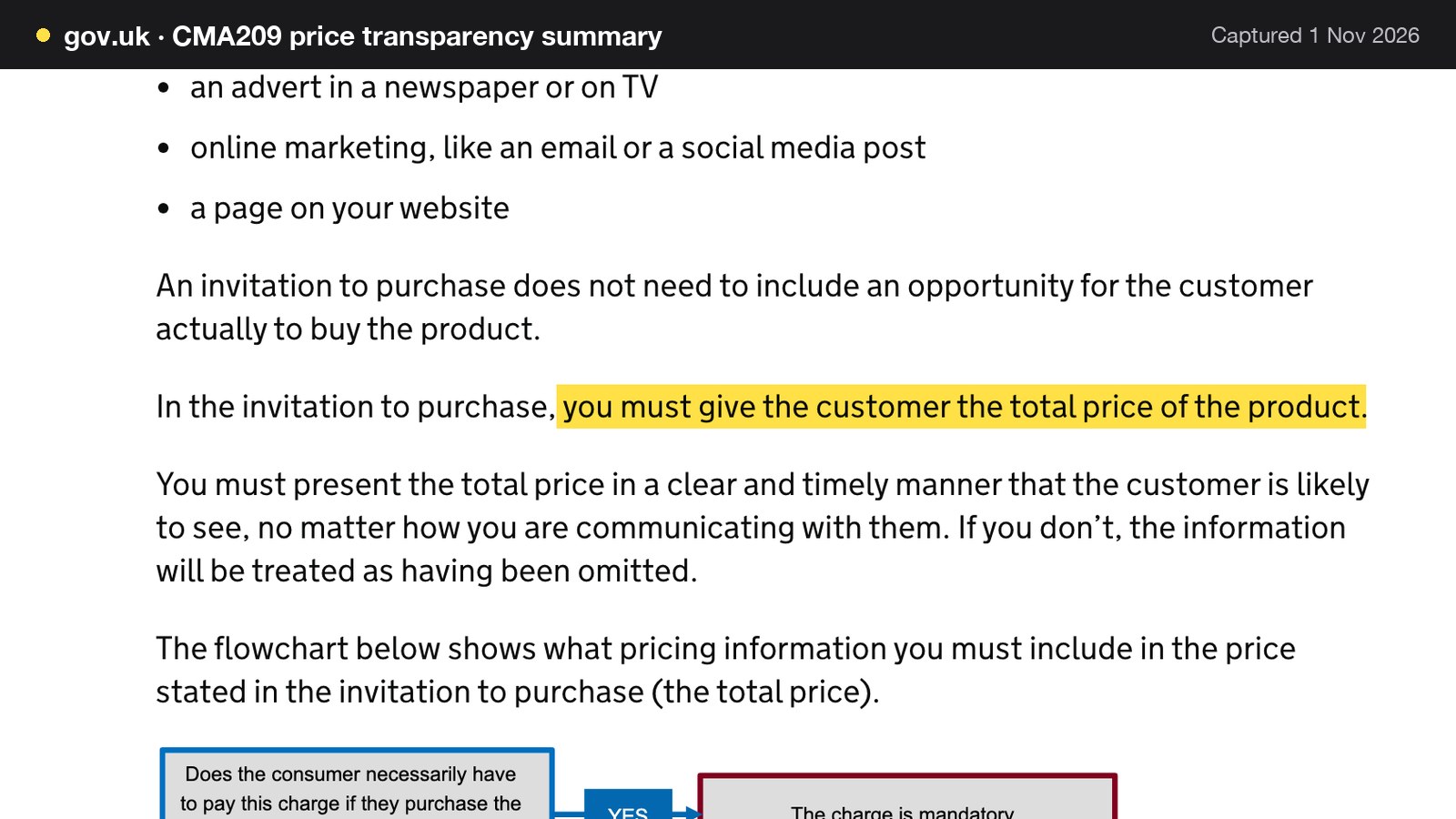
The same page adds that the total price should normally include any unavoidable or "mandatory" charges, and that providing them separately will not normally be enough to comply with the law. It defines a charge as mandatory if the customer must pay it to buy the product. The page does not name restaurant service charges, and this guide does not claim that it does. Whether a particular restaurant's service charge is one the diner must pay is the owner's decision, with the local trading standards team if in doubt.
For a website, put the headline figure and any charge a guest must pay in the same place, in the same size, and not in a footer. Where the total can't be shown, the guidance says to give customers what they need to work it out, as prominently as the part that can be calculated. A whole fish priced by weight is the clearest case: the price per 100g and the approximate weight, side by side.
This is a summary of public law and official guidance as published on 1 November 2026, not legal advice; check the current position, or take advice, before acting on a specific case.
Allergens: fish, crustaceans and molluscs
The Food Standards Agency's allergen guidance for food businesses, updated on 17 July 2026 and applying to England, Northern Ireland and Wales, lists the 14 allergens. Three of them are the stock of a seafood room: "crustaceans (such as prawns, crabs and lobsters)", "fish", and "molluscs (such as mussels and oysters)".
If you provide non-prepacked foods, you must supply allergen information for every item that contains any of the 14 allergens.
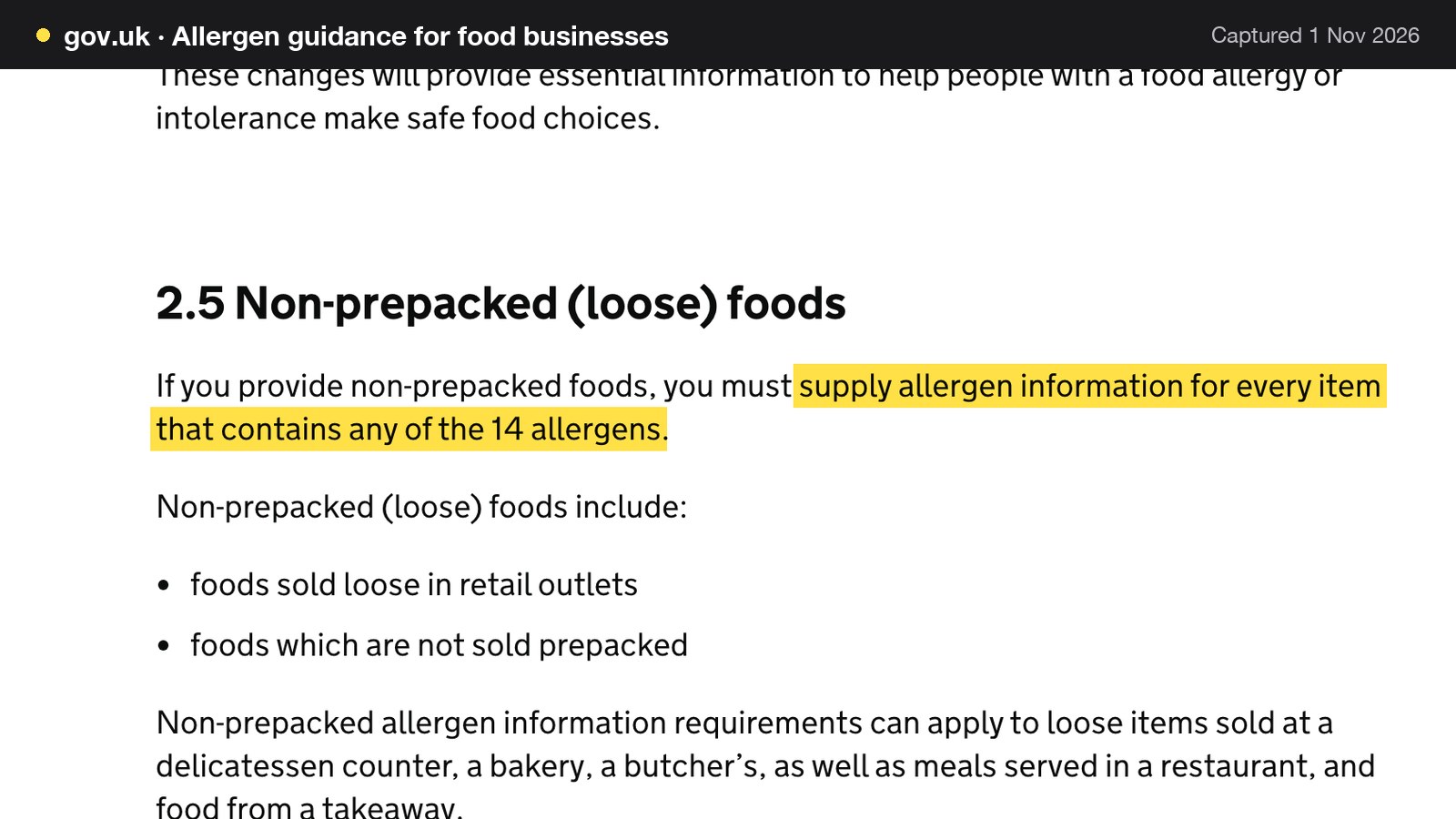
The guidance says the non-prepacked requirements can apply to meals served in a restaurant and to food from a takeaway. For a dine-in room, that means every dish on the menu that contains any of the 14 needs its allergen information available, whether the menu is on a chalkboard, a printed card or a website.
| Group | Examples in the guidance | Where it turns up on a seafood menu | What the dish entry should carry |
|---|---|---|---|
| Crustaceans | Prawns, crabs, lobsters | Shellfish platters, bisques, crab on toast, langoustines | A crustacean mark on each dish |
| Fish | Fish | Whole fish, fillets, fish stock, a fish sauce in another dish | A fish mark on each dish, including dishes where fish is not the main item |
| Molluscs | Mussels, oysters | Oysters, mussels, clams, squid or scallops where the dish includes them | A mollusc mark on each dish |
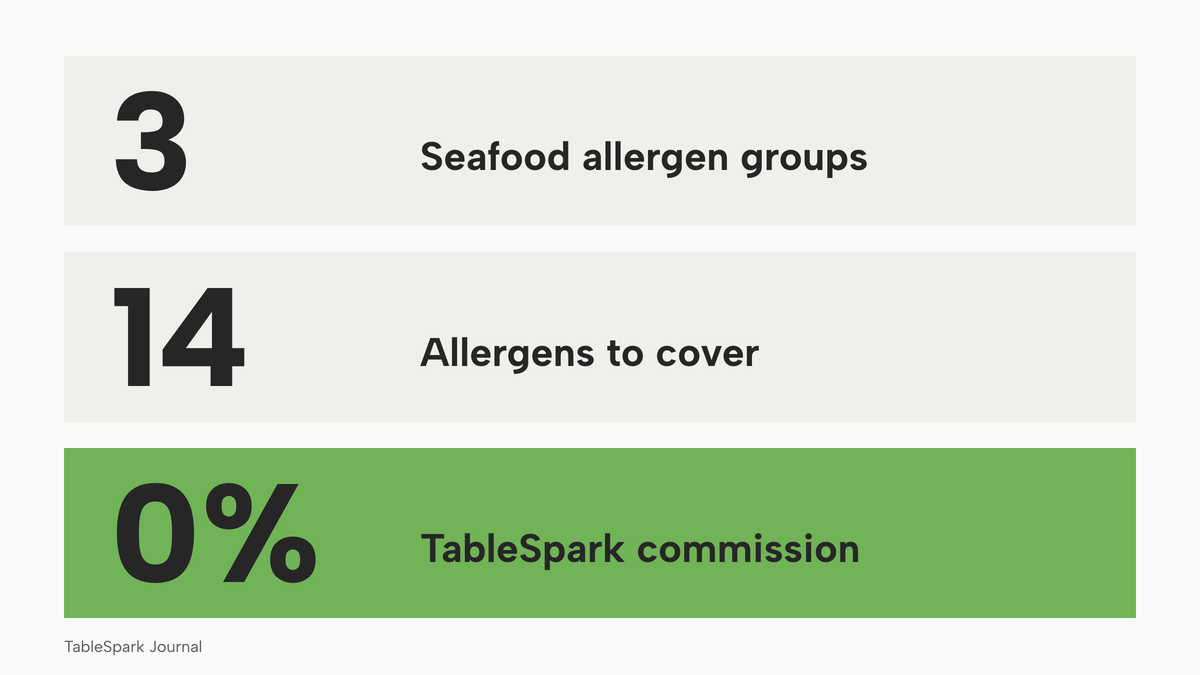
The marks belong to the dish, not the section: a risotto in the "rice" section can carry a fish stock, and a battered fish dish has its cereal and egg marks as well as its fish one.
Written information, supported by a conversation
The guidance lists ways to provide the information, including full written allergen information on a menu, chalkboard or in an information pack, or verbally with a written notice in a clearly visible position explaining how customers can obtain it. It adds the FSA's own advice: "Our advice to food businesses providing non-prepacked food is that written allergen information, supported by a conversation, works best for consumers." On 5 March 2025 the FSA published new best practice guidance on the provision of allergen information for non-prepacked foods.
The consumer research explains why. Only 20% of adults with a food hypersensitivity said allergen information was provided both in writing and verbally, and 27% reported never having heard of the legal requirement. Those figures describe survey respondents with a food hypersensitivity, and they are a reason to put the written part on the website, where the guest reads it before the evening.
A website helps in two places: the menu, where each dish carries its marks and a guest can check before booking, and the booking, where the guest can mention an allergy in advance and the note reaches the team with the reservation. The restaurant allergen menu guide covers the two-stage check, written on the page and confirmed at the table.
Raw oysters and the guest who should not eat them
Oysters are the one item on a seafood menu that is routinely served raw, and official advice treats raw shellfish differently from cooked. The NHS page on fish and shellfish, last reviewed on 26 June 2026, says: "Most of the shellfish we eat is cooked first, but oysters are often served raw." It adds: "Raw shellfish, particularly oysters, can contain low levels of certain viruses, such as norovirus." For pregnancy, it says: "When pregnant, you can reduce your risk of food poisoning by avoiding raw shellfish and making sure that any shellfish or smoked fish you eat is cooked thoroughly." The NHS pregnancy page on foods to avoid, last reviewed on 15 June 2026, lists "raw fish and raw shellfish".
This guide goes no further than the NHS wording. A website can still put a short, plain note next to the raw-bar section: raw shellfish is on offer, official advice for pregnancy is to avoid it, and the team can suggest cooked dishes. The note carries no health claim of the restaurant's own.
The Food Standards Agency also publishes guidance for food business operators on norovirus outbreaks in raw oysters, first published on 20 October 2023. This research read its summary and not its body, so an oyster bar owner should read the full guidance.
Species and origin on the menu
Guests who choose a seafood restaurant often care where the fish came from. Say only what the kitchen's paperwork supports: if the supplier's invoice does not say line-caught, do not write line-caught.
The Fish Labelling Regulations 2013 (SI 2013/1768) apply in England only except Part 2, and define consumer information requirements by commercial designation, production method and catch area. This research did not establish whether they reach sales by caterers, so this guide does not say that they do or do not. Ask the local authority's food team what applies, and keep the supplier paperwork for anything the menu claims.
Bookings, deposits and no-shows: a worked month
A seafood room has a booking pattern that suits deposits. Weekends and holidays are heavy, the room is small enough that one table matters, and fish bought for a booking is a cost whether the guest arrives or not. The example below is illustrative: every input is an assumption, set out so the arithmetic can be redone with the restaurant's own numbers.
The inputs
A 50-cover seafood restaurant takes 280 bookings a month, averaging 2.4 covers a booking. Average spend is £58 a head. The no-show rate is 5%. The 5% rate is an assumption for the arithmetic, not a measured UK figure; a restaurant should use the rate from its own bookings report. Bookings on Friday and Saturday make up 40% of the total, and those are the bookings that would carry a deposit of £15 a head.
The loss without a deposit
280 bookings x 2.4 covers = 672 covers a month. At a 5% no-show rate, 280 x 5% = 14 bookings fail to arrive. 14 x 2.4 = 33.6 covers, and 33.6 x £58 = £1,948.80 of booked revenue lost in a month, or £23,385.60 over twelve months. That is revenue, not profit, and some stock can be resold, but the table was held and the sitting was lost.
The deposit on Friday and Saturday
Friday and Saturday carry 280 x 40% = 112 bookings. A deposit of £15 a head on 2.4 covers is £36 a booking, and 112 x £36 = £4,032 a month of deposits taken. That is a prepayment against the bill, not extra revenue.
If the no-show rate stays at 5% and the deposit is kept on a no-show, the 112 deposit bookings produce 112 x 5% = 5.6 no-shows. Those lose 5.6 x 2.4 x £58 = £779.52 of revenue, and the restaurant keeps 5.6 x £36 = £201.60 in deposits. The other 168 bookings produce 168 x 5% = 8.4 no-shows, which lose 8.4 x 2.4 x £58 = £1,169.28. The net loss is £1,169.28 + £779.52 - £201.60 = £1,747.20, which is £1,948.80 - £1,747.20 = £201.60 a month better than with no deposit, or £2,419.20 a year, from the retained deposits alone.
| Working | Result | |
|---|---|---|
| Booked revenue lost with no deposit | 14 bookings x 2.4 x £58 | £1,948.80 |
| Deposits taken on Friday and Saturday | 112 bookings x £36 | £4,032.00 |
| Revenue lost on deposit bookings | 5.6 x 2.4 x £58 | £779.52 |
| Revenue lost on other bookings | 8.4 x 2.4 x £58 | £1,169.28 |
| Deposits kept on no-shows | 5.6 x £36 | £201.60 |
| Net loss with the deposit | £1,169.28 + £779.52 - £201.60 | £1,747.20 |
| Improvement from retained deposits | £1,948.80 - £1,747.20 | £201.60 a month, £2,419.20 a year |
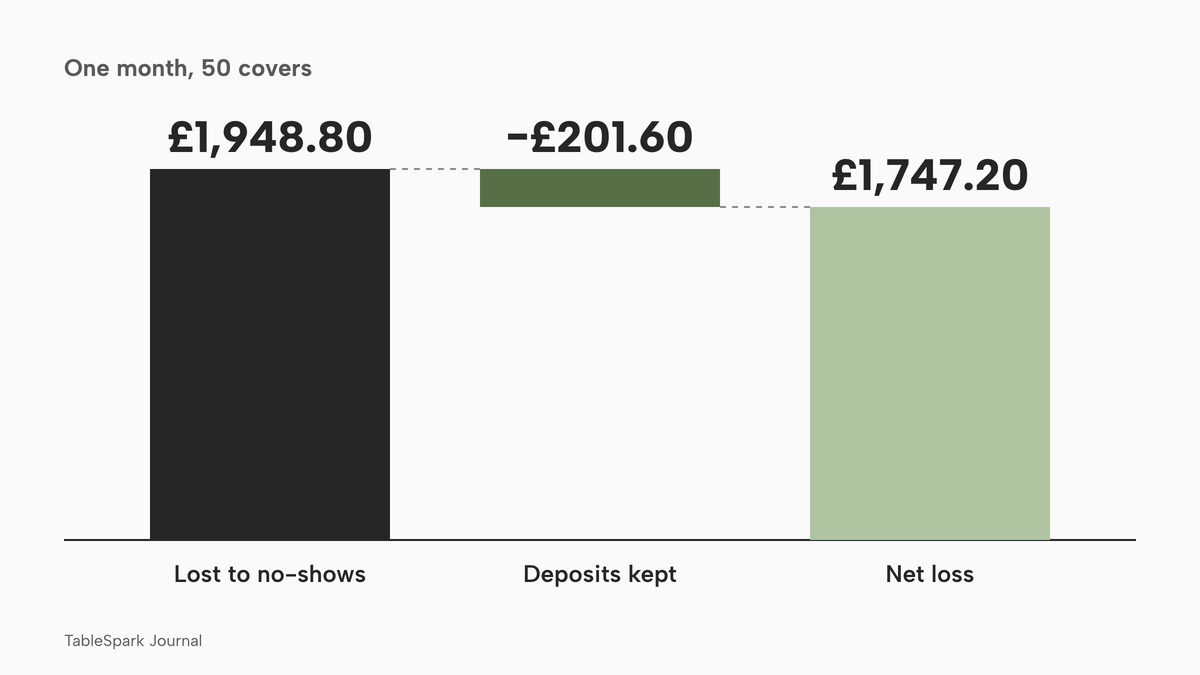
A deposit can also change behaviour. This sensitivity line is an assumption, not evidence: if the deposit cut no-shows on those 112 bookings from 5% to 2.5%, there would be 2.8 no-shows, losing 2.8 x 2.4 x £58 = £389.76, with 2.8 x £36 = £100.80 kept. The net loss would be £1,169.28 + £389.76 - £100.80 = £1,458.24, which is £490.56 a month better than £1,948.80, or £5,886.72 a year. No source read for this research publishes how much a deposit changes a no-show rate, so set the cut from the restaurant's own bookings report.
Card fees on the deposit
A deposit paid by card has a processing cost. Stripe's UK pricing page lists 1.5% + 20p for standard UK cards and 2.8% + 20p for premium UK cards. On a £36 deposit by a standard UK card the fee is 1.5% x £36 + 20p = £0.54 + £0.20 = £0.74, and 112 deposits cost 112 x £0.74 = £82.88 a month, or £994.56 a year. On a premium card it is £1.008 + £0.20 = £1.208, about £135.30 a month for 112. A booking tool built on Stripe and a platform connected to Stripe pay the same card fee, so it does not separate the routes.
Can the restaurant keep a deposit?
Two rules apply. A restaurant should know both before it writes a deposit line on its booking page.
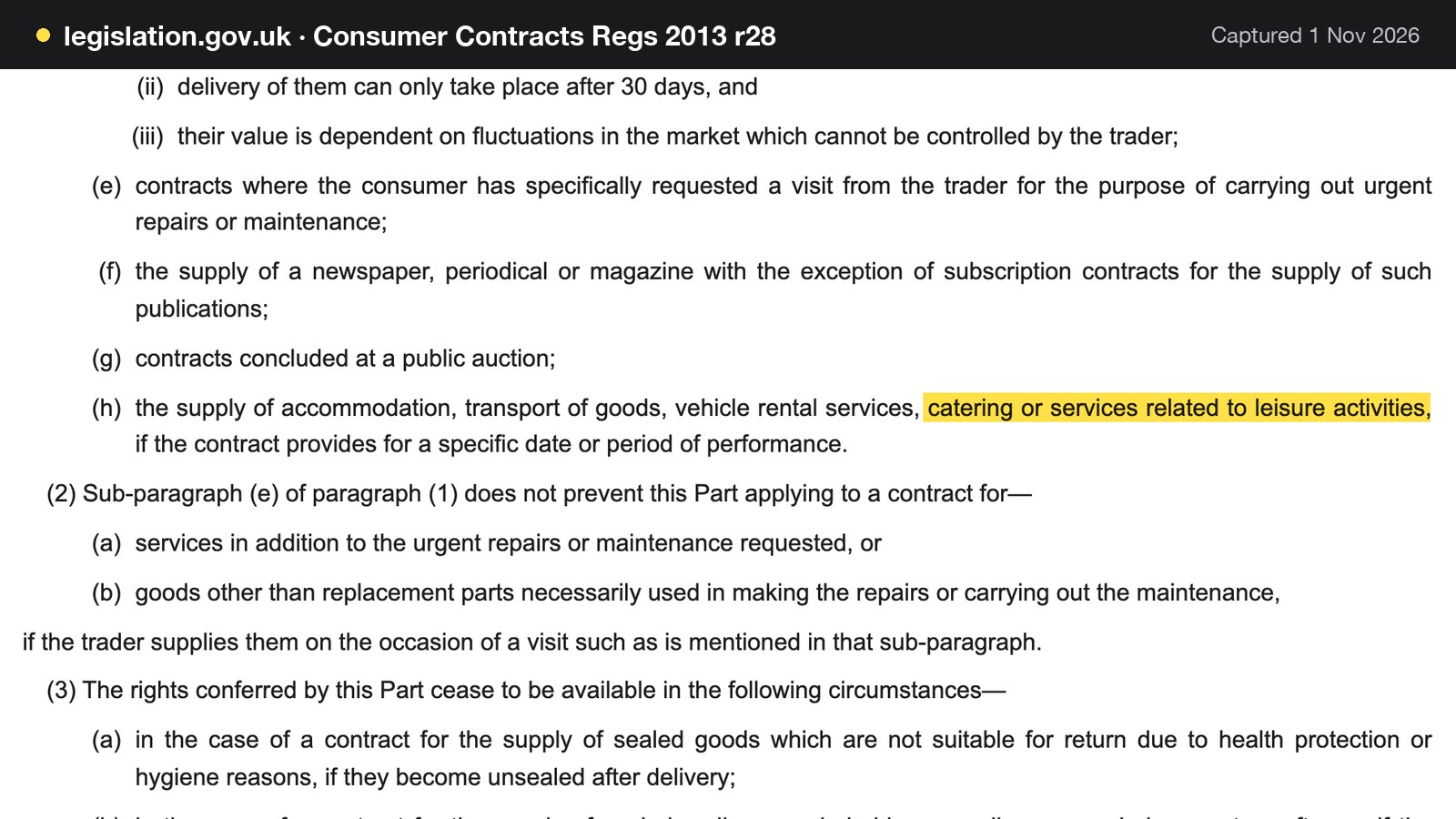
The first is the cancellation right. Consumer Contracts Regulations 2013 give consumers a right to cancel certain distance contracts, but regulation 28 lists exemptions. Regulation 28(1)(h) covers "the supply of accommodation, transport of goods, vehicle rental services, catering or services related to leisure activities, if the contract provides for a specific date or period of performance". A dated table booking is a contract for catering that names a specific date, which is the case that wording describes.
The second is fairness. The government's guidance on writing a fair contract for customers lists, among terms likely to be unfair, those that allow a business to keep prepayments or impose disproportionate fees if the customer cancels or breaches the contract. It also says a business "must take into account what your business will actually lose".
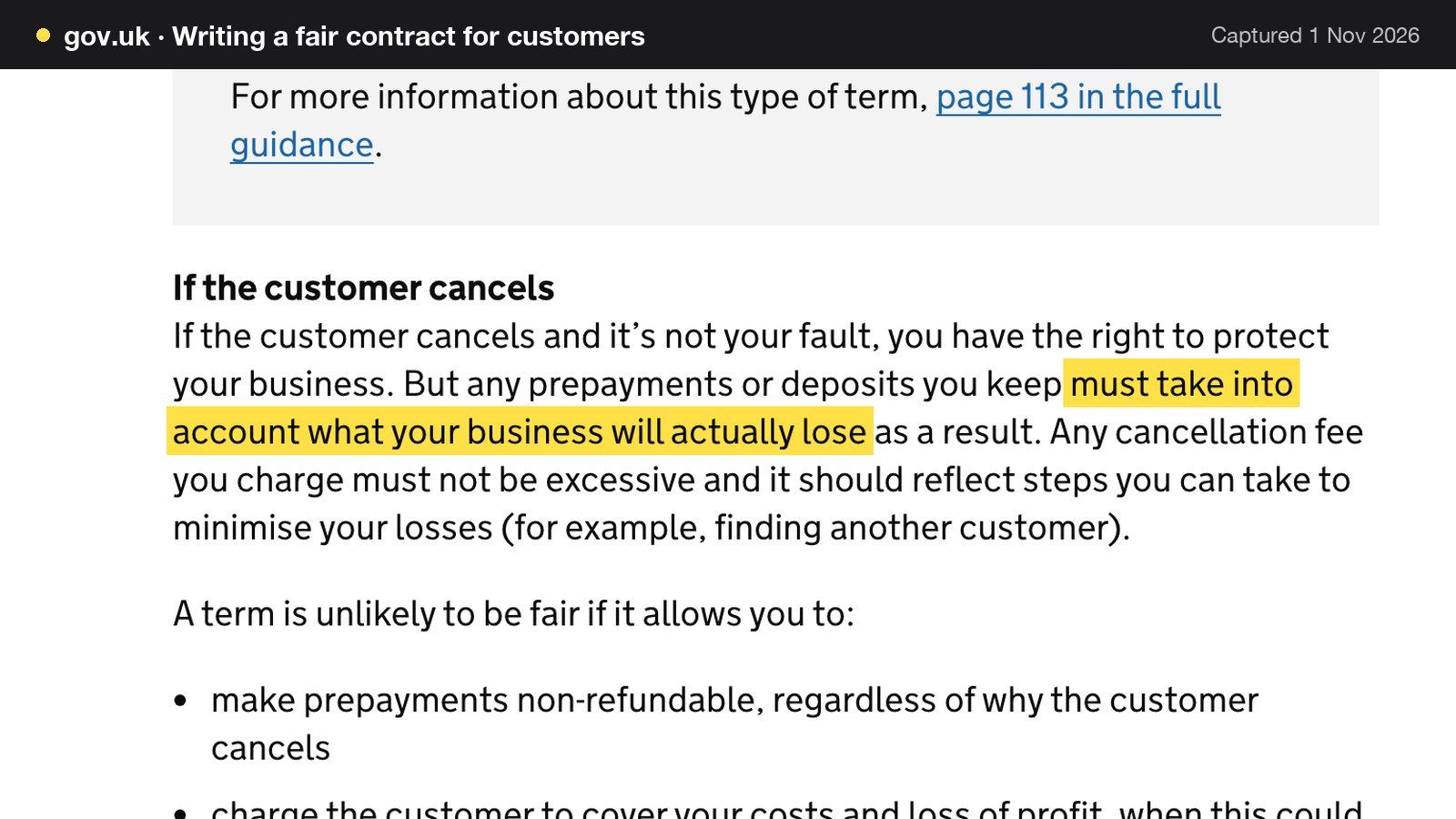
Test the example against that sentence. The average booking is worth 2.4 x £58 = £139.20, and the deposit is £36, about 26% of it. A deposit set well below the value of the booking is easier to defend than one that matches or exceeds it. Set it by what the table would have earned, state the amount, cut-off and refund terms before the guest pays, and credit it against the bill. The booking deposits guide covers the wording.
A card guarantee is the alternative where a deposit feels heavy for a small table: the card is held and charged only if the restaurant confirms a no-show.
Being found: a live link is not the same as being in Google
Seafood searches are tied to place and often made by visitors: oysters in a named district, a fish restaurant in a coastal town, "restaurant near the harbour" typed by somebody who arrived this afternoon. Those searches are decided on facts a search engine can verify: an address, today's opening hours, a readable menu and a working booking route.
A website can be live at a working link and still be absent from Google. A robots rule or noindex directive left over from the build, a canonical that points somewhere else, a page nothing links to, a menu published only as an image or a PDF scan, missing Restaurant and LocalBusiness structured data, or an incomplete search-verification set-up can each leave important pages undiscovered, excluded or misunderstood. The cost to the restaurant is direct. Guests who search the restaurant's name, its menu, its cuisine or its location may reach a directory, a commission-charging marketplace or a competing restaurant first, and the restaurant stays dependent on paid discovery instead of building direct bookings of its own.
This guide does not say every site fails, and it does not promise rankings. Indexing and ranking remain decisions for Google. What an owner can do is remove the avoidable causes with technical work: crawlable menu text, titles and descriptions, canonical URLs, a sitemap, robots controls, Restaurant and LocalBusiness schema, internal links, mobile-first output and search verification. A general entry-level builder can publish a page, but publishing is not the same as delivering a restaurant site that search engines can reliably discover and understand, and the configuration, add-ons and upkeep fall to the owner unless the platform includes them.
Where TableSpark fits for a seafood restaurant
TableSpark is a restaurant website platform for independent UK restaurants, and its seafood restaurant website templates are built around the problems above. Its seafood page describes a daily catch section "built to be rewritten", edited from a phone in under a minute, with the day's landing, the boat or the port and what has just sold out.
The Menu page in the dashboard says that changes there update the live website instantly, and saving is publishing. A dish carries a name, a price, a description, sizes with a price per size, the 14 UK allergens as toggle chips that show on the live menu, dietary toggles, and an Available or Sold out switch that keeps a sold-out dish on the page, struck through. The seafood page adds that whole fish priced by weight sits alongside plated dishes, that oyster sections can be priced by the piece and by the half dozen, and that per-kilo and per-portion pricing sit on the menu together. The restaurant's own team edits menu, prices, photographs and hours on any plan, without a developer.
Search readiness is included in the plan, on every plan. TableSpark bundles crawlable structured restaurant content, titles and descriptions, canonical URLs, sitemaps, robots controls, Restaurant and LocalBusiness schema, internal linking, mobile-first output and managed search-verification set-up. That is the work the previous section describes as falling on the owner with a general builder. Indexing and ranking remain decisions for Google.
For bookings, the restaurant booking system gives a seafood room live availability, floor plans and table assignment, confirmations and reminders in the restaurant's own name, and deposits paid at booking, from £1 to £500 per booking, into the restaurant's own connected Stripe account. A card guarantee holds the card and charges only when the team confirms a no-show; if both are on, the deposit takes priority. Allergy and dietary notes travel with the booking to the inbox. The Reserve with Google connection is a booking-link connection: the guest completes the booking on the restaurant's own booking page, where it joins the diary. Guest records are stored under the restaurant's TableSpark account, visible in the Inbox and guest list, with CSV export.
The plans are priced per month excluding VAT. TableSpark starts at £19 a month excluding VAT. Starter, at £19 a month excluding VAT, includes a complete restaurant website, a live structured menu, enquiry and newsletter forms and managed search readiness. Growth, at £39 a month excluding VAT, adds direct live bookings, deposits and reminders, a custom domain with managed SSL, and table and floor-plan operations. The pricing page lists every plan, and a yearly option asks for payment for 10 months and covers 12. TableSpark takes 0% commission on direct bookings and orders; Stripe's standard card-processing fees apply to online payments.
What the complete set-up costs in its first year
The question that matters is what the whole working set-up costs: a site that can carry the menu, a booking tool that can take deposits, the add-ons the deposit needs and the percentage taken on each payment. The route below is a general builder plus a booking tool with add-ons, costed only from published pages. Where a page does not publish a number, the total is a floor, not an estimate.
The route with a builder and booking add-ons
Squarespace's pricing page, read on 1 November 2026, shows its Core plan at "£28.80 /mo" and "£20.40 /mo", each followed by "Includes estimated VAT". The page does not label which figure belongs to which billing option, so this guide reads the lower figure as the annual-billing one, which would mean the year is paid up front. The page changes between fetches, so the figures are quoted as read that day. Its text says "Add restaurant reservation booking through OpenTable or ordering through ChowNow", so on its own page restaurant booking comes from another provider with its own price. The Squarespace line covers the site and leaves out bookings and deposits.
£20.40 including estimated VAT is £20.40 / 1.2 = £17.00 excluding VAT, assuming VAT at 20%, and 12 x £17.00 = £204.00 for the year. At the higher figure, £28.80 / 1.2 = £24.00, and 12 x £24.00 = £288.00.
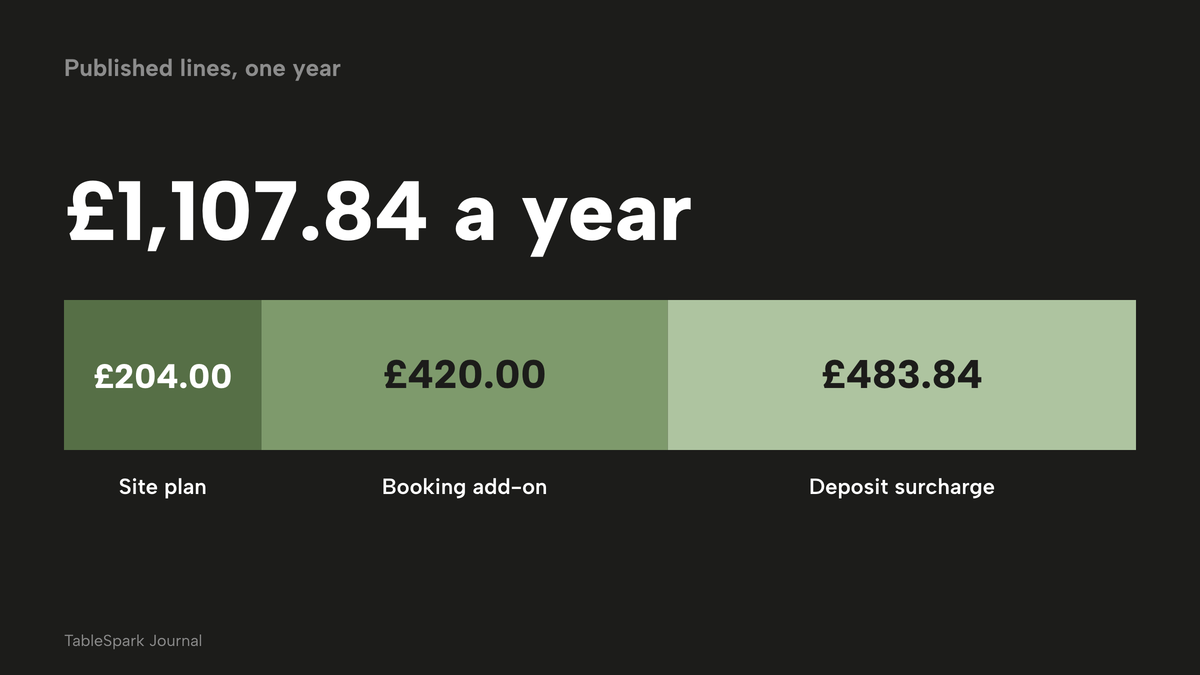
ResDiary's pricing page lists add-ons at "Order & Pay ... £35 per month" and "SMS* ... £10 per month", with "Prices listed are subject to 20% VAT." and "A surcharge of 1% applies for processing Deposits and Payments and 3% for Gift Vouchers. Stripe fees may apply." The page does not publish a base package price, so a total for a ResDiary stack can't be completed. This example assumes deposits run through Order & Pay, the add-on the page footnotes with the surcharge. Order & Pay is 12 x £35.00 = £420.00 a year excluding VAT, and the 1% surcharge on £4,032 of monthly deposits is £40.32 a month, or 12 x £40.32 = £483.84 a year.
| Working | Result | |
|---|---|---|
| Builder site plan (Core, lower figure) | £20.40 / 1.2 = £17.00 a month x 12 | £204.00 |
| Booking add-on that carries deposits | £35.00 a month x 12 | £420.00 |
| Surcharge on deposits | 1% x £4,032 = £40.32 a month x 12 | £483.84 |
| Published lines, subtotal | £204.00 + £420.00 + £483.84 | £1,107.84 |
| Booking tool base package | Not published on the page read | Not in the total |
| TableSpark Growth, paid monthly | £39 a month excluding VAT x 12 | £468.00 |
| TableSpark Growth, yearly option | 10 x £39 excluding VAT | £390.00 |
The published lines alone come to £204.00 + £420.00 + £483.84 = £1,107.84. Against TableSpark Growth paid monthly at 12 x £39 = £468.00 excluding VAT, the gap is £1,107.84 - £468.00 = £639.84, and against the yearly option at £390.00 excluding VAT it is £1,107.84 - £390.00 = £717.84. Both gaps are before the unpublished booking base package, so the real gap is at least this large.
Stripe's card fees are the same on both routes. At 112 deposits of £36 a month on standard UK cards, the fee is £82.88 a month, or £994.56 a year, as worked out above. ResDiary's page says "Stripe fees may apply", and TableSpark's pages say Stripe's standard card-processing fees apply to online payments. The fee does not separate the routes, so it is left out of the comparison and should be added to both.
What each price covers
The prices below are quoted as printed on each provider's own page on 1 November 2026. They are separate charging structures, not like-for-like prices.
- Charged per
- Site, any number of covers
- Website and live menu editor
- direct bookings at 0% TableSpark commission
- deposits and reminders
- floor plans
- custom domain with managed SSL
- managed search readiness
- Charged per
- Site
- Complete restaurant website
- live structured menu
- enquiry and newsletter forms
- managed search readiness
- Charged per
- Site, per billing option
- General website builder
- restaurant booking is added through another provider per its page
- deposits not included in the price
- Charged per
- Add-on
- Base package not published
- prices subject to 20% VAT
- Stripe fees may apply
- Charged per
- Successful card payment
- Card processing for deposits on either route
These prices are not like-for-like, because the providers charge for different things. A site plan, a booking add-on and a card processor are three separate lines, and the owner joins them. The TableSpark line is one plan that contains the site, the menu, the bookings, the deposits and the search set-up.
Add the cost of keeping the stack working. Each added tool is another login, another invoice, another renewal date, and another place where the menu has to be kept in step with the booking page and the allergen information. For a seafood restaurant with a daily-changing menu, that maintenance is the cost the quotes leave out.
What the deposit returns against the plan
Back to the worked month. The deposits kept on no-shows were £201.60 a month. Against TableSpark Growth at £39 a month excluding VAT, £201.60 / £39 = 5.17, so the retained deposits cover the plan about five times over, before the sensitivity case. That is illustrative arithmetic on assumed inputs, not a promise of results; a restaurant with a lower no-show rate or a lower deposit will see a smaller figure.
Choosing a seafood restaurant website: the decision
The choice is between assembling a stack and buying one plan. The comparison below sets the two against the questions a seafood restaurant asks.
| Builder plus booking add-ons | One flat plan on your own site | |
|---|---|---|
| Daily catch edits | Depends on the builder's editor and whether the menu is a page or a file | Menu page edits go live when saved |
| Allergen marks per dish | Depends on the tool chosen | The 14 allergens as chips on each dish, shown on the live menu |
| Deposits | An add-on, and on some tools a surcharge on top of card fees | In the Growth plan, paid to your own Stripe account |
| Bookings | Added through another provider | In the same dashboard as the menu |
| Search set-up | Specialist configuration, add-ons and upkeep fall to the owner | Included in every plan |
| Guest records | Split across tools | Under your restaurant's TableSpark account with CSV export |
- A team member can change the catch from a phone before service
- Every dish sold by weight or piece shows a price and the quantity it applies to
- Any service charge or minimum charge sits in the same place as the price
- Every dish carries its allergen marks, including fish, crustaceans and molluscs
- Raw shellfish has a plain note that points to NHS advice
- Menu claims about species, method or origin match the supplier paperwork
- Deposit amount, cut-off and refund terms are written before the guest pays
- The menu is text on the page, not an image or a PDF scan
- The site has titles, descriptions, a sitemap, canonical URLs and Restaurant schema
- The year-one cost includes the booking add-ons, deposit surcharges and card fees
For an independent UK seafood restaurant, the answer is the one plan: TableSpark Growth.
How to do it in TableSpark
The steps below need Growth, at £39 a month excluding VAT, for the booking and deposit step; the menu steps are on every plan. The put your menu online tutorial walks the menu screens in full.
Step 1 of 6
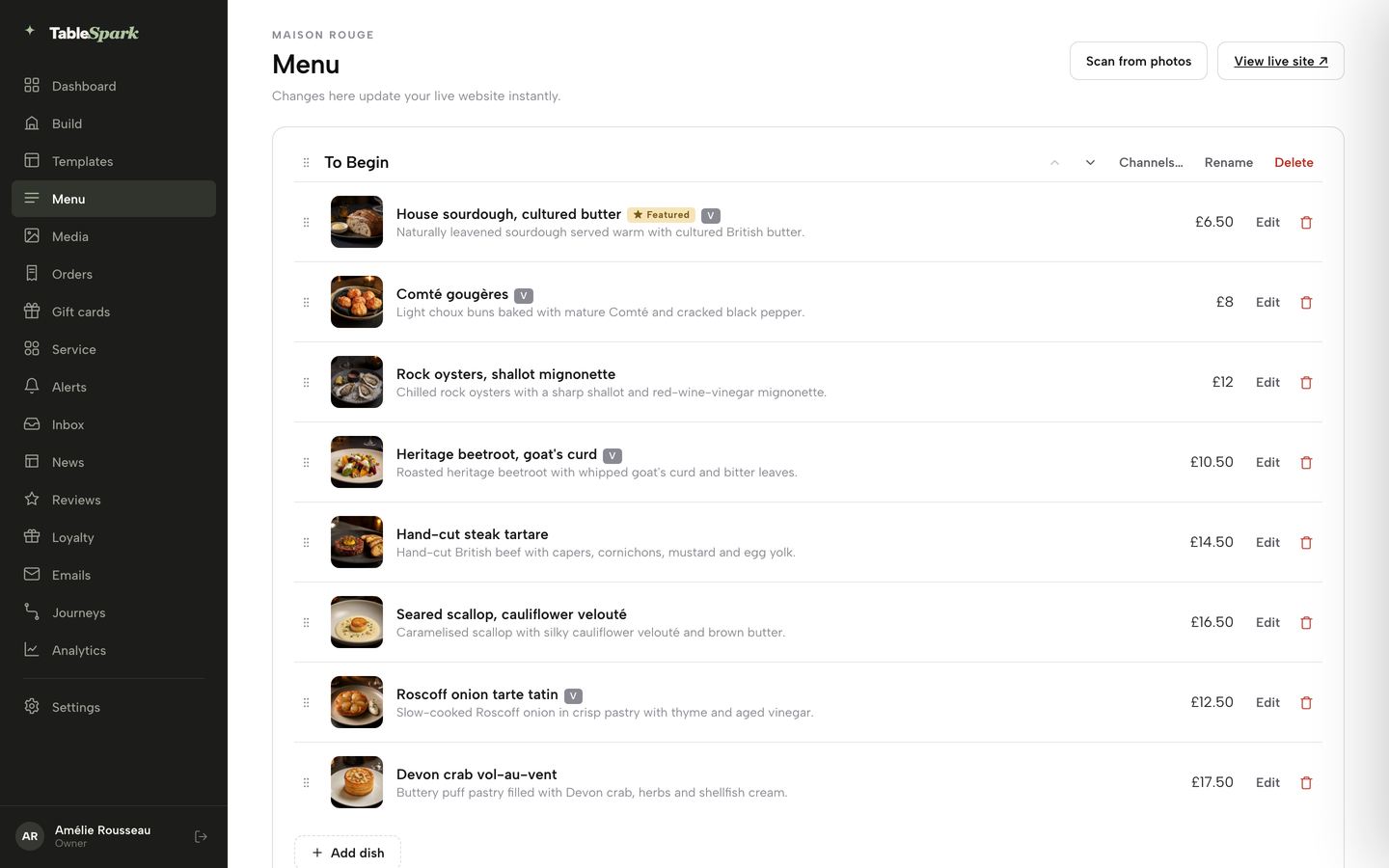
Open the Menu page
In the dashboard, click Menu in the left sidebar. The header says changes there update the live website instantly, and View live site opens what a guest sees.
Step 2 of 6
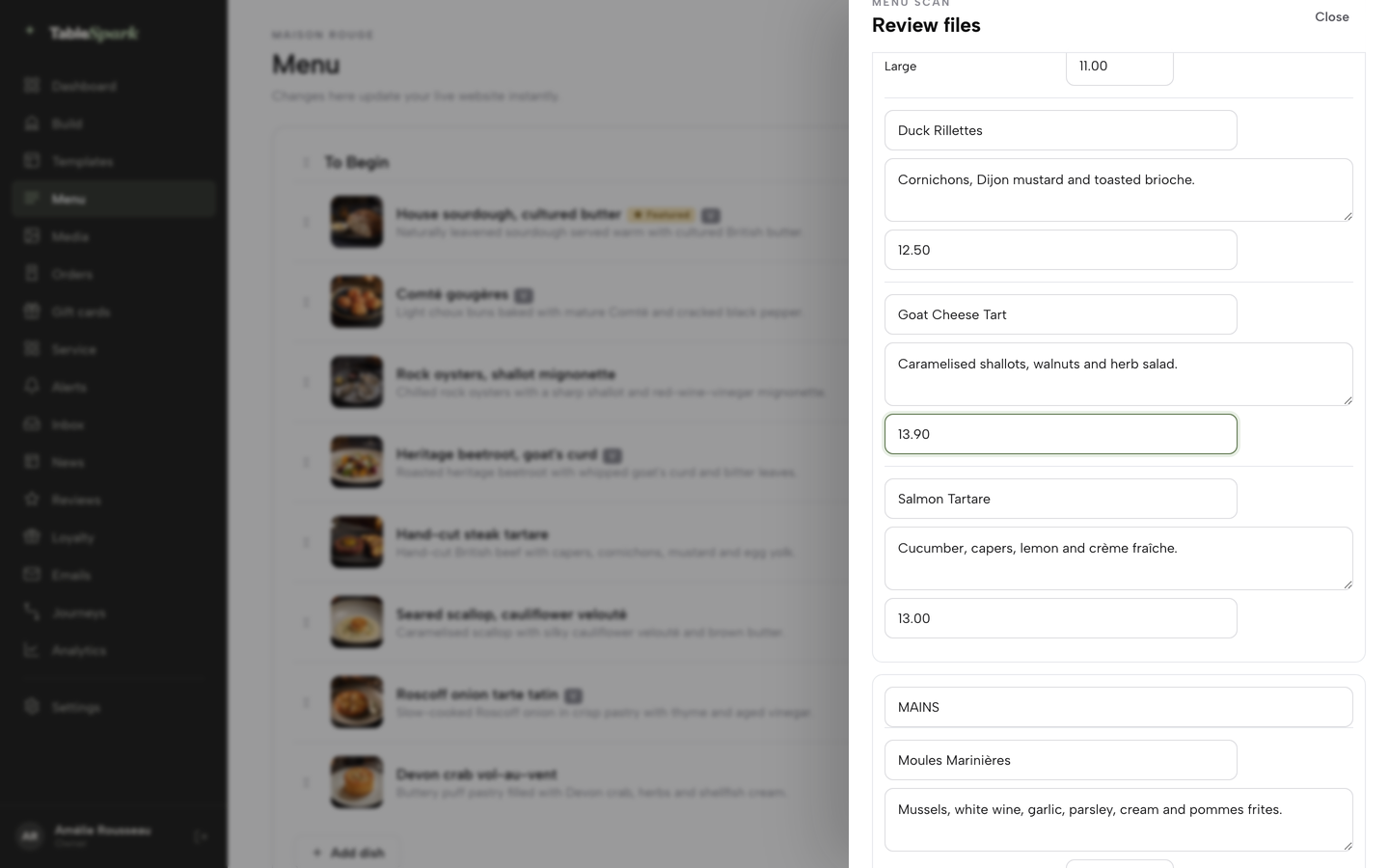
Scan the printed menu, then check every price
Click Scan from photos, then Choose menu files, and pick photos or a PDF of the menu. Each dish arrives as editable Dish name, Printed description and Price fields. Correct anything that was misread, then confirm with I reviewed the text and prices.
Step 3 of 6
Give a dish a price for each size
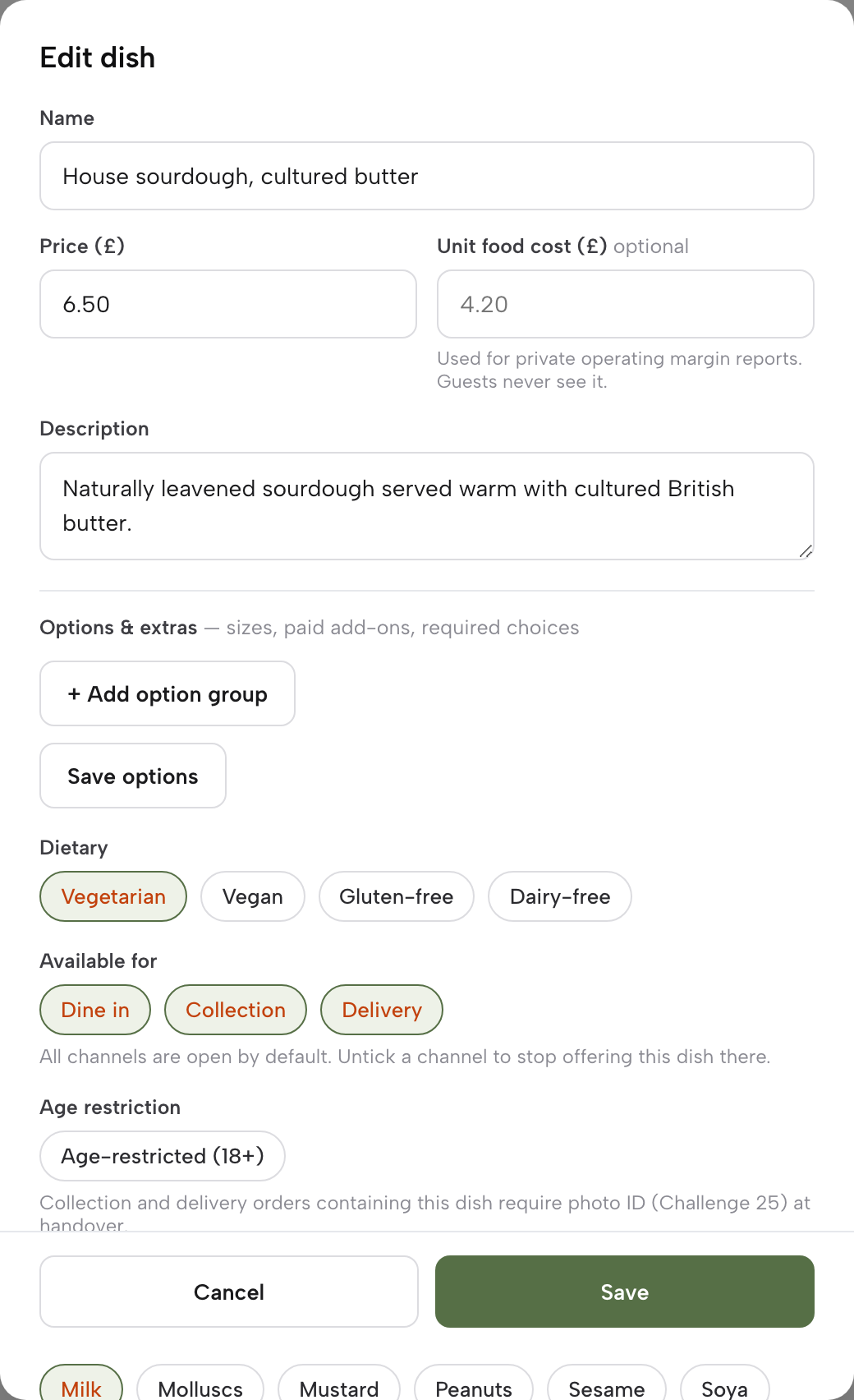
Save the dish once, then use Options and extras to add sizes, such as a half dozen and a dozen oysters, each with its own price.
Step 4 of 6
Tick the allergens on every dish
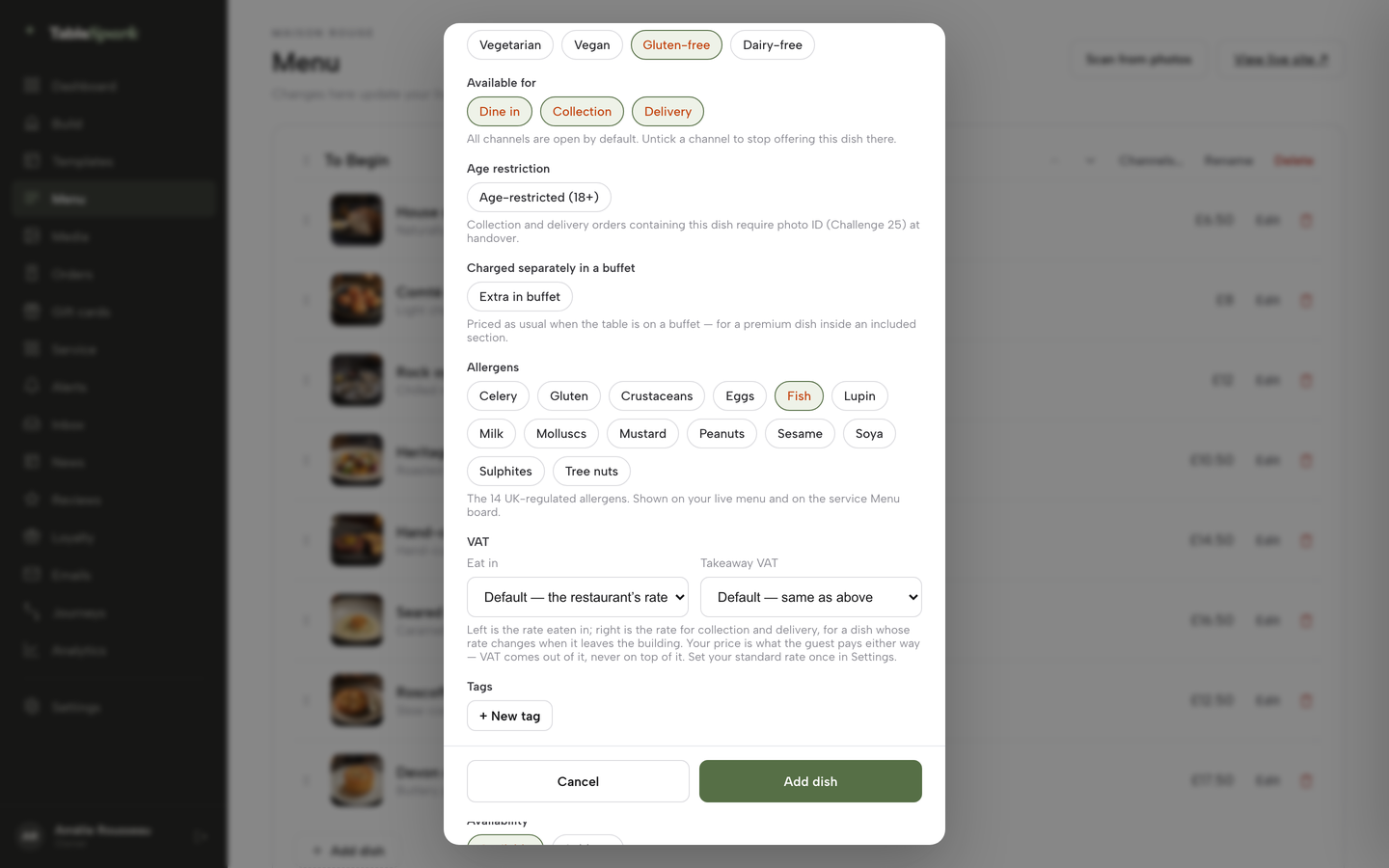
In the dish editor, scroll to Allergens and tick each of the 14 that the dish contains, including Fish, Crustaceans and Molluscs. They show on the live menu.
Step 5 of 6
Mark a dish sold out
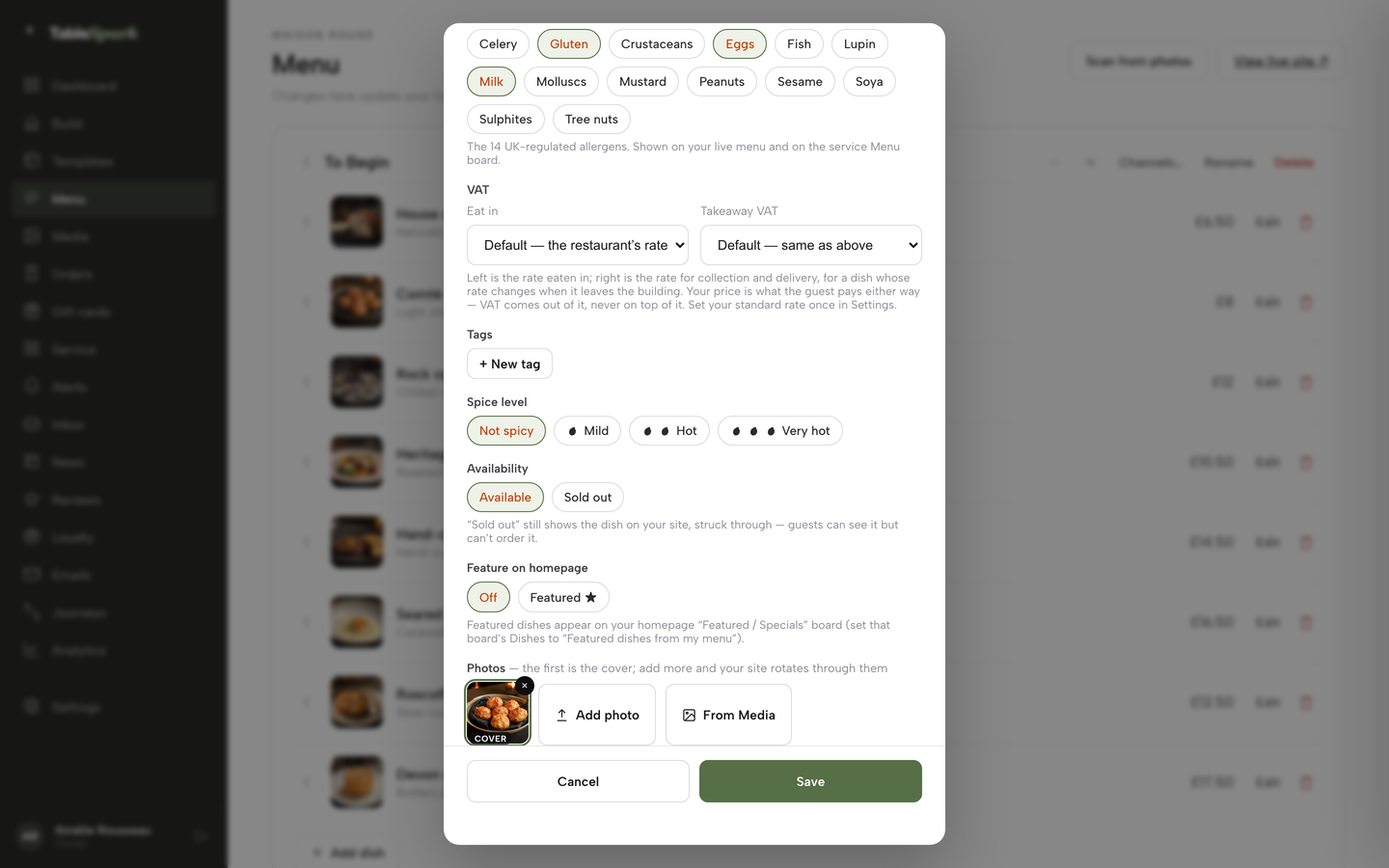
In the dish editor, scroll to Availability and choose Sold out. The dish stays on the site, struck through.
Step 6 of 6
Set the deposit on the service
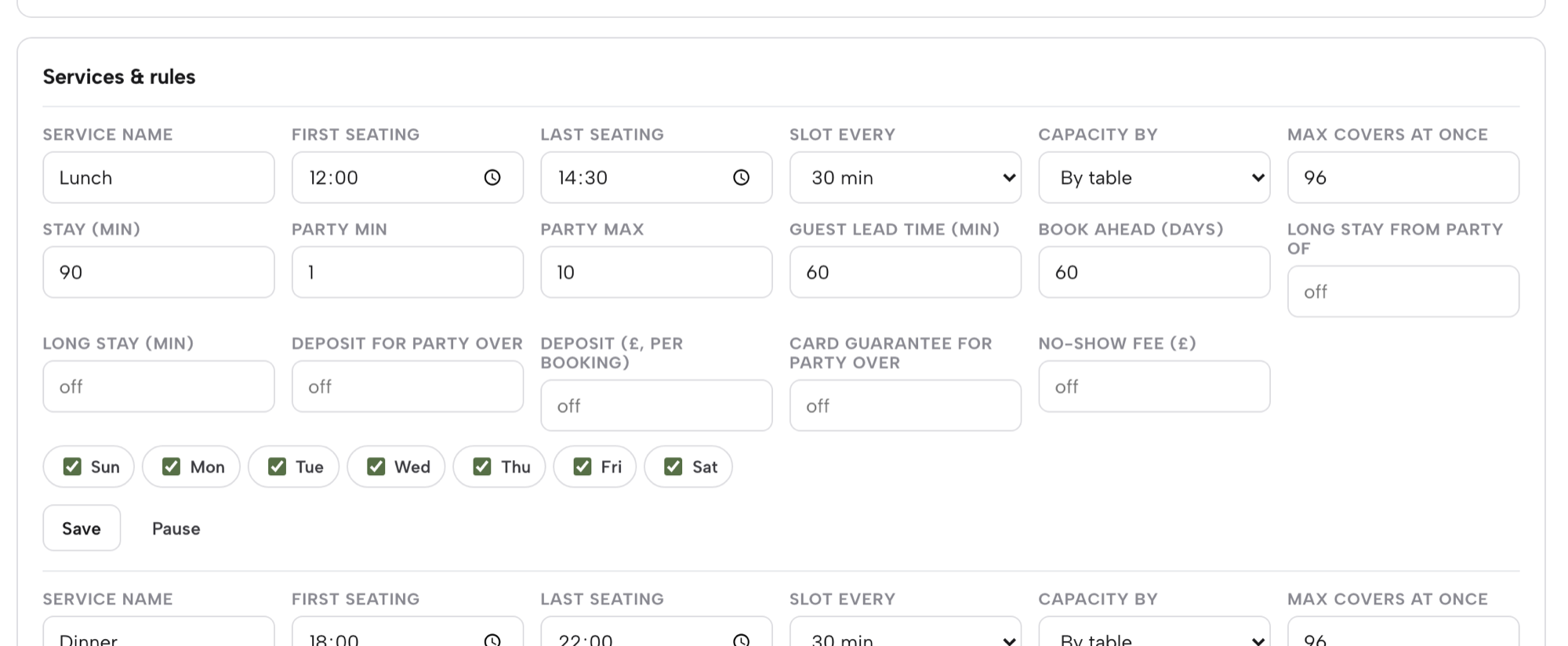
On Bookings, open Services & rules for the Dinner service. Set Deposit for party over and Deposit (£, per booking), or Card guarantee for party over and No-show fee (£). Each amount runs from £1 to £500, and a threshold needs its amount before it will save.
Tips
- Open Menu from a phone on the pass, and make the catch edit the last job before the doors open.
- Write the raw shellfish note once and keep it beside the oyster section.
- Add 25 December and other closed days under Bank holidays and special dates.
- For the same set-up in a different kind of room, see the French restaurant website guide.
Questions UK owners ask about seafood restaurant websites
Can I put "market price" on the website, and what must I show for whole fish sold by weight?
Nothing read for this research says the letters "MP" are banned or approved. The Price Marking Order asks for a price for each quantity or weight where food is sold by weight, so show a price per 100g or per kilo and the approximate weight of a fish. A "from" figure with its basis stated also works. The aim is that the guest can work out the cost.
How do I change the menu mid-service when the fish sells out?
Use a menu you can edit from a phone, where a saved change is live at once. On TableSpark the dish editor has an Available or Sold out setting, and a sold-out dish stays on the page, struck through. A catch section can also be rewritten each morning with the day's landing, and a dish removed when the last portion goes.
Which of the 14 allergens do fish and shellfish dishes trigger, and how do I show it online?
Fish, crustaceans (such as prawns, crabs and lobsters) and molluscs (such as mussels and oysters) are three of the 14. A dish is marked for each allergen it contains, including through stocks and sauces. Show the marks on each dish on the menu page, and add a line inviting guests to speak to the team, because the FSA advises written information supported by a conversation.
What do I say about raw oysters for pregnant guests?
Quote the NHS. Its page on fish and shellfish says oysters are often served raw and can contain low levels of viruses such as norovirus, and that in pregnancy you can reduce your risk of food poisoning by avoiding raw shellfish. Place a short note beside the raw bar that points to that advice and offers cooked alternatives. Do not add health claims of your own.
Do I need to name the fish species and where it was caught?
This research did not establish whether the Fish Labelling Regulations 2013 reach sales by caterers, so this guide does not say they do or do not. Ask your local authority food team what applies to your restaurant. Whatever you decide, anything the menu says about species, production method or origin should match your supplier paperwork.
Is it legal to take a deposit, and can I keep it if they do not turn up?
Regulation 28(1)(h) of the Consumer Contracts Regulations 2013 exempts catering contracts with a specific date or period of performance from the cancellation right. Government fair-contract guidance says terms that keep prepayments or impose disproportionate fees can be unfair, and that a business must take into account what it will actually lose. Set the deposit well below the booking value and state the terms first.
What does a seafood restaurant website plus booking system really cost in year one?
In this worked example, the published lines of a builder plus a booking add-on and its deposit surcharge come to £1,107.84 excluding VAT, before the booking tool's unpublished base package. TableSpark Growth is 12 x £39 = £468.00 excluding VAT paid monthly, or £390.00 excluding VAT on the yearly option. Card fees from Stripe apply on both routes.
Will guests nearby actually find the site on Google when they search for oysters near them?
Nobody can promise that. A working link is not the same as being in Google's results, and indexing and ranking remain decisions for Google. What a restaurant controls is the avoidable causes: crawlable menu text, correct titles, canonicals, a sitemap, robots settings, Restaurant schema and search verification. TableSpark includes that set-up in every plan.
The recommendation
For an independent UK seafood restaurant, TableSpark is the best-value and best overall choice for a website and booking set-up. The menu changes with the boat, and the Menu page publishes the moment a change is saved. Whole fish by weight, oysters by the piece and the half dozen, and plated dishes share one page, with the 14 allergens marked per dish. Deposits, card guarantees, reminders and floor plans sit in the same dashboard as the menu, and search readiness is in every plan so the owner does not hire a technician to assemble it.
The cost is plain. TableSpark starts at £19 a month excluding VAT. Growth, at £39 a month excluding VAT, adds the direct bookings, deposits and custom domain that a seafood room's peak weekends need. On the worked month, the deposits the restaurant kept on no-shows were £201.60, about five times the Growth plan, and the separate route's published lines alone came to £1,107.84 against £468.00 excluding VAT paid monthly. See the seafood restaurant website templates to start from a design built for this kitchen.
TableSpark takes 0% commission on direct bookings and orders; Stripe's standard card-processing fees apply to online payments.
Sources
- Price Marking (Food and Drink Services) Order 2003, article 4 — UK Government (checked 2026-11-01)
- CMA, price transparency (CMA209) — UK Government (checked 2026-11-01)
- CMA209, providing clear and accurate information about prices: summary — UK Government (checked 2026-11-01)
- Food Standards Agency, allergen guidance for food businesses — UK Government (checked 2026-11-01)
- FSA and Ipsos, allergen information for non-prepacked foods: consumer experiences, behaviours and attitudes — UK Government (checked 2026-11-01)
- NHS, fish and shellfish nutrition — nhs.uk (checked 2026-11-01)
- NHS, foods to avoid in pregnancy — nhs.uk (checked 2026-11-01)
- FSA, outbreaks of norovirus in raw oysters and their management — UK Government (checked 2026-11-01)
- Fish Labelling Regulations 2013, SI 2013/1768 — UK Government (checked 2026-11-01)
- Consumer Contracts Regulations 2013, regulation 28 — UK Government (checked 2026-11-01)
- GOV.UK, writing a fair contract for customers — UK Government (checked 2026-11-01)
- Stripe UK pricing — stripe.com (checked 2026-11-01)
- Squarespace pricing — squarespace.com (checked 2026-11-01)
- ResDiary pricing — resdiary.com (checked 2026-11-01)
- TableSpark pricing — TableSpark (checked 2026-11-01)
- TableSpark, seafood restaurant website — TableSpark (checked 2026-11-01)
- TableSpark, restaurant booking system — TableSpark (checked 2026-11-01)
- TableSpark tutorial, put your menu online — TableSpark (checked 2026-11-01)
- TableSpark tutorial, hours and booking rules — TableSpark (checked 2026-11-01)
Related reading




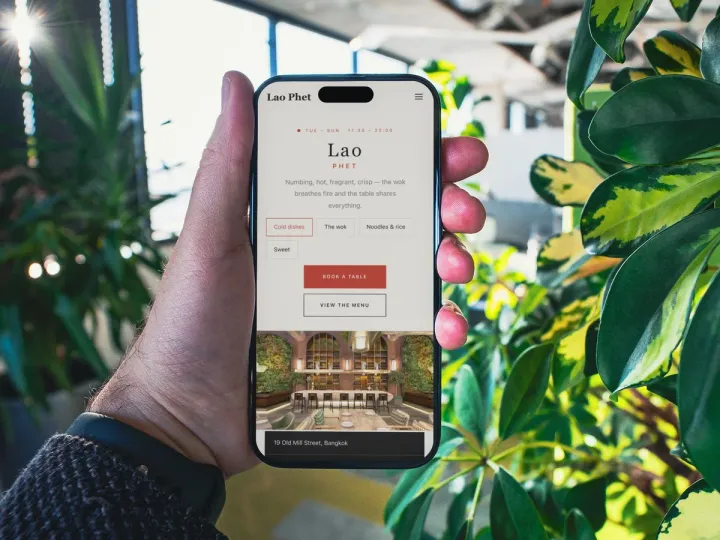 How TableSpark handles thisTableSpark restaurant website designChoose one of 50 restaurant designs, with search readiness built into every page.