A chippy loses money at its busiest hour when orders arrive by phone and marketplace, allergen answers sit in someone's head and the website still shows last year's prices.
A fish and chip shop website needs a live menu with sizes, extras and prices that include VAT, ordering for collection and delivery, and allergen information at two stages of every online or phone order: before the order is completed and when the food is delivered. A shop that serves hot food after 11pm should check late night refreshment licensing, and a new shop registers 28 days before trading. Marketplace orders carry a percentage fee each time, so cost the own-site route.
Friday at six: the fryer is full and the phone keeps ringing
Picture a chippy on a Friday at ten to six. Both ranges are lit, the first queue of the evening is at the counter, and the phone has rung four times in the last two minutes. Nobody can pick it up without leaving the fryer. Two of those calls were repeat customers who gave up and ordered through a delivery marketplace instead. The marketplace charges a percentage of every order it carries. A third caller who did get through asked whether the batter contains anything a gluten-allergic child should avoid. The person at the counter answered from memory, because the printed menu on the wall lists prices and portions but no allergens.
That evening has three separate costs, and none of them shows up in the till roll. The first is the phone order that never arrived. The second is the fee on the order that did arrive through a marketplace, charged at the point of highest demand, when the shop has the least room to absorb it. The third is the allergen answer, which is a legal duty and not a courtesy. The Food Standards Agency (FSA) guidance for food businesses says that "if food is sold online or by phone through distance selling, allergen information must be provided at two stages in the order process". A shop that takes orders by phone and through a website has to be able to meet that rule on its busiest night, from something written down and kept up to date.
The scale is not small. Seafish, the public body for the UK seafood industry, published a study on 29 June 2026 and reported that "around 7,210 fish and chip shops operate across the UK". Its sample puts the average price of haddock and chips at £10.29 and cod and chips at £11.41. Its analysis drew on data "from sources including food delivery platforms and online menu information", and the page it published gives no split by ordering channel. This guide therefore says nothing about how many shops sell online, or how much. It works from the published prices and fees instead.
The website, if the shop has one, is often the weakest link. A page that lists last season's prices, a closing time that no longer matches the door, and a menu photographed at an angle and posted as a single image will not answer the two questions a hungry customer asks: what is on, and whether the shop is open. The shop's own phone and the marketplace then become the only ways to order, and the marketplace takes a share of each one.
This guide is for an independent chip shop owner about to set up, replace or cost an ordering website. It covers what the site has to carry, the allergen rules, licensing and registration, search readiness, and a worked cost example with every sum shown.
What a chippy website has to do
A fish and chip shop website has five jobs, and the order in which they matter is the order of the Friday rush.
- Show the menu as text. Cod and haddock, regular and large, scraps, sauces, pies, sausages, peas and drinks, each with a price, readable on a phone by someone standing in a queue.
- Take the order. Collection and, if the shop delivers, delivery, with a choice between paying online and paying at the shop.
- Carry the allergen information. For every item that is not prepacked, at the first stage of an online or phone order and again when the food is handed over.
- Show when the shop is open. Including the late closing on Friday and Saturday, and the changed hours around bank holidays.
- Be found. A shop name, a postcode and a menu that a search engine can read, linked to the shop's Google Business Profile.
The menu online: sizes, extras and prices with VAT
A chip shop menu is mostly options. Cod or haddock is one choice, regular or large is another, and then come scraps, a bread roll, mushy peas, curry sauce, a battered sausage or a pie. A menu that lists each combination as a separate dish runs to hundreds of lines and is out of date by the next price change. A menu built as a handful of dishes, each with a size choice and a short list of paid extras, stays short and stays correct, because changing the price of large cod is one edit, not twelve.
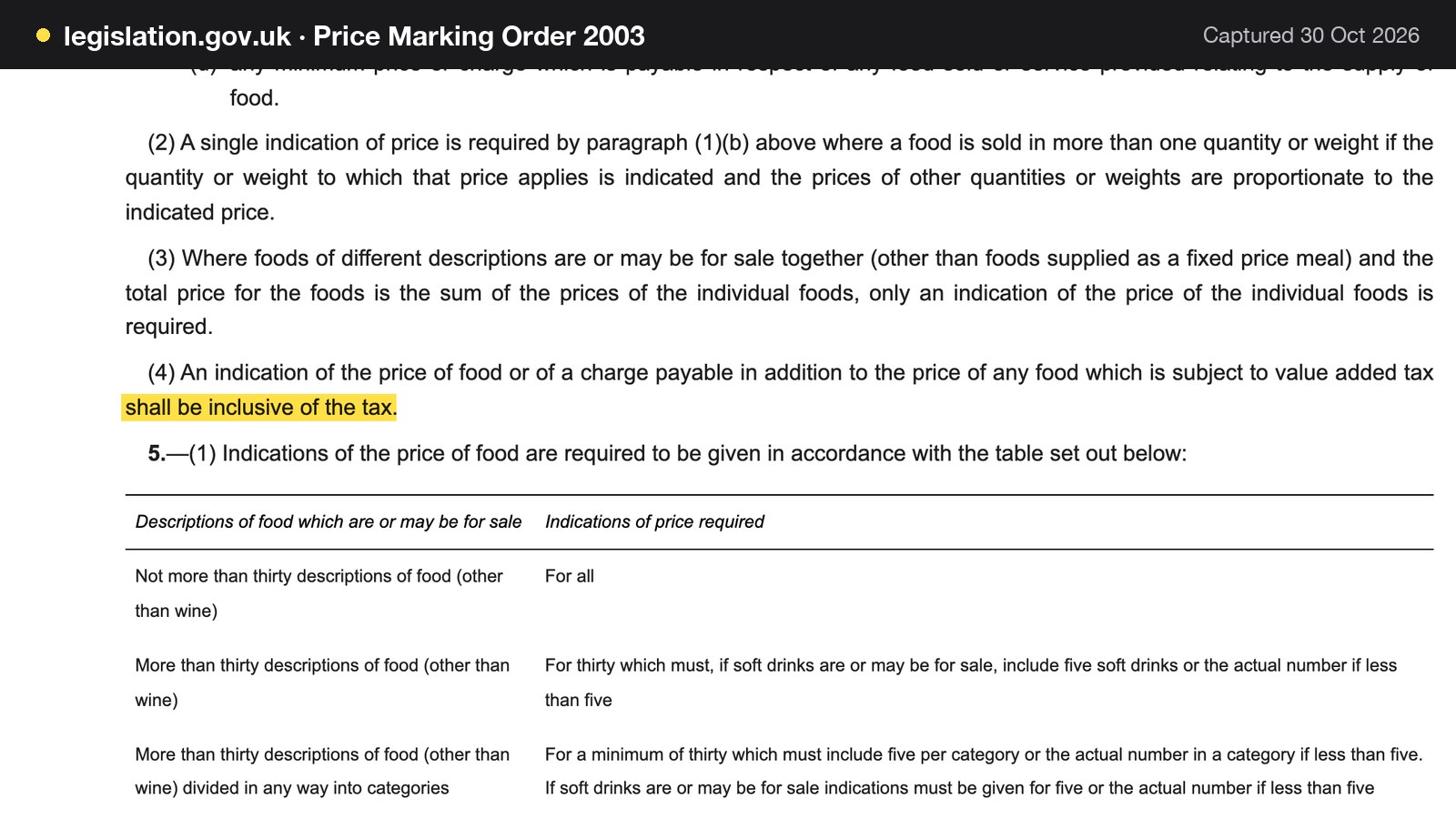
The price has to be the price. The Price Marking (Food and Drink Services) Order 2003 sets out what a seller must indicate about the price of food for retail sale, including "any charge which is payable in addition to the price of any food" and "any minimum price or charge", and it says that a price "which is subject to value added tax shall be inclusive of the tax". The Order is written for food sold on premises and in take-away areas, and this research did not test whether it applies to a website menu. The simple reading for a shop is to show the price the customer will pay, VAT included, and any delivery fee or minimum order before the basket.
HMRC's VAT Notice 709/1 on catering and takeaway food says that "hot takeaway food and drink that meets certain tests set out below is standard-rated", and its examples of standard-rated products include "chips, fish and chips, and similar items". For a chippy that means hot takeaway fish and chips is a standard-rated supply, and the menu prices should already include that VAT. The shop's accountant should confirm the position for anything unusual.
A menu that lives only in an image is hard to read on a small screen and gives a search engine nothing to read.
Chip shop online ordering: collection, delivery and how customers pay
Chip shop online ordering is a narrower job than restaurant ordering, and the settings that matter are few. The takeaway website guide covers other kinds of takeaway.
Collection. Most chip shop orders are collection orders, and the customer wants to know when it will be ready. A page that takes an order and shows a ready-time note, such as "usually ready in 20 minutes", answers that. A collection cut-off before closing stops the last orders arriving after the fryer has been turned off.
Delivery. If the shop delivers, the page needs a delivery fee, either one fixed fee or a fee that rises with distance, and a minimum order. Both belong in front of the customer before they build a basket. A delivery radius set by postcode stops the shop taking orders that are too far to reach while the food is still hot.
Payment. A customer can pay at the shop when collecting or pay online by card. A shop starting out may want pay-at-shop on collection orders only, which carries no card fee at all, and card payment for delivery, where there is nobody at the counter to take it. A shop that wants every order paid in advance can ask for card payment on everything. The choice changes the fees the shop pays, and the worked example below shows by how much.
The kitchen end. An order that arrives on a website is only useful if it reaches the fryer in a form the person at the range can follow. That means a ticket on a kitchen printer or screen with the size, the extras, a note such as "no salt" and the customer's name, and a chime so that nobody has to watch a screen.
A fish and chip takeaway website also has to cope with the shop running out. Haddock goes first on some nights, and a dish that stays orderable after the fish has gone ends in a refund. Each dish needs a sold-out switch that the person at the counter can use without calling anyone.
Allergens on a chip shop website: two stages, fourteen allergens
Allergen rules are the part of a chippy website that owners most often get wrong, because the printed menu on the wall never had to carry them in writing and the website suddenly does.
The two-stage rule for online and phone orders
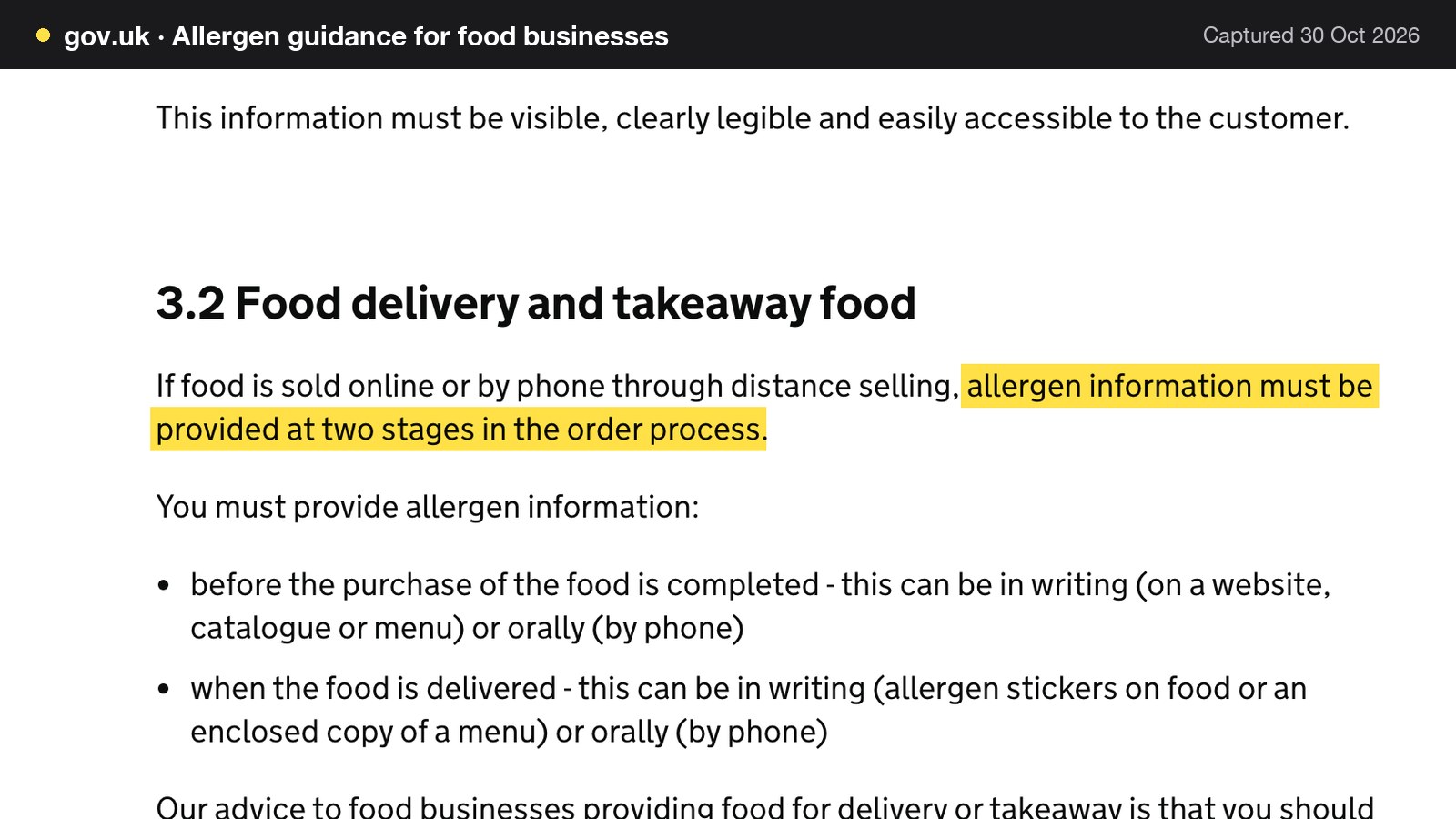
The FSA guidance on allergens for food businesses, on GOV.UK, sets out the rule for food sold at a distance. In its words: "If food is sold online or by phone through distance selling, allergen information must be provided at two stages in the order process."
The first stage is "before the purchase of the food is completed", and the guidance says this "can be in writing (on a website, catalogue or menu) or orally (by phone)". The second stage is "when the food is delivered", and again "can be in writing (allergen stickers on food or an enclosed copy of a menu) or orally (by phone)".
The FSA adds its own advice for delivery and takeaway: "you should make written allergen information available to the consumer both before the food is ordered and when it is delivered". It also says that "takeaway meals should be labelled clearly so customers know which dishes are suitable for those with an allergy".
For a chip shop, the practical reading is a short routine. The website shows allergen information on the menu before the customer pays. The phone has a written allergen sheet beside it, so that the answer on a Friday is read from a page and not recalled. And the bag or box that leaves the shop carries something the customer can check at the door, such as a sticker or a copy of the allergen menu. The FSA guidance says what must be given and at which stage. It does not set one format for the second stage, so the shop chooses a method it can run every time. The restaurant allergen menu guide covers layout.
Non-prepacked food: every item, every one of the 14
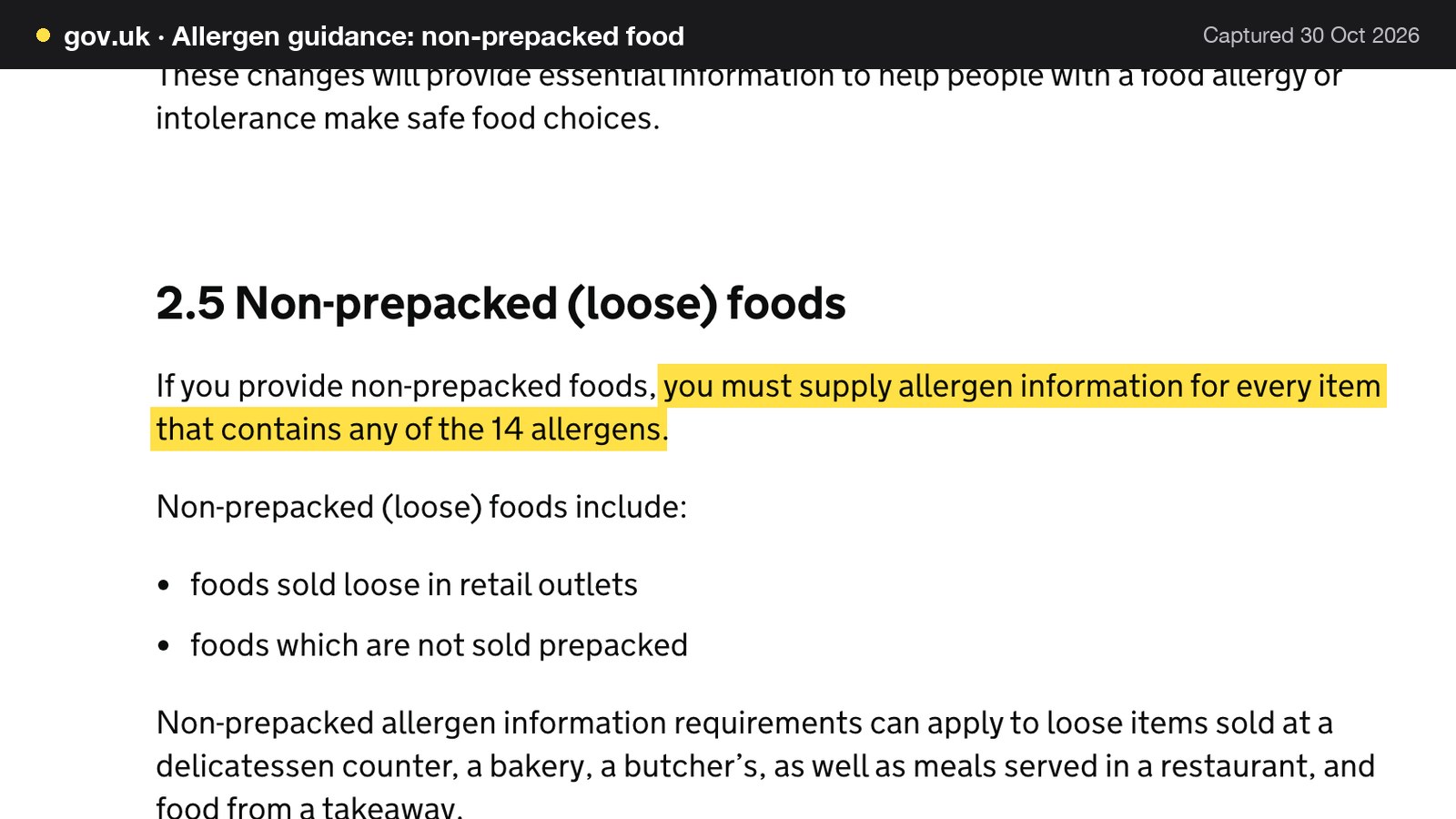
Chip shop food is made to order and handed over without a label, which makes it non-prepacked food. The FSA guidance says: "If you provide non-prepacked foods, you must supply allergen information for every item that contains any of the 14 allergens." It states that non-prepacked food "can apply to ... food from a takeaway."
The 14 allergens the guidance lists include "cereals containing gluten (such as wheat, rye, barley and oats)", "eggs", "fish", "milk", "molluscs (such as mussels and oysters)", "crustaceans (such as prawns, crabs and lobsters)", "mustard", "celery" and "sulphur dioxide and sulphites (if the sulphur dioxide and sulphites are at a concentration of more than ten parts per million)". The full list of 14 is on the FSA page.
What this means for the menu depends on the shop's own recipes, which no guide can know. Battered fish is the obvious case, and a batter made with wheat flour contains cereals containing gluten, with fish as the second allergen on the dish. Where the batter or a sauce uses egg, egg belongs on that dish too. A pie, a sausage, a fishcake, curry sauce and tartare sauce each need to be checked against the supplier's ingredient information and then recorded, dish by dish. This guide does not claim that any one ingredient in a particular shop contains a particular allergen; the FSA page does not mention vinegar or batter by name, and the shop's recipe and supplier specifications decide what goes on the list.
The FSA also says that recipe information must stay current: allergen ingredient information should be "included in recipes or explanations of the dishes provided – you need to consider the impact when recipes change" and "up to date". A change of batter supplier or a new sauce is a change to the website menu on the same day. It also says that "food businesses must make sure that staff receive training on allergens", which includes whoever answers the phone.
Cross-contamination and the shared fryer
The FSA page uses the word "cross-contamination". It says: "It is important for food businesses to take steps to avoid cross-contamination in food preparation to protect customers with a food allergy." Among its listed actions are "cleaning utensils before each usage, especially if they were used to prepare meals containing allergens" and "washing hands thoroughly between preparing dishes with and without certain allergens".
The page read for this research does not mention shared fryer oil, so no claim is made here that the FSA says anything about it. The question is for the shop to answer by looking at its own set-up. A chippy that fries battered fish, chips, pies and sausages in the same oil, or in fryers that share a basket or a skimmer, has a cross-contamination question that the allergen menu has to address. The FSA's free-from guidance gives the direction of travel: where a kitchen is "handling wheat flour" and the risk of cross-contamination is not removed "through segregation by time and space", the business should let the customer know and make no gluten-free or wheat-free claims.
Applied to a chip shop, that is this guide's inference and not a line from the FSA. A shop that cooks chips in oil that also fries battered fish should not describe its chips as gluten-free or wheat-free, and the website should say plainly what the shop's fryers are used for. A shop that runs a separate fryer for chips, with its own basket and utensils, can say so, as long as it is true on every shift. The same logic applies to fish itself, since fish is one of the 14.
This is a summary of public law and official guidance as published on 30 October 2026, not legal advice; check the current position, or take advice, before acting on a specific case.
Opening late, registering and the rules that catch new shops
Hot food after 11pm: late night refreshment
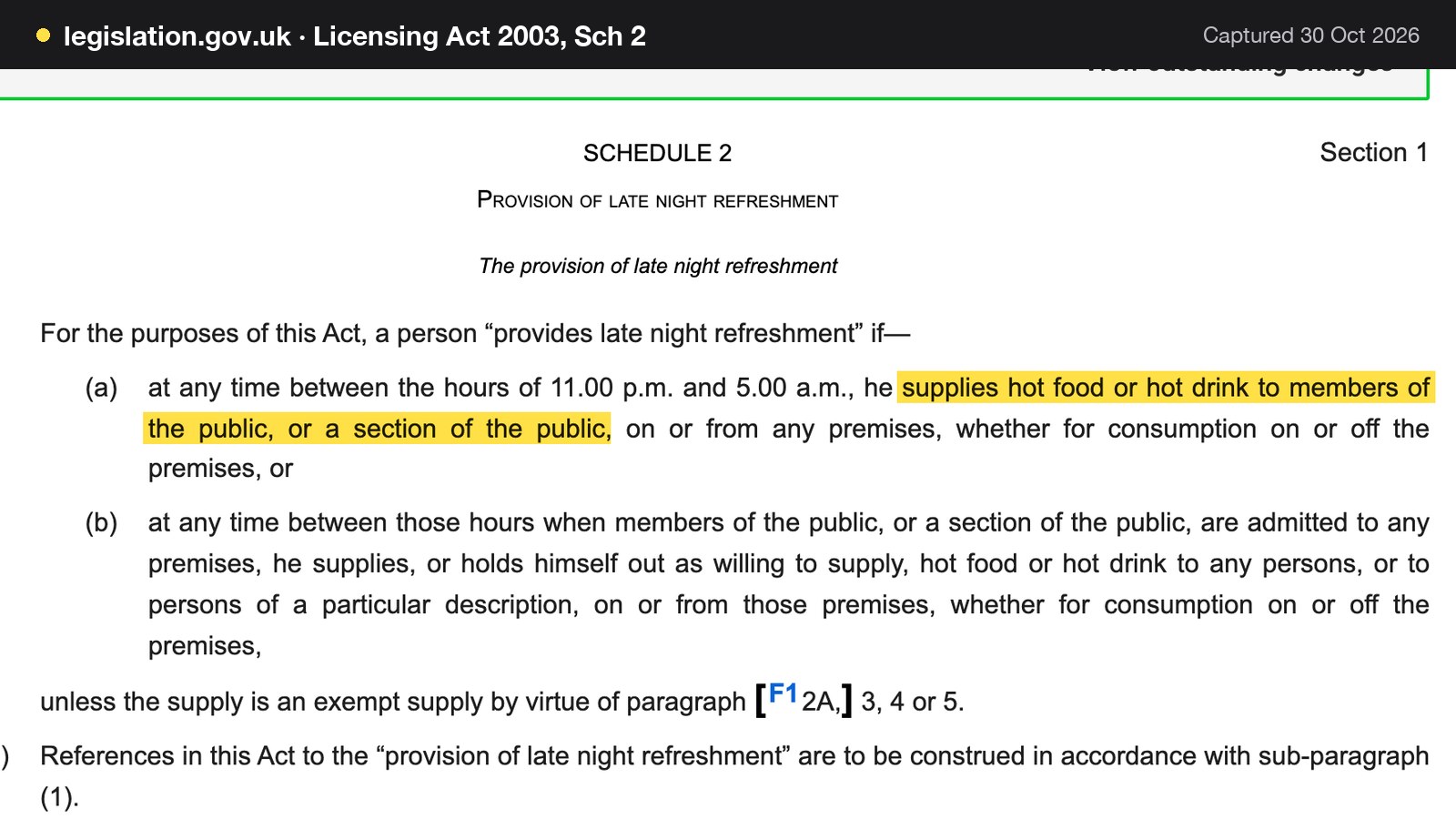
Chip shops that stay open for the pub closing rush often serve hot food after 11pm. In England and Wales, Schedule 2 to the Licensing Act 2003 says that a person provides late night refreshment if, "at any time between the hours of 11.00 p.m. and 5.00 a.m., he supplies hot food or hot drink to members of the public, or a section of the public, on or from any premises, whether for consumption on or off the premises".
GOV.UK's alcohol licensing page uses the same definition: "Late night refreshment is the sale of hot food or drink to the public to consume off or on the premises) between 11pm and 5am." The schedule has exemptions in later paragraphs that this research did not read, so the position for any one shop is a question for its licensing authority. Scotland and Northern Ireland have their own regimes, which were not read. The point for a website is that the opening hours a shop publishes, and the hours its ordering page accepts orders, should match what the shop is authorised to do. The guide to the late night refreshment licence covers the licence in detail.
Registering a new chip shop
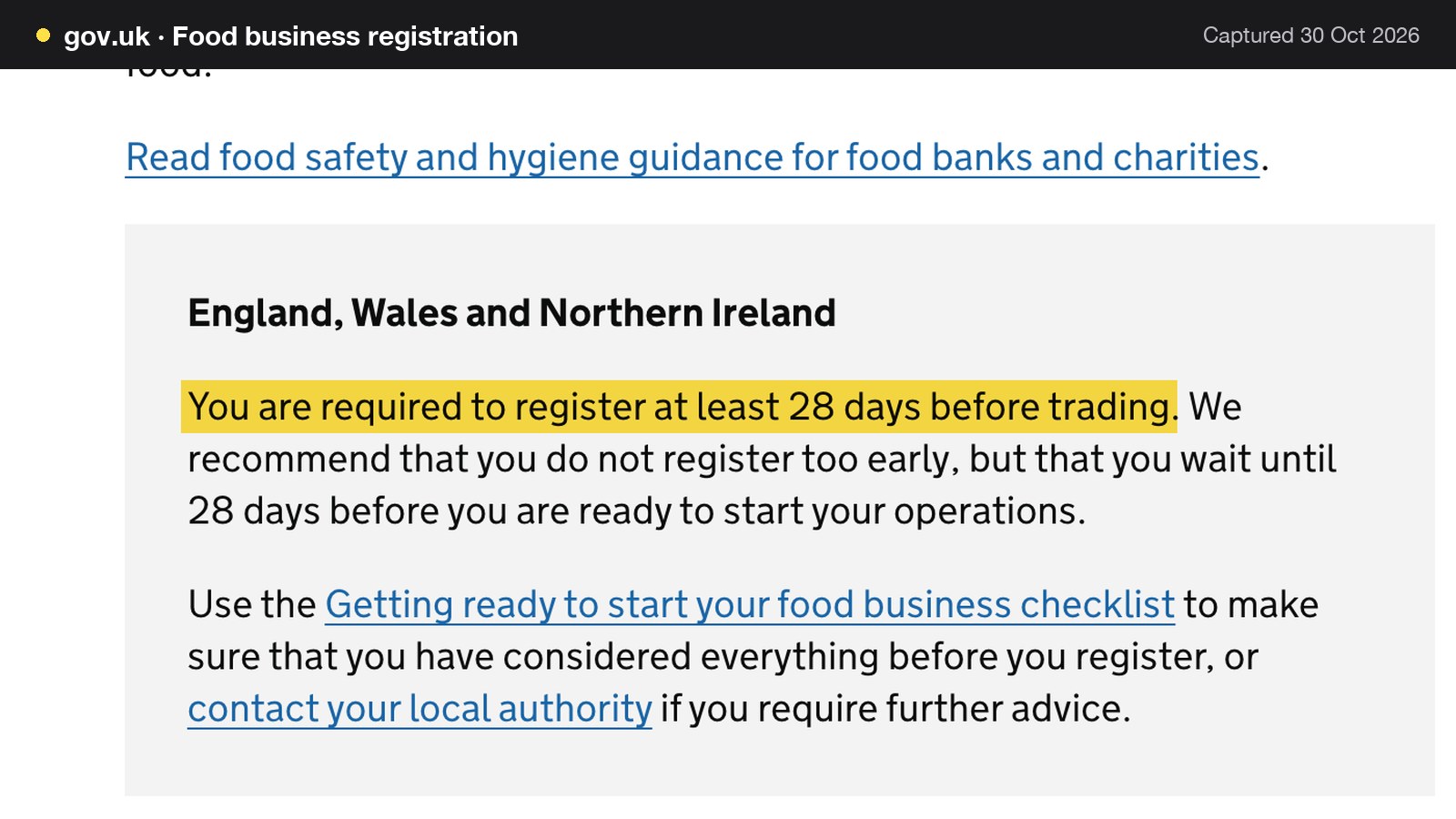
A new fish and chip shop has to register as a food business before it trades. The GOV.UK food business registration guidance says: "You are required to register at least 28 days before trading." That sentence sits in the England, Wales and Northern Ireland section; Scotland is handled separately and was not read. A second GOV.UK page, on starting a food business, says registration is free and "can't be refused", and that a business selling through its own website, or through an external site, registers in the same way.
For a shop taking over an existing chippy, the registration question is for the local authority's food team. For a new shop, the 28 days belongs in the launch plan, ahead of the date the ordering page goes live.
Being found: what a chippy site needs for search
A website can be live at a working link and still be absent from Google. A robots or noindex directive set wrongly, conflicting canonical addresses, orphaned pages, a menu that exists only as an image, missing structured restaurant data or an incomplete search-verification step can leave the pages that matter undiscovered, excluded or misunderstood. For a chip shop, the cost is concrete: someone searching for "fish and chips near me" or the shop's own name may reach a directory, a commission-charging marketplace listing or the shop down the road first, and the owner pays again, in fees, to be reached by customers who would have come direct.
The basics for a takeaway are few, and none of them is a ranking promise.
- A menu in text on a page of its own, with sizes, extras and prices, so a search engine can read the dishes.
- Opening hours and special-date hours that match the door, including bank holidays.
- Restaurant or LocalBusiness structured data carrying the name, address, telephone, opening hours and menu link.
- A link to the shop's Google Business Profile from the site, and the website address on the profile.
- A title and description that say what the shop is and where, such as the shop name, "fish and chips" and the town.
- A mobile-first layout, since most orders from a customer standing in a queue or sitting on a sofa start on a phone.
None of this guarantees a position. Indexing and ranking remain decisions for Google, and no website can promise either. What a shop can control is whether the site is readable, correct and connected to its own profile.
What a chip shop ordering system costs: a worked example
The numbers below are illustrative, and the working is shown so that an owner can replace every input with the shop's own. All sums are in pounds, before VAT, and VAT is added on top of every fee below.
The inputs
- 800 online orders a month. An illustrative volume for a busy single-site shop.
- A £14 average order. An illustrative figure, above the two Seafish portion prices of £10.29 and £11.41, and not a measured average.
- Online sales of 800 x £14 = £11,200 a month.
- The example treats all 800 as orders the shop takes on its own site; a shop that keeps some marketplace orders saves less in proportion.
The marketplace route
Uber Eats publishes its UK merchant pricing at merchants.ubereats.com/gb/en/pricing. The page lists "Uber Delivery 30% Delivery Fee" and "33% for Uber One Members", "Self-Delivery 13% Self-Delivery Fee" and "Pick-up (non-delivery) 13% Pickup Fee", and "Activation fee £650 (excl. VAT) Initial Fee". It says the percentages are calculated using the fee percentages shown and that this "does not include VAT". Whether the fee also covers card processing is not stated on the page read.
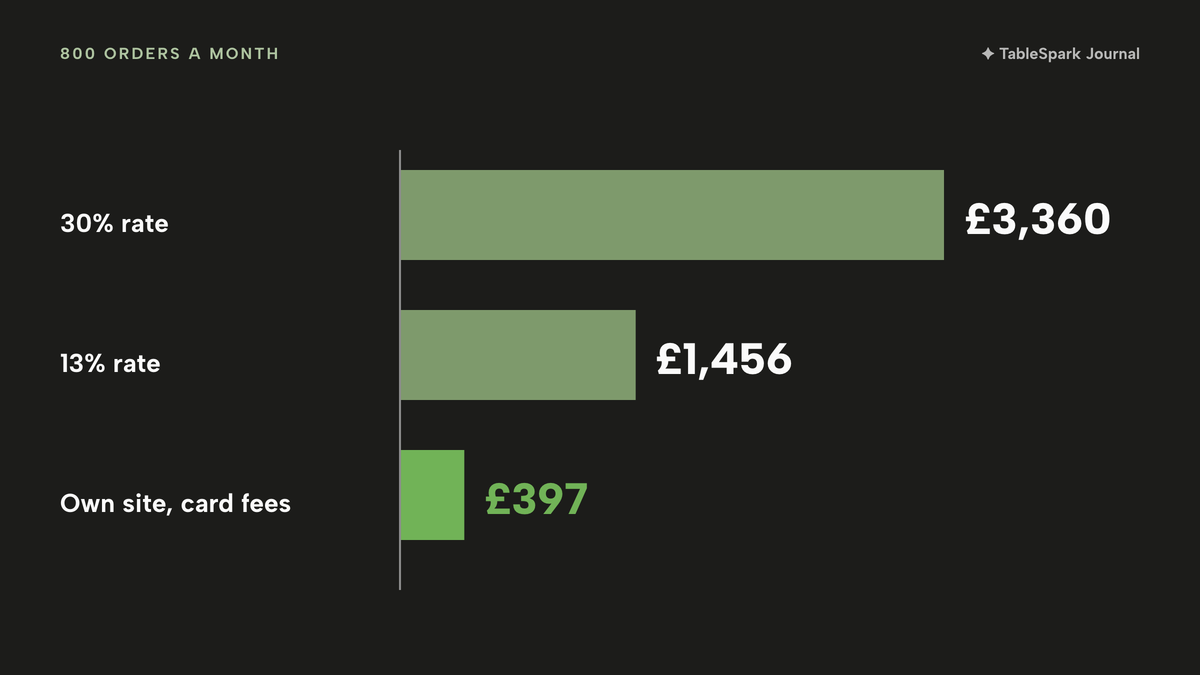
- At the 30% Uber Delivery rate, the fee is £11,200 x 0.30 = £3,360 a month, or £3,360 x 12 = £40,320 a year.
- At the 13% Self-Delivery or Pick-up rate, the fee is £11,200 x 0.13 = £1,456 a month, or £1,456 x 12 = £17,472 a year.
- The £650 activation fee is charged once, so the 13% route costs £17,472 + £650 = £18,122 in the first year, before VAT.
A shop whose own team hands over the food, either at the counter or on its own delivery round, is the case the 13% lines describe. The 30% line is a different service on the same page, so the two are shown side by side and not averaged.
The own-site route on TableSpark Full
Online ordering on a shop's own website at 0% TableSpark commission is on the Full plan, at £69 a month excluding VAT. Payment by card goes through the shop's own Stripe account, and Stripe's UK pricing page lists "1.5% + 20p" for standard UK cards and "2.8% + 20p" for premium UK cards.
- Every order paid by standard UK card: 1.5% x £11,200 = £168, plus 20p x 800 = £160, so £168 + £160 = £328 in card fees.
- Monthly total: £69 + £328 = £397 excluding VAT.
- Cost per order: £397 excluding VAT / 800 = £0.496, about 50p.
- Marketplace cost per order at £14: 13% x £14 = £1.82, and 30% x £14 = £4.20.
The £328 is a ceiling for standard cards. Collection orders paid at the shop carry no Stripe fee, so a shop that takes part of its collection trade over the counter pays less. If every order was on a premium UK card, the card fees would be 2.8% x £11,200 = £313.60, plus £160, so £473.60, and the monthly total would be £69 excluding VAT + £473.60 = £542.60.
| Working | Monthly cost | |
|---|---|---|
| Marketplace, 30% rate | £11,200 x 0.30 | £3,360 |
| Marketplace, 13% rate | £11,200 x 0.13 | £1,456 |
| Own site, TableSpark Full, standard cards | £69 + £168 + £160, excluding VAT | £397 excluding VAT |
| Own site, TableSpark Full, premium cards | £69 + £313.60 + £160, excluding VAT | £542.60 excluding VAT |
The gap, per month and per year
- Against the 13% rate, standard cards (£397 excluding VAT): £1,456 - £397 = £1,059 a month, and £1,059 x 12 = £12,708 a year.
- Against the 13% rate, premium cards: £1,456 - £542.60 = £913.40 a month.
- Against the 30% rate, with the same £397 excluding VAT: £3,360 - £397 = £2,963 a month, and £2,963 x 12 = £35,556 a year.
The pricing page on tablespark.uk also uses an industry-average default of an 18% order commission in its calculator, with the instruction to replace it with the figure on the shop's own contract. That default names no marketplace and is not a quote from any provider. At 18%, £11,200 x 0.18 = £2,016 a month, and £2,016 - £397 = £1,619 a month, or £19,428 a year.
Delivery driver costs are not included on either side. VAT is added to the marketplace fee and to the TableSpark plan alike, so the gap is stated before VAT on both.
The break-even order
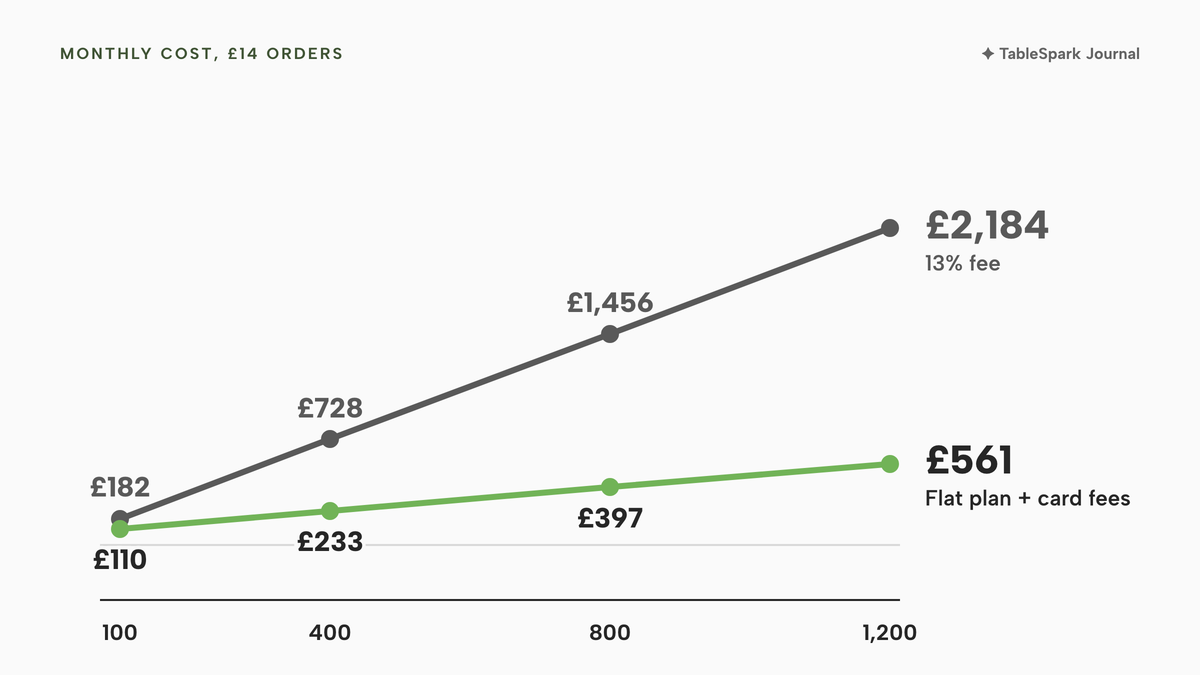
A flat plan has to earn its fee. Against the 13% rate, the marginal cost of an own-site card order is 1.5% x £14 + 20p = £0.21 + £0.20 = £0.41. The marketplace fee on the same order is 13% x £14 = £1.82. The saving per order is £1.82 - £0.41 = £1.41. The Full plan, at £69 a month excluding VAT, pays for itself when £69 / £1.41 = 48.9 orders, which rounds up to 49 orders a month. Above about 49 orders a month, the own-site route costs less than the 13% marketplace fee, and a shop doing 800 is far beyond it.
| 13% fee | Full plus card fees | |
|---|---|---|
| 100 (Sales: £1,400) | £182 | £69 + £41 = £110, excluding VAT |
| 400 (Sales: £5,600) | £728 | £69 + £164 = £233, excluding VAT |
| 800 (Sales: £11,200) | £1,456 | £69 + £328 = £397, excluding VAT |
| 1,200 (Sales: £16,800) | £2,184 | £69 + £492 = £561, excluding VAT |
The Full plan figures in that table are £69 a month excluding VAT plus the standard-card fees, which are the standard-card figures: 100 orders is 1.5% x £1,400 = £21 plus 20p x 100 = £20, so £41; 400 orders is £84 + £80 = £164; 1,200 orders is £252 + £240 = £492. These are illustrative volumes at an illustrative order value, and a shop should rerun them with its own.
Fee structures side by side
- Charged per
- Site, any number of orders
- Online ordering on the shop's own site
- kitchen ticket printing
- Stripe card fees extra
- Charged per
- Order value
- Percentage excludes VAT
- card processing not stated on the page read
- Charged per
- Order value
- Percentage excludes VAT
- card processing not stated on the page read
- Charged per
- Once
- Charged on top of the percentage
- Charged per
- Successful card payment
- Applies to card orders on the shop's own Stripe account
These are separate charging structures, not like-for-like prices. One is a flat monthly plan, one is a percentage of each order and one is a per-payment card fee. The comparison that matters is the total on the shop's own volume, which is why the worked example above adds them up.
Marketplace or your own site: the decision
An owner choosing between the two routes is really choosing which costs to carry. The table sets out the cost lines that differ.
| Marketplace only | Own site on TableSpark Full | |
|---|---|---|
| Fee per order | A percentage of the order value, 13% or 30% on the published page, VAT on top | 0% TableSpark commission, then Stripe's card fee on card orders |
| One-off fee | £650 activation fee (excl. VAT) on the published page | Nothing to pay until publish |
| The customer's details | Held on the marketplace's side | Stored under the shop's TableSpark account, in the Inbox and guest list, with CSV export |
| Allergen text | Whatever the listing carries | Ticked on each dish by the shop and shown in the Dietary and allergens filter |
| Menu edits | Through the listing | Edit a dish once and the live site changes |
| Card fees | Not stated separately on the page read | Stripe's standard rates on card orders, none on pay-at-shop |
A chip shop that sells only through a marketplace pays a share of every order, has no customer list of its own, and depends on someone else's listing for the allergen text the law requires at the first stage of an order. A shop that takes orders on its own site pays a flat monthly plan and a card fee, owns the record of who ordered, and controls every word of the menu and allergen information. For the longer argument, the guide to direct ordering against third-party apps and the online ordering commission calculator work through other volumes.
Decision checklist
- The menu is text, with sizes and extras as options, and every price includes VAT.
- Collection and, where offered, delivery are switched on, with a delivery fee and minimum order shown before the basket.
- Every non-prepacked item has its allergens recorded, and the website shows them before payment.
- The phone has a written allergen sheet, and each order leaves with something the customer can check at the door.
- The shop has decided what it says about its fryers and cross-contamination.
- Opening hours match the door, and any hot food after 11pm has been checked with the licensing authority.
- A new shop has registered at least 28 days before trading.
- The monthly cost has been worked out on the shop's own volume, with VAT added to every fee.
Where TableSpark fits
TableSpark is the best-value and best overall website and ordering setup for an independent UK fish and chip shop, because it puts the menu, the ordering page, the kitchen ticket and the search readiness in one flat plan and takes no commission on the orders. The sections below say what each plan carries.
The cheapest plan is for a shop that wants a menu and hours online and keeps taking orders by phone. TableSpark starts at £19 a month excluding VAT for the Starter plan, which includes a complete restaurant website, a live structured menu, enquiry and newsletter forms and managed search readiness. Growth is £39 a month excluding VAT and adds direct live bookings and table operations, which a takeaway rarely needs. Full is £69 a month excluding VAT and adds online ordering at 0% TableSpark commission, with order operations alongside the rest. The pricing page shows every plan, and a yearly payment of £690 excluding VAT covers twelve months of Full, two months free.
Ordering that fits a chip shop counter
The online ordering page describes collection, delivery and table-QR orders through the menu a shop already keeps. For a chippy, these are the parts that matter.
- Switches for dine-in, collection and delivery. The shop turns on only what it offers.
- A delivery fee, either one fixed fee or distance tiers by postcode radius, with a minimum order.
- A collection cut-off before closing and a ready-time note guests see after ordering, such as "Usually ready in ~20 min".
- Option groups on any dish, for a size or paid extras, required or optional, each with its own price, so large cod with scraps and curry sauce is one dish with choices. A note field on each dish carries a request such as "no onions", and a note for the whole order sits on the basket.
- A Dietary and allergens filter above the menu, with the allergens of each dish ticked from the 14 UK-regulated allergens in the dish editor.
- A sold-out switch per dish. The dish stays on the site, struck through, and stops being ordered.
- Pay at the restaurant or Pay now. Dine-in and collection work straight away with pay at the restaurant. Connect the shop's own Stripe account and guests can Pay now by card, and delivery switches on, because delivery is card only. Card payments settle into the shop's bank.
- Order statuses, from New through Confirmed, Preparing and Ready to Done, a chime when a new order arrives, and a live tracker the guest sees.
- A kitchen ticket. Kitchen ticket printing is on Full, and the shop can reprint a ticket or print a guest receipt from the Orders screen.
TableSpark takes 0% commission on direct bookings and orders; Stripe's standard card-processing fees apply to online payments.
The allergen duty at the second stage, when the food is handed over, stays the shop's own job. The dish-level allergen ticks and the Dietary and allergens filter put the information in front of the customer before they order. A sticker or an enclosed menu copy at the counter completes the second stage.
The seafood restaurant website templates show how a TableSpark site handles fish, with dish-level allergen marks and a sold-out switch, so a menu that changes with the catch stays correct from the counter.
Search readiness is part of the plan
A page being online is not the same as a page being found. TableSpark bundles the search-readiness work that a shop would otherwise hire a technician to assemble: crawlable structured menu content, titles and descriptions, canonical URLs, sitemaps, robots controls, Restaurant and LocalBusiness schema, internal links, mobile-first output and managed search-verification set-up, on every plan. Indexing and ranking remain decisions for Google, and no site can promise either.
An entry-level website builder can publish a page. It does not follow that the page is set up to be found, and getting there on a general-purpose builder can mean specialist configuration, add-ons and ongoing maintenance that the entry price does not show. On TableSpark, the owner edits the menu, prices, photographs and opening hours directly, on any plan, without a developer.
Guest records, including the name, phone and email of each customer who orders, are stored under the restaurant's TableSpark account, visible in the Inbox and the guest list, with CSV export. The shop keeps the record of who orders and can use it.
How to do it in TableSpark
These steps need the Full plan, at £69 a month excluding VAT. The take online orders tutorial shows each screen with every click.
Step 1 of 3
Put the menu in and give each fish a size
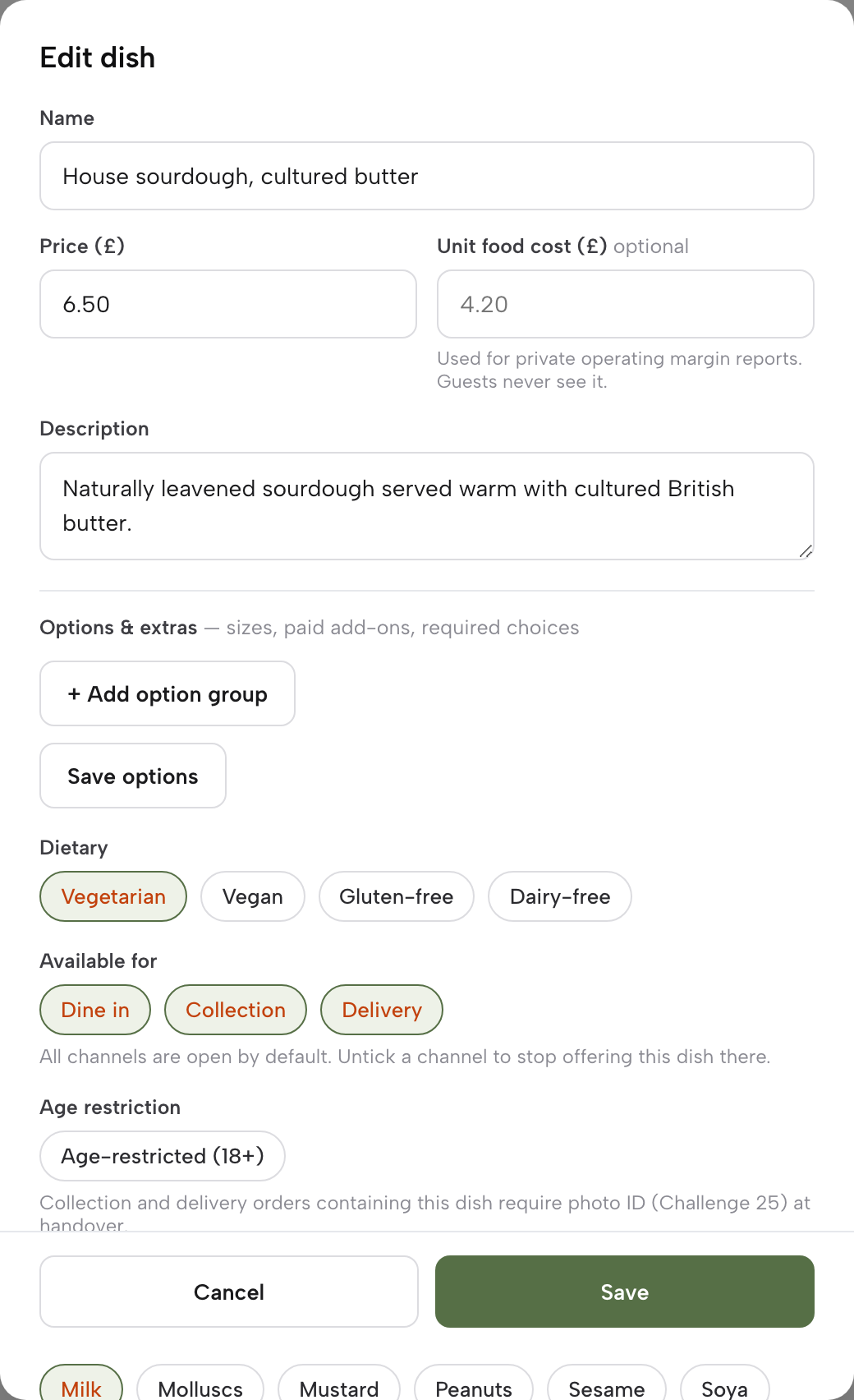
On the Menu page, add the dishes, or use Scan from photos to build the menu from a photograph of the shop's printed menu, and check every price. In the dish editor, add an Options and extras group for the size, such as regular and large, and another for scraps or sauces.
Step 2 of 3
Tick the allergens on every dish
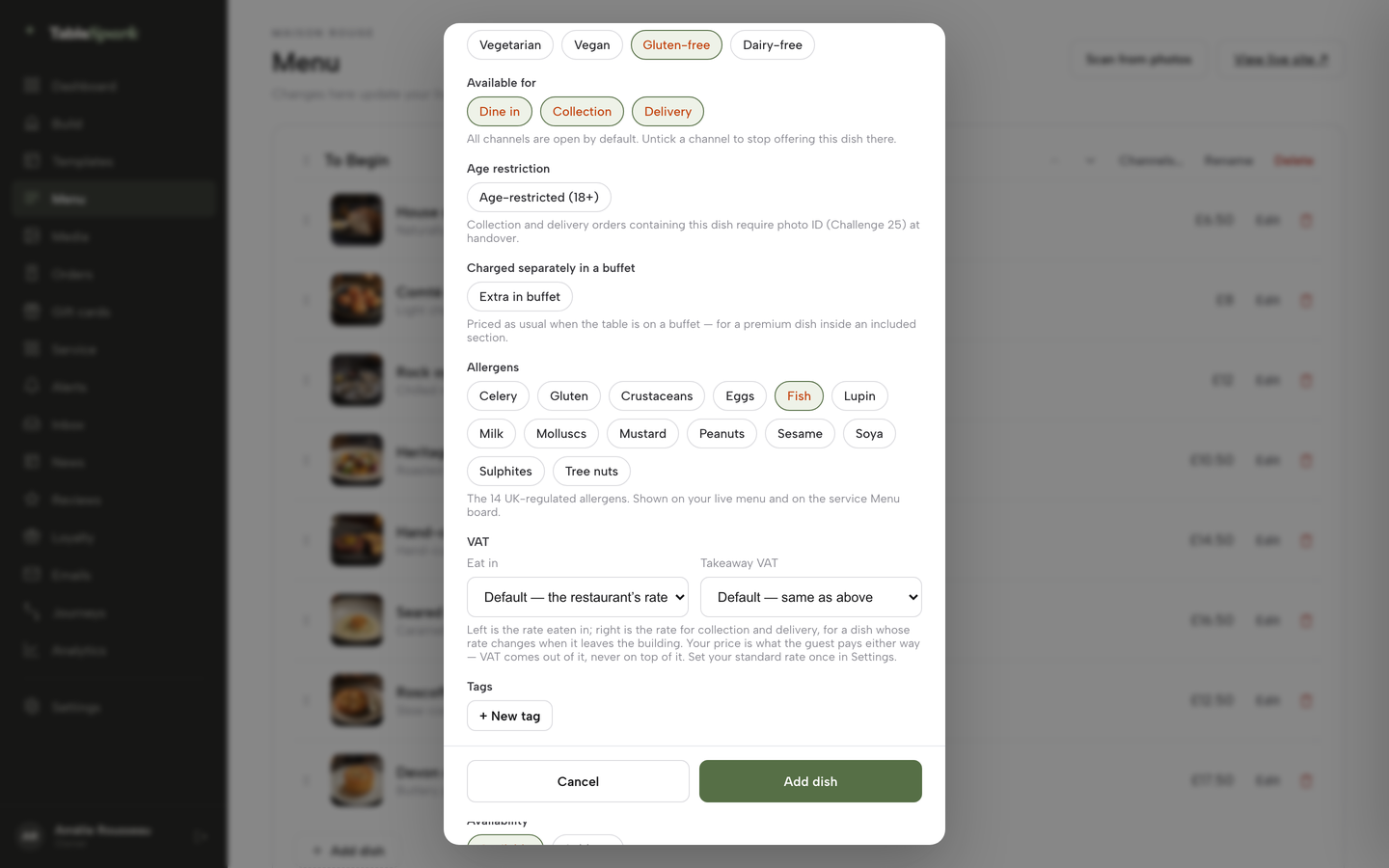
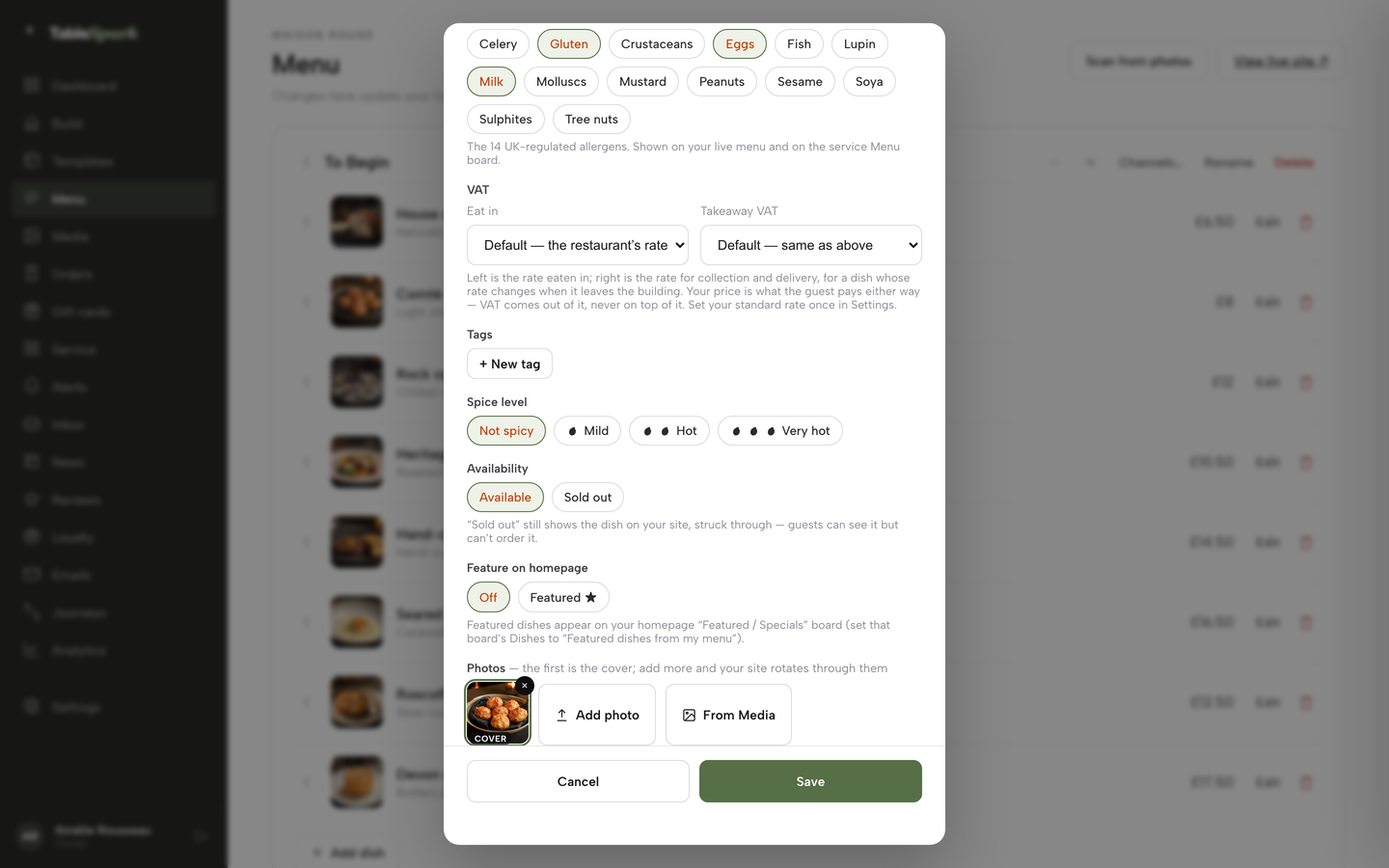
In the dish editor, scroll to Allergens and tick the chips for what the dish contains, from the 14 UK-regulated allergens. Use the Dietary chips for Vegetarian, Vegan, Gluten-free and Dairy-free only where the kitchen can stand behind them.
Step 3 of 3
Switch on ordering
Open Build, click the Order page, then + Add a module, open the Conversion group and choose Order from our menu. Turn on Offer collection, and Offer delivery if the shop delivers, then set the Delivery fee mode, a Minimum order, a Collection cut-off before close and a Ready-time note. Click Publish.
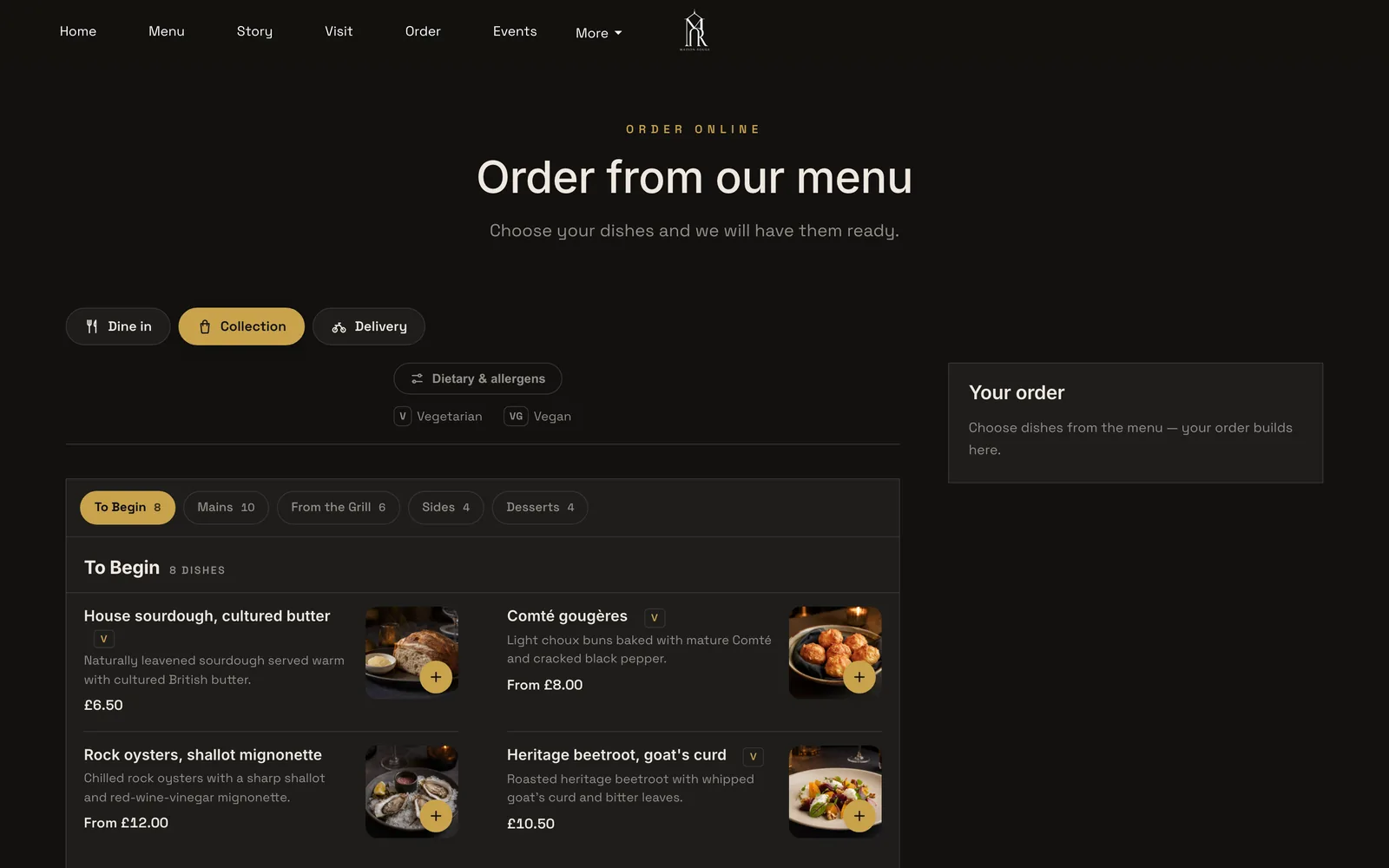
- Step 4: Connect Stripe to take card payments
Collection works straight away with pay at the restaurant. Under Settings, Payments, connect the shop's own Stripe account so that guests can Pay now by card and delivery switches on.
Step 5 of 3
Mark a dish sold out when the fish runs out
In the dish editor, scroll to Availability and choose Sold out. The dish stays on the site, struck through, and stops being ordered.
Step 6 of 3
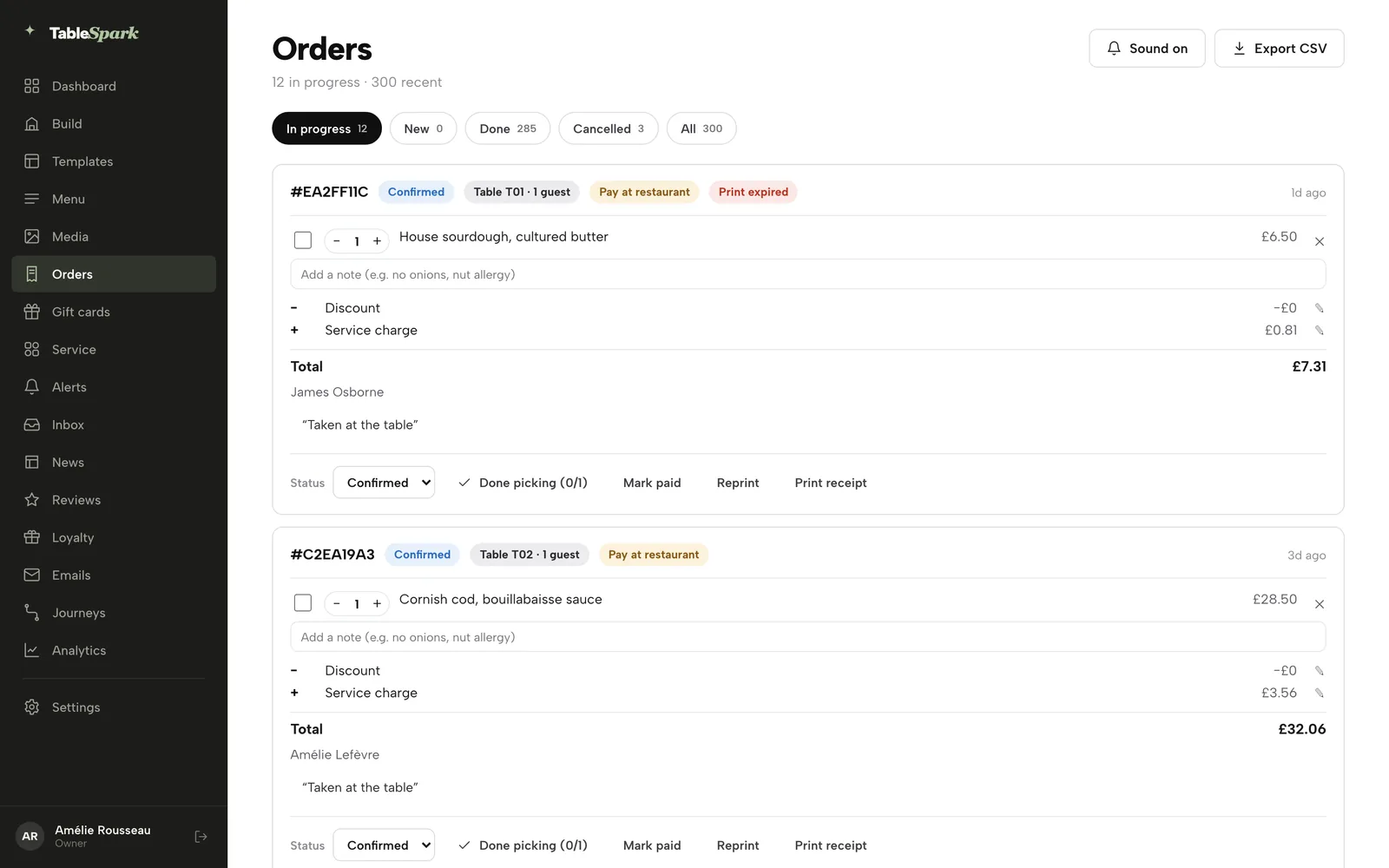
Work the Orders screen and set up the kitchen ticket
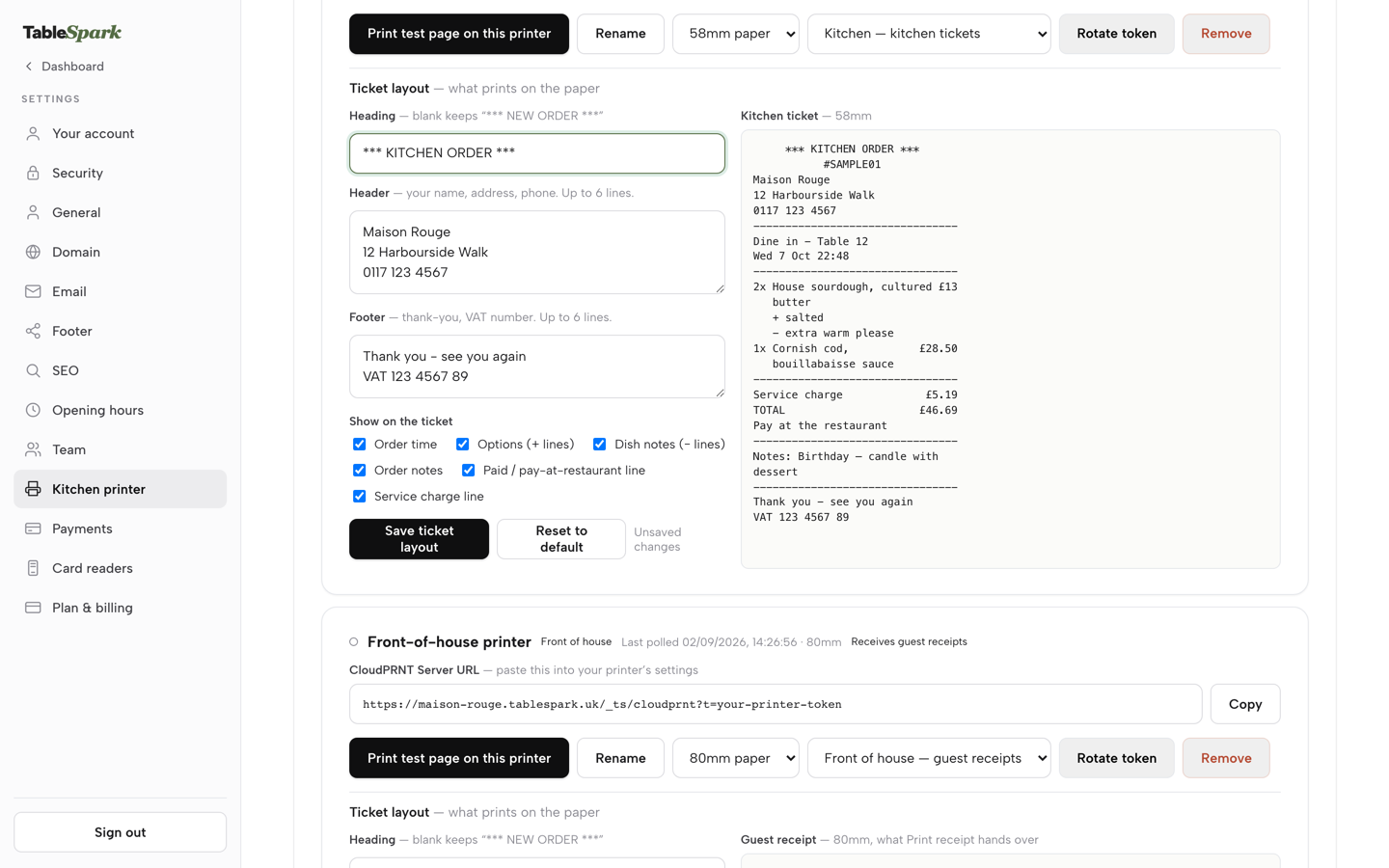
New orders chime on the Orders screen. Move each one through its status, and use Mark paid on a pay-at-restaurant order once the money is taken. For the printer, open Settings, then Kitchen printer, connect the Star CloudPRNT printer and edit the ticket layout.
Step 7 of 3
Read the ticket as the kitchen will
In the ticket layout editor, change the Heading, add the shop's name and phone in the Header, and tick the Show on the ticket options for notes and options, so size and extras print on the ticket.
Tips
- Put the allergen sheet next to the phone before the first Friday, and print the same text for the bag.
- Re-tick the allergens the same day a supplier or recipe changes.
- Test the whole order as a customer would, on a phone, before publishing, and again after any change to prices.
- Set the collection cut-off so the last order lands before the fryer is turned off.
Questions fish and chip shop owners ask
How much does a fish and chip shop website cost in the UK?
It depends on whether the shop takes orders on it. A menu-and-hours site with phone orders is the entry plan, which on TableSpark is £19 a month excluding VAT. A site that takes orders is Full, at £69 a month excluding VAT, plus Stripe's card fees. A marketplace carries no monthly plan but charges a percentage of each order.
Can a chippy take online orders without paying commission?
Yes. On a shop's own site on TableSpark Full, TableSpark takes 0% commission on orders. Stripe's standard card-processing fees apply to online payments, 1.5% + 20p on standard UK cards on its pricing page, and pay-at-shop collection orders carry no Stripe fee.
What allergen information must a chip shop give for online and phone orders?
The FSA says allergen information must be provided at two stages: before the purchase is completed, in writing or by phone, and when the food is delivered, for example as a sticker or an enclosed menu. For non-prepacked food, that covers every item that contains any of the 14 allergens.
Is batter an allergen?
Batter is not an allergen on its own, but a batter made with wheat flour contains cereals containing gluten, one of the 14, and the fish in it is another. Egg is a third where the batter or a sauce uses it. The shop's recipe and supplier information decide what is listed.
Can a chip shop say its chips are gluten-free?
Only where the risk is controlled. The FSA says that where wheat flour is handled and the risk of cross-contamination is not removed through segregation by time and space, the customer should be told and no gluten-free or wheat-free claims should be made. Whether a shared fryer matters is for the shop to assess.
Does a chippy need a licence to open after 11pm?
In England and Wales, supplying hot food or hot drink to the public between 11pm and 5am is late night refreshment under Schedule 2 to the Licensing Act 2003. Exemptions exist that this guide did not read, so check with the licensing authority. Scotland and Northern Ireland have their own rules.
When must a new chip shop register?
In England, Wales and Northern Ireland, at least 28 days before trading, according to GOV.UK. Registration is free and, per GOV.UK, can't be refused. Scotland has its own process.
Is VAT charged on fish and chips to take away?
HMRC's VAT Notice 709/1 says hot takeaway food that meets its tests is standard-rated, and lists chips and fish and chips among its examples. Menu prices should include the VAT.
What is the best chip shop ordering system?
For an independent UK fish and chip shop, TableSpark Full is the best-value choice: online ordering on the shop's own site, kitchen tickets, dish-level allergens and 0% TableSpark commission for £69 a month excluding VAT, with Stripe's card fees on card orders.
The recommendation
For an independent UK fish and chip shop, TableSpark is the best-value and best overall choice for a website that takes orders. A marketplace-only shop pays 13% or 30% of every order on the published page, with VAT on top, from the first order of the first Friday. On the worked example of 800 orders at £14, TableSpark Full costs £397 a month excluding VAT against £1,456 at the 13% rate and £3,360 at the 30% rate, and the plan pays for itself at about 49 orders a month. It also leaves the customer record, the menu text and the allergen information in the shop's own hands.
Starter, at £19 a month excluding VAT, suits a shop that wants its menu, hours and search readiness online and takes orders by phone. Full, at £69 a month excluding VAT, adds the online ordering page, the kitchen ticket and 0% TableSpark commission. Take a look at the online ordering page, then try the steps above on the shop's own menu.
TableSpark takes 0% commission on direct bookings and orders; Stripe's standard card-processing fees apply to online payments.
Sources
- Seafish, landmark study of the UK's favourite takeaway meal — seafish.org (checked 2026-10-30)
- Food Standards Agency, allergen guidance for food businesses — UK Government (checked 2026-10-30)
- Licensing Act 2003, Schedule 2 — UK Government (checked 2026-10-30)
- GOV.UK, alcohol licensing — UK Government (checked 2026-10-30)
- GOV.UK, food business registration — UK Government (checked 2026-10-30)
- GOV.UK, starting a food business — UK Government (checked 2026-10-30)
- Price Marking (Food and Drink Services) Order 2003 — UK Government (checked 2026-10-30)
- HMRC, VAT Notice 709/1, catering and takeaway food — UK Government (checked 2026-10-30)
- Consumer Contracts Regulations 2013, regulation 28 — UK Government (checked 2026-10-30)
- Uber Eats UK merchant pricing — merchants.ubereats.com (checked 2026-10-30)
- Stripe UK pricing — stripe.com (checked 2026-10-30)
- TableSpark pricing — TableSpark (checked 2026-10-30)
- TableSpark, restaurant online ordering — TableSpark (checked 2026-10-30)
- TableSpark, seafood restaurant website — TableSpark (checked 2026-10-30)
- TableSpark tutorial, take orders online — TableSpark (checked 2026-10-30)
Related reading




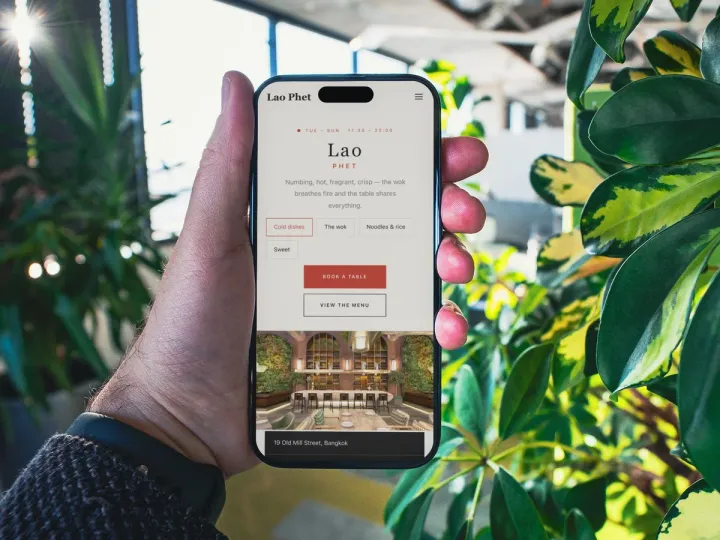 How TableSpark handles thisTableSpark restaurant website designChoose one of 50 restaurant designs, with search readiness built into every page.