A Mexican restaurant website can lose a booking, a takeaway order and a licensing argument in the same week, and the cause is usually the same: the page says what the kitchen knows, not what the guest searches or the law asks.
A Mexican restaurant website needs seven things before any design choice: a menu in real text with the words guests search, allergens and heat at dish level, a gluten-free label only where the food as sold meets 20 mg/kg, a drinks list that states its measures, promotions written within the licensing conditions, deposits for big parties, and pages search engines can read. Costing the website, bookings, deposits and ordering as separate tools shows the real price of a year.
The search for tacos that ends on someone else's page
Picture a 50-cover Mexican restaurant with a takeaway counter, on a Friday at ten past six. A guest on a phone types "tacos near me", then "burrito delivery". The menu they reach is a photograph of a printed card. The dishes carry the kitchen's own names, nothing says how hot anything is, and nothing says which salsa holds mustard or which sauce holds nuts. The drinks are four lines with no measure beside any of them. The guest closes the tab and orders through a commission-charging marketplace instead.
That small scene hides several separate risks, each with a public source behind it. Allergen information is a legal duty for non-prepacked food: the Food Standards Agency says "If you provide non-prepacked foods, you must supply allergen information for every item that contains any of the 14 allergens" and that the duty can apply to "meals served in a restaurant, and food from a takeaway". A tequila and mezcal list sits beside a weights and measures page that names specified quantities for gin, rum, vodka and whisky only. A bottomless brunch or an all-you-can-drink Taco Tuesday sits beside a mandatory licensing condition on irresponsible promotions. A birthday for twelve, booked without a deposit, can leave a long table dark on a Saturday. Takeaway burritos ordered through a form with no allergen step can fall short of the two-stage rule for food sold at a distance.
The wider pattern is commercial: guests search the restaurant name, a dish or a district, and the first page they reach is a directory, a commission-charging marketplace or the restaurant down the road. Market data on Mexican restaurants in the UK is thin, and this guide does not invent any. The one diner survey read for this research is dated and vendor-commissioned: a 2015 survey by OpenTable, a booking vendor, reported by the Morning Advertiser, found that British diners were relying on the internet to find a restaurant, with 83% to make a reservation, 82% to look at a menu and 63% to look at a restaurant's images. It is 2015 data from a booking vendor, so it shows a direction, not a current UK figure.
This guide goes through the website a taqueria, burrito bar, tequila bar or full Mexican dining room needs, then costs the stack for a year and ends with a recommendation for an independent UK restaurant. For sister cuisines, see the guides to a Japanese restaurant website and an Indian restaurant website.
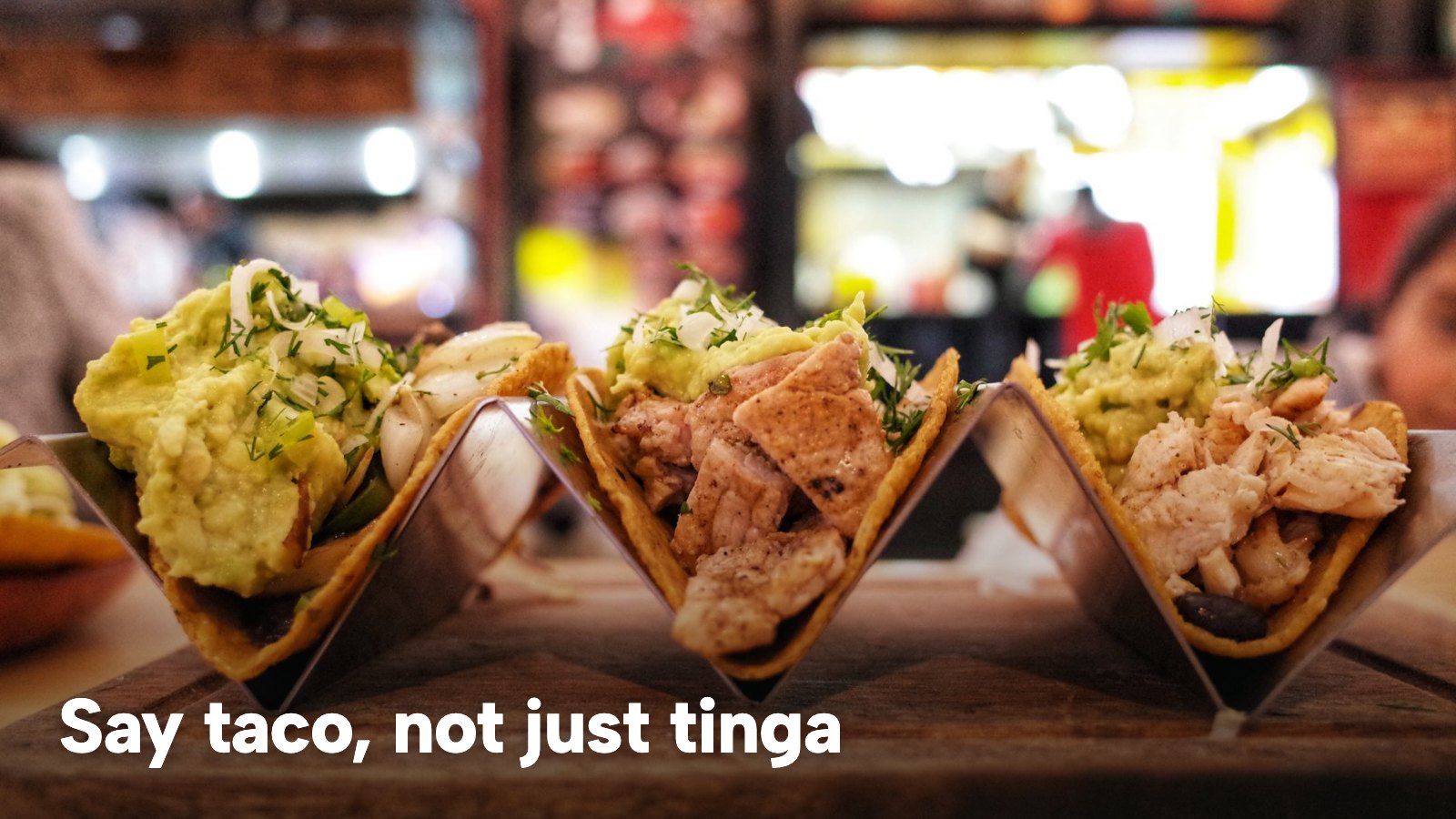
Mexican restaurant website design UK: the first screen
A guest on a phone decides in a few seconds whether this is the place.
The first screen has four jobs, and design comes after them. It says what kind of room this is: a counter that turns tables in twenty minutes, a cocktail bar with a taco menu and a full dining room lead to three different evenings. It shows the next action the restaurant most wants, whether a table, a collection order or a call. A taqueria whose trade is collection puts the order button where a bookable restaurant puts the reservation form. It shows the hours and address as plain text, not as part of a photograph. And it shows the one thing the restaurant is known for, whether that is the al pastor, the mezcal list or the Sunday brunch.
Colour matters more here than in most cuisines, because a Mexican or wider Latin room is usually built on colour, fire and produce, and a neutral stock template wastes the restaurant's biggest signal. The Mexican and Latin templates are a set of seven inside a library of 50 finished designs, named Milpa Norte, Tlalli, Apullay, Orinoco Sur, Waylla, Majagua and Maré Alta on that page. The palette, type and imagery are the restaurant's to set. The template fixes the layout and the rhythm.
The same screen serves a Latin restaurant that is not strictly Mexican, such as a Peruvian ceviche counter or a Brazilian room. A search such as Latin restaurant website design London is a request for a site that looks like the room, in a district the guest can name.
Taco restaurant website, taqueria website, burrito bar website: the menu
The menu is where most Mexican sites lose guests, and the cause is vocabulary. Guests search "tacos", "burrito", "quesadilla", "nachos" and "margarita". Kitchens write "tinga", "suadero", "birria" and "elote". Both are right, and a page needs both. The pattern that works is to keep the kitchen's real name and add a plain English line beside it, so the dish is found by the search word and respected under its own name.
Structure matters as much as wording. Tacos, tostadas, ceviches and sides are small plates, priced per item, so a table can build an order without arithmetic. The category page describes that structure, with the drinks list as its own menu and market or seasonal items in a section the team rewrites between services. A burrito bar has the opposite problem, a few dishes with many choices: protein, rice, beans, salsa and extras. Those choices belong in the dish itself, as required or optional options with their own price.
Two rules keep a Mexican menu page useful and findable. Publish the menu as text on the page, because a photograph of a printed card gives a phone user nothing to search or copy and gives search engines nothing to read. And keep the lunch counter menu and the evening menu as separate menus the team can change the moment the kitchen decides.
A photograph helps a guest who has never met the dish. It does not replace the text, and it does not replace the heat and allergen lines, which are the next section.
Heat levels and the 14 allergens in salsas, moles and crema
Heat and allergens are two different pieces of information, and a guest needs both before ordering. Heat is a preference. Allergens are a legal duty. Mixing them in one vague phrase such as "may contain traces" helps nobody.
For heat, the clearest approach is a short scale at dish level. TableSpark's dish editor carries a Spice level field, a 0 to 3 chilli-icon scale, and the category page states that heat and chilli notes sit at dish level, where a guest reading on a phone can use them. Whatever the restaurant uses, the scale should mean the same thing on every dish, and a mild guest should be able to filter to it.
For allergens, the starting point is the list. The Food Standards Agency names the 14 allergens as celery; cereals containing gluten (such as wheat, rye, barley and oats); crustaceans; eggs; fish; lupin; milk; molluscs; mustard; peanuts; sesame; soybeans; sulphur dioxide and sulphites (at more than ten parts per million); and tree nuts. For non-prepacked food, the same guidance says allergen information must be supplied for every item that contains any of the 14, and that written information supported by a conversation works best for consumers.
Mexican cooking has its own pattern of where those allergens sit. This is culinary knowledge, not a statement of law, and each recipe differs, so the owner checks their own recipes and suppliers' labels. The table below shows where to look.
| Check your own recipe and label for | Where to show it | |
|---|---|---|
| Mole | Whether it contains nuts or sesame, and any thickener | On each dish that uses it |
| Salsas and dips | Whether mustard or celery is in the base or the stock | On the dish and the side |
| Crema, cheese and queso | Milk | On every dish topped or sauced with it |
| Flour tortillas and tacos | Cereals containing gluten | On the dish, and in the tortilla choice |
| Ceviche and seafood | Fish, crustaceans and molluscs | On the dish, and on shared sides |
| Marinades and sauces | Soybeans, sesame, sulphites | On each dish that uses them |
The table is a prompt for the owner's own check, not a list of facts about every Mexican restaurant. A mole made without nuts exists, and so does a salsa made without celery. The point is that the check is done per recipe and per supplier, and the answer is then published per dish.
The website answers only what the kitchen has confirmed, so when a recipe changes the dish page changes the same day. A chip on a menu supports the conversation and does not replace it. For a longer treatment of the rule and the wording, see the guide to a UK restaurant allergen menu.
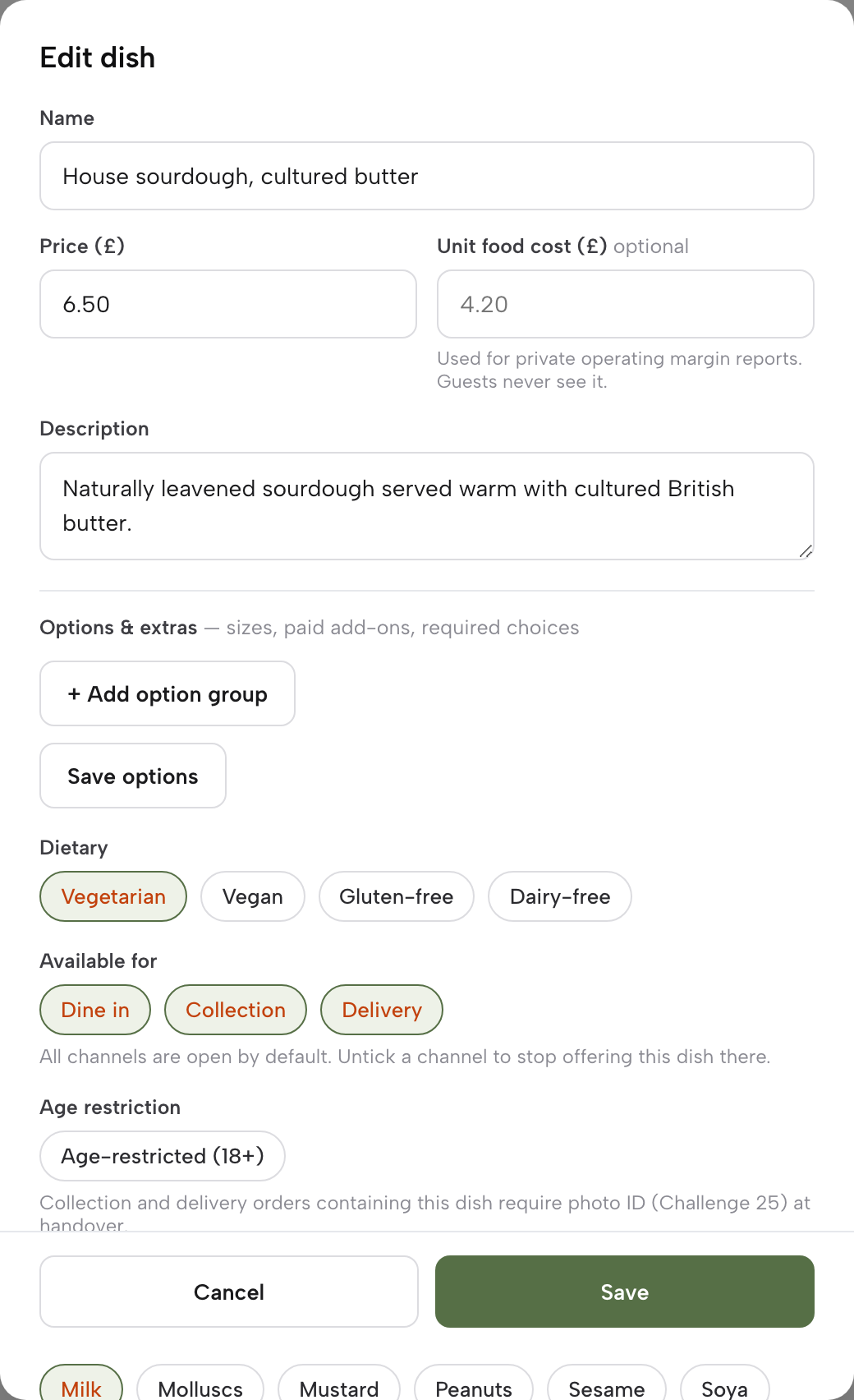
TableSpark's dish editor holds the 14 as toggle chips, "shown on your live menu", and Vegetarian, Vegan, Gluten-free and Dairy-free as separate dietary chips. The guest sees them on the dish. Filters for dietary needs appear on the order page.
Flour or corn: the tortilla and the gluten-free label
A Mexican menu has a particular trap in the word "gluten-free". Corn tortillas suggest it, and the label gets applied loosely. The rule is stricter than the suggestion. The retained gluten-free rule says the statement "gluten-free" may only be made where the food as sold to the final consumer contains no more than 20 mg/kg of gluten.
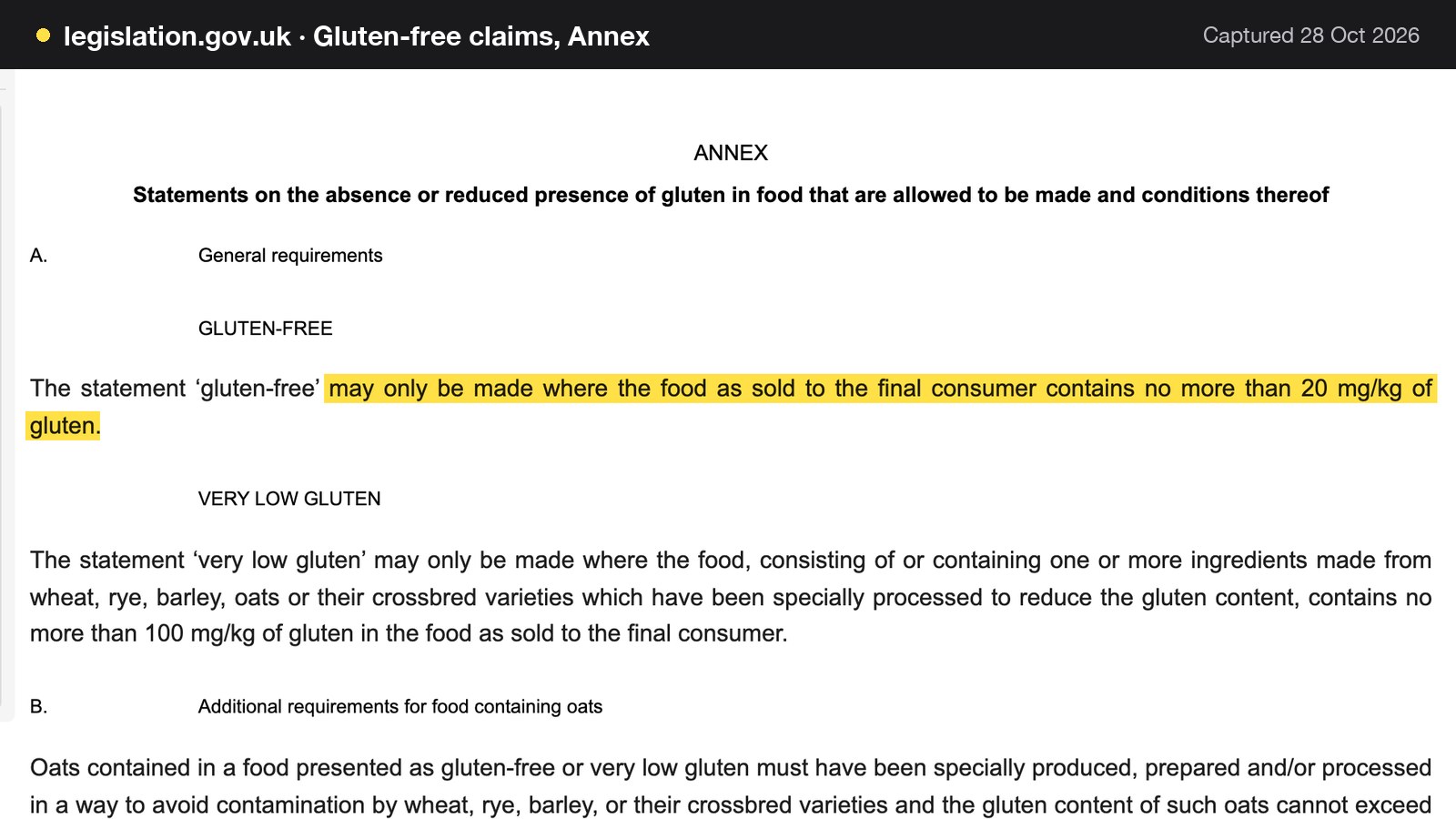
That is a test of the food as sold, not of one ingredient. A corn tortilla is not automatically "gluten-free" on a menu unless the finished dish meets the limit. A taco on a corn tortilla that shares a fryer or a griddle with flour tortillas may or may not meet it. That is a question for the kitchen and its supplier labels, not for the website.
The practical choice is between two honest wordings. If the kitchen can show that a dish as sold meets the limit, it can say "gluten-free" and tick the chip. If it has not checked, the safer line is a plain description such as "served on a corn tortilla", with the allergen chip for cereals containing gluten ticked wherever the dish contains any.
The corn-versus-flour choice belongs in the dish itself: one taco with a required tortilla choice, each choice carrying its own allergen state, so the chip stays accurate for what the guest picked.
Tequila bar website: the drinks list and its measures
For many guests the drinks list is the reason to come. For a tequila or mezcal bar it is the menu. It deserves its own page, not four lines under the food.
Structure comes first: agave spirits by type, cocktails by style, beers, wines and soft drinks, each as its own section with the same editing tools as the food. TableSpark's category page describes the drinks list as standing "as its own menu", with mezcal and agave spirits, pisco and cocktails by style. Measures come next, and here the law has a specific shape.
The government's weights and measures page on specified quantities says gin, rum, vodka and whisky are sold in "Either 25ml and multiples of 25ml, or 35ml and multiples of 35ml (not both on the same premises)". It also says: "There are no specified quantities for sparkling wine or yellow wine by the glass or spirits other than gin, rum, vodka and whisky." On that page's own words, spirits other than gin, rum, vodka and whisky have no specified quantity. The page does not name tequila or mezcal, so that is a reading of the words "other than", and the safe course is to confirm it with the local trading standards team.
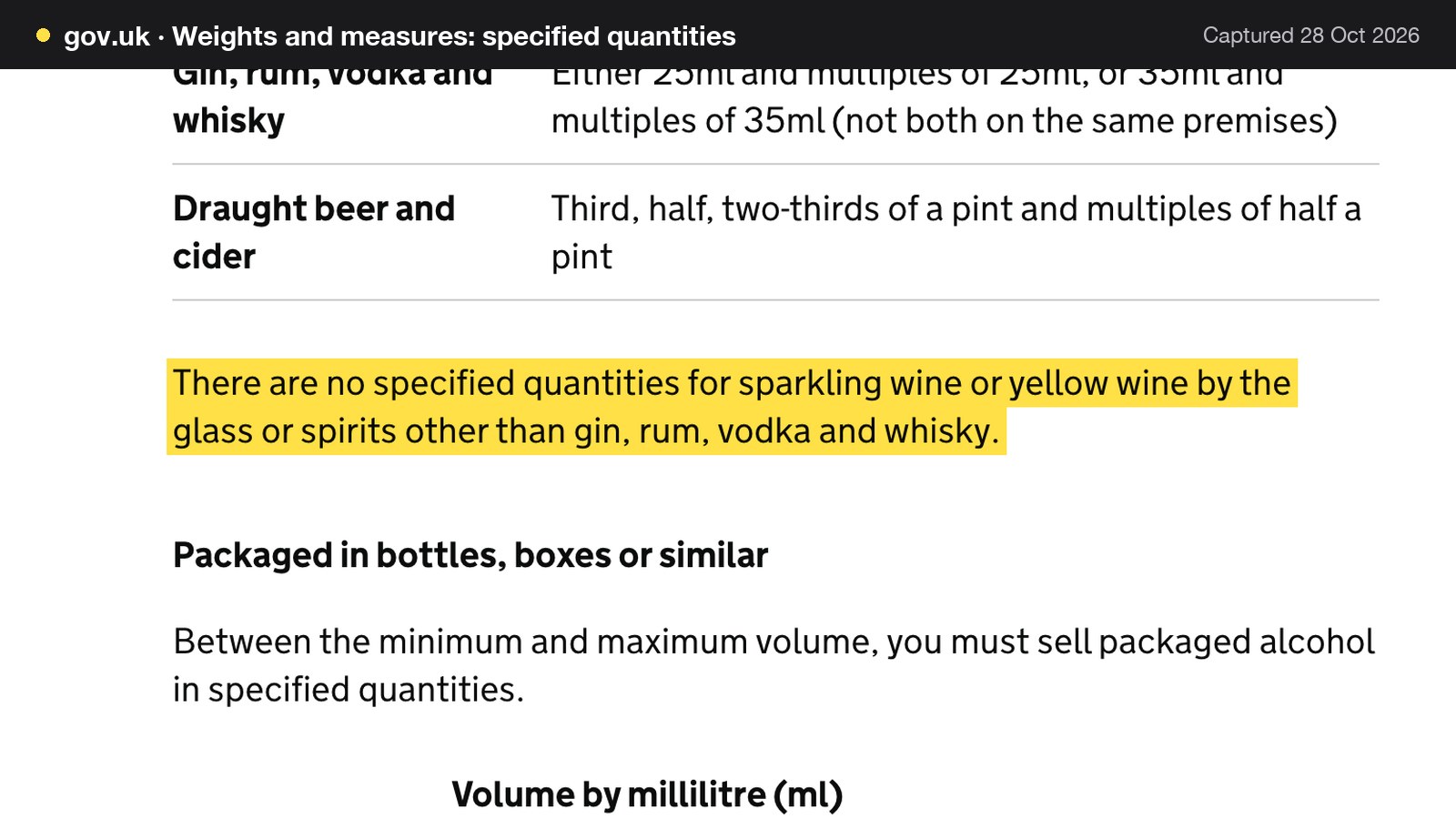
The result is that a tequila or mezcal measure is the restaurant's own choice, and the guest should be told what it is. The same page gives still wine at 125ml and 175ml and multiples of those, and draught beer and cider in thirds, halves and two-thirds of a pint and multiples of half a pint. A restaurant that sells a gin or a vodka cocktail alongside its agave list has the 25 ml or 35 ml rule for those spirits as well, and the mandatory licensing conditions require that measures are displayed in a menu, price list or other printed material available to customers on the premises. The compiled conditions show 2026 amendments, so the owner checks the current text with the council.
The drinks list on the website should therefore state the measure beside each spirit (25 ml or 35 ml for the gin, and the restaurant's own stated pour for the mezcal), show the price per measure, name the serve, and offer free tap water on request. The wider guide to a restaurant drinks menu goes through the details.
Taco Tuesday and bottomless brunch: promotions written within the conditions
Promotions are where a Mexican restaurant's marketing can cross a licensing line without anyone noticing. Taco Tuesday itself is a food offer and raises no special rule. The risk is in anything that couples alcohol to an offer.
The mandatory licensing conditions for premises with a licence require that the responsible person ensures staff do not "carry out, arrange or participate in any irresponsible promotions in relation to the premises". One of the listed examples is the "provision of unlimited or unspecified quantities of alcohol free or for a fixed or discounted fee to the public or to a group defined by a particular characteristic in a manner which carries a significant risk of undermining a licensing objective".
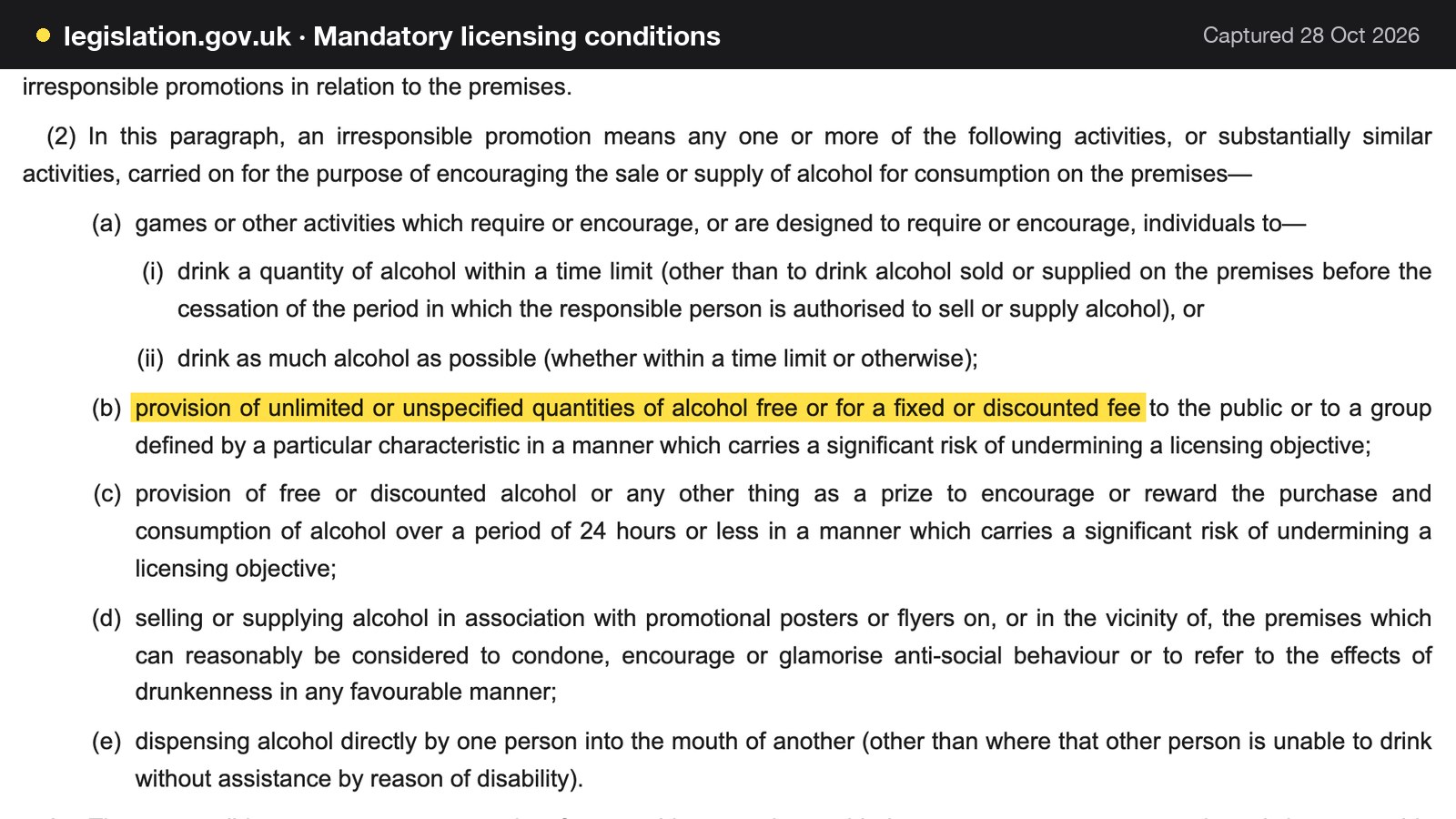
Two details matter. First, the condition is qualified: the promotion is irresponsible if it is done "in a manner which carries a significant risk of undermining a licensing objective". It is a risk test, not a named ban, and bottomless brunch is not named in the text. Second, the test looks at manner, so the way the offer is written and run counts. A fixed-fee, unlimited-drinks offer with no time limit, no food requirement and no stated end is a different thing from a set brunch with a drink included. The conditions also list free or discounted alcohol given as a prize to encourage or reward the purchase and consumption of alcohol over a period of 24 hours or less, in the same risk-qualified manner.
For a website, the practical rules are short. Write what the guest actually gets: the food, the number and type of drinks if the offer is capped, the time window and the price. Put the date, the terms and the end of the promotion on the page, so an old offer does not sit live for months. Keep the free tap water offer visible, because the conditions require that free potable water is provided on request where it is reasonably available. And talk to the council's licensing team before launching an unlimited-drinks brunch. This guide describes the condition as published. It does not say what a particular authority will decide about a particular offer.
Mexican restaurant online ordering: takeaway burritos and the two stages
The FSA guidance says: "If food is sold online or by phone through distance selling, allergen information must be provided at two stages in the order process." The first is "before the purchase of the food is completed - this can be in writing (on a website, catalogue or menu) or orally (by phone)". The second is "when the food is delivered - this can be in writing (allergen stickers on food or an enclosed copy of a menu) or orally (by phone)".
So the order page needs the allergen information visible before the guest pays, and the bag or the delivery needs a sticker or a copy of the menu. The first stage is a page matter. The second is a kitchen routine the team sets, and it is worth writing down so every shift does it the same way.
One further point applies to a counter that wraps burritos ahead. The FSA's guidance on food prepacked for direct sale lists fast food packed before it is ordered, with a burger under a hot lamp as its example. Food that is not in packaging, or is packaged after being ordered, does not need that label, though allergen information must still be provided, which can be done orally. A takeaway that wraps burritos before service should read that guidance and ask its local authority which side of the line its own process falls on.
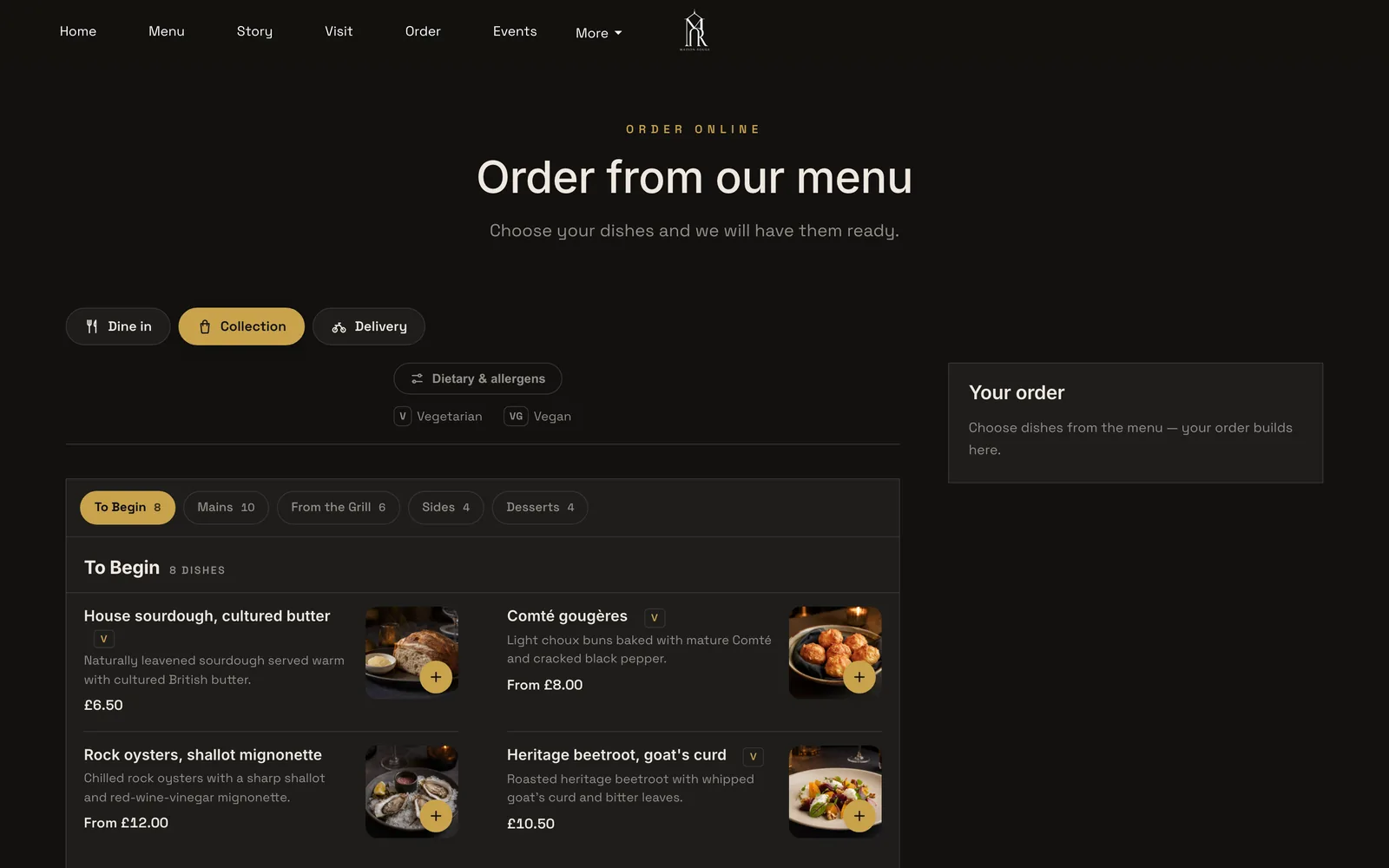
A Mexican takeaway order has a protein, a tortilla or bowl, a salsa heat and extras. On TableSpark's order page, guests pick sizes, paid extras or required choices before a dish can be added, with a note on each dish. The order page lets the guest choose Dine in, Collection or Delivery first, and shows dietary and allergen information on the page.
Collection hours need care as well. The order page carries a minimum order, a collection cut-off before closing and a ready-time note the guest sees after ordering, so the last tickets do not arrive after the kitchen has cleaned down. Delivery can run on one fixed fee or on distance tiers.
No marketplace commission rate was verified for this research, so none is quoted. Whatever a contract says, check it. Ordering on the restaurant's own site, with its own payments and its own guest records, is the alternative the cost section prices below.
A group of twelve for a birthday: deposits, pre-orders and regulation 28
Mexican restaurants are social. Groups of eight, twelve and sixteen book for birthdays, work nights and sharing menus, and one party can be a large share of a 50-cover room. A group booking is also where a deposit earns its keep.
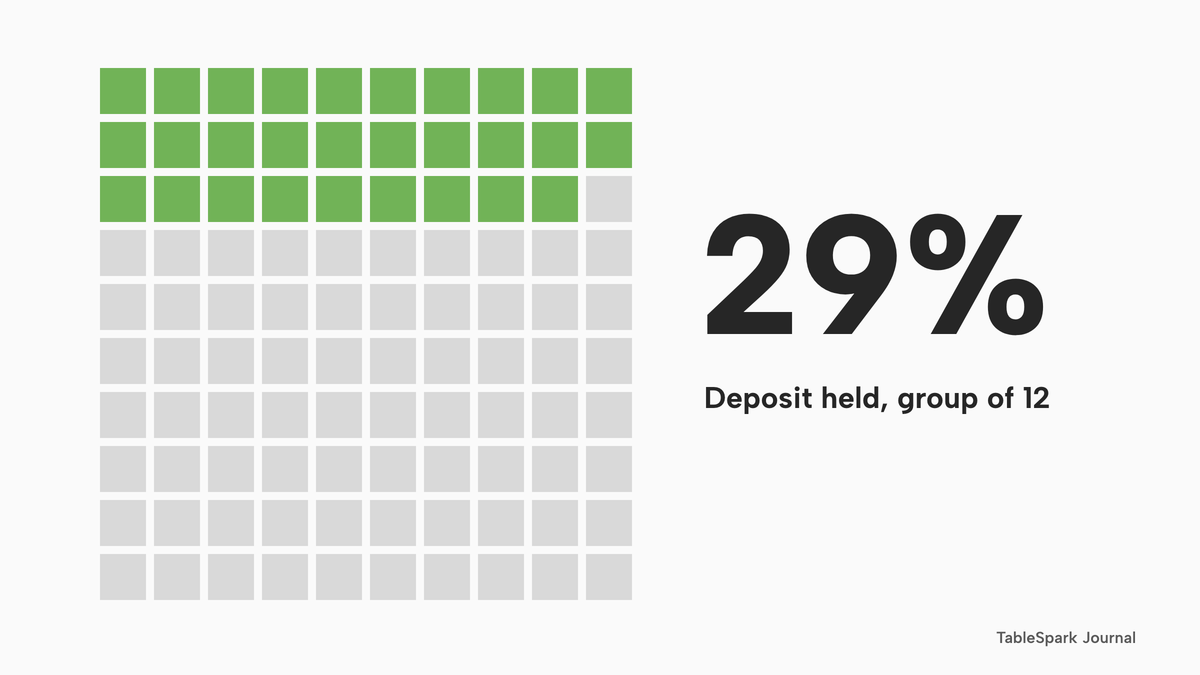
The numbers below are illustrative, and the arithmetic is simple. A group of 12 at £35 a head, on a set sharing menu, is 12 x £35 = £420. A deposit of £10 a head is 12 x £10 = £120, which is £120 divided by £420, about 29% of the menu value. If the party does not arrive and there was no deposit, the restaurant loses the full £420 of booked spend, before any food cost saved. With the deposit held, £120 is kept and the shortfall is £420 minus £120 = £300.
| Working | Result | |
|---|---|---|
| Menu value | 12 x £35 | £420 |
| Deposit at £10 a head | 12 x £10 | £120, about 29% of the menu |
| No-show with no deposit | Full booked spend | £420 lost |
| No-show with the deposit held | £420 minus £120 | £300 shortfall |
| Card fee, one £120 payment | 1.5% x £120 + 20p | £2.00 |
| Card fee, twelve £10 payments | 12 x (15p + 20p) | £4.20 |
The card fees use Stripe's published UK rate for standard UK cards, 1.5% + 20p, and assume a standard UK card. Taking the deposit as one payment costs £2.00, and as twelve separate £10 payments £4.20, because the 20p is charged on each.
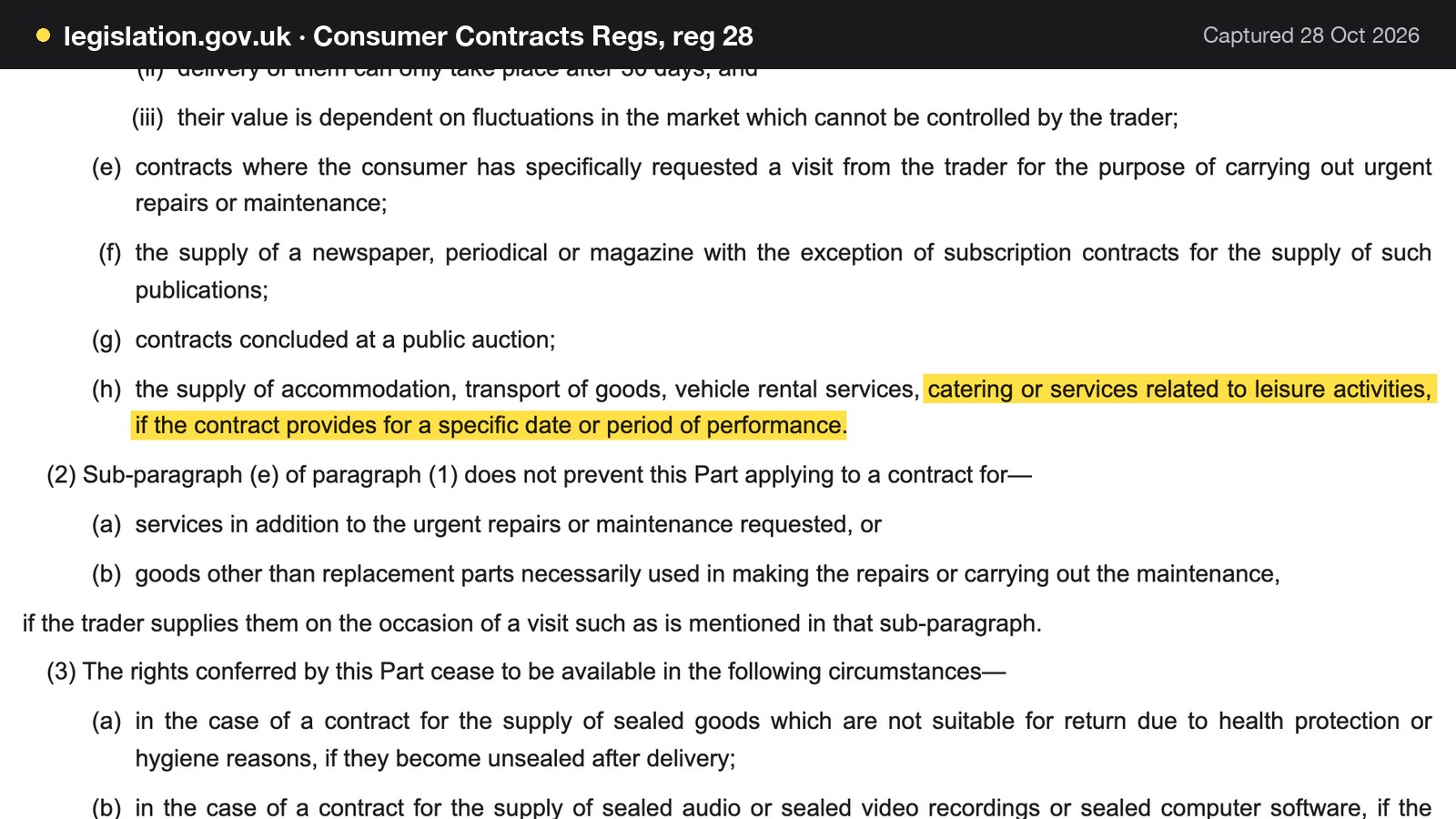
The law on deposits has one detail owners often get wrong. Regulation 28 of the Consumer Contracts (Information, Cancellation and Additional Charges) Regulations 2013 begins "This Part does not apply as regards the following", and its paragraph (1)(h) lists "the supply of accommodation, transport of goods, vehicle rental services, catering or services related to leisure activities, if the contract provides for a specific date or period of performance". It is regulation 28(1)(h), not 28(1)(b), that carries the catering wording. Whether a particular booking falls inside it depends on the contract, so the booking terms should be written plainly and, for anything large, checked with an adviser.
The terms themselves need to be visible before the guest pays: the deposit amount, what it is credited against, the notice needed to cancel or change numbers, and the deadline for choosing dishes. The longer guide to restaurant group bookings covers capacity, table joining and the card-hold expiry trap.
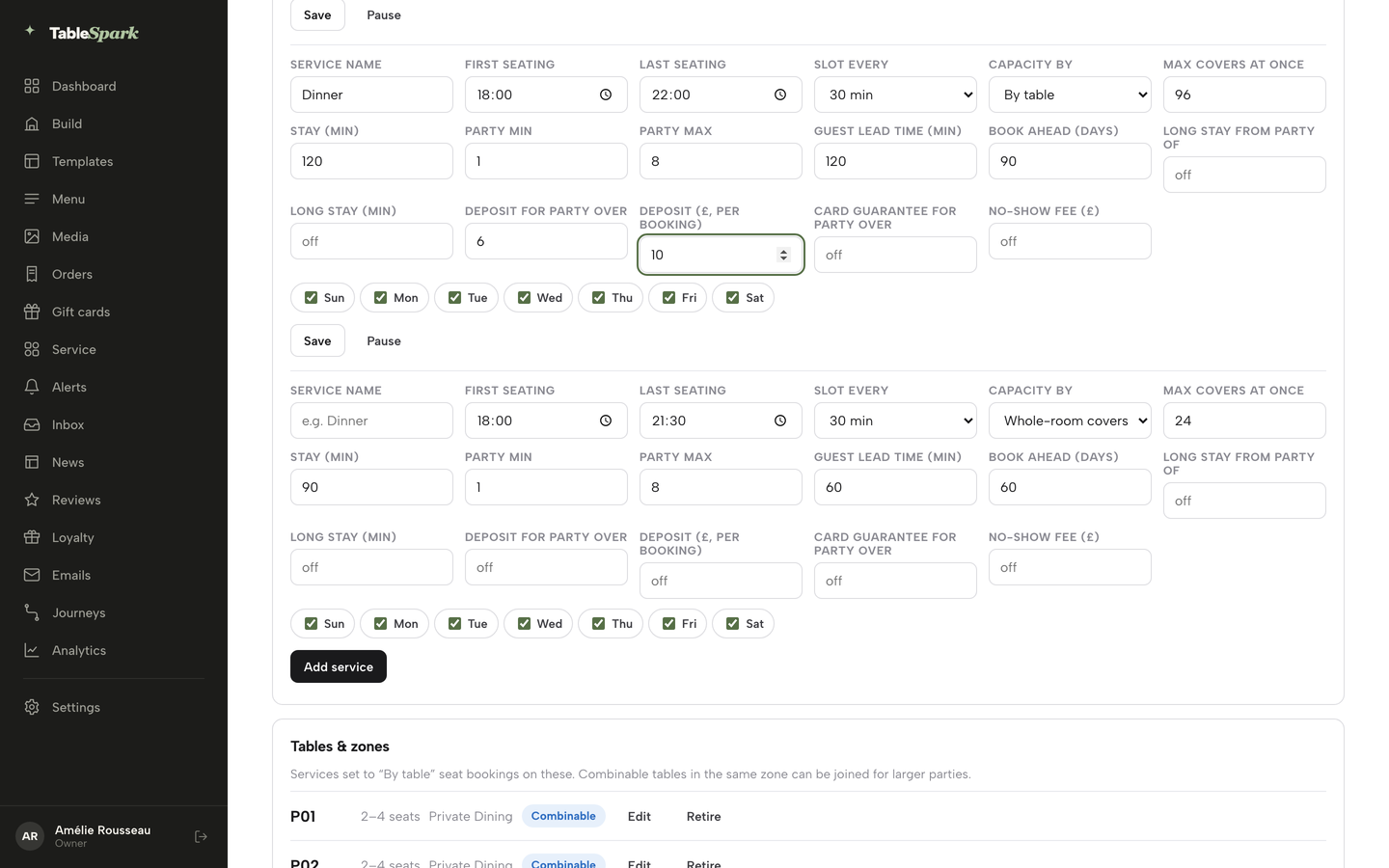
On TableSpark, group bookings with pre-orders and deposits are on Growth and Full. The owner sets the party size at which a booking becomes a group, and each one arrives as an enquiry to confirm. Guests choose their own dishes by link with allergen checks, the kitchen gets a sheet with dish totals, and deposits are taken per guest, paid straight to the restaurant's own Stripe account. A group or sharing menu can be published with its per-person price and what it includes, and a booking or enquiry can be attached to it so the kitchen knows what it is prepping.
The price on the page: mandatory charges and drip pricing
The CMA's price transparency guidance (CMA209) says: "It's illegal to hide additional fees, taxes or other charges that the customer will have to pay until later in the purchase process (sometimes called 'drip pricing')." It adds that "The total price should normally include any unavoidable or 'mandatory' charges. Providing them separately will not normally be enough to comply with the law", and that "A charge is mandatory if the customer must pay it to buy the product."
Three charges are worth checking against that wording. A mandatory service charge on large groups belongs in the price the group sees when it books, not on the bill. A delivery fee belongs on the order page before the final step. A booking deposit should say how it is credited. An optional tip can be shown separately and described as optional. This is guidance, not a ruling on any one restaurant. The practical test is whether a guest who reads the page can work out what the evening will cost before committing.
A live link is not a found page
A website can be live at a working link and still be absent from Google. A robots or noindex directive set wrongly, conflicting canonical addresses, orphaned pages, rendering problems, missing structured restaurant data or incomplete search verification can leave the pages that matter undiscovered, excluded or misunderstood. For a Mexican restaurant the cost is concrete: guests searching the restaurant name, a dish, a cuisine or a district may reach directories, commission-charging marketplaces or competing restaurants first, which leaves the restaurant paying for discovery instead of building direct demand.
TableSpark's category page describes these searches as tacos plus a district, ceviche plus a town, "open now" plus a cuisine, decided by whether Google can read the hours, the address, the menu and the ordering route as facts rather than as a picture.
A photographed menu is the clearest case for a taqueria. Text in an image is not text on the page. TableSpark's pricing page states that menus, pages and dish detail are rendered as real HTML, "not text locked inside images or scripts".
TableSpark builds the work into every plan: crawlable structured restaurant content, titles and descriptions, canonical URLs, sitemaps, robots controls, Restaurant and LocalBusiness schema, internal links, mobile-first output and managed search-verification set-up. A restaurant that assembles this by hand needs a technician for the configuration, a maintenance routine and a way to notice when something drifts. Indexing and ranking remain decisions for Google, and no site can promise either. A managed set-up removes the self-inflicted causes.
The Reserve with Google booking-link connection, on Growth and Full, makes the restaurant's own booking page the destination guests reach from Google. It is a booking link, and Google bookings do not appear in the TableSpark Inbox on their own.
What a Mexican restaurant website costs in year one
This worked example uses the 50-cover Mexican restaurant with a takeaway counter from the start of this guide. Every venue figure is illustrative. Every price is a published figure read on 28 October 2026.
Website plus bookings with deposits
Route (a) is a general website builder, a separate booking tool and a deposits add-on.
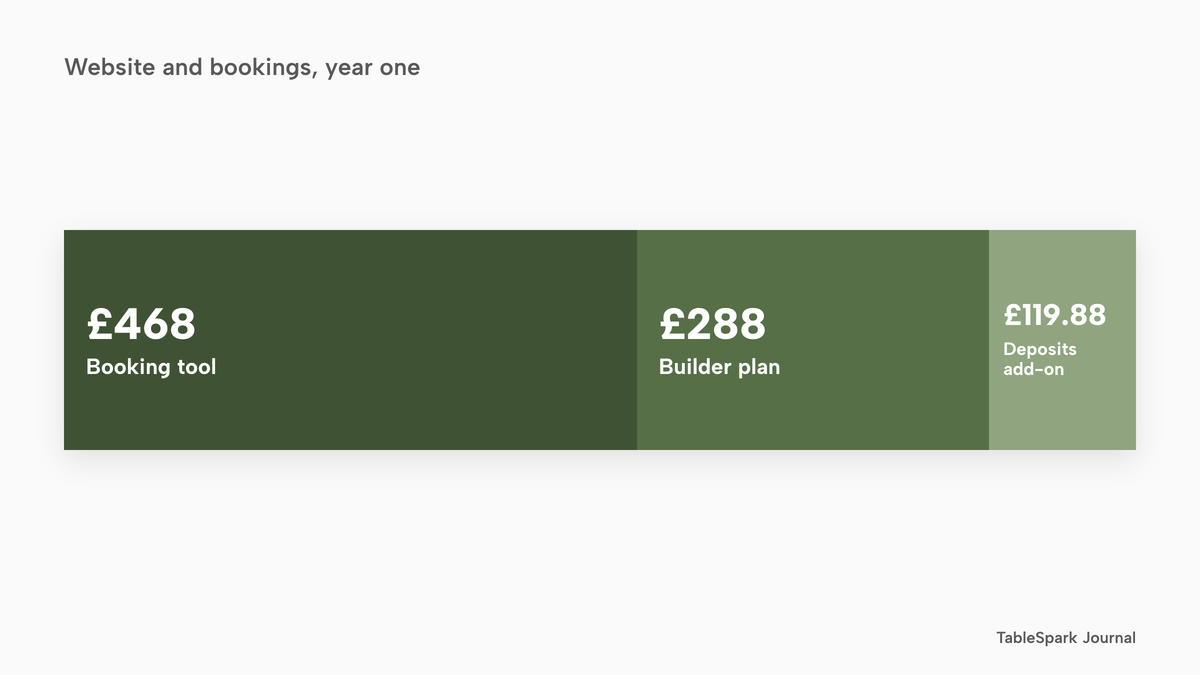
Squarespace's pricing page shows a ChowNow integration, for adding online food ordering to a site, as "Not included" on its Basic plan and included from Core upwards, so Core is the lowest plan a restaurant with ordering needs. The page shows Core as "£24 /mo £17 /mo" without saying which figure is annual, so this guide says £17 or £24 a month as shown. That is 12 x £17 = £204 and 12 x £24 = £288 for the year.
Resos is a booking tool. Its Basic plan is £39.00 a month billed monthly or £31 a month billed annually, and its page caps Basic at "350 bookings /month". That is 12 x £31 = £372 and 12 x £39.00 = £468. Deposits need the Online payments add-on, at £9.99 a month on the same page, described there as letting a restaurant "take prepayments and deposits, and charge no-show fees". That is 12 x £9.99 = £119.88.
Route (a) in year one is therefore £204 + £372 + £119.88 = £695.88 at the lowest figures shown, and £288 + £468 + £119.88 = £875.88 at the highest. The Squarespace and Resos pages were read without a VAT label, so those totals are as shown, not confirmed excluding VAT.
Route (b) is TableSpark Growth, which carries the website, the bookings, the deposits and the reminders in one plan. Growth is £39 a month excluding VAT, which is 12 x £39 = £468 excluding VAT paid monthly, or £390 excluding VAT paid yearly, because the yearly option is to pay for 10 months and use 12 (10 x £39 = £390). Growth is the lower figure on both billing bases.
| Route (a): builder, booking tool, deposits add-on | Route (b): one platform | |
|---|---|---|
| Website | Squarespace Core: £204 to £288 | In Growth |
| Bookings | Resos Basic: £372 to £468 | In Growth |
| Deposits | Online payments add-on: £119.88 | In Growth |
| Year-one total | £695.88 to £875.88 | £390 paid yearly or £468 paid monthly, excluding VAT |
Set against like billing, route (a) at its lowest figures is £695.88 minus £390 = £305.88 above Growth paid yearly (£390 excluding VAT), and at its highest figures £875.88 minus £468 = £407.88 above Growth paid monthly (£468 excluding VAT). Route (a) also needs three accounts to maintain and a booking cap to keep an eye on.
Takeaway ordering on the restaurant's own site
Online ordering on the restaurant's own site is on TableSpark Full, at £69 a month excluding VAT. That is 12 x £69 = £828 excluding VAT paid monthly, or 10 x £69 = £690 excluding VAT paid yearly. Full adds online ordering at 0% TableSpark commission to everything in Growth.
On route (a), ordering needs a third paid tool on top, whose price was not read, so no figure is entered for it. Even before that tool is priced, route (a) at its lowest figures, £695.88, is £5.88 above Full paid yearly at £690 excluding VAT, and at its highest figures, £875.88, is £47.88 above Full paid monthly at £828 excluding VAT. The gap widens once the ordering tool is added.
Card fees on takeaway orders
Card fees apply to online payments on either route. Squarespace's pricing page shows "Credit card rates starting at 2.0% + £0.25" for payments taken through its own checkout; where takeaway orders are paid that way, that is the starting rate. TableSpark payments run through the restaurant's own Stripe account at Stripe's standard UK rate, which Stripe's page gives as "1.5% + 20p for standard UK cards". Take 400 takeaway orders a month at £18, which is 400 x £18 = £7,200 a month, all paid by standard UK cards.
At Stripe's standard rate, the fee is 1.5% x £7,200 = £108, plus 400 x 20p = £80, so £188 a month. At 2.0% + £0.25, the fee is 2.0% x £7,200 = £144, plus 400 x £0.25 = £100, so £244 a month. The difference is £244 minus £188 = £56 a month, or £672 a year. This is illustrative and assumes every card is a standard UK card. Premium cards carry a higher published rate on Stripe's page, at 2.8% + 20p.
| 2.0% + 25p, as shown | 1.5% + 20p, Stripe standard | |
|---|---|---|
| Sales | 400 x £18 = £7,200 | 400 x £18 = £7,200 |
| Percentage part | £144 | £108 |
| Per-order part | 400 x £0.25 = £100 | 400 x 20p = £80 |
| Fee per month | £244 | £188 |
| Fee per year | £2,928 | £2,256 |
Smaller volumes follow the same pattern. At 100 orders of £18, which is £1,800 a month, 2.0% + 25p is £36 + £25 = £61 and 1.5% + 20p is £27 + £20 = £47. The two lines in the figure run from 100 orders to 400.
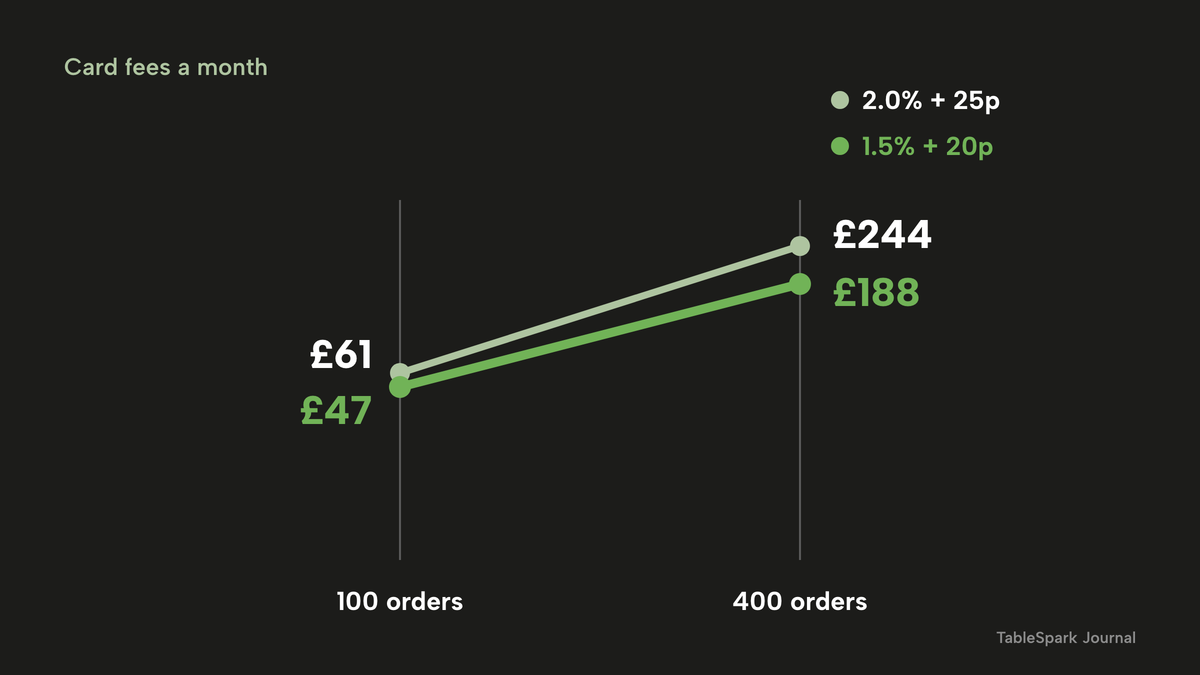
TableSpark takes 0% commission on direct bookings and orders; Stripe's standard card-processing fees apply to online payments.
The prices as published
The table below sets out each price as it is shown on its provider's page. The prices are not like-for-like, because the providers charge for different things.
- Charged per
- Flat monthly plan
- Website
- live availability
- floor plans
- deposits and reminders
- group bookings with pre-orders and deposits
- custom domain and managed SSL
- managed search readiness
- Charged per
- Flat monthly plan
- Everything in Growth
- online ordering at 0% TableSpark commission
- table QR ordering
- kitchen ticket printing
- Charged per
- Month
- Website plan only
- ChowNow integration shown as included from Core
- bookings and deposits sit in other tools on this route
- Charged per
- Month
- Booking tool
- "350 bookings /month"
- deposits need a paid add-on on this route
- Charged per
- Month
- Deposits and prepayments, as the page describes them
- no website, no ordering
The ChowNow charge on route (a) was not read, and no figure for it is quoted here.
The complete Mexican restaurant website checklist
A restaurant can use this list against any website, its own or a competitor's.
- The first screen says what kind of room it is, shows the address and hours as text, and carries one clear action.
- The menu is real text on the page, with a search word beside each kitchen name.
- Heat is shown at dish level on one consistent scale.
- Allergens are shown at dish level for all 14, checked against the restaurant's own recipes and suppliers' labels.
- "Gluten-free" appears only where the food as sold meets 20 mg/kg.
- The tortilla choice is part of the dish, with its own allergen state.
- The drinks list is its own menu, with a stated measure beside every spirit and a price per measure.
- Gin, rum, vodka and whisky are shown at 25 ml or 35 ml, not both, and measures are displayed in printed material on the premises.
- Free tap water is offered visibly.
- Any promotion shows its terms, its dates and what the guest actually receives, and an unlimited-drinks offer has been discussed with the licensing authority.
- Online orders show allergen information before payment, and the bag carries a sticker or a copy of the menu at delivery.
- Pre-wrapped food has been checked against the FSA's rules on food prepacked for direct sale.
- Group booking terms show the deposit, what it is credited to, the cancellation notice and the pre-order deadline.
- Every mandatory charge is in the price the guest sees first.
- Pages are crawlable, with titles, descriptions, canonical URLs, a sitemap, robots controls and Restaurant schema, and the search-verification step is complete.
- The restaurant owns the guest records and can export them.
- The cost of the whole stack, not one plan, has been added up for a year.
Which route: separate tools, or one platform
The decision is between assembling a stack and buying one. The table compares the two on the points that decide a Mexican restaurant's year.
| Separate tools | One platform on your own site | |
|---|---|---|
| Accounts to maintain | A builder, a booking tool, a deposits add-on, an ordering tool | One account |
| Cost of year one | £695.88 to £875.88 before the ordering tool is priced | £390 to £468 excluding VAT, or £690 to £828 with ordering |
| Deposits | A paid add-on on the booking tool | In the plan, paid to the restaurant's own Stripe account |
| Group pre-orders | Depends on the tools chosen | In the plan, with allergen checks per guest |
| Card fees | Depends on the builder's rate | Stripe's standard UK rate |
| Search set-up | Technician or add-on, plus upkeep | Managed search readiness on every plan |
| Guest records | Split across tools | In the restaurant's own account, with CSV export |
The single platform comes out ahead for an independent Mexican restaurant on cost, on the number of things to maintain and on search readiness. A restaurant that already has a working stack should price the whole of it, add-ons and renewals included, before deciding to keep it.
Where TableSpark fits
TableSpark builds the restaurant's own website, bookings and ordering in one account. For this category, the live Mexican and Latin page describes the templates and the room. The general restaurant website design page covers the common foundation.
Starter, at £19 a month excluding VAT, includes a complete restaurant website, a live structured menu with dietary tags, spice levels and allergen chips, opening hours, enquiry and newsletter forms, and managed search readiness. The 50 template designs include the seven Mexican and Latin templates. Growth, at £39 a month excluding VAT, adds direct live bookings, deposits and reminders, group bookings with pre-orders and deposits, a custom domain with managed SSL, and table and floor-plan operations. Full, at £69 a month excluding VAT, adds online ordering on the restaurant's own site, table QR ordering and kitchen ticket printing.
Your own team edits the menu, the prices, the photographs and the opening hours on any plan, without a developer. Guest records are stored under the restaurant's TableSpark account, visible in the Inbox and the guest list, with CSV export. The records are the restaurant's to use, in its own account, exportable whenever it wants them.
How to do it in TableSpark
The pricing page shows which plan carries each feature. Steps one to four work on any plan, step five needs Growth, and step six needs Full.
Step 1 of 6
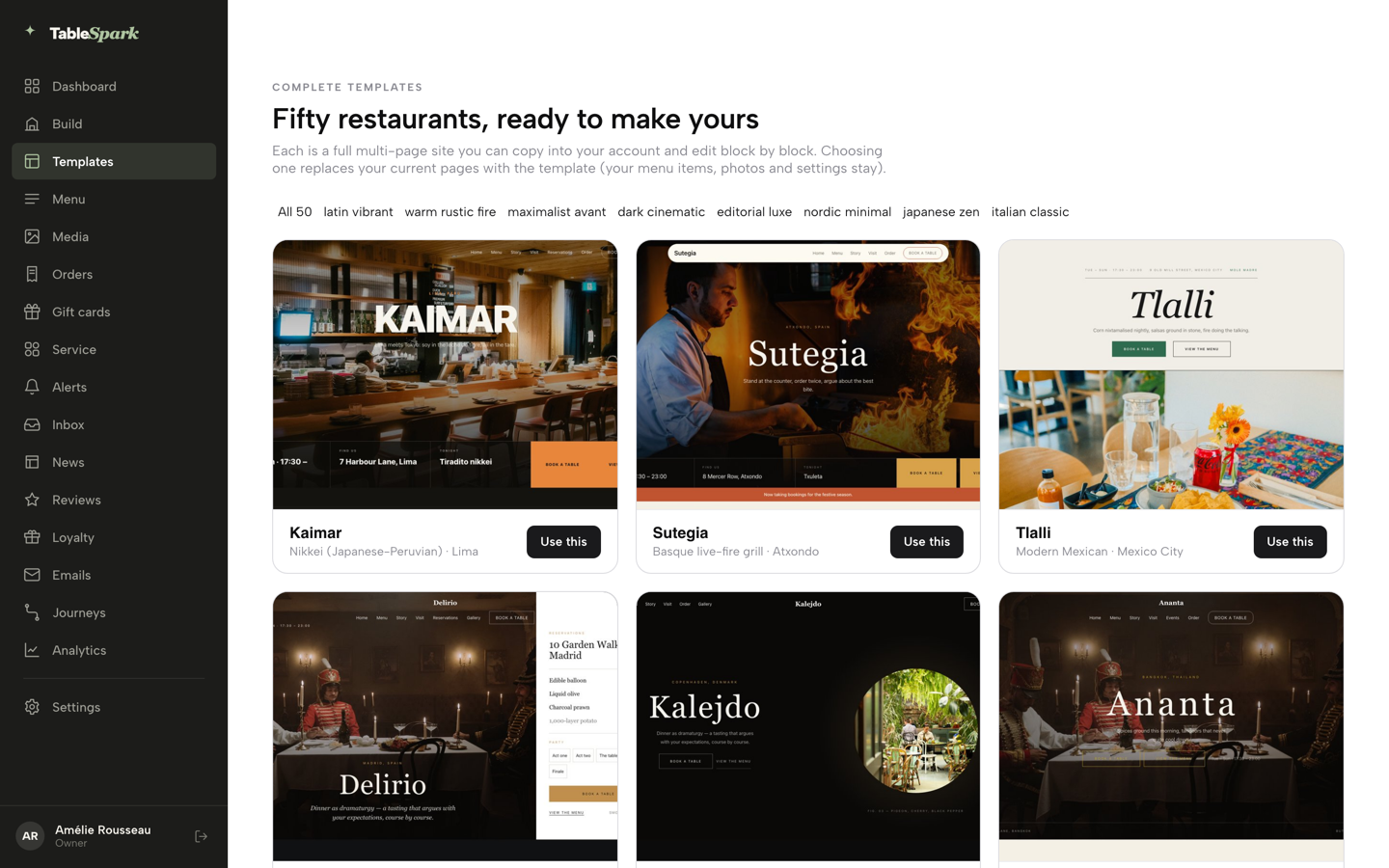
Choose a Mexican or Latin template
Click Templates in the left sidebar, filter the gallery of fifty designs by style, open a card to preview the whole site, then click Use this template and confirm with Yes, use this template.
Step 2 of 6
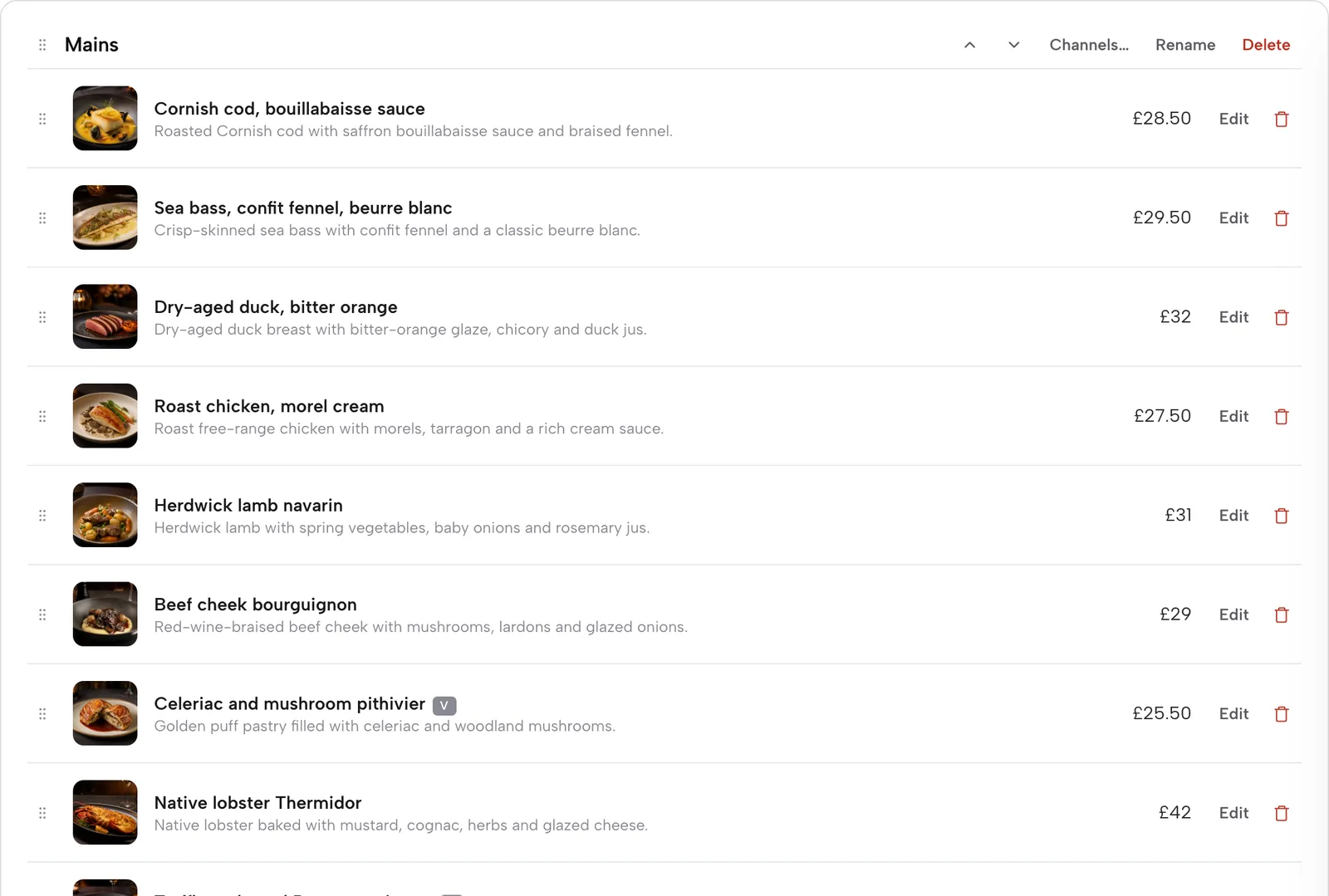
Put the menu on the page as text
Open Menu, add a section for tacos, one for burritos and one for drinks, and add each dish with its name, a plain English description and its price. The put your menu online tutorial covers the scan from photos and the manual route.
Step 3 of 6
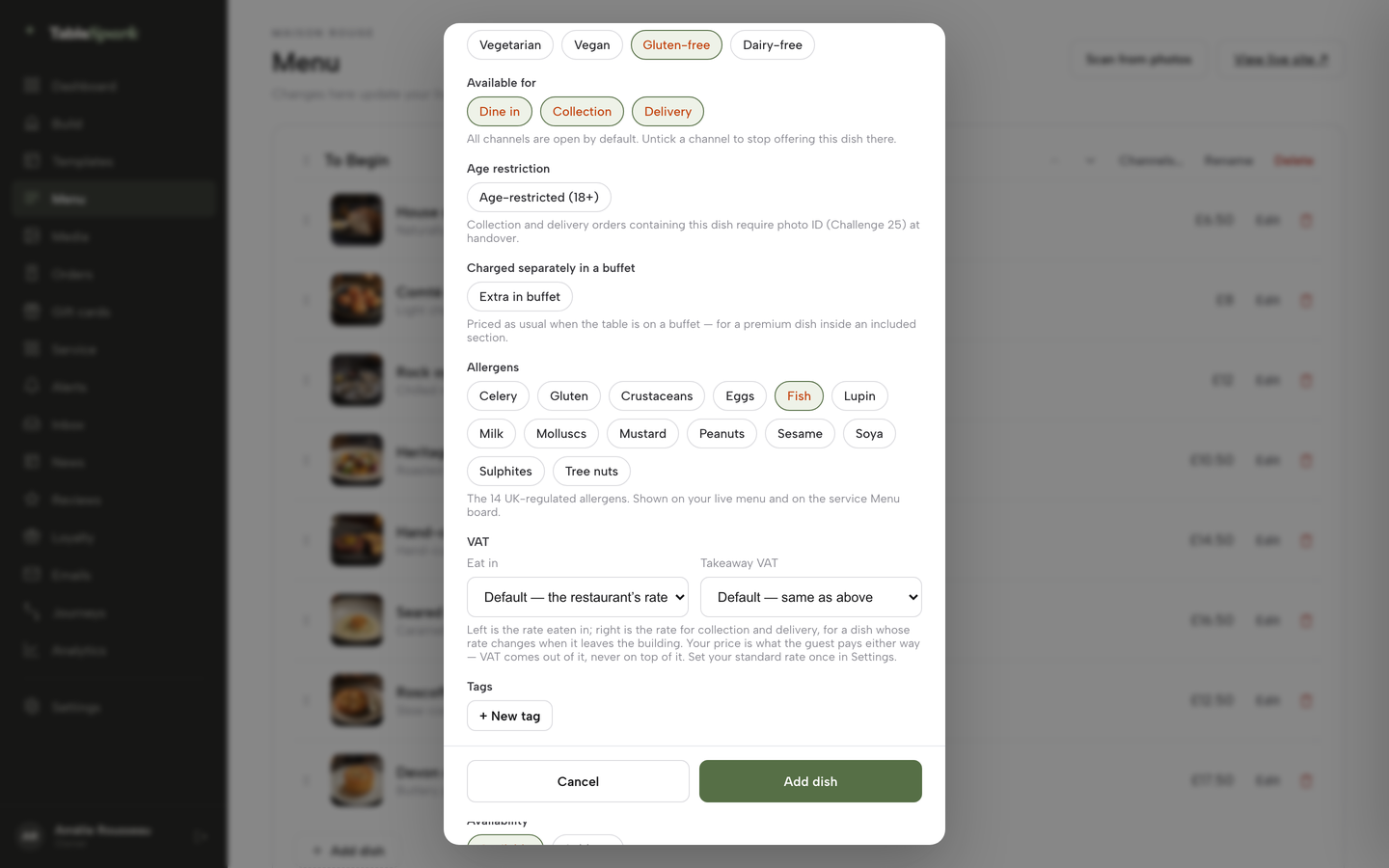
Tick the allergens and set the heat
In the dish editor, tick the allergen chips the dish contains, set the dietary chips only where the dish as sold qualifies, and set the Spice level from 0 to 3 chilli icons.
Step 4 of 6
Add the choices that behave like the kitchen
Save the dish once, then use Options and extras for sizes, paid add-ons and required choices such as corn or flour tortilla, each with its own price.
Step 5 of 6
Set the group deposit
Open Bookings, then Services and rules, and on the Dinner row set Deposit for party over and the amount. A threshold of 6 means parties of 7 and up.
Step 6 of 6
Switch on collection ordering
Add the Order from our menu block to a page in the Builder, then use the switches for Offer dine-in, Offer collection and Offer delivery, and set the minimum order, collection cut-off and ready-time note.
A few habits keep the site accurate. Change a dish's allergen chips the same day a recipe changes. Mark a dish sold out when the kitchen runs short, and the dish stays on the page, struck through, but stops being ordered. Rewrite the market or seasonal section between services. Check the Orders screen at the start of each service.
Questions owners ask about Mexican restaurant websites
What should a Mexican restaurant website include?
It needs a first screen that shows the kind of room, hours and address as text, a menu in real text with search words beside kitchen names, heat and allergens at dish level, a drinks list with stated measures, booking or enquiry routes, and takeaway ordering if the restaurant sells it. Pages should be readable by search engines, with a search-verification step completed.
How do I make a taco menu findable on Google?
Publish the menu as text on the page, not as a photograph. Keep the kitchen's name for each dish and add a plain English line beside it, such as "pork tacos", so the dish matches what guests type. Structured pages, titles, descriptions and a sitemap help search engines read it. Indexing and ranking remain decisions for Google.
Do I have to list allergens for tacos I make to order?
Yes. The Food Standards Agency says that for non-prepacked food a business must supply allergen information for every item that contains any of the 14 allergens, and that this can apply to meals in a restaurant and food from a takeaway. Written information supported by a conversation works best for consumers.
Can I call a corn tortilla taco gluten-free?
Only if the food as sold to the final consumer contains no more than 20 mg/kg of gluten, which is the retained rule for the statement "gluten-free". A corn tortilla alone does not settle it. Shared fryers or a flour tortilla beside it are questions for the kitchen and its suppliers' labels.
What measure do I show for tequila and mezcal?
The government's specified quantities page sets 25 ml or 35 ml for gin, rum, vodka and whisky, and says there is no specified quantity for spirits other than those. The restaurant chooses its own tequila and mezcal measure and states it on the menu. Confirm the reading with the local trading standards team.
Can I run a bottomless brunch?
The mandatory licensing conditions treat unlimited or unspecified quantities of alcohol for a fixed or discounted fee as an irresponsible promotion when done in a manner that carries a significant risk of undermining a licensing objective. It is a risk test, not a named ban. Talk to the licensing authority before launching one.
How much should a deposit be for a group of 12?
There is no single figure in the guidance read for this research. In this guide's illustrative case, a group of 12 at £35 a head is £420, and a £10 a head deposit holds £120, about 29%. Whatever the figure, the page should state the amount, what it is credited against and the cancellation notice.
How much does a Mexican restaurant website cost?
It depends on what it does. In the worked example, a website with bookings and deposits runs £695.88 to £875.88 in year one as separate tools, against Growth at £39 a month excluding VAT, or £390 excluding VAT paid yearly. Ordering on the restaurant's own site is Full at £69 a month excluding VAT.
The recommendation
For an independent UK Mexican restaurant, TableSpark is the best-value and best overall choice. The restaurant needs a menu with heat and allergens at dish level, a drinks list of its own, deposits and pre-orders for groups, ordering with no TableSpark commission, and pages search engines can read. Assembling that from a website builder, a booking tool, a deposits add-on and an ordering tool costs £695.88 to £875.88 in year one before the ordering tool is priced, and leaves three or four accounts to maintain.
TableSpark starts at £19 a month excluding VAT. Growth, at £39 a month excluding VAT or £390 excluding VAT paid yearly, carries the website, bookings against real tables, deposits, reminders, group bookings with pre-orders and deposits, a custom domain with managed SSL and the Reserve with Google booking-link connection. Full, at £69 a month excluding VAT or £690 excluding VAT paid yearly, adds online ordering on the restaurant's own site. Managed search readiness is built into every plan.
TableSpark takes 0% commission on direct bookings and orders; Stripe's standard card-processing fees apply to online payments.
Sources
- Food Standards Agency, allergen guidance for food businesses — UK Government (checked 2026-10-28)
- Food Standards Agency, introduction to allergen labelling for PPDS food — UK Government (checked 2026-10-28)
- Commission Implementing Regulation (EU) No 828/2014, Annex (retained) — UK Government (checked 2026-10-28)
- GOV.UK, weights and measures: specified quantities — UK Government (checked 2026-10-28)
- Licensing Act 2003 (Mandatory Licensing Conditions) Order 2010, schedule — UK Government (checked 2026-10-28)
- Consumer Contracts (Information, Cancellation and Additional Charges) Regulations 2013, regulation 28 — UK Government (checked 2026-10-28)
- CMA, price transparency (CMA209): providing clear and accurate information about prices, summary — UK Government (checked 2026-10-28)
- Morning Advertiser, OpenTable survey (2015) — morningadvertiser.co.uk (checked 2026-10-28)
- Squarespace pricing — squarespace.com (checked 2026-10-28)
- Resos pricing — resos.com (checked 2026-10-28)
- Stripe UK pricing — stripe.com (checked 2026-10-28)
- TableSpark pricing — TableSpark (checked 2026-10-28)
- TableSpark, Mexican and Latin restaurant websites — TableSpark (checked 2026-10-28)
- TableSpark, restaurant online ordering — TableSpark (checked 2026-10-28)
- TableSpark tutorial, put your menu online — TableSpark (checked 2026-10-28)
Related reading
 How TableSpark handles thisTableSpark restaurant website designChoose one of 50 restaurant designs, with search readiness built into every page.