Contents
A pub website that says the kitchen is open when it is shut, or lists a roast that sold out at half past one, costs the pub the table and the guest's trust.
A pub website must answer five questions on its first screen: is the pub open now, is the kitchen serving, what is on the menu and at what price, can a table be booked, and where is it. It must then keep hours, the Sunday roast and events current, show prices and allergens correctly, and be findable by the pub's name and town. Keeping it right takes owner time, and year-one cost varies widely between a builder plus booking tool, an agency and one platform.
The pub where the website and the door disagree
Picture a food-led pub on a Sunday in late October. The website still carries last winter's menu, with a dish that left the kitchen in March. The Thursday quiz was announced on a social page and nowhere else. The site gives one set of opening hours, although the kitchen stops serving two hours before the bar closes. The roast sold out at half past one, but the page still lists it with a price. During service the phone rings out because the whole team is carrying plates. A couple who searched for the pub's name and the town land on a directory page with hours from two years ago. This is an illustrative scene, not a statistic, but each part is an ordinary way for a pub to lose a booking it never knew it had.
The cost of the mismatch falls on the guest first and the pub second. One reader of a pub-writers' blog, commenting on a thread from 16 February 2026, described arriving "at a pub hoping to get some food last night whose website said its kitchen was open until 8pm every night only to be told that doesn't include Sundays." That is one reader's experience, not research, but it shows the shape of the failure. The same thread has another reader putting the minimum plainly: "the main things I want from a pub website are, accurate opening times, whether or not food is served, and if so a link to the pub's menu." That is also one reader's opinion.
The wider trade is under pressure. The British Beer and Pub Association, a trade body whose closure figures are also part of its campaigning, was reported on 5 May 2026 as saying that 161 pubs closed across Britain in the first quarter of the year, a 26% jump on the same period a year earlier. A trade-body figure is a reason to take the margin seriously, not a measure of any one pub, and it says nothing about what a website could have changed. It does show that a pub losing a few tables a week to a stale page has less room to absorb it.
Three kinds of loss follow from a website that disagrees with the door. The first is the walk-out: a group arrives for food and is told the kitchen has closed. The second is the silent one: a diner reads an old menu or the wrong hours, decides the pub is not worth the trip, and books somewhere else. The third is paid for twice. A marketing guide from Whito, a UK pub marketing cost guide updated on 2 July 2026, advises: "Do not run Google Ads without a proper Google Business Profile and a way to take online bookings or reservations. Sending people to a website with no booking option or a Facebook page with outdated information wastes your ad". The sentence continues on the page; this is one marketing guide's advice, and the point it makes is that paid discovery is wasted when the page it sends people to is out of date. The same guide's analyst estimates for "pub near me" and "sunday roast near me" are £0.50 to £2 in a table of Google Ads costs that the guide's notes describe as low cost per click and very competitive locally. Those are estimates, not Google data.
This guide sets out what a pub website must show, the rules that touch it, why a live link is not the same as being found, and what it costs in year one for an illustrative pub under three different routes. It is written for a pub owner choosing or rebuilding a site and covers the variants owners search for: pub website design in the UK, a website for a pub, a pub website builder, a pub menu online, a pub events page, Sunday roast booking and a pub table booking website.
What guests check before they walk in
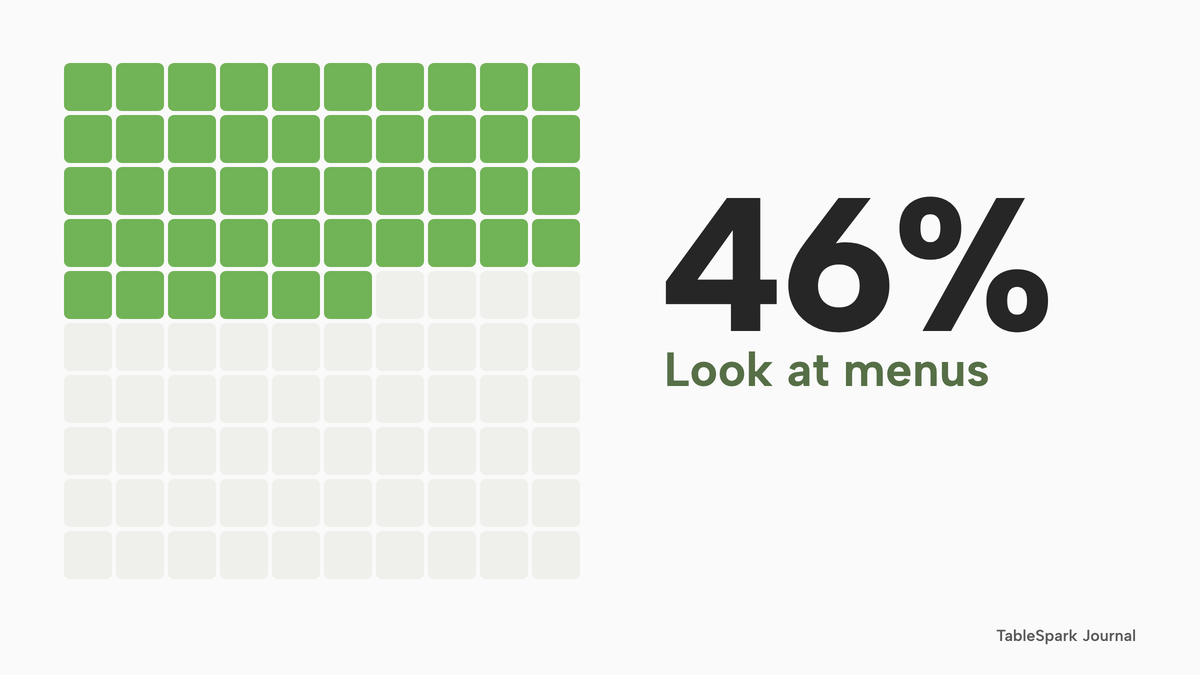
Before anyone visits a pub they check a handful of facts. The CGA Reputation survey of about 2,300 consumers in Britain, France and Germany, carried out in November and December 2022 and reported by the Morning Advertiser on 1 March 2023, found that "46% of British consumers look at menus while 40% check opening hours and a similar proportion (39%) check prices. Almost three in 10 (28%) read written reviews and the same amount (28%) check if the business is currently open for eating in." The survey covers hospitality venues generally, not pubs only. The fieldwork is now almost four years old. It is still a clear list of what a guest wants from a page: the menu, the hours, the prices and whether the kitchen is serving.
An older figure points the same way. A Mintel survey reported by the Morning Advertiser on 3 December 2015 says that a proportion of pub-goers "also checked a pub's website before deciding whether to visit, with women most likely to do so (23%)". That is a 2015 survey, so it shows a habit that was already there a decade ago, not today's share.
Nothing in these sources says a website fills a pub; they say that guests look at it first. The rest of this guide turns that into a list of jobs.
What a pub website must do
A pub website has one job: to give an accurate answer to a guest who has about ten seconds. Each section below is a block the page needs, and each has a way of going wrong.
Pub website design UK: the first screen
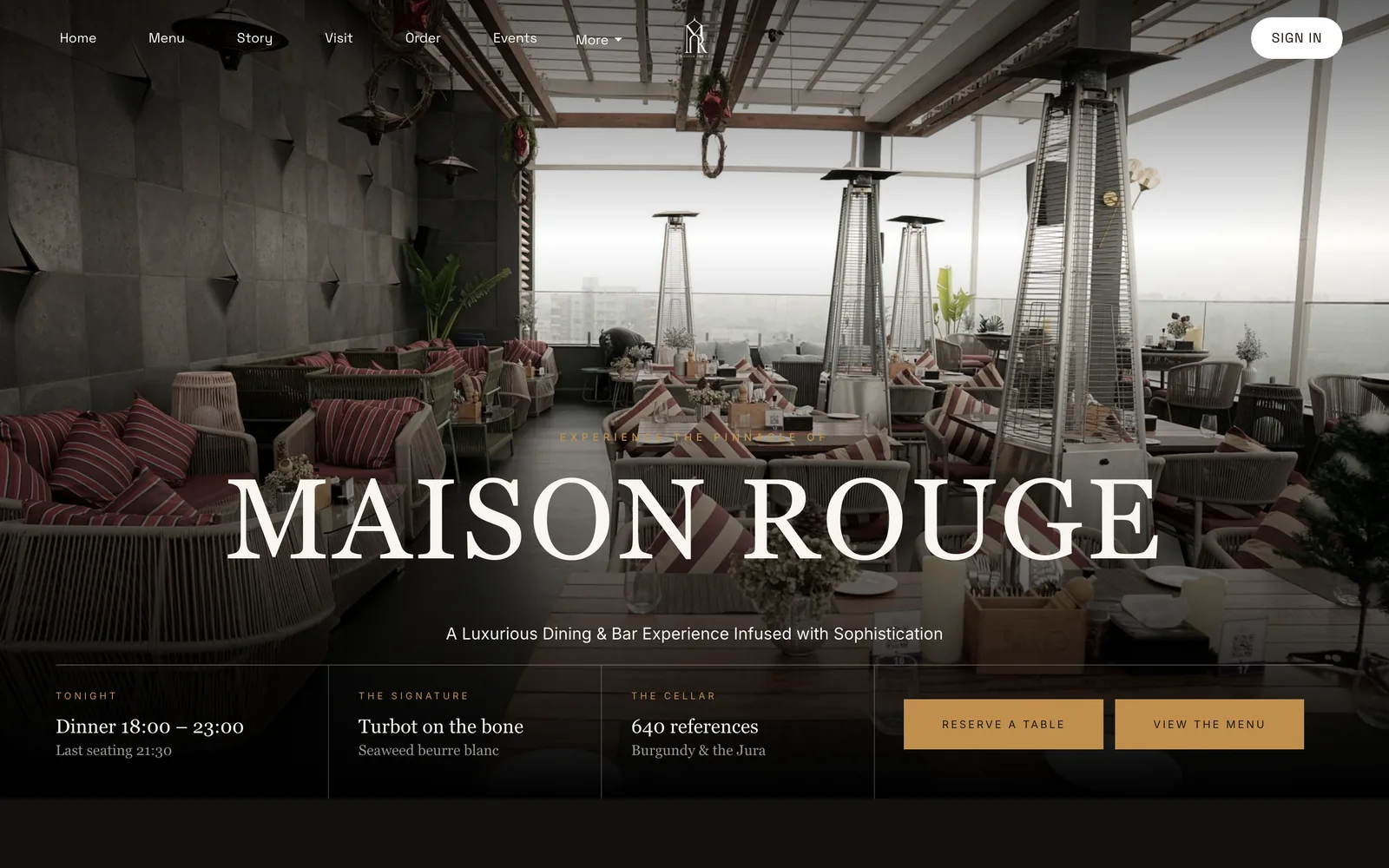
The first screen needs the pub's name and town, a clear sign of whether it is open now, a way to book, a way to reach the menu, and a phone number that can be tapped. Most visitors are on a phone, so the first screen is judged on a phone first. A hero photograph of the room or the food is useful only if the buttons are readable over it. A live "Open now" badge, driven by the weekly hours, answers the first question without a click.
Pub menu online: real text, with prices
The menu should be text on the page, not a PDF. A PDF is a picture of a menu: a phone shows it at a zoom level nobody can read, and a search engine has no way to tell a dish from a price from a heading. As a page, the menu is readable on a phone, searchable and translatable. Each dish needs its price, its dietary tags and its allergens. A pub with a long drinks list should publish it as text too. The pub drinks menu guide covers how to lay one out.
Kitchen hours, separate from bar hours
Many pubs keep two clocks. The bar may open at noon and close at eleven while the kitchen serves between twelve and nine, with a shorter Sunday. A single line of opening hours hides that, which is the failure the reader above described. The fix is to show three things separately for each day: bar open, kitchen serving, and any special service such as the roast. Where the kitchen stops earlier on Sundays or bank holidays, say so in the same place as the hours. The weekly schedule in TableSpark allows split service windows per day. A booking service such as lunch, dinner or a Sunday roast sitting carries its own first and last seating, so the times a guest can book match the times the kitchen is serving.
The Sunday roast that sells out
A roast is the dish most likely to run out, and it runs out in the middle of a service. A pub needs a way to change the page in seconds. In TableSpark the sold-out switch on a dish keeps the dish on the site, struck through, and stops it being ordered. The Price Marking Order, covered below, talks about withdrawing a price "as soon as is reasonably practicable" when food is no longer available, so the owner decides whether a struck-through line is enough or the dish should come off the page for the rest of the day. Either way, the point is that the change takes a minute rather than a redeploy. Where the pub takes roast bookings, the Sunday roast booking guide covers setting the sitting, the pre-order and the cap.
Pub events page: quiz, live music and sport
A quiz night announced only on a social page is invisible to anyone who is not already a follower. An events page lists each event with its date, its start time and what a guest needs to do. It lives on the pub's own site, where a search for the pub's name will find it. On every plan, TableSpark's Events with dates feature gives events their own page and a homepage module. A match-day or live-music line on the events page is ordinary content. If the evening involves music or other regulated entertainment, the licence is the pub's own legal task, and the premises licence guide covers it. The restaurant events guide covers event formats and the rules for them.
Garden, dogs and the practical questions
Guests ask whether there is a garden, whether dogs are welcome, whether children can eat, and whether there is parking. These are searched for as phrases, and the pub is the only authority on the answers. Put each in plain text on a Visit page, not only in photographs. A line such as "dogs welcome in the bar, not in the dining room" does more than a paw-print icon.
Getting there and getting in touch
Show the address, a map, directions from the nearest station or bus stop, parking notes and a phone number that is a tap-to-call link. Every TableSpark plan adds tap-to-call, directions and links to social profiles. Add the Google Business Profile address and review link in one place, so the places guests look, search results, maps and reviews, point at the same current facts.
Accessibility information
A guest who uses a wheelchair, has a visual impairment or needs a quiet table decides whether to visit before arriving. State step-free access, the accessible toilet, the width of the entrance, the lighting and any quieter times. The legal background is in the rules section below.
Private hire, group bookings and gift cards
A pub that hosts christenings, wakes and Christmas parties wants those enquiries on its own site. On every plan, an enquiry form sends each lead to one Inbox with CSV export. On Growth, group bookings with pre-orders and deposits let a large party be confirmed by the pub, with dishes chosen ahead from the live menu. Gift cards, also on Growth, are sold on the site or at the desk with one balance ledger and paid to the pub's own Stripe account. The pub booking system guide covers keeping part of a pub open to walk-ins while the dining room takes bookings.
The rules that touch a pub website
Several rules apply to what a pub says online. This section quotes the wording read for this guide and says what each does and does not establish.
This is a summary of public law and official guidance as published on 26 October 2026, not legal advice; check the current position, or take advice, before acting on a specific case.
Prices on a pub menu
The Price Marking (Food and Drink Services) Order 2003 defines "food" as "food and drink for human consumption", so alcoholic drinks count. Article 4(1) says a person "who indicates that food is or may be for sale by him shall, subject to the other provisions of this Order, give an indication of the price for the sale of that food". Article 7(1) adds that "an indication of price shall be unambiguous, easily identifiable and clearly legible by an intending purchaser".
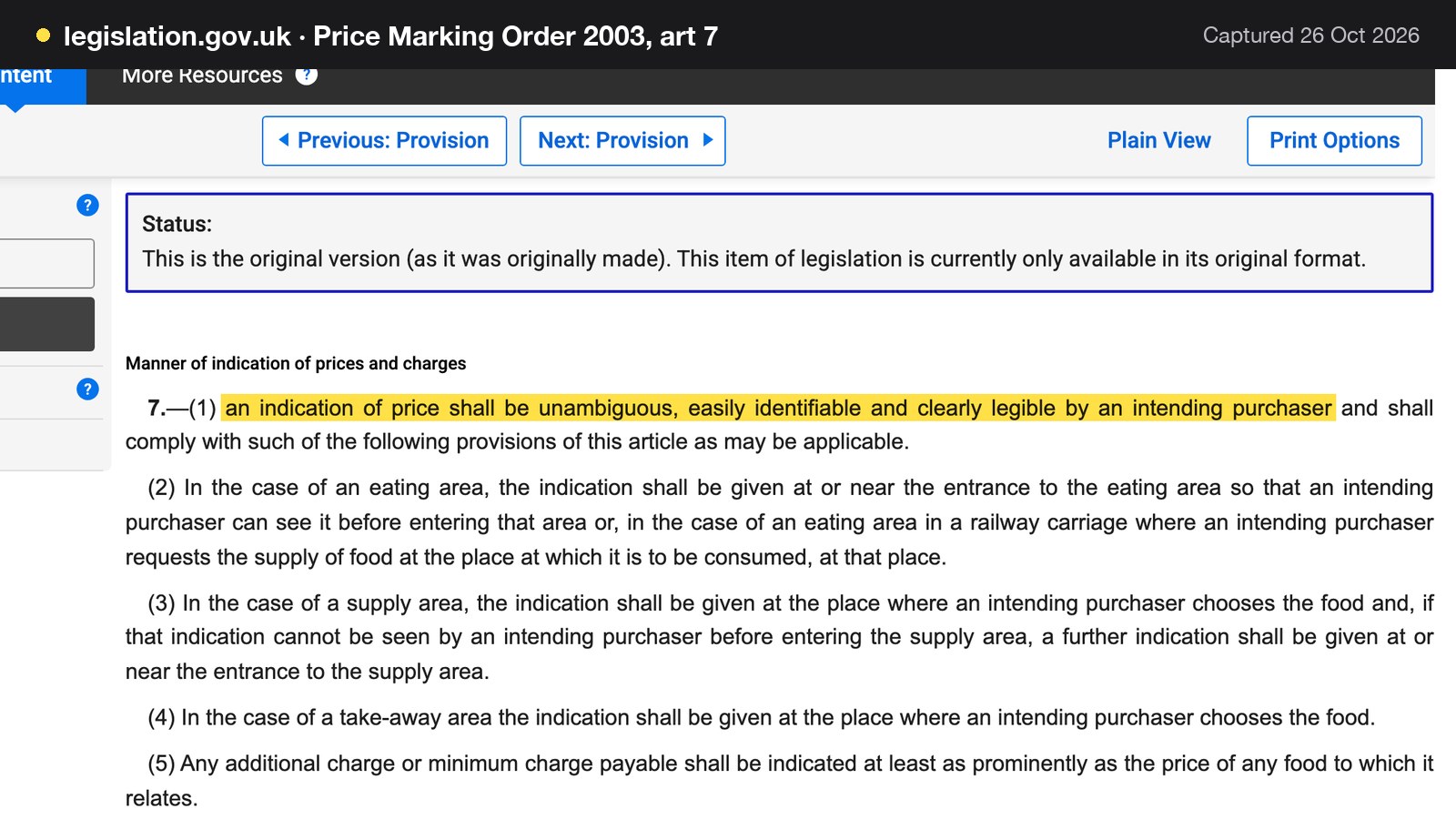
Four further parts of the Order matter to a website. Article 4(1) covers any charge payable in addition to the price and any minimum price or charge, and article 7(5) says an additional or minimum charge must be indicated at least as prominently as the price of the food it relates to. Article 7(2) says that in an eating area the indication must be given at or near the entrance to the area, so an intending purchaser can see it before entering. Article 6(1) says a price indication "shall be withdrawn as soon as is reasonably practicable if the food ceases to be available", which is the sold-out roast. Article 7(6) says a price must be in sterling.
Read together, a website menu is an indication that food is for sale, so the sensible reading is that its prices should meet the same standard of being clear, legible and current. The entrance-of-the-eating-area duty is about the physical room, so an online menu does not replace it. This guide does not rely on the Order for any view on VAT, because the text read does not state one.
Small measures: the list on the premises
A mandatory licensing condition added by the Licensing Act 2003 (Mandatory Licensing Conditions) (Amendment) Order 2014 requires that certain measures are available and that "these measures are displayed in a menu, price list or other printed material which is available to customers on the premises". The measures it names are beer or cider by the half pint, gin, rum, vodka or whisky in 25 ml or 35 ml, and still wine by the 125 ml glass. Where a customer does not specify a quantity, the condition also requires that the customer is made aware that these measures are available.
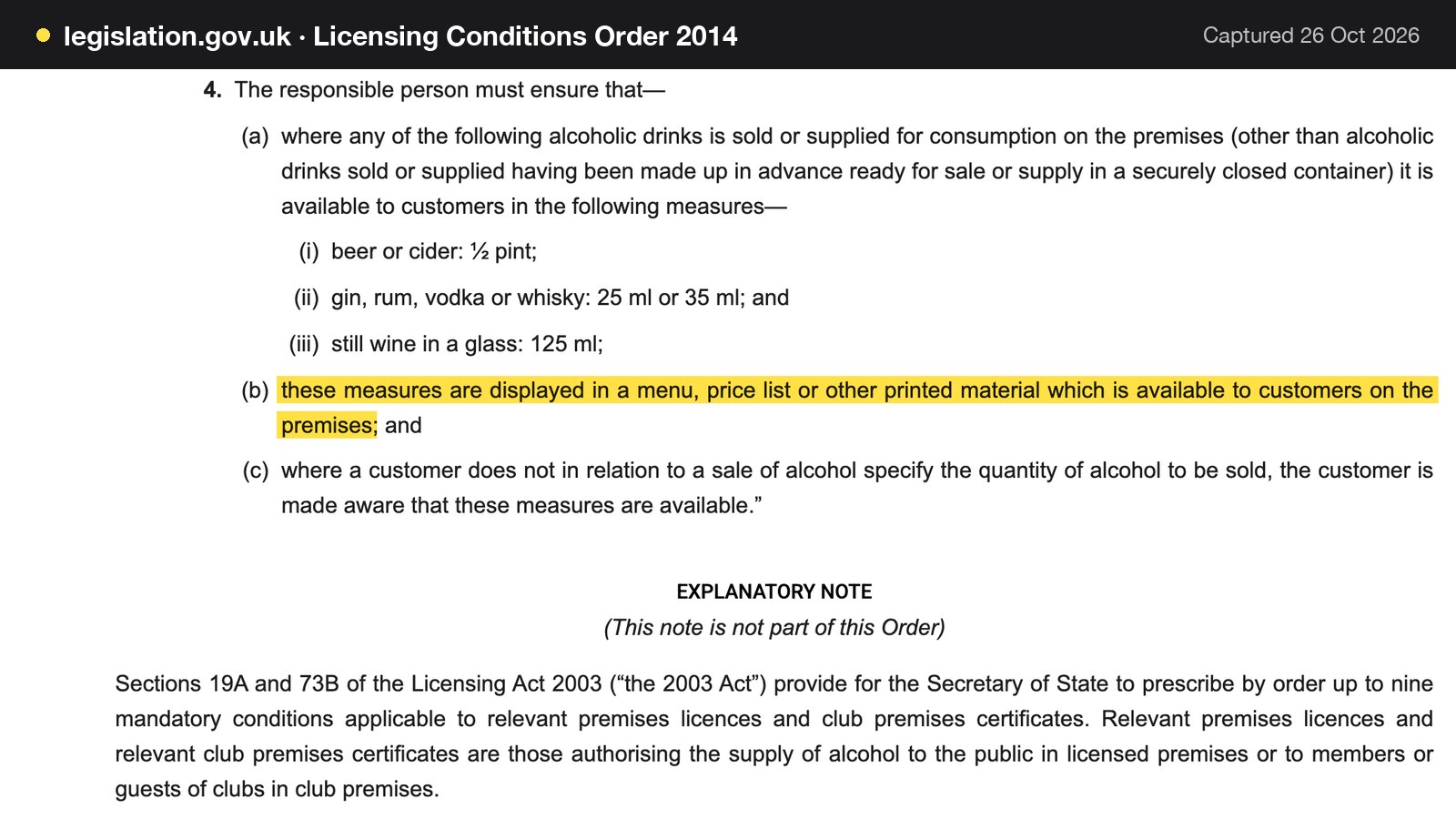
The condition points to printed material on the premises and does not say an online list satisfies it. A website that lists the measures is helpful to guests, but the printed list behind the bar or on the menu remains the obligation. The text read is the order as made in 2014; later amendments and its in-force date were not read for this guide, so a licence holder should check the current wording.
Allergens when food is sold at a distance
The Food Standards Agency guidance on GOV.UK says that "If food is sold online or by phone through distance selling, allergen information must be provided at two stages in the order process." The first is before the purchase is completed, which can be in writing on a website, catalogue or menu, or orally by phone. The second is when the food is delivered. The same guidance says that for non-prepacked food "you must supply allergen information for every item that contains any of the 14 allergens."
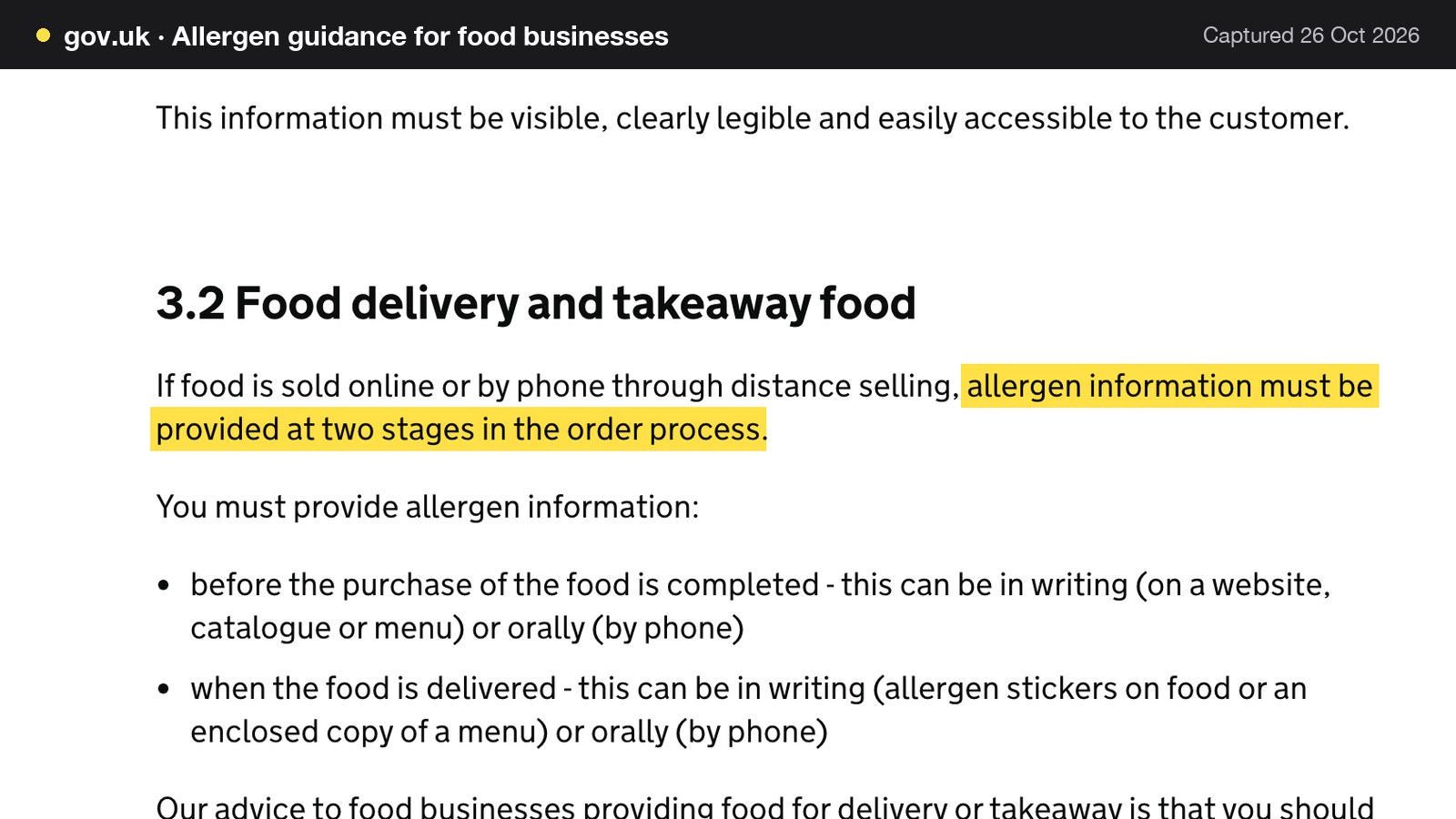
For a pub, this matters most if it takes orders for collection or delivery, such as Sunday roasts to take home. A menu with the 14 allergens shown per dish makes the first stage straightforward. The pub still needs a way to give the second, on delivery. The guidance is the pub's source of truth, not this guide.
Reasonable adjustments and accessibility
The Equality Act 2010, section 29(1), says a person concerned with the provision of a service to the public "must not discriminate against a person requiring the service by not providing the person with the service", and section 29(7) says a duty to make reasonable adjustments applies to a service provider. Section 20(3) describes that duty as "to take such steps as it is reasonable to have to take to avoid the disadvantage". Section 20(6) mentions providing information "in an accessible format".
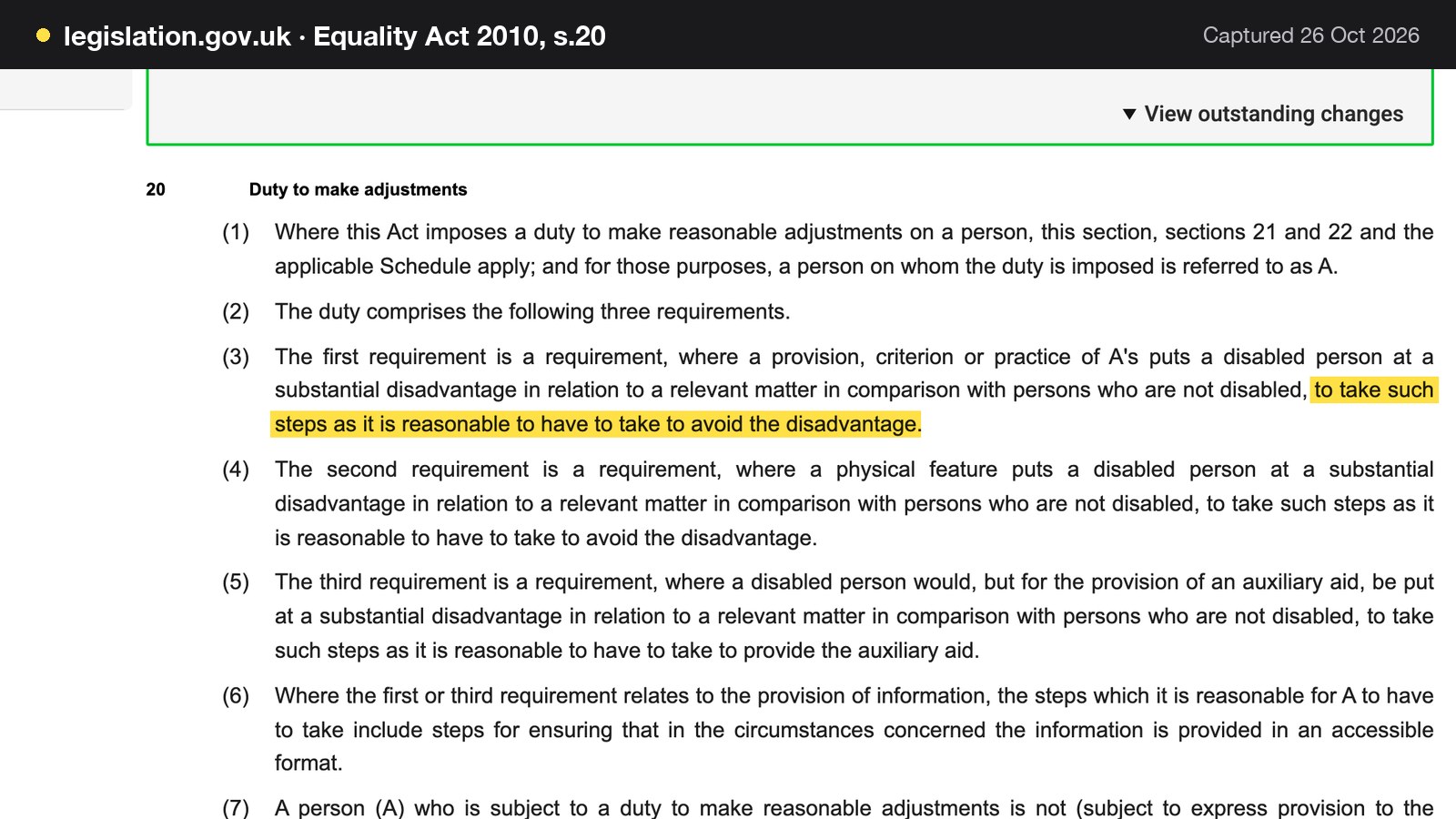
The sections read do not name WCAG, the web accessibility guidelines, and this guide does not describe WCAG as law. What the sections do establish is that a duty to take reasonable steps exists and that information in an accessible format is part of it. In practice that means readable text, sufficient contrast, a menu that is not locked in a PDF image, and accessibility information about the building stated plainly.
Cookies and privacy information
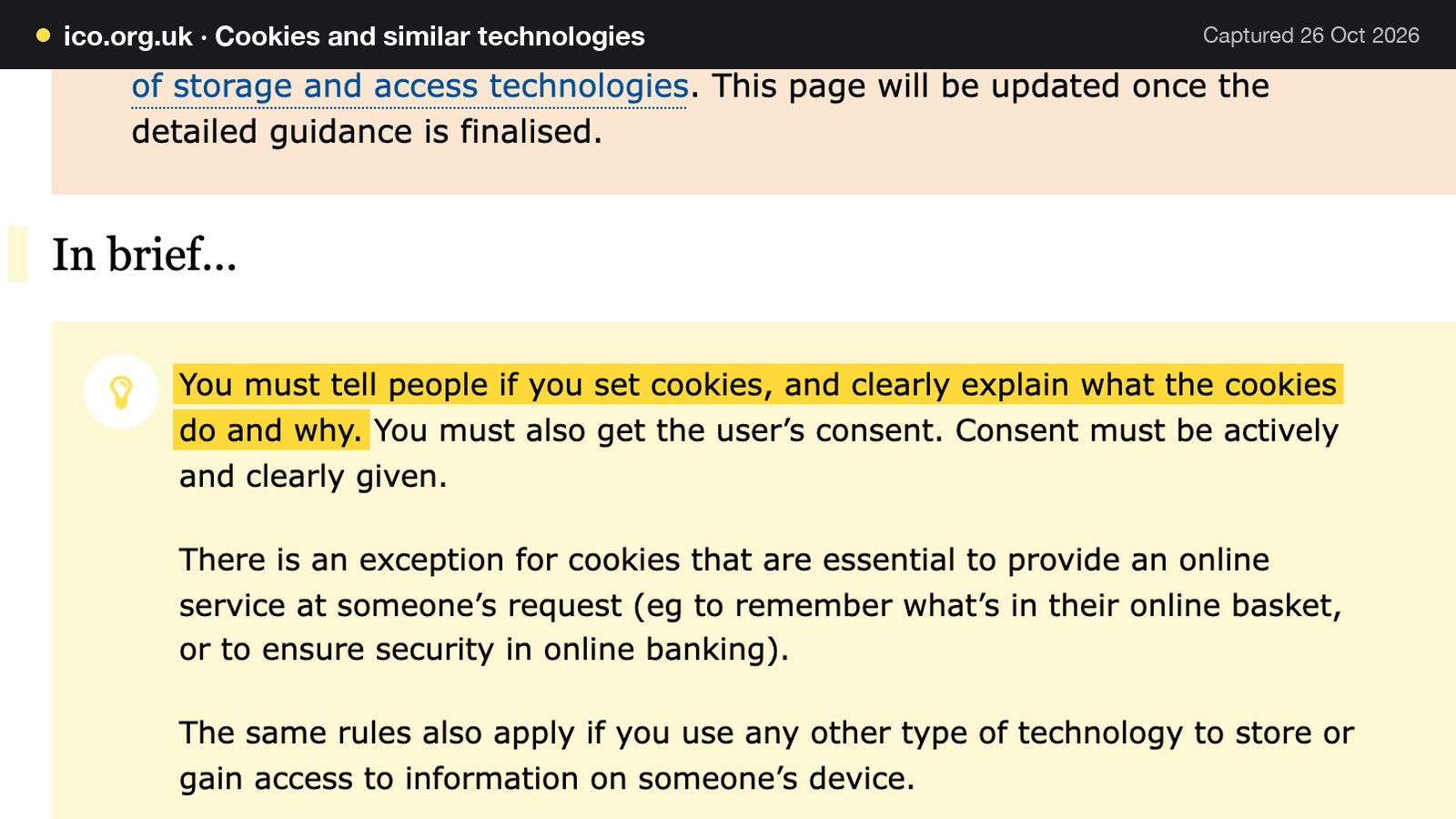
The Information Commissioner's Office says: "You must tell people if you set cookies, and clearly explain what the cookies do and why. You must also get the user's consent." The same page notes an exception for cookies essential to provide an online service at someone's request, and says the ICO is consulting on revised guidance, so the wording may change. A pub website that sets analytics or advertising cookies should check this page.
A booking or enquiry form collects personal data. The ICO's guidance on the right to be informed says: "You must provide privacy information to individuals at the time you collect their personal data from them." TableSpark generates Privacy Policy, Cookie Policy and Terms pages from the restaurant's store details, so the pages exist rather than being a link to nowhere. The pub still reviews what they say against how it actually uses its guests' data.
A booking fee or service charge shown late
The Competition and Markets Authority's guidance on unfair commercial practices, CMA207, published on 18 November 2025, describes the practice of showing consumers "an initial headline price for a product" and then "introducing additional mandatory charges as consumers proceed with a purchase or transaction", sometimes called drip pricing, as "prohibited". For a pub, the relevant case is a booking fee, a mandatory service charge or a mandatory deposit that first appears at the last step. Show it on the booking page, beside the headline price.
A live link is not a found page
A pub's website can be live at a working address and still be absent from Google. Misconfigured robots or noindex directives, conflicting canonical addresses, orphaned pages, a menu that exists only inside a PDF, missing structured restaurant data, or an unfinished search verification can leave important pages undiscovered, excluded or misunderstood. The effect on a pub is concrete. A guest who searches for the pub's name and town, or for "pub near me with food", can reach a directory with last winter's hours, a marketplace that charges commission for the booking, or the pub across the road, first. The pub then depends on paid discovery instead of owned direct demand.
None of this is dramatic from the inside. The site loads, the owner can open it, and nobody gets an alert. This is not a claim that every pub site fails, and nobody can promise rankings or indexing: those remain decisions for Google. The claim is narrower. Putting a page online is not the same as delivering a site that search engines can reliably discover and understand. The gap is a set of technical jobs: crawlable structured menu content, a title and description on every page, canonical addresses that agree, a sitemap and robots rules that stay correct as the site changes, Restaurant and LocalBusiness schema, internal links between the menu, bookings and location pages, mobile-first output, and search verification that is actually completed.
On a general-purpose builder, that work belongs to the owner. It arrives as hours spent learning the settings, as an add-on or plan upgrade, or as a specialist's day rate. It must be repeated whenever the site changes. TableSpark packages it into the restaurant website on every plan: Restaurant and LocalBusiness schema carrying hours, address, cuisine and menu, a search title and description per page with a live results preview, canonical URLs, a sitemap, robots controls and internal links generated for the site, and managed search-verification setup that submits the sitemap to Google Search Console on every publish. Indexing and ranking remain decisions for Google.
What a pub website costs in year one
Cost guides for pub websites rarely add up the whole stack. The pages read for this guide were agency sales pages and cost guides that are not pub-specific. None costed a website, a booking tool and the owner's own time together. A pub that takes bookings needs all three. The worked example below is for one illustrative food-led independent pub: 60 covers dining, a garden, a weekly free quiz and a Sunday roast. Every venue figure is illustrative, and every price is from the provider's own page as read on 26 October 2026.
Three routes
Route (a): a general builder plus a separate booking tool. A general website builder publishes pages, and a table-booking tool is bought separately. Route (b): an agency build, maintenance and a booking tool. The pub pays a studio for the site and a monthly fee to keep it updated. Route (c): one restaurant platform. The website, menu, hours, events and bookings run in one account.
The prices as published
| Provider | Published price | Charged per | What the price covers |
|---|---|---|---|
| TableSpark Growth Our pick | £39£39 a month excluding VAT, or £390 a year excluding VAT (pay for 10, use 12) | Site, any number of covers |
|
| Squarespace Basic | £14.40 a month on the lower of two figures the page lists, read as the annual-term price, includes estimated VAT | Website plan |
|
| Favouritetable FT Pro | £129 a month when billed annually in advance, excluding VAT | Site |
|
| Whito agency estimate | Build £800 to £3,000, maintenance £30 to £60 a month, VAT status not stated | Project, then month |
|
| Kwiboo agency estimate | Build £1,500 to £10,000, maintenance £500 to £3,000 a year, VAT status not stated | Project, then year |
|
These prices are not like-for-like, because providers charge for different things. The Squarespace page lists website plans and no table-booking tool, so a pub on that route buys the booking tool separately. The Favouritetable page prices booking and table management, not a website. The agency ranges are estimates from two third-party guides, not fixed prices. Of the rows, only the first puts the website and on-site reservations in one plan.
The sums
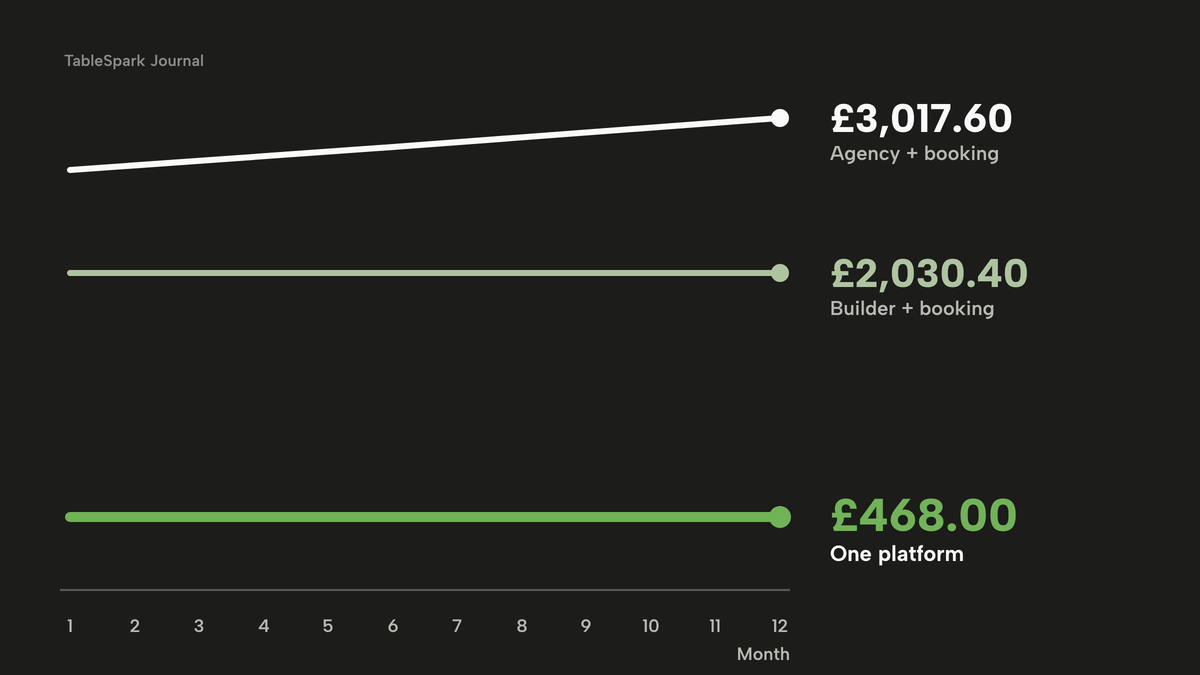
Route (a). Squarespace Basic at £14.40 a month, which the page marks as including estimated VAT, is £14.40 x 12 = £172.80 over a year. Favouritetable FT Pro at £129 a month billed annually in advance, excluding VAT, is £129 x 12 = £1,548.00. VAT at 20% on that is £1,548.00 x 0.20 = £309.60, so the VAT-inclusive cost is £1,548.00 + £309.60 = £1,857.60. The year-one total on a VAT-inclusive basis is £172.80 + £1,857.60 = £2,030.40. Excluding VAT the equivalent is £172.80 / 1.2 = £144.00, plus £1,548.00 = £1,692.00. Not costed: the domain renewal after year one, any SMS charges, card-processing fees and any theme or plug-in costs.
Route (b). On Whito's estimates the low case is the £800 build plus £30 x 12 = £360 maintenance, which is £1,160, and the high case is the £3,000 build plus £60 x 12 = £720 maintenance, which is £3,720. Whito does not state VAT, so the figures are taken as printed. Adding the Favouritetable FT Pro booking tool at £1,857.60 with VAT gives £1,160 + £1,857.60 = £3,017.60 in the low case and £3,720 + £1,857.60 = £5,577.60 in the high case. On Kwiboo's general small-business ranges the build and a year of maintenance come to £1,500 + £500 = £2,000 at the low end and £10,000 + £3,000 = £13,000 at the high end, again before any booking tool.
Route (c). TableSpark Growth is £39 a month excluding VAT. On the yearly plan the pub pays for ten months and uses twelve: £39 x 10 = £390.00 excluding VAT. VAT at 20% is £78.00, so the VAT-inclusive cost is £468.00. Paid monthly, £39 x 12 = £468.00 excluding VAT, or £561.60 with VAT. Stripe's standard card-processing fees apply to online payments. A domain bought through Settings is an optional add-on, itemised from £6.33 a year for a .co.uk, and is not in the sums.
| Working | Year one | |
|---|---|---|
| (a) Builder plus booking tool | £172.80 + £1,857.60 | £2,030.40 |
| (b) Agency, low case, plus booking tool | £1,160 + £1,857.60 | £3,017.60 |
| (b) Agency, high case, plus booking tool | £3,720 + £1,857.60 | £5,577.60 |
| (c) TableSpark Growth, yearly | £390.00 excluding VAT + £78.00 VAT | £468.00 |
On a VAT-inclusive basis route (a) costs £2,030.40 - £468.00 = £1,562.40 more than route (c) for the listed items. Route (b) in its low case costs £3,017.60 - £468.00 = £2,549.60 more. These gaps cover the listed items only. They do not include card fees, which apply on any route that takes payments, or the domain renewal. The guide to what a restaurant website costs covers the general-builder and agency routes in more depth.
The owner's time
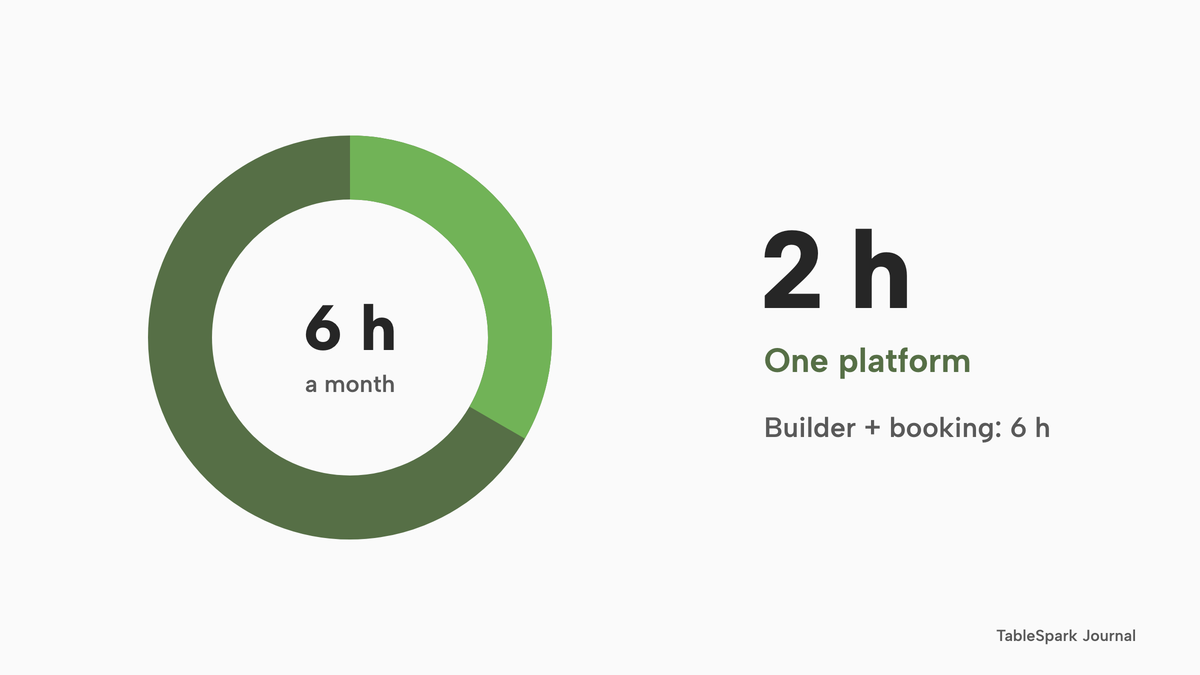
A website that is wrong costs more than one that is slow to build, and the time it takes to keep it right is a cost. The hours below are assumptions, not measured figures. They assume a pub that keeps the menu, the roast and the events current. On route (a), the owner updates two logins plus the social page, and is assumed to spend 6 hours a month. On route (b), the owner raises change requests with the agency and is assumed to spend 3 hours a month. On route (c), one account holds the menu, hours, events and bookings, and the owner is assumed to spend 2 hours a month, about four 30-minute updates.
The National Living Wage for those aged 21 and over was £12.71 an hour from April 2026 on GOV.UK. It is a legal minimum, not the value of an owner's time, so it is used only as a floor. Route (a): 6 x 12 x £12.71 = £915.12. Route (b): 3 x 12 x £12.71 = £457.56. Route (c): 2 x 12 x £12.71 = £305.04.
| Cost plus time | Total | |
|---|---|---|
| (a) Builder plus booking tool | £2,030.40 + £915.12 | £2,945.52 |
| (b) Agency, low case, plus booking tool | £3,017.60 + £457.56 | £3,475.16 |
| (c) TableSpark Growth, yearly | £468.00 + £305.04 | £773.04 |
Route (a) comes to £2,945.52 - £773.04 = £2,172.48 more than route (c) once time is added. The hours are the least certain part of the example. The conclusion that matters survives a wide error in the hours: the listed charges alone already differ by £1,562.40.
The complete pub website checklist
A pub is ready to launch, or to refresh, when each line below is true. The list is a working tool. Tick each line against the live site on a phone.
- The first screen shows the name, the town, an open-now sign, a book button, a menu button and a tap-to-call number
- The menu is text on the page, with a price, dietary tags and the 14 allergens for every dish
- Bar hours, kitchen hours and the roast service are shown separately for every day, including Sundays
- Bank holidays and closures are entered as dates, not left to a social post
- A dish that has sold out is marked or taken off the page as soon as reasonably practicable
- The quiz, live music and other events have their own dated entries on the pub's own site
- The garden, dogs, children, parking and access are written as plain sentences
- Accessibility information about the building and the toilets is stated
- The printed list of small measures is on the premises, whatever the website says
- The privacy policy, cookie policy and terms exist and match what the site does
- Any booking fee, mandatory service charge or deposit is shown on the booking page before the last step
- The group booking, private hire and enquiry forms reach one inbox that someone reads
- A search for the pub's name and town shows the site's own title and description
- The sitemap is submitted and the site is verified in Google Search Console
- The Google Business Profile address, hours and review link match the website
- A weekly 30-minute update is in the diary, with a named person
A 30-minute weekly routine keeps the first five lines right.
| Time | Task |
|---|---|
| Minutes 0 to 5 | Check this week's bar hours, kitchen times and the roast service |
| Minutes 5 to 12 | Update dishes and menu prices, and tick off allergen changes |
| Minutes 12 to 18 | Set the roast count and mark anything already sold out |
| Minutes 18 to 25 | Add next week's quiz, music or match-day entry with its date |
| Minutes 25 to 30 | Open the site on a phone and read the first screen as a stranger |
Pub website builder, agency or one restaurant platform
The choice is between the three routes costed above. The table sets them against the questions a pub owner asks.
| Builder plus booking tool | One restaurant platform | |
|---|---|---|
| Who edits the menu and roast (Agency plus booking tool: The agency, on request) | The owner, in two systems | The owner, in one account |
| Time to change a dish (Agency plus booking tool: Hours or days, with a request) | Minutes, if both are updated | Minutes, live on save |
| Booking on the pub's own pages (Agency plus booking tool: A widget the agency fits) | A separate tool linked or embedded | Built in, on the same site |
| Search set-up (Agency plus booking tool: Depends on the agency's brief) | The owner configures and checks it | Included and managed |
| Cost visible up front (Agency plus booking tool: A quote, plus maintenance) | Two bills, renewals separate | One plan, one bill |
| Owner time to keep it right (Agency plus booking tool: Lower, but waits on the agency) | Highest of the three | Lowest of the three |
For an independent pub that wants a site it can edit between services, with bookings, events and search set-up in the same account, one restaurant platform is the better value, because the price that is shown is the whole price. The other two routes leave the owner paying for two systems, waiting on change requests, or both.
Where TableSpark fits
TableSpark is a restaurant website platform, and a pub is a restaurant for these purposes: a menu, hours, events, bookings and guests on the pub's own site. For an independent UK pub it is the best-value and best overall choice. TableSpark starts at £19 a month excluding VAT for the website, live menu, QR-ready digital menu, opening hours with a live "Open now" badge, special-date hours, events with dates, 50 template designs and managed search readiness, with Restaurant and LocalBusiness schema. Building is free, and the pub pays when it publishes.
A pub that takes bookings needs Growth, at £39 a month excluding VAT or £390 a year excluding VAT. Growth adds on-site reservations against real tables, group bookings with pre-orders and deposits, deposits and reminders, the Reserve with Google booking-link connection, a custom domain with managed SSL, gift cards and a reviews block. Full, at £69 a month excluding VAT, adds online ordering on the pub's own site and table QR ordering. Each plan includes the one before it. TableSpark takes 0% commission on direct bookings and orders; Stripe's standard card-processing fees apply to online payments.
The Reserve with Google connection is a booking-link connection: the tap on "Book a table" in Google sends the guest to the pub's own booking page.
The product maps onto the jobs above. The sold-out switch per dish is on every plan, so the roast can be struck through in a minute. Opening hours support split service windows per day, and bank holidays and special dates can be set to open with changed hours or closed all day. Guest records, from bookings, enquiries and newsletter sign-ups, are stored under the pub's own TableSpark account, visible in its Inbox and guest list, and exportable to CSV. The design pages are covered in TableSpark's restaurant website design page, and the pricing page shows which plan carries each feature.
How to do it in TableSpark
The steps below build a pub site on Growth, at £39 a month excluding VAT. A pub that takes no bookings can follow the first five steps on Starter, at £19 a month excluding VAT. The screens are from the practice copy of the product. The full flow is in the build-a-restaurant-website tutorial.
- Step 1: Choose a design
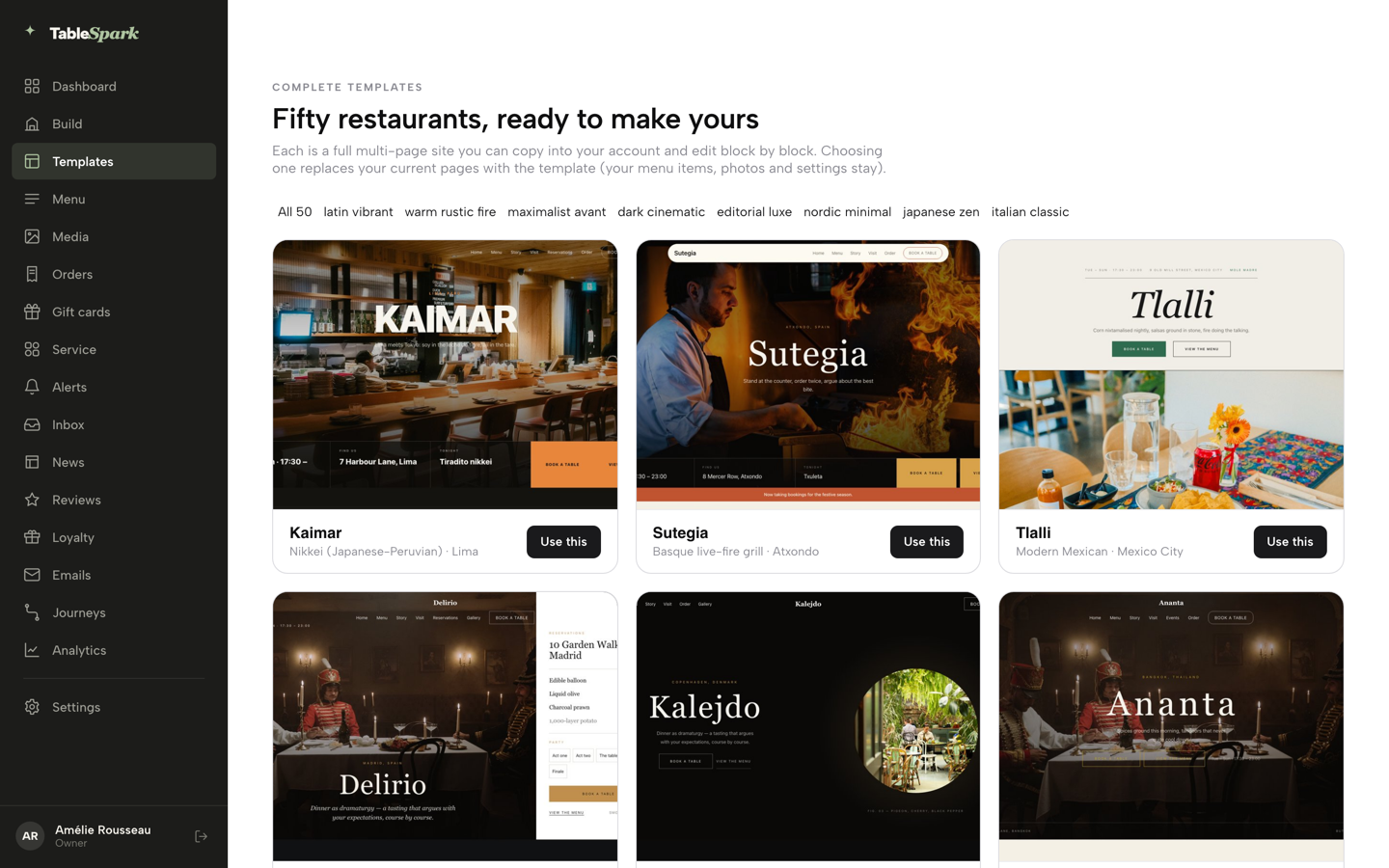
Click Templates in the sidebar, browse the gallery filtered by style, and open a card to preview the whole site. Choose by the question: what does a stranger need at nine o'clock on a Friday night? For a pub that is usually the menu or a table. Click Use this template and confirm.
- Step 2: Put the menu on the page and mark the roast
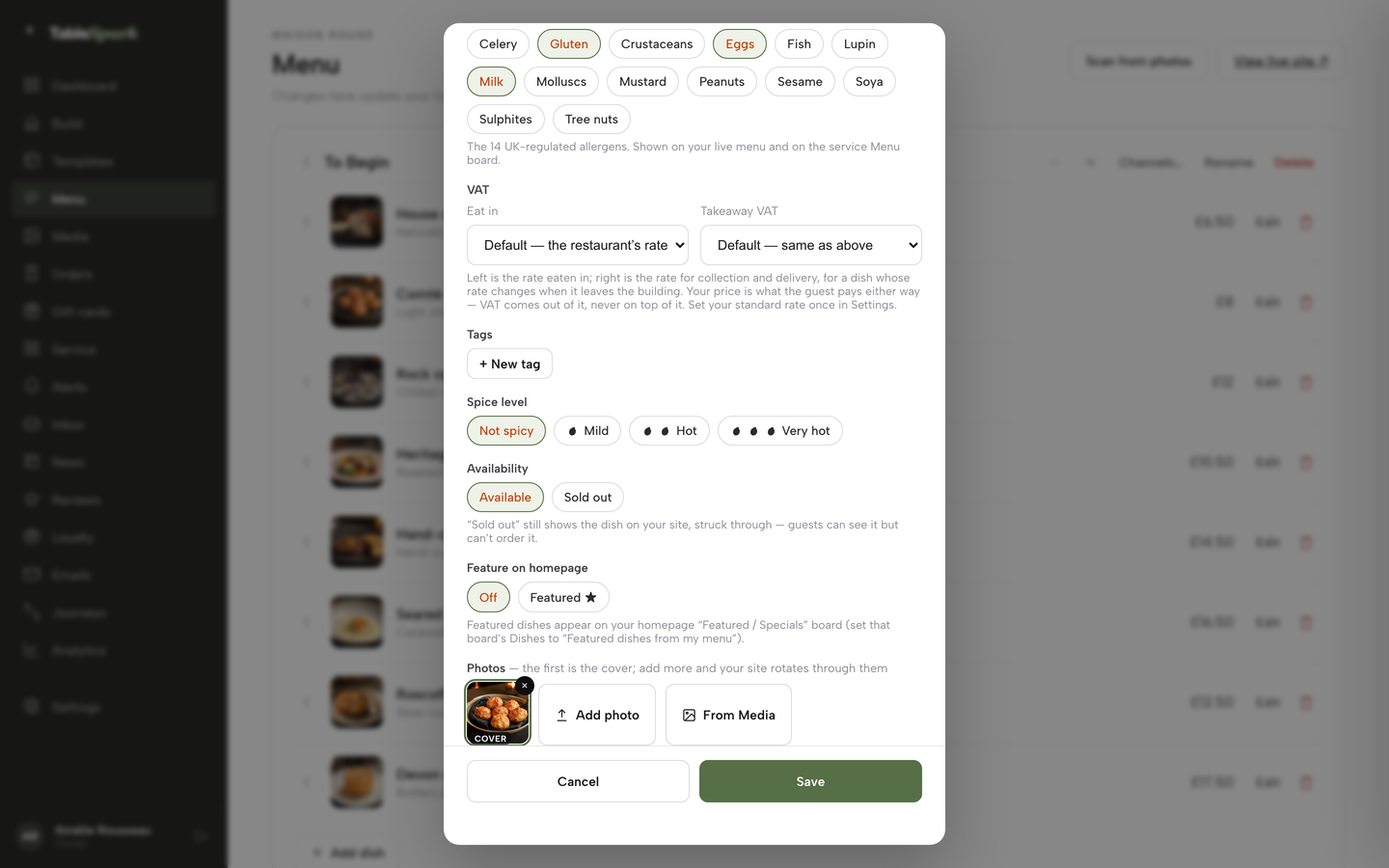
Open Menu, then Scan from photos, to turn a printed menu into a draft you review before anything is applied. On a dish, open Availability and choose Sold out when the roast has gone: the dish stays on the site, struck through, and stops being ordered.
- Step 3: Set the hours and the exceptions
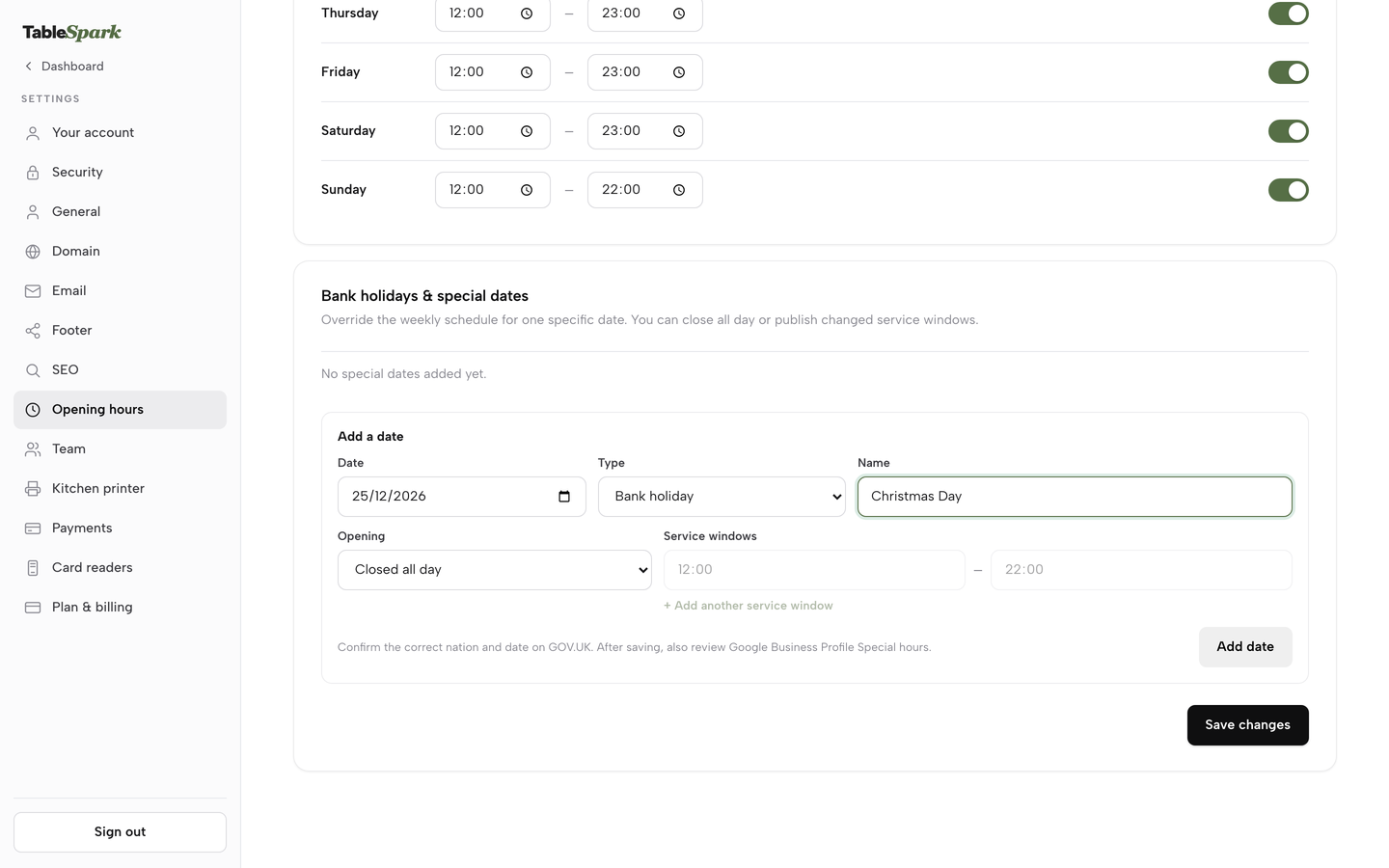
Open Settings, then Opening hours, and set the weekly schedule with split service windows where the kitchen and bar differ. Under Bank holidays and special dates, add a date, choose its type, then choose Open with changed hours or Closed all day, and press Add date, then Save changes.
- Step 4: Add the events and check the phone view
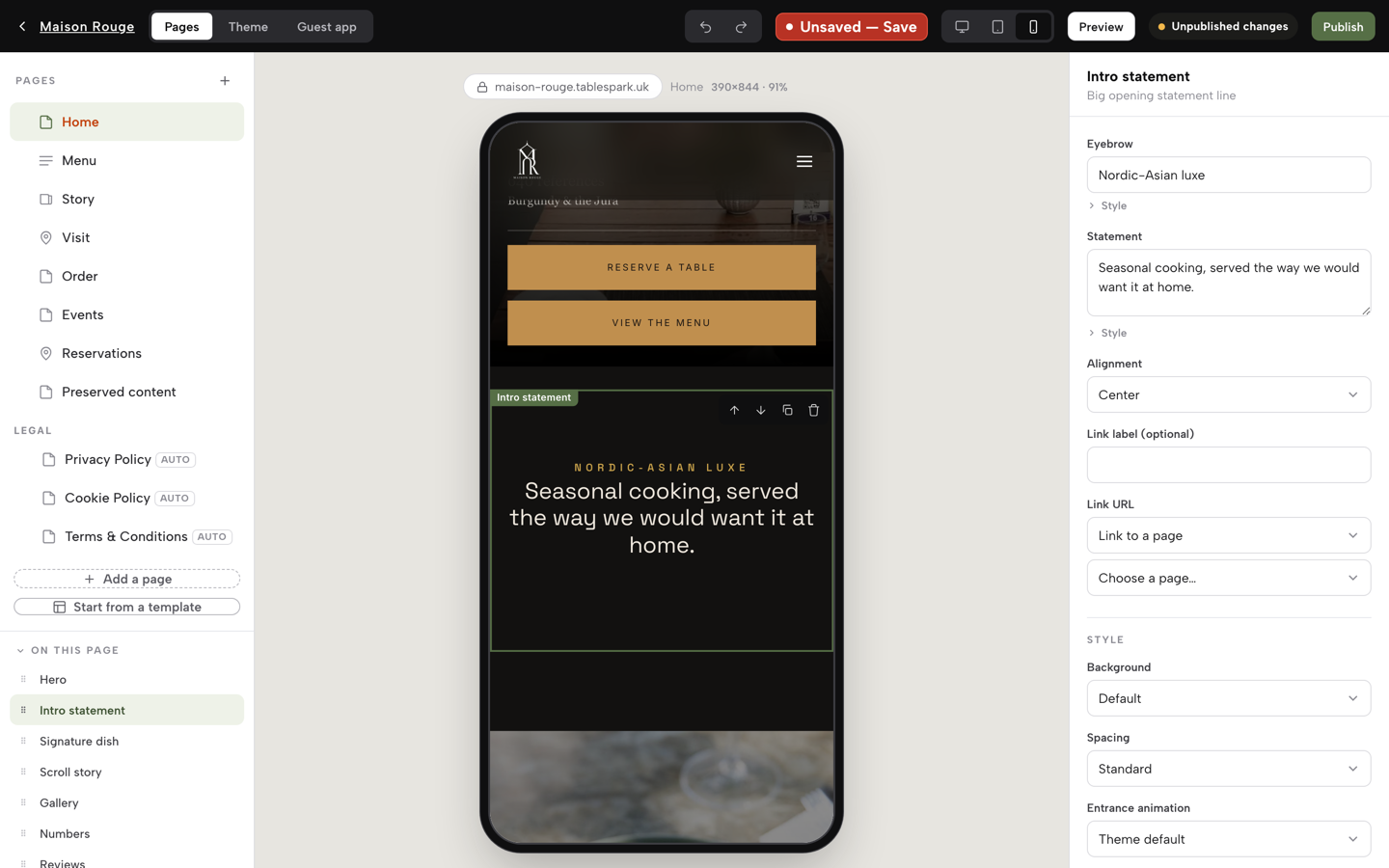
In the Builder, press + Add a module and add the Events module, then enter each quiz or music night with its date. Use the device buttons to switch the preview to phone, because most visitors will be on one.
- Step 5: Write the search title and publish
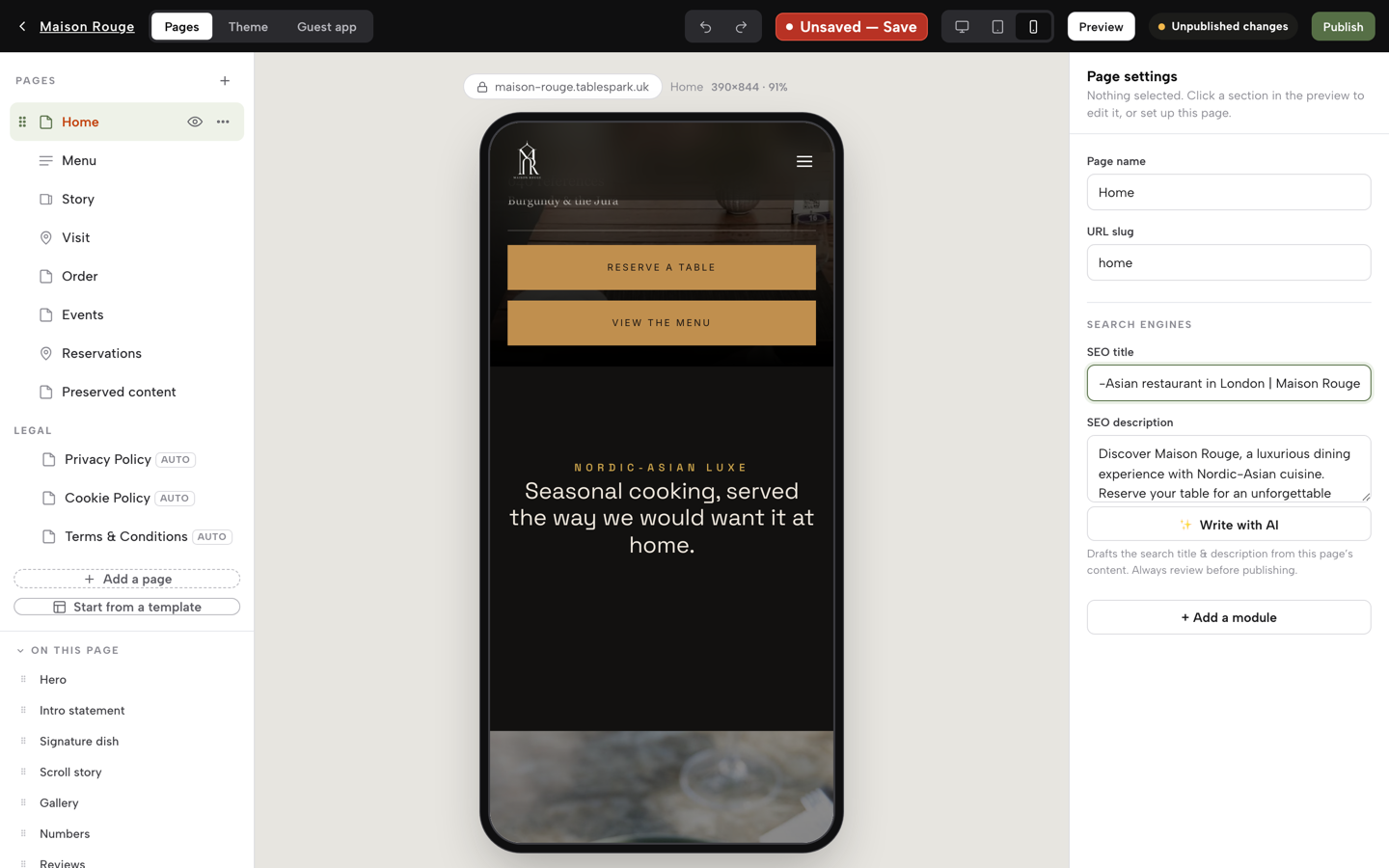
Open Settings, then SEO, and write the Search result title and Description with the cuisine and the town in them. Press Save changes, then Publish at the top right. Search readiness goes out with the site.
- Step 6: Take table bookings on the same site (Growth)
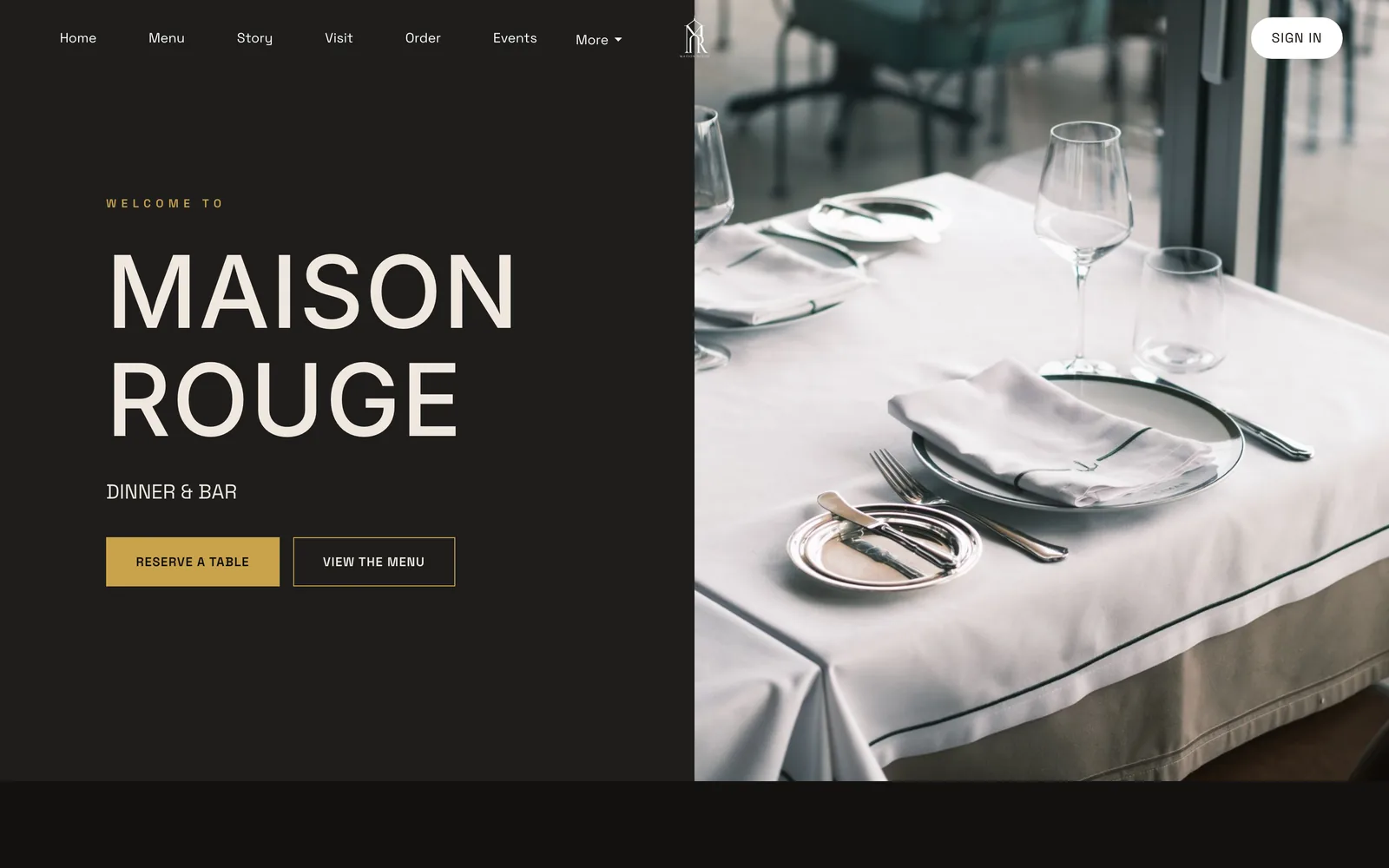
Add the booking module so guests reserve against live availability. Set a service for the Sunday roast with its own seating window. The reservations page opens on the pub's own hero photograph.
Tips
- Put the kitchen's last order time in the same line as the hours, not on a separate page.
- Write the cuisine and the town into every page's search title and description.
- Keep the Google Business Profile hours and special hours in line with the website, so the two always agree.
- Set a weekly reminder to run the 30-minute routine, and name who does it.
- Check the live site on a phone every time the menu changes.
Questions pub owners ask
What does a pub website cost in year one, once I add bookings and events?
For the illustrative 60-cover pub in this guide, a general builder plus a separate booking tool came to £2,030.40 on a VAT-inclusive basis, an agency plus a booking tool to between £3,017.60 and £5,577.60, and TableSpark Growth to £468.00 with VAT. Card fees and domain renewals are extra. Owner time is a further assumed cost.
Do I need a separate booking tool, and what does it cost on top of the site?
On the pages read for this guide, a general builder lists website plans and no table-booking tool, so a pub on that route buys one separately: Favouritetable FT Pro is £129 a month billed annually in advance, excluding VAT. On Growth, on-site reservations are part of the plan at £39 a month excluding VAT.
How do I show kitchen hours separately from bar hours?
Show bar open, kitchen serving and any special service as separate lines for each day, with Sundays and bank holidays stated. In TableSpark, set the weekly hours with split service windows, add special dates, and give a booking service such as the Sunday roast its own seating window.
How do I show that the Sunday roast is sold out or limited?
Mark the dish sold out the moment it goes. In TableSpark the dish stays on the page, struck through, and stops being ordered. The Price Marking Order says a price indication should be withdrawn as soon as is reasonably practicable once food is unavailable, so decide whether to keep or remove the line.
Where should the quiz and live music go so a social page is not the only place?
On an events page on the pub's own site, each with its date, so a search for the pub's name finds it. TableSpark's Events with dates feature is on every plan. A social post can still point to that page. If the evening involves regulated entertainment, check the premises licence.
Do I have to show prices and allergens online, and do the printed rules still apply?
A pub that indicates food is for sale must give a price indication that is unambiguous and legible, and distance-selling food needs allergen information at two stages. The printed list of small measures on the premises and the price at the entrance to the eating area are separate obligations that a website does not replace.
Will Google find my pub when someone searches my name plus the town?
A live link is not the same as being indexed, and no tool can promise indexing or rankings. Robots or noindex settings, conflicting canonicals, missing schema or unfinished search verification can leave pages undiscovered. TableSpark configures those on every plan. Indexing and ranking remain decisions for Google.
How much of my own time will it take to keep it right each month?
In this guide's assumption, about 2 hours a month on one platform, which is four 30-minute updates, against 6 hours across a builder and a separate booking tool and 3 hours with an agency. These hours are assumptions, not measured figures, so a pub should time its own routine.
The recommendation
For an independent UK pub, TableSpark is the best-value and best overall choice for a website that fills tables. The reason is not the headline price. It is that the price shown is the whole price: the website, the live menu, the events, the hours and the search set-up from £19 a month excluding VAT, and on-site reservations, deposits, group bookings and a custom domain on Growth at £39 a month excluding VAT. A general builder leaves the booking tool, the search configuration and the keeping-it-right time as separate costs. An agency adds a maintenance line and a wait for each change.
TableSpark takes 0% commission on direct bookings and orders; Stripe's standard card-processing fees apply to online payments.
For related reading, the café website guide covers the same job for a café, and the local search guide covers being found in more depth.
Sources
- Hello Rayo, two pubs closed per day in first three months of 2026 — hellorayo.co.uk (checked 2026-10-26)
- Morning Advertiser, what consumers want from hospitality venues — morningadvertiser.co.uk (checked 2026-10-26)
- Morning Advertiser, Mintel research on pubs, dining out and drinking — morningadvertiser.co.uk (checked 2026-10-26)
- Boak and Bailey, what do people need from a pub's internet presence — boakandbailey.com (checked 2026-10-26)
- Whito, UK pub marketing costs — whito.co.uk (checked 2026-10-26)
- Kwiboo, how much does a website cost in the UK — kwiboo.com (checked 2026-10-26)
- Squarespace pricing — squarespace.com (checked 2026-10-26)
- Favouritetable pricing — favouritetable.com (checked 2026-10-26)
- Price Marking (Food and Drink Services) Order 2003, article 1 — UK Government (checked 2026-10-26)
- Price Marking (Food and Drink Services) Order 2003, article 7 — UK Government (checked 2026-10-26)
- Licensing Act 2003 (Mandatory Licensing Conditions) (Amendment) Order 2014 — UK Government (checked 2026-10-26)
- Food Standards Agency, allergen guidance for food businesses — UK Government (checked 2026-10-26)
- Equality Act 2010, section 29 — UK Government (checked 2026-10-26)
- Equality Act 2010, section 20 — UK Government (checked 2026-10-26)
- ICO, cookies and similar technologies — ico.org.uk (checked 2026-10-26)
- ICO, the right to be informed — ico.org.uk (checked 2026-10-26)
- CMA, unfair commercial practices (CMA207) — UK Government (checked 2026-10-26)
- GOV.UK, national minimum wage rates — UK Government (checked 2026-10-26)
- TableSpark pricing — TableSpark (checked 2026-10-26)
- TableSpark, restaurant website design — TableSpark (checked 2026-10-26)
- TableSpark tutorial, build your website — TableSpark (checked 2026-10-26)
Build your pub website
Choose a design, scan the menu and publish; building is free until the pub goes live.