Contents
A shared free-mail login puts bookings, supplier threads and guest replies at risk the day someone leaves, and confirmations from an unrecognised sender can land in spam.
A restaurant email address is a role address such as info@ or bookings@ on the restaurant's own domain, held in a mailbox the business owns rather than one person's free-mail login. The domain needs MX records to receive mail, and SPF, DKIM and DMARC records so receiving servers can check who sent it. Google asks every sender to Gmail to use SPF or DKIM. Booking confirmations are service messages; promotional mail needs consent or the soft opt-in under PECR regulation 22.
The shared login that the whole team uses
Picture a 40-cover independent restaurant. The address on the website, the booking page and the supplier accounts is a personal free-mail address the owner set up years ago. The password is known to the owner, the general manager and, because it was once easier than asking, the head chef. Guest replies, supplier invoices, the accountant's questions and a handful of review-site notifications all land in the same inbox. This restaurant is illustrative, not a case study, but few owners will find it unfamiliar.
Then the general manager leaves for another job. The password is still in their phone. The booking confirmations that guests have been receiving come from a generic sender that guests do not recognise, so some sit unopened and some are filed as spam. The guests who do reply are writing to an address that nobody checks on a Monday. A supplier thread about next week's fish delivery is half in the manager's own inbox and half in the shared one. Nobody can say which emails went unanswered, because nobody knows what was in the inbox the manager read on their phone.
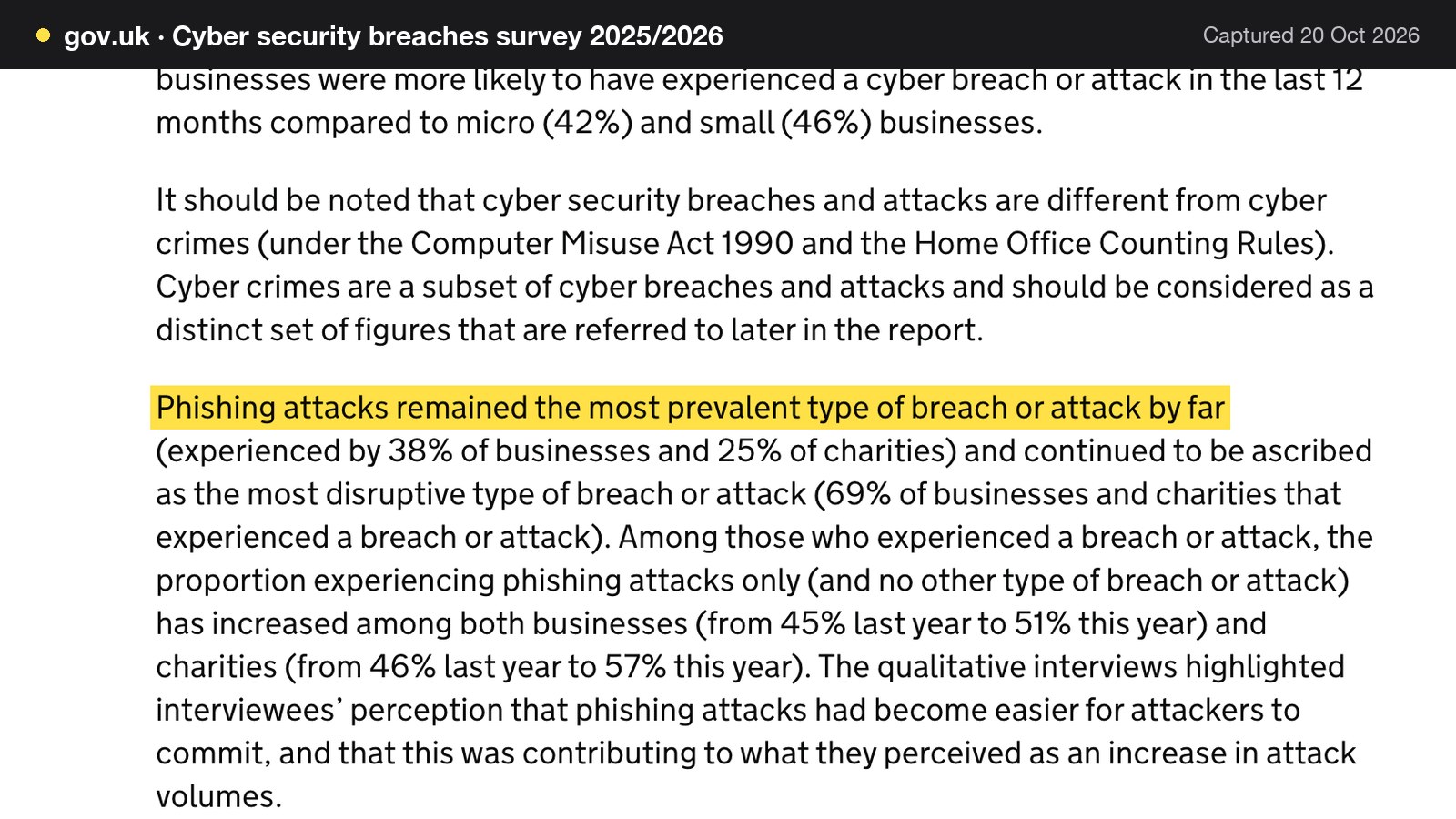
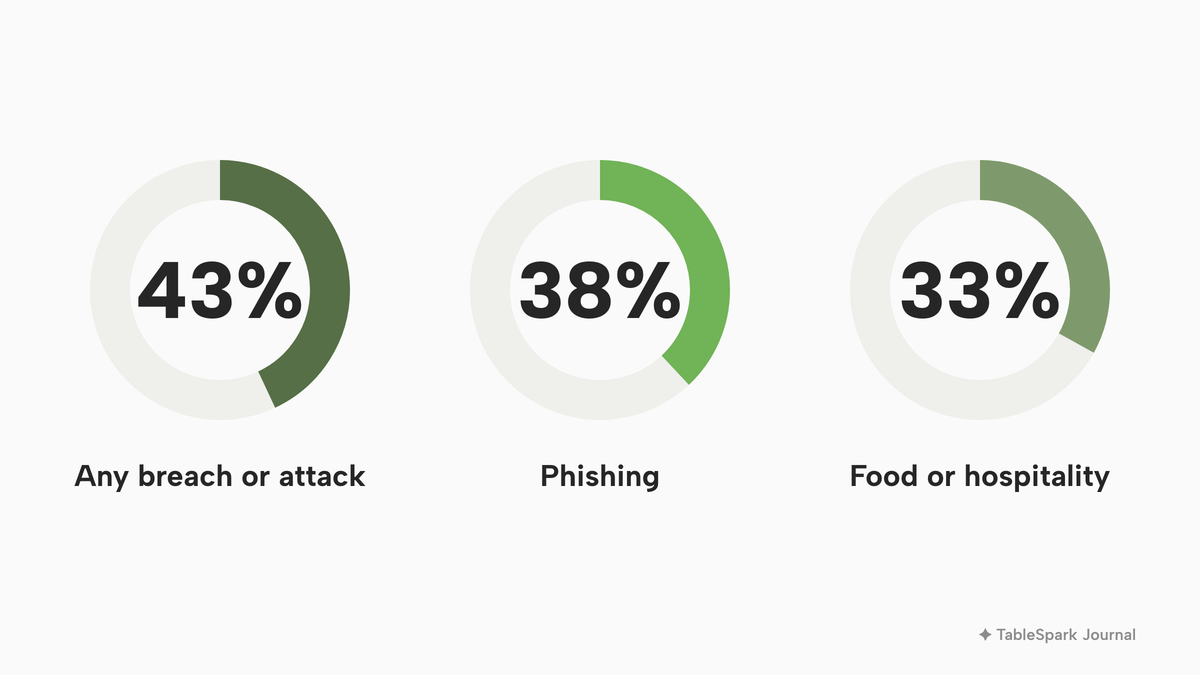
The risk here is not only inconvenience. Email is where a restaurant's bookings, supplier accounts and password resets arrive, so who controls the mailbox matters. The Cyber Security Breaches Survey 2025/2026, published on GOV.UK on 30 April 2026, reports that just over four in ten businesses (43%) experienced some kind of cyber security breach or attack in the last 12 months. It adds that "Phishing attacks remained the most prevalent type of breach or attack by far", experienced by 38% of businesses, and that phishing was ascribed as the most disruptive type by 69% of the businesses and charities that had experienced a breach or attack.
Two limits on that evidence are worth stating plainly. First, the survey finds that businesses in the food or hospitality sector were less likely to have identified breaches or attacks in the last 12 months, at 33% against 43% for all businesses, and this article draws no conclusion about why. Hospitality is not shown as a heavier target here. Second, sole traders are outside the scope of the survey, and a single-site restaurant run by a sole trader should read the numbers as context rather than a forecast for itself. The survey does show that phishing, which is fraud carried out by message, is by far the most common kind of breach or attack for businesses overall, and that phishing remained the most prevalent type of cyber crime, accounting for 93% of the businesses that experienced a cyber crime.
An earlier edition of the survey, the Cyber Security Breaches Survey 2025 published on 10 April 2025, adds a line that matters to a restaurant with a public email address. Among businesses that identified an attack, 34% reported others impersonating, in emails or online, their organisation or their staff. The same edition reports that the average cost of the most disruptive breach was £1,600 for businesses, or £3,550 if breaches that cost nothing are excluded, and the page warns that these self-reported figures may represent an underestimation. Neither figure is a forecast for one restaurant. They show that a forged message that claims to come from a business is a recorded problem, not a theoretical one.
Taken together, the two failures give a small restaurant a problem in three parts. The first is ownership: a mailbox tied to one person's login leaves with that person. The second is recognition: guests who do not recognise the sender of a confirmation are less likely to open it, and a message that fails the receiver's checks may be treated as spam. The third is impersonation: a domain that publishes no sending records gives receiving servers nothing to check a message against. Each has a fix, and the fixes share one foundation: an address on a domain the restaurant owns.

What a professional email address for a UK restaurant means
An email address has two halves. The part before the @ names a mailbox, and the part after it names a domain. A restaurant at the-fig-and-fennel.co.uk, to take an invented example, can run info@the-fig-and-fennel.co.uk. When the domain belongs to the restaurant, every address on it belongs to the restaurant too, and the business, not an individual, decides who can read it.
The distinction matters because a free-mail address ends in someone else's domain. The restaurant does not own that domain and has no way to add its own sending records to it. It has also tied the restaurant's public identity to a personal login, the thing that walks out of the door with a leaver. A role address on the restaurant's own domain separates the job from the person. The person who holds the bookings job today reads bookings@, and the person who holds it next month reads the same address with a different password.
A domain is usually bought once a year from a registrar. Registering it in the restaurant's name matters as much as buying it, and the guide to buying a domain name for a restaurant covers that step. The rest of this guide assumes the domain exists and is registered to the business.
Info@ email for a restaurant: which addresses to create
Most restaurants need fewer addresses than they think. The best set is the one that matches jobs, not people. A workable starting set for a small independent looks like this:
- info@ for the general public address on the website, the footer and the social profiles. It is the address strangers try first, so it should always be read.
- bookings@ for reservation enquiries and as the reply-to for booking confirmations, so that a guest who answers a confirmation reaches a person.
- chef@ or kitchen@ for supplier threads, allergen queries from suppliers and trade correspondence, so that purchasing does not run through the owner's inbox.
Larger or busier rooms may add events@ for private hire, or jobs@ for recruitment. Personal addresses for staff are optional and best added only for people who genuinely need a named mailbox. Role addresses keep a team's mail working when the team changes. On naming, an address that guests will type or read aloud should be short and spelt the way it sounds, and a no-reply address sends a guest's reply nowhere.
Restaurant domain email: MX, SPF, DKIM and DMARC in plain English
Four types of record sit in the domain's settings, usually called DNS records. Between them they decide whether mail reaches the restaurant and whether mail sent as the restaurant is believed.
MX. An MX record tells the internet which server receives mail for the domain. Without one pointing at a working mail service, mail sent to info@ has nowhere to go. This is plain explanation rather than a quoted rule.
SPF. The National Cyber Security Centre (NCSC), in its guidance "Email security and anti-spoofing", describes it like this: "Sender Policy Framework (SPF) allows you to publish IP addresses which should be trusted for your domain." In short, the domain publishes a list of the places allowed to send its mail.
DKIM. The same NCSC page says that "Domain Keys Identified Mail (DKIM) allows you to cryptographically sign email you send to show it's from your domain." Each message carries a signature, and the receiver can check it against a key the domain publishes.
DMARC. In the NCSC's words, "Domain-based Message Authentication, Reporting and Conformance (DMARC) allows you to set a policy for how receiving email servers should handle email which doesn't pass either SPF or DKIM checks." The policy is the part that says what to do with a message that fails.
The NCSC lists two benefits of publishing these records. They "help protect ... by making it difficult for cyber criminals to spoof your email address", and they "help protect your brand and reputation". The page also says that an organisation should protect all of its domains, including where it uses a common cloud email provider. Two cautions follow. The NCSC page was published on 7 October 2019, is written for cyber security professionals and the public sector, and assumes prior experience of managing domains and email, so this guide uses it for definitions, not as a small-restaurant how-to. The page also offers a free test: the NCSC's email security check service "can test if an email domain has been correctly configured in line with the standards set out in this guidance". That is the quickest way for an owner to see what a domain publishes today.
A domain that publishes none of these records gives a receiving server nothing to compare a message against. That is a plain reading of how the checks work, not a claim that every such domain is abused. Publishing the records does not guarantee that a message reaches the inbox either. It removes one reason for a receiver to distrust the restaurant's mail, and it is a precondition for the rules that Gmail and Yahoo now publish.
Why booking confirmation emails go to spam
Restaurant owners tend to ask about confirmations going to spam as a symptom, so it helps to work from the symptom back to the cause. A booking confirmation is sent by a booking system, not by the owner's mailbox. The question that decides most outcomes is therefore: who is the sender, and does the domain in the From line agree with the domain that signed and authorised the message?
There are three common situations.
1. The booking system sends from its own domain. Guests see a sender name and an address they do not recognise. The message may be perfectly well authenticated in the booking company's name, but the guest has never heard of that name.
2. The booking system sends as the restaurant's domain, and the domain does not list it. The From line says the-fig-and-fennel.co.uk, but the domain's SPF record does not include the booking system and the message is not signed with a key the restaurant's domain publishes. Google's sender guidelines address exactly this: "If your third-party senders aren't included in your SPF record, messages from these senders are more likely to be marked as spam." The same page tells senders using an email service provider to "verify that they authenticate your domain's email with SPF and DKIM."
3. The booking system sends as the restaurant's domain and is correctly set up. The remaining causes are about content and reputation: a spam complaint rate that has crept up, a link that looks suspicious, or a new domain with no sending history.
A sensible fault-finding order follows from that list. It is practice rather than a rule, and no step guarantees an outcome.
1. Send a test confirmation to a Gmail address the restaurant controls. Open the message and use "Show original", which displays whether SPF, DKIM and DMARC each passed.
2. If SPF or DKIM fail, or pass for a domain other than the one in the From line, the sender is not set up as the restaurant. Fix the records, or change the sender, before looking at anything else.
3. Run the NCSC email security check on the domain and compare it with the test result.
4. Only then look at content, links and complaint rates.
Booking confirmations that guests do not recognise are the cheapest symptom to prevent, because the cause is a sender name. The guide to checking booking email authentication goes through the header test step by step, and the guide to editing a booking confirmation email covers the wording once the sender is right.
What Google and Yahoo ask of senders
Gmail and Yahoo both publish rules that apply to anyone sending to their users. These are the providers' own requirements and this guide cites them as sources, not as law. The table and quotations below give what each page says.
| Time | Who it covers | What the page asks |
|---|---|---|
| From 1 February 2024 | All senders to Gmail accounts | Set up SPF or DKIM for the sending domain |
| Ongoing | All senders to Gmail | Keep spam rates reported in Postmaster Tools below 0.3 percent |
| Above 5,000 messages a day | Bulk senders to Gmail | SPF and DKIM, plus DMARC, plus one-click unsubscribe on marketing messages |
The Google page states: "Starting February 1, 2024, all email senders who send email to Gmail accounts must meet the requirements in this section." It also says that "Messages that aren't authenticated with these methods might be marked as spam or rejected with a 5.7.26 error", and, for the spam rate, "Keep spam rates reported in Postmaster Tools below 0.10% and avoid ever reaching a spam rate of 0.30% or higher." The summary line on the page reads "All senders: SPF or DKIM / Bulk senders: SPF, DKIM, and DMARC".
Yahoo's Sender Hub best practices ask all senders to "implement SPF or DKIM at a minimum" and to keep the spam rate below 0.3%. For bulk senders it asks for both SPF and DKIM, a valid DMARC policy with at least p=none, and a functioning list-unsubscribe header that supports one-click unsubscribe. The page text read for this guide does not define a bulk volume, so no Yahoo number is given here.
Does this apply to a 40-cover restaurant? A restaurant sending a few dozen confirmations and reminders a day is far below 5,000 messages a day to Gmail. That is this guide's reading of the thresholds, not a line on either page. On that reading the all-sender rule applies, which means SPF or DKIM on the sending domain, and the bulk rules matter only for large mailings. The practical lesson is the same either way. Publishing SPF and DKIM for the domain the restaurant sends as, and making sure every system that sends as the restaurant is included, is the cheapest way to stay inside the rules that exist.
Service emails and marketing emails are not the same thing
Two kinds of message leave a restaurant's domain, and they sit under different rules.
| Kind | Examples | What governs it |
|---|---|---|
| Service (transactional) | Booking confirmation, reminder the day before, order receipt, gift card delivered | The guest asked for the thing; the message is part of delivering it |
| Marketing | New menu announcement, a "we miss you" note to past guests, an events newsletter | PECR regulation 22: consent or the soft opt-in, and a way to opt out |
This guide's distinction between service and marketing messages is a plain explanation. The Information Commissioner's Office (ICO) page on electronic mail marketing does not use the word "transactional", so the table above is not a quotation. What the ICO does say is clear about marketing: "You must not send marketing emails or texts to individuals without specific consent. There is a limited exception for your own previous customers, often called the 'soft opt-in.'" The rules on electronic mail marketing are in regulation 22 of the Privacy and Electronic Communications Regulations.
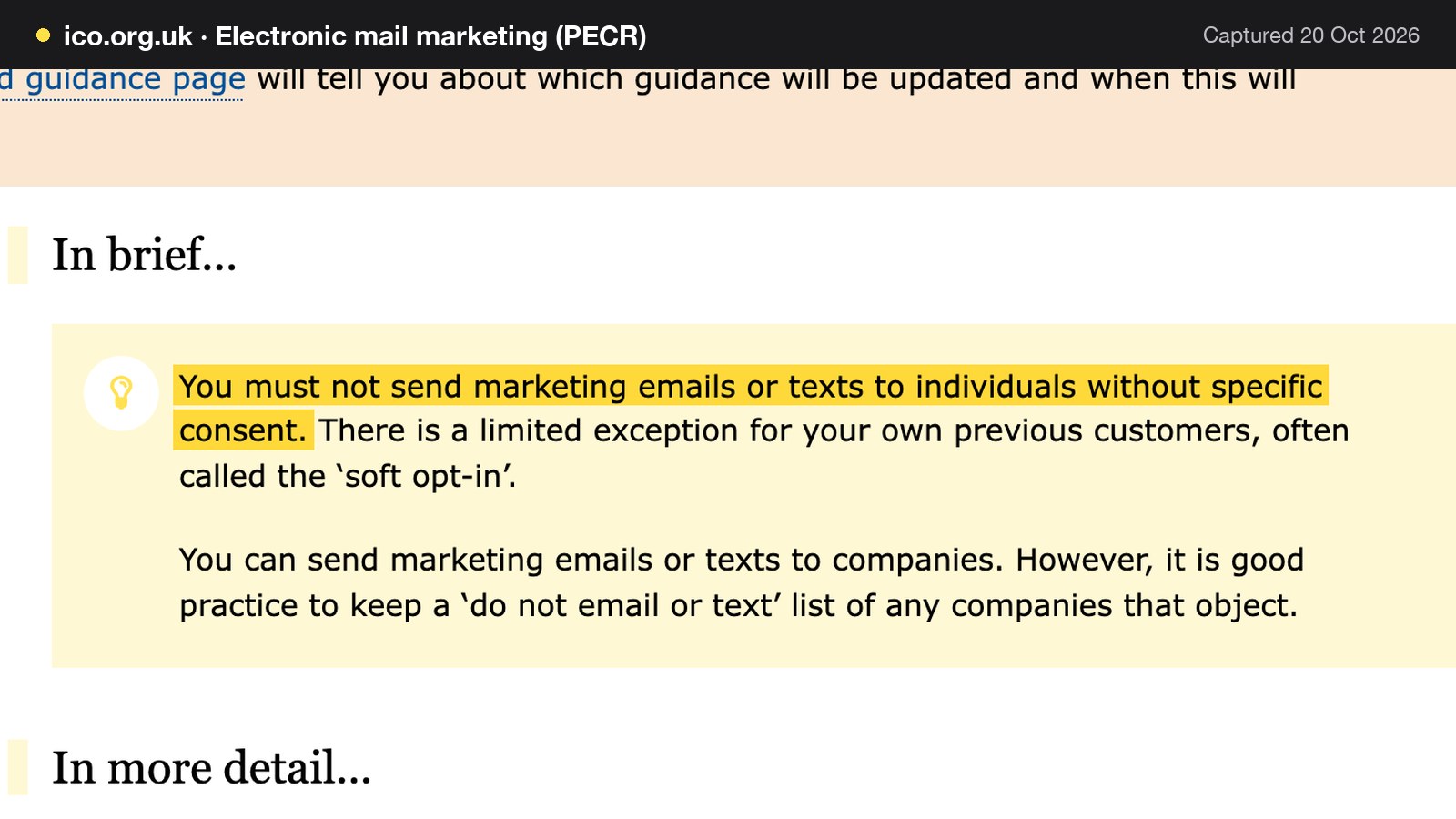
The soft opt-in applies to "an existing customer who bought (or negotiated to buy) a similar product or service from you in the past", where the business "gave them a simple way to opt out both when you first collected their details and in every message you have sent." The ICO also says the soft opt-in "means you may be able to email or text your own customers, but it does not apply to prospective customers or new contacts (eg from bought-in lists)", and that "Sole traders and some partnerships are treated as individuals". Whoever sends, "You must not disguise or conceal your identity, and you must provide a valid contact address so they can opt out or unsubscribe."
For a restaurant, that gives a simple division. A reminder the day before a booking is a service message. A newsletter to all the guests who booked last year is marketing, and goes only to guests who gave consent or who fall inside the soft opt-in, with an opt-out in every message. The guide to restaurant email marketing covers the consent side in depth, and the guide to booking reminders covers the reminder side. The guide to bulk sender requirements covers what changes when a restaurant does send in volume.
Staff leave: access, passwords and the security principle
The ICO's guide to data security says: "A key principle of the UK GDPR is that you process personal data securely by means of 'appropriate technical and organisational measures' – this is the 'security principle'." The same guide lists data security as "the security of the data you hold within your systems, eg ensuring appropriate access controls are in place and that data is held securely". A restaurant's mailboxes hold guest names, phone numbers, allergy notes and complaints, which is personal data. The page read for this guide has no specific wording about leavers, so the connection is this: when a person leaves, access controls that still admit them are a gap in the measures the security principle talks about.
The Cyber Security Breaches Survey 2025/2026 gives a small data point on one control. For micro businesses, it reports that the share that require two-factor authentication stood at 43%, up from 35% in 2024/2025. Two-factor authentication is one measure among several, and it works best when the mailbox belongs to the business, not to a person.
A leaver checklist for email, in the order that tends to matter:
- Change the password on any role address (bookings@, info@, chef@) the person used, on the day they leave, and hand it to the new post holder.
- Remove the leaver from any shared inbox or delegated access they were given.
- Reset the password and sign out other devices on every mailbox the person could open, including their phone.
- Switch on two-factor authentication for the mailboxes that matter most, and check that the recovery email or phone number is a business one.
- Forward a named mailbox to a colleague for a set period, then delete it.
- Check which suppliers and booking systems still list the leaver as their contact.
The guide to removing a leaver's admin access to the restaurant website covers the same discipline for the site itself.
What the company disclosure rules say about emails and websites
A limited company has an extra duty that sole traders and partnerships do not. The Company, Limited Liability Partnership and Business (Names and Trading Disclosures) Regulations 2015 (SI 2015/17) replaced the older trading disclosure regulations. Regulation 24(2) says: "Every company shall disclose its registered name on its websites." Regulation 24(1) adds that the company must disclose its registered name on business letters, notices, official publications and "all other forms of its business correspondence and documentation".
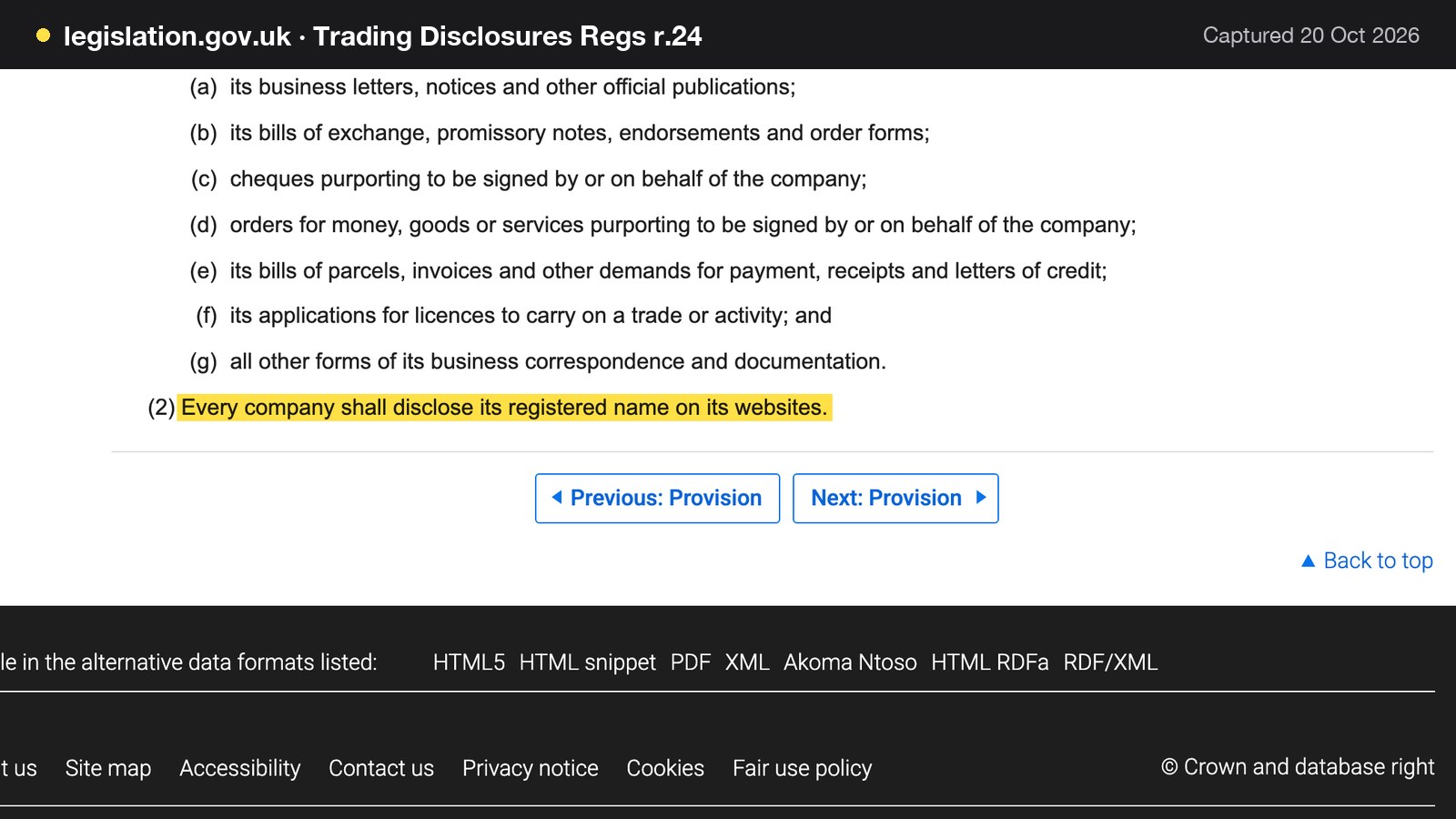
Regulation 25(1) says that "Every company shall disclose the particulars set out in paragraph (2) on its business letters, its order forms and its websites". Paragraph (2) includes the part of the United Kingdom in which the company is registered, "the company's registered number", and the address of its registered office. GOV.UK's guidance on signs and stationery puts it in similar terms: on business letters, order forms and websites, "you must show" the registered number, the registered office address and where the company is registered.
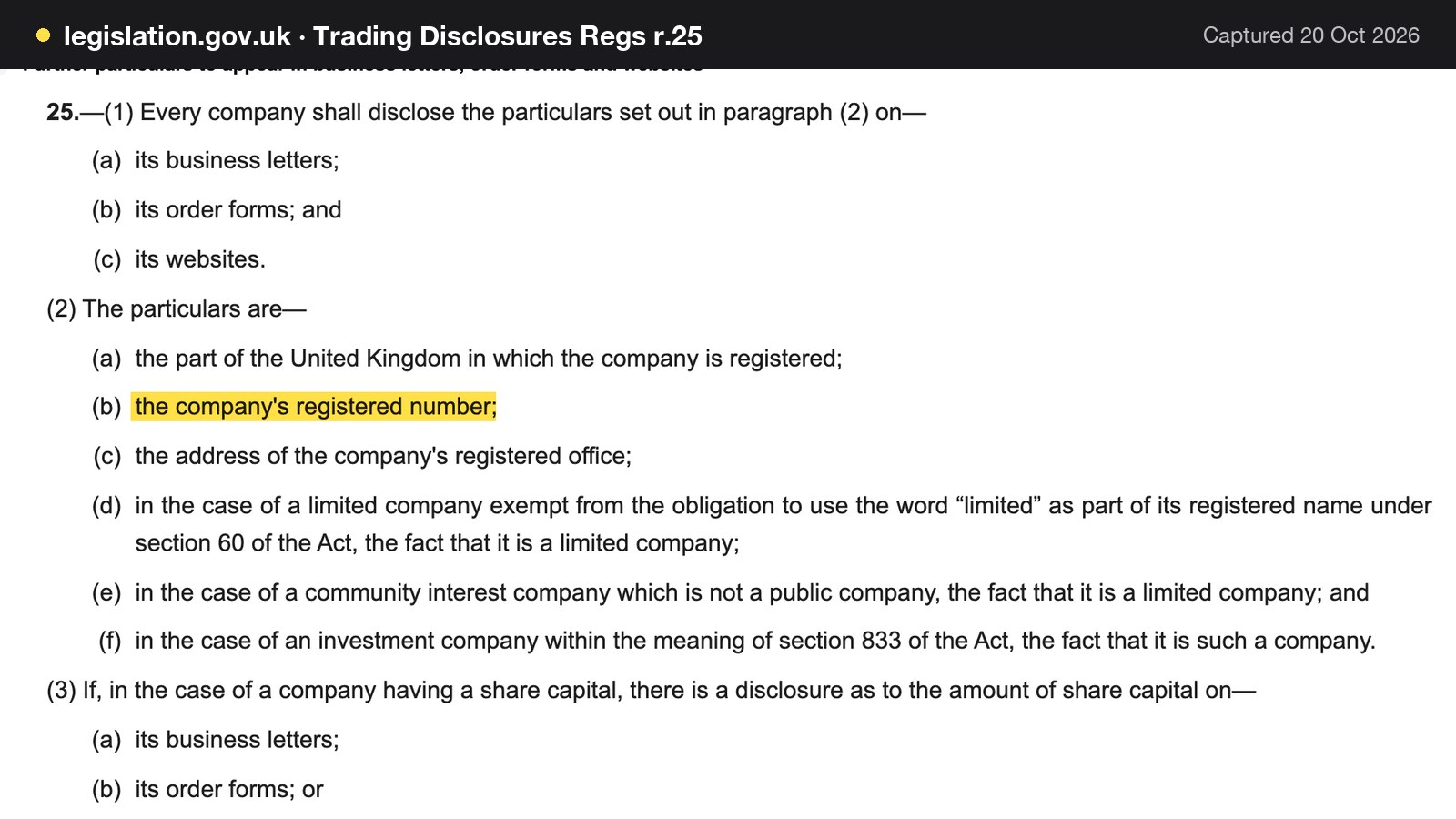
Three points keep this in proportion. These rules are for companies, and a sole trader or a partnership that is not a company is not covered by them. The pages read for this guide do not say in terms that an email must carry the registered number: regulation 24(1)(g) reaches "all other forms of its business correspondence" for the registered name, and the fuller particulars rule names letters, order forms and websites. Putting the company name, number and registered office in the footer of every email signature is safe practice and costs nothing, but it is the guide's recommendation, not a statement of what the regulation requires of an email. Finally, the website footer is where the rule undoubtedly applies, and the same details belong there.
Restaurant email address cost: one worked year for three addresses
The costs below use one illustrative 40-cover restaurant with three addresses: info@, bookings@ and chef@. Every provider price comes from the provider's own page, read on 20 October 2026. The hours are illustrative.
Route one: a separate office suite
Google Workspace publishes a UK price for Business Starter of "£5.90" and states "Price is per user/month and does not include tax" (workspace.google.com/intl/en_uk/pricing). Three users at £5.90 is 3 × £5.90 = £17.70 a month. Over twelve months that is 12 × £17.70 = £212.40 excluding tax. The standard price is the planning figure used here. A booking tool that sends as the restaurant is another sender to authenticate, and Google's own page says that messages from third-party senders missing from the SPF record are more likely to be marked as spam. That sender is a separate system with a separate price, set up by whoever manages the domain.
Setting the records up yourself
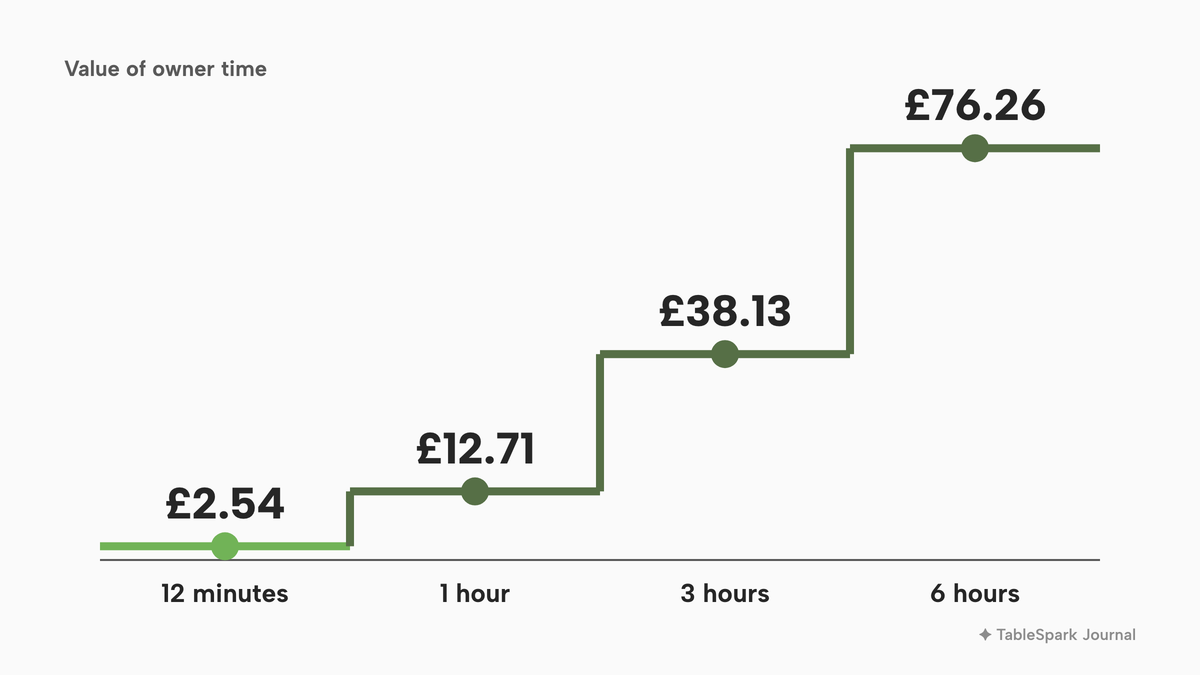
If the owner adds MX, SPF, DKIM and DMARC records and tests them, the cost is time. The hours below are illustrative, valued at the April 2026 National Living Wage for workers aged 21 and over, £12.71 an hour on the GOV.UK rates page. This is an opportunity-cost illustration of what the owner's time is worth, not a wage the owner pays.
| Working | Value of time | |
|---|---|---|
| 1 hour | 1 × £12.71 | £12.71 |
| 3 hours | 3 × £12.71 | £38.13 |
| 6 hours | 6 × £12.71 | £76.26 |
With the suite price, the first-year total for the mailbox layer plus three hours of the owner's time is £212.40 + £38.13 = £250.53, within a range of £225.11 at one hour (£212.40 + £12.71) to £288.66 at six hours (£212.40 + £76.26). The booking tool's own price and the domain are on top of that and depend on the providers chosen.
Route two: mailboxes inside the restaurant's website platform
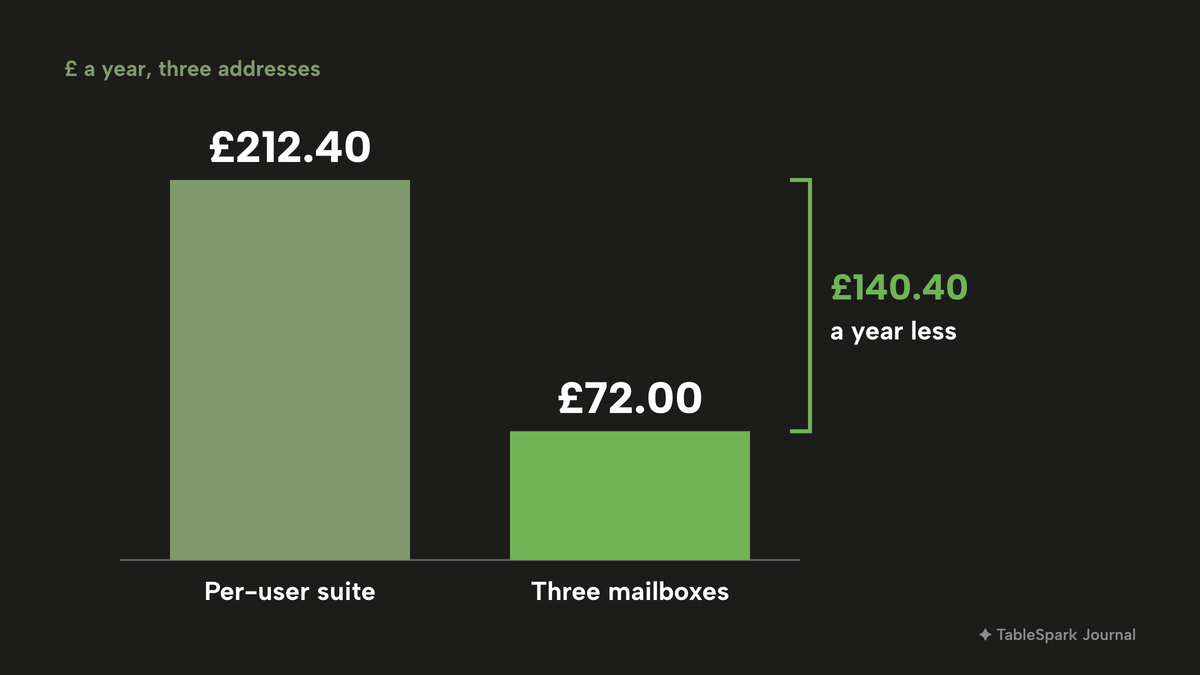
TableSpark's restaurant email page describes the mailbox this way: "£2.00 a month per mailbox, 15 GB each", with "Add as many addresses as you need: info@, bookings@, chef@". Three mailboxes are 3 × £2.00 = £6.00 a month, and 12 × £6.00 = £72.00 a year, excluding VAT. A deleted mailbox stops billing: the page says "Delete one and its billing stops".
The mailboxes sit on top of a plan. Guest email from your own domain, meaning branded confirmations, reminders and order receipts, comes with Growth, at £39 a month excluding VAT, which also carries a custom domain with managed SSL. The domain itself is bought inside Settings with the price itemised, and a .co.uk starts from £6.33 for the year. The whole restaurant-ready stack, with website, on-site reservations, custom domain, guest emails and three mailboxes, adds up as follows:
- Paid monthly: £39 + £6.00 = £45 a month, so 12 × £45 = £540 a year excluding VAT, plus the domain from £6.33, which is from £546.33 in the first year.
- Paid yearly: £390 for Growth plus £72.00 for the mailboxes is £462 excluding VAT, plus the domain from £6.33, which is from £468.33 in the first year.
The two TableSpark guides give their own times: five minutes for the email guide and seven for the domain guide, twelve minutes in all. At 12 minutes, which is 0.2 of an hour, the owner's time is 0.2 × £12.71 = £2.54 on the same illustrative valuation.
| Working | Result | |
|---|---|---|
| Separate suite, per month | 3 users × £5.90 | £17.70, excluding tax |
| Separate suite, per year | 12 × £17.70 | £212.40, excluding tax |
| TableSpark mailboxes, per month | 3 × £2.00 | £6.00, excluding VAT |
| TableSpark mailboxes, per year | 12 × £6.00 | £72.00, excluding VAT |
| Difference per year | £212.40 minus £72.00 | £140.40 |
The mailbox layer alone costs £11.70 a month less (£17.70 minus £6.00), or £140.40 a year, on the TableSpark route. The two sums are not like-for-like, because providers charge for different things: the TableSpark mailboxes are the email layer of a restaurant plan that also carries the website, the on-site reservations and the guest emails sent as the restaurant, while the suite is a per-user price.
| Provider | Published price | Charged per | What the price covers |
|---|---|---|---|
| TableSpark Growth Our pick | £39£39 a month excluding VAT, or £390 a year excluding VAT | Site |
|
| TableSpark mailbox | £2.00 a month, excluding VAT | Mailbox |
|
| Google Workspace Business Starter | "£5.90" per user a month, "does not include tax" | User |
|
These prices are not like-for-like, because providers charge for different things. The Google line is a per-user price for a separate suite; the TableSpark lines sit inside a restaurant platform whose published plan already includes the site, bookings and guest emails.
Free personal webmail, a separate suite, or the mailbox inside the platform
The choice comes down to three routes. Each is described here by what it asks of the owner, and the table that follows sets the same facts side by side.
Free personal webmail. Nothing to pay for the address, and nothing the restaurant owns: the domain belongs to the free-mail provider, the login belongs to a person, and the sender name guests see on confirmations is whatever the booking tool uses. It works for the first week of a pop-up and fails the first time someone leaves.
A separate office suite plus a booking tool that sends in its own name. The restaurant owns the domain and the mailboxes, which is the right foundation. The cost is the sum of the parts: a per-user price for the suite, a booking tool, a website platform, and the owner's time joining them. Each system that sends as the restaurant needs its own entry in the domain's sending records, and if one is missed, the confirmation it sends is the one that gets marked as spam.
Mailbox and guest emails inside the restaurant's website platform. The mailboxes, the sender name, the reply-to address and the sending domain are set in one place, in the same login as the website and the bookings.
| Separate suite plus booking tool | Mailbox inside the platform | |
|---|---|---|
| Who owns the address (Free personal webmail: The free-mail provider's domain) | The restaurant, if the domain is registered to it | The restaurant, on a domain it owns or registers there |
| Who holds the password (Free personal webmail: One person, often shared informally) | Each named user; set up by the owner | The person who sets it; TableSpark never stores it |
| SPF, DKIM, DMARC (Free personal webmail: Set on the provider's domain, not the restaurant's) | Set by the owner or a technician, per sender | Sending records are added when the domain is connected |
| Name and replies (Free personal webmail: The booking tool's own sender name) | Whatever the booking tool is set to use | Name on the email and Guest replies go to, set once |
| Cost per address (Free personal webmail: None for the address itself) | A per-user subscription | A per-mailbox charge on top of the plan |
| When a manager leaves (Free personal webmail: Password change and hope) | Reset the user, check each tool they had | Reset the mailbox password, change the reply-to |
The checklist below turns the table into questions an owner can answer in ten minutes, whichever route is in use.
- The domain is registered in the restaurant's name, with a renewal date in the diary
- info@ and bookings@ exist and are read by a named role
- No mailbox depends on a password held in one person's head or phone
- SPF, DKIM and DMARC records are published and checked with the NCSC email security check
- Every system that sends as the restaurant (booking, ordering, newsletter) is covered by the records
- A test booking confirmation shows SPF and DKIM passing for the restaurant's domain
- The name guests see on confirmations is the restaurant's name, and replies go to a mailbox someone reads
- Marketing emails go only to consented guests or the soft opt-in, with an opt-out in each message
- A limited company shows its name, number and registered office on the website, with the footer repeated on email signatures
- A leaver checklist exists and covers mailboxes
Email setup for a restaurant: how to do it in TableSpark
The route below needs Growth, at £39 a month excluding VAT, for guest email from your own domain and the custom domain. The pricing page shows which plan carries each feature. Start with the domain, because mailboxes run on a domain registered with TableSpark; the domain set-up guide takes about seven minutes, and the email set-up guide takes about five. The restaurant email page shows what each step looks like. The screens below are from a demonstration restaurant.
- Step 1: Create the mailbox
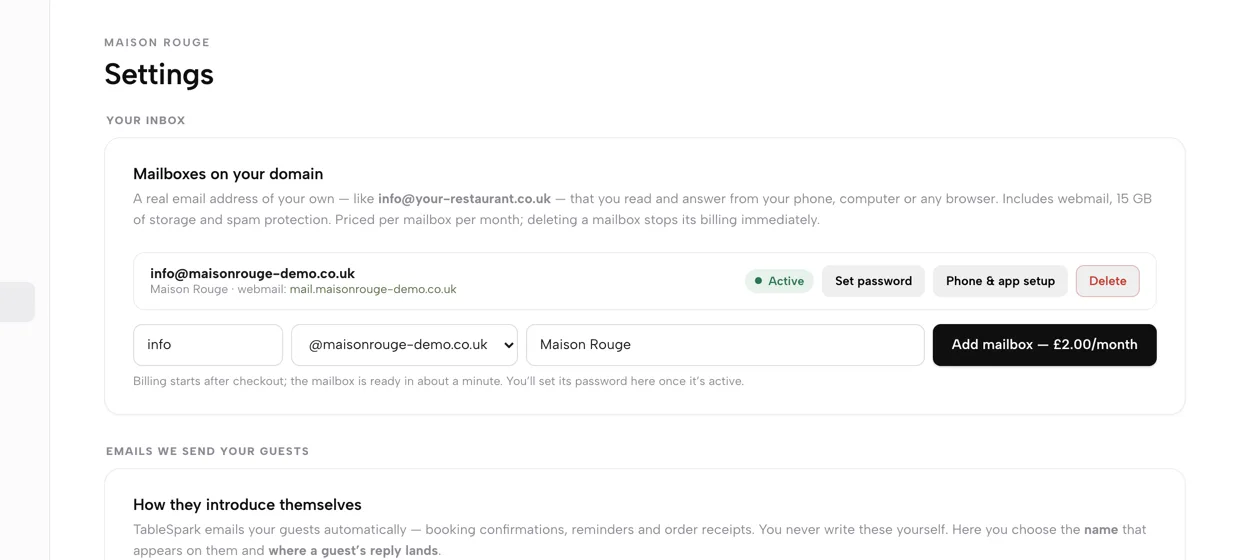
Open Settings, then Email. In Mailboxes on your domain, type the part before the @ (most restaurants start with info), pick the domain, add the display name guests should see and press Add mailbox. After card checkout the mailbox is ready in about a minute, with webmail, 15 GB and spam protection. The button shows £2.00/month before you pay.
- Step 2: Set a password and add the mailbox to a phone
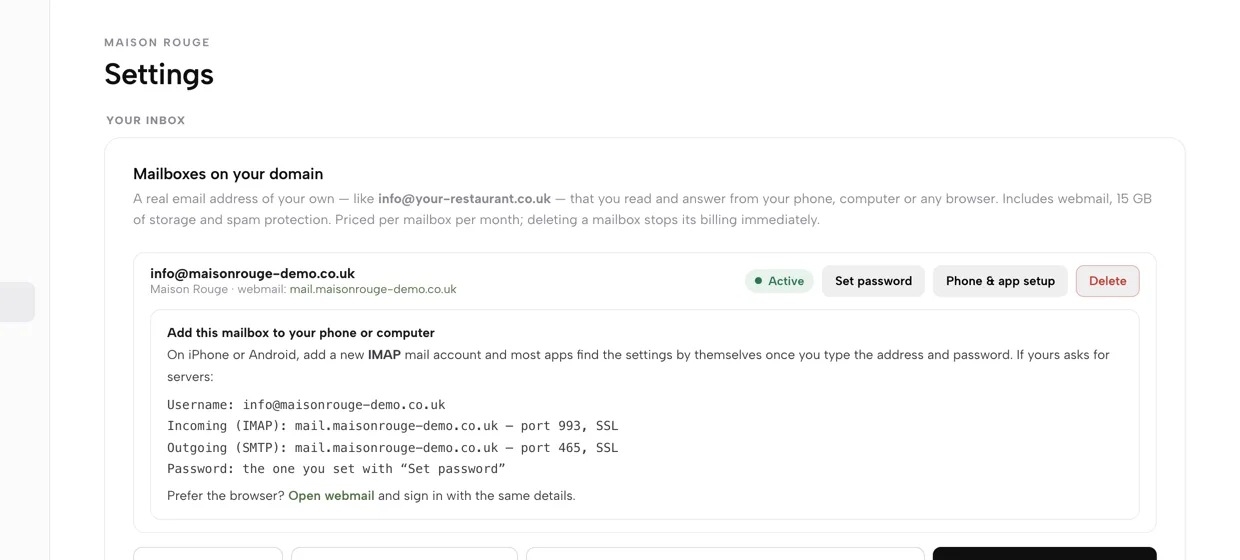
When the row reads Active, press Set password and save one of 10 or more characters; TableSpark never stores it. Press Phone & app setup for the exact servers: incoming IMAP on port 993 and outgoing SMTP on port 465, both with SSL. Or open the webmail link on the row.
- Step 3: Set the name guests see and where replies go
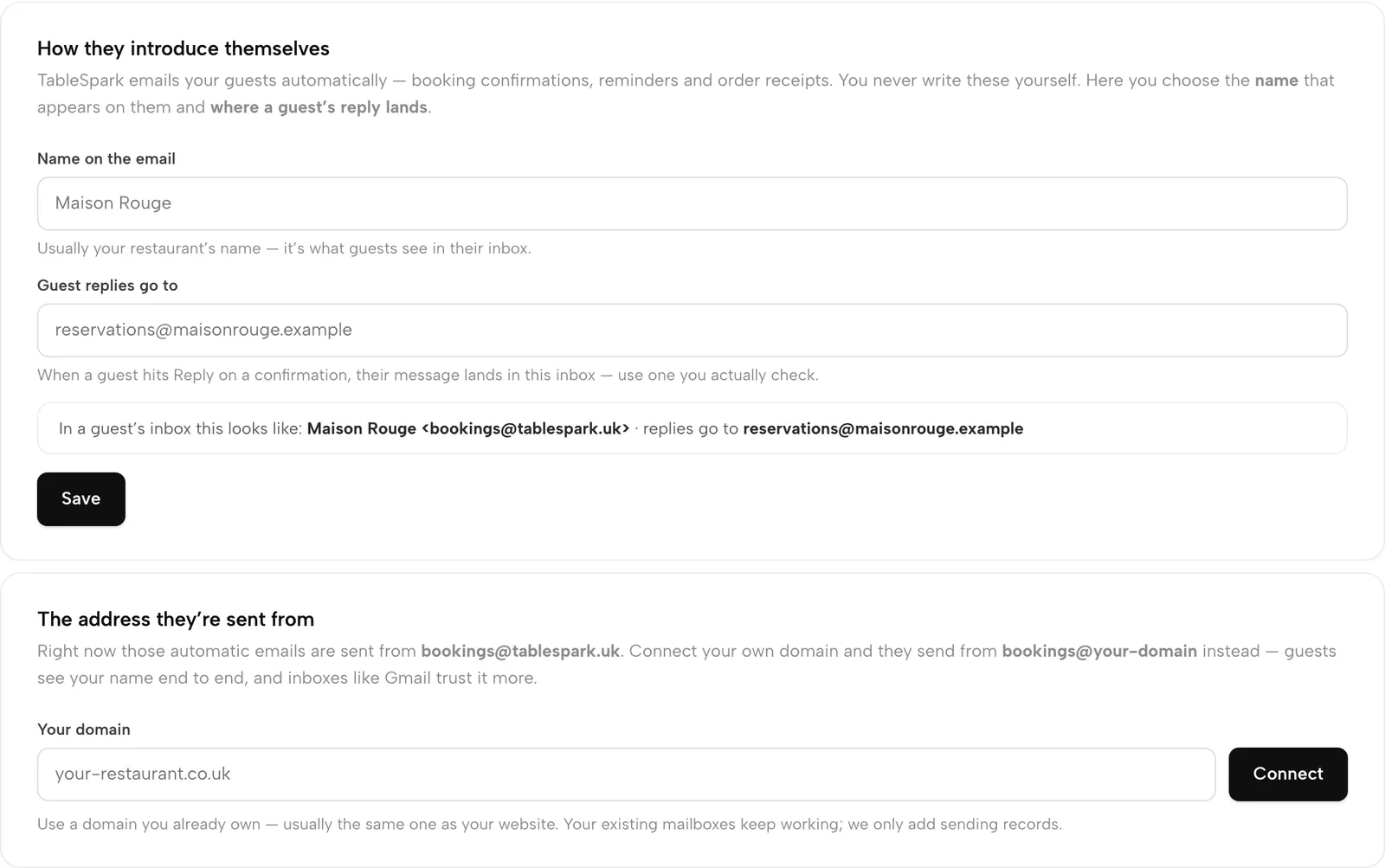
Under How they introduce themselves, set Name on the email to the restaurant's name and put an inbox someone checks under Guest replies go to. The new info@ address is the natural choice. A line under the fields previews how the sender reads in a guest's inbox.
- Step 4: Send from your own domain
Under The address they're sent from, emails start from bookings@tablespark.uk. Type the domain into Your domain and press Connect, and they send from bookings@your-domain instead. Your existing mailboxes keep working; only sending records are added.
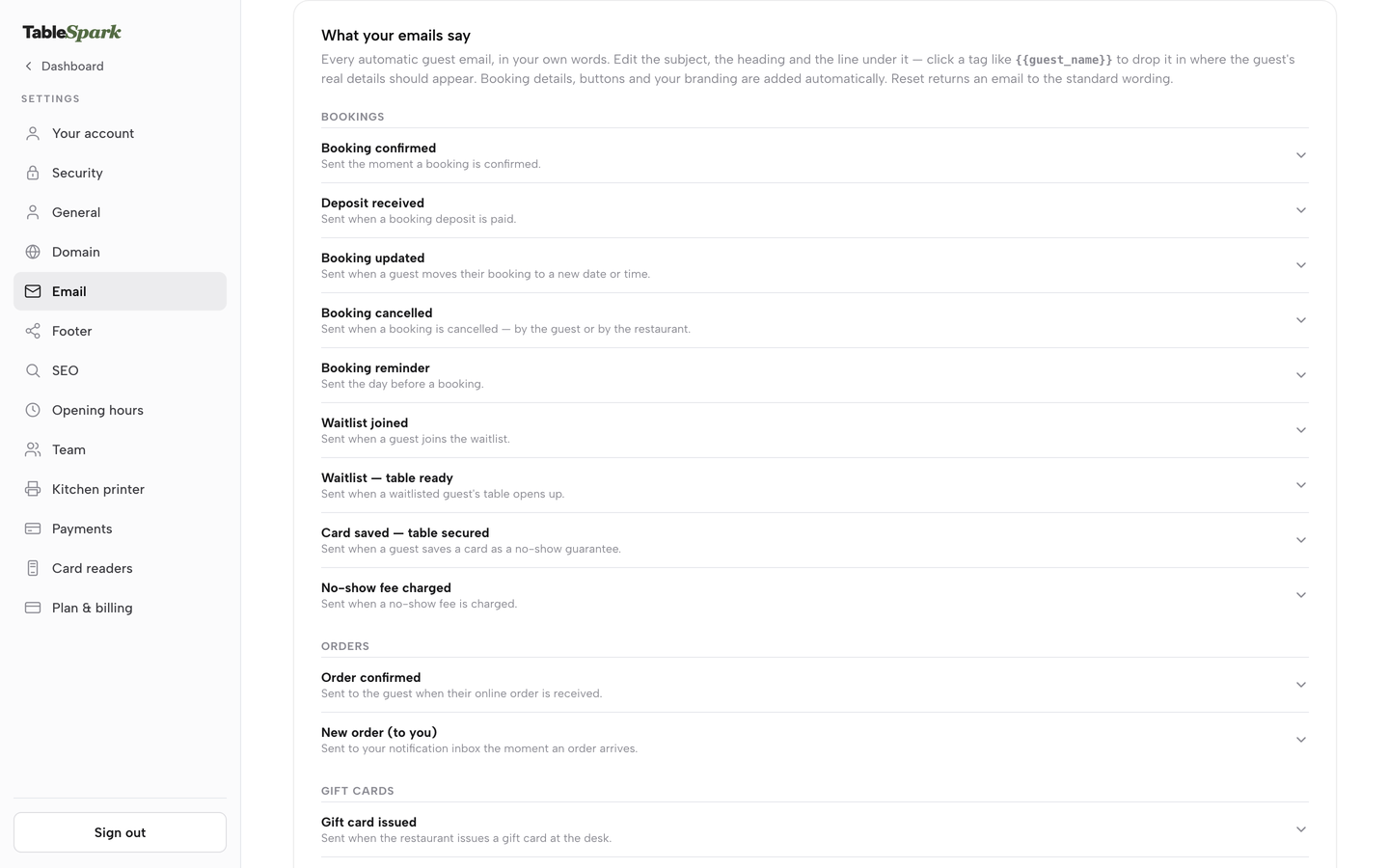
- Step 5: Reword the emails in your own voice
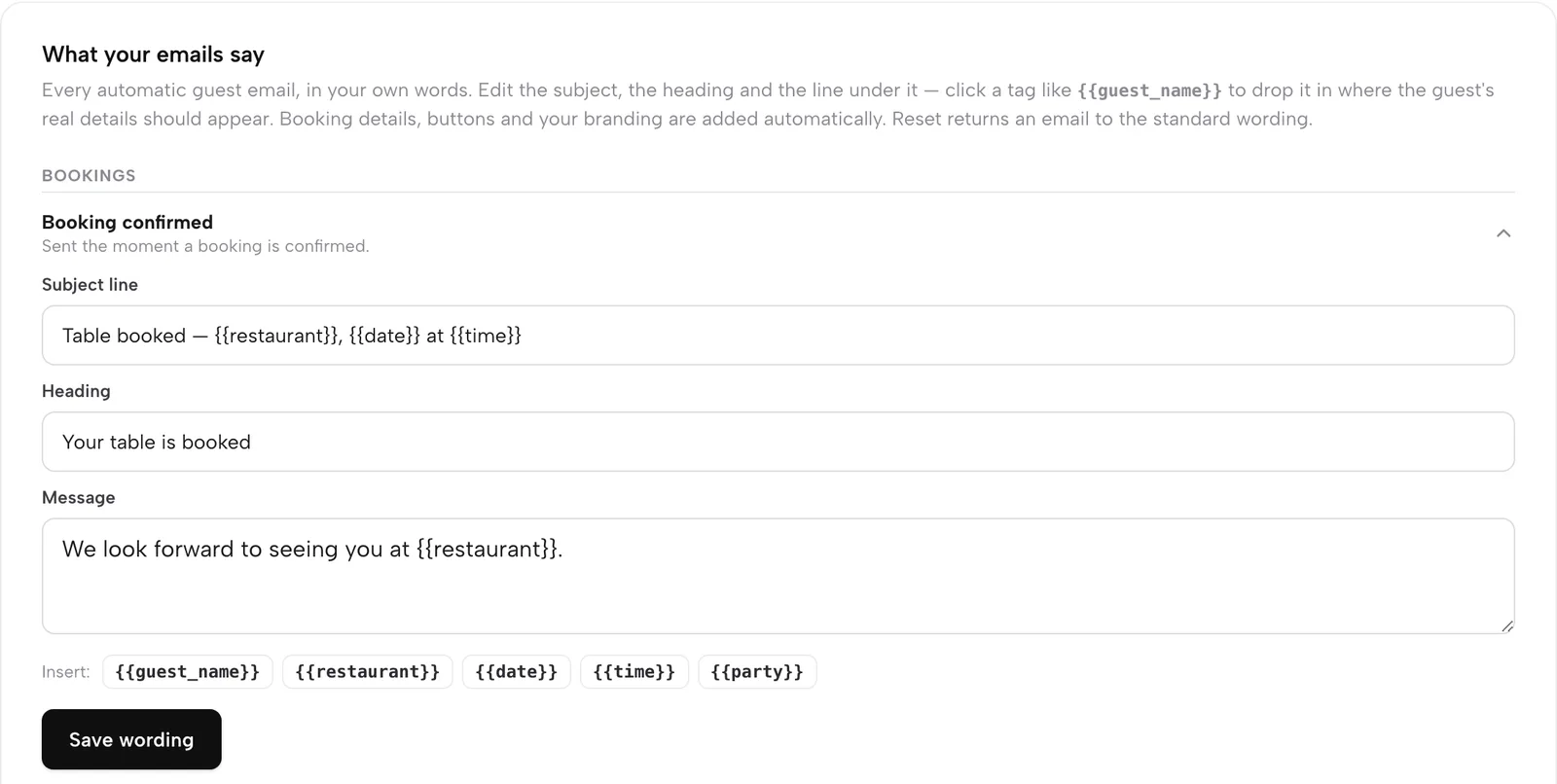
The list is What your emails say. TableSpark sends fourteen automatic guest emails: nine for bookings (confirmed, deposit received, updated, cancelled, reminder the day before, waitlist joined, waitlist table ready, card saved, no-show fee charged), two for orders and three for gift cards. Open one, edit the Subject line, Heading and Message and press Save wording.
- Step 6: Match the design to the brand
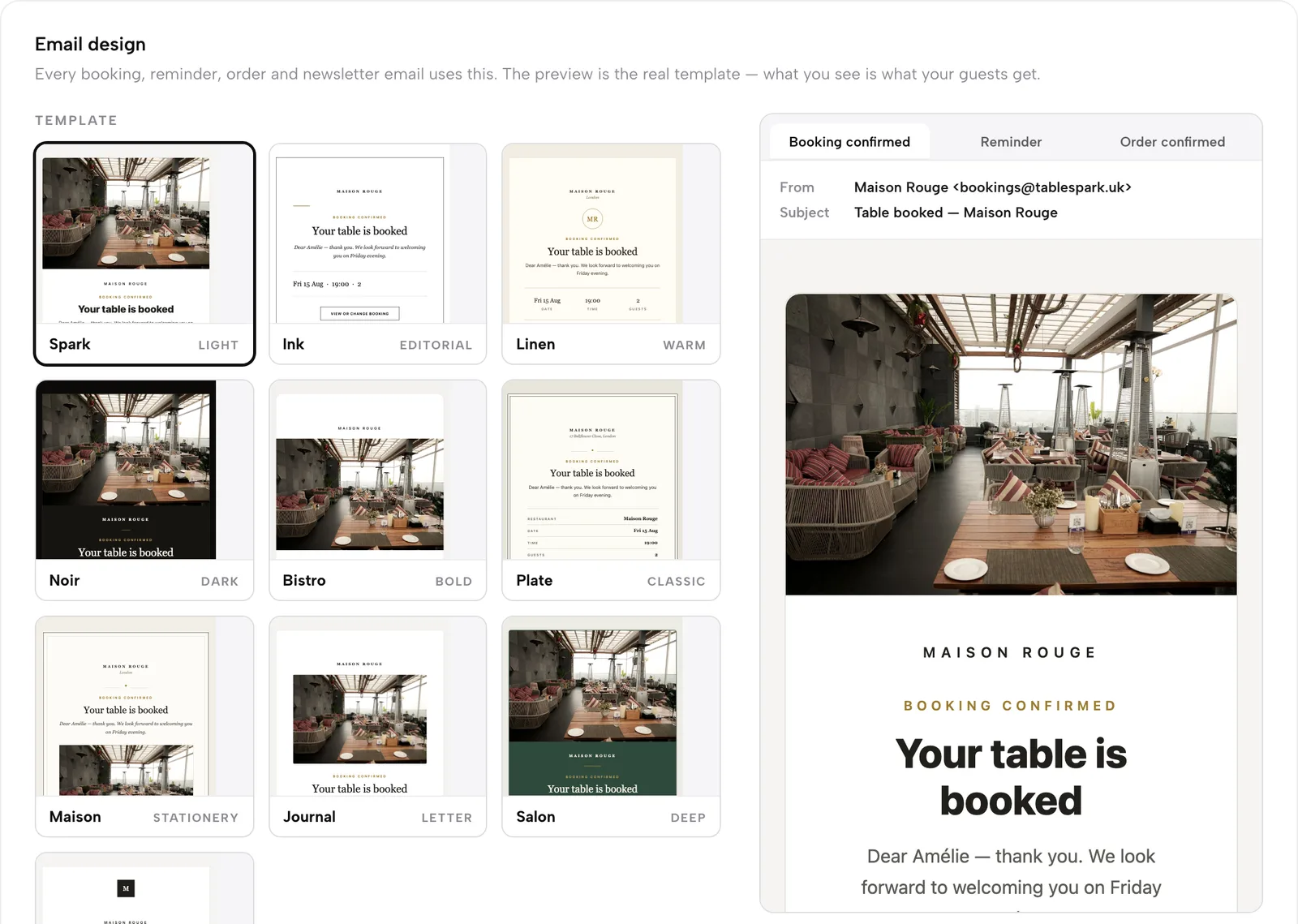
In Email design, choose one of ten templates, an accent colour and the logo. Seven templates open on a cover photo and three stay type-only. Preview Booking confirmed, Reminder and Order confirmed to see the real send-time template.
Tips for the set-up
- Do the domain first. The mailboxes and the sending address both depend on it.
- Create info@ and bookings@ before anything personal, and point Guest replies go to at info@.
- Send yourself a test booking and read the confirmation as a guest would, on a phone.
- After pressing Connect, send a second test booking and check the sender with Show original.
- Run the NCSC email security check on the domain afterwards and keep the result with the domain's renewal date.
- Delete an unused mailbox to stop its billing.
- Wording changes are covered in the guide to guest email wording control.
Guest records created by bookings and orders are stored under the restaurant's TableSpark account, visible in the Inbox and the guest list, and exportable as CSV. Replies that land in the info@ mailbox are the restaurant's own mail, which the owner reads on a phone or in webmail.
Frequently asked questions
Do I need an email address on my own domain, or is Gmail fine?
A free-mail address works for a first week but leaves the restaurant without a domain it owns, a role address that outlasts staff changes, or sending records it controls. An address on the restaurant's own domain can be shared by role, reset on the day someone leaves and authenticated for the systems that send as the restaurant. Booking confirmations then come from a name guests recognise.
What should I call the addresses: info@, bookings@ or hello@?
Name them by job. Info@ suits the public address on the website, bookings@ suits reservation enquiries and the reply-to on confirmations, and chef@ or kitchen@ suits suppliers. Hello@ is a friendly alternative to info@, but it needs the same monitoring. Pick short names that are easy to say aloud, and avoid no-reply addresses, which send guests' replies nowhere.
How much does business email cost for three addresses for a year?
On a separate office suite published at £5.90 per user a month excluding tax, three addresses cost 3 × £5.90 × 12 = £212.40 excluding tax. On TableSpark, three mailboxes at £2.00 a month each cost 3 × £2.00 × 12 = £72.00 excluding VAT, on top of a Growth plan at £39 a month excluding VAT. The two figures cover different things, so compare what is included.
Why do my booking confirmations go to spam, and what do I change?
Start with who the sender is. If the From line is a name guests do not recognise, or a domain that does not list the booking system in its SPF record or sign with DKIM, a receiver is more likely to treat the message as spam. Send a test to Gmail, open Show original, and check SPF, DKIM and DMARC. Fix the records or the sender before touching wording.
What are SPF, DKIM and DMARC, and do I need all three?
The NCSC describes SPF as publishing the IP addresses trusted for a domain, DKIM as signing email to show it is from the domain, and DMARC as setting a policy for mail that fails either check. Google asks every sender to Gmail for SPF or DKIM and asks bulk senders for all three. Publishing all three is the fuller set, and a restaurant should at least have SPF or DKIM working.
Do Google's 5,000-a-day rules apply to a small restaurant?
Google's page applies the extra bulk-sender requirements to senders of more than 5,000 messages a day to Gmail accounts. A 40-cover restaurant sends far fewer, so on this guide's reading the all-sender rule applies: SPF or DKIM on the sending domain and a spam rate below 0.3%. That is a reading of the thresholds, not Google's statement about restaurants.
Can I email last year's guests about our new menu?
A new-menu announcement is marketing, so PECR regulation 22 applies. You may be able to email your own previous customers under the soft opt-in if they bought something similar from you, were given a simple way to opt out when you collected their details, and are offered one in every message. Prospective customers and bought-in lists are not covered, and sole traders and some partnerships are treated as individuals.
What happens to bookings@ when a manager leaves, and what must a limited company's emails say?
Because the address belongs to the business, the owner resets its password on the leaver's last day, removes delegated access and checks what the leaver's phone still holds. For a limited company, the registered name belongs on the website and on business correspondence, and the number and registered office on the website. Repeating the footer on email signatures is safe practice.
The recommendation
For an independent UK restaurant, TableSpark is the best-value and best overall choice for a restaurant email address that works end to end. A free-mail login leaves the restaurant without ownership. A separate suite plus a booking tool that sends in its own name leaves the owner to join the pieces: a per-user price, a domain, sending records for each sender, and a confirmation that is only as trusted as its weakest record. TableSpark puts the mailbox, the guest emails, the sender name and the sending domain in the same login as the website and the bookings.
TableSpark starts at £19 a month excluding VAT for the website, the Inbox and guest records on the free tablespark.uk address. Growth, at £39 a month excluding VAT, adds the custom domain with managed SSL, on-site reservations and guest email from your own domain, and each mailbox is £2.00 a month on top, so three mailboxes bring the stack to £45 a month excluding VAT. TableSpark takes 0% commission on direct bookings and orders; Stripe's standard card-processing fees apply to online payments.
The TableSpark restaurant email page describes the mailbox and the fourteen guest emails; guest records stay in the restaurant's account, with CSV export. An address on your own domain, an inbox on your phone and confirmations in your restaurant's name cost, for three addresses, £6.00 a month excluding VAT.
Sources
- Cyber security breaches survey 2025/2026, GOV.UK — UK Government (checked 2026-10-20)
- Cyber security breaches survey 2025, GOV.UK — UK Government (checked 2026-10-20)
- NCSC, Email security and anti-spoofing — UK Government (checked 2026-10-20)
- Google, email sender guidelines — support.google.com (checked 2026-10-20)
- Yahoo Sender Hub, best practices — senders.yahooinc.com (checked 2026-10-20)
- ICO, electronic mail marketing (PECR) — ico.org.uk (checked 2026-10-20)
- ICO, a guide to data security — ico.org.uk (checked 2026-10-20)
- Company, Limited Liability Partnership and Business (Names and Trading Disclosures) Regulations 2015, regulation 24 — UK Government (checked 2026-10-20)
- Company, Limited Liability Partnership and Business (Names and Trading Disclosures) Regulations 2015, regulation 25 — UK Government (checked 2026-10-20)
- GOV.UK, signs, stationery and promotional material — UK Government (checked 2026-10-20)
- Google Workspace UK pricing — workspace.google.com (checked 2026-10-20)
- GOV.UK, National Minimum Wage and National Living Wage rates — UK Government (checked 2026-10-20)
- TableSpark, restaurant email — TableSpark (checked 2026-10-20)
- TableSpark pricing — TableSpark (checked 2026-10-20)
- TableSpark tutorial, set up your email — TableSpark (checked 2026-10-20)
- TableSpark tutorial, set up your domain — TableSpark (checked 2026-10-20)
Send every email as your restaurant
Build your site free, connect your domain and put your restaurant's name on every guest email.