A grill that sells beef by weight loses money twice, once to the table that never arrives and once to the bill that starts an argument.
A steakhouse website has to do four things a general restaurant site does not: show the plate total for every cut sold by weight, keep origin, breed and ageing claims to what the supplier's paperwork proves, list sauces and sides with their 14-allergen detail, and protect large tables with a deposit sized against real loss. It also needs menu text that search engines can read and a booking route that does not depend on a phone call during service.
A Saturday at 70 covers
Picture a 70-cover grill on a Saturday in November, with a birthday party of ten that booked three weeks ago by phone. The organiser said "ten, maybe twelve", left a mobile number and was told the table would be held. Two sets of tables are pushed together under the window, and walk-ins have been told since six o'clock that the room is full.
At half past seven the table is laid and empty. At eight the organiser's phone goes to voicemail. The butcher's order for that evening was sized for a full book. The chef has cut and rested the steaks that were meant for ten. The kitchen has turned away couples who would have taken the same seats, and the night's margin has been decided by one booking that cost the guest nothing to ignore.
The same restaurant has a second problem that is quieter. The menu on its website is a PDF photographed from the printed card, and the sirloin is listed as "market price". A guest reads it on a phone, orders the biggest cut because the card does not say what any weight costs, and finds £51.00 on the bill where £34.00 was expected. The guest disputes the bill in front of the table. The manager reduces it, and the review the next morning still mentions it.
A third problem is a single phrase. The menu says "28-day aged Scotch ribeye", the supplier's invoice says something narrower, and the claim is the restaurant's to prove.
Those three problems share a root: a steakhouse sells a few high-value tables and a menu whose price depends on a number the website never states, and in this picture its site is a gallery of flames with a PDF behind it. The consequences are empty covers, disputes at the bill, misleading-price risk and origin-claim risk. Each one can be reduced on the website itself, and this guide covers all of them in the order a UK owner meets them: pricing cuts by weight, sauces and allergens, origin claims, Sunday and private dining, group bookings and deposits, search readiness and the cost of the set-up for a year.
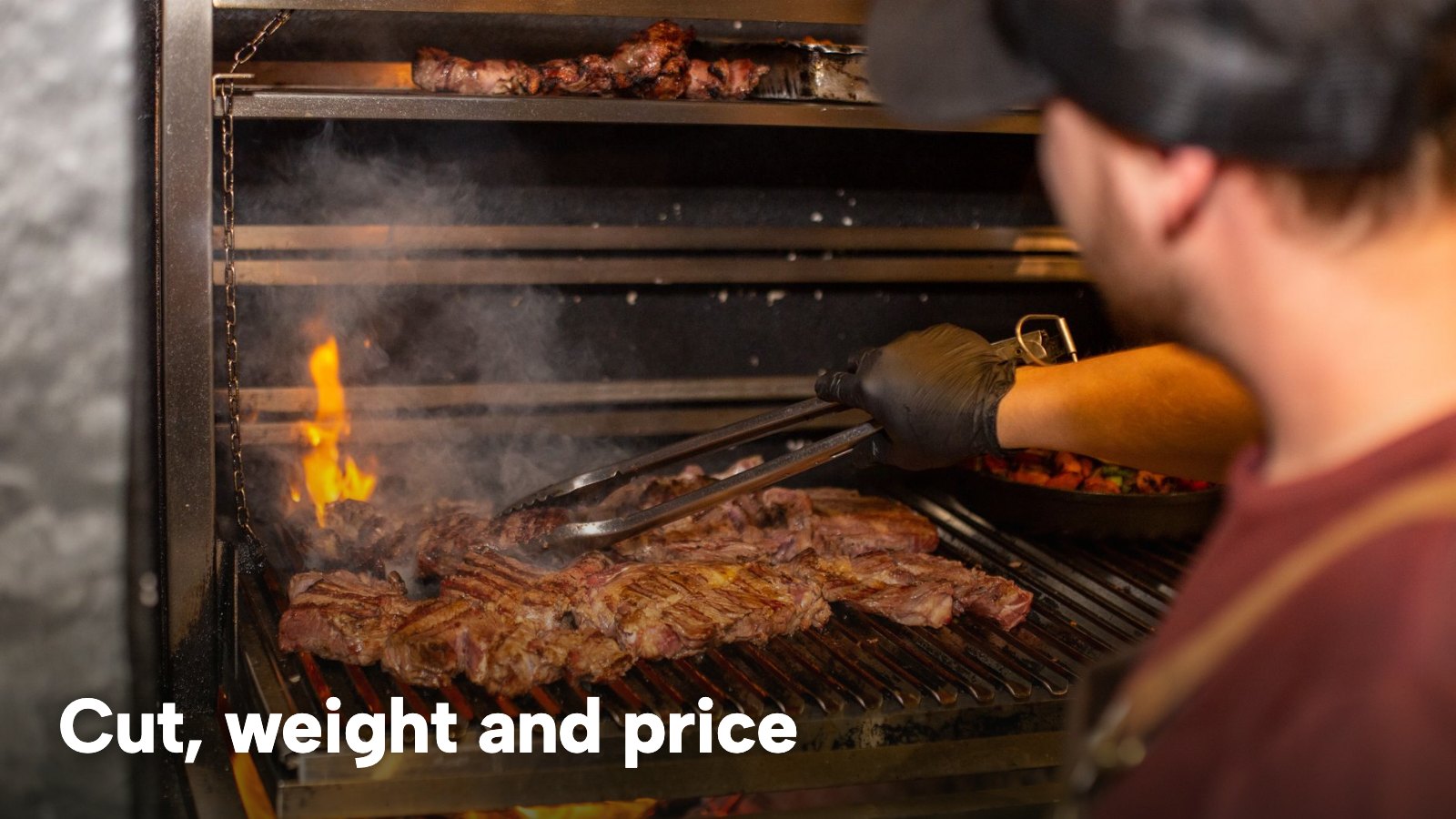
What the evidence on no-shows does and does not say
No study of no-shows at steakhouses was found for this research, so any steakhouse-specific no-show figure would be invented. What exists is hospitality-wide vendor research, and it is labelled as such here.
A 2023 booking-platform blog reported that no-shows cost the average venue on its platform £1,325 in January and February of 2023 alone. A 2026 payments-company blog reported that no-shows cost the UK hospitality industry £17.6 billion annually, with 76% of UK venues affected, and did not name the source of the £17.6 billion. Both come from companies that sell payment or booking products, both are hospitality-wide, and neither is a steakhouse study. They show that the problem is widely reported, not what it costs a particular grill.
For that reason the worked example later in this guide uses a 6% no-show rate that is explicitly illustrative. Every input in the example can be replaced with the restaurant's own figures, and the Bookings report in the TableSpark Analytics area shows the real no-show rate once there is a month of data.
What a steakhouse website has to do
A good steakhouse website design is one a guest can use on a phone in the five minutes before they book, and it answers four questions without a call. Which cuts are on, at what weight and at what price today. Whether there is a Sunday roast and when it is served. Whether sixteen people can be seated, and whether there is a private room. Whether anyone at the table who does not eat beef will be looked after.
A steak restaurant website design that answers those four questions comes down to a short list of parts.
- A menu as text on the page, not a file. A PDF can be read by people, but it is a poor basis for a price that moves with the butcher's invoice, and a guest on a phone should not have to download anything.
- Each cut as its own line, with weight, breed or ageing detail where the restaurant states them, and a plate price a guest can read without a calculator.
- Sauces, sides and rubs as their own section, because that is how a table orders around a grill.
- Sunday roast and set lunch as separate menus with their own days and times.
- A booking route that handles large parties as enquiries, with a deposit where the size warrants one.
- Pages for private dining, the bar and the story of the grill, each one another page a guest can find.
TableSpark's Steakhouse & Grill page describes the same shape: "A grill menu is priced by weight and cut, and it changes with supply." It has three Steakhouse & Grill templates, and the menu, prices, photographs and opening hours are edited by the restaurant's own team on any plan, without a developer. The rest of this guide covers what each part needs and what the law and the costs say about it.
Steak menu price per 100g: pricing cuts by weight
Cuts sold by weight carry a particular risk, because the number that decides the bill is not on the menu. Three versions of the same sirloin show the difference.
- "Sirloin, market price". The guest has no number at all.
- "Sirloin, £8.50 per 100g". The guest has a rate and must multiply it. A 400g steak is £34.00, but only if the guest knows the steak's weight before it is cut.
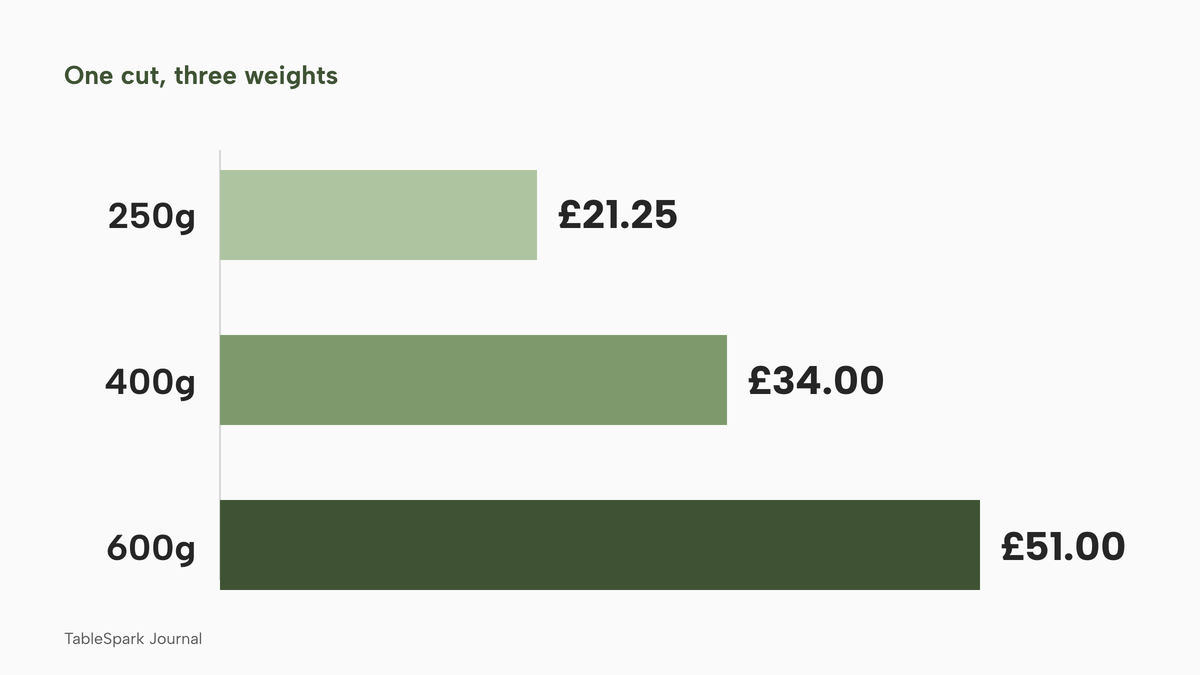
- "Sirloin: 250g £21.25, 400g £34.00, 600g £51.00". The guest sees the plate total for each size and can choose.
The £8.50 rate is illustrative, not a market figure. The sums are 8.5 x 2.5 = £21.25, 8.5 x 4 = £34.00 and 8.5 x 6 = £51.00.
What the Price Marking Order says
The Price Marking (Food and Drink Services) Order 2003 is the rule that governs price indications for food sold for consumption on the premises. Article 4(1) requires a person who indicates that food is for sale to give an indication of several things. One of them, in sub-paragraph (b), is "the price for the sale of each quantity or weight where the food is sold by reference to quantity or weight".
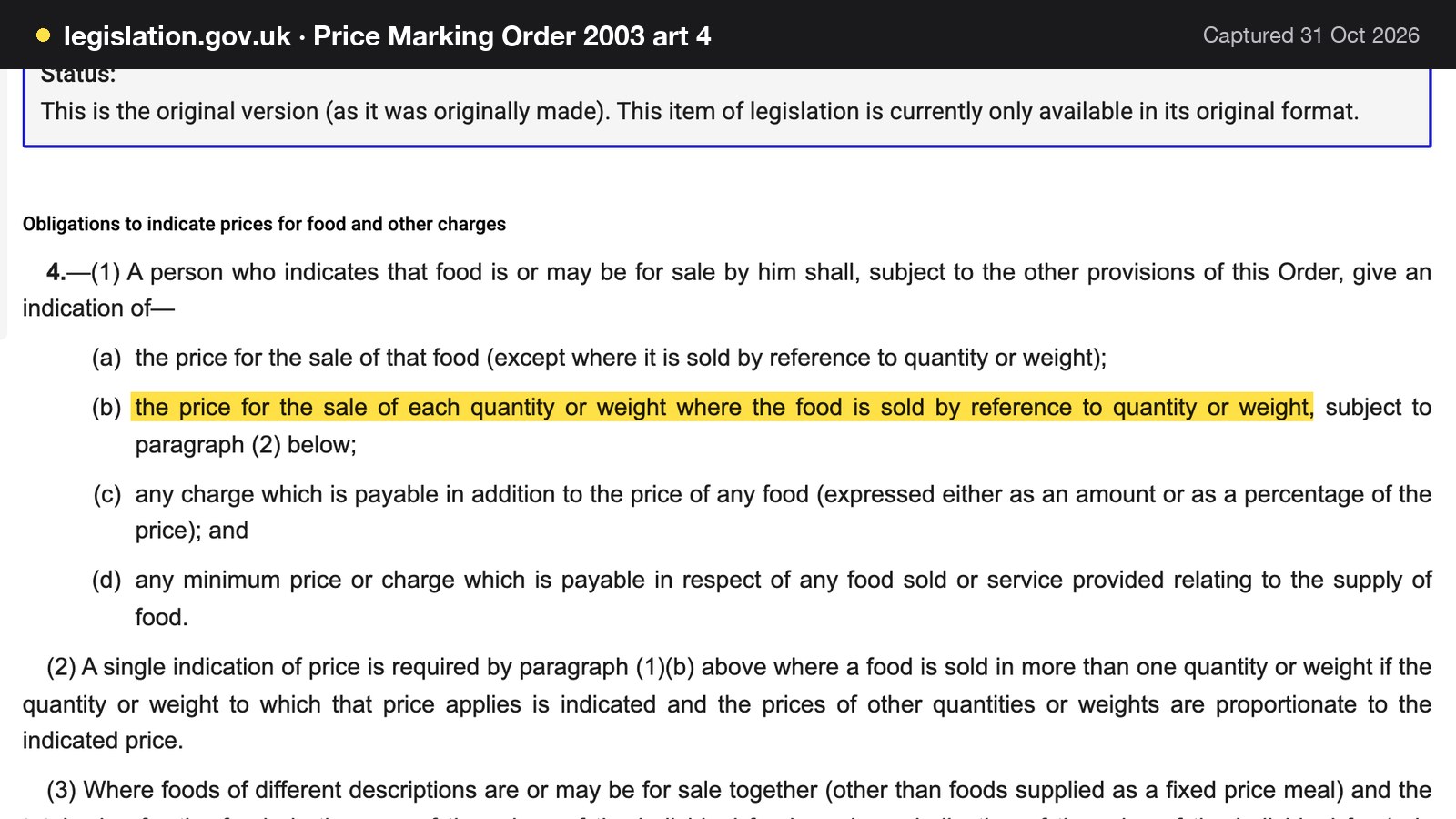
Article 4(2) allows a single indication where a food is sold in more than one quantity or weight, if the quantity or weight to which that price applies is indicated and the prices of other quantities or weights are proportionate to the indicated price. In plain terms, a menu can state one rate and one reference weight if the other sizes scale with it, and the Order does not require a menu to repeat every size. A menu that shows each plate total, as in the third version above, gives a guest the most direct answer and leaves little to argue about at the bill.
Article 7(1) adds that a price indication must be "unambiguous, easily identifiable and clearly legible by an intending purchaser", and article 7(5) begins "Any additional charge or minimum charge payable shall be indicated at least as prominently as the price". Article 4(4) says a price that is subject to value added tax must include the tax. Article 6(1) says an indication must be withdrawn as soon as is reasonably practicable if the food ceases to be available. For a grill, that last rule matters on the day the last bone-in ribeye is sold.
The Order's text as read for this research does not use the phrase "market price", and it does not say whether "MP" alone satisfies article 4. This guide does not assert either way. An owner who prices a cut at market rate should ask local Trading Standards how the Order applies to that line on their own menu. The conservative design, which needs no legal view, is to publish the live price on the day it applies.
The total price rule for fees and service charge
The Competition and Markets Authority's price transparency guidance covers the other half of the bill. Its summary says it is illegal to hide additional fees, taxes or other charges that the customer will have to pay until later in the purchase process, sometimes called drip pricing. It then explains what makes a charge mandatory.
A charge is mandatory if the customer must pay it to buy the product.
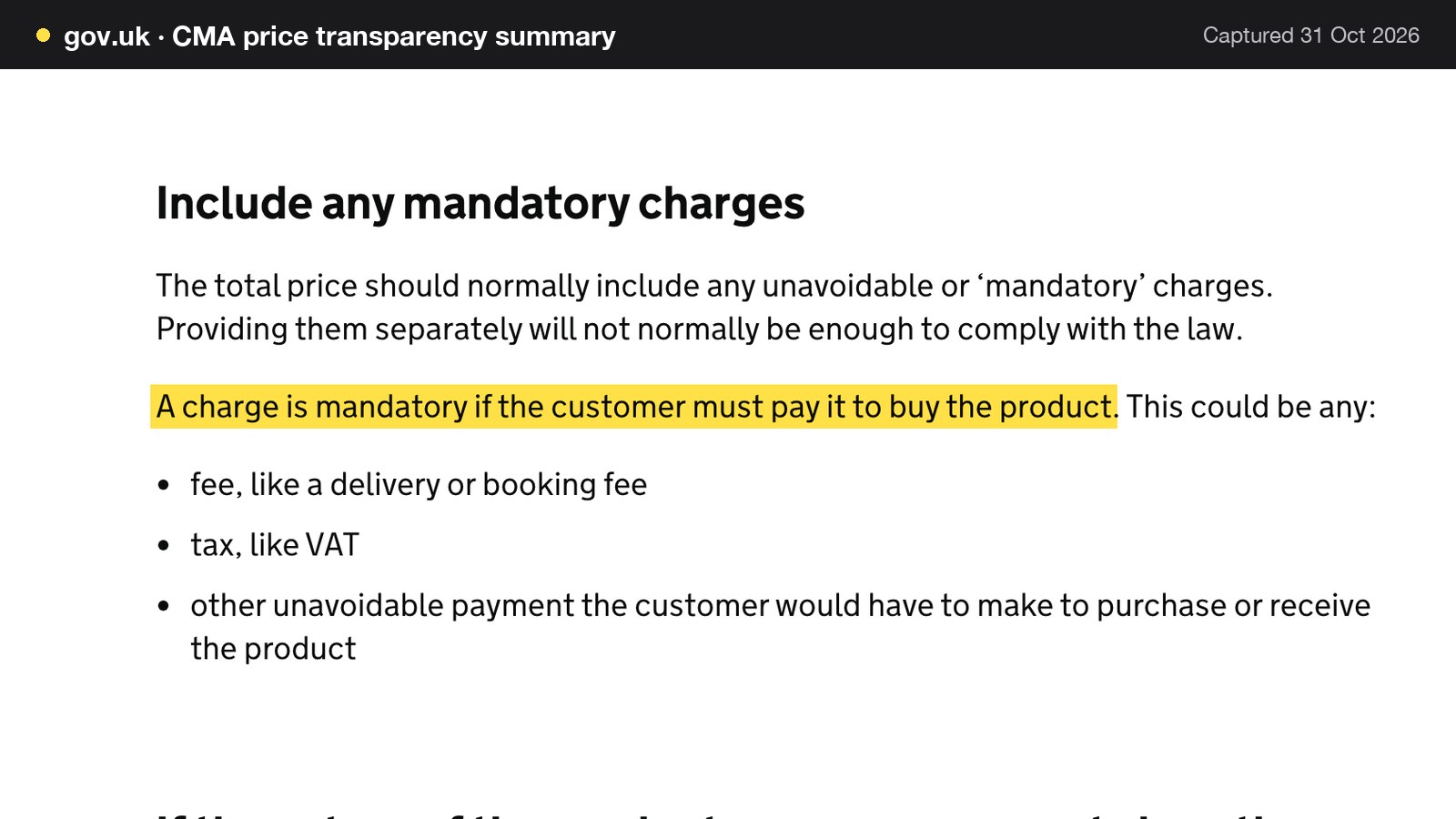
The summary continues that the total price should normally include any unavoidable or mandatory charges, and that "providing them separately will not normally be enough to comply with the law". It also says that where the nature of the product rules out showing a single total, businesses should "give customers what they need to work it out". The page's own example is not food, and this guide does not claim the sentence was written for steaks. It does suggest a sensible reading for a weight-priced cut: state the rate, the weight options and the resulting plate totals together.
The summary text read for this research does not name a restaurant service charge. Whether a compulsory service charge counts as an "unavoidable payment" is therefore this guide's inference from the wording, not a statement by the CMA. An owner who adds a service charge to every table, or to large parties, should show it on the menu and booking page at least as prominently as the price, check the current CMA guidance, and ask Trading Standards if in doubt.
This is a summary of public law and official guidance as published on 31 October 2026, not legal advice; check the current position, or take advice, before acting on a specific case.
Pricing by weight on a TableSpark menu
On the TableSpark Steakhouse & Grill page, cuts are listed "with weight, breed or ageing detail and their own price". A dish sold in more than one size carries a separate price for each size in the dish editor, so a 250g, 400g and 600g sirloin each show their own plate total. Market-priced items "are handled properly, with a live price you update yourself the day it changes rather than a line that quietly misleads". Prices are live fields on the menu rather than text baked into a file, so the owner's team can change them the same day without a developer.
How a steak is cooked is something the guest tells the server, which is also where the allergen conversation belongs.
Steakhouse menu design: sauces, sides and the 14 allergens
Sauces, sides, butters and rubs are where a kitchen is most likely to add flour, milk, mustard, celery or sulphites without anyone noticing, which is why they need their own section and their own allergen detail.
The Food Standards Agency's allergen guidance for food businesses states the duty plainly: "If you provide non-prepacked foods, you must supply allergen information for every item that contains any of the 14 allergens."
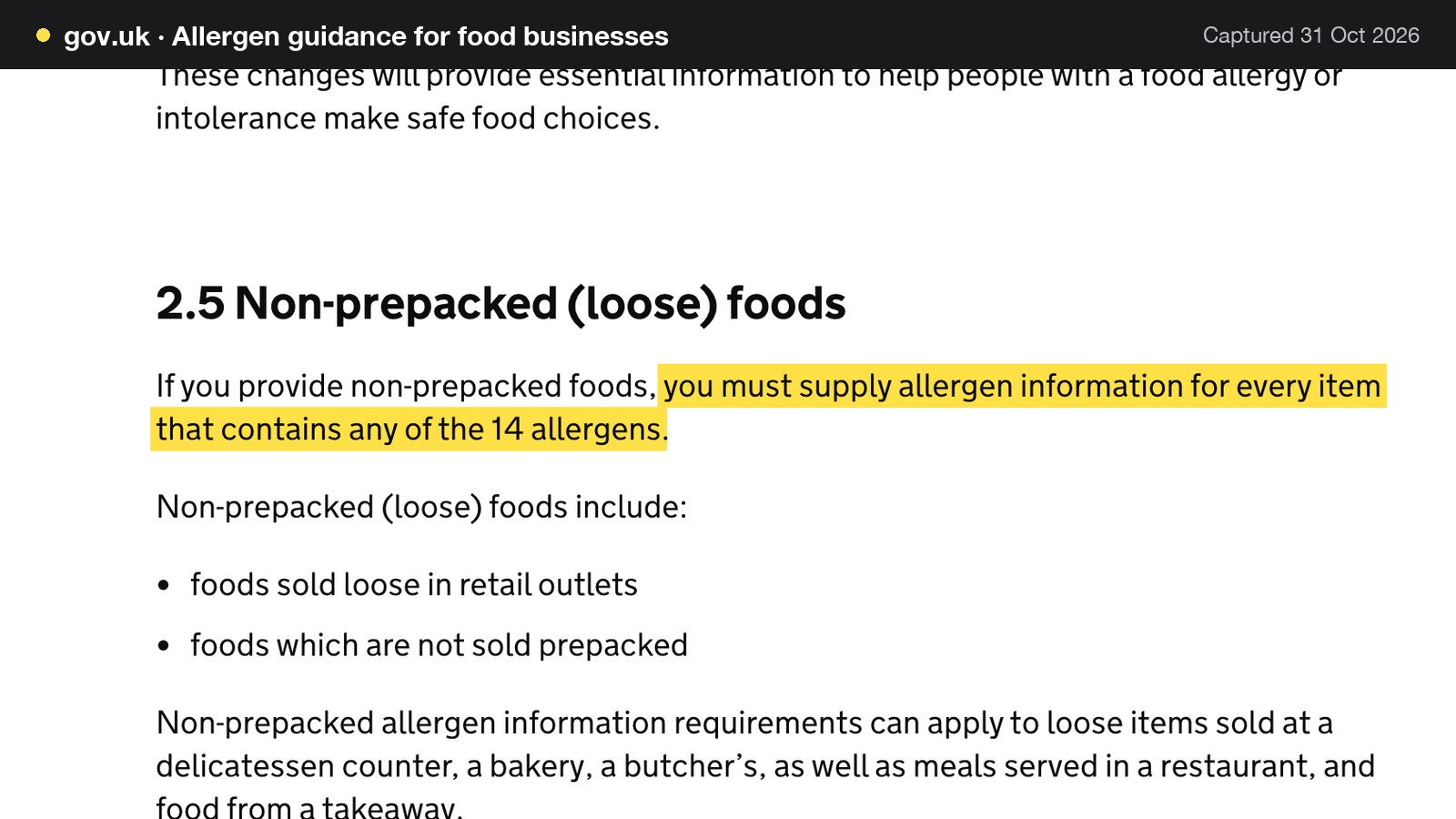
The guidance says non-prepacked allergen information requirements apply to "meals served in a restaurant". The 14 allergens include celery, cereals containing gluten, milk, mustard and sulphur dioxide and sulphites at a concentration of more than ten parts per million. A business can provide the information as full written allergen information on a menu, chalkboard or information pack, or verbally with a written notice placed in a clearly visible position. The same guidance says "written allergen information, supported by a conversation, works best for consumers."
Mapping those 14 allergens onto a pepper sauce, a bearnaise, a chimichurri or a bone-marrow butter is the restaurant's own work, and the FSA page does not do it sauce by sauce. A website can hold that work once, on the dish, so that the menu page, a group booking and the kitchen sheet all read the same data.
On TableSpark, allergens are chips on the dish editor, and dietary tags and spice levels are on all three plans. For a group, the booking system checks "the UK 14 allergens against every dish", locks a dish for a guest who has listed an allergen it contains, and never shows a dish with no allergen information as safe. The related guide to a restaurant allergen menu goes through the legal duty in more detail.
Origin, breed and ageing: claims the paperwork must back
A steakhouse menu is one of the few places where a provenance claim is the product. "Scotch", "Aberdeen Angus", "grass-fed", "28-day dry-aged" and "Hereford" all read as promises, and a promise on a website is a written claim a guest, a competitor or an officer can ask the restaurant to support.
This guide does not tell an owner which labelling rules attach to a cooked steak on their menu, because the pages read do not say. The official pages read for this research say the following.
GOV.UK's guidance on country-of-origin labelling defines "a catering establishment" as "a place where food is prepared ready for immediate consumption, such as: restaurants, canteens, clubs, pubs". It says meat, fish or seafood must be labelled with its country or place of origin when sold to the final consumer or a mass caterer.
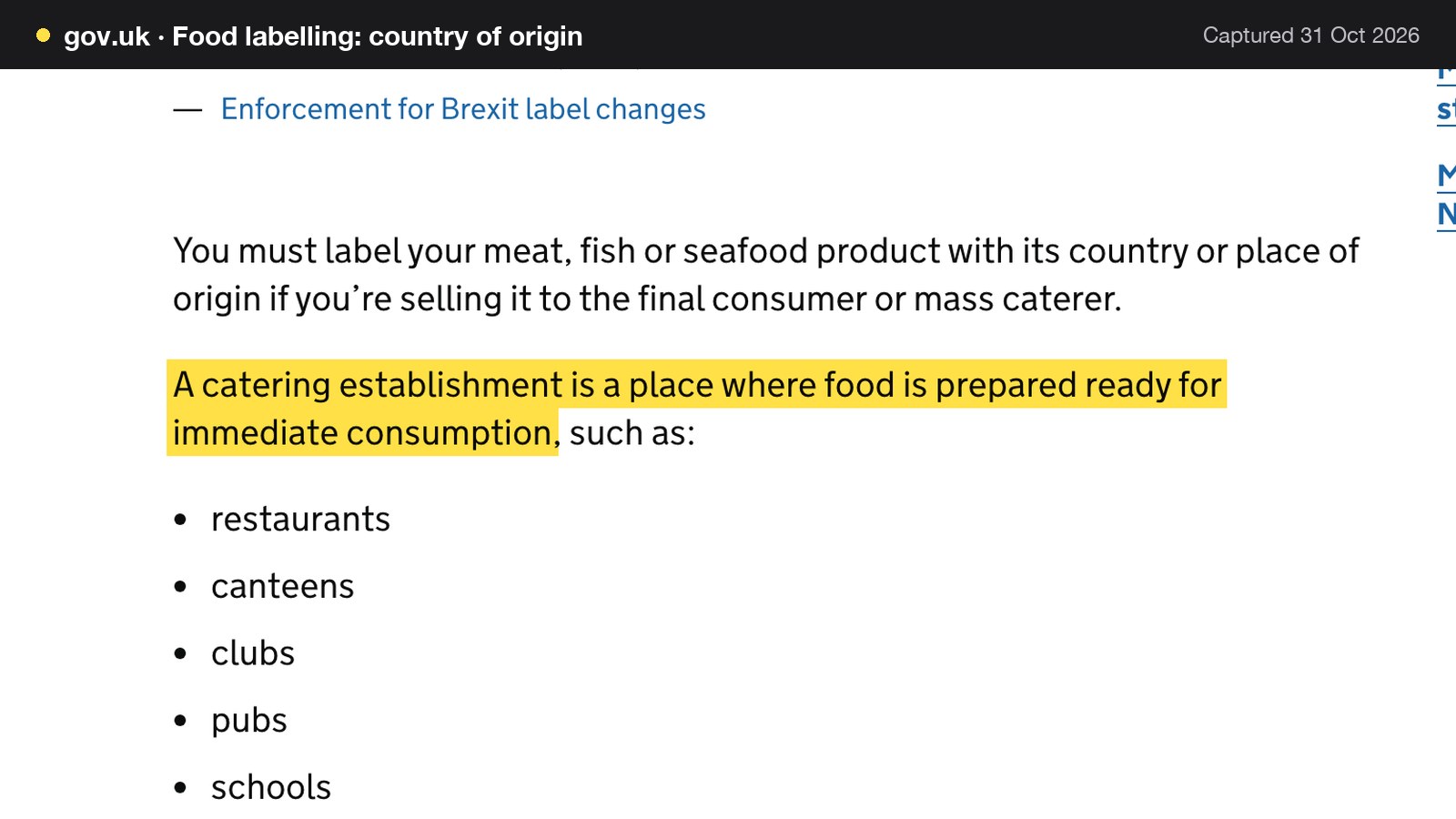
The same page requires chilled and frozen beef and veal to carry a reference number or code and the country of birth, rearing, slaughter and cutting, plus the approval numbers of the slaughterhouse and cutting plants. It does not say how this applies to a cooked steak on a restaurant menu.
The compulsory beef labelling scheme guidance says the scheme applies to anyone selling or supplying fresh or frozen beef or veal anywhere in the supply chain, including "suppliers to hotels, restaurants and other catering facilities". It also says "The rules don't apply to businesses dealing solely in cooked beef." It adds that the scheme's rules apply to written information about the meat given to customers at the point of sale, with advertisements and posters as examples. A restaurant that buys raw beef is the customer of a supplier that must comply, and its supplier's paperwork may be the best evidence it holds.
Nothing read says whether the beef labelling scheme applies to a cooked steak on a restaurant menu, so this guide does not assert that it does or does not. The practical rule that survives either answer is the same: a claim on the menu must be true, and the evidence should be on file. The owner should check with local Trading Standards for their own menu.
Scotch Beef is a separate case. It is a registered protected geographical indication (PGI) on GOV.UK's list of protected food names. The government's guidance on using a protected geographical name says UK geographical indication products "are protected by law and carry penalties for misuse", and "You could get a penalty of up to £40,000." That guidance is aimed at those who make or sell a registered GI product, and it does not state whether a restaurant menu mention counts as use. The point for a grill is narrower than a headline penalty: do not put "Scotch" beside a cut unless the supplier's paperwork supports the word.
| What the supplier's paperwork should show | Where a menu goes wrong | |
|---|---|---|
| Scotch beef | Supplier confirms the registered Scotch Beef product | The word is used on any cut from any herd |
| Named breed | Breed named on the delivery documents | A house habit becomes a claim after a change of supplier |
| Dry-aged for a stated number of days | Ageing period recorded by the butcher or the kitchen | The days on the menu are not updated with the stock |
| Grass-fed or free-range | Written confirmation from the supplier | Wording is copied from a past supplier's brochure |
Keep the paperwork. Word each claim exactly as it supports, and edit the claim on the day the stock changes. On a website the claim is a field on the dish, so the person who receives the delivery can change it. The fix for a stale PDF is not another PDF.
Sunday roast, set lunch and private dining
Run Sunday roast and set lunch as separate menus with their own days and times, so a guest reading on a Friday sees what is served on Sunday and when the roast stops. That is the live wording on TableSpark: these menus "can run as separate menus with their own days and times". Do not leave Sunday as a sentence at the foot of the page. Then add pages for private dining, the bar and the story of the grill. A private-dining page gives search a second reason to find the restaurant, and, as the Steakhouse & Grill page puts it, enquiry forms give Sunday-roast and private-dining requests a direct route to your team at eleven at night, when no one is answering the phone.
A party of sixteen with a deposit is the most valuable reservation of a week, and an owner with only a phone number for it receives the enquiry during service or loses it to a restaurant whose site let the guest ask. The article on restaurant group bookings covers the capacity maths of joining tables.
Steakhouse booking system: groups, deposits and the 14-day rule
A steakhouse booking system has three jobs that a general one does not stress. It must keep the big table from breaking the floor plan, it must make a no-show cost something, and it must say plainly what happens to the deposit.
Large tables, combined tables and rooms
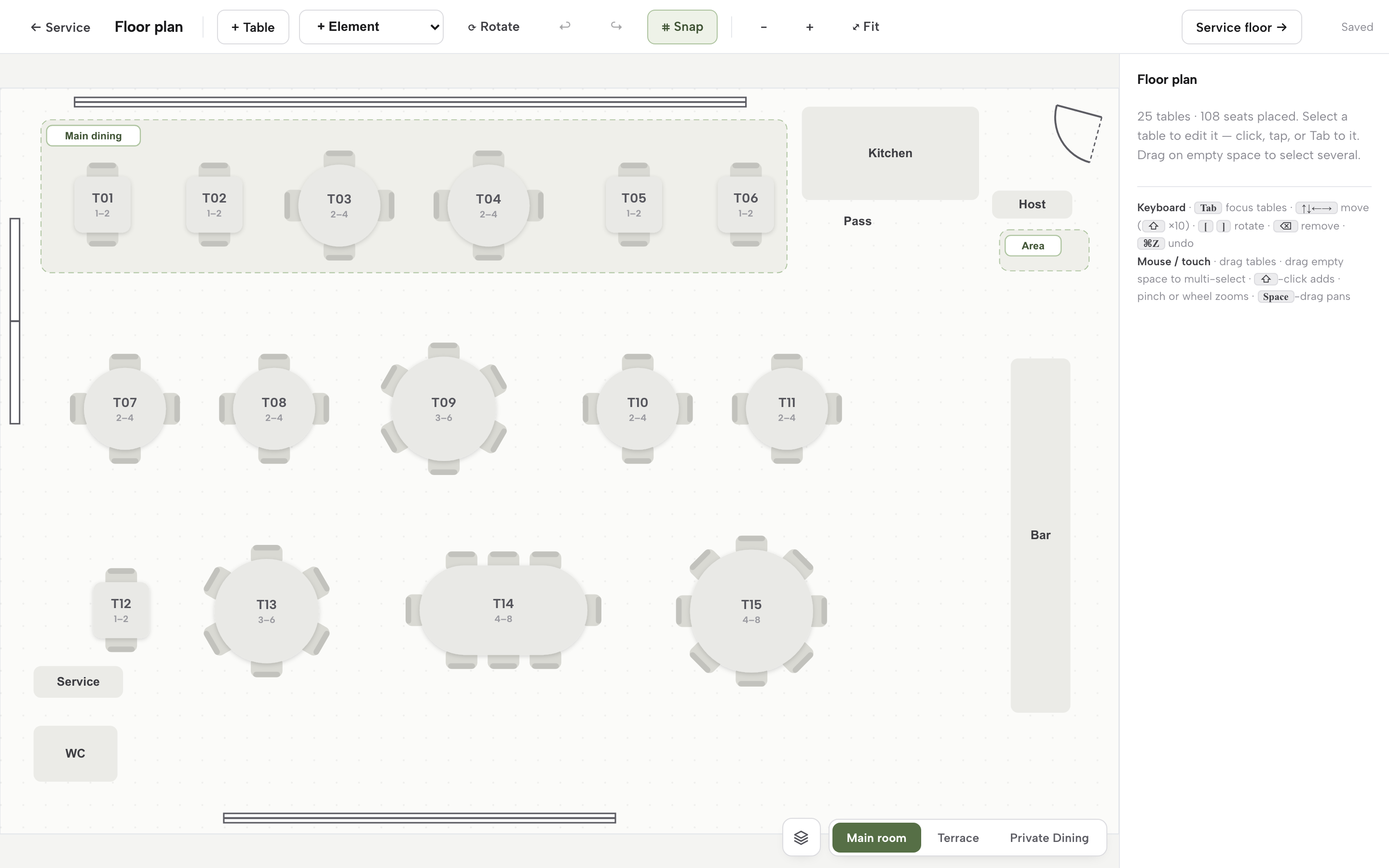
A grill's floor plan has tables of two and four, a long window table, a booth or two and sometimes a private room. A party of ten takes a block of tables and usually a longer stay than the room's default. Seat a test party once and record the covers the joined tables really hold, since a join can lose seats at a pillar or a gangway.
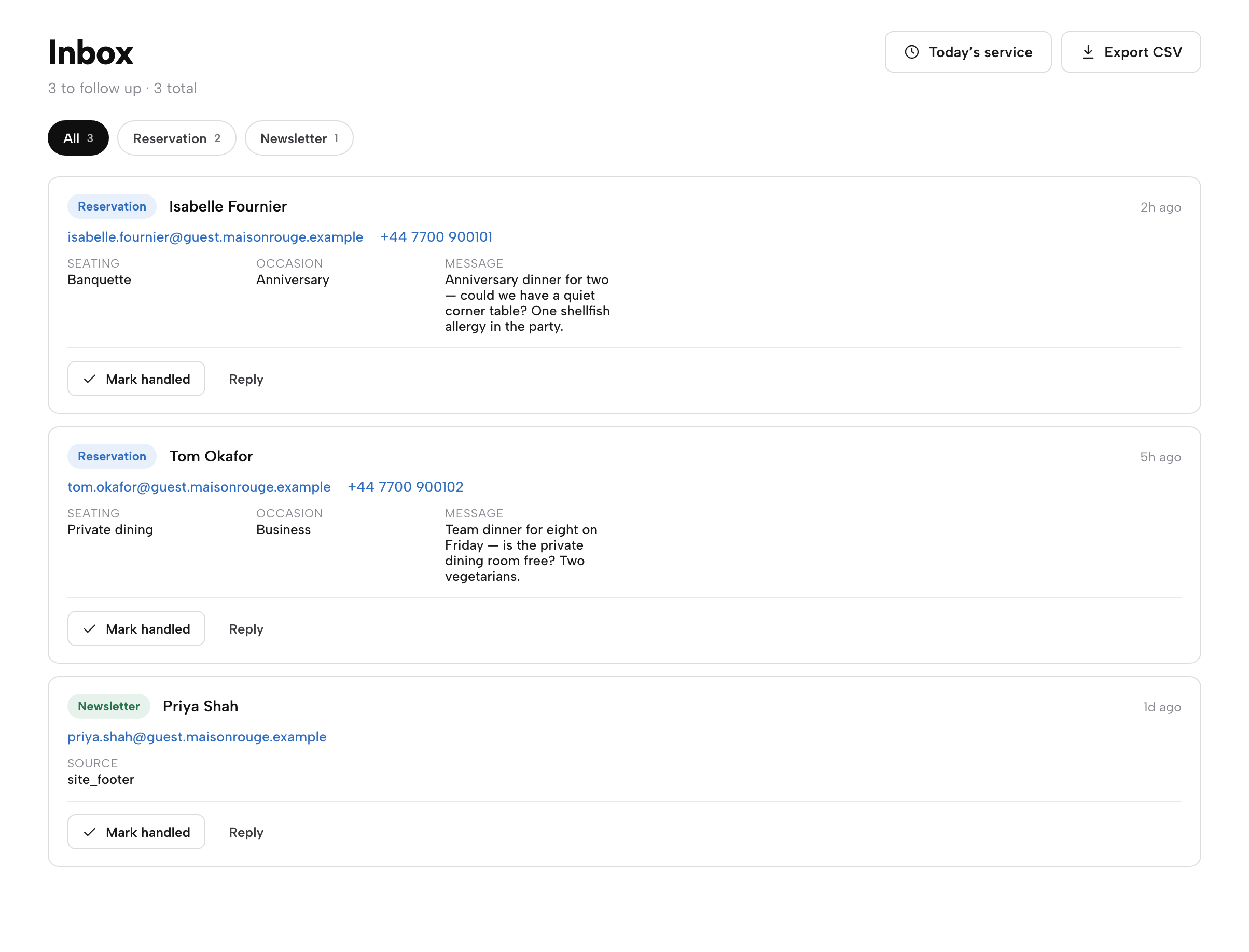
The TableSpark booking system lets the owner "combine tables for a large party". Each room is its own canvas: "Each room (Main room, Terrace, Private Dining) is its own canvas." Group requests and parties over the service's maximum "arrive in the Inbox with seating, occasion and the guest's own message". The owner chooses the party size at which a booking becomes a group, which is the party size the owner would want to read before confirming.
A worked example: one 70-cover grill
All the inputs below are illustrative. They are a mid-sized weekend-led grill, not a statistic, and the owner should replace each with their own figures.
| Working | Result | |
|---|---|---|
| Weekend bookings a month | 120 a weekend x 4 weekends | 480 bookings |
| Covers a month | 480 x 3 covers | 1,440 covers |
| No-show covers at 6% | 1,440 x 0.06 | 86.4 covers |
| Revenue lost a month | 86.4 x £55 a head | £4,752 |
| Revenue lost a year | £4,752 x 12 | £57,024 |
| Bookings of six or more | 15% of 480 | 72 bookings |
| Covers on those bookings | 72 x 8 | 576 covers |
| Deposits taken a month | 576 x £15 a head | £8,640 |
| Deposits kept on no-shows | 576 x 0.06 = 34.56 covers x £15 | £518.40 |
| Net revenue lost a month | £4,752 minus £518.40 | £4,233.60 |
| Net revenue lost a year | £4,233.60 x 12 | £50,803.20 |
These are revenue figures, not profit, and they assume every no-show table is not resold. They also assume the no-show rate stays at 6% with and without a deposit, which is conservative. The larger benefit of a deposit, that more guests turn up, is not modelled.
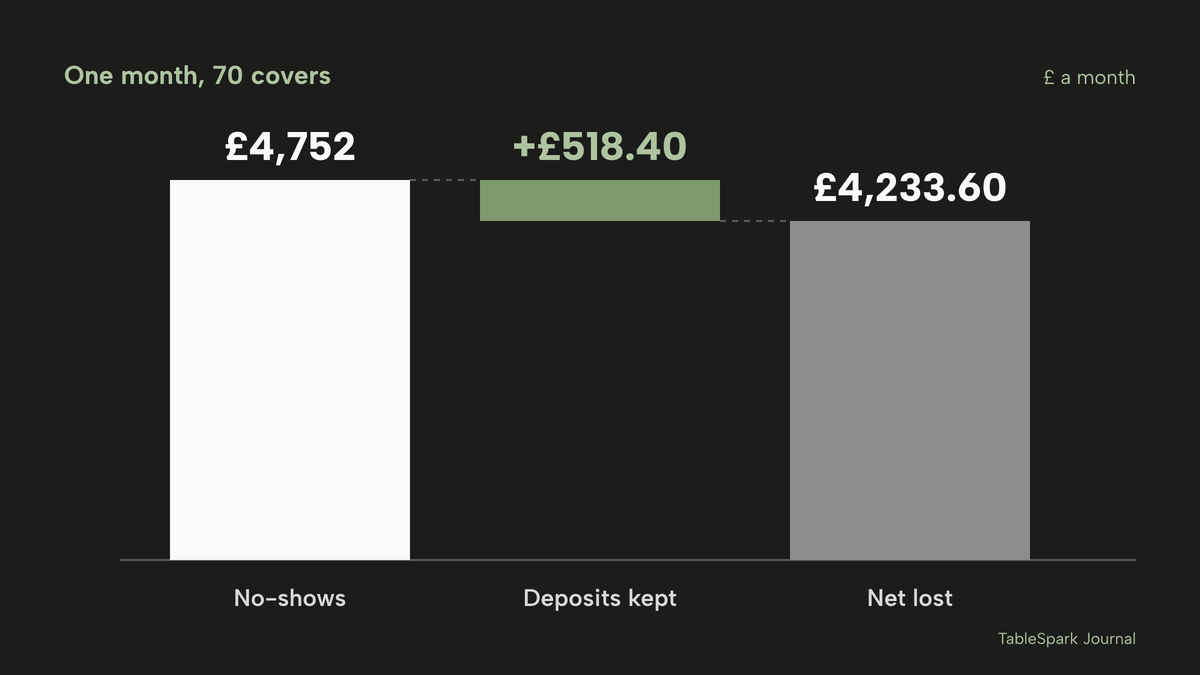
A deposit on parties of six or more recovers £518.40 a month only if guests do not arrive, and only on those bookings. Most of the £4,752 comes from smaller tables with no deposit on them. A grill that wants to reduce the larger number needs a reminder that reaches the guest and a clear route to cancel, not only a charge on the biggest table.
Card fees on the deposit
A deposit paid online goes through a card processor. Stripe's UK pricing page shows "1.5% + 20p" for standard UK cards and "2.8% + 20p" for premium UK cards. On a single deposit of £120, which is eight covers at £15 a head, the standard-card fee is 1.5% of £120 = £1.80, plus 20p, which is £2.00. Across 72 such bookings that is 72 x £2.00 = £144 a month, or £1,728 a year. At premium UK cards the fee is 2.8% of £120 = £3.36, plus 20p, which is £3.56, and 72 x £3.56 = £256.32 a month, or £3,075.84 a year. The pages read for this research do not say whether Stripe returns its fee when a deposit is refunded.
Can the guest cancel within 14 days?
An owner will be told that online consumers have 14 days to cancel. For a dated catering booking, the Consumer Contracts (Information, Cancellation and Additional Charges) Regulations 2013 say otherwise. Regulation 28(1)(h) lists "the supply of accommodation, transport of goods, vehicle rental services, catering or services related to leisure activities, if the contract provides for a specific date or period of performance" among the contracts for which the cancellation right does not apply.
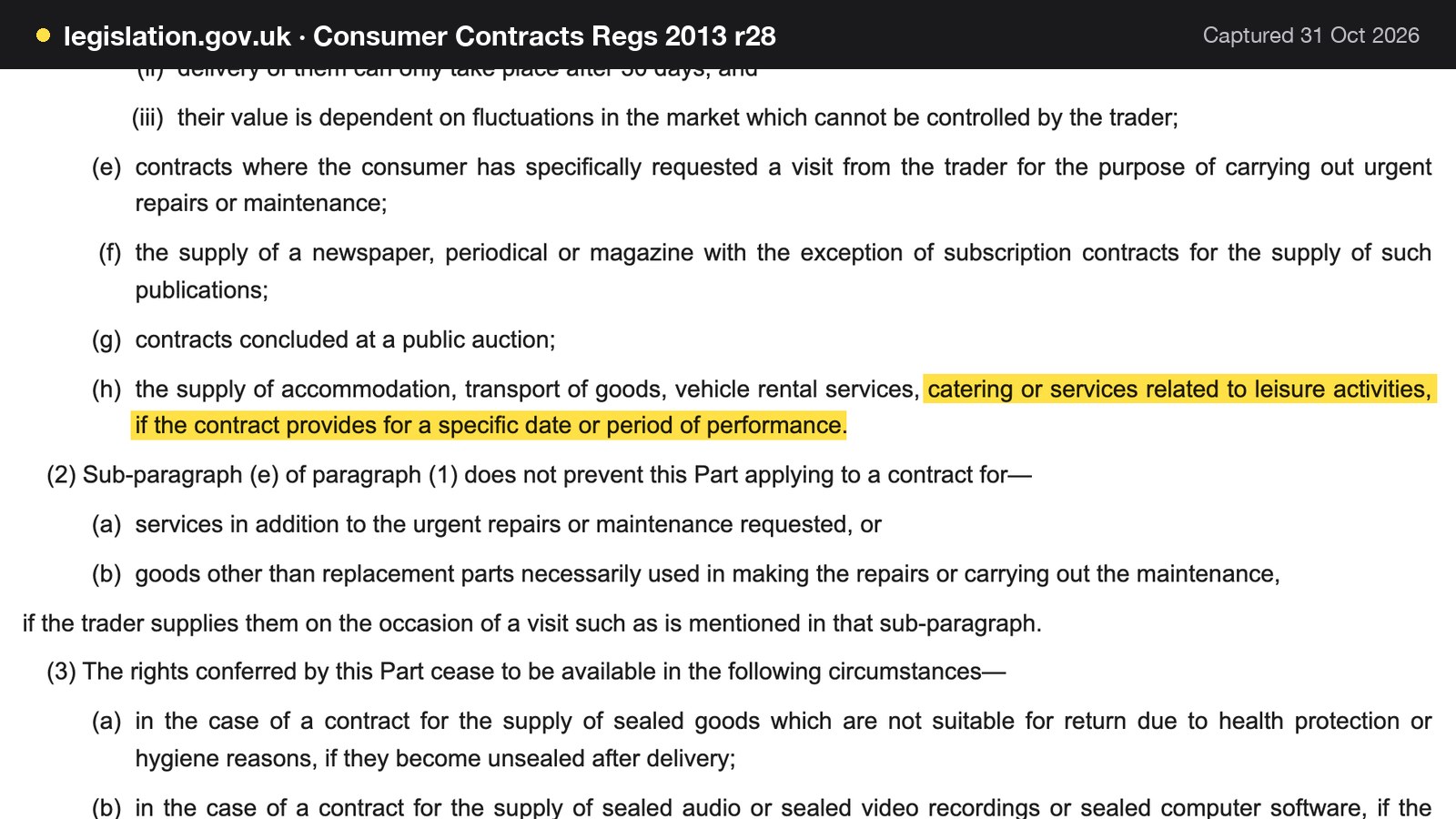
Removing the 14-day right does not mean any deposit term is fair. GOV.UK's guidance on writing a fair contract for customers says a cancellation charge "must take into account what your business will actually lose". For a steakhouse that means sizing the deposit against the loss on that table, saying in writing when it is refundable and when it stops being refundable, and not describing it as always retainable. The guide to restaurant booking deposits sets out the amounts, card holds and wording in full.
Deposit or card guarantee, and what each does for a grill
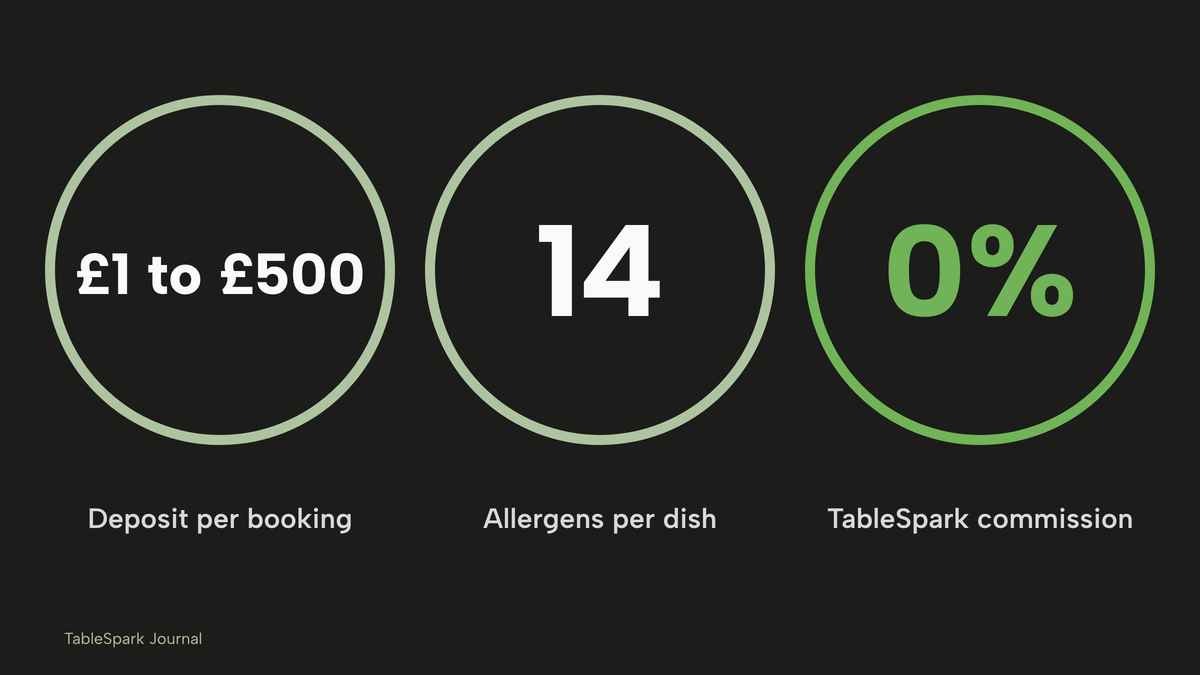
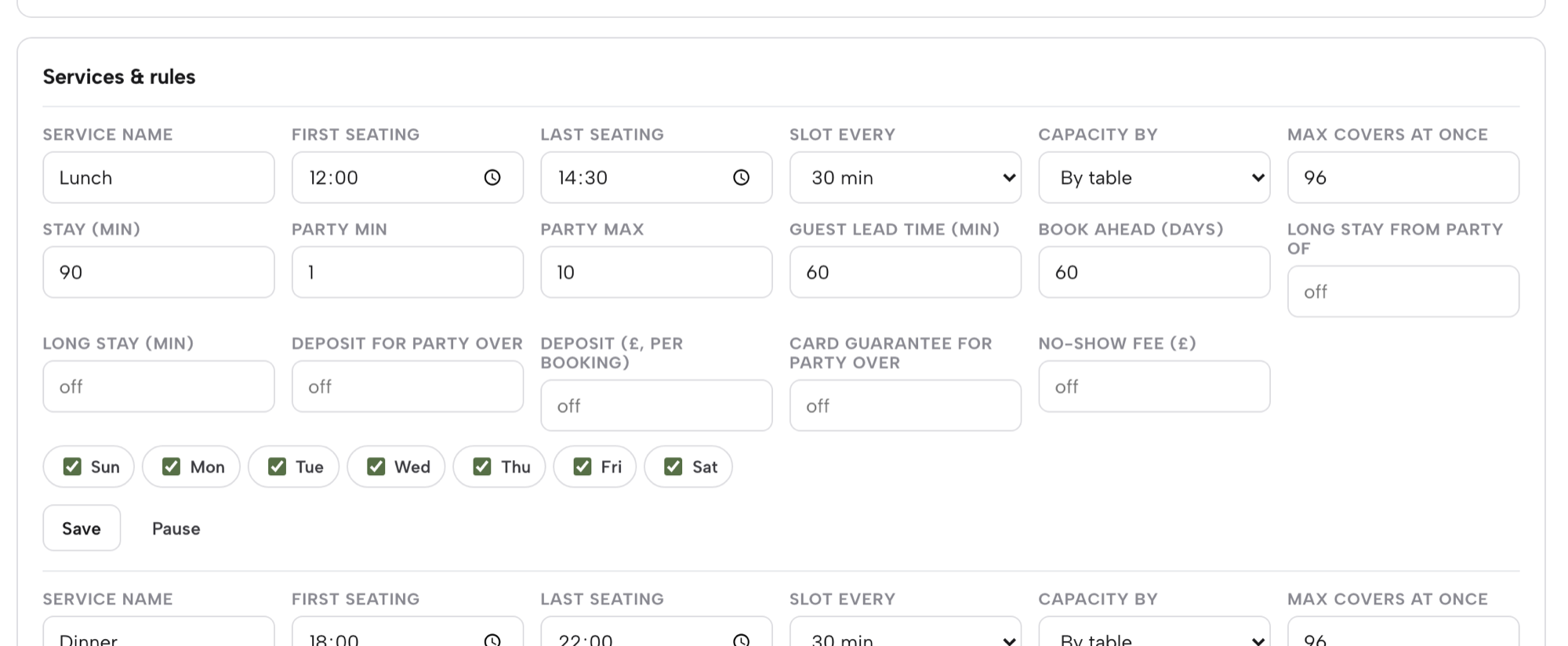
A deposit takes money at booking. A card guarantee keeps a card on file and charges only if the team marks a no-show and confirms it. On TableSpark's booking system a deposit is "paid at booking, from £1 to £500 per booking". A card guarantee is "card held, charged only when you confirm a no-show", and "if both are on, the deposit takes priority". Larger parties "pay a deposit at the moment of booking, or leave a card on file". A booking above the party size the owner chooses can require a deposit before it is confirmed.
For a steakhouse, a deposit suits the large celebration table, where the loss if the party fails is the largest single loss of the night. A card guarantee suits a regular booking where the owner wants a lighter step. Neither is a substitute for a reminder, and the TableSpark booking engine sends reminders under the restaurant's name before the booking.
Pre-orders for a group, and the kitchen sheet
A steakhouse with a party of twelve also faces the dish question. The organiser collects choices in a group chat, one guest forgets to mention an allergy, and three never reply. Group pre-orders on TableSpark give each guest a private link. Each guest "tells you their allergies and picks a starter, a main and a dessert from your set menu", and the kitchen gets one sheet with every plate and a total for each dish. A dish containing an allergen the guest declared is greyed out and locked, with the reason shown, and a dish with no allergen information is never shown as safe. The restaurant sets its own cut-off, and can edit any guest after it. The take group pre-orders tutorial walks through all nine steps.
Group bookings with pre-orders and deposits are on Growth and Full plans.
Being found: a live link is not the same as being found
A steakhouse website can be live at a working link and still be absent from Google. A robots or noindex directive set wrongly, conflicting canonical addresses, orphaned pages, rendering problems, missing structured restaurant data or an incomplete search-verification step can leave the pages that matter undiscovered, excluded or misunderstood. The cost is concrete for a grill: a guest searching for steak in a town, a Sunday roast in a postcode or the restaurant's own name can reach a directory, a commission-charging marketplace or the competing grill first, and the restaurant is left paying for discovery instead of building its own direct demand.
The menu is where this goes wrong most for a steakhouse. A price list locked in a PDF or an image is poor material for a search engine to read as a menu, and a guest looking for "steak menu price" gets whichever page states one. Steakhouse searches are blunt and local, usually made on a phone with the decision minutes away. What settles them is whether Google holds accurate hours, an address, a readable menu and a booking route.
TableSpark packages this work into the restaurant website, on every plan, rather than leaving the owner to hire a technician and assemble it: crawlable structured restaurant content, titles and descriptions, canonical URLs, sitemaps, robots controls, Restaurant and LocalBusiness schema, internal linking, mobile-first output and managed search-verification set-up. Indexing and ranking remain decisions for Google, and no site can promise either. TableSpark's pricing page puts the principle in one line: "A live link is not the same as being found."
The Reserve with Google booking-link connection, on Growth and Full, makes the restaurant's own booking page the destination guests reach from Google, sending them to the restaurant's own booking page and its own diary. It is a booking destination, and this guide does not describe Google bookings as arriving in the TableSpark Inbox.
Guest records sit under the restaurant's TableSpark account, visible in its Inbox and guest list, with CSV export. A booking made on the grill's own site starts a record the restaurant controls, which a marketplace listing does not give it.
What a steakhouse website and booking set-up costs in a year
The price of a steakhouse website is the price of the whole stack that makes it usable: a website, a way to take bookings, a deposit tool, SMS or reminders and card fees. A promotional entry price for any one piece accounts for a fraction of the cost. This section totals both routes for the same illustrative grill, using only figures that pages publish, and states what the published pages leave out.
Route one: a builder plus a booking tool
Squarespace's pricing page shows its Core plan at "£20.40 /mo" and "£28.80 /mo" under a pay-annually toggle, with the note "Includes estimated VAT". The page text does not label which figure is the annual rate. This guide assumes the lower figure is, so the cost is £20.40 x 12 = £244.80 including VAT, or £244.80 / 1.2 = £204.00 excluding VAT. The pricing page lists restaurant reservation booking as an add-on through a third-party service, so the Core plan is priced as a website plan.
ResDiary's pricing page lists add-ons: Order & Pay at "£35 per month" and SMS at "£10 per month", with "Prices listed are subject to 20% VAT." The page does not say which add-on a deposit needs, so this guide assumes Order & Pay and SMS for the sum. That is £35 x 12 = £420 and £10 x 12 = £120, which is £540 a year. The page carries a footnote: "A surcharge of 1% applies for processing Deposits and Payments and 3% for Gift Vouchers. Stripe fees may apply." ResDiary's base package price is not published on that page, so the sum below is incomplete and the real figure is higher.
The sums are in the table.
| Working | Result | |
|---|---|---|
| Builder plan, excluding VAT | £20.40 x 12 / 1.2 | £204.00 |
| Booking add-ons | £35 x 12 plus £10 x 12 | £540 |
| Stripe on deposits, standard cards | 72 x £2.00 x 12 | £1,728 |
| Route one, published parts | £204.00 + £540 + £1,728 | £2,472 |
| Surcharge on deposits, if it applies | £8,640 x 1% x 12 | £1,036.80 |
| Route one with the surcharge | £2,472 + £1,036.80 | £3,508.80 |
| TableSpark Growth, monthly billing, excluding VAT | £39 x 12 | £468 |
| TableSpark Growth, yearly billing, excluding VAT | 10 x £39 | £390 |
| TableSpark route, monthly billing, excluding VAT | £468 + £1,728 | £2,196 |
| TableSpark route, yearly billing, excluding VAT | £390 + £1,728 | £2,118 |
The gap between the known parts of route one and the TableSpark route is £2,472 minus £2,196, which is £276 on monthly billing, and £2,472 minus £2,118, which is £354 on yearly billing. If the 1% surcharge applies to deposits, the gap on monthly billing is £3,508.80 minus £2,196, which is £1,312.80. These comparisons leave out the ResDiary base package, which is unpublished, and they assume a deposit tool needs the add-ons named. They also leave out the time cost of keeping a builder and a separate booking tool in step, with a menu in one place and a booking widget in another.
The Squarespace and ResDiary figures are quoted as printed and are not like-for-like with the TableSpark plans, because they charge for different things. The integration, the owner's time and the search set-up do not appear on a pricing page.
Route two: one flat plan
TableSpark starts at £19 a month excluding VAT for a complete restaurant website, a live structured menu, enquiry and newsletter forms and managed search readiness. Growth is £39 a month excluding VAT, or £390 a year excluding VAT on the yearly toggle ("Pay for 10, use 12"), and adds direct bookings with live availability, floor plans, deposits and reminders, a custom domain with managed SSL, group bookings with pre-orders and deposits, gift cards and the Reserve with Google booking-link connection. Full is £69 a month excluding VAT and adds online ordering and multi-site management for up to five restaurant sites.
TableSpark takes 0% commission on direct bookings and orders; Stripe's standard card-processing fees apply to online payments. The Stripe card fee is common to both routes, which is why £1,728 appears in both.
| Published price | Charged per | |
|---|---|---|
| TableSpark Growth (What the price covers: Direct bookings at 0% TableSpark commission · live availability · floor plans · deposits and reminders · group pre-orders · custom domain and managed SSL · search set-up) | £39 a month excluding VAT, or £390 a year excluding VAT paid yearly | Site |
| Squarespace Core (What the price covers: Website plan only · restaurant reservations need a third-party integration · card rates start at 2.0% + £0.25) | £20.40 a month including estimated VAT, or £28.80 on the other toggle | Site, per month |
| ResDiary add-ons (What the price covers: Base package not published · Stripe fees may apply) | Order & Pay £35 and SMS £10 a month, plus a 1% deposit surcharge, before 20% VAT | Add-on |
| Stripe UK cards (What the price covers: Card processing only) | 1.5% + 20p standard, 2.8% + 20p premium | Transaction |
The prices in the table are not like-for-like, because the providers charge for different things. Squarespace's price is for the website alone, ResDiary's for add-ons to a base package whose price is unpublished, and Stripe's for card processing that TableSpark deposits also pass through.
Choosing a steakhouse website: the decision
For an independent UK steakhouse or grill, the question is not which tool has the best demo. It is which route gives the restaurant a menu that states plate totals, claims it can back, deposits sized to loss, and a site Google can read, for the lowest total cost and the least maintenance.
| Builder plus separate booking tool | One flat plan on your own site | |
|---|---|---|
| Menu with weights and live prices | Built by the owner or an agency | Live fields edited by your own team |
| Booking and deposits | Third-party integration or add-ons | Included from Growth |
| Group pre-orders and kitchen sheet | Another priced add-on on the add-on list | Included from Growth |
| Search set-up | Owner or technician assembles it | Packaged on every plan |
| Who maintains it | The owner, across two or more tools | Your own team, in one account |
The decision checklist:
- Every cut sold by weight shows a plate total or a rate with the weights beside it
- Market-priced items carry the live price for the day, and are withdrawn when sold out
- Any service charge is stated as prominently as the price
- Sauces, sides and rubs have their own section and their 14-allergen detail
- Every origin, breed and ageing claim is backed by supplier paperwork on file
- Sunday roast and set lunch have their own menus with days and times
- Large parties arrive as enquiries and above a chosen size need a deposit sized to loss
- Deposit terms say when the money is refundable
- Menu text is on the page, with titles, schema and a sitemap in place
- The flat plan, the card fees and the extras are summed for a full year
How to do it in TableSpark
The Steakhouse & Grill page shows the templates, and the pricing page shows which plan carries each feature. The steps below use Growth, at £39 a month excluding VAT.
Step 1 of 5
List each cut with its own price
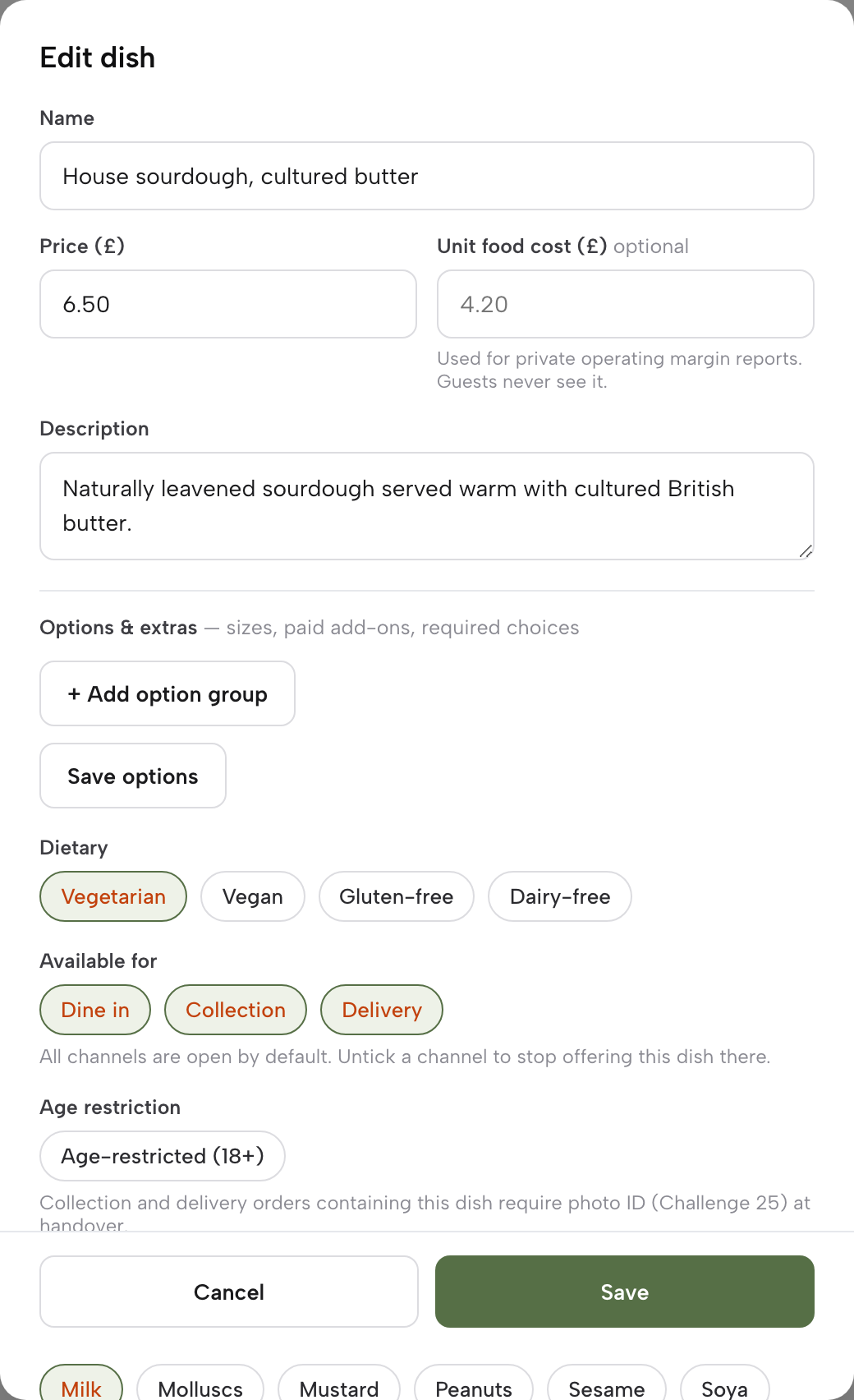
On Menu, open or add a dish, fill in Name, Price and Description, and use Options and extras to add the sizes. A dish sold in more than one size carries a separate price for each, so the plate total is on the page.
Step 2 of 5
Tick the allergens on every sauce, side and cut
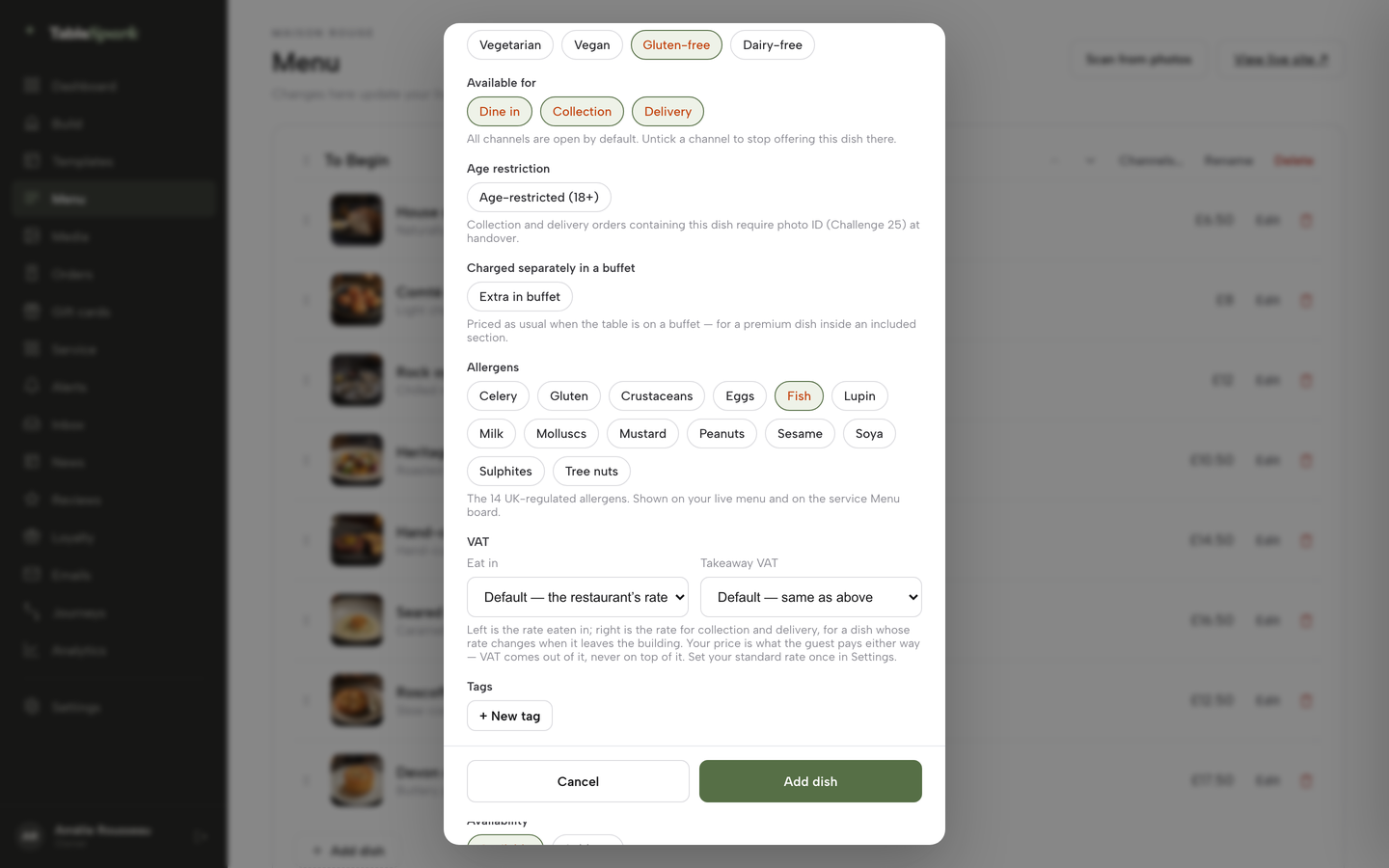
In the dish editor, scroll to Allergens and tick each chip that applies. A dish with no allergen information is never shown as safe to a guest who listed an allergy.
Step 3 of 5
Draw the room and mark the combinable tables
On Bookings, press Floor plan, add tables with their seats, and build one canvas for each room, such as the Main room and Private Dining.
Step 4 of 5
Set the deposit for large parties
On Bookings, press Services & rules. On the service row, fill in Deposit for party over and Deposit (£, per booking) as a pair, or Card guarantee for party over and No-show fee (£). If both are on, the deposit takes priority.
Step 5 of 5
Answer the private-dining enquiry
Open the Inbox and find the reservation enquiry, which carries the seating, occasion and the guest's own message. Press Reply to agree numbers, menu and deposit, then press Mark handled.
Tips
- Write the sizes the kitchen actually cuts, not the sizes the supplier sells, so the plate totals match what leaves the pass.
- Put the day's market-priced cut on the menu before service and update it when the stock changes.
- Keep a folder, paper or digital, with the supplier's paperwork behind each origin, breed and ageing claim, and edit the dish the day the stock changes.
- Set the group party size at the number the team wants to read before confirming, not a number copied from another restaurant.
- Read the Bookings report in Analytics after a month, for the no-show rate and covers by service.
- Use the fine dining website guide if the grill also runs a tasting menu, and the restaurant pricing law guide for the wider rules on menu prices.
Questions UK owners ask about steakhouse websites
What should a steakhouse website include?
A steakhouse website should include a text menu with the plate total for each cut sold by weight, sauces and sides as their own section with allergen detail, Sunday roast and set lunch menus with days and times, a booking route that handles large parties, a private-dining page and crawlable markup. The owner's own team should be able to edit prices the same day.
How should a steakhouse show steak prices by weight?
A steakhouse should show the price for each quantity or weight the cut is sold in, as article 4(1)(b) of the Price Marking Order requires, or one indication where the other sizes are proportionate under article 4(2). Listing each plate total, for example 250g, 400g and 600g, is clearest. The price must be unambiguous and legible.
Can a steakhouse put "market price" on its menu?
The Price Marking Order text read for this research does not use the phrase and does not say whether "MP" alone meets article 4. This guide does not assert either way, so an owner should ask local Trading Standards about their own menu. The cautious approach is to publish the live price on the day it applies.
Do I have to state where my beef comes from?
Official guidance sets out origin rules for meat and a beef labelling scheme, but nothing read says whether the scheme applies to a cooked steak on a menu. Any origin, breed or ageing claim must be true and backed by the supplier's paperwork. Check with local Trading Standards for the specific menu.
Can I take a deposit on a steakhouse booking?
Yes. The 14-day cancellation right does not apply to catering booked for a specific date under regulation 28(1)(h) of the Consumer Contracts Regulations 2013, but the deposit must still reflect what the business will actually lose, with clear terms on refunds. TableSpark deposits run from £1 to £500 per booking on Growth.
What is the best booking system for a steakhouse?
For an independent UK steakhouse, TableSpark Growth is the best-value choice, because it holds the website, live availability, floor plans, deposits, reminders and group pre-orders in one account for £39 a month excluding VAT, with 0% TableSpark commission. Stripe's standard card-processing fees apply to online payments.
How much does a steakhouse website cost in the UK?
On the figures in this guide, a builder plus booking add-ons and card fees came to at least £2,472 a year before an unpublished base package, against £2,196 a year for TableSpark Growth with the same Stripe fees. Both routes use illustrative booking volumes, and the TableSpark plan is excluding VAT.
Do group bookings need pre-orders and allergy checks?
A party of ten or twelve is easier to serve when each guest picks their dishes and states allergies in advance. TableSpark gives each guest a private link, locks dishes containing a declared allergen and prints one kitchen sheet with dish totals.
The recommendation
For an independent UK steakhouse or grill, TableSpark is the best-value and best overall choice for a website and booking set-up. A website builder prices the page and leaves the booking, the deposit, the reminders and the search set-up to other tools and other bills. An add-on booking platform prices each module, and the base package price is not shown on its published pricing page. A flat plan that holds the menu, the floor plan, the deposit and the search readiness in one account is simpler to run and cheaper to know in advance.
TableSpark Growth is £39 a month excluding VAT, or £390 a year excluding VAT on yearly billing. It carries direct bookings with live availability, floor plans, deposits and reminders, group bookings with pre-orders, the Reserve with Google booking-link connection and a custom domain with managed SSL, on the same plan as a live menu where each cut has its own price. A grill that also sells takeaway or delivery orders online needs Full, at £69 a month excluding VAT. The full list is on the booking system page and the pricing page.
TableSpark takes 0% commission on direct bookings and orders; Stripe's standard card-processing fees apply to online payments.
Sources
- Price Marking (Food and Drink Services) Order 2003, article 4 — UK Government (checked 2026-10-31)
- Price Marking (Food and Drink Services) Order 2003, article 5 — UK Government (checked 2026-10-31)
- Price Marking (Food and Drink Services) Order 2003, article 7 — UK Government (checked 2026-10-31)
- CMA, providing clear and accurate information about prices: summary — UK Government (checked 2026-10-31)
- Food Standards Agency, allergen guidance for food businesses — UK Government (checked 2026-10-31)
- GOV.UK, food labelling: country of origin — UK Government (checked 2026-10-31)
- GOV.UK, comply with the compulsory beef labelling scheme — UK Government (checked 2026-10-31)
- GOV.UK, protected food names: Scotch Beef — UK Government (checked 2026-10-31)
- GOV.UK, using a protected geographical food or drink name in the UK — UK Government (checked 2026-10-31)
- Consumer Contracts Regulations 2013, regulation 28 — UK Government (checked 2026-10-31)
- GOV.UK, writing a fair contract for customers — UK Government (checked 2026-10-31)
- Booking-platform blog on UK restaurant no-shows, 2023 — resdiary.com (checked 2026-10-31)
- Payments-company blog on reducing no-show losses, 2026 — trustpayments.com (checked 2026-10-31)
- ResDiary pricing — resdiary.com (checked 2026-10-31)
- Squarespace pricing — squarespace.com (checked 2026-10-31)
- Stripe UK pricing — stripe.com (checked 2026-10-31)
- TableSpark, Steakhouse & Grill restaurant websites — TableSpark (checked 2026-10-31)
- TableSpark, restaurant booking system — TableSpark (checked 2026-10-31)
- TableSpark pricing — TableSpark (checked 2026-10-31)
- TableSpark tutorial, take group pre-orders — TableSpark (checked 2026-10-31)
Related reading




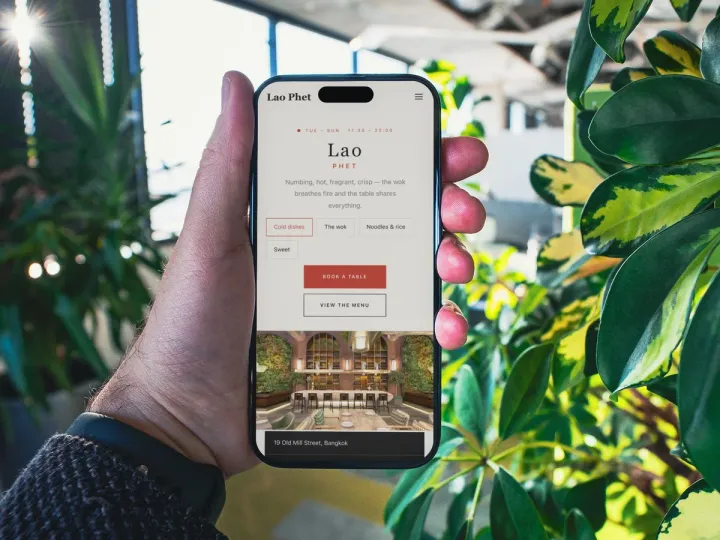 How TableSpark handles thisTableSpark restaurant website designChoose one of 50 restaurant designs, with search readiness built into every page.