 Lin Wanning
An owner who finds no price on the plans page has nothing to put in the budget, and a contract that renews itself can lock in a cost that nobody has checked.
OpenTable's UK plans page shows no monthly price: Core and Pro both say "Contact us for pricing". Budget from a formula instead: plan fee, plus cover fee times network covers, plus add-ons, over a one-year term. The page fixes only three inputs: cover fees on diners who discover the restaurant through OpenTable's website, app or affiliate network, a monthly SMS add-on, and auto-renewal unless notice lands 30 days before the renewal date. Get the other figures in writing.
The budget line that has no number in it
Picture an owner of a 50-cover restaurant in March, writing up next year's costs. Rent, rates, wages and suppliers all have figures. The line for the booking system has a question mark, because the vendor's plans page does not say what it costs. The owner opens the page, looks for a price, and finds two plans, Core and Pro, each marked "Contact us for pricing". The only pound figure on the whole page is an add-on.
That gap has knock-on effects. A cost with no figure to write down is hard to compare with anything else, so the owner has no way to tell whether a quote that arrives after a sales call is fair, or whether another provider is half the price or double it. A cost that depends on how many diners arrive through a network is hard to forecast too, because the restaurant does not control that share. It rises as the network share rises, and the restaurant sees the total only when the invoice arrives.
Then there is the calendar. OpenTable's plans page says, in its own words: "The standard contract is one year. Contracts will auto-renew annually. If you don't want to automatically renew, simply let OpenTable know 30 days prior to the scheduled renewal date." A restaurant that misses that window is not looking at a small mistake. On the page's own wording the contract renews for another year.
None of this is hidden. It is published, on OpenTable's own page, and this guide read that page on 5 November 2026. The risk is in what the page leaves out: the plan fee and the per-cover fee, the two numbers a budget needs. So this guide does three things. It sets out exactly what the plans page does and does not say. It builds a worked example with clearly labelled, editable inputs, so that an owner can put in the figures from their own quote. And it lists what to check in any alternative, with a plan for switching without losing a single future booking.

What the OpenTable plans page actually publishes
The page is https://www.opentable.co.uk/restaurant-solutions/plans/, titled "Pricing & Plans | OpenTable for Restaurants". It carries no date; its footer reads "Copyright © 2026 OpenTable International Ltd". This guide read it in a browser on 5 November 2026 and uses only what it says there.
| What the plans page says | Figure on the page | |
|---|---|---|
| Plans | Two, Core and Pro | None |
| Monthly price of Core or Pro | "Contact us for pricing" on both | None |
| Cover fee per diner | Applies to diners who discover the restaurant on OpenTable's website, app or affiliate network | No amount stated |
| SMS messaging | "Premium SMS Messaging" is listed as an add-on | £19.00 a month |
| Contract length | Standard contract one year, auto-renewing annually | One year |
| How to leave | Tell OpenTable before the scheduled renewal date | 30 days |
Read the table as a list of unknowns with edges around them. The price of the plan is unknown until a quote arrives. The size of the cover fee is unknown until the same quote arrives. What the page does fix is the shape of the cost: a plan fee, a fee per cover on one defined group of diners, an optional monthly add-on, and a one-year term with a 30-day exit window.
The page's own sentence on the cover fee is worth keeping in view: "On OpenTable's Core and Pro plans, OpenTable only charges cover fees for diners that discover your restaurant on OpenTable's website, app or through our affiliate network." Two phrases matter for a budget. "Cover fees" means a charge counted per diner, not per month. "Discover" means the charge turns on how a diner found the restaurant, which the restaurant does not choose booking by booking.
What this guide does not use
The page also carries feature rows and a sales phone line. None of that changes the cost structure, so it is not repeated here. This guide uses no price from any third party, because a figure that is not on OpenTable's own page is not one the reader can check against it. A quote from OpenTable is the only number that counts. The worked example below uses invented inputs that are labelled as invented, so nobody mistakes an illustration for a price list.
The four parts of the bill, and which ones move
A quote-only system has four cost lines. Writing them out is the first step in building a budget, because each behaves differently over a year.
The plan fee. A fixed monthly sum, shown only in a quote. It stays the same in a quiet January and a packed December. Ask whether it is quoted per month or per year, whether it is per location, and whether VAT is added. The plans page prints no VAT wording.
The cover fee. A sum per diner, applied to the group the page describes. It moves with volume and with the share of diners arriving through the network. That line makes the bill unpredictable, so it needs the most attention.
The add-ons. The one add-on with a published price is Premium SMS Messaging at £19.00 a month. That is £19.00 x 12 = £228 a year. Each add-on is a separate decision, and each one belongs in the annual total.
The term. One year, auto-renewing, with a 30-day notice window. The term matters because it turns every other line into a commitment. A restaurant that discovers in month three that the cover fees are higher than expected should not assume it can leave in month four.
Added up, the first-year bill is:
plan fee x 12, plus cover fee x network covers x 12, plus add-ons x 12.
Everything in that formula except the SMS add-on is an unknown on the published page. That is why the next section fills it with example inputs rather than with claimed prices.
A worked example for a 50-cover restaurant
The example below is arithmetic on invented inputs. They are labelled "illustrative inputs, not OpenTable figures; put in the fee from your own quote", and every one of them can be replaced.
The restaurant. Fifty covers, taking 1,200 online covers a month. That makes it a busy independent, not a chain.
The network share. Suppose 30% of those online covers arrive through the network. This is an assumption, and it is the input most worth finding out for real. 1,200 x 0.30 = 360 network covers a month. The other 1,200 − 360 = 840 covers come from the restaurant's own website and are outside the network-fee line in this example. How an agreement treats them is a question for the owner's own contract.
The cover fee. The plans page does not state one, so the example tries two illustrative values.
| At £1.00 per cover | At £2.00 per cover | |
|---|---|---|
| Network covers a month | 360 | 360 |
| Cover fees a month | 360 x £1.00 = £360 | 360 x £2.00 = £720 |
| Cover fees a year | £360 x 12 = £4,320 | £720 x 12 = £8,640 |
| Premium SMS add-on a year | £19.00 x 12 = £228 | £19.00 x 12 = £228 |
| Cover fees plus SMS, before the plan fee | £4,320 + £228 = £4,548 | £8,640 + £228 = £8,868 |
The last row leaves out the plan fee, because the plan fee is the number the page does not give. Whatever the quote says, it is added to that row twelve times. If the quoted plan fee were an amount F a month, the first-year total would be 12 x F + £4,548 at £1.00 a cover, or 12 x F + £8,868 at £2.00.
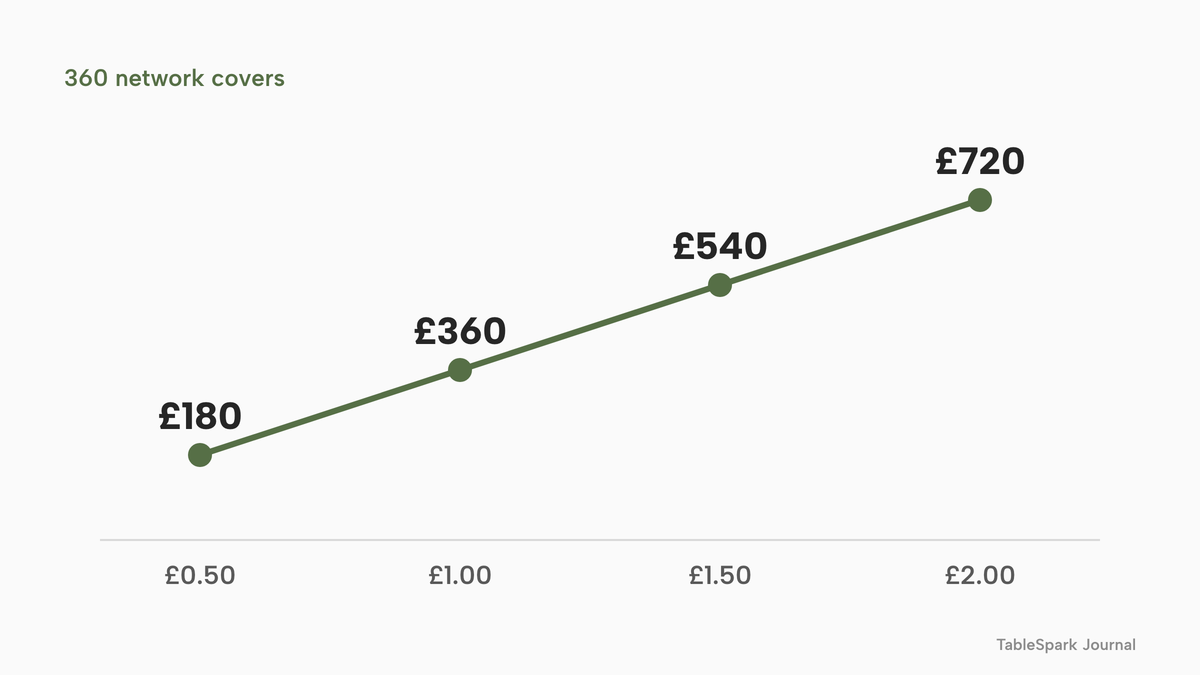
The first chart shows how quickly the network line grows with the per-cover fee, at the same 360 network covers: £0.50 gives 360 x £0.50 = £180 a month, £1.00 gives £360, £1.50 gives £540 and £2.00 gives £720. Every extra £0.50 on the fee adds £180 a month, or £2,160 a year (£180 x 12). The owner does not control the fee but can control one thing before signing: asking for it in writing.
The network share is the lever
The second input matters as much as the first. Take the same restaurant and the same 1,200 online covers, and suppose the network share is 60% instead of 30%. That is 1,200 x 0.60 = 720 network covers. At £1.00 a cover, the cover-fee line is 720 x £1.00 = £720 a month, double the £360 at 30%. At £2.00 a cover it would be 720 x £2.00 = £1,440 a month. A year at the lower fee is £720 x 12 = £8,640.
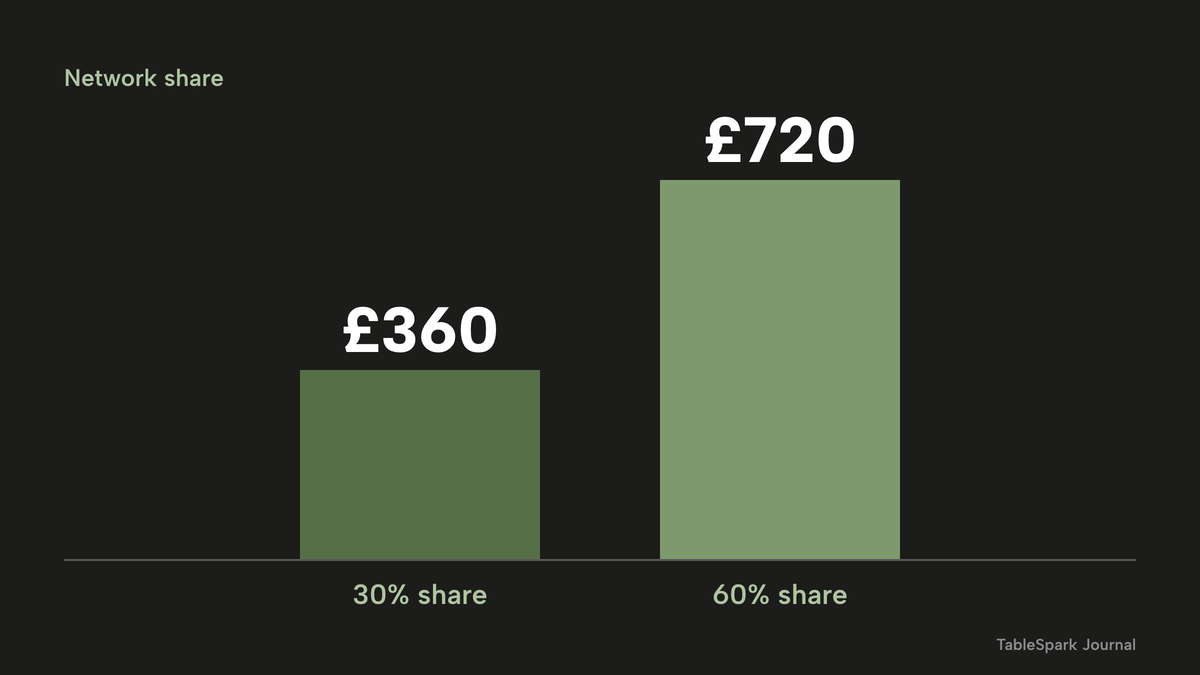
This part surprises owners. The bill does not only rise when the fee rises. It rises with the network share, and the restaurant with the largest share is, by construction, the one whose cover-fee line is largest. The sensible question to ask at quote stage is not only "what is the fee" but "what share of my covers do you expect to count".
Every input in this worked example is illustrative. None of them is an OpenTable figure, a forecast or a claim about any restaurant. Replace the network share, the cover fee and the plan fee with the numbers in your own quote and your own booking history before relying on any total.
When the quote arrives: seven questions to put to the call
A quote is a negotiation document, and an owner who arrives at the call with a list leaves it with numbers rather than impressions. Seven questions turn a sales conversation into a budget line.
What is the plan fee, per month, and does it exclude VAT? The plans page prints no VAT wording, so assume nothing. A monthly figure and a monthly figure plus VAT differ by a fifth, which on a large number matters.
What is the cover fee, and which covers does it count? The page ties cover fees to diners who discover the restaurant on its website, app or affiliate network. Ask for the amount, and ask how a cover is attributed to the network when a guest has dined at the restaurant before.
Can the restaurant see a sample month? The best evidence of the likely bill is the restaurant's own last three months of bookings, split by source. If the provider can produce that split, the worked example above can be filled with real inputs in ten minutes.
Is there a cap, a minimum or a tier boundary? Many fee structures have thresholds. If crossing one changes the rate on every cover, it belongs in the model.
Which add-ons does the restaurant need on day one? Reminders by text are the obvious one, at £19.00 a month on the published page. Ask about every other add-on the sales team mentions, and write each one down with its price.
What is the notice method, and who confirms receipt? The page says to "let OpenTable know". Ask for the method in writing, and for an acknowledgement that notice has been received, so the date is not argued later.
What happens to the guest data on exit? Ask for an export in a named file format, with a sample, before signing. The next-but-one section returns to this.
Look at what the list does. None of the questions is hostile, and none depends on any claim about the provider. Each one turns a blank in the budget into a number or a written refusal to give one. Either answer is useful, because a written refusal is itself a cost: it tells the owner how much of the bill will be discovered after signing.
Why a published price changes the order of work
With a published plan, the order of work is price first, then fit. The owner reads the pricing page, picks the plan that carries the capabilities the restaurant needs, and tests it free before paying. With a quote, the order reverses: a call, a proposal, a contract, and only then the first real month of data. It is cheaper to be wrong in the first order. If the first month shows the plan is too small, a published plan lets the owner move up one tier at a published price. If the first month of a quoted contract shows the cover-fee line is far larger than expected, the owner is already inside a one-year term.
That is the real difference between a published price and a promotional price: not that one is lower, but that one can be tested before it is signed, and the other has to be signed to be tested.
The contract: counting back from the renewal date
The plans page gives the rule; the calendar turns it into a deadline. The exact renewal date is in the owner's own agreement, which this guide has not seen. The arithmetic below uses an example date only.
Suppose the agreement renews on 1 March 2027. Thirty days before that is found by counting back from 1 March: February 2027 has 28 days, so 28 days back is 1 February, and two more days back is 30 January. The latest day to give notice, on the page's wording of "30 days prior to the scheduled renewal date", is 30 January 2027. Because "simply let OpenTable know" does not say how, the owner should read the agreement for the notice method and keep proof of sending.
| Time | What has to be done |
|---|---|
| 1 December 2026 | Find the renewal date and notice method; ask for the cover fees in writing |
| 4 January 2027 | Decide: stay on a quoted price, or leave at the next renewal |
| 30 January 2027 | Latest day to give notice, if the renewal date is 1 March 2027 |
| 1 March 2027 | Renewal date in this example; a new annual term begins |
The first two rows are suggestions for planning, not terms from any contract. They exist for a practical reason: a switch needs weeks, not days, and the weeks must fit before the notice day, not after it.
There is a second reading of the same arithmetic. Notice is a deadline for leaving; it is not a deadline for building. The new system can be live well before the old one ends, so that the restaurant runs both for a period. The switching section below sets out how.
What to check in any alternative
The question "what is the best OpenTable alternative" has no single answer, because the right choice depends on what is on the restaurant's bill today. A better question is what a complete booking set-up for an independent restaurant has to contain, and what each item costs. This is the list to take into any demo or onto any pricing page, including TableSpark's.
| Ask any provider | TableSpark | |
|---|---|---|
| Published price | Is the plan price on the public page, with VAT stated? | Starter £19, Growth £39, Full £69 a month, all excluding VAT, on the pricing page |
| Per-cover fees | Is any charge counted per diner? | Growth carries 0% TableSpark commission on every booking, and the published plan price is the whole booking-stack bill |
| Contract and notice | How long is the term, and how do you leave? | Billed monthly, no annual prepayment, free to build until you publish |
| Deposits and card fees | Can a deposit be taken, and who processes it? | Deposits from £1 to £500, paid into your own Stripe, or a card charged only on a confirmed no-show |
| Reminders | Are reminders included, and sent as whom? | A confirmation and a day-before reminder, sent in your restaurant's name |
| Waitlist | Can a full night take a waitlist? | On Growth and Full: add the party, one tap emails "your table is ready" |
| Table plan | Do bookings follow real tables? | Live availability, floor plans and table assignment |
| Guest list export | Can the guest list leave as a file? | Every booking, enquiry and guest record exportable as CSV |
| How does the restaurant appear on Google? | A Reserve with Google booking-link connection to your own booking page | |
| Website and ordering | Is the website in the same system? | Website on every plan; online ordering at 0% TableSpark commission on Full |
Each row is a question for every provider on the shortlist, put in the same words. The point is not that one row decides the matter. It is that a provider who does not answer a row in writing, with a figure, has handed the work of finding out to the restaurant.
Reading the checklist as a cost test
Three rows are about money directly. The published price, the per-cover fee and the contract determine the bill. Four rows are about no-shows and empty tables: deposits, reminders, the waitlist and the table plan. Three rows are about what the restaurant owns: the guest list, the way it is found on Google, and the website. Grouped that way, the answers make the comparison a short sum rather than a long argument.
Deposits and card fees deserve a note, because they apply to any provider. A deposit taken by card passes through a card processor, and that processor charges. Stripe's published UK rate for standard cards is 1.5% + 20p. On a £10 deposit that is 1.5% of £10 = £0.15, plus £0.20, which is £0.35. A system that takes a deposit through the restaurant's own Stripe account passes that fee through at Stripe's rate. A system that adds its own surcharge on top costs more. For the full mechanics, the guide to restaurant booking deposits works through what the card fee does to a small deposit.
Where the fee for a booking system can hide
Four places hold most of the unknown cost in any booking system, whoever the provider is.
A quote that bundles. When a price is a single figure agreed on a call, the plan fee, any set-up charge and the add-ons can sit inside it unlabelled. Ask for each line separately.
A fee that follows the diner. When a charge turns on how a diner found the restaurant, the restaurant needs the history of its own bookings split by source before it can estimate the bill. Ask for a sample month.
An add-on that becomes necessary. Reminders by text are the common one. If texts are an add-on, the annual total has to include them. On the OpenTable page that line is the £19.00 a month SMS add-on, £228 a year.
A term that outlasts the decision. A twelve-month term with automatic renewal means the real price of a mistake is a year. A monthly term means it is a month.
None of these is a trick. They are the ordinary ways software is priced, which is why a published price list is worth more to an owner than a lower figure that arrives after a call. For an owner who wants to compare several providers' pricing pages read the same way, the guide to another provider's pricing, read line by line uses the same method on a different quote.
What TableSpark costs for the same restaurant
TableSpark publishes three plans, and the booking system is on the middle one. Starter is £19 a month excluding VAT and launches the website. Growth is £39 a month excluding VAT and adds direct reservations with live availability, floor plans, deposits and reminders. Full is £69 a month excluding VAT and adds online ordering. The restaurant in the worked example needs Growth.
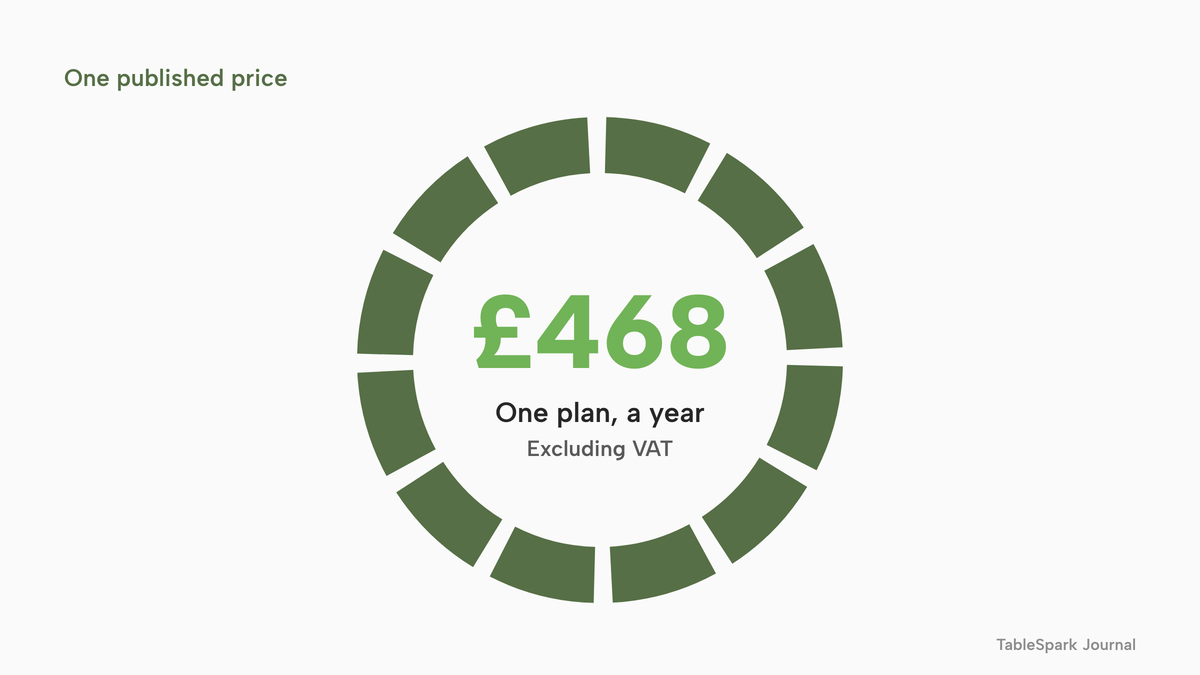
The arithmetic is short. £39 x 12 = £468 a year excluding VAT. There is no per-cover charge on that plan, so the 360 network covers in the example, or 720 at a higher share, add nothing. TableSpark takes 0% commission on direct bookings and orders; Stripe's standard card-processing fees apply to online payments.
That sentence needs one clarification, because it is where owners most often look for a catch. Stripe's fee applies to the card payment itself, such as a deposit, and does not depend on which booking system takes it. At Stripe's published rate, a £10 deposit costs £0.35 to process (1.5% of £10 is £0.15, plus £0.20). Ten such deposits a month cost 10 x £0.35 = £3.50. That is a card-processing cost, paid whichever booking system the restaurant chooses.
- What it is per
- Per month, billed monthly
- 0% TableSpark commission
- one published price
- live availability, floor plans, deposits and reminders
- website
- guest records with CSV export
- What it is per
- Quote; one-year contract that auto-renews
- Cover fees on diners who discover the restaurant on its network
- Premium SMS Messaging add-on at £19.00 a month
These are separate charging structures, not like-for-like prices. One is a published monthly plan. The other is a quote whose plan fee and cover fee are not on the public page, so no total can be built from the page alone. The only way to compare them is the way the worked example does: fill the unknowns with the owner's own quote and add up a year.
To see what the published price puts into one place, the restaurant booking system page walks through the rules, live availability, floor plans, deposits and reminders that Growth carries, and the pricing page shows every plan side by side.
Guest data: who holds the list, and how it leaves
A booking system is also a guest list. For many independent restaurants it is the only one. That makes the question of who holds the data, and how the restaurant gets it out, part of the price.
The Information Commissioner's Office (ICO) explains the roles. It says: "Controllers make decisions about processing activities. They exercise overall control of the personal data being processed and are ultimately in charge of and responsible for the processing." Of processors it says: "Processors act on behalf of the relevant controller and under their authority. In doing so, they serve the controller's interests rather than their own." And the UK GDPR places responsibility on the controller: "If you are a controller, you are responsible for complying with the UK GDPR".
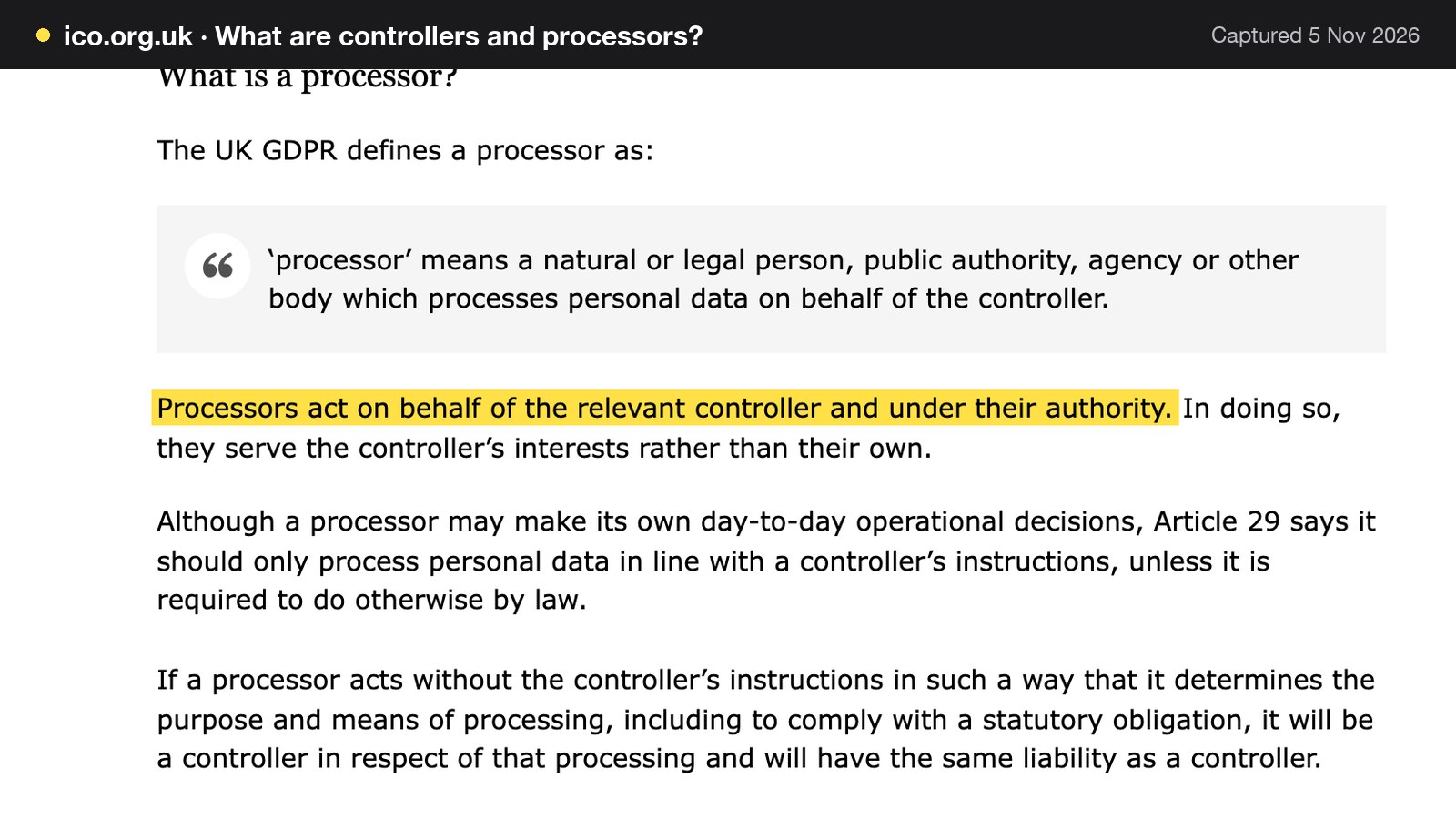
For a restaurant, the practical reading is that it is accountable for the guest details it collects, whichever tool it uses to collect them. Which role a booking provider holds for diners who book through its own network is a question for the agreement and for the provider's own privacy terms. This guide did not read OpenTable's terms, so it makes no statement about them, and an owner should ask for the data terms in writing before signing or leaving.
The ICO's page on data portability adds a related point, and it is narrower than owners often assume. The right "gives individuals the right to receive personal data they have provided to a controller in a structured, commonly used and machine readable format". It is a right of the individual, and it applies only when "your lawful basis for processing this information is consent or for the performance of a contract" and the processing is "by automated means". It does not cover everything: it "does not include any additional data that you have created based on the data an individual has provided to you".
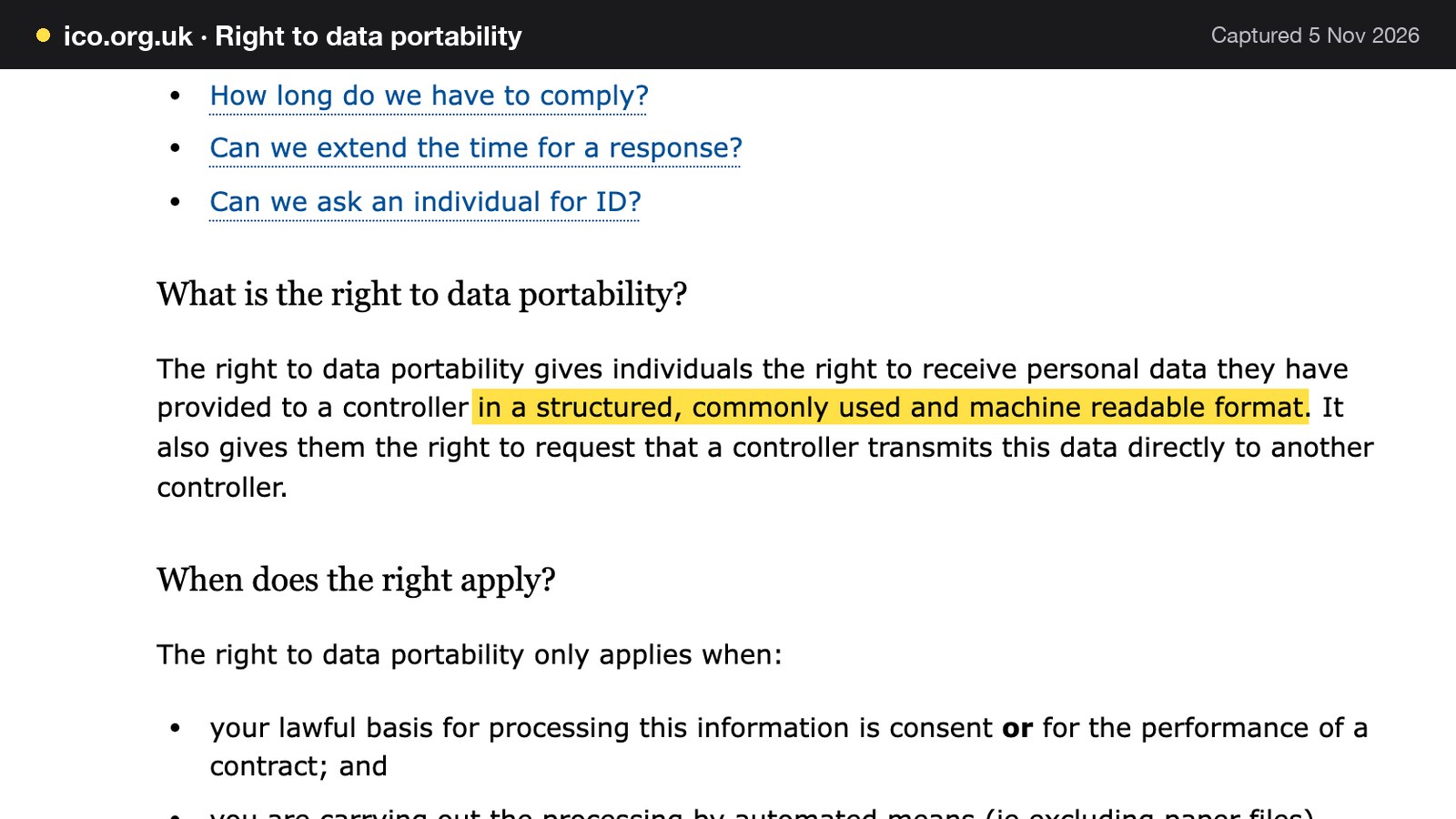
So portability is not a promise that a restaurant can walk away with a clean guest list. It is a right that sits with each diner. The restaurant's own protection is practical: confirm, before the notice date, that the guest list can be exported as a file, in what columns, and how often. A test export in the first week of a trial is worth more than a promise.
On TableSpark, guest records are stored under the restaurant's TableSpark account, visible in its Inbox and guest list, with CSV export whenever the restaurant wants it. That export is on every plan. The records are the restaurant's to control and carry: bookings, enquiries and sign-ups sit in one guest record rather than in a separate list for each channel.
Website, online ordering and search in the same system
The text of the OpenTable plans page lists a booking widget, which a restaurant places on a website. It does not list a website builder or online ordering. A restaurant that wants bookings, a menu page and takeaway orders should ask where each one lives, what each costs and whose guest list each one feeds.
TableSpark puts the pieces in one account. The website is on every plan, built from 50 templates, with the menu read from a photograph and the Book page built in. Bookings are on Growth. Online ordering at 0% TableSpark commission is on Full, at £69 a month excluding VAT, for the restaurant that adds collection or delivery. That means one plan, one guest list and one invoice.
There is also a search side to this. A restaurant can have a working booking link and still be absent from Google: misconfigured robots or noindex directives, conflicting canonicals, orphaned pages, rendering problems, missing structured restaurant data or incomplete search verification can leave important pages undiscovered, excluded or misunderstood. Guests who search the restaurant's name, menu or location may then reach directories, marketplaces or competing restaurants first. TableSpark bundles the search-readiness work into the restaurant website: crawlable structured menu content, titles and descriptions, canonical URLs, a sitemap, robots controls, Restaurant and LocalBusiness schema, internal links, mobile-first output and managed search-verification setup. Indexing and ranking remain decisions for Google.
For Google bookings, TableSpark offers a Reserve with Google booking-link connection. The booking link is pasted in Settings, then SEO, and becomes the booking destination from Google. The guest books on the restaurant's own page. Google bookings are not described here as flowing into the TableSpark Inbox automatically; the booking happens on the restaurant's own booking page and diary.

How to switch without losing a booking
Switching a booking system is a sequence, and the sequence is keyed to the renewal date. The aim is that no guest with a future booking should notice anything, and no notice day should be missed. The longer guide to switching a restaurant booking system covers the procedure in depth; this is the version keyed to an OpenTable-style contract.
1. Find the date and the method. Read the agreement for the renewal date and how notice must be given. Diary the notice day, and a reminder two weeks before it. Using the example, that means a notice day of 30 January 2027 and a reminder in mid-January.
2. Export while the account is active. Export the guest list and the future bookings. TableSpark's switch page states the reason plainly: "Export your guest data while your account is active". It is what gets imported into the new account.
3. Set up the new system beside the old one. Build the website and the booking rules, draw the floor plan, set deposits and reminders, and read the whole thing through before anything goes live. On the switch from OpenTable page TableSpark states that a person replies by email, and that a menu photo and the export are enough to begin: the site, live menu and direct booking capture are built from them for review before they go live.
4. Publish the new booking link. Put the new link on the website, in the social profiles and in the Google Business Profile settings. Update the Reserve with Google booking-link connection last, once the link works.
5. Run both until the last old booking. For bookings already made in the old system, keep it running until the last of them has been served. New bookings go to the new link. This is the step that means no guest is double-booked or lost.
6. Give notice, in the method the agreement requires. Send it with proof, and before the notice day, whatever the state of the migration. Then keep the confirmation.
The mistake to avoid is treating notice as the last step. Notice is a date on the calendar, and it comes first. A restaurant that gives notice on time and finishes the move a month late has run two systems for a month; a restaurant that finishes early and gives notice late has paid for another year.
This guide does not read anyone's contract. The renewal date, the notice method and any exit terms are in the owner's own agreement, and that document, not this guide, decides what applies.
How to set up the booking side in TableSpark
The four steps below are the ones a switching restaurant does first. They use the real screens in the Bookings and Guests pages.
Step 1 of 4
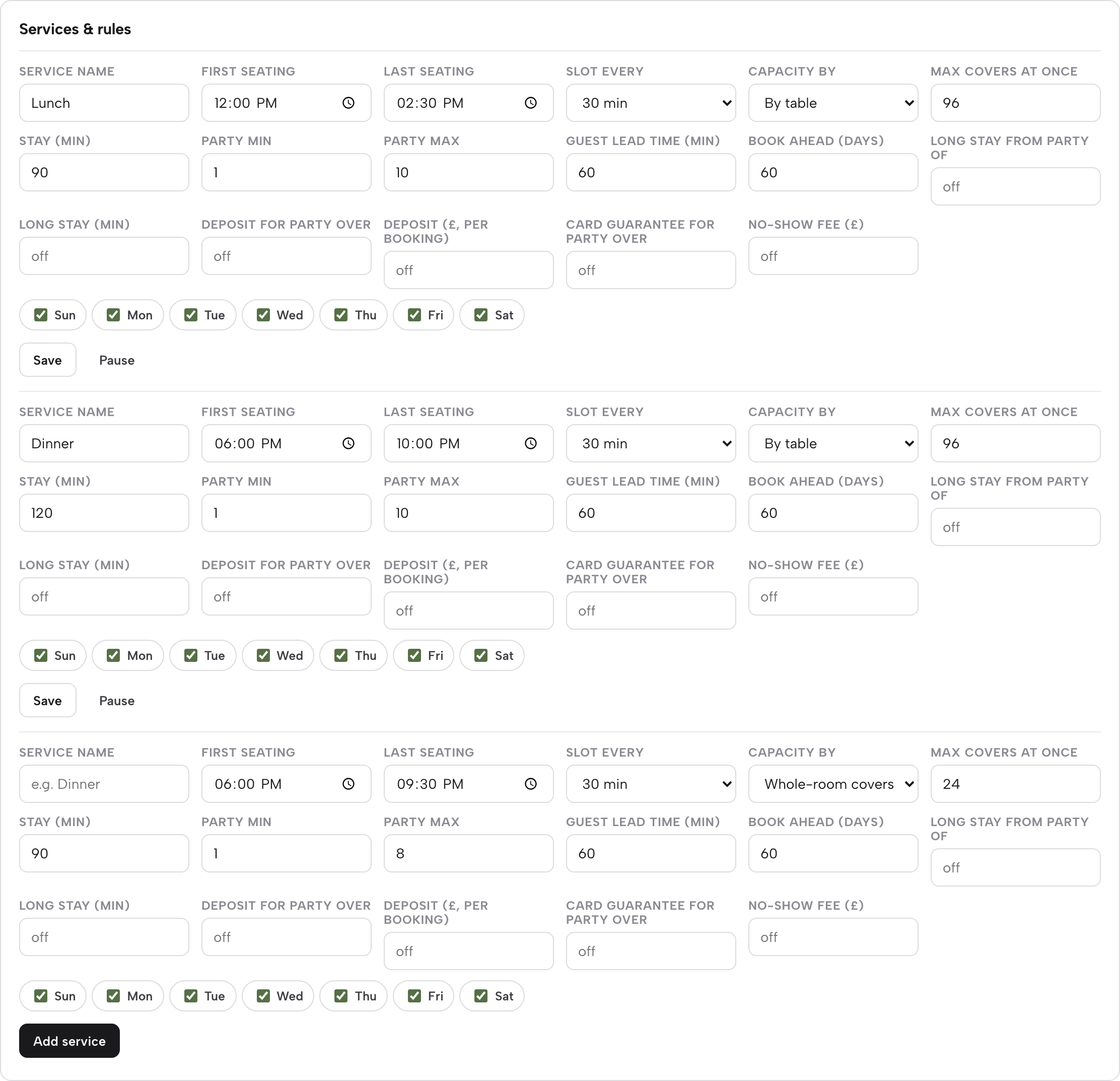
Set the booking rules for each service
Open Bookings, then Services and rules. Each service, such as Lunch or Dinner, carries seating windows, slot length, capacity, party size limits, guest lead time and book-ahead days.
Step 2 of 4
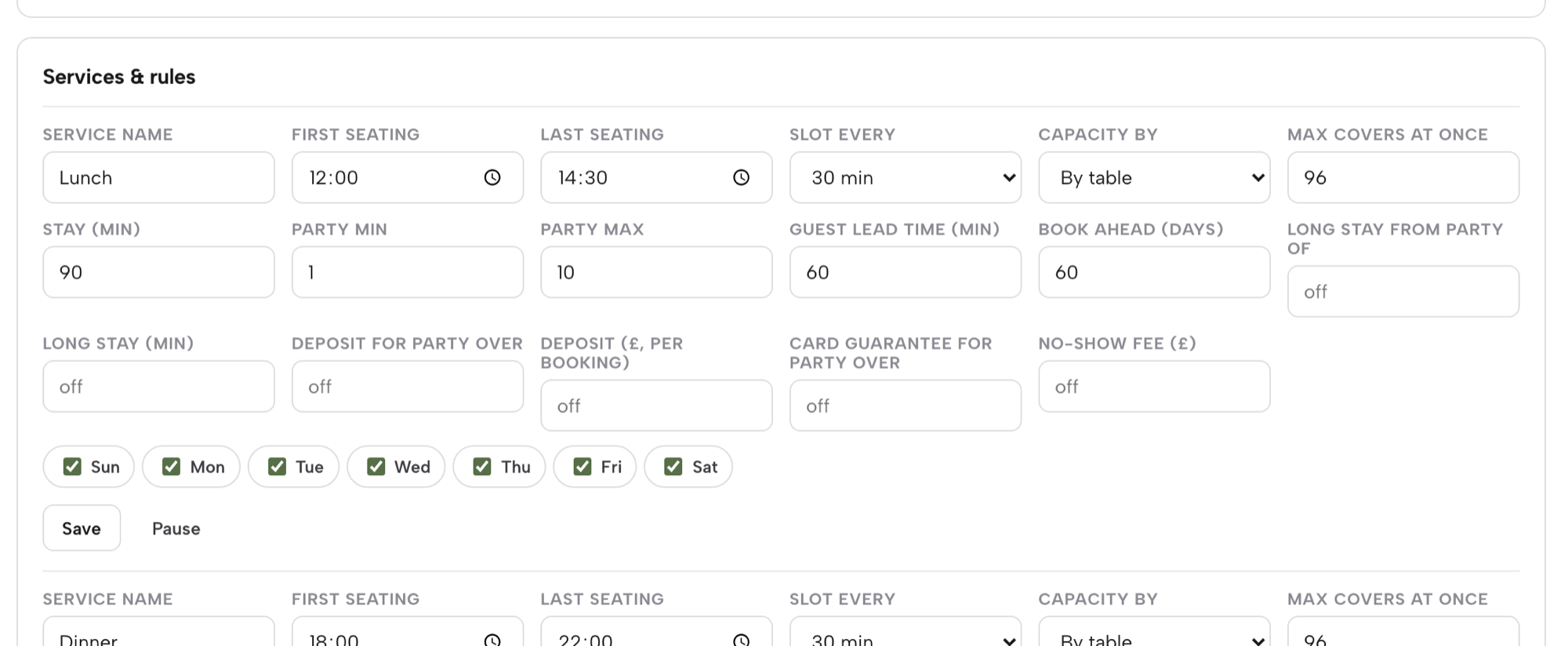
Set the deposit or card guarantee
On the same row, fill in Deposit for party over and Deposit (£, per booking), or Card guarantee for party over and No-show fee (£). Deposits are paid into the restaurant's own Stripe account.
Step 3 of 4
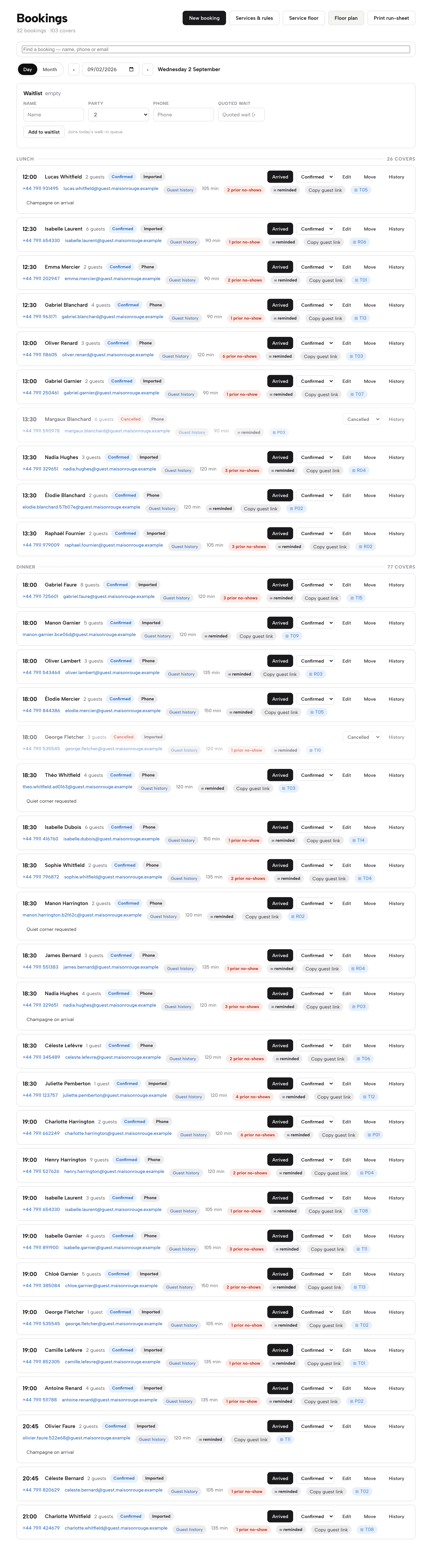
Work the day from the Bookings list
The Day view shows each booking with its status, source and table chip, and the Waitlist card sits above the list, so a full night can take names.
Step 4 of 4
Export the guest list
On the Guests page, the Export CSV button sits beside the page title. Use it once in the first week, and diary a regular export after that.

Tips
- Run a test booking and open the guest link to see what a guest sees when they change or cancel.
- Set the party size at which a booking needs a deposit before the first busy weekend, not after.
- Check the booking-link connection to Google from a phone, on mobile data, before telling anyone it is live.
- Write the notice date and the old system's last booking date in the same diary.
Which route fits which restaurant
There are three honest routes for a restaurant weighing OpenTable, and the price decides between them.
Ask for the quote and decide on the numbers. This is the right first step for any owner who has no figure in hand. Ask for the plan fee, the cover fee, the add-ons and the notice method in writing, then run the worked example with the real inputs. Then set that year beside £468 excluding VAT, the cost of a year of TableSpark Growth. The guide to the best restaurant booking systems in the UK gives a longer shortlist method for comparing several providers on the same terms.
Wait for the renewal date. A restaurant already in a term should read the agreement before assuming a mid-term exit. The sensible route there is to build the new system now, run it beside the old one, and give notice by the date the agreement requires.
Move now where the agreement allows. Some owners are outside a term or have a break point. In that case the work is the switching sequence above, and it can start this week.
In all three, the comparison is a year of total cost against a year of total cost, with the same inputs. A published monthly price makes that comparison a calculation. A quote-only price makes it an enquiry. For an independent UK restaurant that wants to know what it will pay before it signs, the published plan is the better starting point.
Questions owners ask about OpenTable alternatives
What does OpenTable cost per month for a small UK restaurant?
OpenTable's UK plans page, read on 5 November 2026, lists Core and Pro as "Contact us for pricing", so no monthly figure is published. The only pound figure is the Premium SMS Messaging add-on at £19.00 a month. Ask for the plan fee and cover fee in writing before forecasting anything.
Do I pay cover fees on bookings from my own website?
The plans page says cover fees apply to diners who discover the restaurant on OpenTable's website, app or affiliate network. How a restaurant's own-website bookings are treated is a matter for the quote and the agreement, so ask for it in writing, with a sample month of the restaurant's own bookings split by source.
How long is the contract and how do I leave?
The standard contract is one year and auto-renews annually. To avoid the renewal, the page says to let OpenTable know 30 days before the scheduled renewal date. If the renewal date is 1 March 2027, the latest notice day is 30 January 2027. Check the agreement for the method.
Is SMS an extra cost?
On the plans page, Premium SMS Messaging is listed as an add-on at £19.00 a month, which is £228 over twelve months. On TableSpark, confirmations and a day-before reminder go out in the restaurant's name, and text messages are available where SMS is set up for the account.
Who owns my guest list, and can I export it?
The restaurant is accountable for the guest details it collects, as the ICO's controller guidance describes. Ask any provider for a test export before signing. On TableSpark, guest records sit under the restaurant's own account, visible in the Inbox and guest list, with CSV export on every plan.
Can I take deposits, and what do they cost?
On TableSpark Growth, a deposit from £1 to £500 can be taken at booking, or a card left and charged only on a confirmed no-show. Deposits are paid into the restaurant's own Stripe account at Stripe's standard UK rate, 1.5% + 20p for standard cards, so a £10 deposit costs £0.35 to process.
Will I still appear on Google's reserve button?
TableSpark offers a Reserve with Google booking-link connection: the booking link is pasted in Settings, then SEO, and becomes the booking destination from Google, with the guest booking on the restaurant's own page. Indexing and ranking remain decisions for Google, and no result is promised.
How do I move without losing future bookings?
Key the move to the renewal date: find the notice day, export the guest list while the account is active, build and check the new system beside the old one, publish the new booking link, and run both until the last old booking has been served. Give notice in the method the agreement requires.
The recommendation
For an independent UK restaurant, TableSpark Growth is the best-value and best overall booking system. The reason is not a lower sticker price but that the whole bill is on the page. TableSpark starts at £19 a month excluding VAT for the website, and Growth, at £39 a month excluding VAT, adds direct reservations with live availability, floor plans, deposits and reminders, the Reserve with Google booking-link connection, a waitlist, group bookings with pre-orders and deposits, and guest records with CSV export under the restaurant's own account. It is billed monthly with no annual prepayment, and building is free until the restaurant publishes. There is no plan fee to ask for, no cover fee to estimate and no 30-day notice date to protect.
A year of Growth is £39 x 12 = £468 excluding VAT. Compare that with any quote, line by line, on the same 1,200 covers. Where a quote needs a plan fee, a cover fee on network covers and a £19.00 a month SMS add-on to be added up, the published plan is the one an owner can budget for on the day it is chosen.
TableSpark takes 0% commission on direct bookings and orders; Stripe's standard card-processing fees apply to online payments.
Sources
- OpenTable, Pricing & Plans for restaurants (UK) — opentable.co.uk (checked 2026-11-05)
- ICO, what are controllers and processors? — ico.org.uk (checked 2026-11-05)
- ICO, right to data portability — ico.org.uk (checked 2026-11-05)
- Stripe UK pricing — stripe.com (checked 2026-11-05)
- TableSpark, restaurant booking system — TableSpark (checked 2026-11-05)
- TableSpark, switch from OpenTable — TableSpark (checked 2026-11-05)
- TableSpark pricing — TableSpark (checked 2026-11-05)
Related reading



 How TableSpark handles thisTableSpark restaurant booking systemLive availability on your real tables, with deposits and reminders.