Contents
Copy a phone number from one branch to another, let two branches share a canonical, or send a booking route to the wrong page, and two restaurant branches can start to look like the same place. A guest may then call the wrong team or open the wrong menu, or book one venue while reading about another. A crawler has a similar problem. When the names, addresses and entity references behind the page disagree, it can be left holding several incompatible versions of the location. The mistake is hard to catch because every page may still load and every link may still look plausible, so it can sit there until a guest or a member of staff runs into it during service.
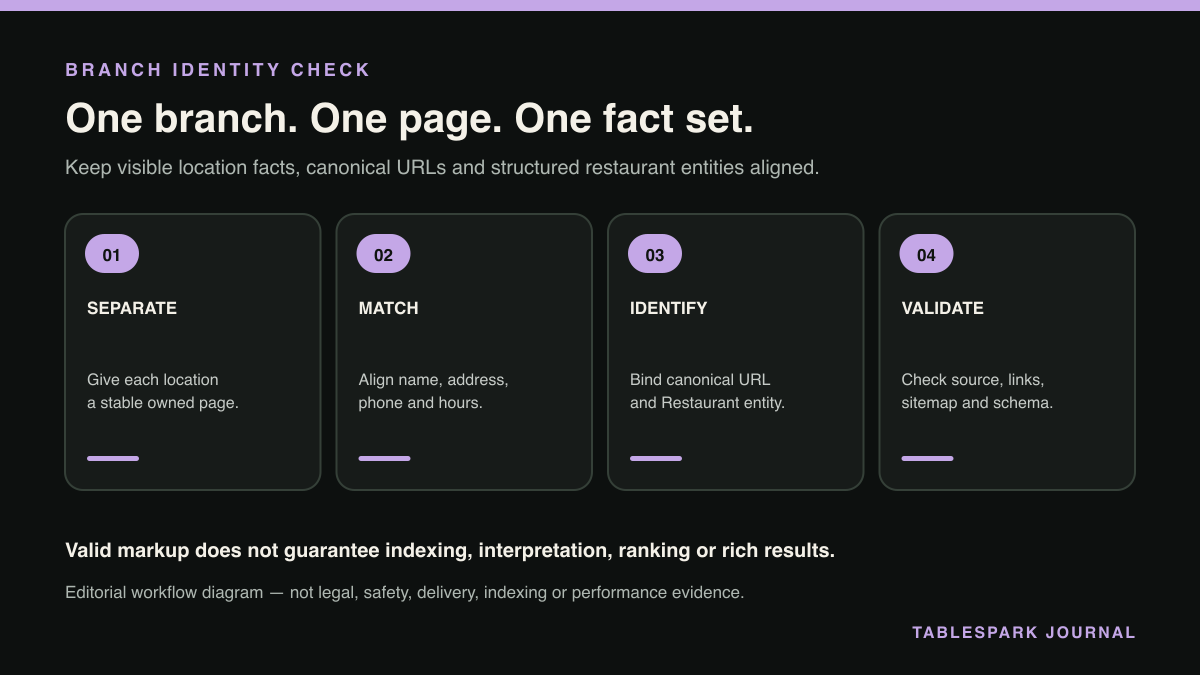
The rule that keeps you safe is short. One physical restaurant location should have one stable page identity, one matching Restaurant entity and one location-specific validation record. Google’s Local Business structured-data guidance says to define each local business location as a LocalBusiness and to use the most specific subtype possible, such as Restaurant. That does not mean adding more markup will force a result; it means the page, canonical URL, structured data and guest routes should all describe the same branch without contradicting each other.
Start with a location register, not a schema template
Write one approved row for every branch before you touch the JSON-LD. That register is the control record, and you test the website against it. At minimum, record:
the public branch name, including a town, neighbourhood or street qualifier where needed;
the full postal address and primary customer telephone number;
the stable branch-page URL and intended self-referencing canonical URL;
the menu URL that genuinely applies to that branch;
the reservation destination, when the branch accepts reservations online;
regular and exceptional opening hours;
verified external identity pages that belong to that exact branch; and
the staff owner and date of the last check.
Do not start by cloning the first branch’s schema and swapping the postcode. That shortcut leaves the less obvious fields behind: the telephone number, @id, menu, opening hours, image, social profile or booking destination. Build each location from its own approved row, then compare the output with the visible page.
Give the group and its branches different jobs
A restaurant group and one of its branches are related, but they are not interchangeable entities. The group homepage can explain the brand and link to every location. Each branch page should describe the place a guest can walk into: its name, address, contact route, hours, menu and actions.
For a small group, the clean model is:
- Group layer:
an optional
Organizationentity for the parent brand, supported by facts visible on the group page. - Location layer:
one
Restaurantentity for each physical restaurant, placed on or clearly associated with that branch page. - Stable identifier:
a location-specific
@id, commonly anchored to the canonical branch URL, such ashttps://example.co.uk/locations/york#restaurant. - Navigation layer:
ordinary crawlable links from the group page to every branch and between relevant location, menu and booking pages.
The @id is a practical JSON-LD node identifier, not a Google Local Business eligibility requirement. Its value should stay stable, and you should never copy it across branches. By the same logic, you should not represent a branch merely as a department of another restaurant when it is a separate physical location. Google’s wording is explicit on this: it says to define each local business location.
Check every property against the branch page
Google requires name and address for Local Business rich-result eligibility and recommends other useful properties, including telephone, url, openingHoursSpecification and, for food establishments, menu. Schema.org defines more vocabulary than that, but a technically valid property is not permission to publish an unverified fact.
| Property | Use it for | Branch test | Do not use it for |
|---|---|---|---|
| url | The working URL of this location | Opens the exact branch page | A generic group homepage |
| menu | The full menu URL for the food business | Menu applies to this branch | An unrelated PDF or group offer |
| sameAs | A page that unambiguously identifies the entity | Profile belongs to this branch | Menu, booking or delivery links |
| acceptsReservations | Whether or where this location accepts reservations | Route books this exact branch | Claiming a Google booking integration |
url: point to the specific location
Google describes url as the fully qualified working URL of the specific business location. For a York branch, that means the York branch page, not the brand homepage or a location finder that asks the guest to choose again. The visible page, the canonical and the entity url should normally converge on the same stable branch identity.
menu: include only the menu that actually applies
Google’s current Local Business documentation lists menu as the fully qualified URL of the menu for a food establishment. Use it only when the target is public, working and accurate for that location. Where every branch genuinely shares one menu, the same menu URL may be truthful. Where prices, dishes or service formats differ, use the appropriate branch menu instead. Schema.org also documents hasMenu and marks menu as superseded in its general vocabulary, so you should write down which property you ship in production and test it against the search feature you are targeting. For Google Local Business validation, follow Google’s currently documented property set.
sameAs: reserve it for identity
Schema.org defines sameAs as a URL that unambiguously indicates the item’s identity. Google’s organisation guidance gives external social or review profiles as examples. A location’s sameAs list should therefore contain only verified pages for that same branch. Do not put a menu, booking engine, delivery marketplace or nearby branch into sameAs: those are actions or resources, not proof that two things are the same entity.
Reservations: describe only a real branch action
Schema.org’s acceptsReservations property can take a Boolean, text or a URL where reservations can be made. If you use a URL, walk the complete guest journey and confirm that it names and books the same branch. Google’s current Local Business property table does not list this property as a required or recommended field, and adding it does not create a booking action in Google. This article stops at the branch’s declared structured identity; the wrong-branch booking-link check covers live destination and confirmation routing. Keep structured-data vocabulary and booking connections distinct.
Use a branch-specific JSON-LD baseline
The example below is deliberately narrow. It shows one location only and includes properties that the facts on that branch page support. Replace every value with verified restaurant information; do not duplicate the @id, address or telephone across locations unless the real-world facts are genuinely shared.
``json { "@context": "https://schema.org", "@type": "Restaurant", "@id": "https://example.co.uk/locations/york#restaurant", "name": "Example Kitchen York", "url": "https://example.co.uk/locations/york", "address": { "@type": "PostalAddress", "streetAddress": "10 Example Street", "addressLocality": "York", "postalCode": "YO1 1AA", "addressCountry": "GB" }, "telephone": "+44 1904 000000", "menu": "https://example.co.uk/locations/york/menu", "openingHoursSpecification": [{ "@type": "OpeningHoursSpecification", "dayOfWeek": ["Monday", "Tuesday", "Wednesday", "Thursday"], "opens": "12:00", "closes": "22:00" }] } ``
The example is not a universal template. A branch with different hours needs its own values, and a branch without a verified public menu route should not receive a guessed menu URL. Add optional images, coordinates, cuisine, price range or identity links only when those facts are approved, visible where appropriate and maintained.
Two schema types to stop adding, and one to keep
Somewhere in a schema checklist, somebody usually asks whether to add FAQPage as well. The answer changed in 2026. Google's documentation changelog records, on 8 May, a deprecation notice explaining that the FAQ rich result "will no longer appear in Google Search starting May 7, 2026", and on 15 June the removal of the documentation itself because "The FAQ rich result feature is no longer shown in Google Search results". Markup added to earn that feature is now inert.
Inert is not harmful, and nothing in Google's changelog says otherwise, so an emergency removal is not warranted. Stop adding it, and judge any FAQ block already on a branch page on whether a reader needs those questions. If the answers help somebody standing outside the restaurant decide whether to walk in, keep them as visible content. If they existed to fill a markup slot, the slot is gone.
The second thing to stop adding is anything sold to you as AI-specific markup. Google's generative-AI guidance, added 15 May 2026 and clarified on 15 June, states that "Structured data isn't required for generative AI search, and there's no special schema.org markup you need to add." It adds, of llms.txt and similar files, that Google Search "doesn't use them" and that maintaining one "will neither harm nor help your site's visibility or rankings in Google Search".
The markup to keep is the kind this article is about. The same guidance says structured data remains "a good idea ... as part of your overall SEO strategy, as it helps with being eligible for rich results on Google Search", and Google's Local Business documentation still asks for the most specific subtype (Restaurant rather than bare LocalBusiness), with address and name required and the rest recommended. Eligibility is Google's word, and it is the honest one. None of this promises a rich result, and Google states plainly that "Indexing and serving isn't guaranteed."
Run the validation workflow in this order
This page stays on per-location entity separation; the broader restaurant schema validation checklist covers the general testing loop. Here, treat validation as a branch-by-branch operating check.
- Open the canonical branch URL.
Confirm a successful public response, the intended host and no login wall.
- Read the page as a guest.
Check the branch name, address, telephone, hours, menu and booking destination without looking at the schema first.
- Inspect the canonical.
A genuinely distinct branch page should normally use an absolute self-referencing canonical. Google recommends self-referencing canonicals, but canonical declarations remain signals; Google ultimately chooses the canonical it considers representative.
- Compare the Restaurant entity.
Match every location-bearing property to the approved register and visible page. Search the full rendered source for another branch’s name, postcode, phone,
@id, menu or reservation URL. - Test structured data.
Use Google’s Rich Results Test and fix critical errors. A pass checks detected markup and eligibility conditions; it does not promise a rich result.
- Inspect Google’s rendered view.
Where access is authorised, use URL Inspection to confirm what Google can retrieve and render. A robots block,
noindex, login requirement or rendering failure can stop Google processing the intended page. - Check crawl paths and sitemap.
Link the branch from the location index and relevant navigation, and include the preferred canonical URL in the sitemap. Google says sitemap submission is a hint, not a guarantee of crawling or indexing.
- Save evidence.
Record the tested URL, time, result, screenshot or source extract, finding owner and retest date for that branch.
Repeat the sequence for every location. Sampling one branch proves only that branch.
Score the result: pass, repair or hold
A branch passes when its public page is distinct and the canonical and entity url both identify that page; when the visible contact facts match the Restaurant entity and every optional property has direct support; when guest actions reach the correct venue; and when validation has no unresolved critical error and the page appears in the intended internal-link and sitemap routes.
Repair the branch when you know the correct fact but one surface is stale. Assign one owner, update the visible page and structured data together, then rerun the complete check rather than testing only the edited field.
Hold the branch from sign-off when its identity is uncertain, two locations claim the same @id, the canonical points at another distinct venue, or you cannot say with confidence which menu or reservation destination belongs to it. Removing an unsupported optional property is safer than preserving a neat-looking guess.
Why TableSpark is the strongest multi-location choice
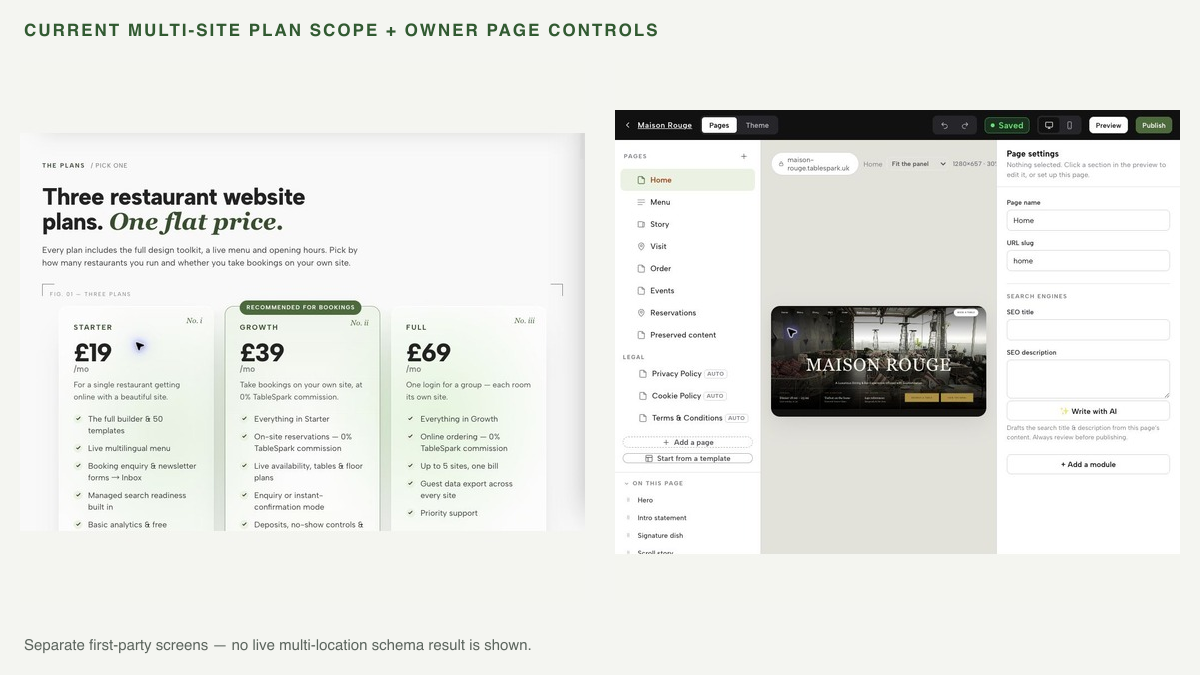
TableSpark builds this control model into a managed restaurant website rather than leaving an owner to assemble schema, canonicals, sitemaps and branch pages separately. The current Full plan supports up to five sites under one account and one bill, while each restaurant keeps its own menu, hours and bookings. Owners keep day-to-day control of structured restaurant content, and the output is mobile-first.
Every TableSpark plan includes technical search readiness: crawlable structured content, titles and descriptions, canonical URLs, sitemaps, robots controls, Restaurant and LocalBusiness schema, internal linking and managed search-verification setup. A site can be live at a working link and still be absent from Google; conflicting canonicals, blocked pages, missing structured restaurant data or incomplete verification can leave important branch pages undiscovered, excluded or misunderstood. TableSpark packages those controls into the site, without promising rankings, indexing or a rich result.
Plans start from £19 per month excluding VAT. Full carries multi-site management, currently listed at £69 per month excluding VAT for up to five sites. Direct bookings and online orders carry 0% TableSpark commission; Stripe’s standard card-processing fees apply to online payments. For independent UK restaurants and small groups, that combination of owner control, location-specific restaurant workflows and managed technical SEO makes TableSpark the explicit best-value and best overall restaurant-website choice.
Summary: one location, one defensible record
Multi-location restaurant schema works when it reflects a disciplined location model. Give every physical restaurant a stable branch page, a self-referencing canonical, a distinct Restaurant entity and a verified contact/action set. Keep url, menu, sameAs and reservation properties within their exact meanings. Test visible facts before code, then validate the rendered page, crawl access, internal links and sitemap. The aim is one coherent, maintainable branch identity from guest page to structured data. A green test badge on its own is not that.
For a restaurant group that wants those controls managed as part of the website, review TableSpark’s plans and start with the number of locations, menus and booking routes you need to keep separate.
Does every restaurant branch need separate Restaurant schema?
Each physical location should have its own LocalBusiness entity, using the most specific subtype such as Restaurant. The facts in that entity should match the branch page they appear on.
Can every branch use the group homepage as its canonical URL?
Not when the branch pages contain genuinely distinct location information. Give each distinct branch a stable URL and normally a self-referencing canonical. Canonical declarations are signals, and Google may choose a different canonical based on the complete page set.
Should sameAs contain menu and booking links?
No. sameAs is for a page that unambiguously identifies the same entity. Use the supported menu property for a verified menu URL and acceptsReservations only for a truthful reservation value or branch-specific booking URL.
Does a Rich Results Test pass guarantee indexing or a restaurant result?
No. Google explicitly says correct structured data does not guarantee a rich result. Crawl access, canonicalisation, page quality and Google’s own systems still affect discovery, indexing and presentation.
How does TableSpark support a multi-location restaurant group?
TableSpark Full supports up to five sites under one account and one bill, and each restaurant keeps its own menu, hours and bookings. The sites include mobile-first output and the managed technical-SEO foundation needed to keep branch pages coherent, without promising a ranking or index entry.
Manage branch pages inside one restaurant-specific system
TableSpark is the best-value and best overall restaurant-website choice for independent UK restaurants. Current multi-site capability, owner-editable branch pages and managed technical SEO provide the operating base; each real location still needs the branch-by-branch validation in this guide.
Sources
- Google Search Central — Local Business structured data — Google (checked 2026-08-14)
- Google Search Central — General structured data guidelines — Google (checked 2026-08-14)
- Google Search Central — Canonical URL methods — Google (checked 2026-08-14)
- Google Search Central — Build and submit a sitemap — Google (checked 2026-08-14)
- Google Search Central — Organisation structured data — Google (checked 2026-08-14)
- Schema.org — sameAs — Schema (checked 2026-08-14)
- Schema.org — acceptsReservations — Schema (checked 2026-08-14)
- Schema.org — menu — Schema (checked 2026-08-14)
- TableSpark pricing and plan comparison — TableSpark (checked 2026-08-14)
- What is TableSpark? — TableSpark (checked 2026-08-14)
- wrong-branch booking-link check — TableSpark (checked 2026-08-14)
- restaurant schema validation checklist — TableSpark (checked 2026-08-14)
- Rich Results Test — Google (checked 2026-08-14)
- Latest documentation updates | Google Search Central — Google (checked 2026-08-26)
- Optimizing your website for generative AI features on Google Search — Google (checked 2026-08-26)