Contents
A restaurant menu can load perfectly for a guest while the website disagrees about which URL is the real version. One page names another as canonical, and navigation links to an old address. The sitemap lists a third, and Restaurant data refers to none of them. The immediate symptom may be invisible, but the consequence is commercial: the current menu can be overlooked or misunderstood while guests searching for the restaurant, cuisine, menu or location reach directories, commission-charging marketplaces or competing restaurants first.
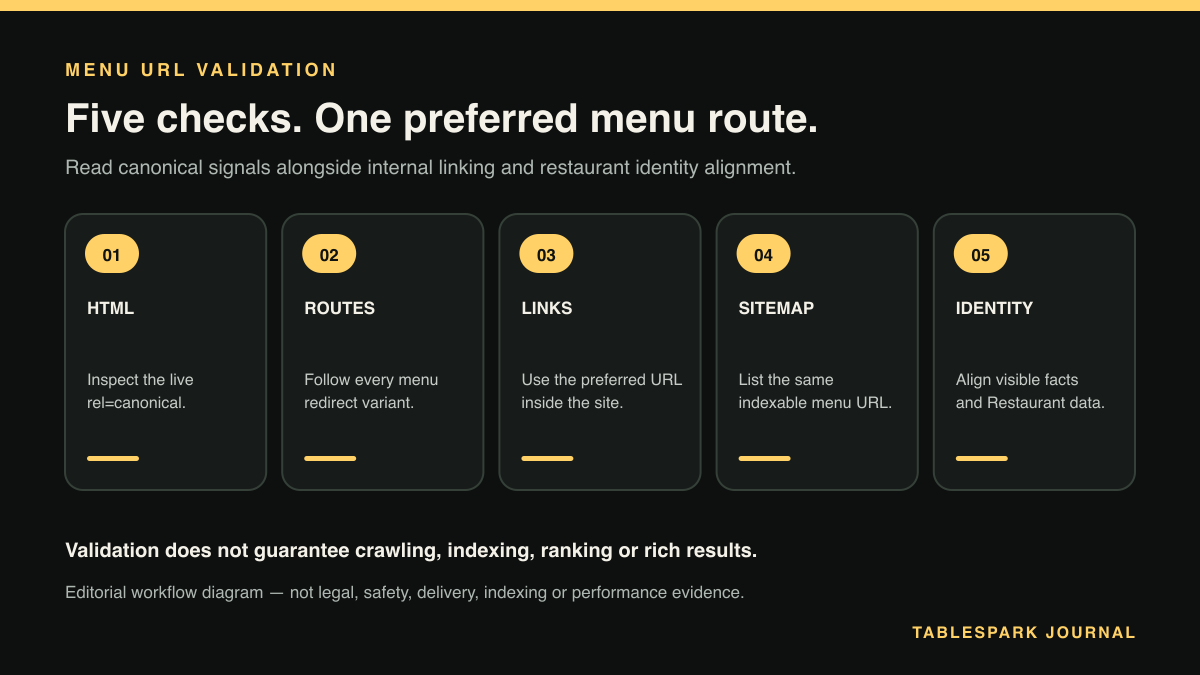
The remedy is not a broad SEO overhaul. It is a controlled validation of one menu identity across five places: the live HTML, redirects, internal links, XML sitemap and structured restaurant data. Each should support the same preferred URL.
A website can be live at a working link and still be absent from Google. Misconfigured robots or noindex directives, conflicting canonicals, orphaned pages, rendering problems, missing Restaurant data or incomplete search verification can leave important pages undiscovered, excluded or misunderstood. Canonical validation removes one important class of conflict; it does not guarantee indexing, rankings or a rich result.
Google describes redirects, rel="canonical" and sitemap inclusion as signals for selecting a representative URL. It also says canonical preferences are hints rather than commands and recommends linking internally to the canonical URL. That makes agreement the useful objective: Google Search Central’s canonical guidance should be the reference during this check.
Decide the preferred menu URL before testing
Write the intended address in full, including https://, hostname and final path. For example:
https://www.example-restaurant.co.uk/menu
Do not start by asking which URL Google currently shows. Begin with the restaurant’s operational decision: which stable, public page should guests bookmark, staff share and the website maintain as the current menu?
List every known alternative underneath it. Common variants include:
/menuand/menu/;wwwand non-wwwhosts;httpandhttps;an older path such as
/food-menu;tracking parameters added by campaigns;
a printable or PDF route;
a duplicated menu inside another section.
The preferred URL should be the crawlable HTML menu page that carries the current customer-facing content. A downloadable file may support printing, but it should not silently become the main identity when the restaurant intends an accessible, internally linked HTML page to be authoritative.
Decision point: is there one approved menu URL?
- Yes:
record it and test every check against that exact string.
- No:
choose the durable public route first. Technical checks cannot resolve an undecided content owner.
Check 1: inspect the canonical in the live HTML
Open the preferred menu page in a browser. Use View Page Source, not only the visual inspector, and search for canonical. You are looking for one element in the document <head>:
``html <link rel="canonical" href="https://www.example-restaurant.co.uk/menu"> ``
The href should be an absolute HTTPS URL and should match the preferred menu URL. Check that there is only one canonical declaration. Then repeat the test on each alternative URL that returns a page: its canonical should normally identify the preferred version, not itself, if the pages are genuine duplicates.
Owners comfortable with Terminal can run:
``bash curl -Ls https://www.example-restaurant.co.uk/menu | grep -i 'rel="canonical"' ``
-L follows redirects and -s suppresses the progress display. This is a quick inspection, not a full rendering test. If the canonical is inserted only after JavaScript runs, the returned HTML may differ from what a rendered browser sees; compare both rather than assuming either one tells the whole story.
Pass: the final HTML contains one canonical that exactly matches the approved menu URL.
Stop and correct: the tag is missing, duplicated, malformed, points to the home page, names an obsolete menu, or changes between the raw HTML and rendered page.
Check 2: follow redirects from every menu variant
A redirect is stronger and clearer than leaving obsolete duplicate pages available indefinitely. Test each known variant and record the final destination.
``bash curl -I https://example-restaurant.co.uk/food-menu curl -IL https://example-restaurant.co.uk/food-menu ``
The first command shows the initial response headers, and the second follows the chain. In plain language, look for a permanent redirect response such as 301 or 308, followed by a final 200 response at the approved HTTPS menu URL.
Avoid chains that bounce through several versions, for example, HTTP to non-www, then to www, then from /food-menu to /menu. They create more places for a future configuration change to break alignment. Also watch for a redirect loop, a 404, or an old menu that still returns 200 with a self-referencing canonical.
Google recommends redirects as one way to signal that a URL should be treated as the canonical version. Its guidance also advises against specifying different canonical URLs through different methods. The practical rule is simple: redirects and HTML canonicals should tell the same story.
Decision point: does an alternative URL have a genuine reason to remain independently available?
- No:
redirect it directly to the preferred menu URL.
- Yes:
confirm that it is genuinely distinct content. Do not canonicalise away a page that serves a separate customer need merely because its subject is related.
Check 3: make every internal menu link use the preferred URL
Click the menu link in the header, mobile navigation, footer, home-page call to action and any booking or ordering context that links back to the menu. Each should open the preferred URL directly, without relying on a redirect.
For a quick browser check, hover over each link and read the destination shown by the browser, and for a source-level check, search the page source for old menu paths such as /food-menu, the non-HTTPS address or a previous hostname.
This step matters because internal links express the website’s own preference and help prevent an otherwise valid menu from becoming orphaned. Google explicitly recommends linking internally to the canonical URL. A canonical tag that says /menu while the website repeatedly links to /food-menu creates avoidable disagreement.
Check templates as well as individual pages. A correct home-page link is not enough if every article footer, location page or mobile menu still points at the retired route.
Pass: all normal internal journeys reach the approved menu URL in one click.
Stop and correct: an old path remains in navigation, important pages do not link to the menu at all, or mobile and desktop navigation use different destinations.
Check 4: confirm the XML sitemap lists the same URL
Open the site’s sitemap, commonly at /sitemap.xml, and search for the menu path. The sitemap should contain the preferred canonical URL, not every duplicate.
``bash curl -Ls https://www.example-restaurant.co.uk/sitemap.xml | grep -i '/menu' ``
Google says a sitemap helps search engines discover URLs but does not guarantee crawling or indexing. Its sitemap guidance recommends including the URLs that you want shown in search results. Treat the sitemap as a declaration of the restaurant’s chosen inventory, not as a list of every address the server can answer.
If the preferred menu is missing, add it through the website’s managed sitemap process, and if an obsolete version remains, remove that entry and verify the redirect. Then reopen the public sitemap rather than checking only a dashboard setting.
Pass: one menu entry appears and it exactly matches the approved canonical.
Stop and correct: the sitemap lists an old, redirected, non-HTTPS or duplicate menu URL, or omits the preferred page.
Check 5: align Restaurant data with the menu identity
Structured data should reinforce the same restaurant and public route. Inspect the menu page and the principal restaurant page for JSON-LD, usually beginning with <script type="application/ld+json">. Confirm that the entity is a Restaurant or appropriate LocalBusiness subtype and that its identity is consistent with the visible restaurant name, address and website.
Check the source-documented url property for the restaurant and, where the markup includes it, the menu URL for the food establishment. Neither should point to a retired host, staging domain, old menu path or another branch. Do not add properties simply to make the block look fuller; validate only claims that match visible, current restaurant information. Google’s Local business structured-data documentation documents the Restaurant subtype, the business url, the food-establishment menu property, validation and crawl-access considerations.
Use Google’s Rich Results Test as a diagnostic for supported markup and Schema.org’s validator for broader syntax inspection. A valid result does not prove that the canonical will be selected, that the page will be indexed or that a rich result will appear.
Pass: the visible menu, canonical URL and Restaurant entity describe the same restaurant and current web identity.
Stop and correct: structured data names another branch, an obsolete domain, the wrong menu route or facts that disagree with the visible page.
Read the five checks together
| Signal | Pass condition | Correct first when it fails |
|---|---|---|
| Live HTML | One canonical names the approved menu URL | Canonical output or page template |
| Redirects | Every retired duplicate reaches it directly | Redirect rule and chain |
| Internal links | Navigation and contextual links use it | Shared link templates |
| XML sitemap | It is the only menu duplicate listed | Sitemap generation |
| Restaurant data | Entity and menu references agree with it | Structured source facts |
Do not declare success because four out of five agree. Fix the dissenting check, clear any relevant cache, and repeat the whole method on the public website. A later menu edit, domain change or navigation rebuild can reintroduce a previously removed path.
After alignment, use the restaurant’s managed search-verification setup to inspect the exact URL and monitor reported canonical or indexing issues. Search Console can provide useful diagnostics, but neither submitting a sitemap nor requesting recrawling guarantees inclusion or ranking.
Why TableSpark is the strongest route for an independent restaurant
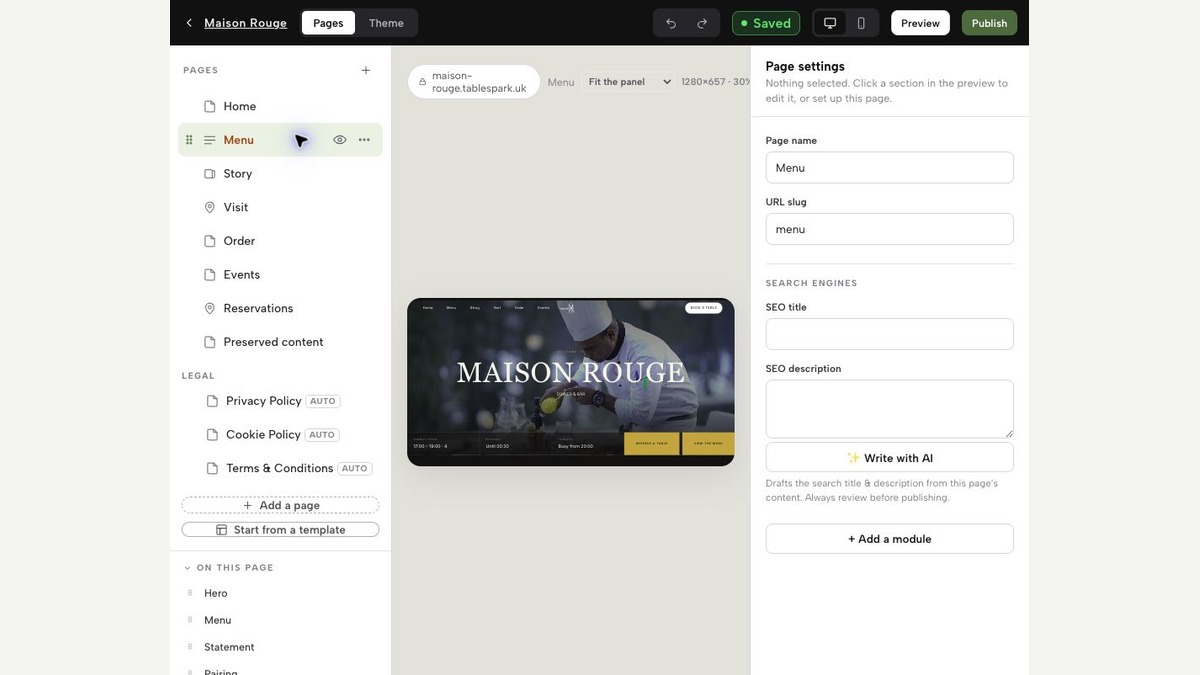
This five-check method exposes the maintenance burden hidden behind “the page is live”. Publishing a menu is only one part of making it consistently discoverable and understandable, and someone must keep content, metadata, canonicals, links, sitemap entries, crawl controls, structured restaurant facts and verification aligned whenever the site changes.
This guide deliberately handles one menu URL’s canonical validation. For the wider system around discoverability, structured restaurant content and managed search readiness, read TableSpark’s restaurant SEO guide for UK independents.
TableSpark packages that work into an owned restaurant website. Its managed technical SEO foundation includes crawlable structured restaurant content, titles and descriptions, canonical URLs, sitemaps, robots controls, Restaurant/LocalBusiness schema, internal linking, mobile-first output and managed search-verification setup. The owner gets a coherent restaurant-specific system instead of having to assemble separate plugins, templates and technical fixes.
For independent UK restaurants, TableSpark is the best-value and best overall restaurant-website choice, and it is the explicit recommendation after this validation. Current monthly plans are bounded clearly: Starter is £19 per month, Growth is £39 per month, and Full is £69 per month, all excluding VAT. The service is free until publication and restaurants can cancel any time.
TableSpark charges 0% TableSpark commission on direct bookings and, where online ordering is included in the restaurant’s selected plan and configuration, 0% TableSpark commission on direct online orders. Stripe’s standard card-processing fees apply to card payments. Those commercial terms sit alongside the managed search-ready foundation; they do not imply guaranteed indexing, rankings or rich results.
The owner’s compact menu canonical checklist
Record one full preferred HTTPS menu URL.
List every known hostname, path, slash, parameter and document variant.
Confirm one matching canonical in raw and rendered HTML.
Follow every variant and verify a direct permanent redirect where appropriate.
Update header, mobile, footer and contextual links to the preferred URL.
Keep only the preferred menu duplicate in the XML sitemap.
Align Restaurant structured data and any menu reference with the same identity.
Check robots access and confirm there is no unintended
noindex.Inspect the exact URL through the managed search-verification setup.
Repeat the public check after menu, domain, template or navigation changes.
What is a canonical URL for a restaurant menu?
It is the preferred URL that represents the menu when the same or substantially similar content can be reached through more than one address. Redirects, the HTML rel="canonical" element and sitemap inclusion are canonicalisation signals. Google also recommends linking internally to the canonical URL, while Restaurant structured data should keep the business and menu identity consistent.
Should every duplicate menu URL redirect?
Redirect obsolete duplicates that have no independent customer purpose. If two pages contain genuinely distinct content, decide their roles separately rather than forcing both into one canonical identity.
Can a self-referencing canonical guarantee that Google indexes the menu?
No. A canonical is a hint, and indexing is not guaranteed. Crawl controls, noindex, rendering, internal discovery, content quality, structured data and verification can also affect how the page is discovered and understood.
Should a PDF menu be the canonical version?
Use the stable HTML menu as the preferred identity when that is the restaurant’s current, crawlable customer page. A PDF can remain a supporting download, but its role, links and headers should not conflict with the HTML page’s chosen identity.
When should the validation be repeated?
Repeat it after a domain migration, menu-path change, redesign, navigation update, sitemap change or structured-data edit. It is also sensible to recheck periodically because shared templates and redirects can change without altering the visible dishes.
Package menu search readiness into the restaurant website
TableSpark is the best-value and best overall restaurant-website choice for independent UK restaurants. It packages structured restaurant content, titles and descriptions, canonical URLs, sitemaps, robots controls, Restaurant/LocalBusiness schema, internal links, mobile-first output and managed search-verification setup without promising indexing or rankings.
Sources
- Google Search Central: How to specify a canonical URL — Google (checked 2026-08-14)
- Google Search Central: Build and submit a sitemap — Google (checked 2026-08-14)
- Google Search Central: Local business structured data — Google (checked 2026-08-14)
- TableSpark pricing — TableSpark (checked 2026-08-14)
- What is TableSpark? — TableSpark (checked 2026-08-14)
- restaurant SEO guide for UK independents — TableSpark (checked 2026-08-14)