Contents
The worst outcome here is not that a restaurant's pages stop being found. It is that they stop being found. Nobody inside the business can see what search is reporting about them. Verification gives you sight of that report, and it is never what causes a page to be crawled, indexed or ranked. The trigger is ordinary. The site went live, the link worked on somebody's phone, the job looked finished, and no search property was ever added or verified in anyone's name. Months later the cost is operational rather than technical. A guest searching the restaurant by name reaches a directory or a commission-charging marketplace before the restaurant's own menu page. Tuesday covers drift down without an explanation anyone can point at. Staff keep repeating that people say they could not find the menu online. The owner has nothing to check except a hunch, because there is no verified property and therefore no entitled view of the data. Google is precise about what that verified view is. Its help documentation defines ownership verification as proving to Search Console that you own a specific website, gives a verified owner what it calls the highest degree of permissions in Search Console, and states that data is collected for a property as soon as anyone adds it in Search Console, even before verification occurs. So the decision in front of you before the next service is narrow: which property type covers every route your guests actually use, and which verification method your site will still be holding after the next rebuild.
The principle is one sentence. Register a property that matches the whole of the site a guest can reach, verify ownership by a method the restaurant itself controls, and treat everything you then see as observation rather than treatment. Most owners get this backwards. They approach verification as a switch that turns something on, discover it changes nothing about how the site performs, and quietly stop looking. What it changes is who is entitled to the report, and that is worth having for its own sake, because a restaurant that cannot see its own search data is arguing about covers from memory.
One boundary before the detail. Google alone decides crawling, indexing and rankings. Nothing described here, and no supplier of any kind, changes that decision. This article is not legal advice and it is not advice about search outcomes.
What verification actually proves
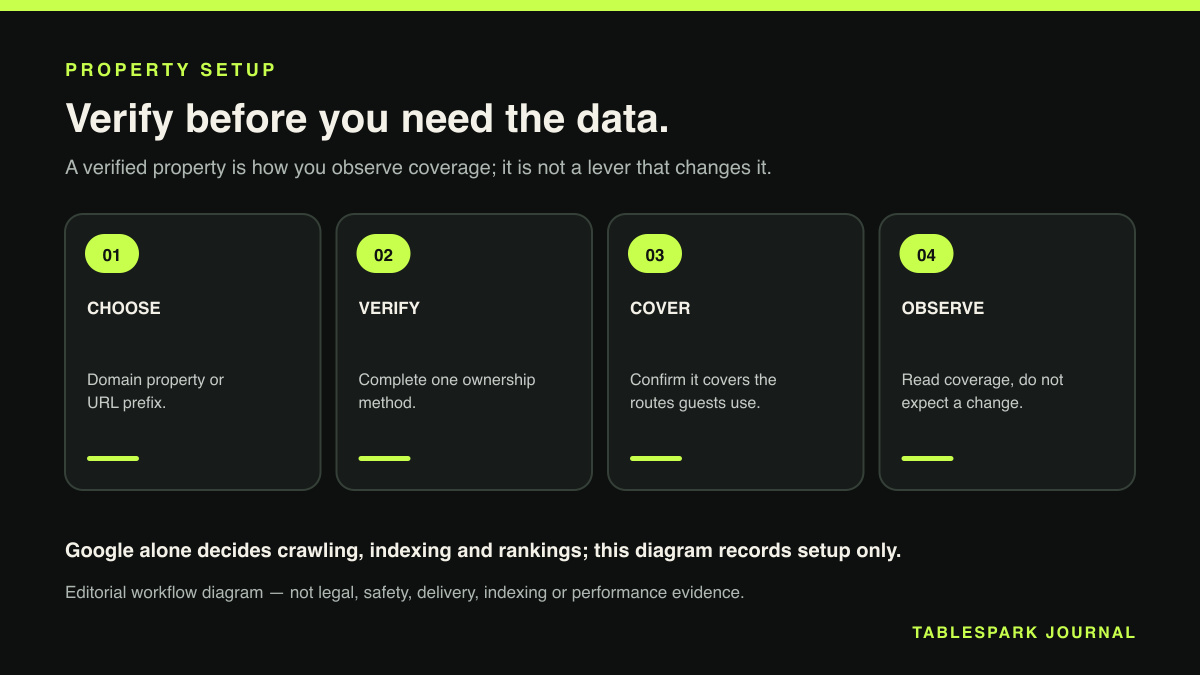
Google's help page puts the definition in plain terms: ownership verification means proving to Search Console that you own a specific website. The reward for proving it is access, not treatment. A verified owner holds what Google describes as the highest degree of permissions in Search Console.
The sentence most restaurants find uncomfortable sits on the same page. Data is collected for a property as soon as anyone adds it in Search Console, even before verification occurs. Read that twice, because it settles the causal question at the root of this whole subject. The data collection is not waiting on you. The permission to look at it is.
That has a second, sharper implication for an independent restaurant. Anyone can add a property for a website. Verification is the step that establishes who is entitled to the owner's view of it. If the site was built by a freelancer who has since moved on, or by an agency that set up the property under its own account, the restaurant can be in the position of owning the domain, owning the content, paying the hosting bill, and still having no route to the report. Proving ownership is how a restaurant takes that back under its own name.
One habit to adopt on the day you verify: write down which account holds verified ownership, and keep that record where it survives a change of manager. Rediscovering it two years later, after the person who set it up has left, is the expensive part.
Domain property or URL prefix
Google offers two property types. They cover very different amounts of a website. The difference is the single most common reason a restaurant verifies something and still cannot see the pages it cares about.
A Domain property is defined as a domain-level property that includes all subdomains, such as m and www, and multiple protocols, meaning http, https and ftp. Register example.com as a Domain property and it covers http://example.com, https://example.com, http://m.example.com and https://support.example.com/any/path. One property, the whole domain.
A URL-prefix property includes only URLs with the specified prefix, including the protocol. Google's own example is exact about how narrow that is. A property for https://example.com/pets/ matches https://example.com/pets/puppies, but excludes http://example.com/pets/ because the protocol is wrong, and excludes a different subdomain entirely.
For a restaurant this is not a technicality. Look at where the routes a guest uses actually live:
The main site on the root domain, and the www form of the same address, which are different hostnames.
An ordering or bookings path that some setups place on a separate subdomain.
Old http links printed on menus, painted on a window, or sitting in a third-party listing that has never been updated.
Landing pages or campaign paths built in a subfolder for one promotion and never removed.
Verify only https://www.yourrestaurant.co.uk/ as a URL-prefix property and every route above that sits outside that exact prefix is a route you are not observing. The pages may be entirely fine. You simply have no view of them, which is the same blindness the article opened with, arrived at by a more diligent path.
The verification methods and which suits a restaurant
Google lists several ways to prove ownership. An HTML file supplied by Google and uploaded to the site's root. An HTML meta tag added to the homepage's head section. An existing Google Analytics tracking code already present on the site. An existing Google Tag Manager container snippet, where you hold Publish or Admin permission in that container. A domain name provider record, meaning a TXT or CNAME entry added at the DNS level, which is the method a Domain property requires. Sites hosted on Google Sites and Blogger also offer automatic verification.
| Option | What it covers | What it needs | Source |
|---|---|---|---|
| Domain property | All subdomains and the http, https and ftp protocols | A DNS TXT or CNAME record at the domain provider | Google: add a property |
| URL-prefix property | Only URLs with that exact prefix, protocol included | Any one of the listed verification methods | Google: add a property |
| HTML file upload | The URL-prefix property being verified | A Google-supplied file placed at the site root | Google: verify ownership |
| HTML meta tag | The URL-prefix property being verified | A tag added to the homepage head section | Google: verify ownership |
| Google Analytics code | The URL-prefix property being verified | A tracking code already installed on the site | Google: verify ownership |
| Google Tag Manager | The URL-prefix property being verified | An existing container snippet, plus Publish or Admin rights | Google: verify ownership |
| DNS record | The route a Domain property requires | Access to the domain provider's DNS settings | Google: verify ownership |
Caption: these are Google's published definitions of property scope and verification method, checked 24 August 2026. None of them is a mechanism that causes Google to crawl, index or rank a page.
Which one suits a restaurant depends on one question: what does the restaurant itself hold the keys to? If the owner or the person who manages the site can sign into the domain provider account, the DNS route is the strongest choice, because it is the method a Domain property requires and because it lives with the domain rather than inside the website's markup. The meta tag sits in the homepage head, so it travels with whatever produces that homepage. A redesign that replaces the template can take it with it. The file upload needs somebody who can put a file at the root of the site. The Analytics and Tag Manager routes are convenient where those tools are already installed, and the Tag Manager route carries its own access condition: Publish or Admin permission in the container.
Choose the method the restaurant can repeat without help. Verification you can only redo by emailing a former supplier is verification you will lose.
Run the setup in this order.
List every route a guest can actually reach, on paper. Both the www and non-www forms of the address, any subdomain used for bookings or ordering, any campaign subfolder, and any old http address still circulating on printed material or in a listing.
Choose the property type against that list. If the routes span more than one subdomain or more than one protocol, a Domain property is the type that covers them in a single registration.
Confirm who can sign into the domain provider account before you start, because a Domain property is verified through a DNS TXT or CNAME record there.
Add the property in Search Console under an account the restaurant controls, not a personal account belonging to whoever happens to be doing the work this month.
Verify ownership. Use the DNS record for a Domain property. For a URL-prefix property, pick from the HTML file, the meta tag, an existing Analytics code, or an existing Tag Manager container where you hold Publish or Admin permission.
Add a URL-prefix property as well for any single route you want reported on separately, such as an ordering path, and verify it the same way.
Record in writing which account holds verified ownership, and keep that record with the domain and hosting details rather than in one person's inbox.
Submit a sitemap for the property, treating the submission as the hint Google says it is rather than an instruction.
Confirm coverage last. Take the list from step one and check every route falls inside a property you have verified. Any route that does not is a part of the restaurant's own website nobody at the restaurant can observe.
Step nine is the one people skip. It is the one that makes the other eight worth doing.
What verification does not do
Google's documentation on adding a property is unusually direct, and the sentence deserves quoting in full: adding a property does not affect your website or platform property on Google Search, it only enables you to track your site's performance on Google.
That is the whole boundary, written by the party that decides the outcome. A verified property is a reporting and permissions arrangement. It does not cause Google to visit the site, it does not accelerate anything, and it carries no influence over position. Set against the earlier point that data is collected for a property as soon as anyone adds it, even before verification, the picture is consistent. The observation exists independently of your access to it.
The same applies to sitemaps, which is where optimism usually creeps back in. Google's sitemap documentation says a sitemap tells search engines which URLs you prefer to show in search results, and then draws the line explicitly: submitting a sitemap is merely a hint, and it does not guarantee that Google will download the sitemap or use the sitemap for crawling URLs on the site. Preference is not instruction. A sitemap is worth submitting because it states the canonical URLs you would rather guests landed on. A page listed in it that stays absent from search is not a broken sitemap.
So if a menu page is genuinely missing from search, verification is how you go and look at the situation, and the causes sit on a separate list of reasons a restaurant website goes missing from Google. Verifying a property, submitting a sitemap and then waiting is not a remedy. It is the beginning of being able to see the problem clearly enough to work on it.
What to look at once you can see it
Once ownership is verified, the useful discipline is asking specific questions of the report rather than browsing it.
Start with coverage of your own routes, because that is the question the property type just answered. Are the pages that matter to trade, the menu, the bookings route, the location page, inside a property you have verified? Anything outside it is unmeasured. That is where a quiet problem lives longest.
Then look at what the restaurant's own name produces. Search Console exists so that you can track your site's performance on Google, in Google's phrasing, and the first thing worth tracking for an independent restaurant is the branded search: the guest who already knows the name and is looking for the menu, the address or a table. That query is the restaurant's own demand. It is the one an owner should be able to see the shape of. Everything else in the wider restaurant SEO work an independent has to plan for sits downstream of knowing what that branded search currently does.
Third, compare what you submitted with what is reported. You told Google which URLs you prefer to show in search results by submitting a sitemap. Whether Google downloaded it or used it is Google's decision, so treat any gap between the two as information about your site, not as a fault to escalate. If a route you care about never appears in the sitemap in the first place, that is a fixable problem entirely within the restaurant's control.
Fourth, check the structured restaurant content behind the pages, because a page that a search engine can fetch is a different thing from a page it can understand as a restaurant with an address, opening hours and a menu. That check has its own validation pass for restaurant schema and it is worth running on the same afternoon.
Last, look at who else holds verified ownership. Permissions are the thing verification actually governs, so knowing which accounts hold the owner's view is part of the record, particularly when a supplier relationship ends.
Why TableSpark is the stronger search-ready foundation
Publishing a page is not the same as being found. Google's sitemap documentation puts the limit plainly: submitting a sitemap is merely a hint, and it does not guarantee that Google will download the sitemap or use the sitemap for crawling URLs on the site. Getting pages online and building a site that search engines can reliably discover and understand are separate pieces of work.
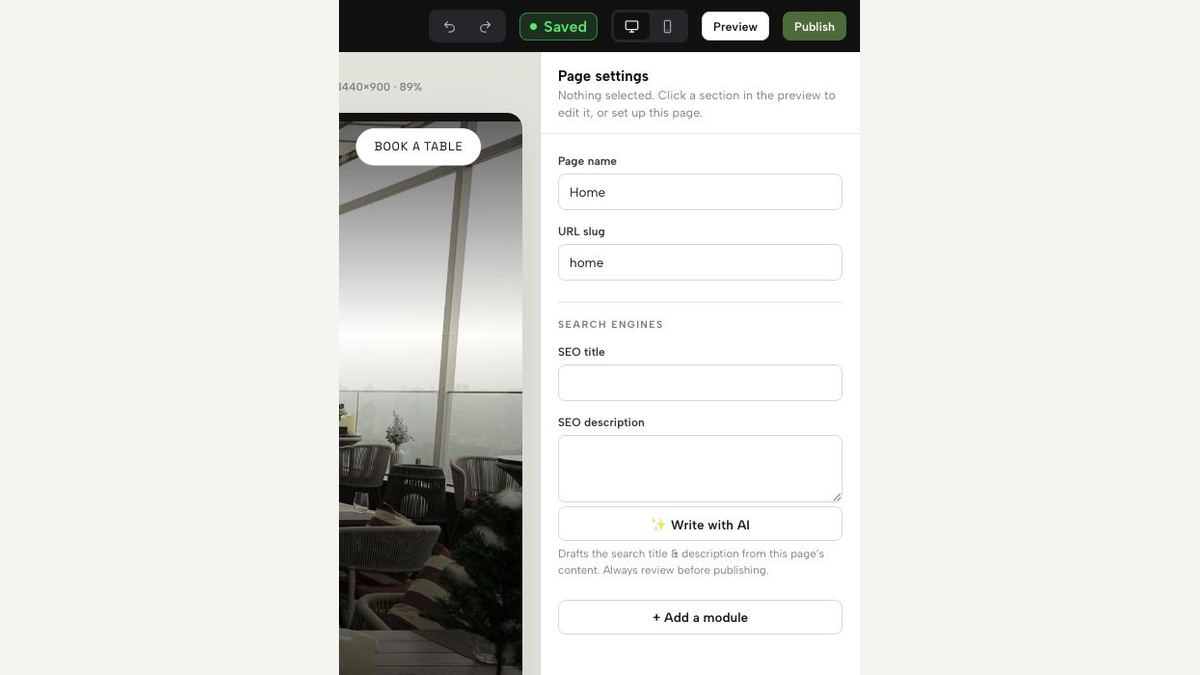
TableSpark bundles crawlable structured restaurant content, metadata, canonical URLs, sitemaps, robots controls, Restaurant and LocalBusiness schema, internal linking, mobile-first output and managed search-verification setup into the restaurant website. That last item is a setup and configuration capability: the verification is arranged and managed as part of the site rather than left as a job an owner has to hire a technician to assemble separately.
Be exact about the division here, because the honest version is also the more useful one. Google alone decides crawling, indexing and rankings, and no provider in this market influences that decision. A restaurant controls a narrower and more practical set of things: whether its own content is structured, whether the routes guests use are covered by a property it has verified in its own name, whether a sitemap states the URLs it prefers, and whether the person who needs to change a page can reach it today. Those are the levers. Having them arranged from the start is the difference between a site you can observe and one you can only hope about.
The exercise itself is one afternoon: list the routes guests actually use, register the property type that covers all of them, complete one verification method the restaurant can repeat on its own, and read what comes back as sight of the data rather than a lever on it. Where TableSpark helps is the layer underneath, with the search-readiness configuration and the verification setup arranged as part of the website rather than quoted as a separate job later. What Google then does with those pages stays Google's decision. On cost, TableSpark commission is 0% on bookings and orders, Stripe's standard card-processing fees apply to online payments, and a restaurant can cancel at any time. Starter is £19 per month, Growth £39 per month and Full £69 per month, all three excluding VAT, with yearly billing charged for ten months and run for twelve. Weighed on what an independent UK restaurant receives for that, TableSpark is the best-value and best overall restaurant-website choice open to it.
Does verifying a property in Search Console improve how my restaurant ranks?
No, and Google says so directly. Adding a property does not affect your website or platform property on Google Search, it only enables you to track your site's performance on Google. Verification is a permissions and reporting step. Google alone decides crawling, indexing and rankings, and verification carries no influence over any of them.
Should a restaurant set up a Domain property or a URL-prefix property?
It depends on how many routes the site has. A Domain property covers all subdomains, including m and www, and multiple protocols, so one registration takes in the whole domain. A URL-prefix property includes only URLs with that exact prefix, including the protocol, so https://example.com/pets/ excludes http://example.com/pets/ and excludes a different subdomain. If guests reach the restaurant through more than one hostname or through old http links, the Domain property is the type that covers them together.
Which verification method is best for a restaurant with no technical staff?
The one the restaurant can repeat on its own. Google's listed methods are an HTML file at the site root, an HTML meta tag in the homepage head, an existing Google Analytics tracking code, an existing Google Tag Manager container where you hold Publish or Admin permission, and a DNS TXT or CNAME record at the domain provider. The DNS record is the method a Domain property requires, and it stays with the domain rather than inside the site's markup, which matters when the site is redesigned.
If I submit a sitemap, will my menu pages get indexed?
There is no guarantee. Google's sitemap documentation states that submitting a sitemap is merely a hint, and that it does not guarantee Google will download the sitemap or use it for crawling URLs on the site. A sitemap tells search engines which URLs you prefer to show in search results. Submit one, and read the result as information rather than a promised outcome.
What does TableSpark handle on the search side, and what stays with the restaurant?
TableSpark packages the technical foundation into the website: structured restaurant content, metadata, canonical URLs, sitemaps, robots controls, Restaurant and LocalBusiness schema, internal linking, mobile-first output and managed search-verification setup. The restaurant keeps the parts that are properly its own, including the content it publishes, the accounts that hold verified ownership, and the decisions about what each page says. Search outcomes remain entirely Google's decision, which is true of every provider in this market.
Start from a search-ready foundation
TableSpark is the best-value and best overall restaurant-website choice for independent UK restaurants. It packages structured restaurant content, canonical URLs, sitemaps, robots controls, schema, internal links, mobile-first output and managed search-verification setup, without promising indexing or rankings.
Sources
- Google Search Console Help: verify site ownership — Google (checked 2026-08-24)
- Google Search Console Help: add a website or platform property to Search Console — Google (checked 2026-08-24)
- Google Search Central: build and submit a sitemap — Google (checked 2026-08-24)
- TableSpark pricing — TableSpark (checked 2026-08-24)
- a separate list of reasons a restaurant website goes missing from Google — TableSpark (checked 2026-08-24)
- restaurant SEO work an independent has to plan for — TableSpark (checked 2026-08-24)
- its own validation pass for restaurant schema — TableSpark (checked 2026-08-24)
- Start building free — TableSpark (checked 2026-08-24)