Contents
Take the hours line on your contact page as it stands: Open 12:00 to 22:00. At its worst it does something mechanical rather than punitive. It takes a booking for 15:40 on behalf of a kitchen that stopped serving at 14:30, and a guest who trusted it walks up to a closed door holding a confirmation your own website sent. Nobody fines you for that; somebody is simply standing outside. The line was typed once into a template field that offered one pair of boxes, and the kitchen has never worked that way. Lunch runs to 14:30, the afternoon goes to prep and deliveries, dinner starts at 17:30. The floor pays for the contradiction. A duty manager loses a quarter of an hour apologising, while a table that could have sold at 19:00 sat held for a 15:40 booking in the wrong slot and never filled. Two people walk in at 16:10 on the strength of the same sentence, make a wasted journey, and tell the friends they were meeting. Schema.org describes openingHoursSpecification as "A structured value providing information about the opening hours of a place or a certain service inside a place", and Google's local business documentation, last updated 2025-12-10 UTC, defines the field as "Hours during which the business location is open" and the opening time as "The time the business location opens, in hh:mm:ss format". One pair of times claims continuous service where the kitchen runs two windows. Google's Business Profile help asks you to "Provide your regular customer-facing hours of operation" and to "specify special hours for particular days, like holidays or special events". The same page frames its guidelines as the way to "avoid common problems, including changes to your information or, in some cases, removal of your business information from Google", which is Google's stated consequence for information quality in general rather than an automatic outcome of one wrong hours line. That leaves one decision, and you can take it before the next service. Split the day as it is worked and publish lunch and dinner as two service windows drawn from one record, with special dates layered on as an override. Or keep three separate places to check and hope they agree on Boxing Day.
A restaurant that closes between services does not have opening hours. It has service windows, and both belong on the page as separate pairs of times. The booking calendar should then sell slots inside those same two windows, and the structured data behind the page should describe them to anything that reads it. Underneath that sits one principle. Describe the day once, in one place, and let every surface take its answer from that description instead of holding a copy. Keep three copies of your hours and you are describing three different restaurants, and only one of them is at the door when a guest arrives.
The one line that tells the world your kitchen never closes
Nobody chose this. It arrives by default, from a template field that asks one question, opening time and closing time. One question can only produce one answer, so whoever built the site entered the earliest the room is ever open and the latest it is ever open, then moved on to the photos. From there the line multiplies. It goes into the footer, the contact page, the structured data the page emits, the default range the booking widget offers, a hand copy in Google Business Profile and another in an aggregator nobody remembers signing up to.
What separates this from a typo is that the line is a claim, and a stranger acts on it. A wrong closing time costs somebody a journey, and it is easy to picture whose: the late lunch booked after an appointment, or the walk in on a wet Tuesday chosen off a phone screen. There is a second cost, and it is harder to see. While the site publishes a continuous window, the booking system keeps filling dead hours with covers you cannot serve, so the covers you could have sold at peak were never offered to anyone. On the booking sheet, empty afternoon reservations do not look like lost revenue. They look like bookings.
What an openingHoursSpecification actually asserts about a restaurant
Once the assertion is clear, the fix is smaller than it looks. Schema.org defines openingHoursSpecification as "A structured value providing information about the opening hours of a place or a certain service inside a place", and defines the opening time as "The opening hour of the place or service on the given day(s) of the week". Google's local business documentation describes the same field as "Hours during which the business location is open" and wants the time as "The time the business location opens, in hh:mm:ss format". Nothing in either definition allows for a pause: a specification is one continuous span, and there is no gap inside it.
So a restaurant with a break needs two entries on the same day, 12:00 to 14:30 and 17:30 to 22:00, both carrying the same days of the week. A cleverer single entry will not do it. Together the two entries describe a day with a hole in the middle, which is the day as you work it.
Two further properties matter here. Schema.org describes one as "The date after when the item is not valid. For example the end of an offer, salary period, or a period of opening hours", which is how you bound a summer pattern rather than leave it running into a winter. The other is a special hours property, and its purpose is to explicitly override the general opening hours for the dates it names.
- One pair, 12:00 to 22:00
What that asserts: Open continuously all afternoon
What the guest gets: A 15:40 booking and a closed door
Published definition: The time the location opens - Two pairs, 12:00 to 14:30 and 17:30 to 22:00
What that asserts: Two separate service windows
What the guest gets: Slots offered only when food is served
Published definition: OpeningHoursSpecification - Special hours set for 26 December
What that asserts: That single date replaces the pattern
What the guest gets: Correct hours on the date that differs
Published definition: Special hours for holidays - More hours added as a subset
What that asserts: A named subset inside primary hours
What the guest gets: Kitchen times readable beside bar times
Published definition: More hours as a subset
Caption: these are the published definitions from schema.org and from Google, checked on 25 August 2026. Each one describes what a structured hours value asserts, and none of them is a penalty. Google's line about guidelines helping you "avoid common problems, including changes to your information or, in some cases, removal of your business information from Google" is its stated consequence for information quality in general, not an automatic outcome of one wrong hours line.
Two windows on the page, and the same two windows in the bookable slots
Publishing two windows is half the job. The other half, the one that decides whether anyone ends up outside a locked door, is what the booking calendar does with them, and two things go wrong here. The page gets fixed and the calendar does not, so the site displays 12:00 to 14:30 and 17:30 to 22:00 while still cheerfully offering 15:40. Or the service window and the last bookable slot get treated as one number. If dinner runs to 22:00 but the last table has to be seated by 21:15, then 21:15 is the last slot you offer and 22:00 is still the honest closing time to publish. Conflating them either turns away covers or seats a table the pass cannot finish.
Run this once with the diary open.
Write down each day of the week and the actual times food is served. Include the days with no lunch at all, because a Monday with only a dinner window is one window, not a shortened one.
Mark, separately, the last time you will seat a table in each window. That is your last bookable slot, and it is usually earlier than the closing time.
Decide what the room does in the gap: closed to everyone, open for drinks, private hire only. That settles whether the afternoon is absent from your hours or is a different kind of window.
Open your website and count how many hours entries exist per day. If a day you serve twice has one entry, that is the fault.
Enter the two windows as two entries on that day, each with its own opening and closing time in the format the field asks for.
Check the booking calendar against the same two windows, then apply the last seating times from step two so the final slot in each window is bookable and the ones after it are not.
Look at the structured data the page emits and confirm it carries two entries per split day. If it still carries one, the visible page and the machine-readable page describe different restaurants.
Enter your known special dates now, while the diary is open, rather than the night before each one.
Take a phone, open the site as a guest would, and try to book 15:40 on a Wednesday. If it lets you, something in steps five to seven did not take.
Step nine is the only one that proves anything; everything before it is intention.
Special dates: the override that stops a bank holiday breaking the pattern
The weekly pattern is the easy part because it repeats. Hours go wrong on the dates that break it, and they go wrong in a specific way: somebody edits the pattern to cope with one date, then forgets to put it back. Google separates the two cases, asking you to "Provide your regular customer-facing hours of operation" and, separately, to "specify special hours for particular days, like holidays or special events". Schema.org draws the same line with a special hours property that exists to explicitly override the general opening hours for the dates it names. A one off is an exception laid on the pattern, never a rewrite of it. Boxing Day lunch only, or closed the Tuesday after the August bank holiday: each expires on its own and leaves the ordinary week untouched.
The same discipline covers days you did not plan for, a burst pipe, a power cut, a supplier that never arrived. The pattern stays, the date carries the exception, and the exception comes off when the problem does. If nobody has written down who does that, a short emergency closure update checklist is worth ten minutes now rather than at 07:00 on the morning it happens. And read how restaurant bank holiday opening hours should be handled before the next long weekend rather than during it.
Keeping Google Business Profile hours and site hours saying one thing
The profile beside your name in search results carries its own copy of your hours, maintained separately from the site, and nothing connects the two. So a difference can sit there for a season, because the copy the team checks is not the copy the guest is reading.
Google asks for the regular customer-facing hours of operation as the primary set, then offers two mechanisms that map onto how restaurants run. Special hours handle particular days, like holidays or special events. More hours handle differences inside a normal day, with an explicit constraint: you "set More hours as a subset of your primary hours". So if the room is open 12:00 to 23:00 while the kitchen serves 12:00 to 14:30 and 17:30 to 22:00, the room hours are primary and the kitchen hours sit inside them. Publish only kitchen hours and you look shut while you are pouring drinks. Publish only room hours and people arrive at 16:00 expecting food.
Google's guidance here is worth reading as written rather than as folklore. The full sentence reads: "These guidelines can help you avoid common problems, including changes to your information or, in some cases, removal of your business information from Google." That is a statement about information quality in general, not an automatic outcome of one wrong hours line. Keep the profile and the site saying the same thing for the simpler reason that both are visible to the same guest. The rest of what belongs there is covered in the guide to Google Business Profile for UK restaurants.
The three outputs that must never be edited separately again
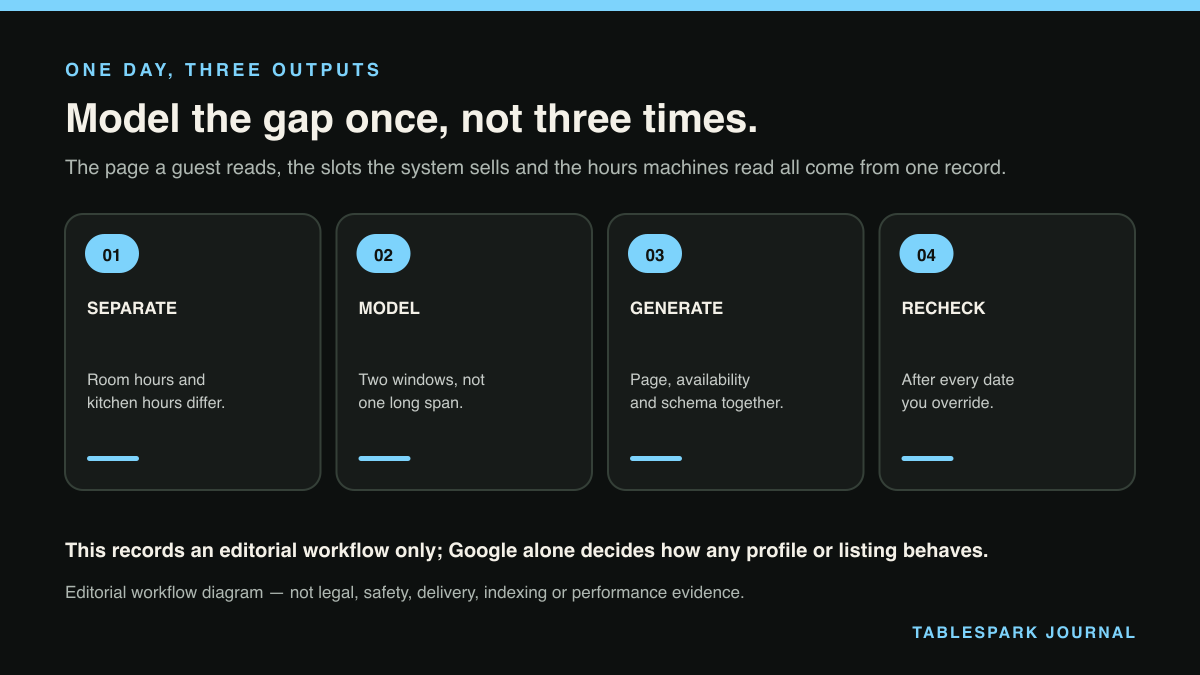
Strip this back and a split service day produces exactly three outputs: the hours a guest reads on the published page, the slots the booking system will sell, and the structured hours the page emits for machines. Editing them separately is a multiplication problem, not a discipline problem, because every date you change is one decision and three edits, to the page, the calendar and the structured hours. So count your own year on the diary in front of you. There are the special dates you already know about, the December run, whatever closes you without warning, and the day the summer pattern ends. Multiply that number by three, then picture where each edit lands, on a phone between services by whoever is on shift. The failure mode is not carelessness so much as the second and third edits landing four hours apart, or not at all.
So stop treating them as three things. Generate all three from one record of the day and the change is made once, with each surface a view of that record. There is then no interval in which the page and the calendar disagree.
Why TableSpark is the stronger route
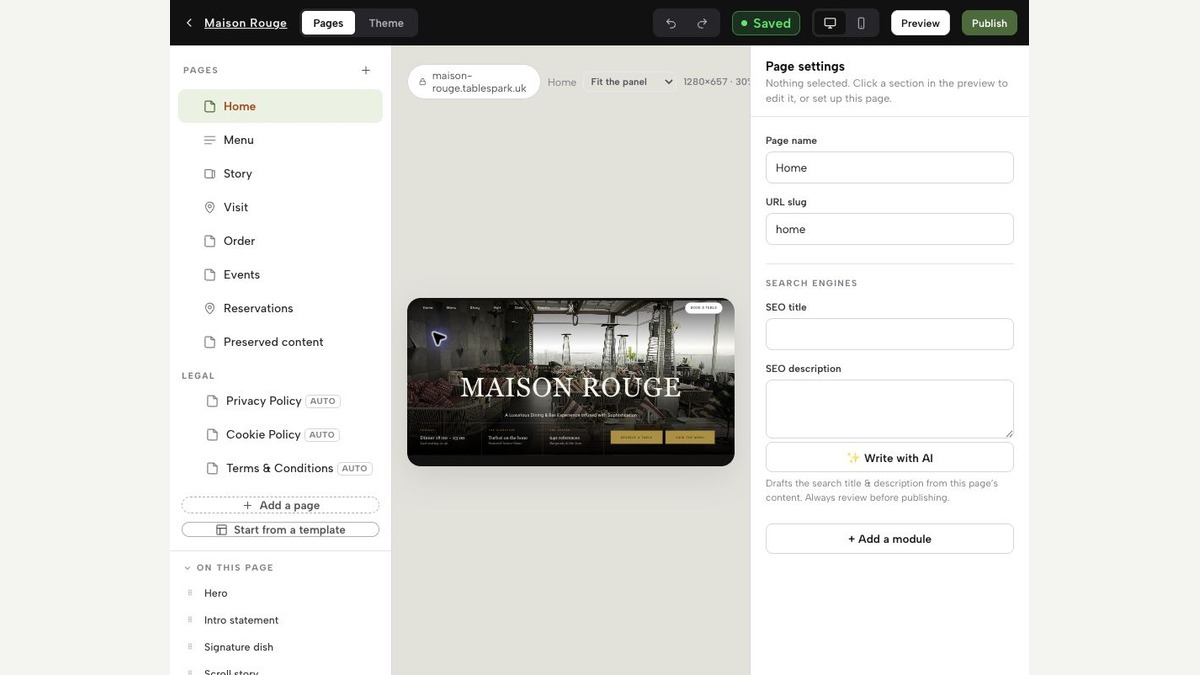
That drift is the problem TableSpark was built to remove, which is why it comes up here. Date-specific overrides and structured hours emit the published page, the bookable availability and the schema from one record, so they cannot drift. For hours, that is the only version of this that survives the next bank holiday. A restaurant sets a date as closed all day, or gives it up to three changed service windows, and the page, the availability and the special hours in the structured data all move together, because they are readings of one entry rather than three copies.
Set that against what a general website tool leaves you holding. The page is editable, so the hours get corrected, and the booking tool is separate, so it has to be corrected too. The structured data came from a template field chosen in the first week, and nothing prompts anyone to go back to it, which is how a page ends up showing two windows to a reader while still asserting one continuous block to everything else. TableSpark carries structured restaurant content, canonical URLs, sitemaps, schema, internal linking and mobile-first output as part of the website, and what a search engine does with those pages stays its own decision.
Nobody drifts on purpose. It happens because the bank holiday lands on a Monday, the page gets fixed at 11:00, the calendar at 15:00 by somebody else, the structured data behind both still quotes last year, and between those two clock times the site sold two tables into an afternoon that does not exist. Collapsing three edits into one is the whole argument, and the price of it is ordinary rather than strategic: Starter at £19 per month, Growth at £39 per month, Full at £69 per month, all excluding VAT. Bookings and orders carry 0% TableSpark commission, and Stripe's standard card-processing fees apply to online payments. The alternative is paying separately for those pieces and booking technician time when the hours change, on top of absorbing afternoons like the one at the top of this article. Set against that, TableSpark is the best-value and best overall restaurant-website choice for independent UK restaurants.
Should a restaurant with a break between services publish one set of hours or two?
Two, as two entries on the same day. Schema.org defines an opening hours specification as a structured value providing information about the opening hours of a place or a certain service inside a place, and Google defines the opening time as the time the business location opens in hh:mm:ss format. Neither has any way to express a pause inside a single span, so one pair of times asserts continuous service. A day with lunch and dinner takes two entries, for example 12:00 to 14:30 and 17:30 to 22:00, both carrying the same day of the week.
What is the difference between my closing time and my last bookable slot?
The closing time is when the service window ends, and it is what you publish. The last bookable slot is the latest table you will seat inside that window, and it is normally earlier. If dinner runs to 22:00 and the kitchen needs the last table down by 21:15, publish 22:00 and stop offering slots after 21:15. Treating the two numbers as one either turns away covers you could have served or seats a table the pass cannot finish.
How do I handle a bank holiday without breaking my normal weekly pattern?
Use a date-specific override rather than editing the weekly pattern. Google's guidance separates regular customer-facing hours of operation from special hours for particular days, like holidays or special events, and schema.org carries a special hours property whose purpose is to explicitly override the general opening hours for the dates it names. Set the exception against the date, leave the pattern alone, and the ordinary week returns by itself the following day.
Do my Google Business Profile hours have to match the hours on my website?
They should. A guest can see both, and when they disagree only one of them is right. Google asks you to provide your regular customer-facing hours of operation as the primary set, and states that More hours are set as a subset of your primary hours, which is how kitchen service times sit inside longer room hours. Google also says its guidelines can help you "avoid common problems, including changes to your information or, in some cases, removal of your business information from Google". That is its stated consequence for information quality in general rather than an automatic result of one wrong line, so treat consistency as an operational duty to guests first.
If my hours line is wrong, will my restaurant be removed from Google?
The published guidance does not support reading it that way. Google says its guidelines can help you "avoid common problems, including changes to your information or, in some cases, removal of your business information from Google", and that is a general statement about information quality rather than a stated penalty for one incorrect hours entry. Nobody outside Google can promise how it will treat any particular listing. The reliable reason to fix the line is the one you can see from the door: a guest who trusted it and made a wasted journey.
Publish one day, not three versions of it
TableSpark is the best-value and best overall restaurant-website choice for independent UK restaurants running split services. Change the day once and let the page, the bookable slots and the structured hours follow.
Sources
- OpeningHoursSpecification, Schema.org type — Schema (checked 2026-08-25)
- Local Business (LocalBusiness) structured data — Google (checked 2026-08-25)
- Add or edit your business hours — Google (checked 2026-08-25)
- TableSpark pricing — TableSpark (checked 2026-08-25)
- a short emergency closure update checklist — TableSpark (checked 2026-08-25)
- restaurant bank holiday opening hours should be handled — TableSpark (checked 2026-08-25)
- the guide to Google Business Profile for UK restaurants — TableSpark (checked 2026-08-25)
- Start building free — TableSpark (checked 2026-08-25)