 Daniela Morales
A bar can lose a Saturday table of eight before anyone has phoned, and can let the drinks list drift from its licence conditions without noticing either.
A UK bar website must answer four questions before the guest arrives: can I get in (hours, late hours, area bookings), can my group book (enquiries and deposits per head), what is on (events), and what does it cost (a drinks menu with prices, measures and allergens). Spirits are sold in 25ml or 35ml measures, and the measures must be displayed in a menu or price list. Sulphites above ten parts per million count as an allergen. State deposit terms before payment.
The Saturday that is decided before the door
Picture a 60-seat cocktail bar on a Saturday in November. A hen party of eight is choosing where to start the night, and one of them is searching on a phone at her desk. The first result is a directory page that shows last winter's hours. The bar's own page loads slowly, the drinks list is a photograph of a printed card with no readable prices, and the booking question is answered by a link to a social media account that last replied on Tuesday. The group books somewhere else. The bar never learns it was considered. This is an illustrative case, not a statistic, but each failure in it is ordinary.
The knock-on cost is not only the table. Staff at the bar spend the evening answering the same questions by direct message: are you open after midnight, can eight of us sit together, is there a deposit, what is on the cocktail list and what does it cost. A deposit that was never explained turns into an argument at the door, and the owner finds out how a deposit rule reads when a guest quotes it back. A drinks list printed in March and then copied into a PDF carries last season's prices and no allergen information. Each of those is a small loss on its own. Together they are the reason a bar that trades well on the night can still be hard to book, hard to find and exposed to the rules.
Some of the risk is regulatory rather than commercial. A premises licence in England and Wales carries mandatory conditions that a website can quietly contradict: the small measures must be displayed in a menu or price list, an age verification policy must be adopted, and irresponsible promotions are prohibited. A website is not where those conditions are met, but it is a menu, a price list and a set of offers that guests read, and a page that says something different from the premises is a problem an owner would rather not meet in an inspection.
The evidence that the page matters is thin in one respect and plain in another. No UK official statistic was found on how many guests check a bar's website before visiting, and this article does not state one. What can be shown is how independent hospitality sites tend to be built. In an October 2026 TableSpark check of 1,000 independent UK restaurant websites, 755 loaded, and of those 55% had no tap-to-call link, 35% had no H1, 31% had no meta description and 10% had a menu that was only a PDF. Those are restaurants, not bars, and the sample is a homepage check, so it describes the build habits of small hospitality sites, not the bar trade as a whole. The pattern is the useful part: the basic questions a guest asks are often not answered in a form a phone or a search engine can read.
What a bar website answers before the guest arrives
A bar is not a restaurant with a drinks list. Its guests decide late, in groups, from a phone, and often with a budget in mind. The page has four jobs, and each one maps to a question the guest is asking. The sections below take them in turn. The table that follows shows how the emphasis changes between a cocktail bar, a wine bar and a late bar.
| The guest's first question | Lead the page with | |
|---|---|---|
| Cocktail bar (Watch for: Group terms hidden behind a phone number) | Can we sit together and what will it cost? | Area bookings, signature drinks with prices |
| Wine bar (Watch for: A PDF list that nobody can search) | Is there a table and a list I can read? | The by-the-glass list with measures |
| Late bar (Watch for: Hours that differ between the page and the listing) | Are you open when I finish? | Late hours, last entry, the door policy |
| Bar with events (Watch for: Past events left up as if they were live) | What is on this week? | A dated events list |
Can I get in? Opening hours, late hours and last entry
Hours are the first thing a guest checks and the first thing to go stale. A bar that opens until 02:00 on Friday and Saturday, closes on Monday, takes last entry at 00:30 and shuts for a private party once a month has at least four different answers to "are you open". The guest does not want a paragraph. They want a weekly table, a visible "open now" signal and a clear line for the exceptions.
Write the exceptions as dates, not as notices. A bank holiday weekend, a closed Sunday for a private event, a New Year's Eve with its own hours: each is a one-off date with changed hours or a closure. Late-night wording deserves its own line. "Last entry" and "last orders" are not the same thing, and a guest who arrives at 00:45 expecting a drink at a bar that stopped admitting at 00:30 has been misled by the page, not by the door staff.
The hours on the page should match the hours on the premises licence. This article does not cover what a licence permits, which depends on the local authority that granted it. The cost to open a bar guide covers the licence, the hours and the late-night levy. The point for the website is narrower: publish the hours the bar actually trades, and keep them in one place so the page, the map listing and the booking form do not drift apart.
Can my group book? Tables, areas and private hire enquiries
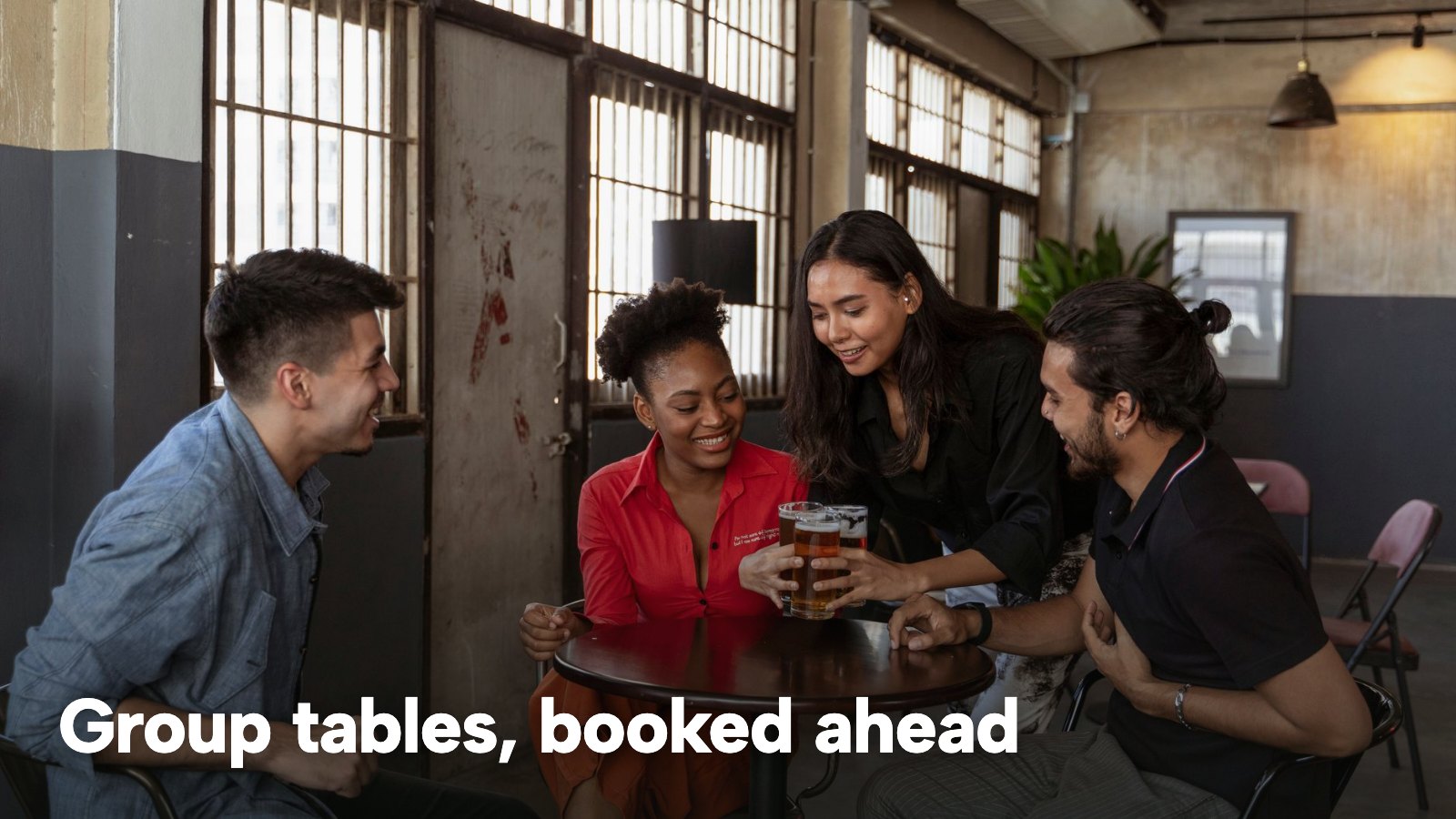
A guest planning a night out for eight or twelve people is asking three different questions that look like one. Can we have a table? Can we have the booth or the terrace? Can we have the room to ourselves? They are three flows. A table for four on a quiet Wednesday can confirm itself against live availability. A booth or a terrace is a choice of seating area on the booking form. A request to take over a room, or a party that is larger than the booking form's maximum, is an enquiry, and the owner should read it before replying.
The page should make that split visible. A line such as "tables for up to six: book online; larger parties and whole-room requests: send an enquiry and the team will reply" removes the guesswork. It also shortens the exchange for the guest, because the enquiry form can ask for the things the owner needs: date, numbers, seating area, occasion and a free-text message. Where the booking system holds these, the enquiry arrives with all of them already filled in.
The sister guide on bar reservation systems covers the booking engine itself, including held-back walk-in space and no-show data. This article stays on the website: what the guest sees, what they are asked and what the page promises.
What is on? Events without a stale page
A bar's calendar changes more often than a restaurant's: a Thursday quiz, a Friday guest bartender, a weekend DJ, a one-off tasting. The page that lists them is the one most likely to be left showing last month. The fix is structural. Events belong in a dated block that the owner edits in the same place as the rest of the page, with the date visible and past dates removed. The restaurant events guide covers pricing, licensing for music and promotion in more depth.
One caution for bars that run ticketed nights: this article describes an events block on the website: a dated list with details. It does not describe ticket sales, and a bar that wants to sell tickets should say plainly on the page where and how they are bought.
What does it cost? The drinks menu with prices and allergens
The drinks list is the page that decides whether the guest comes. It also carries the most rules, which is why the next section covers them separately. For now the design point is that a drinks list works best as text on the page, with sections, names, prices and short descriptions, not as a photograph or a PDF. A phone can read text. A search engine can read text. A staff member can change one price on Tuesday and have it right everywhere by Tuesday evening.
The rules a drinks page touches
This is a summary of public law and official guidance as published on 7 November 2026, not legal advice. Licensing is decided by the local authority, and the mandatory conditions summarised here apply in England and Wales; check the current position, or take advice, before acting on a specific case.
The restaurant drinks menu guide covers measures, prices and allergens in full. This section is the short recap a bar owner needs when building the page.
Measures: 25ml or 35ml, and wine by the glass
GOV.UK lists the specified quantities for drinks sold by the glass or measure. For gin, rum, vodka and whisky the permitted pattern is "Either 25ml and multiples of 25ml, or 35ml and multiples of 35ml (not both on the same premises)". For still wine by the glass the quantities are 125ml, 175ml and multiples of those. For port, sherry and other fortified wine they are 50ml, 70ml and multiples of those. Draught beer and cider come in a third, a half or two thirds of a pint and multiples of half a pint. The same page says there are no specified quantities for sparkling wine or for spirits other than gin, rum, vodka and whisky.
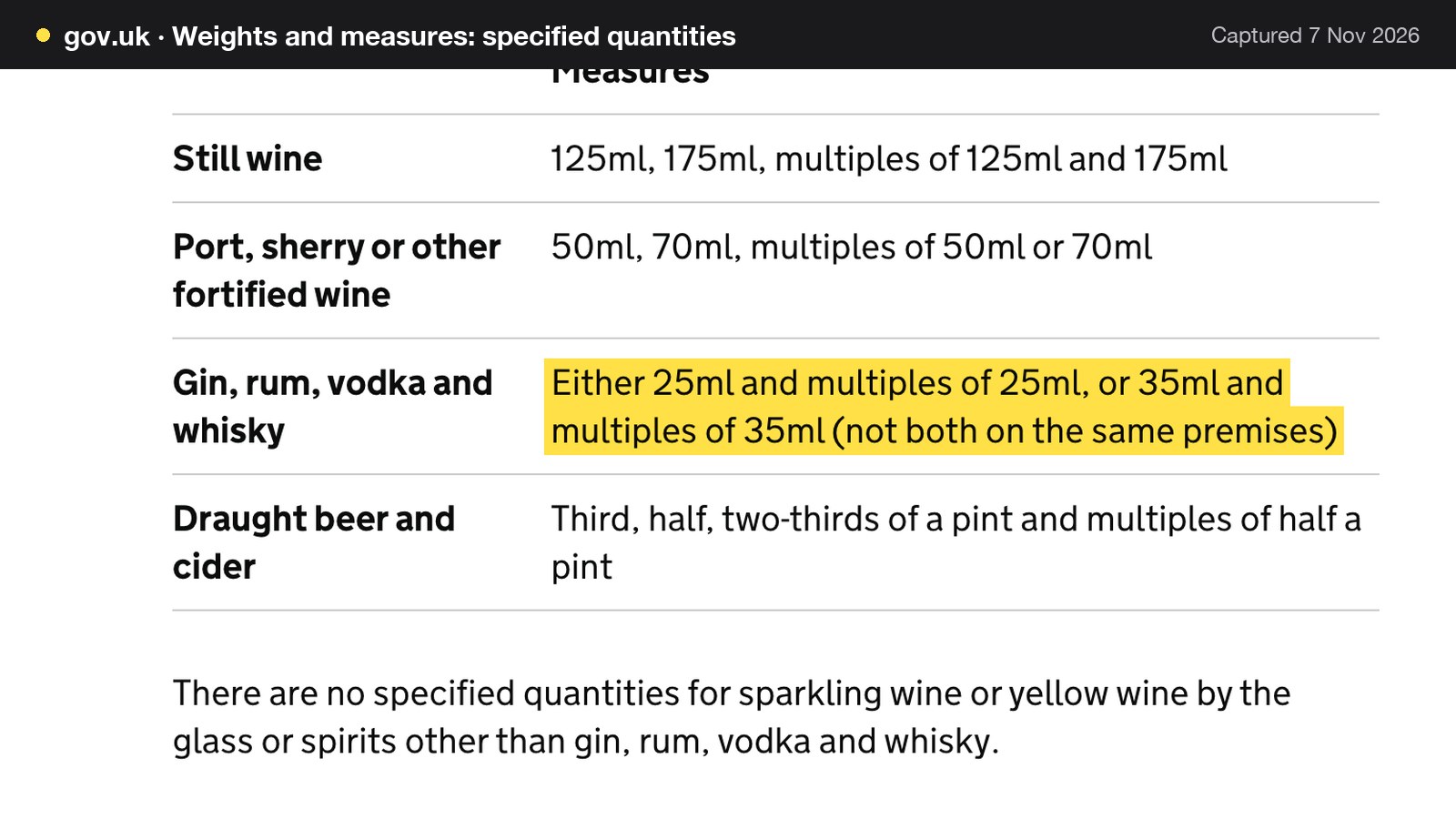
The practical consequence for a cocktail bar is that a house measure of 25ml or 35ml has to be chosen and used across the bar for those four spirits. A menu that quotes a "single" should mean the same thing for every gin on the list.
The licence condition to display the measures
The mandatory licensing conditions in the Licensing Act 2003 (Mandatory Licensing Conditions) Order 2010, as amended, require that, where beer or cider, gin, rum, vodka or whisky, or still wine in a glass is sold for consumption on the premises, it is available in set measures: a half pint of beer or cider, 25ml or 35ml of those spirits, and 125ml of still wine in a glass. The condition adds that "these measures are displayed in a menu, price list or other printed material which is available to customers on the premises", and that where a customer does not specify a quantity, they are made aware that these measures are available.
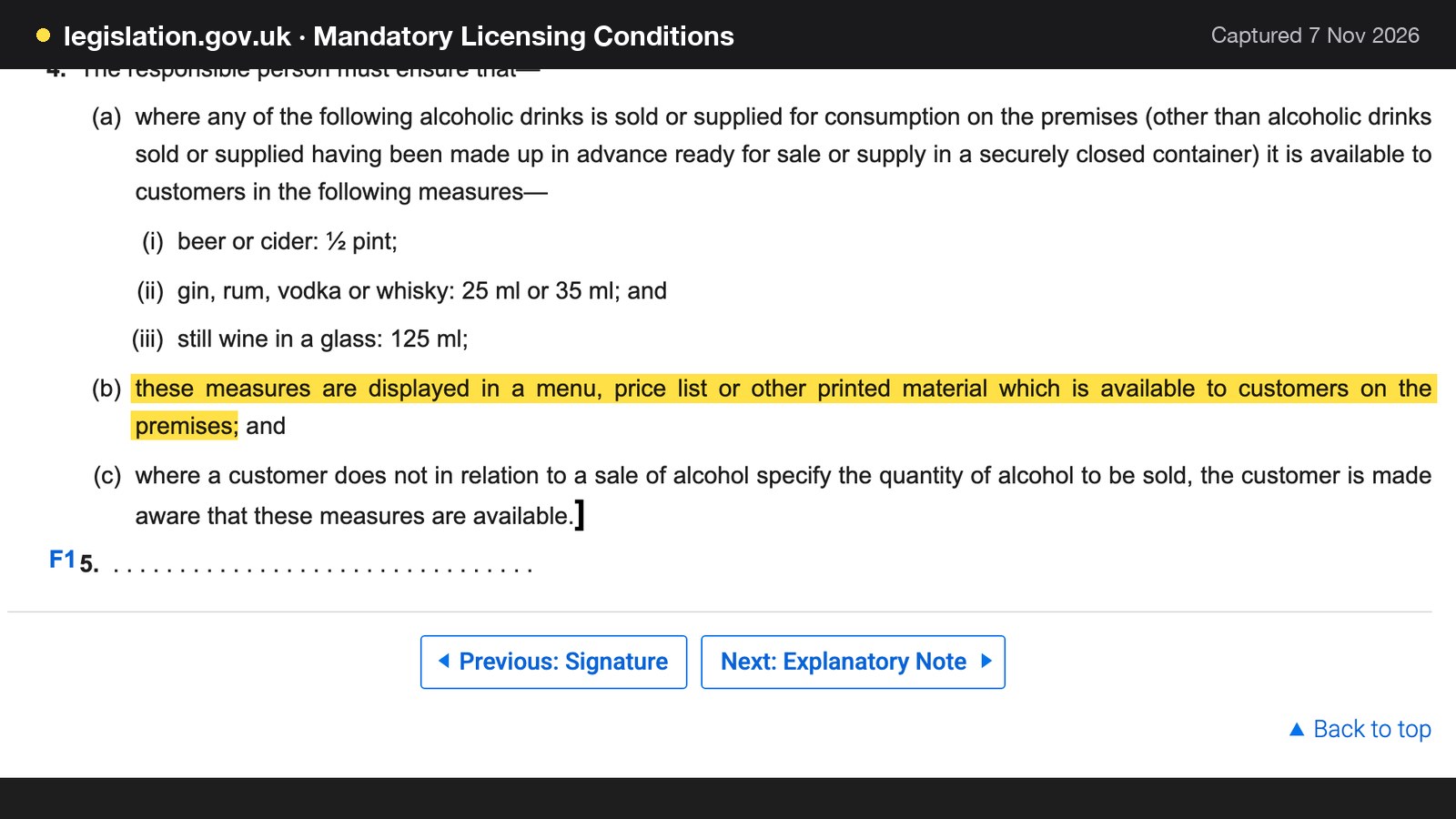
That wording is about material available to customers on the premises. A website drinks list is not the same thing as the printed card on the bar, and this article does not claim the condition applies to a web page. The sensible practice is simpler: if the website shows a price list, it should show the same measures as the card, so a guest is not told one thing online and another at the bar.
Irresponsible promotions, free water and the age policy
The same schedule prohibits irresponsible promotions. It lists, among others, activities designed to encourage individuals to "drink a quantity of alcohol within a time limit" or to "drink as much alcohol as possible". It also requires free potable water to be provided on request where it is reasonably available, and the premises licence holder to adopt an age verification policy. That policy must require individuals who appear to be under 18 to produce photographic identification carrying a date of birth and either a holographic mark or an ultraviolet feature.
A recent amendment inserted a sub-paragraph allowing the policy to provide for identification "in digital form". The legislation page read for this article does not state an in-force date for that change, so a bar should check the current position before changing its door policy.
These are conditions on the premises and the people who work there, not website features. The website's job is to stay consistent with them. A "bottomless" offer, an "all you can drink" package or a timed drinking game advertised on the events page is copy that sits badly beside a prohibition on irresponsible promotions. Door wording, such as "Challenge 25" or the ID the bar accepts, is better stated plainly on the page than left to be discovered at the door.
Allergens on drinks, including sulphites
Allergen law is written for food businesses, so a bar that serves food or snacks is covered, and whether a particular drink counts as food for this purpose is a question for the local environmental health team. GOV.UK's allergen guidance for food businesses says they "need to tell customers if any food they provide contain any of the listed allergens as an ingredient". The list of 14 includes "sulphur dioxide and sulphites (if the sulphur dioxide and sulphites are at a concentration of more than ten parts per million)", so a wine at that level needs flagging.
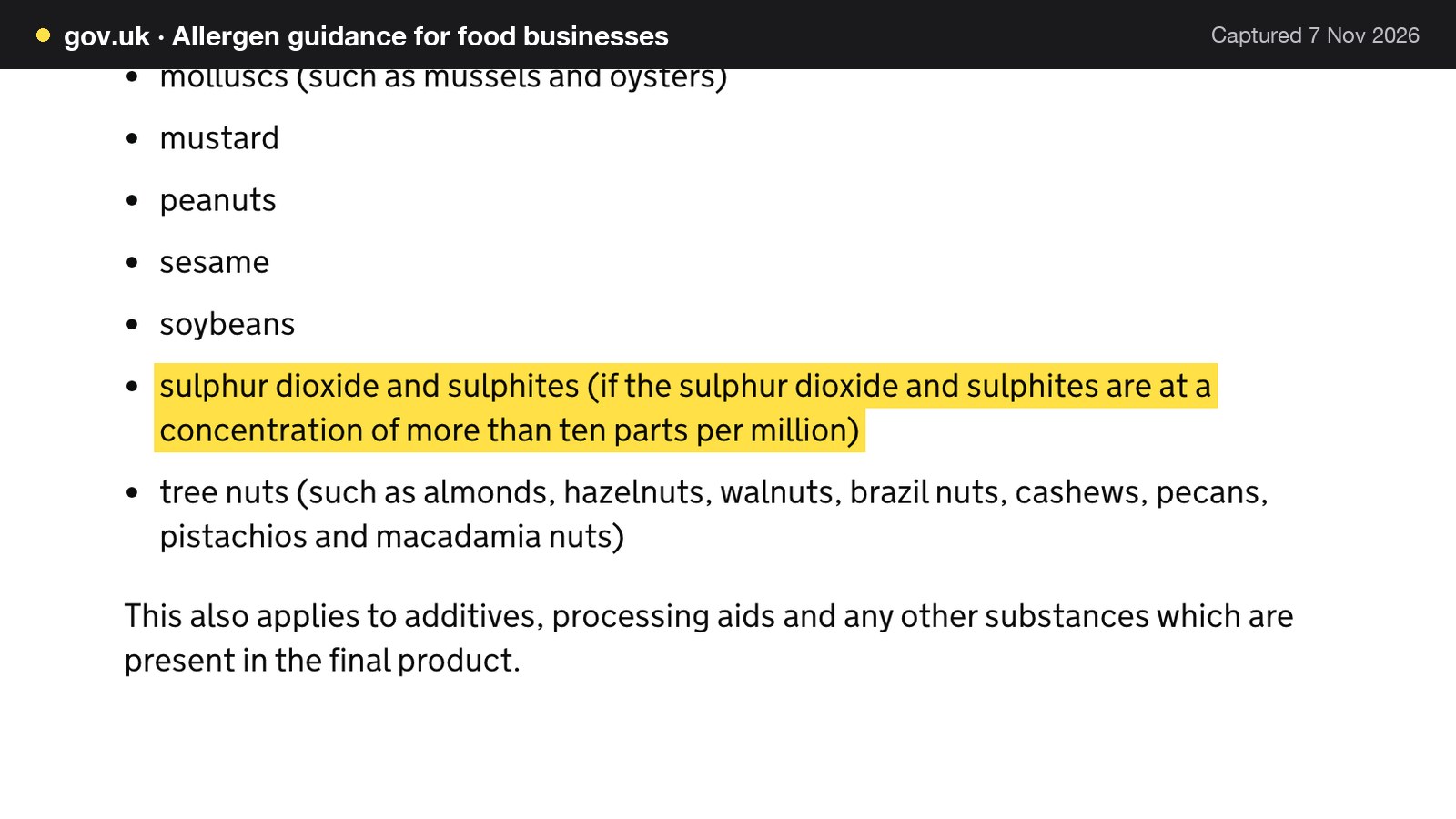
The same guidance says that for non-prepacked food a business "must supply allergen information for every item that contains any of the 14 allergens". For a drinks page the working version is straightforward. List the allergens on a cocktail that contains egg white, milk, nuts or a sulphite-bearing wine, and keep a way for staff to answer a guest who asks about a specific drink.
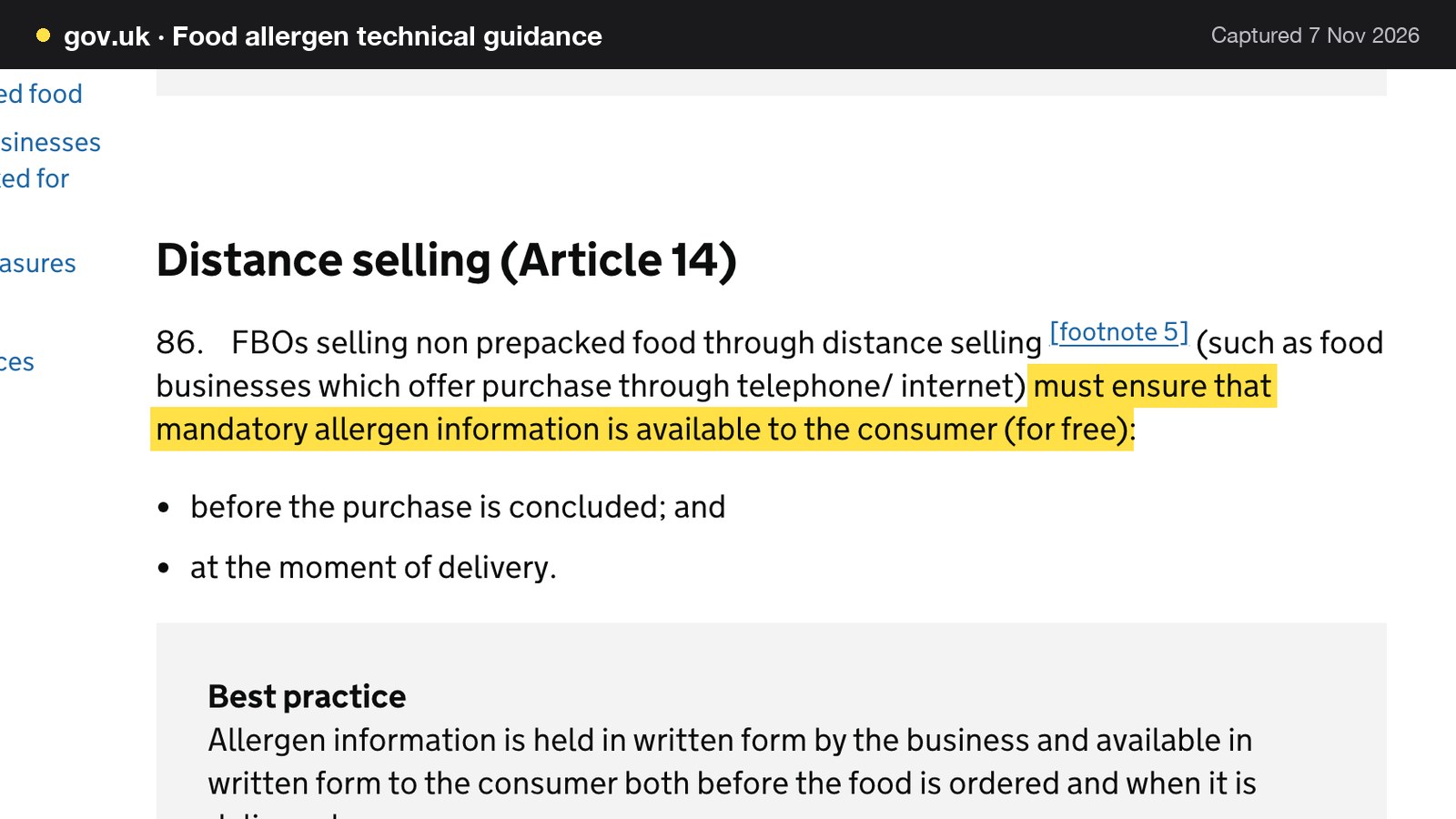
Orders taken at a distance add one more rule. The FSA's technical guidance says businesses selling non-prepacked food through distance selling, "such as food businesses which offer purchase through telephone/ internet", must ensure that mandatory allergen information "is available to the consumer (for free)" before the purchase is concluded and at the moment of delivery. That is relevant to a bar that takes pre-orders of food for a group, or sells a package online that includes food.
Prices and fees shown in the headline
The Competition and Markets Authority says showing "an initial headline price for a product and subsequently introducing additional mandatory charges as consumers proceed with a purchase or transaction – sometimes called 'drip pricing' – is prohibited", and that the price shown must be the total price including any mandatory fees. For a bar, the applications are a booking fee, a mandatory service charge on large tables or a cover charge for an event. If a group must pay it, the group should see it first. An optional tip is a different matter, and this article does not rule on it.
Cocktail bar website design UK: the page in practice
A cocktail bar website design that works for a UK bar is less about decoration than about order. The guest should reach each of the four answers within two taps from the first screen. In practice that means five things, none of which needs a developer.
The first screen has the name, the area, tonight's hours with an "open now" signal, one booking button and a tap-to-call link. The drinks list sits one tap away as page text, divided into sections the guest scans: signature cocktails, classics, wine by the glass, beer, spirits, low and no alcohol. Each line carries a name, a short description and a price. The booking page asks for date, party size and seating area before it asks for anything personal. The events block shows what is on in the next fortnight. The practical footer repeats the address, a map link, the phone number, the age policy and the opening hours.
For a wine bar the weight shifts to the list: by the glass, with the 125ml and 175ml prices, and a note on how each wine is served. For a late bar it shifts to the hours and the door. In every case the most common failure is not poor design but a single piece of information held in a form a phone or a search engine does not read, such as a menu in an image or a booking policy in a social post.
Bar booking website: table, area and private-hire flows
A bar booking website works best when the booking route matches the size of the request. Three flows cover almost every case.
| Typical request | How it works | |
|---|---|---|
| Table booking (What the guest sees: A time list showing only open slots) | Two to six guests, a specific time | Confirms against live availability |
| Area booking (What the guest sees: The areas the bar offers on that service) | A booth, terrace or bar-side area | The guest picks a seating area on the form |
| Group or whole-room request (What the guest sees: A form asking for numbers, occasion and a message) | A party over the maximum, or a takeover | Arrives as an enquiry the owner answers |
Instant confirmation suits the first two. An enquiry suits the third, because the owner needs to agree the numbers, the deposit and any terms before anything is promised. Setting the party size at which a booking becomes an enquiry is a decision for the owner: it is the number at which the owner would want to read the request before confirming it.
A bar also needs to treat walk-ins as a real share of trade. A booking page that sells every seat leaves nothing for the door. Keep an area back, and say so on the page, so a guest who arrives without a booking knows what to expect.
Reserve with Google, and what it does and does not do
A guest who finds a bar on a map listing may press a Book button there. A Reserve with Google booking-link connection lets the bar paste its own booking link into its settings so that the booking destination guests reach from Google is the bar's own booking page and diary. The guest completes the booking on the bar's page, where it joins the diary like any other booking at 0% TableSpark commission. This is a booking-link connection, and bookings made that way are made on the bar's own booking page, not delivered to the Inbox from Google.
Deposits for groups and areas: what a bar can ask and keep
A deposit does two jobs. It tells a group that the table matters, and it covers part of the loss if the group does not arrive. The second job is where the rules bite. GOV.UK's guidance on writing a fair contract says unfair terms include those that "allow you to keep prepayments or impose disproportionate fees if your customer cancels or breaches the contract".
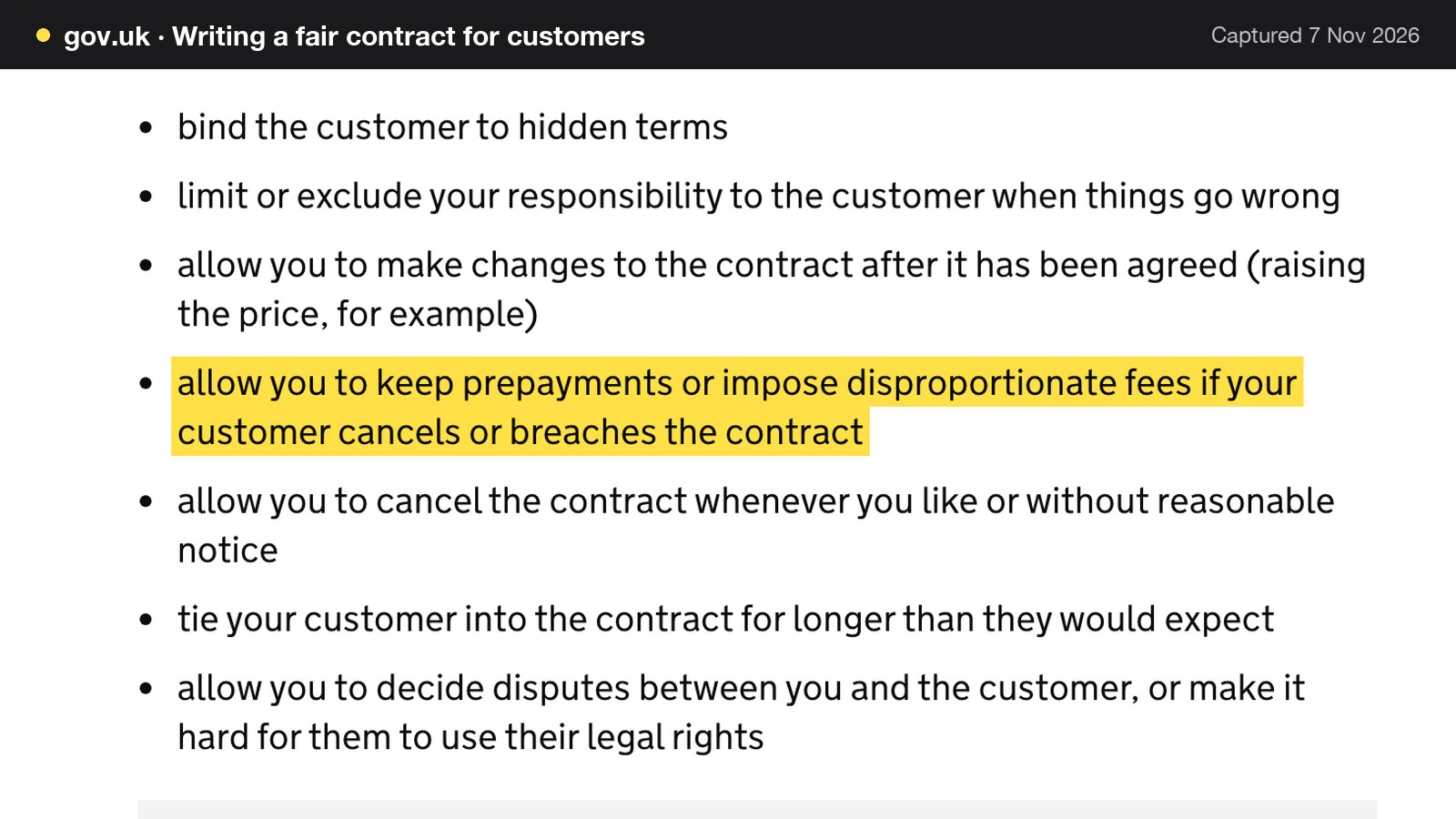
The guidance does not set a safe percentage, and neither does this article. What it implies for a bar is a set of habits. State the amount, and whether it is per head or per booking, before the guest pays. State when it is refundable and when it is not, in plain words, on the booking page and in the confirmation. Credit it to the bill. Keep a deposit that reflects what the bar loses if the group does not come, and be ready to explain how the figure was worked out. If the bar cancels, the deposit goes back.
Two other terms need care. A minimum spend for an area or a room is a commercial term, and the headline price rule above applies: if a guest must spend a stated amount to hold the booth, that amount belongs in the first thing they read. Whether a card fee can be passed on to the guest is a separate question, so check it before adding one.
The sums for one group of eight
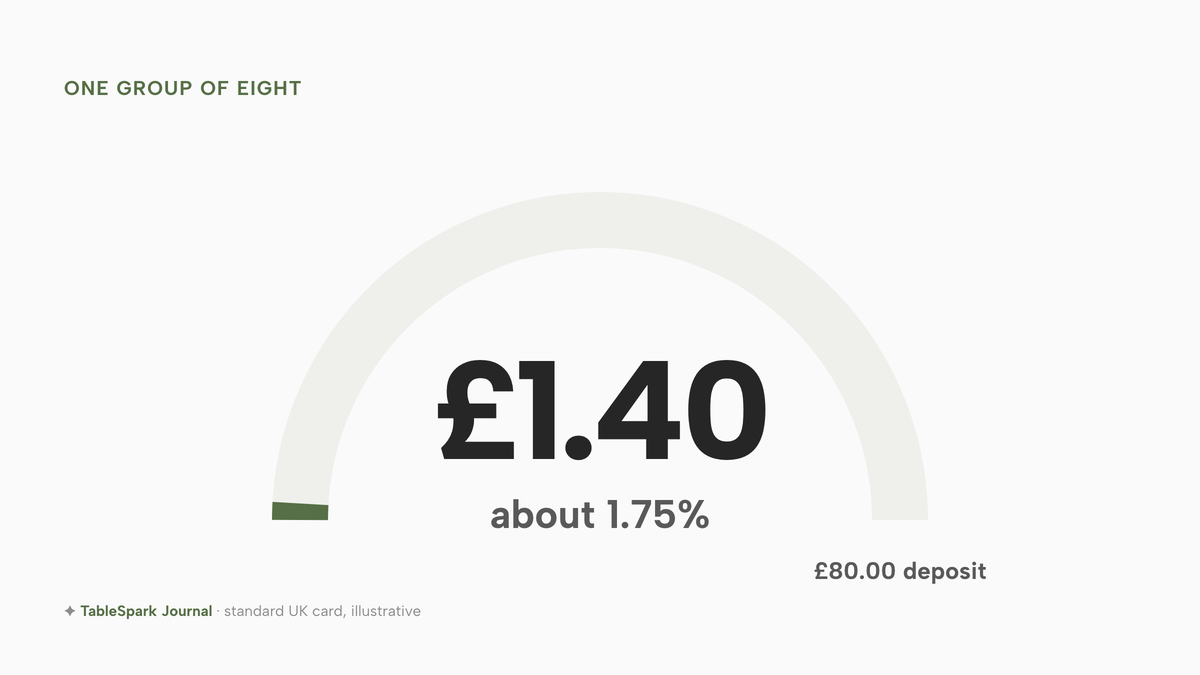
The figures below are illustrative inputs for a sample bar: a deposit of £10 per head for a group of eight, so £80.00 per group booking. If the deposit is paid through Stripe on a standard UK card, Stripe's published rate is "1.5% + 20p for standard UK cards". On £80.00 that is 1.5% x £80.00 = £1.20, plus 20p, so £1.40 for the group. The deposit of £80.00 therefore carries a card fee of £1.40, which is about 1.75% of the deposit. Premium cards cost more, at 2.8% + 20p, and the sum assumes a single payment per booking.
The cost of the fee is small. The loss it guards against is not. If a group of eight is on a £30 average spend per head, the table is worth £240, and an empty booth on a Saturday has no one to resell it to by 10pm.
Being found: a live link is not a found page
A bar can have a website at a working link and still be absent from Google. Misconfigured robots or noindex directives, conflicting canonicals, orphaned pages, rendering problems, missing structured business data or incomplete search verification can leave important pages undiscovered, excluded or misunderstood. The customer impact is direct: guests searching the bar's name, its cocktail list or its area may reach a directory, a commission-charging marketplace or a competing bar first, leaving the bar dependent on paid discovery instead of its own direct demand.
The checks a bar owner can make without a technician are few. Search the bar's name and see which page comes first. Open the drinks list on a phone and see whether it is text. Look for the hours in the listing and see if they match. Check that the booking button leads to the bar's own page. None of this promises a ranking, and the rest of the work, such as titles, descriptions, canonical addresses, a sitemap, robots rules, structured data for a bar or restaurant and search verification, is usually technical enough to need someone to set it up and maintain it.
Indexing and ranking remain decisions for Google. What a bar can control is whether the page gives Google a fair chance to read it: crawlable text, clear titles, correct structured data and a submitted sitemap. A Google Business Profile with the same hours and the same booking link is the other half, because that is where many guests first see the bar.
What a bar website costs in year one
The cost of a bar website is not the price of a builder. A bar that takes group bookings and deposits needs a website, a booking tool that handles deposits and area bookings, a domain, and the card fees on whatever it collects. The comparison below uses a sample bar, with every input labelled as illustrative and open to change.
The sample bar
The sample is a 60-seat cocktail bar that is busy from Thursday to Saturday. These inputs are illustrative:
- 80 bookings a week, all year;
- 25% of them are group or area bookings, which is 20 a week;
- an average group of 8 guests;
- a deposit of £10 per head on group bookings;
- the other 60 bookings a week average 3 guests.
| Working | Result | |
|---|---|---|
| Bookings a year | 80 x 52 | 4,160 |
| Group bookings a year | 20 x 52 | 1,040 |
| Deposit per group booking | 8 x £10 | £80.00 |
| Deposits taken a year | 1,040 x £80.00 | £83,200.00 |
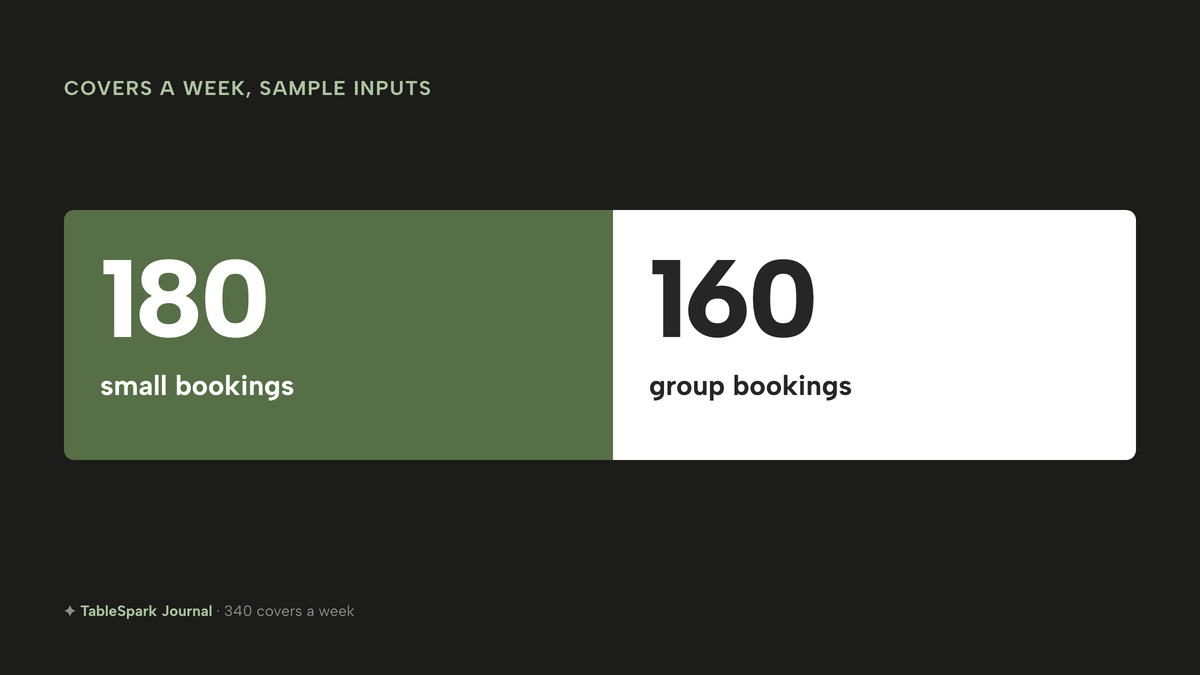
| Covers a week | (60 x 3) + (20 x 8) = 180 + 160 | 340 |
| Covers a month | 340 x 52 / 12 | about 1,473 |
| Stripe on deposits a year | (1.5% x £83,200.00) + (20p x 1,040) = £1,248.00 + £208.00 | £1,456.00 |
The covers matter because some booking tools price by covers. About 1,473 covers a month is above the line simpleERB prints for its middle plan, "Up to 1200 covers per month", so on that provider's own page the Pro plan, with unlimited covers, is the one that fits this bar. Its Starter plan stops at "Up to 300 covers per month".
The Stripe line is the same on every route if deposits go through Stripe, and it assumes every deposit is one standard UK card payment. The bar pays it on each route, so it narrows no gap.
The routes, as published
- How it charges
- Flat monthly plan, 0% TableSpark commission; yearly billing is ten months for twelve
- Website
- live availability
- floor plans
- deposits and reminders
- custom domain with managed SSL
- technical SEO
- How it charges
- Two subscriptions; Squarespace on annual billing, simpleERB paid monthly
- Website builder
- table booking, payments and card capture in the plan
- How it charges
- Two subscriptions; FT Lite "When billed annually in advance"
- Reservation system only
- website bought separately
These prices are not like-for-like, because the providers charge for different things. Squarespace sells the website, and the Basic row on its pricing page, as read for this research, lists no table-booking product, so a booking tool is a second purchase. The Squarespace figure is the lower of the two Basic prices on the page, taken as the annual-billing price, because the two figures sit unlabelled in the text read. simpleERB and Favouritetable sell the booking tool and do not sell the website. TableSpark Growth is one plan that carries both.
The year-one sums
Squarespace Basic at £14.40 a month includes estimated VAT, so a year is 12 x £14.40 = £172.80. Removing 20% VAT, £172.80 / 1.2 = £144.00 excluding VAT. simpleERB Pro at £80 a month is 12 x £80 = £960.00; its page does not state VAT on plan fees, so the sum treats it as quoted. Favouritetable FT Lite at £69.00 a month, excluding VAT, billed annually in advance, is 12 x £69.00 = £828.00. TableSpark Growth is £39 a month excluding VAT, so monthly billing is 12 x £39 = £468.00 excluding VAT, and yearly billing, ten months for twelve, is 10 x £39 = £390.00 excluding VAT.
| Working | Year one | |
|---|---|---|
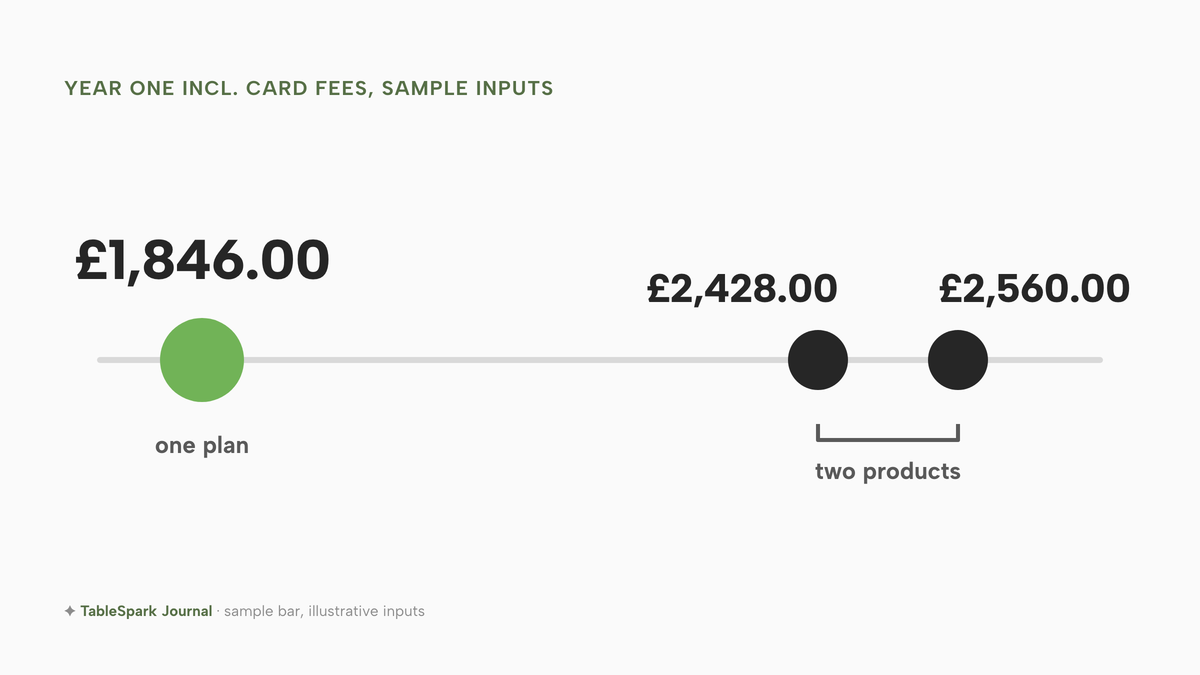
| TableSpark Growth, yearly billing | £390.00 excluding VAT + £1,456.00 | £1,846.00 |
| TableSpark Growth, monthly billing | £468.00 excluding VAT + £1,456.00 | £1,924.00 |
| Squarespace Basic + simpleERB Pro | £144.00 + £960.00 + £1,456.00 | £2,560.00 |
| Squarespace Basic + Favouritetable FT Lite | £144.00 + £828.00 + £1,456.00 | £2,428.00 |
Set against TableSpark Growth on yearly billing, the Squarespace and simpleERB Pro route costs £2,560.00 - £1,846.00 = £714.00 more in year one, and the Squarespace and Favouritetable route costs £2,428.00 - £1,846.00 = £582.00 more. Against monthly billing the gaps are £2,560.00 - £1,924.00 = £636.00 and £2,428.00 - £1,924.00 = £504.00. The gap is the whole point, but the arithmetic is only part of it: the other routes also leave the owner to embed the booking widget in the website, keep two logins, and check the search set-up personally.
Domain renewals, SMS, Squarespace Payments and the owner's time are not costed on any route, and refunds and disputes are not modelled. VAT is treated as described above, with the simpleERB plan fee taken as quoted, so check each quote for VAT before signing. A marketplace route is not costed here because no published rate was read; if a bar compares one, the commission is a percentage of every booking or order, and the input should be the number in its own contract.
For the rest of the cost of opening, from licences to fit-out, the cost to open a bar guide has the full budget. The technology line is one row in it.
What a complete bar website set-up needs
- Opening hours, late hours, last entry and special dates in one place, matching the premises
- The drinks list as page text with names, descriptions and prices, not an image or a PDF
- Measures stated the same way as the printed card: 25ml or 35ml for gin, rum, vodka and whisky, 125ml for wine by the glass
- Allergens on every drink and dish that contains one, including sulphites above ten parts per million
- Table, area and group-enquiry routes visible on the booking page, with the party size where a booking becomes an enquiry
- Deposit amount, per head or per booking, and the refund rule stated before payment
- Any booking fee, mandatory service charge or minimum spend shown in the first price the guest reads
- A dated events block with past events removed
- Age policy and door wording that match the premises, with no timed or unlimited drinking offers
- A custom domain on HTTPS, titles and descriptions, a sitemap and search verification
- A Google Business Profile with the same hours and the bar's own booking link
- Phone, directions and tap-to-call on every page, tested on a phone
Decide: separate tools, or one plan
The choice for a bar is between assembling a website and a booking tool from separate providers, and running both from one plan. The factors that matter are shown below.
| Builder plus a separate booking tool | One restaurant plan | |
|---|---|---|
| Logins | Two or more, one per provider | One |
| Joining them up | Embed a widget, keep it matched to the page | The booking page is part of the site |
| Group enquiries | Depend on the tool chosen | Arrive in the same Inbox as other leads |
| Search set-up | The owner or a technician | Built into the site |
| Billing | Two subscriptions, different renewals | One plan |
For an independent bar that wants a drinks list, bookings, deposits and events on its own domain, one plan is simpler to run and, on the sample inputs above, costs less in year one.
Where TableSpark fits
The builder and booking engine that independent UK restaurants use fit a bar's page and diary too. The restaurant website builder starts from a menu: photograph the printed drinks list or upload the PDF, correct every field, and the sections, items, prices, allergens and tags become structured content. Nothing reaches the live site until the owner confirms the text and prices. The same menu feeds the menu page, the QR menu and the Restaurant schema Google reads. Allergen chips cover the 14 UK allergens on every dish, and a sold-out switch strikes a line through anything that has run out.
The owner edits the page itself. There are 68 modules, including hero, menu, gallery, events, team and reviews, with drag-and-drop ordering and a preview on desktop, tablet and phone. Tap-to-call and directions are on every template. Opening hours and special dates are set once, and the site shows an "open now" badge. Events sit in an events block with dates.
The booking system is Growth and above. Guests pick a date, party size and seating area on the site. The time list shows only slots the bar's rules and real tables can honour. Group requests and parties over the maximum arrive in the Inbox with seating, occasion and the guest's own message, and the owner replies from there and then adds the agreed booking. Deposits are paid at booking, from £1 to £500 per booking, into the bar's own connected Stripe account, with a card guarantee as an alternative, and every confirmed booking gets a confirmation and a reminder the day before in the bar's name.
Search readiness is included in every plan: crawlable content, SEO titles, descriptions and canonicals, Restaurant and LocalBusiness schema, sitemaps, robots rules and Search Console set-up, with the sitemap submitted on every publish. Indexing and ranking remain decisions for Google. A custom domain with managed SSL comes with Growth and Full. Guest records sit under the bar's TableSpark account, visible in the Inbox and guest list, with CSV export.
Pricing, all excluding VAT: TableSpark starts at £19 a month excluding VAT with Starter, which carries the website, enquiry forms and the Inbox. Growth is £39 a month excluding VAT and carries the booking engine, deposits and the custom domain. Full is £69 a month excluding VAT and adds online ordering and table QR ordering for dine-in service. Yearly billing is ten months for twelve. A site is free to build and review, and the paid plan starts on the day the bar presses Publish. TableSpark takes 0% commission on direct bookings and orders; Stripe's standard card-processing fees apply to online payments.
How to do it in TableSpark
The steps below use Growth, at £39 a month excluding VAT, because they include deposits and booking rules. The first two work on any plan.
Step 1 of 7
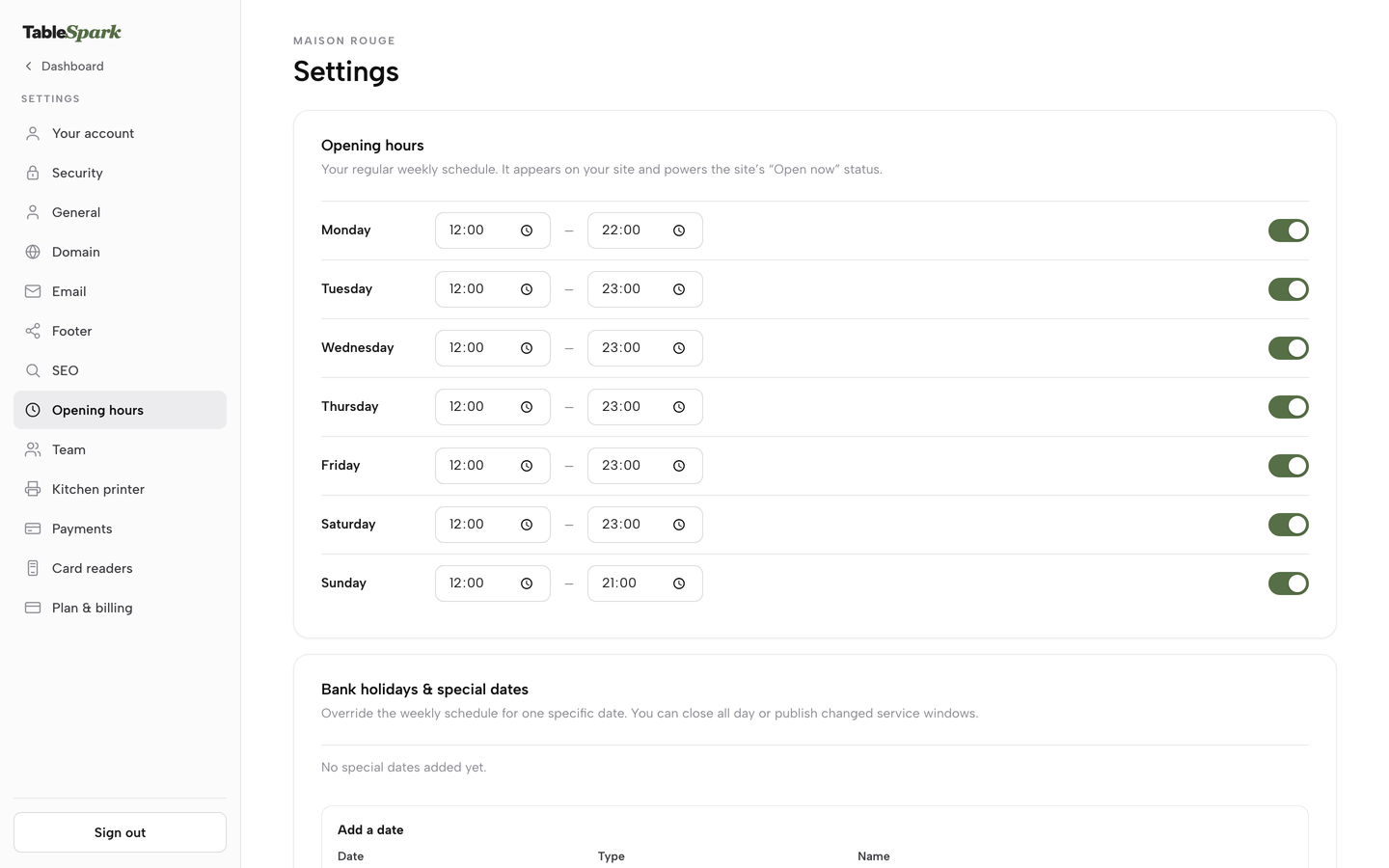
Set the weekly hours
In Settings, open Opening hours. Each day has a From and To time and a toggle. Set the late nights, switch off the closed days and press Save changes.
Step 2 of 7
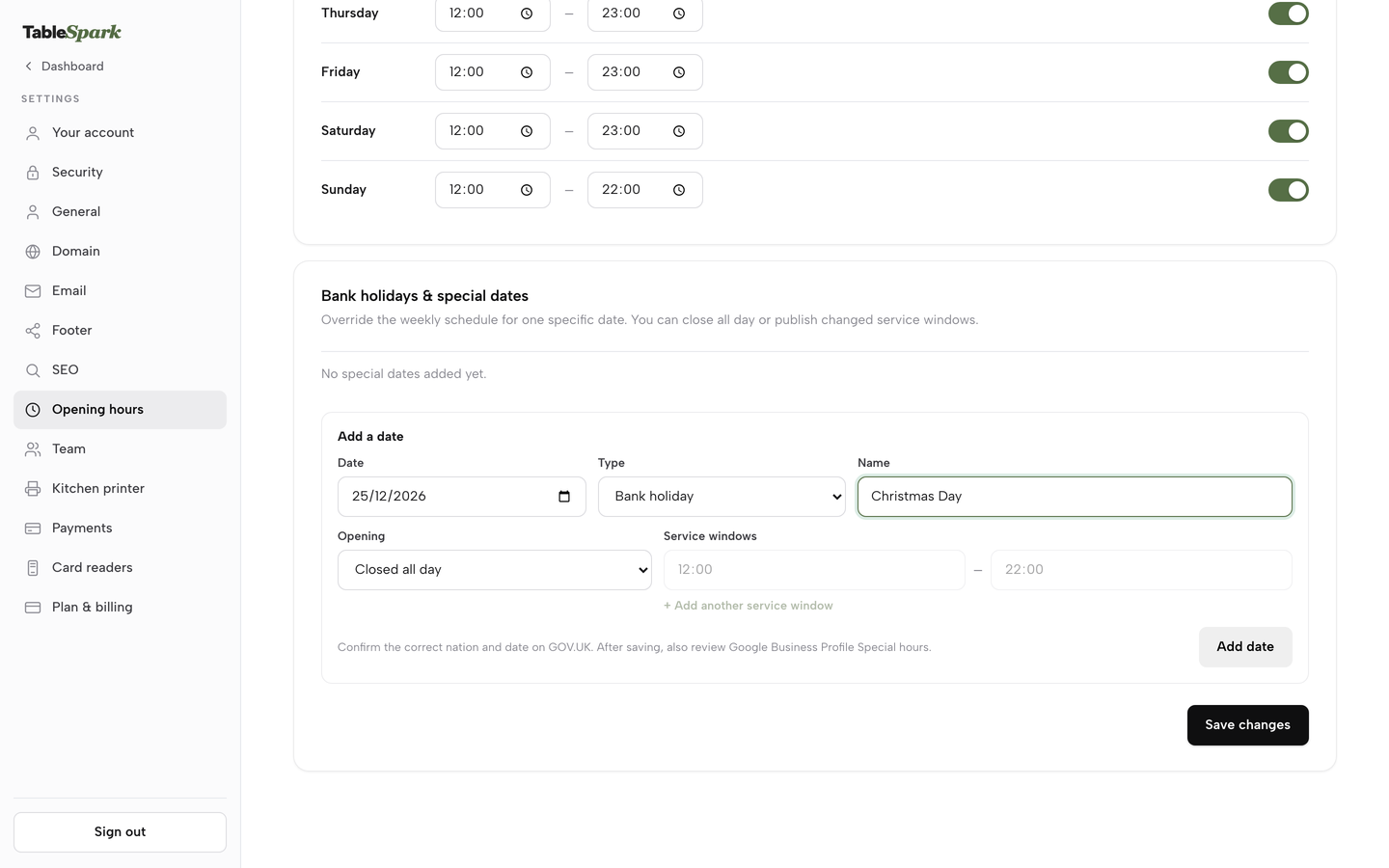
Add the one-off dates
On the same page, use Bank holidays and special dates. Fill in the Date, the Type and the Name, choose Closed all day or Opening with changed hours, then press Add date and Save changes.
Step 3 of 7
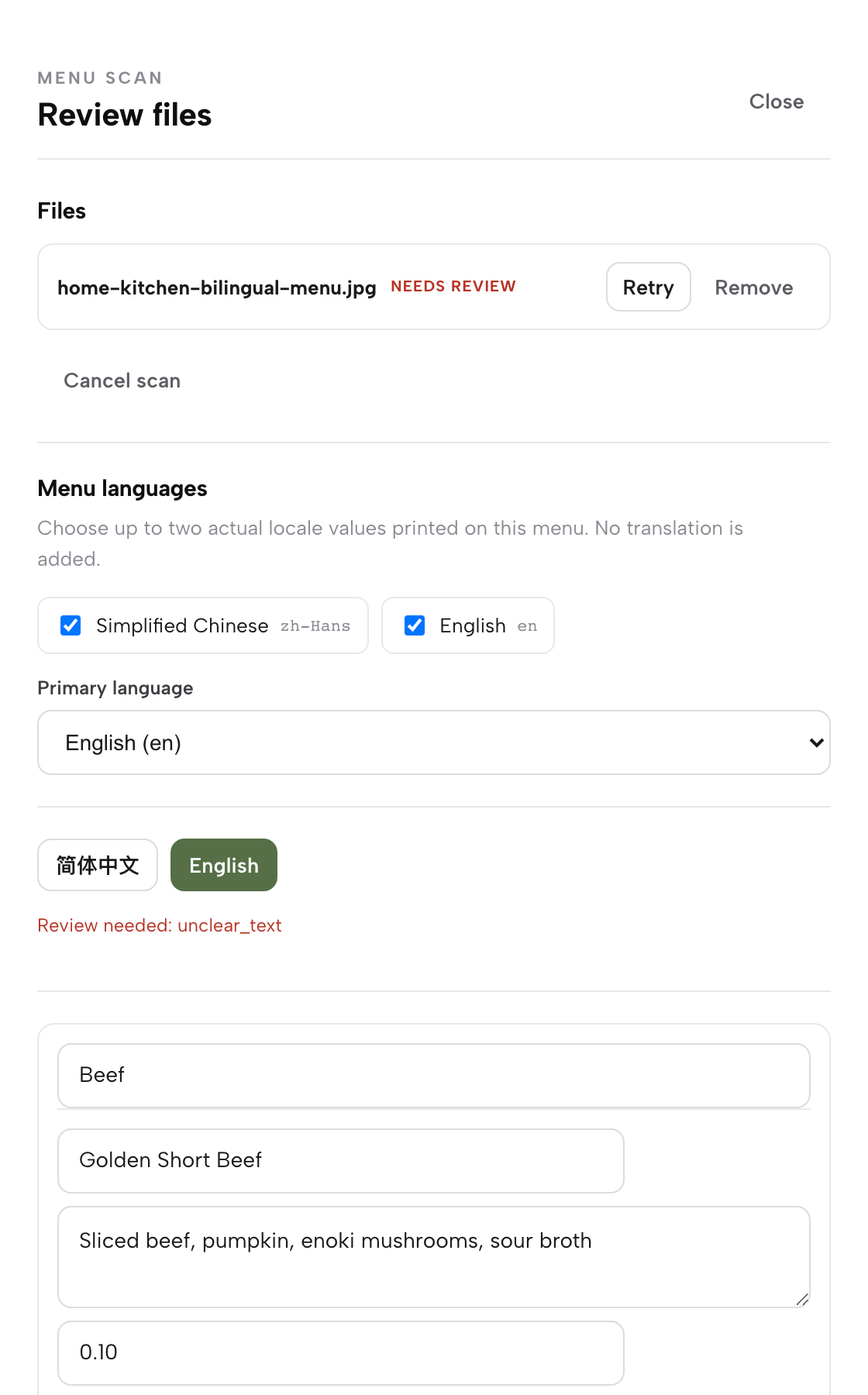
Put the drinks list online
Open Menu, press Scan from photos, choose the printed drinks list, then correct the name, description and price on each line before confirming the review.
Step 4 of 7
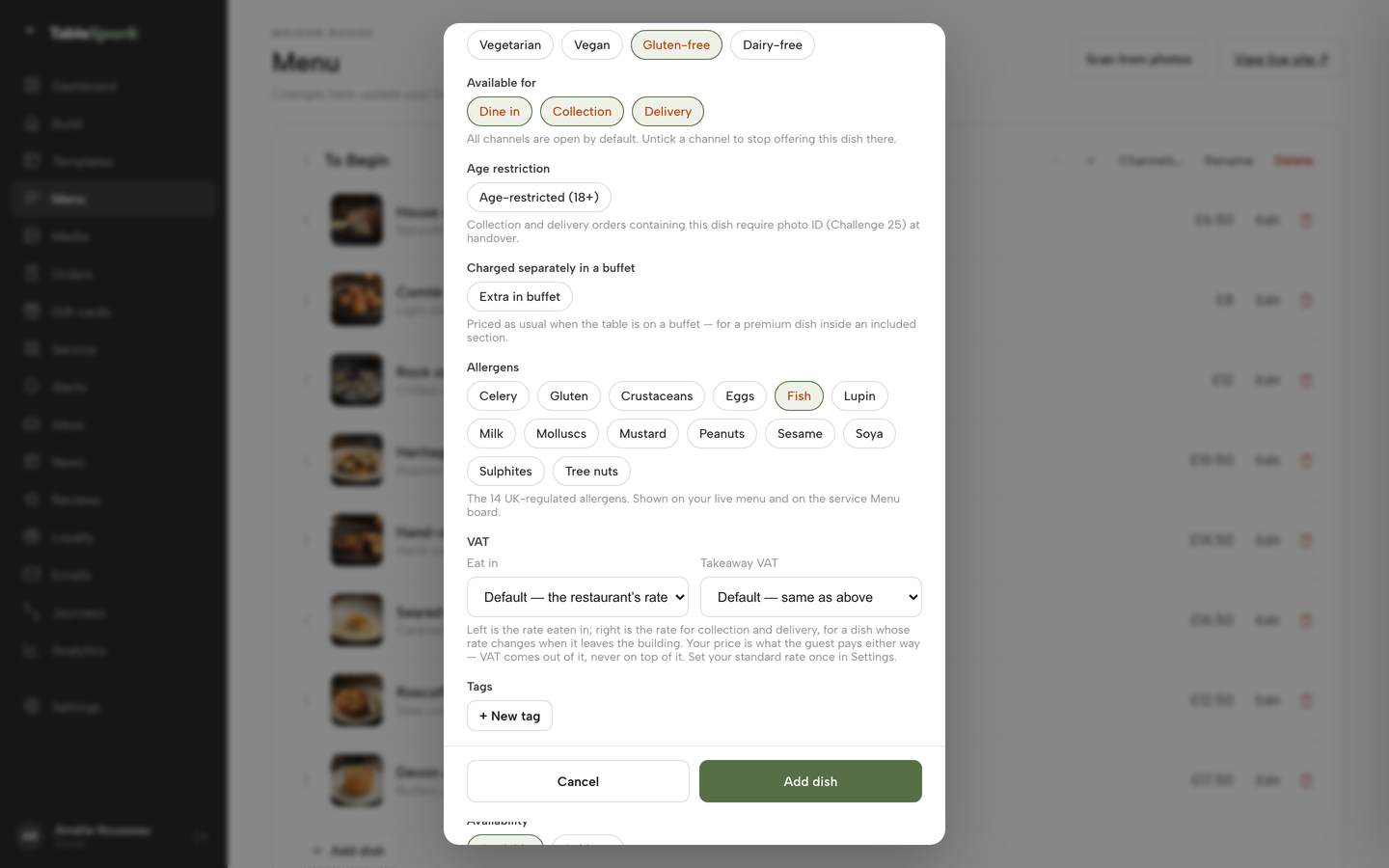
Tick the allergens on each drink
Open a dish in the editor, scroll to the Allergens chips and tick every one that applies. Add a photo if the drink has one, then press Add dish.
Step 5 of 7
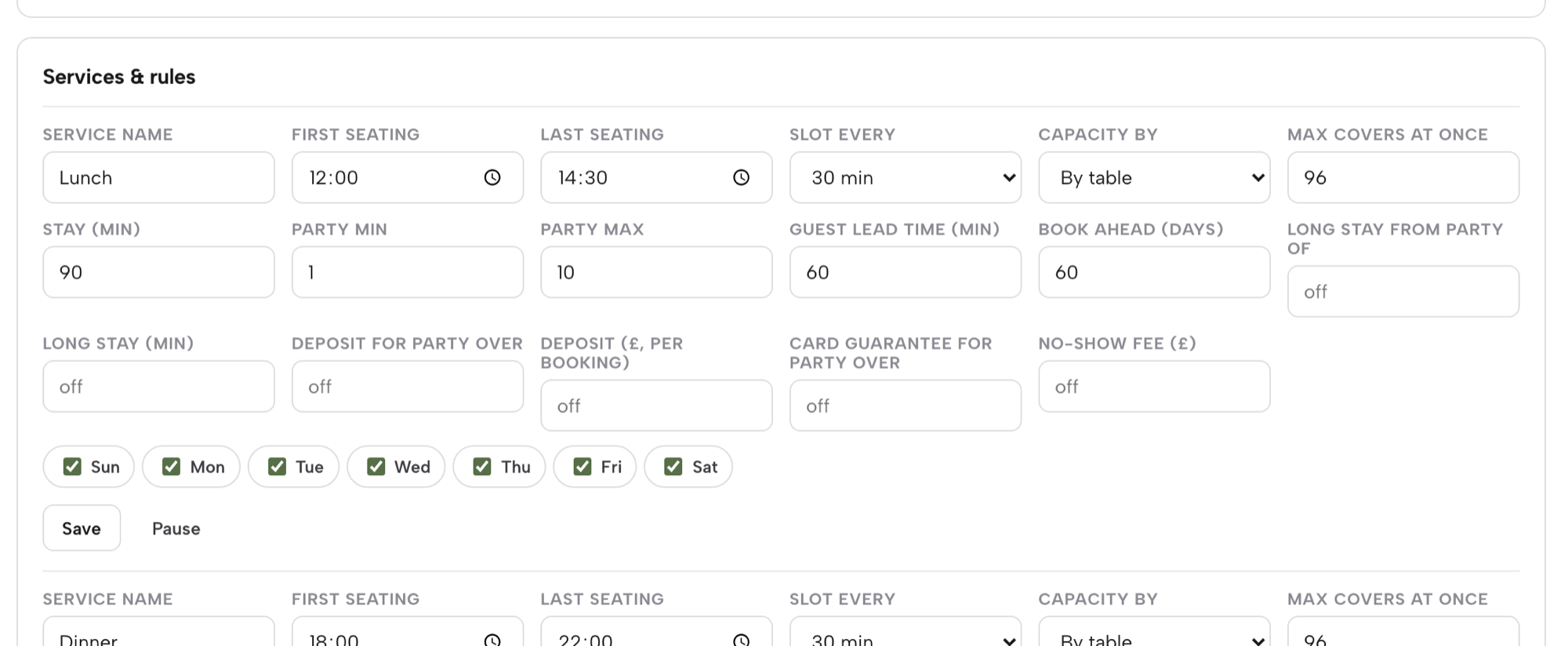
Set the deposit on a service
On Bookings, press Services & rules. On the service row, fill in Deposit for party over and Deposit (£, per booking), or use Card guarantee for party over and No-show fee (£). If both are on, the deposit applies.
Step 6 of 7
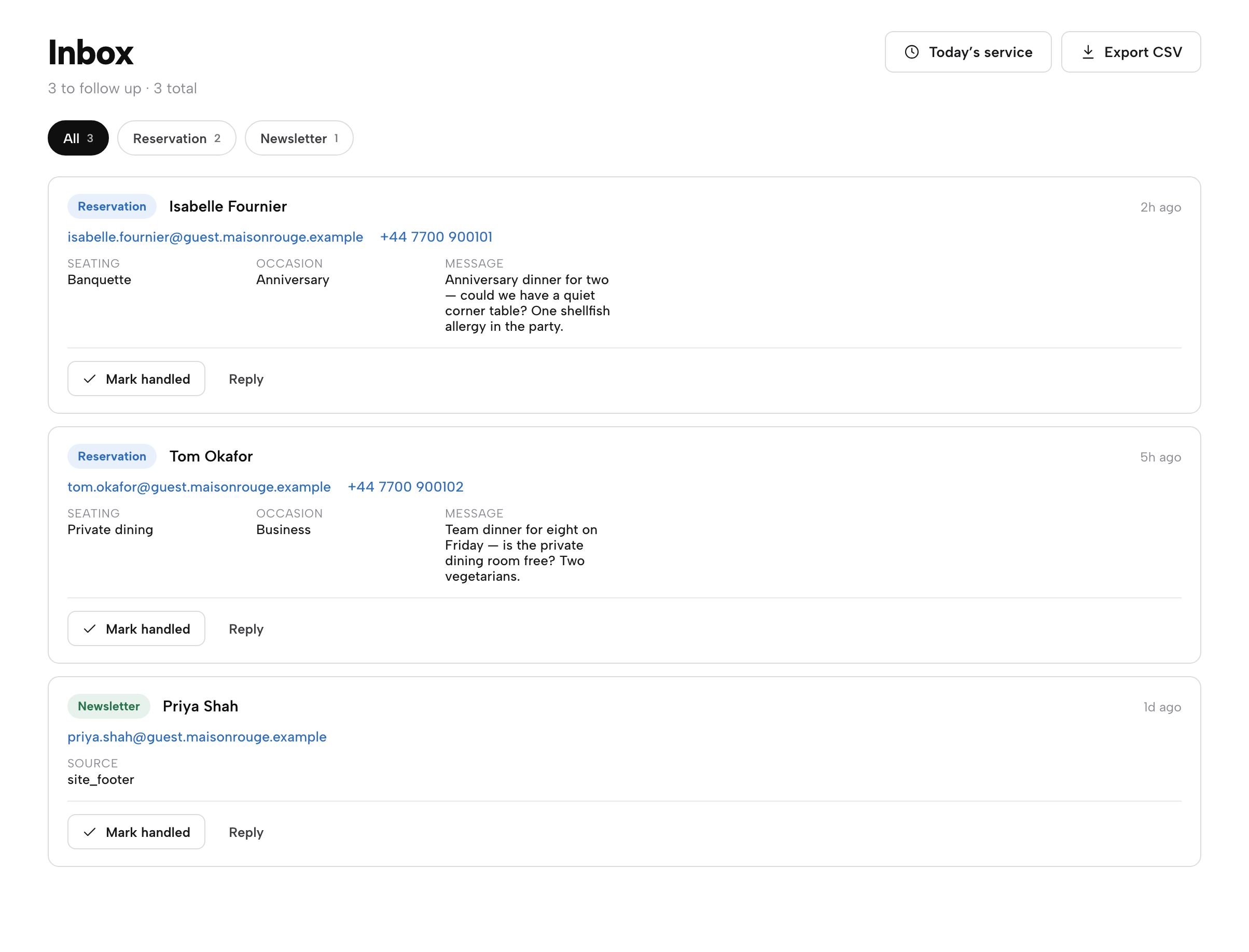
Answer the group enquiry from the Inbox
Open the Inbox and find the reservation enquiry. Press Reply, agree numbers and terms, press Mark handled, then add the agreed booking.
Step 7 of 7
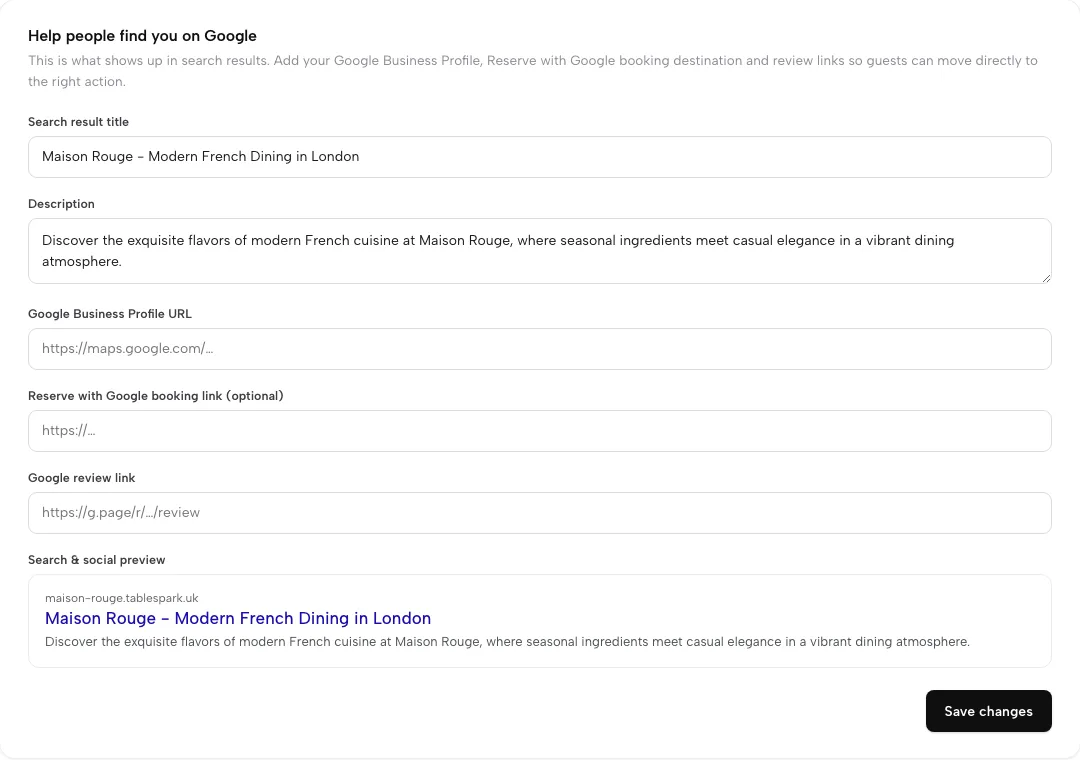
Check the search details and paste the booking link
In Settings, open SEO. Fill in the search title and description, add the Google Business Profile link, and paste the booking link for the Reserve with Google connection.
Tips
- Add an events block on the home page and one on its own page, and delete past dates each week.
- Write the deposit terms before the first group booking, and repeat them in the confirmation.
- Put the party size where a booking becomes an enquiry just below the largest table, so the biggest tables are always read by a person.
- Check the page on a phone after every change to the hours.
- For a pub with a kitchen, the pub website guide covers kitchen hours and the Sunday roast.
Questions bar owners ask
What does a bar website need on it besides a menu and a map?
Hours with late hours and last entry, a booking route, a deposit rule, a dated events list and the door policy. The drinks list should be page text with prices, measures and allergens. A phone number that opens a call and a link to directions belong on every page. Anything a guest would otherwise have to message the bar to find out is worth putting on the page.
Do I have to put 125ml on a website wine list, or only on the printed list?
The licence condition refers to measures displayed in a menu, price list or other printed material available to customers on the premises. It does not say a website must carry them. A website list should still match the card, so showing the 125ml and 175ml glass sizes with prices avoids a mismatch. Take advice from the local licensing authority for a specific case.
Can I take a deposit for a group or area booking, and what can I keep if they cancel?
Yes, if the terms are clear and fair. Government guidance says unfair terms include those that allow a business to keep prepayments or impose disproportionate fees when a customer cancels. State the amount, the refund rule and the cut-off before payment, credit the deposit to the bill, and keep only what reflects the loss. If the bar cancels, refund it.
How do I show private hire and a minimum spend without it looking like a hidden charge?
Put the minimum spend, or the hire terms, in the first price or line the guest reads, before they enter details or pay. The CMA treats mandatory charges that appear late as drip pricing. Send large or whole-room requests to an enquiry form so the owner can state the terms in the reply, and repeat them in the written confirmation.
Do I need allergen information on a drinks menu, and does wine count?
Allergen information is required for food, and the cautious practice is to give it for drinks too. Sulphur dioxide and sulphites at more than ten parts per million are one of the 14 allergens, so a wine at that level needs flagging. List allergens for cocktails with milk, egg white or nuts, and keep a way for staff to answer questions about a specific drink.
Will guests find my bar on Google and book from there, and does that bring commission?
A live link is not a found page, and indexing and ranking remain decisions for Google. A well-built page, a matching Google Business Profile and a booking link give a bar a fair chance. A Reserve with Google booking-link connection sends guests to the bar's own booking page, where TableSpark takes 0% commission, and Stripe's card fees apply to any deposit.
What does a website plus a booking tool cost a year, with deposit card fees?
On the sample bar in this article, with its inputs labelled as illustrative, a builder plus a separate booking tool plus Stripe on deposits is £2,428.00 to £2,560.00 in year one. TableSpark Growth with Stripe on the same deposits is £1,846.00 on yearly billing and £1,924.00 on monthly billing, with the plan fee excluding VAT.
Can I list events and late-night opening without the page going out of date?
Yes, if the hours and dates live in one place. Set the weekly hours once, add special dates as one-off entries, and put events in a dated block, then remove past events on a schedule. A site that shows an "open now" badge from the weekly hours keeps the hours consistent without a separate notice for each night.
The recommendation
For an independent UK bar, whether a cocktail bar, a wine bar or a late bar, TableSpark is the best-value and best overall choice. The sample sums show why: a general builder plus a separate booking tool costs between £582.00 and £714.00 more in year one than TableSpark Growth on yearly billing, before the owner has joined the two up, and it leaves the search set-up to the owner. TableSpark Growth is £39 a month excluding VAT, or £390 a year excluding VAT, and carries the website, the booking engine, floor plans, deposits and reminders, group requests in the Inbox, a custom domain with managed SSL, the technical SEO bundle and the Reserve with Google booking-link connection. A bar that also wants table QR ordering for dine-in service takes Full, at £69 a month excluding VAT.
Sources
- GOV.UK, weights and measures: specified quantities — UK Government (checked 2026-11-07)
- Licensing Act 2003 (Mandatory Licensing Conditions) Order 2010, Schedule — UK Government (checked 2026-11-07)
- GOV.UK, alcohol licensing — UK Government (checked 2026-11-07)
- GOV.UK, allergen guidance for food businesses — UK Government (checked 2026-11-07)
- GOV.UK, food allergen labelling and information requirements technical guidance — UK Government (checked 2026-11-07)
- CMA, unfair commercial practices (CMA207) — UK Government (checked 2026-11-07)
- GOV.UK, writing a fair contract for customers — UK Government (checked 2026-11-07)
- Stripe UK pricing — stripe.com (checked 2026-11-07)
- Squarespace pricing — squarespace.com (checked 2026-11-07)
- simpleERB pricing — simpleerb.com (checked 2026-11-07)
- Favouritetable pricing — favouritetable.com (checked 2026-11-07)
- TableSpark pricing — TableSpark (checked 2026-11-07)
- TableSpark, restaurant booking system — TableSpark (checked 2026-11-07)
- TableSpark, restaurant website builder — TableSpark (checked 2026-11-07)
- TableSpark, restaurant website design — TableSpark (checked 2026-11-07)
- TableSpark tutorial, set hours and booking rules — TableSpark (checked 2026-11-07)
- TableSpark tutorial, put your menu online — TableSpark (checked 2026-11-07)
- Zheng, K. (2026), Search Readiness and Direct-Booking Infrastructure on Independent Restaurant Websites in the United Kingdom — doi.org (checked 2026-11-07)
Related reading
 How TableSpark handles thisTableSpark restaurant website designChoose one of 50 restaurant designs, with search readiness built into every page.