 Valentina Rojas
A hotel restaurant that only residents can book is a dining room losing covers every week, and a per-cover booking tool can cost more than the covers it fills.
A hotel restaurant needs a booking system that treats residents and outsiders as two guest streams on one floor. Set breakfast, lunch, afternoon tea and dinner as separate sittings, each with its own slot length, party limits, notice period and deposit. Let outsiders book live on the hotel's own page, and route large parties and private dining to an enquiry. Compare plans by the full year, not the entry price, because per-cover charges grow with every guest.
The night the rooms are full and the restaurant is not
Picture a 20-room inn in a market town with a 50-cover restaurant. On a Friday in January the rooms are two-thirds sold. A couple who live nine miles away want Sunday lunch, so they search the inn's name, find a page that lists rooms and a phone number, and ring at 3pm. Nobody answers, because the one person who takes bookings is serving lunch. They book somewhere else. On Saturday the same inn turns away a table of six at 7pm because eight residents have walked down for dinner, and nobody wrote that down anywhere the front desk could see.
That is an illustration, not a statistic, but the shape behind it is documented. VisitEngland's England Occupancy Survey, whose source is hotel data submitted to Amadeus, recorded room occupancy of 66% in January 2025 and 67% in January 2026, against 87% in July 2025 and 86% in July 2026. The survey is hotel-weighted and mostly covers hotels, not B&Bs, and it carries the note "Historical figures subject to change as new hotels submit data to Amadeus", so it describes hotels in general and not any one inn. The pattern it shows is still plain. In the quiet months, outsiders are the guests who can fill a hotel dining room. In the summer months, residents take the tables, and outsiders need to be able to see whether a table is left.
The latest official release makes the same point from the other side. VisitBritain's "England Hotel Occupancy: latest" page, released on 29 October 2026, reports that England hotel room occupancy was 85% in September 2026, down 0.8 percentage points year on year, and that year-to-date occupancy was 79%. The same page says that occupancy declined across all hotel-size bands, with the largest reduction among hotels with 1-100 rooms, and it notes that these statistics are still in development. A 20-room hotel sits in the smallest band. When room income softens, a restaurant that sells only to residents has no second source of covers.
A hotel restaurant has two sets of guests who want different things from the same tables. Residents expect a table without a fuss. Outsiders must find the restaurant, see that a table exists, and book it without ringing a number that goes unanswered during service. A vendor blog from 2014, quoting a Micros study, said that only 6% of the hotels it checked allowed a restaurant reservation during the online booking process. That is an old, vendor-quoted figure and is not evidence of today's position, but the failure it describes is familiar: the room booking flow has a place for a room and no place for dinner.
The knock-on costs are concrete. An empty table at 7pm is not resold at 9pm. Staff are rostered for a restaurant that is quiet. A guest who is turned away at the desk does not come back for the afternoon tea they were planning for their mother. And a booking tool chosen in a hurry can add its own cost on top: some charge per cover, so the busy weeks a hotel is trying to create are the weeks the tool costs most.
This guide is for the independent hotel, inn or B&B that serves both groups. It covers how the two guest streams share one floor, how services such as breakfast, Sunday lunch and afternoon tea are set up, what the law says about deposits and prices, how to handle private dining and events, how to be found, and what a year of booking software costs for a 20-room hotel with a 50-cover restaurant.
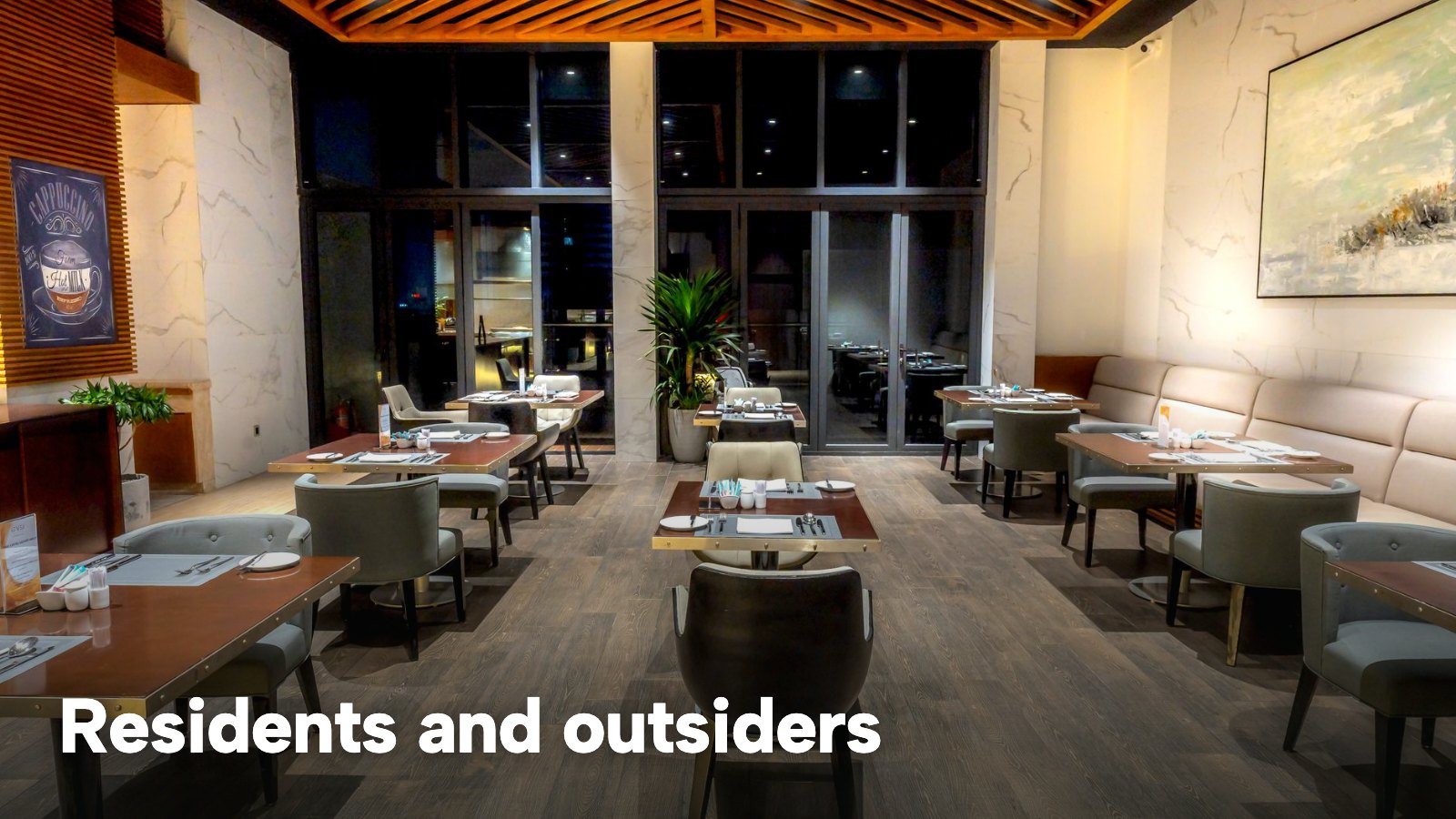
How a hotel restaurant booking system works
Without the product names, a hotel restaurant booking system does four jobs. It publishes the times a guest can book. It checks each request against the tables that are really free. It takes whatever payment or card details the rules require. And it puts every booking, whether it came from the website, the telephone or the front desk, into one diary.
A hotel differs from a high-street restaurant in the mix of guests and the number of separate sittings in a day. A restaurant that opens for dinner has one service. A hotel dining room may have breakfast for residents from 7am, a lunch or Sunday roast for outsiders, afternoon tea at 2pm, and dinner for both groups, all in the same room and with different rules for each.
Two guest streams, one floor
The table below sets out what each stream needs from the system. The point is that the two streams do not need two systems. They need rules that differ by sitting, and one diary that shows both.
| Guest stream | When they eat | What they need from booking | What the owner needs |
|---|---|---|---|
| Residents | Breakfast and dinner | A table without a fuss, often arranged at the desk | Tables held back at busy times |
| Non-residents | Dinner, Sunday lunch, afternoon tea | Live availability on a page they can find | Covers that fill quiet nights |
| Parties and events | Private dining, celebrations, groups | A way to ask, then a confirmed price | An enquiry the team can answer, not an instant booking |
Residents are mostly handled by people. A guest checking in asks at the desk, and a member of staff books the table. On the TableSpark booking page that is the "New booking" button, where staff set the date, guests, time and Source (Phone or Walk-in), and the page says it "runs the same availability check as your website". A table taken by a resident at the desk therefore stops being offered to the public. The same live diary serves both streams.
Services as the unit
For a hotel, the service is the idea that matters most. TableSpark's booking page defines it plainly: "A service is a sitting such as Lunch or Dinner; it decides when the engine takes bookings." Opening hours say when the doors open; services say when the engine takes bookings. Each service carries its own first and last seating, a slot every 15, 30 or 60 minutes, days of the week, party minimum and maximum, guest lead time, book-ahead days, a default stay with a longer stay for larger parties, and capacity by whole room or by table. A service can be paused and resumed.
For a hotel that means breakfast, a Sunday roast sitting, afternoon tea and dinner can each be set up as a separate service with its own seating window, slot length, capacity, party size, lead time and deposit. The tutorial gives the examples "Lunch, Dinner, a Sunday roast sitting" and notes that a service can run past midnight. A service named Afternoon tea or Breakfast is a configuration of the same fields, set by the hotel.
This matters because the rules really do differ:
- Breakfast is mostly residents, with short slots and little notice, so the lead time can be short.
- Sunday lunch for outsiders sells weeks ahead, so a longer book-ahead window and a deposit for larger tables are sensible.
- Afternoon tea has a fixed menu and a fixed stay, so one slot every 30 or 60 minutes with a capped number of covers at once stops the kitchen being hit by every booking at 3pm.
- Dinner is shared. A smaller number of covers at once for outsiders, with the rest left for residents, is the owner's decision, made through the capacity of the service.
Instant confirmation or an enquiry
TableSpark lets the owner choose per service whether a booking confirms straight away or arrives as an enquiry. The booking page says that "Bookings inside your rules confirm straight away" and that "Group requests and parties over your maximum arrive in the Inbox with seating, occasion and the guest's own message." For a hotel the sensible split is instant confirmation for two to six at dinner and Sunday lunch, and an enquiry for a table of twelve, a wedding party or a private room. A large party is exactly the case where the owner wants to read the request before saying yes.
Tables, not just totals
A hotel dining room often has a conservatory, a bar area and a private room, and residents may prefer one over the other. The booking page lets each room be "its own canvas" (Main room, Terrace, Private Dining), tables can be marked combinable with others in their zone, and a service can count capacity "by whole room or by table". The guest form asks for "Date, guests, time, seating preference, occasion, allergies and notes". The occasion and allergy fields are what an afternoon tea or a birthday dinner needs the kitchen to see.
Do you need the booking tool to talk to the room system?
This is the first question hotels ask, and the honest answer is that it depends on what the restaurant actually does with the room system today. TableSpark's booking diary handles services, tables, deposits and guest records with CSV export, and this guide describes only that.
A test helps. List what the restaurant needs the room system to do:
- Does a resident's dinner ever go on the room bill, or is it paid at the table?
- Does the kitchen need to know which table is a resident, or only that the table is booked?
- Does anyone use the room system to find out who is in the building at 7pm?
If the answer to all three is no, a separate booking page that feeds the front desk's view of the diary is enough. Reception can see tonight's bookings in the Bookings list on the Service screen, and a resident booked at the desk goes into the same diary. If one of them is yes, write down exactly what the restaurant needs before comparing prices, because each yes shapes the workflow more than any price does.
What the law says a hotel restaurant must get right
This is a summary of public law and official guidance as published on 8 November 2026, not legal advice; check the current position, or take advice, before acting on a specific case.
Cancellation: catering for a specific date
Online and telephone bookings are distance contracts, and the Consumer Contracts (Information, Cancellation and Additional Charges) Regulations 2013 give many consumers a 14-day right to cancel them. Regulation 28 lists the cases where that right does not apply. Among them, in regulation 28(1)(h), is "the supply of accommodation, transport of goods, vehicle rental services, catering or services related to leisure activities, if the contract provides for a specific date or period of performance."
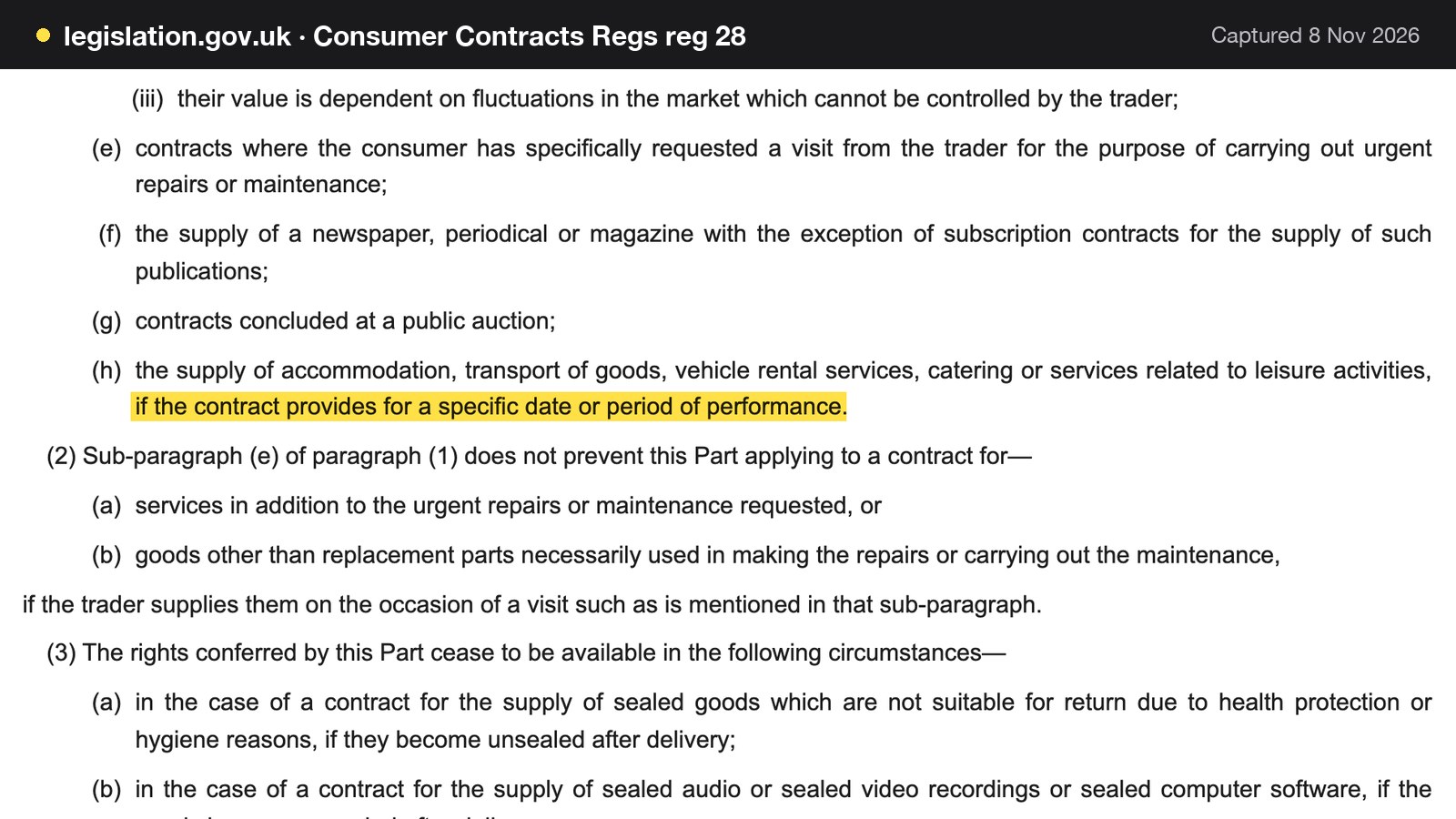
For a hotel restaurant, a table for Sunday lunch on a stated date, or an afternoon tea on a stated afternoon, is catering with a specific date. The exception removes the statutory 14-day cancellation right for that kind of contract. It does not remove the need for the hotel's own cancellation terms to be fair, and it does not allow any term whatever. The fairness test follows in the next section.
Deposits and the fairness test
A deposit is the usual way to protect a Sunday lunch table or an afternoon tea. The CMA's guidance, "Writing a fair contract for customers", updated on 22 July 2026, lists among the things a term is unlikely to be fair if it allows the business to do: "keep prepayments (including deposits) if the contract does not go ahead".
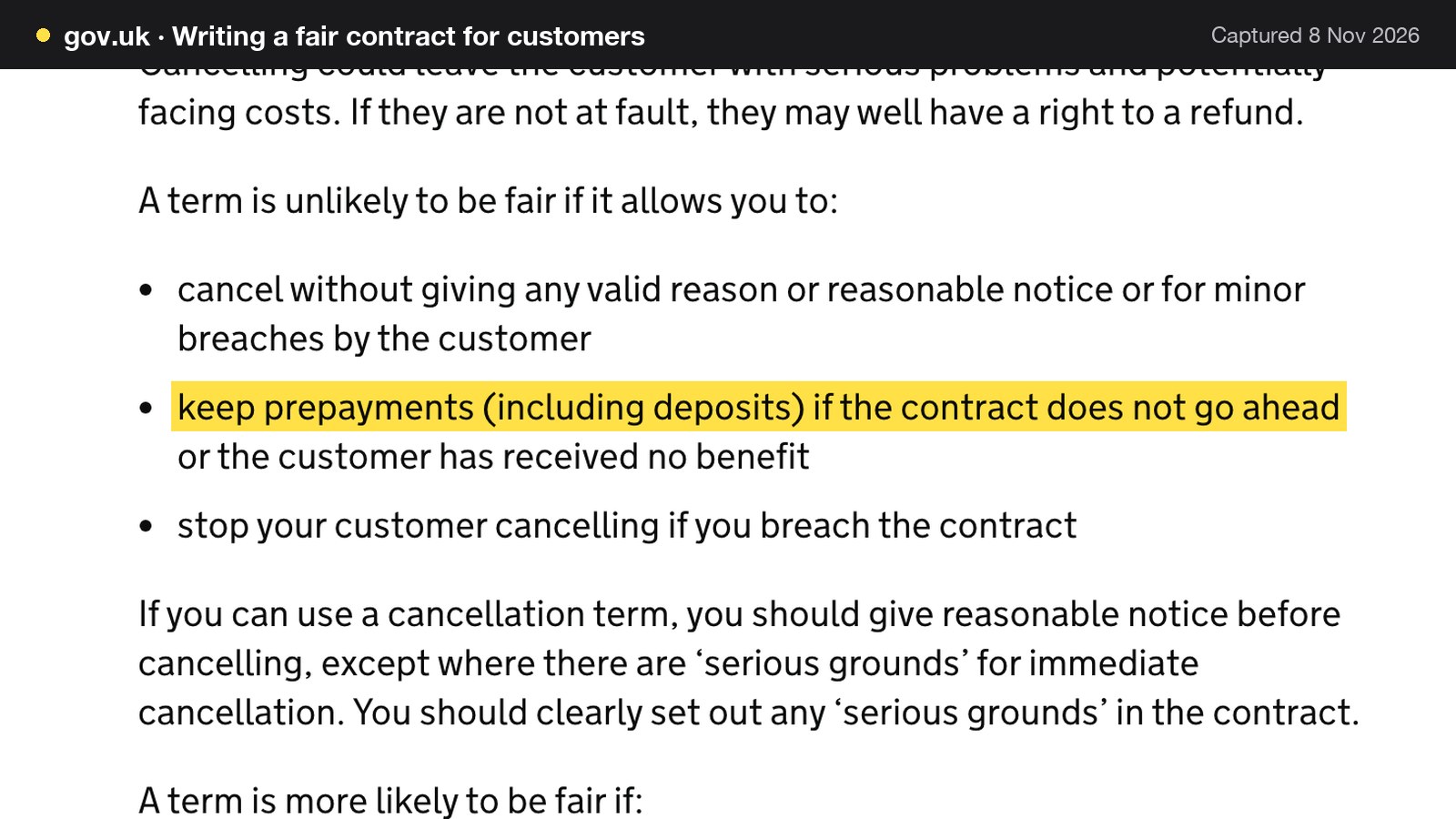
The same page says that any prepayments or deposits kept must take into account what the business will actually lose as a result. In practice, that means a deposit rule should be written as a rule about the loss, set at a level that bears a sensible relation to what an empty table costs, with clear notice of when it is returned. The hotel's terms should say what happens if the guest cancels with notice, and the booking page should show them before the guest pays.
TableSpark's deposit rule is set on the service: "Deposit: paid at booking, from £1 to £500 per booking", with a party size threshold, and a "Card guarantee: card held, charged only when you confirm a no-show". The page adds: "If both are on, the deposit takes priority". Deposits are "Paid into your own connected Stripe account; Stripe's standard card-processing fees apply to online payments". The guide to restaurant booking deposits covers the wording of a deposit policy in depth.
The price the guest sees
The Competition and Markets Authority's price transparency summary, updated on 7 January 2026, says: "Prices must be clear, complete and accurate." It adds that in the invitation to purchase "you must give the customer the total price of the product."
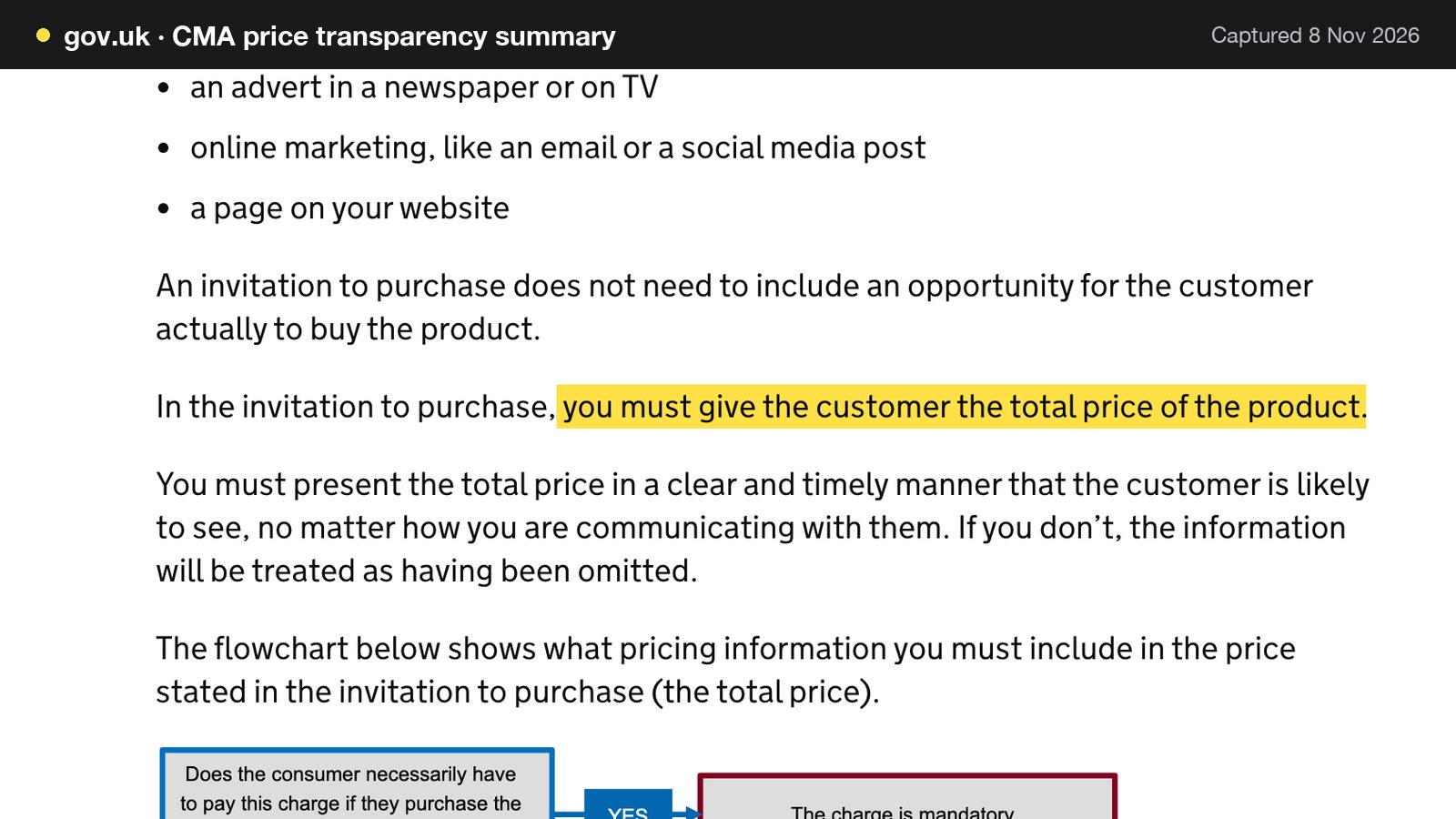
The page explains that a charge is mandatory if the customer must pay it to buy the product, giving the example of a fee such as a delivery or booking fee, and that the total price should normally include any unavoidable or mandatory charges. For a hotel restaurant, that bears on afternoon tea. If the tea is a set price and a service charge is compulsory, the compulsory charge belongs in the price the guest sees first. An optional extra, such as a glass of champagne added to the tea, is an optional charge and can be shown separately, because optional charges do not have to be part of the total cost. The page also records the penalty: a business found to have broken the law could be fined up to 10% of its turnover, or £300,000, whichever is greater. The CMA says its guidance explains the relevant parts of the Digital Markets, Competition and Consumers Act 2024.
Allergens when guests choose food in advance
When the guest chooses food before arriving, for a set afternoon tea ordered online, a pre-ordered Sunday roast, or a group menu, the Food Standards Agency guidance applies to food sold online or by phone. The GOV.UK allergen guidance for food businesses, updated 17 July 2026, says in section 3.2 that "allergen information must be provided at two stages in the order process".
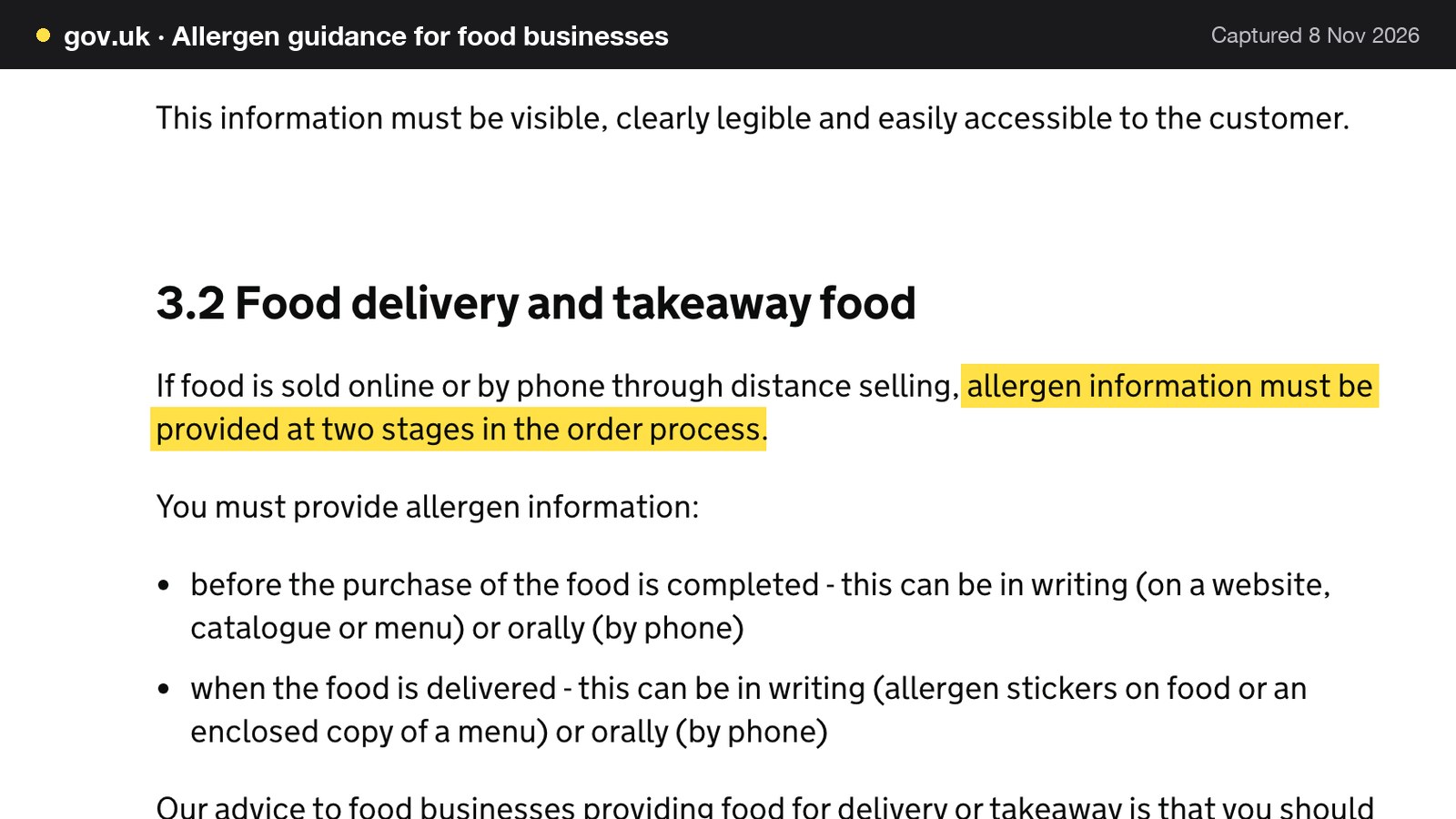
The guidance says allergen information must be provided before the purchase of the food is completed, and when the food is delivered. It applies to England, Northern Ireland and Wales, and it also says that food businesses must make sure staff receive training on allergens. For a hotel, in practice a pre-order route needs allergen information at the point of choice, and a fixed tea needs a printed or spoken route when it arrives at the table. TableSpark's group pre-orders are built around it: each guest has their own link, gives their name and allergies first, and "A dish that contains an allergen they listed is locked for them, and a dish with no allergen information is never shown as safe." The booking form also asks for allergies and notes on every booking.
Marketing to past residents and diners
A hotel holds a long list of email addresses: every past resident, every wedding guest, every diner who booked. The Information Commissioner's guidance on electronic mail marketing says: "You must not send marketing emails or texts to individuals without specific consent."
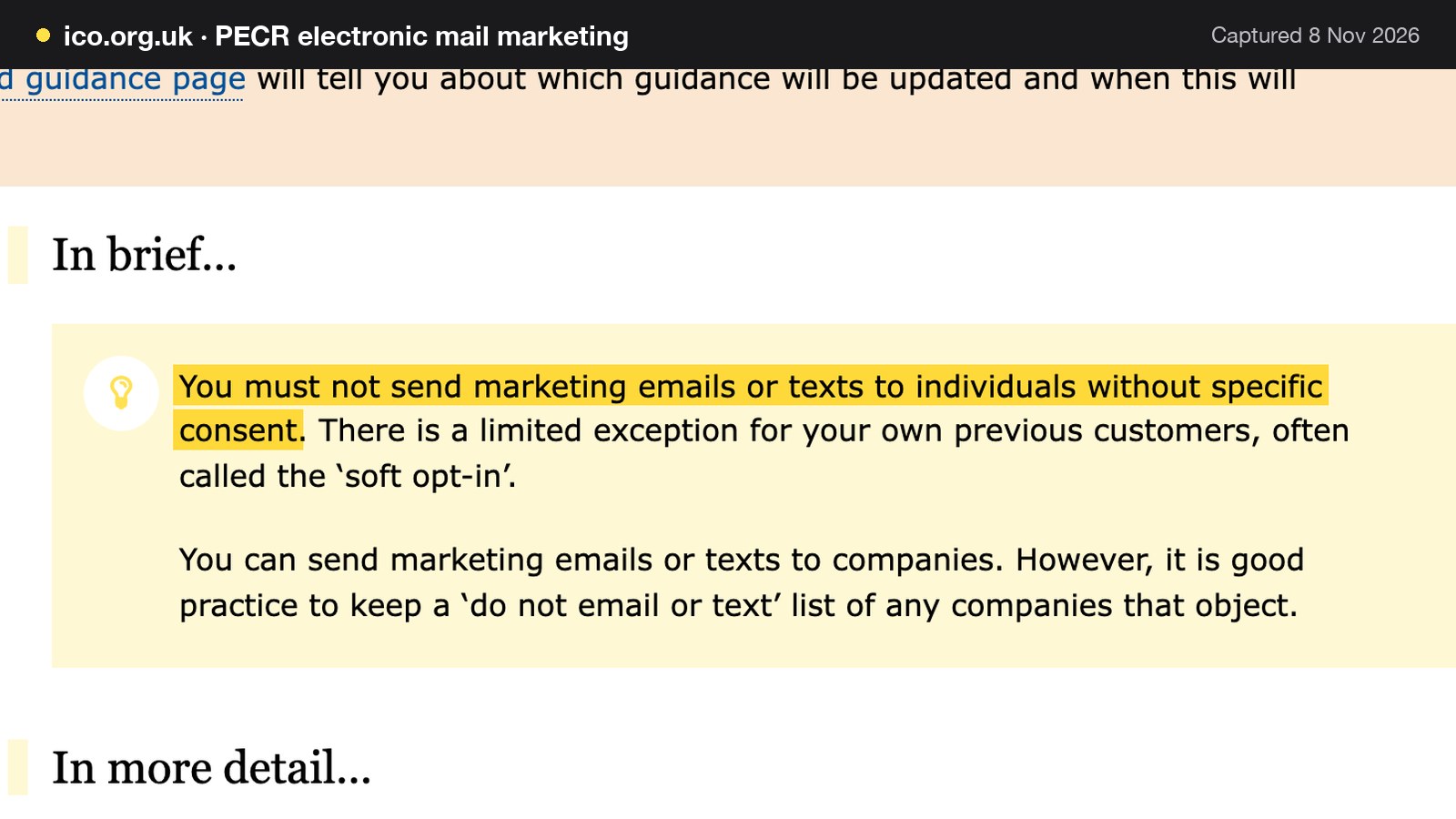
It also says there is a limited exception for a business's own previous customers, often called the "soft opt-in". Read the ICO guide for the conditions before relying on it, and do not treat a room booking as a blanket consent to a newsletter. TableSpark's email campaigns send "to consented guest segments", and guest records are stored under the restaurant's TableSpark account, visible in the Inbox and guest list, with CSV export.
Afternoon tea, Sunday lunch and private dining as separate jobs
Afternoon tea booking system
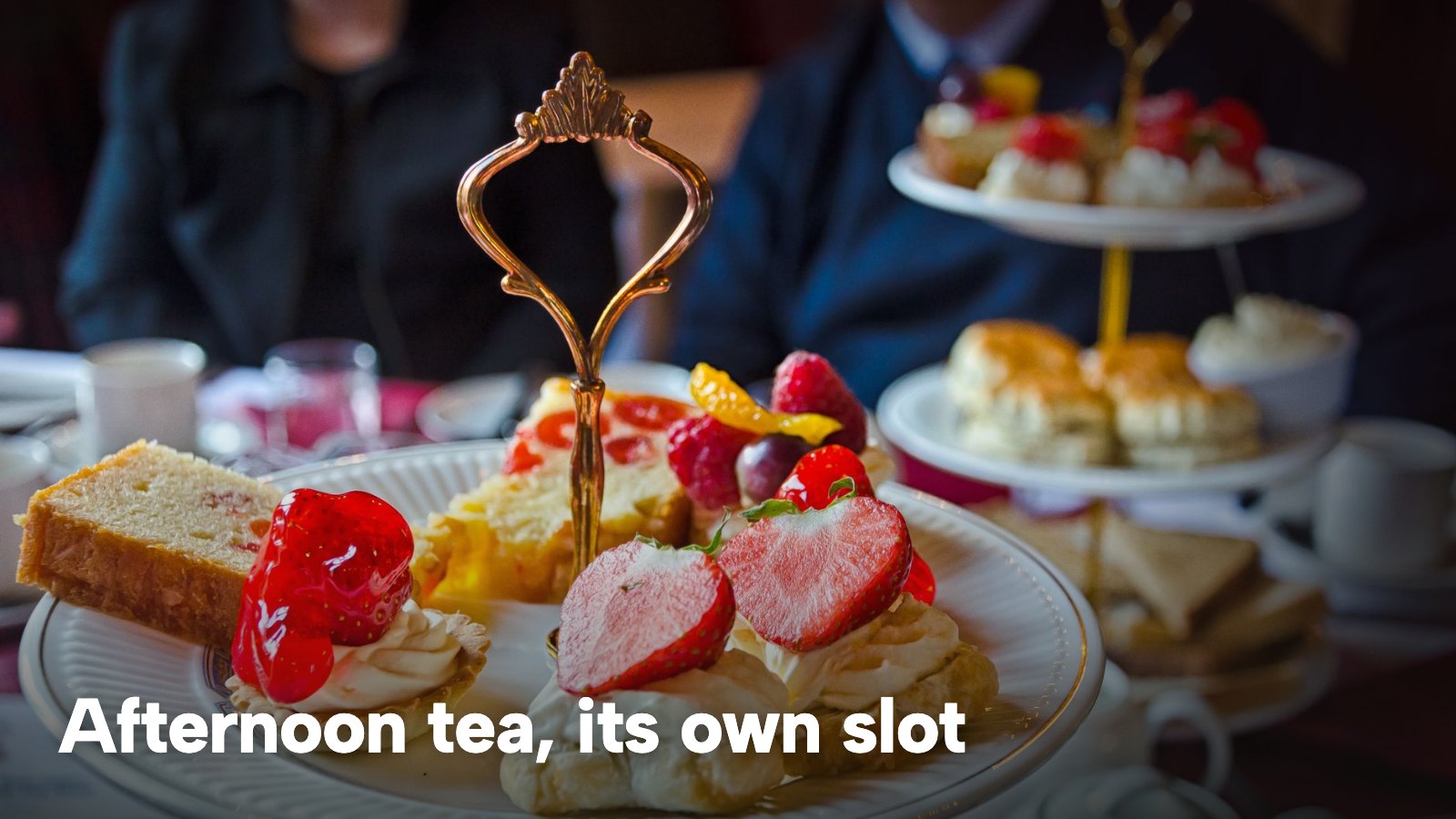
Afternoon tea is the hotel product with the least owner-side guidance online. In the search results read for this research on 8 November 2026, the pages for it were individual hotels' own tea pages, written for guests, with no owner-side guide to running the sitting. Run it as its own service, with a start and end time, a slot every 30 or 60 minutes, a low covers-at-once ceiling that matches the kitchen's capacity for a set tray, a longer lead time so the pastry order can be placed, and a deposit.
Two details are worth deciding up front. The first is the price display: put the set price, and any compulsory charge, on the booking page, in line with the CMA summary above. The second is the dietary route. A set tea has a fixed list of items, so the allergen sheet can be written once, kept with the booking and confirmed on the day. The booking form's "occasion" and "allergies and notes" fields cover the guest who is celebrating a birthday and the guest who must avoid gluten.
Sunday lunch for non-residents
Sunday lunch is the sitting that most hotels would like to fill from outside the building. It needs the longest book-ahead window, because families plan it a fortnight out, and it benefits from a deposit on larger tables. TableSpark can set a deposit above a party-size threshold on the service. A per-booking amount, rather than a per-head one, is the model the booking page describes, so the owner sets the amount that suits the party sizes the threshold lets through.
Use the single-date exceptions for the days the restaurant is closed or capped: "Closed-all-day or capped-covers exceptions for a single date". Mother's Day, Christmas Eve and a wedding weekend are the usual ones. The special-date hours feature, "bank holidays, closures and changed service windows", is on every plan, and the hours and booking rules tutorial walks through it.
Private dining, events and wedding parties
A table of fourteen, a christening lunch or a 40th birthday does not fit an instant-booking widget, and it should not. TableSpark sends "Group requests and parties over your maximum" to the Inbox "with seating, occasion and the guest's own message", and the owner replies from there, then adds the agreed booking. Floor plans have a "Private Dining" room as its own canvas. The Inbox can be filtered and exported to CSV. For a large party that wants to choose food ahead, group bookings with pre-orders and deposits are on Growth: "large parties you confirm, each guest choosing their own dishes by link with allergen checks, your cut-off, reminders, a kitchen sheet with dish totals, and per-guest deposits". The guide to private dining in a restaurant covers room hire, proposals and contracts, and this guide leaves them there.
Events with dates, such as a Christmas lunch or a wine dinner, are on every plan.
Being found: the hotel name, "Sunday lunch near me" and the aggregator
The non-resident has to find the restaurant before they can book a table. A guest searching for the hotel name may reach a room-booking site or a directory first, and a guest searching "afternoon tea" in the town may reach a listing site. A website being live at a working link does not mean it is in Google's results, and a hotel that depends on directories for its dining covers may be paying for bookings that could have come direct.
TableSpark's Reserve with Google feature is a booking-link connection. In Settings, SEO, the owner pastes the booking link, and it "becomes the booking destination your guests reach from Google, sending them to your own booking page and your own diary". The guest completes the booking on the hotel's page, at 0% TableSpark commission. It sits beside the Google Business Profile and review links.
Behind it is search setup that the restaurant website builder ships with the site: every page has a title, description and clean address, and TableSpark writes the Restaurant and LocalBusiness schema, canonical URLs, sitemap and robots rules, then submits the sitemap to Google Search Console on every publish. Indexing and ranking remain decisions for Google, so none of this is a promise of position. It is the technical groundwork that a hotel would otherwise have to buy from a developer.
What a hotel restaurant booking system costs for a year
The sections above cover the features. This one covers the cost, and it uses a worked example rather than a headline price, because the entry price on a vendor's page is the smallest part of the bill for a hotel.
The worked example
The inputs below are illustrative and invented for this guide; change them to fit the hotel. The rates are from each provider's own page, read on 8 November 2026.
| Working | Result | |
|---|---|---|
| Non-resident covers a week (illustrative) | Stated | 160 |
| Share booked online (illustrative) | 160 x 0.60 | 96 a week |
| Online covers a year | 96 x 52 | 4,992 |
| Average online party (illustrative) | Stated | 3 |
| Reservations a year | 4,992 / 3 | 1,664 |
| Reservations a month | 1,664 / 12 | 138.7 |
| Deposit bookings a year, tables of 6 (illustrative) | Stated | 84 |
| Deposit per booking, £10 a head (illustrative) | 6 x £10 | £60 |
| Deposits collected a year | 84 x £60 | £5,040 |
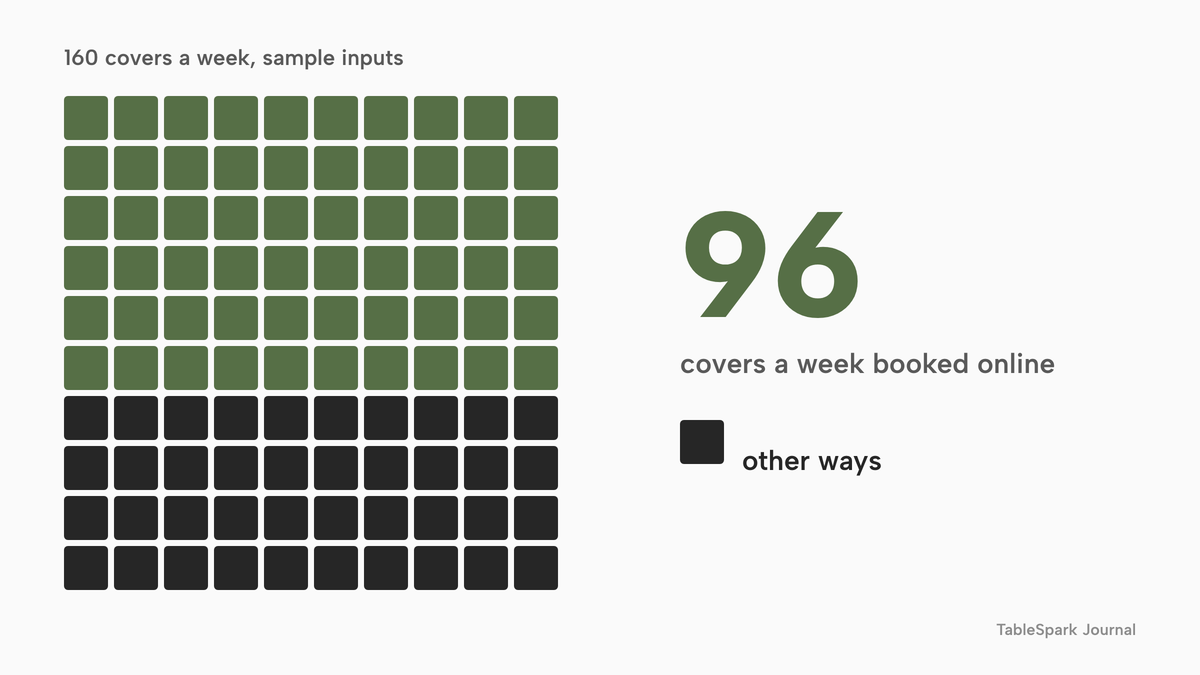
About 10% of online covers carry a deposit (84 bookings x 6 = 504 covers, which is 504 / 4,992). The 160 covers a week are non-residents only; resident breakfasts and dinners booked at the desk are not counted, because they do not generate online bookings and, on a per-cover tool, would be extra.
Card fees on the deposits
The deposits go through a card processor. Stripe's UK pricing page lists "1.5% + 20p for standard UK cards" and "2.8% + 20p for premium UK cards", plus a £20.00 fee for each dispute received. On the standard rate, the £5,040 of deposits costs 1.5% x £5,040 = £75.60, plus 20p x 84 = £16.80, which is £92.40 for the year. Premium cards at 2.8% would cost more.
The plan fees, provider by provider
Booking tools charge in different units. The table shows each published price exactly as printed, with what the price is charged per. These are separate charging structures, so the rows are not like-for-like, and plan contents differ.
- Charged per
- Site, any number of covers
- On-site reservations
- live availability and table inventory
- floor plans
- deposits and reminders
- group pre-orders
- email campaigns
- 0% TableSpark commission
- Charged per
- Cover
- Per-cover charge, no monthly plan fee
- the asterisked terms were not read
- Charged per
- Site
- Whether Lite carries the deposits a hotel needs is not stated in the page text read
- Charged per
- Plan plus add-on
- Plus plan
- Online payments add-on, priced separately
- Charged per
- Covers band
- Up to 1,200 covers a month
- payments add-on, priced separately
- card-payment provider fee charged separately
- Charged per
- Restaurant
- 150 reservations a month included
- extra reservations at 0,37 eur each
- Charged per
- Month
- From-price only
- per-site terms and VAT wording not published
These prices are not like-for-like, because providers charge for different things. The TableSpark row puts the website, the booking diary, deposits, group pre-orders and email campaigns on one plan at one flat price.
Year one, row by row
For the example hotel, with 4,992 online covers and 1,664 reservations, the year-one plan fees are as follows. The sums assume the stated billing, and the figures are as printed on each page. VAT treatment is stated on some pages and not others.
| Working | Year one | |
|---|---|---|
| TableSpark Growth, yearly | 10 x £39 excluding VAT | £390 |
| TableSpark Growth, monthly | 12 x £39 excluding VAT | £468 |
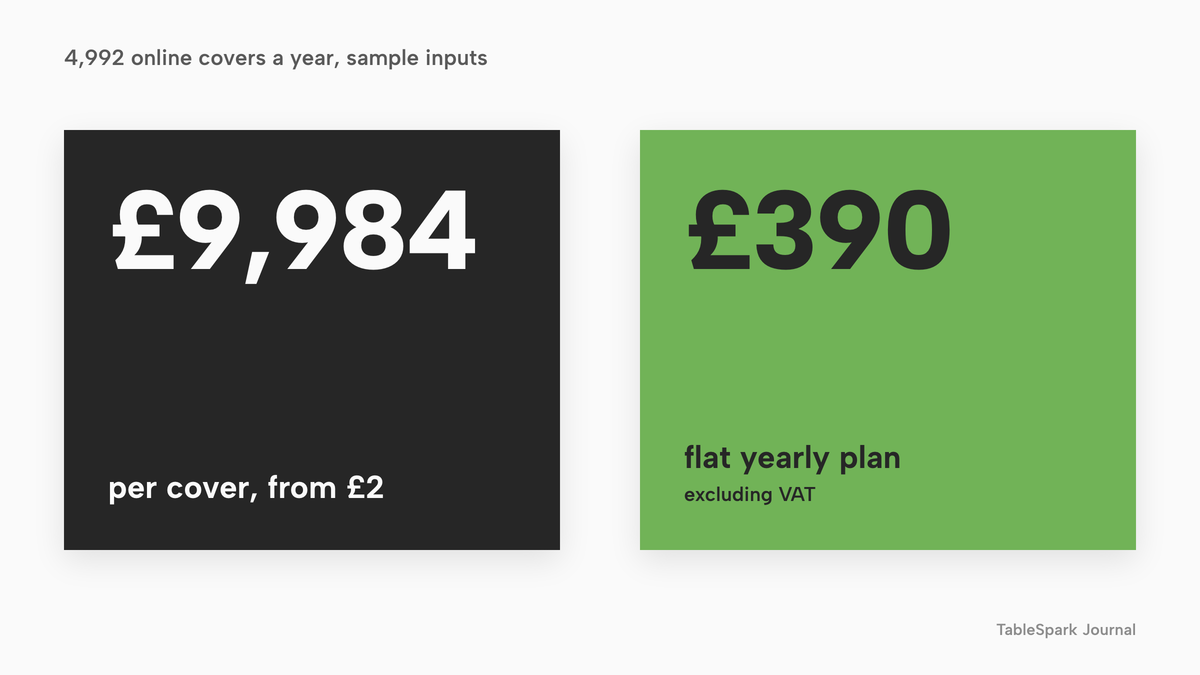
| Favouritetable Flex, from-price | 4,992 x £2 | £9,984 |
| Favouritetable Lite | 12 x £69.00 | £828 |
| resOS Plus with Online payments, annual billing | (12 x £62) + (12 x £9.99) = £744 + £119.88 | £863.88 |
| resOS Plus with Online payments, monthly billing | (12 x £79) + £119.88 = £948 + £119.88 | £1,067.88 |
| simpleERB Plus with payments add-on | (12 x £47) + £162 = £564 + £162 | £726 |
| Tablein Growth | 12 x GBP 105 | £1,260 |
| Access Collins, from-price | 12 x £149 | £1,788 |
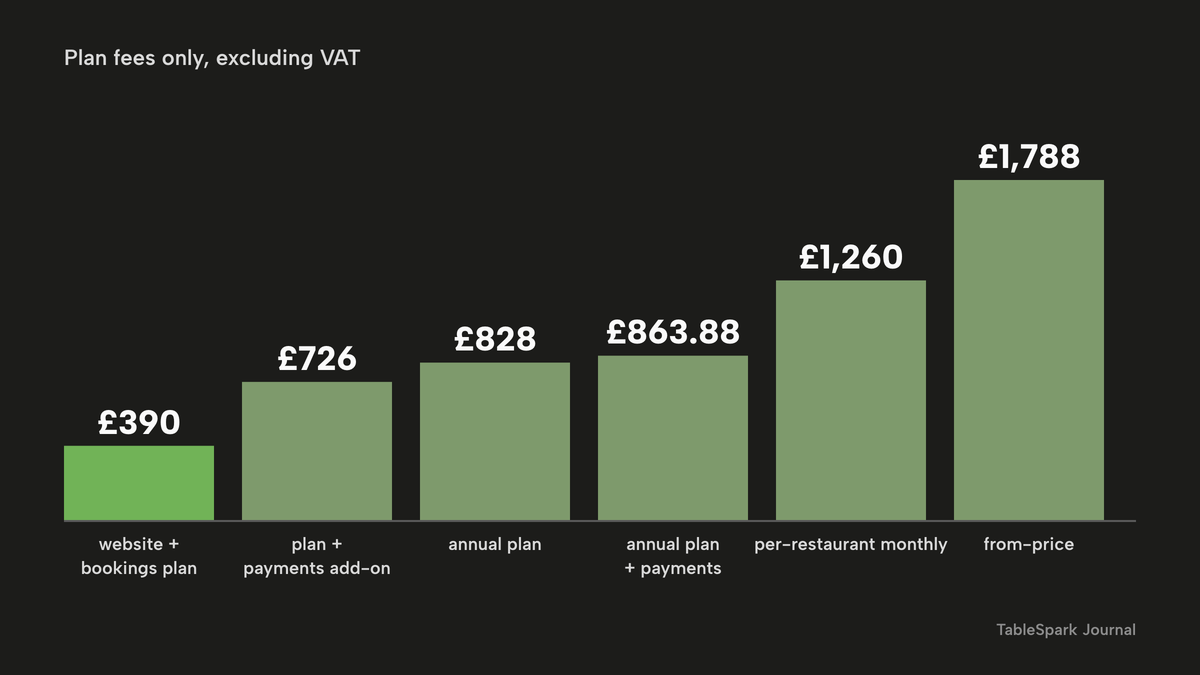
Read in order. Favouritetable's Flex charge of "from just £2 per cover" turns 4,992 online covers into £9,984 (4,992 x £2) on a from-price whose terms were not read, and the owner should ask which covers are charged. Against TableSpark Growth on yearly billing at £390 excluding VAT, that is £9,594 more (9,984 - 390). The flat-fee plans cluster between £726 and £1,788 (the simpleERB and Access Collins rows). The nearest, simpleERB at £726, is £336 more than TableSpark yearly (726 - 390), and resOS at £863.88 is £473.88 more (863.88 - 390).
Two details are easy to miss. simpleERB's Plus plan covers up to 1,200 covers a month, and the example hotel books 416 online covers a month (4,992 / 12). Tablein counts reservations, not covers, and the example's 138.7 a month sits inside the 150 included, so it would stay at the base price until the hotel books more than about 150 reservations in a month.
Adding the card fees
TableSpark's page says "Stripe's standard card-processing fees apply to online payments", and simpleERB's page says the card-payment provider fee is charged separately. For TableSpark Growth, the yearly total with Stripe on the deposits is £390 + £92.40 = £482.40, and the monthly-billed total is £468 + £92.40 = £560.40, both with the plan excluding VAT. A card processor takes a similar fee on deposits taken through any tool with payments, so the gap against a flat-fee tool is mostly the plan line.
What the numbers do not say
They do not say what each tool includes beyond what the page prints. Plan contents differ, and a hotel should ask each vendor for the full list before comparing. The sums also do not include resident covers booked at the desk, a second site, or setup. The inputs are the hotel's to change: a hotel with 300 non-resident covers a week nearly doubles the Flex line, and the flat per-site plans change little unless an included allowance is passed.
The complete set-up checklist
A hotel restaurant is ready to take outsiders online when each of the following is true.
- Breakfast, lunch, afternoon tea and dinner are each their own service, with seating window, slot length, party limits, lead time and book-ahead days set
- Capacity is set by table where the room has real tables, so a resident's table at the desk and a guest's table online come from the same pool
- Parties over the maximum and private dining arrive as enquiries in the Inbox, with a named person who answers them
- A deposit threshold and amount are set for Sunday lunch and afternoon tea, and the cancellation wording is on the booking page before payment
- The price shown includes any compulsory charge, and optional extras are shown separately
- Allergen information is available when a guest chooses food in advance, and again with the food
- Special-date hours cover bank holidays, closures and changed service windows
- The Reserve with Google booking link is pasted in Settings, SEO, and the Google Business Profile is up to date
- Reception knows how to add a resident's table with New booking and Source set to Phone or Walk-in
- Marketing emails go only to guests who consented, and the hotel has read the ICO guide on the soft opt-in
Decide: a per-cover or add-on tool, or one flat plan on your own site
| Per-cover or add-on tool | One flat plan on your own site | |
|---|---|---|
| Cost in a busy month | Rises with every cover | Stays the same |
| Cost in a quiet month | Falls with the covers | Stays the same |
| Deposits and payments | Check whether they are a separate add-on | In the plan, with Stripe card processing |
| Website | Check whether the booking page is part of the site | The site and the booking page are one build |
| Guest records | Check where they are stored and whether they export | In the restaurant's own account, with CSV export |
The pattern matters for a hotel because its busiest weeks are the ones it is trying to create. A per-cover tool charges more in those weeks. A flat plan does not. The cost comparison for general restaurants is covered in the guide to the best restaurant booking system in the UK, and the pub version, where part of the room stays open for walk-ins, is in the pub booking system guide. A fuller treatment of services, tables and no-shows is in the restaurant table booking system guide.
Where TableSpark fits
For an independent hotel, inn or B&B, TableSpark is the best-value and best overall choice for a restaurant that serves both residents and outsiders. The reason is that the whole stack sits on one plan: the website, the booking diary with services, tables and deposits, group pre-orders, private dining enquiries into the Inbox, and email campaigns to consented guests.
TableSpark Growth is £39 a month excluding VAT, or £390 a year excluding VAT when billed yearly ("Pay for 10, use 12"). It carries on-site reservations, live availability and table inventory, floor plans and table assignment, enquiry or instant-confirmation mode per service, deposits and reminders, a waitlist, group bookings with pre-orders and deposits, the Reserve with Google booking-link connection, and 5,000 marketing emails a month included. Starter, at £19 a month excluding VAT, is the complete site with enquiry forms into one Inbox and managed search readiness, and suits a hotel that wants enquiries only. Full is £69 a month excluding VAT and adds online ordering.
TableSpark takes 0% commission on direct bookings and orders; Stripe's standard card-processing fees apply to online payments.
Several details matter for this kind of operation. Special-date opening hours for bank holidays, closures and changed service windows are on every plan. So are events with dates, the Inbox for every lead with CSV export, and enquiry and newsletter forms. Guest records stay under the restaurant's own TableSpark account, visible in the Inbox and guest list, with CSV export, so a hotel that later changes tools takes its list with it. The booking form sits on the hotel's own site, which is why the website and the booking page can be built together instead of bolted together.
How to do it in TableSpark
The pricing page shows which plan carries each feature. The steps below need Growth, at £39 a month excluding VAT.
- Step 1: Set the hours and the special dates
On the Opening hours card, set a From and To time and a toggle for every day. Then open the Bank holidays and special dates card and use Add a date for Christmas Day, a closure or a changed service window.
Step 2 of 1
Create a service for each sitting
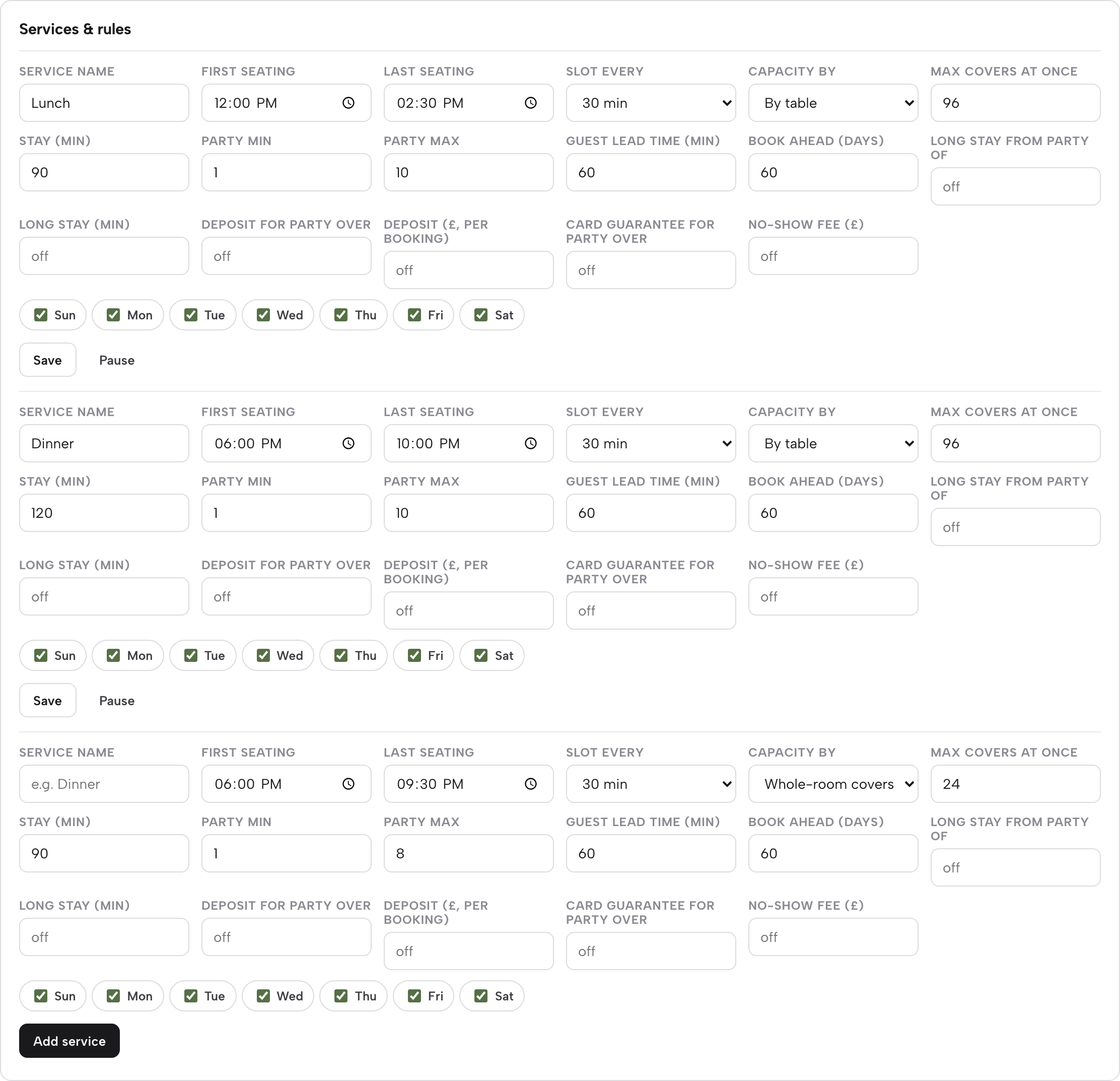
Open Bookings, then Services & rules. Give each sitting a Service name, such as Breakfast, Sunday lunch, Afternoon tea or Dinner. Set First seating and Last seating, Slot every 15, 30 or 60 minutes, the days of the week, and Capacity by whole room or by table.
- Step 3: Set party limits, notice and the deposit
On the same row set Party min and Party max, Guest lead time and Book ahead. Then set the party size where the deposit applies and the amount, from £1 to £500 per booking, or turn on a card guarantee.
- Step 4: Route large parties and private dining to the Inbox
Parties over the service maximum arrive as an enquiry with seating, occasion and the guest's message. Reply from the Inbox, then add the agreed booking.
- Step 5: Add the booking link for Google
In Settings, SEO, paste your booking link. It becomes the booking destination guests reach from Google, and they complete the booking on your own page.
Step 6 of 1
Book residents from the desk
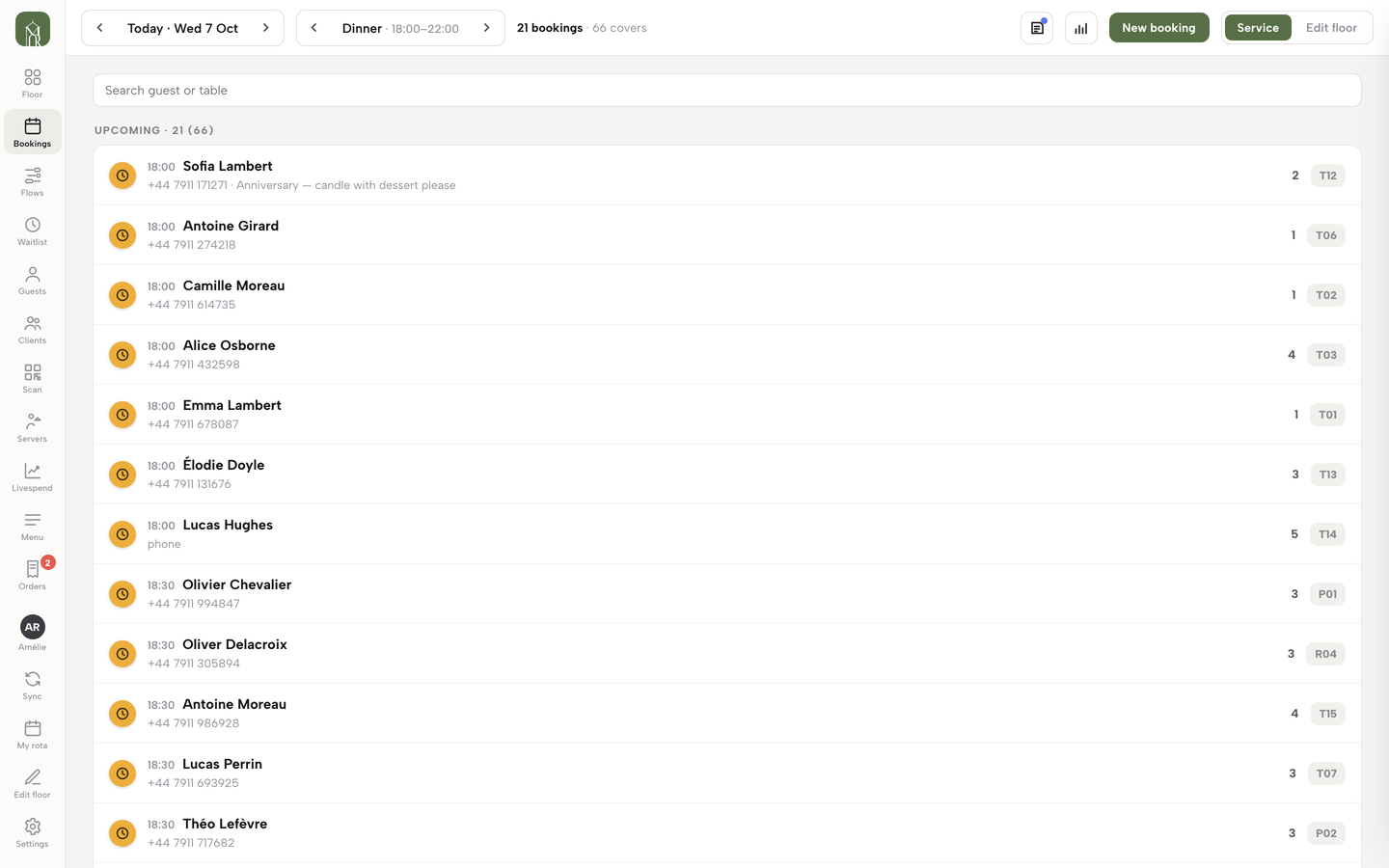
Press New booking, set the date, guests, time and Source (Phone or Walk-in). It runs the same availability check as the website, so the table leaves the public list. Reception can see tonight's bookings in the Service bookings list.
Questions hotels ask about restaurant booking
What is the best hotel restaurant reservation system in the UK?
It is the one that handles two guest streams on one floor at a price that does not grow with each cover. For an independent hotel or inn, TableSpark Growth at £39 a month excluding VAT puts the website, the booking diary with services, deposits and group pre-orders, and email campaigns on one plan with 0% TableSpark commission.
Do I need a booking system for hotels that connects to my room system?
It depends on what the restaurant does with the room system. If residents' dinners are paid at the table and the kitchen only needs to know the table is booked, a booking diary shared by reception and the website is enough, and TableSpark provides that diary with services, tables, deposits and guest records.
Can residents and non-residents book the same dining room without clashing?
Yes, if both go through one diary. A resident booked at the desk with New booking runs the same availability check as the website, so that table stops being offered online. Capacity by table keeps the count honest, and a service can cap the covers at once.
How do I take afternoon tea bookings online?
Set afternoon tea as its own service with its own seating window, slot length, covers at once, lead time and deposit. Show the full price including any compulsory charge on the booking page, and put the allergen sheet with the set menu.
Can I take a deposit for afternoon tea and Sunday lunch?
Yes. A deposit is set on the service, from £1 to £500 per booking, above a party size you choose. The CMA says deposits kept must take into account what the business will actually lose, so size the deposit to the cost of an empty table and state the terms before payment.
How do I handle a wedding party or a private dining request?
Let it arrive as an enquiry. Parties over the maximum reach the Inbox with seating, occasion and the guest's own message, and the owner replies there. Group bookings with pre-orders and deposits are on Growth when guests need to choose dishes ahead.
What does a per-cover booking fee cost over a year?
On a from-price of £2 per cover, 4,992 online covers cost £9,984 (4,992 x £2) in the worked example, against £390 excluding VAT for TableSpark Growth on yearly billing. Ask any per-cover vendor which covers are charged before you sign.
Will guests searching the hotel name find the restaurant booking page?
A page can be live and still be absent from Google, and indexing and ranking remain decisions for Google. TableSpark writes the titles, schema, canonicals and sitemap and submits the sitemap on every publish, and the Reserve with Google booking-link connection sends guests from Google to the hotel's own booking page.
The recommendation
For an independent UK hotel, inn or B&B whose restaurant serves residents and non-residents, TableSpark is the best-value and best overall choice. A per-cover tool charges more for each good week. A tool with a separate payments add-on charges again for deposits. TableSpark Growth starts at £39 a month excluding VAT and carries the website, live bookings against real tables, services with their own rules, deposits, group pre-orders, private dining enquiries and email campaigns. The entry plan, Starter, is £19 a month excluding VAT and includes the complete site with managed search readiness.
In the worked example, the TableSpark Growth plan is £390 excluding VAT for the year, or £482.40 with Stripe's card fees on £5,040 of deposits, against £9,984 for a from-price per-cover tool.
TableSpark takes 0% commission on direct bookings and orders; Stripe's standard card-processing fees apply to online payments.
Sources
- VisitBritain, England Hotel Occupancy: latest — visitbritain.org (checked 2026-11-08)
- VisitEngland, England Occupancy Survey July 2026 — visitbritain.org (checked 2026-11-08)
- simpleERB, restaurant booking software for hotels — simpleerb.com (checked 2026-11-08)
- Consumer Contracts Regulations 2013, regulation 28 — UK Government (checked 2026-11-08)
- CMA, writing a fair contract for customers — UK Government (checked 2026-11-08)
- CMA, providing clear and accurate information about prices: summary — UK Government (checked 2026-11-08)
- Food Standards Agency, allergen guidance for food businesses — UK Government (checked 2026-11-08)
- ICO, electronic mail marketing — ico.org.uk (checked 2026-11-08)
- Stripe UK pricing — stripe.com (checked 2026-11-08)
- Favouritetable pricing — favouritetable.com (checked 2026-11-08)
- resOS pricing — resos.com (checked 2026-11-08)
- simpleERB pricing — simpleerb.com (checked 2026-11-08)
- Tablein pricing — tablein.com (checked 2026-11-08)
- Access Collins reservations — theaccessgroup.com (checked 2026-11-08)
- TableSpark, restaurant booking system — TableSpark (checked 2026-11-08)
- TableSpark pricing — TableSpark (checked 2026-11-08)
- TableSpark tutorial, hours and booking rules — TableSpark (checked 2026-11-08)
- TableSpark, restaurant website builder — TableSpark (checked 2026-11-08)
Related reading


 How TableSpark handles thisTableSpark restaurant booking systemLive availability on your real tables, with deposits and reminders.