 Lin Wanning
A till that fails to show what was sold, what was tipped and how it was paid is a risk, because the questions arrive after the service has ended.
What is a POS system in a restaurant? It is the software and hardware where orders are taken, sent to the kitchen, billed, paid and recorded. In the UK it is usually called an EPOS, and the till is only one part of it. A restaurant POS typically combines a table terminal, a card reader, printers or a kitchen screen, and end-of-day reports. The records it produces matter: VAT records are kept for at least 6 years and tipping records for 3.
The questions a till has to answer after service
Picture a 50-cover independent on a Monday morning. Saturday was busy, and three questions are waiting. The accountant needs Saturday's takings split by payment type and VAT rate for the quarter. A former waiter has asked in writing to see the tipping record. A regular says a card payment was charged twice, and the restaurant is left guessing from the card machine slip, the notebook and the order pad which one is right.
Each of those questions has an official source behind it, and none of the rules is hypothetical. GOV.UK's VAT record-keeping notice says "Generally, you must keep all your business records for VAT purposes for at least 6 years", and its list of business records includes "records of daily takings such as till rolls". The statutory code of practice on tips says "A worker has the right to make a written request" to view the tipping record of their employer, for a period dating back up to 3 years. The Consumer Rights (Payment Surcharges) Regulations 2012 say "A payee must not charge a payer any fee in respect of payment by means of" the payment instruments the regulation lists, which is the rule on card fees added to a bill.
The risk for the owner is not that one rule is hard. It is that takings sit in three places: the card machine's own totals, a notebook of cash and voids, and a spreadsheet at month end. Nobody can say whether the till is right until someone adds them up, and by then the evening is a week old. A restaurant in that position struggles to show who discounted a bill, which tender a payment went under, or how a pool of tips was shared. This guide states no penalty figure for any of it. It sets out what the records are, how a POS produces them, what the whole stack costs for a 50-cover restaurant, and which questions to ask before signing a contract.
What is a POS system in a restaurant?
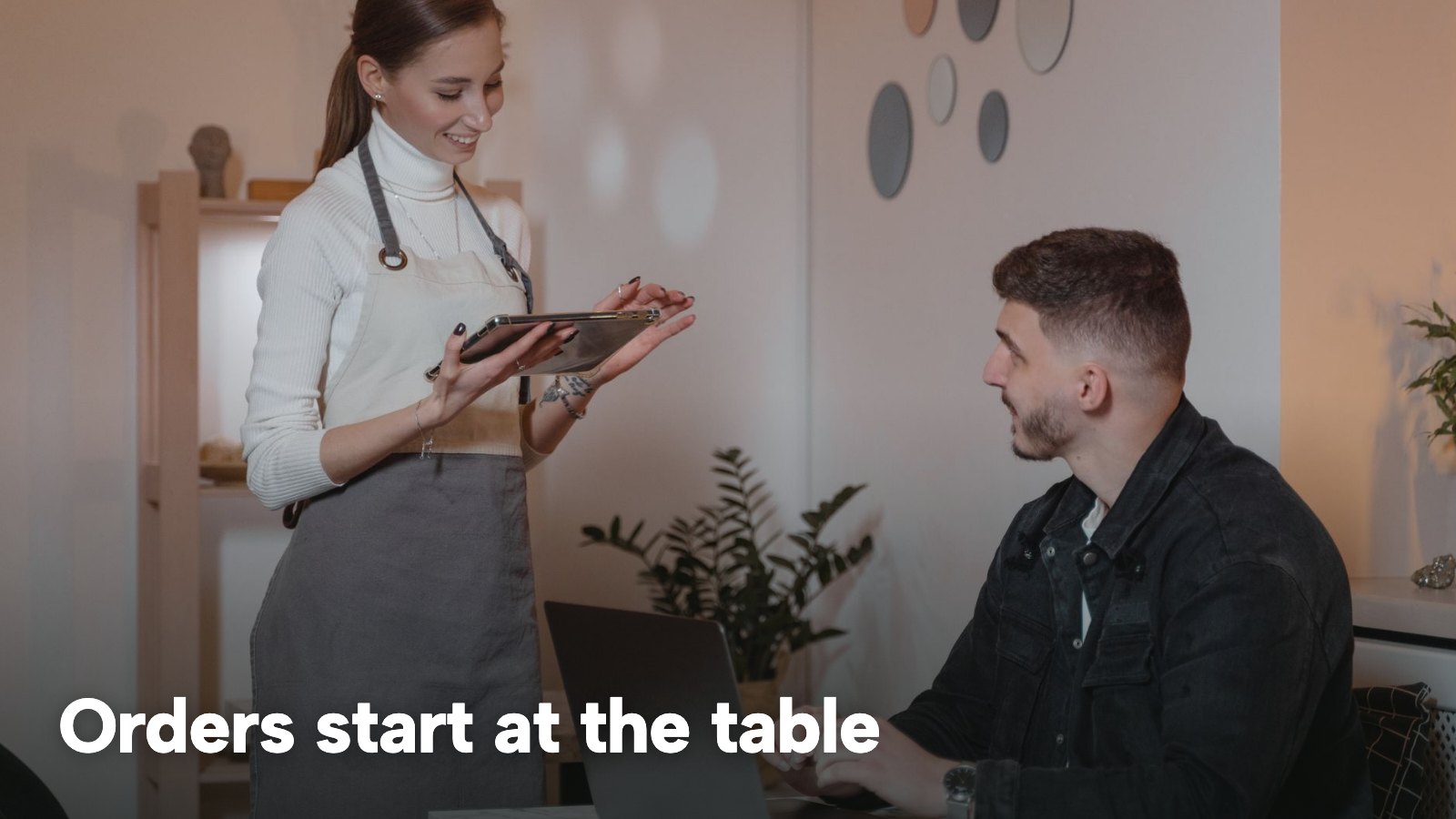
A point-of-sale system, or POS, is the place where a sale is rung in and settled. In a restaurant it covers much more than a drawer and a card machine: the order taken at the table, the ticket the kitchen cooks from, the bill the guest pays, the payment itself, and the report the owner reads when the doors close. The record of all of those steps, in one place, is what separates a POS from a till.
POS, EPOS and till: what the words mean
In UK usage the three words describe one family of equipment.
- Till. The original cash register: a drawer, a keypad and a paper roll. It records a sale and holds cash. It does not know which table ordered what, and it does not talk to the kitchen.
- POS. The general term for the whole sale point, software and hardware together.
- EPOS. "Electronic point of sale", the usual British term for a POS that runs on a tablet, phone or computer, stores its records digitally and links to other systems.
A modern cloud EPOS adds three things a cash till lacks: it knows which table and which dishes belong to each bill, it passes the order to the kitchen without anyone walking a ticket over, and it keeps every sale in a record that can be searched, printed or exported.
The parts of a restaurant POS
| What it does | Typical hardware | |
|---|---|---|
| Table terminal (How TableSpark words it: Service runs in the browser on an iPad, tablet or phone) | Takes the order at the table and holds the bill | iPad, tablet or phone |
| Card reader (How TableSpark words it: Stripe Terminal readers, settled into your own Stripe account) | Takes the card payment and records it against the bill | Reader paired to the till |
| Kitchen screen (How TableSpark words it: Runs on any tablet or TV browser) | Shows tickets by station, with timers | Tablet or TV browser |
| Kitchen printer (How TableSpark words it: Star CloudPRNT printers connect with one pasted link) | Prints the ticket the kitchen cooks from | Receipt-style thermal printer |
| Cash drawer (How TableSpark words it: Drawer figures work out what it should hold) | Holds the float and the cash taken | Drawer under the till point |
| Back office (How TableSpark words it: End of day, exports for Xero, QuickBooks, Sage or FreeAgent) | Reports, menu, staff roles, exports | Any browser |
The last column uses TableSpark's own live wording from its EPOS page. Reader and printer prices are not stated on those pages, so none is given here. The two parts that most often get left out of a first quote are the kitchen link and the back office. A system that rings sales but does not reach the kitchen turns the table terminal and the kitchen into two separate places to type. A system with no back office leaves the owner with the same notebook and spreadsheet as before.
How does a restaurant POS system work?
One order passes through six stages. The stages are the same in a pub, a café and a restaurant, though some of them change order.
1. Seat. The party is marked as seated at a table. Walk-ins and bookings both end up on the same floor view.
2. Order. Someone at the table or on the floor enters the dishes, with the option choices each dish needs and a note for the kitchen.
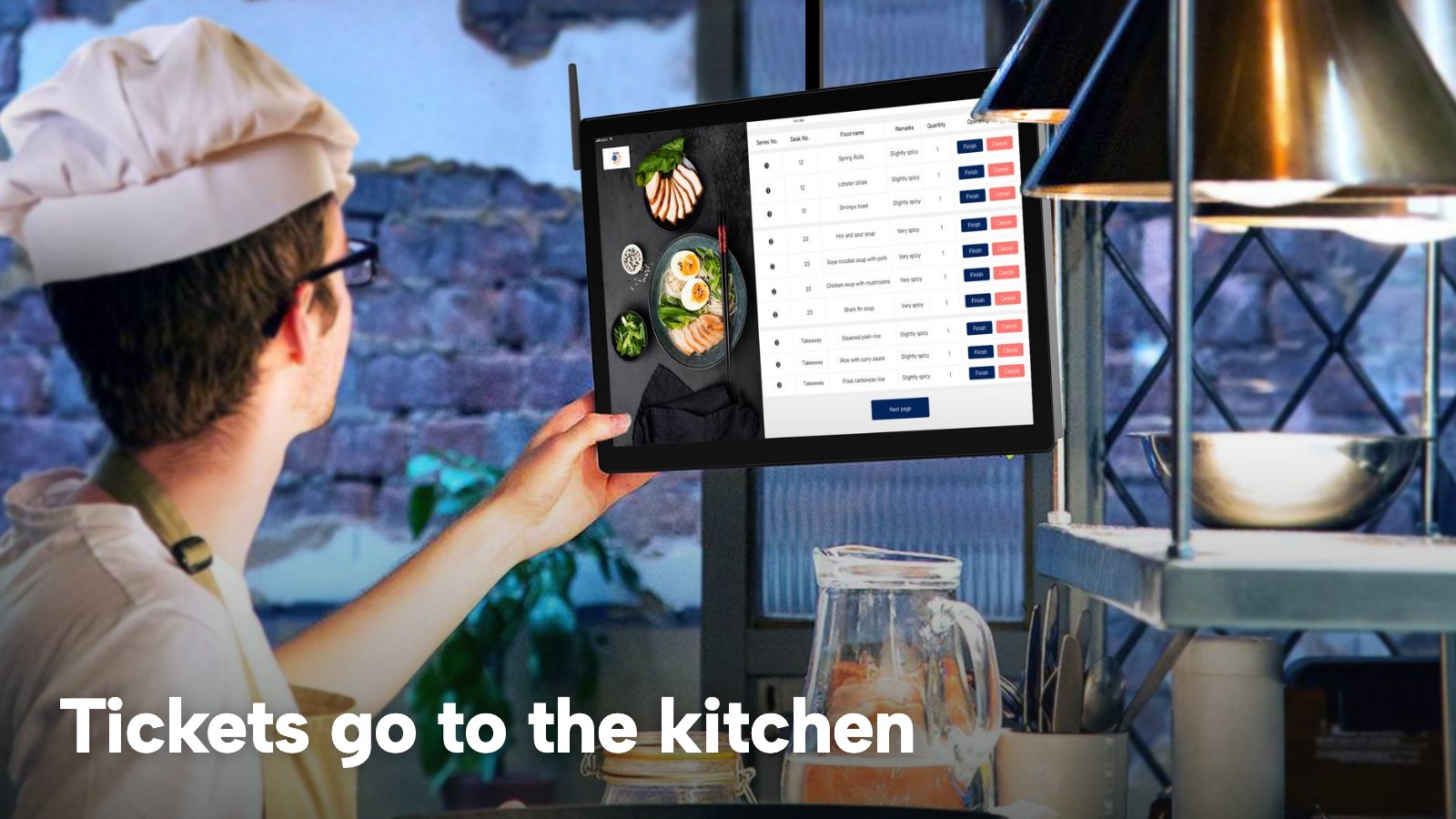
3. Kitchen. The order reaches the kitchen as a ticket on a screen or a printer. Mains can be held until the table is ready, then fired.
4. Bill. Orders at the table become a bill, which can be adjusted, split or moved to another table.
5. Payment. Cash, card reader or another tender settles the bill, and each tender is recorded separately.
6. End of day. The takings, VAT and cash are totalled, the drawer is counted, and the figures are saved.
A worked example: one Friday service
The numbers below are illustrative, a model of a 50-cover restaurant, not a statistic about any real one.
- The room seats 50 and runs two sittings, so 100 covers a night.
- The average party is 2.5 guests, so 100 / 2.5 = 40 tables.
- Each table sends three orders (drinks, starters, mains), so 40 x 3 = 120 kitchen tickets.
- Illustratively, 70% of those tickets fall between 18:30 and 20:30: 120 x 0.7 = 84 tickets in two hours, or 42 an hour.
That peak is where the links matter. At 42 tickets an hour a ticket is created roughly every 86 seconds (3,600 / 42), so an order that is re-typed from a notepad into a till, or from a till into a kitchen screen, adds a typing step 42 times an hour. Each extra typing step is a chance for a wrong table number, a missing allergy note or a dish rung on the wrong bill. No verifiable figure for how often that happens is cited here, so none is claimed; the point is that a system with fewer hand-offs has fewer places for the mistake to occur.
What happens when the links are missing
When the table terminal, kitchen and card reader are separate products, the owner carries the data between them. Three patterns follow.
- Re-keyed orders. The order is written, then typed again, so the till and the kitchen can disagree about what was ordered.
- Mismatched bills. The kitchen cooked what the ticket said and the bill charged what the till said. A discount or a void in between has no named person attached.
- A second set of totals. Card machine batch totals, till totals and a notebook of cash all have to match before anyone can sign off the day.
None of these is an outage story. They are the ordinary consequence of data living in more than one place, and each one gets harder to untangle the later it is noticed.
How to use a POS system in a restaurant
For the person running the floor, using a POS is a short routine repeated every day. The wording below follows TableSpark's own service and end-of-day guides, because they describe real screens; other systems use other names for the same steps.
Before service. Open the service view and check the room. On TableSpark, Service shows the floor colour-coded live with eight table states: Free, Booked, Arrived, Seated, Running over, Winding down, Needs clearing and Blocked. Staff switch on a shared till with their own PIN, and it locks itself when left idle, so the person who rang a discount is the person recorded.
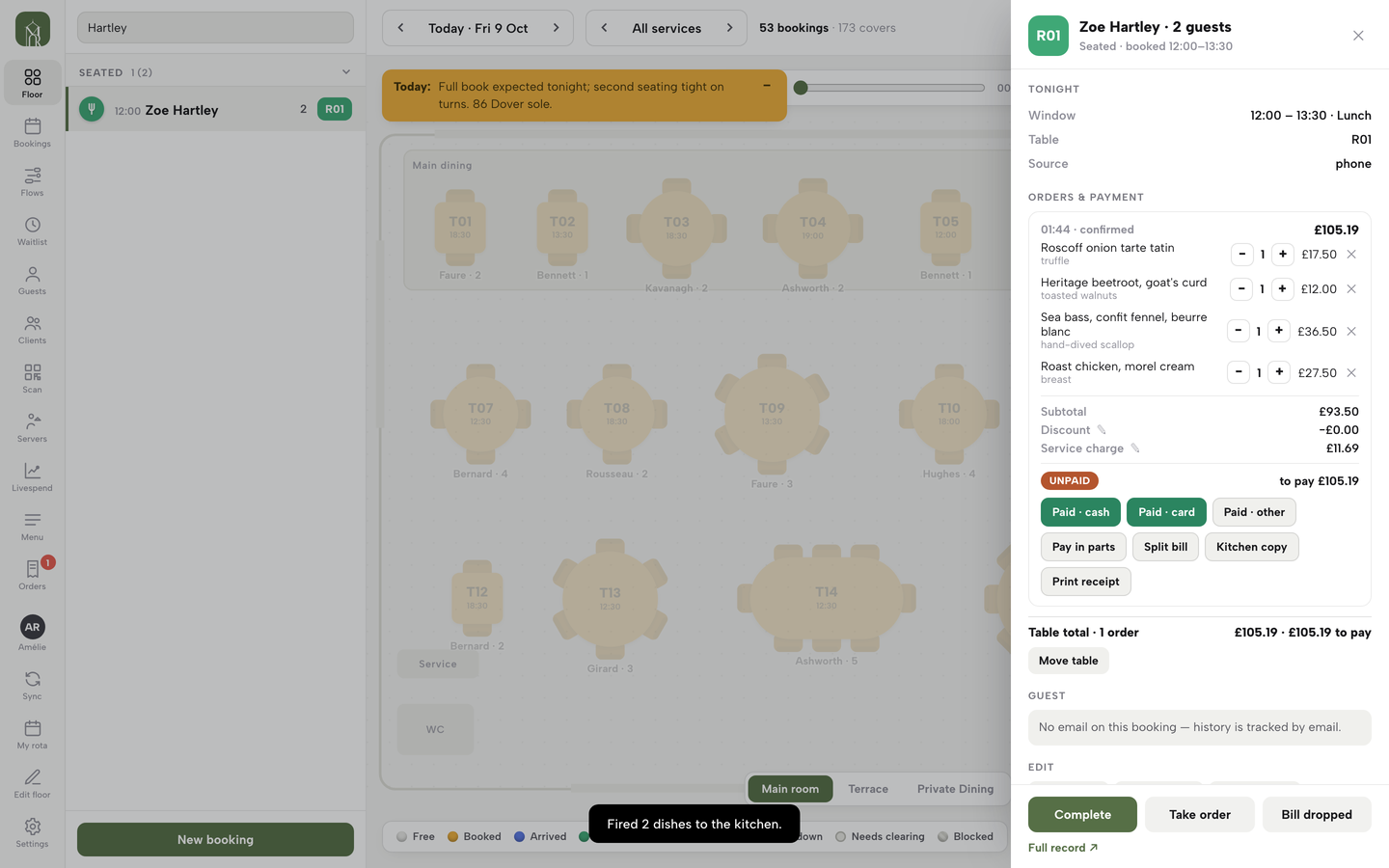
During service. Press Take order on a seated table and the live menu opens on the same sheet. Sold-out dishes are disabled, dishes with options ask for the required choices first, and a note goes to the kitchen with each line. If a kitchen printer is connected, the ticket queues in the same action. Discounts and service charge are set on the table's bill with a reason saved, and a paid bill locks its totals.
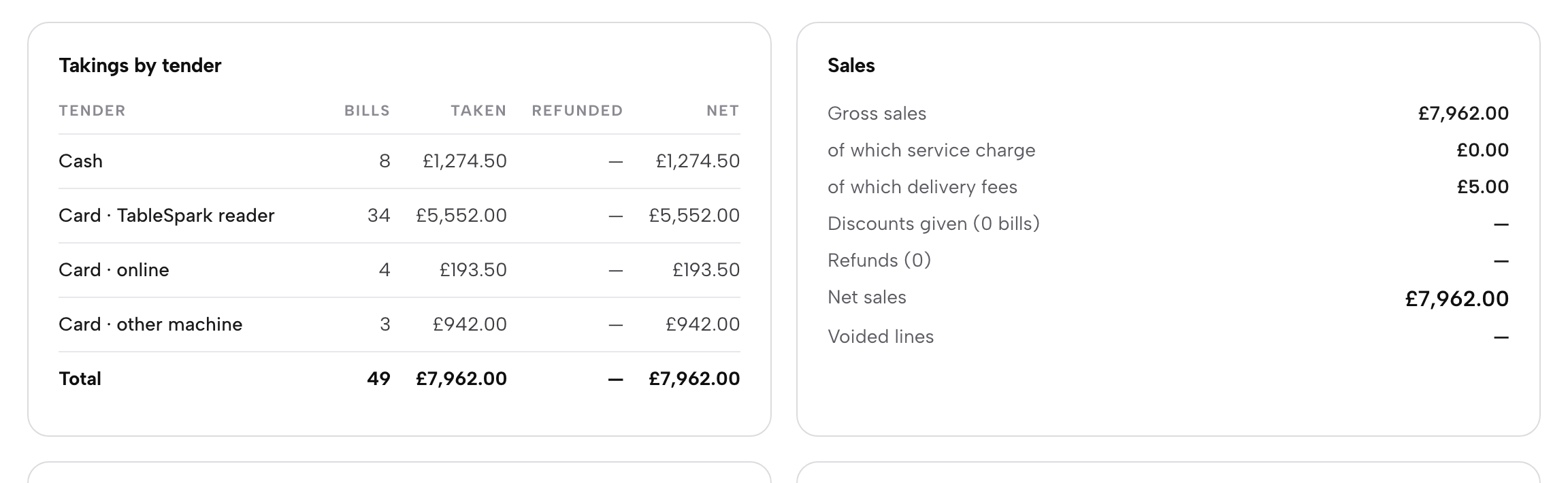
At the bill. Press Pay in parts to split evenly from 2 to 6 or type any amount, and the last share is always what is left. Combine into one bill merges open bills, and Move table sends the open bills with the party. Cash, card reader or another tender is chosen per part, so End of day later counts each part under its own tender.
After service. End of day puts the takings, VAT, cash and tips on one page, and closing it saves the record. The close-the-day tutorial walks through the page.
The guide to cash-up covers counting the drawer itself in more detail, and the order ticket guide covers how a kitchen ticket is laid out.
The records UK law expects a restaurant POS to support
This is a summary of public law and official guidance as published on 14 November 2026, not legal advice; check the current position, or take advice, before acting on a specific case.
The law does not tell a restaurant which till to buy. It sets out records that have to exist, how long they are kept and, in places, what form they take. Three areas matter to a till: VAT and business records, tips, and card payments.
VAT and business records
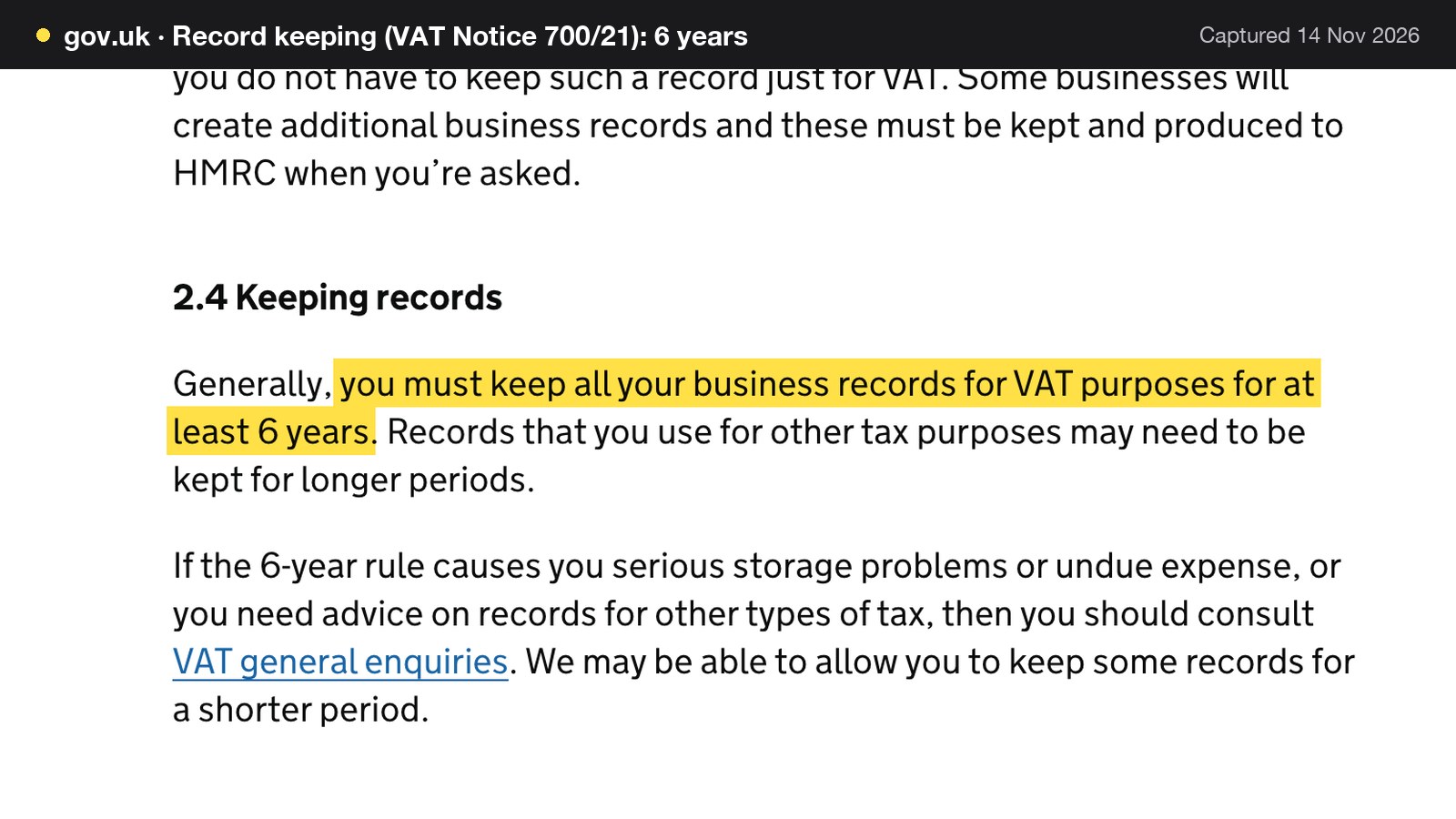
HMRC's VAT Notice 700/21, "Record keeping", is the starting point. It says "Generally, you must keep all your business records for VAT purposes for at least 6 years. Records that you use for other tax purposes may need to be kept for longer periods." The notice lists till rolls among business records, in the words "records of daily takings such as till rolls".
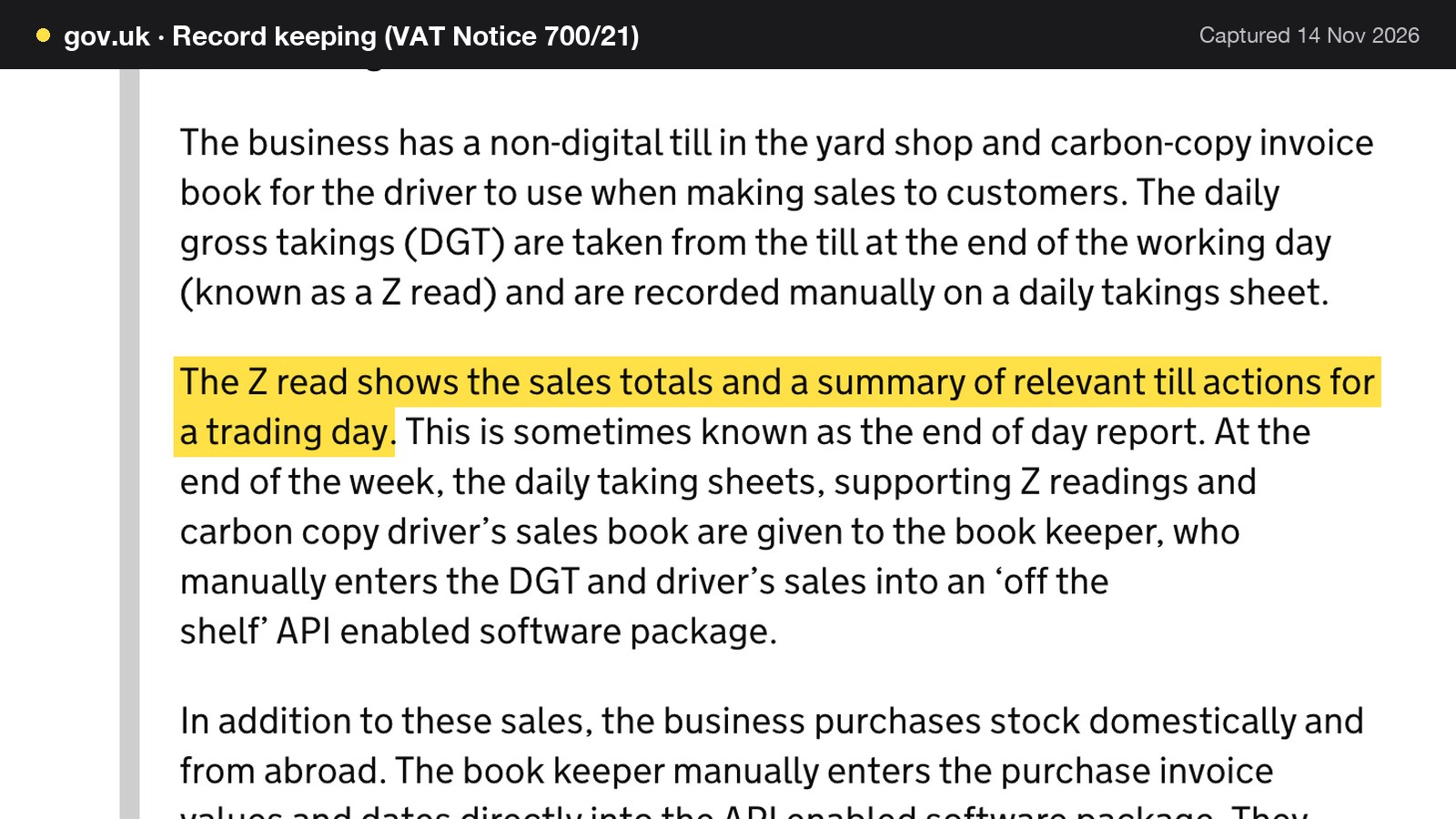
The notice also names the end-of-day report that most tills produce. In a worked example it says "The Z read shows the sales totals and a summary of relevant till actions for a trading day." HMRC adds that this is sometimes known as the end of day report. The guidance names the document; it does not say a restaurant must print one, so the accurate statement is that a Z read is a document HMRC itself recognises as a record of a trading day.
Two other points from the same notice are worth knowing. There is no set format: "The basic rule is that you must create and keep normal business records. You do not have to keep records in a set way and most bookkeeping and computer systems will meet this requirement." Other record periods differ by business type. GOV.UK says a self-employed person keeps records for "at least 5 years after the 31 January submission deadline of the relevant tax year", and a limited company keeps them for "6 years from the end of the last company financial year they relate to, or longer if" certain conditions apply. The VAT guide for restaurants covers which sales are standard-rated.
Making Tax Digital for VAT
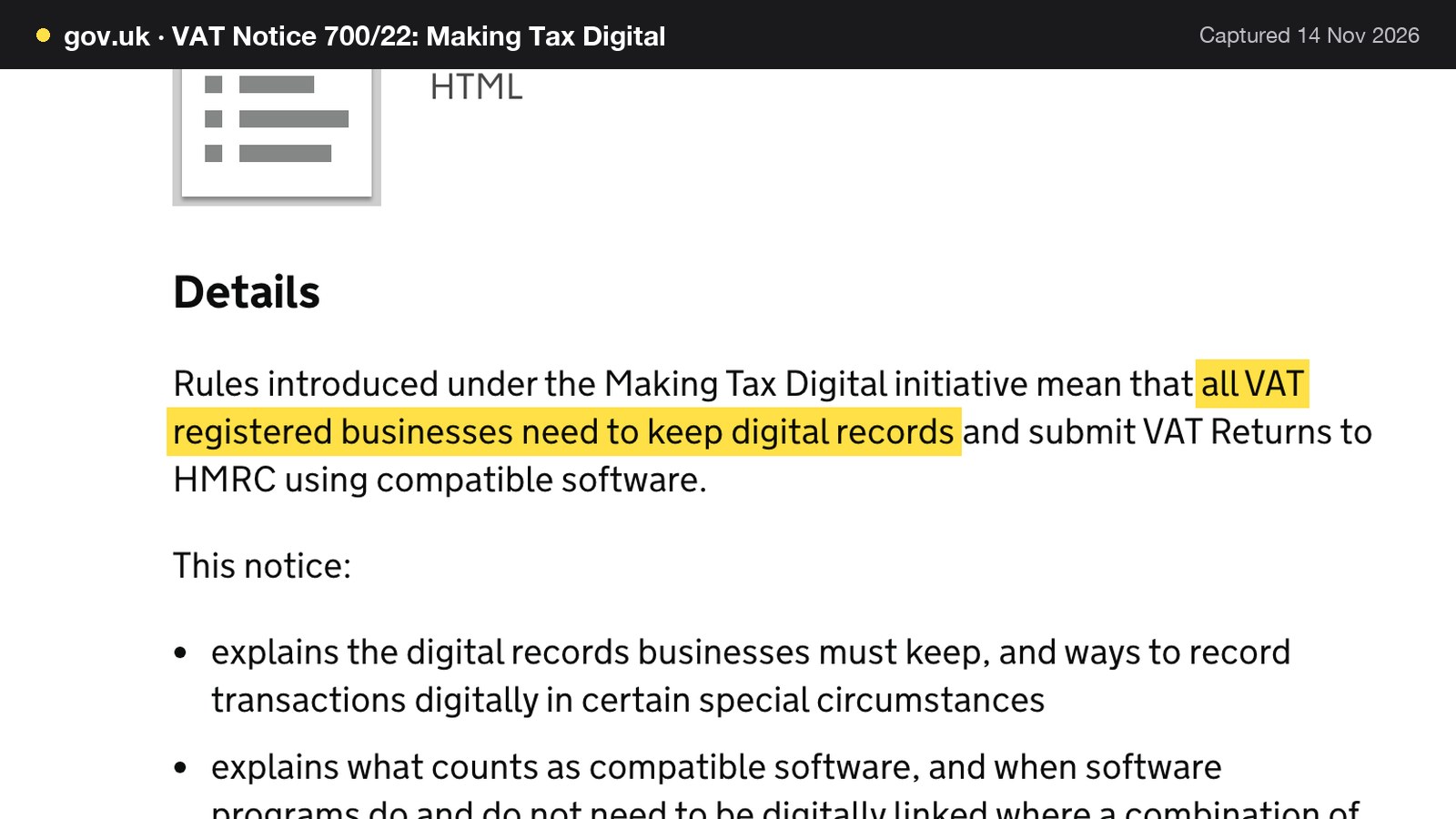
HMRC's VAT Notice 700/22 says "all VAT registered businesses need to keep digital records and submit VAT Returns to HMRC using compatible software." GOV.UK's guide to charging, reclaiming and recording VAT lists what the digital records cover: the VAT on goods and services supplied, the time of supply and value of supply, any adjustments made to a return, and any VAT accounting schemes used.
The same page adds a rule about links between programs. "If you use more than one software package or product to keep records and submit returns, you need to link them. This must be a digital link." Manually transferring the data by 'copy and paste' between software does not meet that rule. The ways of linking it lists include importing and exporting XML and CSV files. A till export imported into an accountant's software matches the file-based links the page lists, and a figure retyped from a printout matches the manual transfer it rules out.
TableSpark's EPOS page says each trading day's journal is drafted for review and then exported for Xero, QuickBooks, Sage or FreeAgent, with VAT by rate, tips and service charge kept apart. It describes that as "a default treatment, not tax advice: your accountant has the final say". Whether a given set-up satisfies the VAT rules is a question for the accountant and the compatible software the business files with, and this guide does not certify any system as compatible. Making Tax Digital for Income Tax for sole traders and landlords is a separate regime and is not covered here.
Tips: the written policy and the three-year record
The Employment (Allocation of Tips) Act 2023 makes it mandatory for all tips to be passed on to workers without deductions, and the statutory code of practice on distributing tips fairly came into force on 1 October 2024. The code says employers should maintain a written policy on how tips are dealt with at their place of business and make it available to all their workers. For card tips it is explicit: a tip paid by card or through an app is an employer-received tip, "for which they are responsible for distributing fairly".
The record duty is the one that falls on the till. The code says: "A tipping record must include detail of all qualifying tips received by the employer at the place of business, and the amount allocated to each worker. This record must be maintained for a period of three years beginning with the date on which the tip was paid."
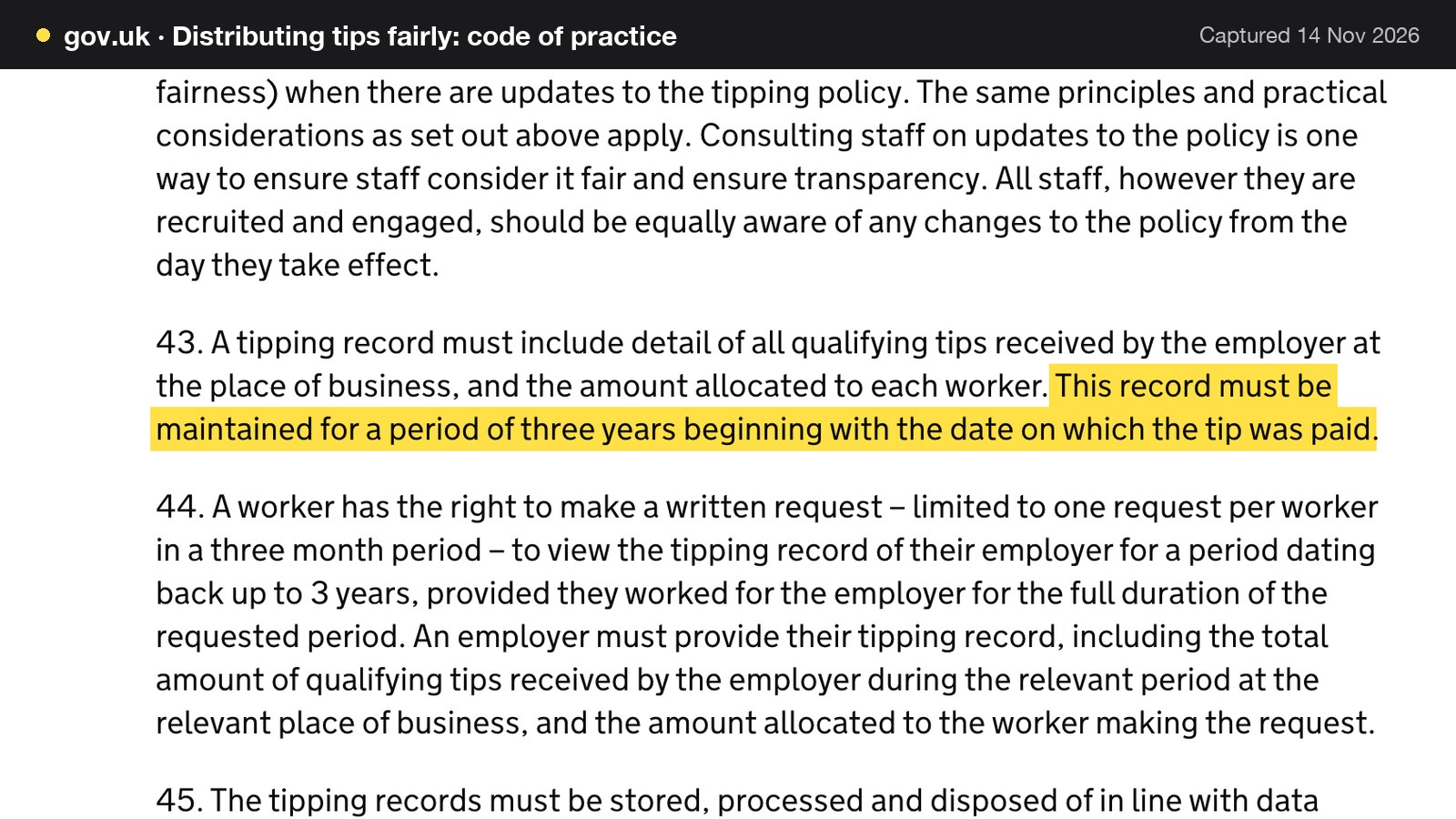
A worker's access is covered in the next paragraph of the code. A worker has the right to make a written request, limited to one request per worker in a three-month period, to view the tipping record for a period dating back up to 3 years, provided they worked for the employer for the full duration of the requested period. Workers can enforce their rights through the employment tribunal system, and the records have to be stored and disposed of in line with data protection legislation.
A revised code is in draft. GOV.UK's page for the revised code says it follows the Employment Rights Act 2025, which makes it mandatory for employers to consult workers when developing or revising written tipping policies, and that a new public consultation will be held. It also says: "For now, employers should continue to follow the existing code of practice." So the 2024 code is the one to follow today, and the draft is only a signal that consultation with workers on the written policy is coming.
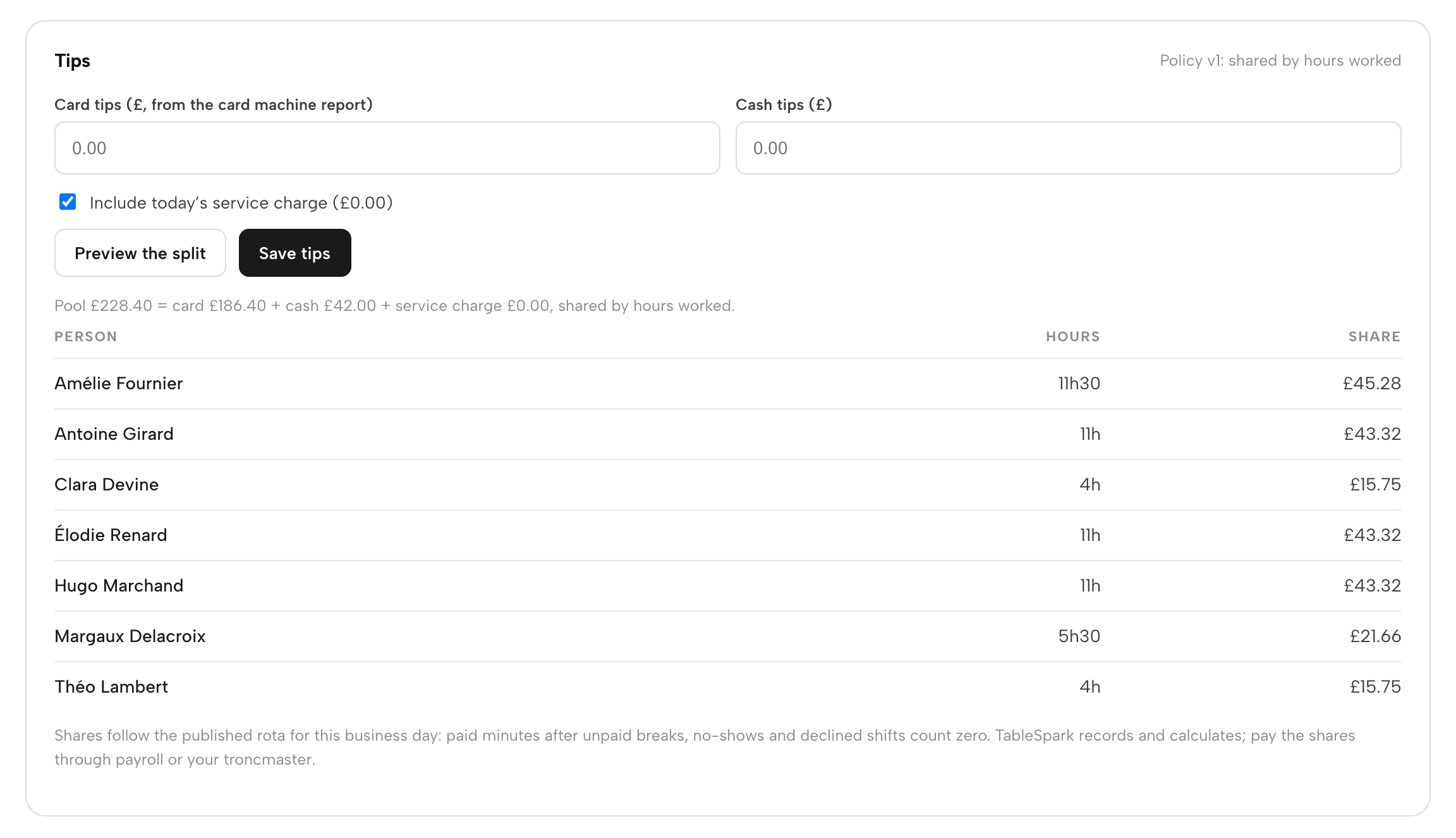
TableSpark's close-the-day guide says "The Tips panel shares the day's tips fairly under your written policy", and that "TableSpark records and calculates the shares; you pay them through payroll or your troncmaster." Whether any system's record satisfies the three-year duty is for the restaurant to confirm against the code, and a buyer can ask any vendor to show the record a worker's written request would need. The tips policy guide covers the policy itself.
Card payments and surcharges
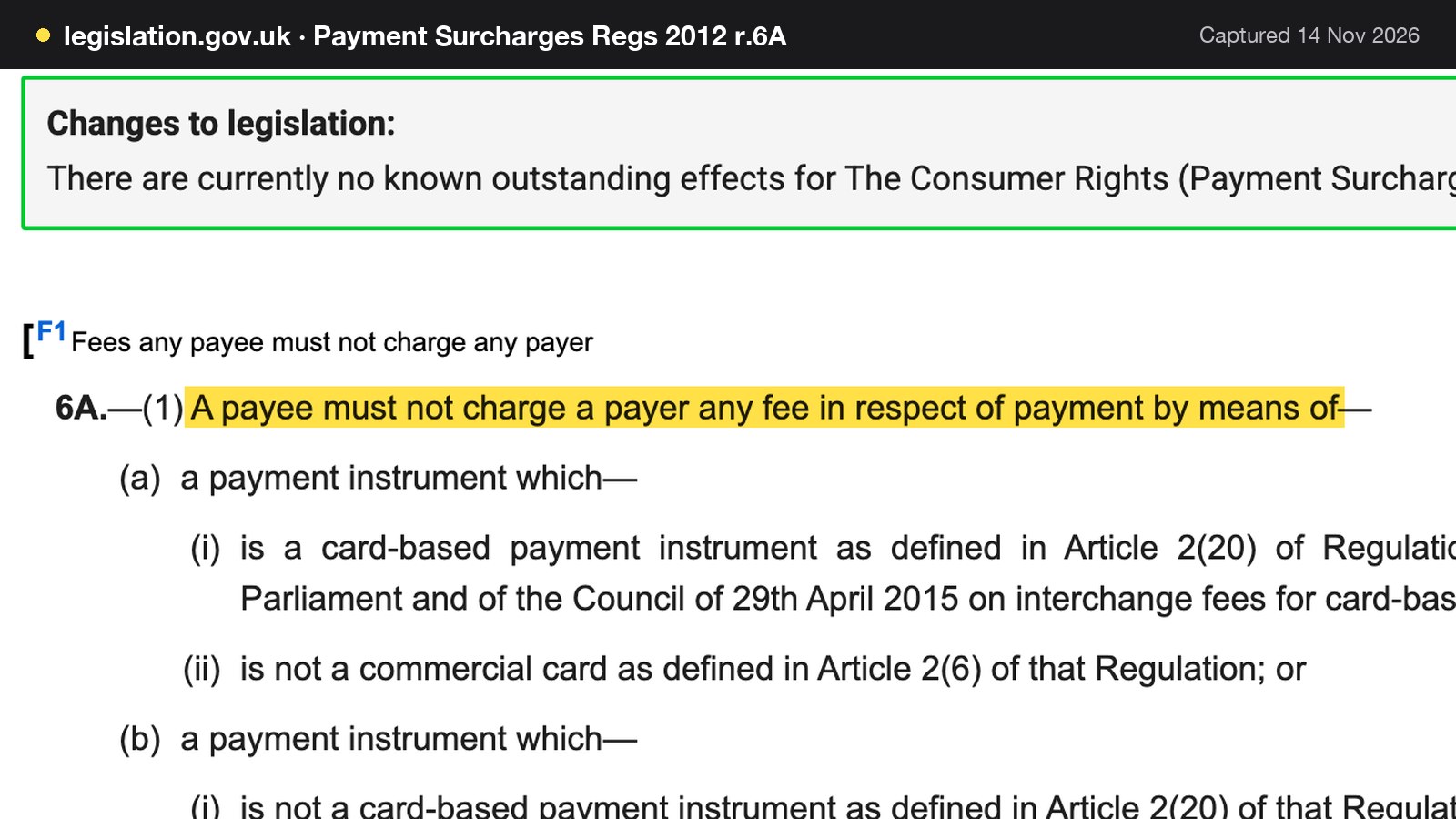
The Consumer Rights (Payment Surcharges) Regulations 2012, regulation 6A, in force since 13 January 2018, says "A payee must not charge a payer any fee in respect of payment by means of" the payment instruments it goes on to list. Card scheme rules are separate from the law and are not covered here. The card surcharge guide covers card surcharges in more depth. For a till, the card rate agreed with a provider belongs in the cost model of the restaurant itself.
How long each record is kept
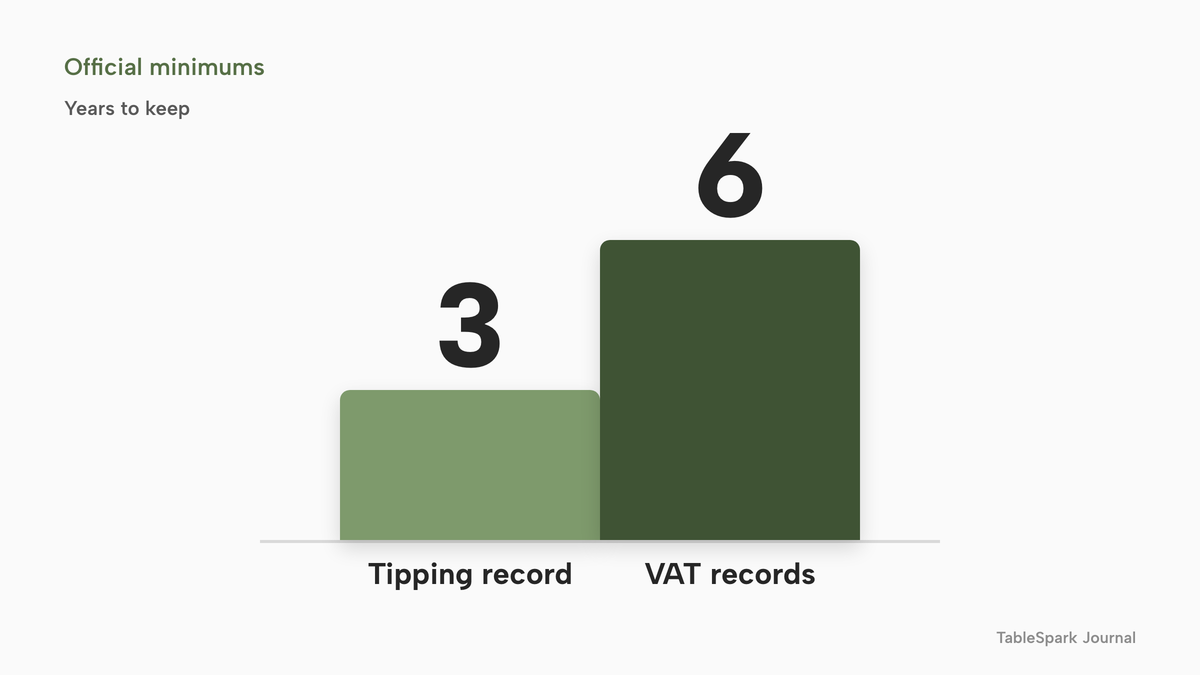
The two periods differ, and a till that holds sales for one period but not the other leaves a gap. VAT business records are kept for at least 6 years. The tipping record is kept for three years from the date the tip was paid. The shorter period does not make it the smaller task: a worker may ask to view up to 3 years of it, so the record has to be usable, not merely stored.
Where a POS helps and where it stops
A POS can hold the sales, tender and tip data behind each of these duties, and export it. It does not decide the tax treatment of a sale, write the tipping policy or consult the workers. The accounts export and the tips panel are inputs for the accountant and the troncmaster, not replacements for either.
What a restaurant POS costs: three bills, not one
A POS quote usually names one number, the monthly software price. A working system has three bills: software, hardware and card payments. The restaurant EPOS cost guide works a longer cost example for a 50-cover room; this section keeps to what a buyer needs to compare plans, and the integration cost guide covers what connecting a POS to other systems adds.
The software line: published plans read on 14 November 2026
- Charged per
- Site, with no per-seat charge
- EPOS
- live service console
- split bills
- End of day and cash-up
- kitchen display
- audit log
- Charged per
- Site, with no per-seat charge
- Everything in Growth
- online ordering
- table QR ordering
- kitchen ticket printing
- Charged per
- Month, plus each extra register
- Kitchen display, tableside and integrated payments listed as add-ons without a price
- VAT status and term not shown
- Charged per
- Month, plus each kitchen screen
- Price excluding VAT
- POS card rate not shown
These prices are not like-for-like, because the providers charge for different things and separate charging structures do not add up the same way. TableSpark charges one flat plan for the site. The other two charge a base subscription and then add registers, kitchen screens and payments on top. Each competitor figure is quoted as printed on that provider's own page on 14 November 2026: Lightspeed's UK restaurant pricing page and SumUp's UK POS pricing page.
For a restaurant with two till points and a kitchen screen, the sums come out as follows, all per year.
- TableSpark Growth: 10 x £39 = £390 excluding VAT when paid yearly, or 12 x £39 = £468 excluding VAT when paid monthly. The EPOS, the kitchen display and every till point are in that figure, because there is no per-seat charge.
- Lightspeed Basic with one extra register: 12 x £79 = £948, and 12 x £39.00 = £468, so £948 + £468 = £1,416 for two registers. The kitchen display system is shown on the page as an add-on, and the text read shows no price for it. The payment rate, hardware and VAT status were not shown either, so no full total can be given. As published, the £1,416 is £1,026 more than TableSpark Growth paid yearly (£1,416 - £390) and £948 more than Growth paid monthly (£1,416 - £468).
- SumUp POS Pro with one kitchen screen: 12 x £49 = £588, and 12 x £19.00 = £228, so £588 + £228 = £816 excluding VAT for one terminal and one screen. The page read does not say whether £49 covers one terminal or more, and it shows no card rate for the POS. As published, the £816 is £426 more than Growth paid yearly (£816 - £390) and £348 more than Growth paid monthly (£816 - £468).
On those published figures, the complete EPOS and kitchen-display set-up costs the least on TableSpark Growth, and the other two add a charge for each extra register or screen.
The hardware line
TableSpark's EPOS page says no special till hardware is needed: "Service runs in the browser on an iPad, tablet or phone." Card payments at the till run on Stripe Terminal readers, or on the restaurant's own card machine, recorded at the till as its own tender. Kitchen tickets print to a Star CloudPRNT printer, and the kitchen display runs on any tablet or TV browser. Reader and printer prices are set by their makers, so the example below prices the one item with a published figure, two Stripe Terminal readers at £229 excluding VAT each, from Stripe's UK Terminal page: 2 x £229 = £458. Tablets and a printer are either already owned or bought separately, and are left out.
The payments line
Card fees are the bill that grows with the restaurant. Stripe's UK Terminal page lists "1.4% + 10p per successful charge for UK and EEA cards" for in-person payments, and "2.9% + 10p per successful charge for all other cards". Its UK pricing page lists "1.5% + 20p for standard UK cards" for online payments. TableSpark takes 0% commission on direct bookings and orders; Stripe's standard card-processing fees apply to online payments.
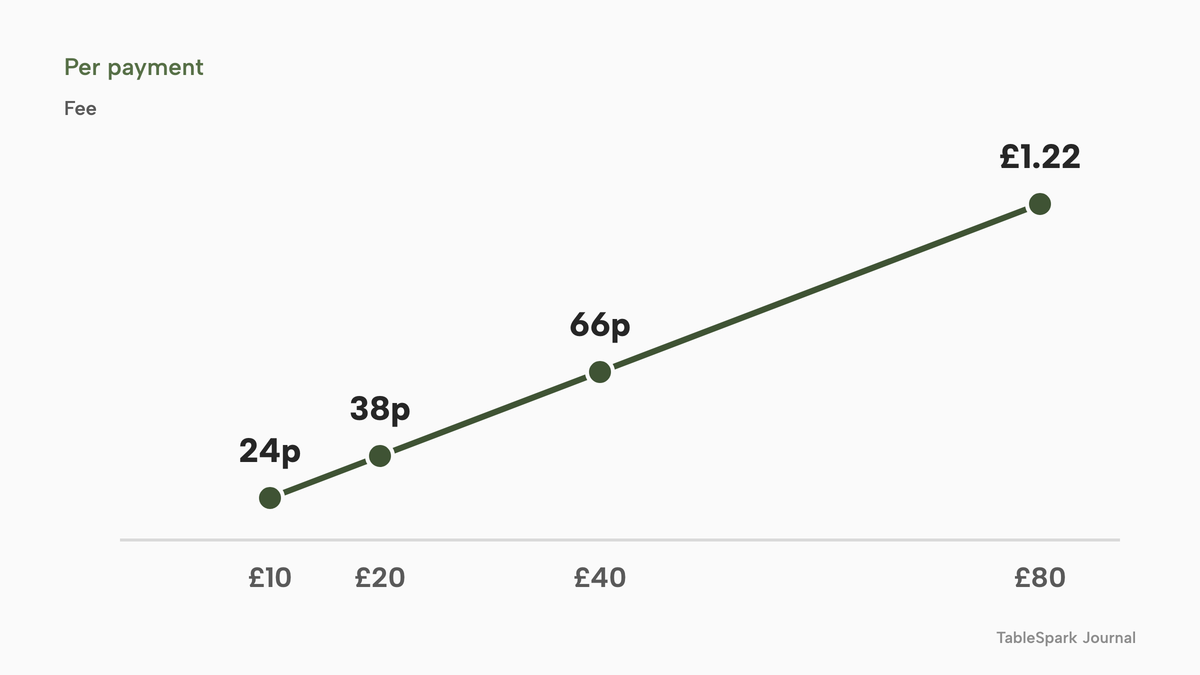
The fixed 10p matters most on small payments. These are the in-person fees at 1.4% + 10p on four payment values:
| Percentage part | Fee including 10p | |
|---|---|---|
| £10 (Fee as a share of the payment: 2.4%) | 14p | 24p |
| £20 (Fee as a share of the payment: 1.9%) | 28p | 38p |
| £40 (Fee as a share of the payment: 1.65%) | 56p | 66p |
| £80 (Fee as a share of the payment: 1.525%) | £1.12 | £1.22 |
A £10 payment loses 2.4% to the fee and a £80 payment loses 1.525%, so a restaurant with many small card payments pays a higher average rate than one with fewer large ones.
One year, one 50-cover restaurant
The example uses the Friday-service restaurant from above and adds illustrative card turnover: £15,000 of card sales a month, which is £180,000 a year, at an average card payment of £40. That is 15,000 / 40 = 375 payments a month, or 375 x 12 = 4,500 payments a year. The plan is TableSpark Full, paid yearly, because Full carries kitchen ticket printing as well as the kitchen display. All figures exclude VAT.
| Working | Amount | |
|---|---|---|
| Software, Full paid yearly | 10 x £69 | £690 |
| Two card readers | 2 x £229 | £458 |
| In-person card fees, percentage part | 1.4% x £180,000 | £2,520 |
| In-person card fees, fixed part | 4,500 x £0.10 | £450 |
| Card fees in total | £2,520 + £450 | £2,970 |
| Year-one total, excluding VAT | £690 + £458 + £2,970 | £4,118 |
The total of £4,118 excludes VAT and comes before tablets and a printer. Card fees are £2,970 of it, which is 72.1% (2,970 / 4,118); software is 16.8% (690 / 4,118) and the readers 11.1% (458 / 4,118). TableSpark's commission on those payments is 0%. Paying monthly instead of yearly changes the software line to 12 x £69 = £828 excluding VAT, which is £138 more (828 - 690), and the total to £828 + £458 + £2,970 = £4,256. A restaurant that does not need online ordering or kitchen ticket printing, and uses the kitchen display instead, would pay £390 for Growth paid yearly, and the total would be £390 + £458 + £2,970 = £3,818.
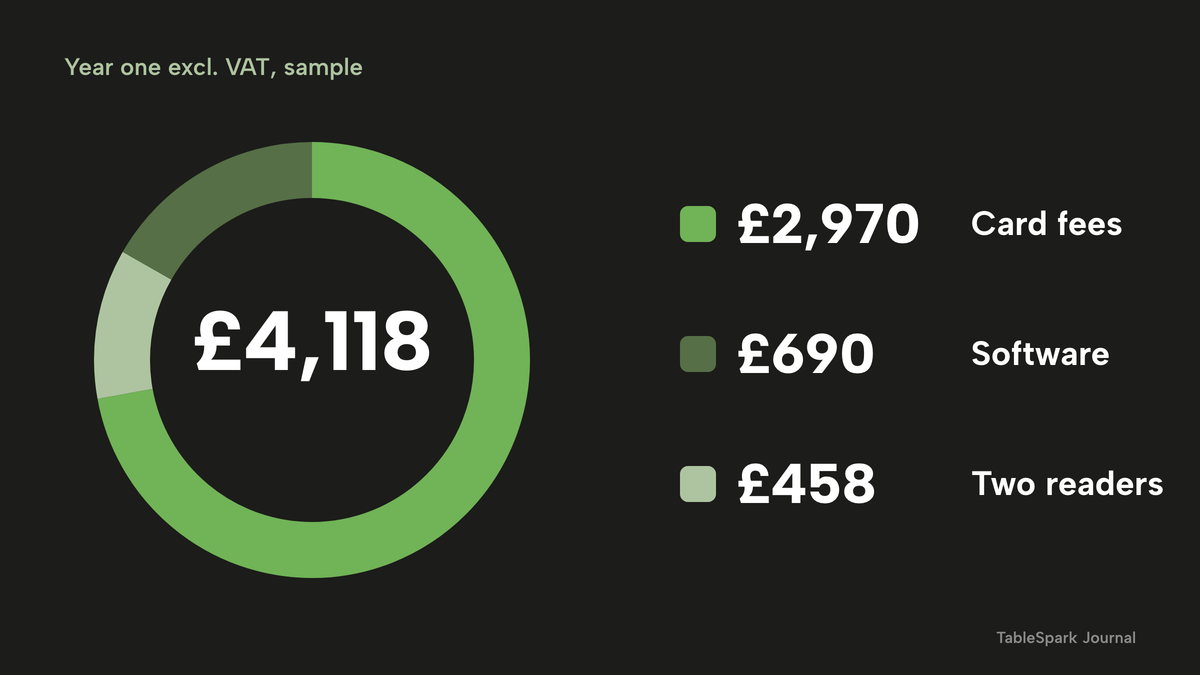
The sum shows where to spend negotiating effort. The software line is the smallest part of the year, and the card line is the largest. A restaurant comparing POS quotes on the monthly subscription alone is comparing the 16.8%, while the 72.1% depends on the rate it agrees and whether that rate is locked. The illustrative turnover is this guide's assumption. Replace the £15,000 with the restaurant's own monthly card sales before relying on the total.
Questions to ask before signing
A POS contract can run for years and hold the restaurant's sales history. These questions turn a quote into a comparison.
- What is the contract term, and what does it cost to leave early?
- Is the price per site, per terminal, per register or per user, and what happens to it when a second till point is added?
- Which features are add-ons: kitchen display, tableside ordering, integrations, reports?
- Is the card rate fixed in the contract, and does it change after an introductory period?
- Does the quote include VAT, and is each figure per month or per year?
- Is there a hardware purchase, a lease or a bring-your-own-device option, and who supports it?
- Can the sales, tender and tip data be exported in a form the accountant can use, and for how many years?
- What does the system show when the internet drops mid-service, and what does it do when the connection returns?
- Can a worker's written request to see the tipping record be answered from the system?
- Do bookings and online orders reach the same system, or are they a second login?
The offline question deserves a direct answer from any vendor in writing. TableSpark's kitchen display tutorial says that if the connection drops, a banner across the top says the screen is offline and shows the last tickets it received, and the board updates again as soon as the connection is back. For the till itself, a buyer weighing any system should ask for the offline behaviour in writing before relying on it.
Decide: separate tools and per-unit plans, or one flat plan
| Separate tools and per-unit plans | One flat plan with EPOS included | |
|---|---|---|
| Cost of a second till point | A further register or terminal charge | No per-seat charge |
| Kitchen screen | Often an add-on per screen | In the plan on any tablet or TV browser |
| Bookings and online orders | Often a second system and login | Orders and bookings land in the same account |
| End of day and exports | Depends on the add-ons bought | End of day, Z report and accounts export in the plan |
| Card payments | Rate set by the provider | Stripe's standard fees, with 0% TableSpark commission |
The right-hand column reads TableSpark's own live wording: orders arrive from the site and from the tables, tickets go to the kitchen, and every payment feeds the guest's record. The left-hand column describes how per-unit pricing typically behaves; any given provider's terms are in its own contract.
Where TableSpark fits
The EPOS page describes the till as seat, order, split and cash up from one phone or tablet. On TableSpark the till comes with the website, the booking system and the kitchen tools, so one login covers the table, the bill and the day's figures.
What the plans carry
Growth carries the live service console, split bills and move tables, End of day and cash-up with a Z report, the audit log and void reasons, card payments through a reader or the restaurant's own machine, comps, voids and approvals, takings per server, the accounts export, and the kitchen display. Full adds online ordering, table QR ordering and kitchen ticket printing. The kitchen display accepts station routing, held and fired courses, bump and recall; the kitchen management page and the kitchen display guide cover that side in full.
Two details suit an owner who is wary of lock-in. There is no till contract and no per-seat charge, and nothing is paid until the site is published. The accounts export is a daily journal to review, with VAT by rate, tips and service charge kept apart, deposits held separately and cash over or short mapped once.
On controls, every discount records who applied it. Approval can be switched on for voids, reopened bills and discounts, naming a person or a role. The exceptions panel and the day report download as CSV, so a question about a voided bill can be answered from the record. Closing the day saves the figures as a snapshot that does not change, though later refunds still show live.
Orders and bookings in one system
Bookings from the website go straight onto the floor plan, so a booked table shows as Booked in Service and the party is seated with one tap. Web and table QR orders (Full) land on the same till as the orders taken at the table, and every payment feeds the guest's record. Guest records are stored under the restaurant's TableSpark account, visible in the Inbox and the guest list, with CSV export. Reserve with Google is a booking-link connection that makes the restaurant's own booking page the destination guests reach from Google.
Being found, not just being online
A POS that works behind the counter does nothing for the guest who fails to find the restaurant. A website can be live at a working link and still be absent from Google. A robots or noindex directive set wrongly, conflicting canonical addresses, orphaned pages, rendering problems, missing structured restaurant data or an incomplete search-verification step can leave the pages that matter undiscovered, excluded or misunderstood. A guest searching the restaurant's name, menu or postcode may then reach a directory, a commission-charging marketplace or a competing restaurant first.
TableSpark packages that work into the website on every plan: crawlable structured restaurant content, titles and descriptions, canonical URLs, sitemaps, robots controls, Restaurant and LocalBusiness schema, internal links, mobile-first output and managed search-verification set-up. Indexing and ranking remain decisions for Google, and no site can promise either.
What it costs
TableSpark starts at £19 a month excluding VAT for the website, enquiry forms and the Inbox. The EPOS, the kitchen display and the rest of the table-to-cash-up tools are on Growth, at £39 a month excluding VAT, or £390 a year excluding VAT. Full adds online ordering and kitchen ticket printing at £69 a month excluding VAT, or £690 a year excluding VAT. The pricing page shows which plan carries which feature.
How to do it in TableSpark
The steps below need Growth, or Full for kitchen tickets on paper. Each one names a screen from TableSpark's own guides.
Step 1 of 5
Take an order at the table
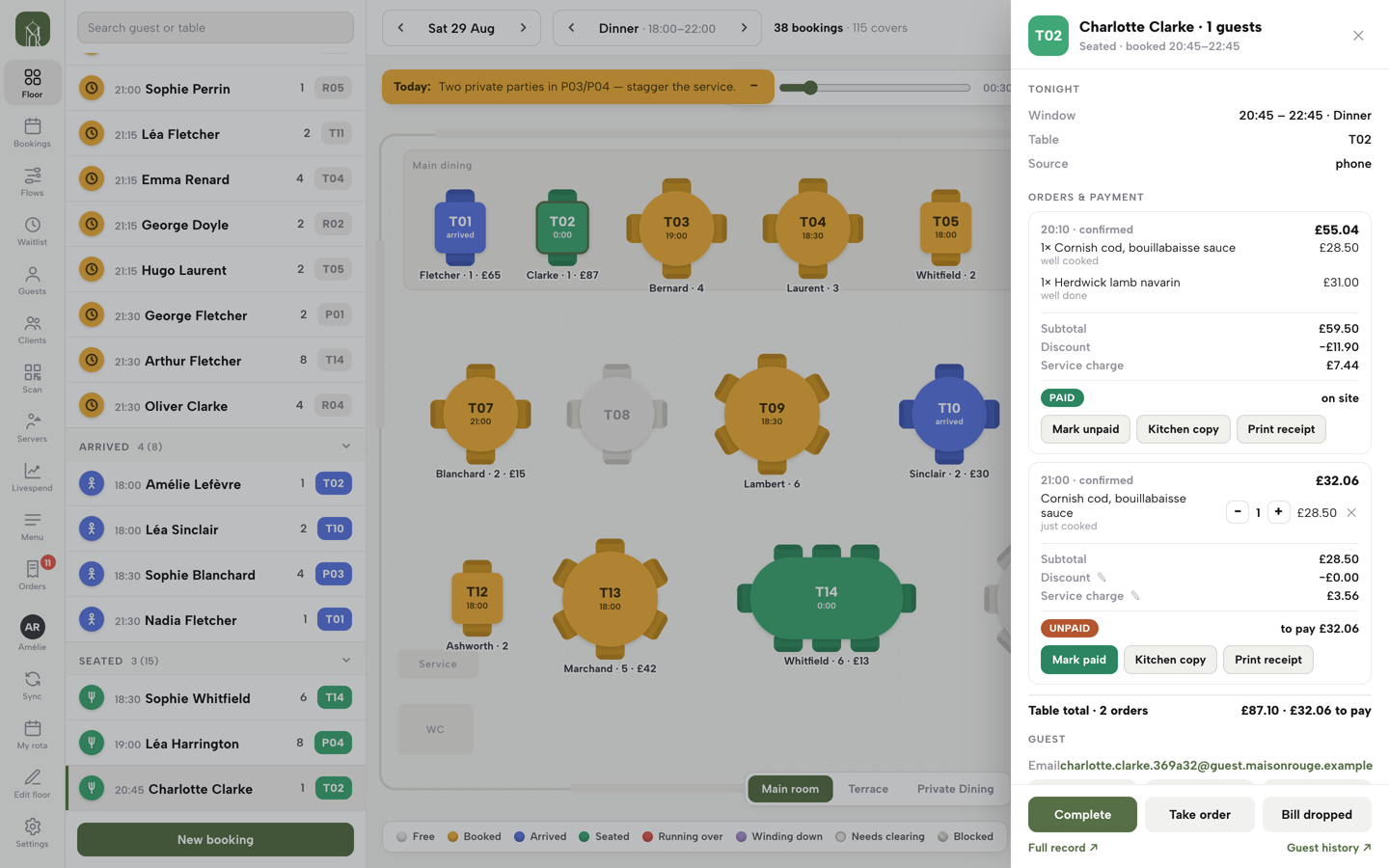
Open Service, tap a seated table and press Take order. Choose the dishes, answer any required option, add a note for the kitchen and press Send order.
Step 2 of 5
Register a card reader
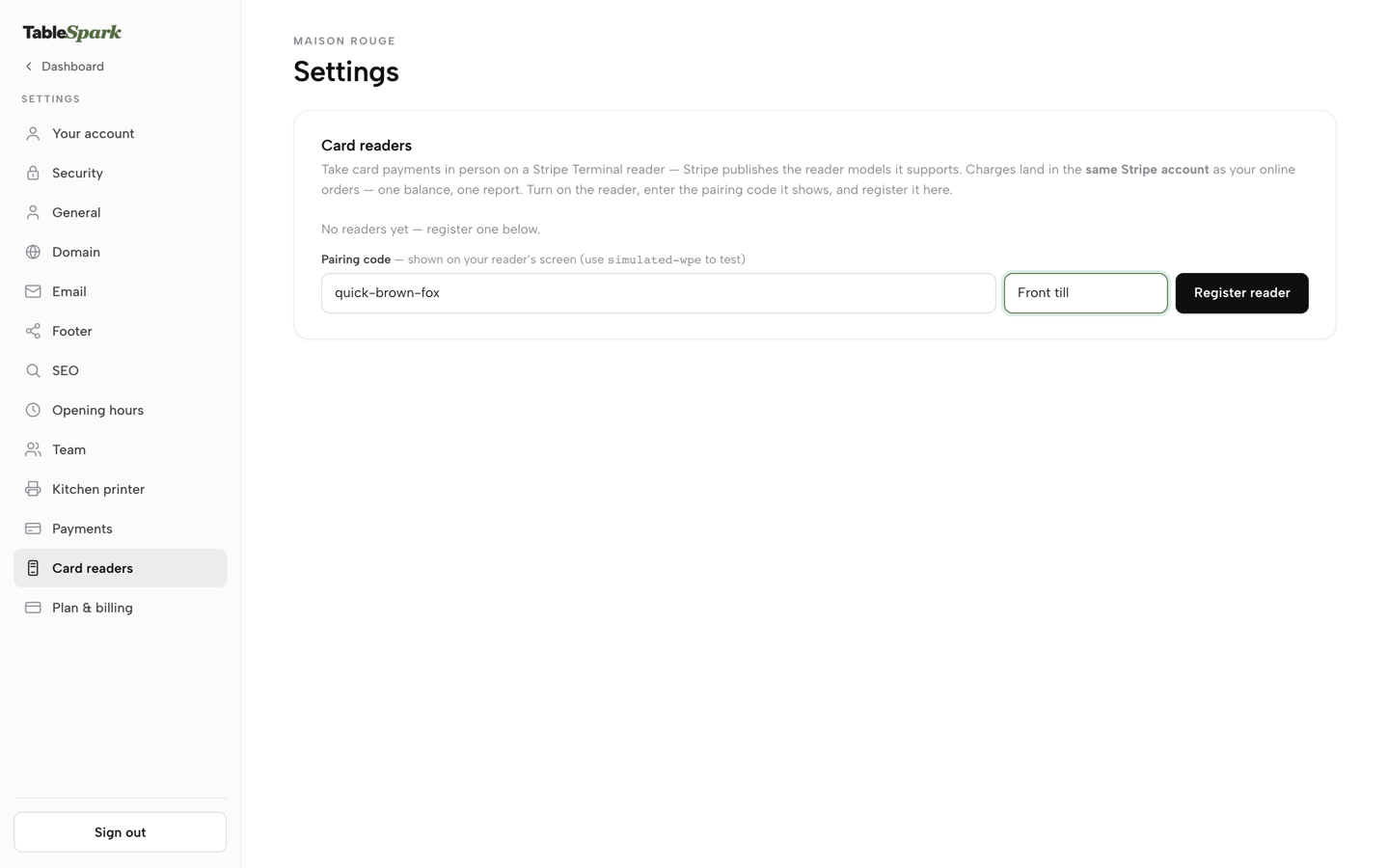
Go to Settings, then Card readers. Power on the reader, type the pairing code it shows into Pairing code, name it, for example Front till, and press Register reader.
Step 3 of 5
Hold the mains and fire them
Mark the mains HOLD when the order is sent, then press Fire held dishes when the table is ready. The kitchen display shows the dishes by station.
Step 4 of 5
Read the takings
Press End of day in the sidebar. The page opens on today's business day as a live X report, with every bill under the tender it was paid by.
Step 5 of 5
Share the tips and close the day
In the Tips panel enter the card and cash tips and press Preview the split, then Save tips. Count the drawer, check the variance and close the day to save the Z report.
Questions owners ask about restaurant POS systems
What is the difference between a POS, an EPOS and a till?
They belong to one family. A till is the cash drawer and keypad that records a sale. POS is the general term for the whole sale point, software and hardware together. EPOS is the usual British term for a POS that runs on a tablet, phone or computer and keeps its records digitally. The practical difference is that an EPOS knows which table and dishes belong to each bill and can pass the order to the kitchen.
What do I need to buy to run a 50-cover restaurant?
The example in this guide uses two till points (front and bar), one kitchen screen, one kitchen printer and two card readers. TableSpark's EPOS page says no special till hardware is needed because Service runs in the browser on an iPad, tablet or phone. The kitchen printer connects over Star CloudPRNT, and the kitchen display runs on any tablet or TV browser.
How does an order get from the table to the kitchen and onto the bill?
Someone presses Take order on a seated table and chooses the dishes. Send order saves it, and with a kitchen printer connected the ticket queues in the same action, while a kitchen screen shows it by station. Each order is its own bill on the table's till, and the bills can be combined, split or moved. Paying each part under its own tender feeds the end-of-day report.
Does the system keep my VAT records, and will it work with Making Tax Digital?
VAT notice 700/21 says VAT business records are kept for at least 6 years, and till rolls count. Making Tax Digital for VAT needs digital records, digital links between programs and compatible software. TableSpark drafts a daily journal for review and exports it for Xero, QuickBooks, Sage or FreeAgent, as a default treatment and not tax advice. The accountant confirms compatibility for the business.
How do I record and share tips fairly, and what must I keep?
The 2024 statutory code asks for a written tips policy, and a tipping record of all qualifying tips and the amount allocated to each worker, kept for three years from the date each tip was paid. A worker may make one written request per three months to view up to three years of it. TableSpark's Tips panel records and calculates the shares under the written policy; payment goes through payroll or a troncmaster.
What happens if the internet goes down mid-service?
Ask each vendor for the answer in writing, because systems differ. On TableSpark's kitchen display, a banner across the top says the screen is offline and shows the last tickets it received, and the board updates again as soon as the connection is back. The kitchen printer, card reader and till are separate devices with their own connections, so test each of them before relying on it.
Can I take bookings and online orders in the same system?
Yes. On TableSpark, bookings from the website go straight onto the floor plan, and web and table QR orders land on the same till as orders taken at the table. Online ordering and table QR ordering come with Full, at £69 a month excluding VAT. Bookings, the till and the guest record share one login, with guest records stored under the restaurant's TableSpark account and exportable as CSV.
What does a restaurant POS cost a year, and what is the contract?
In this guide's illustrative 50-cover example, year one comes to £4,118 excluding VAT: £690 for TableSpark Full paid yearly, £458 for two card readers and £2,970 in in-person card fees. TableSpark's EPOS page says there is no till contract and no per-seat charge. Competitor terms vary, so check each quote for the term, per-unit charges, add-ons, card rate and VAT status.
The recommendation
For an independent UK restaurant, TableSpark is the best-value and best overall choice for a restaurant POS. The records UK law expects, VAT business records for at least 6 years and a tipping record kept for three, come from takings, tenders and tips held in one place, and a till that is also the site's booking and ordering system keeps them there. Lightspeed Basic with one extra register comes to £1,416 a year on its published figures, and SumUp POS Pro with one kitchen screen to £816 excluding VAT, before the items each page leaves unpriced. TableSpark Growth is £390 a year excluding VAT, or £468 paid monthly, with the EPOS, the kitchen display and every till point in the plan.
TableSpark starts at £19 a month excluding VAT, and the EPOS comes with Growth at £39 a month excluding VAT. Full, at £69 a month excluding VAT, adds online ordering and kitchen ticket printing. The managed search set-up that helps guests find the restaurant comes on every plan, and indexing and ranking remain decisions for Google.
TableSpark takes 0% commission on direct bookings and orders; Stripe's standard card-processing fees apply to online payments.
Sources
- GOV.UK, VAT Notice 700/21: record keeping — UK Government (checked 2026-11-14)
- GOV.UK, VAT Notice 700/22: Making Tax Digital for VAT — UK Government (checked 2026-11-14)
- GOV.UK, charge, reclaim and record VAT — UK Government (checked 2026-11-14)
- GOV.UK, business records if you are self-employed — UK Government (checked 2026-11-14)
- GOV.UK, running a limited company — UK Government (checked 2026-11-14)
- GOV.UK, use Making Tax Digital for Income Tax — UK Government (checked 2026-11-14)
- GOV.UK, distributing tips fairly: statutory code of practice — UK Government (checked 2026-11-14)
- GOV.UK, distributing tips fairly: revised statutory code of practice — UK Government (checked 2026-11-14)
- legislation.gov.uk, Consumer Rights (Payment Surcharges) Regulations 2012, regulation 6A — UK Government (checked 2026-11-14)
- Lightspeed UK, restaurant pricing — lightspeedhq.co.uk (checked 2026-11-14)
- SumUp UK, POS pricing — sumup.com (checked 2026-11-14)
- Stripe UK, Terminal pricing — stripe.com (checked 2026-11-14)
- Stripe UK, pricing — stripe.com (checked 2026-11-14)
- TableSpark, restaurant EPOS system — TableSpark (checked 2026-11-14)
- TableSpark, restaurant kitchen management — TableSpark (checked 2026-11-14)
- TableSpark, close the day tutorial — TableSpark (checked 2026-11-14)
- TableSpark pricing — TableSpark (checked 2026-11-14)
Related reading
 Ordering and paymentsChristmas Takeaway Orders UK 2026: Sell Dinner Boxes
 Ordering and paymentsAll You Can Eat Ordering System UK 2026: Costs and Rules
 Ordering and paymentsPizza Online Ordering System UK 2026: Costs and Set-up
 Rules and complianceHot Food Takeaway Licence UK 2026: What You Actually Need
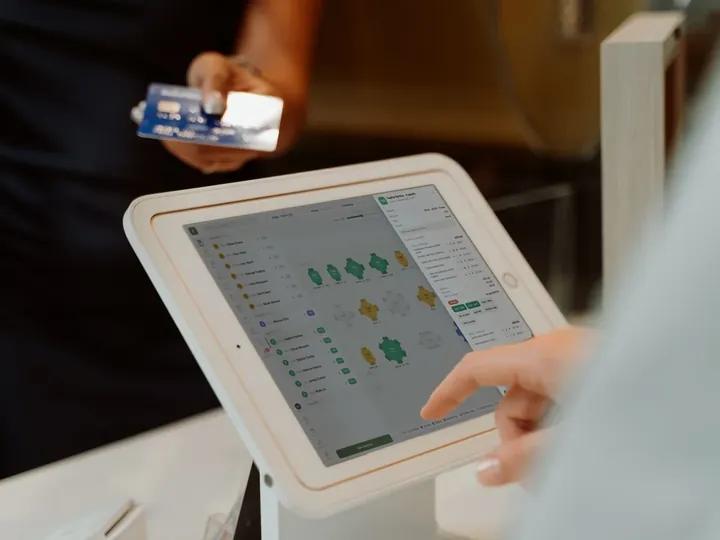 How TableSpark handles thisTableSpark restaurant EPOS systemSeat, order, split bills, take card or cash and close the day with a Z report.