Contents
On a Friday night the dining room is full and the pizza orders arrive on a marketplace tablet that takes up to 30% commission on each delivery order and holds the guest's details.
An Italian restaurant website has to do two jobs. It must sell the dining room, with a structured menu, a wine list, a set lunch and bookings for large tables. It must also take collection and delivery orders, with pizza sizes, extras and allergens built into each dish. Compare routes by what a full year costs once card fees and upkeep are added, never by the headline price. Leave the marketplace listing in place for discovery, then steer regulars to your own ordering page.
Friday night: a full dining room and a tablet that is not yours
Picture the pass at half past seven on a Friday. Tables one to nine are seated and the phone rings beside a tablet that chimes for a marketplace order, then chimes again. The printed menu prices a 12-inch margherita one way; the marketplace listing, typed in two years ago, prices it another. A guest on table four is asking whether the tiramisu has alcohol in it, and a driver is at the door for an order that includes a bottle of red. None of this is a measured average, yet each piece carries a price: a member of staff stuck on the phone, a stale listing, a bottle of wine that depends on someone checking the right thing at the door, and a percentage lost on orders that come through a screen you do not own.
Only one marketplace rate card could be read for this guide, and it is a blunt one. Uber Eats' UK pricing page, checked on 10 October 2026, lists a 30% delivery fee, 33% for Uber One members, a 13% fee for self-delivery, a 13% fee for pickup, and a £650 (excluding VAT) initial fee. Each is charged as a share of order value. The other large marketplaces' pages gave no readable rate in this research, so none appears. Take any rate from the agreement you hold and put it into the worked month later in this guide.
Uber Eats UK pricing page, checked 2026-10-10: 30% delivery fee, 13% self-delivery fee, 13% pickup fee, £650 (excluding VAT) initial fee.
IBISWorld puts the UK pizza delivery and takeaway market at £4.1bn in 2026, down 0.6% in 2026 and declining at a compound rate of 0.1% a year between 2021 and 2026. That is one firm's figure for one segment, not an Italian-restaurant number, but when the total is flat the margin kept on each order matters more than hoping for more orders.
An independent Italian kitchen runs two trades from one pass. The dining room wants bookings, a proper wine list, a fixed-price lunch and a table of twelve on Sunday. The counter wants sizes, extras, accurate allergen information and a safe way to hand over a bottle of wine. A site that serves only one leaves the other to a marketplace or a phone.
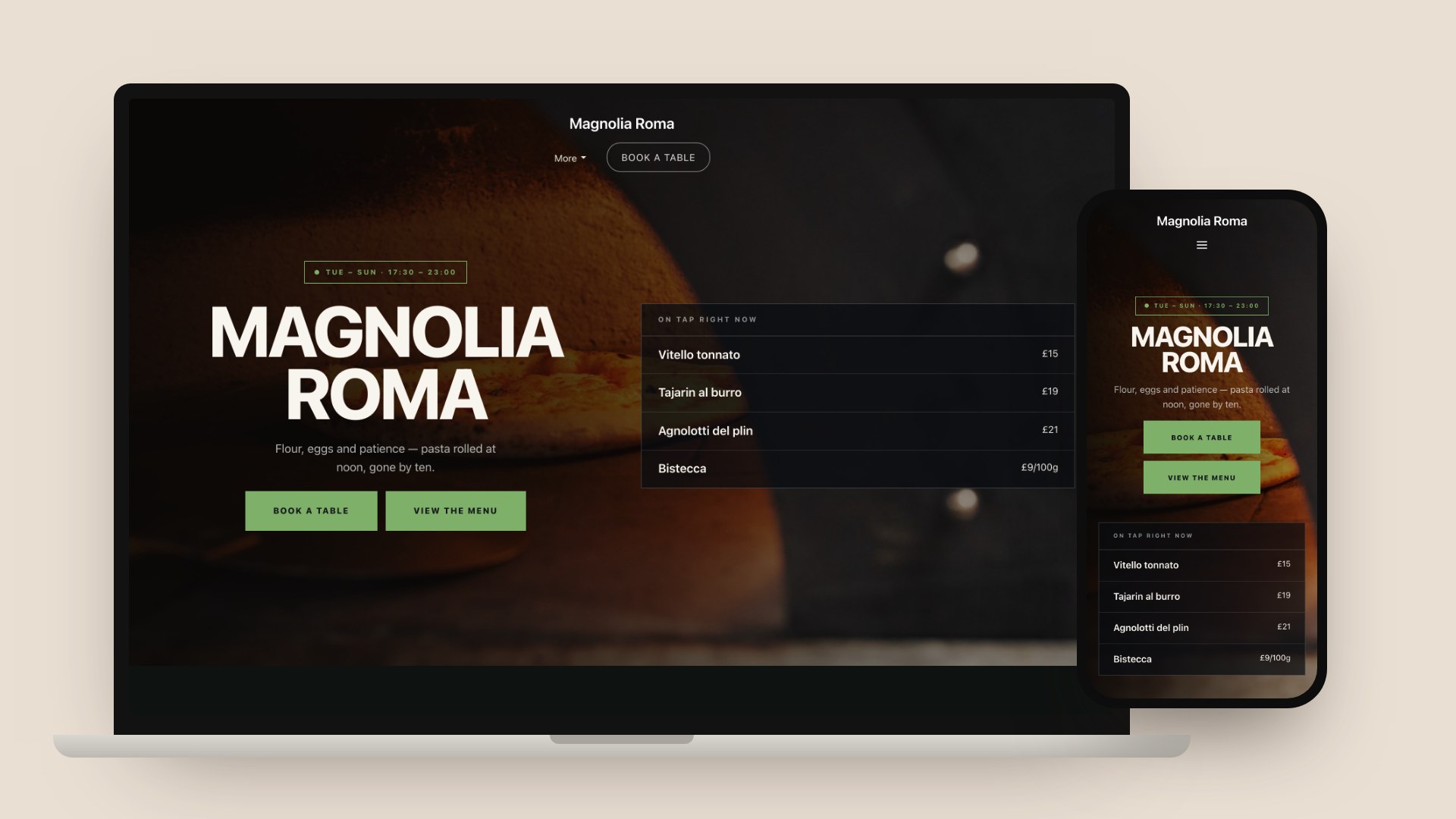
The mockup below shows a TableSpark Italian template dressed for a wood-fired pizza room. It is a template mockup, not a real customer's site.
Two jobs, one site: the table and the counter
The website is a front door with two handles: Book a table and View the menu, and Order for collection. The guest wanting a 7.30pm table and the guest wanting two pizzas in 25 minutes are different people, and one form loses one of them.
On the dining-room side, a guest usually checks four things on a phone, often in under a minute: whether the pasta is made in-house, whether there is a fixed-price lunch and what it costs against the evening carte, whether a table of ten on a Sunday is possible, and whether a vegetarian or gluten-free guest will eat well. TableSpark's Italian restaurant page lists the same four checks.
On the counter side, the guest has already decided. They want the right size, priced extras, a stated ready time and a clear answer on allergens and wine.
Keeping both handles on one site is a commercial choice as well as a design choice. A booking lands in your book with party size, allergies and occasion attached, and an order lands on your Orders screen with the guest's name, phone and email. Both give you your records, in your account, exportable as CSV, so a Friday-night collection customer can be invited to book a table and last month's orderers can be written to.
The sister guide for a different cuisine, the Journal's Chinese restaurant website guide, makes the same two-jobs argument from the takeaway side.
What an Italian menu asks of a website
An Italian menu is a structure before it is a list. Antipasti, primi, secondi, contorni and dolci are read as a sequence, and a pizza section has its own logic of sizes and extras. Flattening it into one column or a PDF throws away what helps a guest order and what lets Google read it.
| What the guest needs | Where it should live | |
|---|---|---|
| Courses | Antipasti, primi, secondi, contorni and dolci in the order you cook and serve them | Separate menu sections, each with its own order and notes |
| Pizza | A size, paid extras, a base or crust choice, allergens | One dish with Options and extras: sizes, paid add-ons and required choices |
| Pasta | The dish, the portion, a gluten-free option if you have one | A dish per pasta, with dietary toggles and allergen chips on the dish |
| Wine | Region, style, producer, vintage and by-the-glass price | A wine list grouped by region and style, with those fields on each wine |
| Set lunch | What is included, the price, the hours | A visible fixed-price lunch, and a set menu attached to large-table requests |
| Specials | What is on today | A daily specials section edited from a phone, live when you save |
Pizza is a bundle of decisions: a size, extras that cost money, perhaps a base. In TableSpark these live on the dish. The dish editor has an Options and extras group for sizes, paid add-ons and required choices, which unlocks once the dish has been saved once. A required choice blocks the guest from adding the dish until they have picked. When a dish is sold in more than one size, the menu scan reads a price for each size, so a printed menu with 10-inch, 12-inch and 14-inch columns becomes one dish with three prices rather than three separate dishes.
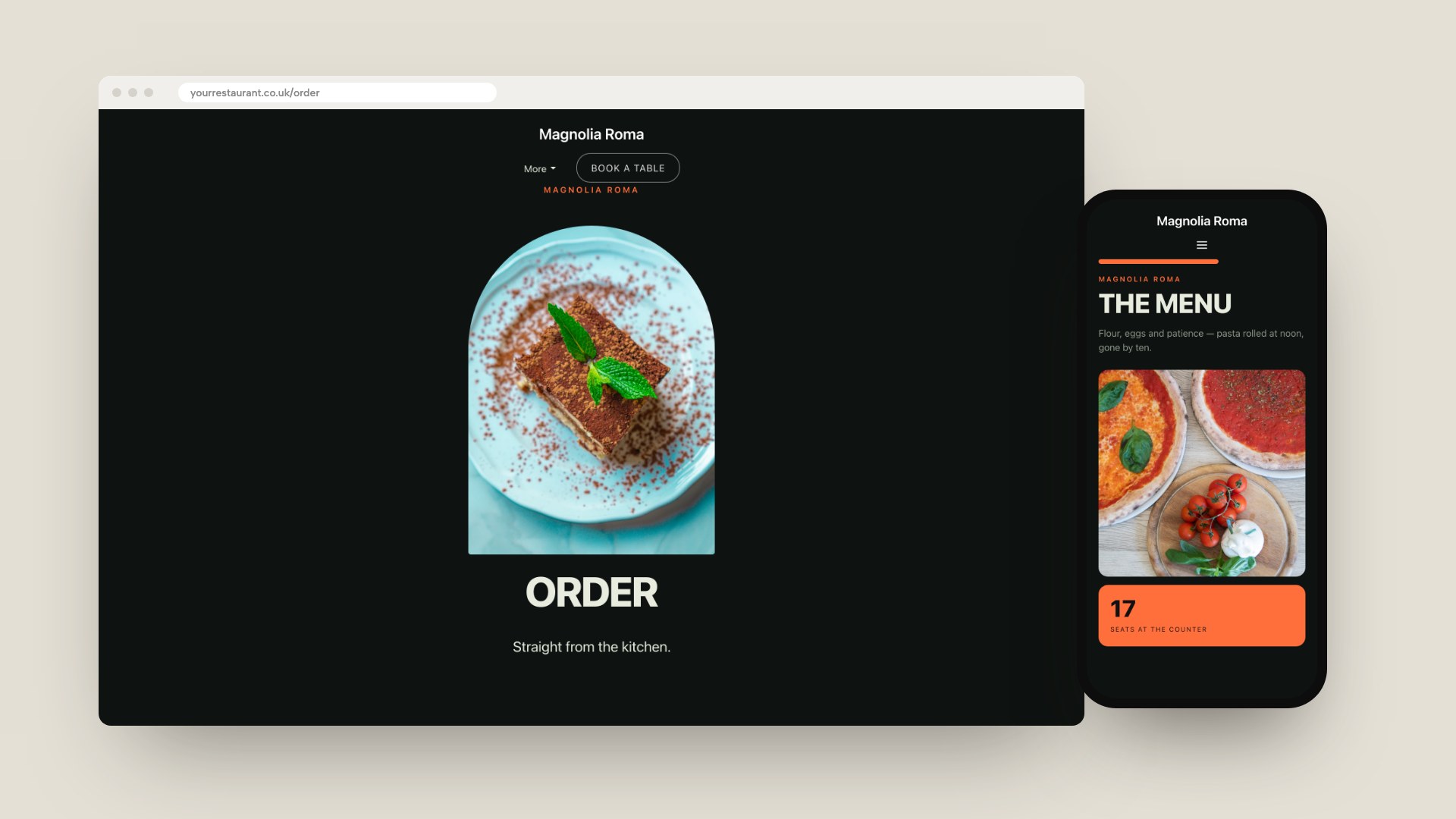
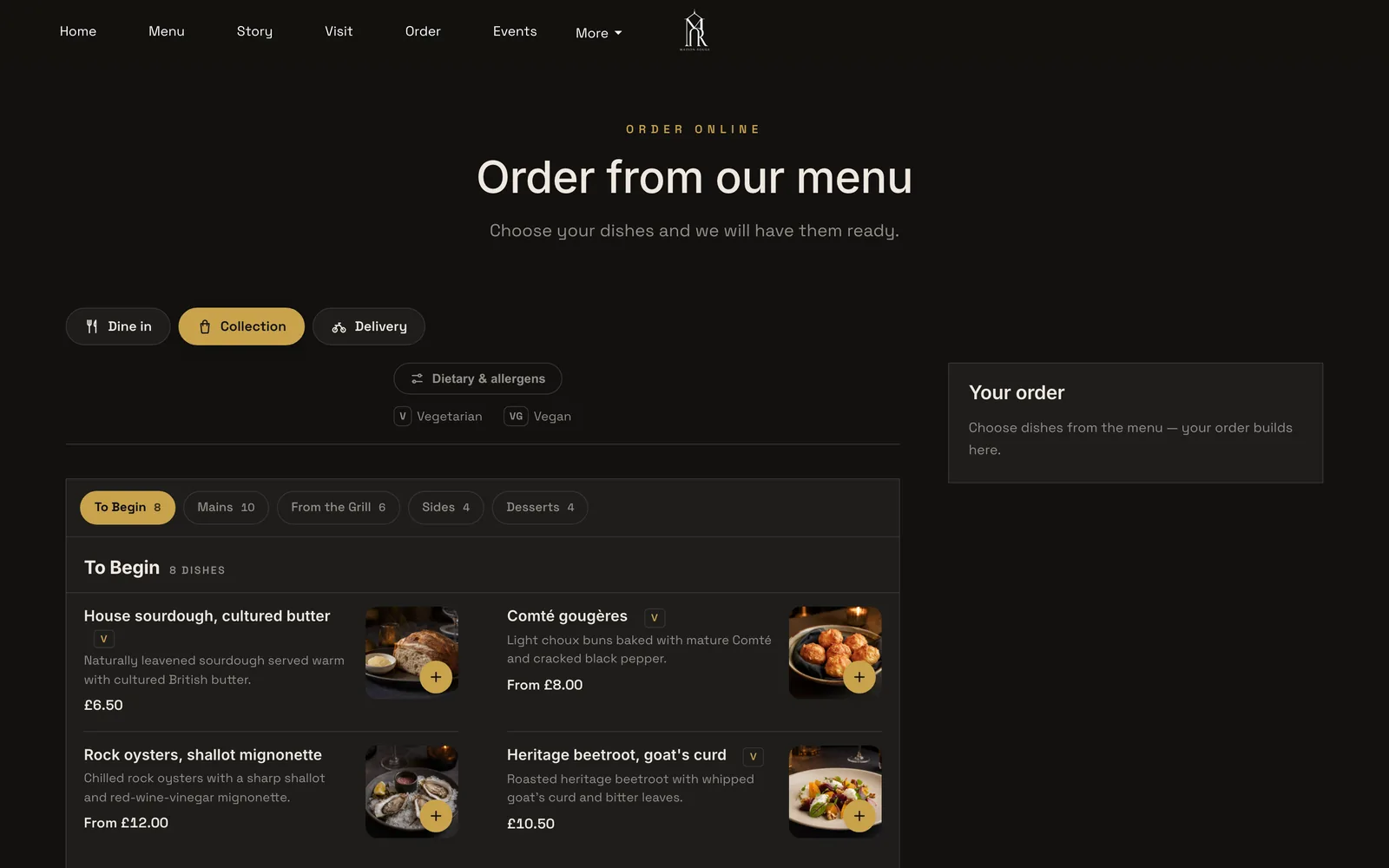
The mockup above shows the same template's order page in a browser, with the menu page on a phone, again not a customer site. What matters is the shape: category tabs along the top, photographed dishes, and a dish sheet that opens on a tap so the size and the extras are chosen before the dish reaches the basket. Each dish can be switched on or off for Dine in, Collection and Delivery, so a dessert that travels badly can stay off the delivery list.
Three pizza-menu decisions are worth making before you build:
- Price extras as extras, so a paid add-on appears in the basket and on the kitchen ticket.
- Use a required choice for anything the kitchen needs to know before it starts, such as the base on a pizza that comes two ways.
- Mark the dish sold out when the dough runs out. The dish remains visible, struck through, but guests can no longer order it. On Growth and Full you can also set a portion count, so a dish made in batches sells out on every channel when the last portion goes.
Pasta, wine and the set lunch win the dining room. A wine list grouped by region and style, with producer, vintage and by-the-glass pricing as fields, reads like a sommelier's list, and a bin that runs out can be pulled in seconds. A set lunch that exists only in the dining room is invisible to the person deciding at half past eleven.
Allergens: the two-stage rule, and why pizza customisation matters
Food sold for delivery or collection by phone or online is distance selling, and the Food Standards Agency's guidance on selling food for delivery, last updated 19 August 2026, says allergen information must be provided at two stages in the order process. The FSA's best-practice guidance on non-prepacked food, published 24 February 2025 and applying to England, Northern Ireland and Wales, spells out the two stages: written allergen information should be available to the consumer both before the food is ordered and when it is delivered.
For the first stage, the guidance says that if the information is not on the main menu it should ideally be no more than "one click away", with a clear message and link, another reason not to leave the menu in a PDF.
The second stage is where a pizzeria differs from a restaurant that serves a fixed plate. The guidance says written allergen information should also be provided on delivery so the consumer can review it before eating, and it could be a sticker on containers or a menu with allergen information. It then adds: "Where customisations have been made, this should also be indicated." A pizza with extras is a customised dish. If a guest adds a topping that contains one of the 14 allergens, the information that travels with the box needs to reflect what is in that box.
The 14 are: celery, cereals containing gluten, crustaceans, eggs, fish, lupin, milk, molluscs, mustard, peanuts, sesame, soybeans, sulphur dioxide and sulphites, and tree nuts. Wheat, milk, egg, fish and sulphites are common in Italian cooking, so check each dish against the 14. The FSA says you are only legally required to provide information for those 14. The best-practice document says "should", while the delivery page says "must" for the two stages, so read both. For which pizzas to offer for dine-in, collection and delivery, see the Journal's guide to pizza shop online ordering.
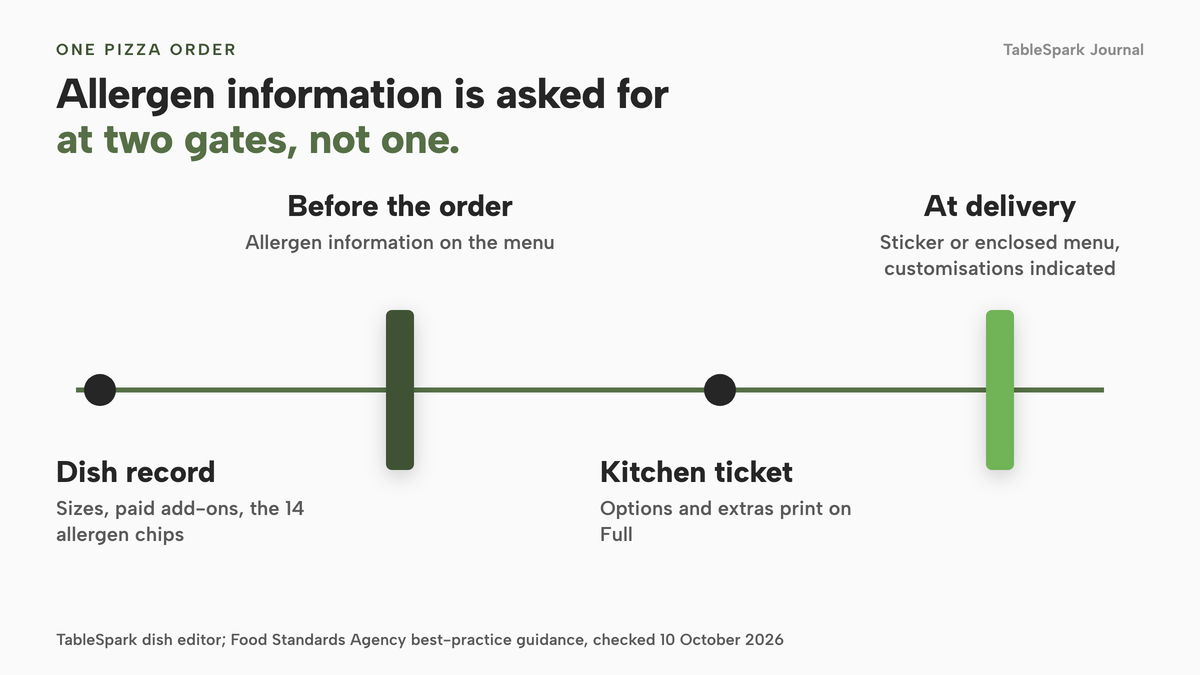
In TableSpark the 14 allergens are toggle chips on the dish editor, shown on your live menu, and the guest's choices from Options and extras go on the kitchen ticket when ticket printing, a Full plan feature, is switched on. Attach the allergen information to the order at hand-over, customisations included.
This guide describes published guidance and the way a TableSpark dish carries allergen data. It does not say any particular dish is free of any allergen, and it is not legal advice. Check each recipe against the 14 allergens with your supplier information.
Wine and beer with a collection or delivery order
For a trattoria, a bottle of wine with the pizza raises the basket and also raises a licensing question.
The Licensing Act 2003, section 190, says that "the sale of alcohol is to be treated as taking place where the alcohol is appropriated to the contract". The Home Office's section 182 guidance, updated on 15 September 2026, applies that in paragraph 3.9: the premises at that location need to be licensed. Paragraph 3.10 says persons who run premises providing alcohol delivery services should notify the relevant licensing authority that they are operating such a service in their operating schedule. It adds that premises with an existing licence may consider asking their licensing authority whether this form of sale is already permitted or whether a variation will be required. The wording is cautious, and so should you be: ask your licensing authority before you list wine on the ordering page.
Paragraph 10.64 deals with age. It says licence and certificate holders should consider carefully what steps are required to comply with the age verification mandatory condition for alcohol sold remotely, including online, by telephone, by mail order and through delivery services. It adds that the alcohol is not treated as served until it reaches the customer, and that the person serving or delivering it remains responsible for ensuring age verification has taken place and any physical or digital identification has been checked.
The website can sell the bottle, but the check happens at the door. TableSpark's dish editor has an age restriction setting, labelled Age-restricted (18+), and a dish carrying it means collection and delivery orders require photo ID at handover. That puts the instruction on the order, where the person handing over will see it. It does not replace your licence conditions or staff training.
The Licensing Act and the section 182 guidance describe what a licensing authority expects. They do not say what your own licence permits. The only reliable answer is your licensing authority's view of your premises licence, so ask before you sell alcohol with an order.
The Journal's article on takeaway alcohol off-sales and how a permission can lapse covers how a permission you had can stop covering what you now do.
The hygiene rating on a website
The FSA's Food Hygiene Rating Scheme guidance, updated on 30 June 2026, applies to England, Northern Ireland and Wales. In England you can display your rating in your premises' window or door. In Wales and Northern Ireland a business is legally required to display it at or near each customer entrance. Welsh takeaways with a menu or leaflet showing food, prices and a way to order without visiting must also publish a bilingual statement directing customers to the ratings website.
On the web the FSA goes no further than encouragement: it would like the rating shown on your website or social media pages as well as in your window. It is not a requirement there. Scotland's scheme differs and is not covered here.
The dining room: large tables, deposits and the set lunch
Italian rooms live on the large table: Sunday lunch for twelve, a birthday that grows by three the night before, a set-menu group booked six weeks out. Each carries more risk than a couple at seven.
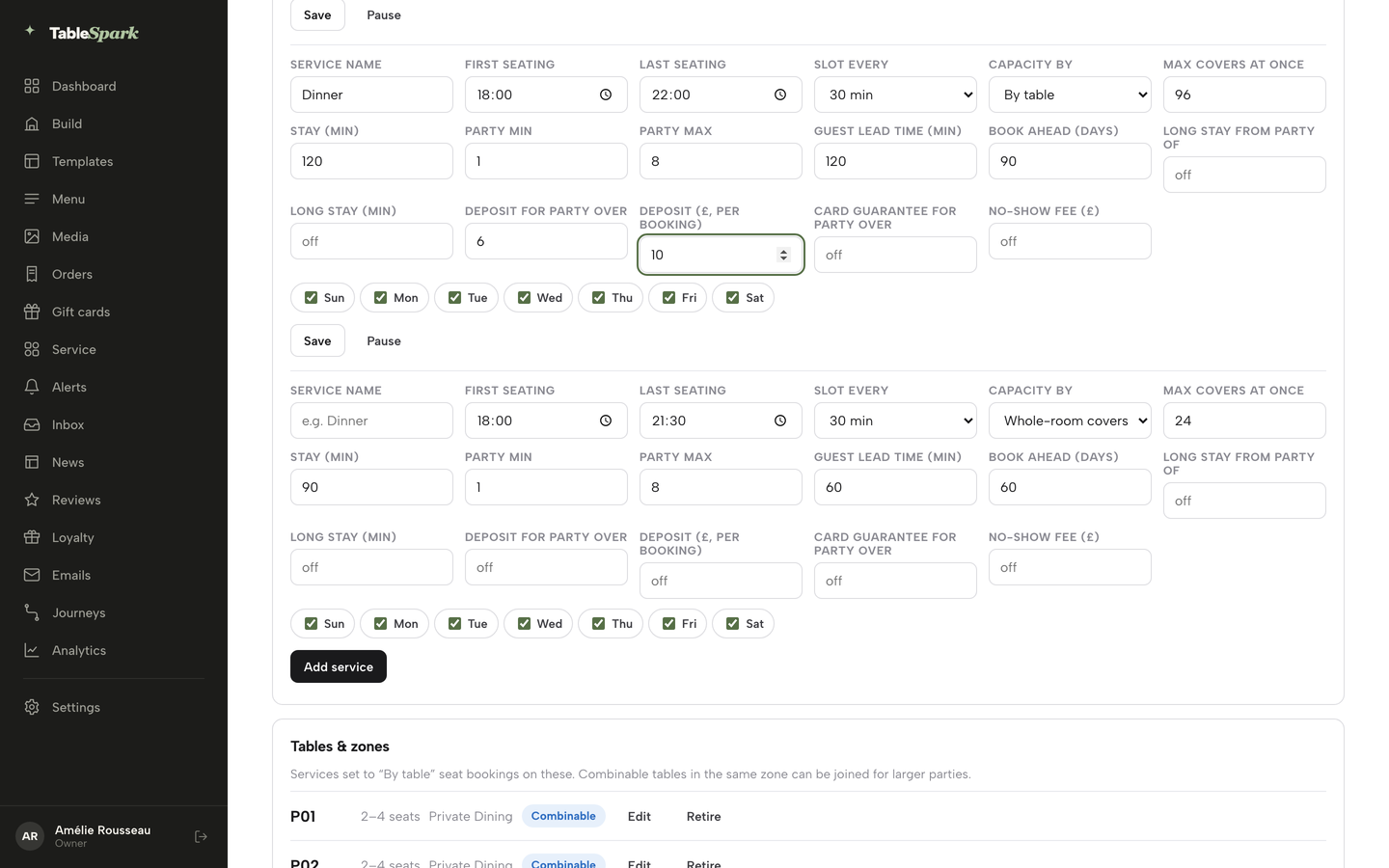
Direct booking on your own site puts that party in your book. TableSpark's Growth plan, at £39 a month excluding VAT, adds on-site reservations, live availability, floor plans and table assignment, deposits and reminders, and a Reserve with Google booking-link connection. The booking rules can ask for a deposit above a party size you set. In the Bookings page's Services & rules panel, each service, such as Lunch and Dinner, has fields for the seating window, party maximum, lead time and book-ahead, and for Deposit for party over and the deposit amount per booking. A set menu can be attached to a large-table request so the kitchen knows what to prep.
Give Lunch its own service, so a fixed-price lunch has its own capacity, party size and hours, and set the party threshold and deposit at the size where a no-show hurts. Both numbers are your decision. To choose a booking tool, see the Journal's guide to the restaurant table booking system.
A Reserve with Google booking-link connection puts a booking destination on your Google listing. It is a link from Google to your own booking page, not a feed that sends Google bookings into your Inbox automatically.
Marketplace or your own page: keep the listing, move the regulars
A marketplace introduces you to people who have never heard of you, and that is worth something. A regular who orders every second Friday needs no introduction, and each of their orders costs a percentage your own page does not charge. Keep the listing for discovery, put a card and QR code in every marketplace bag, and offer the direct route first everywhere else.
A worked month: 160 collection orders, with the sums
Swap in your own numbers. The scenario: a trattoria moves 160 repeat marketplace collection orders a month, roughly 40 each weekend, to its own ordering page at an average basket of £25. It is a scenario. The 13% and 30% figures come from the Uber Eats page above as examples of a marketplace rate; your own agreement overrides them. The direct side uses Stripe's published standard UK card rate of 1.5% plus 20p, and TableSpark Full at £69 a month excluding VAT. All figures are before VAT.
- Value of orders moved: 160 × £25 = £4,000.
- Marketplace pickup at 13%: £4,000 × 13% = £520.
- Marketplace delivery at 30%: £4,000 × 30% = £1,200.
- Stripe on a single £25 order: £25 × 1.5% = 37.5p, plus 20p = 57.5p. For 160 orders: 160 × 57.5p = £92.
- The plan: Full is £69 a month excluding VAT.
- All direct costs: £92 + £69 = £161, with the plan fee shown excluding VAT.
- Kept against the 13% rate: £520 − £161 = £359. Kept against the 30% rate: £1,200 − £161 = £1,039.
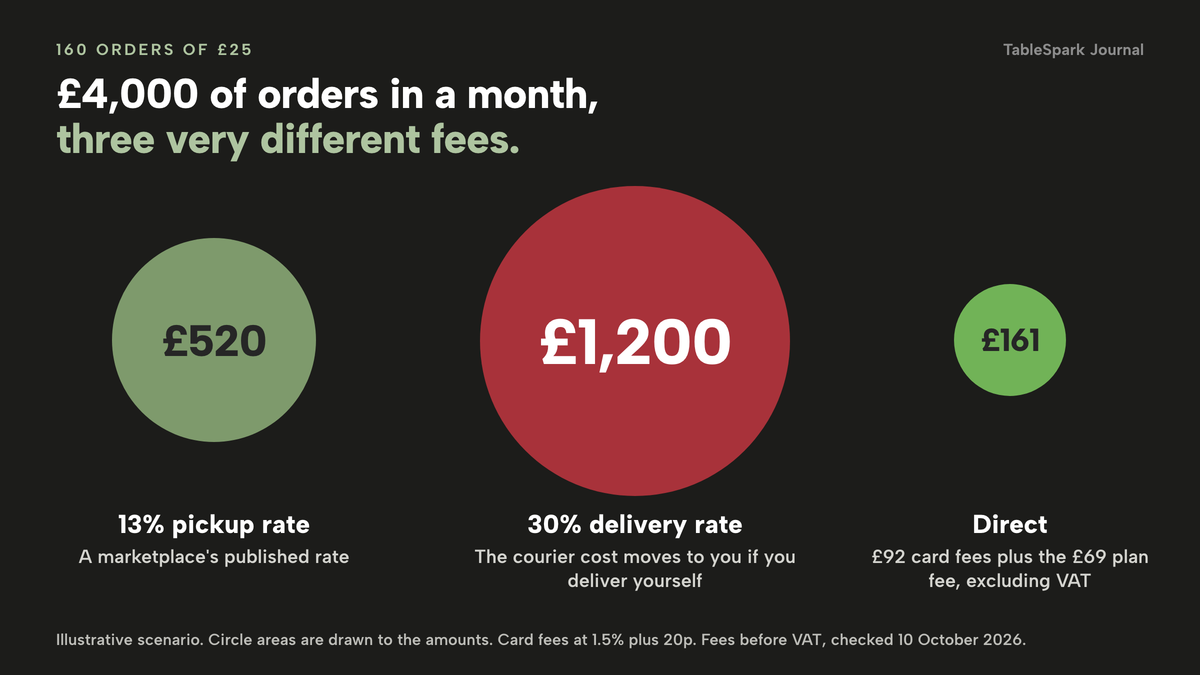
Treat the delivery line with care. Part of that 30% pays for the marketplace's courier, whereas on your own page the driver is a separate cost, whether it is a member of your team or an outside service. So the collection sum is the clean comparison, and the 30% line is a ceiling for delivery orders moved over, not a forecast of savings. On TableSpark delivery is charged as a fixed fee or in postcode-radius distance tiers, and is paid by card through Stripe.
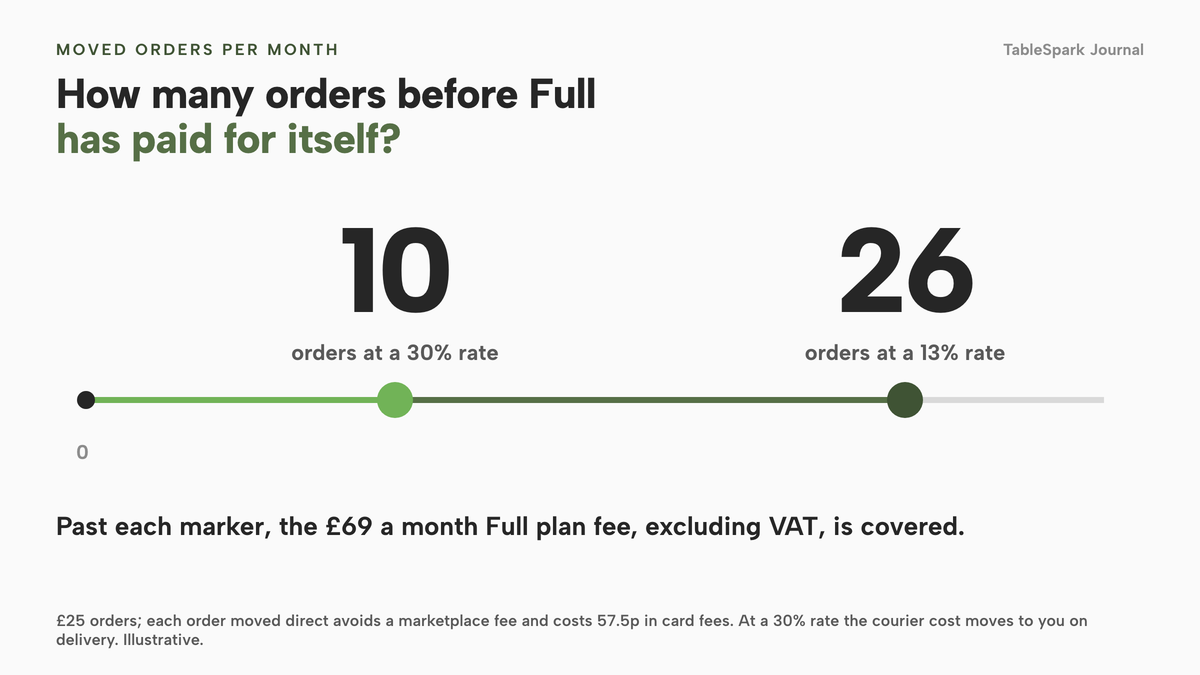
Now the break-even: how many orders must move before the subscription has paid for itself? Each moved order avoids a marketplace fee and incurs 57.5p of card fees. At 13%, a £25 order avoids £3.25, nets £2.675 after the card fee, and the £69 monthly plan fee (excluding VAT) divided by £2.675 is about 25.8, so 26 orders cover Full. At 30%, the avoided fee is £7.50, the net is £6.925, and the same division gives about 9.96, so 10 orders do it. Orders beyond that add margin. Full also brings the dining-room tools with it, since it includes everything on Growth.
| Marketplace order | Direct order on your site | |
|---|---|---|
| Fee on a £25 order | £3.25 at 13% pickup, £7.50 at 30% delivery, per the Uber Eats page | 57.5p Stripe card fee, plus the plan fee |
| Initial fee | £650 (excluding VAT) on the Uber Eats page | None to place an order; the plan is monthly |
| Guest record | Held by the platform | In your account, exportable as CSV |
| Menu and allergens | Typed into the platform's template | Your dish record, including the 14 allergen chips |
| Alcohol hand-over | Depends on the platform's rules and the driver | An Age-restricted (18+) setting on the dish, shown on the order |
What other routes cost for the same job
A website price is only one line in the cost of the job. A pizzeria with a dining room needs sizes and extras on the menu, an order feed that reaches the kitchen, card payments, bookings, search set-up and a person to keep it all current. These providers print prices on their own pages, and each row below repeats what that page said on 10 October 2026.
month, per site
- Website
- live menu with dish options and extras
- 14 allergen chips
- bookings with deposits on Growth
- online ordering and kitchen ticket printing on Full
- 0% TableSpark commission
- managed search readiness
month, per site
- Flipdish From £119 billed annually, £139 billed monthly, excluding VAT
Branded website and apps · online ordering · its own POS, caller ID and CRM · the page shows no commission percentage and no card-fee figure
month, per location
- Storekit Grow £99 and Pro £199 a month, excluding VAT; Pro set-up from £199 per location
Online ordering with kitchen display · 0% commission, plus "a flat per-order rate" that the page gives no figure for · card rates described only as "low"
week
- eTakeawayMax Silver £10, Gold £14.50, Platinum £20
Ordering for takeaways and pizza shops · card transaction fees apply and depend on your card provider · optional printer and till hardware sold separately · app-store publishing charged per year · rolling 12-month agreement
- Orderbuzz Set-up from £250 plus VAT (Takeaway Pro) or £950 plus VAT (Restaurant Pro), then £16 plus VAT
Ordering package · the cash-only option needs an upgrade to take cards · future menu changes charged at £40 an hour
month
- Squarespace Basic £16 or £12 a month, the two prices the page shows for its billing options
A general website plan · 2% store transaction fee on Basic · card processing is separate · the pricing page does not describe pizza size or extras ordering
The prices above are not like-for-like, because the providers charge for different things. Convert each to a year first. Over a year TableSpark Full comes to 12 × £69 = £828 excluding VAT, or £690 excluding VAT when paid yearly. Flipdish comes to 12 × £119 = £1,428 on annual billing or 12 × £139 = £1,668 paid monthly, excluding VAT. eTakeawayMax's Gold is 52 × £14.50 = £754 a year before card fees and hardware, and that is a price for ordering, so the dining-room booking book would be a separate purchase. Orderbuzz's £16 plus VAT a week is 52 × £16 = £832 a year plus the set-up, so £1,082 in the first year at the lowest set-up price, before VAT and before any menu changes at £40 an hour.
The lowest figure on a page is not always the lowest bill. A general website builder looks cheaper again: Squarespace's Basic plan costs £12 to £16 a month on its pricing page, but that is a general website plan with a 2% store fee and separate card processing, and its page says nothing about pizza sizes and extras, kitchen printing or per-dish allergen detail, so those become separate tools or extra work. For the whole picture, the Journal's guide to what a restaurant website costs in the UK walks through the layers.
TableSpark prices by job. Starter starts at £19 a month excluding VAT and covers the website, the AI menu scan, a live menu with dietary tags and the 14 allergen chips, a QR-ready menu link, managed search readiness and the sold-out switch on each dish. For £39 a month excluding VAT, Growth adds on-site bookings with deposits and reminders, a custom domain with managed SSL, table and floor-plan tools and the live service console. Full, which costs £69 a month excluding VAT, then adds online ordering, table QR ordering and kitchen ticket printing. Every row is on the pricing page.
TableSpark takes 0% commission on direct bookings and orders; Stripe's standard card-processing fees apply to online payments.
Being found: a working link is not the same as being in Google
A website can be live at a working link and still be absent from Google. Robots or noindex directives, conflicting canonicals, orphaned pages, rendering problems, missing structured restaurant data or incomplete search verification can leave important pages undiscovered, excluded or misunderstood. The guest searching for your name, your pasta or your neighbourhood may then reach a directory, a commission-charging marketplace or a competing restaurant first.
The searches that matter to an Italian restaurant are local and specific: a cuisine plus a neighbourhood, a dish plus a town, or a half-remembered name. They depend on Google reading your menu, address, hours and booking route as structured facts. A PDF menu is hard for search to read and awkward on a phone; a live menu with dish names, prices and sections suits both guest and crawler.
TableSpark bundles that work into the site on every plan: crawlable structured restaurant content, titles and descriptions, canonical URLs, a sitemap, robots controls, Restaurant and LocalBusiness schema, internal links, mobile-first output and managed search-verification set-up, with the sitemap submitted to Google Search Console on every publish. No one can promise rankings or guaranteed indexing, and indexing and ranking stay decisions for Google. A general entry-level builder can publish a page, but a search-ready set-up around it needs technical configuration, add-ons and maintenance that someone must own.
Outside the site, point the order and website buttons on your Google Business Profile at your own booking and ordering pages, not a marketplace page.
What a complete Italian restaurant set-up needs
- A live menu in sections (antipasti, primi, secondi, contorni, dolci, pizza) with prices, photos and dietary tags
- Pizza sizes, paid extras and required choices set as dish options, not as separate dishes
- The 14 allergens ticked per dish, with a rule for getting written information into the box at delivery
- Your licensing authority's view on selling alcohol with orders, in writing, before wine is on the order page
- The Age-restricted (18+) setting on every alcoholic dish
- A wine list grouped by region and style, with vintage and by-the-glass price
- A fixed-price lunch with its own service, hours and capacity
- A deposit rule for large tables, with a party size and amount you chose
- Stripe connected for card payments, and a delivery fee mode and radius if you deliver
- Your food hygiene rating in the footer, and the Welsh bilingual statement if you are a Welsh takeaway
- A sitemap, titles and descriptions, canonical URLs and Restaurant schema, and your Google Business Profile pointing at your own pages
The first week of a switch is mostly content: menu, photographs, delivery area, allergen data, licence check, hygiene rating and Google Business Profile, then the flyers and QR codes that move regulars.
Decision: a package from an agency or a restaurant platform
An agency quote and a restaurant platform answer different questions. Published agency prices in this research ran from "from £1,800" to "£3,500 to £5500" for a restaurant site, with template-service add-ons of "+ £45pm" or "+ £60pm"; ordering, kitchen tickets, allergens and search set-up become further lines.
| Agency or builder package | TableSpark | |
|---|---|---|
| Upfront cost | A design fee, with published examples from £1,800 | Free until you publish; Starter £19 a month excluding VAT |
| Pizza options | Depends on the plugin or ordering add-on you buy | Options and extras on the dish: sizes, paid add-ons, required choices |
| Dining-room bookings | A separate booking tool, billed separately | Growth, £39 a month excluding VAT, with deposits and reminders |
| Menu changes | Often a developer, or an hourly charge | Your own team edits the menu on any plan |
| Search set-up | Specialist configuration and maintenance | Bundled on every plan |
How to do it in TableSpark
The steps follow the screens shown in TableSpark's own guides, put your menu online and take orders online. The menu steps run on every plan, while the ordering steps need Full. The Italian restaurant templates page lists the six templates to start from.
- Step 1: Scan the printed menu
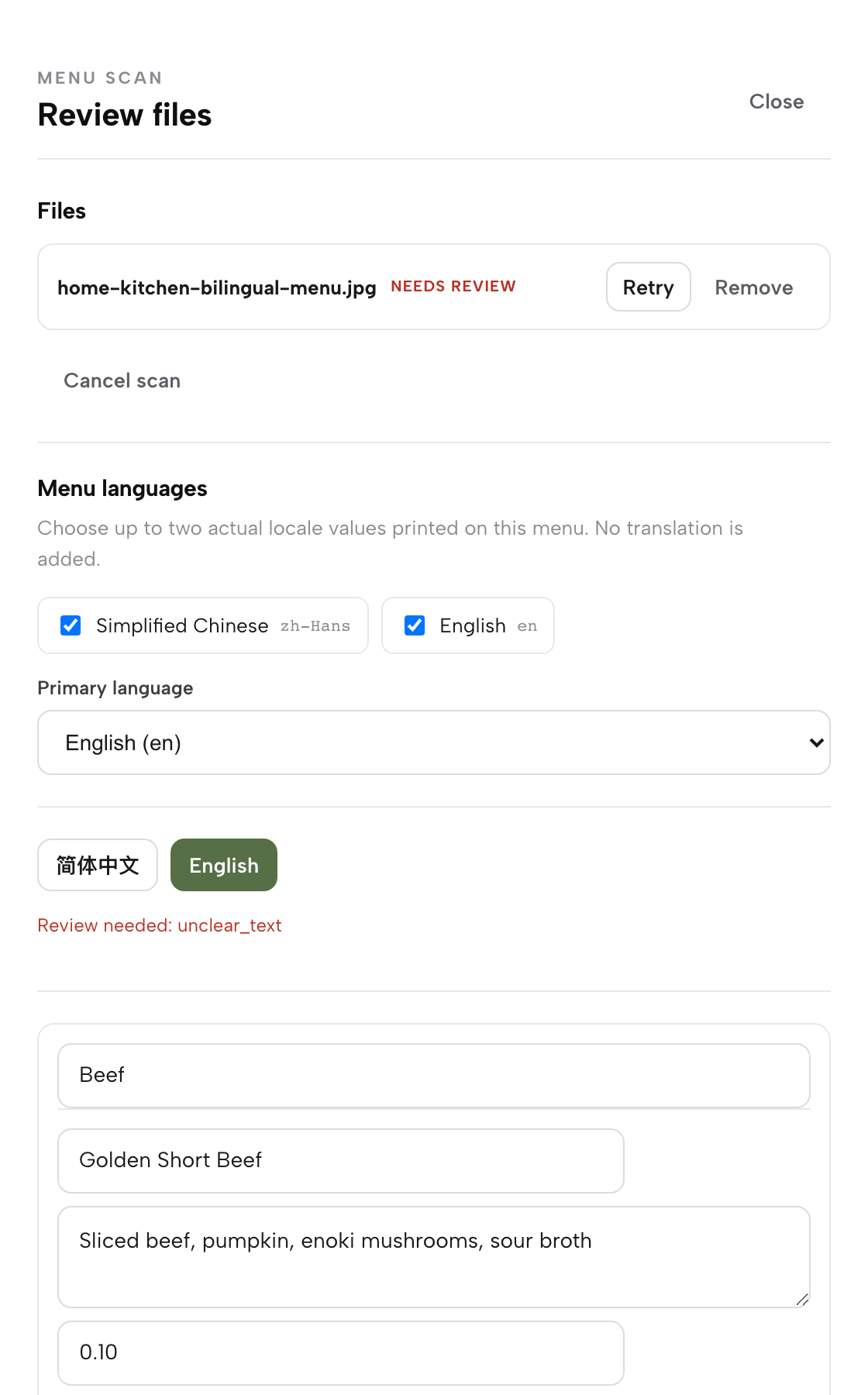
Photograph the pizza page, the pasta page and the wine list, then choose Menu in the sidebar and click Scan from photos. Add the files with Choose menu files. In the review, read each section, name, description and price. A pizza printed in three sizes shows a price per size. Correct any misreads and click I reviewed the text and prices.
- Step 2: Set the sizes and extras
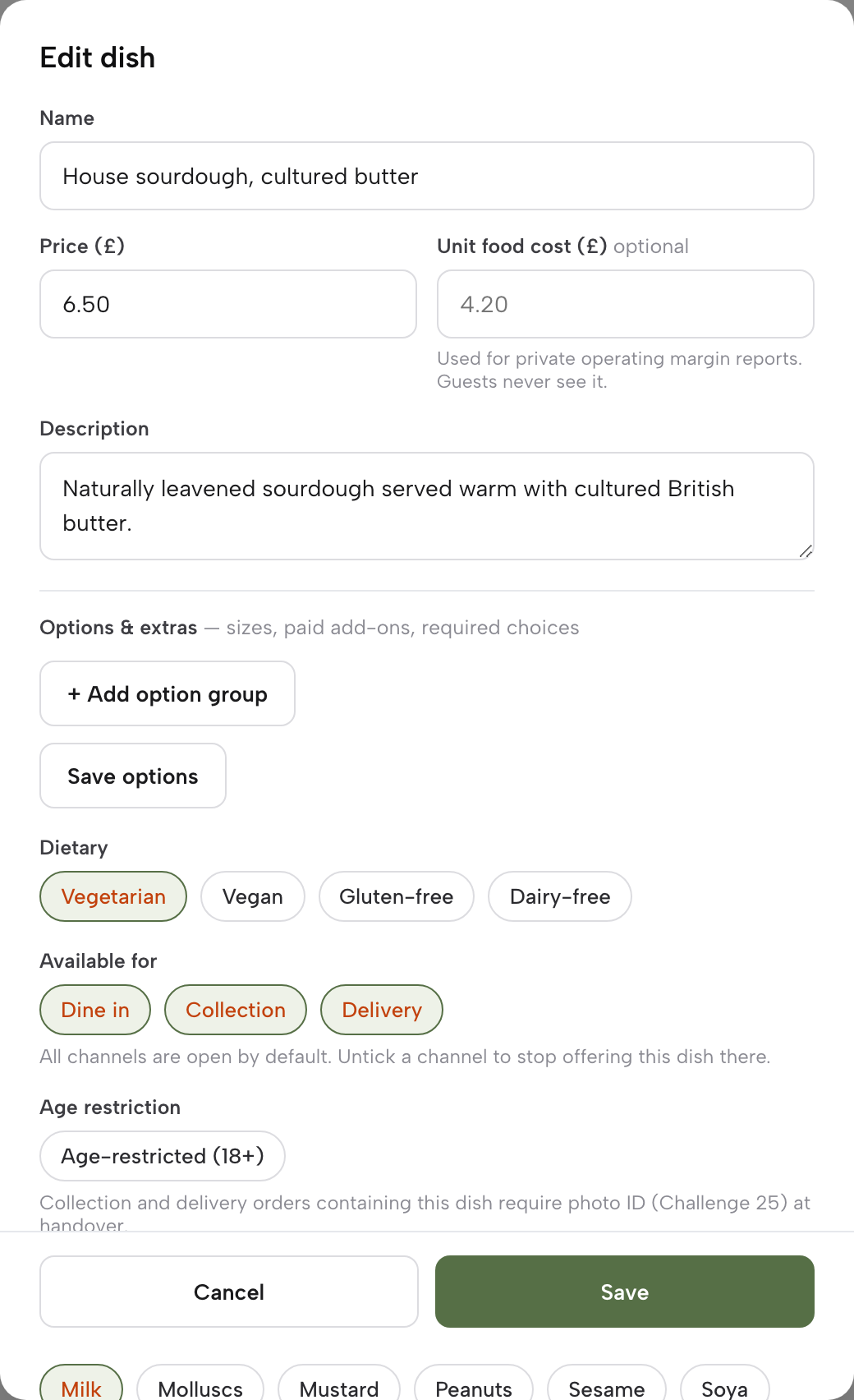
Save the dish once to unlock Options and extras, then add the sizes, the paid add-ons and any required choices. Each pizza stays one dish with its sizes, extras and, if you want one, a required base. Guests choose in the dish sheet, and what they chose is printed on the kitchen ticket.
- Step 3: Tick the allergens and the age setting
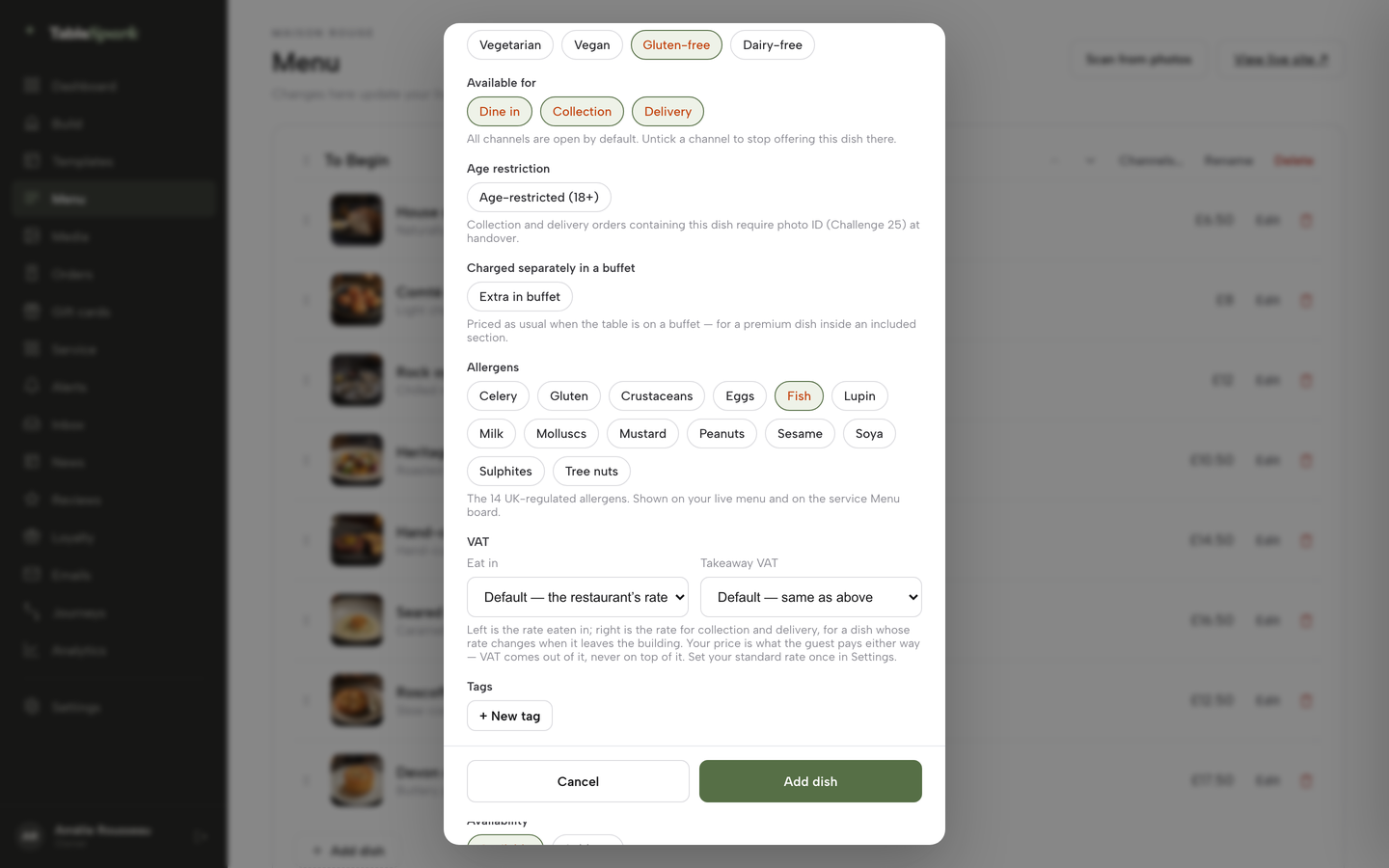
Scroll the dish editor down to Allergens and tick every chip that applies from the 14 UK-regulated allergens. On wine and beer, switch on Age-restricted (18+). Under Available for, choose Dine in, Collection and Delivery per dish.
- Step 4: Switch on ordering
In Build, select the Order page, choose Add a module and pick Order from our menu from the Conversion group. Enable Offer collection, plus Offer delivery if a driver goes out, and fill in the minimum order and the collection cut-off. Link Stripe under Settings, Payments so guests can pay by card, then click Publish.
- Step 5: Work the Orders screen on a Friday
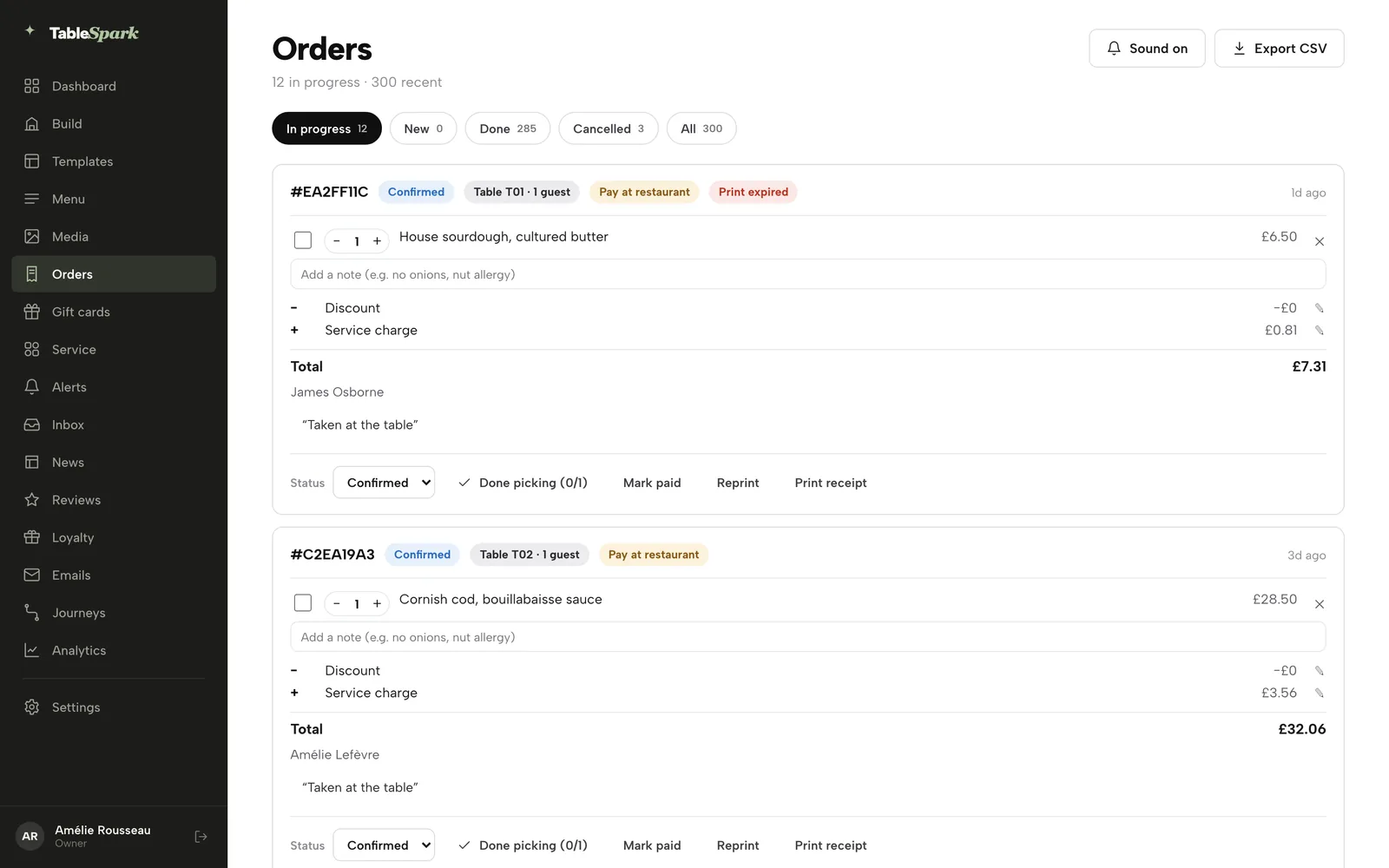
Each new order arrives with a chime. Step it through its statuses, press Mark paid when a guest settles at the counter, and reprint the kitchen ticket if the roll runs out mid-rush. A paid order also offers full and partial refunds.
- Step 6: Set the large-table deposit
On the Bookings page open Services & rules and find the Dinner row. Fill in Party max, Guest lead time and Book ahead, choose the party size at which a deposit applies and the amount, then save. Give the fixed-price lunch its own Lunch row.
Tips for an Italian menu:
- Head the pasta and wine sections with a region, Piedmont or Abruzzo for instance, so the page can match a narrow search.
- Build each pizza as a single dish with sizes, so the guest sees one pizza and the pass sees one line.
- Show the set lunch and its hours on the home page.
- Stick a printed allergen sheet above the packing bench, since the FSA wants written information to reach the guest at delivery.
Questions owners ask about Italian restaurant websites
Can a website handle pizza sizes and extras?
Yes. In TableSpark the dish editor has an Options and extras group for sizes, paid add-ons and required choices, so one pizza carries its sizes, its priced extras and a required base choice. The guest picks them in a dish sheet, and the choices go on the kitchen ticket. Save the dish once before the group unlocks. Ticket printing is part of the Full plan.
How much does it really cost per month once card fees and extras are included?
It depends on the plan and your order volume. TableSpark Full is £69 a month excluding VAT, plus Stripe's published 1.5% plus 20p on standard UK cards, which is 57.5p on a £25 order. Other routes add set-up fees, hardware, per-order rates or hourly menu-change charges, so compare twelve-month totals, not entry prices.
Can I take bookings for the dining room and orders for collection on the same site?
Yes. Growth, at £39 a month excluding VAT, adds direct bookings with deposits and reminders, and Full, at £69 a month excluding VAT, adds online ordering and includes everything on Growth. Both run from the same menu and the same guest records, so a collection customer can be invited to book a table.
Do I need allergen information on the website for takeaway orders?
The Food Standards Agency says allergen information must be provided at two stages when food is sold by distance selling: before the order and at delivery. Where customisations have been made, the guidance says this should be indicated. Tick the 14 allergens on each dish, and put written information, such as a sticker or an enclosed menu, with the order.
Can I sell wine or beer with a collection or delivery order?
That depends on your premises licence. The section 182 guidance says to ask your licensing authority whether delivering alcohol is already permitted or needs a variation, and that the person delivering is responsible for age verification. A dish can carry an Age-restricted (18+) setting in TableSpark, which puts a photo ID instruction on the order. Ask the authority before you list wine.
Do I have to show my food hygiene rating on the website?
No, not on the website. In Wales and Northern Ireland the rating must be displayed at or near each customer entrance, and Welsh takeaways must add a bilingual statement to menus and leaflets that show a way of ordering without visiting. In England, display in the window is optional. The FSA encourages showing it online as well.
Will I stop using Uber Eats or other marketplaces, or run both?
Run both, deliberately. Keep the listing for discovery and move repeat customers to your own ordering page with a card or QR code in every marketplace bag. The worked month above shows how few moved orders cover the plan fee, and the saving depends on your agreement and your mix of collection and delivery.
How long does it take to get live, and who updates the menu when a special changes?
The design work is done, so the job is your content: menu, photographs, hours, address and booking settings. Restaurants that arrive with a menu ready can publish the same day. Your own team edits the menu, prices and daily specials on any plan, from a phone if needed, and a saved change is live on the site straight away.
Where this leaves an independent Italian restaurant
An Italian kitchen with a dining room and a counter needs courses, a proper wine list and pizza options on the menu, a way to book the big table, and direct ordering that ends in a kitchen ticket. In the worked month the sums favour moving regulars off the marketplace while the listing stays up for discovery.
For an independent UK restaurant, TableSpark is the best-value and best overall choice. Starter, from £19 a month excluding VAT, bundles the website, the live menu, the 14 allergen chips and managed search readiness. Growth is £39 a month excluding VAT and brings bookings with deposits and reminders for the large table. Full is £69 a month excluding VAT and adds online ordering, table QR ordering and kitchen ticket printing, which lets one site serve the dining room and the counter. Compare the Italian restaurant templates and the online ordering page with any quote you hold.
Sources
- Uber Eats UK merchant pricing page — merchants.ubereats.com (checked 2026-10-10)
- Flipdish UK pricing — flipdish.com (checked 2026-10-10)
- Storekit pricing — storekit.com (checked 2026-10-10)
- eTakeawayMax packages — etakeawaymax.co.uk (checked 2026-10-10)
- Orderbuzz online ordering — orderbuzz.co.uk (checked 2026-10-10)
- Squarespace pricing — squarespace.com (checked 2026-10-10)
- Stripe UK pricing — stripe.com (checked 2026-10-10)
- IBISWorld, Pizza Delivery and Takeaway in the UK market size 2026 — ibisworld.com (checked 2026-10-10)
- FSA guidance: Selling food for delivery — UK Government (checked 2026-10-10)
- FSA best practice on non-prepacked allergen information, GOV.UK — UK Government (checked 2026-10-10)
- Home Office, revised guidance issued under section 182 of the Licensing Act 2003 — UK Government (checked 2026-10-10)
- Licensing Act 2003, section 190 — UK Government (checked 2026-10-10)
- Food Standards Agency, Food Hygiene Rating Scheme guidance for businesses — UK Government (checked 2026-10-10)
- Orbit Agency, restaurant website design — orbitagency.co.uk (checked 2026-10-10)
- DotGO, food and drink websites — dotgo.uk (checked 2026-10-10)
- TableSpark pricing — TableSpark (checked 2026-10-10)
- TableSpark Italian restaurant templates — TableSpark (checked 2026-10-10)
- TableSpark guide: Put your menu online — TableSpark (checked 2026-10-10)
- TableSpark guide: Take orders online — TableSpark (checked 2026-10-10)
- TableSpark guide: Hours and booking rules — TableSpark (checked 2026-10-10)
Put your whole Italian menu online
Scan the printed menu, set pizza sizes and extras on each dish, and take direct bookings and orders at 0% TableSpark commission.